

Page 1
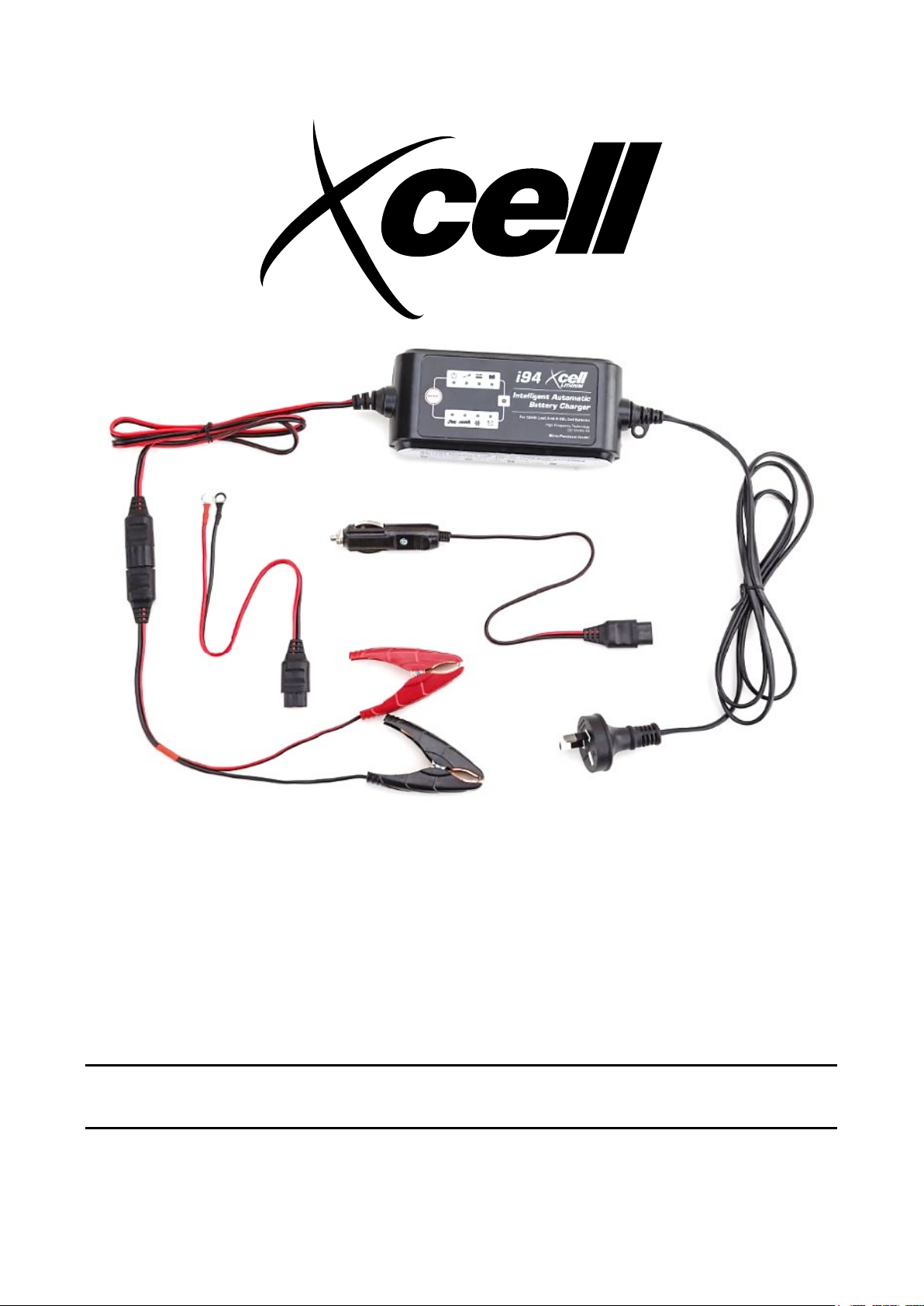
i94 Intelligent Automatic Battery
Charger
User Manual
[Revision 2.0 October 2018]
READ THIS MANUAL CAREFULLY BEFORE USE – FAILURE TO DO SO MAY RESULT IN INJURY, PROPERTY
DAMAGE AND MAY VOID WARRANTY. • KEEP THIS MANUAL FOR FUTURE REFERENCE. • Products covered by
this manual may vary in appearance, assembly, inclusions, specifications, description and packaging.
E&OE © 2018 Xcell
Page 2
i94 Intelligent Automatic Battery Charger
It is important that you read and
General Work Area Safety
Use the equipment and accessories etc. in
Safety
Safety messages are designed to alert you to possible dangers or hazards that could cause death, injury or
equipment or property damage if not understood or followed. Safety messages have the following symbols:
You WILL be KILLED or
SERIOUSLY INJURED if you
do not follow instructions.
understand the instruction manual before
use and keep the manual in a safe place
for future reference. Safety information
presented here is generic in nature – some
advice may not be applicable to every
piece of equipment.
All safety precautions must be observed to
reduce the risk of personal injury when
operating the equipment.
The term “equipment" refers to your
product, be it electrical mains, battery or
petrol engine powered.
IMPORTANT – Handle the equipment
safely and carefully.
BEFORE USE - If you are not familiar with
the safe operation/handling of this
equipment, or are in any way unsure of any
aspect of suitability or correct use it for
your application, you should complete
training conducted by a person or
organization qualified in safe use and
operation of this equipment, including
fuel/electrical handling and safety.
WARNINGS
• Read all safety warnings and all
instructions. Failure to follow warnings
and instructions may result in electric
shock, fire and/or serious injury.
• Do not operate the equipment in
flammable or explosive environments,
such as in the presence of flammable
liquids, gases or dust. Engine and
equipment may create sparks or heat
that may ignite vapours, dust etc
• Keep clear of moving parts.
• This equipment may be a potential
source of electric shock if misused.
• Do not operate the equipment if it is
damaged, malfunctioning or is in an
excessively worn state.
• Do not allow others to use the
equipment unless they have read this
manual and are adequately trained.
• When using the equipment, basic
safety precautions detailed here m ust
always be followed to reduce the risk
of fire, electric shock, personal injury
and material damage.
• When wiring electrically powered
equipment, follow all electrical and
safety codes.
• Ensure the electrical supply conf orm s
to the equipment requirements.
• To reduce risk of electric shock,
disconnect the equipment from the
electrical supply before connecting
batteries, cleaning etc.
You CAN be KILLED or
SERIOUSLY INJURED if you
do not follow instructions.
Work areas should be clean and well it.
Do not operate the equipment if
bystanders, animals etc are within
operating range of the equipment or the
general work area.
Personal Safety
Keep packaging away from children - risk
of suffocation! Operators must use the
equipment correctly. When using the
equipment, consider conditions and pay
due care to persons and property.
Prevent unintentional starting of the
equipment - ensure equipment and power
source switches are in the OFF position
before connecting or moving the
equipment. Do not carry equipment with
hands/fingers touching any controls.
Remove any tools or other items that are
not a part of the equipment from it before
starting or switching on.
Stay a lert and use common sense when
operating equipment. Do not overreach.
Keep proper footing and balance at all
times. Do not use equipment when tired or
under the influence of drugs, alcohol or
medication. This equipment is not intended
for use by persons with reduced physical,
sensory or mental capabilities.
You must wear appropriate protective
equipment when operating, servicing, or
when in the operating area of the
equipment to help protect from serious
injury, including eye injury, inhalation of
toxic f umes, burns, and hearing loss.
Always wear eye protection. Protective
equipment such as respirators, non-skid
safety shoes, hard hat, hearing protection
etc should be used for appropriate
conditions. Other people nearby should
also wear appropriate personal protective
equipment. Do not wear loose clothing or
jewellery, which can be caught in moving
parts. Keep hair and clothing away from
the equipment.
If devices are provided for the connection
of dust extraction and collection facilities,
ensure these are connected and properly
used. Use of dust collection can reduce
dust-related hazards.
General Equipment Use and Care
Do not force the equipment. Use the
correct equipment for your application. The
correct equipment will perform better and
be safer within its design parameters. Do
not use the equipment if the ON/OFF
switch m alfunctions – any equipment that
cannot be controlled with the ON/OFF
switch is dangerous and must be repaired.
You CAN be INJURED if you do not
follow instructions or equipment
damage may occur.
accordance with these instructions, taking
into account working conditions and the work
to be performed. Using the equipment for
operations different from those intended
could result in hazardous situations.
Before use, inspect the equipment for
misalignment or binding of moving parts,
loose components, damage or any other
condition that may affect its operation. If
damaged, have the equipment repaired by an
authorized service ce ntre or technician before
use.
Always keep the equipment and accessories
(cutting tools, nozzles, bits etc) properly
maintained. Keep the equipment, controls
and handles dry and free from dirt, oil and
grease.
Store the equipment out of reach of children
or untrained persons. To avoid burns or fire
hazards, let the equipment cool completely
before transporting or storing. Never place
the equipment in places where there are
flammable materials, combustible gases or
combustible liquids etc.
The equipment is not weatherproof, and
should not be stored in direct sunlight, at high
ambient temperatures or locations that are
damp or very humid.
Battery Charger Use and Care
WARNINGS – EXPLOSION HAZARD
• Use for charging lead-acid batteries
only. Do not use for other battery types ,
which may burst and cause injury to
persons and damage to property.
• Substances used in batteries and gases
or vapours produced when charging
may be extremely flammable / explosive
– keep clear of naked flames or other
ignition sources.
• Correct battery polarity MUST be
followed. Incorrect polarity may present
an explosion hazard.
• Always charge batteries in well-
ventilated areas. NEVER charge in
closed-in or restricted areas.
• Use only accessories supplied with the
product. Use of non-supplied or
recommended accessories may result in
fire, electric shock, or injury and will void
warranty.
• When disconnecting the battery charger,
pull by the plug and not by the cord.
Pulling on the cord may damage it.
• Do not operate equipment with a
damaged cord or plug. Have the cord or
plug replaced immediately.
• Do not disassemble charger. Take it to a
qualified professional when service or
E&OE © 2018 Xcell 2
Page 3

i94 Intelligent Automatic Battery Charger
• Do not use an extension cord unless
Personal Precautions and Safety
repair is required.
absolutely necessary. Use of an
improper extension cord could result
in fire or electric shock. If an
extension cord must be used, make
sure that:
The extension cord socket is
compatible with the charger plug.
The e xtension cord is properly
wired and in good condition.
The extension cord wire gauge is
suitable for the charger current
rating.
• Wear fully enclosing eye protection
and protective clothing when working
with lead-acid batteries.
• Make sure someone is within range of
your voice or close enough to come to
your aid when you work with or near a
lead-acid battery.
• If battery acid contacts skin or eyes,
remove affected clothing and any
excess acid. Seek medical attention
immediately and rinse with water for
at least 15 minutes then apply a cold
compress.
• To reduce the possibility of short-
circuiting the battery and possible
severe injur y, remove all personal
metal items such as rings, bracelets,
watches etc.
• Take great care when handling metal
items (tools etc) around or near
batteries to reduce the possibility of
short-circuiting the battery and
possible severe injury.
• Locate the charger as far away from t he
battery as the charger cables allow.
• Do NOT charge a frozen battery. If
battery fluid (electrolyte) is frozen, place
the battery in a warm area to thaw
before charging.
• Do NOT allow battery acid to come into
contact with the charger or any of its
components..
• Do NOT place a battery on top of the
charger.
• Do NOT place the charger directly
above a battery being charged. Gases
from the battery may corrode and
damage the charger.
• Do NOT allow the battery terminal
clamps to touch at any time when the
charger is energized.
• Do NOT start a vehicle e ngine wit h the
charger connected to the vehicle
battery.
• Boat batteries should be removed from
the boat and charged on land.
• Always select the correct voltage of the
battery being charged. Do NOT charger
a battery using a different voltage to the
battery rating.
• Always follow battery manufacturer
instructions for battery charging.
E&OE © 2018 Xcell 3
Page 4

i94 Intelligent Automatic Battery Charger
Table of Contents
Safety ................................................................................................................................................... 2
Introduction ........................................................................................................................................ 5
Suitable Battery Types ............................................................................................................................... 5
Parts Identification ............................................................................................................................. 6
Operation ............................................................................................................................................ 7
Using Charging Cables .............................................................................................................................. 7
Charging a Battery ..................................................................................................................................... 7
Charging Modes and Display Functions ......................................................................................... 8
Maintenance ....................................................................................................................................... 9
Troubleshooting ................................................................................................................................. 9
Specifications ................................................................................................................................... 10
E&OE © 2018 Xcell 4
Page 5
i94 Intelligent Automatic Battery Charger
Introduction
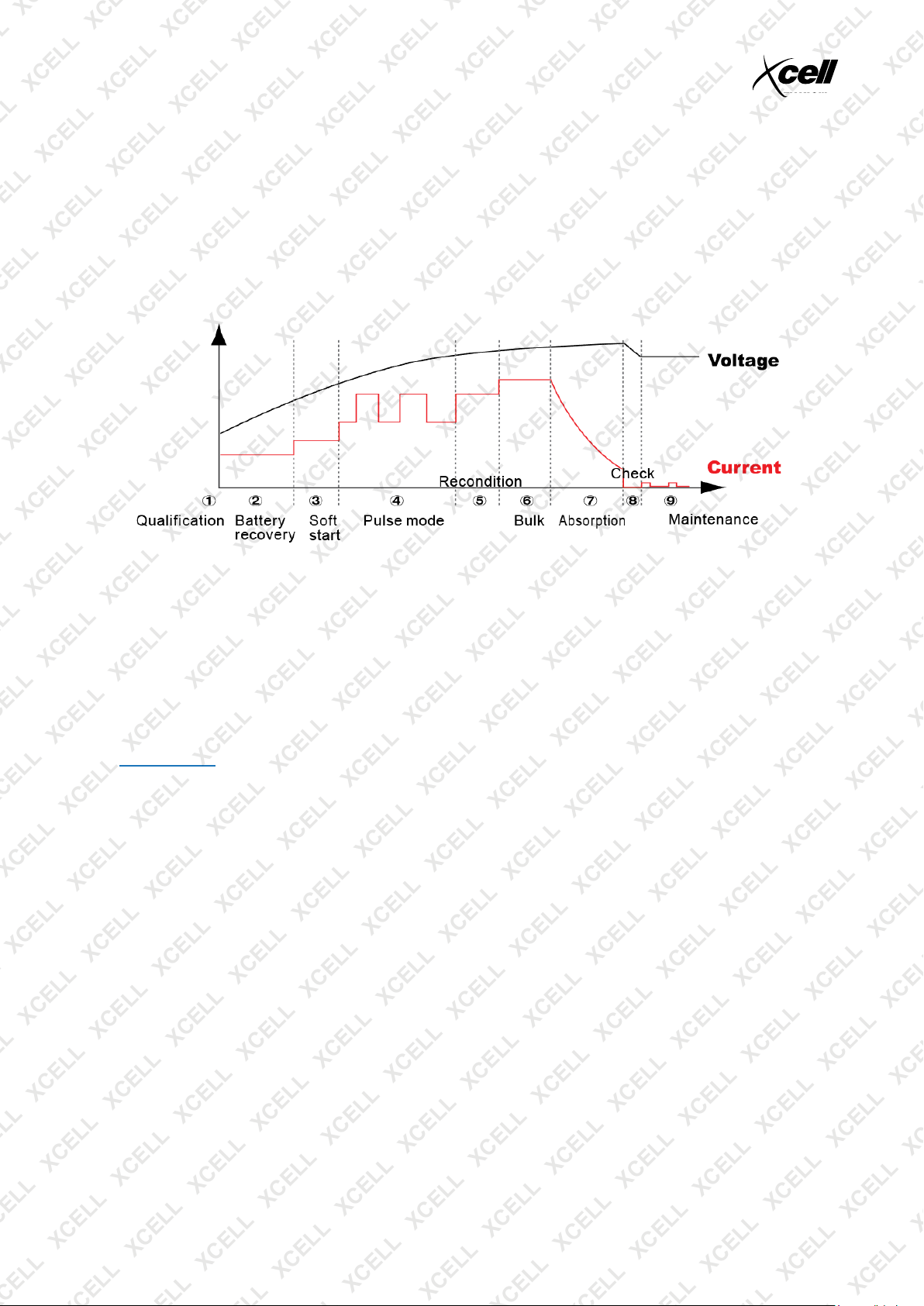
The battery charger is a high-frequency switch mode type that is suitable for charging a range of lead-acid
batteries. The charger features a logic controlled 9-stage charging program that monitors battery charge and
switches modes automatically to ensure the battery charge is a s close to 100% of the original capacity as
possible.
The charger is capable of restoring almost completely discharged batteries (must have a minimum 2V) and
also batteries that are slightly sulphated. It is possible to leave the charger connected to a battery indefinitely,
in which case it will maintain battery charge as required. It can also be used in temperatures below 5°C.
Suitable Battery Types
The charger can be used for of the following types:
• Lead-Acid (unsealed liquid electrolyte, may also be known as "WET").
• AGM (absorbent glass mat).
• GEL (sealed "gelified" electrolyte).
See Specifications for detailed information on applicable battery voltage and capacity.
E&OE © 2018 Xcell 5
Page 6
i94 Intelligent Automatic Battery Charger
1 2 3
4
Parts Identification
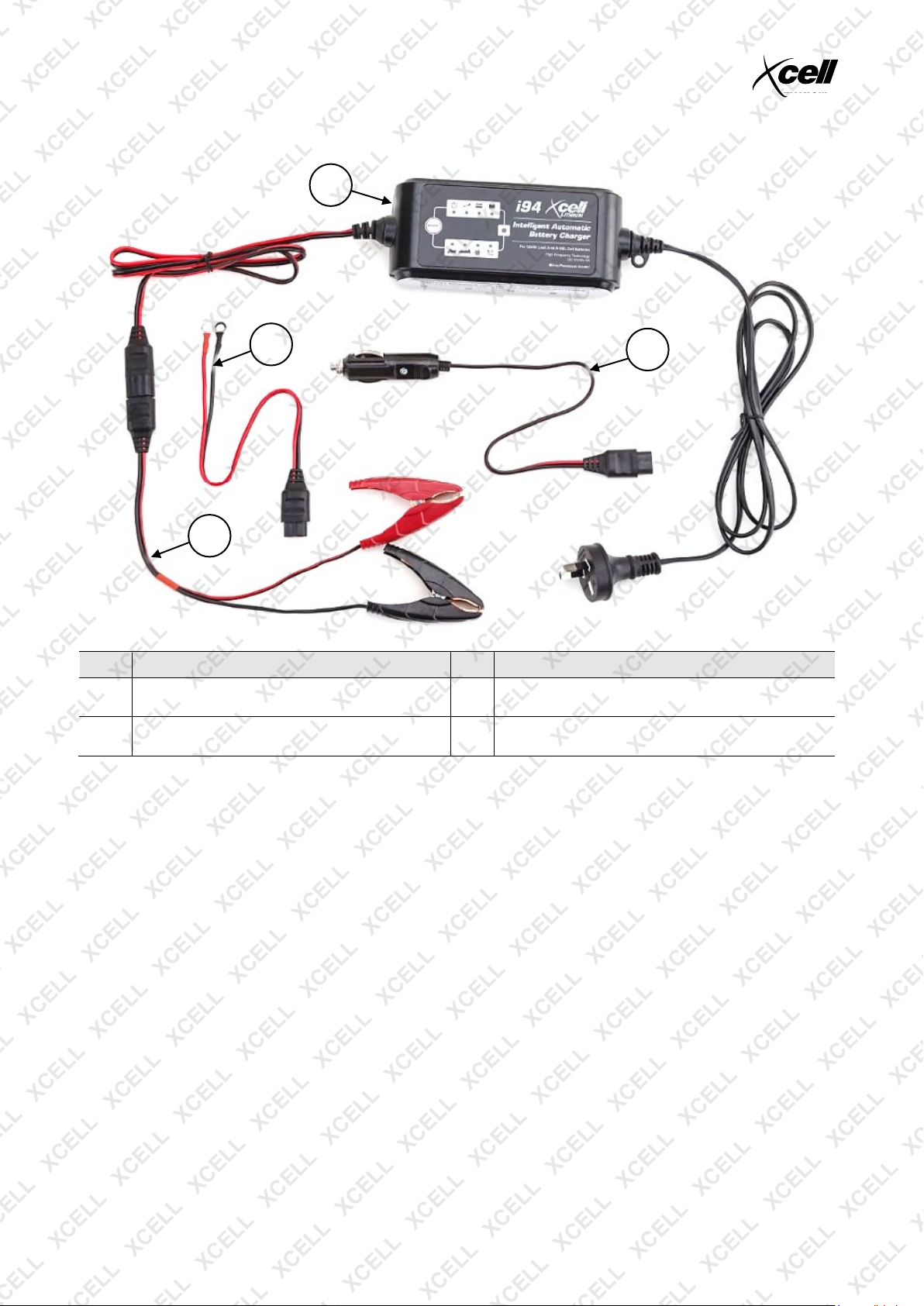
No. Name No. Name
1
2
Battery Charger (includes 240VAC mains input
cable and low voltage DC output cable)
Terminal Clamp Battery Connect Cable (shown
connected to charger output cable)
3 Permanent Battery Connect Cable
4 12V Vehicle Socket Connect Cable
E&OE © 2018 Xcell 6
Page 7
i94 Intelligent Automatic Battery Charger
Operation
Substances used in batteries and gases or vapours produced when charging
may be extremely flammable – keep clear of naked flames or other ignition
sources. • Correct battery polarity MUST be followed. Incorrect polarity may present an explosion or fire
hazard. • Do NOT attempt to charge a frozen battery. • Do NOT connect to or charge the battery of a running
engine. • Do NOT connect the battery connect clamps to any part of the fuel system or sensitive electrical
components. • Position all charger cables so they cannot come into contact with conductive parts of the
vehicle (except the battery terminals), be pinched or caught etc. • Always select the correct voltage of the
battery being charged. Do NOT charger a battery using a different voltage to the battery rating. • Always
follow battery manufacturer instructions for battery charging. • If applicable, before charging, remove any
battery cell ventilation caps and check that the cell electrolyte level is adequate. After charging, check
electrolyte level and re-install battery cell ventilation caps.
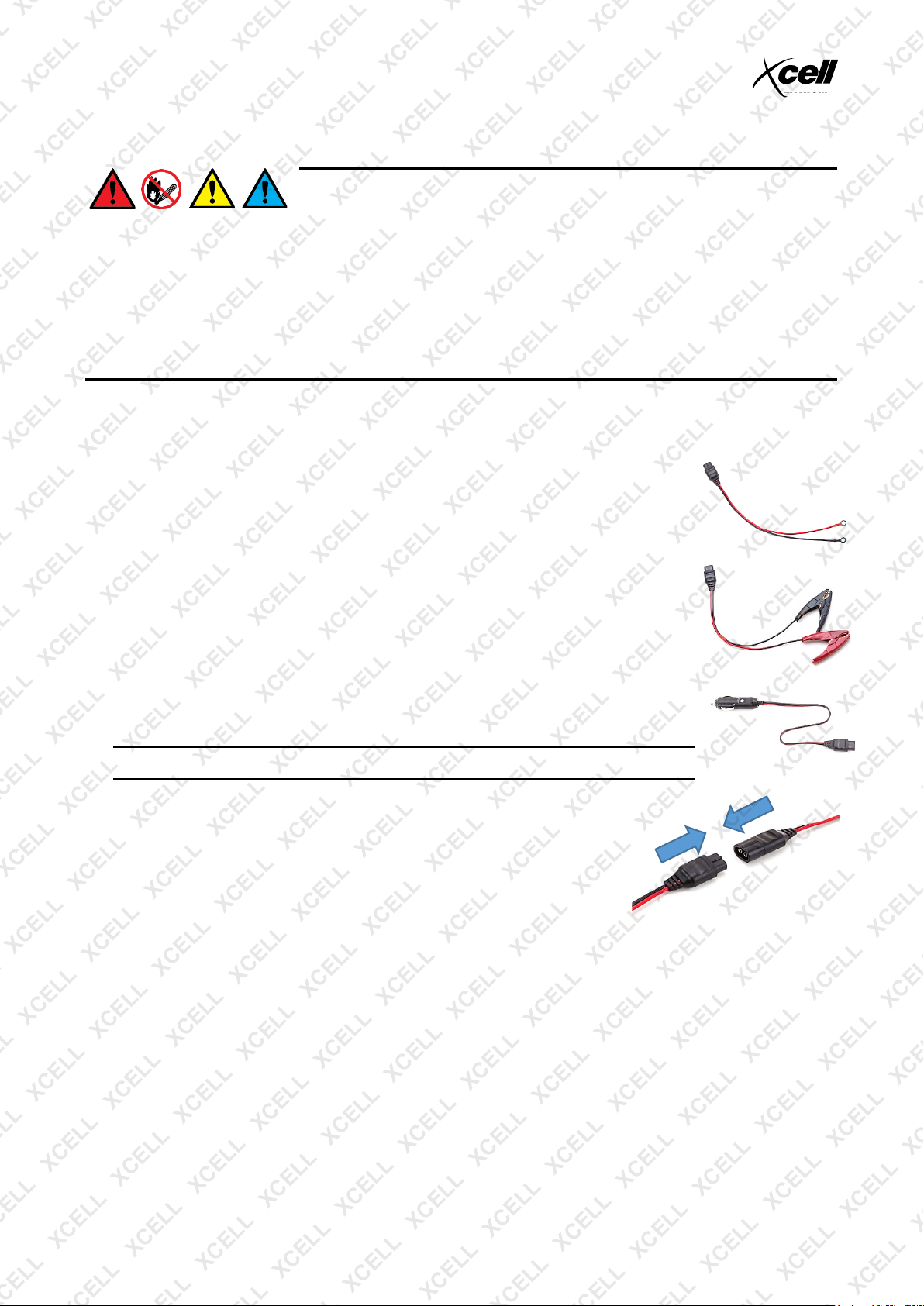
Using Charging Cables
The charging (output) cables are colour-coded for polarity – RED = POSITIVE and BLACK = NEGATIVE.
There are two types of cable supplied:
• Permanent Battery Connect Cable – For convenient, regular charging. To use,
attach the connectors on the ends of the cable directly to the battery terminals. To
use, connect the free end of the cable to the battery charger output cable.
• Terminal Clamp Battery Connect Cable – For connecting directly to the
corresponding battery terminals. To use, squeeze the clamp to open the jaw, then
place the jaw over the battery terminal and release the clamp. Ensure that the
clamp is firmly attached to the battery terminal.
• 12V Vehicle Socket Connect Cable – For connecting to the battery using the
vehicle electrical system. This is the simplest and least complicated method. To
use, insert the 12V plug connector into the vehicle 12V / cigarette lighter socket.
Note: The vehicle 12V socket must remain "on" when the vehicle ignition is "OFF".
To connect either battery connect cable to the charger, firmly push the ends
of the battery connect cable and charger output cables together (they can fit
one way only).
Charging a Battery
1. If using the terminal clamp battery connect cable, connect the POSITIVE clamp to the battery POSITIVE
terminal, the connect the NEGATIVE clamp to the battery NEGATIVE terminal.
2. Connect the battery charger output cable to the battery connect cable.
3. Connect the charger to a 240VAC electrical supply and switch the supply ON. The display illuminates.
4. Use MODE to select the required charging program. Once a mode has been selected, the charger
begins charging the battery.
To stop charging:
1. Switch the electrical supply to the charger OFF, then disconnect the charger power cable.
2. Disconnect the battery connect cable from the battery charger output cable.
3. If using the terminal clamp battery connect cable, remove the clamp from the NEGATIVE terminal, then
remove the clamp from the POSITIVE terminal.
E&OE © 2018 Xcell 7
Page 8
i94 Intelligent Automatic Battery Charger
Charging Modes and Display Functions
A battery must be connected to the charger in order for the charger to function correctly. If no battery
is detected, the fault indicator illuminates red – see Troubleshooting.
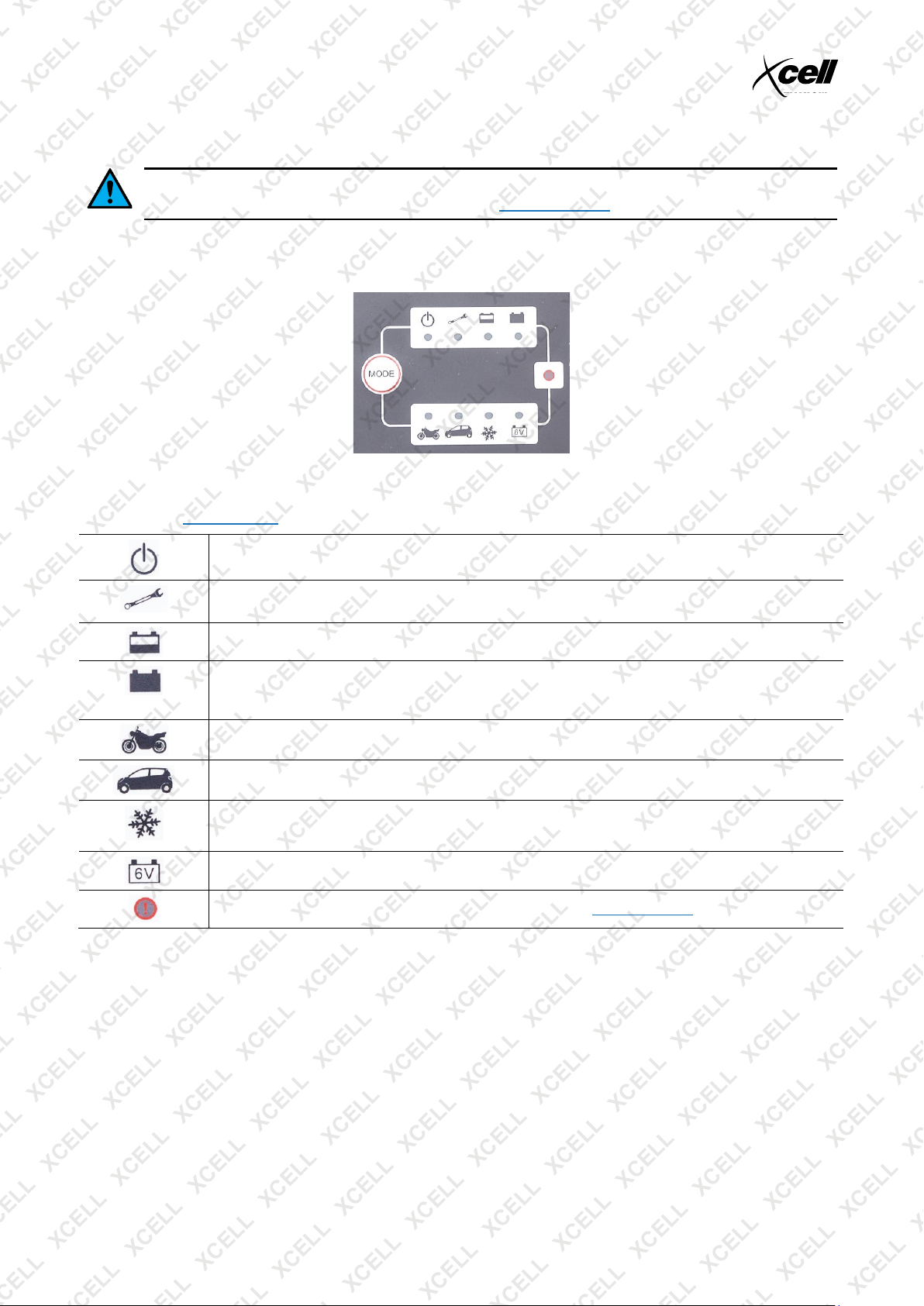
The battery charger features logic controlled "intelligence" to accurately monitor the battery and automatically
adjust charging functions to optimise charging. Battery charge status and current functions are shown by
lamps that illuminate next to the associated function.
To switch between functions and display modes, press MODE repeatedly until the required function/mode is
reached. When next used or after a disruption to the power supply, the charger defaults to the last used
function. See Specifications for detailed information on charging mode voltages and current.
Power - Green lamp illuminates to indicate charger is connected to electrical supply
Repair / Recondition – Green lamp illuminates to indicate battery "recondition" / "repair" mode in
operation.
Charging - Green lamp illuminates to indicate battery not yet fully charged.
Charging Complete - Green lamp illuminates to indicate the battery is fully charged. If the charger
remains connected after the battery is fully charged, it will maintain the battery at full charge for as
long as it remains connected and switched on.
Slow – Red lamp illuminates to indicate 12V "Slow" charge mode.
Fast – Red lamp illuminates to indicate 12V "Fast" charge mode.
Winter – Red lamp illuminates to indicate "Winter" charge mode. Use at ambient temperatures
below 5°C. Also suitable for many AGM batteries.
6V – Red lamp illuminates to indicate 6V charge mode.
Fault – Red lamp illuminates to indicate fault detected – see Troubleshooting.
E&OE © 2018 Xcell 8
Page 9
i94 Intelligent Automatic Battery Charger
Maintenance
Do not use the charger if any of the electrical cords or terminal clamps have been damaged
in any way. If the power supply cord is damaged, it must be replaced by the manufacturer,
its service agent or qualified person in order to avoid a hazard.
Follow these steps below to maintain the charger in optimum condition:
• After each use, clean the battery charger clamps - be sure to remove any battery fluid as this will cause
corrosion of the copper material.
• Clean the outside case of the charger with a soft cloth and, if necessary, mild soap solution.
• Keep the charger cords loosely coiled during storage to prevent damage to them.
Troubleshooting
Note: Some maintenance activities described may be beyond the scope of some users. For procedures that
you are not comfortable with or have the tools or experience for, or if problems persist after following all
suggested actions, contact a service centre or qualified technician.
The following information may assist in identifying a problem and rectifying it.
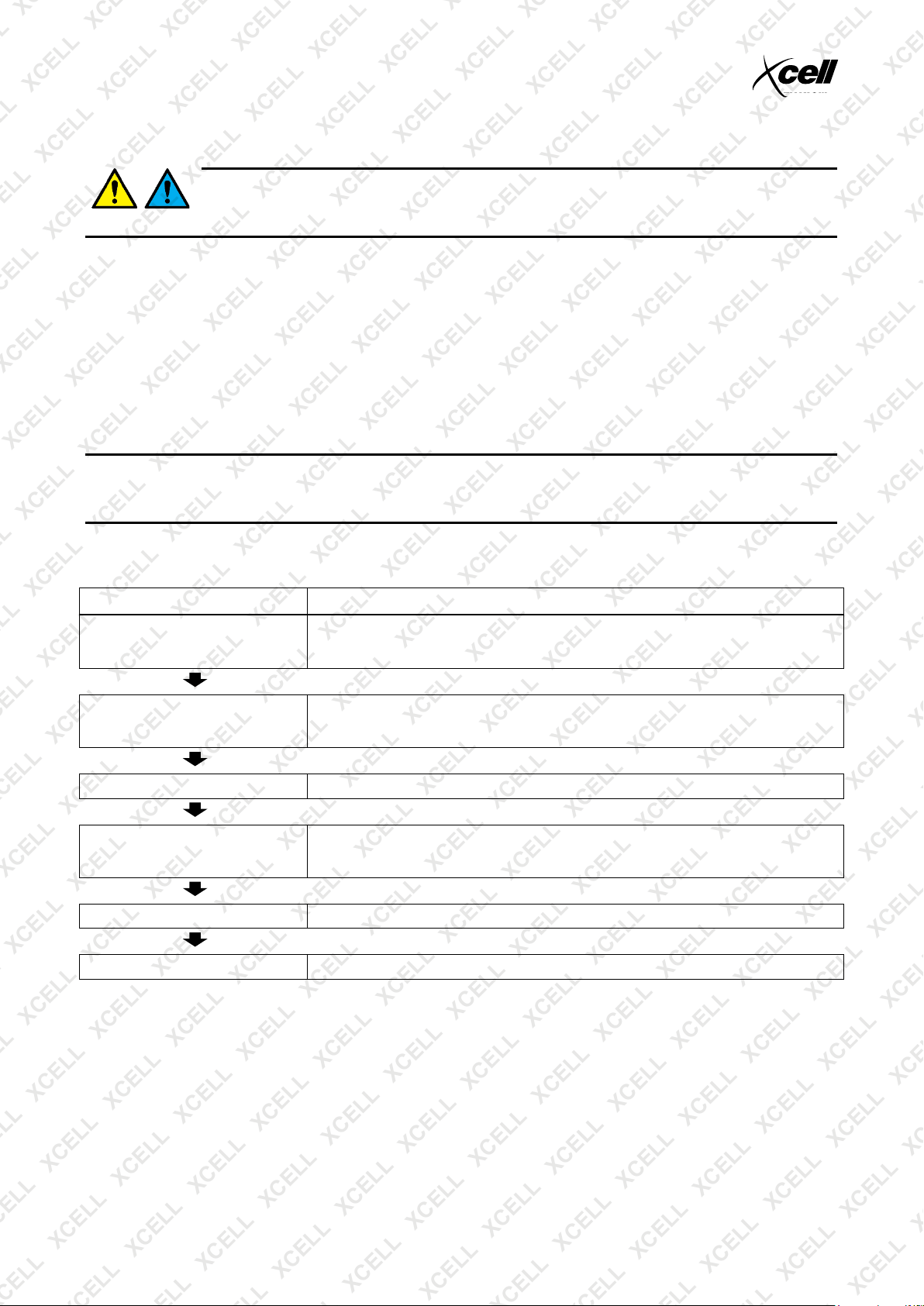
Fault lamp illuminates red
Possible Fault Action
Battery not detected Ensure that the battery connect cable connections to the charger output cable and the battery
Short-circuit detected Ensure that the battery connections and all cable connections are secure and polarity is
Reverse polarity connection detected Check and ensure that polarity of the battery connections is correct.
Poor electrical connection to battery Ensure that the battery connect cable connections to the charger output cable and the battery
Battery voltage too high Have the battery checked by an authorised person. Replace battery if necessary.
Faulty battery Have the battery checked by an authorised person. Replace battery if necessary.
are secure. Check that the battery terminals/clamps are clean and not corroded so as to
provide a good electrical connection.
correct. Check the condition of all cables and ensure that no damage has occurred. Ensure
that
are secure. Check that the battery terminals/clamps are clean and not corroded, so as to
provide a good electrical connection.
E&OE © 2018 Xcell 9
Page 10

i94 Intelligent Automatic Battery Charger
Specifications
i94
Electrical Requirements 220 to 240VAC / 50 to 60Hz 0.45A.
Charge Mode Output Slow: 14.4VDC 1.0A. Suitable for 12V batteries up to 20Ah.
Fast: 14.4VDC 4.0A. Suitable for 12V batteries up to 80Ah.
Winter: 14.7VDC 4.0A. Also recommended for 12V AGM type batteries.
6V: 7.5VDC 4.0A. Suitable for 6V batteries up to 80Ah.
Battery Compatibility 6V / 12V AGM / GEL / WET Lead-Acid types.
E&OE © 2018 Xcell 10
Page 11
i94 Intelligent Automatic Battery Charger
Some experts believe that the incorrect or prolonged use of almost any
product may cause serious injury or death. To help reduce your risk of serious
injury or death, refer to the information below. For more information, see
www.datastreamserver.com/safety
Consult all documentation, packaging and
product labelling before use. Note that
some products feature documentation
available online. It is recommended to print
and retain the documentation.
Before each use, check the product for
loose/broken/damaged/missing parts, wear
or leaks (if applicable). Never use a
product with
loose/broken/damaged/missing parts, wear
or leaks.
Products must be inspected and serviced
(if applicable) by a qualified technician
every 6 months. This is based on average
residential use by persons of average size
and strength, and on a property of average
metropolitan size. Use beyond these
recommendations may require more
frequent inspections/servicing.
Ensure that all users of the product have
completed a suitable industry recognised
training course before being allowed
access to the product.
The product has been supplied by a general merchandise
retailer that may not be familiar with your specific
application or description of application. Be sure to attain
third-party approval from a qualified specialist for your
application before use, regardless of any assurances from
the retailer or its representatives.
This product is not intended for use where fail-safe
operation is required. As with any product (for example,
automobile, computer, toaster), there is the possibility of
technical issues that may require the repair or replacement
of parts, or the product itself. If the possibility of such failure
and the associated time it may take to rectify could in any
way inconvenience the user, business or employee, or
financially affect the user, business or employee, then the
product is not suitable for your requirements. This product is
not intended for use where incorrect operation or a failure of
any kind, including but not limited to, a condition requiring
product return, replacement, parts replacement or service
by a technician may cause financial loss, loss of employee
time or an inconvenience requiring compensation.
If this product has been purchased in error when
considering the information presented here, contact the
retailer directly for details of their returns policy, if required.
©2018 Xcell. All rights reserved. No part of this document, including descriptive content, concepts, ideas,
diagrams or images may be reproduced or transmitted in any form or by any means, electronic or
mechanical, including photocopying, scanning or recording, or any information storage and retrieval system,
without express permission or consent from the publisher.
E&OE © 2018 Xcell 11
 Loading...