

Page 1
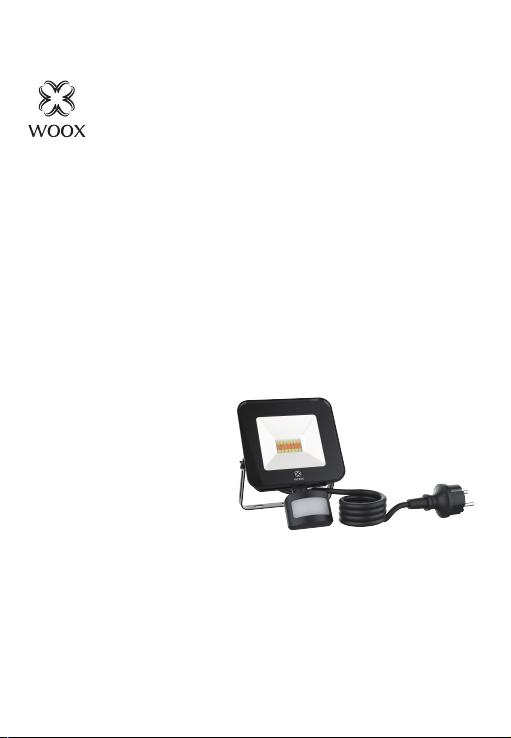
Smart LED Floodlight
Quick Start Guide (EN)
Verkorte handleiding (NL)
Kurzanleitung (DE)
Guía de inicio rápido (ES)
Guide de démarrage rapide (FR)
Guida rapida (IT)
Guia de iniciação rápida (PT)
Hurtigstartsguide (DK)
Snabbstartsguide (SE)
Pikaopas (FI)
Krótki przewodnik (PL)
Rychlá příručka (CZ)
hitri vodnik (SI)
Gyors útmutató (HU)
Ghid rapid (RO)
брзи водич (RS)
sprievodca rýchlym spustením (SK)
R5113
Version: 20200304
Page 2
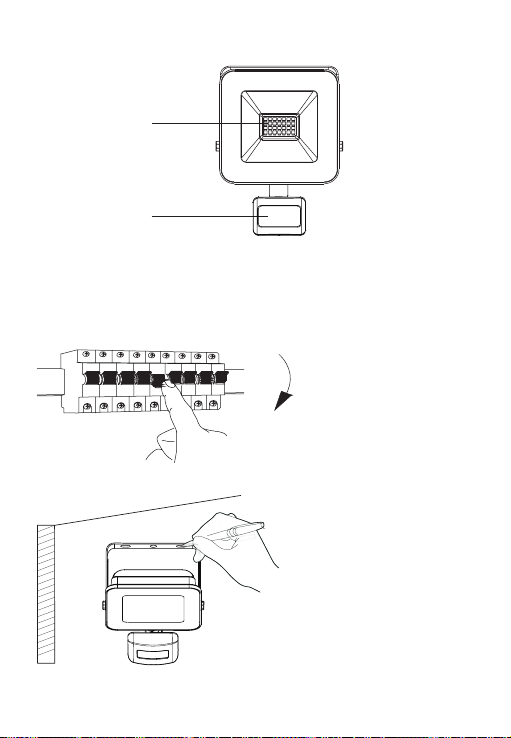
LED
PIR Sensor
Installation instruction
1. Power o.
2. Mark installation position.
1
Page 3
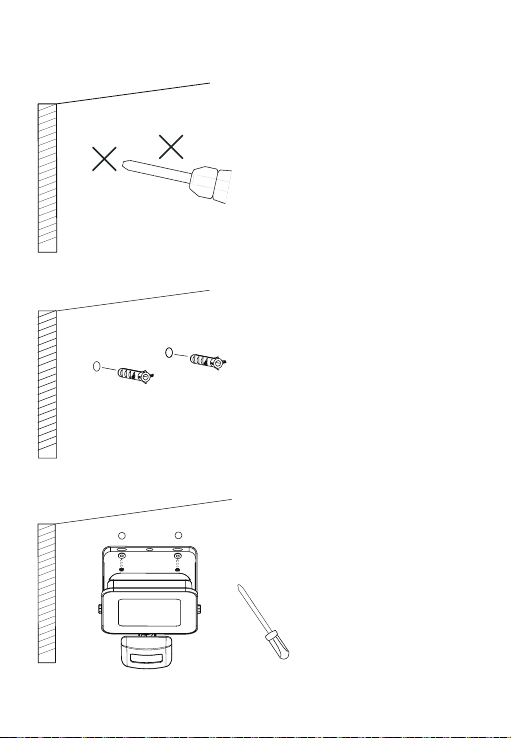
3. Drill holes into a wall with a
hammer drill.
4. Insert the expansion bolt.
5. Fixed the bracket.
2
Page 4

Package includes
1. Smart LED Floodlight x 1
2. Screws bag x 1
3. User manual x 1
Requirement to use
1. WOOX Home app
2. WLAN-enabled router: 2.4GHz (Separate band)
Set up smart LED floodlight to WOOX Home app
1. Download and install the app "WOOX Home" from Apple App Store or Google Play
Store on your smartphone.
2. Open bluetooth on smartphone.
3. Enable bluetooth and location permission for WOOX Home app, so that the app can
nd smart LED oodlight via bluetooth.
4. Launch the app "WOOX Home".
5. Create a new account or log in to your existing account.
6. Ensure the LED is quick ashing (ashing 2 times per second). If the LED isn't ashing:
turn ON/OFF wall switch 3 times until the LED starts to ash.
7. Tap “+” to add the device.
8. The smart LED floodlight will appear on the app. If smart LED floodlight does not
appear, please check if the bluetooth and location permission of WOOX Home app are
enabled in smartphone settings.
9. Select the smart LED oodlight and continue.
10. Conrm the Wi-Fi network and password.
11. Note: only 2.4GHz WiFi is supported.
12. The app will now search for the device and register is to your account.
13. Enter the device name.
Note: The device name will also be used by Amazon Alexa and Google Home.
Safety
• To reduce risk of electric shock, this product should only be opened by an authorized
technician when service is required.
• Disconnect the product from the mains and other equipment if a problem should occur.
• Read the manual carefully before use. Keep the manual for future reference.
• Only use the device for its intended purposes.
• Do not use the device for other purposes than described in the manual.
• Do not use the device if any part is damaged or defective. If the device is damaged or
defective, replace the device immediately.
• The device is suitable for indoor use only. Do not use the device outdoors.
• Do not expose the product to water or moisture.
• Do not touch the device with wet hands.
3
English
Page 5

English
Cleaning and maintenance Warning!
• Do not use cleaning solvents or abrasives.
• Do not clean the inside of the device.
• Do not attempt to repair the device. If the device does not operate correctly, replace it
with a new device.
• Clean the outside of the device using a soft, damp cloth.
Support
If you need further help or have comments or suggestions please visit
www.wooxhome.com.
Specification
Power supply: AC 220-240V
Rated power: 20W
Color temperature: 3000K-6500K
CRI: >80
Beam angle: 120°
Luminous: 1600 lumens
Wi-Fi: IEEE 802.11 b/g/n 2.4GHz
Waterproof: IP44 rating
Working temperature: -20℃-35
Working humidity: 20%RH-80%RH
Dimension: 128x184x59mm
Cable length: 1.5 meters
Bluetooth: supported
℃
4
Page 6

Nederlands
Pakket bestaat uit
1. Slimme LEDschijnwerper x 1
2. Zak met schroeven x 1
3. Gebruikershandleiding
Nodig voor gebruik
1. WOOX Home app
2. WLAN-compatibele router: 2.4GHz (apart kanaal ingesteld)
Stel slimme LED-schijnwerper in op de WOOX Home-app
1. Download en installeer de app "WOOX Home" van Apple App Store of Google Play
op uw smartphone.
Store
2. Open de bluetooth instellingen op uw smartphone.
3. Schakel bluetooth en locatietoestemming in voor de WOOX Home-app, zodat de
app slimme LED-schijnwerpers kan vinden via bluetooth.
4. Start de app "WOOX Home".
5. Maak een nieuwe account aan of log in op uw bestaande account.
6. Zorg ervoor dat de LED snel knippert (knippert 2 keer per seconde). Als de LED niet
knippert: zet de wandschakelaar 3 keer AAN / UIT totdat de LED begint te knipperen.
7. Tik op "+" om het apparaat toe te voegen.
8. De slimme LED-schijnwerper verschijnt in de app. Als de slimme LED-schijnwerper
niet verschijnt, controleer dan of de bluetooth en locatietoestemming van de WOOX
Home-app zijn ingeschakeld in de smartphone-instellingen.
9. Selecteer de slimme LED-schijnwerper en ga verder.
10. Bevestig het Wi-Fi-netwerk en wachtwoord.
11. Let op: alleen 2,4 GHz WiFi wordt ondersteund.
12. De app zoekt nu naar het apparaat en registreert zich op uw account.
13. Voer de apparaatnaam in.
Opmerking: de apparaatnaam wordt ook gebruikt door Amazon Alexa en Google Home.
Veiligheid
• Om het risico op elektrische schokken te verkleinen, mag dit product alleen worden geopend door
een geautoriseerde technicus als er onderhoud nodig is.
• Koppel het product los van het lichtnet en andere apparatuur als zich een probleem voordoet.
• Lees voor gebruik de handleiding zorgvuldig door. Bewaar de handleiding voor toekomstig gebruik.
• Gebruik het apparaat alleen waarvoor het bedoeld is.
• Gebruik het apparaat niet voor andere doeleinden dan beschreven in de handleiding.
• Gebruik het apparaat niet als een onderdeel beschadigd of defect is. Vervang het apparaat
onmiddellijk als het apparaat beschadigd of defect is.
• Het apparaat is alleen geschikt voor gebruik binnenshuis. Gebruik het apparaat niet buitenshuis.
• Stel het product niet bloot aan water of vocht.
• Raak het apparaat niet met natte handen aan.
5
Page 7

Nederlands
Reiniging en onderhoud Waarschuwing!
• Gebruik geen schoonmaakmiddelen of schuurmiddelen.
• Maak de binnenkant van het apparaat niet schoon.
• Probeer het apparaat niet te repareren. Als het apparaat niet correct werkt, vervang het
dan door een nieuw apparaat.
• Maak de buitenkant van het apparaat schoon met een zachte, vochtige doek.
Ondersteuning
Als u meer hulp nodig heeft of opmerkingen of suggesties heeft,
bezoek dan www.wooxhome.com.
Specificaties
Power supply: AC 220-240V
Rated power: 20W
Color temperature: 3000K-6500K
80
CRI:
>
Beam angle: 120°
Luminous: 1600 lumens
Wi-Fi: IEEE 802.11 b/g/n 2.4GHz
Waterproof: IP44 rating
Working temperature: -20℃ -35
Working humidity: 20%RH-80%RH
Dimension: 128x184x59mm
Cable length: 1.5 meters
Bluetooth: supported
℃
6
Page 8

Deutsch
Paket beinhaltet
1. Smart LED Floodlight x 1
2. Schraubenbeutel x 1
3. Benutzerhandbuch x 1
Voraussetzung zur Verwendung
1. WOOX Home app
2. WLAN-fähiger Router: 2,4 GHz (als separates Band eingestellt)
Richten Sie einen intelligenten LED-Scheinwerfer für die WOOX Home-App ein
1. Laden Sie die App "WOOX Home" aus dem Apple App Store oder Google Play Store auf
Ihr Smartphone herunter und installieren Sie sie.
2. Öffnen Sie Bluetooth auf dem Smartphone.
3. Aktivieren Sie Bluetooth und die Standortberechtigung für die WOOX Home-App, damit
die App über Bluetooth einen intelligenten LED-Scheinwerfer finden kann.
4. Starten Sie die App "WOOX Home".
5. Erstellen Sie ein neues Konto oder melden Sie sich bei Ihrem vorhandenen Konto an.
6. Stellen Sie sicher, dass die LED schnell blinkt (2 Mal pro Sekunde blinkt). Wenn die LED
nicht blinkt: Schalten Sie den Wandschalter dreimal ein / aus, bis die LED zu blinken
beginnt.
7. Tippen Sie auf „+“, um das Gerät hinzuzufügen.
8. Das intelligente LED-Flutlicht wird in der App angezeigt. Wenn kein Smart-LED-
Scheinwerfer angezeigt wird, überprüfen Sie, ob die Bluetooth- und Standortberechtigung
der WOOX Home-App in den Smartphone-Einstellungen aktiviert ist.
9. Wählen Sie den Smart LED-Scheinwerfer aus und fahren Sie fort.
10. Bestätigen Sie das Wi-Fi-Netzwerk und das Kennwort.
11. Hinweis: Es wird nur 2,4-GHz-WLAN unterstützt.
12. Die App sucht nun nach dem Gerät und registriert sich in Ihrem Konto.
13. Geben Sie den Gerätenamen ein.
Hinweis: Der Gerätename wird auch von Amazon Alexa und Google Home verwendet.
Sicherheit
• Um das Risiko eines Stromschlags zu verringern, darf dieses Produkt nur von einem autorisierten
Techniker geöffnet werden, wenn eine Wartung erforderlich ist.
• Trennen Sie das Produkt vom Stromnetz und anderen Geräten, falls ein Problem auftreten sollte.
• Lesen Sie das Handbuch vor Gebrauch sorgfältig durch. Bewahren Sie das Handbuch zum
späteren Nachschlagen auf.
• Verwenden Sie das Gerät nur für den vorgesehenen Zweck.
• Verwenden Sie das Gerät nicht für andere als die im Handbuch beschriebenen Zwecke.
• Verwenden Sie das Gerät nicht, wenn Teile beschädigt oder defekt sind. Wenn das Gerät
beschädigt oder defekt ist, tauschen Sie es sofort aus.
• Das Gerät ist nur für den Innenbereich geeignet. Verwenden Sie das Gerät nicht im Freien.
• Setzen Sie das Produkt weder Wasser noch Feuchtigkeit aus.
• Berühren Sie das Gerät nicht mit nassen Händen.
7
Page 9

Deutsch
Reinigung und Wartung Warnung!
• Verwenden Sie keine Reinigungsmittel oder Schleifmittel.
• Reinigen Sie das Innere des Geräts nicht.
• Versuchen Sie nicht, das Gerät zu reparieren. Wenn das Gerät nicht ordnungsgemäß
funktioniert, ersetzen Sie es durch ein neues Gerät.
• Reinigen Sie die Außenseite des Geräts mit einem weichen, feuchten Tuch.
Unterstützung
Wenn Sie weitere Hilfe benötigen oder Kommentare oder Vorschläge
haben, besuchen Sie bitte www.wooxhome.com.
Spezifikation
Power supply: AC 220-240V
Rated power: 20W
Color temperature: 3000K-6500K
80
CRI:
>
Beam angle: 120°
Luminous: 1600 lumens
Wi-Fi: IEEE 802.11 b/g/n 2.4GHz
Waterproof: IP44 rating
Working temperature: -20℃ -35
Working humidity: 20%RH-80%RH
Dimension: 128x184x59mm
Cable length: 1.5 meters
Bluetooth: supported
℃
8
Page 10

Espanol
El paquete incluye
1. Reflector LED
inteligente x 1
2. Bolsa de tornillos x 1
3. Manual de usuario x 1
Requisito de uso
1. WOOX Home app
2. Enrutador habilitado para WLAN: 2,4 GHz (configurado como banda separada)
Configure el reflector LED inteligente en la aplicación WOOX Home
1. Descargue e instale la aplicación "WOOX Home" de Apple App Store o Google Play Store
en su teléfono inteligente.
2. Abra la configuración de bluetooth en el teléfono inteligente.
3. Habilite bluetooth y el permiso de ubicación para la aplicación WOOX Home, de modo
que la aplicación pueda encontrar un reflector LED inteligente a través de bluetooth.
4. Inicie la aplicación "WOOX Home".
5. Cree una nueva cuenta o inicie sesión en su cuenta existente.
6. Asegúrese de que el LED parpadee rápidamente (parpadee 2 veces por segundo). Si el
LED no parpadea: encienda / apague el interruptor de pared 3 veces hasta que el LED
comience a parpadear.
7. Toque "+" para agregar el dispositivo.
8. El reflector LED inteligente aparecerá en la aplicación. Si no aparece el reflector LED
inteligente, verifique si el bluetooth y el permiso de ubicación de la aplicación WOOX Home
están habilitados en la configuración del teléfono inteligente.
9. Seleccione el reflector LED inteligente y continúe.
10. Confirme la red Wi-Fi y la contraseña.
11. Nota: solo se admite WiFi de 2,4 GHz.
12. La aplicación ahora buscará el dispositivo y se registrará en su cuenta.
13. Ingrese el nombre del dispositivo.
Nota: Amazon Alexa y Google Home también utilizarán el nombre del dispositivo.
La seguridad
• Para reducir el riesgo de descarga eléctrica, este producto solo debe ser abierto por un técnico
autorizado cuando se requiera servicio.
• Desconecte el producto de la red eléctrica y de otros equipos si surge algún problema.
• Lea el manual detenidamente antes de usar. Conserve el manual para consultarlo en el futuro.
• Utilice el dispositivo únicamente para los fines para los que fue diseñado.
• No utilice el dispositivo para otros fines distintos a los descritos en el manual.
• No utilice el dispositivo si alguna pieza está dañada o defectuosa. Si el dispositivo está dañado o
defectuoso, reemplácelo de inmediato.
• El dispositivo es apto solo para uso en interiores. No utilice el dispositivo al aire libre.
• No exponga el producto al agua ni a la humedad.
• No toque el dispositivo con las manos mojadas.
9
Page 11

Espanol
Limpieza y mantenimiento ¡Advertencia!
• No utilice disolventes de limpieza ni abrasivos.
• No limpie el interior del dispositivo.
• No intente reparar el dispositivo. Si el dispositivo no funciona correctamente, sustitúyalo
por uno nuevo.
• Limpie el exterior del dispositivo con un paño suave y húmedo.
Apoyo
Si necesita más ayuda o tiene comentarios o sugerencias, visite
www.wooxhome.com.
Especificación
Power supply: AC 220-240V
Rated power: 20W
Color temperature: 3000K-6500K
80
CRI:
>
Beam angle: 120°
Luminous: 1600 lumens
Wi-Fi: IEEE 802.11 b/g/n 2.4GHz
Waterproof: IP44 rating
Working temperature: -20℃ -35
Working humidity: 20%RH-80%RH
Dimension: 128x184x59mm
Cable length: 1.5 meters
Bluetooth: supported
℃
10
Page 12

francais
Le forfait comprend
1. Projecteur LED intelligent x 1
2. sac de vis x 1
3. Manuel de l'utilisateur x 1
Obligation d'utiliser
1. WOOX Home app
2. Routeur compatible WLAN: 2,4 GHz (défini comme bande distincte)
Configurer un projecteur LED intelligent sur l'application WOOX Home
1. Téléchargez et installez l'application «WOOX Home» depuis l'App Store d'Apple ou le
Google Play Store sur votre smartphone.
2. Ouvrez les paramètres Bluetooth sur le smartphone.
3. Activez le Bluetooth et l'autorisation de localisation pour l'application WOOX Home, afin
que l'application puisse trouver un projecteur LED intelligent via Bluetooth.
4. Lancez l'application "WOOX Home".
5. Créez un nouveau compte ou connectez-vous à votre compte existant.
6. Assurez-vous que la LED clignote rapidement (clignote 2 fois par seconde). Si la LED ne
clignote pas: activez l'interrupteur mural ON / OFF 3 fois jusqu'à ce que la LED commence à
clignoter.
7. Appuyez sur «+» pour ajouter l'appareil.
8. Le projecteur LED intelligent apparaîtra sur l'application. Si le projecteur LED intelligent
n'apparaît pas, veuillez vérifier si le bluetooth et l'autorisation de localisation de
l'application WOOX Home sont activés dans les paramètres du smartphone.
9. Sélectionnez le projecteur LED intelligent et continuez.
10. Confirmez le réseau Wi-Fi et le mot de passe.
11. Remarque: seul le WiFi 2,4 GHz est pris en charge.
12. L'application recherchera maintenant l'appareil et s'inscrira sur votre compte.
13. Entrez le nom de l'appareil.
Remarque: le nom de l'appareil sera également utilisé par Amazon Alexa et Google Home.
Sécurité
• Pour réduire le risque de choc électrique, ce produit ne doit être ouvert que par un technicien
agréé lorsqu'une réparation est nécessaire.
• Débranchez le produit du secteur et des autres équipements en cas de problème.
• Lisez attentivement le manuel avant utilisation. Conservez le manuel pour référence future.
• N'utilisez l'appareil qu'aux fins pour lesquelles il a été conçu.
• N'utilisez pas l'appareil à d'autres fins que celles décrites dans le manuel.
• N'utilisez pas l'appareil si une pièce est endommagée ou défectueuse. Si l'appareil est
endommagé ou défectueux, remplacez-le immédiatement.
• L'appareil est conçu pour une utilisation en intérieur uniquement. N'utilisez pas l'appareil à
l'extérieur.
• N'exposez pas le produit à l'eau ou à l'humidité.
• Ne touchez pas l'appareil avec les mains mouillées.
11
Page 13

francais
Nettoyage et entretien Attention!
• N'utilisez pas de solvants de nettoyage ou d'abrasifs.
• Ne nettoyez pas l'intérieur de l'appareil.
• N'essayez pas de réparer l'appareil. Si l'appareil ne fonctionne pas correctement,
remplacez-le par un nouvel appareil.
• Nettoyez l'extérieur de l'appareil à l'aide d'un chiffon doux et humide.
Soutien
Si vous avez besoin d'aide supplémentaire ou avez des commentaires
ou des suggestions, veuillez visiter www.wooxhome.com.
spécification
Power supply: AC 220-240V
Rated power: 20W
Color temperature: 3000K-6500K
80
CRI:
>
Beam angle: 120°
Luminous: 1600 lumens
Wi-Fi: IEEE 802.11 b/g/n 2.4GHz
Waterproof: IP44 rating
Working temperature: -20℃ -35
Working humidity: 20%RH-80%RH
Dimension: 128x184x59mm
Cable length: 1.5 meters
Bluetooth: supported
℃
12
Page 14

La confezione include
1. Proiettore LED intelligente x 1
2. Borsa per viti x 1
3. Manuale utente x 1
Requisiti da utilizzare
1. WOOX Home app
2. Router abilitato per WLAN: 2,4 GHz (impostato come banda separata)
Configura il proiettore LED intelligente sull'app WOOX Home
1. Scarica e installa l'app "WOOX Home" da Apple App Store o Google Play Store sul tuo
smartphone.
2. Apri le impostazioni Bluetooth sullo smartphone.
3. Abilitare il Bluetooth e l'autorizzazione alla localizzazione per l'app WOOX Home, in
modo che l'app possa trovare il proiettore LED intelligente tramite Bluetooth.
4. Avvia l'app "WOOX Home".
5. Crea un nuovo account o accedi al tuo account esistente.
6. Verificare che il LED lampeggi rapidamente (lampeggia 2 volte al secondo). Se il LED
non lampeggia: ruotare l'interruttore a muro ON / OFF 3 volte finché il LED non inizia a
lampeggiare.
7. Toccare "+" per aggiungere il dispositivo.
8. Il proiettore LED intelligente apparirà sull'app. Se il proiettore LED intelligente non viene
visualizzato, controlla se il Bluetooth e il permesso di localizzazione dell'app WOOX Home
sono abilitati nelle impostazioni dello smartphone.
9. Selezionare il proiettore LED intelligente e continuare.
10. Confermare la rete Wi-Fi e la password.
11. Nota: è supportato solo Wi-Fi a 2,4 GHz.
12. L'app ora cercherà il dispositivo e si registrerà sul tuo account.
13. Immettere il nome del dispositivo.
Nota: il nome del dispositivo verrà utilizzato anche da Amazon Alexa e Google Home.
Sicurezza
• Per ridurre il rischio di scosse elettriche, questo prodotto deve essere aperto solo da un tecnico
autorizzato quando è necessaria l'assistenza.
• Scollegare il prodotto dalla rete e da altre apparecchiature in caso di problemi.
• Leggere attentamente il manuale prima dell'uso. Conservare il manuale per riferimenti futuri.
• Utilizzare il dispositivo solo per gli scopi previsti.
• Non utilizzare il dispositivo per scopi diversi da quelli descritti nel manuale.
• Non utilizzare il dispositivo se una qualsiasi parte è danneggiata o difettosa. Se il dispositivo è
danneggiato o difettoso, sostituirlo immediatamente.
• Il dispositivo è adatto solo per uso interno. Non utilizzare il dispositivo all'aperto.
• Non esporre il prodotto all'acqua o all'umidità.
• Non toccare il dispositivo con le mani bagnate.
Italiano
13
Page 15

Italiano
Pulizia e manutenzione Attenzione!
• Non utilizzare solventi per la pulizia o abrasivi.
• Non pulire l'interno del dispositivo.
• Non tentare di riparare il dispositivo. Se il dispositivo non funziona correttamente,
sostituirlo con un nuovo dispositivo.
• Pulire la parte esterna del dispositivo utilizzando un panno morbido e umido.
Supporto
Se hai bisogno di ulteriore aiuto o hai commenti o suggerimenti,
visita www.wooxhome.com.
Specifica
Power supply: AC 220-240V
Rated power: 20W
Color temperature: 3000K-6500K
80
CRI:
>
Beam angle: 120°
Luminous: 1600 lumens
Wi-Fi: IEEE 802.11 b/g/n 2.4GHz
Waterproof: IP44 rating
Working temperature: -20℃ -35
Working humidity: 20%RH-80%RH
Dimension: 128x184x59mm
Cable length: 1.5 meters
Bluetooth: supported
℃
14
Page 16

O pacote inclui
1. Holofote LED Inteligente x 1
2. Saco de parafusos x 1
3. Manual do usuário x 1
Requisito para usar
1. WOOX Home app
2. Roteador habilitado para WLAN: 2,4 GHz (definido como banda separada)
Configure o holofote LED inteligente para o app WOOX Home
1. Baixe e instale o aplicativo "WOOX Home" da Apple App Store ou Google Play Store em
seu smartphone.
2. Abra as configurações de bluetooth no smartphone.
3. Ative o bluetooth e a permissão de localização para o aplicativo WOOX Home, para que o
aplicativo possa encontrar o holofote LED inteligente via bluetooth.
4. Abra o aplicativo "WOOX Home".
5. Crie uma nova conta ou faça login em sua conta existente.
6. Certifique-se de que o LED está piscando rapidamente (piscando 2 vezes por segundo).
Se o LED não estiver piscando: ligue / desligue o interruptor de parede 3 vezes até que o LED
comece a piscar.
7. Toque em “+” para adicionar o dispositivo.
8. O holofote LED inteligente aparecerá no aplicativo. Se o holofote LED inteligente não
aparecer, verifique se o bluetooth e a permissão de localização do aplicativo WOOX Home
estão habilitados nas configurações do smartphone.
9. Selecione o holofote LED inteligente e continue.
10. Confirme a rede Wi-Fi e a senha.
11. Nota: apenas Wi-Fi de 2,4 GHz é compatível.
12. O aplicativo irá agora procurar o dispositivo e se registrar em sua conta.
13. Digite o nome do dispositivo. Observação: o nome do dispositivo também será usado
pela Amazon Alexa e pelo Google Home.
Segurança
• Para reduzir o risco de choque elétrico, este produto só deve ser aberto por um técnico
autorizado quando for necessária manutenção.
• Desconecte o produto da rede elétrica e de outros equipamentos se ocorrer um problema.
• Leia o manual cuidadosamente antes de usar. Guarde o manual para referência futura.
• Use o dispositivo apenas para os fins a que se destina.
• Não use o dispositivo para outros fins que não os descritos no manual.
• Não use o dispositivo se alguma parte estiver danificada ou com defeito. Se o dispositivo estiver
danificado ou com defeito, substitua o dispositivo imediatamente.
• O dispositivo é adequado apenas para uso interno. Não use o dispositivo ao ar livre.
• Não exponha o produto à água ou umidade.
• Não toque no dispositivo com as mãos molhadas.
15
Português
Page 17

Português
Limpeza e manutenção Aviso!
• Não use solventes de limpeza ou abrasivos.
• Não limpe o interior do dispositivo.
• Não tente reparar o dispositivo. Se o dispositivo não funcionar corretamente, substitua-o
por um novo.
• Limpe a parte externa do dispositivo com um pano macio e úmido.
Apoio, suporte
Se precisar de mais ajuda ou tiver comentários ou sugestões, visite
www.wooxhome.com.
Especificação
Power supply: AC 220-240V
Rated power: 20W
Color temperature: 3000K-6500K
80
CRI:
>
Beam angle: 120°
Luminous: 1600 lumens
Wi-Fi: IEEE 802.11 b/g/n 2.4GHz
Waterproof: IP44 rating
Working temperature: -20℃ -35
Working humidity: 20%RH-80%RH
Dimension: 128x184x59mm
Cable length: 1.5 meters
Bluetooth: supported
℃
16
Page 18

Pakken inkluderer
1. Smart LED-projektør x 1
2. Skruetaske x 1
3. Brugermanual x 1
Krav til brug
1. WOOX Home app
2. WLAN-aktiveret router: 2,4 GHz (indstillet som separat bånd)
Konfigurer smart LED-projektør til WOOX Home-appen
1. Download og installer appen "WOOX Home" fra Apple App Store eller Google Play Store
på din smartphone.
2. Åbn Bluetooth-indstillinger på smartphone.
3. Aktivér Bluetooth- og placeringstilladelse til WOOX Home-appen, så appen kan finde
smart LED-projektør via Bluetooth.
4. Start appen "WOOX Home".
5. Opret en ny konto, eller log ind på din eksisterende konto.
6. Sørg for, at LED'en blinker hurtigt (blinker 2 gange pr. Sekund). Hvis LED ikke blinker:
Tænd / sluk for vægkontakten 3 gange, indtil LED'en begynder at blinke.
7. Tryk på “+” for at tilføje enheden.
8. Den smarte LED-projektør vises i appen. Hvis smart LED-projektør ikke vises, skal du
kontrollere, om Bluetooth og placeringstilladelse fra WOOX Home-appen er aktiveret i
smartphone-indstillinger.
9. Vælg den smarte LED-projektør og fortsæt.
10. Bekræft Wi-Fi-netværket og adgangskoden.
11. Bemærk: kun 2,4 GHz WiFi understøttes.
12. Appen søger nu efter enheden, og registreringen er på din konto.
13. Indtast enhedens navn.
Bemærk: Enhedsnavnet bruges også af Amazon Alexa og Google Home.
Sikkerhed
• For at mindske risikoen for elektrisk stød, bør dette produkt kun åbnes af en autoriseret
tekniker, når der er behov for service.
• Frakobl produktet fra lysnettet og andet udstyr, hvis der skulle opstå et problem.
• Læs brugsanvisningen grundigt inden brug. Opbevar manualen til fremtidig reference.
• Brug kun enheden til det tilsigtede formål.
• Brug ikke enheden til andre formål end beskrevet i manualen.
• Brug ikke enheden, hvis en del er beskadiget eller defekt. Hvis enheden er beskadiget
eller defekt, skal du straks udskifte enheden.
• Enheden er kun egnet til indendørs brug. Brug ikke enheden udendørs.
• Udsæt ikke produktet for vand eller fugt.
• Rør ikke ved enheden med våde hænder.
17
Dansk
Page 19

Dansk
Rengøring og vedligeholdelse Advarsel!
• Brug ikke rengøringsmidler eller slibemidler.
• Rengør ikke enhedens inderside.
• Forsøg ikke at reparere enheden. Hvis enheden ikke fungerer korrekt, skal du udskifte den
med en ny enhed.
• Rengør enhedens yderside med en blød, fugtig klud.
Support
Hvis du har brug for yderligere hjælp eller har kommentarer eller
forslag, kan du besøge www.wooxhome.com.
Specifikation
Power supply: AC 220-240V
Rated power: 20W
Color temperature: 3000K-6500K
80
CRI:
>
Beam angle: 120°
Luminous: 1600 lumens
Wi-Fi: IEEE 802.11 b/g/n 2.4GHz
Waterproof: IP44 rating
Working temperature: -20℃ -35
Working humidity: 20%RH-80%RH
Dimension: 128x184x59mm
Cable length: 1.5 meters
Bluetooth: supported
℃
18
Page 20

Förpackningen innehåller
1. Smart LED-strålkastare x 1
2. Skruvpåse x 1
3. Användarhandbok x 1
Krav på användning
1. WOOX Home app
2. WLAN-aktiverad router: 2,4 GHz (ställ in som separat band)
Ställ in smart LED-strålkastare till WOOX Home-appen
1. Ladda ner och installera appen "WOOX Home" från Apple App Store eller Google Play
Store på din smartphone.
2. Öppna Bluetooth-inställningar på smarttelefonen.
3. Aktivera Bluetooth och platsbehörighet för WOOX Home-appen, så att appen kan hitta
smart LED-strålkastare via Bluetooth.
4. Starta appen "WOOX Home".
5. Skapa ett nytt konto eller logga in på ditt befintliga konto.
6. Se till att lysdioden blinkar snabbt (blinkar 2 gånger per sekund). Om lysdioden inte
blinkar: slå PÅ / AV väggströmbrytaren tre gånger tills lysdioden börjar blinka.
7. Tryck på “+” för att lägga till enheten.
8. Den smarta LED-strålkastaren visas i appen. Om smart LED-strålkastare inte visas,
kontrollera om Bluetooth och platsbehörighet för WOOX Home-appen är aktiverad i
smartphone-inställningar.
9. Välj den smarta LED-strålkastaren och fortsätt.
10. Bekräfta Wi-Fi-nätverket och lösenordet.
11. Obs! Endast 2,4 GHz WiFi stöds.
12. Appen kommer nu att söka efter enheten och registrera är till ditt konto.
13. Ange enhetens namn.
Obs! Enhetsnamnet kommer också att användas av Amazon Alexa och Google Home.
Säkerhet
• För att minska risken för elchock bör denna produkt endast öppnas av en auktoriserad
tekniker när service krävs.
• Koppla bort produkten från elnätet och annan utrustning om ett problem skulle uppstå.
• Läs handboken noggrant före användning. Spara manualen för framtida referens.
• Använd endast enheten för avsedda ändamål.
• Använd inte enheten för andra ändamål än vad som beskrivs i handboken.
• Använd inte enheten om någon del är skadad eller defekt. Om enheten är skadad eller
defekt, byt ut enheten omedelbart.
• Enheten är endast lämplig för inomhusbruk. Använd inte enheten utomhus.
• Utsätt inte produkten för vatten eller fukt.
• Rör inte enheten med våta händer.
19
Svenska
Page 21

Svenska
Rengöring och underhåll Varning!
• Använd inte rengöringsmedel eller slipmedel.
• Rengör inte enhetens insida.
• Försök inte reparera enheten. Om enheten inte fungerar korrekt, byt ut den mot en ny
enhet.
• Rengör enhetens utsida med en mjuk, fuktig trasa.
Stöd
Om du behöver ytterligare hjälp eller har kommentarer eller förslag,
besök www.wooxhome.com.
Specifikation
Power supply: AC 220-240V
Rated power: 20W
Color temperature: 3000K-6500K
80
CRI:
>
Beam angle: 120°
Luminous: 1600 lumens
Wi-Fi: IEEE 802.11 b/g/n 2.4GHz
Waterproof: IP44 rating
Working temperature: -20℃ -35
Working humidity: 20%RH-80%RH
Dimension: 128x184x59mm
Cable length: 1.5 meters
Bluetooth: supported
℃
20
Page 22

Pakkaus sisältää
1. Älykäs LED-valonheitin x 1
2. Ruuvipussi x 1
3. Käyttöopas x 1
Käyttövaatimus
1. WOOX Home app
2. WLAN-yhteensopiva reititin: 2,4 GHz (asetettu erilliseksi kaistaksi)
Määritä älykäs LED-valonheitin WOOX Home -sovellukseen
1. Lataa ja asenna WOOX Home -sovellus älypuhelimeesi Apple App Storesta tai Google
Play Kaupasta.
2. Avaa älypuhelimen Bluetooth-asetukset.
3. Ota Bluetooth- ja sijaintilupa käyttöön WOOX Home -sovelluksessa, jotta sovellus löytää
älykkään LED-valonheittimen bluetoothin kautta.
4. Käynnistä WOOX Home -sovellus.
5. Luo uusi tili tai kirjaudu sisään nykyiselle tilillesi.
6. Varmista, että LED vilkkuu nopeasti (vilkkuu 2 kertaa sekunnissa). Jos LED ei vilku:
käännä ON / OFF-seinäkytkintä 3 kertaa, kunnes LED alkaa vilkkua.
7. Lisää laite napauttamalla “+”.
8. Älykäs LED-valonheitin ilmestyy sovellukseen. Jos älykäs LED-valonheitin ei tule
näkyviin, tarkista, ovatko WOOX Home -sovelluksen Bluetooth- ja sijaintiluvat käytössä
älypuhelimen asetuksissa.
9. Valitse älykäs LED-valonheitin ja jatka.
10. Vahvista Wi-Fi-verkko ja salasana.
11. Huomaa: vain 2,4 GHz: n WiFi on tuettu.
12. Sovellus etsii nyt laitetta ja rekisteröi sinut tilillesi.
13. Anna laitteen nimi.
Huomaa: Laitteen nimeä käyttävät myös Amazon Alexa ja Google Home.
Turvallisuus
• Sähköiskun vaaran vähentämiseksi valtuutettu teknikko saa avata tämän tuotteen vain
huollon yhteydessä.
• Irrota tuote sähköverkosta ja muista laitteista, jos ilmenee ongelmia.
• Lue käyttöohje huolellisesti ennen käyttöä. Säilytä käsikirja myöhempää tarvetta varten.
• Käytä laitetta vain sen käyttötarkoitukseen.
• Älä käytä laitetta muihin kuin käyttöoppaassa kuvattuihin tarkoituksiin.
• Älä käytä laitetta, jos jokin osa on vaurioitunut tai viallinen. Jos laite on vaurioitunut tai
viallinen, vaihda se välittömästi.
• Laite soveltuu vain sisäkäyttöön. Älä käytä laitetta ulkona.
• Älä altista tuotetta vedelle tai kosteudelle.
• Älä koske laitteeseen märillä käsillä.
21
Suomi
Page 23

Suomi
Puhdistus ja huolto Varoitus!
• Älä käytä puhdistusliuottimia tai hankausaineita.
• Älä puhdista laitteen sisäosia.
• Älä yritä korjata laitetta. Jos laite ei toimi oikein, vaihda se uuteen.
• Puhdista laitteen ulkopinta pehmeällä, kostealla liinalla.
Tuki
Jos tarvitset lisäapua tai sinulla on kommentteja tai ehdotuksia, käy
osoitteessa www.wooxhome.com.
Erittely
Power supply: AC 220-240V
Rated power: 20W
Color temperature: 3000K-6500K
80
CRI:
>
Beam angle: 120°
Luminous: 1600 lumens
Wi-Fi: IEEE 802.11 b/g/n 2.4GHz
Waterproof: IP44 rating
Working temperature: -20℃ -35
Working humidity: 20%RH-80%RH
Dimension: 128x184x59mm
Cable length: 1.5 meters
Bluetooth: supported
℃
22
Page 24

Paczka zawiera
1. Inteligentny reflektor LED x 1
2. Torba na śruby x 1
3. Instrukcja obsługi x 1
Wymóg użycia
1. Aplikacja WOOX Home
2. Router z obsługą sieci WLAN: 2,4 GHz (ustawione jako oddzielne pasmo)
Skonfiguruj inteligentny reflektor LED w aplikacji WOOX Home
1. Pobierz i zainstaluj aplikację „WOOX Home” z Apple App Store lub Google Play Store na
swoim smartfonie.
2. Otwórz ustawienia Bluetooth na smartfonie.
3. Włącz Bluetooth i pozwolenie na lokalizację dla aplikacji WOOX Home, aby aplikacja
mogła znaleźć inteligentne oświetlenie LED przez bluetooth.
4. Uruchom aplikację „WOOX Home”.
5. Utwórz nowe konto lub zaloguj się do istniejącego konta.
6. Upewnij się, że dioda LED szybko miga (miga 2 razy na sekundę). Jeśli dioda LED nie
miga: włącz / wyłącz przełącznik ścienny 3 razy, aż dioda zacznie migać.
7. Dotknij „+”, aby dodać urządzenie.
8. W aplikacji pojawi się inteligentny reflektor LED. Jeśli inteligentny reflektor LED się nie
pojawi, sprawdź, czy zezwolenie na Bluetooth i lokalizację aplikacji WOOX Home jest
włączone w ustawieniach smartfona.
9. Wybierz inteligentny reflektor LED i kontynuuj.
10. Potwierdź sieć Wi-Fi i hasło.
11. Uwaga: obsługiwane jest tylko WiFi 2,4 GHz.
12. Aplikacja wyszuka teraz urządzenie i zarejestruje się na Twoim koncie.
13. Wprowadź nazwę urządzenia.
Uwaga: nazwa urządzenia będzie również używana przez Amazon Alexa i Google Home.
Bezpieczeństwo
• Aby zmniejszyć ryzyko porażenia prądem, ten produkt powinien być otwierany tylko przez
autoryzowanego technika, gdy wymagany jest serwis.
• Odłącz produkt od zasilania i innych urządzeń, jeśli wystąpi problem.
• Przeczytaj uważnie instrukcję przed użyciem. Zachowaj instrukcję do wykorzystania w przyszłości.
• Używaj urządzenia tylko zgodnie z jego przeznaczeniem.
• Nie używaj urządzenia do innych celów niż opisane w instrukcji.
• Nie używaj urządzenia, jeśli jakakolwiek część jest uszkodzona lub wadliwa. Jeśli urządzenie jest
uszkodzone lub wadliwe, natychmiast je wymień.
• Urządzenie nadaje się tylko do użytku w pomieszczeniach. Nie używaj urządzenia na zewnątrz.
• Nie wystawiać produktu na działanie wody ani wilgoci.
• Nie dotykaj urządzenia mokrymi rękami.
Polski
23
Page 25

Polski
Czyszczenie i konserwacja Ostrzeżenie!
• Nie używaj rozpuszczalników do czyszczenia ani materiałów ściernych.
• Nie czyścić wnętrza urządzenia.
• Nie próbuj naprawiać urządzenia. Jeśli urządzenie nie działa prawidłowo, wymień je na
nowe.
• Wyczyść urządzenie z zewnątrz miękką, wilgotną szmatką.
Wsparcie
Jeśli potrzebujesz dalszej pomocy, masz uwagi lub sugestie, odwiedź
www.wooxhome.com.
Specyfikacja
Power supply: AC 220-240V
Rated power: 20W
Color temperature: 3000K-6500K
80
CRI:
>
Beam angle: 120°
Luminous: 1600 lumens
Wi-Fi: IEEE 802.11 b/g/n 2.4GHz
Waterproof: IP44 rating
Working temperature: -20℃ -35
Working humidity: 20%RH-80%RH
Dimension: 128x184x59mm
Cable length: 1.5 meters
Bluetooth: supported
℃
24
Page 26

Balíček obsahuje
1. Inteligentní LED Floodlight x 1
2. Šroubovací sáček x 1
3. Uživatelská příručka x 1
Požadavek na použití
1. Aplikace WOOX Home
2. Router s podporou WLAN: 2,4 GHz (nastaveno jako samostatné pásmo)
Nastavte inteligentní LED světlomet do aplikace WOOX Home
1. Stáhněte a nainstalujte si do smartphonu aplikaci „WOOX Home“ z Apple App Store
nebo Google Play Store.
2. Otevřete nastavení Bluetooth na smartphonu.
3. Povolte bluetooth a povolení polohy pro aplikaci WOOX Home, aby aplikace mohla najít
inteligentní LED světlomet přes bluetooth.
4. Spusťte aplikaci „WOOX Home“.
5. Vytvořte nový účet nebo se přihlaste ke svému stávajícímu účtu.
6. Zajistěte, aby LED rychle blikala (bliká 2krát za sekundu). Pokud LED nebliká: 3x
zapněte / vypněte nástěnný spínač, dokud LED nezačne blikat.
7. Klepnutím na „+“ přidáte zařízení.
8. V aplikaci se objeví inteligentní LED světlomet. Pokud se inteligentní LED světlomet
neobjeví, zkontrolujte, zda je v nastavení smartphonu povoleno bluetooth a povolení k
poloze aplikace WOOX Home.
9. Vyberte inteligentní LED světlomet a pokračujte.
10. Potvrďte síť Wi-Fi a heslo.
11. Poznámka: Podporováno je pouze 2,4 GHz WiFi.
12. Aplikace nyní vyhledá zařízení a zaregistruje se na vašem účtu.
13. Zadejte název zařízení.
Poznámka: Název zařízení bude používat také Amazon Alexa a Google Home.
Bezpečnost
• Aby se snížilo riziko úrazu elektrickým proudem, měl by tento výrobek otevírat pouze
autorizovaný technik, je-li vyžadován servis.
• Pokud dojde k problému, odpojte produkt od elektrické sítě a dalších zařízení.
• Před použitím si pozorně přečtěte příručku. Návod si uschovejte pro budoucí použití.
• Zařízení používejte pouze k účelům, ke kterým je určen.
• Nepoužívejte zařízení k jiným účelům, než které jsou popsány v příručce.
• Nepoužívejte zařízení, pokud je některá jeho část poškozená nebo vadná. Pokud je
zařízení poškozené nebo vadné, okamžitě jej vyměňte.
• Zařízení je vhodné pouze pro vnitřní použití. Nepoužívejte zařízení venku.
• Nevystavujte výrobek působení vody nebo vlhkosti.
• Nedotýkejte se zařízení mokrýma rukama.
25
Česky
Page 27

Česky
Čištění a údržba Varování!
• Nepoužívejte čisticí rozpouštědla nebo brusiva.
• Nečistěte vnitřek zařízení.
• Nepokoušejte se zařízení opravit. Pokud zařízení nefunguje správně, nahraďte jej novým
zařízením.
• Vnější část zařízení čistěte měkkým vlhkým hadříkem.
Podpěra, podpora
Pokud potřebujete další pomoc nebo máte připomínky či návrhy,
navštivte stránky www.wooxhome.com.
Specifikace
Power supply: AC 220-240V
Rated power: 20W
Color temperature: 3000K-6500K
80
CRI:
>
Beam angle: 120°
Luminous: 1600 lumens
Wi-Fi: IEEE 802.11 b/g/n 2.4GHz
Waterproof: IP44 rating
Working temperature: -20℃ -35
Working humidity: 20%RH-80%RH
Dimension: 128x184x59mm
Cable length: 1.5 meters
Bluetooth: supported
℃
26
Page 28

Paket vključuje
1. Pametna LED reflektor x 1
2. Vijačna vrečka x 1
3. Uporabniški priročnik x 1
Zahteva za uporabo
1. Aplikacija WOOX Home
2. Usmerjevalnik z omogočenim WLAN: 2,4 GHz (nastavljen kot ločen pas)
Nastavite pametni LED reflektor v aplikacijo WOOX Home
1. Prenesite in namestite aplikacijo "WOOX Home" iz trgovine Apple App Store ali Google
Play Store na svoj pametni telefon.
2. Odprite nastavitve Bluetooth na pametnem telefonu.
3. Omogočite bluetooth in dovoljenje za lokacijo za aplikacijo WOOX Home, da bo
aplikacija lahko našla pametni LED-reflektor prek Bluetootha.
4. Zaženite aplikacijo "WOOX Home".
5. Ustvarite nov račun ali se prijavite v obstoječega.
6. Poskrbite, da LED hitro utripa (utripa 2-krat na sekundo). Če LED ne utripa: 3-krat
vklopite / izklopite stensko stikalo, dokler LED ne začne utripati.
7. Tapnite »+«, da dodate napravo.
8. V aplikaciji se prikaže pametni LED-reflektor. Če se pametni LED reflektor ne prikaže,
preverite, ali sta v nastavitvah pametnega telefona omogočena Bluetooth in dovoljenje za
lokacijo aplikacije WOOX Home.
9. Izberite pametni LED reflektor in nadaljujte.
10. Potrdite omrežje Wi-Fi in geslo.
11. Opomba: podprt je samo 2,4 GHz WiFi.
12. Aplikacija bo zdaj iskala napravo in se registrirala na vaš račun.
13. Vnesite ime naprave.
Opomba: Ime naprave bosta uporabljali tudi Amazon Alexa in Google Home.
Varnost
• Da bi zmanjšali tveganje električnega udara, sme ta izdelek odpreti samo pooblaščeni
tehnik, kadar je potrebno servisiranje.
• Če pride do težave, izdelek izključite iz omrežja in druge opreme.
• Pred uporabo natančno preberite priročnik. Priročnik hranite za poznejšo uporabo.
• Napravo uporabljajte samo za predvidene namene.
• Naprave ne uporabljajte za druge namene, kot so opisani v priročniku.
• Naprave ne uporabljajte, če je kateri koli del poškodovan ali pokvarjen. Če je naprava
poškodovana ali pokvarjena, jo takoj zamenjajte.
• Naprava je primerna samo za uporabo v zaprtih prostorih. Naprave ne uporabljajte na
prostem.
• Izdelka ne izpostavljajte vodi ali vlagi.
• Naprave se ne dotikajte z mokrimi rokami.
27
slovenský
Page 29

slovenský
Čiščenje in vzdrževanje Opozorilo!
• Ne uporabljajte čistil ali topila.
• Ne čistite notranjosti naprave.
• Naprave ne poskušajte popraviti. Če naprava ne deluje pravilno, jo zamenjajte z novo.
• Zunanjost naprave očistite z mehko in vlažno krpo.
Podpora
Če potrebujete dodatno pomoč ali imate pripombe ali predloge,
obiščite www.wooxhome.com.
Specifikacija
Power supply: AC 220-240V
Rated power: 20W
Color temperature: 3000K-6500K
80
CRI:
>
Beam angle: 120°
Luminous: 1600 lumens
Wi-Fi: IEEE 802.11 b/g/n 2.4GHz
Waterproof: IP44 rating
Working temperature: -20℃ -35
Working humidity: 20%RH-80%RH
Dimension: 128x184x59mm
Cable length: 1.5 meters
Bluetooth: supported
℃
28
Page 30

A csomag tartalmazza
1. Intelligens LED Floodlight x 1
2. Csavarok táska x 1
3. Felhasználói kézikönyv x 1
Használat követelménye
1. WOOX Home alkalmazás
2. WLAN-kompatibilis útválasztó: 2,4 GHz (külön sávként állítva)
Állítson be intelligens LED-es reflektorokat a WOOX Home alkalmazáshoz
1. Töltse le és telepítse az okostelefonjára a „WOOX Home” alkalmazást az Apple App Store
vagy a Google Play Store áruházból.
2. Nyissa meg a bluetooth beállításokat az okostelefonon.
3. Engedélyezze a Bluetooth és a tartózkodási engedélyt a WOOX Home alkalmazáshoz,
hogy az alkalmazás megtalálja az intelligens LED reflektorokat bluetooth-on keresztül.
4. Indítsa el a "WOOX Home" alkalmazást.
5. Hozzon létre új fiókot, vagy jelentkezzen be meglévő fiókjába.
6. Győződjön meg arról, hogy a LED gyorsan villog (másodpercenként 2-szer villog). Ha a
LED nem villog: kapcsolja be háromszor az ON / OFF fali kapcsolót, amíg a LED villogni nem
kezd.
7. Érintse meg a „+” gombot az eszköz hozzáadásához.
8. Megjelenik az alkalmazásban az intelligens LED-es reflektor. Ha nem jelenik meg az
intelligens LED reflektor, ellenőrizze, hogy az okostelefon beállításaiban engedélyezve vane a WOOX Home alkalmazás bluetooth és helymeghatározási engedélye.
9. Válassza ki az intelligens LED-es reflektorfényt, és folytassa.
10. Ellenőrizze a Wi-Fi hálózatot és a jelszót.
11. Megjegyzés: csak 2,4 GHz-es WiFi támogatott.
12. Az alkalmazás most megkeresi az eszközt, és regisztrálja magát a fiókjába.
13. Írja be az eszköz nevét.
Megjegyzés: Az eszköz nevét az Amazon Alexa és a Google Home is használja.
Biztonság
• Az áramütés kockázatának csökkentése érdekében ezt a terméket csak szervizben szabad
felhatalmazott szakemberrel kinyitni.
• Ha probléma merülne fel, válassza le a terméket az elektromos hálózatról és az egyéb
berendezésekről.
• Használat előtt gondosan olvassa el a kézikönyvet. Őrizze meg a kézikönyvet későbbi felhasználás
céljából.
• A készüléket csak rendeltetésszerűen használja.
• Ne használja a készüléket a kézikönyvben leírtaktól eltérő célokra.
• Ne használja a készüléket, ha bármely alkatrésze sérült vagy hibás. Ha a készülék sérült vagy
hibás, azonnal cserélje ki.
• A készülék csak beltéri használatra alkalmas. Ne használja a készüléket szabadban.
• Ne tegye ki a terméket víznek vagy nedvességnek.
• Ne érjen nedves kézzel a készülékhez.
29
magyar
Page 31

magyar
Tisztítás és karbantartás Figyelem!
• Ne használjon tisztító oldószert vagy súrolószert.
• Ne tisztítsa a készülék belsejét.
• Ne próbálja megjavítani a készüléket. Ha a készülék nem működik megfelelően, cserélje
ki egy új eszközre.
• Tisztítsa meg a készülék külsejét puha, nedves ruhával.
Támogatás
Ha további segítségre van szüksége, vagy észrevétele vagy javaslata
van, látogasson el a www.wooxhome.com webhelyre.
Leírás
Power supply: AC 220-240V
Rated power: 20W
Color temperature: 3000K-6500K
80
CRI:
>
Beam angle: 120°
Luminous: 1600 lumens
Wi-Fi: IEEE 802.11 b/g/n 2.4GHz
Waterproof: IP44 rating
Working temperature: -20℃ -35
Working humidity: 20%RH-80%RH
Dimension: 128x184x59mm
Cable length: 1.5 meters
Bluetooth: supported
℃
30
Page 32

Pachetul include
1. Proiector LED inteligent x 1
2. Pungă cu șuruburi x 1
3. Manual de utilizare x 1
Cerința de utilizare
1. WOOX Home app
2. Router compatibil WLAN: 2,4 GHz (setat ca bandă separată)
Configurați proiector LED inteligent în aplicația WOOX Home
1. Descărcați și instalați aplicația „WOOX Home” din Apple App Store sau Google Play Store
pe telefonul smartphone.
2. Deschideți setările Bluetooth pe smartphone.
3. Activați permisiunea bluetooth și locația pentru aplicația WOOX Home, astfel încât
aplicația să poată găsi reflector LED inteligent prin Bluetooth.
4. Lansați aplicația „WOOX Home”.
5. Creați un cont nou sau conectați-vă la contul dvs. existent.
6. Asigurați-vă că LED-ul clipește rapid (clipește de 2 ori pe secundă). Dacă LED-ul nu
clipește: porniți comutatorul de perete ON / OFF de 3 ori până când LED-ul începe să
clipească.
7. Atingeți „+” pentru a adăuga dispozitivul.
8. Proiectorul LED inteligent va apărea în aplicație. Dacă proiectorul cu LED-uri inteligente
nu apare, vă rugăm să verificați dacă permisiunea Bluetooth și locația aplicației WOOX
Home sunt activate în setările smartphone-ului.
9. Selectați reflectorul inteligent cu LED și continuați.
10. Confirmați rețeaua Wi-Fi și parola.
11. Notă: este acceptat doar WiFi de 2,4 GHz.
12. Aplicația va căuta acum dispozitivul și se va înregistra în contul dvs.
13. Introduceți numele dispozitivului.
Notă: numele dispozitivului va fi, de asemenea, utilizat de Amazon Alexa și Google Home.
Siguranță
• Pentru a reduce riscul de electrocutare, acest produs ar trebui să fie deschis de către un
tehnician autorizat numai atunci când este necesar service.
• Deconectați produsul de la rețeaua electrică și de la alte echipamente dacă ar apărea o
problemă.
• Citiți cu atenție manualul înainte de utilizare. Păstrați manualul pentru referințe viitoare.
• Utilizați dispozitivul numai în scopurile prevăzute.
• Nu utilizați dispozitivul în alte scopuri decât cele descrise în manual.
• Nu utilizați dispozitivul dacă orice piesă este deteriorată sau defectă. Dacă dispozitivul
este deteriorat sau defect, înlocuiți imediat dispozitivul.
• Dispozitivul este potrivit numai pentru uz interior. Nu utilizați dispozitivul în aer liber.
• Nu expuneți produsul la apă sau umezeală.
• Nu atingeți dispozitivul cu mâinile ude.
31
Română
Page 33

Română
Curățare și întreținere Atenție!
• Nu utilizați solvenți de curățare sau abrazivi.
• Nu curățați interiorul dispozitivului.
• Nu încercați să reparați dispozitivul. Dacă dispozitivul nu funcționează corect, înlocuiți-l
cu un dispozitiv nou.
• Curățați exteriorul dispozitivului folosind o cârpă moale și umedă.
A sustine
Dacă aveți nevoie de ajutor suplimentar sau aveți comentarii sau
sugestii, vă rugăm să vizitați www.wooxhome.com.
Specificație
Power supply: AC 220-240V
Rated power: 20W
Color temperature: 3000K-6500K
80
CRI:
>
Beam angle: 120°
Luminous: 1600 lumens
Wi-Fi: IEEE 802.11 b/g/n 2.4GHz
Waterproof: IP44 rating
Working temperature: -20℃ -35
Working humidity: 20%RH-80%RH
Dimension: 128x184x59mm
Cable length: 1.5 meters
Bluetooth: supported
℃
32
Page 34

Пакет садржи
1. Паметни ЛЕД рефлектор к 1
2. Вијци врећа к 1
3. Кориснички приручник к 1
Захтев за употребу
1. WOOX Home app
2. Рутер са омогућеном ВЛАН мрежом: 2,4 ГХз (постављен као засебан опсег)
Подесите паметни ЛЕД рефлектор за апликацијуto WOOX Home
1. Преузмите и инсталирајте апликацију „ВООКС Хоме“ из Аппле Апп Сторе-а или
Гоогле Плаи продавнице на свој паметни телефон.
2. Отворите Блуетоотх поставке на паметном телефону.
3. Омогућите Блуетоотх и дозволу за локацију за апликацију ВООКС Хоме, тако да
апликација може да пронађе паметни ЛЕД рефлектор преко блуетоотх-а.
4. Покрените апликацију „ВООКС Хоме“.
5. Направите нови налог или се пријавите на постојећи.
6. Уверите се да ЛЕД брзо трепће (трепће 2 пута у секунди). Ако ЛЕД не трепће:
укључите / искључите зидни прекидач 3 пута док ЛЕД не почне трептати.
7. Додирните „+“ да бисте додали уређај.
8. Паметни ЛЕД рефлектор ће се појавити у апликацији. Ако се паметни ЛЕД
рефлектор не појави, проверите да ли су у подешавањима паметног телефона
омогућени Блуетоотх и дозвола за локацију апликације ВООКС Хоме.
9. Изаберите паметни ЛЕД рефлектор и наставите.
10. Потврдите Ви-Фи мрежу и лозинку.
11. Напомена: подржан је само ВиФи од 2,4 ГХз.
12. Апликација ће сада тражити уређај и регистровати се на ваш рачун.
13. Унесите име уређаја.
Напомена: Име уређаја користиће и Амазон Алека и Гоогле Хоме.
Сигурност
• Да би се смањио ризик од електричног удара, овај производ треба да отвори само
овлашћени техничар само када је потребна услуга.
• Одспојите производ са електричне мреже и друге опреме ако дође до проблема.
• Пажљиво прочитајте упутство пре употребе. Приручник сачувајте за будућу
употребу.
• Уређај користите само за предвиђене сврхе.
• Не користите уређај за друге сврхе осим описаних у упутству.
• Не користите уређај ако је неки део оштећен или неисправан. Ако је уређај оштећен
или неисправан, одмах га замените.
• Уређај је погодан само за унутрашњу употребу. Не користите уређај на отвореном.
• Не излажите производ води или влази.
• Не додирујте уређај мокрим рукама.
33
Српски
Page 35

Српски
Чишћење и одржавање Упозорење!
• Не користите раствараче или абразиве за чишћење.
• Не чистите унутрашњост уређаја.
• Не покушавајте да поправите уређај. Ако уређај не ради правилно, замените га
новим.
• Очистите спољну страну уређаја меком, влажном крпом.
Подршка
Ако вам је потребна додатна помоћ или имате коментаре или
сугестије, посетите www.wooxhome.com
Спецификација
Power supply: AC 220-240V
Rated power: 20W
Color temperature: 3000K-6500K
80
CRI:
>
Beam angle: 120°
Luminous: 1600 lumens
Wi-Fi: IEEE 802.11 b/g/n 2.4GHz
Waterproof: IP44 rating
Working temperature: -20℃ -35
Working humidity: 20%RH-80%RH
Dimension: 128x184x59mm
Cable length: 1.5 meters
Bluetooth: supported
℃
34
Page 36

Balenie obsahuje
1. Inteligentný LED svetlomet x 1
2. Skrutky sáčok x 1
3. Používateľská príručka x 1
Požiadavka na použitie
1. WOOX Home app
2. Smerovač s podporou WLAN: 2,4 GHz (nastavený ako samostatné pásmo)
Nastavte inteligentné LED svetlo na aplikáciu WOOX Home
1. Stiahnite a nainštalujte si aplikáciu „WOOX Home“ z obchodu Apple App Store alebo
Google Play Store do svojho smartphonu.
2. Otvorte nastavenie bluetooth na smartfóne.
3. Povoľte Bluetooth a povolenie polohy pre aplikáciu WOOX Home, aby mohla aplikácia
nájsť inteligentný LED svetlomet cez Bluetooth.
4. Spustite aplikáciu „WOOX Home“.
5. Vytvorte nový účet alebo sa prihláste do svojho existujúceho účtu.
6. Zaistite, aby LED rýchlo blikali (blikajú 2 krát za sekundu). Pokiaľ LED nebliká: 3x zapnite /
vypnite nástenný vypínač, až kým LED nezačne blikať.
7. Klepnutím na „+“ pridáte zariadenie.
8. V aplikácii sa zobrazí inteligentný LED svetlomet. Ak sa inteligentný svetlomet LED
nezobrazí, skontrolujte, či je v nastaveniach smartfónu povolené bluetooth a povolenie
polohy v aplikácii WOOX Home.
9. Vyberte inteligentný LED svetlomet a pokračujte.
10. Potvrďte sieť Wi-Fi a heslo.
11. Poznámka: Podporované je iba 2,4 GHz WiFi.
12. Aplikácia teraz vyhľadá zariadenie a zaregistruje sa na vašom účte.
13. Zadajte názov zariadenia.
Poznámka: Názov zariadenia bude používať aj Amazon Alexa a Google Home.
Bezpečnosť
• Aby sa znížilo riziko úrazu elektrickým prúdom, mal by tento produkt otvárať iba
autorizovaný technik, iba ak je nutný servis.
• Ak sa vyskytne problém, odpojte výrobok od elektrickej siete a od iného zariadenia.
• Pred použitím si pozorne prečítajte tento návod. Návod si uschovajte pre budúce
použitie.
• Používajte prístroj iba na účely, na ktoré je určený.
• Nepoužívajte prístroj na iné účely, ako sú uvedené v návode.
• Nepoužívajte prístroj, ak je niektorá jeho časť poškodená alebo poškodená. Ak je prístroj
poškodený alebo chybný, okamžite ho vymeňte.
• Zariadenie je vhodné len na použitie v interiéri. Nepoužívajte prístroj vonku.
• Nevystavujte výrobok vode alebo vlhkosti.
• Nedotýkajte sa prístroja mokrými rukami.
35
Slovák
Page 37

Slovák
Čistenie a údržba Varovanie!
• Nepoužívajte čistiace rozpúšťadlá alebo abrazívne prostriedky.
• Nečistite vnútro prístroja.
• Nepokúšajte sa prístroj opraviť. Ak zariadenie nefunguje správne, nahraďte ho novým.
• Vonkajšiu časť zariadenia čistite mäkkou vlhkou handričkou.
podpora
Ak potrebujete ďalšiu pomoc alebo máte pripomienky alebo návrhy,
navštívte stránku www.wooxhome.com.
Špecifikácia
Power supply: AC 220-240V
Rated power: 20W
Color temperature: 3000K-6500K
80
CRI:
>
Beam angle: 120°
Luminous: 1600 lumens
Wi-Fi: IEEE 802.11 b/g/n 2.4GHz
Waterproof: IP44 rating
Working temperature: -20℃ -35
Working humidity: 20%RH-80%RH
Dimension: 128x184x59mm
Cable length: 1.5 meters
Bluetooth: supported
℃
36
 Loading...