

Page 1

Getting Started Manual
4400 Mobile Phone Tester Series
For serial numbers
0911001 and higher
boosting wireless efficiency
Page 2

Page 3

Notice Every effort was made to ensure that the information in this docu-
ment was accurate at the time of printing. However, information is
subject to change without notice, and Willtek Communications
reserves the right to provide an addendum to this document with
information not available at the time this document was created.
Copyright © Copyright 2006 Willtek Communications GmbH. All rights
reserved. Willtek is a trademark of Willtek Communications GmbH.
All other trademarks and registered trademarks are the property of
their respective owners. No part of this guide may be reproduced
or transmitted electronically or otherwise without written permission of the publisher.
Trademarks Willtek is a trademark of Willtek Communications GmbH in
Germany and other countries.
Specifications, terms, and conditions are subject to change
without notice. All trademarks and registered trademarks are the
property of their respective companies.
Ordering
information
This guide is a product of Willtek Communications, issued as part
of the Willtek 4400 Mobile Phone Tester Series. The ordering
number for a published guide is M 295 011. The ordering number
for the product depends on the exact model as follows:
Table 1 4400 Series models and ordering numbers
Model
4403 Mobile Phone Tester M 101 105
4405 Mobile Phone Tester M 101 104
4400 Mobile Phone Tester Series Serial number 0911xxx i
Ordering
number
Page 4

ii 4400 Mobile Phone Tester Series Serial number 0911xxx
Page 5

Table of contents
About This Guide v
Purpose and scope . . . . . . . . . . . . . . . . . . . . . . . . . . . . . . . . . . . . . . vi
Applicability . . . . . . . . . . . . . . . . . . . . . . . . . . . . . . . . . . . . . . . . . . . vi
Assumptions . . . . . . . . . . . . . . . . . . . . . . . . . . . . . . . . . . . . . . . . . . . vi
Related information . . . . . . . . . . . . . . . . . . . . . . . . . . . . . . . . . . . . . vi
Technical assistance . . . . . . . . . . . . . . . . . . . . . . . . . . . . . . . . . . . . vii
Conventions. . . . . . . . . . . . . . . . . . . . . . . . . . . . . . . . . . . . . . . . . . . viii
Chapter 1 Safety Notes 1
Safety class . . . . . . . . . . . . . . . . . . . . . . . . . . . . . . . . . . . . . . . . . . . . 2
Taking into account before startup . . . . . . . . . . . . . . . . . . . . . . . . . 2
Operating the 4400 . . . . . . . . . . . . . . . . . . . . . . . . . . . . . . . . . . . . . 2
During maintenance and repair. . . . . . . . . . . . . . . . . . . . . . . . . . . . 3
Shutdown when defective . . . . . . . . . . . . . . . . . . . . . . . . . . . . . . . . 3
Declaration of EU Conformity . . . . . . . . . . . . . . . . . . . . . . . . . . . . . 4
Chapter 2 4400 Overview 5
About the 4400. . . . . . . . . . . . . . . . . . . . . . . . . . . . . . . . . . . . . . . . . 6
Features and capabilities . . . . . . . . . . . . . . . . . . . . . . . . . . . . . . . . . 6
Options . . . . . . . . . . . . . . . . . . . . . . . . . . . . . . . . . . . . . . . . . . . . . . . 6
Physical description . . . . . . . . . . . . . . . . . . . . . . . . . . . . . . . . . . . . . 7
4400 Mobile Phone Tester Series Serial number 0911xxx iii
Page 6

Table of contents
Chapter 3 First-Time Use 9
Standard delivery . . . . . . . . . . . . . . . . . . . . . . . . . . . . . . . . . . . . . . 10
Power connector. . . . . . . . . . . . . . . . . . . . . . . . . . . . . . . . . . . . . . . 10
Chapter 4 Operation 11
Powering the unit. . . . . . . . . . . . . . . . . . . . . . . . . . . . . . . . . . . . . . 12
Navigating the user interface . . . . . . . . . . . . . . . . . . . . . . . . . . . . 13
Standby button. . . . . . . . . . . . . . . . . . . . . . . . . . . . . . . . . . . . . . . . 13
MS Power Supply connector . . . . . . . . . . . . . . . . . . . . . . . . . . . . . 13
Numeric keys . . . . . . . . . . . . . . . . . . . . . . . . . . . . . . . . . . . . . . . . . 13
Function keys . . . . . . . . . . . . . . . . . . . . . . . . . . . . . . . . . . . . . . . . . 14
Cursor keys . . . . . . . . . . . . . . . . . . . . . . . . . . . . . . . . . . . . . . . . . . . 14
Selection key. . . . . . . . . . . . . . . . . . . . . . . . . . . . . . . . . . . . . . . . . . 14
Softkeys. . . . . . . . . . . . . . . . . . . . . . . . . . . . . . . . . . . . . . . . . . . . . . 15
Marker tabs. . . . . . . . . . . . . . . . . . . . . . . . . . . . . . . . . . . . . . . . . . . 15
RF socket (RF in/out) . . . . . . . . . . . . . . . . . . . . . . . . . . . . . . . . . . . 15
Using the online help . . . . . . . . . . . . . . . . . . . . . . . . . . . . . . . . . . . 15
Connecting the RF . . . . . . . . . . . . . . . . . . . . . . . . . . . . . . . . . . . . . 16
Cable connection . . . . . . . . . . . . . . . . . . . . . . . . . . . . . . . . . . . . . . 16
Off-air connection . . . . . . . . . . . . . . . . . . . . . . . . . . . . . . . . . . . . . 16
Connecting the audio parts . . . . . . . . . . . . . . . . . . . . . . . . . . . . . . 18
Performing radio frequency (RF) measurements . . . . . . . . . . . . . 19
Transmitter measurements . . . . . . . . . . . . . . . . . . . . . . . . . . . . . . 19
Receiver measurements . . . . . . . . . . . . . . . . . . . . . . . . . . . . . . . . . 19
Publication History 23
iv 4400 Mobile Phone Tester Series Serial number 0911xxx
Page 7

About This Guide
This section contains the following basic information:
– “Purpose and scope” on page vi
– “Assumptions” on page vi
– “Related information” on page vi
– “Technical assistance” on page vii
– “Conventions” on page viii
4400 Mobile Phone Tester Series Serial number 0911xxx v
Page 8

About This Guide
Purpose and scope
Purpose and scope
The purpose of this guide is to help you get acquainted with the
4400. This guide includes instructions that describe how to install,
configure, use, and get help with the 4400.
Applicability
This guide, including the Declaration of EU Conformity, is applicable to the 4400 Series Mobile Phone Testers with a serial number
in the 0911xxx range.
Assumptions
This guide is intended for novice users who want to use the 4400
effectively and efficiently. We are assuming that you have basic
computer and are familiar with basic telecommunication concepts
and terminology.
Related information
Use this guide in conjunction with the following information:
M 290 011: GSM System Option user’s guide
M 293 016: GSM/GPRS System Option user's guide
M 292 010: CDMA2000 System Option user’s guide
M 294 249: WCDMA Options user’s guide
M 294 251: TD-SCDMA Option user’s guide
vi 4400 Mobile Phone Tester Series Serial number 0911xxx
Page 9

Technical assistance
If you need assistance or have questions related to the use of this
product call one of Willtek’s technical assistance centers. You can
also contact Willtek by e-mail at [email protected].
Table 1 Technical assistance centers
Region Phone number Fax number
About This Guide
Technical assistance
Europe,
Middle East,
Asia, Africa
Americas +1 973 386 9696 +1 973 386 9191
China +86 21 5836 6669 +86 21 5835 5238
+49 (0) 89 996 41 386 +49 (0) 89 996 41 440
4400 Mobile Phone Tester Series Serial number 0911xxx
vii
Page 10

About This Guide
Conventions
Conventions
This guide uses naming conventions and symbols, as described in
the following tables.
Table 2 Typographical conventions
Description Example
User interface actions appear
in this typeface.
Buttons or switches that you
press on a unit appear in this
T
YPEFACE.
Code and output messages
appear in this typeface.
Text you must type exactly as
shown appears in this
typeface.
Variables appear in this typeface.
Book references appear in
this typeface.
A vertical bar | means “or”:
only one option can appear
in a single command.
Square brackets [ ] indicate
an optional argument.
Slanted brackets < > group
required arguments.
On the Status bar, click
Start.
Press the ON switch.
All results okay
Type: a:\set.exe in the
dialog box.
Type the new hostname.
Refer to Newton’s Telecom
Dictionary
platform [a|b|e]
login [platform
name]
<password>
viii 4400 Mobile Phone Tester Series Serial number 0911xxx
Page 11

Table 3 Keyboard and menu conventions
Description Example
About This Guide
Conventions
A plus sign + indicates
simultaneous keystrokes.
A comma indicates consecutive key strokes.
A slanted bracket indicates
choosing a submenu from
menu.
Press Ctrl+s
Press Alt+f,s
On the menu bar, click
Start > Program Files.
Table 4 Symbol conventions
This symbol represents a general hazard.
This symbol represents a risk of electrical shock.
NOTE
This symbol represents a Note indicating related information or
tip.
Table 5 Safety definitions
WARNING
Indicates a potentially hazardous situation which, if not
avoided, could result in death or serious injury.
CAUTION
Indicates a potentially hazardous situation which, if not
avoided, may result in minor or moderate injury.
4400 Mobile Phone Tester Series Serial number 0911xxx
ix
Page 12

About This Guide
Conventions
x 4400 Mobile Phone Tester Series Serial number 0911xxx
Page 13

Chapter1 Safety Notes
This chapter provides the safety notes for the 4400. Topics
discussed in this chapter include the following:
– “Safety class” on page 2
– “Taking into account before startup” on page 2
– “Operating the 4400” on page 2
– “During maintenance and repair” on page 3
– “Shutdown when defective” on page 3
– “Declaration of EU Conformity” on page 4
1
4400 Mobile Phone Tester Series Serial number 0911xxx 1
Page 14
Chapter 1 Safety Notes
Safety class
Safety class
The 4400 is built and tested in line with DIN 57411 part 1 (protective measures for electronic test equipment). The instrument
complies with safety class I; it left the factory in a perfectly safe
condition for operation. To make sure it stays this way and can be
operated without any risk, please note the following instructions,
which are based on section 17 of DIN 57411 part 1 a.
Taking into account before startup
Before powering on, ensure that the operating voltage which is
permitted for 4400 (90 to 140 V
your power source. 4400 adjusts itself automatically to the applied
(permissible) line voltage.
The power plug must only be inserted in an outlet with a ground
contact. Do not endanger the unit by using an extension cable
without a protective conductor.
, 200 to 250 VAC) is the same as
AC
Operating the 4400
Do not interrupt protective conductor!
Risk of electric shock
Any interruption of the protective conductor inside or outside
the instrument may result in electric shock.
Do not attempt to service this product yourself!
Risk of electric shock
Opening or removing covers may expose you to dangerous, high
voltage points and other hazards. Refer all servicing to qualified
service personnel.
2 4400 Mobile Phone Tester Series Serial number 0911xxx
Page 15

During maintenance and repair
Maintenance and repair is only allowed to specially trained service
technicians. Opening a unit without permission causes loss of
warranty.
Live parts can be exposed when you open covers or remove components. Connecting parts can also be live.
Capacitors in the power supply can still be charged, even though
the instrument has been separated from all voltage sources.
Only use fuses with identical specifications to the replaced ones.
You should never patch fuses or short the fuse holder.
Shutdown when defective
If you think that it is unsafe to continue operating the 4400, shut
it down immediately and contact your nearest Willtek service
center.
Chapter 1 Safety Notes
During maintenance and repair
In the following cases, safe operation is very likely to be no longer
possible:
– if the instrument exhibits visible damage
– if the instrument will no longer work
– if stored under the wrong conditions
– following transport under adverse conditions
4400 Mobile Phone Tester Series Serial number 0911xxx
3
Page 16

Chapter 1 Safety Notes
Declaration of EU Conformity
Declaration of EU Conformity
Manufacturer Willtek Communications GmbH
Product designation 4400 Series
Low voltage directive 73/23/EEC, has been superseded by
EMC directive 89/336/EEC
EMC EN 61326
Gutenbergstr. 2 – 4
85737 Ismaning, Germany
The designated products conform to
the following European directives:
the directive 93/68/EEC
The conformity of these products to
the above directives is demonstrated
by application of the following standards:
(Class A)
Safety EN 61010, Part 1
Ismaning,
January 30, 2003
J. Schwarzhuber, R&D Director
This declaration is not a guarantee
of features. Pay attention to the
safety instructions in the product
documentation.
4 4400 Mobile Phone Tester Series Serial number 0911xxx
Page 17

Chapter2 4400 Overview
This chapter provides a general description of the 4400. Topics
discussed in this chapter include the following:
– “About the 4400” on page 6
– “Features and capabilities” on page 6
– “Options” on page 6
– “Physical description” on page 7
2
4400 Mobile Phone Tester Series Serial number 0911xxx 5
Page 18

Chapter 2 4400 Overview
About the 4400
About the 4400
The instruments from the Willtek 4400 series are high-precision RF
communication testers for transmitter and receiver testing. The
4400’s capabilities can be extended by options for audio testing,
spectrum measurements and many more.
This manual refers to the 4403 and 4405 variants of the Willtek
4400 Mobile Phone Tester series. Throughout this manual, all
members of the Willtek 4400 series are simply referenced as the
4400.
Features and capabilities
The 4400 is a modular mobile phone tester for digital radio
communication systems. The respective system option determines
the radio test features. Typical features include:
– Transmitter measurements of the RF power and modulation
characteristics
– Receiver tests based upon bit error rate measurements
– Spectrum measurements
– Remote control via GPIB or USB, based on SCPI commands
– Integrated programming environment RAPID!
Options
With additional hardware and software options you can extend
your 4400’s application range to provide audio signals and
measurements or measure the current consumption of the mobile.
Available options include, but are not restricted to, the following
items:
6 4400 Mobile Phone Tester Series Serial number 0911xxx
Page 19
– Options and system options for the cellular standards GSM,
GPRS, EDGE, WCDMA (UMTS FDD), CDMA2000 including
– Audio Generator/Analyzer, Codec Options
– MS Power Supply Option, Current Measurement Option
– ACPM (ORFS) Option for GSM and GSM/GPRS
Physical description
When unpacking the 4400, ensure that you do not miss any of the
items listed in section “Standard delivery” on page 10.
Chapter 2 4400 Overview
Physical description
The user-accessible parts of the 4400 can be broken down into
several sections:
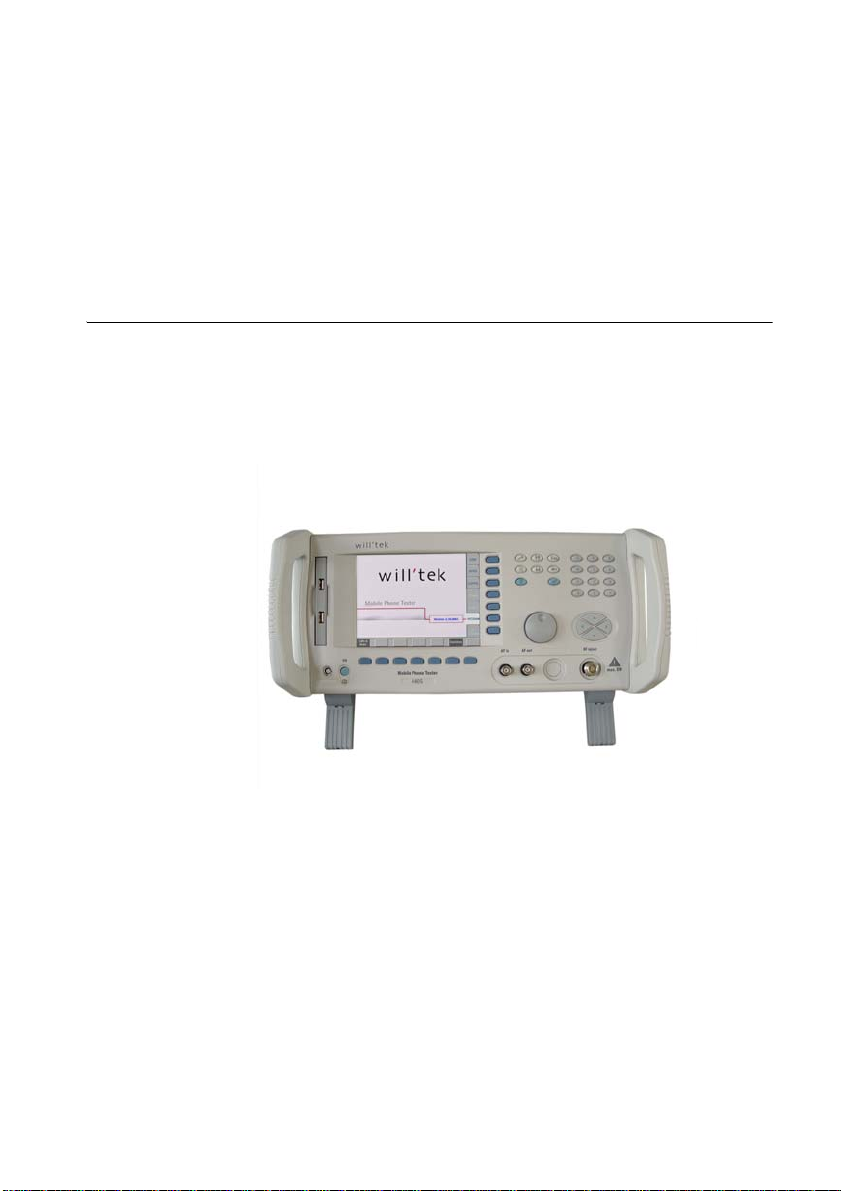
– Front panel with screen, softkeys, numerical, cursor and func-
tion keys; RF, audio, MS power and USB connectors
– Rear panel with connectors for mains power, synchronization,
printer, external monitor and control (USB, GPIB, RS-232)
4400 Mobile Phone Tester Series Serial number 0911xxx
7
Page 20

Chapter 2 4400 Overview
Physical description
8 4400 Mobile Phone Tester Series Serial number 0911xxx
Page 21

Chapter3 First-Time Use
This chapter describes how to set up the 4400. The topics discussed
in this chapter are as follows:
– “Standard delivery” on page 10
– “Power connector” on page 10
3
4400 Mobile Phone Tester Series Serial number 0911xxx 9
Page 22
Chapter 3 First-Time Use
Standard delivery
Standard delivery
The standard delivery includes:
– an instrument from the 4400 series (4403 or 4405)
– the manual pack including this getting started manual
– the calibration report
– a power cable
Options
If you ordered the 4400 together with options, these options are
already installed and ready for use when you switch on the
instrument.
Cardboard box
Keep the cardboard box for shipping the 4400 back to Willtek
e.g. for factory calibration or a model upgrade.
Power connector
Supply voltage
Before powering on, ensure that the operating voltage at your
location is permitted for 4400 (90 to 140 V
250 V
The 4400 adjusts itself automatically to the applied (permissible) line voltage.
Connect the supplied power cable to the line socket of the power
supply module (rear of 4400) and then to a power outlet with a
ground contact.
Switch on the 4400. The power switch is located on the rear of the
4400, above the socket of the power cable. The 4400 is in standby mode now.
10 4400 Mobile Phone Tester Series Serial number 0911xxx
AC
).
or 200 to
AC
Page 23

Chapter4 Operation
This chapter describes the functionality of the instrument. Topics
discussed in this chapter are as follows:
– “Powering the unit” on page 12
– “Navigating the user interface” on page 13
– “Using the online help” on page 15
– “Connecting the RF” on page 16
– “Connecting the audio parts” on page 18
– “Performing radio frequency (RF) measurements” on page 19
4
4400 Mobile Phone Tester Series Serial number 0911xxx 11
Page 24
Chapter 4 Operation
Powering the unit
Powering the unit
Ensure that the 4400 is switched on. The power switch is located
on the rear of the 4400, above the socket of the power cable. When
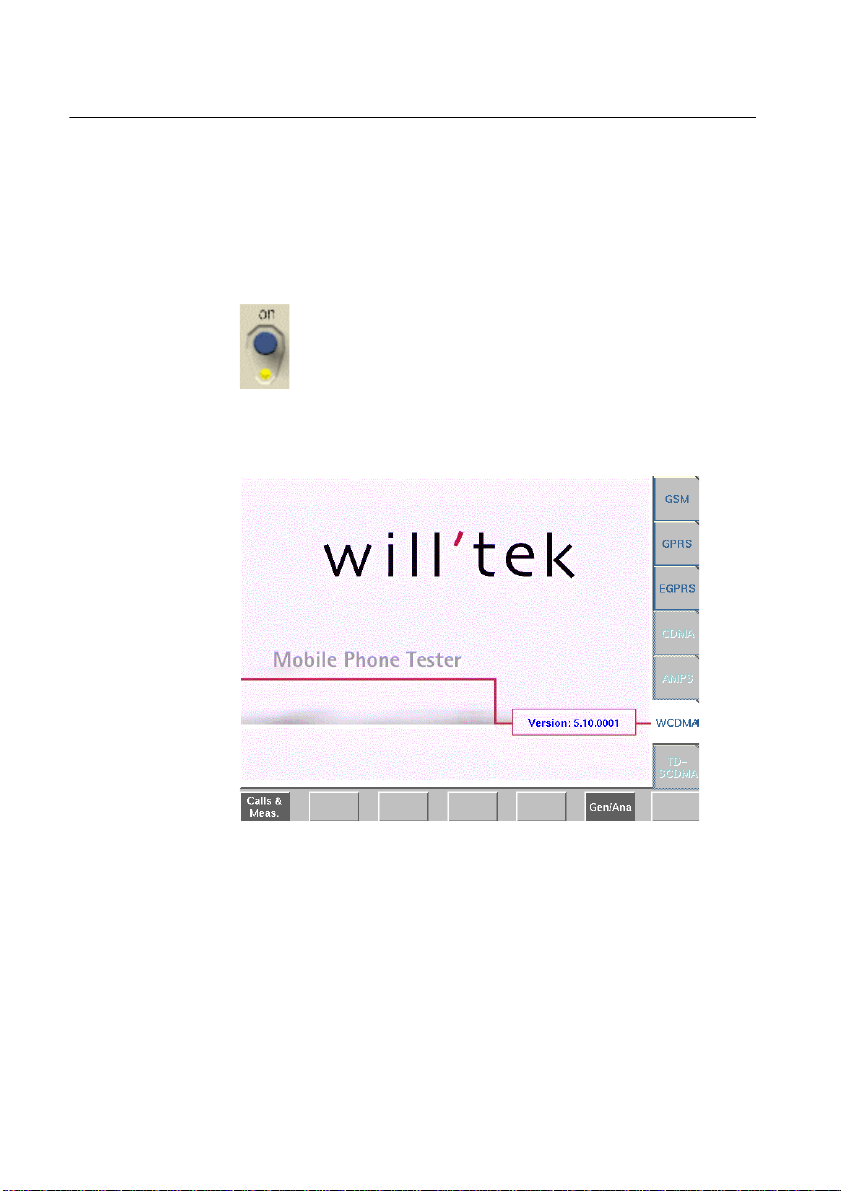
switched on, the 4400 is in stand-by mode; the light below the
stand-by button on the front panel lights yellow.
appears.
Push the stand-by button to put the 4400 into operation
mode. The stand-by light turns green.
The display of the 4400 shows the text “Loading...”.
After this startup sequence, the start or Welcome screen
In the Welcome screen, you can immediately start testing GSM
mobiles in call mode by pressing the Calls & Meas. softkey below
the TFT display.
Other sytems can be selected using the marker tabs on the right
side of the TFT display, provided the options are installed.
12 4400 Mobile Phone Tester Series Serial number 0911xxx
Page 25
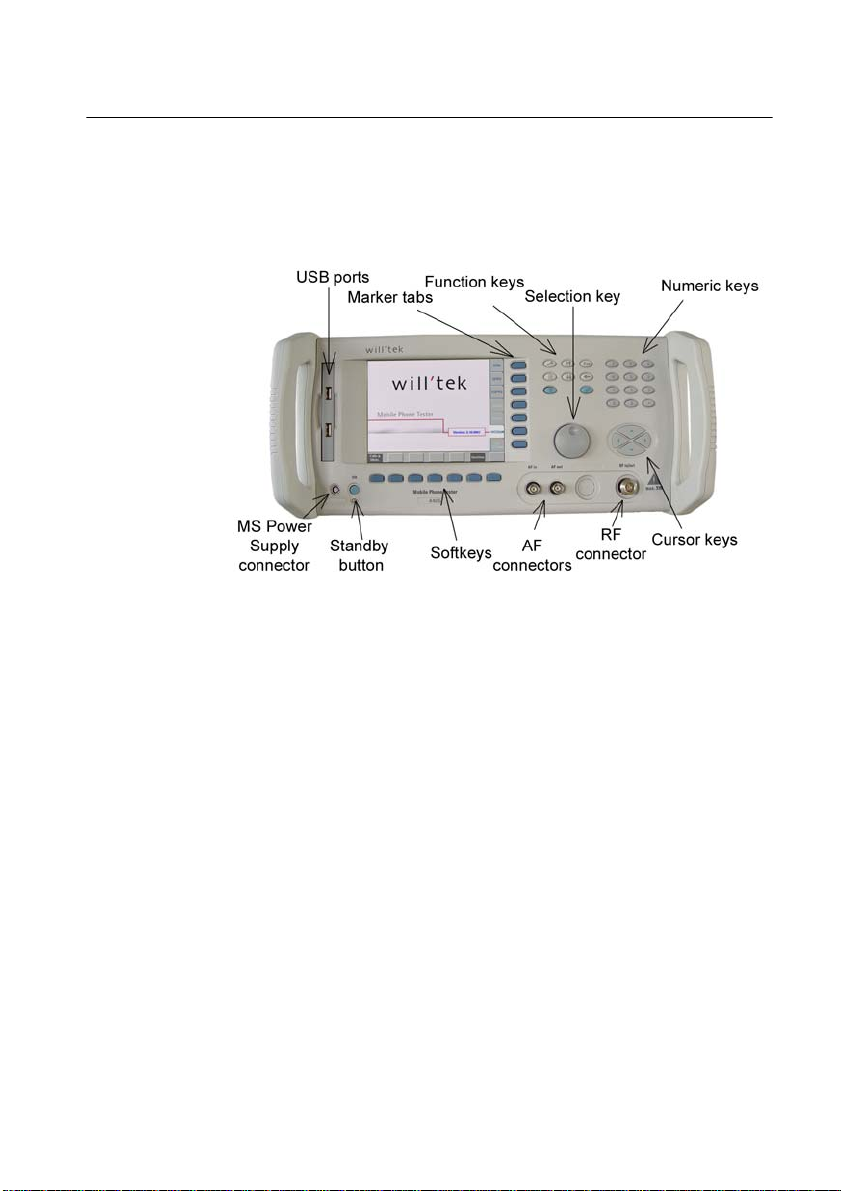
Navigating the user interface
This is a short description of the front panel of the 4400. You will
find a detailed description of the front panel in the online help.
Chapter 4 Operation
Navigating the user interface
Standby button
MS Power Supply
connector
Numeric keys
This button switches the 4400 from stand-by mode to operating
mode. The light below the button lights yellow in stand-by mode
and green in operating mode.
This connector can be used to feed the supply voltage to a mobile
under test. It requires the MS Power Supply Option to be installed.
Used for entering numerical values into entry fields.
4400 Mobile Phone Tester Series Serial number 0911xxx
13
Page 26
Chapter 4 Operation
Navigating the user interface
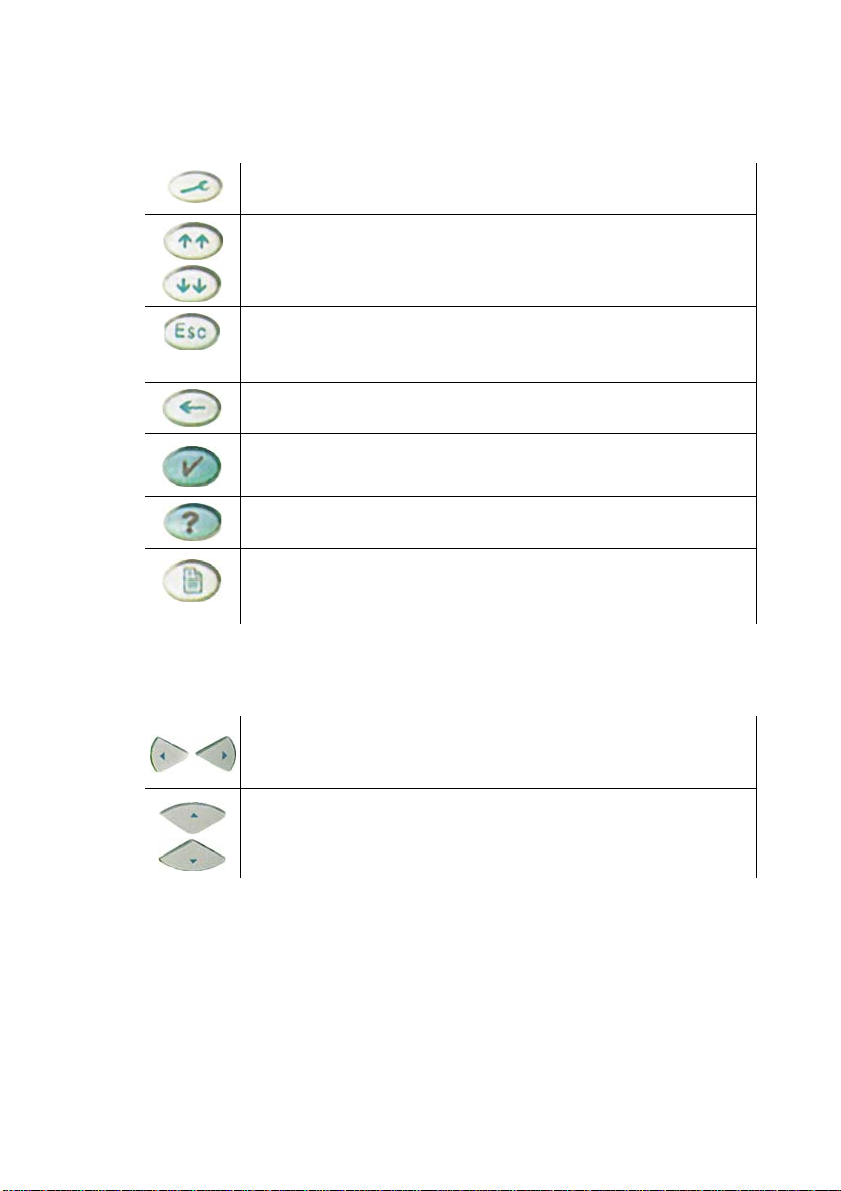
Function keys
Cursor keys
With these important keys you get general control of the 4400.
Shows the 4400 tools menu. Here you can start any 4400 tool
such as the spectrum analyzer, RAPID! etc.
Selects the first entry field of the previous/next group. In help
mode they load the previous/next page of a menu of the online
help.
This key brings you one menu level up. If this causes a parameter
change then you will be prompted to confirm or cancel the level
change.
Deletes the value left of the cursor in an entry field.
Accepts a newly entered value in an entry field.
Starts the online help. If the help key is used while in the online
help, the "Help on help" is shown.
Prints the screen contents on paper or stores it in a bmp file on
floppy disk, depending on the printer setting under Tools >
Config > I/O.
To get from one entry field to the previous or next one.
To change the value of a numeric field or the setting of a selection field (scroll variable).
Selection key
14 4400 Mobile Phone Tester Series Serial number 0911xxx
Turning the selection key changes values in entry fields or scrolls
through a page of the online help.
Page 27

Chapter 4 Operation
Using the online help
Softkeys
Marker tabs
RF socket (RF in/
The softkeys are the keys below the screen. Their individual functions depend on the state of the software and are described by the
text at the lower end of the screen.
From the Welcome screen, use the softkeys to select one of the
available test modes (e.g. Calls & Measurements), start the
different tests and navigate through the online help.
Press a marker tab to select the communication system (e.g. GSM
or GSM/GPRS) or to jump from one test menu to another. The function of the marker tab is shown on the TFT display next to the
buttons. It will change on every new entered level. When in the
online help, it lets you jump to another help topic.
Connect your mobile to this N-type socket.
out)
Using the online help
You can start the online help from every menu by pressing the
key.
The online help is the detailed operating manual of the 4400. It is
a fully linked hypertext manual.
4400 Mobile Phone Tester Series Serial number 0911xxx
15
Page 28
Chapter 4 Operation
Connecting the RF
Connecting the RF
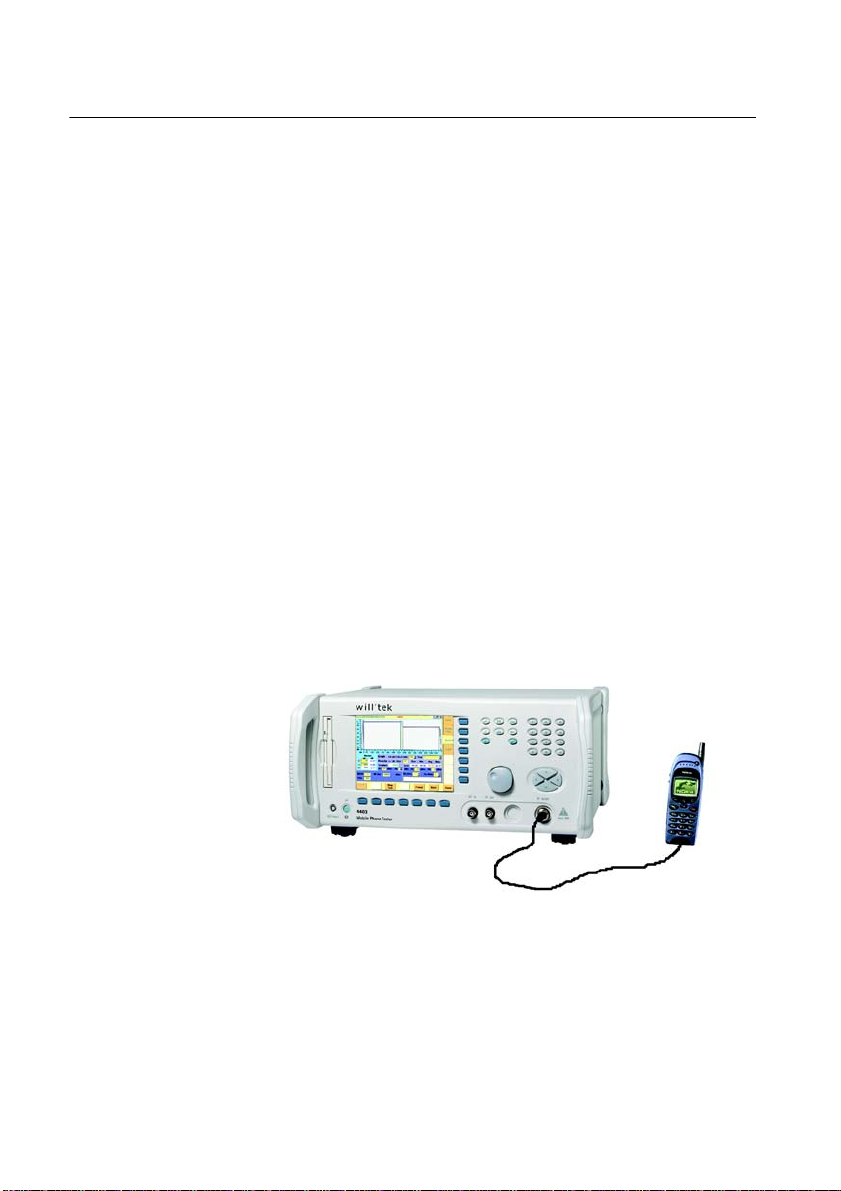
There are two ways of connecting a mobile to a tester:
– Cable connection
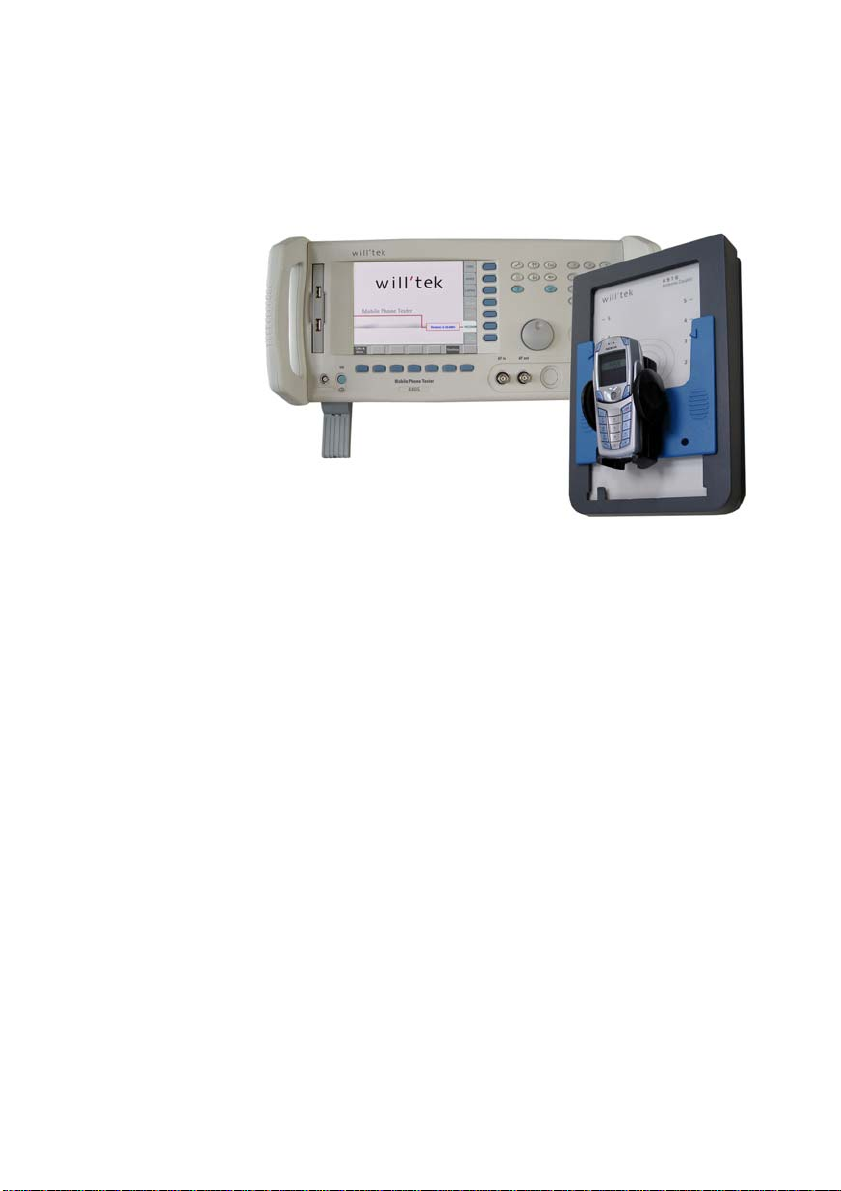
– Off-air connection
Both have their advantages and disadvantages.
Cable connection
With a cable connection, the RF socket of the tester is connected
to the RF socket of the mobile (typically an antenna connector, e.g.
for car-mount adapters). A shielded cable contributes to very accurate measurements.
However, if you need to test many different types of mobile phones,
you will need many different cables or adapters, which increases
test costs. Also, many new types of mobile phones do not have an
RF socket anymore.
Off-air
connection
16 4400 Mobile Phone Tester Series Serial number 0911xxx
With an off-air connection, the RF socket of the tester is connected
to Willtek’s Universal Antenna Coupler. This makes testing easy and
fast. The mobile transmits via the antenna. No further test adapters
are needed.
Page 29
Chapter 4 Operation
Connecting the RF
The coupling loss depends on factors such as orientation, distance
and frequency. To a certain extent, this can be compensated with
a coupling loss table.
4400 Mobile Phone Tester Series Serial number 0911xxx
17
Page 30
Chapter 4 Operation
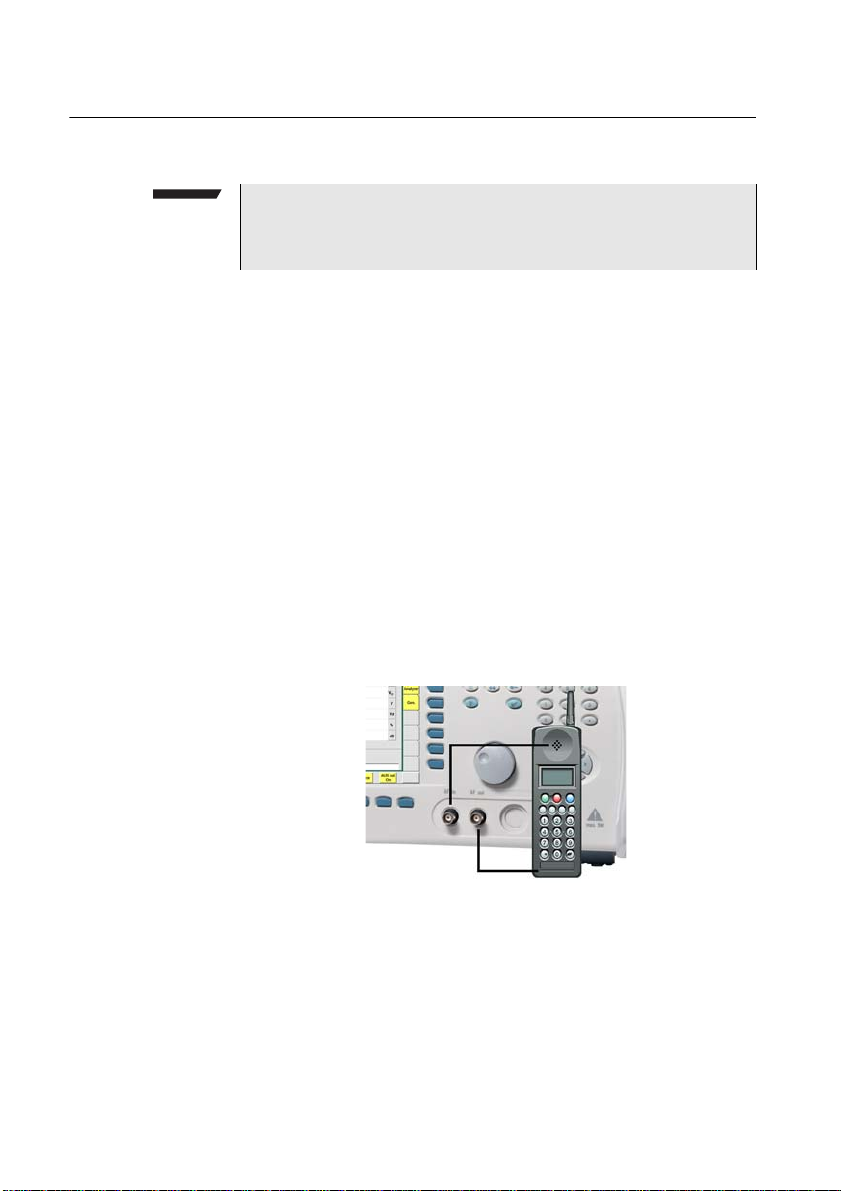
Connecting the audio parts
Connecting the audio parts
Requires Audio Option
Any audio tests with the Willtek 4400 require the Audio Option
to be installed.
The audio connection is used for testing the mobile's audio quality.
The signal follows the path shown below: the analog audio signal
from the mobile phone is fed to the AF in connector of the 4400;
the analog audio signal from the AF out connector of the 4400 can
be fed to the microphone input of the mobile phone. For best
performance you will want to use shielded coax cables.
One example of an audio signal path is a sine wave generated by
the 4400 which is fed to the headset connector of the phone,
passes through both the encoder and decoder of the mobile and
leaves the earphone.
The speech quality can be evaluated by comparing the two signals,
either by ear, or in a more quantitative approach by the audio
analyzer.
18 4400 Mobile Phone Tester Series Serial number 0911xxx
Page 31

Performing radio frequency (RF) measurements
Performing radio frequency (RF) measurements
RF measurements can be divided into measurements on the transmitter and on the receiver.
Chapter 4 Operation
Transmitter
measurements
Receiver
measurements
A transmitter test is carried out to evaluate the performance of the
mobile’s transmitter. These measurements can be divided into two
main groups:
– Power measurements: Here the focus is on transmit power
levels and level changes. In GSM, for example, the peak power
measurement and the power/time template check are
common examples.
– Modulation quality checks: In these measurements, the focus
lies on the modulator. In GSM, phase and frequency error are
measured.
Receiver measurements are also referred to as RX tests. In order to
transfer speech and data correctly, the received bits must be
detected properly. The common method in radio communication
systems to test the receiver performance is the bit error rate
measurement, often based on a signal loopback.
An additional method is to look at the mobile’s internally generated evaluation of its received signal strength and quality. In many
systems, the mobile reports these data to the network and hence
can be displayed by the 4400 when it simulates a network to the
mobile phone.
4400 Mobile Phone Tester Series Serial number 0911xxx
19
Page 32

Appendix A Room for your notes
Appendix A Room for your
notes
20 4400 Mobile Phone Tester Series Serial number 0911xxx
Page 33

Appendix A Room for your notes
4400 Mobile Phone Tester Series Serial number 0911xxx
21
Page 34

Appendix A Room for your notes
22 4400 Mobile Phone Tester Series Serial number 0911xxx
Page 35

Publication History
Publication History
Revision Changes
9907-263-B Initial revision.
0005-100-A Power LED became yellow.
0101-100-B Formal changes.
0112-110-A MS Power Supply connector added. New Welcome screen.
0201-110-A Blank page 18.
0208-120-A New company name and layout.
0302-130-A New declaration of EU conformity.
0603-090-A New interfaces.
Willtek and its logo are trademarks of Willtek Communications GmbH. All other trademarks and registered trademarks are the property of their respective owners.
Specifications, terms and conditions are subject to change without notice.
© Copyright 2006 Willtek Communications GmbH. All rights reserved.
No part of this manual may be reproduced or transmitted in any form or by any means
(printing, photocopying or any other method) without the express written permission of
Willtek Communications GmbH.
4400 Mobile Phone Tester Series Serial number 0911xxx
23
Page 36

Manual ident no.
M 295 011
Manual version
0603-090-A
English
Willtek Communications GmbH
85737 Ismaning
Germany
Tel: +49 (0) 89 996 41-0
Fax: +49 (0) 89 996 41-440
[email protected]
Willtek Communications UK
Cheadle Hulme
United Kingdom
Tel: +44 (0) 161 486 3353
Fax: +44 (0) 161 486 3354
[email protected]
Willtek Communications SARL
Roissy
France
Tel: +33 (0) 1 72 02 30 30
Fax: +33 (0) 1 49 38 01 06
[email protected]
Willtek Communications Inc.
Parsippany
USA
Tel: +1 973 386 9696
Fax: +1 973 386 9191
[email protected]
[email protected]
Willtek Communications
Singapore
Asia Pacific
Tel: +65 943 63 766
[email protected]
Willtek Communications Ltd.
Shanghai
China
Tel: +86 21 5835 8039
Fax: +86 21 5835 5238
[email protected]
© Copyright 2006 Willtek
Communications GmbH. All
rights reserved.
Willtek Communications, Willtek
and its logo are trademarks of
Willtek Communications GmbH.
All other trademarks and registered trademarks are the property of their respective owners.
Note: Specifications, terms and
conditions are subject to change
without prior notice.
 Loading...