

Page 1
(Antibacterial)
WFS1274C*
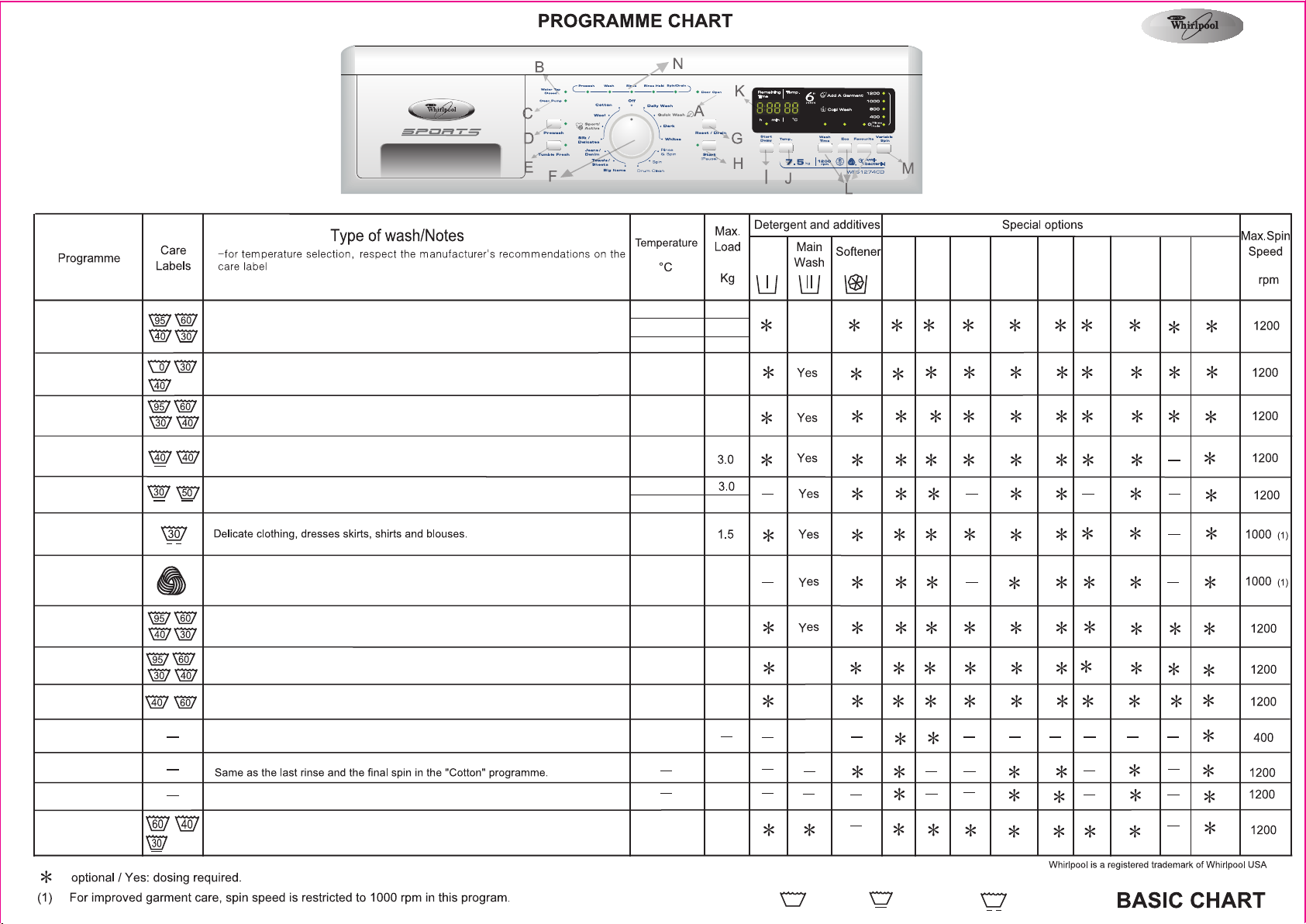
This washing machine is equipped with
automatic safety functions which detect
and diagnose at an early stage and react
appropriately, e.g.:
A. “Door Open” indication
B. “Water Tap Closed” indication
C. “Clean Pump” indication
D. “Prewash” button
E. “ Tumble Fresh ” button
F. Programme selector
G.“Reset/Drain” button
H. “Start/Pause” button
I. “Start Delay” button
J. “Temp.” button – Temperature adjustment
K. Time and Temperature display
L. “Wash Time” - “ECO”- “Favourite” option buttons
M. “Variable Spin” selector
N. Programme sequence indicator
Prewash Wash Rinse Rinse Hold Spin/Drain
● ● ● ● ●
Cotton/
(Antibacterial)
D ark
Whites
Daily Wash
Quick Wash
Silk/Delicates
Wool
Towels/Sheets
Big Items
Jeans/Denim
Drum Clean
Rinse & Spin
Spin
Sport/Active
Pre
wash
Normally to heavily soiled bed linen, table linen and underwear, towels, shirts etc.
made of cotton and linen. At a temperature of 95
bacteria, ensuring sanitization of your laundry. The bacteria removal efficiency has
been tested following a similar methodology to the NF EN 13697 standard of Nov.
2001.
2
Lower temperature to ensure dark fabrics do not fade in colour or mix
Removes easily visible stains on white garments
Slightly to normally soiled textiles made of cotton and/or synthetics.
Refresh briefly worn outer clothing made of cotton, artifical fibres and blends with
cotton.
°C, this programme eliminates
70-95
60
20-50
20 - 40
20 - 95
20 - 60
20 - 40
50
7.0
7.5
7.0
7.0
7.0
7.0
Yes
Start
Delay
Temp.
Pre
wash
Tumble
fresh
Rinse
Hold
Wash
Time
(2)
(2)
Variable
Spin
ECO
F avourite
20 - 30
Only woolens, labelled with the Woolmark and identified as machine washable. This
programme (40°C
washable wool.
If you select “Rinse Hold” do not leave items to soak for too long.
Washes towels and sheets without too much wrinkling and optimum temperature
and spin speed
Blankets made of synthetic fibres, bed covers filled with polyester or other artificial
fibres, sleeping bags, bath mats and similar items.
Normally soiled cotton jeans wear and garments made of robust jeanslike material
such as trousers and jackets.
In this programme, the drum can be cleaned, when required. Detergent quantity
should be approximately a quarter of that used for a normal load. (Recommended
once per month.
) is tested and approved by the Woolmark Corporation for machine
20 - 40
20 - 60
20 - 95
20 - 60
20 - 95
1.0
7.0
7.0
7 .0
Yes
Yes
Yes
(2)
7.5
In this programme spin speed and spin time can be selected.
Normally soiled and sweaty sportswear made of cotton, synthetics, jersey or
microfibres. This programme includes a prewash cycle - you can add detergent also
to the prewash chamber. Do not add any softner.
20 - 60
7.5
3.5
(2) Option available for use under 70 °C.
Cotton
Synthetics
Delicates
Page 2
Daily Wash
Quick Wash
Quick Wash
Cotton antibacterial
Cotton antibacterial Eco **
Cotton (Antibacterial) ***
Dark
Whites
Big items
Towels/Sheets
Jeans/Denim
Silk/Delicates
Sports/Active
Wool
Rinse & Spin
Spin
Drum Clean
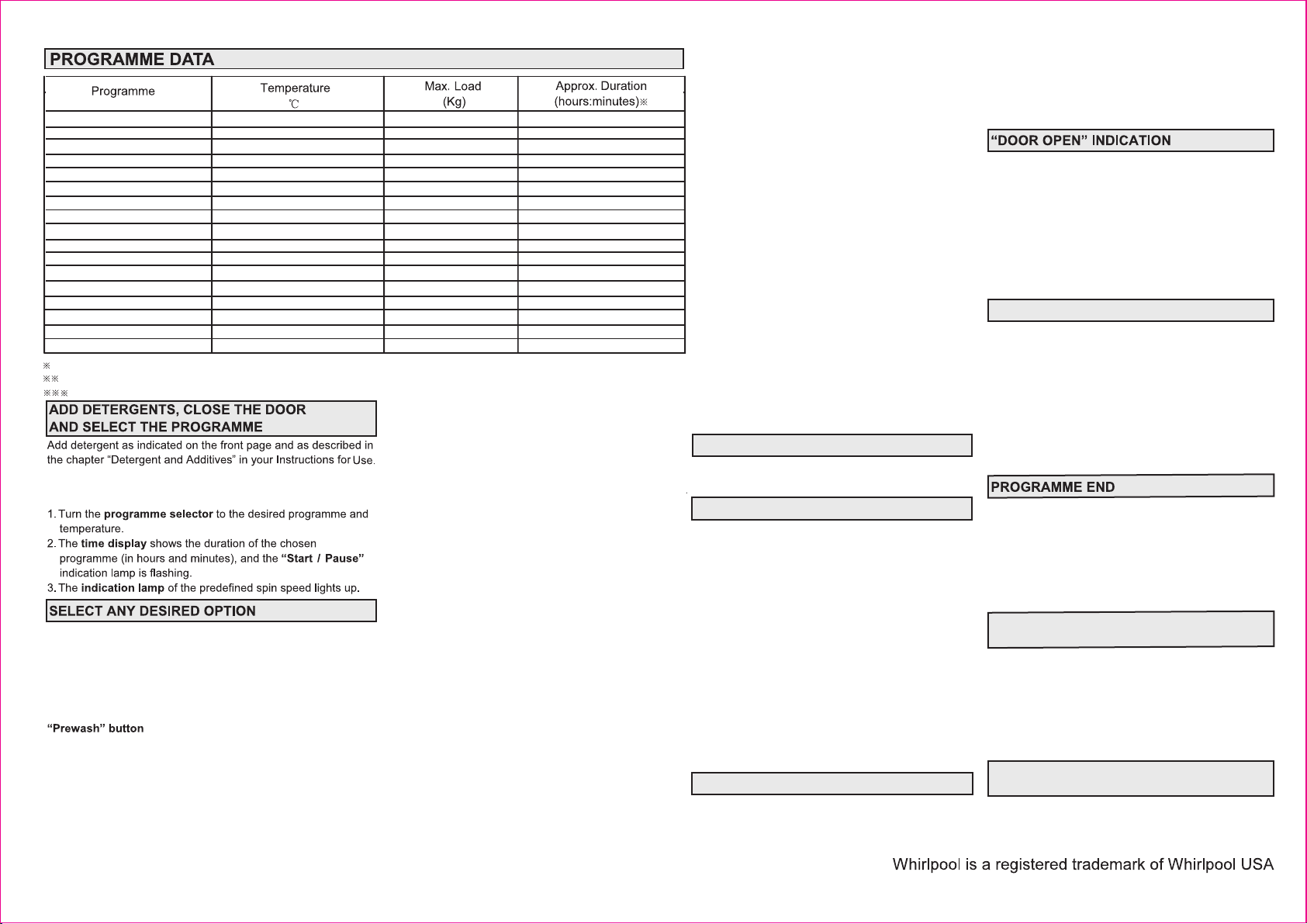
The actual running time can deviate from the values in the table, because it takes into account the operating conditions applicable at that time.
Reference programme for Energy and Water Labelling, according to the Australian Standards, AS/NZS 2040.1 and AS/NZS 2040.2.
To reduce water temperature, some cold water is added at the end of the main wash cycle, before the pump drains the water out.
40
30
50
60
60
95
40
60
40
60
40
30
40
30
—
—
60
3.0
3.0
7.0
7.5
7.5
7.0
7.0
7.0
7.0
7.0
7.0
1.5
3.5
1.0
7.5
7.5
—
0:57
0:15
0:59
3:25
3:45
2:15
1:59
3:25
1:59
3:25
1:59
0:40
1:32
0:42
0:30
0:16
1:10
Appliance offers possibility to save one setting for each
program so that it can be used again by just pushung one
botton.
• S elect the desired programme, temperature, spin speed
The detergent can also be added as a solution dissolved in
warm water. (Always use high efficiency, low foam detergent for
front load washing machine.)
and options, push and hold the “Favourite” button for
at least 3 second. The lamp next to “Favourite” shortly
blinks and then lights up - the programme setting is saved
Next time you want to use your individual programme
setting, select the programme, push the “Favourite”
button and start by pushing “Start(Pause)”.
If you want to replace the saved programme setting by
another one, proceed as already descried above.
“Wash Time” button:
• The wash time can be adjusted by pressing the button.
Each press of the button either increases or decreases
the time by approximately 10 minutes, depending on the
Press the selected option button once, the current value is
displayed on the display. By pressing the button repeatedly, the
display will display the values in sequence. By pressing the
button of the desired option, the respective indicator lights up.
When the combination of programme and additional options is
not possible, the indication lights switch off automatically.
Unsuitable combinations of options are deselected automatically.
• Only for heavily soiled loads (for example, sand, granular di rt,
etc.). Initial set time for the “Prewash” is about 18 minutes,
during which the drum will rotate. The “Soak” time, which will
commence after the “Prewash” cycle, can be increased by 10
minutes for each additional press of the button. Press the
“Prewash” button to set the desired “Soak” time. The
appliance will complete the “Prewash” cycle, lasting about 18
minutes and then keep the laundry soaked, up to the selected
time. The water is then drained out.
• Do not use liquid detergent for the main wash when activating
“Favourite” button:
If there is a programme setting which you use frequently, the
Wash Programme selected.
“ECO” button:
• W ith a prolonged washing duration and lower washing
temperature, a desirable washing performance can be
obtained and reduces energy consumption.
“Variable Spin” button:
• Every programme has a pre-defined max. spin speed.
• Press the button to set another spin speed.
• If spin speed “0/Rinse/Hold” is selected, The laundry
remains in the last rinse water without progressing to the
final spin cycle, to avoid creasing of the laundry.
• Do not leave the laundry to soak for too long in the
“Rinse Hold” state, to prevent colours from being
affected.
• The programme stops at “Rinse Hold” when the
“Rinse Hold” light in the programme sequence
indication is on. Also, the indication lamp next to the
“Start / Pause” button flashes.
• To terminate “Rinse Hold” , by spinning the laundry,
press the “Variable Spin” button to select the desired
spin speed and then press the “Start / Pause” button.
The programme will then terminate automatically after
the spin cycle.
• To terminate “Rinse Hold”
any spinning, press the “Start / Pause”
“Tumble fresh”
• Select this option if you cannot unload the laundry
soon after programme end, or if you tend to forget the
laundry in your washing machine; it will help to keep
your laundry fresh.
• The washing machine will start to tumble the laundry
periodically about half an hour after programme end.
• The light of the “Tumble fresh” button will blink while
this function is active, and the display will show “0:01”
with blinking colon.
• The periodic tumbling will last up to approximately
12 hours after the end of your wash programme, and
you can stop it at any time by pressing the “Tumble
fresh” or “Reset” button; it will last a while until
you can open the door.
• After the “tumble fresh” period has run out, the
display indicates “End”.
and drain the water, without
button.
“Add garment”
If you want to add garments in the process of the
washing, please press "Start/Pause" button
• If can add garment, the washing time in the big
screen will wink , waiting for the door open indicator
lights, then open the door and add the garment.
• If the washing time in the big screen doesn't wink, it
means you can't add garment in the process of the
washing, it may be caused by the water temperature
over 40°C or over the time for adding garment.
TEMPERATURE CONTROL
On selecting a programme, a predefined temperature
is displayed. Press the button to set another
temperature.
START DELAY
The “Start Delay” function allows the machine to be
run at the consumer’s convenience, for example at
night when electricity is cheaper.
• Select the programme, temperature and the required options.
• Press the “Start Delay” button to select one of the
delay time steps between 0:10 and 23:00 hours.
• Press the “Start / Pause” button.
• The LED display above the “Start Delay” button,
displays the delay time and the countdown begins.
• The time delay indication disappears when the
programme starts and is replaced by the remaining
programme time.
• To change the time delay, once the “Start / Pause”
button has been pressed, press the “Start / Pause”
button and then press the “Start Delay” button to
select the required time delay.
To Cancel “Start Delay”:
To cancel the Start Delay, do one of the following:
• Turn the programme selector to another position, or;
• Press the “Start / Pause” button, or;
• Press the “Reset” button for at least 3 seconds, the
“Start Delay” time disappears from the time display.
PROGRAMME START
Open the tap and press the “Start / Pause” button.
The indication lamp next to the “Start / Pause” button
lights up. The programme sequence indicator shows
the current programme phase, from left to right, as
Prewash, Wash, Rinse, Rinse Hold and Spin / Drain.
The time display shows the remaining programme
time. Due to variations in load and the temperature of
the inlet water, the remaining time is re-calculated in
certain programme phases. When this occurs, the
remaining programme time is replaced by an
animation.
Before the start and after the end of a programme, the
“Door Open” indication lamp, lights to show that the
door can be opened. While a wash programme is
running, the door remains locked and must on no
account be forced open. In case, there is an urgent
need to open it during a running programme, press the
“Start / Pause” button and then press the “Reset”
button.
Refer to “
PROGRAMME BEFORE THE END
RED FAILURE INDICATIONS
“Water Tap Closed”:
If the appliance has insufficient or no water supply, the
“Water Tap Closed” indication will light up. Open the
water tap. If the indication still lights up, refer to the
“Trouble Shooting Guide” in the Instructions for Use.
“Clean Pump”:
If the waste water is not being pumped out, the “Clean
Pump” indication will light up. Check whether the drain
hose or the filter requires to be cleaned. In the latter
case, refer to, “Removing the Filter” in the Instructions
for Use.
• The display shows “End” and the “Door Open” indication
lights up.
• All the lights of the programme sequence indicators
are off.
1. Turn the programme selector to the “Off / 0” position.
2. Close the water tap.
3. Open the door and unload the machine.
4. Leave the door ajar, to allow the drum to dry.
CHANGE PROGRAMME AND / OR
OPTIONS AFTER PROGRAMME START
1. Press the “Start / Pause” button to pause the
programme. The indication light flashes.
2. Select the new programme, the temperature, options
and the required spin speed.
3. Press the “Start / Pause” button again. The new
programme continues at the same position, where
the previous programme was interrupted. Do not add
detergent again.
CANCEL / RESET A RUNNING
PROGRAMME BEFORE THE END
The “Reset” button cancels a set programme before
the end of the cycle. To reset, press the “Reset” button
for at least 3 seconds. Water from the machine is then
drained out, before the door can be opened.
CANCEL / RESET A RUNNING
”.
W10398024A
 Loading...