

Page 1
Use And Care
A Note To You
Important Safety
Instnictions
3
Parts And Features
Before Using Your
Refiigerator
Using Your
Refiigerator
Caring For Your
Refiigerator
Food Storage Guide 20
If You Need
Assistance
Or Service 22
Warranty
1-800-253-1301
Call us with questions or comments.
17
24
4
5
7
NO-FROST REFRIGERATOR-FREEZER
B
MODELS ED20PK ED22PK
Page 2
A NOTE TO YOU
A Note To You
Thank you for buying a Whirlpool* appliance.
You have purchased a quality, world-class home appliance. Years of engineering experience
went into its manufacturing. To ensure that you enjoy many years of trouble-free operation,
we developed this Use and Care Guide. It is full of valuable infomnation on how to operate
and maintain your appliance properly and safely. Please read it carefully. Also, please com
plete and mail the Ownership Registration Card provided with your appliance. This will help
us notify you about any new information on your appliance.
Your safety Is Important to us.
This guide contains safety symbols and statements. Please pay special attention to these
symbols and follow any instructions given. Here is a brief explanation of the use of each
symbol.
Awarning
This symbol will help alert you to such
dangers as personal injury, burns, fire
and electrical shock.
This symbol will help you avoid actions
which could cause product damage
(scratches, dents, etc.) and damage to
your personal property.
Acaution
Our Consumer Assistance Center number, 1-800-253-1301,
Is toll-free, 24 hours a day.
If you ever have a question concerning your appliance’s operation, or if you need service, first
see “If You Need Assistance Or Service” on page 22. If you need further help, feel free to call
our Consumer Assistance Center. When calling, you will need to know your appliance's
complete model number and serial number. You can find this information on the model and
serial number label (see diagram on page 4). For your convenience, we have included a
handy place below for you to record these numbers, the purchase date from the sales slip
and your dealer’s name and telephone number. Keep this book and the sales slip together in
a safe place for future reference.
Model Number
Serial Number
Purchase Date
Dealer Name.
Dealer Phone
Page 3

IMPORTANT SAFETY INSTRUCTIONS
Important Safety Instructions
AWARNING
• Read all instructions before using the
refrigerator.
• Child entrapment and suffocation are
not problems of the past. Junked or
abandoned refrigerators are still danger
ous ... even if they will “just sit in the
garage a few days.”
If you are getting rid of your old refrig
erator, do it safely.
• Never allow children to operate, play
with, or crawl inside the refrigerator.
To reduce the risk of fire, electrical shock, or injury when
using your refrigerator, follow these basic precautions:
- SAVE THESE INSTRUCTIONS -
Help us help you
Please:
• Install and level the refrigerator on a floor
that will hold the weight and in an area
suitable for its size and use.
• Do not install the refrigerator near an oven,
radiator or other heat source.
• Do not use the refrigerator in an area
where the room temperature will fall below
SS^Fiia^C).
• Keep the refrigerator out of the weather.
• Connect the refrigerator only to the proper
kind of outlet, with the correct electrical
supply and grounding.
• Do not load the refrigerator with food
before it has time to get properly cold.
• Use the refrigerator only for the uses
described in this manual.
• Properly maintain the refrigerator.
• Be sure the refrigerator is not used by
anyone unable to operate it properly.
• Never clean refrigerator parts with
flammable fluids. The fumes can create a
fire hazard or explosion.
• FOR YOUR SAFETY •
DO NOT STORE OR USE GASOLINE OR
OTHER FLAMMABLE VAPORS AND
LIOUIDS IN THE VICINITY OF THIS OR
ANY OTHER APPLIANCE. THE FUMES
CAN CREATE A FIRE HAZARD OR
EXPLOSION.
Page 4
PARTS AND FEATURES
Parts And Features
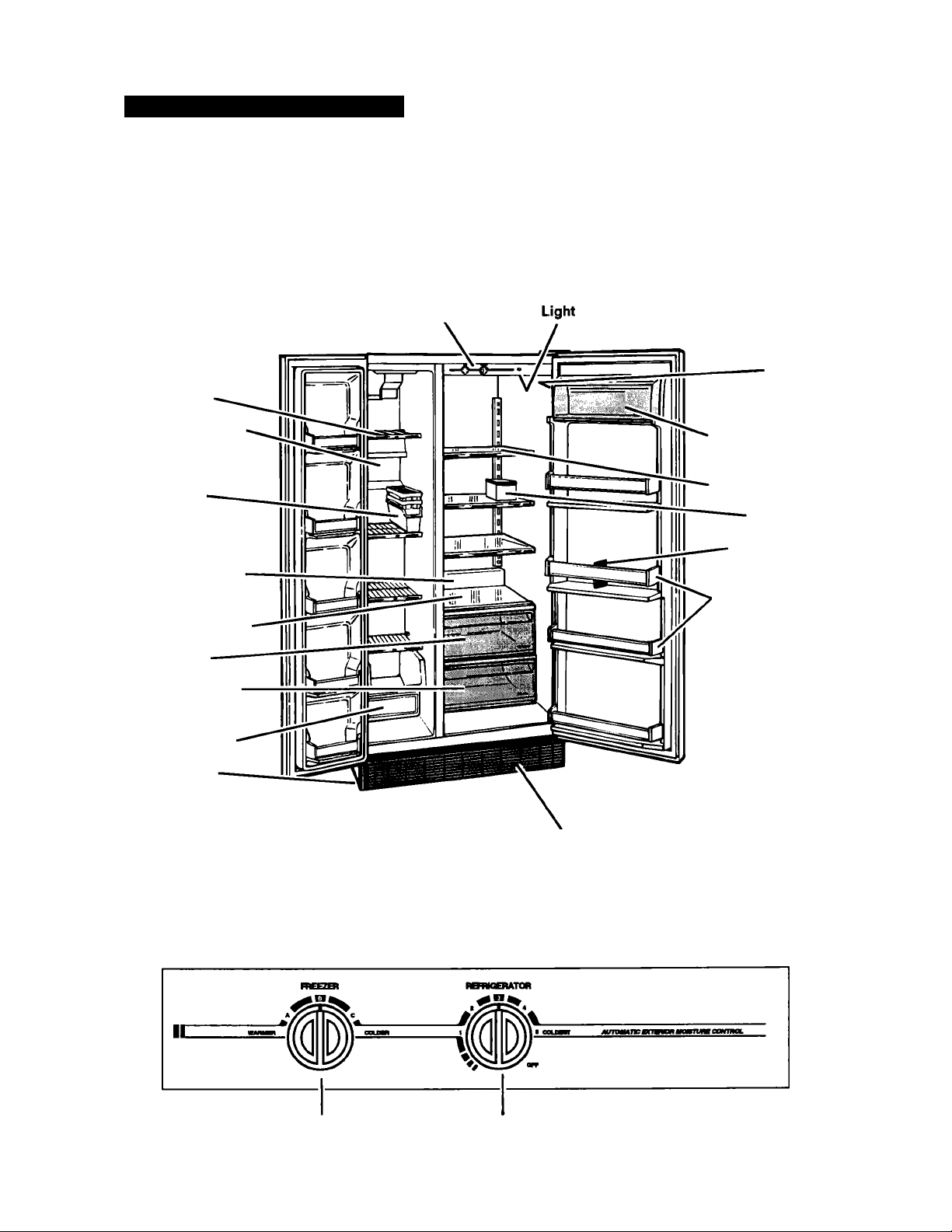
This section contains captioned illustrations. Use them to become familiar with where all parts
and features are located and what they look like.
Controi panei
Model and
Removable
freezer
shelves
Freezer light
serial number
(on side wall)
compartment
label
Utility
Ice cube
trays and
ice bin
Crisper light
(ED22PK)
Crisper cover
Crisper
Meat drawer
Freezer bin
Leveling
roilers
(behind base
grilie)
Adjustable
glass shelves
Egg bin
Shelf glide
Gallon-deep
door shelves
(Adjustable
door bins on
ED22PK)
Tail-bottle
retainer
(not shown-
on ED22PK)
Snack bin
(not shown-
on ED22PK)
Base grille
Model ED20PK shown
Control panel
Freezer control
Refrigerator control
Page 5
BEFORE USING YOUR REFRIGERATOR
Before Using Your
Refrigerator
In This Section
Cleaning it
Plugging it in.........................
It is important to prepare your refrigerator for use. This section tells you how to clean it,
connect it to a power source, install it and level it.
.............................
.................
.................
Page
5 Installing it properly
5 Leveling it
..............................
.............
.................
.................
Cleaning it
Removing packaging materials
Remove tape and any inside labels (except
the rtxxJel and serial number label) before
using the refrigerator.
To remove any remaining giue:
• Rub briskly with thumb to make a ball, then
remove.
OR
• Soak area with liquid hand-dishwashing
detergent before removing glue as
described above. Do not use sharp
instruments, rubbing alcohol, flammable
fluids or abrasive cleaners. These can
damage the material. See “Important
Safety Instructions” on page 3.
NOTE: Do not remove any permanent
instruction labels inside your refrigerator. Do
not remove the Tech Sheet fastened under
the refrigerator at the front.
Cleaning it before use
After removing all packaging materials,
clean your refrigerator before using it, if
necessary. See cleaning instructions on
pages 17-18.
Page
6
6
Plugging it in
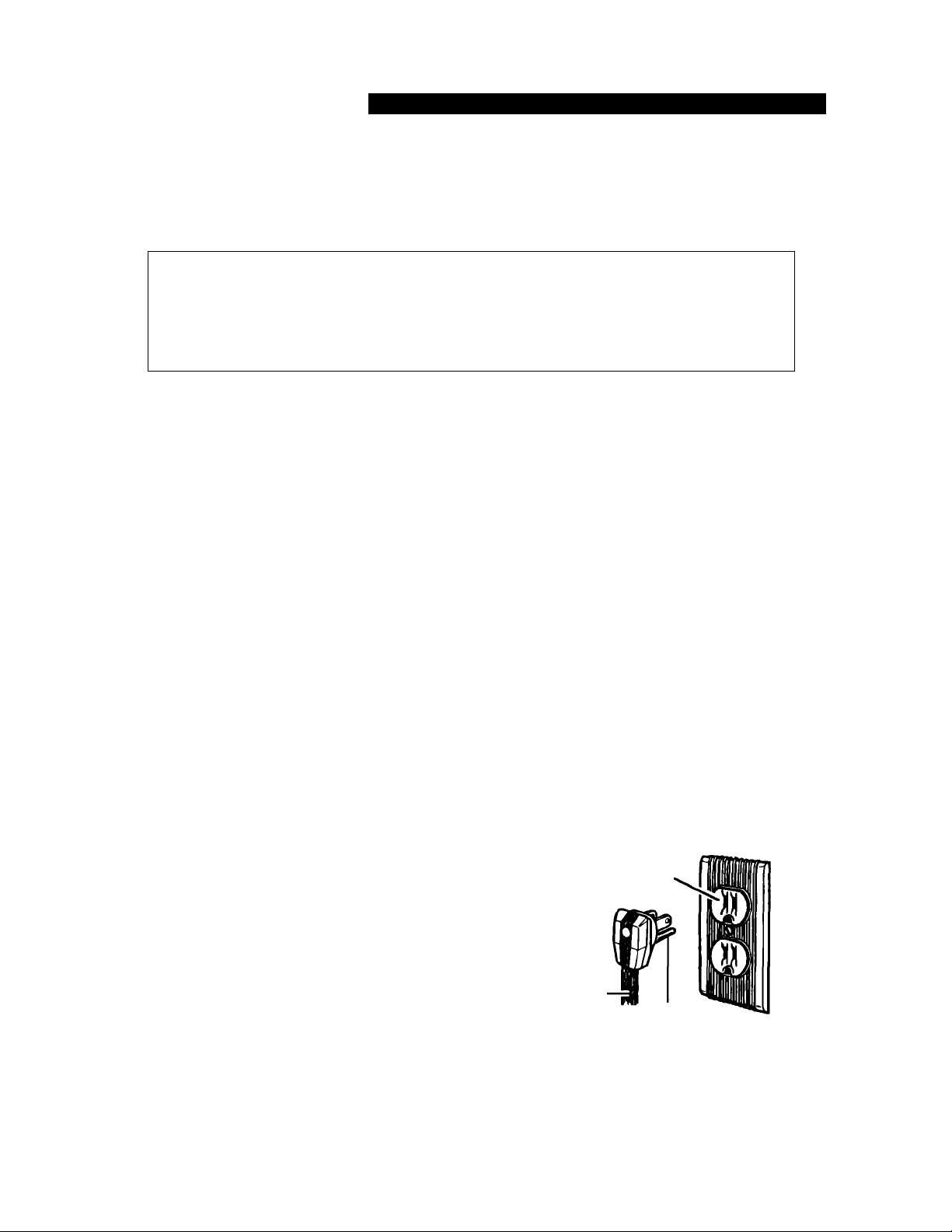
Recommended Grounding Method
A 115 Volt, 60 Hz., AC only 15 or 20 ampere
fused and properly grounded electrical
supply is required. It is recommended that a
separate circuit sen/ing only this appliance
be provided. Use a receptacle which cannot
be turned off with a switch or pull chain. Do
not use an extension cord.
See Electrical Requirements and Ground
ing Instructions Sheet in your Literature
Package.
3-prong grounding
type wall receptacle
Refrigerator
power cord
3-prong
grounding
plug
Page 6
BEFORE USING YOUR REFRIGERATOR
Installing it properly
1. Allow Vi inch (1.25 cm) space on each
side and at the top of the refrigerator for
ease of installation.
2. If the refrigerator is to be against a wall,
you might want to leave extra space on
the hinge side closest to the wall so the
door can be opened wider.
3. The refrigerator can be flush against the
wall.
n
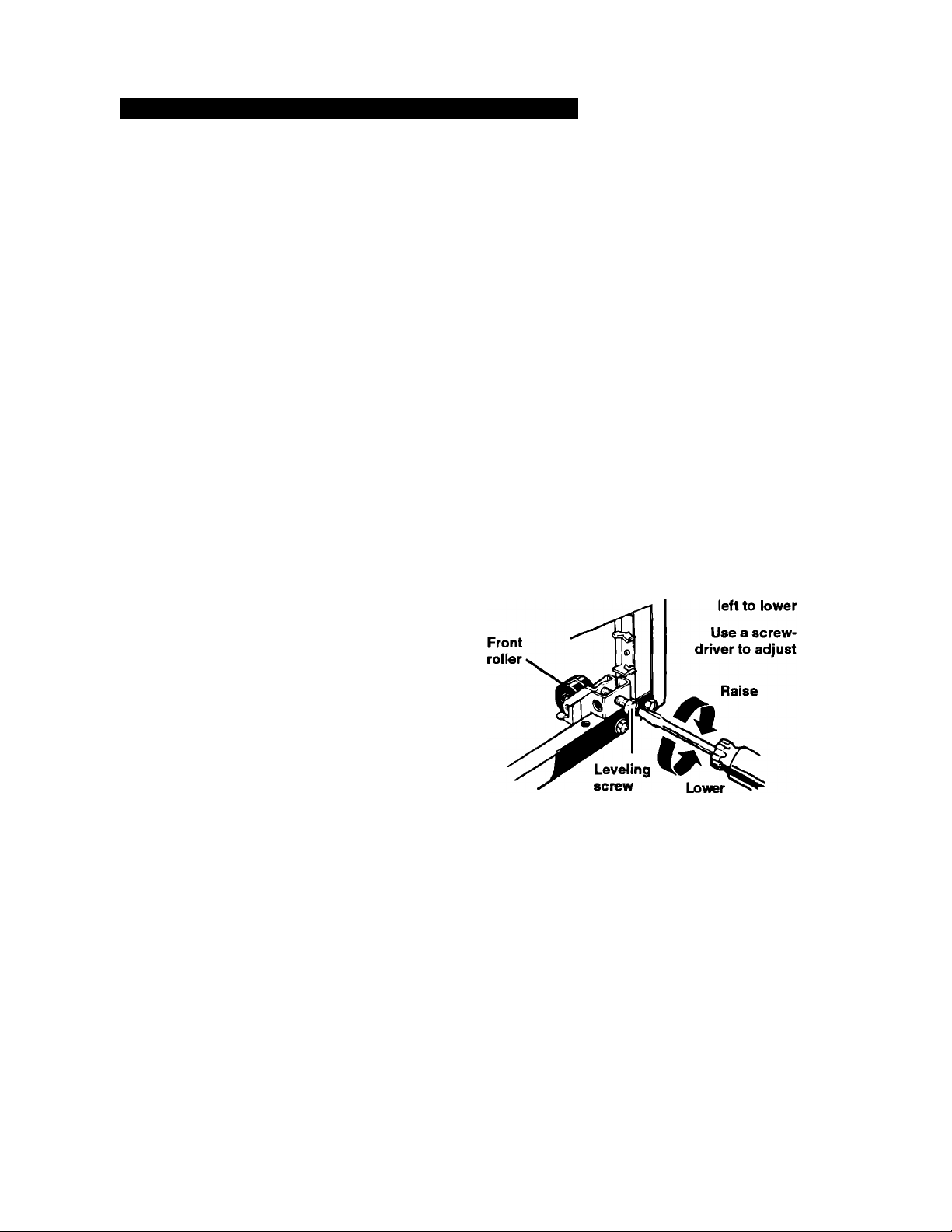
Leveling it
Your refrigerator has 2 front leveling
screws-one on the right and one on the left.
To adjust one or both of these, follow the
directions below.
1. Remove base grille. (See page 14.)
2. To raise front, turn screw clockwise.
3. To lower front, turn screw counterclock
wise.
4. Check with level.
5. Replace base grille. (See page 14.)
Right to raise;
Page 7
USING YOUR REFRIGERATOR
Using Your Refrigerator
In This Section
Setting the controls
Changing the control settings
Adjusting the door bins......................9
Adjusting the bin/shelf glide
Removing the tail-bottle retainer.. ....9
Adjusting the refrigerator shelves ..10
Using the egg bin
Removing the crisper and
crisper cover....................................
Removing the meat drawer
and cover
Removing the snack bin...................12
To obtain the best possible results from your refrigerator, it is important that you operate it
property. This section tells you how to set the controls, remove and adjust some of the fea
tures in your refrigerator, and how to save energy.
.........................................
........................
............................
.......
..........
Page
....7
....8
....9
..10
..11
..11
Removing the freezer shelves..
Removing the freezer bin
Removing the freezer
door shelves
Using the optional
automatic ice maker
Removing the base grille
Changing the light bulbs
Understanding the sounds
you may hear
Saving energy.............................
...............................
..............................
..........
..................
..........
...........
Page
.......
12
.......12
.......
13
.......
13
.......14
......
15
.......16
.......
16
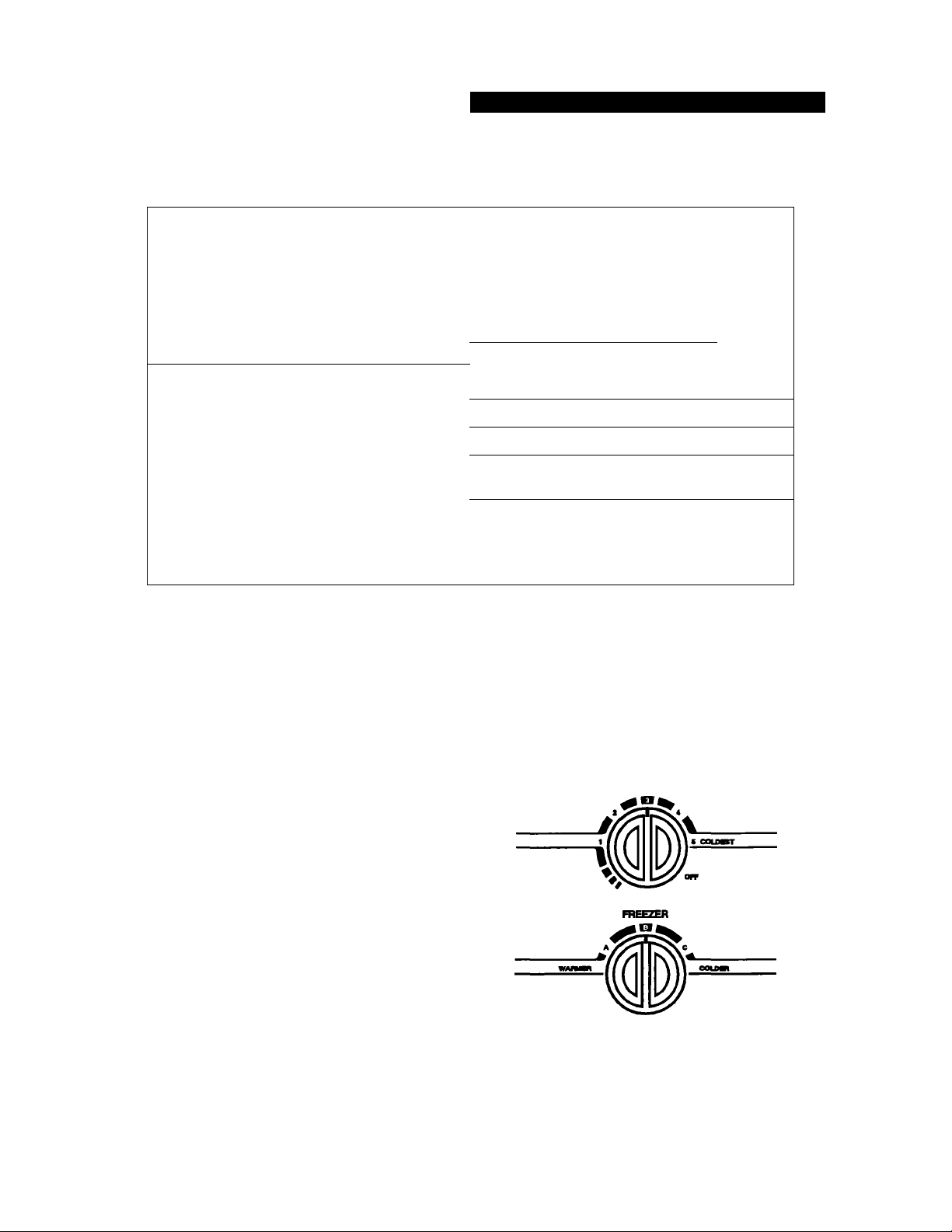
Setting the controls
Controls for the refrigerator and freezer are in
the refrigerator. When you plug in the refrigerator
for the first time:
1. Set the Refrigerator Control to 3.
Refrigerator Control adjustments range from
1 (warmest) to 5 (coldest).
2. Set the Freezer Control to B.
Freezer Control adjustments range from
A (warmest) to C (coldest).
REnWlERATOR
Page 8
USING YOUR REFRIGERATOR
Give the refrigerator time to cool down
completely before adding food. This may
take several hours.
The settings indicated above should be
correct for normal, household refrigerator
usage. The controls are set correctly
when milk or juice is as cold as you like
and when ice cream is firm. If you need to
adjust these settings, see “Changing the
control settings” below.
Changing the control settings
If you need to adjust temperatures in
refrigerator or freezer, use the settings listed
in the chart below as a guide. If you have
questions, call our Consumer Assistance
Center number. (See page 23.)
CONDITION: REASON:
Refrigerator
section
too warm
Freezer
section
too warm
Refrigerator • Controls not set correctly
section
too coid
• Door opened often
• Large amount of food added
• Room temperature too warm
• Door opened often Refrigerator
• Large amount of food added
• Very cold room temperature
(can't cycle often enough)
for your conditions
NOTE: The Automatic Exterior Moisture
control continuously guards against moisture
build-up on the outside of your refrigerator
cabinet. This control does not have to be set
or adjusted.
• Adjust the Refrigerator Control first.
• Wait at least 24 hours between adjustments.
• Then adjust the Freezer Control if needed.
RECOMMENDED
CONTROL SETTINGS:
Refrigerator 4
Freezer
Freezer
Refrigerator 2
Freezer
A
3
C
B
ice not
made fast
enough
Both
sections
too warm
• Heavy ice usage
• Very cold room temperature
(can’t cycle often enough)
• Door opened often
• Large amount of food added
• Very warm or very cold room
temperatures
Refrigerator 3
Freezer
Refrigerator 4
Freezer
C
B
Page 9
USING YOUR REFRIGERATOR
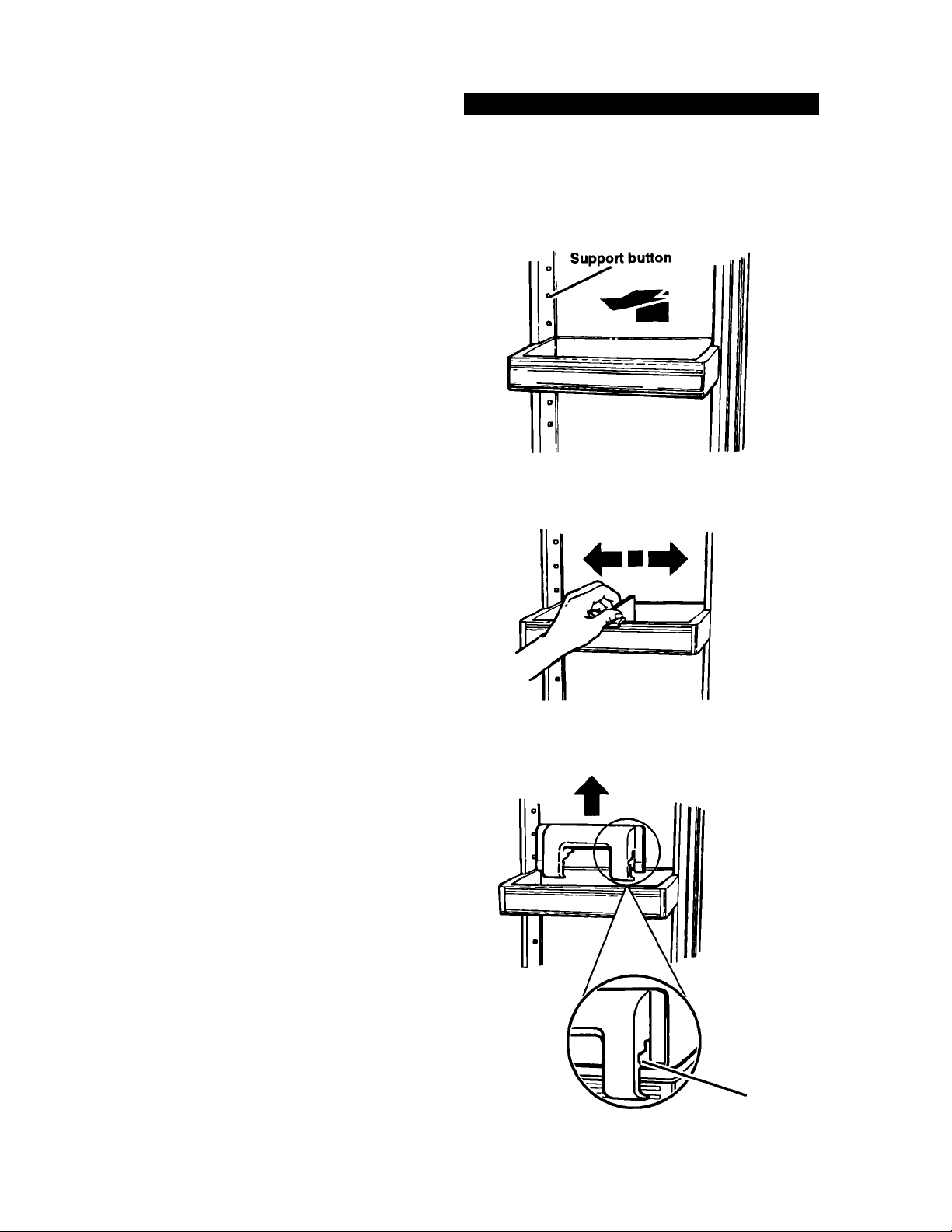
Adjusting the door bins (ed22pk only)
To remove door bins:
1. Lift bin up.
2. Pull bin straight out.
To replace door bins:
1. Slide bin in above desired support button.
2. Push down until it stops.
Adjusting the bin/shelf glide
Use the bin/shelf glide to secure odd-shaped
items or to separate other items.
1. Grasp glide.
2. Slide glide along bin/track.
NOTE: Model ED20PK has a shelf glide. It
cannot be removed. Model ED22PK has a
bin glide which can be renx>ved.
Removing the tail-bottle retainer (ED22PKoniy)
The tail-bottle retainer fits onto any door bin
in your refrigerator. The retainer helps to
hold tail-bottles in place when opening and
closing the refrigerator door.
To remove tail-bottle retainer:
1. Grasp center of retainer.
2. Pull up and off of bin.
To replace tail-bottle retainer:
1. Position retainer above desired door bin.
2. Gently push retainer down onto bin.
3. Make sure both side notches sit firmly
against bin.
Notch
g
Page 10
USING YOUR REFRIGERATOR
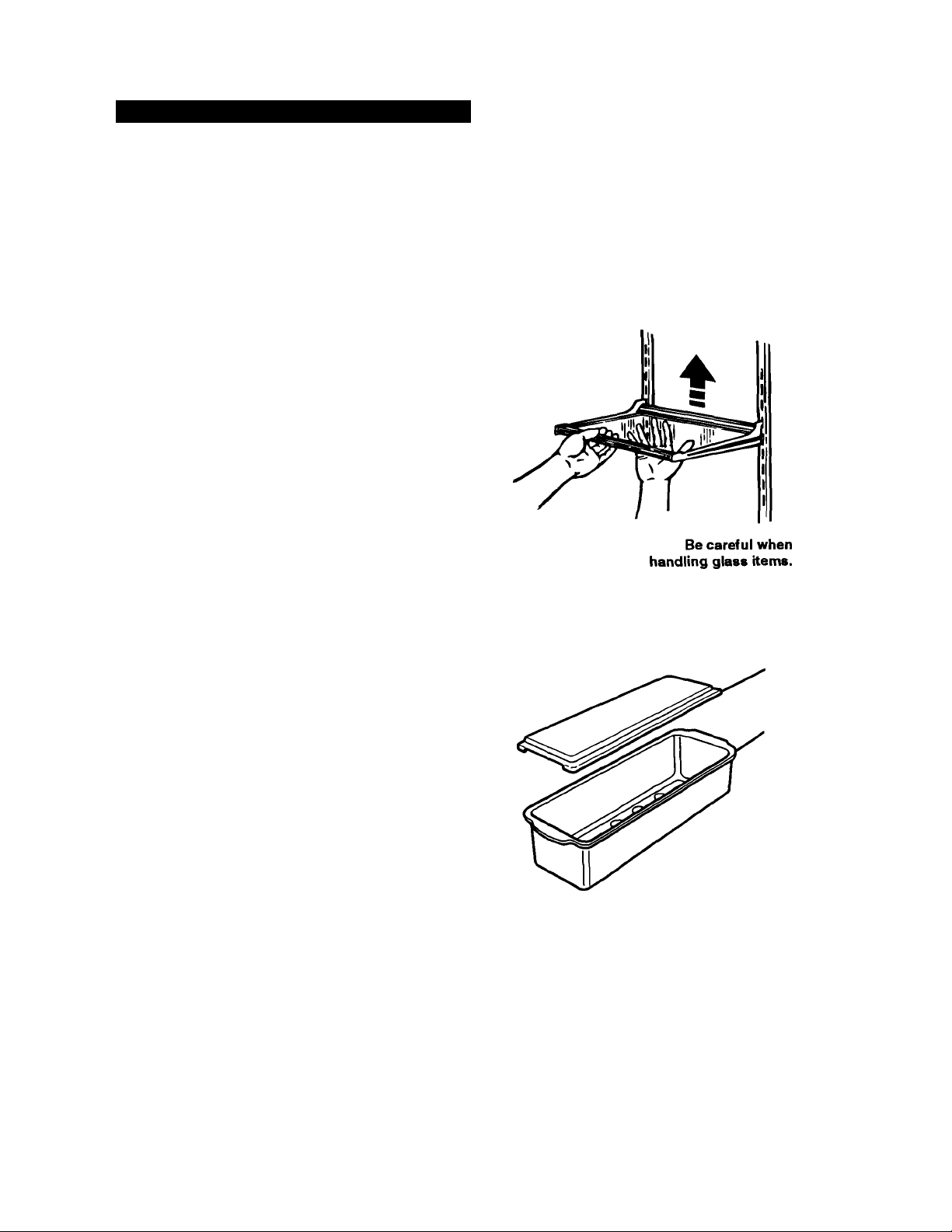
Adjusting the refrigerator shelves
Adjust shelves to match the way you use
your refrigerator. Glass shelves are strong
enough to hold bottles, milk and other heavy
food items.
To remove the shelves:
1. Remove items from the shelf.
2. Tilt shelf up at front.
3. Lift shelf up at back.
4. Pull shelf straight out.
To replace the shelves:
1. Guide the rear shelf hooks into the slots
in the shelf supports on the back liner
wall.
2. Tilt front of shelf up until hooks drop into
slots.
3. Lower front of shelf to a level position.
Using the egg bin
The egg bin has two pieces - the lid and
the bin. Use the egg bin to hold one, two or
three dozen eggs.
To hold one dozen eggs:
Place a dozen eggs (in or out of carton) in
the bin and cover with the lid.
To hold two dozen eggs:
Place two dozen eggs loose in the bin and
cover with the lid.
To hold three dozen eggs:
Place two dozen eggs loose in the bin.
Invert the lid and place it on the bin. Put a
dozen eggs, in their carton, on top of the lid.
Lid
Bin
10
Page 11
USING YOUR REFRIGERATOR
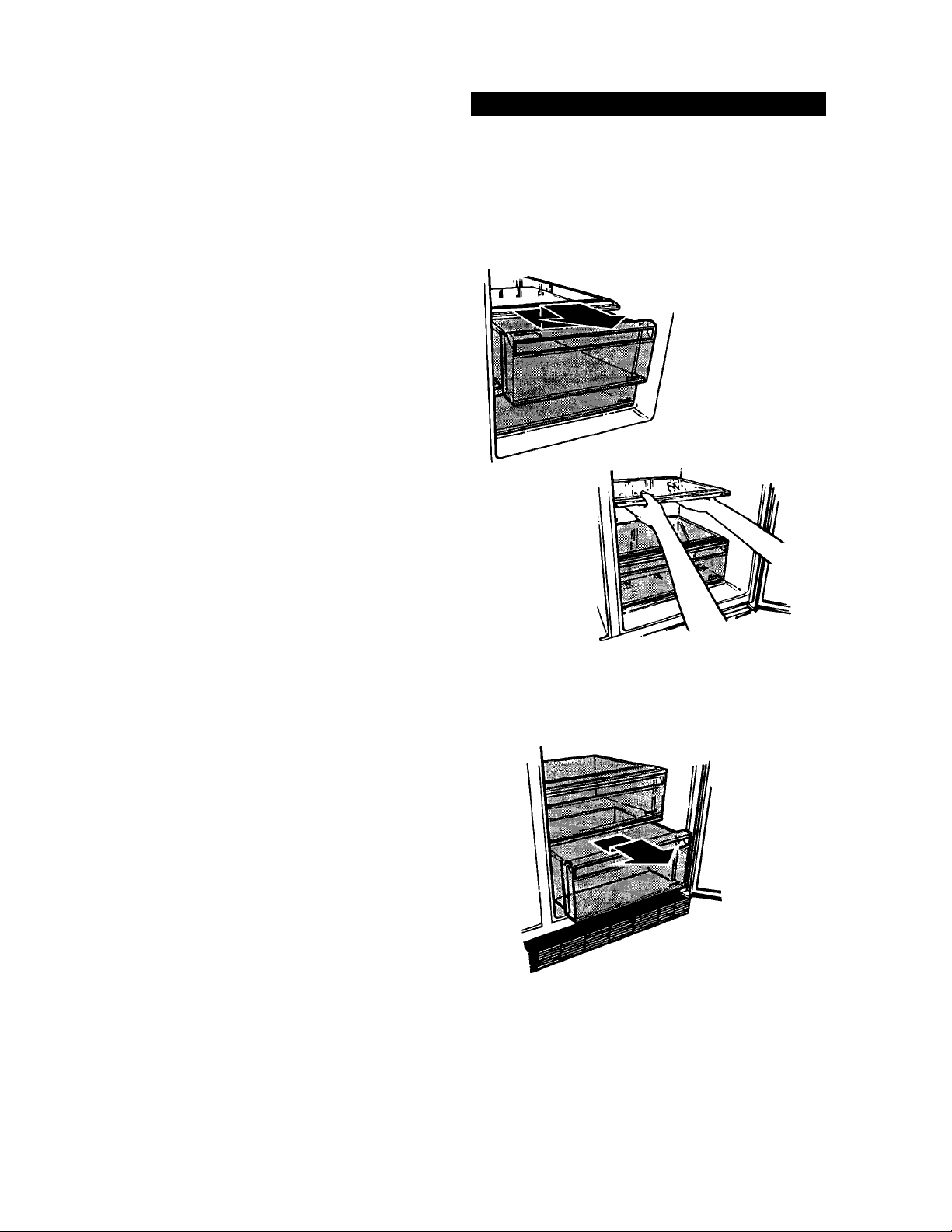
Removing the crisper and crisper cover
To remove the crisper:
1. Slide the crisper straight out to the stop.
2. Lift the front slightly.
3. Slide out the rest of the way.
4. Replace in reverse order.
To remove the cover:
1. Hold cover firmly with both hands and lift
front of cover off supports.
2. Lift cover out by pulling up and out.
To replace the cover:
1. Fit back of cover into notch supports on
walls of refrigerator.
2. Lower front into place.
Lift the cover
front, then
the back.
Removing the meat drawer and cover
To remove the meat drawer:
1. Slide the meat drawer straight out to the
stop.
2. Lift the front slightly.
3. Slide out the rest of the way.
4. Replace in reverse order.
Pull out to the
stop, lift the front
and pull again.
Pull out to the stop, lift
the front and pull again.
To remove the cover:
1. Remove the crisper, the crisper cover and
the meat drawer.
2. Tilt front of cover up.
3. Lift cover at back and pull straight out.
4. Replace in reverse order.
11
Page 12
USING YOUR REFRIGERATOR
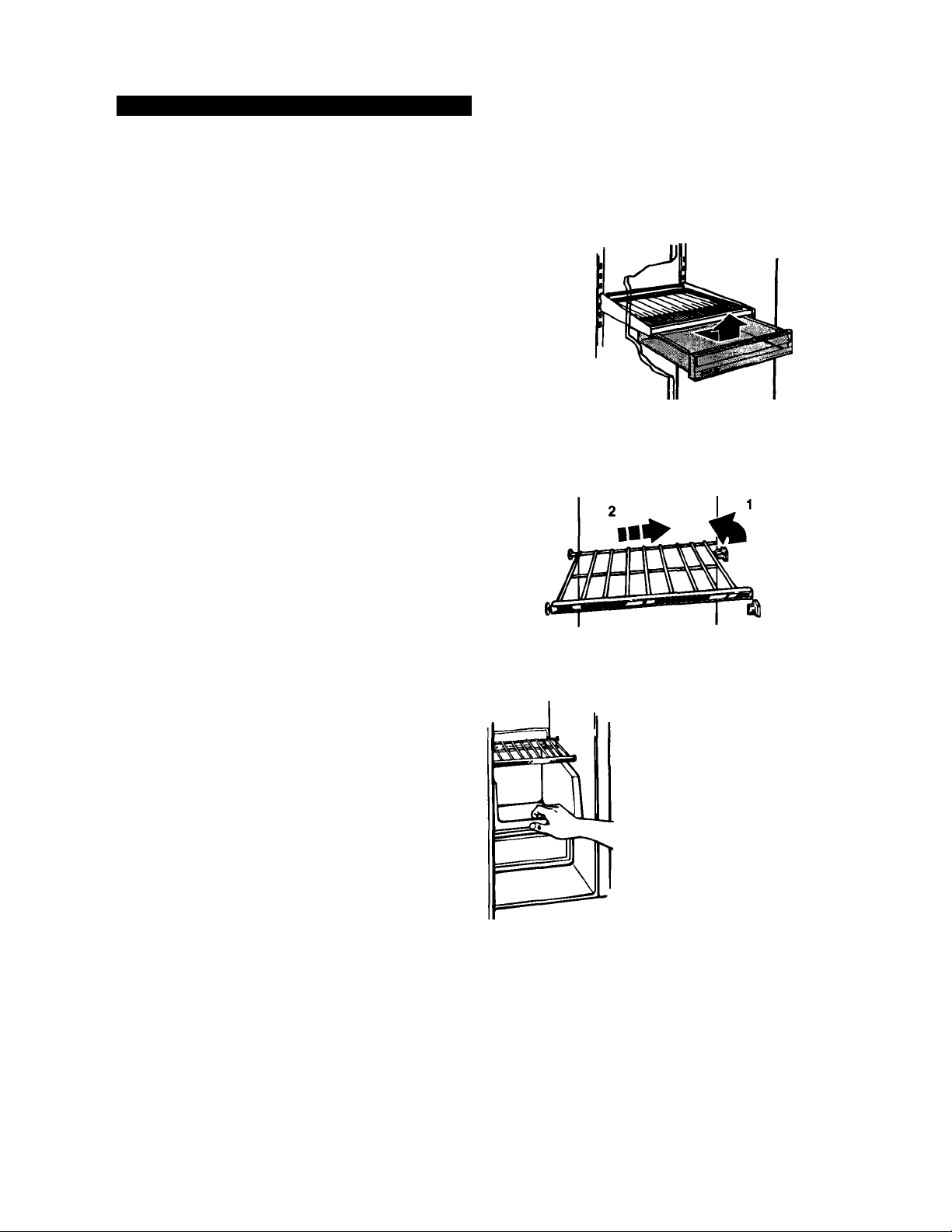
Removing the snack bin (ed22pk only)
To remove the snack bin:
1. Slide snack bin straight out to the stop
with an even, constant motion.
2. Lift the front.
3. Slide bin out the rest of the way.
4. Replace in reverse order.
Pull out to the
stop, lift the front
and pull again.
Removing the freezer shelves
To remove the shelves:
1. Lift right side of shelf off supports.
2. Slide shelf out of shelf support holes.
3. Replace in reverse order.
Removing the freezer bin
To remove the bin:
1. Slide bin out to the stop.
2. Lift the front to clear the stop.
3. Slide bin out the rest of the way.
To replace the bin:
1. Place bin on the slides.
2. Make sure the wire stops clear the front
of the slides.
3. Slide bin in all the way.
Pull out to the stop, lift
the front and pull
again.
12
Page 13
USING YOUR REFRIGERATOR
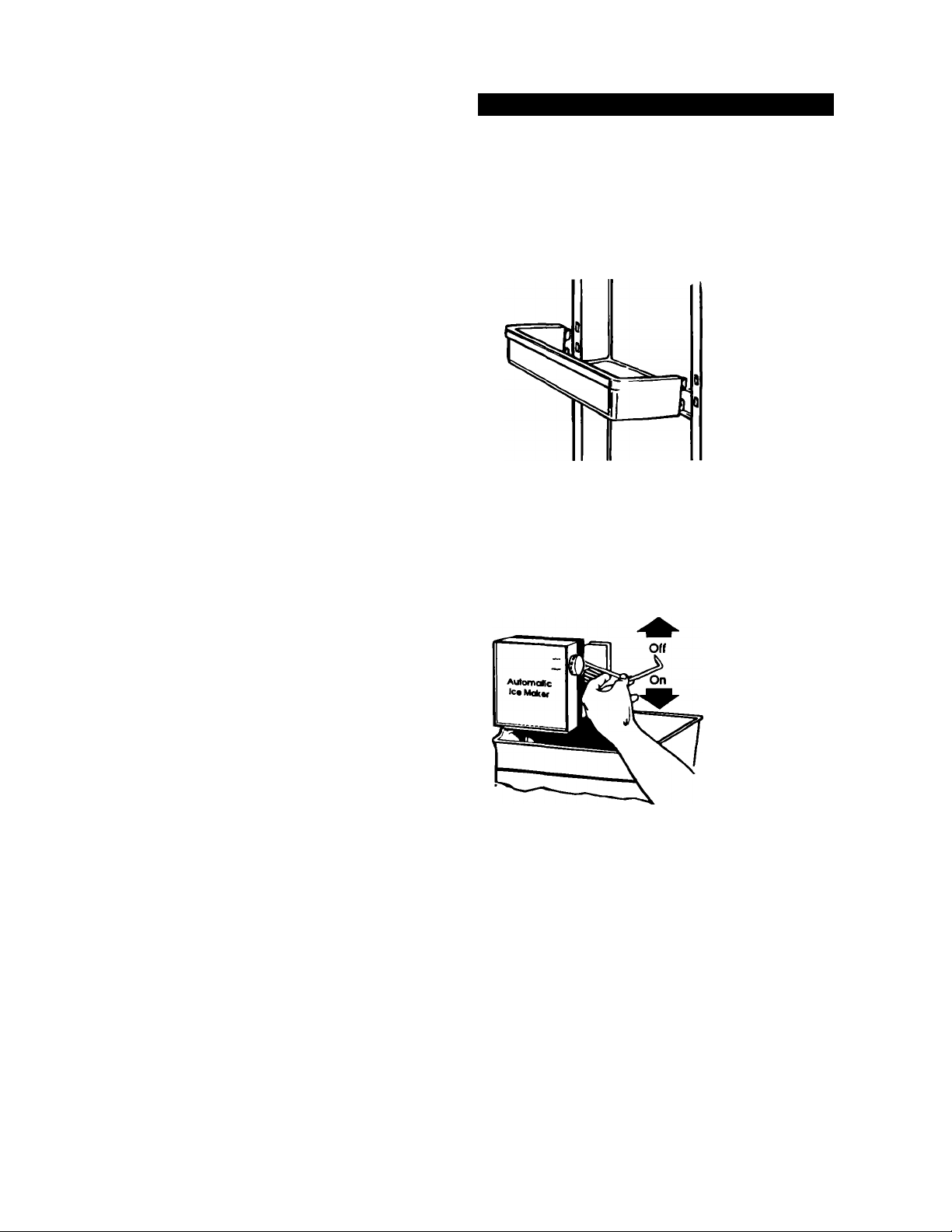
Removing the freezer door shelves
(ED22PK only)
Remove the freezer door shelves for easier
cleaning.
To remove the door shelves:
1. Grasp shelf at both ends.
2. Lift shelf up and pull it out.
To replace the door shelves:
1. Insert door shelf hooks into guides on
both edges of door liner.
2. Push shelf down to lock into place.
Using the optional automatic ice maker
If you have the automatic ice maker acces
sory (contact dealer for ice maker kit num
ber), or if you plan to add one later, there
are a few things you will want to know:
• The ON/OFF lever is a wire signal arm.
DOWN to make ice automatically.
UP to shut off the ice maker.
NOTE: Do not turn ice maker on until it is
connected to the water supply. Instruc
tions for ice maker water suppiy hook
up are attached to the back of the
refrigerator cabinet.
• The dial or lever on the side of the ice
maker changes the size of the cubes.
• It is normal for ice crescents to be attached
by a corner. They break apart easily.
• The ice maker will not operate until the
freezer is cold enough to make ice. This
can take overnight.
• Good water quality is important for good
ice quality. Try to avoid connecting the ice
maker to a softened water supply. Water
softener chemicals (such as salt from a
malfunctioning softener) can damage the
ice maker mold and lead to poor ice
quality. If a softened water supply cannot
be avoided, make sure the water softener
is operating properly and well maintained.
UP to
stop ice
maker.
DOWN to
start ice
maker.
13
Page 14
USING YOUR REFRIGERATOR
Solving common ice maicer probiems
PROBLEM
Ice crescents attached
at corners
POSSIBLE CAUSE/SOLUTION
• This is normal. They break apart easily. Shake bin occasion
ally to keep cubes separated.
Ice maker will not
operate or ice is not
made fast enough
Off-taste or odor in ice
• ON/OFF lever is in the OFF (up) position. Lower lever to the
ON (down) position.
• Freezer is not cold enough. Adjust temperature controls and
wait 24 hours. (See “Changing the control settings” on
page 8.)
• New plumbing connections can cause discolored or offflavored ice. Discard the first few batches of ice.
• Cubes are stored too long. Throw them away and make a
new supply.
• Foods in freezer are not wrapped properly. See “Food
Storage Guide” on pages 20 and 21.
• Freezer and ice bin need to be cleaned. See pages 17
and 18.
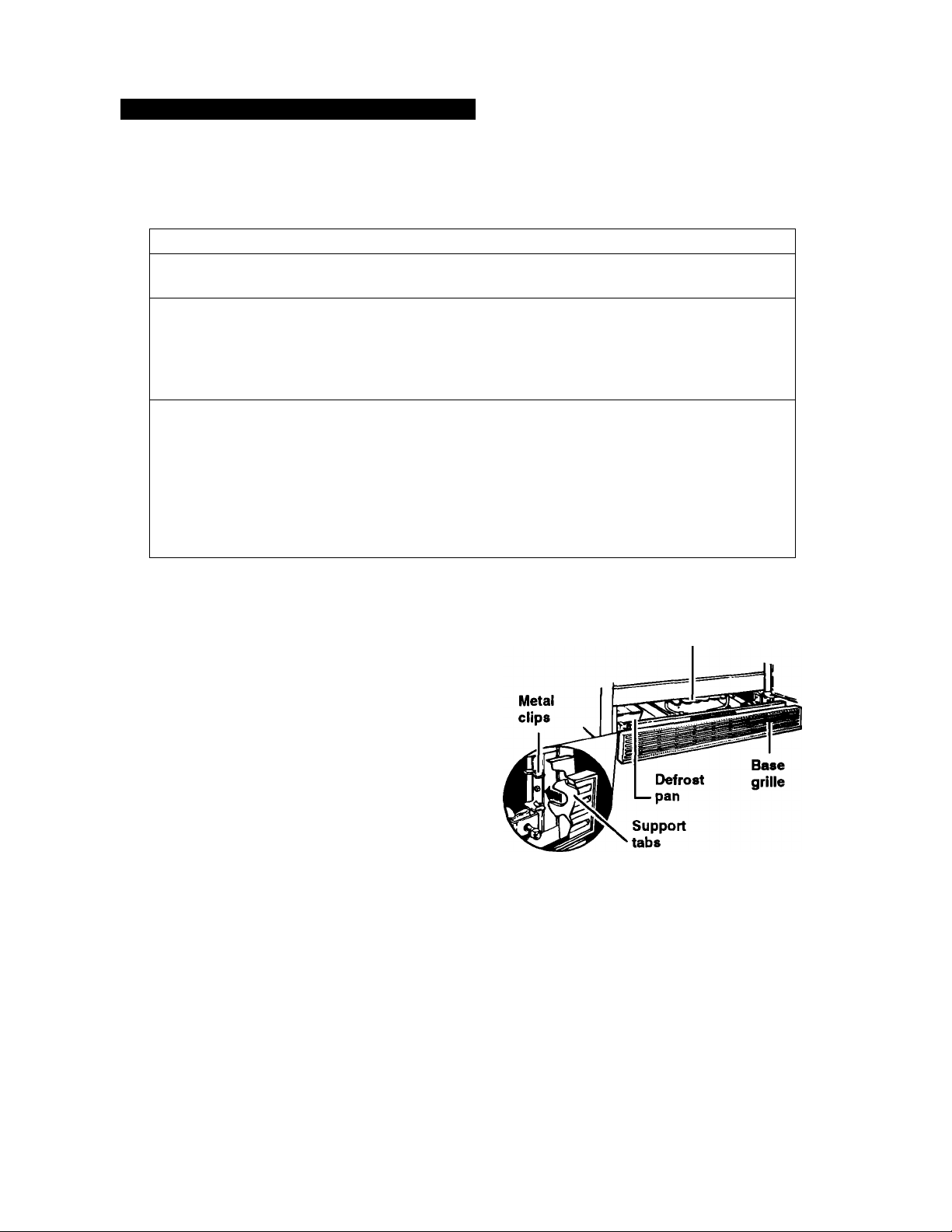
Removing the base grille
To remove the grille:
1. Open both doors.
2. Pull base grille forward to release the
support tabs from the metal clips.
3. Do not remove Tech Sheet fastened
behind the grille.
To replace the grille:
1. Line up grille support tabs with metal clips.
2. Push firmly to snap into place.
3. Close the doors.
Condenser coils
See cleaning instructions for defrost pan and
condenser coils on page 18.
14
Page 15
Changing the light bulbs
^WARNING
Electrical Shock Hazard
Before removing a light bulb, either
unplug the refrigerator or disconnect
the electricity leading to it at the main
power supply.
Failure to do so could result in
personal injury.
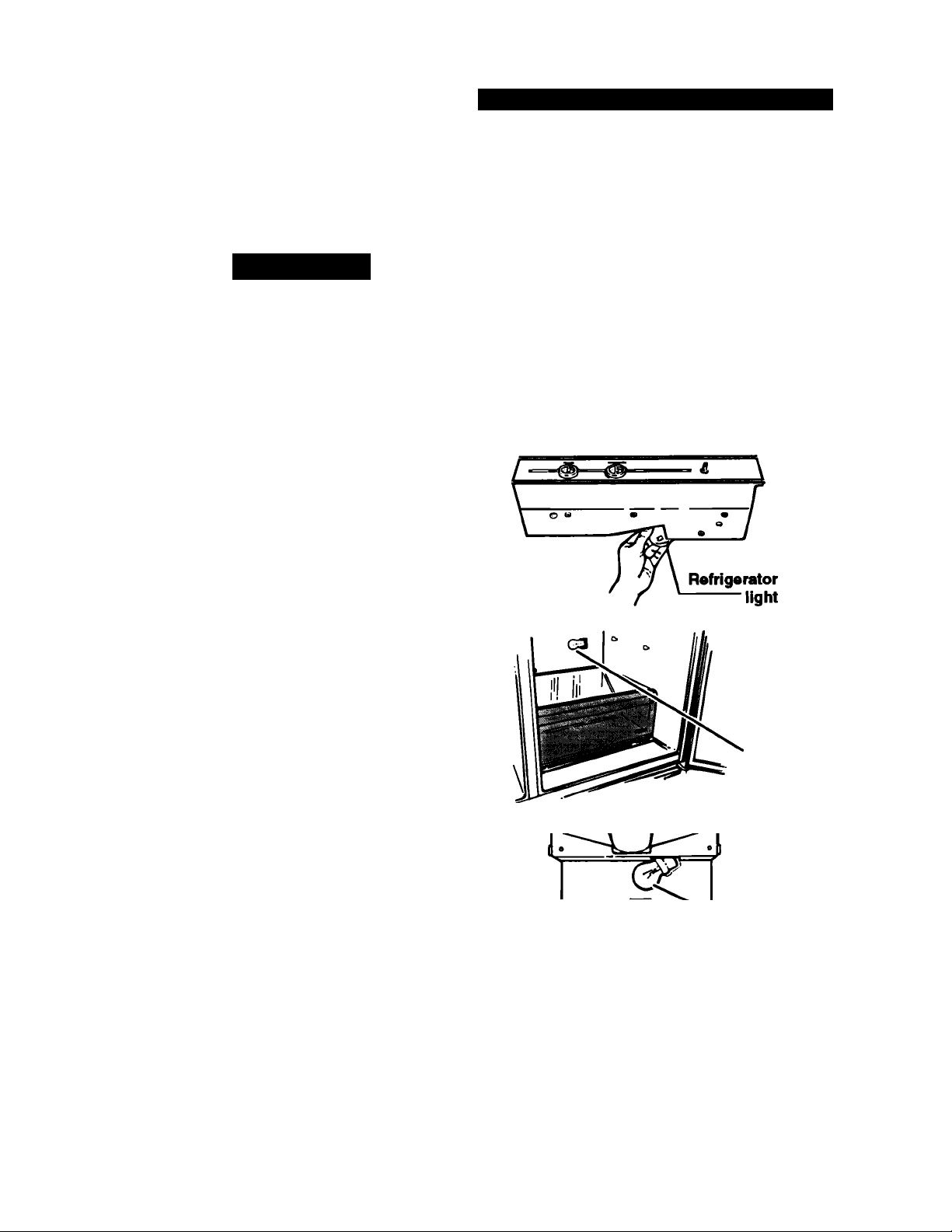
To change refrigerator light:
1. Disconnect refrigerator from power supply.
2. Reach behind the Control Console to
remove bulb.
3. Replace bulb with a 40-watt appliance bulb.
4. Reconnect refrigerator to power supply.
USING YOUR REFRIGERATOR
To change crisper light (ED22PK only):
1. Disconnect refrigerator from power supply.
2. Pull top of light shield forward until it snaps
free.
3. Lower light shield to clear bottom supports.
4. Pull light shield straight out to remove.
5. Replace bulb with a 40-watt appiiance bulb.
6. Replace light shield in reverse order.
7. Reconnect refrigerator to power supply.
To change freezer light:
1. Disconnect refrigerator from power supply.
2. Push in sides of light shield until it snaps
free.
3. Replace bulb with a 40-watt appliance bulb.
4. Replace light shield.
5. Reconnect refrigerator to power supply.
NOTE: Not all commercial appliance bulbs
will fit your refrigerator. Be sure to replace a
bulb with one of the same size and shape.
Crisper
light
Freezer
light
15
Page 16

USING YOUR REFRIGERATOR
Understanding the sounds you may hear
Your new refrigerator may make sounds that
your old one didn’t. Because the sounds are
new to you, you might be concerned about
them. Don't be. Most of the new sounds are
normal. Hard surfaces like the floor, walls
and cabinets can make the sounds seem
louder.
The following describes the kinds of
sounds that might be new to you, and what
may be making them.
Slight hum, soft hiss
You may hear the refrigerator’s fan motor
and moving air.
Clicking or snapping sounds
The thermostat makes a definite click when
the refrigerator stops running. It also makes
a sound when the refrigerator starts. The
defrost timer will click when the defrost cycle
starts.
Water sounds
When the refrigerator stops running, you
may hear gurgling in the tubing for a few
minutes after it stops. You may also hear
defrost water running into the defrost water
pan.
Ice maker sounds
• trickling water
• thud (clatter of ice)
If you have an automatic ice maker you may
hear buzzing (from the water valve), trickling
water and the clatter of ice dumped into the
bin.
Running sounds
Your refrigerator has a high-efficiency
compressor and motor. It will run longer than
older designs. It may even seem to run most
of the time.
Saving energy
You can help your refrigerator use less
electricity.
• Check door gaskets for a tight seal. Level
the cabinet to be sure of a good seal.
• Clean the condenser coils regularly.
• Open the door as few times as possible.
Think about what you need before you
open the door. Get everything out at one
time. Keep food organized so you won’t
have to search for what you want. Close
door as soon as food is removed.
• Go ahead and fill up the refrigerator, but
don’t overcrowd it so air movement is
blocked.
• It is a waste of electricity to set the refrig
erator and freezer to temperatures colder
than they need to be. If ice cream is firm in
the freezer and drinks are as cold as your
family likes them, that’s cold enough.
• Make sure your refrigerator is not next to a
heat source such as a range, water heater,
furnace, radiator or in direct sunlight.
16
Page 17
CARING FOR YOUR REFRIGERATOR
Caring For Your Refrigerator
In This Section
Page
Cleaning your refrigerator......
.........
Vacation and moving care
Your refrigerator is built to give you many years of dependable service. However, there are a
few things you can do to help extend its product life. This section tells you how to clean your
refrigerator and what to do when going on vacation, moving or during a power outage.
.....
18
Page
...............19
Cleaning your refrigerator
Both the refrigerator and freezer sections
defrost automatically. However, clean both
about once a month to prevent odors from
building up. Wipe up spills right away.
To clean your refrigerator, turn the Refrig
erator Control to OFF, unplug it, take out all
removable parts and clean the refrigerator
according to the following directions.
PART
Removable parts
(shelves, crisper,
etc.)
Outside
WHAT TO USE HOW TO CLEAN
Sponge or cloth with mild
detergent and warm
water
Sponge, cloth or paper
towel with mild detergent,
warm water and an
appliance wax (or good
auto paste wax)
Refrigeration system tubes are located
near the defrost pan and can become
hot. Remove and install defrost pan
carefully.
Failure to do so could result in personal
injury.
• Hand wash, rinse and dry thor-
• Wash outside of cabinet. Do not
• Rinse and dry thoroughly.
• Wax painted metal surfaces at least
^WARNING
Personal Injury Hazard
oughly.
use abrasive or harsh cleaners.
twice a year. Apply wax with a
clean, soft cloth. Waxing painted
metal surfaces provides rust
protection. Do not wax plastic
parts.
Inside walls
(allow freezer to
warm up so cloth
won’t stick)
Sponge, soft cloth or
paper towel with baking
soda or mild detergent
and warm water
• Wash with mixture of warm water
and:
- mild detergent, or
- baking soda (2 tablespoons [26 g]
to 1 quart [.95 L] of water).
• Rinse and dry thoroughly.
continued on next page
17
Page 18
CARING FOR YOUR REFRIGERATOR
PART
Door liners and
gaskets
Plastic parts
(covers and
panels)
Defrost pan
WHAT TO USE HOWTO CLEAN
Sponge, soft cloth
or paper towel with
mild detergent and
warm water
Soft, clean sponge
or soft, clean cloth
with mild detergent
and warm water
Sponge or cloth
with mild detergent
and warm water
Condenser coils Vacuum cleaner
with extended
narrow
attachment
Floor under
Floor cleaners
refrigerator
• Wash, rinse and dry thoroughly.
DO NOT USE cleaning waxes, concen
trated detergents, bleaches or cleaners
containing petroleum on plastic parts.
• Wash, rinse and dry thoroughly.
DO NOT USE paper toweis, window
sprays, scouring cleansers or flam
mable fluids. These can scratch or
damage material. See “Important Safety
Instructions” on page 3.
• Remove base grille. (See page 14.)
• To remove defrost pan, lift pan over wire
brace (remove tape; if any).
• Wash, rinse and dry thoroughly.
• Replace with notched corner to the rear.
Push it in all the way.
• Make sure defrost pan drain tube is
pointing into pan.
• Replace base grille.
• Remove base grille.
• Vacuum coils when dusty or dirty. Coils
may need to be cleaned as often as
every other month.
• Replace base grille.
• Roll refrigerator out only as far as the
water supply line allows.
• Clean floor.
• Roll refrigerator back into place.
• Check to see if the refrigerator is level.
Vacation and moving care
Short vacations
No need to shut off the refrigerator if you will
be away for less than four weeks.
1. Use up any perishables.
2. Freeze other items.
3. If you have an automatic ice maker;
• Raise signal arm to OFF (up) position.
• Shut off water supply to ice maker.
• Empty the ice bin.
18
Page 19
CARING FOR YOUR REFRIGERATOR
Long vacations
If you will be gone a month or more;
1. Remove all food from the refrigerator:
2. If you have an automatic ice maker:
• Turn off the water supply to the ice
maker at least one day ahead of time.
• When the last load of ice drops, turn off
the ice maker. Make sure all ice had
dispensed out of the ice maker mecha
nism.
3. Unplug the refrigerator.
4. Clean it, rinse well and dry.
5. Tape rubber or wood blocks to the tops of
both doors to prop them open far enough
for air to get in. This stops odor and mold
from building up.
^WARNING
Personal Injury Hazard
Do not allow children to climb on, play
near or climb inside the refrigerator
when the doors are blocked open.
They may become injured or trapped.
Moving
When you are moving the refrigerator to a
new home:
1. If you have an automatic ice maker;
• Turn off the water supply to the ice
maker at least one day ahead of time.
• Disconnect the water line.
• After the last load of ice drops, lift the
signal arm to the OFF (up) position.
2. Remove all food from the refrigerator.
3. Pack all frozen food in dry ice.
4. Unplug the refrigerator.
5. Clean it thoroughly. Rinse well and dry.
6. Take out all removable parts, wrap them
well, and tape them together so they don't
shift and rattle.
7. Screw in the leveling rollers.
8. Tape the doors shut and tape the power
supply cord to the cabinet.
When you get to your new home, put
everything back and refer to page 5. Also,
remember to reconnect the water supply
line.
To restart refrigerator, see “Using Your
Refrigerator” on page 7.
Power interruptions
If electricity goes off, call the power com
pany. Ask how long power will be off.
1. If service will be interrupted 24 hours or
less, keep both doors closed. This
helps food stay frozen.
2. If service will be interrupted longer than
24 hours:
(a) Rerrx)ve all frozen food and store in a
frozen food locker.
OR
(b) Place 2 lbs. (0.9 kg) of dry ice in
freezer for every cubic foot of freezer
space. This will keep food frozen for 2
to 4 days. Wear gloves to protect your
hands from dry ice burns.
OR
(c) If neither a food locker or dry ice is
available, use or can perishable food
at once.
3. A full freezer stays cold longer than a
partly filled one. A freezer full of meat
stays cold longer than a freezer full of
baked goods. If food contains ice crystals,
it may be safely refrozen, although the
quality and flavor may be affected. If the
condition of the food is poor, or if you feel
it is unsafe, dispose of it.
Questions 7
Call our Consumer Assistance Center
telephone number, 1-800-253-1301.
19
Page 20
FOOD STORAGE GUIDE
Food Storage Guide
There is a correct way to package and store refrigerated or frozen food. To keep food fresher,
longer, take the time to study these recommended steps.
Storing fresh food
Wrap or store food placed in the refrigerator
in airtight and moisture-proof material. This
prevents food odor and taste transfer
throughout the refrigerator. For dated
products, check code date to ensure fresh
ness.
Leafy vegetables
Remove store wrapping and trim or tear off
bruised and discolored areas. Wash in cold
water and drain. Place in plastic bag or
plastic container and store in crisper.
Vegetables with skins
(carrots, peppers)
Store in crisper, plastic bags or plastic
container.
Fruit
Wash, let dry and store in refrigerator in
plastic bags or crisper. Do not wash or hull
berries until they are ready to use. Sort and
keep berries in their original container in a
crisper, or store in a loosely closed paper
bag on a refrigerator shelf.
Eggs
Store without washing in egg bin provided,
or in the original carton on an interior shelf.
Milk
Wipe milk cartons. For best storage, place
milk on interior shelf.
Butter or margarine
Keep opened butter in covered dish or
closed compartment. When storing an extra
supply, wrap in freezer packaging and
freeze.
Cheese
Store in the original wrapping until you are
ready to use it. Once opened, rewrap tightly
in plastic wrap or aluminum foil.
Leftovers
Cover leftovers with plastic wrap or alumi
num foil. Plastic containers with tight lids can
also be used.
Meat
Store most meat in original wrapping as long
as it is airtight and moisture-proof. Rewrap if
necessary. See the following chart for
storage times.
APPROXIMATE TIME
TYPE
Chicken
Ground beef
Steaks and roasts 3 to 5
Cured meats
Bacon 5 to 7
Cold cuts
Variety meats 1 to 2
‘If storing meat longer than the times given,
follow the directions for freezing.
NOTE: Use fresh fish and shellfish the same
day as purchased.
(DAYS)*
1 to 2
1 to 2
7 to 10
3to5
20
Page 21

Storing frozen food
The freezer section is designed for storage
of commercially frozen food and for freezing
food at home.
NOTE: For further information about prepar
ing food for freezing or food storage times,
contact your local Cooperative Extension
Service or check a freezer guide or reliable
cookbook.
Packaging
The secret of successful freezing is in the
packaging. The way you close and seal the
package must not allow air or moisture in or
out. Packaging done in any other way could
cause food odor and taste transfer through
out the refrigerator and drying of frozen
food.
FOOD STORAGE GUIDE
Freezing
Do not expect your freezer to quick-freeze
any large quantity of food. Put no more
unfrozen food into the freezer than will
freeze within 24 hours (no more than 2 to
3 pounds of food per cubic foot of freezer
space). Leave enough space for air to
circulate around packages. Be careful to
leave enough room at the front so the door
can close tightly.
Storage times will vary according to the
quality of the food, the type of packaging or
wrap used (airtight and moisture-proof) and
the storage temperature, which should be
0°F(-17.8‘“C).
Packaging recommended for use:
• Rigid plastic containers with tight-fitting lids
• Straight-sided canning/freezing jars
• Heavy-duty aluminum foil
• Plastic-coated paper
• Non-permeable plastic wraps (made from
a saran film)
Follow package or container instructions for
proper freezing methods.
Do not use:
■ Bread wrappers
• Non-polyethylene plastic containers
• Containers without tight lids
• Waxed paper
• Waxed-coated freezer wrap
• Thin, semi-permeable wrap
The use of these wrappings could cause
food odor, taste transfer and drying of frozen
food.
21
Page 22
IF YOU NEED ASSISTANCE OR SERVICE
If You Need Assistance Or
Service
Performance problems often result from little things you can fix without tools. Please read the
chart below before calling for service on your appliance.
1. Before calling for assistance ...
Listed in this chart are the most common problems consumers run into with their appliances.
Please read through this and see if it can solve your problem.
PROBLEM
Your refrigerator
will not
operate
The lights do
not work
The ice maker
does not work
You hear unfamil
iar souiuls or a
rattling/jingling
noise
There is water in
the defrost pan
CHECK THE FOLLOWING
Is the power supply cord firmly plugged into a live circuit with proper
voltage?
Has a household fuse or circuit breaker blown/tripped?
Is the Refrigerator Control set to the OFF position?
Is the power supply cord firmly plugged into a live circuit with proper
voltage?
Has a household fuse or circuit breaker blown/tripped?
Is a bulb burned out?
Is the freezer cold enough to make ice? It could take overnight for
the freezer to reach the proper temperature.
Is the ON/OFF lever in the ON (down) position? (See page 13.)
Is the water valve turned on?
Does the water line have a clog or leak?
Is something on top of or behind the refrigerator?
Some new sounds are normal. See “Understanding the sounds you
may hear” on page 16.
This is normal on hot, muggy days. Make sure the refrigerator is level
so the pan does not overflow.
The motor seems Are the condenser coils dirty?
to run too much
22
Has the door been opened often? Has a large amount of food been
added at one time? The motor naturally runs longer if these things
happen.
Is the room hot? If the room is too warm, the motor runs longer to
keep the unit cool.
Page 23

IF YOU NEED ASSISTANCE OR SERVICE
2. If you need assistance*...
Call Whirlpool Consumer Assistance
Center telephone number. Dial toll-free
from anywhere In the U.S.A.:
1-800-253-1301
and talk with one of our trained consultants.
The consultant can instruct you in how to
obtain satisfactory operation from your
appliance or, if service is necessary, recom
mend a qualified service company in your
area.
If you prefer, write to:
Mr. William Clark
Consumer Assistance Representative
Whirlpool Corporation
2000 M-63
Benton Harbor, Ml 49022
Please include a daytime phone number in
your correspondence.
3. If you need service*...
Whirlpool has a nationwide network of
authorized Whirlpool® service companies.
Whirlpool service technicians are trained to
fulfill the product warranty and provide after
warranty service, anywhere in the United
States. To locate the authorized Whirlpool
service company in your area, call our
Consumer Assistance Center telephone
number (see Step 2) or look in your tele
phone directory Yellow Pages under:
• APPU ANCE-HOUSEHOLDMAJOR, SERVICE A REPAIR
- See.’Whiripool Appliances or
Authorized Whirlpool Service
{Examp le: XYZ Service Co.)
•WASHING MACHINES &
DRYERS, SERVICE A REPAIR
> See: WNrIpool Appliances or
Authorized Whirlpool Service
{Examp le: XYZ Service Co.)
4. If you need FSP* replace
ment parts ...
FSP is a registered trademark of Whirlpool
Corporation for quality parts. Look for this
symbol of quality whenever you need a
replacement part for your Whirlpool appli
ance. FSP replacement parts will fit right
and work right, because they are made to
the same exacting specifications used to
build every new Whirlpool appliance.
To locate FSP replacement parts in your
area, refer to Step 3 above or call the
Whirlpool Consumer Assistance Center
number in Step 2.
5. If you are not satisfied with
how the problem was
solved ...
• Contact the Major Appliance Consumer
Action Panel (MACAP). MACAP is a group
of independent consumer experts that
voices consumer views at the highest
levels of the major appliance industry.
• Contact MACAP only when the dealer,
authorized servicer and Whirlpool have
failed to resolve your problem.
Major Appliance Consumer Action Panel
20 North Wacker Drive
Chicago, IL 60606
• MACAP will in turn inform us of your
action.
*When asking for help or service:
Please provide a detailed description of
the problem, your appliance's complete
model and serial numbers, and the pur
chase date. (See page 2.) This informa
tion will help us respond properly to your
request.
23
Page 24

WHIRLPOOL'
Refrigerator Warranty
LENGTH OF WARRANTY
FULL ONE-YEAR
WARRANTY
From Date of Purchase
FULL FIVE-YEAR
WARRANTY
From Date of Purchase
WHIRLPOOL WILL NOT PAY FOR
A. Service calls to:
1. Correct the installation of your refrigerator.
2. Instruct you how to use your refrigerator.
3. Replace house fuses or correct house wiring or plumbing.
4. Replace light bulbs.
B. Repairs when your refrigerator is used in other than normal, single-family household
use.
C. Pickup and delivery. Your refrigerator is designed to be repaired in the home.
D. Damage to your refrigerator caused by accident, misuse, fire, flood, acts of God or use
of products not approved by Whirlpool.
E. Any food loss due to product failure.
F. Repairs to parts or systems caused by unauthorized modifications made to the
appliance.
WHIRLPOOL WILL PAY FOR
FSP* replacement parts and repair labor to correct
defects in materials or workmanship. Service must be
provided by an authorized Whirlpool service company.
FSP replacement parts and repair labor to correct defects
in materials or workmanship in the sealed refrigeration
system. These parts are:
1. Compressor 4. Drier
2. Evaporator 5. Connecting tubing
3. Condenser
Service must be provided by an authorized Whirlpool
service company.
WHIRLPOOL CORPORATION SHALL NOT BE LIABLE FOR INCIDENTAL OR CONSE
QUENTIAL DAMAGES. Some states do not allow the exclusion or limitation of incidental or
consequential damages, so this limitation or exclusion may not apply to you. This warranty
gives you specific legal rights, and you may also have other rights which vary from state to
state.
Outside the United States, a different warranty may apply. For details, please contact your
authorized Whirlpool distributor or military exchange.
If you need service, first see the “Assistance or Service” section of this book. After checking
“Assistance or Service," additional help can be found by calling our Consumer Assistance
Center telephone number, 1-800-253-1301, from anywhere in the U.S.A.
©
Printed on recycled paper-
10% post-oonsumer waste
50% recovered materials
PART NO. 2170840
O 1993 Whirlpool Corporation
9 Registered Trademark of Whirlpool Corporation.
Printed in U.S.A.
 Loading...