

Page 1

Machine operation
Additional information (including troubleshooting and service) can be found in the individual chapters of the
instructions for use.
Sort laundry according to
care symbols:
Do not tumble dry
Suitable for tumble drying -
at low drying temperature
Suitable for tumble drying
Sort by:
Material thickness:
separate laundry according to weight (e.g. dry towels and thin underwear
separately).
Type of material:
Degree of drying:
Do not tumble dry:
with metallic decorations, bulky items such as sleeping bags, etc.
Whenever there is greater load than the dryer can handle,
Cotton (linen); synthetic textiles (easy care).
Cupboard dry, iron dry etc.
Woollens, silk, nylon stockings, delicate embroidery, fabrics
Preparing laundry
Opening door
Loading dryer and
closing door
Switching on machine and
selecting programme
Selecting options
(if available)
Starting dryer
Check that all fastenings are closed and that pockets are empty. Please ensure that
there are no cigarette lighters in the wash. Turn laundry inside out.
Pull the door handle.
Place laundry loosely in the drum to achieve equal drying throughout. Then close
the door.
Select the drying programme required by turning the programme selector knob
(for information, refer to programme table).
Select the option required by pressing the corresponding button.
The indicator lamp above the relevant button lights up to confirm your selection.
An alarm sounds if an incorrect selection is made (incompatible options). Press the
button again to cancel the option.
The drying programme is started by pressing the
The relevant indicator lamp lights up.
Changing programme selection:
drying, the dryer stops. The
the new programme, again press the
Interrupting programme:
programme selector knob to “ ” and press the
button. Wait at least 5 minutes before opening the door to allow the dryer to cool
down. For your safety the drying cycle stops automatically if you open the door. To
restart, after door opening, close the door and press the
again.
If the programme selected is changed during
“Départ (Pause)”
“Départ (Pause)”
To interrupt the dryer during the drying cycle, set the
“Départ (Pause)”
indicator lamp flashes. To operate
button.
“Départ (Pause)”
“Départ (Pause)”
button.
button
Take the laundry out of the dryer. The drying process is complete and
Programme end -
unloading dryer
Set the programme selector knob to “ ”.
Switching dryer off
Please note:
thoroughly in plenty of water before drying. Never dry rubber objects or objects stained with vegetable oils in the dryer.
Only use additives/plastic items specified as dryer safe and rinse items that have been treated with stain remover
Cleaning the lint filter:
using a soft brush or your fingertips. Push lint filter firmly back into place.
the anti-crease phase has been reached (active).
If the laundry is not removed at the end of the drying cycle, an
automatic anti-crease cycle will operate for maximum 60 min. The
drum rotates at regular intervals to prevent the laundry from creasing.
Open door, pull lint filter up and out of machine. Brush lint
1
Page 2

Programmes / Drying levels
Cotton
Mixed fabrics
plus
Delicate
Overview of programmes Options
Cupboard dry +
Cupboard dry *
Iron dry *
Cupboard dry +
Cupboard dry *
Iron dry *
Cupboard dry
Type of tex tile
Multi-layered, thick laundry such
as: terry towels, dish cloths and dry
towels, bed linen, underwear , terry
towelling bath robes.
Similar types of laundry which do not
require ironing such as: dry towels,
bed linen, underwear, baby clothes,
T -shirts, cotton socks.
Laundry which requires ironing
such as: bed and table linen, dry
towels, T-shirts, polo shirts, work
clothes.
Laundry with thick, multi-layered
areas such as: bed and table linen,
track suits, anoraks, blankets.
Laundry which does not require
ironing such as: shirts, blouses,
T-shirts, sportswear.
Laundry which requires ironing
such as: trousers, dresses, skirts,
shirts, blouses.
Low drying intensity for delicates and
items labelled with , such as:
trousers, dresses, shirts, blouses.
Fabrics
Cotton or linen hot wash /
coloured laundry
Max. 6 kg
Synthetic, mixed fibre or
cotton easy care (ironing not
required) laundry
Max. 2.5 kg
Laundry made from
synthetic fibres such as
polyamide, nylon,
polyacrylic, etc.
Max. 2.5 kg
Volume
of load
kg
3.0
6.0
3.0
6.0
3.0
6.0
1.0
2.5
1.0
2.5
1.0
2.5
2.5
Gentle
Rapid
Buzzer Anti-
crease
X X X X X
X X X X X
X X X X X
X - X X X
X - X X X
X - X X X
X - X X -
Start
Delay
Approximate
drying times
(in minutes)
Very
Wet
wet
load
load
75’
60’
130’
100’
70’
50’
110’
95’
50’
45’
95’
75’
25’
20’
45’
35’
20’
15’
35’
30’
15’
10’
30’
25’
60’ 45’
Laundry is aired and refreshed for
30 minutes without heating.
Airing
Completes drying or dries single
items (suitable for all fabrics).
cycle
Time/
* Test programme in accordance with EN 61121.
- - - - - - - -
Programme temps
- X - X X -
2
Page 3
...you want to correctly
care for and clean your
dryer:
...you want to check the
dryer yourself first:
(If your machine is not
functioning correctly, please
check the following points
before phoning for the
customer service – also refer
to relevant chapter in the
instructions for use)
How to proceed if ...
Clean the filter at the end
of every cycle.
Please de-install once a
year the air hose and
remove the lint inside
Drying takes too long
laundry is not dry enough
The dryer will not operate
(after a power failure,
always press the
“Départ (Pause)” button).
• Open the door.
• Pull the filter upwards.
• Brush lint using a soft brush or your
fingertips.
• Push the filter back into place.
• Has the correct drying programme been
selected?
• Was the inserted laundry too wet
(washing machine spin speed less than
800rpm?)
• Is the lint filter dirty (filter indicator light
on)?
• Is the room temperature too high?
•Are the “ ” and “ ”
indicator lamps lighting up? The drying
cycle is complete and the laundry can be
taken out.
• Is the plug properly inserted into the
mains electricity socket?
• Is ther e a pow e r failure?
•Has the fuse blown?
• Is the door properly closed?
• Has a drying programme been selected?
•Has the
pressed?
“Départ (Pause)”
button been
Lint filter indicator lamp
on.
AFTER-SALES SERVICE
If the fault is still present once the above checks have been undertaken or should the fault occur for a second time, s witch the
machine off. Please contact your after -sale s se rvice representative (for mo re information, refer to the warr anty manual).
Please have the following details ready when calling your after-sales service representative:
• the nature of the fault.
• the dryer type and model
• the service code (the number after the word Service on the adhesive
rating plate) on the right-hand side when the door is open.
• Is the lint fi l ter c lean?
• Is the vent hose blocked?
3
Page 4
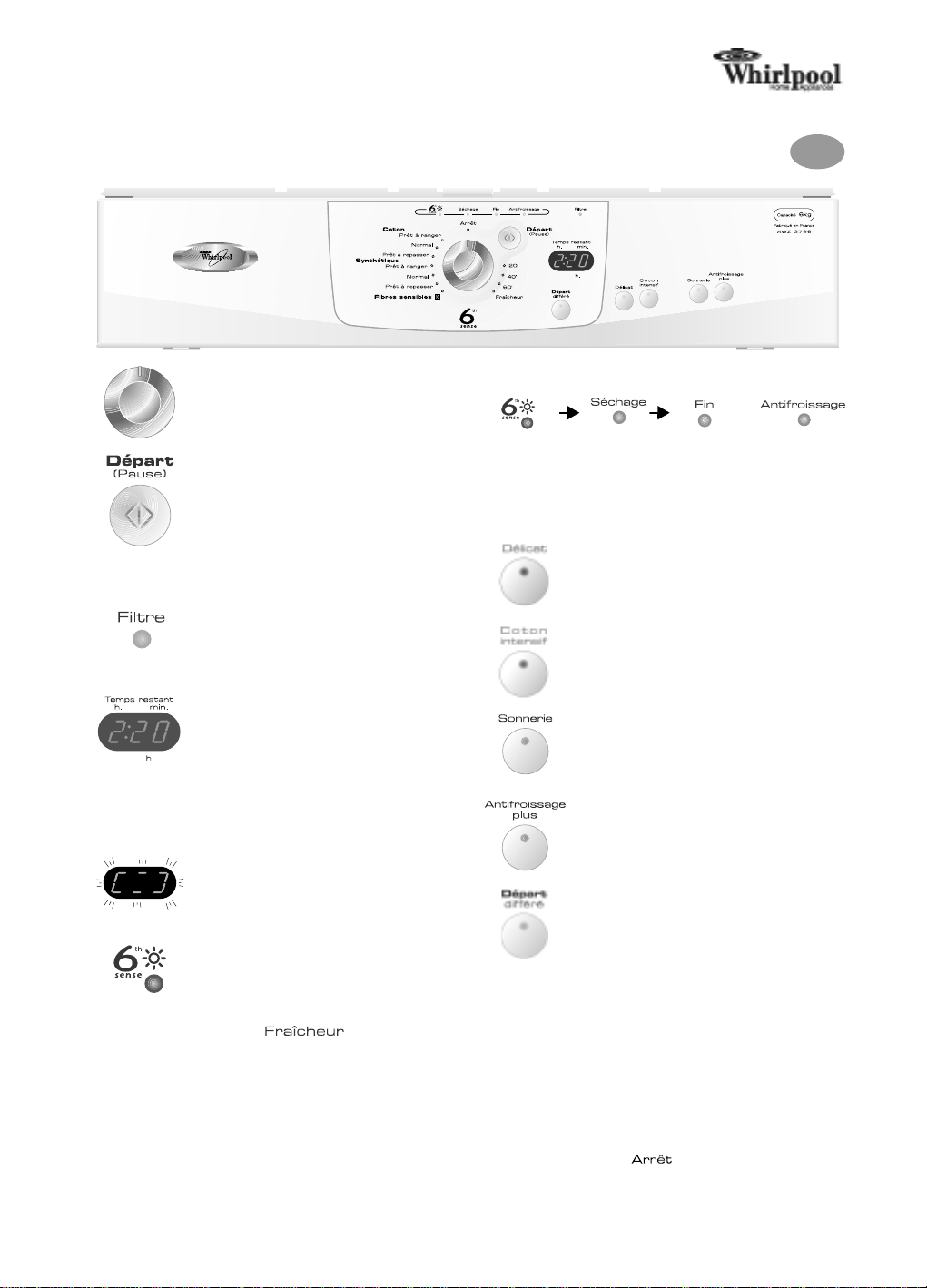
Before using the machine, please also read the instructions for use carefully!
AWZ 3796
Programme selector knob
The drying programme is selected by turning
this knob.
“Départ (Pause)” button
The drying programme is started by pressing
this button. The indicator lamp flashes during
the selection phase and lights up during
drying.
Indicator lamps
Filter
The indicator lamp lights up when the filter
needs cleaning.
Clean the filter at the end of every cycle.
Quick Reference Guide
Programme sequence
Overdry
protection
Options
Drying
Gentle
Reduces drying intensity
(recommended for delicate items).
Rapid
Shortens drying duration (recommended for
thin items of the same size).
End
of cycle
GB
+
Anti-
crease
Time remaining display
Depending on the programme selected, once
the drying cycle has been started, a default
drying time is displayed. The time displayed is
corrected by a few minutes depending on the
volume, type and dampness of the laundry.
The drying time specified is a calculated
value which will be updated during the
drying programme.
The flashing lines indicate that the calculation is
running. The remaining time will be updated.
Overdry protection
The indicator lamp lights up when a humidity
controlled programme is selected, to indicate
the working protection function. Function is
not active in time controlled programmes
and “ ”.
40' 60'
20'
Buzzer
Signals/sounds end of drying cycle.
Anti-crease
Prevents laundry from creasing up to 12
hours. Buzzer and Anti-crease cannot be
selected together.
Delayed Start
Delays the start of the drying cycle by 1 to 9
hours.
Each time the button is pressed, the start
time is delayed by 1 hour.
Then press the
confirm the final selection and to start the
dryer.
The delayed start indicator lamp flashes and
the countdown counts down in 1-hour
intervals. The countdown is indicated by the
indicator lamp above the button flashing.
During the countdown, the drum will turn
from time to time to re-distribute the
laundry. To cancel or change the previously
set time delay, set the programme selector
knob to “ ” or open the door.
“Départ (Pause)”
button to
Whirlpool is a registered trademark of Whirlpool USA
5019 307 00635
(Subject to technical modifications)
4
 Loading...