

Page 1
QUICK START GUIDE
Page 2

Page 3
IMPORTANT SAFETY INSTRUCTIONS
• Read these instructions – All the safety and operating instructions should be read before
this product is operated.
• Keep these instructions – The safety and operating instructions should be retained for
future reference.
• Heed all warnings – All warnings on the appliance and in the operating instructions
should be adhered to.
• Follow all instructions – All operating and use instructions should be followed.
• Do not use this apparatus near water – The appliance should not be used near water or
moisture - for example, in a wet basement or near a swimming pool and the like.
• Clean only with a dry c
• DO NOT
• Pro tect the power cord from being walked o n o r pinched, p articularly at plugs,
• Only use attachments/accessories specified by the manufacturer.
• Use only with the cart, stand, tripod, bracket or table specified by the manufacturer,or
• Unplug this apparatus during lightning storms or when unused for long periods of time.
• Refer all servicing to qualify service personnel. Servicing is required when the apparatus
:
• Block any ventilation openings. Always install in accordance with the manufacturer’s
instructions.
• Install near a ny hear sources such as r adiators, heat registers, stoves, or other
apparatus (including amplifiers) that produce heat.
• Use a polarized plug for this television. A polarized plug has two blades with one wider
that the other. A grounding-type plug has two blades and a third grounding prong.
The wide blade (or third prong) are provided for your safety. If the provided plug does
not fit into your outlet, consult an electrician for a replacement of the obsolete outlet.
convenience receptacles, and the point
sold with the apparatus. When a cart is used, use caution when moving the cart apparatus
combination to avoid injury from tip-over.
has b een damaged in any way, such as the power-supply cord or plug is damaged,
liquid has been spilled or objects have fallen into the apparatus, the apparatus has been
exposed to rain or moisture, does not operate normally, or has been dropped.
loth.
where they exit from the apparatus.
• Keep unit in a well ventilated environment.
• WARNING:
• To reduce the risk of fire or electric shock, do not expose this apparatus to rain or
• The batteries shall not be exposed to excessive heat such as sunshine, fire or the
• The main plug is used as disconnect device, the disconnect device shall remain
• To reduce the risk of electric shock, do not remove cover (or back) as there are no
The terms HDMI and HDMI High -Definition Multimedia Interface,and the HDMI Logo are
trademarks or registered trademarks of HDMI Licensing Administrator, Inc in the United
States and other countries.
moisture. The apparatus should not be exposed to dripping or splashing. Objects
filled with liquids, such as vases should not be placed on apparatus.
like.
readily operable.
user-serviceable parts inside. Refer servicing to qualified personnel.
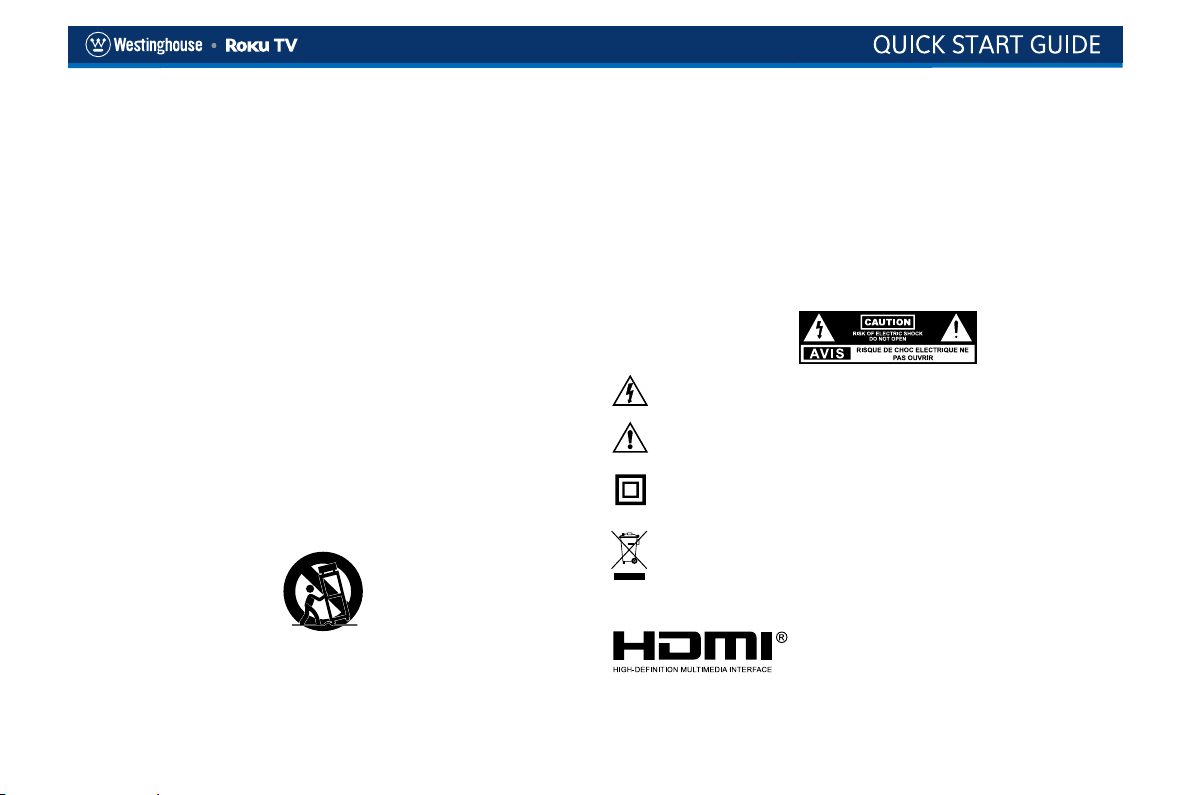
This symbol is intende d to alert the user to the presence of non-insula ted
“dangerous voltage” within the product’s enclosure that may be of sufficient
magnitude to constitute a risk of electric shock.
This symbol is intended to alert the user to the presence of important operating
and maintenance instructions in the literature accompanying the appliance.
This equipment is a Class II or double insulated electrical appliance. It has been
designed in such s way that it does not require a safety connection to electrical
earth.
This product contains electrical or electronic materials. The presence of these
materials may, if not disposed of properly, have potential adverse effects on the
environment and human health. Presence of this label on the product means it
should be disposed of as unsorted waste and must be collected separately. As a
consumer, you are responsible for ensuring that this produ ct is d isposed of
properly.
Page 4
The FCC Wants You to Know
FCC STATEMENT
This device complies with Part 15 of the FCC Rules. Operation is subject to the following two conditions:
(1) This device may not cause harmful interference, and
(2) This device must accept any interference received, including interference that may cause undesired operation.Changes or not expressly approved by
the party responsible for compliance could void the user's authority to operate the equipment.
NOTE: This equipment has been tested and found to comply with the limits for a Class B digital device, pursuant to Part 15 of the FCC Rules. These limits
are designed to provide reasonable protection against harmful interference in a residential installation. This equipment generates uses and can radiate
radio frequency energy and, if not installed and used in accordance with the instructions, may cause harmful interference to radio communications.
However, there is no guarantee that interference will not occur in a particular installation. If this equipment does cause harmful interference to radio or
television reception, which can be determined by turning the equipment off and on, the user is encouraged to try to correct the interference by one or
more of the following measures:
(1) Reorient or relocate the receiving antenna.
(2) Increase the separation between the equipment and receiver.
(3) Connect the equipment into an outlet on a circuit different from that to which the receiver is connected.
(4) Consult the dealer or an experienced radio/TV technician for help.
FCC Radiation Exposure Statement
This equipment complies with FCC radiation exposure limits set forth for an uncontrolled environment.
This equipment should be installed and operated with minimum distance 20cm between the radiator & your body.
Responsible Party –
Company:Westinghouse Electronics
Address:6255 Providence Way, Eastvale, CA 92880
Tel:(800)-701-0680
Page 5
TABLE OF CONTENTS
PACKAGE CONTENT 1
INSTALLING THE TV STAND 2
LOCATION OF CONNECTORS 3
CONNECTING DEVICES TO YOUR TV 4
SETTING UP YOUR TV 5
CONNECT AN ANTENNA (OPTIONAL) 7
REMOTE CONTROL 8
SPECIFICATION 9
This Quick Start Guide is provided so that you can properly set up your new TV.
Page 6
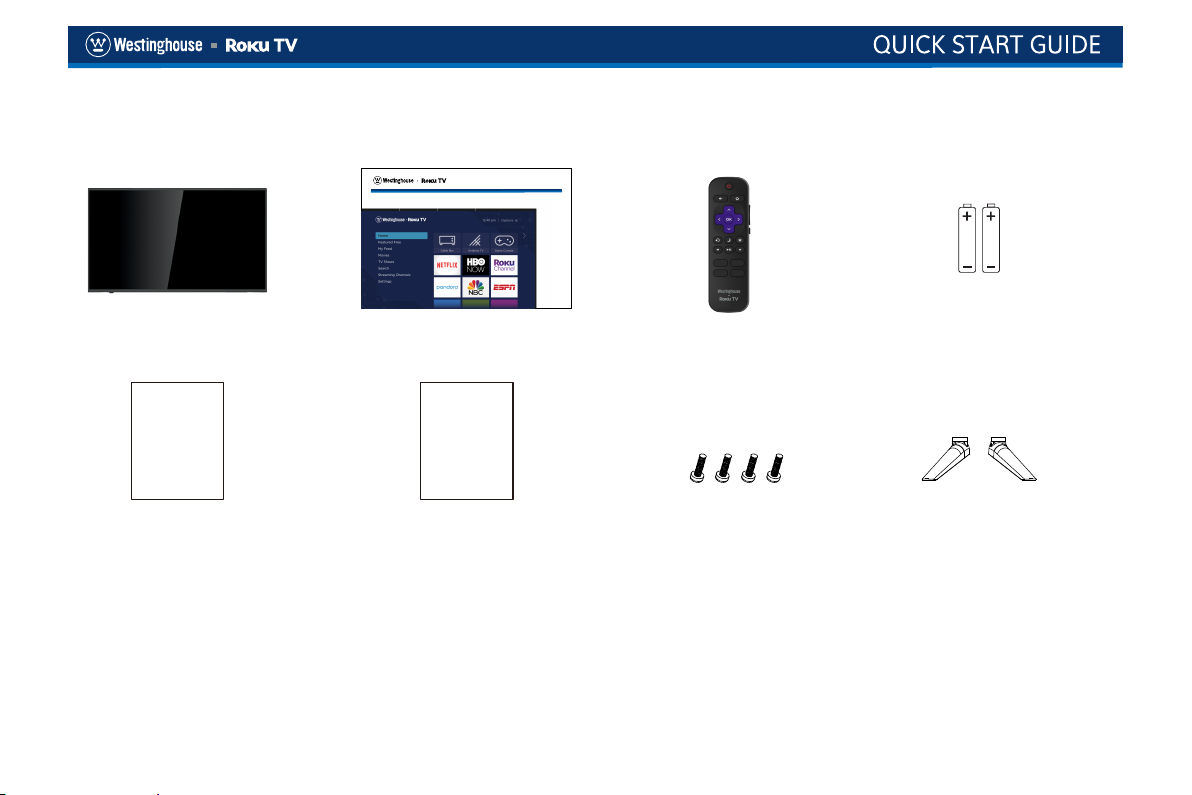
PACKAGE CONTENT
QUICK START GUIDE
Westinghouse Roku TV x 1pc Quick Start Guide x 1pc
Remote Control x 1pc
Batteries for Remote Control
(Size AAA) x 2pcs
Warranty
Card
Warranty Card Roku TV EULA Stands x 2pcs
What you need (not included)
- Phillips screw driver
- Wireless router (needed for streaming)
- Internet connection (needed for streaming)
- Computer, tablet, or smart phone (needed for setup)
Roku TV
EULA
4x screws for TV Stand
For additional support, please refer to User Manual and
Westinghouse Customer Support at
http://go.roku.com/tvmanual
http://westinghouseelectronics.com/support/
Key things to know: A paid subscription or other payments
may be required for some streaming channel content.
Channel availability subject to change and varies by country.
1
Page 7
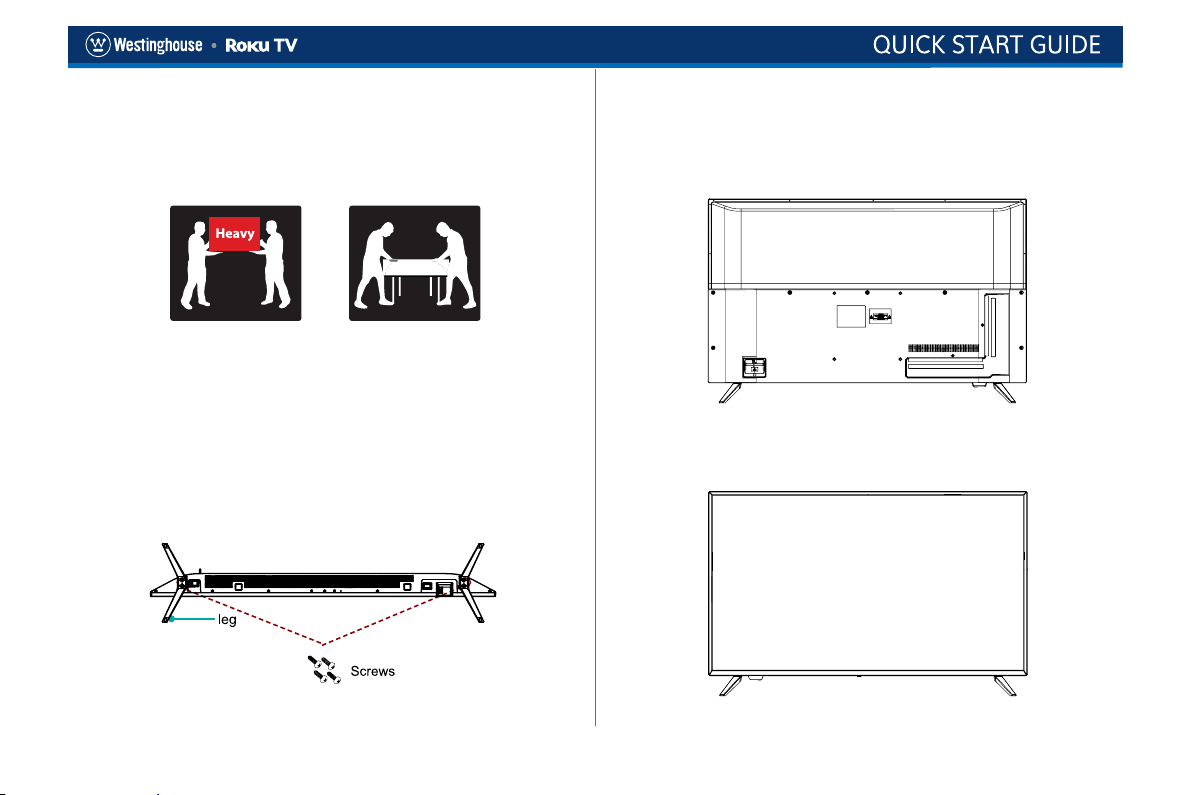
INSTALLING THE TV STAND
It is recommended two people handle TV stand installation.To
prevent scratch or damage to the TV screen, place the TV on
a soft, flat surface.
Attach the stands to the bottom of the TV by inserting the
stand into slots on the TV. Secure the stands to the TV with
the supplied screws.
2. After securing the stand, place the TV on a stable surface.
The TV is ready for use now.
To attach the left and right leg that forms the stand:
1.Place the legs into the bottom slots of the TV, insert and
tighten the screws (found in the accessories bag) in the
circled areas with the screwdriver (not provided).
Note: TV can also be wall mounted. Wall mount sold
separately.
2
Page 8
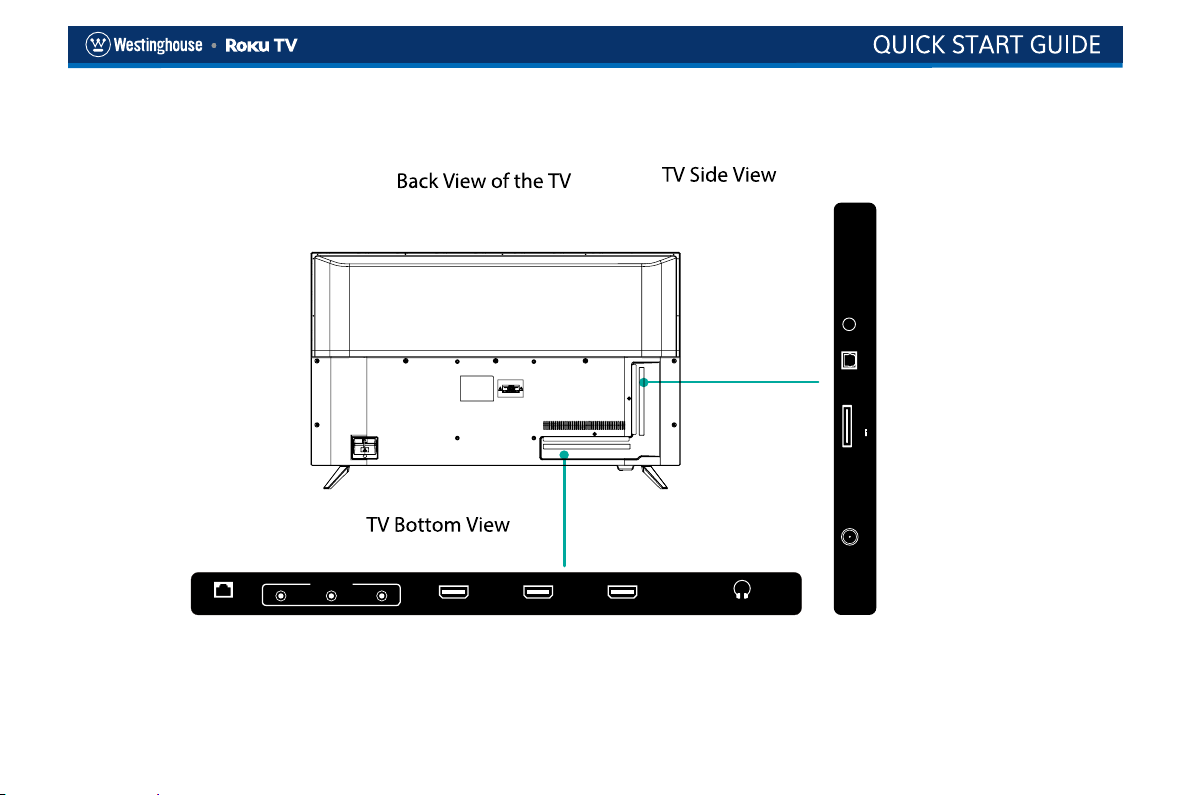
LOCATION OF CONNECTORS
OPTI CAL RESE T
500mA
USB
5V
RF IN
AV IN
L
LAN HDMI 3 HDMI 2 HDM I 1 HEAD PHONE
RCVBS
(ARC )
3
Page 9
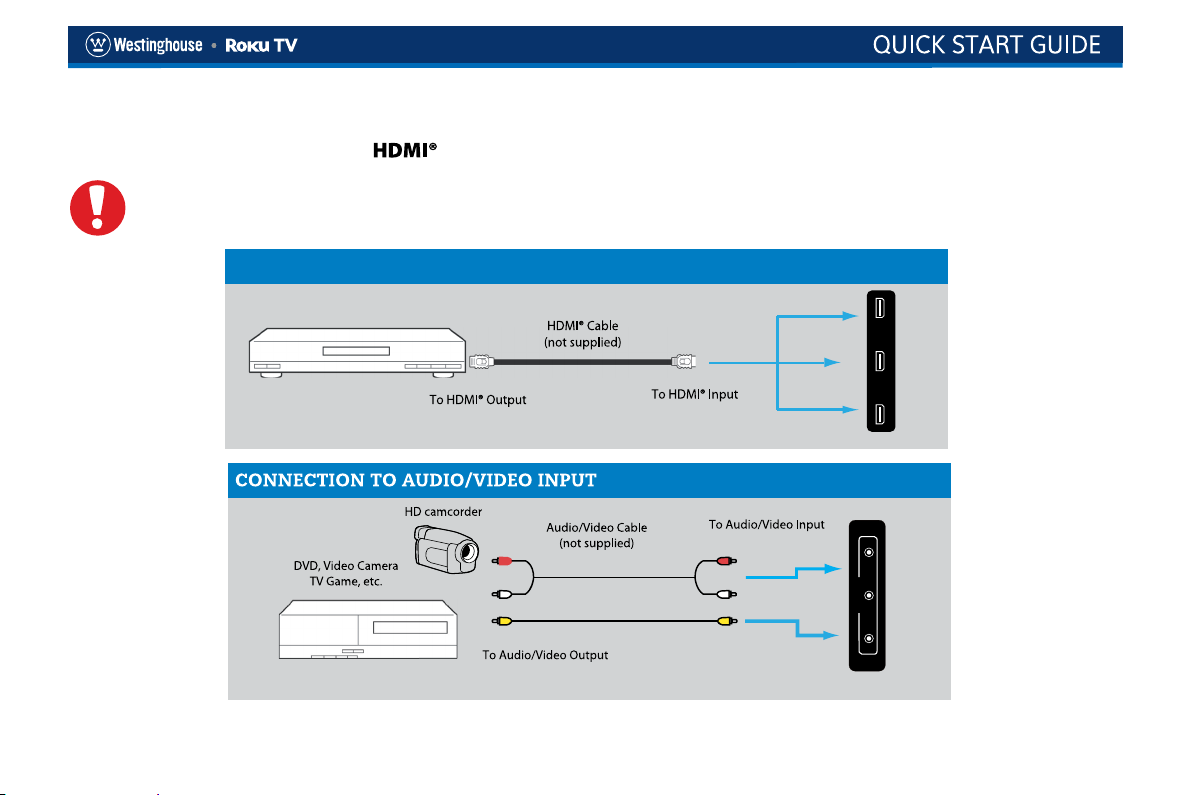
CONNECTING DEVICES TO YOUR TV
Westinghouse remmends using the best-quality video connection for your Cable Box,Satellite Receiver,Blu-ray,DVD player,Game
box or any other device starting with .
CATUTION
Disconnect the power cord before connecting device
CONNECTION TO HDMI INPUT
(ARC)
BEST CONNECTION
HDMI is a trademark of HDMI Licensing LLC in the United States and other countries.
4
HDMI 3 HDMI 2 HDMI 1
L RCVBS
AV IN
Page 10
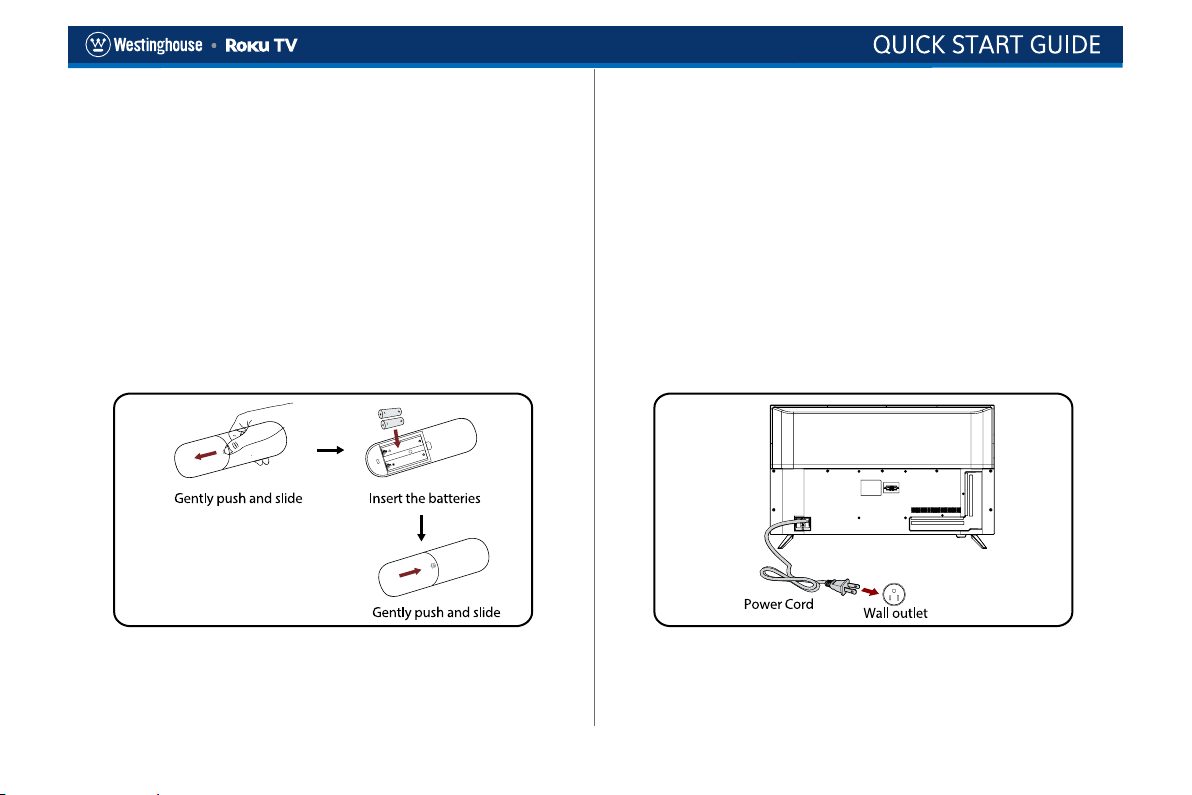
SETTING UP YOUR TV
1. Place batteries in remote
Power your TV remote by inserting the included batteries
carefully matching(+) and (-) indicated inside the battery
compartment.
Tip: Always replace dead batteries with two brand-new
batteries from the same manufacturer. Never use damaged
batteries. If your remote gets warm/hot during use,
discontinue use and contact customer support immediately
at http://westinghouseelectronics.com/support/
2. Plug in and turn on TV
Connect your power cord to the TV, then plug it into the wall
outlet. Press the power button on your TV remote control.
5
Page 11
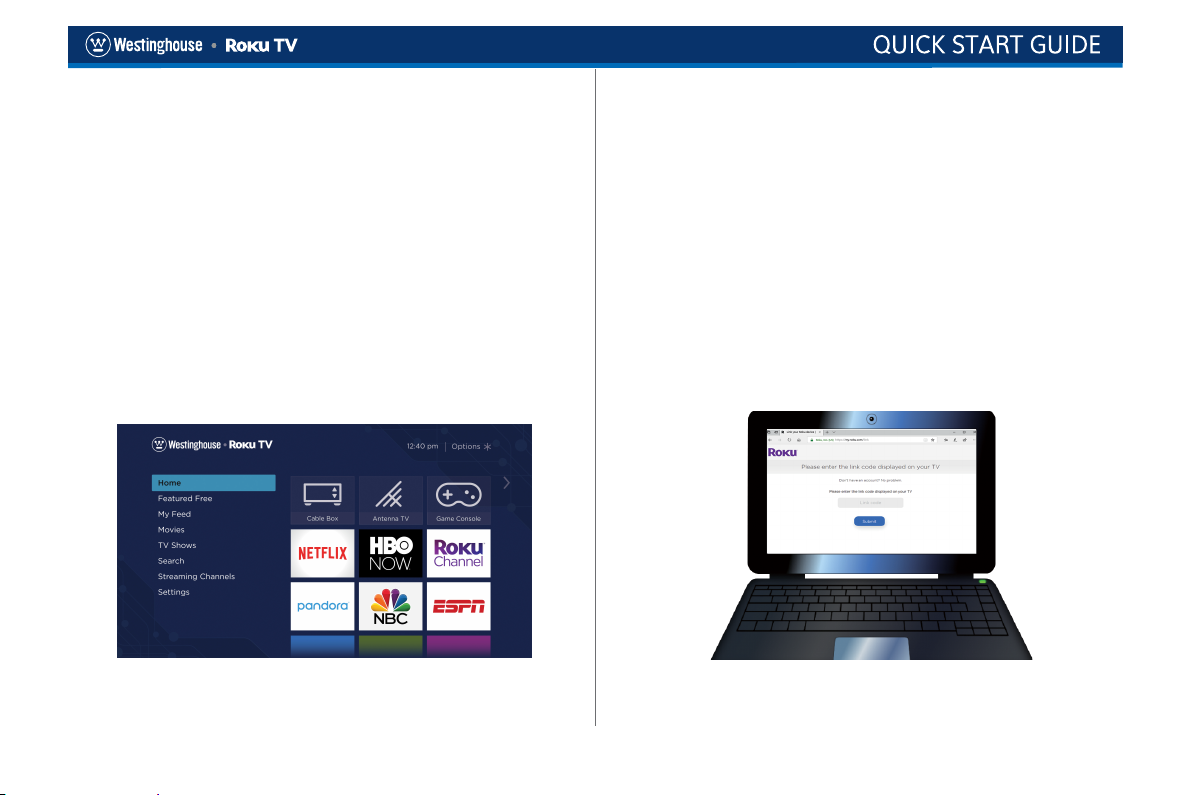
SETTING UP YOUR TV
3. Follow the on-screen instructions
Once your Roku TV powers on, follow the on-screen
instructions. Your Roku TV will walk you through initial setup
and help connect to your preferred wireless network. Your TV
will automatically detect wireless networks in your area. Have
your network name and password handy and follow the easy
on-screen instructions. Once connected your TV will
automatically update with the latest software. This can take a
few minutes to update. If you aren’t ready to connect your TV
to a wireless network, you can still use it as a regular TV.
NOTE: Roku does not charge for activation support – beware of scams.
4. Activate your smart TV
Y
ou need a Roku account to activate your Roku TV and
access entertainment across thousands of streaming
channels. From your smartphone, tablet or computer, go to
www.roku.com/link and enter the unique link code that is
displayed on your TV screen. Roku accounts are free and
while a valid credit card number is not required to create a
Roku account, saving your credit card information makes
renting and purchasing entertainment from the Roku Channel
Store fast and convenient.
6
Page 12
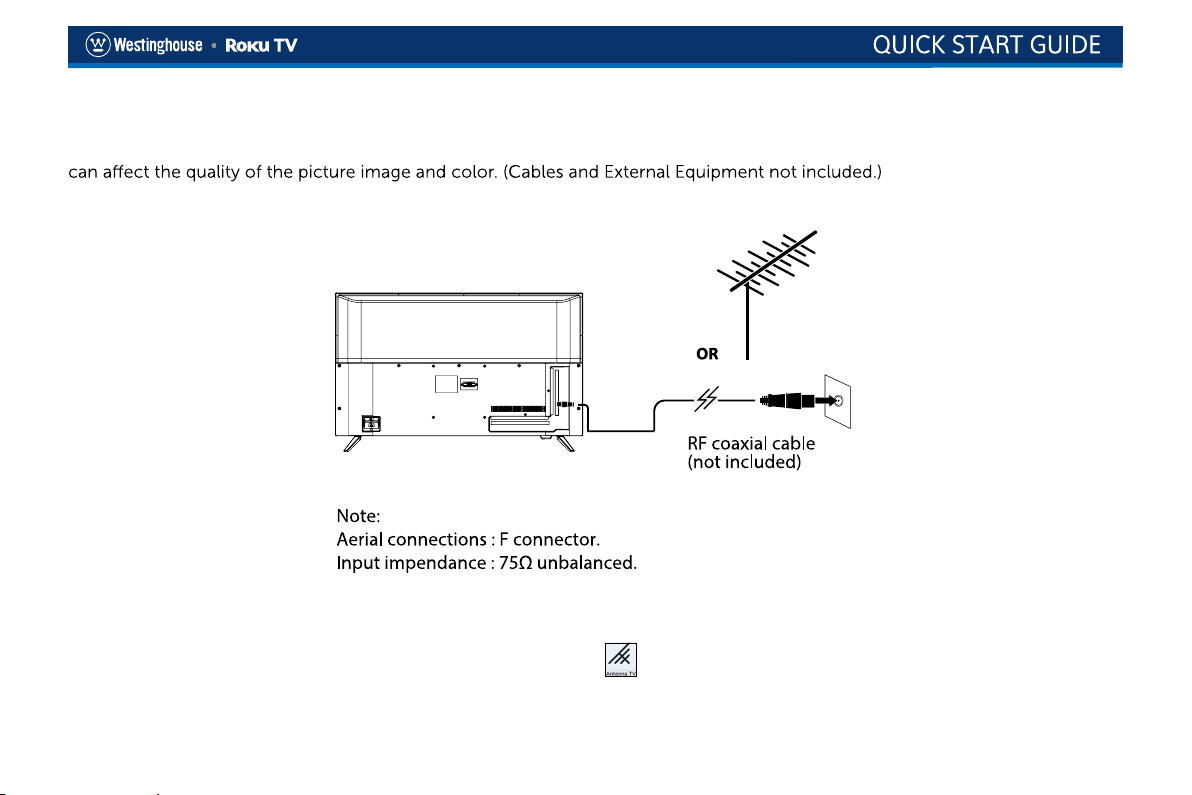
CONNECT AN ANTENNA (OPTIONAL)
Check to ensure that you have selected the right cables for the ports and that they are connected securely. Loose connections
With the tuner built-in you can connect your TV to an antenna and enjoy over-the-air entertainment.
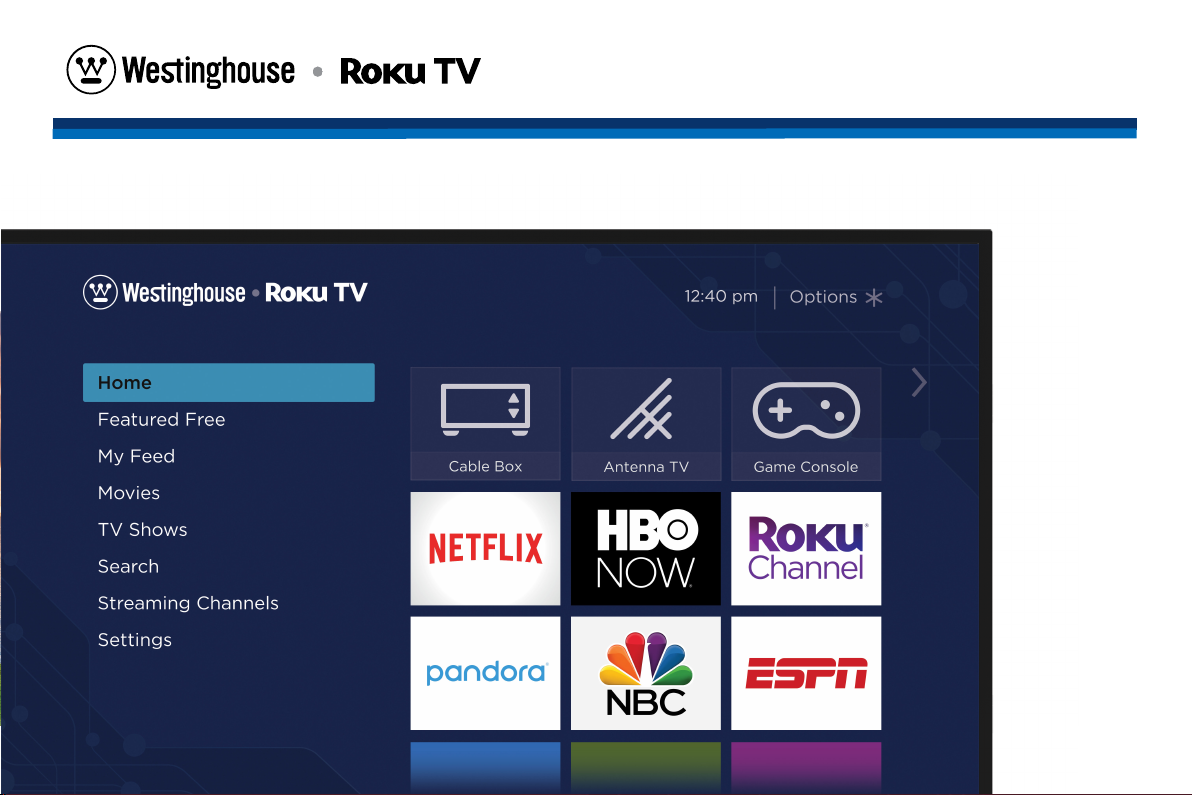
1. When the setup wizard is complete select the Antenna TV icon
2. Follow the on-screen instructions.
3. Whenever you want to watch antenna TV, select the Antenna icon.
from the home screen.
7
Page 13
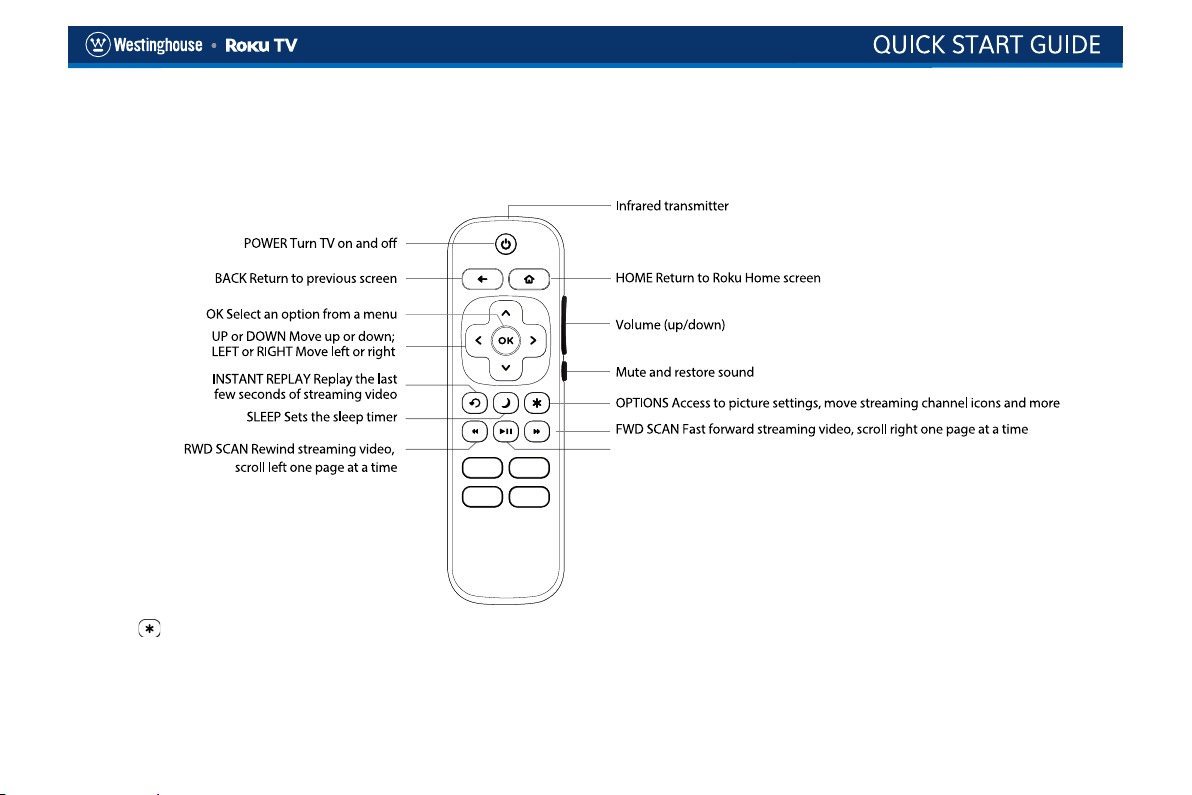
REMOTE CONTROL
The Roku TV remote should feel right at home in your hand. We designed it to be incredibly intuitive for watching TV and navigating on-screen menus.
Start or pause playback. You can also use this button to activate and use the
Live TV Pause feature when a 16GB USB drive is attached to the TV. The Live
TV Pause feature requires connecting to the Roku service.
Tip: The
gives you easy access to picture settings, display options and more. Try it on every screen.
Tip: If you prefer to use your cable set-top box or satellite receiver remote as a Universal Remote, please refer to the manual that
your cable or satellite service provided. It includes instructions on how to program their remote to your television. You can find
codes that work with your Westinghouse Roku TV and most common cable and satellite provider’s universal remote controls at
www.roku.com/universalremote.”
8
Page 14
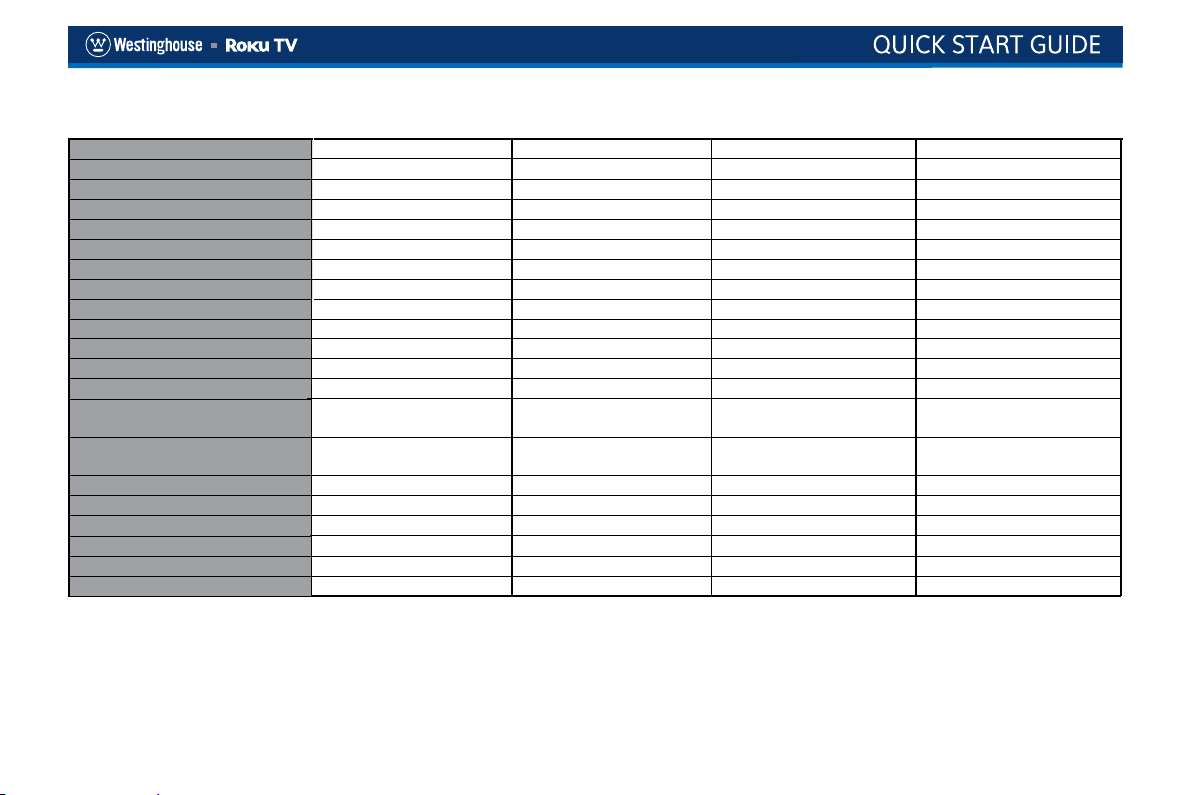
SPECIFICATIONS
Panel Size diagonal
Display Type
Panel Technology
Panel 60 Hz Vs. 120 Hz
Display Resolution
HDMI Support
Resolution
Aspect Ratio
Channel Range
Contrast Ratio
Brightness (Centre Typ.) Cd/M²
Response Time (G To G)
Lamp Life (Typ. Hours)
Horizontal Viewing Angle (At
CR≥10)
Vertical Viewing Angle (At
CR≥10)
TV System
Channel Range
Channel Range
Tuner Type
Stand Screw
Wall Mount
Design and specifications are subjects to change without prior notice.
42.5 inches
LED
TFT
60 Hz
2160P
Up to 2160P
3840 x 2160
16:9
UHF: 14~69
4000:1
200~250
6.5 ms
>30,000 hours
178
178
ATSC/NTSC
VHF: 2~13
CATV: 1~135
Frequency synthesized
4*14PM *4
200x200mm/M6*12mm*4
49.5 inches
LED
TFT
60 Hz
2160P
Up to 2160P
3840 x 2160
16:9
UHF: 14~69
4000:1
200~250
9.5 ms
>30,000 hours
178
178
ATSC/NTSC
VHF: 2~13
CATV: 1~135
Frequency synthesized
4*14PM *4
200x200mm/M6*12mm*4
54.6 inches
LED
TFT
60 Hz
2160P
Up to 2160P
3840 x 2160
16:9
UHF: 14~69
4000:1
200~250
8.5 ms
>30,000 hours
178
178
ATSC/NTSC
VHF: 2~13
CATV: 1~135
Frequency synthesized
4*14PM *4
400x200mm/M6*12mm*4
9
64.5 inches
LED
TFT
60 Hz
2160P
Up to 2160P
3840 x 2160
16:9
UHF: 14~69
4000:1
300+/-10%
8 ms
>30,000 hours
160
150
ATSC/NTSC
VHF: 2~13
CATV: 1~135
Frequency synthesized
4*14PM *4
400x200mm/M6*12mm*4
Page 15
Register your products online: www.westinghouseelectronics.com/support
Enjoy these benefits by registering your product online today!
• Up-to-date product information
• Exciting promotional offers
• Industry news
Westinghouse Electronics has a comprehensive online privacy policy designed to protect our online visitor’s information.
Please visit www.westinghouseelectronics.com/privacy/ for our complete Online Privacy Policy.
Need help? Contact us at: (800) 701-0680
or go to www.westinghouseelectronics.com/support
11
Page 16
ROKU, ROKU TV and the ROKU logo are the trademarks or registered trademarks of
Roku, Inc. All other trademarks and logos herein are the property of their respective
owners.
4 0 3 3 Q4 3 6 0 1 4
© 2019 Westinghouse All Rights Reserved.
 Loading...