

Page 1

Thank You!
for purchasing this Westcott® product.
Register your purchase.
We have a simple form
for registering your
Westcott purchase that
provides you with added
assurance for your gear:
fjwestcott.com/warranty
Visit fjwestcott.com
Video Tips
Product Support
Knowledge Base
Product Reviews
Contests & More!
WARRANTY
One year against manufacturer defect.
Westcott’s warranty obligations for this product are limited to the terms set forth below: The F.J. Westcott Co. (“Westcott")
warrants this Westcott branded product against defects in materials and workmanship under normal use for a period of ONE
(1) YEAR fr om the date of retai l purchase by the o riginal end- user purchase r (“Warranty P eriod"). If a def ect arises and a v alid
claim is received wi thin the Warrant y Period, at its option and t o the extent permi tted by law, Westcott will either (1) repair the
defect a t no charge, usi ng new or refurb ished repla cement part s, or (2) exchange t he product w ith a product t hat is new or wh ich
has been manufactured from new or serviceable used parts and is at least functionally equivalent to the original product. This
Limit ed Warranty ap plies only to pr oducts manu factured by or f or Westcott th at can be identi fied by the “Wes tcott” tra demark,
trade name, or logo affixed to them.
This warranty does not apply: (a) to damage caused by accident, abuse, misuse, flood, fire, earthquake or other external
causes; (b) to damage caused by operating the product outside the permitted or intended uses described by Westcott; (c) to a
produc t or part that has been modifi ed to alter functionalit y or capabilit y without the written permission of Westcott.; or (d) to
cosmet ic damage, inclu ding but not limited to scrat ches, dents and broken plastic.
Please contact Westcott’s Repair Department for a Return Authorization Number “RMA" prior to requesting warranty service.
This R MA must be c learly wri tten on the ou tside of th e box to the left o f the shippin g label. Ite ms sent in wit hout pre- authoriz ation
or that do n ot fall under the O NE (1) YEAR limited warranty will be retur ned at the expense of the sender.
Repair Dept.: 800 -886-16 89 / 419-243-7311 (International)
E-Mail: [email protected] SUBJEC T: ATTN: REPAIR DEPT.
Shipping: F.J. Westcott Co, 1425 Holland Rd, Maumee, OH 43537 ©F.J. WESTCO TT CO. ALL RIGHTS RE SERVED.1214US.
QUICK START GUIDE
Page 2
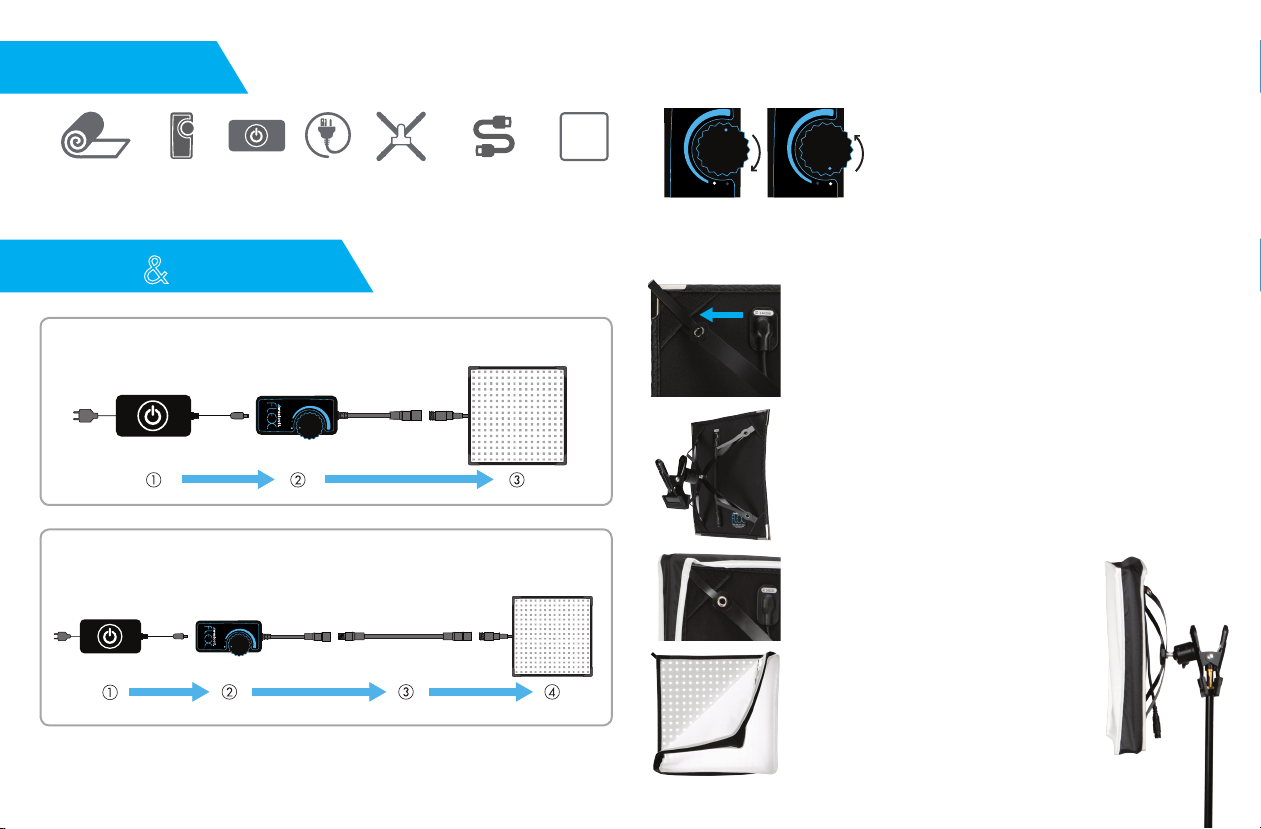
IN THE BOX
ON OFF
ON OFF
ON OFF
ON OFF
10" X 10" FLEX™
LED MAT
SETUP
Please follow the diagram to connect the Flex LED mat to a power source.
DIMMER
CONTROL
USAGE
POWER
SUPPLY
POWER
CORD
X-BRACKET
MOUNT*
*INCLUDED WITH KITS & SOLD SEPARATELY
16' WATERPROOF
EXTENSION*
1/4-STOP
DIFFUSER*
POWER CONTROL
To power on the Flex LED mat, turn the dial on the Dimmer Control clockwise.
This dial also controls the output of the Flex LED
mat. To brighten, turn the dial clockwise. To dim,
turn the dial counter-clockwise.
ON OFF
ON OFF
ON OFF
To power off the Flex mat, turn the dial on the
Dimmer Control counter-clockwise until it clicks.
MOUNTING FLEX KIT
1. To mount the Flex LED mat to the optional Flex X-Bracket
Mount, locate the pockets located on the rear corners of
the Flex LED mat. Each arm of the Flex X-Bracket Mount
will fit securely into each of these pockets.
ON OFF
When using the optional Waterproof Extension, please follow the diagram to
connect the Flex LED mat to a power source.
Note: Always connect the Westcott Flex in the order shown above. Failure to do so could
result in electrical damage to the Westcott Flex.
ON OFF
2. Once the Flex LED mat is mounted securely on the
Flex X-Bracket Mount, the Flex can be mounted to
any stand or surface via the X-Bracket Mount clip.
3. Once placed in desired position, the Flex
LED’s output can be diffused by placing
the optional Flex LED Diffusion Panel onto
the X-Bracket Mount. To diffuse, first
locate the X-Bracket Mount’s adjustable
extension pieces.
4. Place each of the adjustable pieces into
each corner of the Flex Diffusion Panel
and adjust until secure.
 Loading...