

Page 1

Integrated Vehicle Tire
Pressure Monitoring
Vehicle tire pressure
monitoring system
System functions
System configuration
Instructions for installation
and diagnostics
1st. edition
815 000 452 3
8150004523
Revisions of this document are not set up.
New versions could be found in INFORM website
www.wabco-auto.com
Ó Copyright WABCO 2004
Vehicle Control Systems
An American Standard Company
8150003993
Changes are reserved
Version 001/04.03(en)
Wabcodruck 815 000 452 3
Page 2

FCC Notice
This device consists of Wheelmodul 960 730 XXX X (SA4-WM730)
and Electronic Control Unit 446 220 XXX X (SA4-ECU220)
This device complies with Part 15 of the FCC Rules. Operation is
subject to the following two conditions:
(1) this device may not cause harmful interference, and
(2) this device must accept any interference received, including
interference that may cause undesired operation.
Changes or modifications not expressly approved by the party
responsible for the compliance could void the user's authority to
operate the equipment.
Page 3
Contents
1. System functions 5
1.1 System structure 7
1.1.1 Example of installation in the bus 8
1.1.2 Example of installation in the trailer 8
2. Configuration 9
2.1 Components 10
2.1.1 Wheel module 10
2.1.2 Electronic control unit (ECU) 12
2.1.3 Display 13
2.2 Wiring 14
3. Installation instructions 17
3.1 General instructions 17
3.2 Overview 17
3.3 Additional mounting into vehicle/bus 18
3.3.1 Additional mounting into trailer 19
3.4 Inflation pressure 19
3.5 Installation of the control unit in vehicle 20
3.5.1 Installation of the wiring harness in vehicle 20
3.5.2 Installation of the wiring harness in trailer 22
4. Diagnostics 26
4.1 System configuration 26
4.2 Diagnostics structure 26
4.3 Instructions for use 27
4.3.1 Display instructi ons 27
4.4 Various information on display 27
4.4.1 Normal data 27
4.4.2 Pressure data 28
4.4.3 Error messages 29
4.4.4 Display reset 30
4.5 System error signalization 31
4.5.1 Interrupted connection to the wheel module 31
4.5.2 System failure 31
4.5.3 Interrupted connection between control unit and display 31
1
3
Page 4
1. System functions
System functions
IVTM
1.
IVTMstands for Integrated Vehicle Tire Pressure
Monitoring. It is the tire pressure monitoring system,
which is installed in the vehicle. IVTM continuously
monitors the pressure in all tires. This monitoring is
performed by the pressure sensors in all tires, which
relays information to the display in the cab in and warns
driver about critical pressure drop. IVTM makes tr ansport
safer and more efficient, becau se mor e than 80 % of tire
damage could be recognized before serious damage
occurs, which requires repair. IVTM thus cuts down
operational costs, as continually maintained optimized
pressure in all tire s results in minimal fuel c onsumption
and extension of service life of tires.
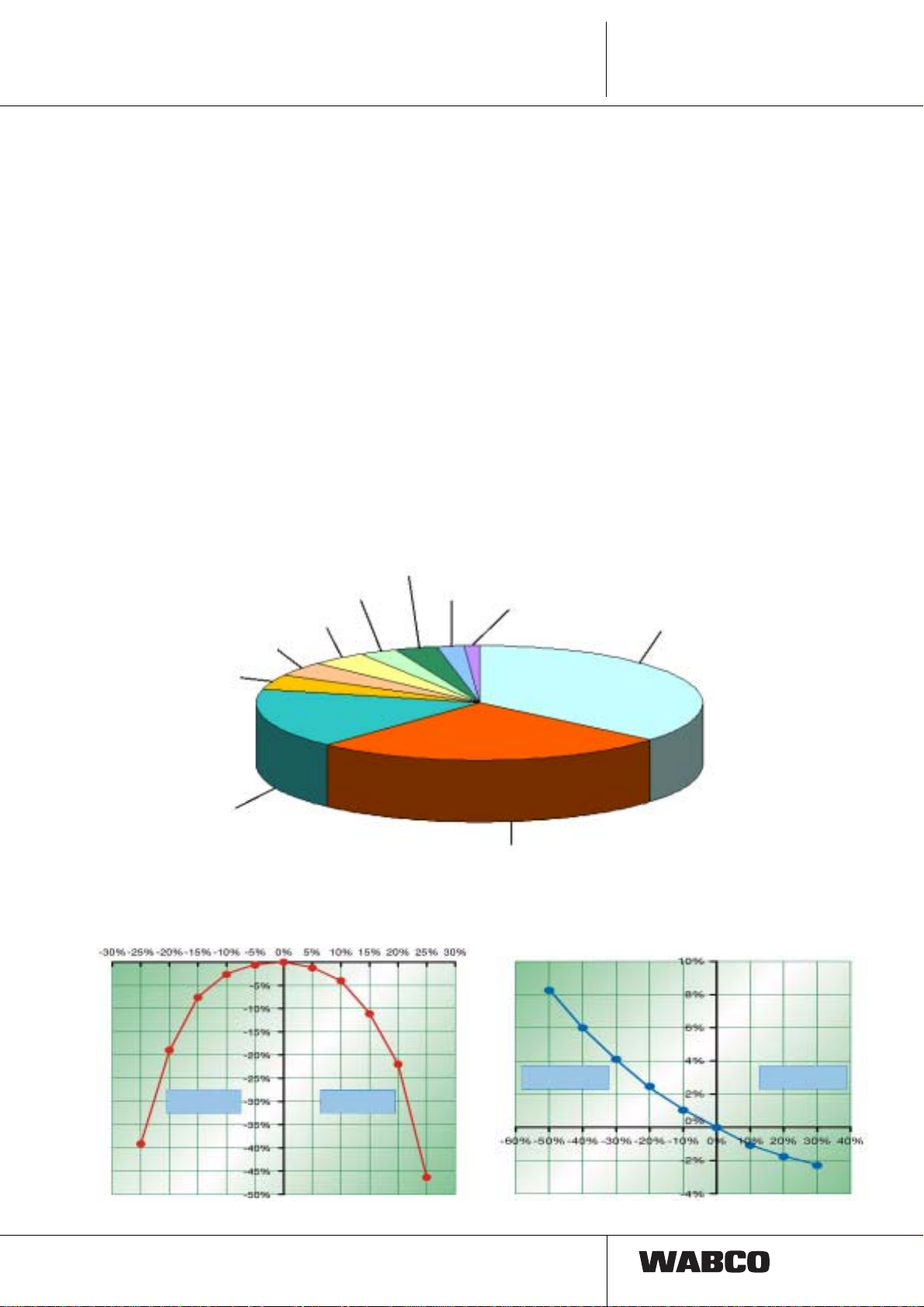
Let us present some information:
Tire manufacturers estimate that total losses caus ed by
Main reasons for brakedowns at commercial vehicles are:
Service / information 3%
Structure 3%
Salvage operation 4%
Drive line 4%
Chassis 2%
improper maintenance of tires of commercial vehicles are
more than 10 millions of Euro in Germany. Lot of vehicle
users unfortunately tend to overlook this important factor
of operational costs. By selecting correct tires and proper
maintenance it is possible to save up to 2500.- €per
vehicle for one year. The unnecessary expanses are
further increased by widely spread carelessness of
driving with under-inflated tires. Tires with 20 % lower
pressure are no e xception in e veryday life. This underinflation reduces service life of tires by 20 % and
unnecessarily incr eas es fu el co nsu mpt ion .
In order to minimize these costs WABCO company
designed new sy stem I VTM, which al so in crea ses t raffic
safety.
Operating
supplies 1%
Engine 36%
Brakes 4%
Electric 17%
The mileage of tyres significantly depends
on the tyre pressure...
tyre pressure
too low
tyre pressure
too high
Tire pressure
Source: Se rvice 24 GmbH & Co. KG
Tyres 26%
66000 brakedown missions
for trucks and busses in 1999
and fuel consumption also depends on the
tyre pressure.
Fuel consumption
tyre pressure
too low
tyre pressure
too high
Service life reduction
5
Page 5
1.
IVTM
System functions
Checks of the car fleets show:
Every second tire is under-inflated by more than
10 %.
Using of new IVTM system increases profitability :
• reduced fuel consumption due to lower rolling
resistance
• smaller tire wear owing to lower deformation
losses => longer tire life cycle
• Saving costs of manual tire pressure check
(up to 30 minutes for one vehicle)
• spare tire is not needed due to low probability of
rupture
=> higher vehicle load.
tyre pressure too low
IVTM warns driver about sneak pressure drop
early, i.e. before the tire could burst.
IVTM enhances safety of passengers, driver, vehicle and
traffic :
• The driver may react to sneak pressure drop
early and prevent up to 85 % of tire bursts.
Which types of pressure monitoring are
available?
Permanent tire press ure monitoring durin g driving could
be performed in several ways:
– direct tire pressure measurement
permanent on-line pressure monitoring is possible.
Extremely precise and effective, very expensive.
– direct tire pressure measureme nt with limit value
monitoring
not so precise.
– indirect tire pressure measurement
moderately expansive, not nearly as precise and
reliable. The pressure is calculated from drive slip,
measured by ABS turning sensors.
WABCO IVTM uses direct pressure
measurement and in comparison with systems
using ABS presents these advantages:
1. pressure monitori ng during parking or before driving
start; diagnostics memory
2. able to distinguish uniform diffusion losses
• Additionally, properly maintained pressure in
tires ensures s afe driving properties of ve hicle
and short braking distance.
IVTM ensures travel efficiency:
• Prevents unnecessary delays and idle time.
• No backup vehicles/emergency actions needed
• Prevents loss of confidence from unsatisfied
customers and resulting drop of turnover.
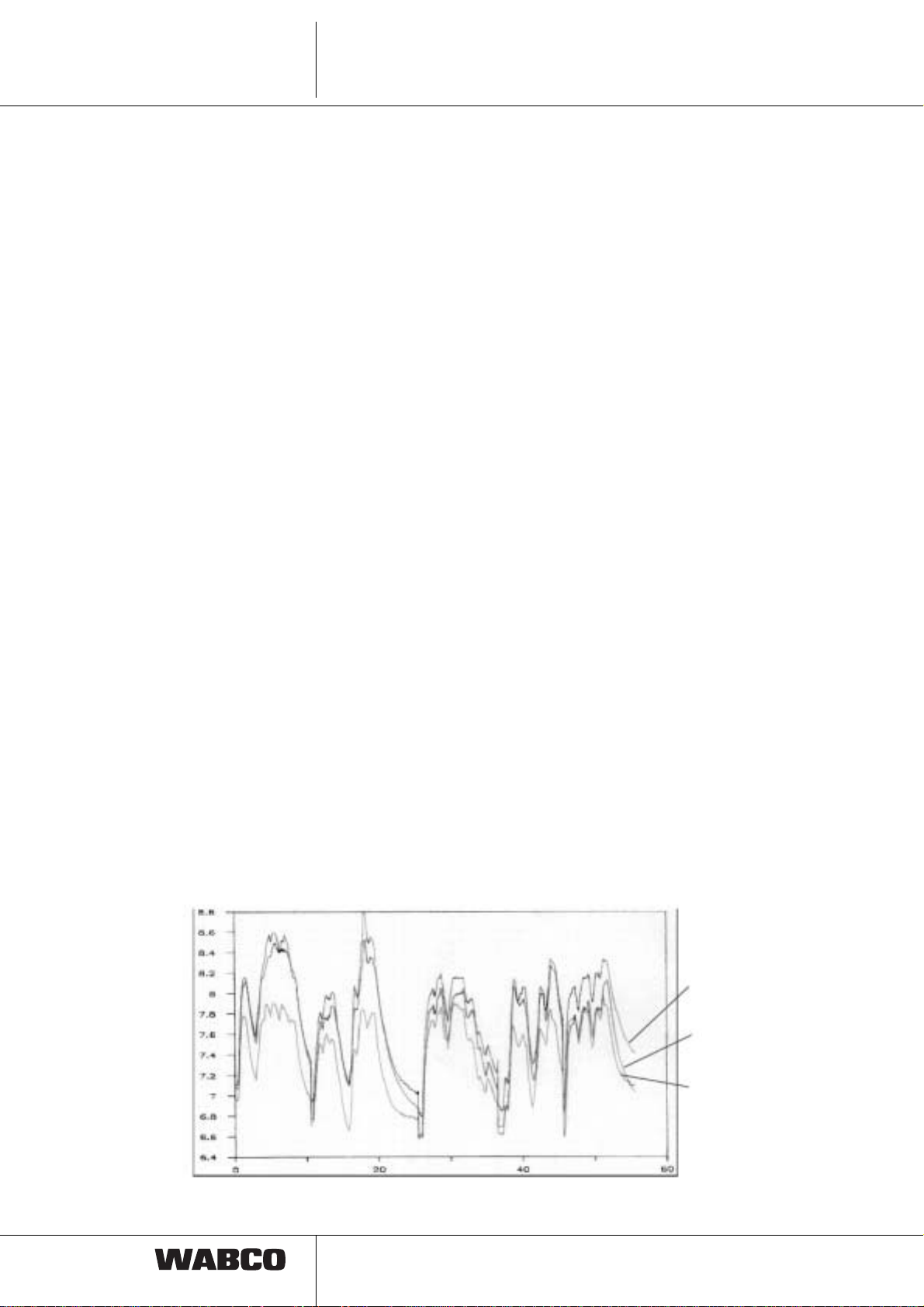
records about tire pressure (rise)
Air pressure
in bar
3. fast detection of pres sur e d ro p, reac ti on t ime in order
of several seconds.
4. display of c urre nt ti re pres sure
5. higher precision
6. identification of leaking tire
7. measurement is not affecte d by driving on lo w qual ity
road
8. measurement is not affected by uneven vehicle
loading
VEHICLE
rear axle inside
TRAILER
3 axles
VEHICLE
front axle
The range of tire pressure oscillation for utility vehicles is far higher then for passenger car.
6
Page 6
System functions
IVTM
1.
This requires using sophisticated evaluation algorithm,
instead of using simple identification of limit value.
Other requirements for tire pressure monitoring
systems of utility vehicles:
• exact wheel identification for vehicles with more
than 10 wheels or with double wheels
• high efficiency of wireless data transport
• pressure range 2 - 14 bars
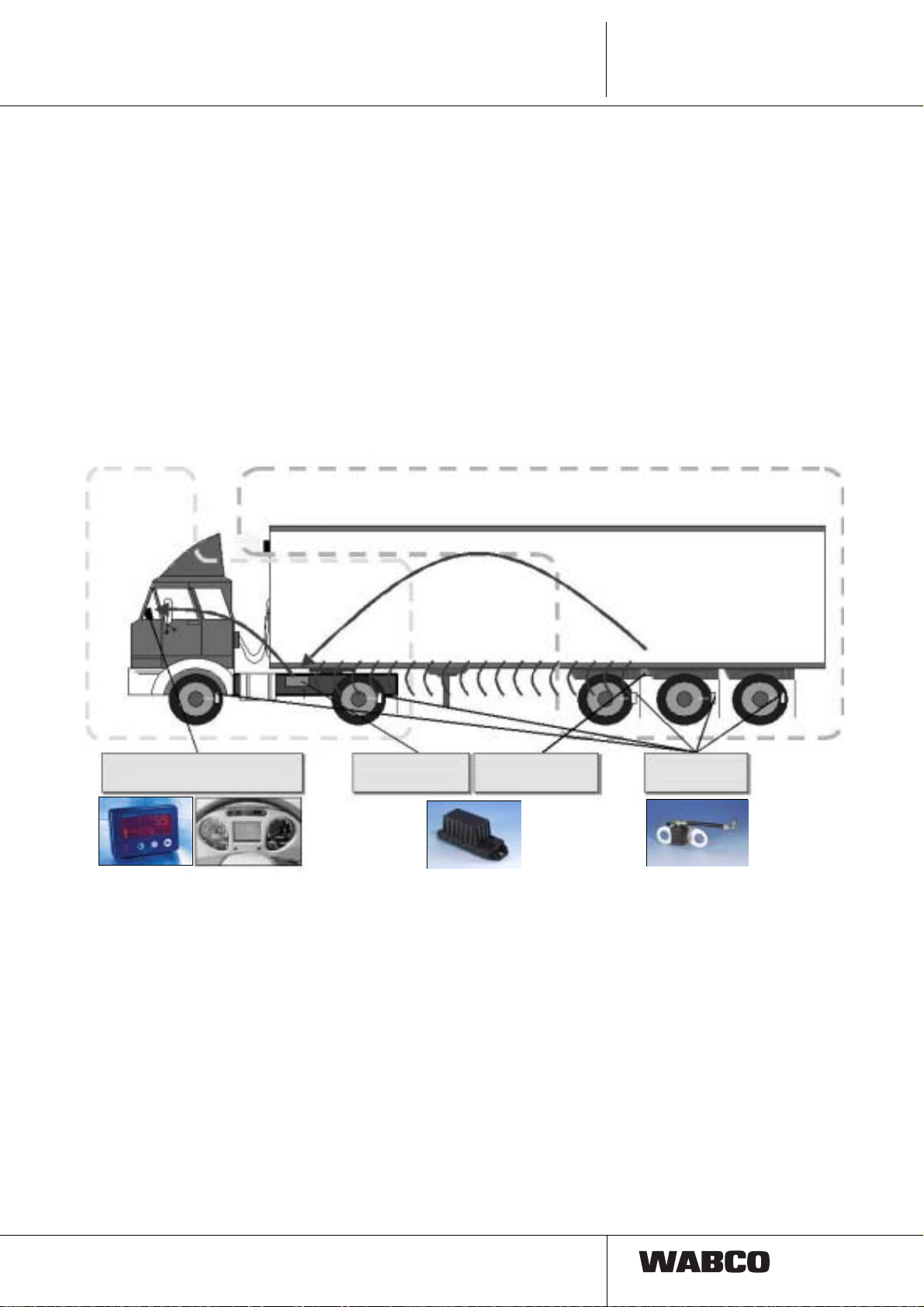
1.1 System architecture
IVTM system
Vehicle
CAN bus
CAN bus or
HF wireless data transfer
from trailer control unit
to vehicle control unit
• Identification of tire pres sure fluctuation ba sed
on load and tire wear.
This function req uires complicated "eval uative
algorithm".
• Wheel modules must be m ounted flexible with
respect to different ty pes and locations of tire
valves on rims, different rim designs and
frequent wheel changes and mus t allow easy
exchange.
IVTM system
Trailer
Display:
« Standalone » or integrated
WABCO system is based on one el ectronic circuit 446
220 00x 0, so called control unit, which receives wireless
data transmitted by wheel modul es. Whe el modules 960
730 00x 0 are conn ected to the whee l valves by hoses .
Pressure informati on is processed by algorith ms stored
in control unit.
The information is sent through CAN bus to di splay unit
446 221 000 0. Di splay unit con sists of o ne disp lay, two
indicators, one buzzer and two buttons.
Warning massages of different levels are displayed;
indicator colour and type of audio signal shows
seriousness of the problem:
Control unit
Vehicle
Control unit
Trailer
• Red light and 1 minute long audio signal
indicates serious defect; the vehicle must be
stopped immediately (possible threat to lives
and vehicle).
• Yellow light and 10 min utes long audio signal
indicates smaller defec t; the vehicle shoul d be
slowed down and lower pressure adjusted.
Defects found by IVTM s ystem are stored in electronic
memory (EEPROM) for diagnostic purposes.
Wheel module
fro wheel
7
Page 7
1.
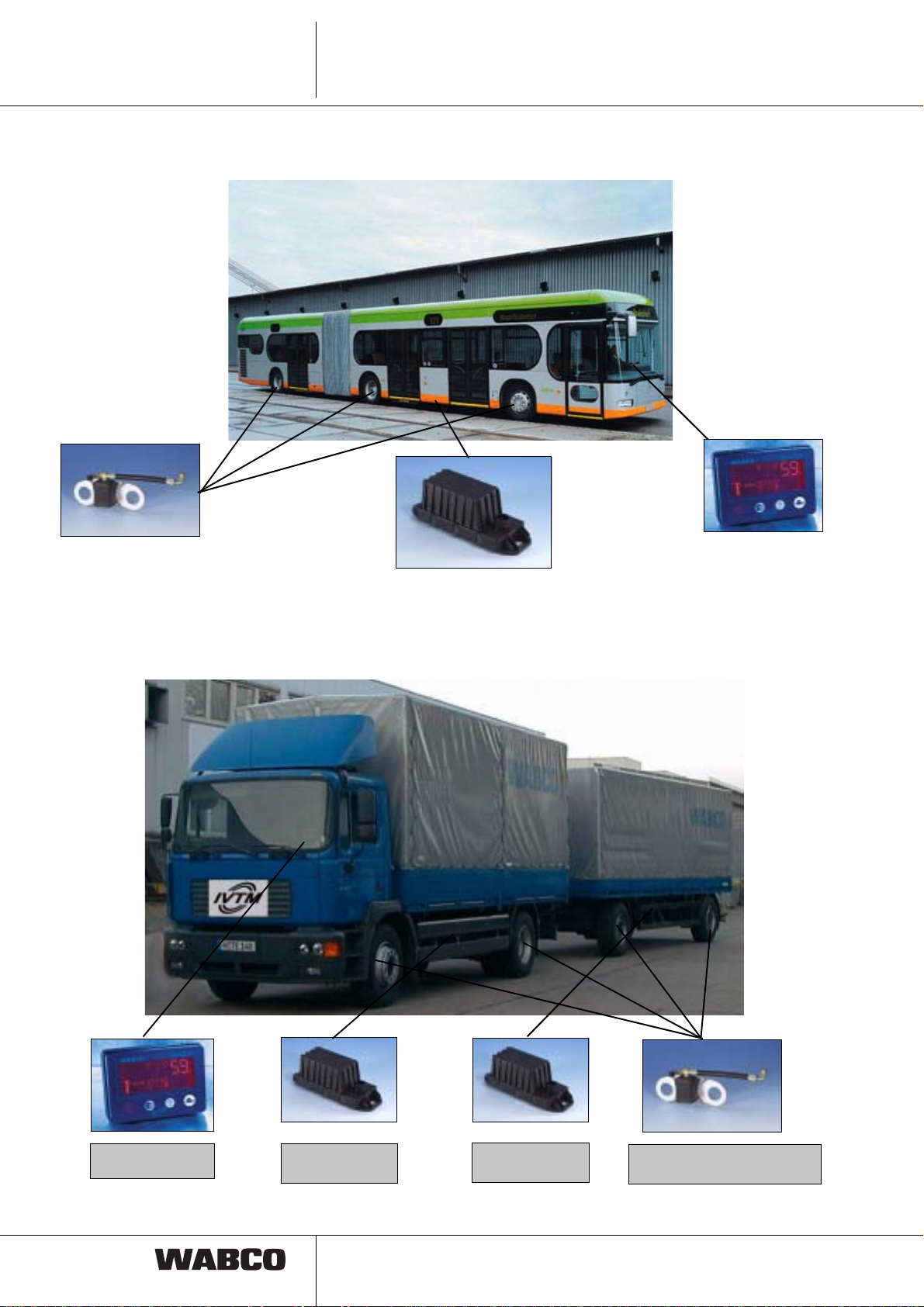
1.1.1 Example of installation in the bus:
IVTM
System functions
wheel module
electronic control unit (ECU)
1.1.2 Example of installation in the trailer:
Driver display
Display
8
Control unit
Vehicle
Control unit
Trailer
wheel module
(one module per one tire)
Page 8
2. Configuration
r
Configuration
IVTM
2.
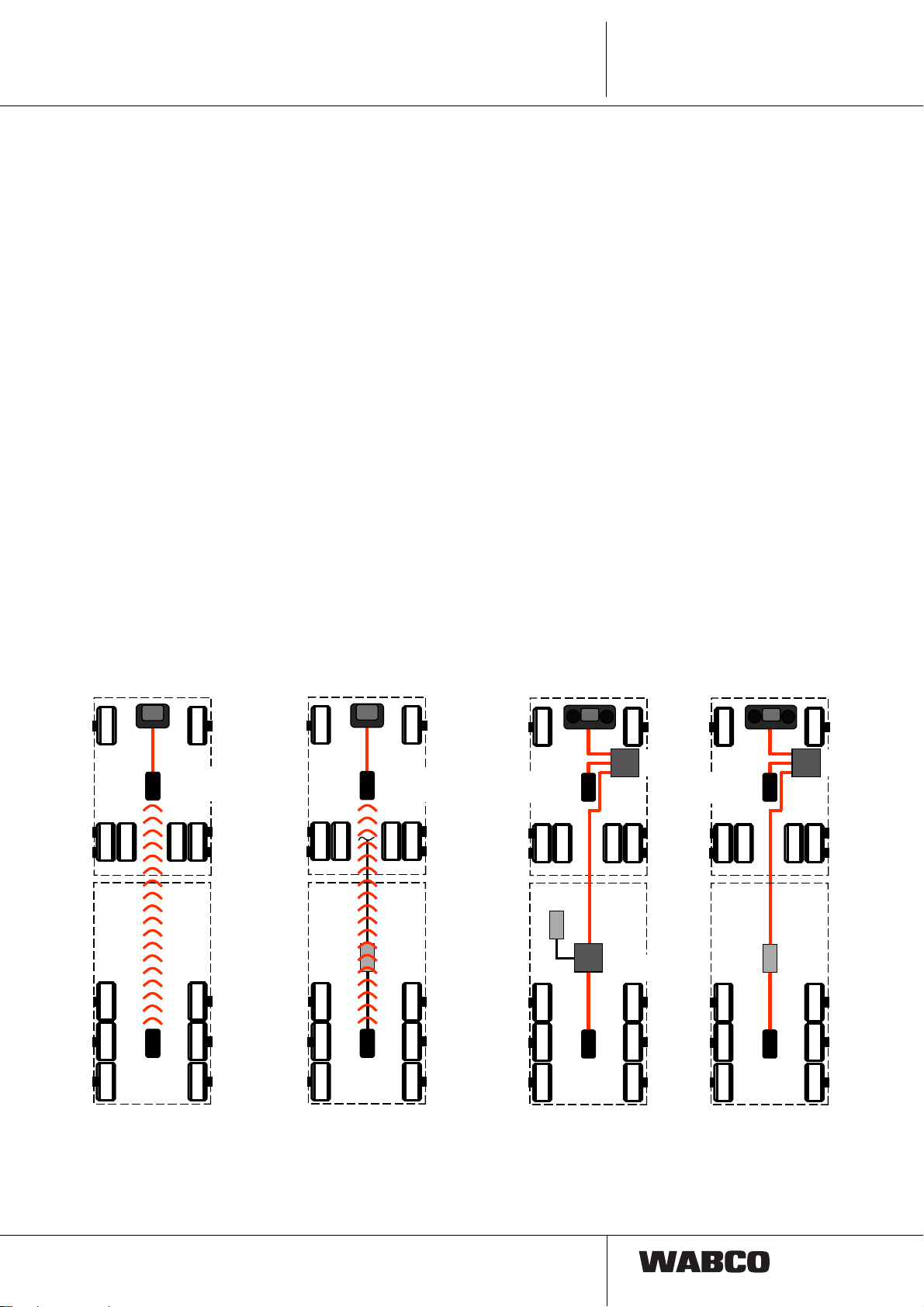
In order to display tir e pressure and trailer warnings to
driver during driving it is in general case necessary to
install IVTM to both par ts of v ehicle, i.e . one control unit
to trailer and one unit to motor vehicle. Any vehicle
equipped with IVTM could be connected to any trailer
equipped with IVTM. Control unit of vehicle identifies
control unit of trailer automatically: Synchronization is
ensured through the break lights wiring, data are
transported wirelessly.
As trailers are usually not permanently powered, it is
possible that due to the frequency of wheel modules
transmission the tire pressure data for all the wheels
could be availabl e after up to 15 mi nutes after the drive
start.
In combination with WABCO-TCE (Trailer Central
Electronics) or EBS systems the information about the
pressure could be transmitted into control unit through
standardized bus connection CAN according to 11992.
Future vehicl es wi ll be able to display the d ata from CAN
System structure
bus on multifunction d isplay on the dashboard. If such
vehicles will not be ava ilable, data will be transfe rred to
the vehicle control IVTM unit wirelessly.
Certificates
Certificates for mounting and additional mounting of
IVTM are available, which significantly facilitate approval
of vehicle registr ati on pa pers . Ce rti ficat es ar e not part of
this booklet, how ever in case of need they cou ld be ordered in WABCO or by Internet at www.wabco-auto.com
:
Ordering number 815 000 414 3 (D) / 815 000 415 3 (GB)
Contents: Expertise
TÜH ATC - TB 2002-108.00 and
Certificate part of TÜH ATC - TB 2003-023.00
Ordering number 815 000 441 3 (D)
Contents: Model verification 94/9/EG
CE 0032, TÜV03 ATEXxxxx
Aplication range
ex II 2G EEx ib IIC T4
IVTM display
CAN bus
Wireless connection
IVTM ECU
Trailer
vehicle
data transfer
wireless
IVTM ECU
Vehicle
Wheel
modules
IVTM display
CAN bus
IVTM ECU
Vehicle
TCE/
EBS
Wireless connection
IVTM ECU
Trailer
vehicle
connection to TCE or EBS,
wireless data transfer
Integrated display Integrated display
CAN
J1939
IVTM ECU
Vehicle
EBS
ISO 11992
IVTM ECU
Trailer
vehicle
connection to TCE,
data transfer by CAN bus
Central
computer
Wheel
modules
TCE
Trailer
Central
Electronics
CAN
IVTM ECU
Vehicle
IVTM ECU
Trailer
vehicle
connection to EBS,
data transfer by CAN bus
J1939
ISO 11992
Central
compute
EBS
9
Page 9
2.
IVTM
Configuration
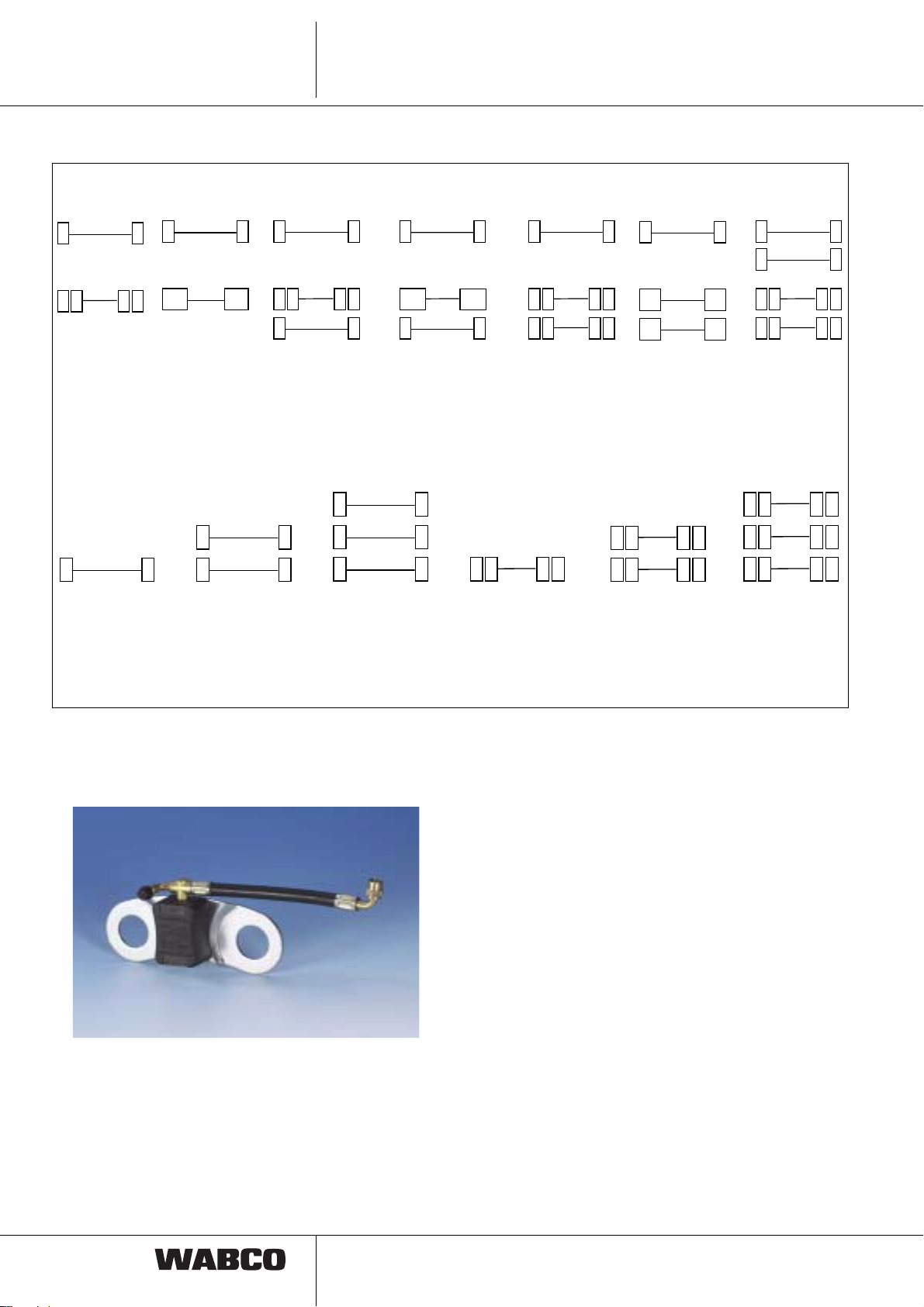
Possible vehicle configuration:
Motor vehicle
4 x 2 4 x 2 6 x 2 6 x 2 6 x 2 / 6 x 4 6 x 2 / 6 x 4 8 x 4
Super-Single with with Super-Single
Steering-/ Steering-/lifting axle
Loading axle Super-Single
Trailer vehicles
1-axle 2-axles 3-axles 1-axle 2-axles 3-axles
trailer vehicle trailer vehicle trailer vehicle trailer vehicle trailer vehicle trailer vehicle
with double with double with double
tires tires tires
2.1 Parts
2.1.1 Wheel module
Wheel module is cast in plastic enclosure and is
composed of:
• pressure sensor 2-14 bars
• electronic circuits for data procession
• electronic circuits for data transmission
• lithium-battery
• 24 bit identification code
Life cycle of the battery > is five years under normal
operating conditions .
Wheel module is mounted by the standard nuts from
outside to the shank to rim and is connected to valve.
Result is:
+ easy installation, tire dismounting is not necessary
+ high quality of wireless data transfer
+ Modules remain in their place even during tire
change, i.e. the s ystem does not have to be newly
setup.
The wheel module must not disrupt wheel balance;
therefore the cou nter wei ght is moun ted on the o pposi te
side.
Evaluation and data transfer is provided by 433 MHz
signal. If the pressure is constant, measur ed value s are
transmitted every 15 minutes, if the pressure is changing,
frequency of data transfers is faster.
10
Page 10

Configuration
IVTM
2.
Special identification code of each wheel allows unique
assignment of modules to particular wheels. Possibility of
receptions of signals from another vehicle is excluded.
Installation instructions:
– Single tires (front axle, lifting axle,
trailer axle, Super-Single):
1 wheel module + 1 weight
– Double tires (rear axle):
Wheel module mounting on front and lifting
axle
For wheels 22.5 x 7.5 , 22.5 x 8.25, 22.5 x 9 10 holes,
pitch circle diameter 335 mm, ET 160
Wheel with protective nut circle:
L-Shape wheel module 960 730 001 0 with hose 960 730
056 4. Install counter weight on opposite side.
2 standard wheel modules for outer wheel.
Please do not use plastic valve extensions, as these
parts are not designed for permanent pressure load. Use
instead brass extensions (i.e. Alligator V 153-MS-R,
length 177 mm, type 332 903) or flexible valve extensions
with clamps.
Remark:
During hose installation ensure that wheel module
connection is not expos ed to exce ssive mechani cal lo ad
or excessive pressure.
Do not use excessive force when tightening cup nut of tire
inflation valve. Check connection seal with test spray.
Replace damaged O rings of wheel module conn ection:
4.47 x 1.78 EPDM 70
Wheel with axle cap:
Wheel module 960 73 0 001 0 with module 960 730 057
4. Counter weight 960 730 820 4 on opposite side.
Wheel module installation on rear axle with
double tires
For wheels 22.5 x 7.5 , 22.5 x 8.25, 22.5 x 9 10 holes,
pitch circle diameter 335 mm, ET 160
2 wheel modules 960 730 001 0
Hose for outer wheel: 960 730 054 4 (22.5 x 7.5,
22.5 x 8.25 und 22.5 x 9)
Hose for inner wheel: 960 730 055 4 (22.5 x 7.5)
respectively 960 730 058 4 (22.5 x 8.25 and 22.5 x 9)
Counter weight is not needed.
11
Page 11

2.
IVTM
Configuration
Wheel module installation on axle
of trailer with single tires and Super-Single
For trailer wheels 22.5 x 11.75 ET 0 and 120; SuperSingle wheels 22.5 x 11.75, 22.5 x 15, 22.5 x 17, 10 holes
pitch circle diameter 335 mm
ET 0
2.1.2 Electronic control unit (ECU)
Three different typ es of el ectroni c cont rol unit ( ECU) ar e
used:
1. Motor vehicle (truck) 446 220 000 0
2. Attached vehicle (trailer) 446 220 001 0
3. Attached vehicle with TCE
(trailer with TCE) 446 220 002 0
ET 120
Wheel module 960 730 001 0
Hose for trailer wheel 22.5 x 11.75 ET 0:
960 730 055 4
Hose for trailer wheel 22.5 x 11.75 ET 120:
960 730 053 4
Hose for Super-Single wheel 22.5 x 11.75 and
22.5 x 15: 960 730 055 4
Hose for Super-Single wheel 22.5 x 17: 960 730 052 4
Install counter weight 960 730 820 4 on opposite side.
Electronic units differ by HF signal structure and
connection to CAN bus (ID). Externally could be
recognized by type label.
Technical pa ra m e t ers
Operational temperature range: - 40°C to + 80°C
Storage temperature range: - 40°C to + 90°C
max +100°C for 2h
Voltage: 24V ± 8V DC
Protection: IP 69K DIN 40050/IEC 529
Torque: 15 Nm ± 10%
Electronic control unit is mounted in central part of vehicle
to chassis, so that perfect HF connectio n with all wheel
modules and connection between vehicle control unit and
trailer control unit is ensured. For control units
preferentially use mounting system 960 730 350 4.
Wireless connec tion is provided by aeria l inside control
unit housing, which guarantees pressure signal reception
from all wheels even for most difficult operating
conditions.
All changes from pre-programmed required values of tire
pressure are immediately recognized by comparison with
limit pressure values and pressure changes.
Incorrect values of tire pressures are displayed
immediately during start of the drive (if the unit is
permanently powered).
12
Page 12

Configuration
IVTM
2.
The system may be extended up to 12 wheel modules for
one control unit.
Performance of the sy stem may be checked by i nternal
diagnostics memory.
2.1.3 Display
red indicator light
STOP
button
Manometer symbol
button
„?“
yellow indicator light
Turtle symbol
All necessary information of IVTM system is shown on
display. Connected to particular control unit by CAN bus.
These data are among others shown on the display:
– All tire pressur es could be disp layed by pressi ng the
button (Manometer). Manual tire pressure checks are
not necessary.
– The driver is informed by pilot lights and audio signals:
• Yellow light indicates s ligh t ly l ower pres su re or
sneaking pressure drop: In such case the
maximum speed of vehicle should be
decreased and the tire pressure should be
checked on first occasion.
• Red light indicates critical pressure drop:
The vehicle should be stopped immediately.
– Pressing button “?” displays additional information
about position of defect tire and current pressure.
DIN-Bajonett-
DIN bayonet
Stecker
plug (7 pin)
(7polig)
Adaptor in the
Zwischenstecker
vehicle
im Fahrzeug
external
außen innen
2354
6
CAN-H
CAN-H
1
CAN-L
CAN-L
3
ground
Masse
7
+ 24 V
+24 V
5
brake light
Bremslicht
ignition
Zündung
inside
Bremslicht (nur bei Anhängefahrzeug)
Elektr. Anschlüsse +24 V, Masse, Zündung
electrical connectors +24V, gnd, ignition
offene Enden
stripped ends
5A-Sicherung vorgeschrieben!
5A fuse required
Diagnosestecker
Diagnostic plug
Diagnostic cable
Diagnosekabel
446 300 348 0
4
5
7
1
SUB-D plug
SUB-D Stecker
diagnostic
Diagnose-
interface
interface
brake light (on trailers only)
5
4
2
1
13
Page 13

2.
2.2 Cabling
IVTM
Configuration
Motor vehicle: Cable set 894 607 295 0
14
1
Page 14

Configuration
Trailer: Cable set 449 674 051 0
IVTM
2.
1
15
Page 15

2.
IVTM
Configuration
Trailer with TCE: Cable set 449 302 000 0
16
Page 16

Installation instructions
3. Installation instructions
IVTM
3.
3.1 General instruct ions
These installation instructions ar e for experts, who have
knowledge about installation of electronic and electropneumatic equipment in vehicles.
It describes on examples mounting of IVTM equipment in
motor vehicle and trailer.
Respect general and special laws and regulations.
Further respect drawings in appendix and particular
technical parameters.
Warning: Work on insufficiently secured vehicle may
result in spontaneous movement of the vehicle.
Safety instructions
Respect valid regulations for work
safety and instructions of vehicle
manufacturer.
Before mounting make all necessary
safety precautions, for example secure
the car against spontaneous
movement.
Do not clean working clothes,
workplace and tools by pressure air.
Wheel nuts must be tightened with
torque specified by vehicle
manufacturer. Check tightness of
wheel nuts after 500 km.
3.2 Overview
Additional mounting in motor vehicle/bus.
1. Wheel modules are installed first.
2. Installation of the control unit to vehicle chassis.
3. Display installation.
4. Mounting and connection of cable harness to the
control unit and display.
5. Finally: IVTM system configuration
with PC diagnostics.
Additional mounting in trailer
1. Wheel modules are installed first.
2. Installation of the control unit to vehicle chassis.
On three axles trailer preferentially in front of
the first axle
Display
Elektronik
control unit
(ECU)
(ECU)
Pin 15, 30, 31
Diagnose-
Kl. 15, 30, 31
steckdose
Brem slicht
1 wheel module
1 Rad modu l
per tyre
pro Reifen
diagnostic
socket
brake light
17
Page 17

3.
3. Mounting and connection of cable harness to the
control unit.
4. Finally: IVTM system confi gur ati on
with PC diagnostics.
IVTM
Installation instructions
3.3 Additional mounting in motor vehicle/
bus
Wheel modules are installed first.
For the front wheels
always one module with
connecting hose and
counter weight is
necessary.
The vehicle needs not to
be lifted as only four wheel
nuts are dismounted.
brake
+24V
GND
Bremslicht
Elektronik
control unit
(ECU)
(ECU)
light
diagnostic
Diagnose-
socket
steckdose
First connect module h ose to w heel module b y insertin g
connecting segment to wheel module opening. Secure
the connection by tu rning the conn ecting se gment. After
mounting to wheel it could not be removed.
Unscrew four nuts and
remove protecting ring.
Then mount the wheel
module and counter weight
on opposite side.
Return protection ring and
tighten wheel nuts.
Connect hose to tire valve.
For installation to rear axl e of vehi cle (in th is exa mple)
two modules for double tires for each side with one
connecting hose are needed.
Warning:
Do not use plastic valve
extension
Requirements of this
connection are fulfilled only
by metal valve extension!
First remove four wheel
nuts depending on
mounting position of
module (on opposite sides)
as well.
18
Page 18

Installation instructions
IVTM
3.
Connect hoses to m odules
and mount modules on
prepared location (removed
nuts). Then mount back
wheel nuts.
Connect hoses to valves.
3.3.1 Additional mounting in trailer.
For additional mounting in trailer follow installation
instructions for motor vehicle/bus. Pr oceed accordin g to
the same instructions.
In accordance with
mounting instructions for
vehicle, fir st co nne ct pr op e r
hose to the module. Further
in accordance with
mounting instructions for
motor vehicle, in case of
single front vehicle tires
install counter weight.
After removing of four nuts
install both parts an d return
back the nuts.
3.4 Inflation pressure
Actual tire pressures and pressures stored in diagnostics
should correspond with values given by vehicle or tire
manufacturer.
Inflation pressure in tires should ideally be set up in
ambient drive temperature, i.e. strictly before drive on
”cold” tires. In this mann er you will be operating your
tires with optimum inflation pressure and achieve
optimum life cycle with minimum fuel consumption.
It is common that for example during longer drive on
highway the tires are heated and their pressure rises.
Such higher pressure should under no circumstances be
lowered to standard value. Inflation pressure of ”cold”
tires would then be significantly lower.
In following situati ons the inflation pressure set on cold
tires is not correct:
1. Inflation pressure was adjus ted in very c old night an d
during drive in day the tires are heating up. In this case
the tire pressure during day is too high.
Example:
Required inflation pressure: 8 bars
Ambient temperature
during tire inflation: -10°C
Ambient temperature
during day drive: +20°C
☞ Effective tire pressure during day
rises above 9 bars.
☞ Inflation pressure during could night shoul d therefore
be 7.1 bar.
The tire pressure before day drive would in this
example be
8 bars.
2. Inflation pressure in cold weather is adjusted in
heated workshop. In this example the tire inflation
pressure is too low during drive.
Finally connect hoses to tire
valves.
Example:
Required inflation pressure: 8 bars
Ambient temperature
during tire inflation: +20°C
Ambient temperature during drive: -10°C
☞ Effective tire pressure drops to
approximately 7.1 bar.
☞ Inflation pressure for heated workshop should be set
to 9 bars.
Tire pressure would reach correct values outside
before the start of the drive.
8 bars.
19
Page 19

3.
IVTM
Installation instructions
3.5 Installation of electronic control unit
to motor ve hicle
The control unit should be installed on such place, which
is in same distance fr om all wheels. It is usually instal le d
in the centre of vehicle. Fo r trailer the cont ro l unit sh oul d
be installed ahead of front axle.
Control unit
Install electronic control unit in such position, that
longitudinal axis of unit is parallel with longitudinal axis of
vehicle. Apart fro m that on ly inst allatio n ”ter minals up” is
allowed. This mounting position is necessary for optimum
reception of signal.
Use body shell clams for mounting of control unit 960 730
350 4, because welding is not allowed on chassis of
vehicle.
Body shell clamp
3.5.1 Cable harness installation
Motor vehicle
For installatio n of electroni c units into m otor vehicle use
prepared cable harnesses WABCO. IVTM parts are
connected by installed plug-in modules. Adjust location of
cables to individual vehicle situation. Respect relevant
law regulations.
Connection to
brake lights
wire from
IVTM-ECU
Wire to
brake light
Diagnostics plug
connecting
wiring-plug
Connection to
terminals 15, 30 and 31
Connection to battery (permanent, plus) and ignition
must be fused 5A.
Example of motor vehicle wiring with
connectors to brake lig hts, plus terminal of
Batt, chassis and ignition.
20
Page 20

Installation instructions
IVTM
3.
Display
Chassis
Connection to
IVTM-ECU
Break lights wiring should be connec ted only in case of
vehicles with trailers, i.e. for example not for buses.
Connection provides synchronisation of signals from
trailer to motor vehicle.
Driver cabin
WABCO
Diagnostics
Diagnostics
Diagnostics-
Plug
red: +24
grey: ignition (with fuse 5A!)
blue: ground
Install display on fa vo ur abl e positi on on dashboard. Due
to audio signals it is not necessary to install display
directly in front of driver.
.
Wire
446 300 348 0
connection
for PC: COM
yellow: brake light
Interface
446 301 021 0
Break lights cable could be connected for example
through the connector for brake pedal. Conditions of
particular vehicle may and must be taken into account.
21
Page 21

3.
IVTM
Installation instructions
If possible install IVTM diagnostics plug close to other
diagnostics terminals of vehicle.
3.5.2 Cable harness installation
Trailer
For installatio n of electroni c units int o motor veh icle use
prepared cable harnesses WABCO. IVTM parts are
connected by installed plug-in modules. Adjust location of
cables to individual vehicle situation. Respect relevant
law regulations.
Wiring + 24V must be fused 5A.
22
Install electronic control unit in such position, that
longitudinal axis of unit is parallel with longitudinal axis of
vehicle. Apart from t hat only inst allati on ”te rmina ls up ” is
allowed. This mounting position is necessary for optimum
reception of signal.
Use body shell clams for mounting of control unit 960 730
350 4, because welding is not allowed on chassis of
vehicle.
Page 22

Installation instructions
Examples of Vario C wiring:
Vario C wiring
without additional
electronics
+ 24 Volt
Masse
IVTM
**)
3.
For connection in Vario C housing
are needed auxiliary thread
connections :
Vario C wiring
with auxiliary electronics
ECAS
with power module
446 107 530 0
brake light
**)
+ 24 Volt
Masse
brake light
**) Remark:
For installation of c onnecting cable IVTM in trailer
WABCO is recommending cable socket AK 192
from:
Apparatebau Kirchheim-Teck GmbH & Co.
Alleenstraße 36
D 73230 Kirchheim-Teck
23
Page 23

3.
Necessary
Necessary
IVTM
4x2
Super Single
Parts
Trailer
for 2 axles
Parts
trailer
for 3 axles
ET 120 ET 0 ET 120 ET 0 truck bus
Installation instructions
Necessary
Necessary
Necessary
Super
Single
Parts
for 6x2-
Swivel bus
parts
for 6x2-
parts
for 4x2-
double
tires
truck bus truck bus
960 730 054 4 2 2 2 2 4
960 730 058 4 2 2
960 730 055 4 2 2 4 4 6 4 2
24
Prototypes Series
Situation in the beginning of 2003
Truck ECU 884 906 939 0 446 220 000 0 1 1 1 1 1 1 1 1
Trailer ECU 884 906 940 0 446 220 001 0 1 1 1
Display 884 650 161 0 446 221 000 0 1 1 1 1 1 1 1 1
Truck cable 894 607 295 0 1 1 1 1 1 1 1
Trailer cable 449 674 051 0 1 1 1 1
884 623 605 0 960 730 001 0 4 4 4 4 8 4 6 6 4 4 2 2
wheel module
Standard
wheel module
884 014 985 0 960 730 007 0 2 2 4 4 2 2 2 2
L-Shape (front axle)
Counter weight 960 730 820 4 2 2 4 4 2 6 6 6 4 4 4 4
L-shape hose 960 730 056 4 2 2 4 4 2 2 2 2
External hose for rear
axle
axle
Internal hose for rear
Single tire hose 960 730 052 4 2
ET 120 trailer hose 960 730 053 4 6 4
ET 0 trailer hose external
hose for bus rear axle
Super Single for bus
Page 24

Installation instructions
Review of connecting hoses:
Super Single 22.5 x 17 960 730 052 4
Trailer 22.5 x 11.75 ET 120 960 730 053 4
IVTM
3.
Double tires – external 22.5 x 7.5 ET 160
22.5 x 8.25 ET 160
22.5 x 9 ET 160
Trailer 22.5 x 11.75 ET 0
Double tires – internal 22.5 x 7.5 ET 160
Super Single 22.5 x 11.75
22.5 x 15
Independent L-shape wheel 22.5 x 7.5
with protecting ring 22.5 x 8.25 ET 160
22.5 x 9
Independent wheel 22.5 x 7.5
with axle cap 22.5 x 8.25 ET 160
22.5 x 9
960 730 054 4
960 730 055 4
960 730 056 4
960 730 057 4
Double tires – internal 22.5 x 8.25 ET 160
22.5 x 9
960 730 058 4
25
Page 25

4.
IVTM
Diagnostics
4. Diagnostics
4.1 System configuration
Newly installed IVTM system is configured, i.e. set up, by
PC diagnostics of IVTM system.
Parts necessary for configuration:
Diagnostics connecting cable: 446 300 348 0
Diagnostics interface with cable: 446 301 021 0
Diagnostics software: 446 301 730 0
Remark: Diagnostic could be do ne only with special diagnostics cabl e for IVTM, other diagnos tics cables
WABCO (i.e. cables for EBS, ECAS etc.) could not be used.
4.2 Diagnostic structure
26
Page 26

Diagnostics
IVTM
4.
4.3 OPERATING INSTRUCTIONS
The system consists of one electronic unit, so called
electronic control unit, which receives wireless
information from wheel modules. Wheel modules are
permanently connected by hoses to tire valves. Pressure
information is proc essed by algorithms stored in control
unit.
Data are relayed by CAN bus to display. Display unit
consists of one d isplay, two indicators, one buzzer and
two buttons.
Warnings of different levels are signalised; importance
could be recognised by colour of indicator light and audio
signal:
– Red light (STOP) and 1 minute long audio signal
indicates serious de fect; th e v ehi cl e m us t be st opp ed
immediately (possible threat to lives and vehicle).
– Yellow light (turt le) and 10 m inutes lon g audio signa l
indicates smaller defect; the vehicle should be slowed
down and lower pressure adjusted.
If the tire pressur es are not exceed ing specifie d values,
following data are displayed after initialisation:
Two buttons on fro nt panel are used to control different
functions.
Left button with symbol of manomet er displays vehi cle
tire pressure.
Right button with question mark symbol shows detected
defects. If pressed longer, the error messages are
deleted (after correction of tire pressure).
Defects found by IV TM are stored i n electronic memo ry
for diagnostic purposes.
4.3.1 Display operation
Cable harness is connected to display by 4 -pole plug. It
is powered only if the ignition is on.
After the ignition is switched on, internal check procedure
is performed, when all internal functions are tested: all
symbols are displayed for one second, all pilot lights and
audio signals are switched on; this procedure is repeated
twice.
psi
bar
IVTM
+
psi
bar
h
mn
km
psi
bar
4.4 DIFFERENT VALUES ON DISPLAY
4.4.1. Normal values
After initialisation the top view of vehicle is displayed
(driving directi on upward) for 12 seconds. For example
4x2 truck is shown like:
IVTM
Fig. 3
If the trailer with IVTM system is connected to motor
vehicle, both vehicles are shown alternatively in one
second intervals for 12 seconds.
Fig. 1
27
Page 27

4.
IVTM
Diagnostics
Example: If the three axles trailer is connected to shown
vehicle, Fig. 3 is changed to:
IVTM
Fig. 4
The display shows IVTM logo (Fig. 2) and stays without
change till the button is pressed or the defect is found.
If the defect is found on one of the vehicle wheels, symbol
of particular wheel is blinking in corresponding image
(vehicle or trailer). Depending on seriousness of defect,
control lights and audio signals are switched on.
If the defect is found on more than one wheel of vehicle
or trailer, symbols of all defect wheels are blinking.
4.4.2 Pressure display
This manometer function shows the tire pressures
measured by IVTM system, and completely replaces
manual pressure measurement through tire valves.
The values are displayed after pressing left button
”manometer” in normal mode.
The axle, whose pressures are displayed, is marked.
bar bar
IVTM
Fig. 7
Tire pressures on following axle could be displayed by
repeatedly pressing button ”manometer”.
If one of the axles is equipped with double tires, individual
pressures are displayed in sequence.
IVTM
Fig. 5
If the defects are found in both vehicle and trailer wheels,
images of both vehicles are changing each ten seconds,
and all defect wheels are blinking.
IVTM
Fig. 6
In all cases the indicator light and audio signal
corresponding with the worst defect is switched on.
If the defect is found on one tire of double tires, the
system activates error message for both tires.
Display of pressure in outer tires of double tires:
bar bar
IVTM
Fig. 8
The pressure of inner tires could be displayed by
repeatedly pressing button ”manometer”:
bar
bar
IVTM
Fig. 9
If the trailer is connected the pressure in the tires of trailer
is displayed in the same way.
28
After display of tire pressure in last axle and pressing the
button ”manometer” the display switches to normal
mode.
1
Page 28

Diagnostics
IVTM
4.
If the button ”manometer” is not pressed for 20 seconds,
the display also switches to normal display mode.
4.4.3 Error messages
All defects found by system could be displayed in order of
their importance.
This function could be activated by pressing button
”question mark - ?”.
Symbol of defect wheel blinks in particular vehicle image
(both tires in case of double tires), symbol of detected
defect and particular indicator are lighted.
By successive pressing the button ”?” it is possible to
display all defects. After another press of button the user
is asked to reset data (see 4.4.2).
If button ”pump” is not pressed for 20 seconds, display
switches to normal mode.
If no defect is found the system does not react to pressing
button ”?”.
Different types of defects, which could be found by IVTM
system, are described below. Let us start with the most
dangerous.
4.4.3.2 Extremely high pressure
bar
IVTM
Fig. 11
Display informs about position and current pressure of
defect tire. Yellow indicator is on.
Action:
Driver should slow down the vehicle to prevent bursting
of tire. The cause of high pressure should be found out
(for example heated brake).
4.4.3.3 Sneaking pressure drop
bar
IVTM
4.4.3.1 Extremely low pressure
bar
IVTM
Fig. 10
Display informs about position and current pressure of
defect tire. The symbols of wrench and red light are
displayed.
Action:
Drive should immediately stop the vehicle and check the
pressure drop. Generally, it is necessary to change the
tire because of the damage.
Fig. 12
Display informs about position and current pressure of
tire, where the drop was detected. The symbols of
wrench and soft tire are displayed. Yellow indicator is on.
Action:
Driver should slow down the vehicle and on first occasion
find out the cause of pressure drop, or change the tire.
4.4.3.4 Low pressure
bar
IVTM
Fig. 13
Display informs about position and current pressure of
defect tire. Symbol ”pump” is displayed. Yellow indicator
is on.
29
Page 29

4.
IVTM
Diagnostics
Action:
Drive should slow down the vehicle and on first occasion
adjust the tire pressure.
4.4.3.5 High pressure
bar
IVTM
Fig. 14
This defect could be found only for cold tires, i.e. if the
vehicle stand for more than four hours with ignition
switched off.
In this case the defect is displayed two minutes after the
ignition is switched on.
Display informs about position and current pressure of
defect tire. Symbol ”pump” is displayed. Yellow indicator
is on.
If the image of vehicle is displayed and you press the
button ”pump” for 5 seconds, the control unit of this
vehicle is reset.
Switching off of the display confirms successful reset.
If the unit is not reset, the display changes to normal
operating mode.
As all data about defects and tire pressures of particular
vehicle are deleted, new information about tire pressure
may be displayed after up to 15 minutes.
4.5 SYSTEM ERROR DISPLAY
4.5.1 Connection of the wheel module is
interrupted
Action:
The pressure in tires should be adjusted before starting
the engine.
4.4.4 Reset
This function allows resetting all information about tire
pressure and possible defects of IVTM system.
Reset is necessary for example after adjustment of the
tire pressure, because otherwise the system may report
false defect. Repeatedly press right button ”?”, until all
defects of vehicle are displayed. All wheels are lighted.
This image of vehicle is displayed for five seconds. After
that, if IVTM system recognizes trailer, it displays image
of trailer for another five seconds.
IVTM
Fig. 16
This error message is shown when there are no data
received from one of the wheel modules for more than
one hour.
Display shows position of wheel, which is not transmitting
data. Two lines are displayed instead of pressure value.
IVTM logo is crossed.
Action:
– Optimize mounting position of control unit
– ECU and/or wheel module is excessively dirty
If this error shows after several years of operation of
wheel module, it is likely, that the module battery is
discharged. Change the wheel module (it is necessary to
perform new setup
using system diagnostics).
30
Page 30

Diagnostics
IVTM
4.
4.5.2 System error
IVTM
Fig. 17
This error message is displayed when IVTM functions or
regular tire pressure monitoring fails.
All wheels are blinking on display. IVTM logo is crossed.
In certain cases the type of vehicle equipped with IVTM is
not recognized. In this case following data are displayed:
IVTM
4.5.3 Interrupted connection between control
unit and display
If the connection between IVTM and display is
interrupted, following information is shown and white line
on IVTM logo is flashing.
IVTM
Fig. 19
Action:
– Check plugs: ECU,
connecting plug
– Check connection to harness 30
– Plugs from harnesses 15 and 30 could have been
interchanged
(display is on even after ignition is switched off)
Action:
System diagnostics, check of the control unit wiring
Fig. 18
– Check cable connections
– Diagnostics
31
 Loading...