

Page 1
- 1 -
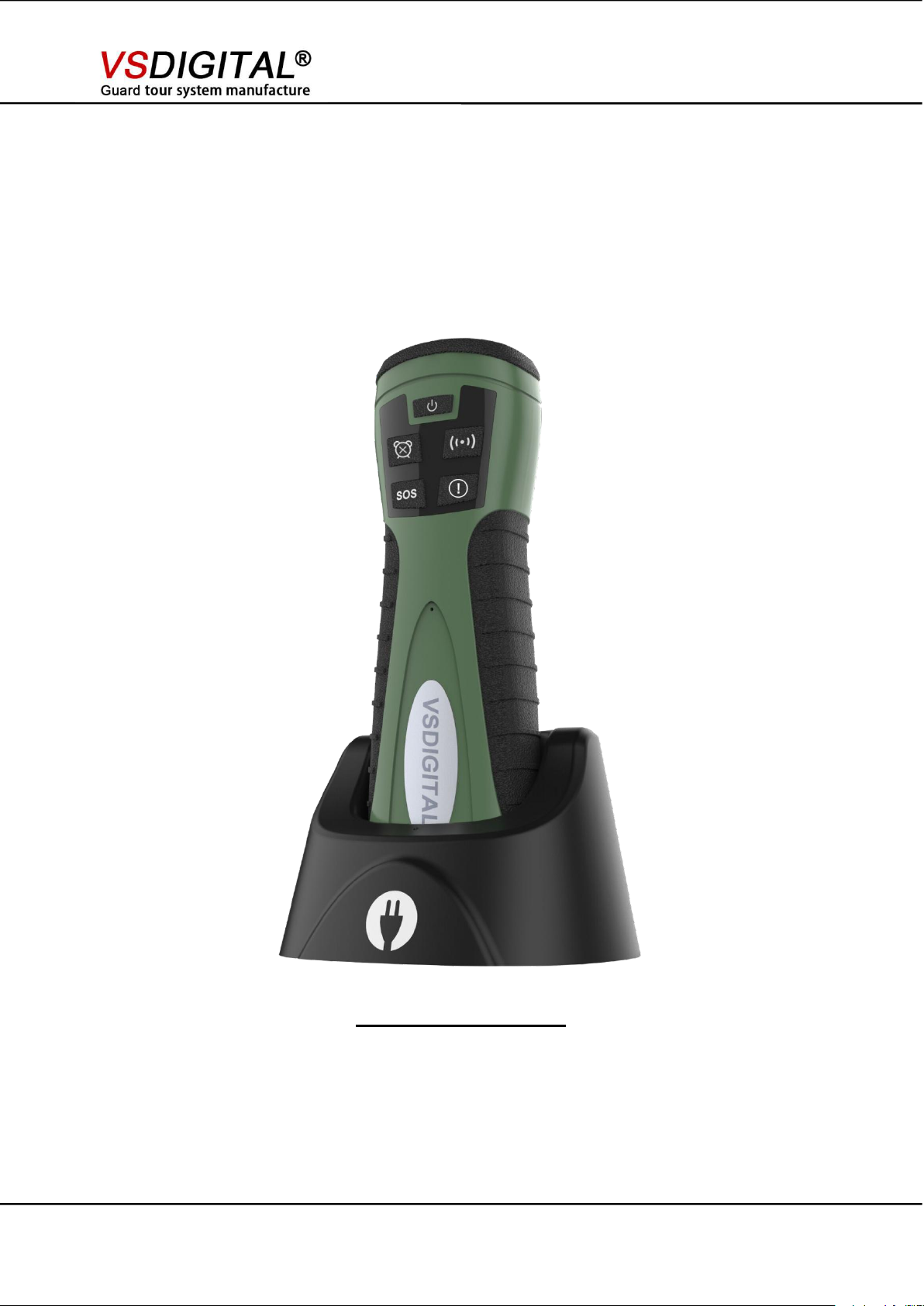
KingGuard V9
Realtime Guard Tour System
(No GPS)
V9 User Manual
Operation Manual
Version: V1.20
www.onlineguardpatrol.com www.vsdigital.com
Page 2

- 2 -
Content
V9 User Manual
1. Apperance .
2. Main Functions.
3. Parameter Setting
4. SMS Configuration Format
...............................................................................
........................................................................
....................................................................
...................................................
5. OGP Software Realtime Version Introduction
6. SIM Card Installation
7. Charging
..................................................................................
.............................................................
..................
3
6
7
17
18
30
30
www.onlineguardpatrol.com www.vsdigital.com
Page 3

- 3 -
1. Appearance
1.1 Buttons and indication lights
1) Power on/off button
2) Charging indication light
3) Patrol alert button
V9 uses two- color injection crafts, button and shell integrate with no slit, more durable,
soft buttons can be used for more than 10w times.
V9 User Manual
V9 has 5 buttons, 2 indication lights.
(Press the button for 2 seconds to open or close the device.)
( Reader indicates red led light when reader is in charge, light off when power is full.)
(Press button, patrol alert will finish.)
www.onlineguardpatrol.com www.vsdigital.com
Page 4

V9 User Manual
- 4 -
4) SOS
5) Operation indication light
6) Read out button
7) Customized button
1.2 Other parts
8) Buzzer sound hole
9) Read-out field
(Press button for a second, it will generate a SOS record.)
(Indication lights have relative indications when reader has any operations.)
(Read RFID card)
(Press button, it will upload a customized event.)
(Read-out RFID card field)
10) Lanyard hole
11) Battery lid
(Open battery lid when install SIM card)
12) Communication, charging connector
www.onlineguardpatrol.com www.vsdigital.com
Page 5
- 5 -
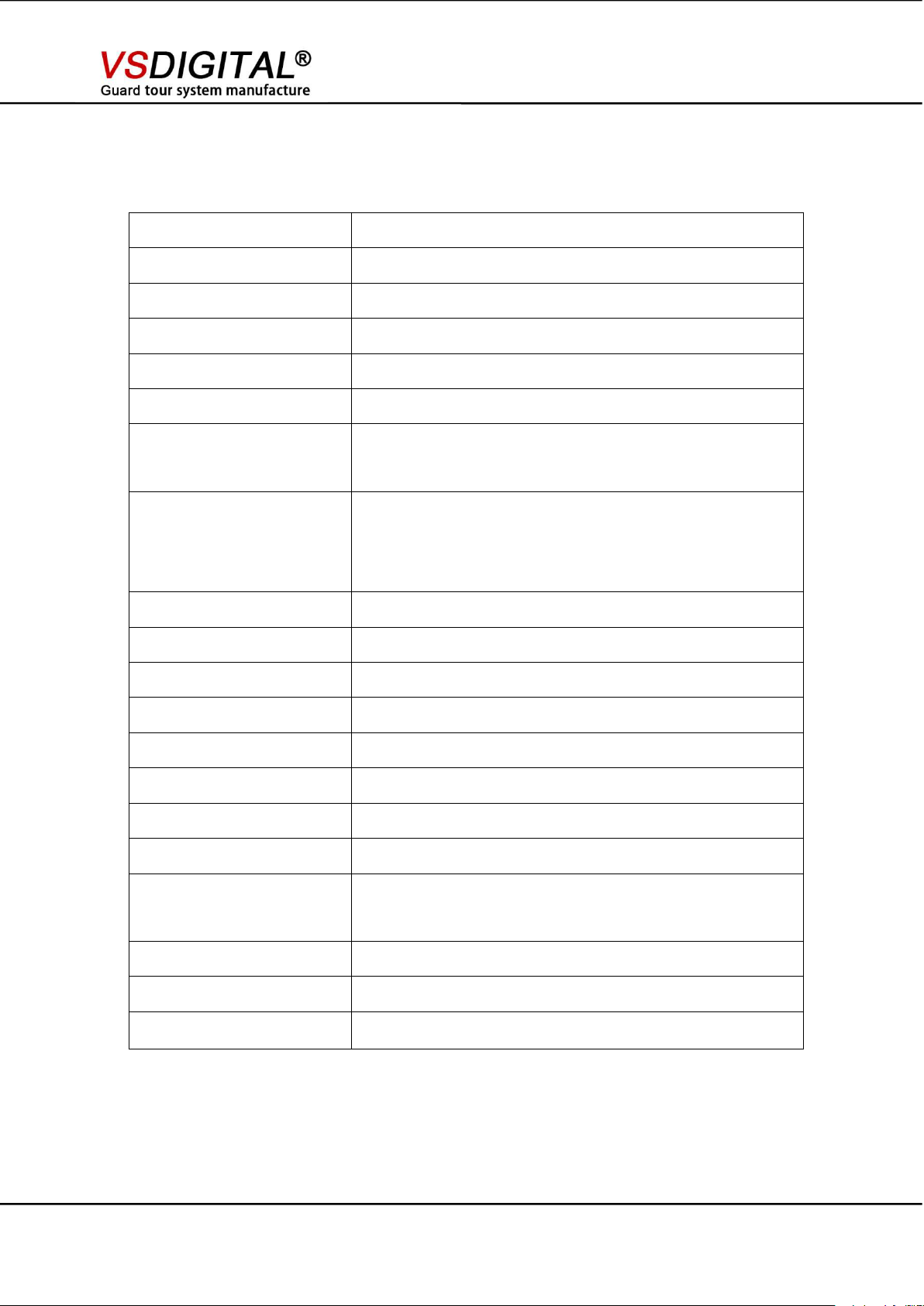
Specification
Read-out type
RFID
RFID frequency
125kHz
Read-out distance
3-4 cm
Read-out indication
LED, beep/vibration
Support SIM type
GSM/WCDMA
Storage capacity
6000 records (120KB)
Out shell
Main body is Polycarbonate, surrounded by TPU, durable,
double injection
Battery
1800mAh Rechargeable lithium battery
Charge by downloader
It can stand for one week
Transmission
GPRS
Alarm
48 group alarms
Online firmware upgrade
Yes
Interface
5 buttons
3D Accelerometer
Internal, detect people fall down
Shock detect
Yes
Low power alert
Yes
Operation temperature
-20℃--+85℃
Time zone set
Set timezone, Support daylight time adjust automatically
Protection rate
IP 67
Weight
200g
Dimensions
150*50*30(mm)
V9 User Manual
www.onlineguardpatrol.com www.vsdigital.com
Page 6
V9 User Manual
- 6 -
2. Main Functions
2.1 Patrol alert
When patrol alert time arrives, V9 beep and vibrates, click this button to stop alert.
2.2 Read-out
Press or hold this button, then you could read tag within 3 seconds.
Read the tag successfully: Vibration and beep alert.
*** Remarks: read a same card within 1 minute, red light flash, vibration and beep alert, this
record isn’t stored.
2.3 SOS function
Press SOS button and keep for 1 second, V9 send a SOS record to server, V9 send a SOS
record failed if time of pressing button is less than 1 second.
*** Remarks: SOS function couldn’t be used repeatedly within one minute.
2.4 Customized button
Press this button, V9 will upload a special ID information which could be set as an event. Click
this button to upload record when this event happened.
***Remarks: event is needed set in software.
2.5 Mandown alert function
A patrol guard has accident when he is in patrolling, for example: stumbles, falls, accidents and
other dangerous situation, V9 will generate a record and upload to server.
*** Remarks: Mandown record generated will meet below conditions: weightlessness and shock
and quiescency after moving. After weightlessness and shock into quiescency status within 60s,
V9 will generate pre-alarm with alert. After quiescency status 60 seconds, V9 will upload a record:
mandown record. ( after weightlessness and shock and enter into quiescency status for 60
seconds) *** Remarks: V9 meets all conditions, indispensable.
2.6 Patrol alert function
V9 could be set 48 group alarms, it will have patrol alert at pre-set time.
*** Remarks: V9 will upload a record to server every ten minutes“No one replies the patrol alert” if
no one stops the patrol alert.
Stop patrol alert: press patrol alert button.
*** Remarks: V9 will upload a record after patrol alert is stopped: patrol alert has been
processed.
www.onlineguardpatrol.com www.vsdigital.com
Page 7
- 7 -
3. Parameter Setting
V9 User Manual
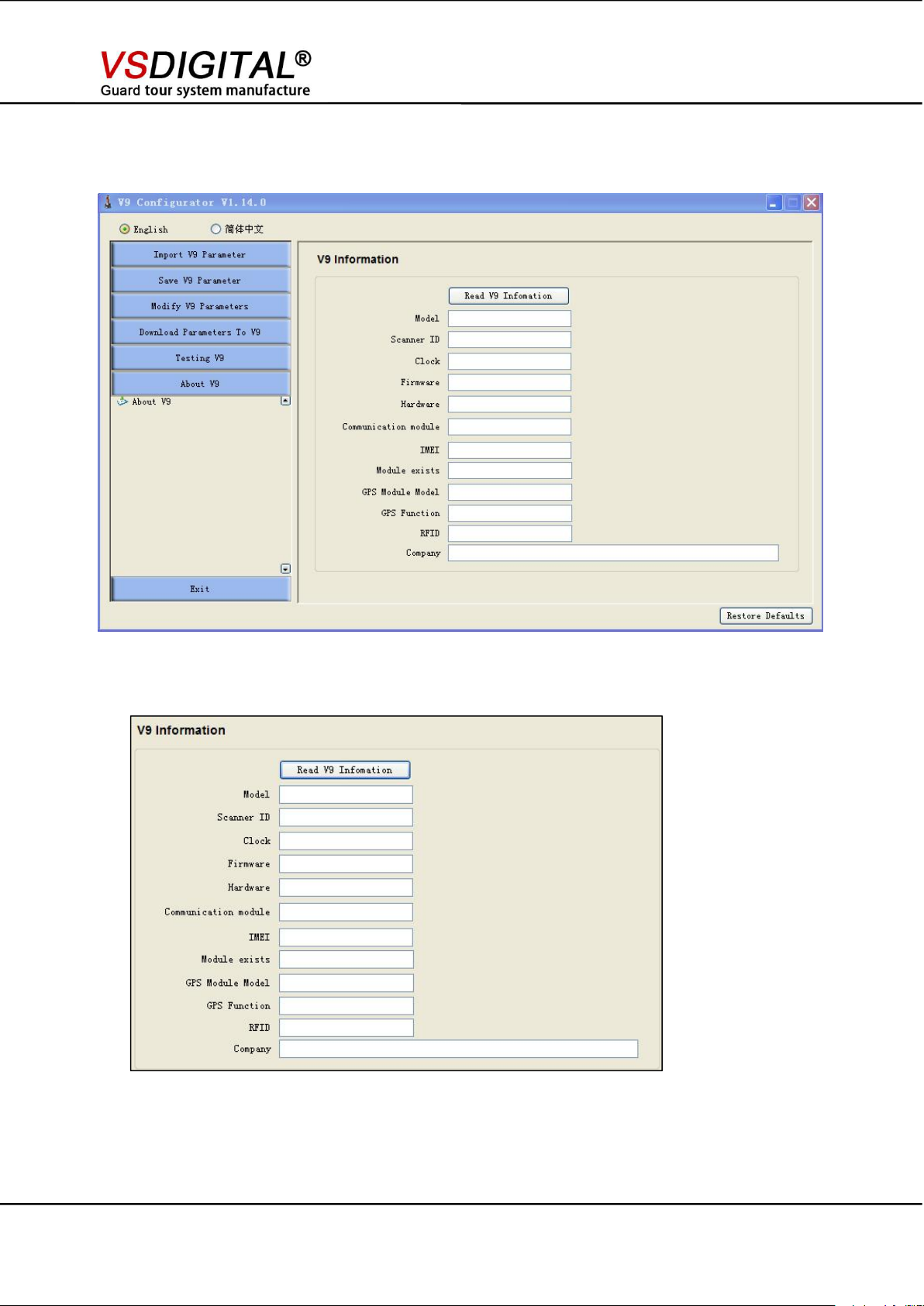
3.1 About V9
Click“ Read V9 information”to read all parameter of V9
***Remarks: Module exists: No (if V9 has no GPS module).
www.onlineguardpatrol.com www.vsdigital.com
Page 8
- 8 -
3.2 Modify V9 Parameter
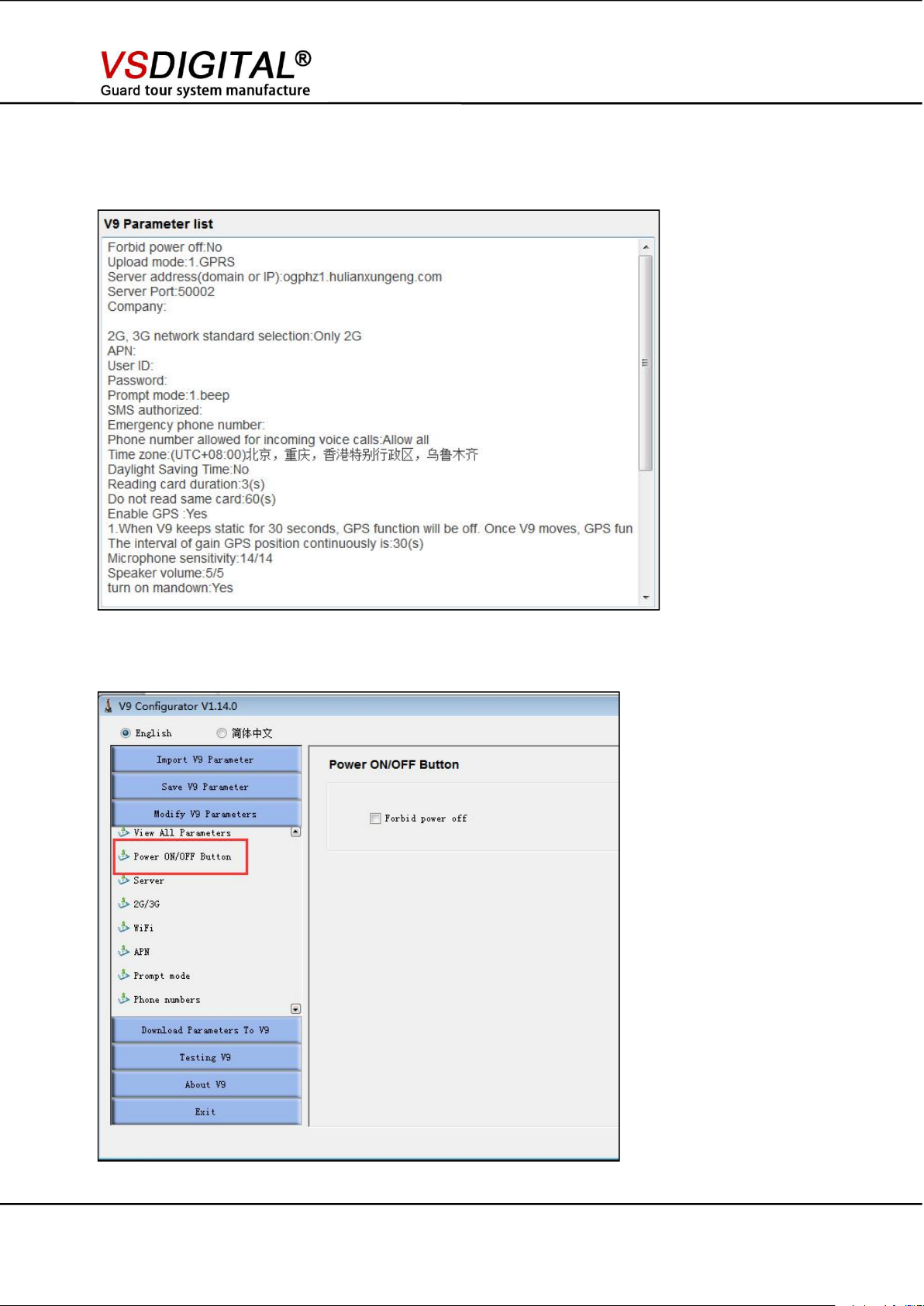
3.2.1 View all Parameter
V9 User Manual
Check the original data of the device.
3.2.2 Power on/off button
Choose “Forbid power off” will not allow power off any more, power off button not work.
www.onlineguardpatrol.com www.vsdigital.com
Page 9

- 9 -
3.2.3 Server
V9 User Manual
Upload mode: 1. GPRS: can only upload data via GPRS.
2. GPRS+SMS: when signal is not good, change to SMS autoamatically
3. SMS: only use SMS to upload data.
Server IP:IP to receive the V9 data.
if you use our company online software, it will be:ogphz1.hulianxungeng.com
Sever Port: IP port for receive v9 data, if you use our online software, the default port is :50002
SMS Server phone number: choose SMS function must wirte it for SMS will be sent to it.
Company name: company name on the server. Length is 48 characters bytes.
www.onlineguardpatrol.com www.vsdigital.com
Page 10

- 10 -
3.2.4 2G/3G selection
***Remarks: plz choose it according to the v9 mode and SIM card frequcny.
3.2.5 WIFI Network
V9 User Manual
This is only available for V9 has WIFI function, which can set max 5 groups of wifi name and
password.
www.onlineguardpatrol.com www.vsdigital.com
Page 11

- 11 -
3.2.6 APN
You need to consult your SIM card supplier or visit their website to find it.
3.2.7 Prompt mode
V9 User Manual
1. beep
2. No beep
3.2.8 Timezone
Choose the timezone according to your country time zone, also support the DST.
www.onlineguardpatrol.com www.vsdigital.com
Page 12

- 12 -
3.2.9 RFID reading tag
Reading card duration: press “read out” button, the device will detect if there is RFID card
nearby if over this setting time, it device will stop detecting .
Reading tag interval : can not read the same tag within this time.
*** Remarks: the unit is second
3.2.10 3D Acceleration sensor
V9 User Manual
V9 built-in acceleration sensor,detecting man-down or fall down
Turn on man-down: turn on this feature or not
How long time the device will send the man- down data to server since man-down and
can not move
Pre-alarm time : within this time ,the device will not send the data to server
*** Remarks: pre-alarm time can not longer than generating alarm time.unit is second
www.onlineguardpatrol.com www.vsdigital.com
Page 13

- 13 -
3.2.11 48 group alarm ( patrol alert )
V9 User Manual
V9 can set 48 groups alarm
*** Remarks: Every half-hour alarm , start 00:00,every half hour can set one alarm
Hour alarm : from 00:00 to 23:00 ,every hour can set one alarm
Clear : cancel the selected alarms.
3.3 Save V9 Parameter
Can save the current setting as .cfg.click “save parameter file” save v9 setting file. This can batch
setting V9
www.onlineguardpatrol.com www.vsdigital.com
Page 14

- 14 -
3.4 Download Paramters to v9
V9 User Manual
Every Change of the setting, you need to download the setting data to the v9, or the setting
will be meaningless.
3.5 Test V9
3.5.1 Communication Command
www.onlineguardpatrol.com www.vsdigital.com
Page 15

- 15 -
Have a basic communication test by above picture command.
1. Set clock : Set V9’s time same with computer’s time.
2. End communication: end V9’s communication status.
3. Vibration: test is V9’s vibration ok, default is 1, click “vibration” V9 vibrates one time, the maximum
4. Beep: test is V9’s beep ok, default is 1, click “ Beep“, V9 beeps one time, the maximum is 10.
5. Record bytes: read V9’s bytes data, not records, it is how many bytes records, not how many
6. Delete record: delete all storage data of V9.
7. Initialization: V9 initialization, restore factory settings, delete all setting parameter.
8. Restart: start V9 again.
9. Read record: read V9’s record.
10. Update firmware: use this function to update firmware after received V9’s newest update
is 10.
records.
*** V9 can store maximum 120K records .(1K=1024B)
V9 User Manual
firmware news.
3.5.2 Memory unit
You can operate the v9 Flash and E2PROM via the following commands.
www.onlineguardpatrol.com www.vsdigital.com
Page 16

- 16 -
3.5.3 Adjust
V9 User Manual
When the Kingguard v9 device has any problem, you can insert the v9 into the charge downloader
and connect it with PC,make this page on “Open” staus, Then click “save”then send it to our IT
engineer they can help you to identify the problem of the device.
3.6 Import V9 parameter
3.6.1 Import configuration from V9 setting file
Click “impart parameter file”open save V9 setting .cfg file
www.onlineguardpatrol.com www.vsdigital.com
Page 17

- 17 -
3.6.2 Read out V9 parameter
V9 User Manual
4. SMS Configuration Format
4.1 Rules
1.Each message is beginning with “####”
2.Each paragraph is combined with parameter name and parameter values. They are connected
with “=”, ex.SERVER=192.168.1.2. For easy reading, parameter name is in bold. The parameter
value is in italic.
3.If there are multiple parameters, separate them with “,”(half angle comma)(0*2c).
4.The parameter name need to use the capital letter.
4.2 Parameter
1. SERVER=112.124.102.106
Description: The IP or the domain name of the data receiving server.
2. PORT=50002
Description: data receiving server port, valid value 0~65535.
3. APN=apn
4. UN=apn_user_name
5. PW=apn_user_password
Description: APN、UN、PW is available at your GSM Provider.
6. SMS=13901234567
Description:Defines telephone number for sending SMS messages.
www.onlineguardpatrol.com www.vsdigital.com
Page 18

V9 User Manual
- 18 -
7. AUTH= 13840405050
Description:This number can be used to modify the parameter, and only the SMS sending
from this number can modify the parameter.
8. GETCFG
Sending Content:####GETCFG
Return Content:
SERVER=112.124.102.106,PORT=50002,APN=,UN=,PW=,SMS=13901234567,EMERGE
NCY=119
9. ALARM
Sending Content : ####ALARM1 、 ####ALARM2 、 ####ALARM3 、 ####ALARM4 、
####ALARM5
Response of V9:
After receiving the message, beeper alarms immediately and lasts for 1 mintues.
5 kind of alarm stand for 5 kinds of content.
5. OGP Software Realtime Version Introduction
5.1. Home page
Type website in your browser : www.onlineguardpatrol.com, enter into home page.
Log in software: Username: XXXX Password: XXXX
Salesman will indiacte you the username and password.
www.onlineguardpatrol.com www.vsdigital.com
Page 19
V9 User Manual
- 19 -
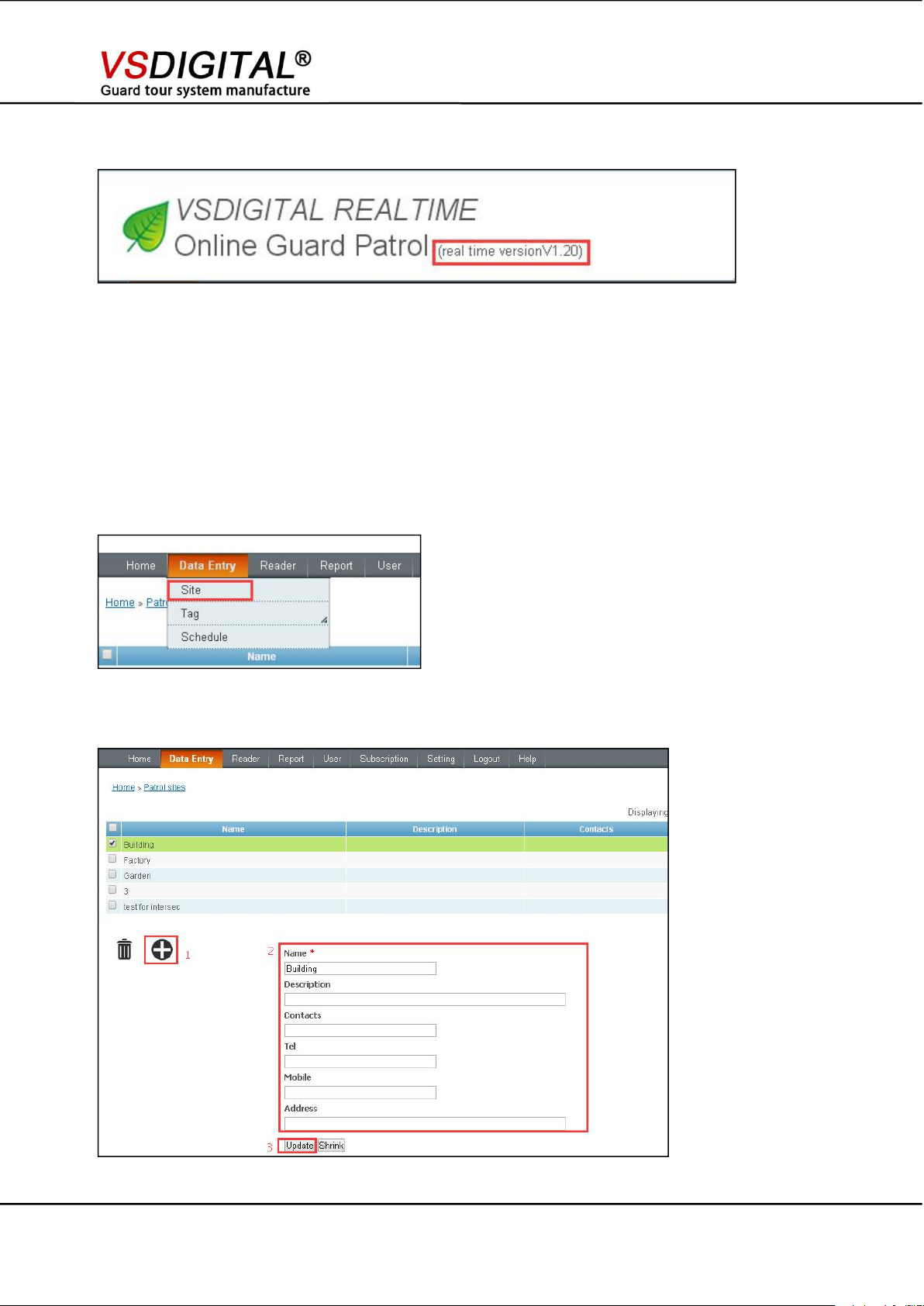
“1”add site
“2”add site information
“3”update
5.2 Functions and Setup
After Login, the upper left corner: real time version( please see the picture below)
5.2.1 Function
Real time report function: real time report show uploaded patrol data, and some special event report
such as: fall down report and SOS report and so on.
Coordinate function: every place can be set as checkpoint coordinate address.
Map indication: many reports are shown by map indication.
5.2.2 Set up
Add Site
Log in software --- Data entry --- Site
www.onlineguardpatrol.com www.vsdigital.com
Page 20

- 20 -
Add checkpoint
Mark checkpoint 1.2.3.4.5.6......,use reader to scan checkpoint in order
V9 will upload the checkpoints to the software automatically
Log in software “ data entry--- tag --- checkpoint”
Click “ Add checkpoint from unregistered points”
“1” Choose tags which you want to add,
“2” then add these tags into the site
Modify checkpoint tag name
V9 User Manual
Click this icon (1)--- modify the name(2) ---- Update(3)
www.onlineguardpatrol.com www.vsdigital.com
Page 21

V9 User Manual
- 21 -
Modify checkpoint coordinate
(1)Set up the ordinary schedule
Click “ setting”, it will show the map, choose the site which install this tag on the map.
Add Schedule
www.onlineguardpatrol.com www.vsdigital.com
Page 22

V9 User Manual
- 22 -
“1”choose the site you want to set schedule for.
“2”add schedule.
“3”modify the schedule“start time”(start time for this tour), “ Duration” (patrol once time for one
“4”choose the guard work day, the default is the guard work for 7 days.If the guard do not work
“5”Create Schedule
tour), “Tolerance”(It is allowed to patrol this site 5mins before the start time and 5 mins after the
finish time)
on Sunday, you do not need to choose Sunday.
Attention:The schedule in the picture means, the guard starts to patrol at 6:00am, he must finish this
patrol within 60min, but according to the duration time is 5mins, so the guard complete the patrol
between during 5:55-7:05 will also be qualified patrol.
***It has the fixed start patrol time, how many times you hope the guard patrol, set how many
schedules. Such like hope the guard start patrol time 06:00、08:00、10:00、12:00、14:00, you need
to set 5 schedules.
( 2 ) Set numbers of schedule
***This methods only suitable for this situation, you have no requirement for the start patrol time for
each time, but has the requirement for the patrol times, for example, you hope the guards finish how
many times patrol during a period of time.
www.onlineguardpatrol.com www.vsdigital.com
Page 23

V9 User Manual
- 23 -
<1>.This picture means if you change the patrolling times to 5,It means you ask the guard to
<2> The interval read time is 30mins, means you can not read the same site again within 30mins.
(3)Custom choose the tags to set schedule
(2) check patrol reports
Calendar report
Flow reports
Real time reports
patrol this site 5 times within 40mins. Why 40mins, since the duration time is 30mins+tolerance
time 5 mins before and 5 mins after.
if you read the first tag at 6:10, then you must read the same tag after 8:40.
You could change the data according to your real situation.
*** this type can set schedule according to the checkpoints tags.
For example: if there are 4 checkpoints tags under one site, you can ask the guard start patrol at
6:00am, only patrol the checkpoint 1, checkpoint 2 within 30mins. Start patrol at 7:00am, only patrol
checkpoint 3 and checkpoint 4 within 30mins.
The above setting schedule are as followings:
Other setting is the same as others.
5.3 Upload Patrol Data and Check Patrol Reports
(1) upload patrol data
Real time tag reader, patrol data will be sent to server once scan a tag in real time
www.onlineguardpatrol.com www.vsdigital.com
Page 24

- 24 -
5.3.1 Calendar reports
“1” can modify the date and site based on needs “
“2” can send reports to email, can export reports in PDF format
“3” different color and icon stand for
“4” click the date to check the patrol details .
V9 User Manual
There is a map to show each patrol report in map format for every patrolling
There is a move icon to how the patrolman walked line (show as follow)
www.onlineguardpatrol.com www.vsdigital.com
Page 25

- 25 -
5.3.2 Flow report
“1”Select query condition (adjust the timeline with mouse)
“2”Show the scanned checkpoints during this period chronologically
“3”Unregistered checkpoint will not display on the map.
Here also can show patrol report in MAP format in flow report
Click map icon,it can show map report
V9 User Manual
***Unregistered checkpoint means: checkpoint which is new, unset, no name, no position in the
software
www.onlineguardpatrol.com www.vsdigital.com
Page 26

V9 User Manual
- 26 -
5.3.3 Realtime report
Realtime report means when you upload a record, it could be seen on the report immediately. The
realtime report is suitable for the realtime guard tour reader. The information are: patrolling start, no
patrolling start, missed checkpoints, no missed checkpoints, staff in danger, impact reports, pictures,
record, word, upload record, event, ask for calling back,make calls and so on.
5.4 Mobile Phone APP(OGP APP)
Type www.onlineguardpatrol.com in the browser. Scan the qr code on the right side of the screen to
download OGP APP.
***1.APP supports Android and ISO system,You could search online guard patrol in google play or
app store.
2.After install the APP, the default login name is visitor, customers could switch the name, the user
name and password is the account of www.onlineguardpatrol.com.
When you install the APP, during the patrol process or after the patrol, server could push instant
message to your APP. These records could help to know the situation during the patrolling process on
time.
www.onlineguardpatrol.com www.vsdigital.com
Page 27

V9 User Manual
- 27 -
E.g. Staff in danger report means people is in danger now. Click the app message could see the
location of the staff.
Daily Summary: could show how many missed checkpoints yesterday, whether staff do the patrol
schedule as required.
Missed checkpoint report means the patrol job is finished, but there is missed checkpoint during
the patrol route.
Following is the introduction of APP operation:
www.onlineguardpatrol.com www.vsdigital.com
Page 28

V9 User Manual
- 28 -
www.onlineguardpatrol.com www.vsdigital.com
Page 29

V9 User Manual
- 29 -
www.onlineguardpatrol.com www.vsdigital.com
Page 30

V9 User Manual
- 30 -
6. Sim Card Installation
* The Sim card should be the “Micro Sim card”, not the normal or Nano one.
* SIM card and its connectors may be easily damaged by scratching or folding.
* Prepare the tweezers, screwdriver in advance.
Before installation ,V9 should be power off .shown as below picture
Take off the back cover and the jumper switch,install Sim card,then put the jumper switch to
“ON”make the back cover tight ,finish the SIM card installation
7. Charging
Connect VT9 downloader to power via USB cable, insert V9 into VT9. The left light will be on when
charging ,it will be off when it is fully charged
1. It needs 3-4 hours to be fully charged if VT9 connect to power
2. It needs 5-6 hours to be fully charged if VT9 connect to computer
www.onlineguardpatrol.com www.vsdigital.com
 Loading...