

Page 1

Factory Workshop Manual
Volkswagen
Passat Sedan
V6-3.6L (BLV) (2008)
Anonymous
1st January 2018
Make
Model
Engine and year
This manual was submitted by
Date
Page 2
Volkswagen Passat Sedan Workshop Manual (V6-3.6L (BLV) (2008))
Volkswagen Workshop Manuals > Relays and Modules > Relays and Modules - Accessories and Optional Equipment >
Alarm Horn Relay > Component Information > Locations
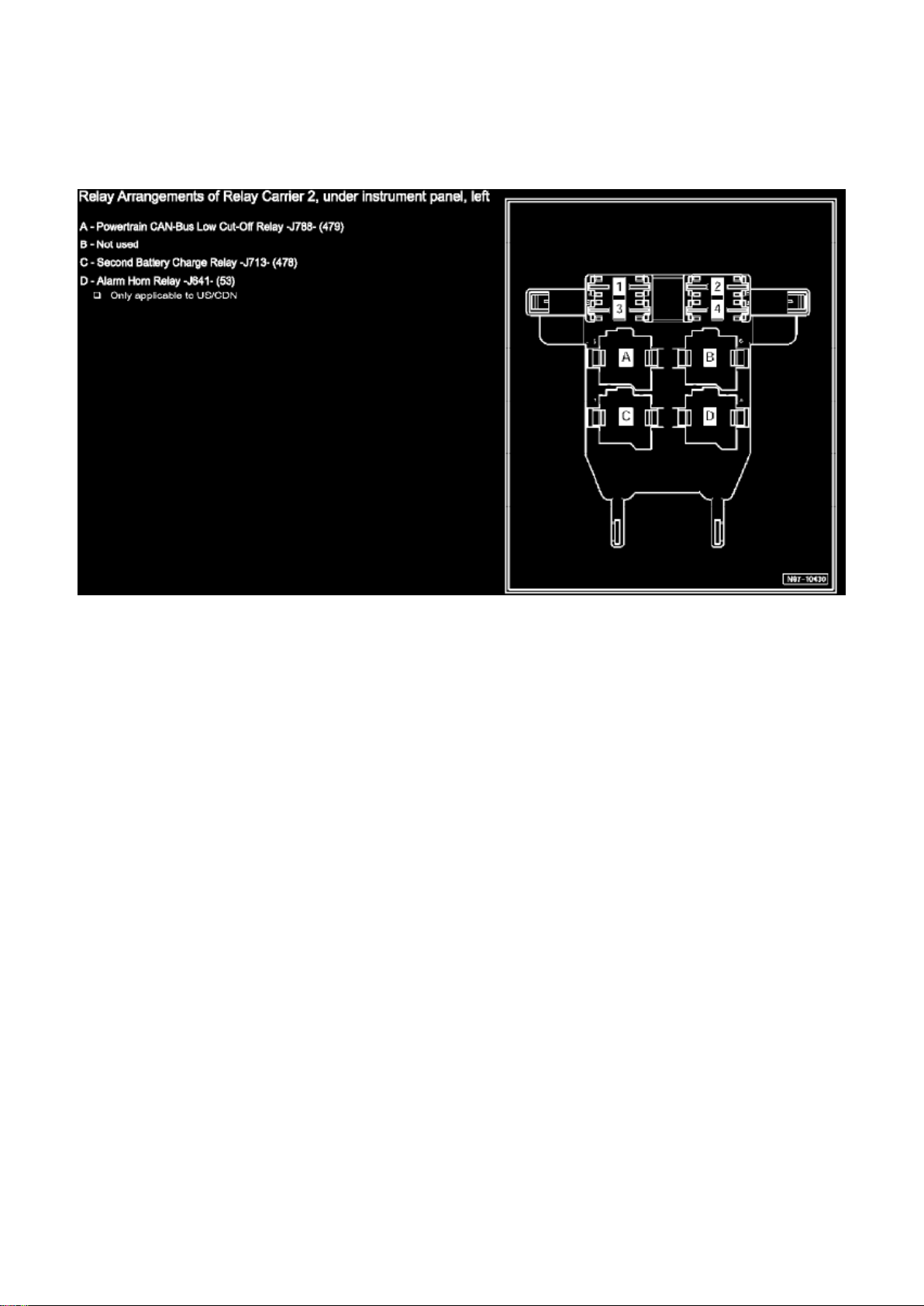
Relay Arrangements Of Relay Carrier 2, Under Instrument Panel, Left
Page 3

Volkswagen Passat Sedan Workshop Manual (V6-3.6L (BLV) (2008))
Volkswagen Workshop Manuals > Relays and Modules > Relays and Modules - Accessories and Optional Equipment >
Alarm Module, (Vehicle Antitheft) > Component Information > Description and Operation > Anti-Theft Immobilizer
Page 4

Alarm Module: Description and Operation Anti-Theft Immobilizer
Anti-Theft Immobilizer
=> [ Anti-Theft Immobilizer Control Module ]
=> [ Anti-Theft Immobilizer Reading Module ]
=> [ Electronic Ignition Switch ]
General Description:
The Passat is equipped with Anti-theft Immobilizer 4 with online connection. The chief integral
component of the fourth generation immobilizer is a central database, in which all anti-theft relevant
data of participating control modules is stored. It is not possible to adapt the participating control
modules to the immobilizer without an online connection to this data bank.
Online system test, refer to => [ Anti-Theft Immobilizer Online System Test ] See: Accessories and
Optional Equipment/Antitheft and Alarm Systems/Testing and Inspection/Component Tests and
General Diagnostics/Anti-Theft Immobilizer Online System Test.
Modifications from Immobilizer 3:
‹› It is not possible to request the PIN of anti-theft immobilizer components via fax or earlier
clearing of the components.
‹› All components participating on the immobilizer must be adapted online.
‹› All vehicle keys (subsequently ordered keys as well) are already pre-coded to a specific vehicle
from the factory and can only be adapted to this
vehicle.
‹› It is necessary to have the VIN to be able to order replacement keys.
‹› It is no longer possible to perform adaptation on components originating from other Konzern
brands in Volkswagen vehicles.
Immobilizer Components:
‹› Anti-Theft Immobilizer Control Module (J362), refer to => [ Anti-Theft Immobilizer Control Module
].
‹› Electronic Steering Column Lock Control Module (J764), refer to => [ Electronic Steering Column
Lock Control Module ] See: Relays and
Modules - Steering and Suspension/Relays and Modules - Steering/Steering Column Control
Module/Description and Operation/Electronic Steering Column Lock Control Module (J764).
‹› Electronic Ignition Switch (D9), refer to => [ Electronic Ignition Switch ].
‹› Ignition key, refer to => [ Ignition Key ] See: Accessories and Optional Equipment/Antitheft and
Alarm Systems/Keyless Entry/Description and
Operation/Ignition Key.
Replacing all immobilizer components, refer to => [ Anti-Theft Immobilizer New Identity When
Replacing All Components ] See: Accessories and Optional Equipment/Antitheft and Alarm
Systems/Testing and Inspection/Component Tests and General Diagnostics/Anti-Theft Immobilizer
New Identity When Replacing All Components.
Page 5

Functions of Anti-Theft Immobilizer Control Module (J362):
‹› Communicating all theft relevant data to the central data bank via the online connection.
‹› Communication of all components participating on immobilizer with each other.
‹› Data encryption between participating control modules.
DTC Recognition and Display:
The immobilizer is equipped with On Board Diagnostic (OBD) capabilities which aids in
troubleshooting.
The "Guided Fault Finding" function is to be used for troubleshooting of one of the systems
described.
Anti-Theft Immobilizer Control Module (J362)
Page 6

Volkswagen Passat Sedan Workshop Manual (V6-3.6L (BLV) (2008))
Volkswagen Workshop Manuals > Relays and Modules > Relays and Modules - Accessories and Optional Equipment >
Alarm Module, (Vehicle Antitheft) > Component Information > Description and Operation > Anti-Theft Immobilizer > Page 11
Page 7

The Anti-theft Immobilizer Control Module is integrated into Comfort System Central Control
Module (J393).
If anti-theft control module is malfunctioning, the Comfort System Central Control Module must be
replaced.
- Comfort System Central Control Module, removing and installing, refer to => [ Comfort System
Central Control Module ] See: Relays and Modules - Powertrain Management/Relays and Modules
- Computers and Control Systems/Body Control Module/Service and Repair/Comfort System
Central Control Module (J393).
‹› If Comfort System Central Control Module is to be replaced, the work procedure => [ Comfort
System Central Control Module, Replace and
Coding ] See: Relays and Modules - Powertrain Management/Relays and Modules - Computers
and Control Systems/Body Control Module/Testing and Inspection/Programming and
Relearning/Comfort System Central Control Module (J393), Replace and Coding to read out the
codes stored in the module must always be performed.
‹› After replacing Comfort System Central Control Module, other functions of Comfort System
Central Control Module such as Anti-theft
Immobilizer, Anti-theft Alarm System, access and start authorization, tire pressure monitoring and
central locking system key must also be adapted, depending on vehicle equipment.
‹› In this case, start by adapting the Anti-theft Immobilizer, refer to => [ Anti-Theft Immobilizer
Control Module, Adapting ] See: Accessories and
Optional Equipment/Antitheft and Alarm Systems/Testing and Inspection/Programming and
Relearning/Anti-Theft Immobilizer Control Module (J362), Adapting and then the other
equipment-dependent functions of Comfort System Central Control Module in any order.
Anti-Theft Immobilizer Reading Module (D1)
Anti-Theft Immobilizer Reading Module is integrated in the electronic ignition switch and cannot be
replaced individually.
Electronic Ignition Switch (D9), refer to => [ Electronic Ignition Switch ]
Electronic Ignition Switch (D9)
The following components are integrated in the electronic ignition switch (depending on
equipment):
‹› Anti-Theft Immobilizer Reading Module (D1)
‹› Push Button Illumination (L76)
‹› Ignition Switch Key Lock Solenoid (N376) (vehicles with automatic transmission only)
Page 8
Volkswagen Passat Sedan Workshop Manual (V6-3.6L (BLV) (2008))
Volkswagen Workshop Manuals > Relays and Modules > Relays and Modules - Accessories and Optional Equipment >
Alarm Module, (Vehicle Antitheft) > Component Information > Description and Operation > Anti-Theft Immobilizer > Page 12
Alarm Module: Description and Operation Towing Recognition Control Module (J345)
Towing Recognition Control Module (J345)
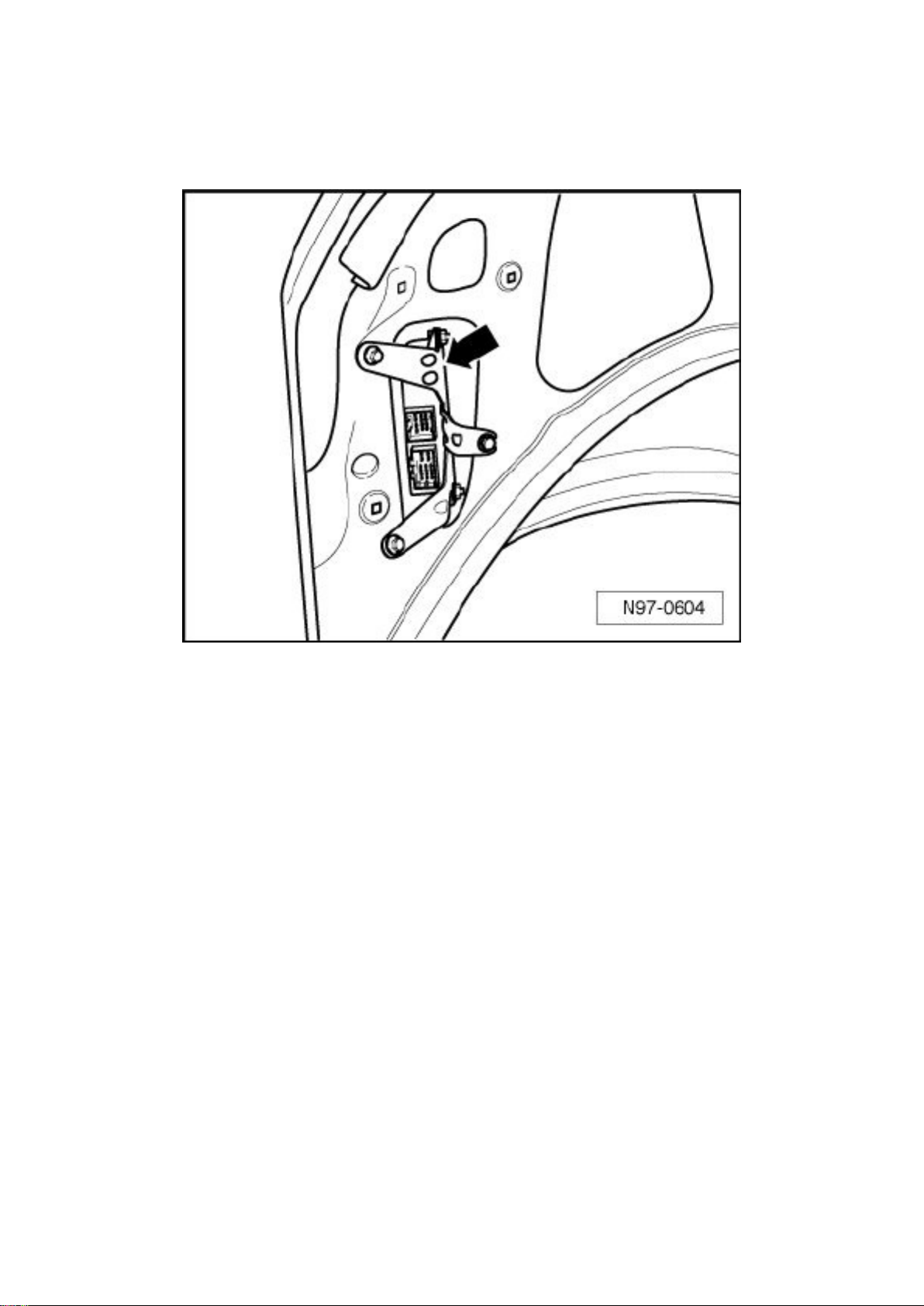
Towing Recognition Control Module - arrow - is located behind side trim at left rear in luggage
compartment.
‹› Additional information:
Refer to the Owner's Manual.
General Description:
‹› At this time, only control modules manufactured by Westfalia are installed in the Passat.
‹› Use the Power Outlet Tester (V.A.G 1537/A) to test the control module, refer to => [ Towing
Recognition Control Module, Output Diagnostic
Test Mode ] See: Accessories and Optional Equipment/Antitheft and Alarm Systems/Tow
Sensor/Testing and Inspection/Scan Tool Testing and Procedures/Towing Recognition Control
Module (J345), Output Diagnostic Test Mode.
The Towing Recognition Control Module detects from a performance decrease of at least 5 W* the
use of a trailer and sends this information to diverse control modules via CAN-Bus.
Via CAN-Bus, Towing Recognition Control Module is supplied with information (light control) from
Vehicle Electrical System Control Module (J519) and Comfort System Central Control Module
(J393).
Page 9

* At least the turn signal or parking lamp must be switched on to detect use of a trailer.
DTC Recognition and Display:
The Towing Recognition Control Module is equipped with On Board Diagnostics (OBD) which
assists troubleshooting.
The "Guided Fault Finding" function is to be used for troubleshooting of one of the systems
described.
Page 10

Volkswagen Passat Sedan Workshop Manual (V6-3.6L (BLV) (2008))
Volkswagen Workshop Manuals > Relays and Modules > Relays and Modules - Accessories and Optional Equipment >
Alarm Module, (Vehicle Antitheft) > Component Information > Description and Operation > Anti-Theft Immobilizer > Page 13
Page 11

Alarm Module: Description and Operation Radar Interior Monitoring Control Module 1
Anti-Theft Alarm System
‹› Additional information:
Refer to Owner's Manual.
General Description:
Functions of anti-theft alarm system are integrated in Comfort System Central Control Module
(J393).
Anti-theft alarm system must be adapted after replacing Comfort System Central Control Module,
refer to => [ Comfort System Central Control Module ] See: Relays and Modules - Powertrain
Management/Relays and Modules - Computers and Control Systems/Body Control
Module/Description and Operation.
‹› If Comfort System Central Control Module is to be replaced, the work procedure => [ Comfort
System Central Control Module, Replace and
Coding ] See: Relays and Modules - Powertrain Management/Relays and Modules - Computers
and Control Systems/Body Control Module/Testing and Inspection/Programming and
Relearning/Comfort System Central Control Module (J393), Replace and Coding to read out the
codes stored in the module must always be performed.
‹› After replacing Comfort System Central Control Module, other functions of Comfort System
Central Control Module such as Anti-theft
Immobilizer, Anti-theft Alarm System, access and start authorization, tire pressure monitoring and
central locking system key must also be adapted, depending on vehicle equipment.
‹› In this case, start by adapting the Anti-theft Immobilizer, refer to => [ Anti-Theft Immobilizer
Control Module, Adapting ] See: Accessories and
Optional Equipment/Antitheft and Alarm Systems/Testing and Inspection/Programming and
Relearning/Anti-Theft Immobilizer Control Module (J362), Adapting and then the other
equipment-dependent functions of access and start authorization in any order.
DTC Recognition and Display:
Anti-theft alarm system is equipped with On Board Diagnostics (OBD) which assists
troubleshooting.
The "Guided Fault Finding" function is to be used for troubleshooting of one of the systems
described.
‹› After anti-theft alarm system has triggered, the alarm source, which is stored in Comfort System
Central Control Module, can be checked, refer to
=> [ Anti-Theft Alarm System Sources, Checking ] See: Accessories and Optional
Equipment/Antitheft and Alarm Systems/Alarm Horn/Testing and Inspection/Component Tests and
General Diagnostics/Anti-Theft Alarm System Sources, Checking.
‹› After Alarm Horn (H12) has triggered, the alarm source, which is stored in Comfort System
Central Control Module, can be checked, refer to => [
Alarm Horn Sources, Checking ] See: Accessories and Optional Equipment/Antitheft and Alarm
Systems/Alarm Horn/Testing and Inspection/Component Tests and General Diagnostics/Alarm
Horn Sources, Checking.
Page 12

Radar Interior Monitoring Control Module 1 (G303)
‹› Radar Interior Monitoring Control Module 1, Vehicle Inclination Sensor (G384) and Interior
Monitoring Sensor (G273) (three sensors) compose
one component.
Page 13

Volkswagen Passat Sedan Workshop Manual (V6-3.6L (BLV) (2008))
Volkswagen Workshop Manuals > Relays and Modules > Relays and Modules - Accessories and Optional Equipment >
Alarm Module, (Vehicle Antitheft) > Component Information > Description and Operation > Page 14
Page 14

Alarm Module: Testing and Inspection
Anti-Theft Immobilizer Control Module (J362), Adapting
Special tools, testers and auxiliary items required
‹› Vehicle Diagnosis, Testing and Information System (VAS5051B)
After replacing Comfort System Central Control Module (J393), immobilizer must be adapted.
- Connect the (VAS5051B).
- On the (VAS5051B), select "Guided Fault Finding".
- Using the "Go To" button, select "Functions/Component selection" and the following menu options
in sequence:
‹› Body
‹› Electrical Equipment
‹› 01 - OBD capable systems
‹› Anti-Theft Immobilizer
‹› Anti-theft Immobilizer functions
‹› Adaptation when replacing immobilizer
Page 15

Volkswagen Passat Sedan Workshop Manual (V6-3.6L (BLV) (2008))
Volkswagen Workshop Manuals > Relays and Modules > Relays and Modules - Accessories and Optional Equipment >
Alarm Module, (Vehicle Antitheft) > Component Information > Service and Repair > Anti-Theft Immobilizer Reading Module
Page 16

Alarm Module: Service and Repair Anti-Theft Immobilizer Reading Module
Anti-Theft Immobilizer Reading Module
Anti-Theft Immobilizer Reading Module D1 is integrated in the electronic ignition switch and cannot
be replaced individually.
Electronic Ignition Switch D9.
Page 17

Volkswagen Passat Sedan Workshop Manual (V6-3.6L (BLV) (2008))
Volkswagen Workshop Manuals > Relays and Modules > Relays and Modules - Accessories and Optional Equipment >
Alarm Module, (Vehicle Antitheft) > Component Information > Service and Repair > Anti-Theft Immobilizer Reading Module
> Page 17
Page 18
Alarm Module: Service and Repair Radar Interior Monitoring Control Module 1 (G303)
Page 19

Radar Interior Monitoring Control Module 1 (G303)
Special tools, testers and auxiliary items required
‹› Trim Removal Wedge (3409)
‹› When removing and installing components in a visible area (switches, covers, trim, etc.), mask
off the areas at which a prying tool ((3409),
screwdriver) will be positioned, using commercially available adhesive tape.
Removing:
- Switch ignition and all electrical consumers off and disengage the key or ignition switch in position
0 (ignition off).
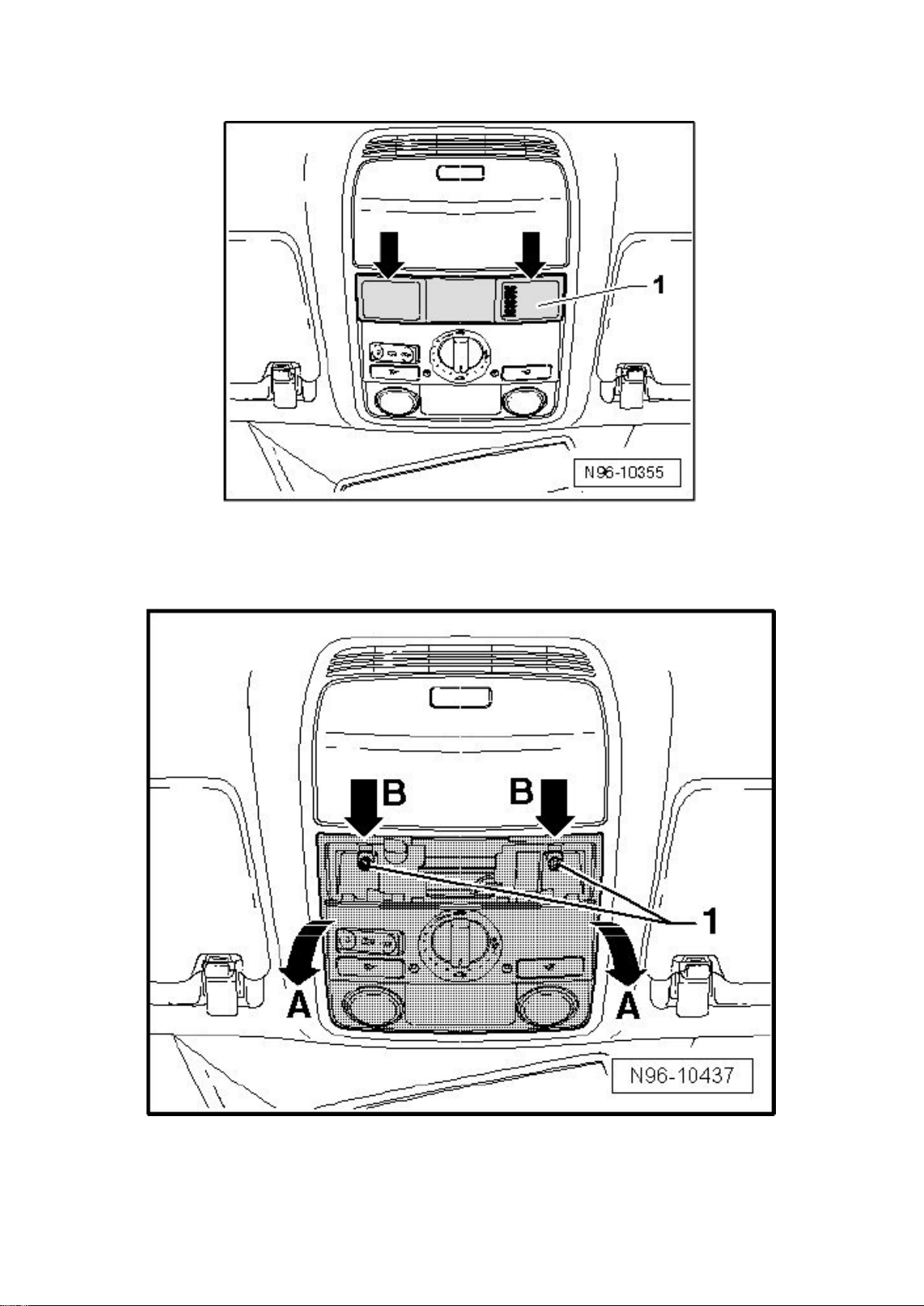
- Carefully remove trim - 1 -.
- Remove screws - 1 -, release retainers - arrows B - and remove interior light module from
headliner opening - direction of arrow A -, considering length of available cable.
Page 20

Volkswagen Passat Sedan Workshop Manual (V6-3.6L (BLV) (2008))
Volkswagen Workshop Manuals > Relays and Modules > Relays and Modules - Accessories and Optional Equipment >
Alarm Module, (Vehicle Antitheft) > Component Information > Service and Repair > Anti-Theft Immobilizer Reading Module
> Page 18
Page 21
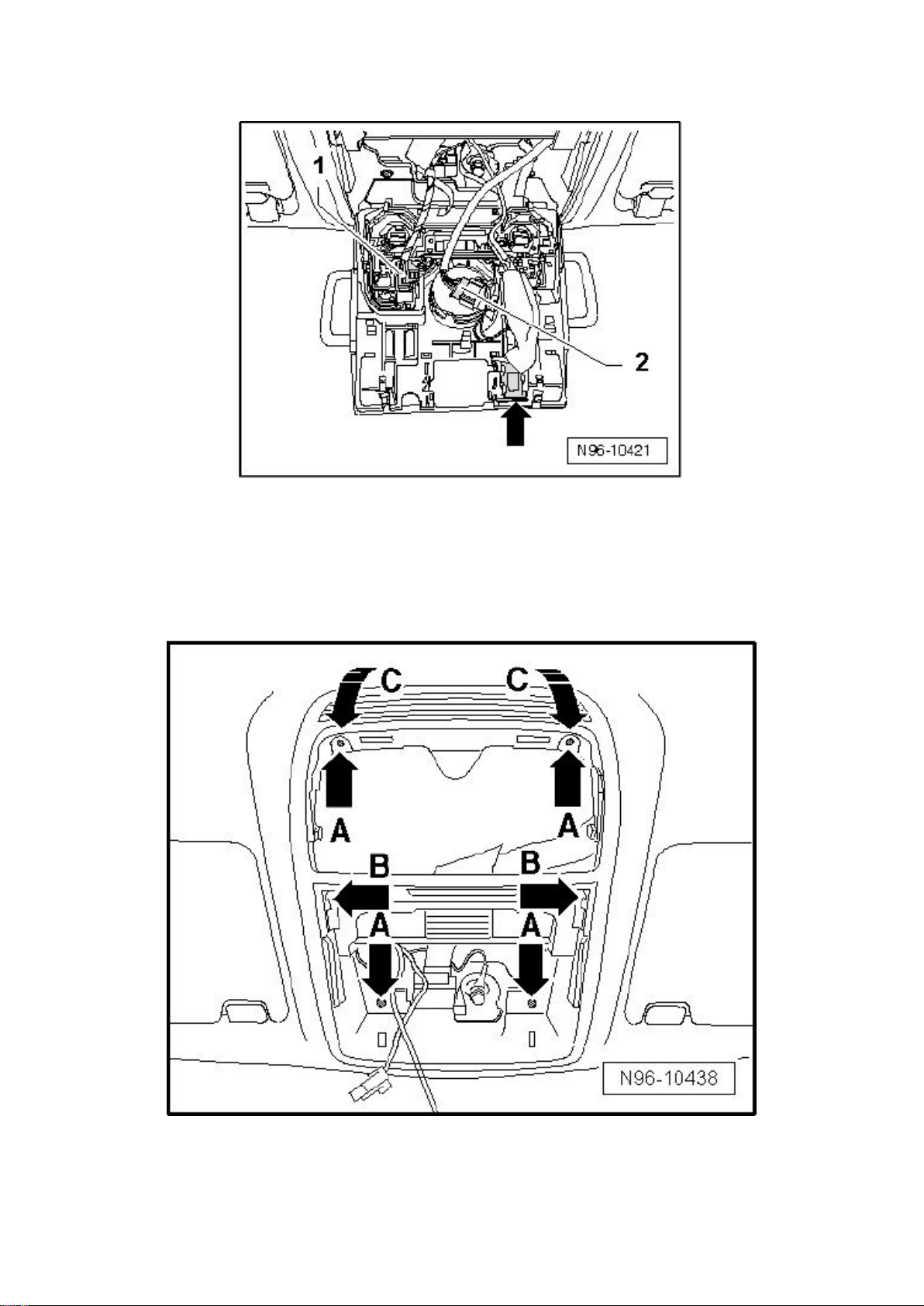
- Disconnect the connectors - 1 - and - 2 -.
Page 22

- For vehicles with hands-free telephone equipment, unclip Telephone Microphone (R38) - arrow -.
- Remove front interior light.
- Remove the bolts - arrows A -, disengage retaining lugs - arrows B - and remove console from
molded headliner in - direction of arrow C -.
- Disconnect connector - 2 - from Radar Interior Monitoring Control Module 1 - 1 -.
Page 23

Volkswagen Passat Sedan Workshop Manual (V6-3.6L (BLV) (2008))
Volkswagen Workshop Manuals > Relays and Modules > Relays and Modules - Accessories and Optional Equipment >
Alarm Module, (Vehicle Antitheft) > Component Information > Service and Repair > Anti-Theft Immobilizer Reading Module
> Page 19
Page 24
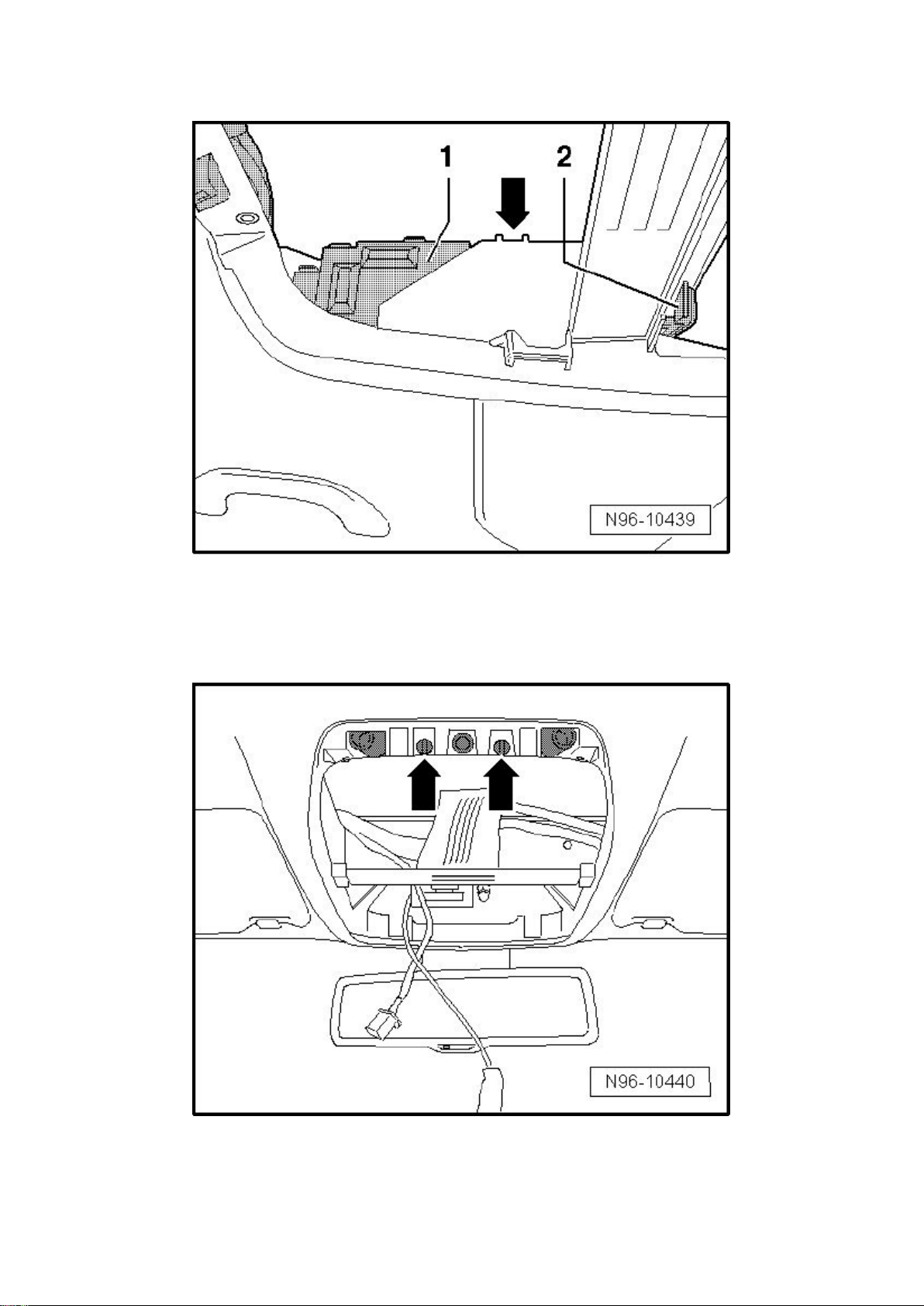
- Disengage Radar Interior Monitoring Control Module 1 - 1 - at retaining lug - arrow -.
Page 25

- Release retainers at interior monitoring sensors and remove from headliner along with Radar
Interior Monitoring Control Module 1.
Page 26

Volkswagen Passat Sedan Workshop Manual (V6-3.6L (BLV) (2008))
Volkswagen Workshop Manuals > Relays and Modules > Relays and Modules - Accessories and Optional Equipment >
Alarm Module, (Vehicle Antitheft) > Component Information > Service and Repair > Anti-Theft Immobilizer Reading Module
> Page 20
Page 27
Alarm Module: Service and Repair Towing Recognition Control Module (J345)
Page 28

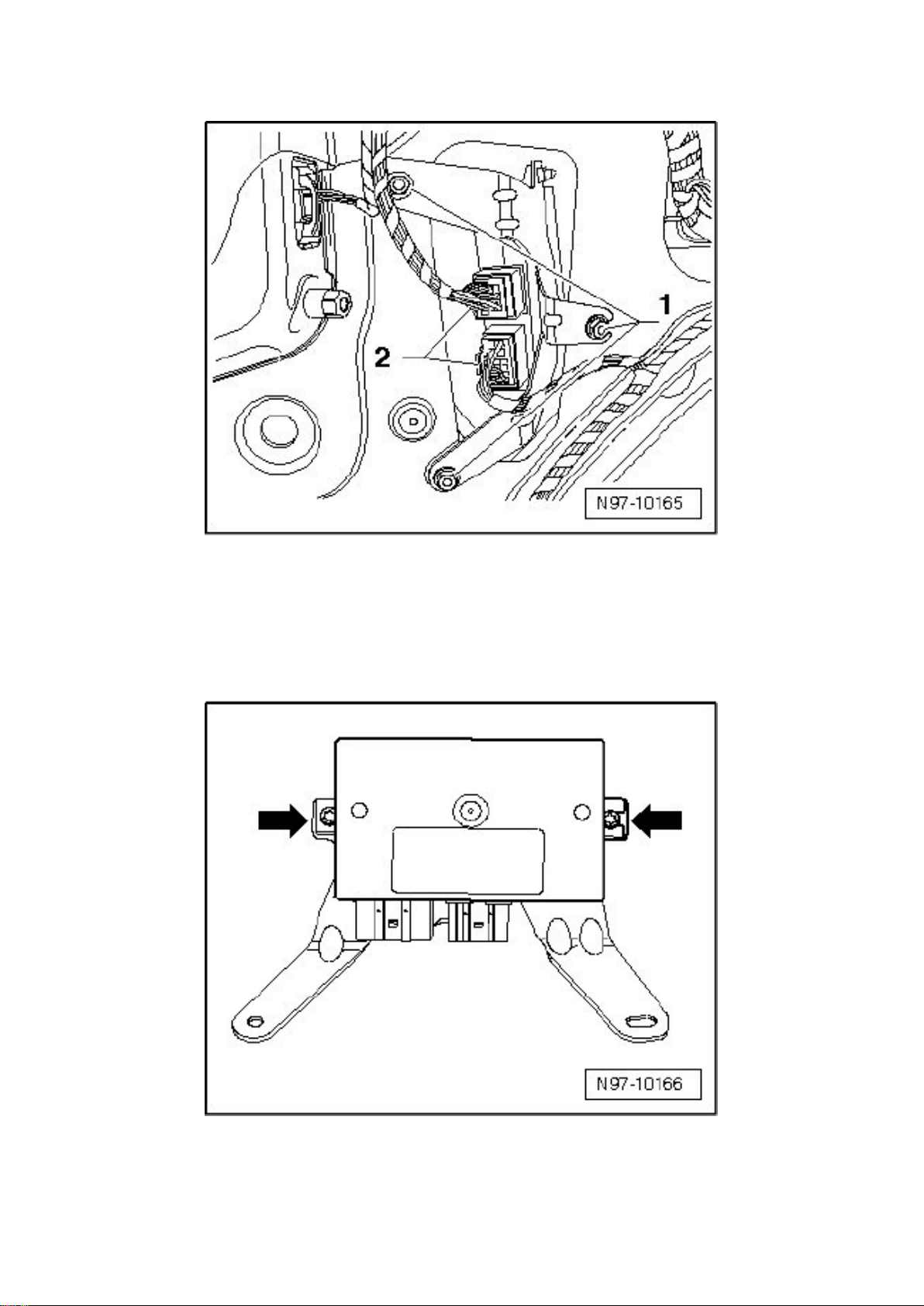
Towing Recognition Control Module (J345)
Special tools, testers and auxiliary items required
‹› Torque Wrench (V.A.G 1783)
Removing:
- Switch ignition and all electrical consumers off and disengage the key or ignition switch in position
0 (ignition off).
- Remove left side panel trim in luggage compartment.
- Disengage connectors - 2 - and disconnect them from Towing Recognition Control Module.
‹› The number of connectors on the towing recognition control module can deviate from the
illustration depending on the vehicle equipment.
- Remove mounting bolts - 1 - and remove towing recognition control module with bracket out of
vehicle.
- Remove mounting bolts - arrows - and remove towing recognition control module from bracket.
Installing:
Install in reverse order of removal, noting the following:
‹› After installing a new towing recognition control module, it must be coded, refer to => [ Towing
Recognition Control Module, Coding ] See:
Page 29

Volkswagen Passat Sedan Workshop Manual (V6-3.6L (BLV) (2008))
Volkswagen Workshop Manuals > Relays and Modules > Relays and Modules - Accessories and Optional Equipment >
Alarm Module, (Vehicle Antitheft) > Component Information > Service and Repair > Anti-Theft Immobilizer Reading Module
> Page 21
Page 30

Accessories and Optional Equipment/Antitheft and Alarm Systems/Tow Sensor/Testing and
Inspection/Programming and Relearning.
Page 31
Volkswagen Passat Sedan Workshop Manual (V6-3.6L (BLV) (2008))
Volkswagen Workshop Manuals > Relays and Modules > Relays and Modules - Accessories and Optional Equipment >
Antenna Control Module > Component Information > Service and Repair > Radio Reception Antenna Module (Sedan)
Page 32

Antenna Control Module: Service and Repair Radio Reception Antenna Module (Sedan)
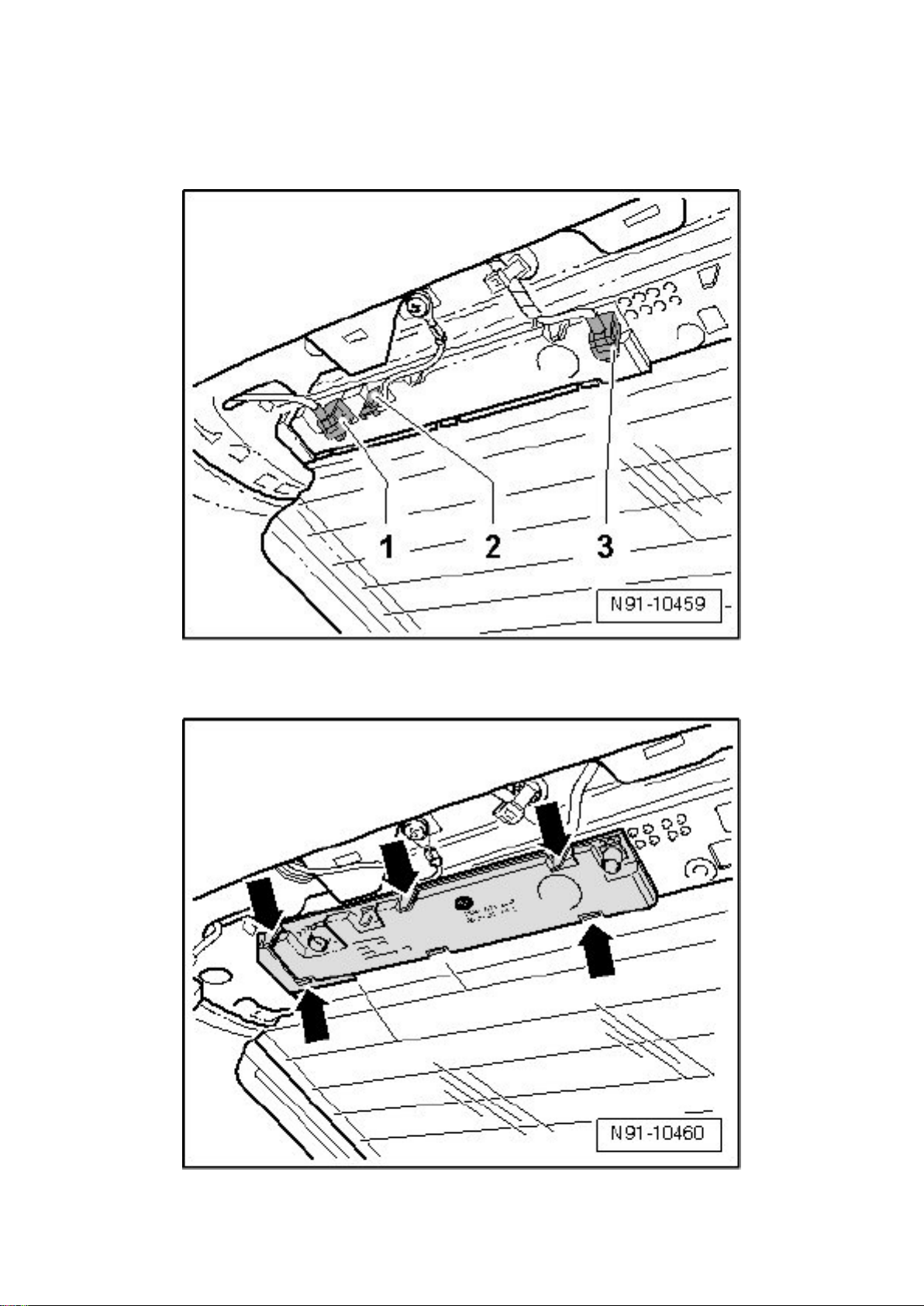
Radio Reception Antenna Module
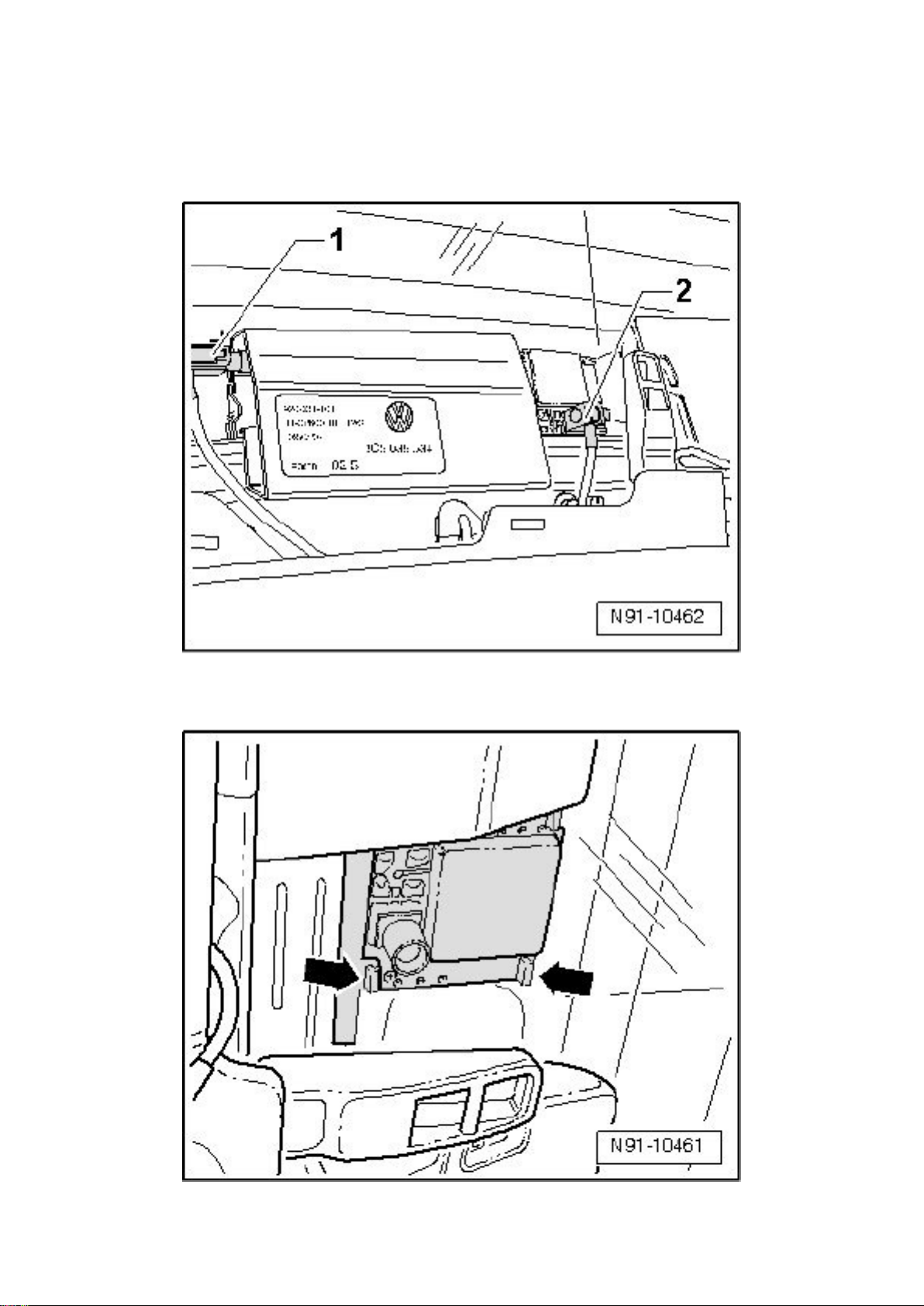
Removing:
- Remove rear headliner connector trim at rear window.
- Disengage connectors - 1, 2 and 3 - and remove them.
- Release retaining clips - arrows - on both sides.
- Carefully remove antenna module.
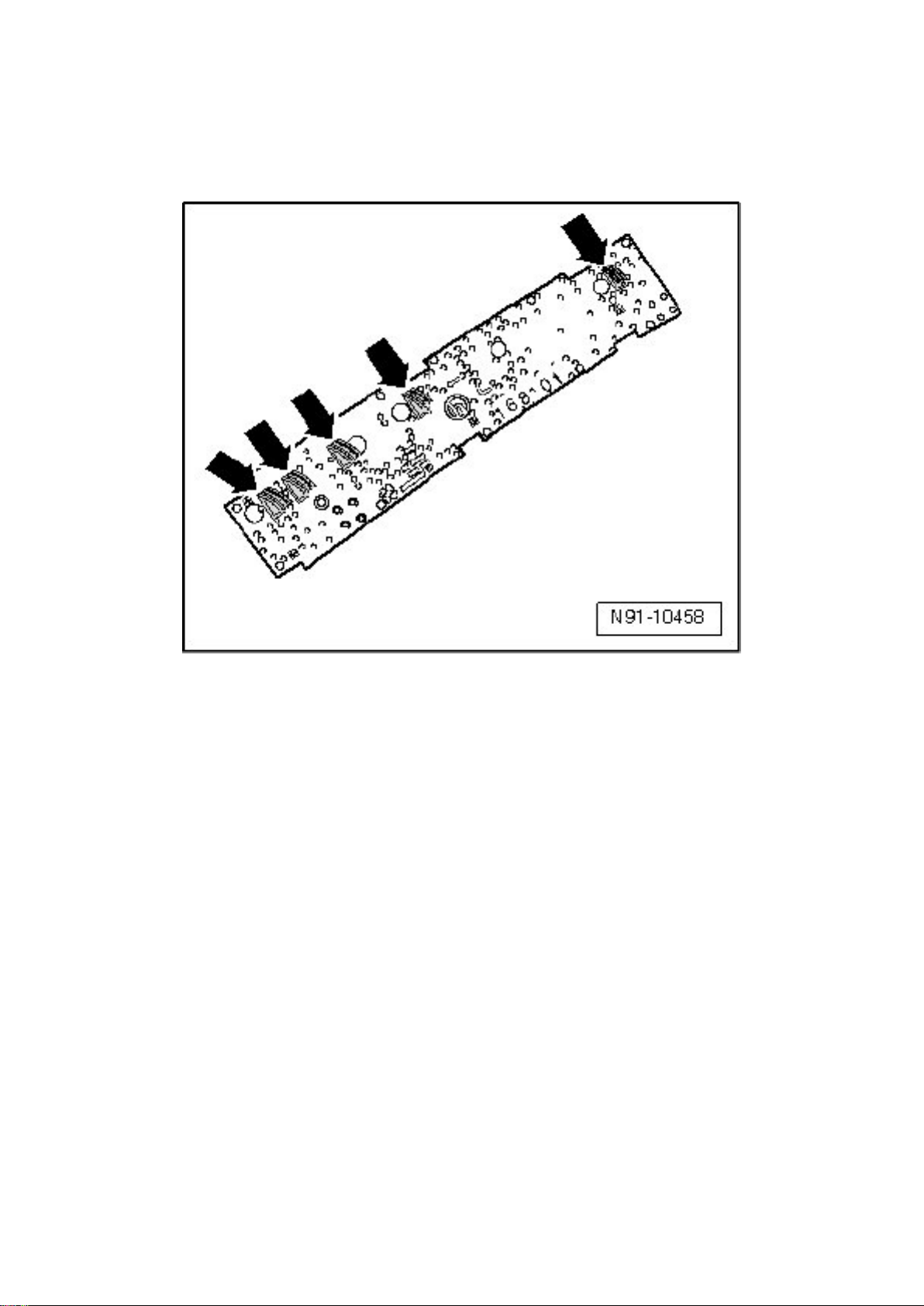
Installing:
‹› Terminals on antenna module - arrows - must not be bent and must be metallically clean so that
reception problems do not result.
Page 33
Volkswagen Passat Sedan Workshop Manual (V6-3.6L (BLV) (2008))
Volkswagen Workshop Manuals > Relays and Modules > Relays and Modules - Accessories and Optional Equipment >
Antenna Control Module > Component Information > Service and Repair > Radio Reception Antenna Module (Sedan) >
Page 26
‹› The same applies to contact surfaces on rear window.
Install in reverse order of removal.
Page 34
Volkswagen Passat Sedan Workshop Manual (V6-3.6L (BLV) (2008))
Volkswagen Workshop Manuals > Relays and Modules > Relays and Modules - Accessories and Optional Equipment >
Antenna Control Module > Component Information > Service and Repair > Radio Reception Antenna Module (Sedan) >
Page 27
Page 35

Antenna Control Module: Service and Repair Navigation Antenna Module (Sedan)
Navigation Antenna Module
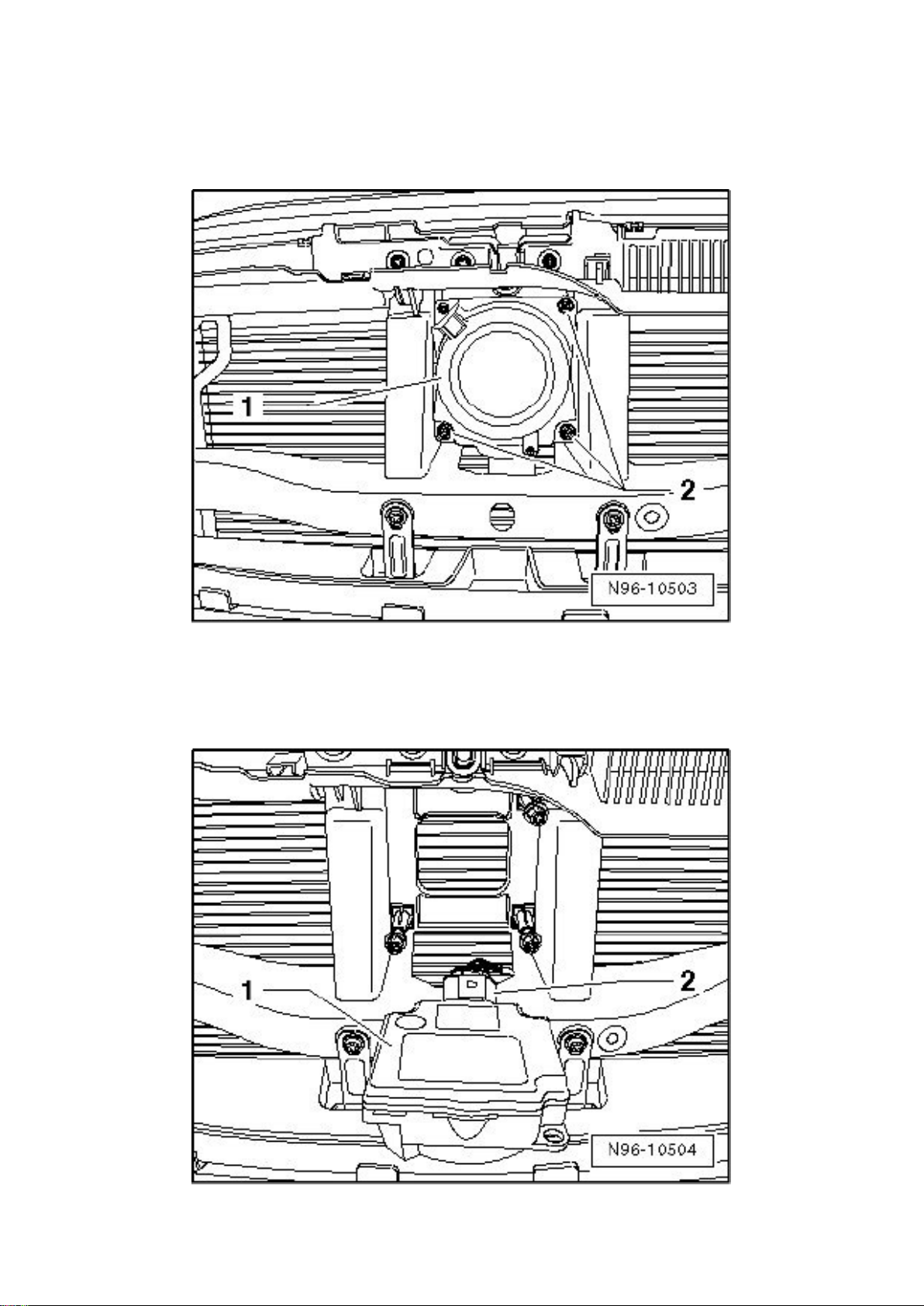
Removing:
- Remove rear headliner connector trim at rear window.
- Release and disconnect electrical connection - 2 -.
- Release retaining clips - arrows - on both sides.
- Carefully remove antenna module.
Installing:
Install in reverse order of removal.
Page 36
Volkswagen Passat Sedan Workshop Manual (V6-3.6L (BLV) (2008))
Volkswagen Workshop Manuals > Relays and Modules > Relays and Modules - Accessories and Optional Equipment >
Collision Avoidance Module > Component Information > Service and Repair
Page 37

Collision Avoidance Module: Service and Repair
Distance Regulation Control Module (J428)
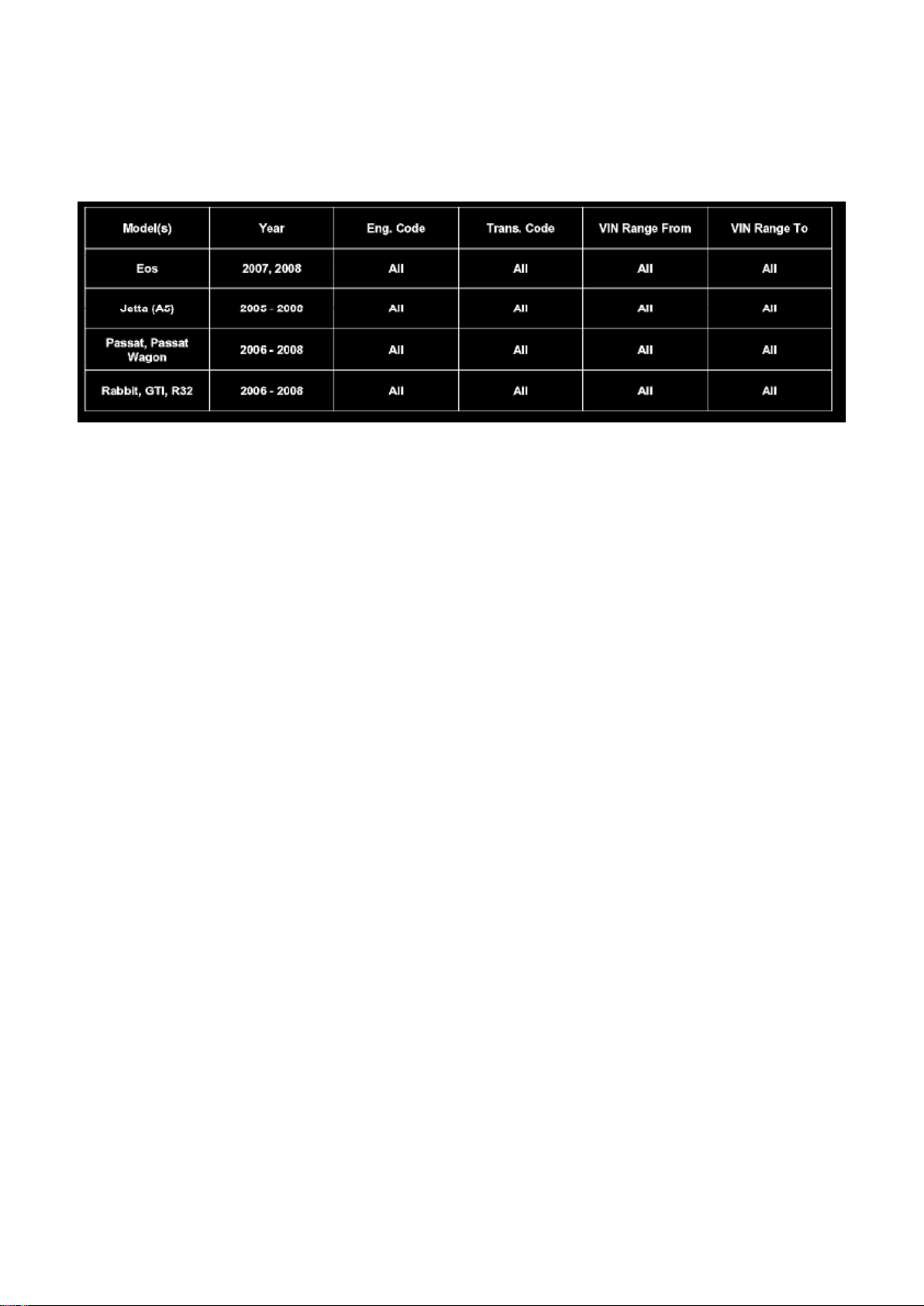
Distance Regulation Control Module is mounted on front of vehicle, behind VW-logo in the radiator
protective grille.
Distance Regulation Control Module must not be disassembled further and contains the following
components:
‹› Adaptive Cruise Control Sensor (G550)
‹› Distance Regulation Sensor Heater (Z47)
Removing:
- Switch ignition and all electrical consumers off and disengage the key or ignition switch in position
0 (ignition off).
- Remove radiator protective grille.
- Unclip Distance Regulation Control Module - 1 - from the three mounts - 2 -.
- Swivel Distance Regulation Control Module - 1 - forward, paying attention to lengths of connected
wires.
- Disengage and disconnect harness connector - 2 - and remove Distance Regulation Control
Module from vehicle.
Installing:
Install in reverse order of removal, noting the following:
Adaptive Cruise Control Sensor (G550) in Distance Regulation Control Module is to be adjusted:
Page 38

Volkswagen Passat Sedan Workshop Manual (V6-3.6L (BLV) (2008))
Volkswagen Workshop Manuals > Relays and Modules > Relays and Modules - Accessories and Optional Equipment >
Collision Avoidance Module > Component Information > Service and Repair > Page 31
Page 39

‹› whenever the adaptive cruise control sensor is removed, installed or replaced,
‹› every removal and installation, and replacement of assembly carrier,
‹› if there is a suspicion of forceful impact on these two parts, an accident during driving or similar.
Adjusting Adaptive Cruise Control Sensor, refer to => [ Adaptive Cruise Control Sensor, Calibrating
] See: Accessories and Optional Equipment/Collision Avoidance and Parking Assist
Systems/Distance Sensor/Testing and Inspection.
- The Distance Regulation Control Module must be adapted prior to first use and/or after
replacement. Refer to => [ Automatic Distance Regulation, Initializing ] See: Cruise Control/Testing
and Inspection/Programming and Relearning/Automatic Distance Regulation, Initializing.
Page 40
Volkswagen Passat Sedan Workshop Manual (V6-3.6L (BLV) (2008))
Volkswagen Workshop Manuals > Relays and Modules > Relays and Modules - Accessories and Optional Equipment >
Navigation Module > Component Information > Technical Service Bulletins > All Technical Service Bulletins for Navigation
Module: > 9109-04 > Feb > 09 > Navigation Radio - Multiple Malfunctions
Navigation Module: All Technical Service Bulletins Navigation Radio - Multiple Malfunctions
9109-04
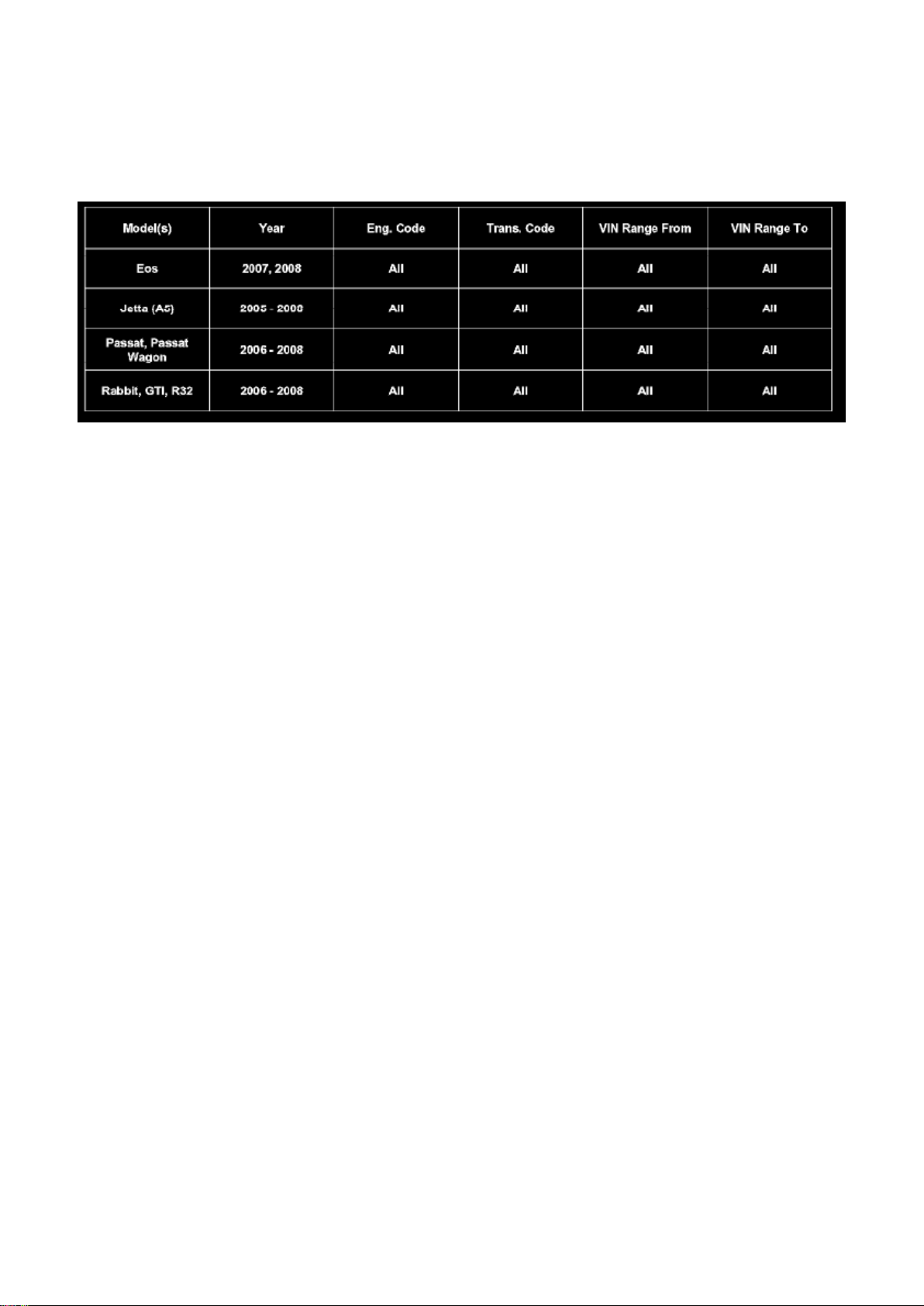
Affected Vehicles
Condition
91 09 04 Feb. 13, 2009 2016982 Supersedes T.B. Group 91 number 08-01 dated Jan. 7, 2008 and
replaces T.B. (2015952) Group 91 number 07-12 dated Aug. 17, 2007 due to software
programming update.
Radio, Navigation System, Update Programming for Loss of Presets (Sat),
Various Stability Concerns Various malfunctions on radio-navigation system MFD2 DVD:
- Loss of satellite radio presets
- Map is empty
- First part of navigation voice output is missing
- Radio display in MFI is not shown
- No sound after engine start (audio CD operation)
- No radio operation after engine start possible
- Frequent station list (satellite radio) refresh
- Various radio stability concerns
Technical Background
Radio software fault.
Production Solution
Updated radio software version 50.
Service
Page 41

Tip: DO NOT remove navigation unit from vehicle.
- To perform this procedure in its entirety should take approximately 50 minutes.
- Procedure will erase presets.
- If navigation is left ON for more than 1 hour unattended it will turn OFF to conserve battery power.
If this occurs, turn navigation back on by pressing power key and continue SW program from
previous step (There is no risk of update being interrupted by this power down).
- The initial Accept screen has been eliminated beginning with software version 48.
Page 42

Volkswagen Passat Sedan Workshop Manual (V6-3.6L (BLV) (2008))
Volkswagen Workshop Manuals > Relays and Modules > Relays and Modules - Accessories and Optional Equipment >
Navigation Module > Component Information > Technical Service Bulletins > All Technical Service Bulletins for Navigation
Module: > 9109-04 > Feb > 09 > Navigation Radio - Multiple Malfunctions > Page 40
Page 43
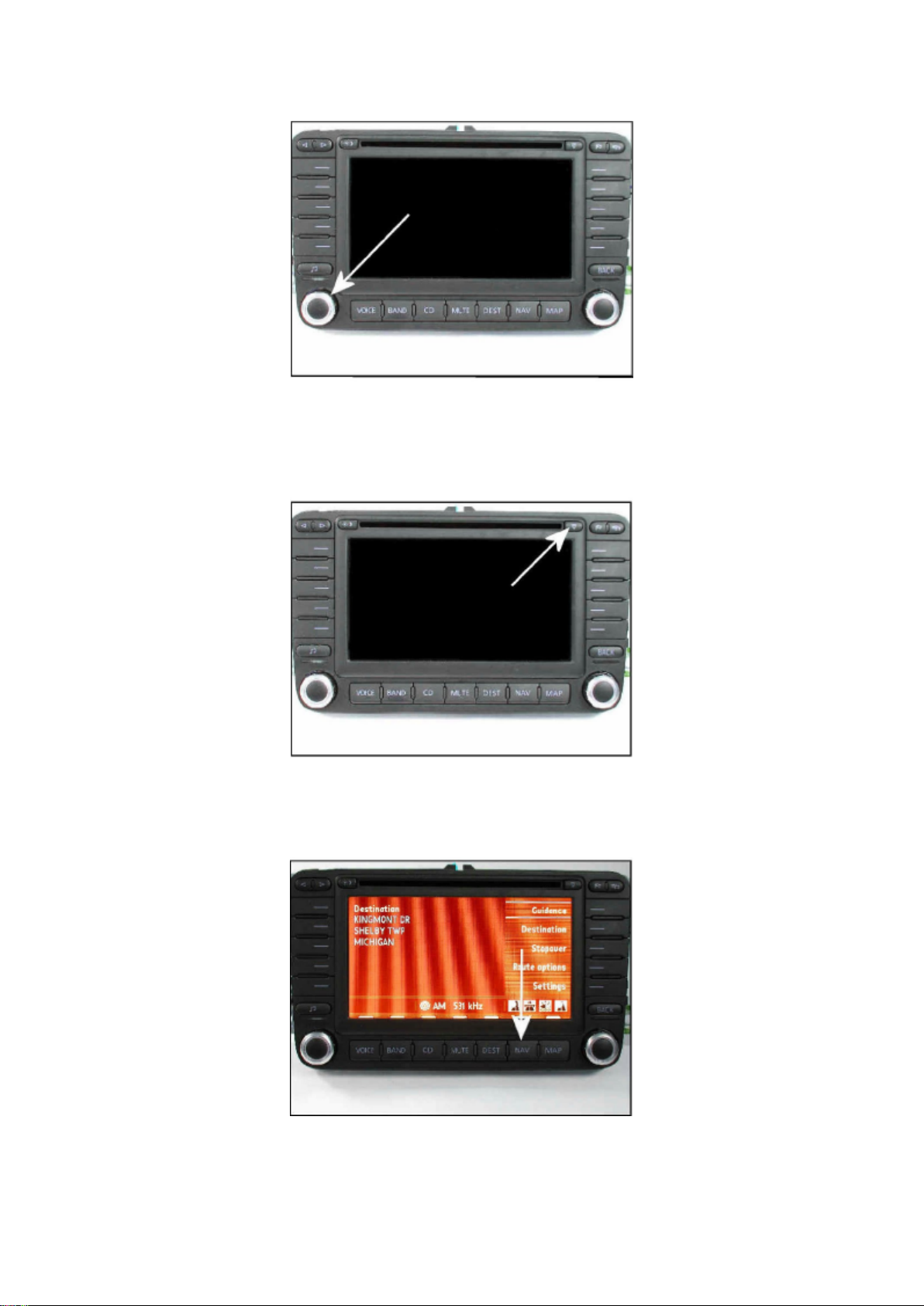
Identifying Software level
Page 44

- Connect Midtronics InCharge 940 (INC 940) tester/charger to vehicle's battery.
- Remove key from ignition.
- Press "power" knob on navigation unit.
- Eject any disc in navigation unit by using eject button.
- For software version up to 47, press "Accept" button.
- If software version is 48 or greater, continue.
- Press "Navigation" button.
Page 45

Volkswagen Passat Sedan Workshop Manual (V6-3.6L (BLV) (2008))
Volkswagen Workshop Manuals > Relays and Modules > Relays and Modules - Accessories and Optional Equipment >
Navigation Module > Component Information > Technical Service Bulletins > All Technical Service Bulletins for Navigation
Module: > 9109-04 > Feb > 09 > Navigation Radio - Multiple Malfunctions > Page 41
Page 46
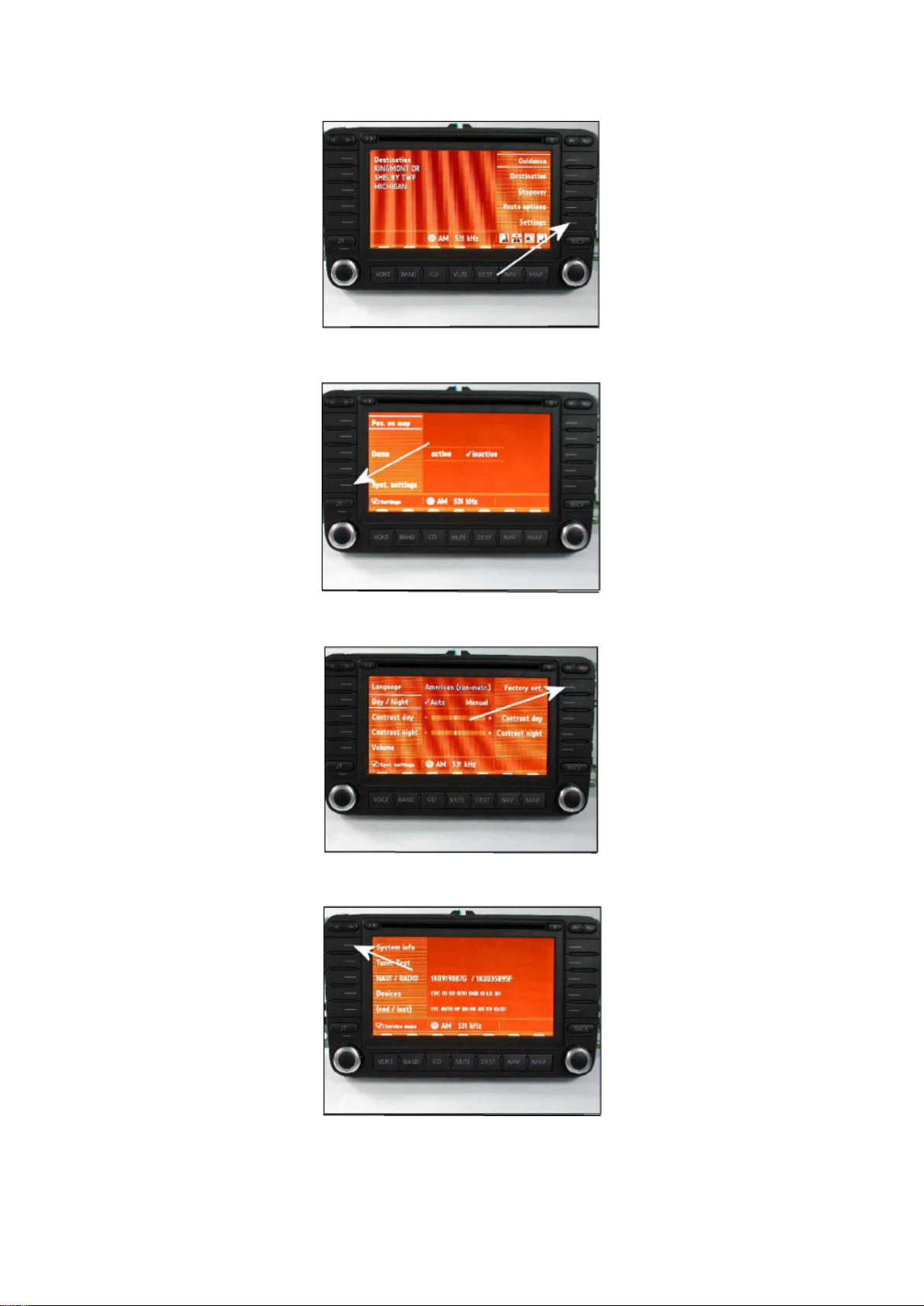
- Press the "Settings" button.
Page 47

- Press the "Syst. Settings" button.
- Press and hold "Factory set" button for 5 to 10 sec.
- Press "System info" button.
Page 48

Volkswagen Passat Sedan Workshop Manual (V6-3.6L (BLV) (2008))
Volkswagen Workshop Manuals > Relays and Modules > Relays and Modules - Accessories and Optional Equipment >
Navigation Module > Component Information > Technical Service Bulletins > All Technical Service Bulletins for Navigation
Module: > 9109-04 > Feb > 09 > Navigation Radio - Multiple Malfunctions > Page 42
Page 49
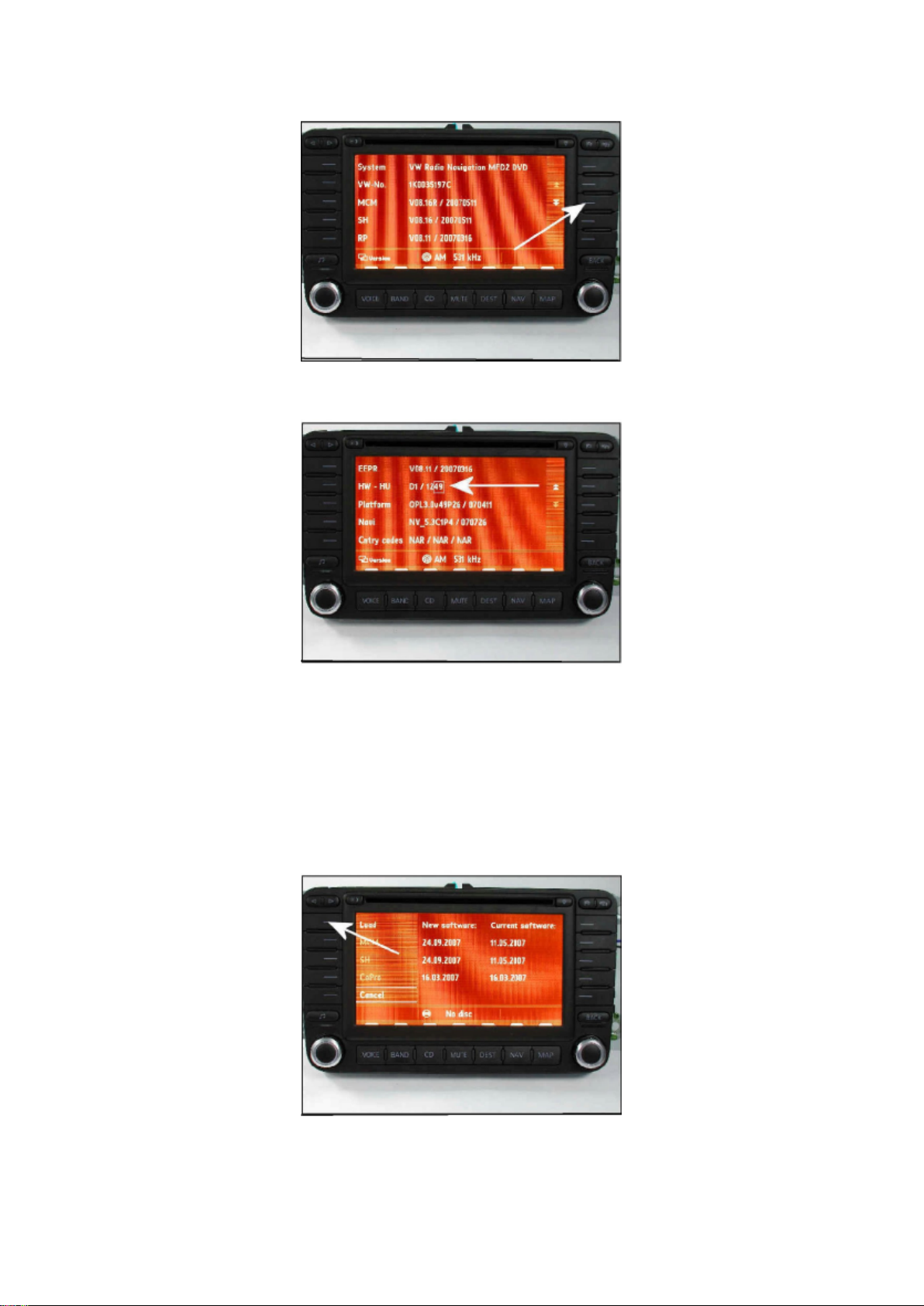
Tip: If this screen does not appear repeat previous step and continue holding.
Page 50

- Press "down arrows" button.
Navigation software version will be listed under HW-HU.
Tip: The software version will be the last 2 digits on the right hand side. In the figure, software
version is 49.
If software version is 50 or above, DO NOT continue with programming.
Tip: If software level is found to be at 50 or higher, this technical bulletin DOES NOT apply, further
diagnosis is required.
If software version is 49 or below, continue with update programming.
- Record customer presets.
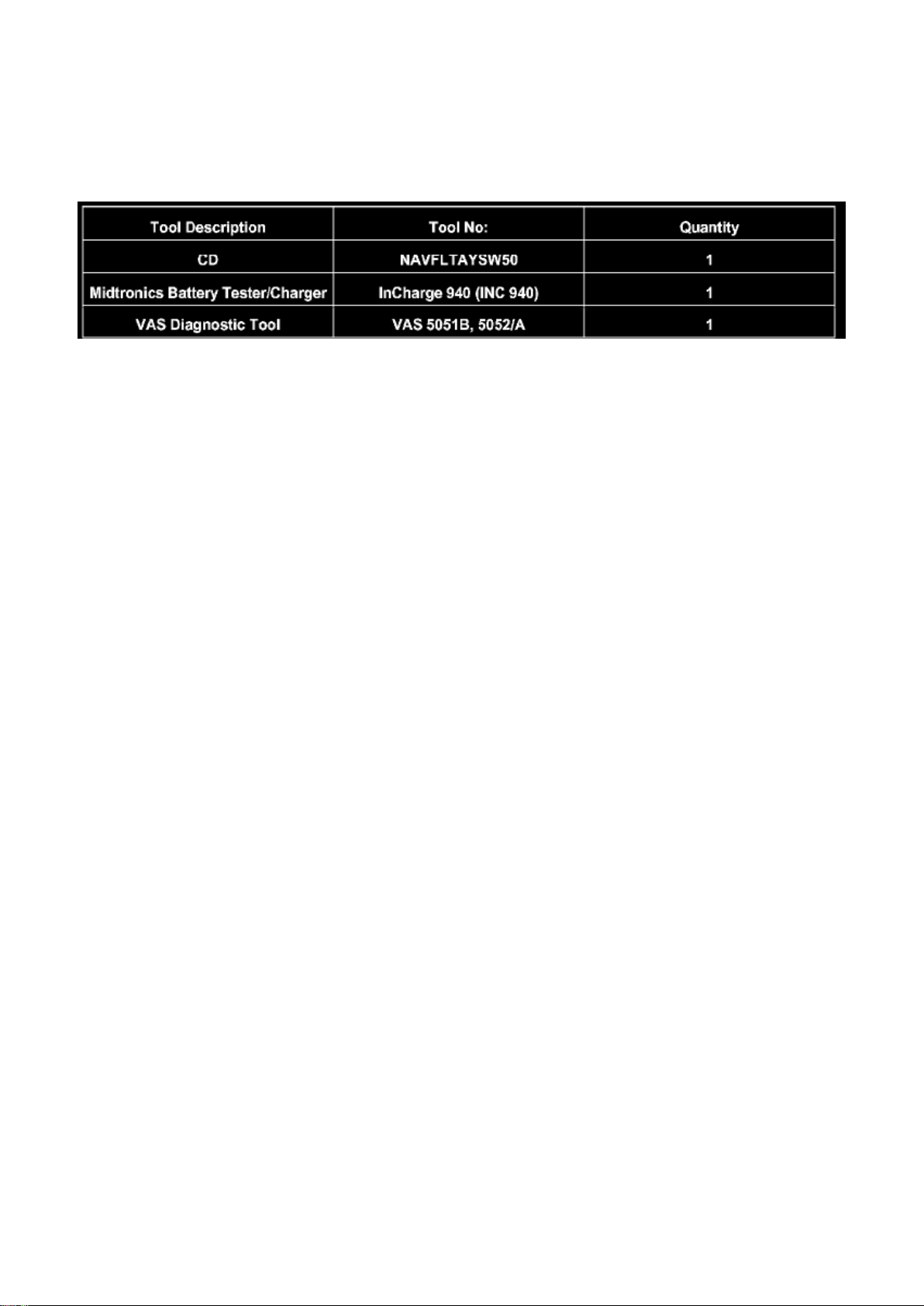
- Insert programming CD Part No. NAVFLTAYSW50.
- Press "Load" button.
Page 51

Volkswagen Passat Sedan Workshop Manual (V6-3.6L (BLV) (2008))
Volkswagen Workshop Manuals > Relays and Modules > Relays and Modules - Accessories and Optional Equipment >
Navigation Module > Component Information > Technical Service Bulletins > All Technical Service Bulletins for Navigation
Module: > 9109-04 > Feb > 09 > Navigation Radio - Multiple Malfunctions > Page 43
Page 52
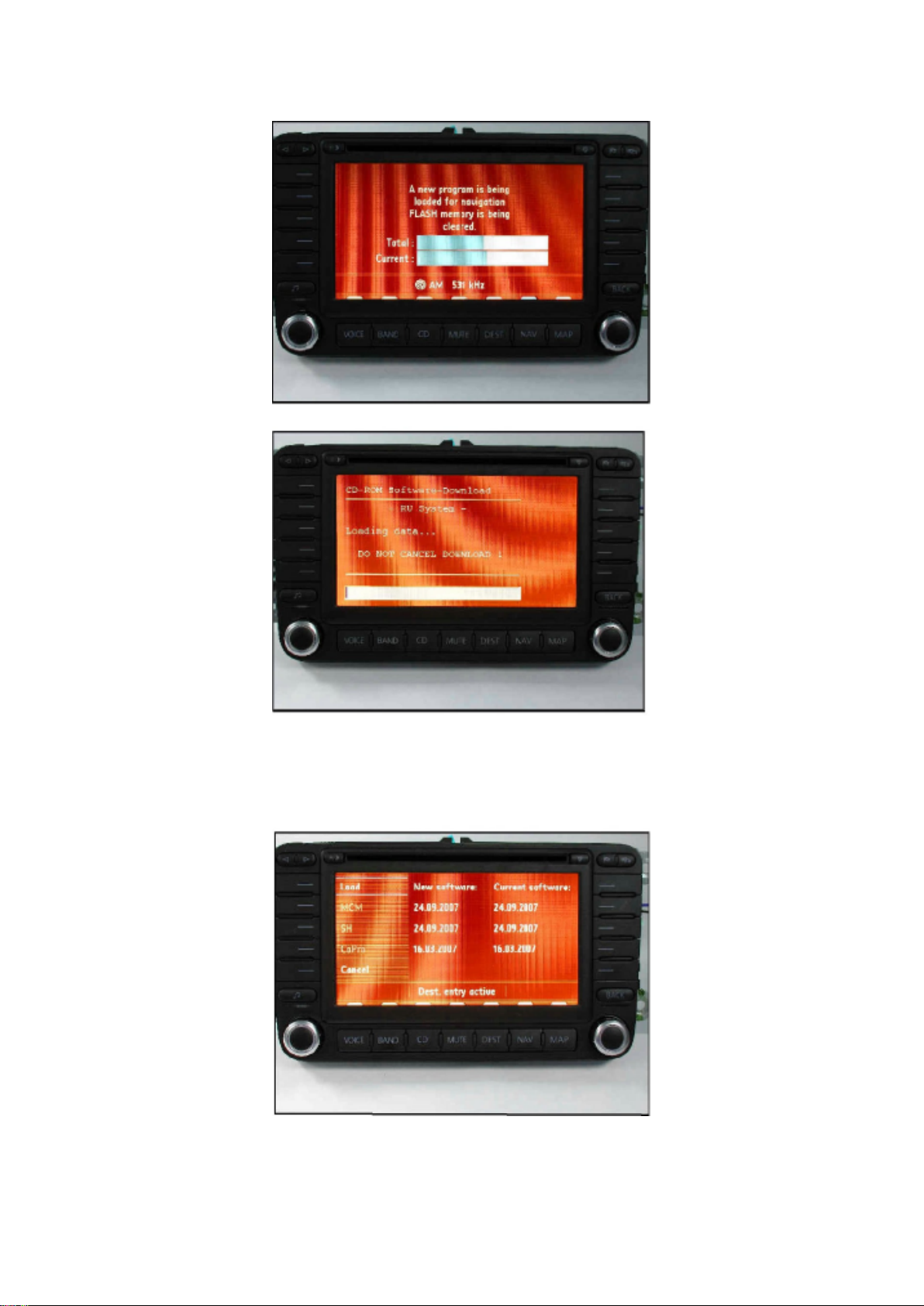
Software will now update. You will observe two screens during the update.
Page 53

NOTE: DO NOT CANCEL THE UPDATE UNTIL PROCEDURE IS COMPLETED.
When update is complete this screen will appear.
Tip: The new and current software dates match horizontally.
If all dates match horizontally as shown, software programming was successful.
Page 54

Volkswagen Passat Sedan Workshop Manual (V6-3.6L (BLV) (2008))
Volkswagen Workshop Manuals > Relays and Modules > Relays and Modules - Accessories and Optional Equipment >
Navigation Module > Component Information > Technical Service Bulletins > All Technical Service Bulletins for Navigation
Module: > 9109-04 > Feb > 09 > Navigation Radio - Multiple Malfunctions > Page 44
Page 55
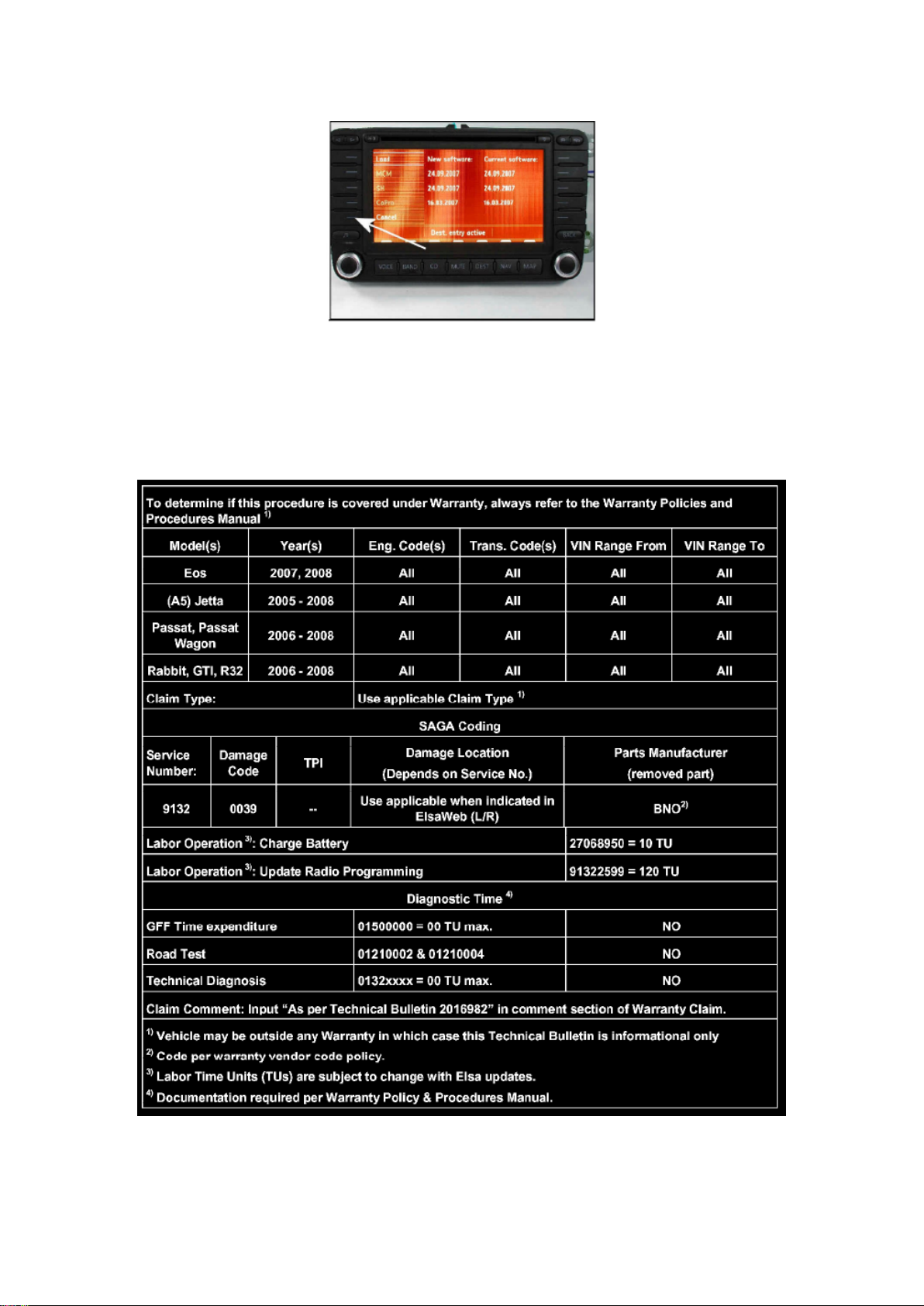
- Press the "Cancel" soft key.
Page 56

- Recheck the software as shown in steps 1 through 10.
- Insert Map CD and reprogram customer presets.
Tip: If the problem still occurs after the update programming is complete, contact technical
assistance by selecting the "Technical Assistance" tab in ElsaWeb and follow the instructions to
obtain a 6 digit access code.
Warranty
Page 57
Volkswagen Passat Sedan Workshop Manual (V6-3.6L (BLV) (2008))
Volkswagen Workshop Manuals > Relays and Modules > Relays and Modules - Accessories and Optional Equipment >
Navigation Module > Component Information > Technical Service Bulletins > All Technical Service Bulletins for Navigation
Module: > 9109-04 > Feb > 09 > Navigation Radio - Multiple Malfunctions > Page 45
Required Parts and Tools
No Special Parts required.
Tip: Additional copies of the "Update-Programming" CD (Literature Number NAVFLTAYSW50) may
be ordered from the Volkswagen Technical Literature Ordering Center.
Additional Information
All part and service references provided in this Technical Bulletin are subject to change and/or
removal. Always check with your Parts Dept. and Repair Manuals for the latest information.
Page 58
Volkswagen Passat Sedan Workshop Manual (V6-3.6L (BLV) (2008))
Volkswagen Workshop Manuals > Relays and Modules > Relays and Modules - Accessories and Optional Equipment >
Navigation Module > Component Information > Technical Service Bulletins > Customer Interest for Navigation Module: >
9109-04 > Feb > 09 > Navigation Radio - Multiple Malfunctions
Navigation Module: Customer Interest Navigation Radio - Multiple Malfunctions
9109-04
Affected Vehicles
Condition
91 09 04 Feb. 13, 2009 2016982 Supersedes T.B. Group 91 number 08-01 dated Jan. 7, 2008 and
replaces T.B. (2015952) Group 91 number 07-12 dated Aug. 17, 2007 due to software
programming update.
Radio, Navigation System, Update Programming for Loss of Presets (Sat),
Various Stability Concerns Various malfunctions on radio-navigation system MFD2 DVD:
- Loss of satellite radio presets
- Map is empty
- First part of navigation voice output is missing
- Radio display in MFI is not shown
- No sound after engine start (audio CD operation)
- No radio operation after engine start possible
- Frequent station list (satellite radio) refresh
- Various radio stability concerns
Technical Background
Radio software fault.
Production Solution
Updated radio software version 50.
Service
Page 59

Tip: DO NOT remove navigation unit from vehicle.
- To perform this procedure in its entirety should take approximately 50 minutes.
- Procedure will erase presets.
- If navigation is left ON for more than 1 hour unattended it will turn OFF to conserve battery power.
If this occurs, turn navigation back on by pressing power key and continue SW program from
previous step (There is no risk of update being interrupted by this power down).
- The initial Accept screen has been eliminated beginning with software version 48.
Page 60

Volkswagen Passat Sedan Workshop Manual (V6-3.6L (BLV) (2008))
Volkswagen Workshop Manuals > Relays and Modules > Relays and Modules - Accessories and Optional Equipment >
Navigation Module > Component Information > Technical Service Bulletins > Customer Interest for Navigation Module: >
9109-04 > Feb > 09 > Navigation Radio - Multiple Malfunctions > Page 51
Page 61
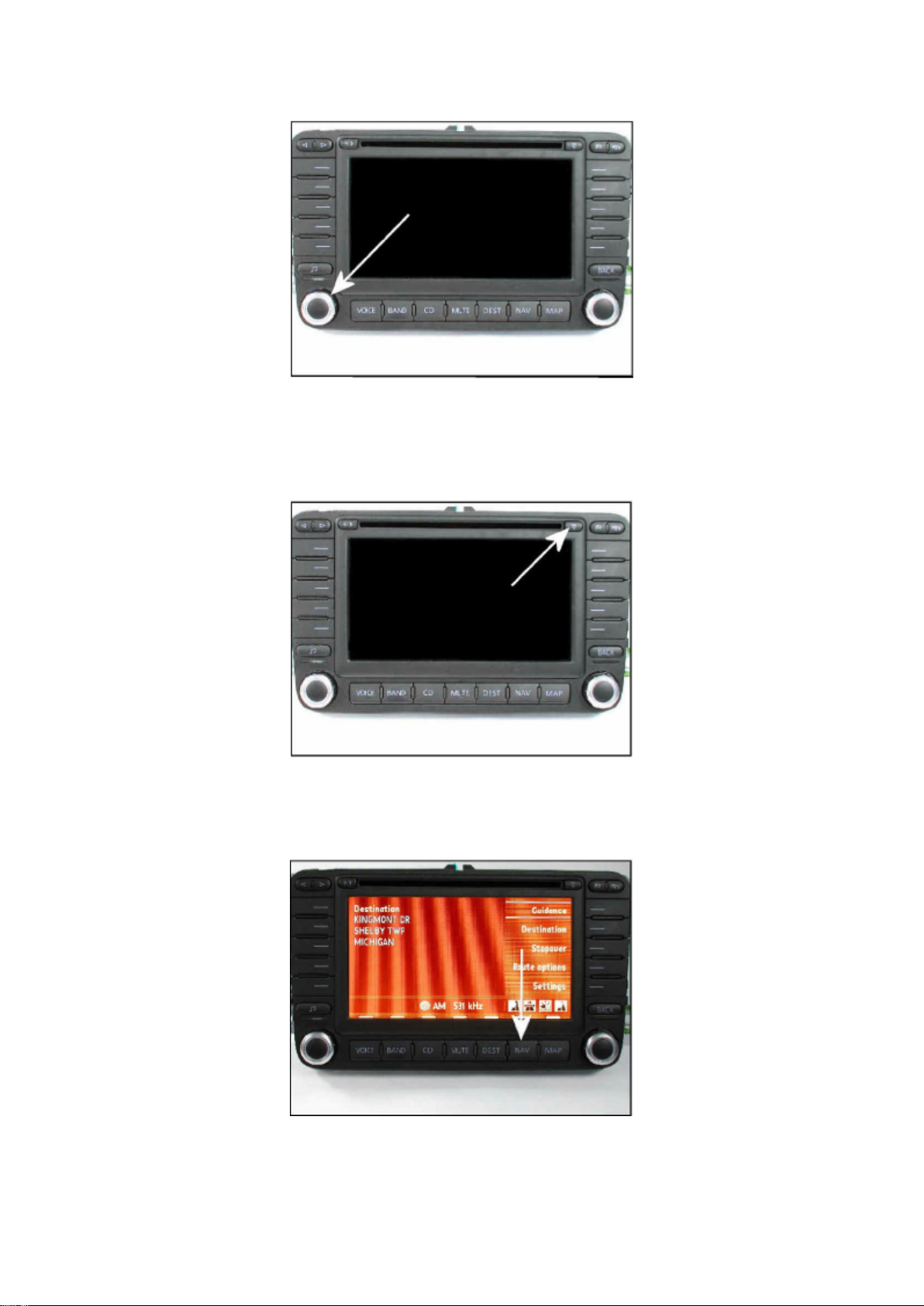
Identifying Software level
Page 62

- Connect Midtronics InCharge 940 (INC 940) tester/charger to vehicle's battery.
- Remove key from ignition.
- Press "power" knob on navigation unit.
- Eject any disc in navigation unit by using eject button.
- For software version up to 47, press "Accept" button.
- If software version is 48 or greater, continue.
- Press "Navigation" button.
Page 63

Volkswagen Passat Sedan Workshop Manual (V6-3.6L (BLV) (2008))
Volkswagen Workshop Manuals > Relays and Modules > Relays and Modules - Accessories and Optional Equipment >
Navigation Module > Component Information > Technical Service Bulletins > Customer Interest for Navigation Module: >
9109-04 > Feb > 09 > Navigation Radio - Multiple Malfunctions > Page 52
Page 64
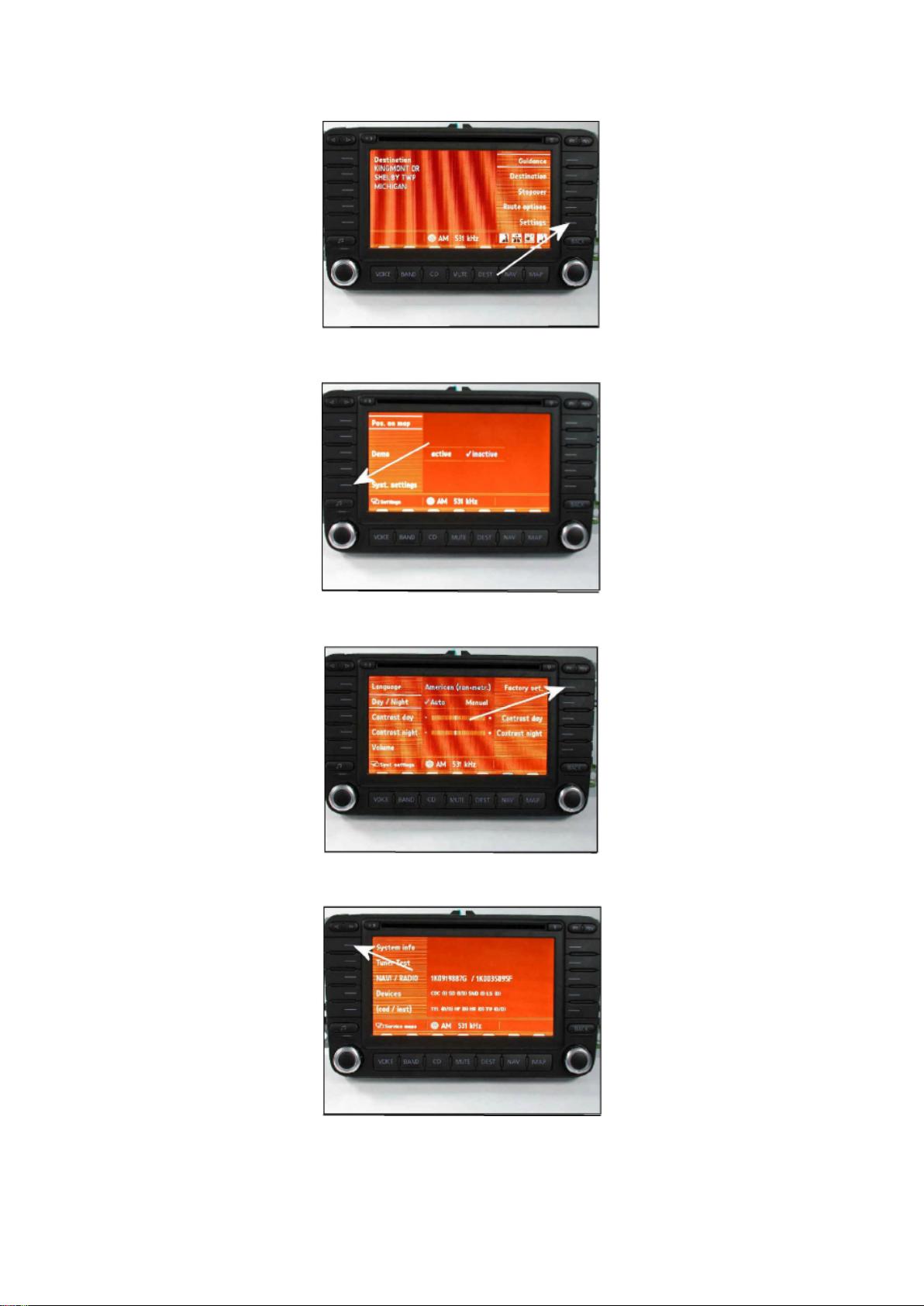
- Press the "Settings" button.
Page 65

- Press the "Syst. Settings" button.
- Press and hold "Factory set" button for 5 to 10 sec.
- Press "System info" button.
Page 66

Volkswagen Passat Sedan Workshop Manual (V6-3.6L (BLV) (2008))
Volkswagen Workshop Manuals > Relays and Modules > Relays and Modules - Accessories and Optional Equipment >
Navigation Module > Component Information > Technical Service Bulletins > Customer Interest for Navigation Module: >
9109-04 > Feb > 09 > Navigation Radio - Multiple Malfunctions > Page 53
Page 67
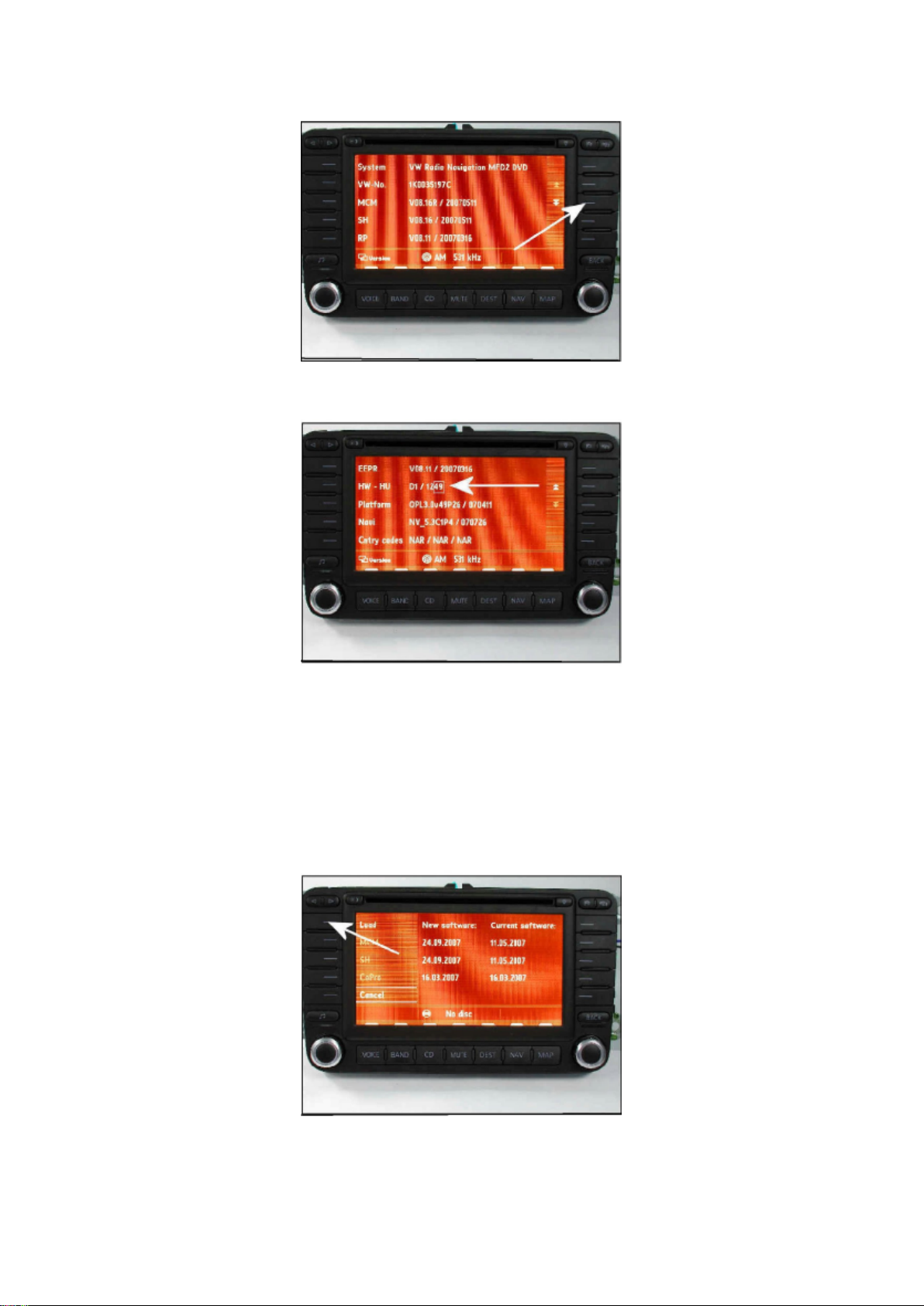
Tip: If this screen does not appear repeat previous step and continue holding.
Page 68

- Press "down arrows" button.
Navigation software version will be listed under HW-HU.
Tip: The software version will be the last 2 digits on the right hand side. In the figure, software
version is 49.
If software version is 50 or above, DO NOT continue with programming.
Tip: If software level is found to be at 50 or higher, this technical bulletin DOES NOT apply, further
diagnosis is required.
If software version is 49 or below, continue with update programming.
- Record customer presets.
- Insert programming CD Part No. NAVFLTAYSW50.
- Press "Load" button.
Page 69

Volkswagen Passat Sedan Workshop Manual (V6-3.6L (BLV) (2008))
Volkswagen Workshop Manuals > Relays and Modules > Relays and Modules - Accessories and Optional Equipment >
Navigation Module > Component Information > Technical Service Bulletins > Customer Interest for Navigation Module: >
9109-04 > Feb > 09 > Navigation Radio - Multiple Malfunctions > Page 54
Page 70
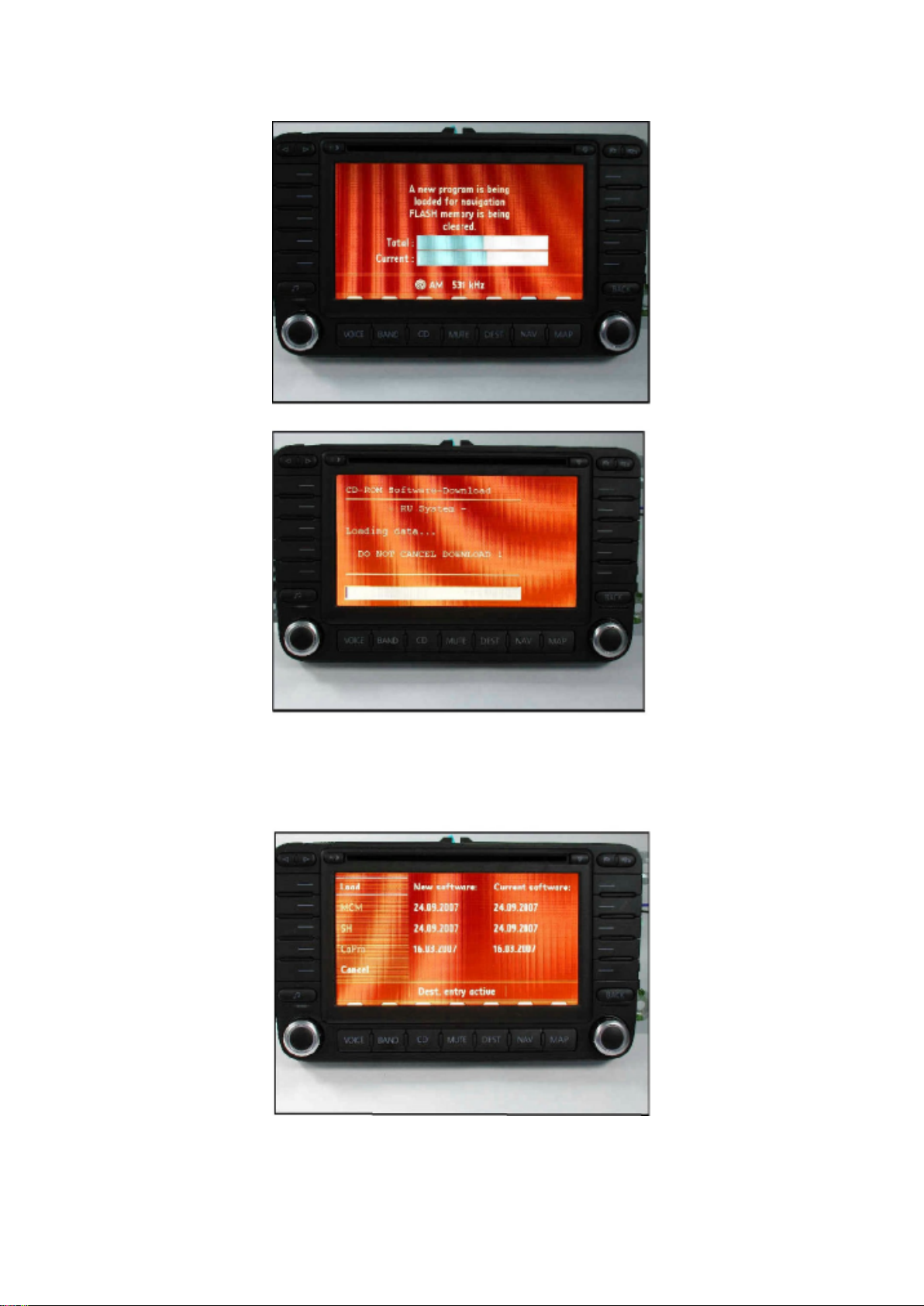
Software will now update. You will observe two screens during the update.
Page 71

NOTE: DO NOT CANCEL THE UPDATE UNTIL PROCEDURE IS COMPLETED.
When update is complete this screen will appear.
Tip: The new and current software dates match horizontally.
If all dates match horizontally as shown, software programming was successful.
Page 72

Volkswagen Passat Sedan Workshop Manual (V6-3.6L (BLV) (2008))
Volkswagen Workshop Manuals > Relays and Modules > Relays and Modules - Accessories and Optional Equipment >
Navigation Module > Component Information > Technical Service Bulletins > Customer Interest for Navigation Module: >
9109-04 > Feb > 09 > Navigation Radio - Multiple Malfunctions > Page 55
Page 73
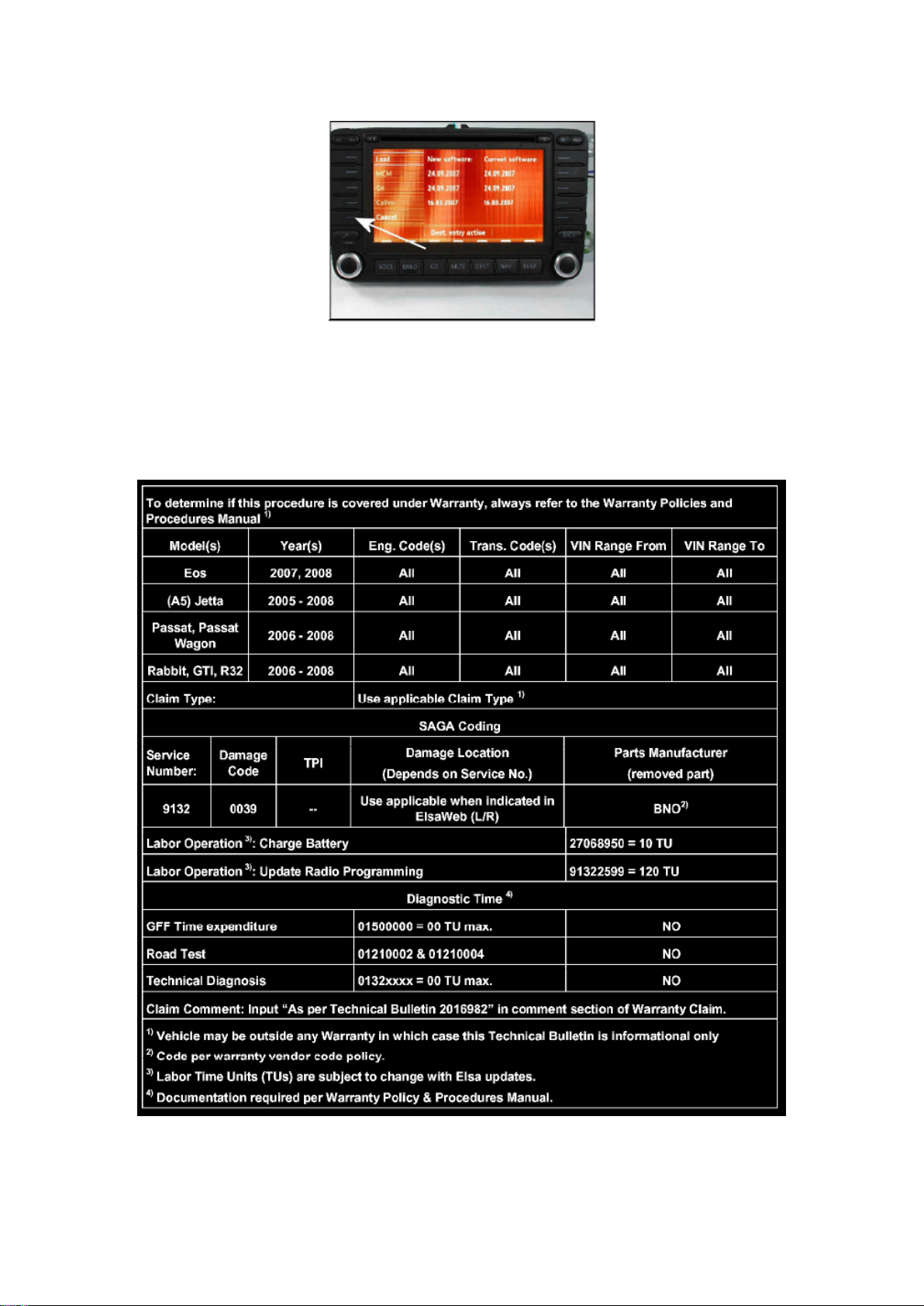
- Press the "Cancel" soft key.
Page 74

- Recheck the software as shown in steps 1 through 10.
- Insert Map CD and reprogram customer presets.
Tip: If the problem still occurs after the update programming is complete, contact technical
assistance by selecting the "Technical Assistance" tab in ElsaWeb and follow the instructions to
obtain a 6 digit access code.
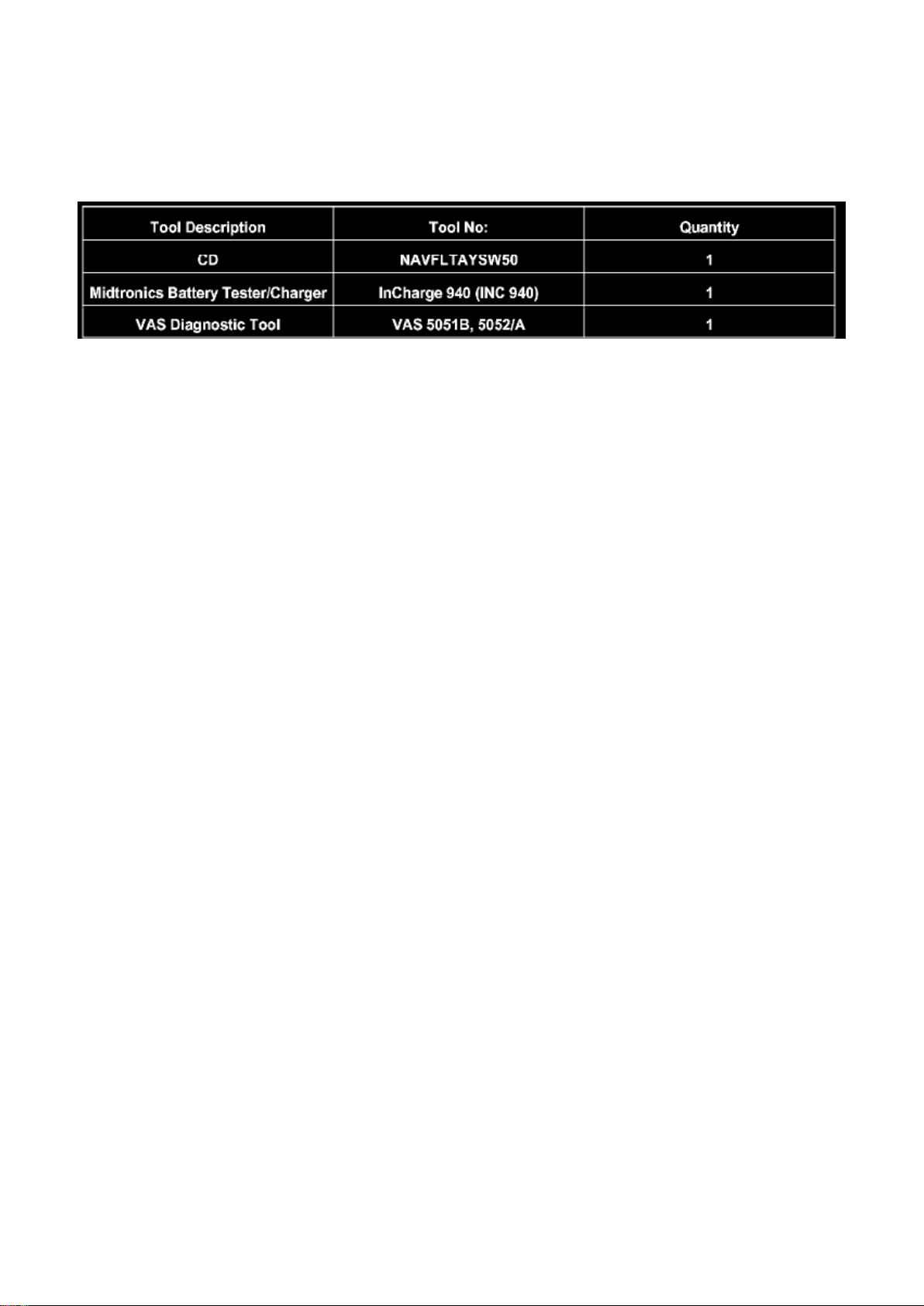
Warranty
Page 75
Volkswagen Passat Sedan Workshop Manual (V6-3.6L (BLV) (2008))
Volkswagen Workshop Manuals > Relays and Modules > Relays and Modules - Accessories and Optional Equipment >
Navigation Module > Component Information > Technical Service Bulletins > Customer Interest for Navigation Module: >
9109-04 > Feb > 09 > Navigation Radio - Multiple Malfunctions > Page 56
Required Parts and Tools
No Special Parts required.
Tip: Additional copies of the "Update-Programming" CD (Literature Number NAVFLTAYSW50) may
be ordered from the Volkswagen Technical Literature Ordering Center.
Additional Information
All part and service references provided in this Technical Bulletin are subject to change and/or
removal. Always check with your Parts Dept. and Repair Manuals for the latest information.
Page 76

Volkswagen Passat Sedan Workshop Manual (V6-3.6L (BLV) (2008))
Volkswagen Workshop Manuals > Relays and Modules > Relays and Modules - Accessories and Optional Equipment >
Parking Assist Control Module > Component Information > Diagrams
Page 77

Parking Assist Control Module: Diagrams
Parking Aid Control Module, Connector Terminal Assignments
Refer to wiring diagram for connector assignments on Parking Aid Control Module J446.
Page 78

Volkswagen Passat Sedan Workshop Manual (V6-3.6L (BLV) (2008))
Volkswagen Workshop Manuals > Relays and Modules > Relays and Modules - Accessories and Optional Equipment >
Parking Assist Control Module > Component Information > Diagrams > Page 60
Page 79

Parking Assist Control Module: Description and Operation
Parallel Parking Assistance Control Module (J791)
The parallel parking assistance control module is located inside the footwell on the driver side
above the fuse box. The parallel parking assistance control module also controls the parking aid
functions on vehicles with front parking aid or PLA.
Page 80

Volkswagen Passat Sedan Workshop Manual (V6-3.6L (BLV) (2008))
Volkswagen Workshop Manuals > Relays and Modules > Relays and Modules - Accessories and Optional Equipment >
Parking Assist Control Module > Component Information > Testing and Inspection > Scan Tool Testing and Procedures
Page 81

Parking Assist Control Module: Scan Tool Testing and Procedures
Parking Aids
Parking Aid Control Module (J446) Output Diagnostic Test Mode
Special tools, testers and auxiliary items required
‹› Vehicle Diagnosis, Testing and Information System (VAS 5051B)
The following components can be checked via output Diagnostic Test Mode (DTM):
‹› Front Parking Aid Warning Buzzer (H22)
‹› Rear Parking Aid Warning Buzzer (H15)
‹› Parking Aid Indicator Lamp (K136)
- Connect the (VAS 5051B).
- On the (VAS 5051B), select "Guided Fault Finding".
- Using the "Go To" button, select "Functions/Component selection" and the following menu options
in sequence:
‹› Body
‹› Body repair procedures
‹› 01 - OBD capable systems
‹› Parking Aid
‹› Parking assistance functions
‹› Parking Aid System Output Diagnostic Test Mode (DTM)
Page 82

Volkswagen Passat Sedan Workshop Manual (V6-3.6L (BLV) (2008))
Volkswagen Workshop Manuals > Relays and Modules > Relays and Modules - Accessories and Optional Equipment >
Parking Assist Control Module > Component Information > Testing and Inspection > Scan Tool Testing and Procedures >
Page 63
Page 83

Parking Assist Control Module: Programming and Relearning
Page 84

Parking Aids
Parking Aid Control Module (J446), Coding
Special tools, testers and auxiliary items required
‹› Vehicle Diagnosis, Testing and Information System (VAS 5051B)
Via coding, the Parking Aid Control Module can be specifically adjusted to the demands of the
vehicle at hand.
- Connect the (VAS 5051B).
- On the (VAS 5051B), select "Guided Fault Finding".
- Using the "Go To" button, select "Functions/Component selection" and the following menu options
in sequence:
‹› Body
‹› Body repair procedures
‹› 01 - OBD capable systems
‹› Parking Aid
‹› Parking assistance functions
‹› Coding parking aid system
Page 85
Volkswagen Passat Sedan Workshop Manual (V6-3.6L (BLV) (2008))
Volkswagen Workshop Manuals > Relays and Modules > Relays and Modules - Accessories and Optional Equipment >
Parking Assist Control Module > Component Information > Service and Repair > Parking Aid and Parallel Parking
Assistance Control Module (J446), From 04.08
Parking Assist Control Module: Service and Repair Parking Aid and Parallel Parking Assistance
Control Module (J446), From 04.08
Parking Aids
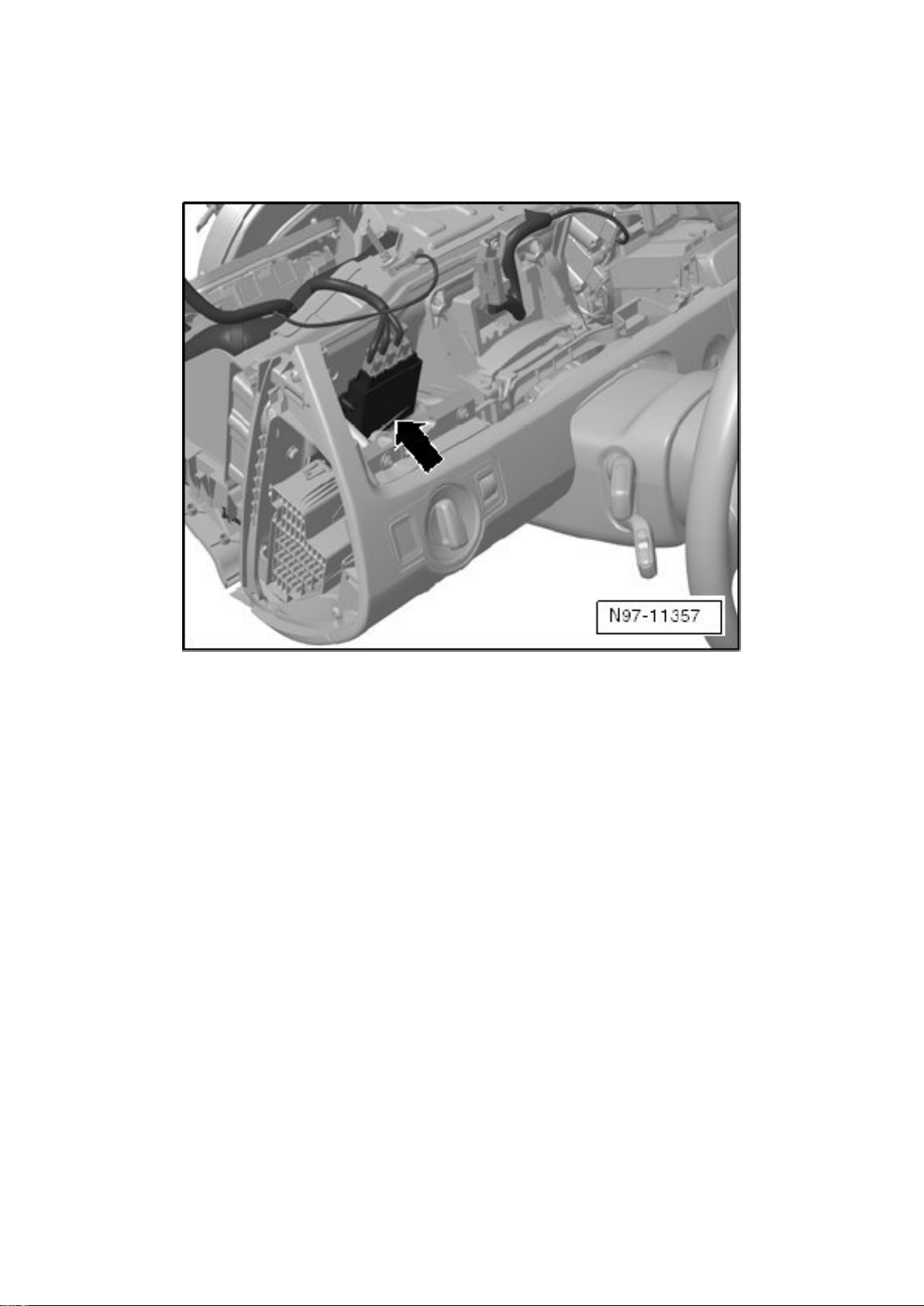
Parking Aid and Parallel Parking Assistance Control Module (J446), From 04.08
The parking aid control module is located above the fuse box on the driver side - arrow -.
- Switch off the ignition and all electrical consumers and remove the key or move the ignition/starter
switch to the 0 position.
- Remove the trim inside the footwell.
‹› The control module is shown in the illustration with the instrument panel partially disassembled.
- Loosen the expanding rivets, disconnect the connectors and remove the control module.
Installing:
Install in reverse order of removal.
Page 86
Volkswagen Passat Sedan Workshop Manual (V6-3.6L (BLV) (2008))
Volkswagen Workshop Manuals > Relays and Modules > Relays and Modules - Accessories and Optional Equipment >
Parking Assist Control Module > Component Information > Service and Repair > Parking Aid and Parallel Parking
Assistance Control Module (J446), From 04.08 > Page 66
Parking Assist Control Module: Service and Repair Parking Aid and Parallel Parking Assistance
Control Module (J446), From 05.08
Parking Aids
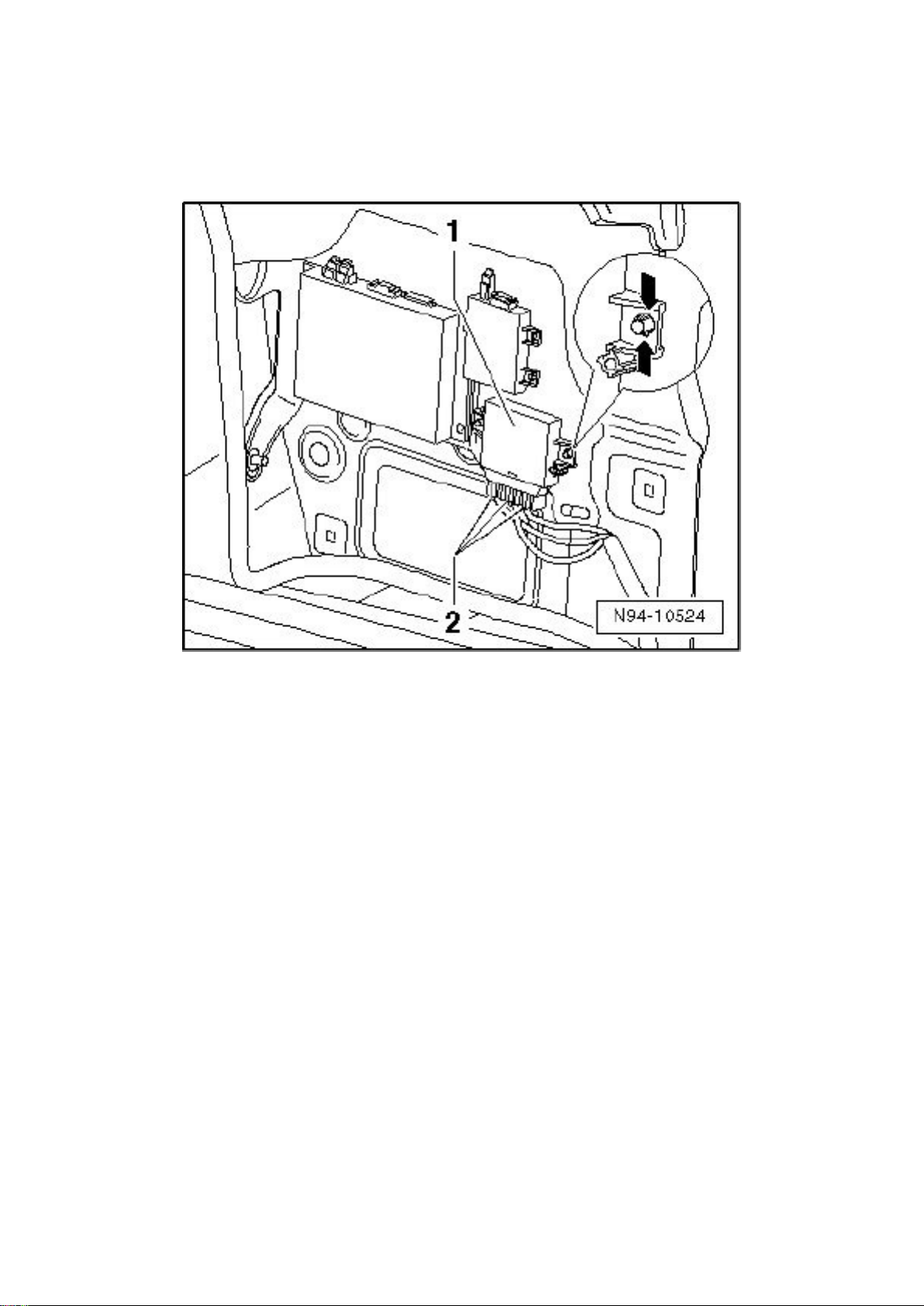
Parking Aid and Parallel Parking Assistance Control Module (J446), From 05.08
Parking Aid Control Module is located behind side panel trim in luggage compartment, right side.
Removing:
- Switch ignition and all electrical consumers off and disengage the key or ignition switch in position
0 (ignition off).
- Open cover of right side wall trim in luggage compartment.
‹› For clearer illustration, component location of Parking Aid Control Module is depicted with the
side trim panel removed.
- Disengage and disconnect harness connectors - 2 -.
- On both sides of Parking Aid Control Module depress locking tabs - arrows - and pull Parking Aid
Control Module - 1 - out of retainers.
Installing:
Install in reverse order of removal.
Page 87
Volkswagen Passat Sedan Workshop Manual (V6-3.6L (BLV) (2008))
Volkswagen Workshop Manuals > Relays and Modules > Relays and Modules - Accessories and Optional Equipment >
Remote Control Module, Audio - Stereo > Component Information > Service and Repair
Remote Control Module: Service and Repair
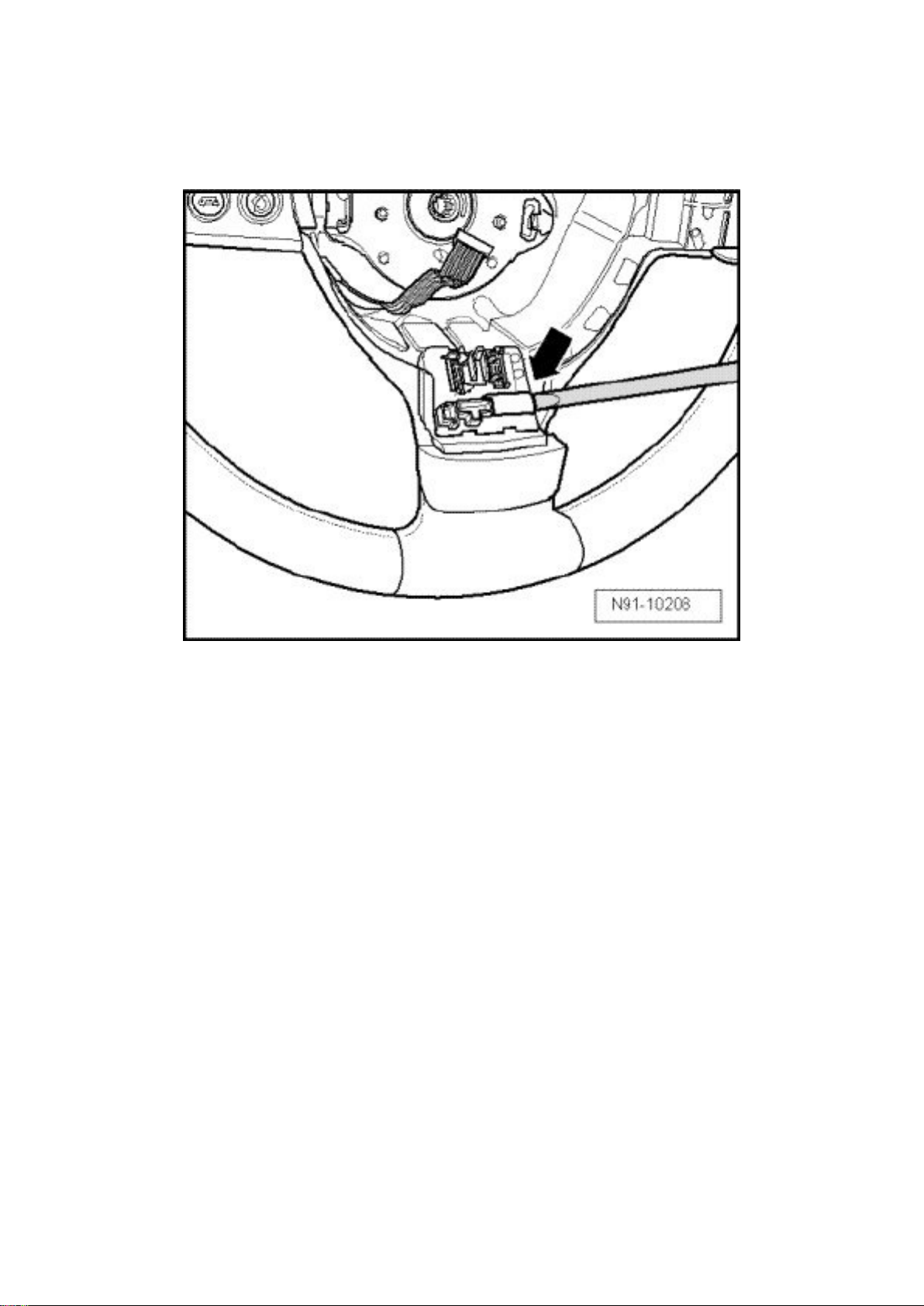
Multifunction Steering Wheel Control Module
Removing
- Remove driver's side airbag unit.
- Disconnect both harness connectors at control module.
- Using a suitable screwdriver, carefully pry out control module - arrow -.
Installing
Install in reverse order of removal.
- Code Control unit for the steering column electronics, fit component parts Multifunction Steering
Wheel, => [ Multifunction Steering Wheel Components, Adapting ] See: Relays and Modules Steering and Suspension/Relays and Modules - Steering/Steering Mounted Controls
Communication Module/Testing and Inspection.
Page 88
Volkswagen Passat Sedan Workshop Manual (V6-3.6L (BLV) (2008))
Volkswagen Workshop Manuals > Relays and Modules > Relays and Modules - Body and Frame > Door Module >
Component Information > Technical Service Bulletins > Body - Door Lock Rotary Switch Diagnostic Aid
Door Module: Technical Service Bulletins Body - Door Lock Rotary Switch Diagnostic Aid
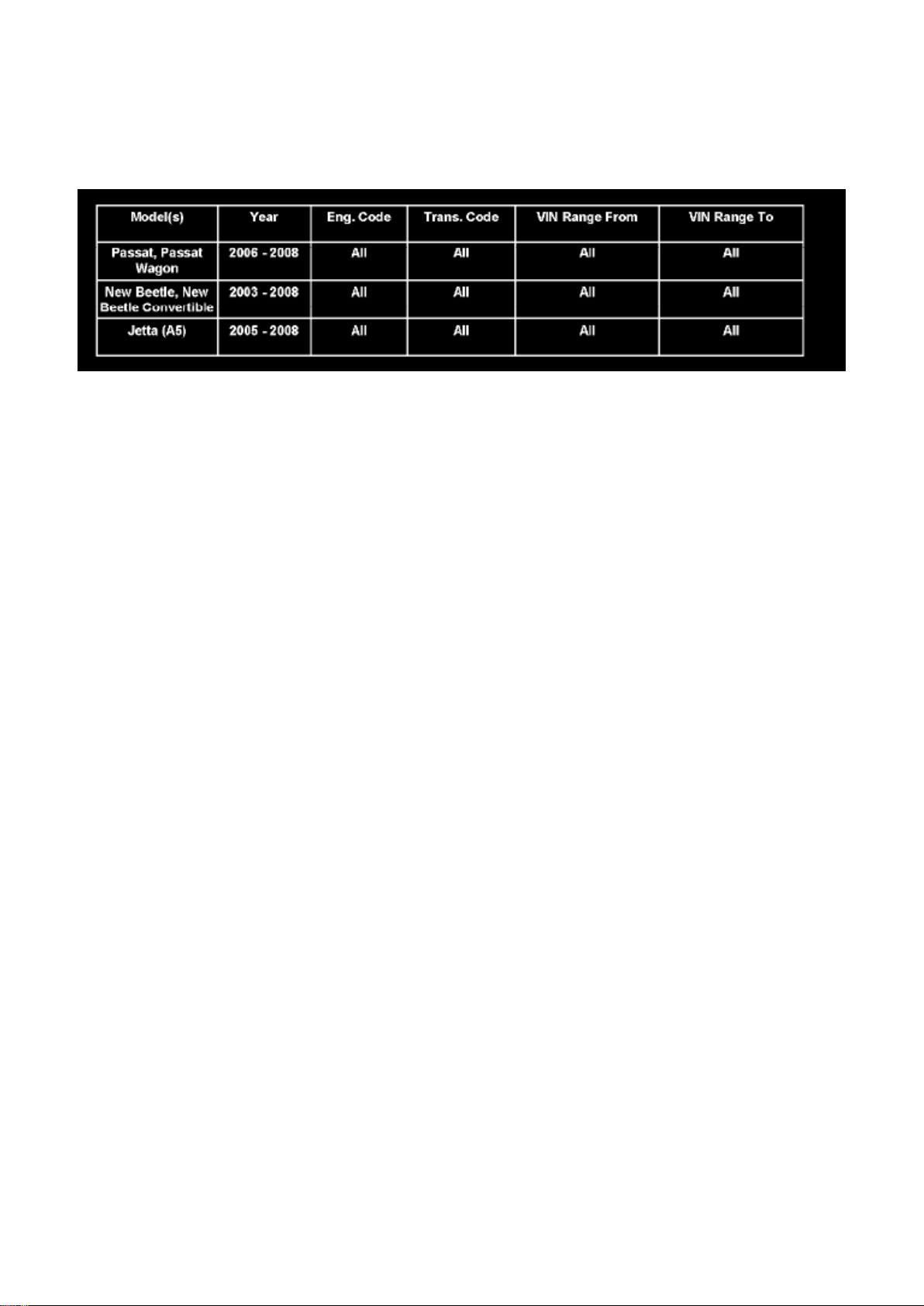
57 07 08
July 30, 2007
2015633 Supersedes T.B. Group 57 number 07-07 dated July 18, 2007 due to modified door ajar
switch testing procedure.
Condition
Vehicle Information
Door Lock Rotary Switch Diagnostic Aid
Instrument cluster display shows door ajar, anti-theft alarm may intermittently sound, Battery may
discharge and / or power door lock inoperative.
Technical Background
Information only, to assist with diagnosis of door lock rotary switch and / or door ajar switch.
Production Solution
No production change required.
Service
Tip:
When performing the following procedure, two keys will be required.
To Check Rotary Switch Function (all vehicles except Passat):
1. Roll windows down and close all doors.
2. Insert key into lock cylinder.
3. Rotate key to lock position and hold, windows should roll up.
4. Rotate key to unlock position, windows should roll down.
If windows do not operate as stated above:
1. Verify rotary position via Measured Value Block with VAS 5051/5052.
Page 89

a. Select Guided Functions.
b. Select Door Control Module.
c. Read measure value block 5, function 4, Drivers Side Key Switch.
d. Cycle the key cylinder back and forth several times while monitoring measure value block 5,
function 4.
Tip: Ensure door is closed during the key cycling procedure.
Page 90

Volkswagen Passat Sedan Workshop Manual (V6-3.6L (BLV) (2008))
Volkswagen Workshop Manuals > Relays and Modules > Relays and Modules - Body and Frame > Door Module >
Component Information > Technical Service Bulletins > Body - Door Lock Rotary Switch Diagnostic Aid > Page 75
Page 91

After rotary position has been verified:
1. Check coding of comfort module.
After coding of comfort module has been verified:
1. Check wiring between door control module and lock before replacing any components.
To Check Door Ajar Switch (all vehicles):
1. Roll windows down and close all doors.
2. Open Door, instrument cluster should display open door.
3. Manually position door latch to closed position
4. Wait for instrument cluster open door display to turn OFF.
5. Move door back and forth and observe the open door display in instrument cluster.
The state of the door ajar should not change while performing this test.
If the state of the door ajar does change:
1. Verify mechanical adjustments and check wiring between door control module and lock before
replacing any components.
Warranty
Information Only.
Required Parts and Tools
No Special Parts required.
No Special Tools required.
Additional Information
All part and service references provided in this Technical Bulletin are subject to change and/or
removal.
Always check with your Parts Dept. and Repair Manuals for the latest information.
Page 92
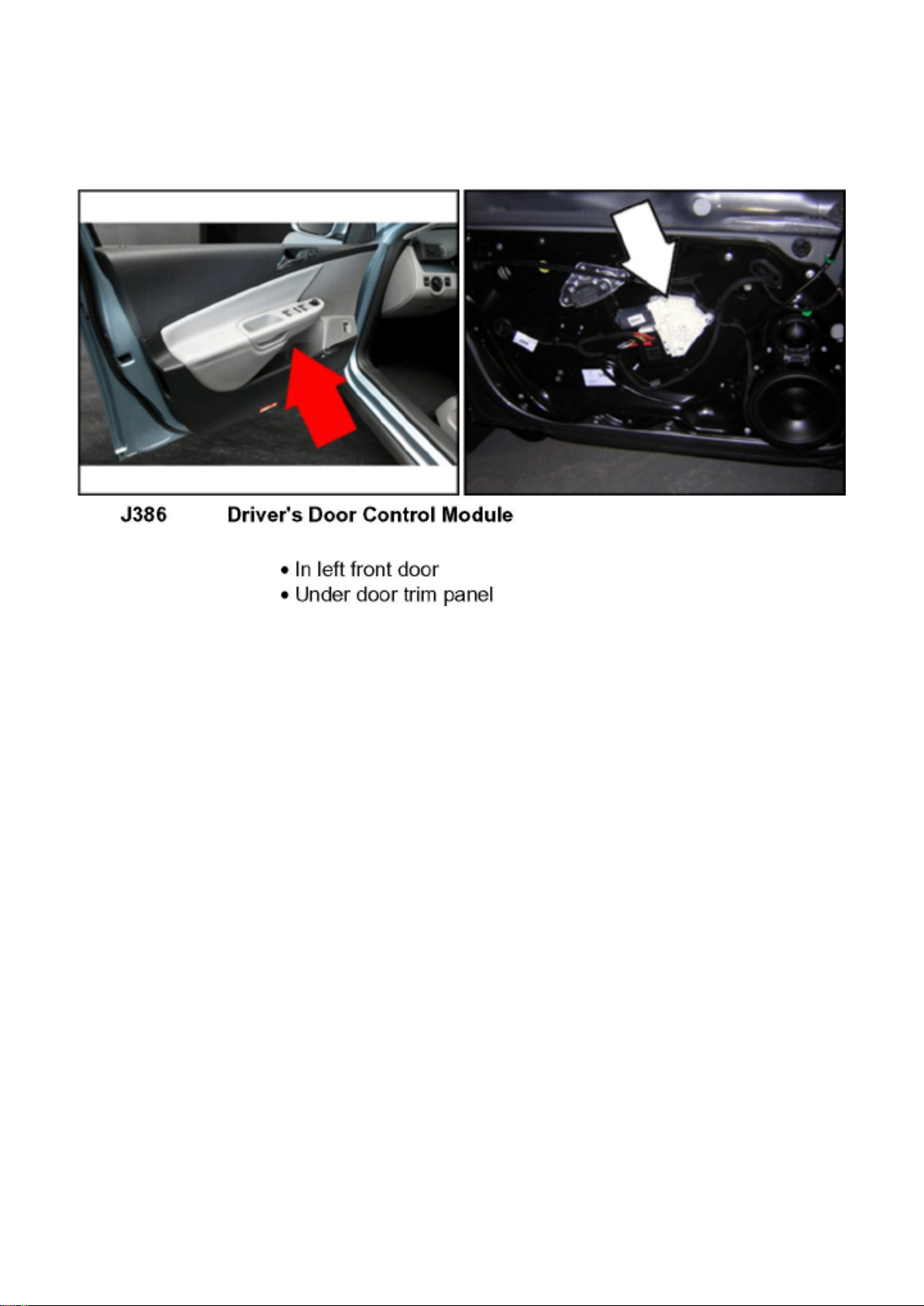
Volkswagen Passat Sedan Workshop Manual (V6-3.6L (BLV) (2008))
Volkswagen Workshop Manuals > Relays and Modules > Relays and Modules - Body and Frame > Door Module >
Component Information > Locations > Driver's Door Control Module J386
Page 93
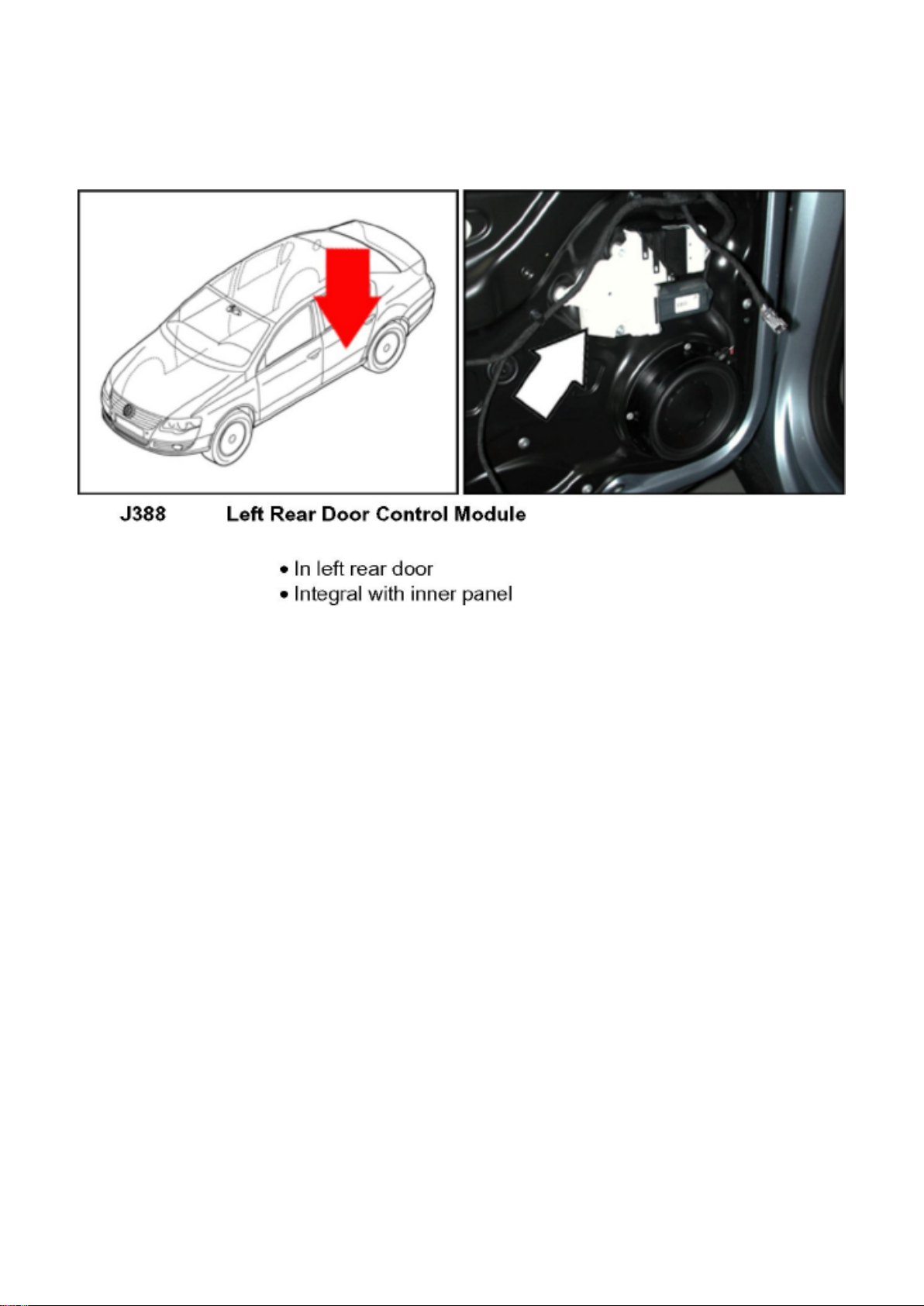
Volkswagen Passat Sedan Workshop Manual (V6-3.6L (BLV) (2008))
Volkswagen Workshop Manuals > Relays and Modules > Relays and Modules - Body and Frame > Door Module >
Component Information > Locations > Driver's Door Control Module J386 > Page 78
Page 94
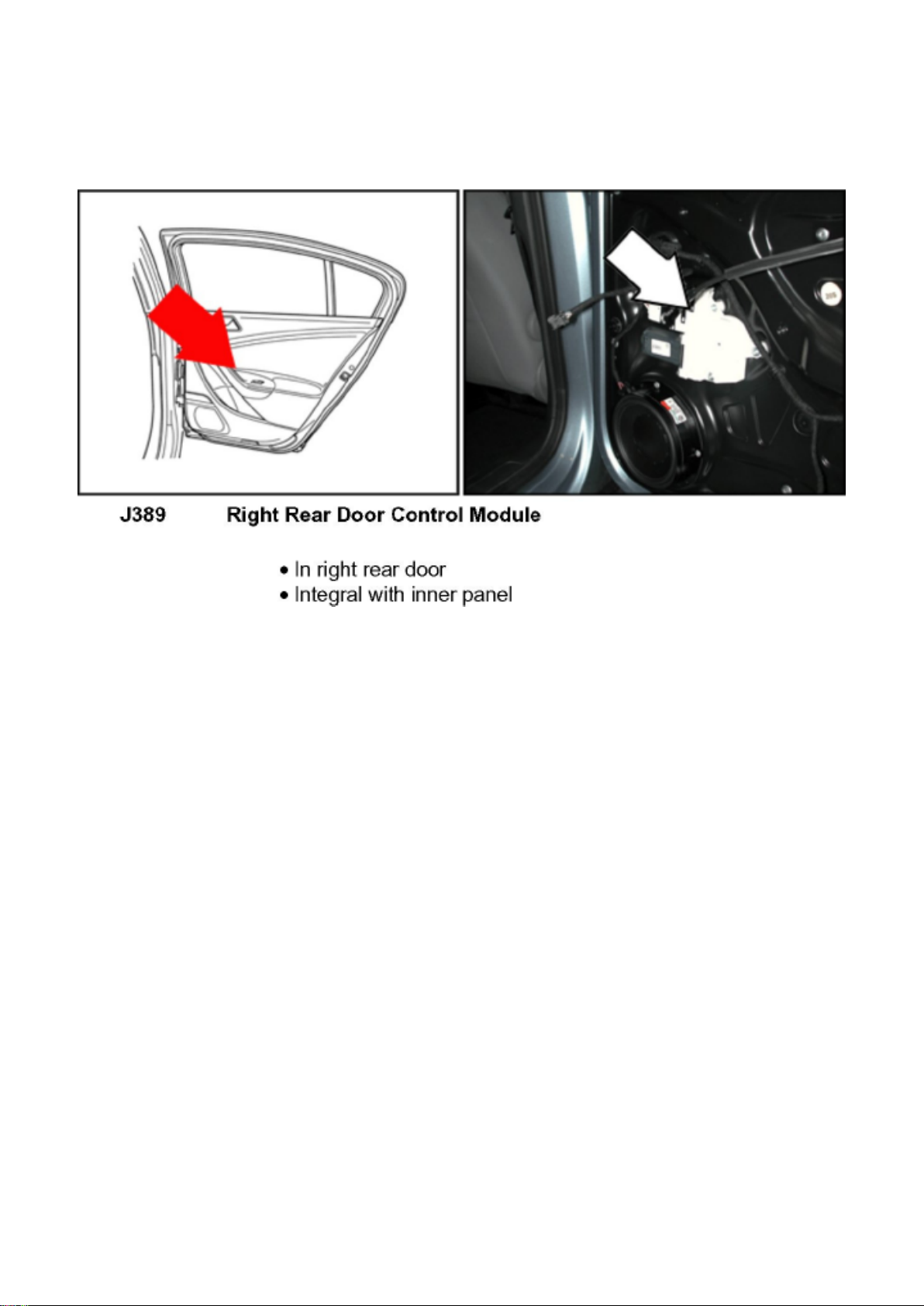
Volkswagen Passat Sedan Workshop Manual (V6-3.6L (BLV) (2008))
Volkswagen Workshop Manuals > Relays and Modules > Relays and Modules - Body and Frame > Door Module >
Component Information > Locations > Driver's Door Control Module J386 > Page 79
Page 95

Volkswagen Passat Sedan Workshop Manual (V6-3.6L (BLV) (2008))
Volkswagen Workshop Manuals > Relays and Modules > Relays and Modules - Body and Frame > Door Module >
Component Information > Description and Operation > Driver Door Control Module (J386)
Page 96

Door Module: Description and Operation Driver Door Control Module (J386)
Driver Door Control Module (J386)
‹› Driver Door Control Module (J386) and Driver Window Regulator Motor (V147) comprise a single
component and cannot be replaced
individually.
‹› If Driver Door Control Module or Driver Window Regulator Motor is to be replaced, the work
procedure => [ Driver Door Control Module,
Coding ] See: Testing and Inspection/Programming and Relearning/Driver Door Control Module
(J386), Coding must then be performed.
‹› Additional information:
Refer to the Owner's Manual.
Page 97

Volkswagen Passat Sedan Workshop Manual (V6-3.6L (BLV) (2008))
Volkswagen Workshop Manuals > Relays and Modules > Relays and Modules - Body and Frame > Door Module >
Component Information > Description and Operation > Driver Door Control Module (J386) > Page 82
Page 98

Door Module: Description and Operation Front Passenger Door Control Module (J387)
Front Passenger Door Control Module (J387)
‹› Front Passenger Door Control Module (J387) and Front Passenger Window Regulator Motor
(V148) comprise a single component and cannot be
replaced individually.
‹› If Front Passenger Door Control Module or Front Passenger Window Regulator Motor is to be
replaced, the work procedure => [ Front Passenger
Door Control Module, Coding ] See: Testing and Inspection/Programming and Relearning/Front
Passenger Door Control Module (J387), Coding must then be performed.
‹› Additional information:
Refer to the Owner's Manual.
Page 99

Volkswagen Passat Sedan Workshop Manual (V6-3.6L (BLV) (2008))
Volkswagen Workshop Manuals > Relays and Modules > Relays and Modules - Body and Frame > Door Module >
Component Information > Description and Operation > Driver Door Control Module (J386) > Page 83
Page 100

Door Module: Description and Operation Left Rear Door Control Module (J388)
Left Rear Door Control Module (J388)
‹› Left Rear Door Control Module (J388) and Left Rear Window Regulator Motor (V26) compose a
single component and cannot be replaced
individually.
‹› If Left Rear Door Control Module or Left Rear Window Regulator Motor is to be replaced, the
work procedure => [ Left Rear Door Control
Module, Coding ] See: Testing and Inspection/Programming and Relearning/Left Rear Door Control
Module (J388), Coding must then be performed.
‹› Additional information:
Refer to the Owner's Manual.
 Loading...