

Page 1
Quick Setup Guide
Vodafone Sure Signal
Page 2

Page 3

Page 4
Power socket
3
1
Vodafone Sure Signal
Broadband router/modem
2
LAN1 LAN2 LAN3 LAN4
Page 5
Quick setup
Just follow these simple steps to boost your indoor 3G signal.
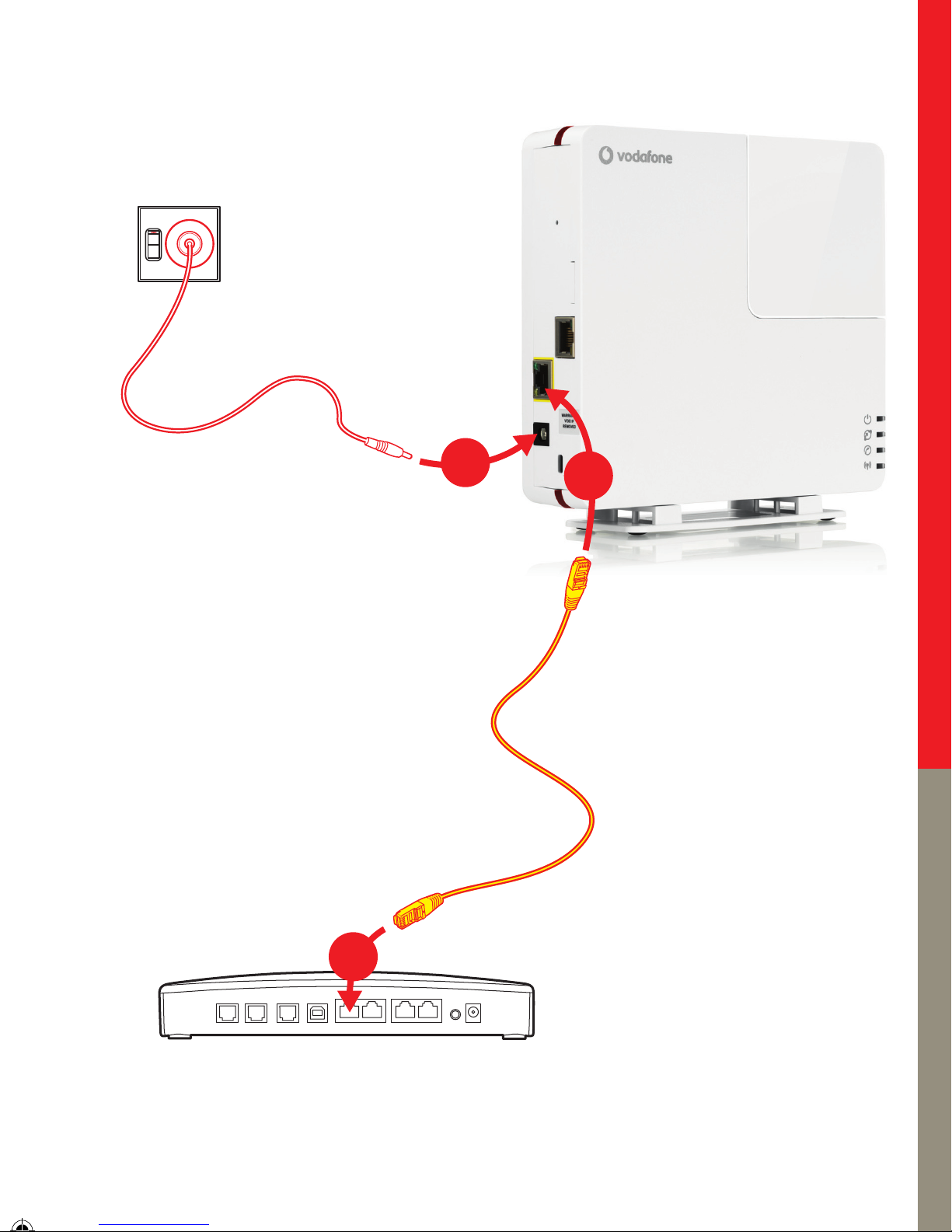
Plug one end of the included Ethernet cable into
1
the yellow Ethernet port on the Sure Signal.
Plug the other end of the Ethernet cable into a spare
2
Ethernet port on your fixed broadband router*.
Plug the Sure Signal into the mains power supply –
3
you will see the light turn on.
The Sure Signal will now start its initialisation process. This is fully
4
automated and may take between one and two hours to complete.
During this time all the lights will blink continuously – when they stop
blinking and the Power, Internet and Service lights remain on the
process is complete.
Once the initialisation process is complete, turn your mobile handset
5
off and then on, so your mobile can automatically connect to Sure Signal.
Your Vodafone Sure Signal is now set up and ready for you to use.
We recommend that you leave the Sure Signal plugged in at all times to
maintain optimum performance.
You should now have full 3G signal strength on your phone. If this doesn’t
happen, please go to www.vodafone.co.nz/business/suresignal
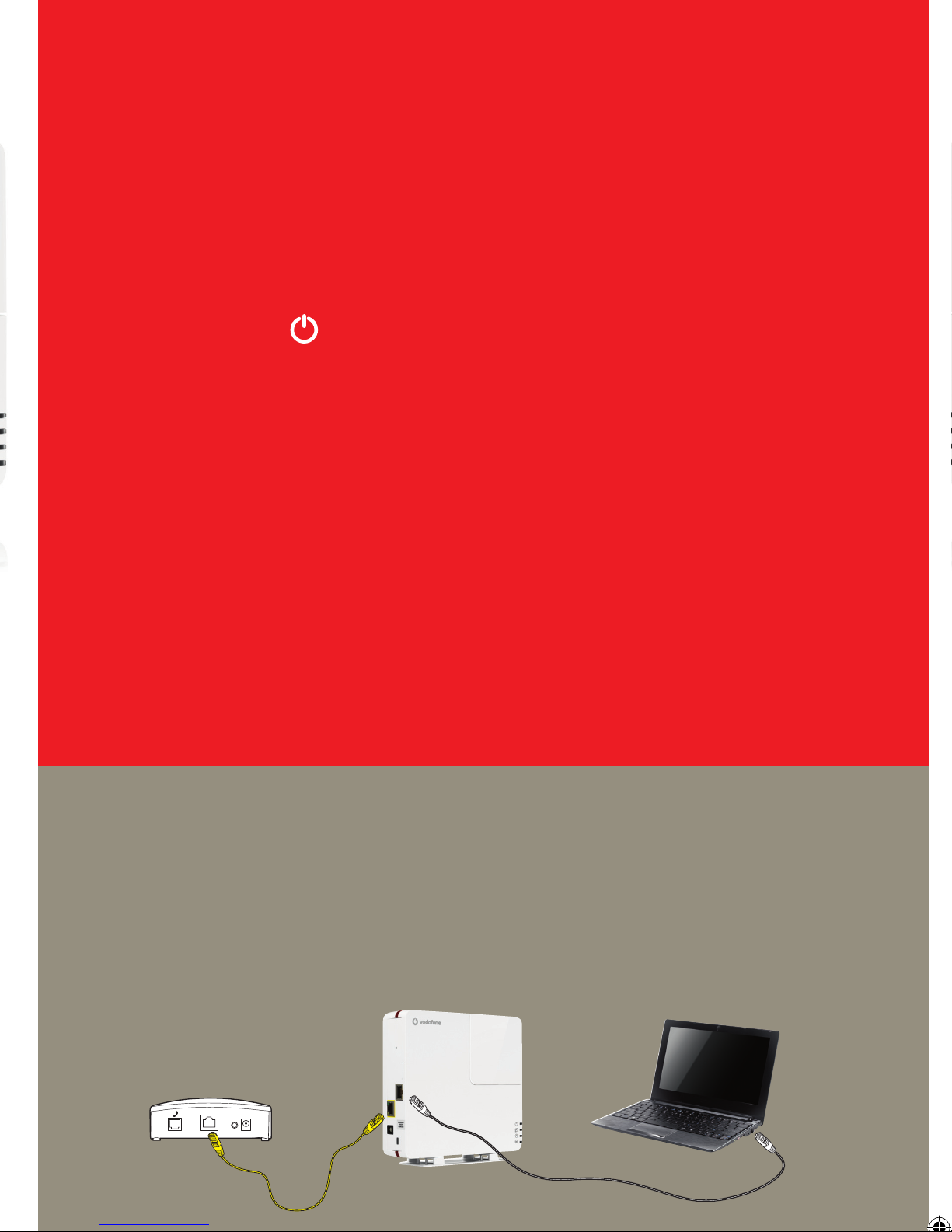
* Single Ethernet port instructions: if you wish to use a broadband modem that only
has one Ethernet port, please follow these steps to connect:
Connect the included Ethernet cable from the yellow Ethernet port on the Sure
Signal to the Ethernet port on your modem. Then plug your existing Ethernet cable
from the port labelled PC on your Sure Signal to the Ethernet port on your PC.
Page 6
What do the lights mean?
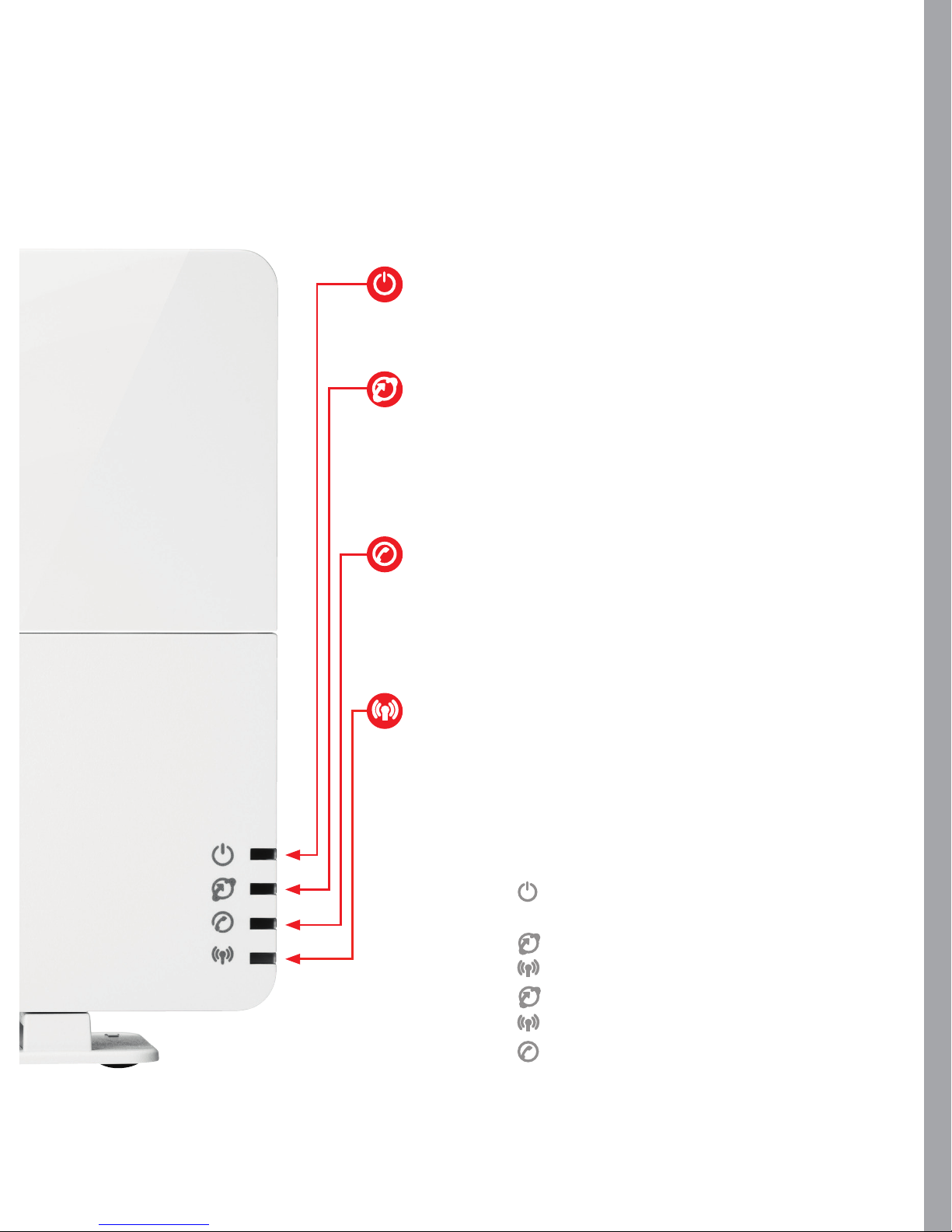
Power: On – the Sure Signal is powered on
Flashing – a problem has been detected
Internet: On – a Vodafone internet connection
has been established
Slow flashing – connection in progress
Fast flashing – connection error
Users: On – maximum number of concurrent
users reached (8)
Slow flashing – one user
Fast flashing – several users
Service: On – the Sure Signal is ready for use
Slow flashing – the Sure Signal is updating itself
Restart: When restarted, the Sure Signal lights will
run through this sequence:
1 lights up
2 All lights flash once
3 flashes slowly
4 flashes slowly
5 stays on
6 stays on
7 flashes when the Sure Signal in is use.
Page 7

FAQs
For more technical information, please
go to www.vodafone.co.nz/
business/suresignal
How do I check that my mobile is
using the Sure Signal?
The Phone symbol on the Sure
Signal will flash while your phone is in
use.
Why will my phone not connect to
the Sure Signal?
The Sure Signal supplies a 3G signal.
If your phone is a 3G phone, please
check it is set to use the 3G service.
For assistance please visit our help
centre at :
www.vodafone.co.nz/business/
suresignal
The power light keeps flashing.
What does this mean?
A problem connecting to the internet
has been detected. Please check the
following:
Are all the cables plugged in 1
securely?
No – please connect the cables
Ye s – please follow on to the next
check
Are you able to connect to the 2
internet on your PC?
No – please call us for support
Ye s – please visit our help centre
at www.vodafone.co.nz/business/
suresignal to obtain the settings
your broadband router requires
If I leave my Sure Signal plugged in
all the time, how much electricity
will it use?
The Sure Signal uses about the same
power as a typical broadband Wi-Fi
router.
What are the radio frequency
emissions from the Sure Signal?
The Sure Signal emits a lower level
of emissions than a standard wireless
broadband router.
Since I plugged my Sure Signal in I
have been unable to connect my PC
to the internet via Wi-Fi. Is there a
fault?
No, but if the Sure Signal is situated too
close to your broadband Wi-Fi router this
can occasionally affect the range of the
Wi-Fi.
To rectify this please move your Sure
Signal further away from your router
(there is no need to move it further than
the supplied cable allows).
Help and support:
Go to www.vodafone.co.nz/
business/suresignal, or
call us on 0800 921 021.
Page 8
Safety notes
Please read this quick setup guide carefully before using the
device.
Do not install your Vodafone Sure Signal in a humid room
(bathroom, laundry, kitchen, etc.) or within 1.5m of a tap
or water source, or outside. The device and all associated
components (power supply, handset, cables) are for indoor use
in normal temperature conditions only.
Keep the device out of the reach of children, especially infants.
Do not expose the device to moisture, splashes, drips or spray.
To avoid the risk of demagnetisation please do not store
diskettes, credit cards or similar objects in the vicinity of the
device.
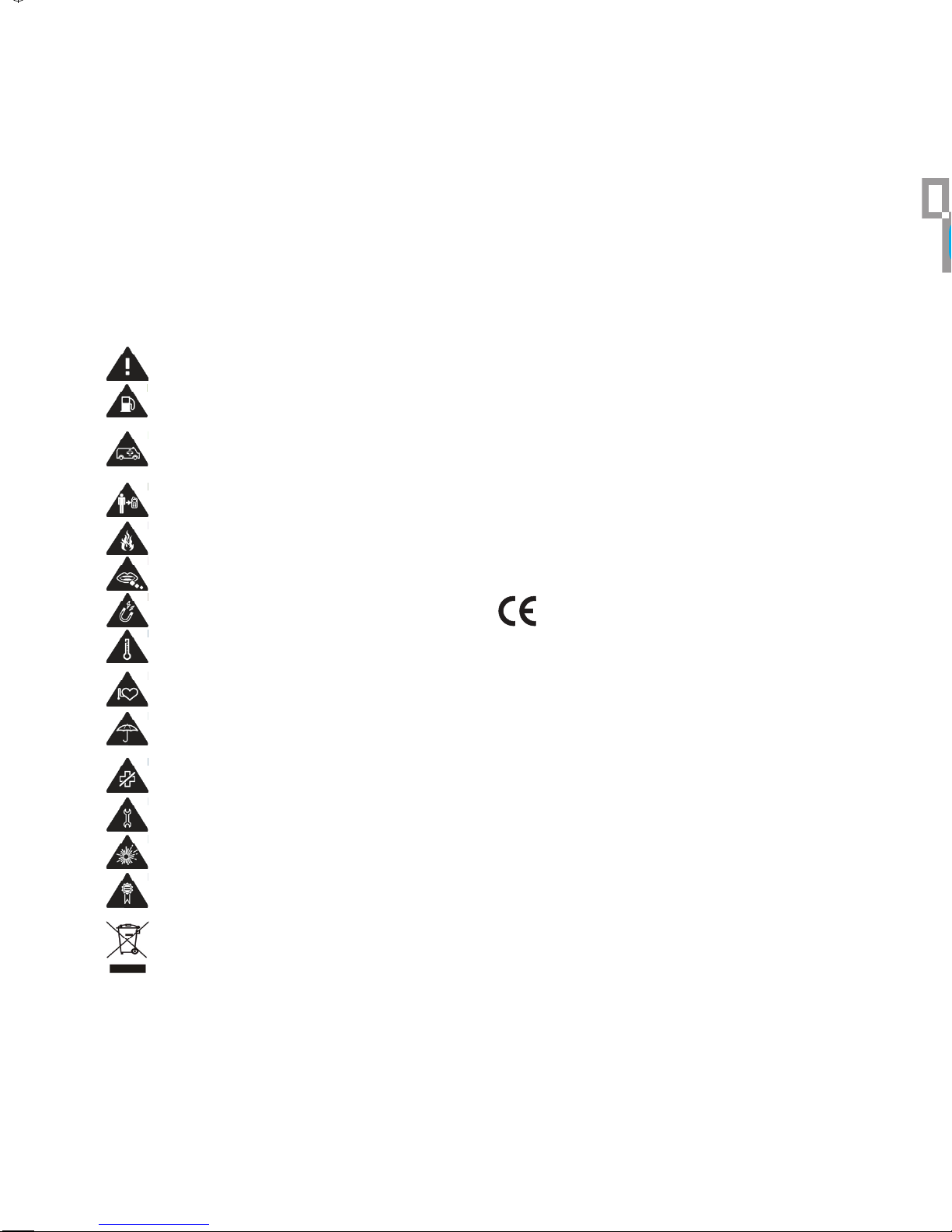
Read the safety notes section
Do not use at refuelling points
Do not rely on this device for emergency
communications
Maintain a separation distance of 20 cm from the
Sure Signal
Do not dispose of in a fire
Small parts may cause a choking hazard
Avoid contact with magnetic media
Avoid extreme temperatures
Keep away from pacemakers and other personal
medical devices
Purpose
The purpose of the device is to provide you with
coverage to make calls, send texts and Picture Messages, and
access mobile data from a location which may not have 3G
coverage.
Installation
Do not switch on the device if any cable or the device itself
is damaged. Never use the device in areas where radio
transmission is prohibited. The Vodafone Sure Signal should
be placed vertically, with sufficient space left all around it. The
casing should not be covered.
Health
The device contains a radio transmitter which may affect the
operation of medical electronic devices such as hearing aids
or heart pacemakers. Your doctor can provide you with further
advice.
Emergency
The device does not work in case of power loss, so please use
your mobile or landline phones to make emergency calls.
Power supply
Only use the manufacturer’s original power supply units. Take
care that the power supply is always easily accessible. The
voltage specified on the rating plate of the power supply unit
must match that of your mains supply. Disconnect the mains
plugs of all devices during thunderstorms.
CE marking:
The CE marking certifies that the product meets the
main requirements of the European Parliament and
Council directive 1999/5/EC on telecommunications terminal
equipment, regarding safety and health of users, and regarding
electromagnetic interference.
The declaration of compliance can be consulted on the site
http://ec.europa.eu/enterprise/sectors/rtte/documents
Avoid contact with liquid, keep dry
Switch off when instructed in hospitals and medical
facilities
Do not try to disassemble
Switch off in explosive environments
Only use approved accessories
This product is recyclable. Dispose of it properly.
Packaging
To facilitate recycling, please respect the sorting rules set
up in your country for this kind of waste.
Country of use
Use of the device is only permitted in NZ.
Product
This product belongs to the family of electrical and electronic
equipment. In this respect, the European regulations ask you to
dispose of it selectively: at sales points in the event of
the purchase of similar equipment, or at the collection points
made available to you locally (drop-off centre, selective
collection, etc.). When installing the product in a hospital, obey
all regulations or rules with respect to the use of a wireless
device.
Open source components
The Vodafone Sure Signal contains a number of open source
components. Please visit www.vodafone.co.nz/suresignal for
licensing information and, where applicable, access to source
code.
 Loading...