

Page 1
D-301439 1
AMBER SELECT /
AMBER SELECT
X
Setting Up Your System
Quick Start Guide
To set up your system, follow the steps below. For more
detailed information, see the AMBER SELECT / AMBER
SELECT
X
User Guide.
Select a central location in your home for the AMBER
SELECT / AMBER SELECT
X
where you spend most of
your time. The AMBER SELECT / AMBER SELECT
X
can be placed on a table, desk, or counter. It also can
be mounted on the wall.
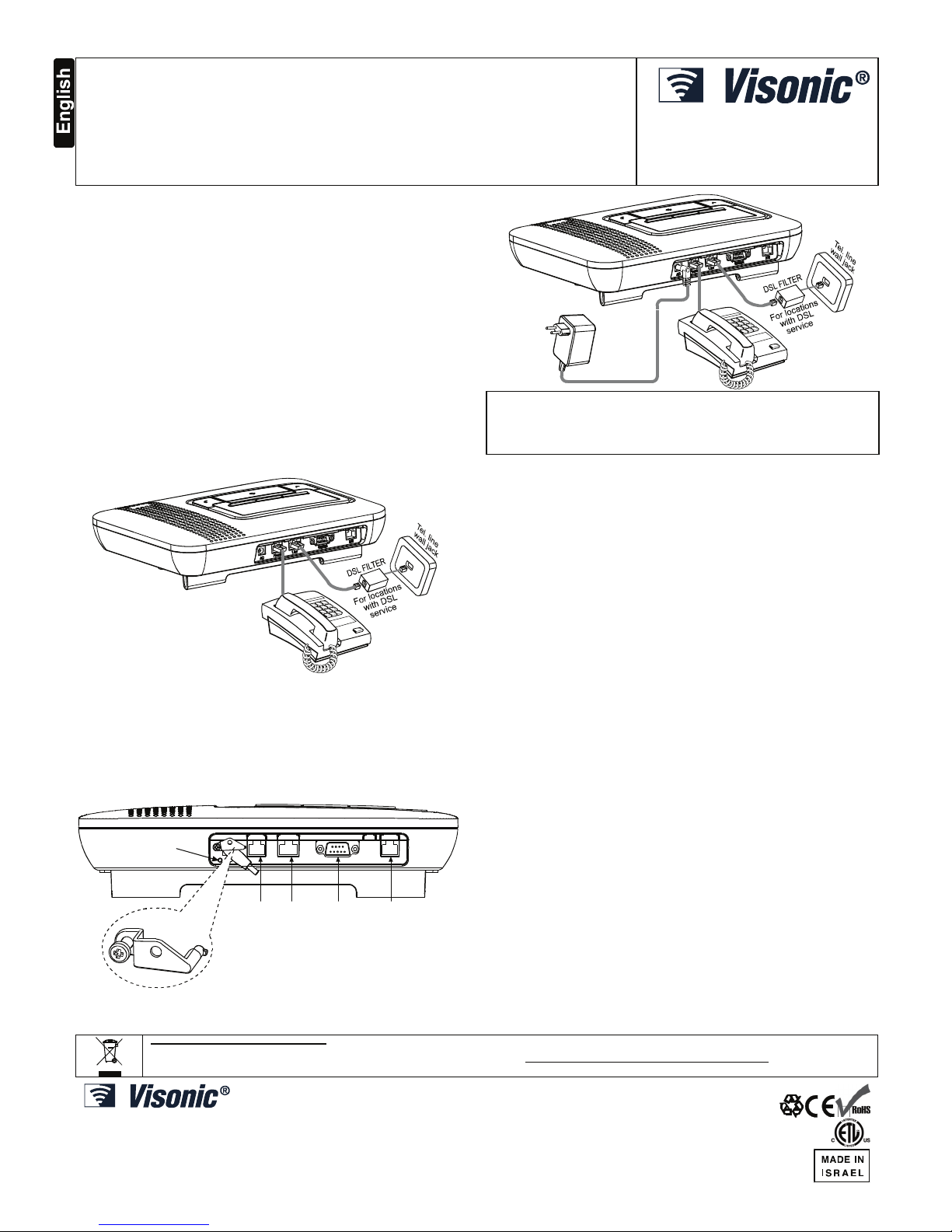
1. Connect the Base Unit to your
Telephone Line:
Connect the wide end (RJ-45) of the phone cord to the
"Wall Jack" on your AMBER SELECT / AMBER
SELECT
X
. Plug the narrow end (RJ-11) of that phone
cord into the phone jack on your wall.
Note: Be aware of other phone line services such as
DSL. If DSL service is present on the phone line, you
must install a filter.
For more information regarding
the DSL filter, contact the service provider.
Phone Line RS232 AUX
(optional)
INSERT TH E SAFETY CATCH TAB HORIZONTALLY AS SHOWN.
TURN THE LEFT SIDE OF THE CATCH COUNTER-CLOCKWISE
UNITL IT FACES THE SCREW HOLE AND THEN FASTEN THE
SAFETY CATCH WITH THE SCREW
SCREW
HOLE
Note: The safety catch is optional, can be purchased
upon request.
CONNECT THE
ADAPTER
INTO A NEARBY
ELECTRICAL
OUTLET
WARNING!
DO NOT USE AN OUTLET CONTROLLED BY A WALL
SWITCH.
When electrical power is supplied to the Base Unit, the
green light on the front panel illuminates.
Note: It is recommended that the AC power input, the
RS-232, and the telephone be interconnected within the
same room.
2. Program the panel:
Local setup
Install the HHCPC software on your PC. Enter all the desired
programming information into the HHCPC. Connect one end
of the special cable (supplied by Visonic) to one of the
computer's COM ports and the other end to the AMBER
SELECT / AMBER SELECT
X
unit.
Remote setup
Enter all the desired programming information into the
HHCPC. Connect to the remote panel via a dial-up
modem attached to the PC.
3. The AMBER SELECT / AMBER
SELECT
X
will call the Central Station:
After you complete steps 1 and 2 above your AMBER
SELECT / AMBER SELECT
X
will automatically call your
Central Station provided that your unit was programmed
to report to Central Station (and not to private
telephones). The central station operator will begin a twoway voice session. Once this feature has been tested, the
operator must disconnect by pressing DTMF '99'.
Note: Certain remote areas of your residence may lie
outside the reception range of the AMBER SELECT /
AMBER SELECT
X
, resulting in the unit not being able to
receive transmissions directly. In this case, a Repeater
(MCX-600PERS) can be used to increase the AMBER
SELECT / AMBER SELECT
X
reception range.
W.E.E.E. Product Recycling Declaration
For information regarding the recycling of this product you must contact the company from which you orignially purchased it. If you are discarding this product and not
returning it for repair then you must ensure that it is returned as identified by your supplier. This product is not to be thrown away with everyday waste.
Directive 2002/96/EC Waste Electrical and Electronic Equipment.
VISONIC LTD. (ISRAEL): P.O.B 22020 TEL-AVIV 61220 ISRAEL. PHONE: (972-3) 645-6789, FAX: (972-3) 645-6788
VISONIC INC. (U.S.A.): 65 WEST DUDLEY TOWN ROAD, BLOOMFIELD CT. 06002-1376. PHONE: (860) 243-0833, (800) 223-0020. FAX: (860) 242-8094
VISONIC LTD. (UK): 7 COPPERHOUSE COURT, CALDECOTTE, MILTON KEYNES. MK7 8NL.
VISONIC GmbH (D-A-CH): KIRCHFELDSTR. 118, D-40215 DÜSSELDORF, TEL.: +49 (0)211 600696-0, FAX: +49 (0)211 600696-19
VISONIC IBERICA: ISLA DE PALMA, 32 NAVE 7, POLÍGONO INDUSTRIAL NORTE, 28700 SAN SEBASTIÁN DE LOS REYES, (MADRID), ESPAÑA. TEL (34) 91659-3120,
FAX (34) 91663-8468. www.visonic-iberica.es
INTERNET: www.visonic.com
©VISONIC LTD. 2009 AMBER SELECT / AMBER SELECTX QUICK START GUIDE D-301439 (REV. 2, 5/09)
 Loading...