

Page 1
TVP-B/TVP-P
Price Computing Scales
V1.08
Page 2

TVP-B/TVP-P Price Computing Scales Operation Manual
Contents
1. INTRODUCTION.................................................................................................................. - 1 -
2. KEY DESCRIPTION............................................................................................................ - 1 -
3. DISPLAY SYMBOLS...............................................................................................................- 1 -
4. GENERAL INSTRUCTION.................................................................................................... - 2 -
5. BASIC OPERATION................................................................................................................. - 2 -
5.1 Power ON/OFF..............................................................................................................- 2 -
5.2 Zero the scale................................................................................................................- 2 -
5.3 Tare..................................................................................................................................- 2 -
5.4 Overload Warning......................................................................................................... - 3 -
5.5 Unit price setting............................................................................................................- 3 -
5.6 Change unit....................................................................................................................- 3 -
6. ACCUMULATOR OPERATION.............................................................................................- 3 -
6.1 Prepare to accumulate................................................................................................. - 3 -
6.2 Accumulative operation................................................................................................- 3 -
6.3 Account operation......................................................................................................... - 3 -
7. UNIT PRICE MEMORY..........................................................................................................- 4 -
7.1 Save the unit price........................................................................................................ - 4 -
7.2 Load the unit price........................................................................................................ - 4 -
8. OTHER FUNCTION................................................................................................................- 4 -
8.1 Backlight......................................................................................................................... - 4 -
8.2 Automatic unit price clear.............................................................................................- 4 -
8.3 Commodities Without Weighing................................................................................. - 5 -
9.SPECIFICATION...................................................................................................................... - 5 -
10.DIMENSIONS (inch/mm)...................................................................................................... - 6 -
11.ERROR MESSAGE................................................................................................................- 6 -
12.SELECTING THE PRINTER................................................................................................- 7 -
13.RS232 OUTPUT.....................................................................................................................- 7 -
13.1 Print Format................................................................................................................. - 7 -
13.2 Diagram: Serial interface........................................................................................... - 7 -
14.PARAMETER..........................................................................................................................- 8 -
Page 3
TVP-B/TVP-P Price Computing Scales Operation Manual
- 1 -
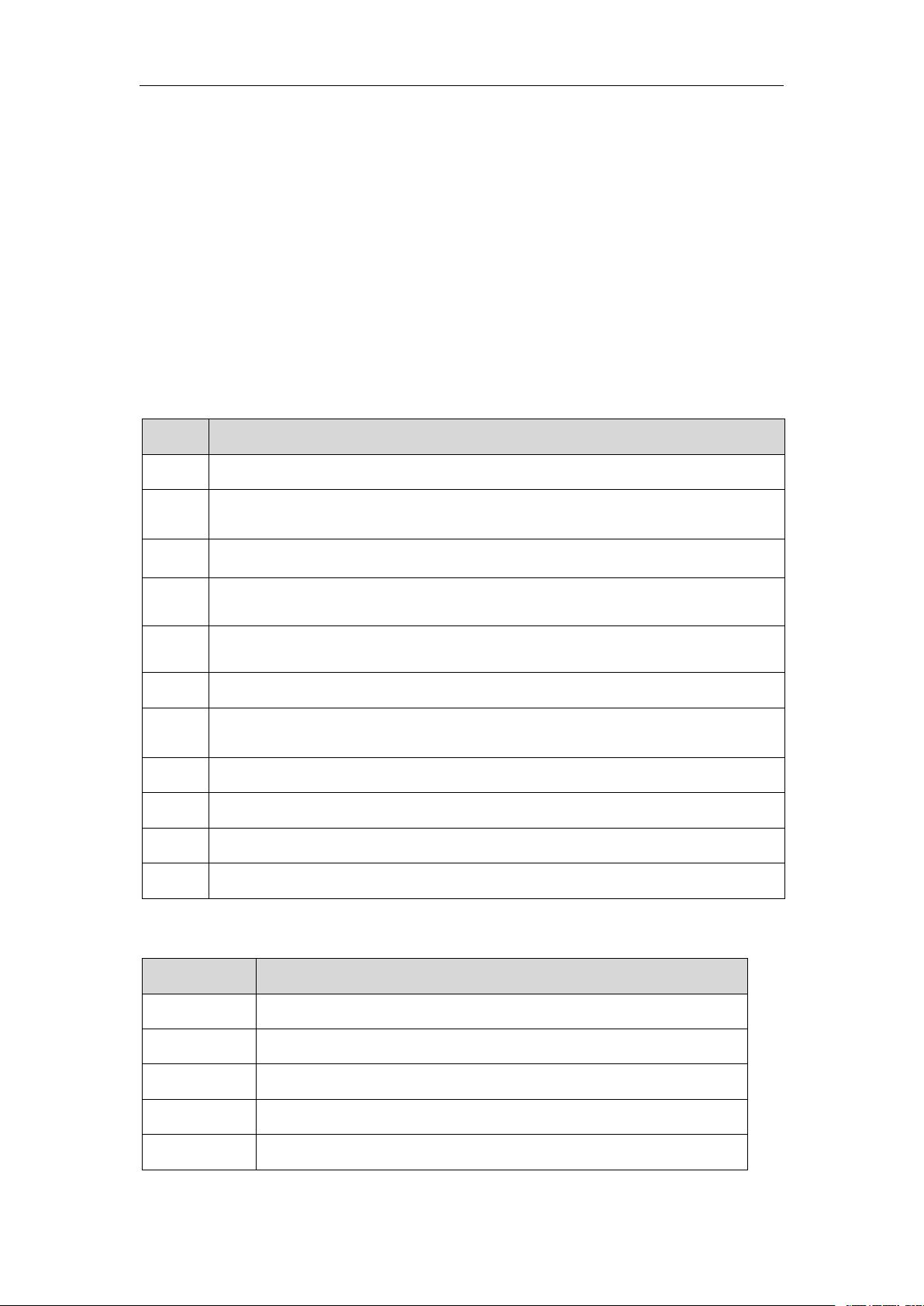
Keys
Description
ZERO
Returns the display to zero. In parameter settings, to escape from the menu
TARE
Subtracts the tare values, change to gross to net mode and enter parameter
settings.
SAVE
Enter to auto clear mode
CH
Used to do memory recall, give change and memory clear
M+
Add the current data aggregated. In parameter setting mode, used to scroll up
the menu, Used to print out a label or receipt papet
UNIT
Used to change unit (lb / oz / kg)
PLU
Used to store or recall unit price, In parameter setting mode, used to scroll
down the menu
C
Used for canceling the memorized and input data.
0~9
Used for setting unit price data.
·
Decimal Point key is used to set the decimal of the unit price
QTY
Quantity key, use for without weighing.
Symbols
Description
BATT.
Battery indicator. When it’s illuminated, battery should be recharge
NET
Net Weight
STABLE
Stable indicator. When it’s illuminated, the scale is stable
ZERO
Zero indicator. When it’s illuminated, the scale is in Zero point
lb/oz/kg
Current weighing unit
1. INTRODUCTION
TVP-B, TVP-P series of economic price computing scales are very compact, reliable,
high accuracy and much stable.
It use LCD display with white LED back light, with the different back light operation.
10 indirect PLU ,it can store 10 unit price values
Accumulation and change function
Auto unit price clear operation
Weighing units conversion(kg/lb/oz)
Standard RS-232 can be connect to receipt and label printer
2. KEY DESCRIPTION
3. DISPLAY SYMBOLS
Page 4

TVP-B/TVP-P Price Computing Scales Operation Manual
- 2 -
SAVE
Save Indicator
CHARGE
Battery charging indicator
ACC
Accumulation indicator
CH
Check out indicator
4. GENERAL INSTRUCTION
1.When battery goes low, the BATT symbol indicator will be show on automatically. It is
the time to charge the battery with the AC power. If scale goes on being used without
proper charging, the display window will show “BAT LO” every 5 minutes, and scale would
be shut down automatically after 2 hours of warning in order to protect the battery. Please
charge the battery immediately, or scale cannot be used. To charge battery, just plug AC
adapter or main power cord, scale turn on power is not necessary.
2.There is an LED left side of the total price display window to indicate the status of
battery charging. If the LED is green the battery has a full charge. and red indicates the
battery is being charged. please keep charge battery at least 1 hour after LED turn to
green to insure full charge.
3.Before starting using scale, please check if the bubble is in the middle of the level ; if not,
please make appropriate adjustment.
5. BASIC OPERATION
5. 1 Power ON/OFF
Power switch is located below the right side of the scale. Switch on the scale by
pressing on/off. The display is switched on and the self test is started. If you want to switch
off press again the key.
5. 2 Zero the scale
When there is no item on the scale but reading is not zero, press
the ZERO key to turn on ZERO indicator. When the weight goes over 2% of the full
capacity, “read zero” function is obsolete.
5. 3 Tare
Put container on the platter,once the weight reading is stable, press the TARE key, the
Page 5

TVP-B/TVP-P Price Computing Scales Operation Manual
- 3 -
TARE indicator will be on and the container’s weight will be deducted. When it is time to
clear the TARE, take off the container, and press TARE key again.
5. 4 Overload Warning
Please do not add item that is over the maximum capacity.
When reading “—OL—“ and hear beeping sound, remove the item on the platter to avoid
damage to the load cell.
5.5 Unit price setting
To trade with your scale, it is necessary to setting a unit price of the goods, scale then
uses this unit price to determine how much that goods are on the platter.
When scale displaying the weight of the goods placed on the scale, set the unit price
through numeric keys. Set unit price is showed in UNIT PRICE window display, TOTAL
PRICE window display shows the total price of the goods. To cancel the previous unit
price, press C key .
5.6 Change unit
You can use the UNIT key to change unit(kg/lb/oz). Press UNIT key will change the
weighing unit circularly, and the pertinent indicator will on.
6. ACCUMULATOR OPERATION
6. 1 Prepare to accumulate
The scale can be set to accumulate manually by pressing M+ key,
To enable the accumulation function on, see parameters F11RS232 >mode > EP50
Confirm the platter is empty,the current accumulator values is reset to zero, and the
weight reading is stable.only when weight more than 20d
6. 2 Accumulative operation
Put the weighing item on platter, wait for the weight reading to be stable, press the M+
key,the window will show total x,this is current total value.
6. 3 Account operation
To enable the change function on, see parameters F12 change > on
After do accumulate operate, you can press CH key, WEIGHT window will show the
Page 6

TVP-B/TVP-P Price Computing Scales Operation Manual
- 4 -
In normal weighing mode, Press and hold .
key until to show the display
Press the M+ key to change the settings
Display
Description
bLSEt ModE AUto
Backlight will be turned on, when start to
use or when weight is not in zero.
bLSEt ModE on
Backlight will be turned always on
bLSEt ModE oFF
Backlight function will be turned off
BLSEt
ModE
AUto
summed price, key in paid money by keyboard, this will show on Unit Price window, and
the Total Price window will show the return value.
Press TARE key to return normal weighing mode and clear memory, if you don’t want
clear memory, press ZERO key to return normal weighing mode.
Note: if you haven’t do accumulate operation, you also can use Account function, the
summed price is current total price.
7. UNIT PRICE MEMORY
Scale can store 10 sets unit price.
7. 1 Save the unit price
Hold the PLU key for 3 seconds after you key in the unit price, it will show “save pos” ,
press numeric key 0~9 to select which memory location you want to use. After you do, the
unit price is stored in the scale.
7.2 Load the unit price
If you want to use the unit price stored in the scale, press PLU key, scale will shows
“load pos”, press numeric key 0~9 to select which memory location’s price you want to
use, current unit price will change to the value stored in the memory.
8. OTHER FUNCTION
8.1 Backlight
back light display mode to Auto / On /Off.
8.2 Automatic unit price clear
Scale can set automatic unit price clear, when return to zero, scale will clear the unit price
automatically.
Page 7
TVP-B/TVP-P Price Computing Scales Operation Manual
- 5 -
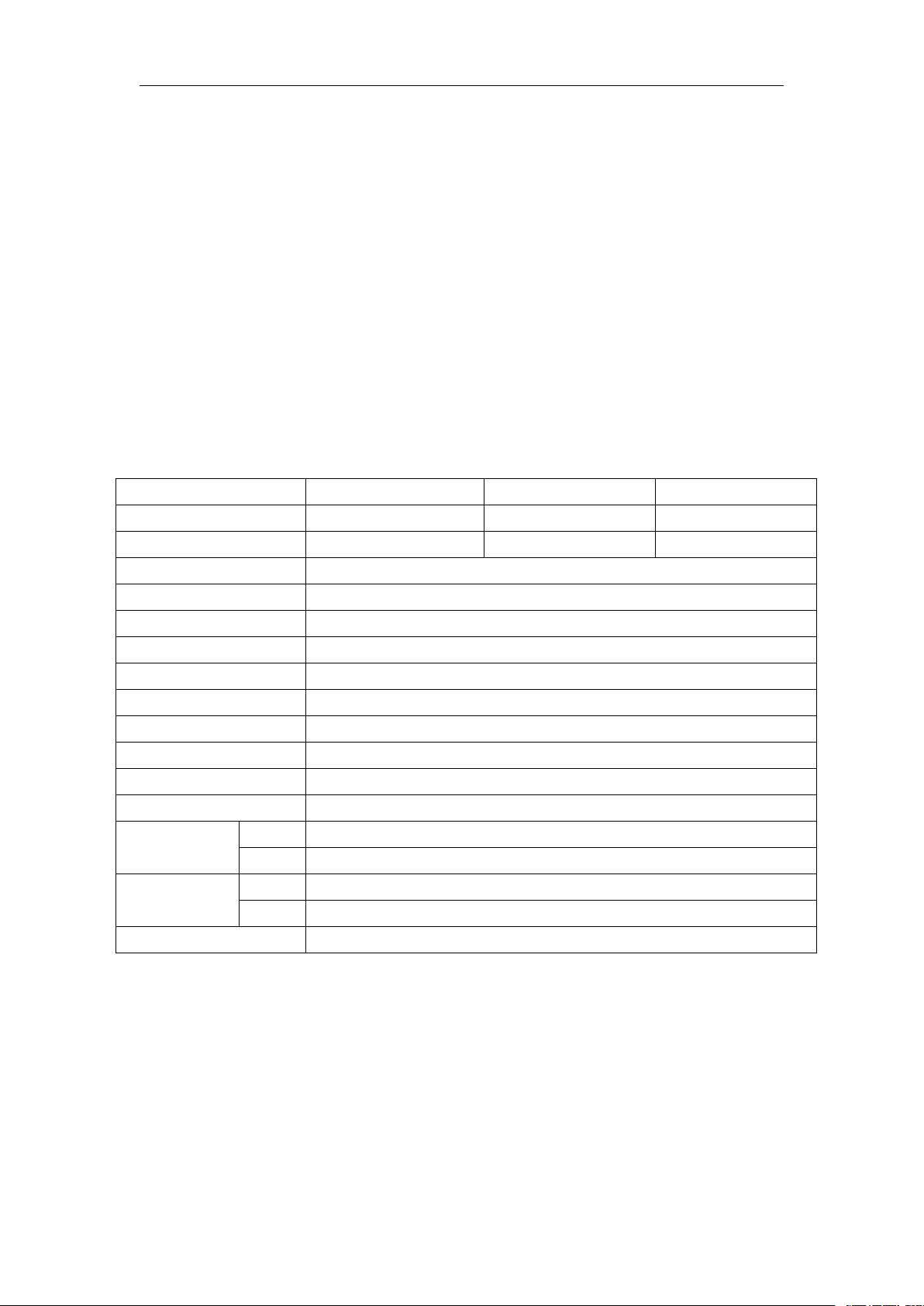
MODEL
TVP-12B/TVP-12P
TVP-30B/TVP-30P
TVP-60B/TVP-60P
Capacity
12lb / 6kg / 160oz
30lb / 12kg /480oz
60lb / 30kg / 960oz
Readability
0.002lb / 0.001kg / 0.05oz
0.005lb / 0.002kg / 0.1oz
0.01lb / 0.005kg / 0.2oz
Max. Divisions
6000e
Weighing Units
lb / oz / kg
Display
0.59inch /15mm digits LCD Display with white LED back Light
Platter size
8 x 10.5inch / 204 x 265mm
Housing
ABS Plastic and Stainless Steel pan
Interface
RS232 Output standard
Operation Temperature
14°F - 104°F / -10°C - + 40°C
Power
AC Adaptor 12V/500mA , Rechargeable Battery 6V/3.2Ah
Battery life
Approx.60 Hours LCD (no backlight)
Keypad
20 membrane keys
Dimensions
(inch/mm)
Bench
10.5 (W) x 12 (D) x 4 (H) / 265 (W) x 313 (D) x 108.8 (H)
Pole
11 (W) x 14 (D) x 18 (H) / 288 (W) x 367 (D) x 479.8 (H)
Gross weight
Bench
9lb (4.1kg)
Pole
9.9lb (4.5kg)
Approvals
NTEP: Certificate No.19-038
Press SAVE key will turn on / off automatic unit price clear function, when SAVE indicator
on, automatic unit price clear disable when SAVE indicator off, automatic unit price clear
enable.
8.3 Commodities Without Weighing
Using numeric keys to input unit price, Press QTY key to enter QTY mode
Using numeric keys to input quantity in the weight window, the total price will be show
automatically
Press QTY key to return normal weighing mode.
9. SPECIFICATION
Page 8
TVP-B/TVP-P Price Computing Scales Operation Manual
- 6 -
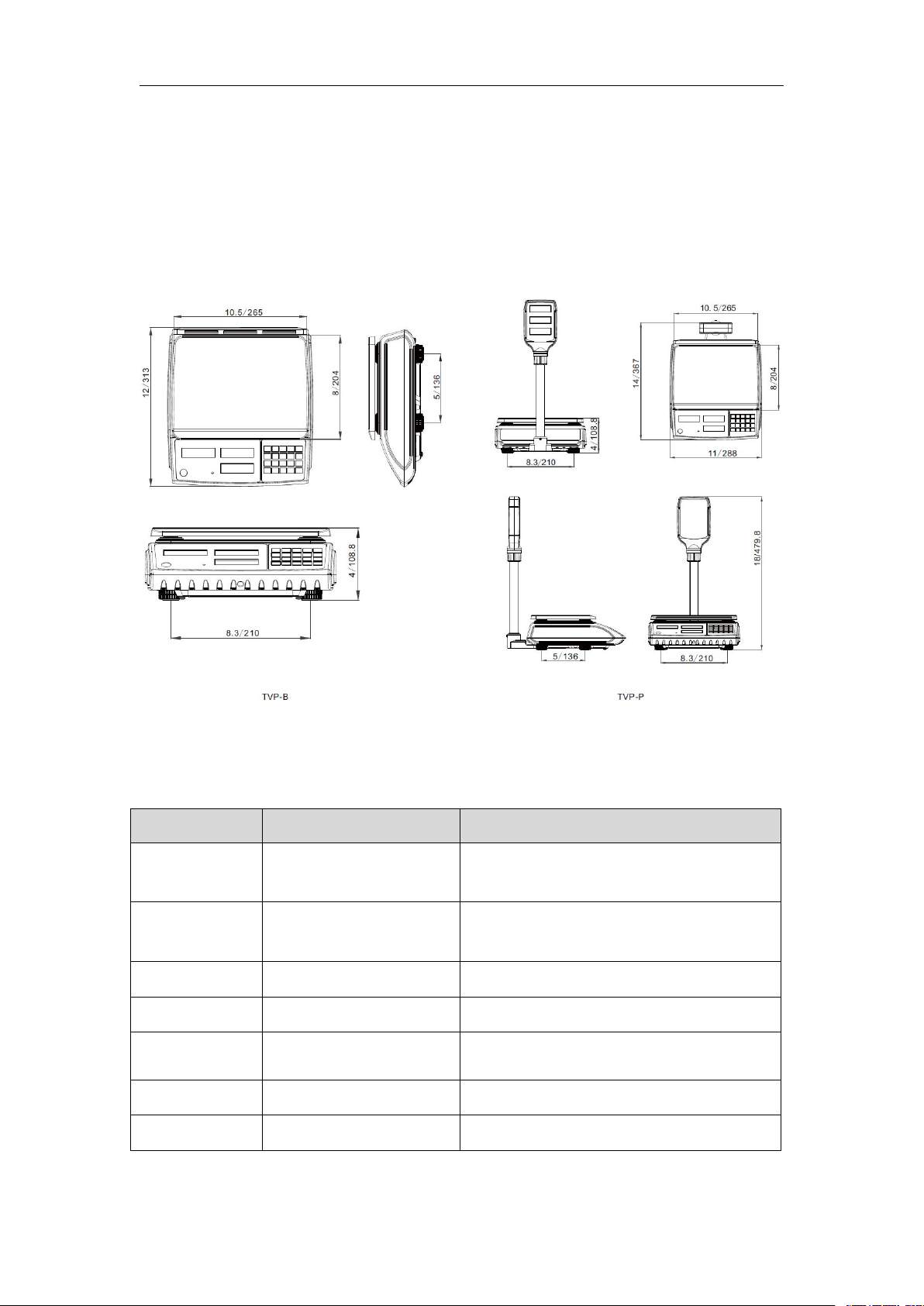
Error Message
Description
Solution
Err 4
Zero setting error
Zero setting range exceeded due to
switching on.
Make sure platform empty.
Err 6
A/D value out of range
Make sure platform empty and check the
pan is installed proper. Check the load cell
connectors.
Err15
Enter gravity error
Gravity rang(0.9~1.0)
Err19
Initialize zero error
Calibration the scale.
--ol--
Over range
Remove the load.
Re calibrate
fai l
Calibration Error
Re calibrate
Ba lo
Battery low
Re charge battery, check the voltages.
10. DIMENSIONS (inch/mm)
11. ERROR MESSAGE
Page 9
TVP-B/TVP-P Price Computing Scales Operation Manual
- 7 -
Pin 2
RXD
Input
Receiving data
Pin 3
TXD
Output
Transmission data
Pin 5
GND―Signal ground
Options
Description
EP50
Press M+ key to send data to DEP-50 receipt printer
LP50
Press M+ key to send data to DLP-50 label printer
12.SELECTING THE PRINTER
For printer setting, it need to enter the parameters settings to select F11> RS232 >
mode > EP50/LP50, use M+ key to select options
13. RS232 OUTPUT
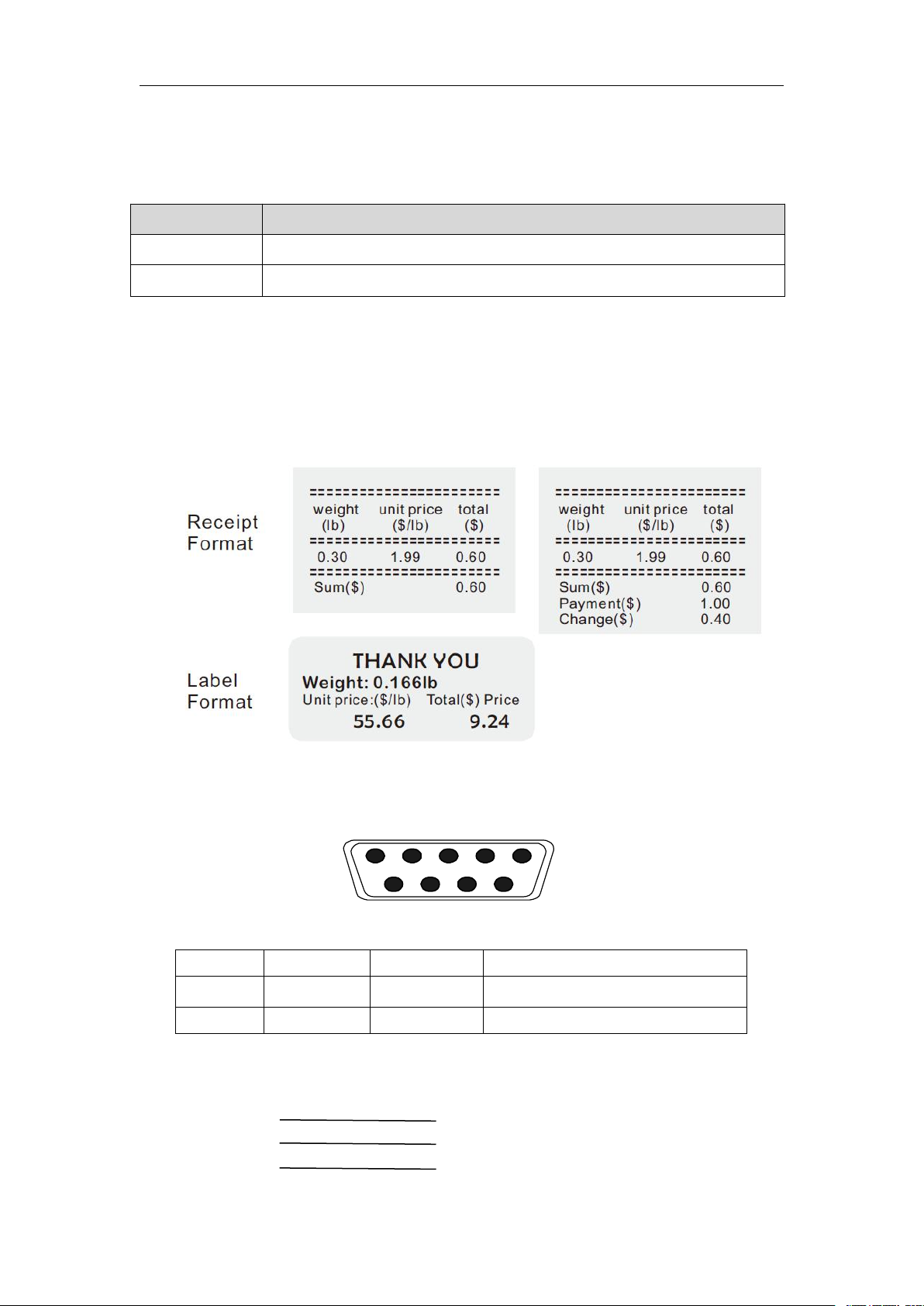
The TVP-B& TVP-P Series of scales can be ordered with a standard RS-232 output. It can
be connected to DEP-50 receipt printer & DLP-50 label printer
13.1 Print Format
13.2 Diagram: Serial interface
9pin D Connecter:
Scale Computer
Pin 2 Pin 3
Pin 3 Pin 2
Pin 5 Pin 5
Page 10
TVP-B/TVP-P Price Computing Scales Operation Manual
- 8 -
F11 rS232
ModE
PC-100
Protocol Type :CAS
printr
The scale RS232 protocol will be
determined by the Baud & Pr settings
EP50
accumulation function enable,and
press M+ key to send data to receipt
printer
Lp50
accumulation function enable, and press
M+ key to send data to printer
POS
Protocol Type :POS
oFF
RS232 function disable
Cont
Continues data transmission
StC
Stable data sending continues
Toledo
Protocol Type 1: Toledo
nciecr
Protocol Type 2: NCI-ECR
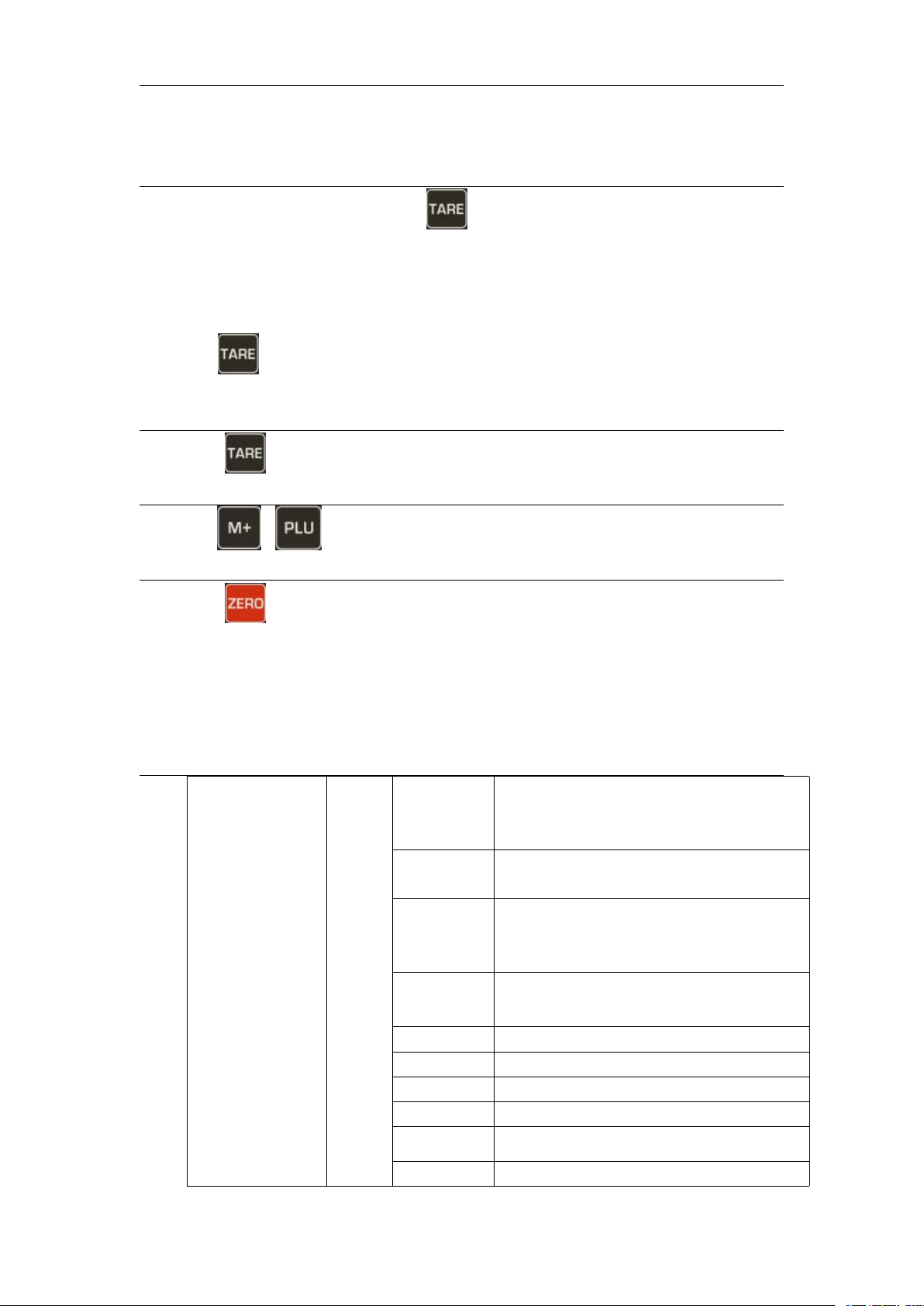
14. PARAMETER
PARAMETER SETTING
Enter into the Menu
Turn on the scale. Press and hold key during the self test.
Display will show “Pn” briefly PIN is activated. Press the PIN number to get
into the parameter menu.
The default PIN number is “0000”
Press numeric key 0 four times , display will be shown Pn - - - -
Press key to confirm, It will enter into the parameter settings and will to show
“ menu unit kg” .
Enter to Selected Menu
Press , it can confirm which will be shown displayed.
Select the Menu
Press or . It can choose menu block one by one.
Return to Weighing Mode
Press escape from the menu and exit to weighing mode
Active Parameter
Page 11

TVP-B/TVP-P Price Computing Scales Operation Manual
- 9 -
ncigen
Protocol Type 3: NCI-General
tec
Protocol Type 4: TEC
easy
Protocol Type 5: Easy Weigh
baud
Set baud rate
to( 1200/2400/4800/9600/19200/38400/1
15200)
Pr
8n1
8 data bits, no verify, 1 stop bit
7E1
7 data bits, Even verify, 1 stop bit
7o1
7 data bits, Odd verify, 1 stop bit
F12 change
CHAN
GE
ON
To set change function on
OFF
To set change function off
Press key to choose "lb",“oz”or "kg" unit in the setting mode, capacity
will be show in lb, oz or kg values.
Page 12

 Loading...