

Page 1

CCA-3074 Channel Console Appliance
Planning
P/N 707159-002
Page 2

Page 3
CCA-3074 Planning
Revision Information
Issue/Revision Schedule
Comments Revision Number Date
Initial Release 707159-001 04/01/2012
Second Release 707159-002 06/27/2013
707159-002 iii
Page 4

Page 5

CCA-3074 Planning
Table of Contents
Revision Information.........................................................................................................iii
Table of Contents.................................................................................................................v
Chapter 1. CCA-3074 Overview......................................................................................1-1
Product Overview ....................................................................................................... 1-1
Optional CSS32 Coax Subsystem............................................................................... 1-2
CCA-3074 Environmental Parameters .......................................................................1-3
CSS32 Environmental Parameters..............................................................................1-3
CCA-3074 Power Requirements.................................................................................1-4
CSS32 Power Requirements....................................................................................... 1-4
Ethernet Requirements................................................................................................ 1-4
ESCON Cabling Requirements...................................................................................1-5
FICON Cabling Requirements.................................................................................... 1-5
CCA-3074 Directly Attached Management Console Interface (Optional).................1-5
CSS32 Management Options......................................................................................1-6
Platform Management Using the Visara eManager Product ...................................... 1-6
Field Upgradability..................................................................................................... 1-6
Chapter 2. Planning for Your Install................................................................................ 2-1
Identifying the Non-SNA Environment...................................................................... 2-1
Worksheet Discussion................................................................................................. 2-2
Number of Mainframes..........................................................................................2-2
Number of LPARs ................................................................................................. 2-2
EMIF Support on the Mainframe........................................................................... 2-2
Operating Systems in Use......................................................................................2-2
Coax Terminal Requirements................................................................................2-3
StorageTek LMUs.................................................................................................. 2-3
IBM 3290............................................................................................................... 2-3
Redundant Console Controllers.............................................................................2-3
Number of Consoles Required for Each LPAR.....................................................2-4
Need/Desire to Use One Console for Multiple LPARs......................................... 2-4
Need to Display Multiple LPARs at Once on a Display .......................................2-4
Remote Access Requirement................................................................................. 2-4
Hot Console Session Requirement.........................................................................2-4
Session Sharing Requirement................................................................................2-4
Long Wave or Short Wave FICON .......................................................................2-5
Replacing Existing ESCON 3174 Controllers............................................................2-6
Replacing Bus and TAG Controllers.......................................................................... 2-6
Determining the Need for ESCON Directors ............................................................. 2-6
When to Use EMIF..................................................................................................... 2-6
Coax Requirement Planning.......................................................................................2-7
StorageTek LMUs Planning .......................................................................................2-7
FICON Usage..............................................................................................................2-7
707159-002 v
Page 6

IBM 3290 Plasma Display Planning...........................................................................2-7
Planning for the Visara 500Lx....................................................................................2-8
Planning for Hot Console Sessions.............................................................................2-8
Use of ESCON Channel Extenders.............................................................................2-8
Secure Network Connections...................................................................................... 2-9
LAN Printers Supported as Consoles .........................................................................2-9
Management Planning ................................................................................................2-9
Planning for eManager Support................................................................................ 2-10
CCA-3074 Maximum Capability Chart.................................................................... 2-11
Determining the Number of CCA-3074s..................................................................2-12
Parameter Definition Cross Reference Chart............................................................2-14
Chapter 3. Host Gens – OS/390 with HCD ..................................................................... 3-1
Task List......................................................................................................................3-1
HCD Panel 1 – Define, Modify, or View Configuration Data ................................... 3-1
HCD Panel 2 – Operating System Configuration List................................................ 3-2
HCD Panel 3 – Switch List.........................................................................................3-2
HCD Panel 4 – Change Switch Definition .................................................................3-3
HCD Panel 5 – Port List ............................................................................................. 3-3
HCD Panel 6 – Change Port Definition......................................................................3-4
HCD Panel 7 – Switch Configuration List .................................................................3-4
HCD Panel 8 – Port Matrix......................................................................................... 3-5
HCD Panel 9 – View Connected Units.......................................................................3-5
HCD Panel 10 – Processor List ..................................................................................3-6
HCD Panel 11 – Actions on Selected Processors.......................................................3-6
HCD Panel 12 – Partition List....................................................................................3-7
HCD Panel 13 – View Partition / Channel Paths........................................................ 3-7
HCD Panel 14 – View Partition / Control Units.........................................................3-8
HCD Panel 15 – View Partition / Devices..................................................................3-8
HCD Panel 16 – Control Unit List.............................................................................. 3-9
HCD Panel 17 – Control Unit List.............................................................................. 3-9
HCD Panel 18 – Change Control Unit Definition....................................................3-10
HCD Panel 19 – View Control Unit Definition........................................................3-10
HCD Panel 20 – Select Processor / Control Unit .....................................................3-11
HCD Panel 21 – Add Device.................................................................................... 3-11
HCD Panel 22 – Device / Processor Definition........................................................ 3-12
HCD Panel 23 – Define Device / Processor ............................................................. 3-12
HCD Panel 23 (2) – HCD Help ................................................................................ 3-13
HCD Panel 24 – Define Device Candidate List........................................................3-13
HCD Panel 25 – Define Device to Operating System Configuration.......................3-14
HCD Panel 26 – Define Device Parameters / Features.............................................3-14
HCD Panel 27 – Define Device to Operating System Configuration.......................3-14
HCD Panel 28 – I/O Device List .............................................................................. 3-15
HCD Panel 29 – Define Device / Processor ............................................................. 3-15
vi 707159-002
Page 7

CCA-3074 Planning
Chapter 4. IOCDS Sample Definitions............................................................................4-1
Example 1 – Typical 3174 Replacement (ESCON) ...................................................4-2
Example 2 – Typical 3174 Replacement (FICON).....................................................4-4
Example 3 – Device Candidate List not Used............................................................4-5
Example 4 – EMIF and ESCON Directors Used........................................................ 4-6
Example 5 – Multiple LCSS and ESCON.................................................................. 4-8
Example 6 – Multiple LCSS and FICON.................................................................4-10
Chapter 5. CSS32 External Coax Subsystem ..................................................................5-1
What is the External Coax Subsystem........................................................................ 5-1
CSS32 Factory Default Configuration........................................................................ 5-1
Chapter 6. Frequently Asked Questions .......................................................................... 6-1
Appendix A. Consoles Planning Worksheet................................................................... A-1
707159-002 vii
Page 8

Page 9

CCA-3074 Planning
Chapter 1. CCA-3074 Overview
Product Overview
The CCA-3074 is a versatile 3U, rack-mountable enterprise class server product capable
of running many features and functions traditionally supported by a variety of legacy
products. The Non-SNA feature set that comes standard with the CCA-3074 provides
functionality traditionally found on the IBM 2074 Control Unit product family, as well as
the Visara SCON family. Up to 16 LPARs are supported through each ESCON and
FICON interface. Up to two ESCON and four FICON interfaces are supported providing
a maximum of 96 LPAR support. Several hundred user sessions can be supported
including both console sessions and VTAM sessions.
With the optional CSS32 to provide coax cable connectivity, the CCA-3074 can also
easily accommodate the functionality provided by traditional IBM 3174 and 3274
console controllers as well as most plug compatible products such as the Visara SCON20L, SCON-22L, SCON-25L, and 1174-25S products, the Memorex Telex 1174-10L,
1174-20L, 1174-15X, and 1374-1L, and the McData 7100 products.
Configuration of the CCA-3074 is achieved by means of a secure web browser interface
(HTTPS). This browser connection can be made through the network or from a direct
attached monitor, keyboard, and mouse. The CCA-3074 ships with a default
configuration including a default IP address. To connect from an external PC you must
either modify the default configuration for your own network requirements (requires
modifying the FEP4600.ini file on a 3.5” floppy disk) or modify the IP configuration of
the PC you are using to configure with (assign a compatible IP address).
Once configured, the CCA-3074 is capable of running independently, without human
intervention. That is, if power is lost and regained, it will automatically boot back into
service using the stored configuration. (You may need to reactivate any console sessions.)
You can manage the platform using the same secure web browser connection from
anywhere that you can connect to the platform via IP. Multiple management console
interfaces are supported by the CCA-3074, making it ideal for remote disaster recovery
operations.
707159-002 1-1
Page 10

Chapter 1. Installation
Optional CSS32 Coax Subsystem
The optional CSS32 Coax Subsystem can be added to the CCA-3074 to provide up to 32
real coax ports for attachment of 3270 displays, printers, and Storagetek coax LMU
connections.
The CSS32 comes in a separate rack mountable platform which can be mounted in the
same physical rack as the CCA-3074 and interconnected by a single crossover Ethernet
cable. Multiple CSS32 platforms can be supported by a single CCA-3074. In instances
where multiple CSS32 platforms are to be supported, it may be necessary to use a small
Ethernet hub or switch to interconnect the multiple platforms. It is also possible to
directly attach multiple CSS32 platforms by adding a Quad Ethernet interface card into
the CCA-3074.
The CSS32 may similarly be attached to multiple CCA-3074 platforms. Because
communication between CSS32 and CCA-3074 uses standard Ethernet IP connections it
is possible for a CCA-3074 to communicate to a CSS32 platform over an IP network. The
CSS32 does not natively support SSL encryption, so external SSL encryption or VPN is
recommended to provide security when direct crossover connections are not used.
The CSS32 comes standard preconfigured to communicate with one CCA-3074. In the
factory default configuration, 31 coax ports are defined to support displays or LMU
connections and 1 coax port is defined to support a printer. The factory configuration can
be modified to support other combinations of devices and destination platforms.
1-2 707159-002
Page 11
CCA-3074 Planning
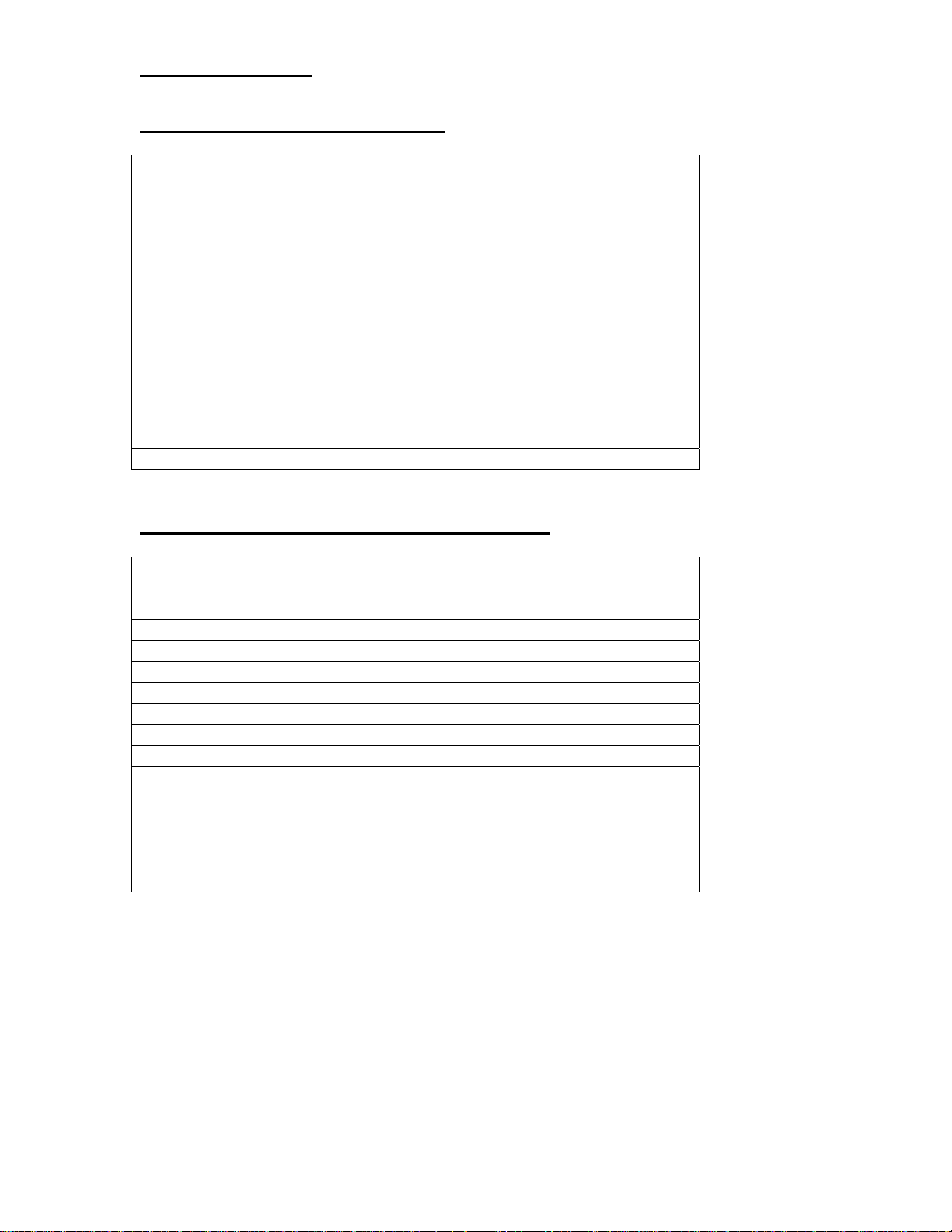
CCA-3074 Environmental Parameters
Specification Value
Height 5.2 in (13.2 cm.)
Width 17.7 in (45.0 cm.)
Depth 25.5 in (64.7 cm.)
Weight 72.0 lb. (32.7 kg.)
Front Clearance 42.0 in. (61.0 cm.)
Back Clearance 10.0 in. (25.0 cm.)
Top Clearance 0.0 in. (0.0 cm.)
Left Clearance 2.0 in. (5.0 cm.)
Right Clearance 2.0 in. (5.0 cm.)
Heat Output 4350 BTU/hr. (maximum)
Relative Humidity 8% to 90% with no condensation
Temperature Range 50o to 95o F. (10o to 35o C.)
Power Cord length 6 ft. (1.83 m.)
Rack Specifications Standard 19 in. rack, 3U height
CSS32 Coax Subsystem Environmental Parameters
Specification Value
Height 8 in. (20 cm.)
Width 17.5 in (44.5 cm.)
Depth 20 in. (51 cm.)
Weight 50 lb. (22.7 Kg.)
Front Clearance 24 in. (61 cm.)
Back Clearance 10 in. (25.0 cm.)
Top Clearance 0.0 in. (0.0 cm.)
Left Clearance 2.0 in. (5.0 cm)
Right Clearance 2.0 in. (5.0 cm.)
Heat Output 310 BTU/hr. (minimum)
600 BTU/hr. (maximum)
Relative Humidity 8% to 80% with no condensation
Temperature Range 50 o to 105 o F. (10 o to 40.6 o C.)
Power Cord length 6 ft. (1.83 m.)
Rack Specifications Standard 19 in. rack
707159-002 1-3
Page 12
Chapter 1. Installation
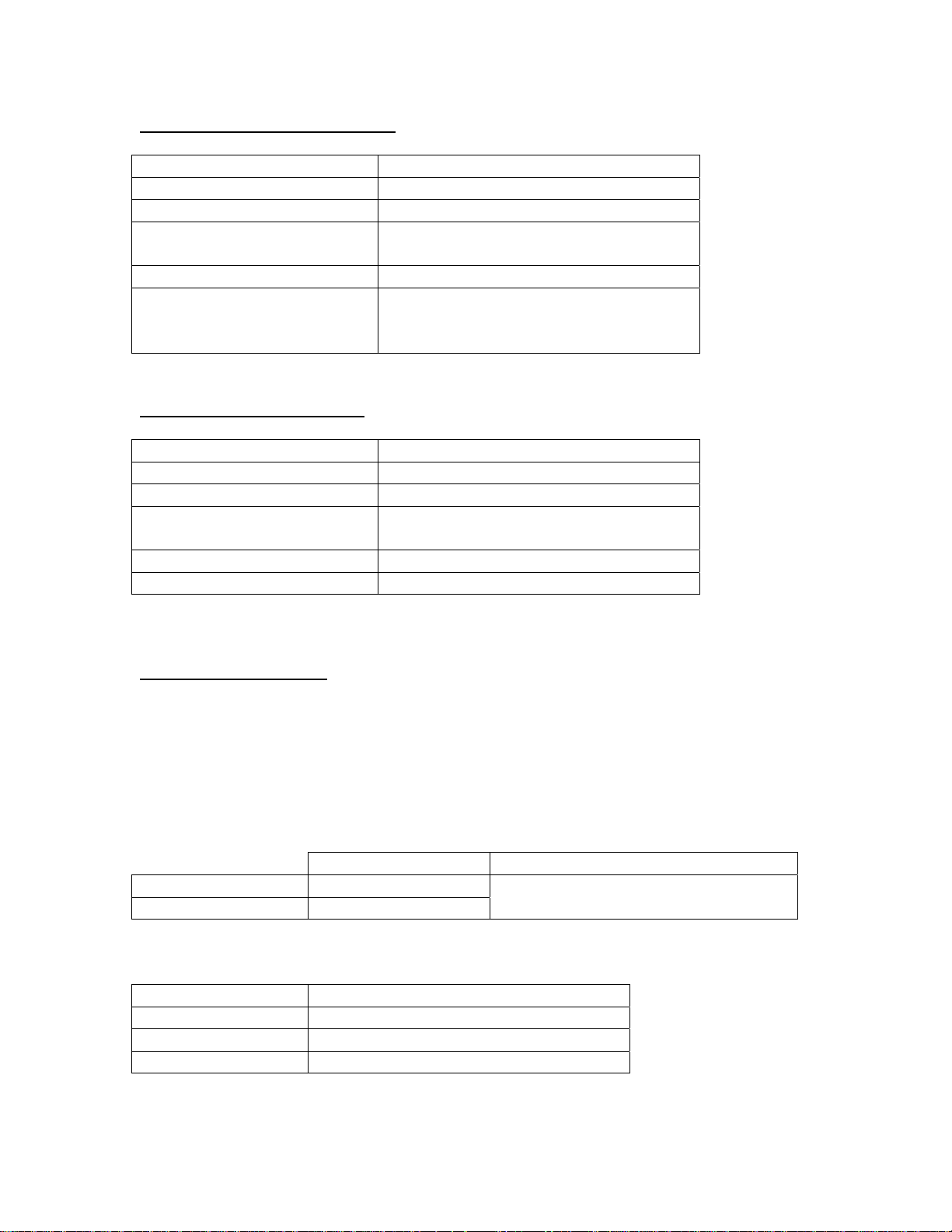
CCA-3074 Power Requirements
Specification Value
Rated AC input voltage 100-240V AC
Rated input frequency 50-60 Hz
Rated input current 14A (115V)
7A (230V)
Rated output power 760 W
Physical Connection 2 AC input cables feeding 2 individual
power supplies capable of plugging into
2 different power mains
CSS32 Power Requirements
Specification Value
Rated AC input voltage 100-240V AC
Rated input frequency 50-60 Hz
Rated input current 3 A (115V)
Rated output power 130-240 W
Physical Connection 1 AC input cable, single phase
Ethernet Requirements
The Ethernet interfaces for the CCA-3074 each consist of an RJ45 socket. The Ethernet
interface of the CCA-3074 will default to auto-detect the speed and can be plugged into a
switch or hub running at 10 Mhz, 100 Mhz, or 1000 Mhz. It can also be attached to
CSS32 Coax Subsystem using a crossover (null) Ethernet cable.
Ethernet Cable Spec
Category 3, 4, or 5 ANSI/IEEE Standard
Maximum Length 100 meters (328 feet) 802.3I – 1990 Section 14 or greater
Minimum Length 1 meter (3.28 feet)
Recommended Minimum Cabling Type
Ethernet Speed Minimum Twisted Pair Cable Type
10 Mbps Cat 3
100 Mbps Cat 5
1000 Mbps Cat 5e
1.5 A (240V)
1-4 707159-002
Page 13
CCA-3074 Planning
ESCON Cabling Requirements
The ESCON interface card used by the CCA-3074 uses the larger Duplex ESCON
interface cable. Most newer mainframes such as the z-processors use the smaller MTRJ
connector. Both Duplex/Duplex ESCON and Duplex/MTRJ ESCON cables can be
obtained from Visara or sourced locally.
FICON Cabling Requirements
The FICON card used by the CCA-3074 comes in three versions; single port, dual port,
and quad port. Each interface uses the popular LC type connector. Each FICON interface
can be ordered to support either Long Wave FICON Transceivers or Short Wave FICON
Transceivers. Selection of Long Wave or Short Wave is dependent on what the CCA3074 will be communicating with on the other end of the FICON cable. Note that FICON
cables also come in Long Wave (single-mode) or Short Wave (multi-mode) versions. The
FICON interface supported by the CCA-3074 is capable of running at 2.125 Gbps, 4.25
Gbps, and 8 Gbps speeds. Maximum cable lengths are dependent upon the transceiver
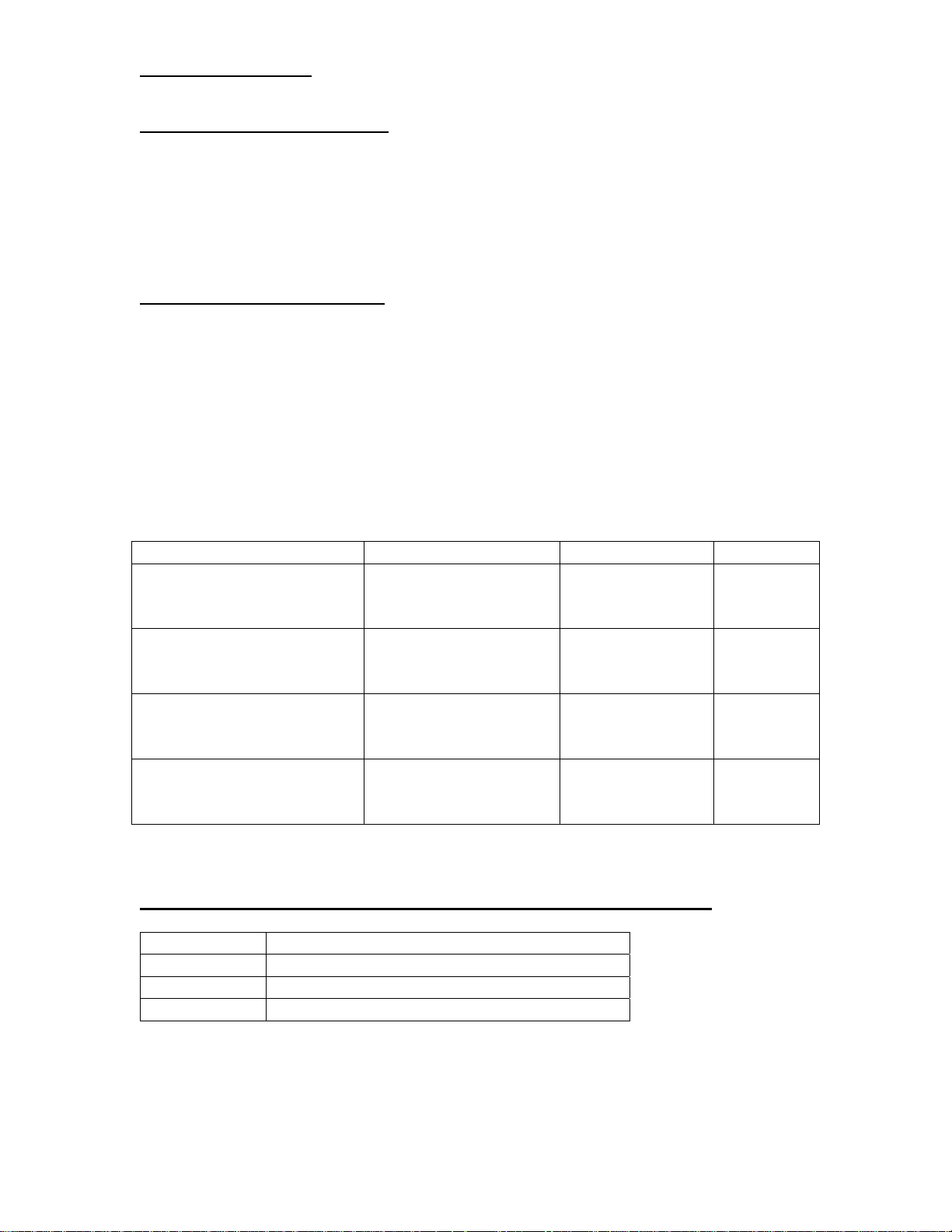
type used and the speed of the interface according to the following table.
Fiber Optic Cable Maximum Length Minimum Length Connector
OM3 – Multimode 50/125
micron fiber (2000 Mhz*km
bandwidth cable)
OM2 – Multimode 50/125
micron fiber (500 Mhz*km
bandwidth cable)
OM1 – Multimode 62.5/125
micron fiber (200 Mhz*km
bandwidth cable)
OS1/OS2 – Single-mode 9
micrometer fiber with LC
connectors
CCA-3074 Directly Attached Management Console Interface (Optional)
Component Specification
Monitor SVGA (minimum resolution 1024 x 768)
Keyboard PS2 interface, 104 Key
Mouse PS2 interface
2.125 Gbps: 0.5-500m
4.25 Gbps: 0.5-380m
8.5 Gbps: 0.5-150m
2.125 Gbps: 0.5-300m
4.25 Gbps: 0.5-150m
8.5 Gbps: 0.5-50m
2.125 Gbps: 0.5-150m
4.25 Gbps: 0.5-70m
8.5 Gbps: 0.5-21m
2.125 Gbps: 0.5-10 km
4.25 Gbps: 0.5-10 km
8.5 Gbps: 0.5-10 km
.5 meters LC
.5 meters LC
.5 meters LC
.5 meters LC
707159-002 1-5
Page 14

Chapter 1. Installation
CSS32 Management Options
The CSS23 can be configured and managed using any coax attached CUT display device,
or through the Ethernet interface from the CCA-3074 Directly Attached Management
Console (described above) using one of the integrated Telnet client sessions. If the
CSS32 is attached to the CCA-3074 through a switch or hub, it is also possible to
configure and manage the CSS32 from a remote Telnet device.
The CSS32 comes preconfigured from the factory, ready to attach to a single CCA-3074
through a crossover (null) Ethernet cable.
Platform Management Using the Visara eManager Product
Both the CCA-3074 and CSS32 products may be managed remotely via the eManager
software product from any Windows PC that has eManager installed upon it.
Field Upgradability
The CCA-3074 can be upgraded in the field for most features. Among the features that
can be field upgraded are:
Additional ESCON interface (maximum of two are supported)
Additional FICON interface (a single FICON card is supported with 1, 2 or 4
interfaces)
Addition of Quad Ethernet card (maximum of 2 Quad Ethernet cards supported)
Additional CU images (LPARs) beyond the default numbers to a maximum of 16
per ESCON/FICON interface
1-6 707159-002
Page 15

CCA-3074 Planning
Chapter 2. Planning for Your Install
Identifying the Non-SNA Environment
First, take a moment to fill out the following worksheet to determine
what your environment is, or what you wish to create. Several topic
paragraphs are provided to help determine what is needed to satisfy
your requirements. Finally, a worksheet at the back of this book may
be used to map out your configuration prior to actually attempting to
configure the CCA-3074. You may want to create a spreadsheet with
a similar layout or make several copies of the worksheet to
encompass your entire configuration requirement.
Number of mainframes? Number: _______
Number of LPARs? Number: _______
EMIF supported on any of the mainframes? (Yes/No) _______
ESCON/FICON Directors being used? (Yes/No) _______
Operating Systems in use? (OS/390, MVS/ESA, VM/ESA,
VSE/ESA) _______
Coax Terminal Requirement ________
StorageTek LMUs (Yes/No) _______
IBM 3290 (Yes/No) _______
Redundant Console Controllers (Yes/No) _______
Number of consoles needed for each LPAR Number: _______
Need/desire to use one console for multiple LPARs (Yes/No) _______
Need to display multiple LPARs at once on a display (Yes/No) _______
Remote Access requirement? (Yes/No) _______
Hot Console session requirement (Yes/No) _______
Shared session requirement (Yes/No) ________
For FICON installs, are Long Wave or Short Wave interfaces required ________
707159-002 2-1
Page 16

Chapter 2. Planning for Your Installation
Worksheet Discussion
Number of Mainframes: If more than one mainframe must be
supported by the CCA-3074 then it is best to connect through
ESCON/FICON Directors. If no ESCON/FICON Directors are
available the CCA-3074 must have at least one cable connection
to each mainframe. A maximum of two mainframes can be
supported through ESCON when Directors are not used. A
maximum of four mainframes can be supported through FICON
when Directors are not used. If the mainframe that the CCA-3074
is attached to supports multiple logical channel subsystems
(LCSS) then there is a requirement to attach to each LCSS via a
separate ESCON cable. Again if there are ESCON directors
available, it is possible for the CCA-3074 to communicate with
LPARs in each LCSS through the same interface.
Number of LPARs: There is at least one CNTLUNIT definition
associated with each LPAR that will be defined for use with the
CCA-3074. Each CNTLUNIT definition corresponds to one of
the CU definitions on the CCA-3074. A maximum of 16 CUs are
supported through each ESCON and FICON interface (maximum
of 96 per platform).
EMIF Support on the Mainframe?: EMIF (ESCON Multiple
Imaging Facility) or MIF (Multiple Imaging Facility) is the
mainframe mechanism that allows multiple LPARs to share a
single CHPID interface. If EMIF/MIF is not used then a Director
is necessary to allow multiple LPARs to be supported over a
single ESCON/FICON interface into the CCA-3074.
Operating Systems in Use?: Although the CCA-3074 supports
all major IBM mainframe operating systems, it is still useful
information when planning the use of the CCA-3074. If other
than IBM operating systems are in use (such as a Fujitsu
operating system) it is best to contact a Visara representative to
determine whether the CCA-3074 is a solution.
2-2 707159-002
Page 17

CCA-3074 Planning
Coax Terminal Requirement: The CCA-3074 does not support
an onboard coax interface but uses an optional external Coax
Subsystem (the CSS32). The external Coax Subsystem connects
to the CCA-3074 using IP communications through an Ethernet
interface. The external Coax Subsystem can be located nearby
and use a simple Ethernet crossover cable, or can be connected
remotely through an IP network. The direct attachment through
an Ethernet crossover cable is the preferred method, for two
reasons. 1) The CSS32 does not support SSL encryption natively,
making attachment to a network more of a security issue than a
direct attachment would be. 2) By not attaching to your network,
the CSS32 should provide reliable connectivity even when you
have network problems.
StorageTek LMUs: STK LMUs require a coax interface to
communicate with the CCA-3074 through the external CSS32
Coax Subsystem described above. The CCA-3074 does not
communicate to the STK LMU through an Ethernet (IP)
connection.
IBM 3290: The IBM 3290 plasma display is DFT/DSL coax
display commonly used in computer rooms for displaying up to
four console sessions simultaneously. DSL terminals require that
the controller they are attached to be capable of downloading a
code set into them. The CSS32 coax subsystem may not support a
3290 properly. It is possible to replace the 3290 product with
another Visara product (the 500Lx product that is capable of
supporting up to 10 sessions. With the 500Lx it is possible to
configure it for four sessions and display all four sessions on a
flat panel display in much the same manner as a 3290. Note that
the 500Lx supports 4 color and 7 color displays as compared to
the orange plasma monochrome of the 3290. It is also possible to
configure the 3290 to display only orange characters if it is really
desired.
Redundant Console Controllers: Most mainframe console
environments require redundant consoles attached through
redundant controller platforms to provide DR capabilities. This
means duplication of the minimum platform requirement. Note
that if your coax requirements are minimal, it is possible to drive
a single CSS32 Coax Subsystem from two (or more) CCA-3074s.
707159-002 2-3
Page 18

Chapter 2. Planning for Your Installation
Number of Consoles Required for Each LPAR: Normally
there is a minimum requirement to have at least two consoles
defined to each LPAR, to provide redundancy. Sometimes the
number is actually higher to support additional console users or to
subdivide the messages. With the Session Sharing feature of the
CCA-3074 you may also be able to define fewer consoles than
you would otherwise need, by allowing multiple users to share a
single console session.
Need/Desire to Use One Console for Multiple LPARs: It
might be needed to provide console support for multiple LPARs
on one desktop. The CCA-3074 can be configured to allow
multiple TN3270 sessions to be connected from a single TN3270
client. The ability to support multiple sessions on the client is a
function of the client software. The CSS32 Coax Subsystem is
capable of allowing up to 10 sessions to be managed from a
single coax port, including attachment to multiple CCA-3074s.
Need to Display Multiple LPARs at Once on a Display: This
is a function of the client. Visara offers TN3270 clients that may
be used to display up to 4 complete sessions on the screen at
once, and up to 10 total. Refer to the Visara 500Lx thin client
display.
Remote Access Requirement: By default, the TN3270 protocol
is capable of allowing remote access to the unit since
communication between the CCA-3074 and its clients is through
an IP connection. Additionally, the CCA-3074 supports SSL
encryption between itself and the TN3270 clients allowing safe
secure connections even through the Internet.
Hot Console Session Requirement: Sometimes it is beneficial
to have hot sessions configured on the CCA-3074. For hot
sessions, once a console has been activated, it always appears to
be powered on and active even if the client is no longer
connected. This allows a client to connect to a console session
without requiring someone to manually activate the console. This
feature works well for lights out DR sites.
Session Sharing Requirement: Sometimes it is useful to allow
multiple users to share the same console session. Multiple users
can share a session on the CCA-3074 if configured for session
sharing. This feature may aid in diagnostic and training functions.
It may also allow you to get around the 99 console limitation of
MVS environments.
2-4 707159-002
Page 19

CCA-3074 Planning
Long Wave or Short Wave FICON: The FICON interface
comes with the choice of connecting to either a single-mode optic
cable supporting Long Wave signals or to multimode optic cable
that requires Short Wave signals. The difference is in the form of
a transceiver that plugs into the FICON interface card.
Transceivers used on both ends of the cable must be compatible
to the cable and each other. The card used by the CCA-3074
comes with the transceivers factory installed in it so it is
important to order the proper card variation to plug into your
equipment. Refer to the FICON Cabling Requirements section
in the previous chapter for additional information.
707159-002 2-5
Page 20

Chapter 2. Planning for Your Installation
Replacing Existing ESCON 3174 Controllers
Each of your existing 3174 Non-SNA controllers is capable of
communicating to only one LPAR, and appearing as only one
control unit image (CUI). Each 3174 is therefore utilizing only
one CUADD of the 16 CUADD values that can be defined (0-F)
through a single ESCON or FICON interface. It is common to use
the same CUADD number for each 3174 (if no CUADD
parameter is found in the CNTLUNIT macro of the gen,
CUADD=0 is implied). The CCA-3074 provides support for
multiple CUIs, allowing it to replace multiple 3174 controllers.
To replace multiple 3174s with a single CCA-3074, even if they
have ESCON interfaces, you will normally have to make some
minor gen changes to direct the connection to the CCA-3074.
Replacing Bus and Tag Controllers
Bus and Tag definitions and ESCON definitions are different, so
you will always require Gen changes when replacing Bus and Tag
controllers with a CCA-3074. A CCA-3074 with a single
ESCON interface can replace up to 16 Bus and Tag controllers, or
up to 32 controllers with two ESCON interfaces.
Determining the Need for Directors
If you have more than two mainframe platforms or have multiple
LPARs on a single mainframe that does not support EMIF/MIF,
or if you are running multiple logical channel subsystems (LCSS)
on a single mainframe, you will probably be best served by using
ESCON and FICON directors. Directors allow multiple LPARs
and multiple mainframes to communicate to a CCA-3074 through
a single interface (up to 16 CU images). If Directors are to be
used, consider implementing a redundant Director to eliminate a
single point of failure.
When to Use EMIF/MIF
If your mainframe supports EMIF (Enterprise Multiple Imaging
Facility) or MIF (Multiple Imaging Facility) and you are running
multiple LPARs, making use of EMIF/MIF can greatly reduce the
number of interfaces by allowing multiple LPARs (up to 15) to
share a single channel.
2-6 707159-002
Page 21

CCA-3074 Planning
Coax Requirement Planning
The CCA-3074 does not support direct coax attachment. Coax
attachment can be provided using an external CSS32 Coax
Subsystem. These appliances can be directly attached to the
CCA-3074 using a crossover Ethernet cable, or may be positioned
elsewhere on your IP network, even at a remote location. Each
CSS32 Coax Subsystem can support up to 32 coax ports. One
CCA-3074 can communicate with multiple CSS32 appliances and
one CSS32 can communicate with multiple CCA-3074 platforms.
It is also possible to obtain a CSS32 that can support up to 128
coax devices. If you need to support more than 32 coax devices
contact a Visara representative to determine your options.
StorageTek LMUs Planning
StorageTek LMUs have a requirement to use a single coax
connection for each LPAR that you wish to connect the LMU to.
Be sure to allow for that in your calculation for the number of
coax connections needed. The CCA-3074 does not support coax
directly, but makes use of the external CSS32 to provide the coax
connectivity.
FICON Usage
The CCA-3074 supports a single FICON card. The card comes in
3 interface variations (single interface, dual interface, and quad
interface). The interfaces on each card also have the option of
using Long Wave or Short Wave transceivers and must be
ordered to work in your environment. FICON support can be
ordered as an upgrade to ESCON existing units and allows for the
coexistence of ESCON and FICON connectivity.
IBM 3290 Plasma Display Planning
The 3290 plasma display can support up to 4 sessions through a
single coax connection, but it is limited to communication to only
one LPAR. Coax connectivity is handled through an external
CSS32 Coax Subsystem available from Visara. An alternative to
the use of the 3290 would be to use the Visara 500LX thin client
product. The 500LX can support up to 10 sessions (in color),
including simultaneous full screen display of 4 sessions to
different LPARs.
707159-002 2-7
Page 22

Chapter 2. Planning for Your Installation
Planning for the Visara 500Lx
The Visara 500Lx product is designed to support console sessions
in a rather unique way. You can use it to display multiple console
sessions on the screen (up to 4 full screen console sessions)
through its TN3270E feature when using a monitor capable of
supporting 1280 x 1024 resolution. Unlike other TN3270E clients
however, you can optionally attach the 500Lx directly through a
coax connection (fewer security issues). The 500Lx also supports
an Ethernet connection.
Planning for Hot Console Sessions
One of the unique features available for the CCA-3074 allows
Console sessions to remain powered on with the host LPAR, even
when the client associated with the session is not currently
connected. This is referred to as a Hot Console Session.
Applications for the Hot Console Session include:
• Provide console connections for a lights out site.
• Provide a means for multiple operators, located in multiple
locations to have access to the same console session at
different times.
• Provide a tool for disaster recovery from a remote location.
Hot console sessions do not roll over to an alternate console
unless the CCA-3074 is powered down, varied offline, or is no
longer functional.
Use of Channel Extenders
There is nothing unique about the CCA-3074 that should cause
problems using channel extenders. However, Visara has
conducted no special testing with specific channel extenders to
verify their correct operation. It is the customer’s responsibility to
determine compatibility with another vendor’s channel extender,
when used with the CCA-3074. Because the CCA-3074 supports
clients remotely through TN3270 sessions, it might be better (and
less expensive) to locate the CCA-3074 at the data center site and
connect remotely from a TN3270 client.
2-8 707159-002
Page 23

CCA-3074 Planning
Secure Network Connections
Secure network connections for TN3270 clients using Secure
Socket Layer (SSL) protocol, is provided by the CCA-3074 as a
configuration option. The CCA-3074 server is designed to
provide secure SSL encrypted communication to PC desktops or
any other TN3270 client platform that supports SSL. For PC
emulators that do not support SSL encryption natively, Visara has
software available (eConduit) that may be loaded onto the PC to
provide the SSL encryption.
LAN Printers Supported as Consoles
LAN printers can be supported by the CCA-3074 through a
couple of different mechanisms. TN3287 sessions can be set up
internally on the CCA-3074 with output directed to a LAN printer
or remote Unix/Linux server using LPD/LPR protocol. Visara
thin clients can be used to provide the same function but staged
remotely.
Management Planning
The CCA-3074 offers several options for management.
Configuration changes can be made while the CCA-3074 is
performing its normal duties, however for most changes, a restart
is required. To allow for routine maintenance and system
changes, it is strongly suggested that more than one CCA-3074 be
used to provide redundant console connections.
Configuration and management of the CCA-3074 is supported
through a secure browser (https) connection. This browser
connection can be initiated from a direct attached monitor,
keyboard, and mouse, or from most any remote platform capable
of running a web browser.
A unique management product produced by Visara for the
purpose of managing the CCA-3074, as well as any external Coax
Subsystems and Visara Thin Client/Console desktops is available.
This product is called eManager. eManager communicates to the
CCA-3074 using SSL encryption. eManager provides additional
tools
707159-002 2-9
Page 24

Chapter 2. Planning for Your Installation
Planning for eManager Support
eManager is a platform management software product available
from Visara for the purpose of managing most Visara products
including the CCA-3074, CSS32 Coax Appliances, and 500Lx
Thin Client desktop product lines.
eManager can be used to communicate with CCA-3074 on site or
off site through corporate networks or across the Internet. If you
are to manage the CCA-3074 from a remote location over public
connections, you might want to consider the use of a VPN.
Among the capabilities of eManager are:
• Provide CCA-3074 Software Configuration Backups (dynamic
or scheduled)
• Provide management of multiple configurations on a single
CCA-3074
• Provide Inventory Information Including a Report Generator
(supports coax terminal Vital Product Data reporting)
• Provide Network Status of the CCA-3074, CSS32 Coax
Appliance, and 500Lx Visara Thin Clients through the Pulse
Network Monitor feature of eManager
• Software and Configuration Management
• Remote Viewing of Event Logs including search and filter
utilities and Other Diagnostic Information
• Telnet and Browser Interface into Remote CCA-3074
• Code and Configuration Management of CSS32 Coax
Appliances used with the CCA-3074
• Code and Configuration Management of 500Lx Visara Thin
Client Products Used With the CCA-3074
• The Event Log manager provides a means to filter and search
Event Logs pulled from CCa-3074s.
• The Debug Log manager allows you to pull Debug Logs from
your CCA-3074s as well as delete old logs no longer needed.
• The System Dump manager allows you to initiate and retrieve
System Dumps from your CCA-3074 platforms and delete
those no longer needed.
2-10 707159-002
Page 25

CCA-3074 Planning
CCA-3074 Maximum Capability Chart
Feature Value Notes
Maximum Host Console
Sessions
Maximum LPARs/CU
Images
Maximum coax sessions Any host sessions can be
Maximum sessions per
CU image
Maximum ESCON
interfaces
Maximum FICON
interfaces
256 per ESCON and
FICON interface
16 per ESCON and
FICON interface
connected to coax
through an external Coax
Subsystem
32 Maximum of 256
2
4
Even more users are
supported when using
the Shared Sessions
feature
Each CSS32 supports 32
coax ports. Multiple
CSS32 appliances are
supported.
sessions may be spread
across up to 16 CUs
Maximum Ethernet
interfaces
10 2 come standard with
base unit, 4 more
available with each of two
optional quad Ethernet
card
707159-002 2-11
Page 26

Chapter 2. Planning for Your Installation
Determining the Number of CCA-3074s
Use the CCA-3074 Maximum Capability Chart on the previous
pages to help in determining the number of CCA-3074 and
external Coax Subsystems that will be required to satisfy your
requirements.
The minimum number of CCA-3074 platforms that are required
is determined by several factors:
• Whether redundant Console Controllers will be used
(recommended)
• The number of ESCON and FICON cables required to connect
to the LPARs defined
• Whether redundant ESCON or FICON Directors are being
used
• The number of LPARs defined
• The total number of consoles required
A minimum of two consoles, each located on separate CCA3074s should be used for every critical application. This allows
for a CCA-3074 to be powered down for routine maintenance and
configuration changes. At least two CCA-3074s should be
connected to each LPAR, to provide these connections.
When Directors are used, the overall number of CCA-3074s that
would be required may be greatly reduced. Up to 16 LPARs (host
circuits) can be connected through each ESCON and FICON
interface.
When redundant Directors are available, two ESCON or FICON
interfaces may be desired. The total number of LPAR connections
(host circuits) that a CCA-3074 with two ESCON and four
FICON interfaces can be configured for is 96.
2-12 707159-002
Page 27

CCA-3074 Planning
Take time to fill out the Console Configurations Planning
Worksheet found in Appendix A, or better yet a similar
spreadsheet. This can be used to help determine the total number
of consoles needed to satisfy your requirements. It can later be
used as a reference to aid in performing the configuration of the
CCA-3074. In determining the console requirement, remember
the following:
The maximum number of sessions per LPAR supported by the
CCA-3074 is 32. The maximum number of sessions per
ESCON interface supported is 256.
707159-002 2-13
Page 28
Chapter 2. Planning for Your Installation
Parameter Definition Cross Reference Chart
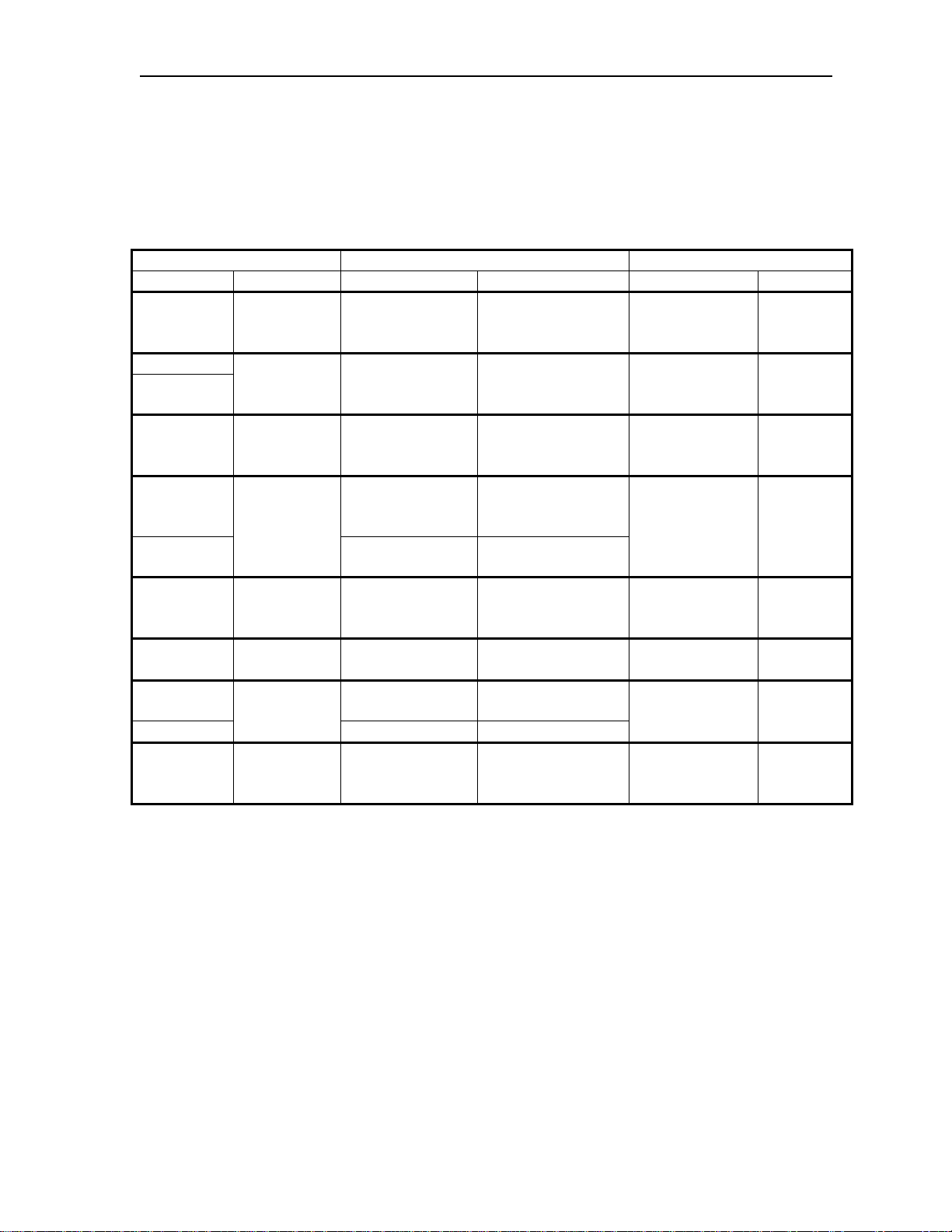
The following chart and notes can be used to help show the
corresponding configuration parameters between the IOCDS
definitions, HCD definitions, and the CCA-3074 configuration.
IOCDS HCD CCA-3074
MACRO Parameter Panel Parameter Panel Parameter
CNTLUNIT CUADD Change Control
Unit Definition
IODEVICE
CNTLUNIT
IODEVICE ADDRESS Add Device Number of Devices Update
CHPID Update CHPID
IODEVICE
CHPID SWITCH Add Channel
CNTLUNIT LINK Change Control
CNTLUNIT Change Control
IODEVICE
IODEVICE UNIT Add Device Device Type Update
UNITADD Define
Device/Processor
PARTITION
Access and
Candidate List
Define Device
Candidate List
Path
Unit Definition
CUNUMBR
Unit Defintion
Add Device Connected to CUs
Logical Address Update
ESCON/FICON
CUs
Unit Address Update
ESCON/FICON
CUs
ESCON/FICON
CUs
Access List = Yes
Partition/Reachable
Dynamic Switch
ID or Entry Switch
ID
Link Address N/A N/A
Control Unit
Number
Update
ESCON/FICON
CUs
N/A N/A
N/A N/A
ESCON/FICON
CUS
CUADD
Low
Address
High
Address
LPAR
Number
Protocol
Notes:
1. Note that the UNITADD parameter of the IODEVICE macro
must correspond to one or more of the range of addresses
defined in the UNITADD parameter of the CNTLUNIT
macro.
2. Each address within the range defined by the UNITADD
parameter of the CNTLUNIT macro that has an associated
IODEVICE definition should have a Subchannel definition on
the CCA-3074.
2-14 707159-002
Page 29
CCA-3074 Planning
Chapter 3. Host Gens – OS/390 with HCD
Task List
The following is a general list of the tasks that are needed to
successfully implement the CCA-3074 in the OS/390 host environment.
(An assumption is made that the LPARs being used are already
defined.) Example panels are given for many of the steps below, along
with other example panels to give you a better flavor of what to expect
to see.
• Define Switch (ESCON Director) if not already defined (HCD
Panels 4-9)
• Define CHPID: identifies which ESCON or FICON cable
connected to the processor, Director (switch), and downstream port
to the controller are to be used (view: HCD Panel 13)
• Define Controller Definition: identifies controller type, protocol
(define: 16-18, 20 / view: 14, 19)
• Define I/O Device Definitions: defines the number of I/O devices
(define: 21-26, 29 / view: 15, 28)
• Define the Explicit Device Candidate List (on EMIF systems): Used
to limit access to each CCA-3074 host circuit to one LPAR (define:
23, 24)
• Build the production I/O Definition File with the new definitions
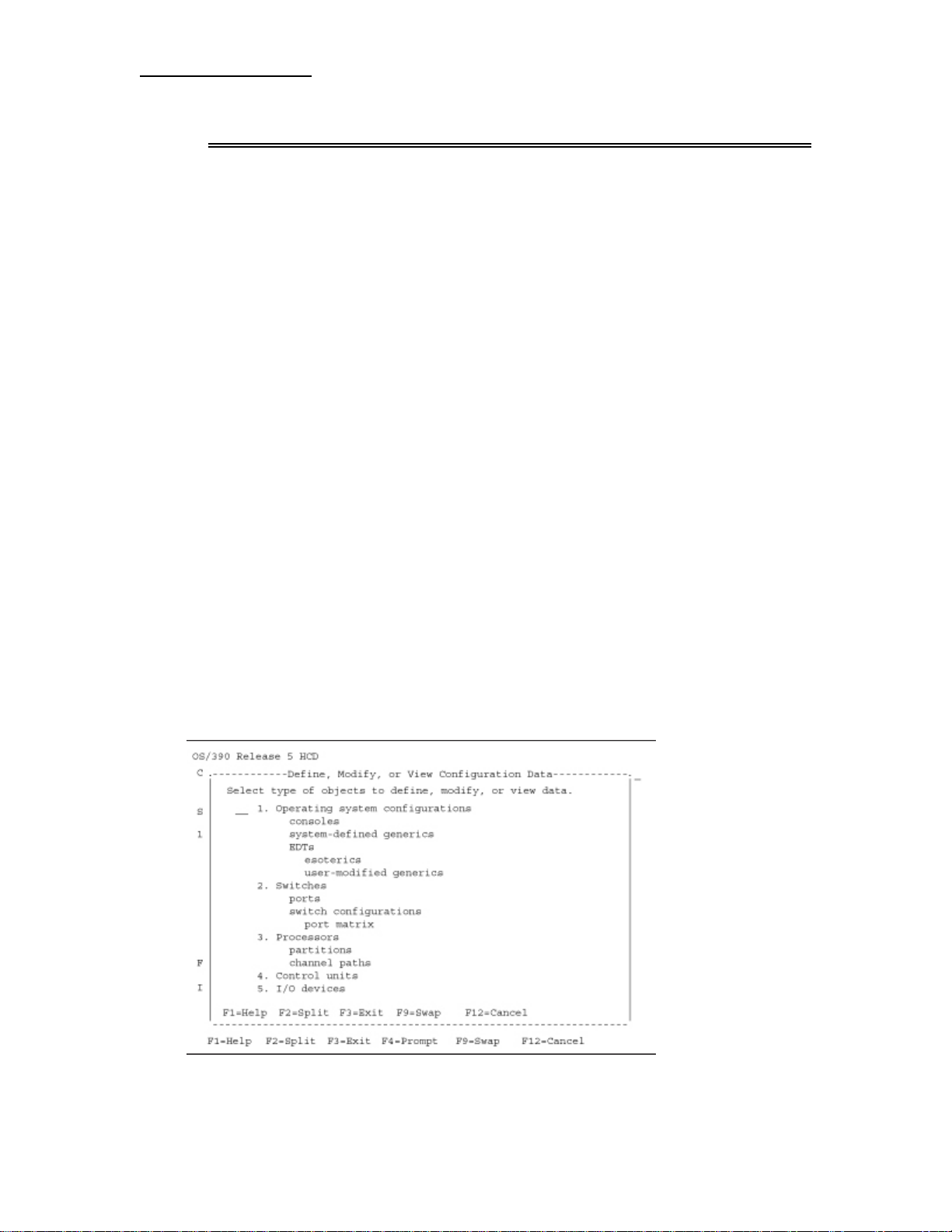
HCD Panel 1
Above is the first screen you see when you start the HCD program in
OS/390.
707159-002 3-1
Page 30
Chapter 3. Host Gens –OS/390 with HCD
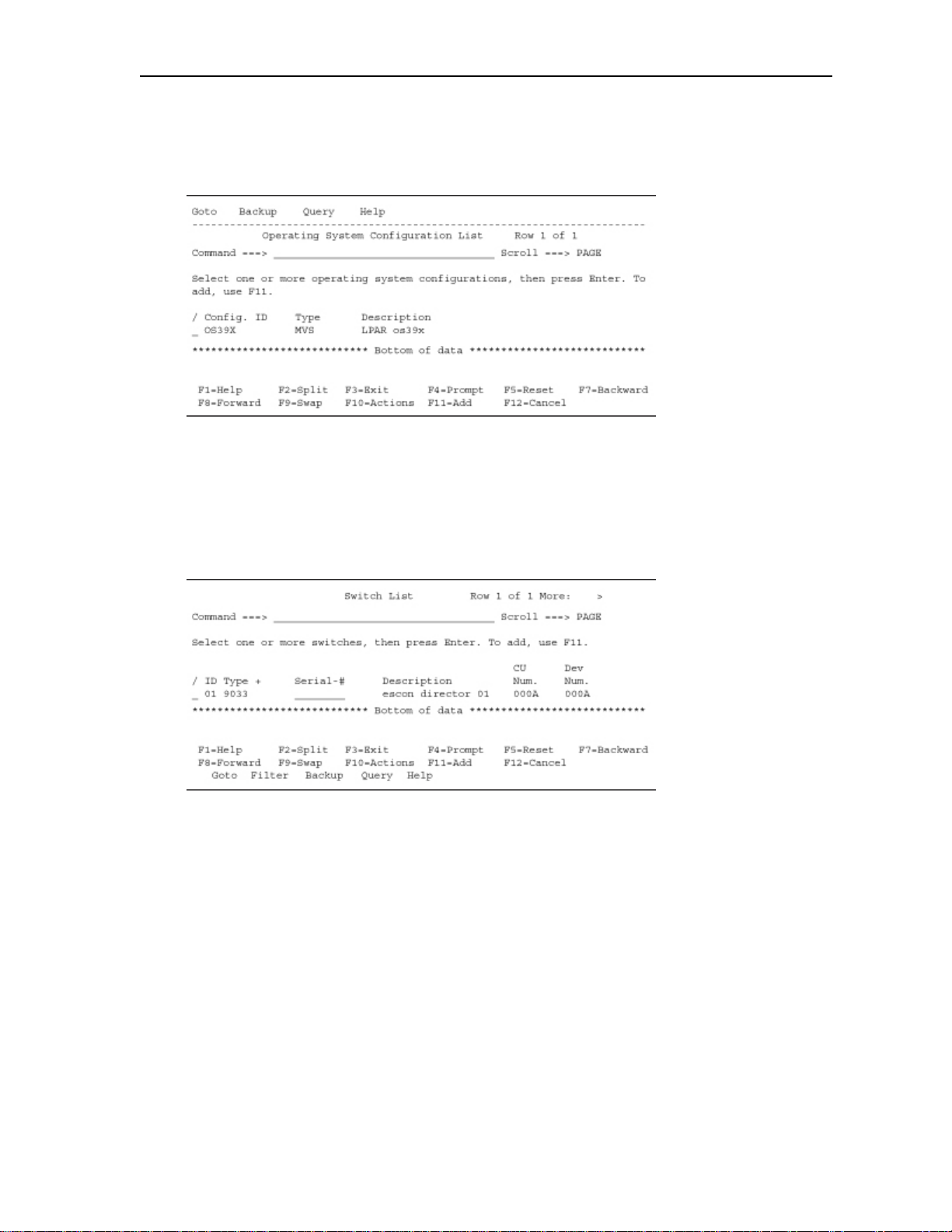
HCD Panel 2
Selecting option 1 on HCD panel 1 results in the above panel. This
panel defines what the operating system type is (MVS). Multiple
LPARs may be defined in one Config. ID, or separate Config. IDs may
be established for each LPAR.
HCD Panel 3
Selecting option 2 on panel 1 brings you to where ESCON Directors
(Switches) are defined.
The example shows a type 9033 ESCON Director defined as switch ID
(#01).
3-2 707159-002
Page 31
CCA-3074 Planning
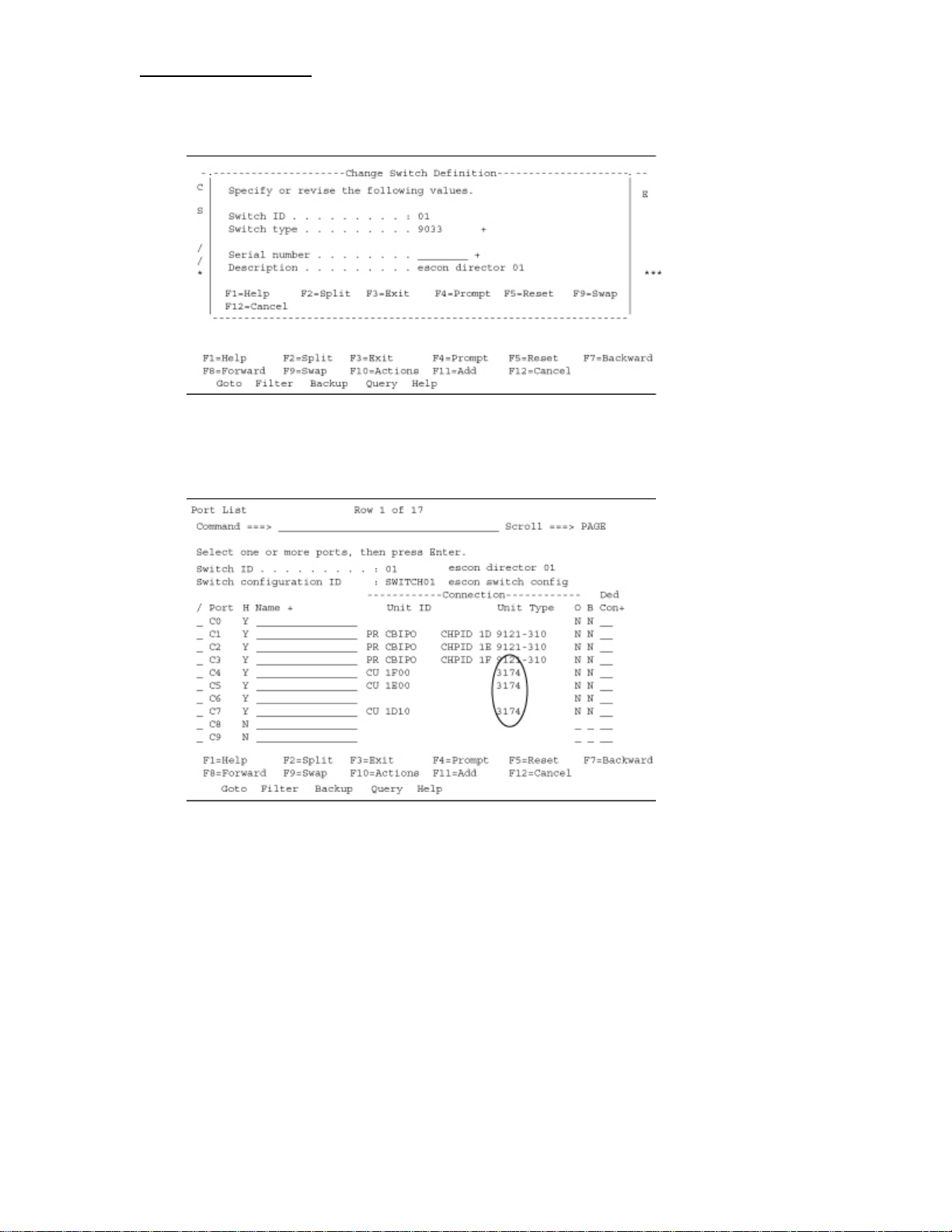
HCD Panel 4
Above shows how a switch definition is created or edited.
HCD Panel 5
Selecting option P “work with ports” on the switch list panel will list
the ports available on this ESCON director and how they are assigned.
Note the 3174 unit types used to denote the CCA-3074.
707159-002 3-3
Page 32
Chapter 3. Host Gens –OS/390 with HCD
HCD Panel 6
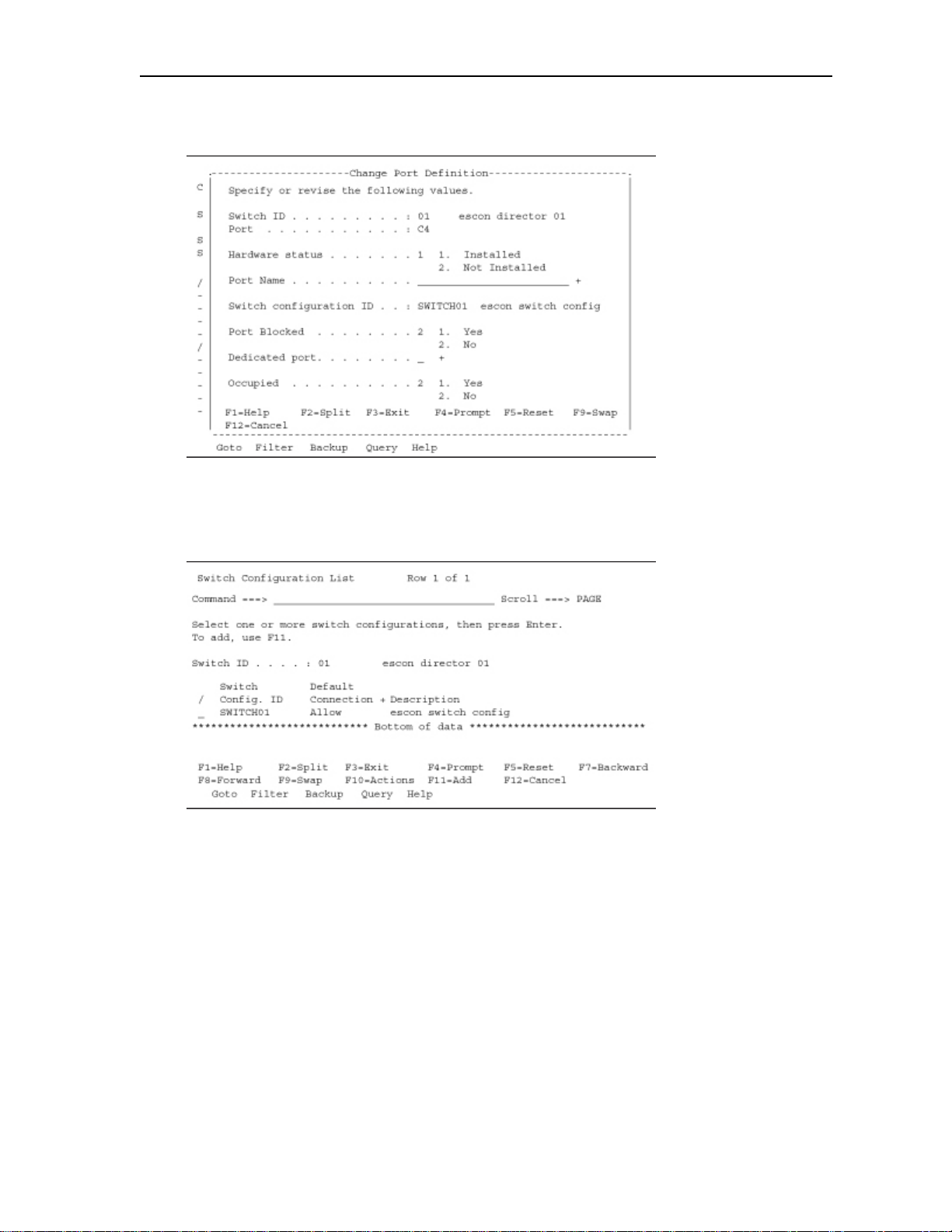
If you elect to edit one of the port definitions, the above panel appears.
HCD Panel 7
Selecting option S on panel 3 will display the “Switch Configuration
List”. This panel is used to define whether you allow the default
connection to be “Allow” or “Blocked”.
3-4 707159-002
Page 33
CCA-3074 Planning
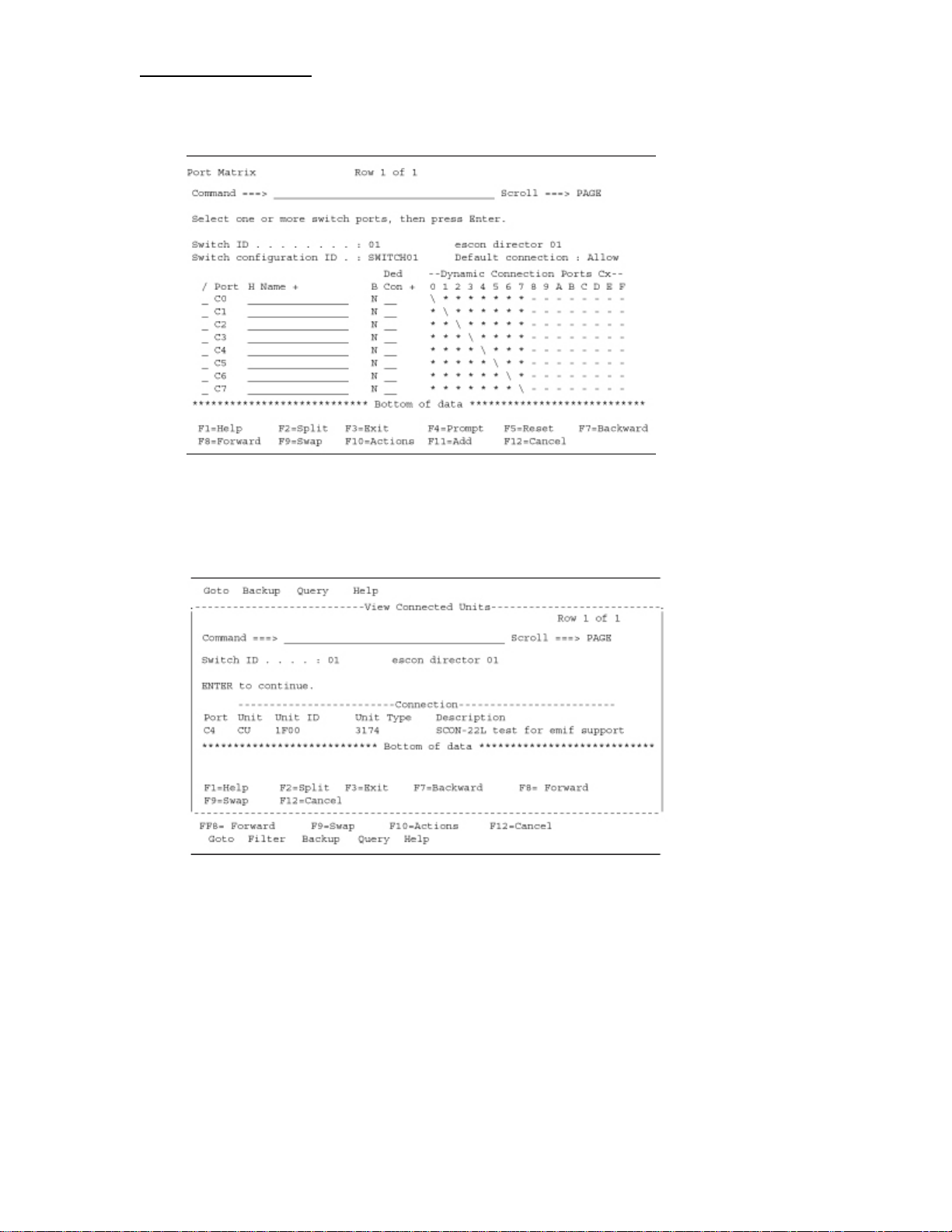
HCD Panel 8
Select option S on panel 7. This panel allows you to override the default
connection: “Allow”, and specify block on a per (switch) port basis.
HCD Panel 9
You can view/edit/define what is connected to each port on the switch.
707159-002 3-5
Page 34
Chapter 3. Host Gens –OS/390 with HCD
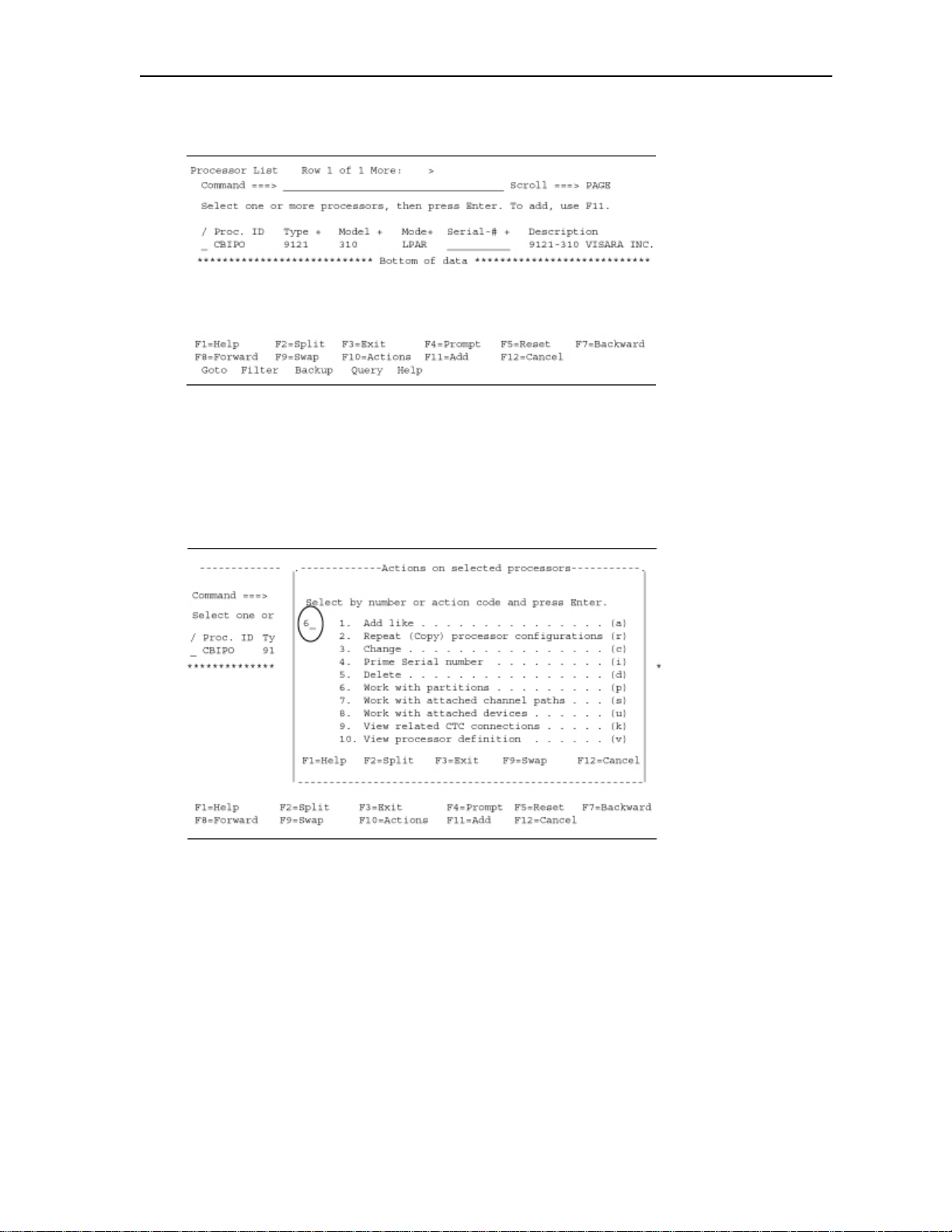
HCD Panel 10
The panel shown above is obtained by selecting option 3 on HCD panel
1. This panel is where we define our processor and whether this
processor is in LPAR MODE or in BASIC MODE (BASIC MODE
means partitioning is turned off).
HCD Panel 11
From this panel, you can select to work with the partitions.
3-6 707159-002
Page 35
CCA-3074 Planning
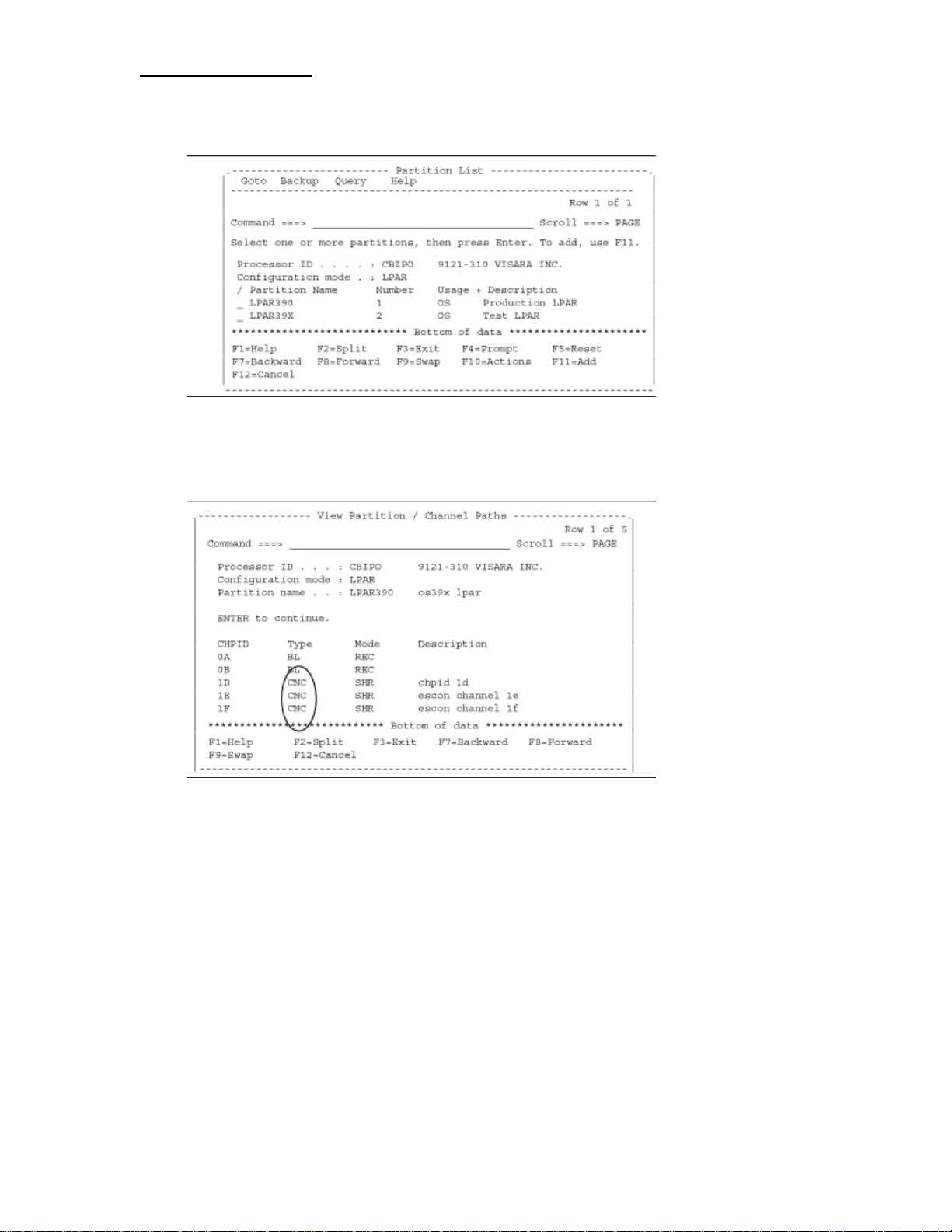
HCD Panel 12
This panel shows the LPAR named LPAR390 and LPAR39X.
HCD Panel 13
Entering option V on partition LPAR390 in panel 12 and a panel
similar to the one above, showing the channel paths that are defined for
the LPAR.
Note that on chpid 1D-1F the type channel used for the CCA-3074 is
CNC.
707159-002 3-7
Page 36
Chapter 3. Host Gens –OS/390 with HCD
HCD Panel 14
Selecting option S on panel 12, you come to the panels showing the
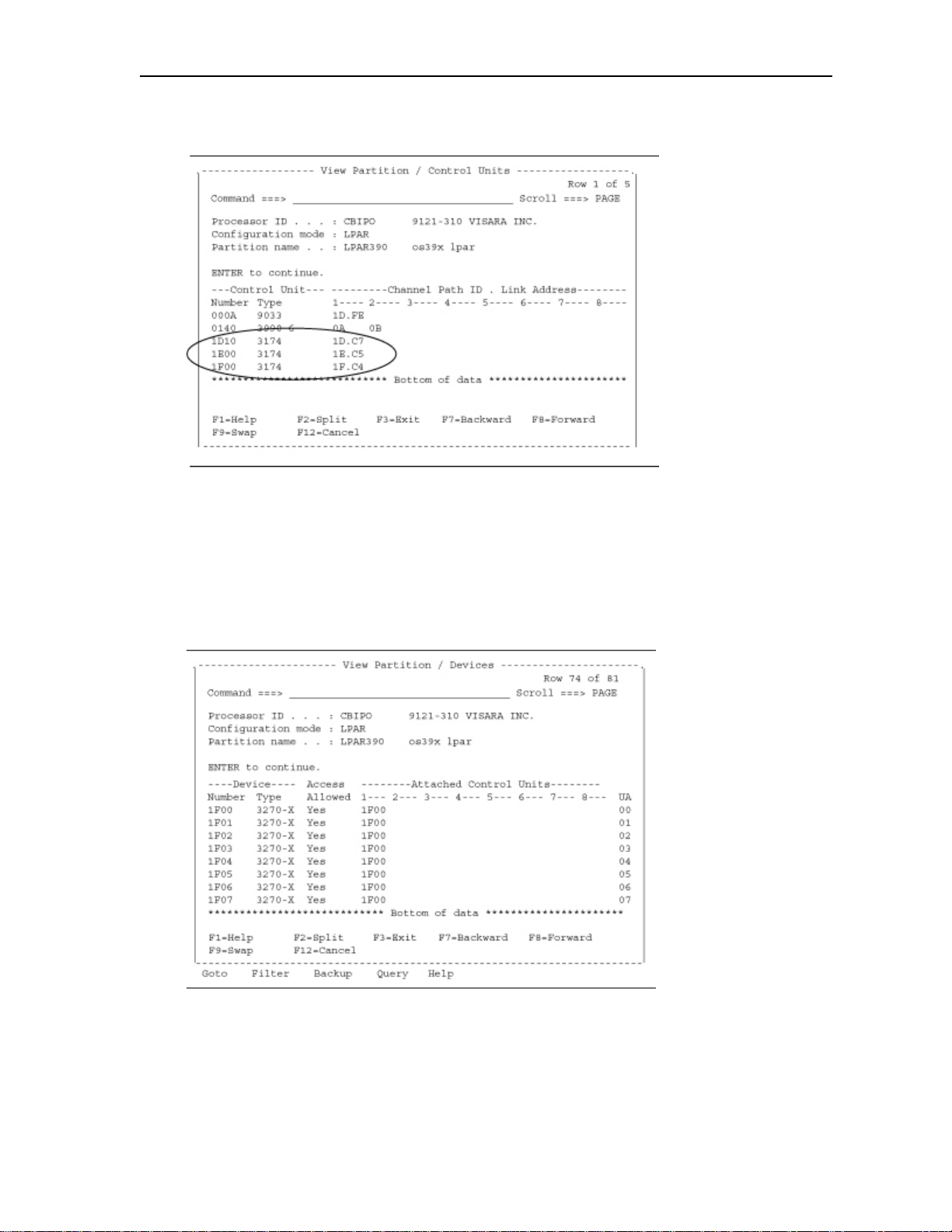
control units defined for the LPAR. Note the control unit type of
“3174” used for the CCA-3074. Also note the format of the Channel
Path ID (defined on HCD panel 13) and Link Address (ESCON
Director port being used - as listed on HCD panel 5).
HCD Panel 15
Select option U on panel 12. The panel above shows the IO Devices
(consoles) that are defined to control unit 1F00 from the HCD Panel 14.
Notice the column labeled Access Allowed. This would be a NO if
access to this LPAR is turned off in the IO Device Candidate List.
(1F00-1F07 corresponds to the 00-07 Device Low-High range in the
3-8 707159-002
Page 37
CCA-3074 Planning
CCA-3074 configuration.
HCD Panel 16
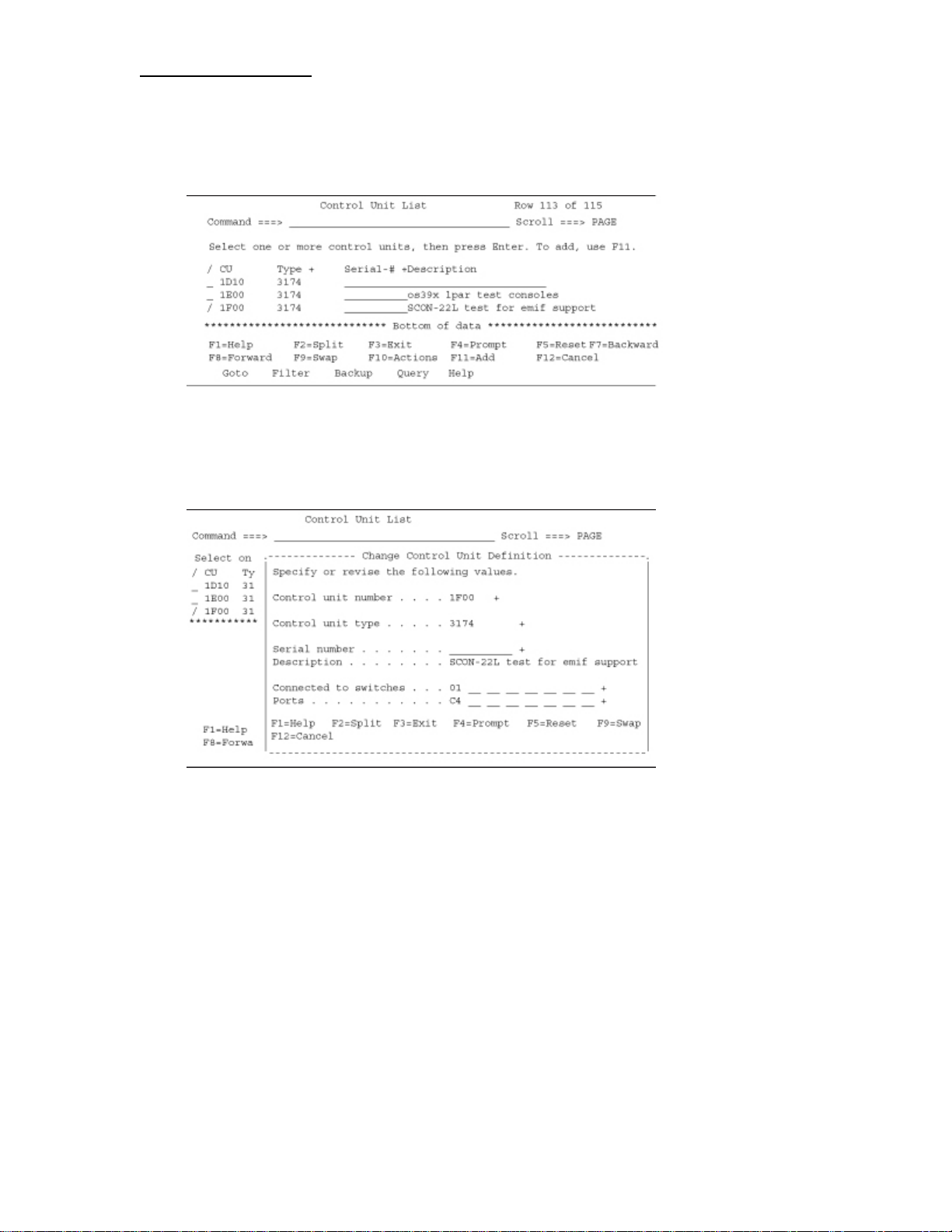
Select option 4 from HCD panel 1. The panel above shows the Control
Unit List panel.
HCD Panel 17
The panel above shows the detail for the control unit definition when
selected from the previous panel. Note the references to the switch
number and the output port number of the switch.
707159-002 3-9
Page 38
Chapter 3. Host Gens –OS/390 with HCD
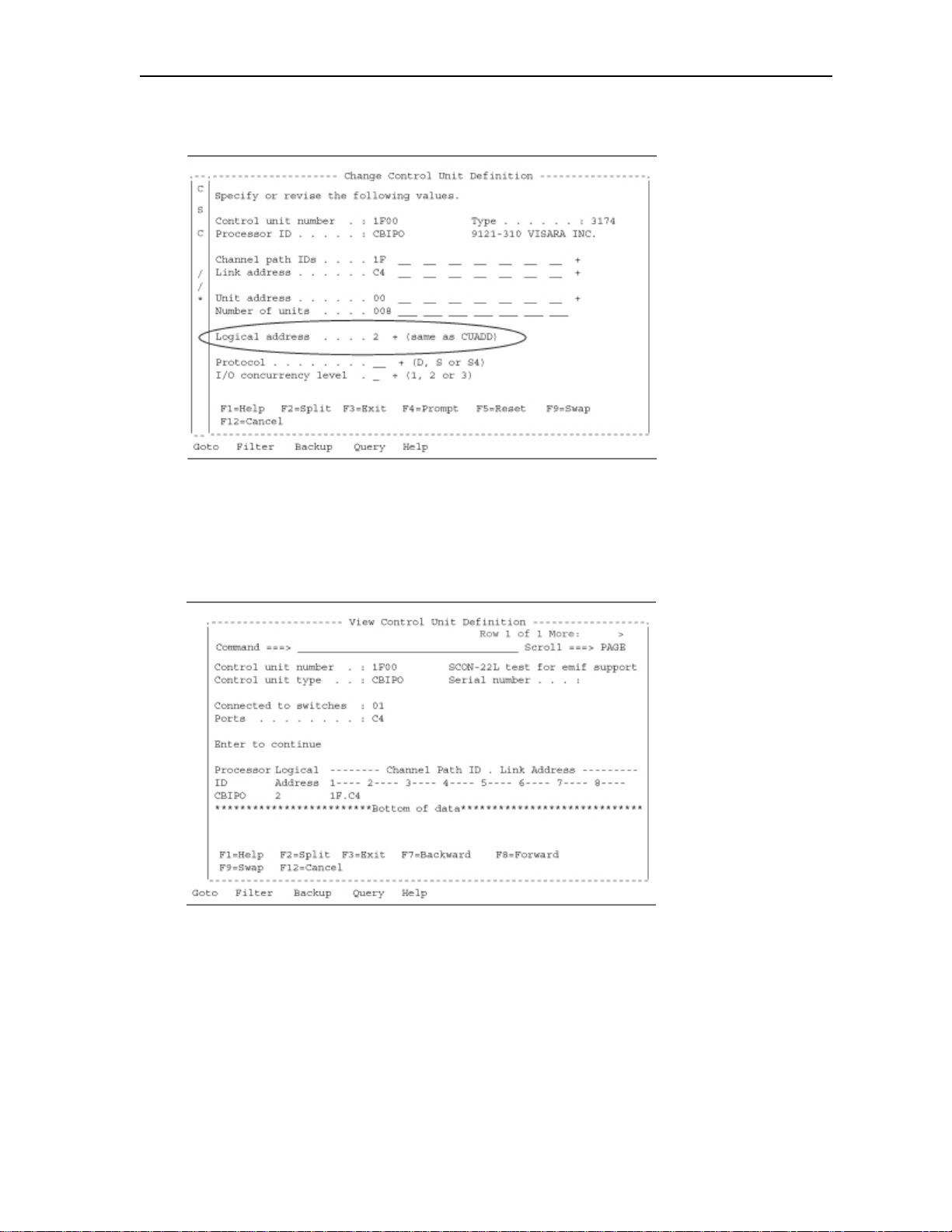
HCD Panel 18
The parameter circled corresponds to the CUADD (CU address)
parameter for the CCA-3074 over the ESCON interface (CU parameter
in the CCA-3074 configuration).
HCD Panel 19
From the “Control Unit List” panel enter option V on control unit 1F00.
This panel allows you to view the control unit definition for the CCA-
3074.
3-10 707159-002
Page 39
CCA-3074 Planning
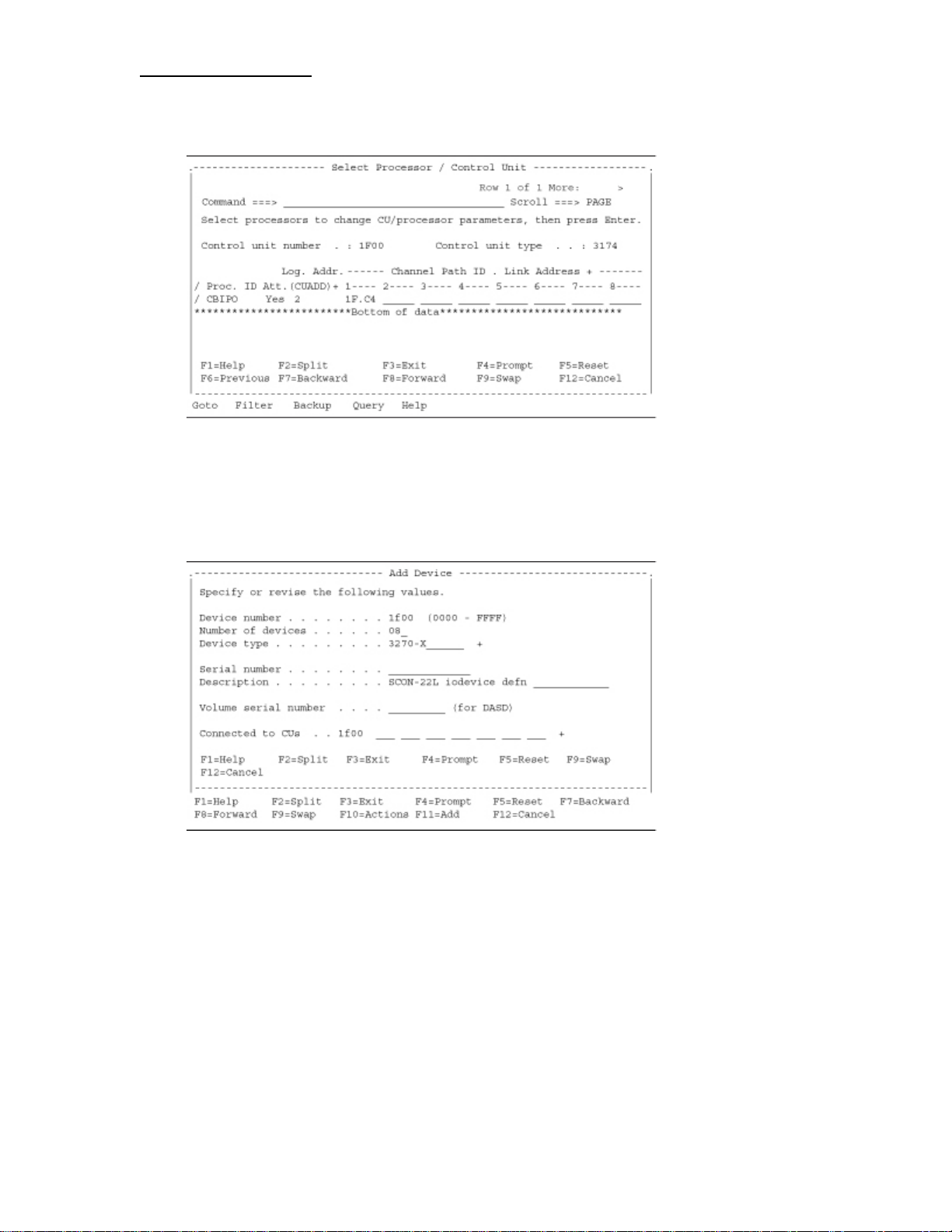
HCD Panel 20
This panel is where you select which processor you are attaching the
control unit to. For a multi-processor mainframe you would select the
appropriate processor ID.
HCD Panel 21
By selecting item 5 from HCD Panel 1, you can bring up panels to
define the devices (consoles) that will be attached to the CCA-3074. It
is important to match the address range on the CCA-3074 with the
range defined by this panel. Note that the Device Numbers used must
be unique within each Config. ID, even if multiple MVS systems are
defined. If different Config. IDs are used to define each MVS system,
then the same Device Number may appear in more than one of the
definitions. (Reference Config. IDs in HCD Panel 2.)
707159-002 3-11
Page 40
Chapter 3. Host Gens –OS/390 with HCD
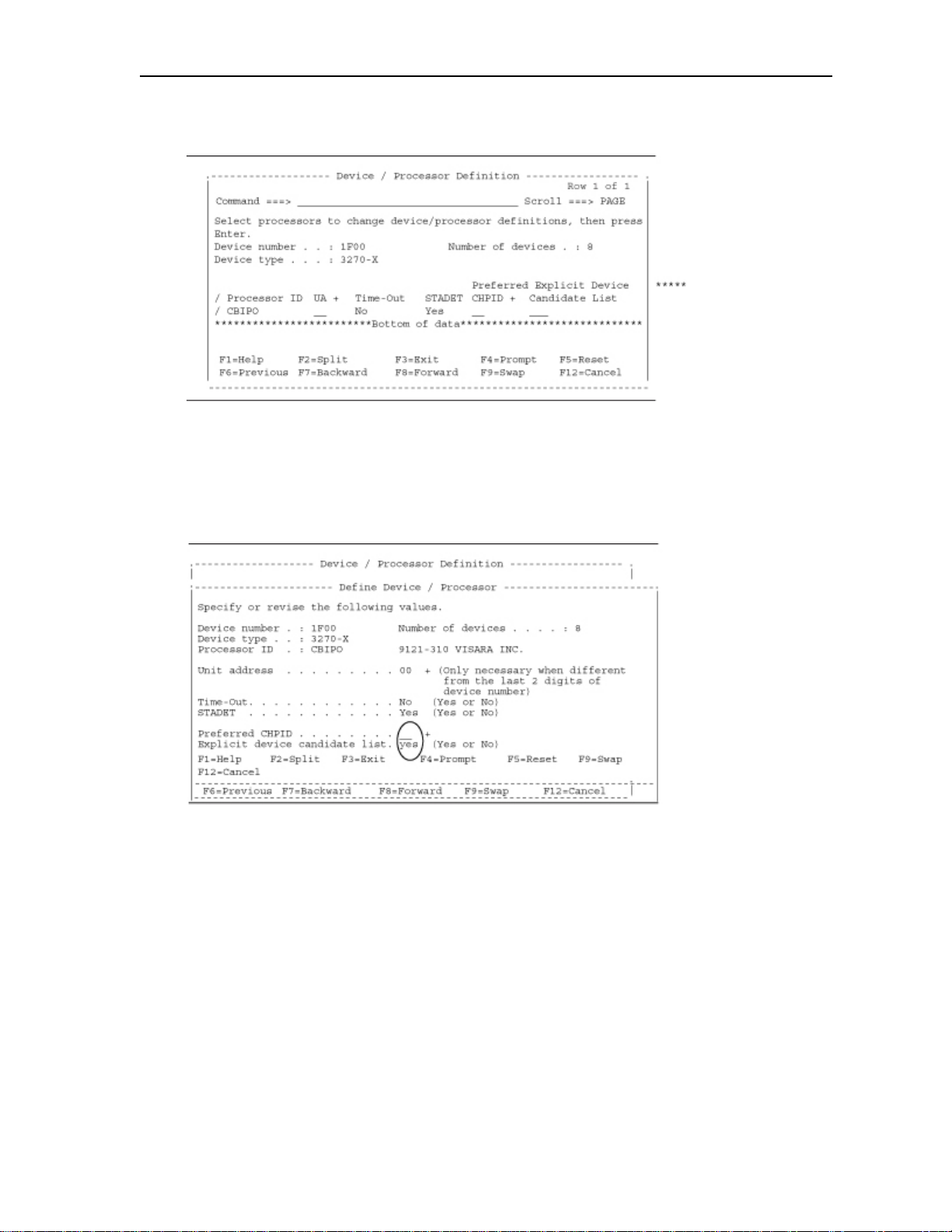
HCD Panel 22
Depressing the Enter key on the “Add Device” panel brings us to this
panel. This is where we select which processor this IO device (console)
connects to.
HCD Panel 23
Making a selection on the previous panel will allow you to define I/O
device definition. One of the options is for the Explicit Device
Candidate List. The purpose of the Explicit Device Candidate List is to
limit which LPARs have access to a particular resource in an EMIF
environment. Below is the related help information.
3-12 707159-002
Page 41
CCA-3074 Planning
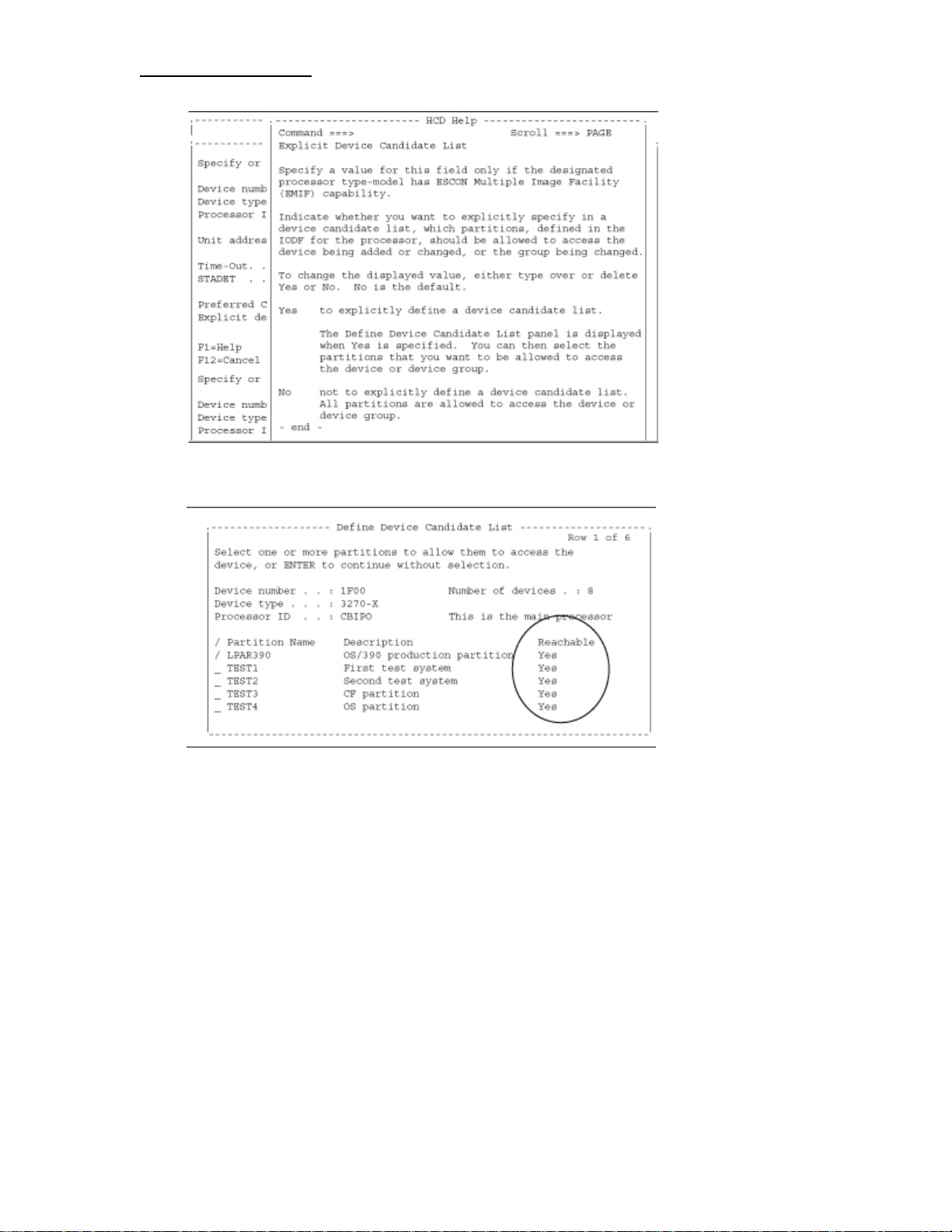
HCD Panel 24
If you specify Yes in the Explicit device candidate list field of HCD
Panel 23, the panel above is displayed.
Note that the partition must also be in the channel path access or
candidate list to access the device. On the Define Device Candidate List
panel, place a slash (/) character to the left of only one specific Partition
Name.
707159-002 3-13
Page 42
Chapter 3. Host Gens –OS/390 with HCD
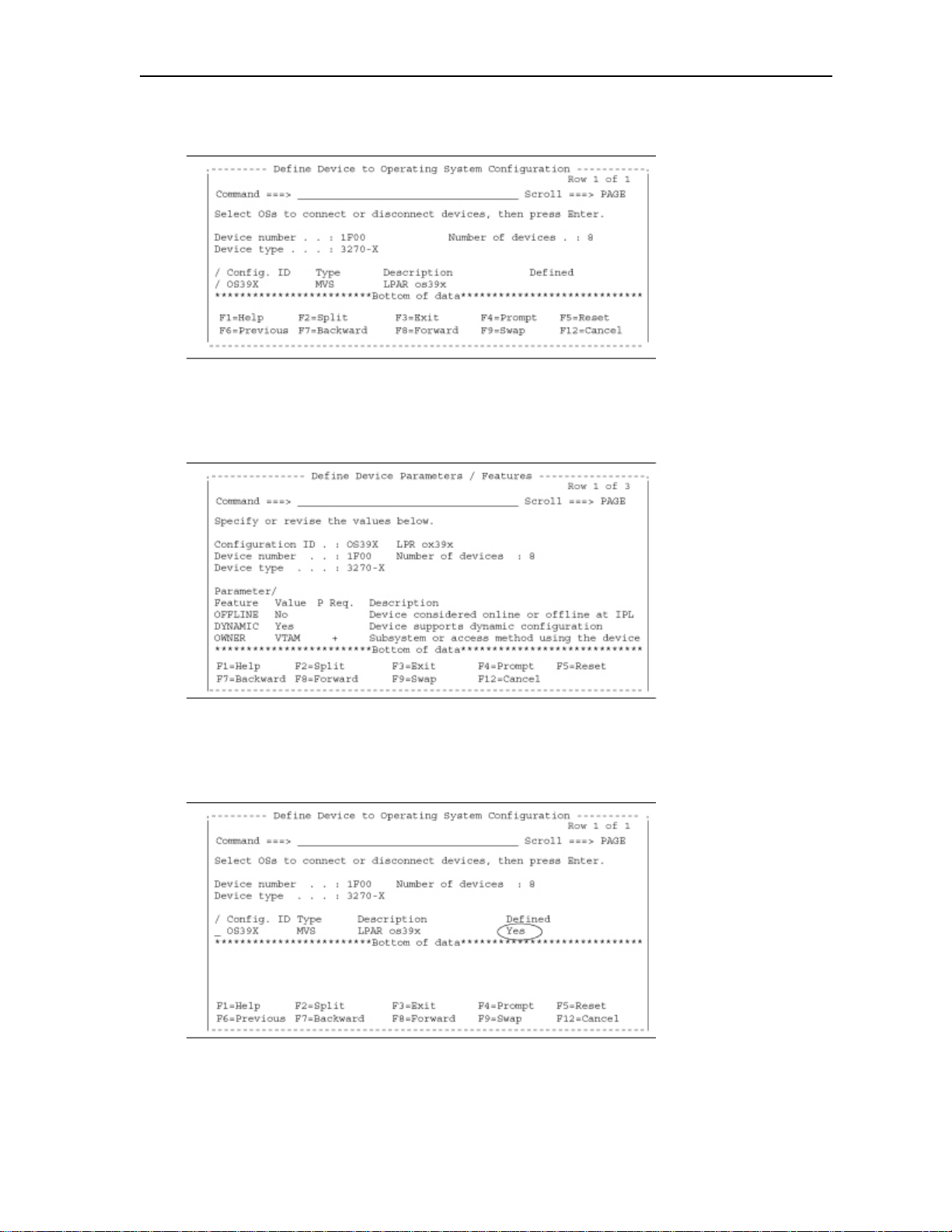
HCD Panel 25
This panel allows you to connect the device to the operating system.
HCD Panel 26
This panel lets you define some of the specific features of the device.
HCD Panel 27
This just shows that the device has been defined to the operating
system.
3-14 707159-002
Page 43
CCA-3074 Planning
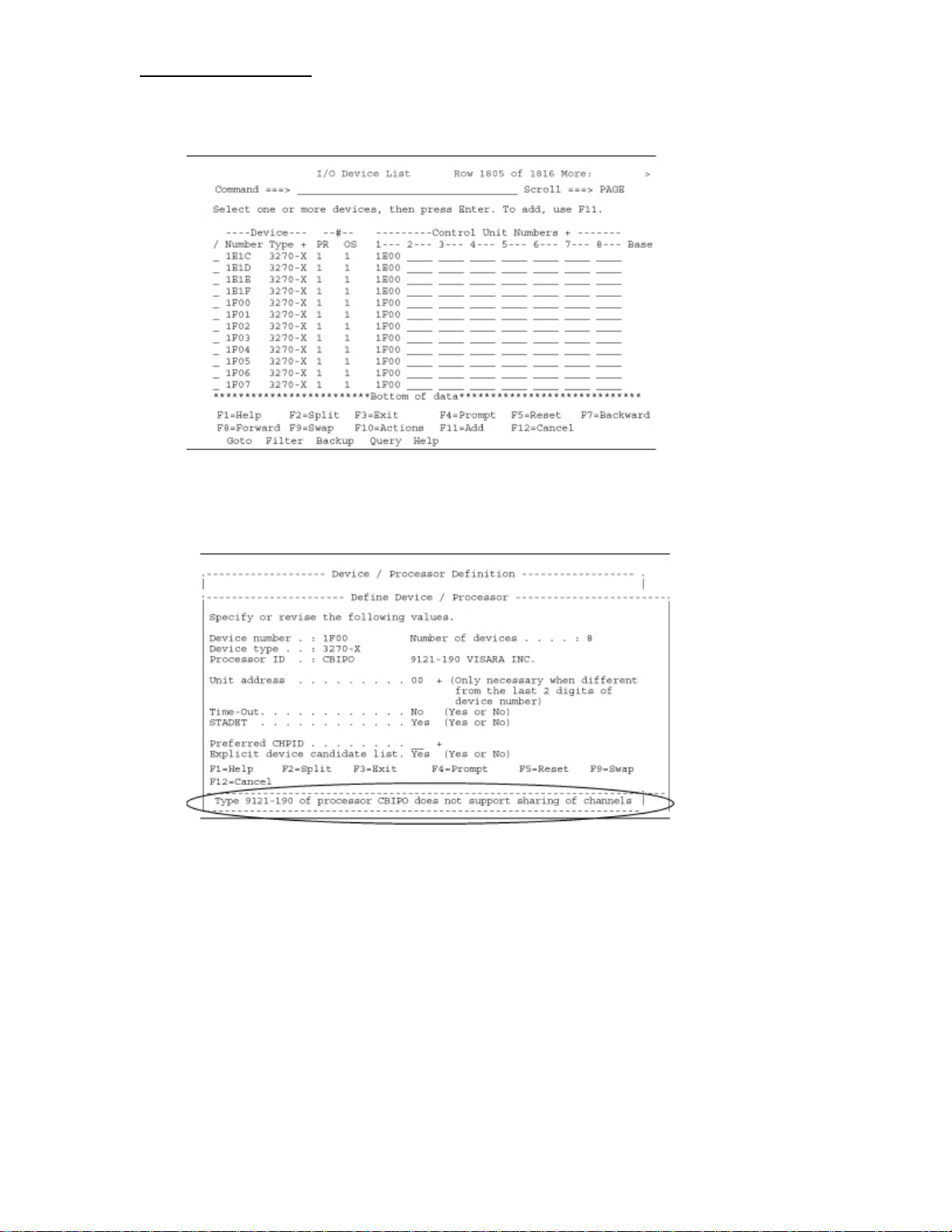
HCD Panel 28
This just shows the 8 IO Devices you just created.
HCD Panel 29
This panel shows what you would see if you tried to configure a
“Explicit device candidate list” on a processor that does not support
EMIF.
707159-002 3-15
Page 44

Page 45

CCA-3074 Planning
Chapter 4. IOCDS Sample Definitions
Following are some example IOCDS definitions. Detailed
examples of the corresponding HCD panels are not practical, due
to the large number of panels required to create one of these
definitions. Refer to the sample HCD panels in Chapter 3, and to
the parameter cross reference chart in Chapter 2, to aid in
determining what to define in the HCD panels.
Here are some of the key parameters used in the definitions for
the CCA-3074, and what their purpose is.
CHPID
• PATH=number identifies which host ESCON/FICON
connection is used
• TYPE=CNC required for ESCON
• TYPE=FC required for FICON
• SWITCH=number identifies an ESCON/FICON Director as
being in the channel path
CNTLUNIT -
• LINK=number identifies the ESCON/FICON Director port
that the controller is attached to
• PATH argument allows association of the PATH to the LINK
• UNIT=3174 for ESCON definitions
• UNIT=NOCHECK for FICON definitions
IODEVICE - Basically the same as for Bus and Tag with
addition of the following:
• PARTITION identifies which partition the definition is
assigned to. Note that if no PARTITION parameter is
specified, then the IODEVICE statement applies to all
partitions sharing the CHPID (and the CNTLUNIT macro also
applies to each). When this is the situation, the single set of
statements is actually defining a CU in each of the LPARs
with identical addressing. The CCA-3074 in turn, must have a
separate CU defined to each of the LPARS sharing the path,
and a separate set of definitions for the device sessions, etc.
707159-002 4-1
Page 46
Chapter 4. IOCDS Sample Definitions
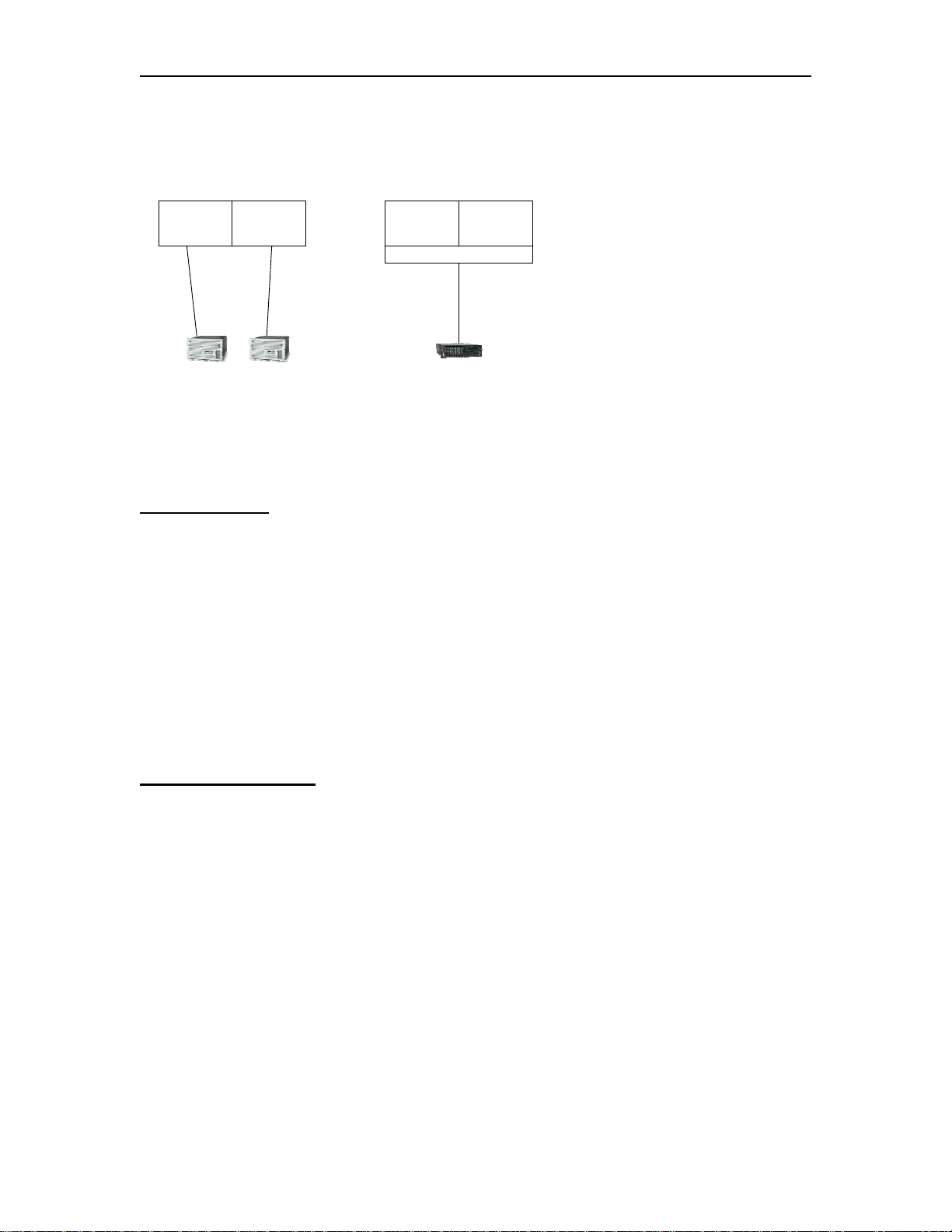
EXAMPLE 1 - Typical 3174 Replacement (ESCON)
Before
LPAR390 TEST1
1F
1E
After
LPAR390 TEST1
EMIF
1E
This first example shows the replacement of two ESCON attached 3174s with a single
CCA-3074 (also on ESCON). The first definitions shown are used to define the two
3174-22L. The second set of definitions is used to connect the CCA-3074.
3174 Definitions
RESOURCE PARTITION=((LPAR390,1),(TEST1,2)
CHPID PATH=(1F),TYPE=CNC,PARTITION=(LPAR390)
CHPID PATH=(1E),TYPE=CNC,PARTITION=(TEST1)
CNTLUNIT CUNUMBR=IFOO,PATH=1F,UNITADD=((00,5)),UNIT=3174
CNTLUNIT CUNUMBR=IEOO,PATH=1E,UNITADD=((00,5)),UNIT=3174
IODEVICE CUNUMBR=IF00,ADDRESS=(600,5),UNIT=3270-X,UNITADD=00,PARTITION=(LPAR390)
IODEVICE CUNUMBR=IE00,ADDRESS=(600,5),UNIT=3270-X,UNITADD=00,PARTITION=(TEST1)
CCA-3074 Definitions
RESOURCE PARTITION=((LPAR390,1),(TEST1,2))
CHPID PATH=(1E),TYPE=CNC,SWITCH=01,SHARED
CNTLUNIT CUNUMBR=IEOO,PATH=1E,UNITADD=((00,5)),UNIT=3174
CNTLUNIT CUNUMBR=IFOO,PATH=1E,UNITADD=((00,5)),UNIT=3174
IODEVICE CUNUMBR=IE00,ADDRESS=(600,5),UNIT=3270-X,UNITADD=00,PARTITION=(TEST1)
IODEVICE CUNUMBR=IF00,ADDRESS=(600,5),UNIT=3270-X,UNITADD=00,PARTITION=(LPAR390)
4-2 707159-002
Page 47

CCA-3074 Planning
Notes:
1. EMIF is used to allow both CNTLUNITs to share the same path (1E).
2. The CNTLUNIT macros do not include the CUADD parameter, and the default
value of “0” is assumed.
3. EMIF only allows LPARs within the same LCSS to share a channel. If multiple
LCSS’ are in use on a single mainframe, then an ESCON channel from each LCSS
in use is required.
4. Up to 15 LPARs can be configured to share a single EMIF channel from the host.
5. The Device Candidate List in HCD is used to specify which LPARs are accessing
each CU.
707159-002 4-3
Page 48
Chapter 4. IOCDS Sample Definitions
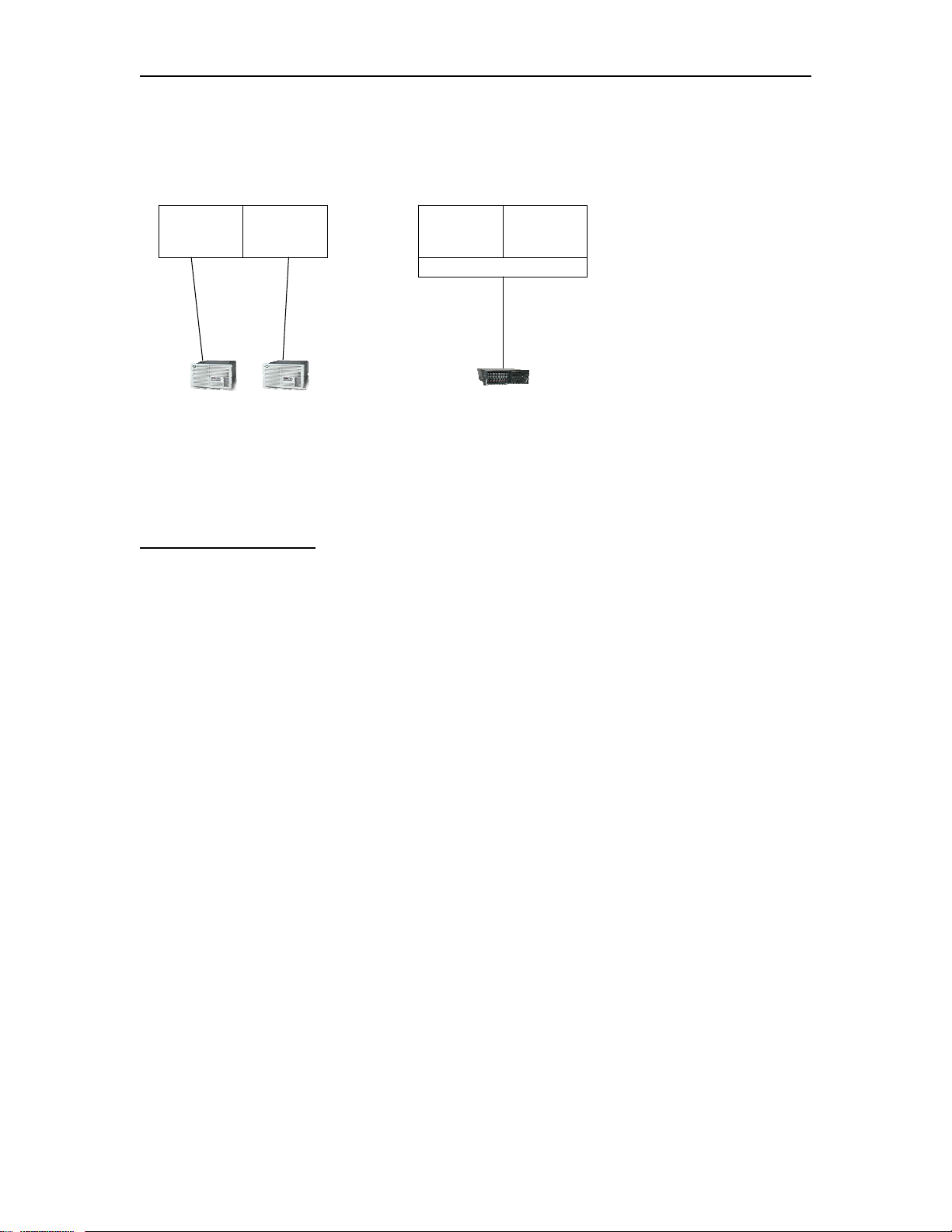
EXAMPLE 2 - Typical 3174 Replacement (FICON)
Before
LPAR390 TEST1
1F
1E
After
LPAR390 TEST1
MIF
1E
This example shows the replacement of the same two ESCON attached 3174s from
Example 1, with a single CCA-3074 (this time on FICON). The definitions for the two
3174-22L were given in Example 1. The definitions below are used to connect the CCA3074 through FICON.
CCA-3074 Definitions
RESOURCE PARTITION=((LPAR390,1),(TEST1,2))
CHPID PATH=(1E),TYPE=FC,SWITCH=01,SHARED
CNTLUNIT CUNUMBR=IEOO,PATH=1E,UNITADD=((00,5)),UNIT=NOCHECK
CNTLUNIT CUNUMBR=IFOO,PATH=1E,UNITADD=((00,5)),UNIT=NOCHECK
IODEVICE CUNUMBR=IE00,ADDRESS=(600,5),UNIT=3270-X,UNITADD=00,PARTITION=(TEST1)
IODEVICE CUNUMBR=IF00,ADDRESS=(600,5),UNIT=3270-X,UNITADD=00,PARTITION=(LPAR390)
Notes:
1. MIF is used to allow both CNTLUNITs to share the same path (1E).
2. The CNTLUNIT macros do not include the CUADD parameter, and the default
value of “0” is assumed.
3. This time the CHPID type is FC (FICON)
4. Note that the UNIT type has changed to ‘NOCHECK’. TYPE=3174 is not valid in the
FICON environment.
4-4 707159-002
Page 49
CCA-3074 Planning
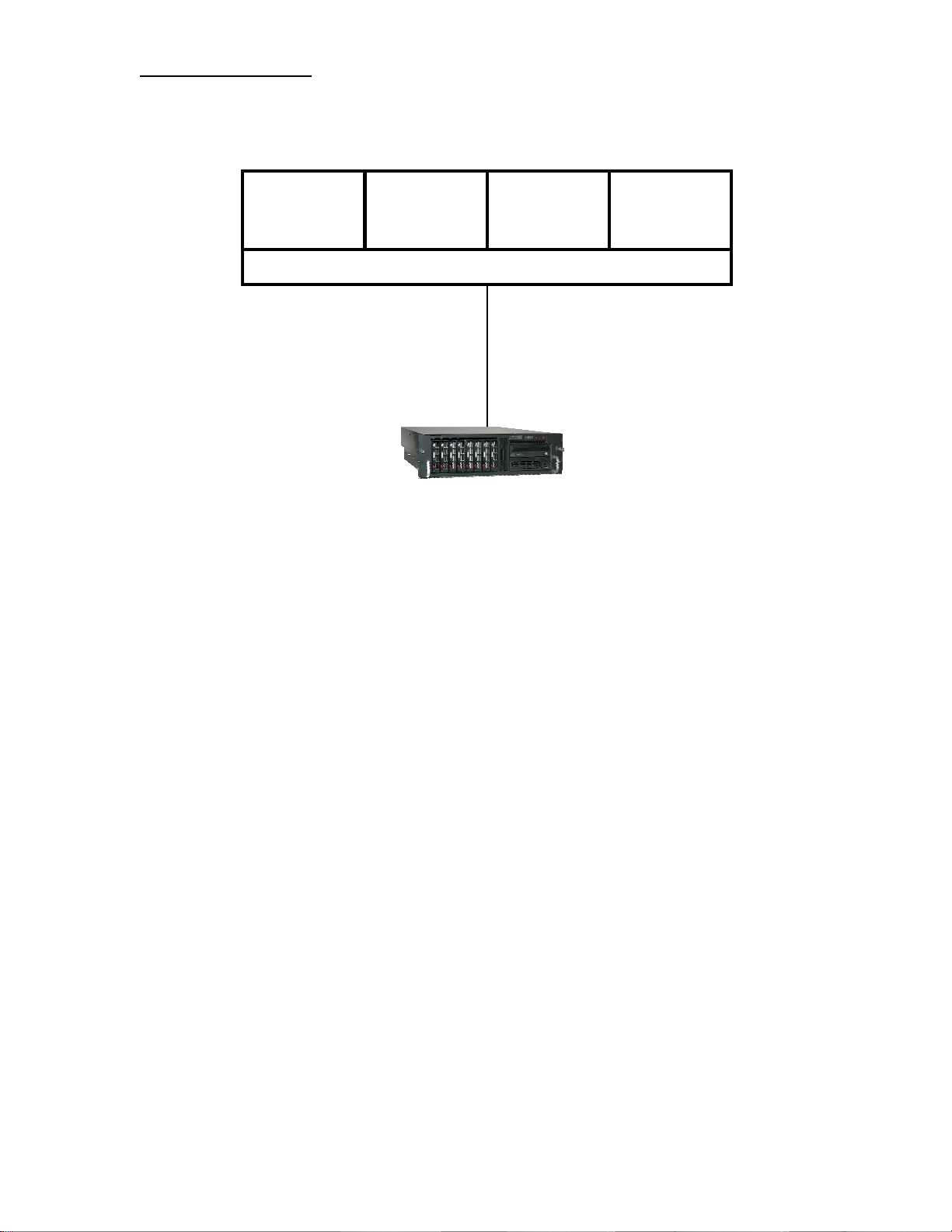
EXAMPLE 3 – Device Candidate List not Used
LPAR390 PROD3
LPARZOS
EMIF
72
TEST1
A single CNTLUNIT and IODEVICE definition is used to define consoles on all four
LPARS, by intentionally not using the Device Candidate list. This method makes use of
the same CUNUMBR and IODEVICE numbers in each LPAR that shares the CHPID.
A separate CU definition is still required on the CCA-3074 to direct each connection to
the correct LPAR.
RESOURCE PARTITION=((LPAR390,1),(LPARZOS,2),(PROD3,3),(TEST1,4))
CHPID PATH=(72),PARTITION=((LPAR390,LPARZOS,PROD3,TEST1)),TYPE=CNC,SHARED
CNTLUNIT CUNUMBR=985,PATH=72,UNITADD=((20,16)),UNIT=3174,CUADD=3
IODEVICE CUNUMBR=985,ADDRESS=(800,16),UNIT=3270-X,UNITADD=20
Notes:
1. Since there is no PARTITION parameter displayed in the IODEVICE statement,
the IODEVICE and CNTLUNIT definitions are valid in all partitions sharing the
path. The attached CCA-3074 must have a separate CU defined to communicate
with each of the four partitions.
707159-002 4-5
Page 50
Chapter 4. IOCDS Sample Definitions
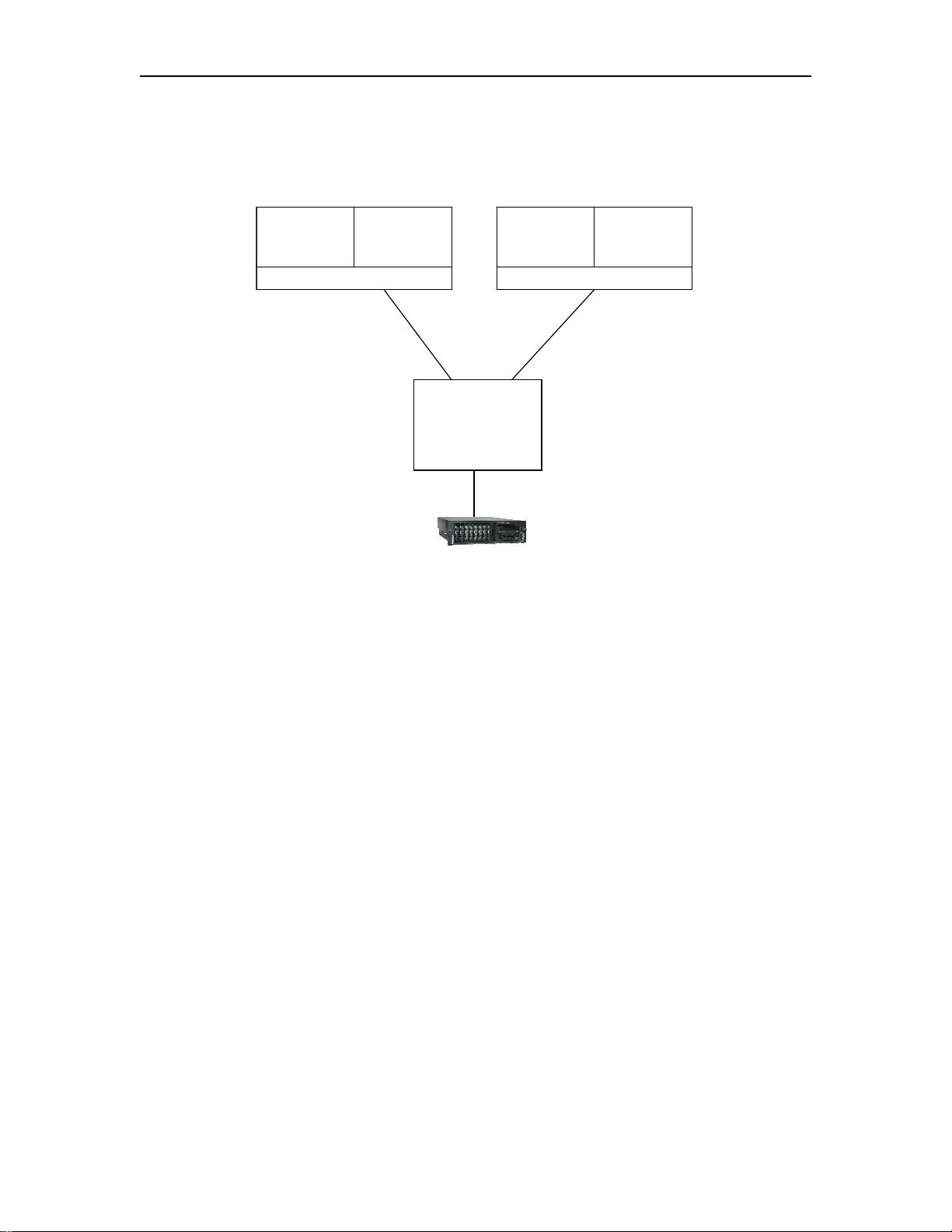
EXAMPLE 4 - EMIF and ESCON Directors Used
CPU1
LPAR390 TEST1
MIF
1F
A1 19
CPU2
LPAR390B TEST2
MIF
43
SWITCH 04
C4
CCA-3074
LPARS on two different CPUs are connected through an ESCON
director to a single CCA-3074 over a single ESCON interface. Users on
the CCA-3074 can have sessions on any or all of the 4 LPARs shown.
Up to 16 LPARs can be supported through the single ESCON interface
to the CCA-3074.
First CPU Definitions:
RESOURCE PARTITION=((LPAR390,1),(TEST1,2))
CHPID PATH=(1F),PARTITION=((LPAR390,TEST1)),SWITCH=04,TYPE=CNC,SHARED
CNTLUNIT CUNUMBR=1E00,PATH=1F,UNITADD=(00,5),UNIT=3174,CUADD=0,LINK=C4
IODEVICE CUNUMBR=IE00,ADDRESS=(600,5),UNIT=3270-X,UNITADD=00,PARTITION=(TEST1)
CNTLUNIT CUNUMBR=1F00,PATH=1F,UNITADD=(00,5),UNIT=3174,CUADD=1,LINK=C4
IODEVICE CUNUMBR=1F00,ADDRESS=(1200,5),UNIT=3270-X,UNITADD=00,PARTITION=(LPAR390)
Second CPU Definitions:
RESOURCE PARTITION=((LPAR390B,3),(TEST2,4))
CHPID PATH=(43),PARTITION=((LPAR390B,TEST2)),SWITCH=04,TYPE=CNC,SHARED
CNTLUNIT CUNUMBR=1195,PATH=43,UNITADD=(00,5),UNIT=3174,CUADD=5,LINK=C4
IODEVICE CUNUMBR=1195,ADDRESS=(1E00,5),UNIT=3270-X,UNITADD=00,PARTITION=(TEST2)
CNTLUNIT CUNUMBR=2144,PATH=43,UNITADD=(00,5),UNIT=3174,CUADD=1,LINK=C4
IODEVICE CUNUMBR=2144,ADDRESS=(700,5),UNIT=3270-X,UNITADD=00,PARTITION=(LPAR390)
4-6 707159-002
Page 51

CCA-3074 Planning
Notes:
1. Different CUADD values are shown for each definition, but they
are not required to be different with the CCA-3074.
2. LINK=C4 in the IO gen refers to the port that the CCA-3074 is
connected to.
707159-002 4-7
Page 52
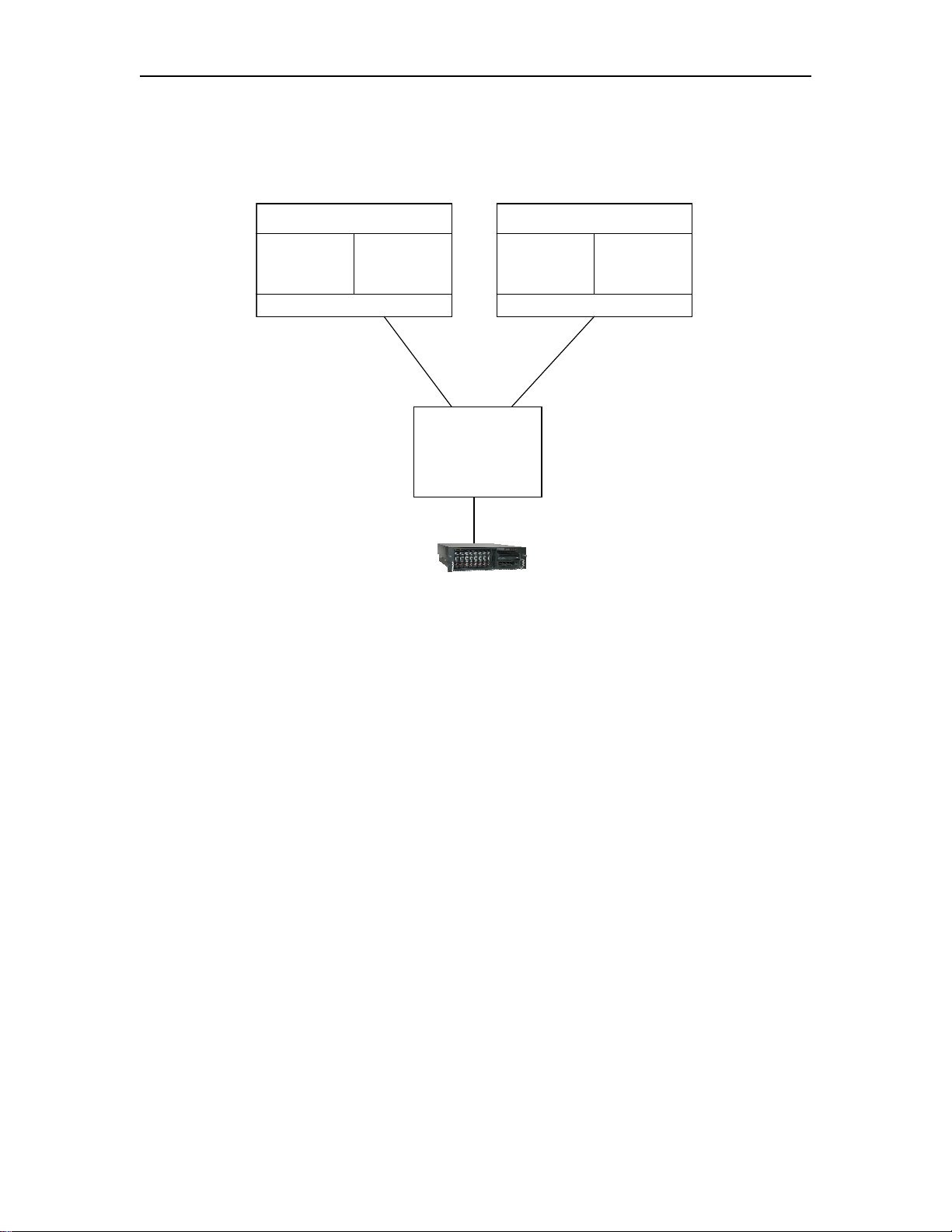
Chapter 4. IOCDS Sample Definitions
EXAMPLE 5 – Multiple LCSS and ESCON
LCSS0 LCSS1
LPAR390 TEST1
MIF
1F
A1 19
LPAR390B TEST2
MIF
43
SWITCH 04
C4
CCA-3074
This example is similar to the last one except all of the LPARS are on a
single CPU that has two Logical Channel Subsystems (LCSS). An
ESCON switch is used similar to before, and a single ESCON cable is
run into the switch from each LCSS to which in turn is connected to the
switch through a single ESCON cable. Users on the CCA-3074 can
have sessions on any or all of the 4 LPARs shown. Up to 16 LPARs
can be supported through the single ESCON interface to the CCA-
3074.
4-8 707159-002
Page 53

CCA-3074 Planning
IO Definitions:
RESOURCE PARTITION=((CSS(0),(LPAR390,1),(TEST1,2)),(CSS(1), (LPAR390B,3),(TEST2,4)))
CHPID PATH=(CSS(0),1F),PARTITION=((LPAR390,TEST1)),SWITCH=04,TYPE=CNC,PCHID=1C0,SHARED
CHPID PATH=(CSS(1),43),PARTITION=((LPAR390B,TEST2)),SWITCH=04,TYPE=CNC,PCHID=145, *
SHARED
CNTLUNIT CUNUMBR=1E00,PATH=(CSS(0),1F),UNITADD=(00,5),UNIT=3174,CUADD=0, *
LINK=(CSS(0),C4)
IODEVICE CUNUMBR=IE00,ADDRESS=(600,5),UNIT=3270-X,UNITADD=00,PARTITION=(CSS(0),TEST1)
CNTLUNIT CUNUMBR=1F00,PATH=(CSS(0),1F),UNITADD=(00,5),UNIT=3174,CUADD=1, *
LINK=(CSS(0),C4)
IODEVICE CUNUMBR=1F00,ADDRESS=(1200,5),UNIT=3270-X,UNITADD=00, *
PARTITION=(CSS(0),LPAR390)
CNTLUNIT CUNUMBR=1195,PATH=(CSS(1),43),UNITADD=(00,5),UNIT=3174,CUADD=5,LINK=(CSS(1),C4)
IODEVICE CUNUMBR=1195,ADDRESS=(1E00,5),UNIT=3270-X,UNITADD=00,PARTITION=(CSS(1),TEST2)
CNTLUNIT CUNUMBR=2144,PATH=(CSS(1),43),UNITADD=(00,5),UNIT=3174,CUADD=1,LINK=(CSS(1),C4)
IODEVICE CUNUMBR=2144,ADDRESS=(700,5),UNIT=3270-X,UNITADD=00,PARTITION=(CSS(1), *
LPAR390B)
Notes:
1. Each LCSS must have a separate ESCON cable into the
switch. LPARs from different LCSS can not be MIF’d onto
the same ESCON channel.
707159-002 4-9
Page 54
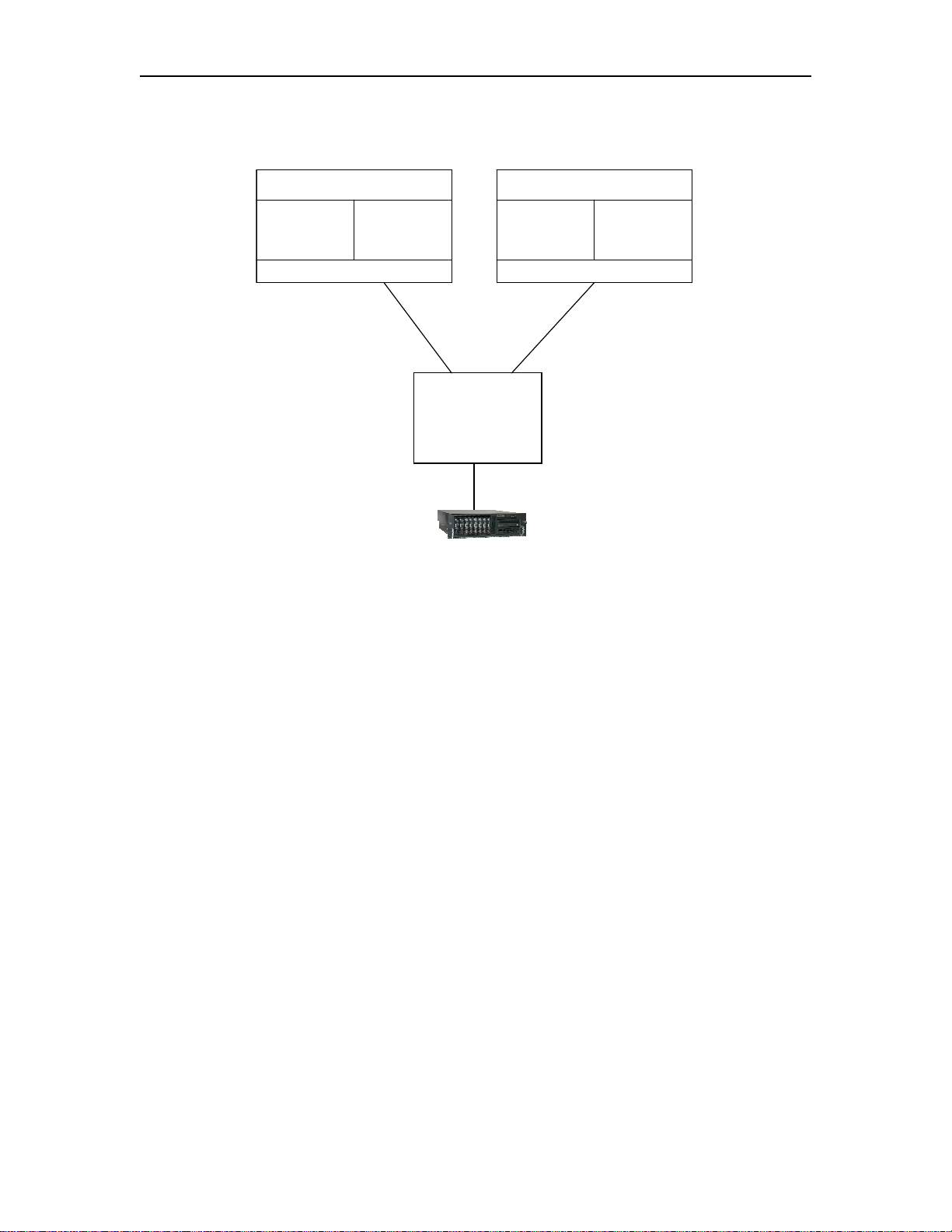
Chapter 4. IOCDS Sample Definitions
EXAMPLE 6 – Multiple LCSS and FICON
LCSS0 LCSS1
LPAR390 TEST1
MIF
1F
A1 19
LPAR390B TEST2
MIF
43
SWITCH 04
C4
CCA-3074
This example is the same as the last one except the connection to the
CCA-3074 is through FICON instead of ESCON. All of the LPARS are
on a single CPU that has two Logical Channel Subsystems (LCSS). A
FICON switch is used, and a single FICON cable is run into the switch
from each LCSS to which in turn is connected to the switch through a
single FICON cable. Users on the CCA-3074 can have sessions on any
or all of the 4 LPARs shown. Up to 16 LPARs can be supported
through a single FICON interface to the CCA-3074.
4-10 707159-002
Page 55

CCA-3074 Planning
IO Definitions:
RESOURCE PARTITION=((CSS(0),(LPAR390,1),(TEST1,2)),(CSS(1), (LPAR390B,3),(TEST2,4)))
CHPID PATH=(CSS(0),1F),PARTITION=((LPAR390,TEST1)),SWITCH=04,TYPE=FC,PCHID=1C0,SHARED
CHPID PATH=(CSS(1),43),PARTITION=((LPAR390B,TEST2)),SWITCH=04,TYPE=FC,PCHID=145, *
SHARED
CNTLUNIT CUNUMBR=1E00,PATH=(CSS(0),1F),UNITADD=(00,5),UNIT=NOCHECK,CUADD=0, *
LINK=(CSS(0),C4)
IODEVICE CUNUMBR=IE00,ADDRESS=(600,5),UNIT=3270-X,UNITADD=00,PARTITION=(CSS(0),TEST1)
CNTLUNIT CUNUMBR=1F00,PATH=(CSS(0),1F),UNITADD=(00,5),UNIT=NOCHECK,CU ADD=1, *
LINK=(CSS(0),C4)
IODEVICE CUNUMBR=1F00,ADDRESS=(1200,5),UNIT=3270-X,UNITADD=00, *
PARTITION=(CSS(0),LPAR390)
CNTLUNIT CUNUMBR=1195,PATH=(CSS(1),43),UNITADD=(00,5),UNIT=NOCHECK,CUADD=5, *
LINK=(CSS(1),C4)
IODEVICE CUNUMBR=1195,ADDRESS=(1E00,5),UNIT=3270-X,UNITADD=00,PARTITION=(CSS(1),TEST2)
CNTLUNIT CUNUMBR=2144,PATH=(CSS(1),43),UNITADD=(00,5),UNIT=NOCHECK,CUADD=1, *
LINK=(CSS(1),C4)
IODEVICE CUNUMBR=2144,ADDRESS=(700,5),UNIT=3270-X,UNITADD=00,PARTITION=(CSS(1), *
LPAR390B)
Notes:
1. CHPID TYPE=FC is used for FICON as compared to the
TYPE=CNC used for ESCON.
2. For FICON you must use UNIT=NOCHECK in the
CNTLUNIT macros in place of the UNIT=3174 used in the
ESCON environment.
707159-002 4-11
Page 56

Chapter 4. IOCDS Sample Definitions
4-12 707159-002
Page 57

CCA-3074 Planning
Chapter 5. CSS32 External Coax Subsystem
What is the External Coax Subsystem?
The CCA-3074 does not support coax ports directly attached to
the platform. To accommodate coax connectivity, an external
CSS32 Coax Subsystem can be interfaced to the CCA-3074.
The external CSS32 Coax Subsystem is a Visara LINCS based
product. The CSS32 communicates with the CCA-3074 over an
IP network using TN3270E protocol for display or LMU
sessions, and using LPD/LPR protocol for printer sessions. The
network connection can be as simple as a RJ45 crossover cable
interconnecting the two platforms mounted in the same 19” rack
or the two platforms can be remotely linked through a corporate
Intranet or even across the Internet (preferably through a VPN).
The relationship between the CCA-3074 and its satellite(s) does
not have to be one on one. That is, one CCA-3074 can support
multiple Coax Subsystems, and a single Coax Subsystem can
communicate with multiple CCA-3074s.
CSS32 Factory Default Configuration
The CSS32 comes with a standard factory default configuration.
This configuration is designed to support the CSS32 attached to
the CCA-3074 through a crossover cable. The default
configuration will support up to 31 coax display or LMU sessions
(one session for each of 31 coax ports) and one printer session.
For more complex requirements for the CSS32, changes to the
factory default configuration will be needed.
For more details about the specifics of the factory default
configuration of the CSS32 please refer to Appendix A in the
CCA-3074 Installation and Configuration Manual.
707159-002 5-1
Page 58

Page 59

CCA-3074 Planning
Chapter 6. Frequently Asked Questions
Q: Does the CCA-3074 support SNA over ESCON or
FICON?
A: No. The CCA-3074 is dedicated to supporting Non-SNA
communications over ESCON and FICON. If SNA
communications is required, you may use the CNA-8000
product instead. The CNA-8000 is capable of supporting
SNA communications over ESCON and FICON.
Q: Does the CCA-3074 support Bus and Tag connections?
A: No.
Q: Can you attach coax terminals to the CCA-3074?
A: The CCA-3074 does not support coax ports directly. You
can support coax terminals, printers, and LMU
connections through use of the external CSS32 Coax
Subsystem.
Q: Can you attach StorageTek Silos to the CCA-3074.
A: The LMU (Library Management Unit) used to manage
the Silos will attach to the external CSS32 Coax
Subsystem using coax connections.
Q: Is there any way to remotely manage the CCA-3074?
A: Yes. CCA-3074 management is through a browser
interface. The biggest concern for remote management is
probably security. The CCA-3074 browser is a secure
connection making use of https (SSL encryption) between
the workstation running the browser session and the
CCA-3074.
Q: Does the CCA-3074 support VPNs?
A: No, not directly. You can use external products to provide
the Virtual Private Network security. However, SSL
encryption is supported directly, so the question becomes
do you really need a VPN connection. In most cases you
probably do not.
Q: Does the CCA-3074 support Secure Socket Layer
communication over the network?
A: Yes. You can configure the CCA-3074 to communicate
SSL encryption directly to the remote client desktops.
707159-002 6-1
Page 60

Chapter 6. Frequently Asked Questions
Q: Does the CCA-3074 support international languages?
A: No. All host communication and browser management
interface makes use of English.
Q: Does the CCA-3074 have any provisions for redundancy?
A: The CCA-3074 supports 2 ESCON interfaces and 4
FICON interfaces, allowing you to provide multiple paths
to your LPARs. The CCA-3074 also makes use of
redundant, independently configurable power supplies,
redundant cooling fans, and redundant hard drives that
use RAID mirroring.
Q: Does the CCA-3074 support all TN3270E clients.
A: Yes, for the most part. All of the more popular emulators,
as well as many more obscure ones will work. There is
nothing about the TN3270E (RFC 1647) interface that
should preclude the operation of a specific emulator. Note
that many of the older TN3270 (RFC 1576) emulators
may not be supported. You may however wish to contact
a Visara representative for a list of PC emulations that are
known to work as consoles.
Q: Does the CCA-3074 support a FICON interface?
A: Yes. You can connect the CCA-3074 to a FICON channel
either point to point to a CPU or through a Director. Both
Long Wave (single-mode fiber) and Short Wave
(multimode fiber) is supported (you must request the
correct transceivers for your environment when you
order).
Q: Is 1 Gbps FICON supported?
A: No. The FICON adapter used by the CCA-3074 supports
2Gbps, 4Gbps, and 8Gbps FICON.
Q: If there is a power failure, will the CCA-3074
automatically recover?
A: Yes. First of all, the CCA-3074 has dual power feeds, and
if plugged into multiple mains, the chance of a power
failure can be minimized. However, if you have all lines
plugged into the same power source and there is a failure,
the CCA-3074 should power back up and automatically
go online when the power failure is over. The boot
process should be complete within about 5 minutes. It
will probably be necessary to vary the console sessions
active again, since a failed console connection will
normally roll to another console on another platform if
available or to the support element.
6-2 707159-002
Page 61

CCA-3074 Planning
Q: Does the CCA-3074 support NIP consoles?
A: Yes. You can define NIP and MCS (MVS) consoles to
the CCA-3074. It is good planning to define multiple NIP
consoles, spread across more than one CCA-3074 for
redundancy sake.
Q: Can you change the configuration of one LPAR on the
CCA-3074, or add a new LPAR definition without
performing a reboot?
A: No, you can not. That is why it is important to have a
redundant CCA-3074, with alternate consoles defined to
it. By having redundant CCA-3074s, you can take one
down for periodic maintenance while the other CCA3074 is providing critical services.
Q: Can you change TN3270E client settings without having
to reboot or restart the CCA-3074?
A: Yes. You can make changes to TN3270E clients, which
ports they connect to, whether encryption is supported,
user IDs and passwords, pool definitions, etc. and apply
the changes without having to reboot or restart the
platform.
Q: Will a TN3270E client get a live console session when
they connect in?
A: Only if the Hot Session option is configured on the CCA-
3074. Otherwise, if the client is not connected when the
LPAR first comes up, the device is reported as being
powered off, and the console session would roll to the
alternate console or to the support element.
Q: How does the Hot Console Session feature work?
A: The CCA-3074 treats a Hot Console Session as if the
device were always powered up. Console messages are
received and discarded by the CCA-3074 when no client
is connected to the session. When a client does connect to
the session, a clear is sent inbound automatically to cause
the host to repaint the latest screen to the client.
Q: Can a console operator retrieve messages discarded by the
CCA-3074 from a Hot Session?
A: No, not directly from the CCA-3074. You would need to
access the SDSF, on the host. Visara also offers another
product, the MCC (Master Console Center), which can
provide console session logging and retrieval among its
many features.
707159-002 6-3
Page 62

Chapter 6. Frequently Asked Questions
Q: Can I configure a combination of regular console sessions
and Hot Console sessions?
A: Yes. You can determine which sessions need to be hot
and which ones do not.
Q: Does the CCA-3074 support some way to track what
users connect to the platform?
A: Yes. The CCA-3074 keeps a sessions log which logs
when users connect to the CCA-3074, disconnect from
the CCA-3074, and when a failed attempt to get a session
from the CCA-3074 occurs. The size of the file kept or
how long it is kept is configurable.
Q: Does the CCA-3074 support Long Wave (single-mode
fiber) or Short Wave (multimode fiber) FICON?
A: The CCA-3074 can support either environment, but you
must order it for whichever you are using in your
environment.
Q: Can I mix Long Wave (single-mode fiber) and Short
Wave (multimode fiber) FICON on the CCA-3074?
A: The CCA-3074 can support either environment, but you
must order the interface for whichever you are using in
your environment.
Q: Can I configure Hot VTAM sessions?
A: In general, you do not need to. The host should detect
when a VTAM terminal powers up, and provide the user
with a new session. Configuring a VTAM session as a hot
session on the CCA-3074 may result in unpredictable
results.
Q: How do I make a Hot Session roll to another terminal?
A: Do not configure a Hot Session if you need it to roll to
another terminal automatically. If you need to switch
control of a console to another device you can use normal
console commands to disable a console and activate a
different console. Of course if the CCA-3074 powers
down, or otherwise stops communicating with the host,
all console sessions will automatically roll to their
alternates or to the support element.
6-4 707159-002
Page 63

CCA-3074 Planning
Q: Is it possible to share a console session between two or
more operators.
A: Yes, the CCA-3074 supports a session sharing feature
which can be configured. You can share a single session
between multiple users at one time. All operators may
enter console commands, and each of the operators
sharing the session will see the results of the command
entered. This option can be used for training, joint
problem determination, and disaster recovery situations.
Q: Does the CCA-3074 support hot swappable cards?
A: No. Only the power supplies, fans, and hard drives are hot
swappable.
Q: How many coax devices can be supported by a single
CCA-3074?
A: Any or all of the sessions supported by the CCA-3074 can
be realized as coax sessions if needed. Each CSS32 coax
subsystem supports 32 physical coax devices. Multiple
CSS32 coax subsystems can be connected to the CCA-
3074. It is even possible to connect multiple coax devices
to share a single console session if desired.
Q: How is the CSS32 coax subsystem connected to the
CCA-3074?
A: The actual connection makes use of an Ethernet
compatible twisted pair cable. By using a null crossover
cable, the coax subsystem can be isolated from your
corporate network providing additional reliability.
Communication over this connection makes use of IP.
You can also run the connection through any standard
Ethernet switch or hub.
Q: Is it possible to run multiple console sessions from a
single coax device?
A: Although the CSS32 is configured in the factory to
support a single session from each coax device, it is
possible to run as many as 10 concurrent sessions from a
single coax device.
707159-002 6-5
Page 64

Chapter 6. Frequently Asked Questions
Q: How many LPARs can the CCA-3074 support consoles
for?
A: The number of LPARs supported is limited by the
number of host interfaces installed. Each ESCON
interface supports as many as 16 LPARs. Two ESCON
interfaces are supported for a current total of 32 LPARs.
The CCA-3074 supports up to four FICON interfaces in
addition to the ESCON interfaces. This brings the total
number of LPARs supported by the CCA-3074 to 96
LPARs.
6-6 707159-002
Page 65

CCA-3074 Planning
Appendix A. Consoles Planning Worksheet
Function
Port
Listen
3074
Name
Device
#
IODEVICE
CU
3074
Name
3074
CU #
3074
ESCON
Interface
#
CNTLUNIT
#
CUADD
Host
Name
Partition
Port t #
to 30 74
Director
Port #
to CPU
Director
#
Switch
#
CHPID
CPU
707159-002 A-1
Page 66

Appendix A. Consoles Planning Worksheet
Example of filled out sheet.
Function
Port
Listen
3074
Name
Device
#
IODEVICE
CU
3074
Name
3074
CU #
3074
ESCON
Interface
#
CNTLUNIT
#
CUADD
Console
12100
CON3
690
PROD3
0
0
1800
0
LMU port 0
Prog Display
12101
12102
LMU0
DSP31
691
692
Console
Prog Dsiplay
12102
13100
CON9
DSP32
693
1401
TEST9
1
0
2800
1
Utility
13101
DSP91
1402
Console
14100
BCON1
3700
BIS390
2
0
1201
0
LMU port3
Prog Display
14101
14102
BLMU3
BDSP11
3701
3702
Console
Prog Display
14102
15100
CCON1
BDSP12
3703
3700
BISDDU
3
0
1221
1
LMU port4
Prog Display
15101
15102
CLMU4
CDSP31
3701
3702
Prog Display
`5`02
CDSP32
#
LPAR
Host
Name
Partition
Port t #
to 30 74
Director
Port #
to CPU
Director
#
Switch
#
CHPID
CPU
3
PROD3
C7
C1
01
63
HOSS
9
TEST9
1
BIS390
C7
B4
01
21
BISMARK
3
BISDDU
C7
B6
01
18
A-2 707159-002
 Loading...