

Page 1
• Automatic, instant switching to activated camera
• Supports 2 zones/entry points, expandable to 4
entry points (requires 2 units)
• Compatible with analog PABX/KSU extensions,
Viking doorboxes, entry phones, and emergency
phones
• Screw terminals for easy connection
• Separate screw-terminal connections for camera
power and ground
• Rugged, durable relay switching for video control
• Dip switch programming for modes and camera
assignment
• Four inactive modes
• Activated by ringing or off-hook
• 12V 400mA DC output provided to operate two
CCTV cameras
• Can be configured to activate from a doorbell
PPrraaccttiicce
e
T
T
EELLEECCOOM
M
S
S
OOLLUUTTIIOONNSSFFOORRTTHHE
E
221
1
SST
T
C
C
EENNTTUURRY
Y
TECHNICAL
TECHNICAL
Provide Event-Triggered CCTV Camera
Switching for Two Zones - Expandable to Four
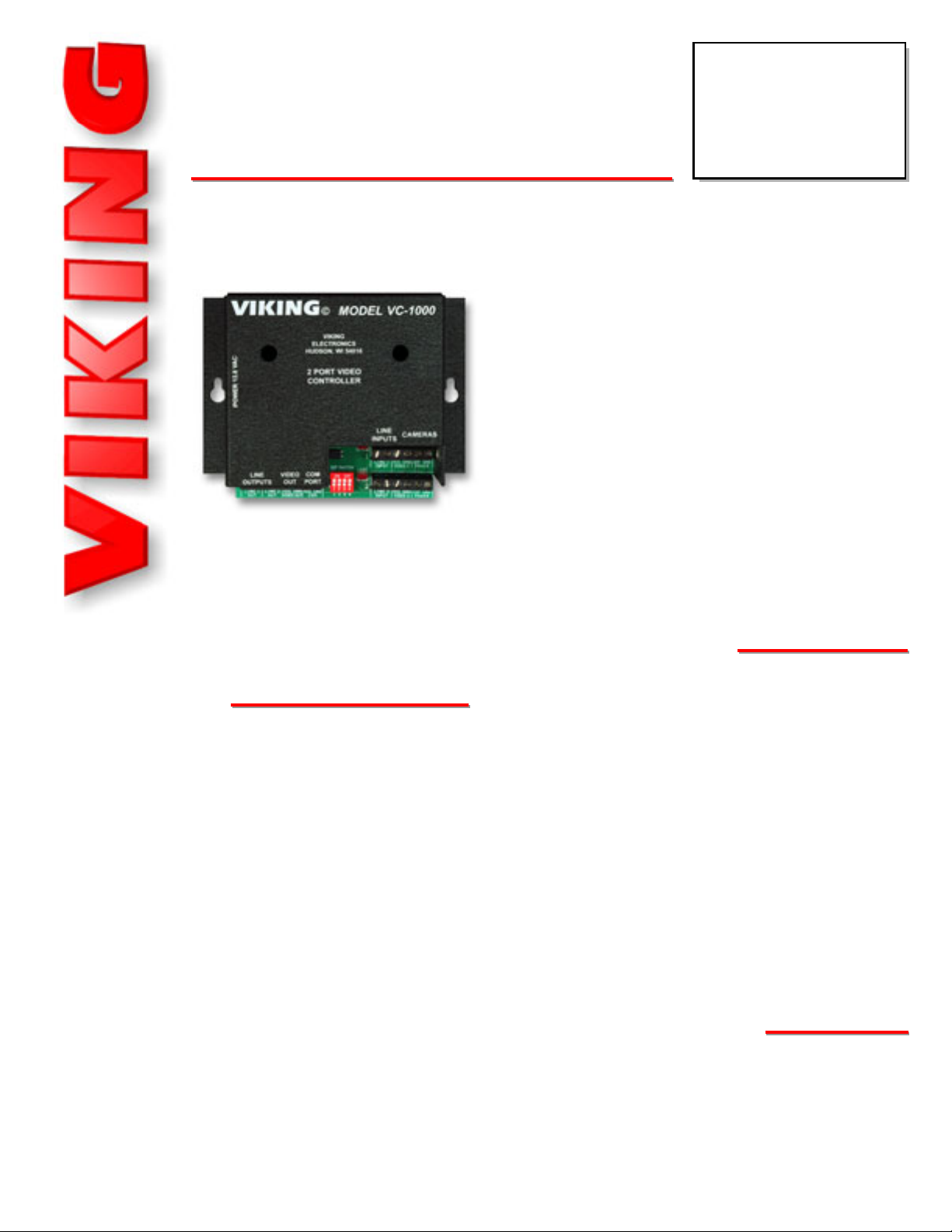
The VC-1000 Programmable CCTV Camera
Controller consists of two telco interface modules
each linked to a CCTV camera input and a combiner for output to a video monitor, television or
VCR.
Unlike passive or manual CCTV camera switchers, the VC-1000 continuously monitors for activity on its telco line circuits and instantly switches to
the appropriate camera when activity is detected.
FFeeaattuurrees
s
PPhhoonnee......771155..338866..8888661
1
Power: 120V AC/13.8V AC, 1.25A UL listed adapter provided
Power Output: 12V 400mA DC (total, for both cameras)
Dimensions: 133mm x 89mm x 44mm (5.25” x 3.5” x 1.75”)
Shipping Weight: .80 kg (1.7 lbs)
Environmental: 0° C to 32° C (32° F to 90° F) with 5% to 95%
non-condensing humidity
Relay Contact Rating: 1A 30VDC, 0.3A1 10 VDC, 0.5A125V AC
Connections: (20) cage clamp screw terminals
SSppeecciiffiiccaattiioonns
s
During periods of inactivity, the VC-1000 can be programmed to provide no video output, output camera 1, output the last camera activated, or output the cameras sequentially. Two VC-1000’s can be stacked to cover four zones. Programming is done easily using dip switches.
VC-1000
VC-1000
CCTV Camera
Controller
February 28, 2006
iinnffoo@@vviikkiinnggeelleeccttrroonniiccss..ccoom
m
• Adds video switching capability to the following
Viking products:
- 1600A Series Emergency Phones
- K-1900 Series Phones
- K-1500 Series Phones
- E-10, E-20A and E-30 Speaker Phones
- W-1000, W-2000A and W-3000 Doorboxes
• Apartment entry
• Security checkpoints
• Multi-zone surveillance
AApppplliiccaattiioonns
s
hhttttpp::////wwwwww..vviikkiinnggeelleeccttrroonniiccss..ccoom
m
Page 2
IF YOU HAVE APROBLEM WITH AVIKING PRODUCT, PLEASE CONTACT: VIKING TECHNICAL SUPPORT AT (715) 386-8666
Our Technical Support Department is available for assistance Monday 8am - 4pm and Tuesday through Friday 8am - 5pm central time. So that we can give you better service, before you call please:
1. Know the model number, the serial number and what software version you have (see serial label).
2. Have your Technical Practice in front of you.
3. It is best if you are on site.
WARRANTY
Viking warrants its products to be free from defects in the workmanship or materials, under normal use and service, for a period of one year from the date of purchase from any authorized Viking distributor or 18 months from the date manufactured, which ever is greater. If at any time during the warranty period, the product is deemed defective or malfunctions, return the product to Viking Electronics, Inc., 1531 Industrial Street, Hudson, WI., 54016. Customer must contact Viking's
Technical Support Department at 715-386-8666 to obtain a Return Authorization (R.A.) number.
This warranty does not cover any damage to the product due to lightning, over voltage, under voltage, accident, misuse, abuse, negligence or any damage caused by use of the product by the purchaser or others.
Vikings sole responsibility shall be to repair or replace (at Viking's option) the material within the terms stated above. VIKING SHALL NOT BE LIABLE FOR ANYLOSS OR DAMAGE OF ANYKIND INCLUDING INCIDENTALOR CONSEQUENTIAL DAMAGES RESULTING DIRECTLYOR INDIRECTLYFROM ANYBREACH OF ANYWARRANTY EXPRESSED OR IMPLIED, OR FOR ANY OTHER FAILURE OF THIS PRODUCT. Some states do not allow the exclusion or limitation of incidental or consequential damages, so this limitation may not apply to you.
THIS WARRANTY IS IN LIEU OF ALL OTHER WARRANTIES, EXPRESSED OR IMPLIED, INCLUDING THE WARRANTIES OF MERCHANTABILITY AND FITNESS FOR A PARTICULAR PURPOSE, WHICH ARE HEREBY EXCLUDED
BEYOND THE ONE YEAR DURATION OF THIS WARRANTY. Some states do not allow limitation on how long an implied warranty lasts, so the above limitation may not apply to you.
RETURNING PRODUCT FOR EXCHANGE
The following procedure is for equipment that has failed out-of-box (within 10 days of purchase
):
1. Customer must contact Viking’s Technical Support at 715-386-8666 to determine possible causes for the problem. The
customer MUST be able to step through recommended tests for diagnosis.
2. If the Technical Support Product Specialist determines that the equipment is defective based on the customer's input
and troubleshooting, a Return Authorization (R.A.) number will be issued. This number is valid for fourteen (14)
calendar days from the date of issue.
3. After obtaining the R.A. number, return the approved equipment to your distributor
, referencing the R.A. number. Your
distributor will then replace the product over the counter at no charge. The distributor will then return the product to
Viking using the same R.A. number.
4. The distributor will NOT exchange this product without first obtaining the R.A. number from you. If you haven't
followed the steps listed in 1, 2 and 3, be aware that you will have to pay a restocking charge.
RETURNING PRODUCT FOR REPAIR
The following procedure is for equipment that needs repair:
1. Customer must contact Viking's Technical Support Department at 715-386-8666 to obtain a Return Authorization (RA)
number. The customer MUSThave a complete description of the problem, with all pertinent information regarding the
defect, such as options set, conditions, symptoms, methods to duplicate problem, frequency of failure, etc.
2. Packing: Return equipment in original box or in proper packing so that damage will not occur while in transit. Static
sensitive equipment such as a circuit board should be in an anti-static bag, sandwiched between foam and individually boxed. All equipment should be wrapped to avoid packing material lodging in or sticking to the equipment. Include
ALL parts of the equipment. C.O.D. or freight collect shipments cannot be accepted. Ship cartons prepaid to:
Viking Electronics, 1531 Industrial Street, Hudson, WI 54016
3. Return shipping address: Be sure to include your return shipping address inside the box. We cannot ship to a PO Box.
4. RA number on carton: In large printing, write the R.A. number on the outside of each carton being returned.
IInnssttaallllaattiioon
n
IMPORTANT: Electronic devices are susceptible to lightning and power station electrical surges from both the AC outlet and the telephone line.
It is recommended that a surge protector be installed to protect against such surges. Contact Panamax at (800) 472-5555 or Electronic Specialists
Inc. at (800) 225-4876.
!
A. Telco Wiring
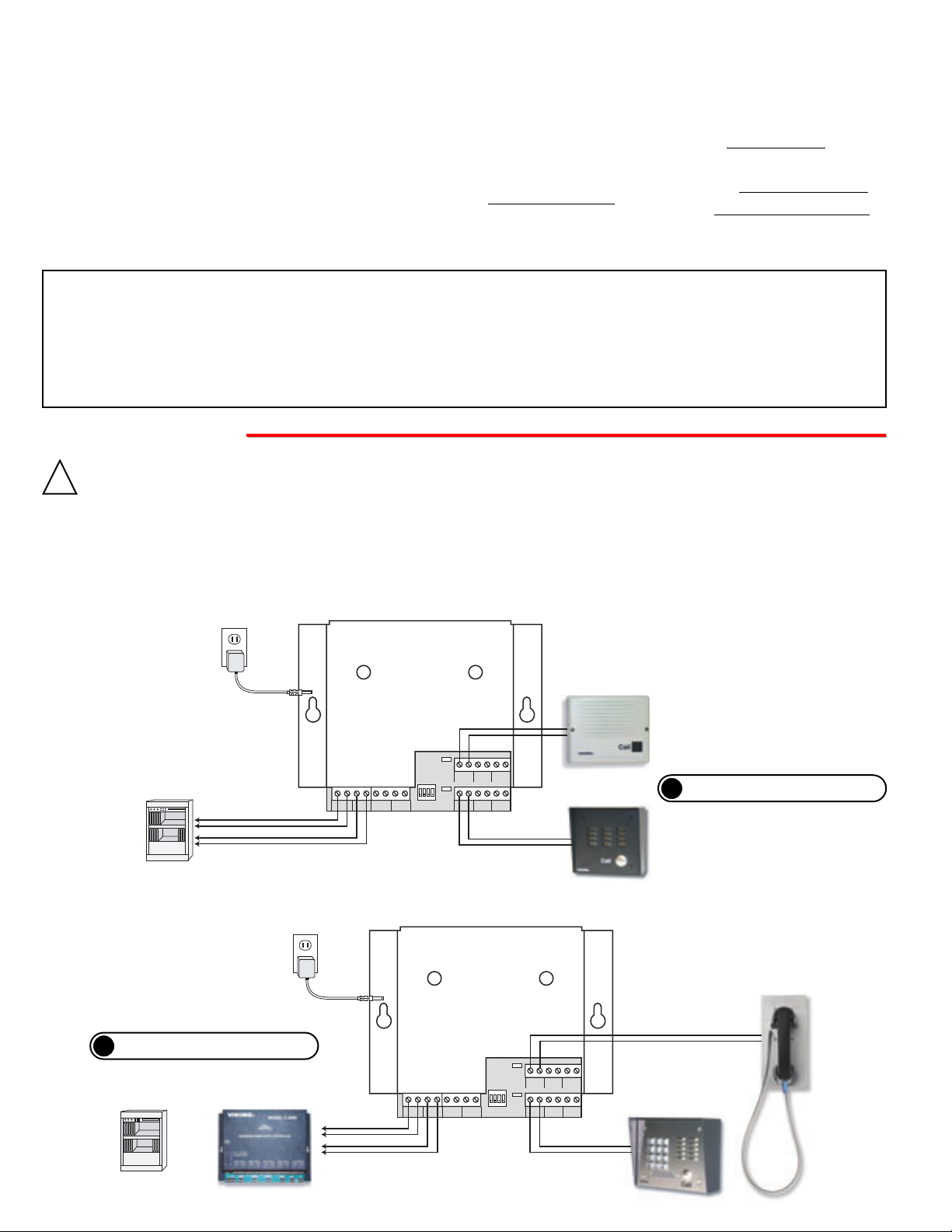
The VC-1000 monitors for ringing and off-hook activity on two analog lines, doorboxes or entry phone circuits. Connect
as shown in the following diagrams.
?
Need More Information on Doorboxes?
Call (715) 386-4345 and select 170.
?
Need More Information on the C-2000A?
Call (715) 386-4345 and select 156.
2. Using with Viking Entry Phones
1. Using with Viking Doorboxes
120V AC
13.8V AC
Adapter
included
Unused Trunk
Input of PABX/KSU
From
Doorbox 1
From
Doorbox 2
VIKING
POWER 13.8 VAC
LINE
VIDEO
OUTPUTS
LINE 1
LINE 2
SIG GND
OUT
OUT
VIDEO OUT
HUDSON, WI 54016
2 PORT VIDEO
CONTROLLER
COM
OUT
PORT
SIG GND
COM
MODEL VC-1000
©
VIKING
ELECTRONICS
LED1
IN USE
DIP SWITCH
LED2
ON
IN USE
1 2 3 4
1 2 3 4
LINE
INPUTS
LINE 1
INPUT
LINE 2
INPUT
CAMERAS
SIG GND
VIDEO 1
SIG GND
VIDEO 2
12V GND
POWER
12V GND
POWER
Compatible Viking Doorboxes:
W-1000, W-2000A and W-3000
(not included)
Doorbox 1
W-2000A shown
(not included)
Doorbox 2
W-1000 shown
(not included)
120V AC
13.8V AC
Adapter
included
Unused Stations
of PABX/KSU
C-2000A Advanced
Door Entry Controller
(not included)
or
From
Doorbox 1
From
Doorbox 2
VIKING
POWER 13.8 VAC
LINE
VIDEO
OUTPUTS
OUT
LINE 1
LINE 2
SIG GND
OUT
SIG GND
OUT
VIDEO OUT
MODEL VC-1000
©
VIKING
ELECTRONICS
HUDSON, WI 54016
2 PORT VIDEO
CONTROLLER
COM
DIP SWITCH
PORT
ON
1 2 3 4
1 2 3 4
COM
LINE
CAMERAS
INPUTS
LED1
IN USE
LINE 1
SIG GND
12V GND
INPUT
VIDEO 1
LED2
IN USE
POWER
LINE 2
SIG GND
12V GND
INPUT
VIDEO 2
POWER
Doorbox 2, K-1700-3
shown (not included)
Compatible Viking Entry and
Emergency Phones (not included):
1600A Series, K-1900 Series, K-1700-3,
K-1500 Series, E-10 and E-20A
Doorbox 1, K-1500-7
shown (not included)
Page 3

B. Video Wiring
1. Industrial Application
Two video cameras can be wired to, and powered from, the VC-1000 as shown below. A single video output can be
wired directly to a video monitor/VCR, to the video input of a home television set, or to an RF modulator.
Wire video signal directly to a TV / video monitor or video recorder as shown below.
2. Home Application - Manual Switched Input
Wire video signal to home
TV’s video input. Manually
switch to that input to see
camera video.
3. Home Application - Automatic Switched Input
Wire video signal to an inexpensive RF modulator (Radio Shack # 15-1214 or equivalent) that automatically switches from
VCR/satellite to CCTV video when a signal is present. Note: For this application the TV must remain on channel 3 or 4. Set up
the VCR and satellite receiver to send the signal out on channel 3 or 4 and use the VCR’s tuner to select local broadcast stations.
?
Recommended RF Modulator:
Radio Shack #15-1214
120V AC
VIKING
13.8V AC
Adapter
included
POWER 13.8 VAC
LINE
OUTPUTS
TV / Video Monitor / VCR Recorder
(not included)
LINE 1
OUT
TV's Video
Input
Video Signal
Video Ground
Home TV / VCR Recorder
Ant In
Coax RF
120V AC
13.8V AC
Adapter
included
(not included)
TV's Video
Input
VCR
Satellite Receiver
HUDSON, WI 54016
2 PORT VIDEO
CONTROLLER
VIDEO
COM
OUT
PORT
LINE 2
SIG GND
SIG GND
OUT
VIDEO OUT
Video Signal
Video Ground
MODEL VC-1000
©
VIKING
ELECTRONICS
LED1
IN USE
DIP SWITCH
LED2
ON
IN USE
1 2 3 4
1 2 3 4
COM
VIKING
POWER 13.8 VAC
LINE
VIDEO
OUTPUTS
OUT
LINE 1
LINE 2
SIG GND
OUT
OUT
VIDEO OUT
LINE
CAMERAS
INPUTS
LINE 1
SIG GND
INPUT
VIDEO 1
LINE 2
SIG GND
INPUT
VIDEO 2
MODEL VC-1000
©
VIKING
ELECTRONICS
HUDSON, WI 54016
2 PORT VIDEO
CONTROLLER
COM
DIP SWITCH
PORT
ON
1 2 3 4
1 2 3 4
SIG GND
COM
12V GND
POWER
12V GND
POWER
Video
Signal
Ground
+12V
CCTV Camera 1
(not included)
Ground
Power
Power
Ground
+12V
Ground
CCTV Camera 2
(not included)
Signal
Video
Video
Signal
Ground
LINE
CAMERAS
INPUTS
LED1
IN USE
LINE 1
SIG GND
12V GND
INPUT
VIDEO 1
LED2
IN USE
POWER
LINE 2
SIG GND
12V GND
INPUT
VIDEO 2
POWER
+12V
Ground
Power
Power
CCTV Camera 1
(not included)
Ground
+12V
Ground
CCTV Camera 2
(not included)
Signal
Video
Coax RF
120V AC
13.8V AC
Adapter
included
Home TV / VCR Recorder
(not included)
Ant In
RF Modulator
VCR
Satellite Receiver
Video
Input
Video Signal
Video Ground
VIKING
POWER 13.8 VAC
LINE
VIDEO
OUTPUTS
OUT
LINE 1
LINE 2
SIG GND
OUT
OUT
VIDEO OUT
MODEL VC-1000
©
VIKING
ELECTRONICS
HUDSON, WI 54016
2 PORT VIDEO
CONTROLLER
COM
DIP SWITCH
PORT
ON
1 2 3 4
1 2 3 4
SIG GND
COM
Video
Signal
Ground
LINE
CAMERAS
INPUTS
LED1
IN USE
LINE 1
SIG GND
12V GND
INPUT
VIDEO 1
LED2
IN USE
POWER
LINE 2
SIG GND
12V GND
INPUT
VIDEO 2
POWER
+12V
Ground
Power
Power
CCTV Camera 1
(not included)
Ground
+12V
Ground
CCTV Camera 2
(not included)
Signal
Video
Page 4

Use DIP switches 1 and 2 to assign video camera 1 and video camera 2 in use, and off if not installed. The ability to turn off a camera
position not being used will prevent the controller from sequencing
in an unused camera position (see Programming section B).
Due to the dynamic nature of the product design, the information contained in this document is subject to change without notice. Viking Electronics, and its affiliates and/or
subsidiaries assume no responsibility for errors and omissions contained in this information. Revisions of this document or new editions of it may be issued to incorporate
such changes.
Fax Back Doc 185
ZF301950 Rev A
Printed in the U.S.A.
PPrroodduuccttSSuuppppoorrttLLiinnee......771155..338866..8866666
6
FFaaxxBBaacckkLLiinnee......771155..338866..4433445
5
OOppeerraattiioon
n
PPrrooggrraammmmiinng
g
A. Camera Assignment for Sequenced Video Feature
Switch
1
1
2
2
ON/OFF
ON
OFF
ON
OFF
Description
Camera 1 enabled
Camera 1 disabled
Camera 2 enabled
Camera 2 disabled
B. Inactive Modes
DIP switches 3 and 4 are used to program what the VC-1000 does when all telco lines are inactive (not ringing or in-use). If “output
camera 1” mode is used, an additional VC-1000 ganged together must be set to “cameras disconnected” mode to prevent contentions. Otherwise, if two VC-1000’s are ganged together, both units must be programmed to the same inactive mode.
Switch 3
OFF
OFF
ON
ON
Switch 4
OFF
ON
OFF
ON
Description
All cameras are disconnected
Output Camera 1 Note: An additional VC-1000 ganged together must be set to “cameras disconnected”.
Remain connected to the last camera activated, until another camera is called into action
Sequenced Video (rotate every 4 seconds)
The VC-1000 allows multiple cameras to be concentrated down to one video signal, by switching to the camera at the zone/entry point
being used. When the VC-1000 detects ringing (voltage), off hook (loop current) of the entry phone or doorbox, or a doorbell button
pressed, it will connect that camera's video feed to the video output. This happens in a first come, first serve manner. When all telco lines
are idle (entry phones or doorboxes not in use), the VC-1000 can be programmed to do one of four operations:
1. Disconnect all cameras so there is no video output. This mode is very convenient when used in combination with a video RF
modulator, which automatically switches the video source in when a video signal is present. Ahome TV’s broadcast/satellite program
will be automatically interrupted to show video feed of the arriving guest (see Installation section C).
2. Connect video feed from camera 1.
3. Remain connected to the last camera active and continue feeding video from it until another camera is called into action.
4. Sequence video from all cameras connected, rotating every 4 seconds.
C. Gang Wiring
Two VC-1000’s can be wired together to
support up to 4 zones/entry points. Do this
by wiring the COM PORT SIG screw terminals together and wiring the COM PORT
GND screw terminals together. The VIDEO
OUT screw terminals of both VC-1000’s can
be wired together in parallel to send video
signal to a monitor TV or video recorder.
TV / Video Monitor / VCR Recorder
(not included)
TV's Video
Input
Video Signal
Video Ground
VIKING
POWER 13.8 VAC
LINE
VIDEO
OUTPUTS
OUT
LINE 1
LINE 2
SIG GND
OUT
SIG GND
OUT
VIDEO OUT
MODEL VC-1000
©
VIKING
ELECTRONICS
HUDSON, WI 54016
2 PORT VIDEO
CONTROLLER
COM
DIP SWITCH
PORT
ON
1 2 3 4
1 2 3 4
COM
MODEL VC-1000
VIDEO
OUT
SIG GND
VIDEO OUT
©
VIKING
ELECTRONICS
HUDSON, WI 54016
2 PORT VIDEO
CONTROLLER
COM
DIP SWITCH
PORT
ON
1 2 3 4
1 2 3 4
SIG GND
COM
LINE
CAMERAS
INPUTS
LED1
IN USE
LINE 1
SIG GND
12V GND
INPUT
VIDEO 1
LED2
IN USE
POWER
LINE 2
SIG GND
12V GND
INPUT
VIDEO 2
POWER
VIKING
POWER 13.8 VAC
LINE
CAMERAS
INPUTS
LED1
IN USE
LINE 1
SIG GND
12V GND
INPUT
VIDEO 1
LED2
IN USE
POWER
LINE 2
SIG GND
12V GND
INPUT
VIDEO 2
POWER
COM Port Signal
COM Port Ground
Video Out Signal
Video Out Ground
OUTPUTS
LINE 1
OUT
LINE
LINE 2
OUT
DIP SWITCH
ON
ON
1 2 3 4
OFF
1 2 3 4
VIKING
AC
13.8 V
POWER
LINE
OUTPUTS
LINE 1
LINE 2
OUT
OUT
VIDEO
OUT
SIG GND
VIDEO OUT
MODEL VC-1000
©
VIKING
ELECTRONICS
HUDSON, WI 54016
2 PORT VIDEO
CONTROLLER
COM
DIP SWITCH
PORT
ON
1 2 3 4
SIG GND
1 2 3 4
COM
LINE
INPUTS
LED1
IN USE
LINE 1
INPUT
LED2
IN USE
LINE 2
INPUT
SIG GND
VIDEO 1
SIG GND
VIDEO 2
CAMERAS
12V GND
POWER
12V GND
POWER
 Loading...