

Page 1
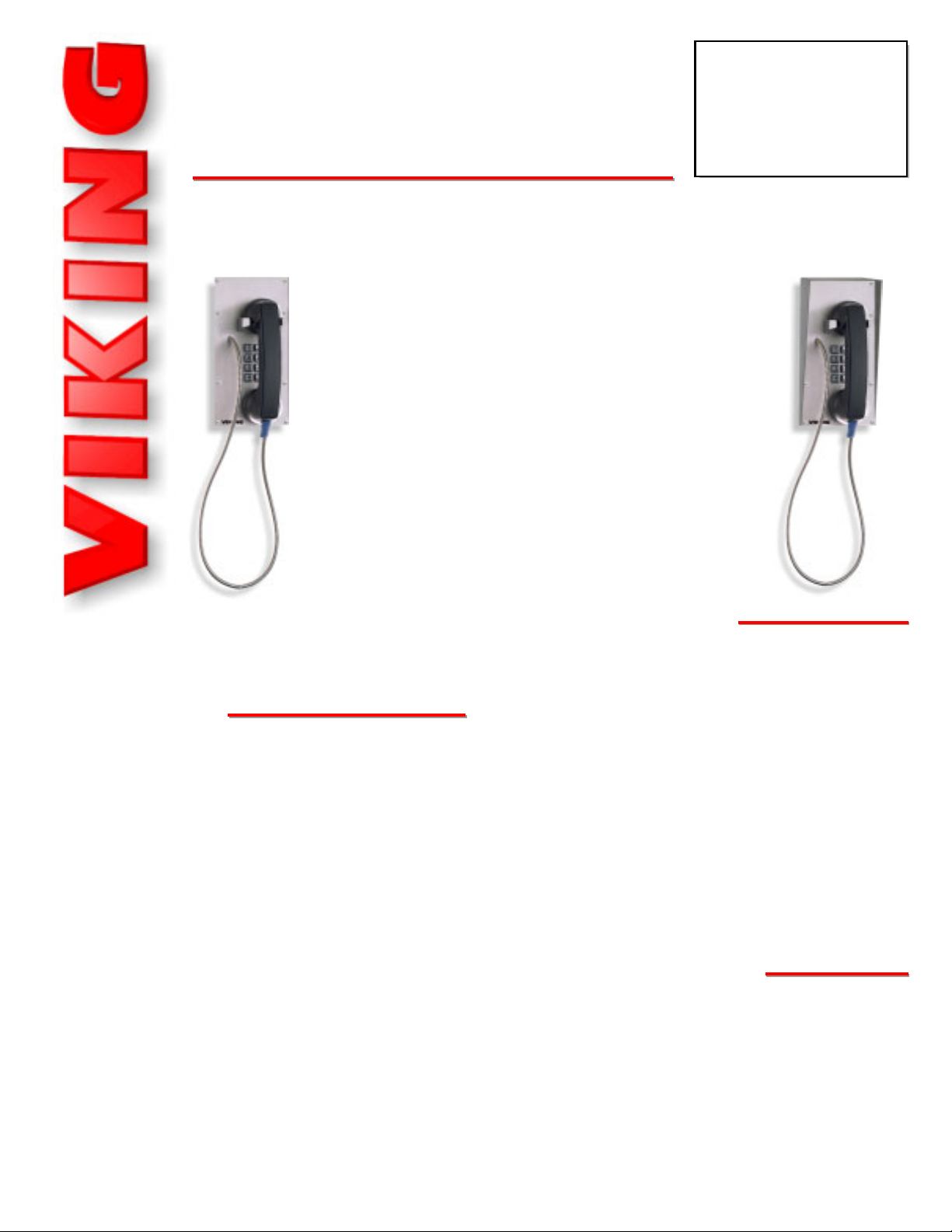
K-1900-8
K-1900-8
Hot-Line Panel
Phone with Keypad
November 30, 2005
The K-1900-8 panel phone can either auto-dial a
phone number each time the handset is lifted, be
used as a multi-number auto-dialer, or be used as a
standard (dumb) phone. The unit will Touch Tone or
pulse dial and will not auto-dial on incoming calls.
The K-1900-8 housing consists of a heavy gauge
stainless steel panel, a metal Touch Tone keypad,
an armored cable, a heavy duty handset, and an all
metal cradle.
The K-1900-8 can be easily Touch Tone programmed at the shop or installation site. All programming is stored in non-volatile E
2
memory.
Attractive, Vandal Resistant,
Hot-Line Phone with Built-in Keypad!
PPhhoonnee......771155..338866..8888661
1
hhttttpp::////wwwwww..vviikkiinnggeelleeccttrroonniiccss..ccoom
m
• Auto dials 1 (up to 32 digits) programmable
speed dial number
• Multi-number dialer mode adds 5 (up to 16
digits) speed dial numbers
• Touch Tone or pulse dialing
• Touch Tone keypad
• Non-volatile E
2
memory (no batteries required)
• Operates on analog PABX and key system
extensions or analog Centrex and C.O. lines
• Programmable 6 digit security code
• Touch Tone programmable
• Vandal resistant, heavy gauge, stainless steel
panel; armored cable, metal cradle and
metal keypad
• Programmable pre-dial pause
• Blocks fraudulent calls from hand held pocket
dialers
• Limited toll restriction in dumb phone mode
• Hearing aid compatible amplified handset with
rotary volume control
Power: Telephone line powered (20V DC/18mA minimum)
Dimensions: Overall - 127mm x 254mm x 102mm (5” x 10” x 4”)
Shipping Weight: 1.8 kg ( 4 lbs.)
Environmental: 0°C to 32°C (32°F to 90°F) with 5% to 95%
non-condensing humidity
Panel Material: .125 inch thick stainless steel
Handset Cable Length: 864mm (34”)
Mounting: Flush mounted
Dial Speed: Touch Tone - Normal = 120ms on/off, Fast = 50ms
on/off; Pulse - Normal = 10 pps, Fast = 20 pps
Connections: (1) RJ11 jack
PPrraaccttiicce
e
T
T
EELLEECCOOM
M
S
S
OOLLUUTTIIOONNSSFFOORRTTHHE
E
221
1
SST
T
C
C
EENNTTUURRY
Y
TECHNICAL
TECHNICAL
FFeeaattuurrees
s
SSppeecciiffiiccaattiioonns
s
• Catalog sales
• Kiosks in malls
• Courtesy and customer service phones
• Automated tellers (ATM’s)
• Hot-line reservation phones
• Security and emergency phones
• Replaces leased Ringdown circuits
AApppplliiccaattiioonns
s
iinnffoo@@vviikkiinnggeelleeccttrroonniiccss..ccoom
m
K-1900-8
K-1900-8
shown
with
VE-5x10
Page 2
IInnssttaallllaattiioon
n
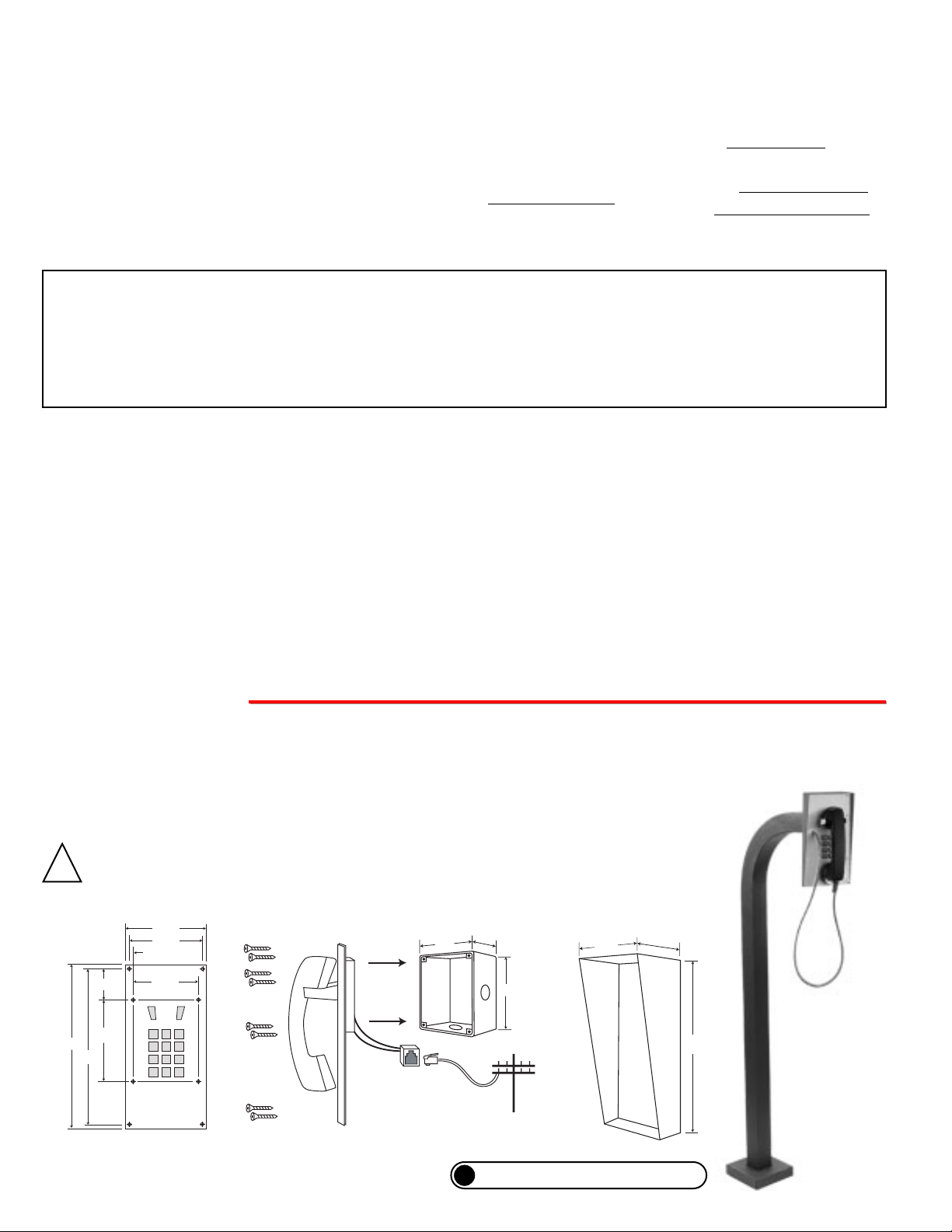
To install the K-1900-8 panel phone, attach the panel using the provided screws or use the optional VE-5x10 weather resist-
ant surface mount box. Insert a cord into the RJ11 jack on the back of the K-1900-8. Note: Four extra screws and nuts
are provided to fill the unused mounting holes.
The optional VE-5x10 surface mount box (shown below) is designed to be surface mounted to a
single gang box or a VE-GNP goose neck pedestal (shown right).
IF YOU HAVE A PROBLEM WITH A VIKING PRODUCT, PLEASE CONTACT: VIKING TECHNICAL SUPPORT AT (715) 386-8666
Our Technical Support Department is available for assistance weekdays between 8 a.m. and 5 p.m. central time. So that we can give you better service, before you call please:
1. Know the model number, the serial number and what software version you have (see serial label).
2. Have your Technical Practice in front of you.
3. It is best if you are on site.
WARRANTY
Viking warrants its products to be free from defects in the workmanship or materials, under normal use and service, for a period of one year from the date of purchase from any authorized Viking distributor or 18 months from the date manufactured, which ever is greater. If at any time during the warranty period, the product is deemed defective or malfunctions, return the product to Viking Electronics, Inc., 1531 Industrial Street, Hudson, WI., 54016. Customer must contact Viking's
Technical Support Department at 715-386-8666 to obtain a Return Authorization (R.A.) number.
This warranty does not cover any damage to the product due to lightning, over voltage, under voltage, accident, misuse, abuse, negligence or any damage caused by use of the product by the purchaser or others.
Vikings sole responsibility shall be to repair or replace (at Viking's option) the material within the terms stated above. VIKING SHALL NOT BE LIABLE FOR ANY LOSS OR DAMAGE OF ANY KIND INCLUDING INCIDENTAL OR CONSEQUENTIAL DAMAGES RESULTING DIRECTLY OR INDIRECTLY FROM ANY BREACH OF ANY WARRANTY EXPRESSED OR IMPLIED, OR FOR ANY OTHER FAILURE OF THIS PRODUCT. Some states do not allow the exclusion or limitation of incidental or consequential damages, so this limitation may not apply to you.
THIS WARRANTY IS IN LIEU OF ALL OTHER WARRANTIES, EXPRESSED OR IMPLIED, INCLUDING THE WARRANTIES OF MERCHANTABILITY AND FITNESS FOR A PARTICULAR PURPOSE, WHICH ARE HEREBY EXCLUDED
BEYOND THE ONE YEAR DURATION OF THIS WARRANTY. Some states do not allow limitation on how long an implied warranty lasts, so the above limitation may not apply to you.
RETURNING PRODUCT FOR EXCHANGE
The following procedure is for equipment that has failed out-of-box (within 10 days of purchase
):
1. Customer must contact Viking’s Technical Support at 715-386-8666 to determine possible causes for the problem. The
customer MUST be able to step through recommended tests for diagnosis.
2. If the Technical Support Product Specialist determines that the equipment is defective based on the customer's input
and troubleshooting, a Return Authorization (R.A.) number will be issued. This number is valid for fourteen (14)
calendar days from the date of issue.
3. After obtaining the R.A. number, return the approved equipment to your distributor
, referencing the R.A. number. Your
distributor will then replace the product over the counter at no charge. The distributor will then return the product to
Viking using the same R.A. number.
4. The distributor will NOT exchange this product without first obtaining the R.A. number from you. If you haven't
followed the steps listed in 1, 2 and 3, be aware that you will have to pay a restocking charge.
RETURNING PRODUCT FOR REPAIR
The following procedure is for equipment that needs repair:
1. Customer must contact Viking's Technical Support Department at 715-386-8666 to obtain a Return Authorization (RA)
number. The customer MUST have a complete description of the problem, with all pertinent information regarding the
defect, such as options set, conditions, symptoms, methods to duplicate problem, frequency of failure, etc.
2. Packing: Return equipment in original box or in proper packing so that damage will not occur while in transit. Static
sensitive equipment such as a circuit board should be in an anti-static bag, sandwiched between foam and individual-
ly boxed. All equipment should be wrapped to avoid packing material lodging in or sticking to the equipment. Include
ALL parts of the equipment. C.O.D. or freight collect shipments cannot be accepted. Ship cartons prepaid to:
Viking Electronics, 1531 Industrial Street, Hudson, WI 54016
3. Return shipping address: Be sure to include your return shipping address inside the box. We cannot ship to a PO Box.
4. RA number on carton: In large printing, write the R.A. number on the outside of each carton being returned.
If the trouble is causing harm to the telephone network, the telephone company may request you to remove
the equipment from the network until the problem is resolved.
The K-1900-8 uses the USOC jack RJ11C.
It is recommended that the customer install an AC surge arrester in the AC outlet to which this device is con-
nected. This is to avoid damaging the equipment caused by local lightning strikes and other electrical surges.
This equipment is Hearing-Aid Compatible (HAC).
The telephone Consumer Protection Act of 1991 makes it unlawful for any person to use a computer or other
electronic device, including fax machines, to send any message unless such message clearly contains in a margin at the top or bottom of each transmitted page or on the first page of the transmission, the date and time it is
sent and an identification of the business or other entity, or other individual sending the message and the telephone number of the sending machine or such business, other entity, or individual. (The telephone number provided may not be a 900 number or any other number for which charges exceed local or long-distance transmission charges.)
PART 15 LIMITATIONS
This equipment has been tested and found to comply with the limits for a Class A digital device, pursuant to Part
15 of the FCC Rules. These limits are designed to provide reasonable protection against harmful interference
when the equipment is operated in a commercial environment. This equipment generates, uses, and can radiate radio frequency energy and, if not installed and used in accordance with the instruction manual, may cause
harmful interference to radio communications. Operation of this equipment in a residential area is likely to cause
harmful interference in which case the user will be required to correct the interference at his own expense.
FCC REQUIREMENTS
This equipment complies with Part 68 of the FCC rules. Located on the equipment is a label that contains,
among other information, the FCC registration number and ringer equivalence number (REN). If requested, this
information must be provided to the telephone company.
The REN is used to determine the quantity of devices which may be connected to the telephone line.
Excessive REN's on the telephone line may result in the devices not ringing in response to an incoming call. In
most, but not all areas, the sum of the REN's should not exceed five (5.0) To be certain of the number of devices
that may be connected to the line, as determined by the total REN's, contact the telephone company to determine the maximum REN for the calling area.
This equipment cannot be used on the telephone company-provided coin service. Connection to Party Line
Service is subject to State Tariffs.
If this equipment causes harm to the telephone network, the telephone company will notify you in advance
that temporary discontinuance of service may be required. If advance notice isn't practical, the telephone company will notify the customer as soon as possible. Also, you will be advised of your right to file a complaint with
the FCC if you believe it is necessary.
The telephone company may make changes in its facilities, equipment, operations, or procedures that could
affect the operation of the equipment. If this happens, the telephone company will provide advance notice in
order for you to make the necessary modifications in order to maintain uninterrupted service.
If trouble is experienced with this equipment, please contact: Viking Electronics, Inc., 1531 Industrial
Street, Hudson, WI 54016 (715) 386-8666
?
Need More Information on VE-5x5 or VE-GNP?
Call (715) 386-4345 and select 424.
IMPORTANT: Electronic devices are susceptible to lightning and power station electrical surges from both the
AC outlet and the telephone line. It is recommended that a surge protector be installed to protect against such
surges. Contact Panamax at (800) 472-5555 or Electronic Specialists Inc. at (800) 225-4876.
!
Zinc-Plated Steel
Rough-In Box (included)
2.5"
4.5"
5.5"
Optional VE-5x10 Surface
Mount Box (not included)
5.22"
3.69"
1.72"
0.23"
5.00"
4.50"
4.04"
Side View
of the K-1900-8
- or -
10.0"
5.12"
9.5"
Front View
of the K-1900-8
(8) #6-32 x 3/4"
Stainless Steel Hxdrive
Screws (included)
C.O. Line or Analog
PABX/KSU Station
10.14"
K-1900-8 shown
with optional
Viking Model
VE-GNP
Gooseneck
Pedestal
(not included)
Page 3
PPrrooggrraammmmiinng
g
B. Accessing the Programming Mode
1. Remote Programming
Step 1. Connect the line cord on the K-1900-8 to a C.O. line or analog PABX/KSU station.
Step 2. Set DIP switch 1 to ON.
Step 3. If using the multi-number dialer mode, set DIP switch 2 to ON.
Step 4. From a Touch Tone phone, call the line connected to the K-1900-8.
Step 5. Take the K-1900-8 off-hook (remove handset from cradle). A double beep should be heard indicating you have
entered programming.
Step 6. Program as shown in sections C - K.
Step 7. Set DIP switch 1 back to OFF.
Step 8. To exit programming, simply hang-up the phones.
2. Programming Without Using the Security Code
A. Security Code
A six digit number may be used to access the programming mode. The security code has been factory set to 845464 (V-I-K-I-N-
G). It is recommended that you change the security code to a personal 6 digit number as follows:
Step 1. Access programming as shown in section B.
Step 2. Enter your new security code followed by #47.
Step 3. To exit programming simply hang up the K-1900-8.
Note: The security code must be six digits in length and MUST NOT contain a
✱
or #. If you have forgotten your security code,
see section “B, 2. Programming Without Using the Security Code.”
Step 1. If using the multi-number dialer mode, set DIP switch 2 to ON.
Step 2. Connect the line cord on the K-1900-8 to a C.O. line or analog PABX/KSU station.
Step 3. From a Touch Tone phone, call the line connected to the K-1900-8.
Step 4. Take the K-1900-8 off-hook (remove handset from the cradle) and enter “
✱” followed by the six digit security code,
factory set to 845464 (see section A above). A double beep will indicate that programming has been entered.
Step 5. Program as shown in sections C - K.
Step 6. To exit programming, hang up both phones.
- then -
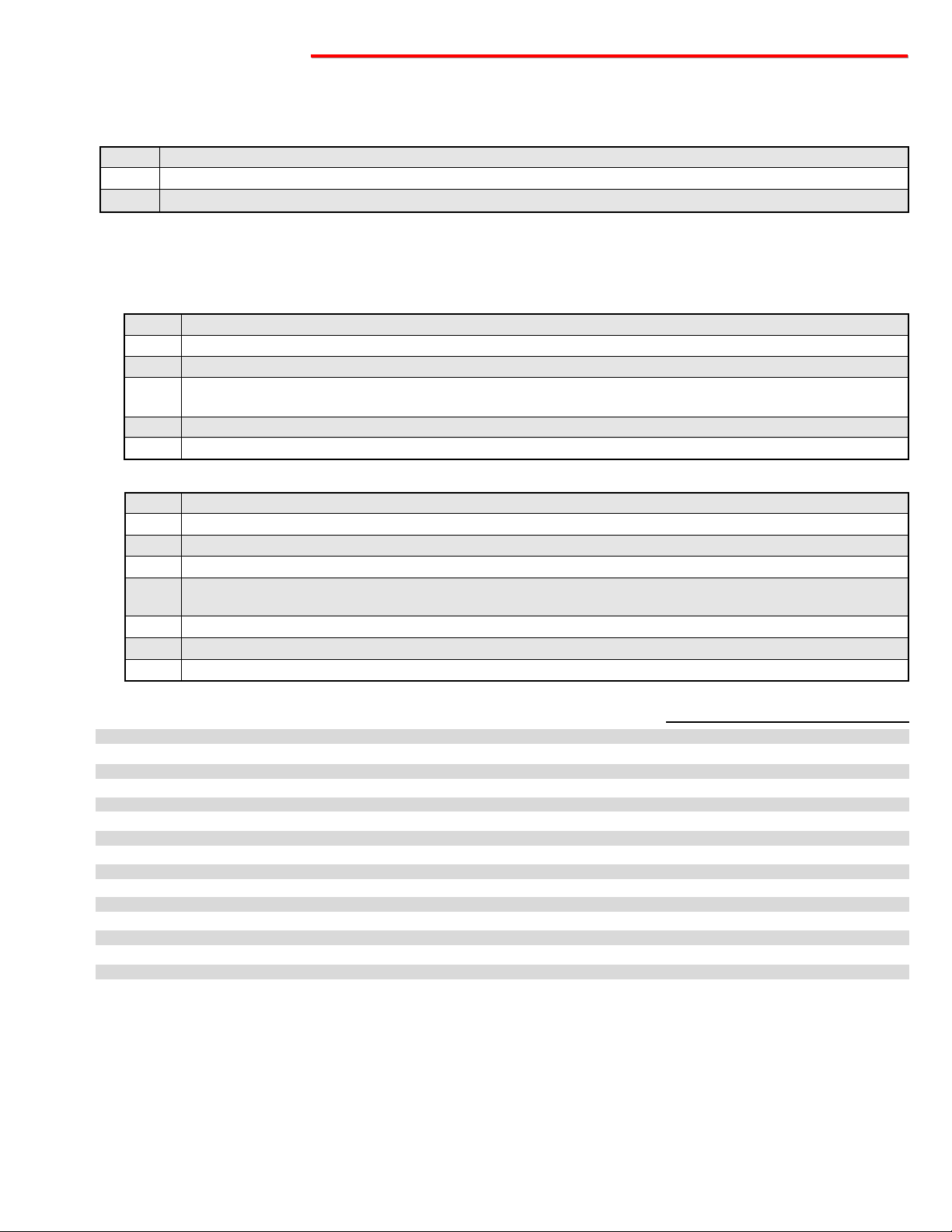
Speed dial number .................................................................................................................
Multi-number auto-dialer numbers 1-5 (DIP switch 2 must be ON) .........................................
✱ (anywhere in the speed dial number) .................................................................................
# (anywhere in the speed dial number) ..................................................................................
Set dialing speed to normal (Touch Tones: 120ms on/off, Pulse: 10 pps) (factory setting) .....
Set dialing speed to fast (Touch Tones: 50ms on/off, Pulse: 20 pps) ......................................
Block hand held pocket dialers (factory setting) ....................................................................
Allow hand held pocket dialers ..............................................................................................
Normal pre-dial pause (approximately 1.4 sec) (factory setting) ............................................
Short pre-dial pause (approximately 800 ms) ........................................................................
To add a four second pause at any point in the dialing string .................................................
Toggle between Pulse and Touch Tone dialing (see section K) .............................................
Disable toll restriction (factory setting) ...................................................................................
Enable toll restriction .............................................................................................................
Change security code ............................................................................................................
To clear all phone numbers and return all programming to factory settings ...........................
1-32 digit (0-9)
1-16 digits (0-9)
✱✱
✱
#
✱1
✱2
✱3
✱4
✱5
✱6
✱7
✱8
✱9
✱0
6 digits (0-9)
###
# 00
#01 - #05
#47
C. Programming Features Quick Reference
Memory
Location
Enter Digits
+
+
+
Note: Special features such as a ✱, a #, a mode change and a pause, use single digits in the programming memory.
D. Dialer Modes
The K-1900-8 can operate in 3 different modes. With DIP switch 2 set to OFF and memory location #00 cleared, the K-1900-8 is in
the Standard (Dumb) Phone mode. With DIP switch 2 set to OFF and a phone number programmed in memory location #00, the K-
1900-8 is in the Single Number Auto-Dialer mode. With DIP switch 2 set to ON, the K-1900-8 becomes a Multi-Number Auto Dialer.
E. Dialing Speed
To set the dialing speed, access the Programming mode as shown in section B, then choose a speed. To set the dialing speed to
Normal (Touch Tone: 120ms on/off, Pulse: 10pps), enter ✱1. To set the dialing speed to Fast (Touch Tone: 60ms on/off, Pulse:
20pps), enter ✱2.
Page 4
Due to the dynamic nature of the product design, the information contained in this document is subject to change without notice. Viking Electronics, and its affiliates and/or
subsidiaries assume no responsibility for errors and omissions contained in this information. Revisions of this document or new editions of it may be issued to incorporate
such changes.
Fax Back Doc 362 ZF301770 Rev APrinted in the U.S.A.
PPrroodduuccttSSuuppppoorrttLLiinnee......771155..338866..8866666
6
FFaaxxBBaacckkLLiinnee......771155..338866..4433445
5
The K-1900-8 is programmed to hang-up if it detects Touch Tones it did not generate (except when in Dumb Phone mode). This
helps prevent toll fraud from hand held dialers. To set the K-1900-8 to block/allow dialing from external devices, access the
Programming mode as shown in section B, then choose block or allow. To Block hand held dialers, enter ✱3. To Allow Touch Tones
from external devices, enter ✱4.
G. Pre-Dial Pause
In the single number auto-dialer mode, the time from when the handset is taken off-hook until the K-1900-8 auto-dials can be programmed. Access the Programming mode (section B), then choose a pause length. To set the pause length to Normal (approxi-
mately 1.4 seconds), enter ✱5. To set the pause length to Short (approximately 800ms) enter ✱6.
F. Hand Held Pocket Dialers
H. Pauses in the Dialing String
To set pauses in the dialing string, access the Programming mode as shown in section B, then enter ✱7 to put a 4 second pause
anywhere in the dialing string.
I. Toll Restriction
When the K-1900-8 is in the Standard (Dumb) phone mode, some limited toll restriction is available. With toll restriction enabled, the
phone will hang-up if a 0 or 1 is entered as the first digit, or if more than ten digits are entered. Access the Programming mode (section B), then choose enable or disable toll restriction. To set the K-1900-8 to Disable toll restriction, enter ✱9. To set the K-1900-8
to Enable toll restriction, enter ✱0.
These examples would be entered after accessing the Programming mode as shown in section B.
K. Programming Examples
To Program the K-1900-8 to...
...Touch Tone dial 555-1234
...pulse dial 555-1234 followed by a Touch Tone 9
...dial 9, a 4 second pause and then 555-1234
...set the dialing speed to fast
...clear the speed dial number (dumb phone mode)
Enter Digits
5551234
✱8 5551234 ✱8 9
9 ✱7 5551234
✱2
Enter Location
#00
#00
#00
#00
OOppeerraattiioon
n
A. Single Number Auto Dialer
In the single number auto dialer mode (see Programming section D), when the K-1900-8 is taken off-hook it will speed dial the
phone number programmed in memory location #00. After speed dialing is complete, the keypad is available for user Touch Tone
signaling. In this mode, the K-1900-8 can be programmed to block hand held dialers (see Programming section F).
B. Standard (Dumb) Phone Mode
If nothing is programmed in memory locations #00, the K-1900-8 drops into the dumb phone mode. The phone will act like any
standard 2500 type telephone. The only feature which may be enabled is the limited toll restriction (see Programming section I).
C. Multi-Number Auto Dialer
In the multi-number auto dialer mode (see Programming section D), when the K-1900-8 is taken off-hook it will dial one of six speed
dial numbers programmed in memory locations #01, #02, #03, #04, #05 and #00 when the user presses 1, 2, 3, 4, 5, or 0 (respectively) on the keypad. After speed dialing is complete, the keypad is available for user Touch Tone signaling. In this mode, the K-
1900-8 can be programmed to block hand held pocket dialers (see Programming section F).
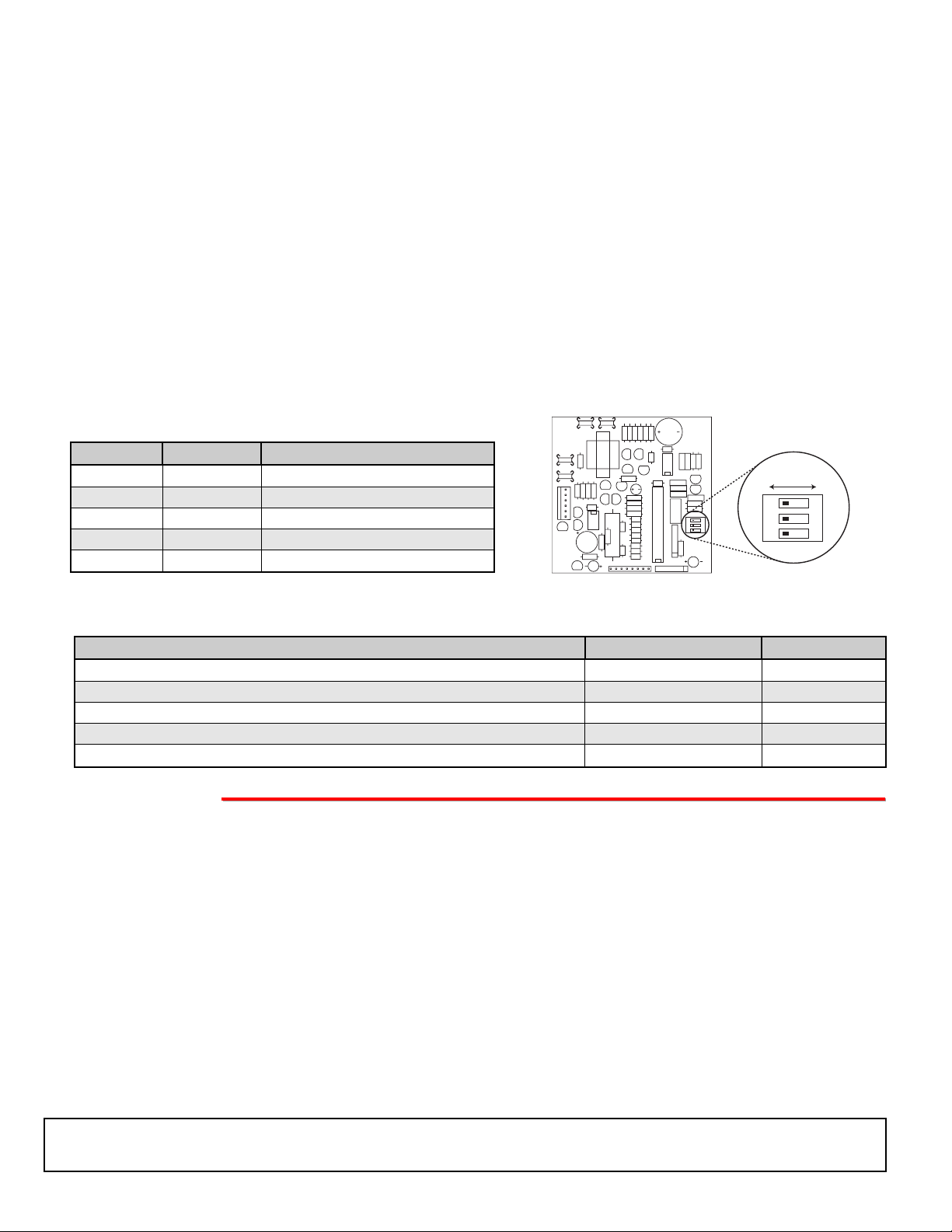
J. DIP Switch Programming
DIP Switch
1
1
2
2
3
Position
ON
OFF
ON
OFF
N/A
Description
Learn Mode
Normal Operation (factory setting)
Multi-Number Dialer Mode
Normal Operation (factory setting)
(not used - for future use)
OFF ON
O
1
O
F
2
F
3
F
F
1
2
3
 Loading...