

Page 1
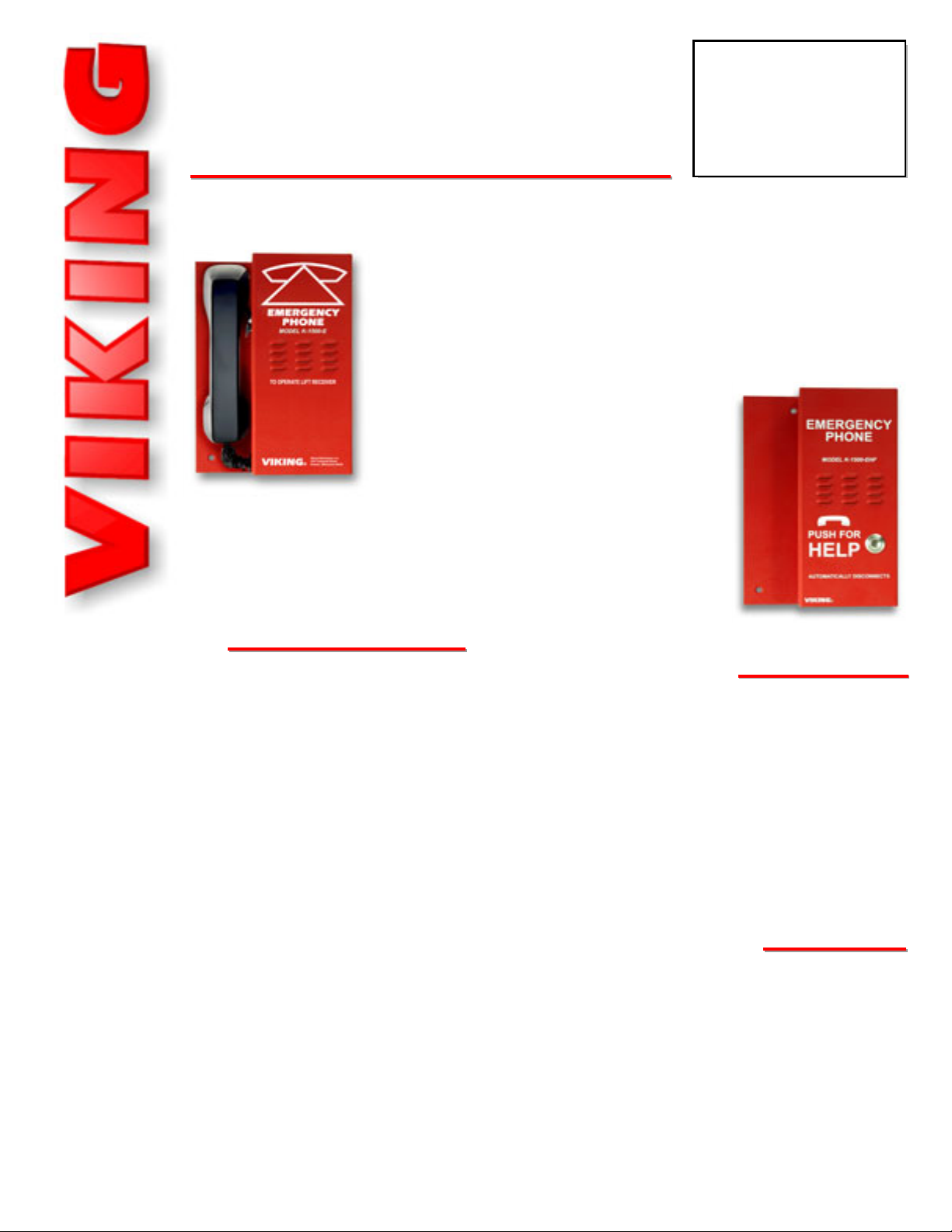
K-1500-E
K-1500-E
K-1500-EHF
K-1500-EHFAA
Emergency/Elevator
Phones
November 27, 2006
PPhhoonnee......771155..338866..8888661
1
i
i
n
n
f
f
o
o
@
@
v
v
i
i
k
k
i
i
n
n
g
g
e
e
l
l
e
e
c
c
t
t
r
r
o
o
n
n
i
i
c
c
s
s
.
.
c
c
o
o
m
m
hhttttpp::////wwwwww..vviikkiinnggeelleeccttrroonniiccss..ccoom
m
Power: Telephone line powered (18V DC/20mA minimum)
Dimensions: 174mm x 251mm x 63.5mm (6.8” x 9.875” x 2.1”)
Shipping Weight: K-1500-E: 1.13 kg (2.5 lbs), K-1500-EHFA:
.91 kg (2 lbs)
Environmental: 0°C to 32°C (32°F to 90°F) with 5% to 95% noncondensing humidity
K-1500-EHFA Speaker Volume: Approximately 70db maximum
@ 1m
K-1500-EHFA Ring Voltage: 25V AC RMS minimum
K-1500-EHFA CPC Disconnect Time: 300ms minimum
K-1500-EHFA REN: 0.8A
Connections: K-1500-E: (1) RJ11 jack, K-1500-EHFA: (1) 2-
position terminal block
Emergency Phones without Auto Dialing
The K-1500 Emergency Phones provide reliable handset or handsfree
emergency communication.
The K-1500-E and K-1500-EHFA can be connected directly to a C.O.
line or analog PABX/KSU station when used in conjunction with a hotline dialer or programmed ring down circuit. The phones can also be
used with Viking’s DLE-200B ring down circuit.
When the button is pressed, the K-1500-EHFA
will come off hook until its intelligent call
PPrraaccttiicce
e
T
T
EELLEECCOOM
M
S
S
OOLLUUTTIIOONNSSFFOORRTTHHE
E
221
1
SST
T
C
C
EENNTTUURRY
Y
TECHNICAL
TECHNICAL
SSppeecciiffiiccaattiioonns
s
FFeeaattuurrees
s
• Handsfree or handset models available
• Phone line powered
• No dial pads
• Designed to mount in a standard emergency
phone enclosure (10” x 7” x 3”)
• Built for easy installation and simple operation
K-1500-E Features
• Hearing aid compatible handset with volume control
K-1500-EHFA Features
• Intelligent call progress detection for automatic
hang-up on CPC, silence, busy signal or timeout
• Alternate action “call” button to place or cancel
a call
• Selectable auto-answer feature allows remote
monitoring
• Two-way handsfree communication
• Vandal resistant metal push button
• Programmable maximum call length
• Programmable VOX (mic/speaker) switching
speed
• Adjustable mic and speaker volume
progress detection automatically hangs it up.
During this time, the user may converse
handsfree. Alternatively, standard handset
communication is used with the K-1500-E.
The K-1500-E and K-1500-EHFA components conform to industry-set
standards and are mounted on a formed aluminum panel, finished in
red powder paint for easy visibility.
• Commercial, industrial or residential elevators
• Use in conjunction with a Viking K-1900-5 Dialer
on C.O. lines or analog PABX/KSU stations
• Use on any programmed ringdown circuit of an
analog PABX/KSU station
AApppplliiccaattiioonns
s
Model K-1500-E
Model K-1500-EHFA
Page 2
A. Installing the K-1500-E or K-1500-EHFA
IInnssttaallllaattiioon
n
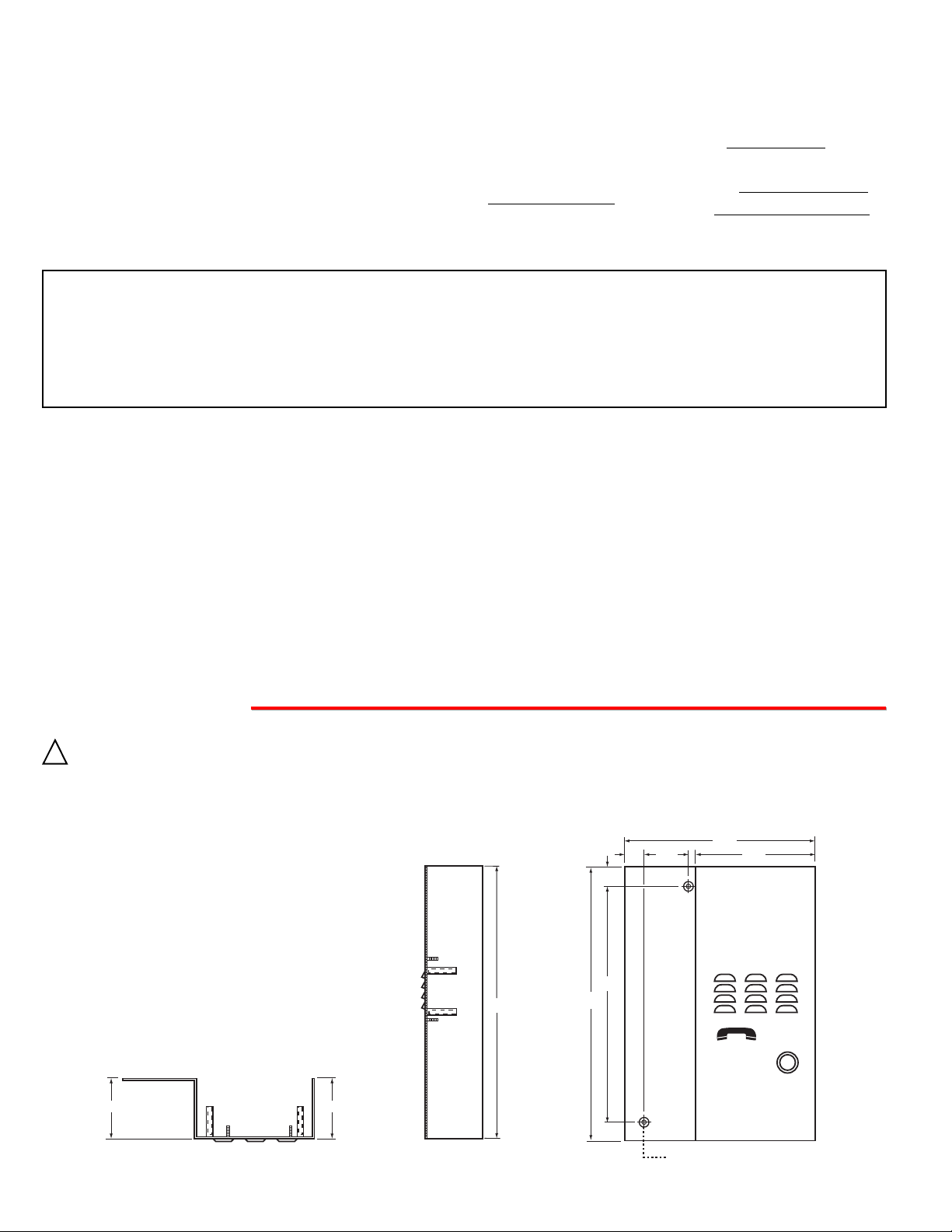
The K-1500-E and K-1500-EHFA are
designed to be mounted inside of a standard
elevator phone box: 10” high x 7” wide x 3”
deep (Example: Allen Tel Outlet Box, part #
GB62247).
IMPORTANT: Electronic devices are susceptible to lightning and power station electrical surges from both the AC outlet and the telephone line. It is recommended that
a surge protector be installed to protect against such surges. Contact Panamax at (800) 472-5555 or Electronic Specialists Inc. at (800) 225-4876.
!
IF YOU HAVE APROBLEM WITH AVIKING PRODUCT, PLEASE CONTACT: VIKING TECHNICAL SUPPORT AT (715) 386-8666
Our Technical Support Department is available for assistance Monday 8am - 4pm and Tuesday through Friday 8am - 5pm central time. So that we can give you better service, before you call please:
1. Know the model number, the serial number and what software version you have (see serial label).
2. Have your Technical Practice in front of you.
3. It is best if you are on site.
WARRANTY
Viking warrants its products to be free from defects in the workmanship or materials, under normal use and service, for a period of one year from the date of purchase from any authorized Viking distributor or 18 months from the date manufactured, which ever is greater. If at any time during the warranty period, the product is deemed defective or malfunctions, return the product to Viking Electronics, Inc., 1531 Industrial Street, Hudson, WI., 54016. Customer must contact Viking's
Technical Support Department at 715-386-8666 to obtain a Return Authorization (R.A.) number.
This warranty does not cover any damage to the product due to lightning, over voltage, under voltage, accident, misuse, abuse, negligence or any damage caused by use of the product by the purchaser or others.
Vikings sole responsibility shall be to repair or replace (at Viking's option) the material within the terms stated above. VIKING SHALL NOT BE LIABLE FOR ANY LOSS OR DAMAGE OF ANY KIND INCLUDING INCIDENTALOR CONSEQUENTIAL DAMAGES RESULTING DIRECTLY OR INDIRECTLY FROM ANY BREACH OF ANY WARRANTY EXPRESSED OR IMPLIED, OR FOR ANYOTHER FAILURE OF THIS PRODUCT. Some states do not allow the exclusion or limitation of incidental or consequential damages, so this limitation may not apply to you.
THIS WARRANTY IS IN LIEU OF ALL OTHER WARRANTIES, EXPRESSED OR IMPLIED, INCLUDING THE WARRANTIES OF MERCHANTABILITY AND FITNESS FOR A PARTICULAR PURPOSE, WHICH ARE HEREBY EXCLUDED
BEYOND THE ONE YEAR DURATION OF THIS WARRANTY. Some states do not allow limitation on how long an implied warranty lasts, so the above limitation may not apply to you.
RETURNING PRODUCT FOR EXCHANGE
The following procedure is for equipment that has failed out-of-box (within 10 days of purchase
):
1. Customer must contact Viking’s Technical Support at 715-386-8666 to determine possible causes for the problem. The
customer MUST be able to step through recommended tests for diagnosis.
2. If the Technical Support Product Specialist determines that the equipment is defective based on the customer's input
and troubleshooting, a Return Authorization (R.A.) number will be issued. This number is valid for fourteen (14)
calendar days from the date of issue.
3. After obtaining the R.A. number, return the approved equipment to your distributor
, referencing the R.A. number. Your
distributor will then replace the product over the counter at no charge. The distributor will then return the product to
Viking using the same R.A. number.
4. The distributor will NOT exchange this product without first obtaining the R.A. number from you. If you haven't
followed the steps listed in 1, 2 and 3, be aware that you will have to pay a restocking charge.
RETURNING PRODUCT FOR REPAIR
The following procedure is for equipment that needs repair:
1. Customer must contact Viking's Technical Support Department at 715-386-8666 to obtain a Return Authorization (RA)
number. The customer MUSThave a complete description of the problem, with all pertinent information regarding the
defect, such as options set, conditions, symptoms, methods to duplicate problem, frequency of failure, etc.
2. Packing: Return equipment in original box or in proper packing so that damage will not occur while in transit. Static
sensitive equipment such as a circuit board should be in an anti-static bag, sandwiched between foam and individual-
ly boxed. All equipment should be wrapped to avoid packing material lodging in or sticking to the equipment. Include
ALL parts of the equipment. C.O.D. or freight collect shipments cannot be accepted. Ship cartons prepaid to:
Viking Electronics, 1531 Industrial Street, Hudson, WI 54016
3. Return shipping address: Be sure to include your return shipping address inside the box. We cannot ship to a PO Box.
4. RAnumber on carton: In large printing, write the R.A. number on the outside of each carton being returned.
the necessary modifications to maintain uninterrupted service.
If trouble is experienced with the K-1500-E or K-1500-EHFA, for repair or warranty information, please contact:
Viking Electronics, Inc., 1531 Industrial Street, Hudson, WI 54016 (715) 386-8666
If the equipment is causing harm to the telephone network, the telephone company may request that you disconnect the
equipment until the problem is resolved.
Connection to Party Line Service is subject to State Tarif fs. Contact the state public utility commission, public service commission or corporation commission for information.
WHEN PROGRAMMING EMERGENCY NUMBERS AND (OR) MAKING TEST CALLS TO EMERGENCYNUMBERS:
Remain on the line and briefly explain to the dispatcher the reason for the call. Perform such activities in the off-peak
hours, such as early morning or late evenings.
It is recommended that the customer install an AC surge arrester in the AC outlet to which this device is connected. This
is to avoid damaging the equipment caused by local lightning strikes and other electrical surges.
PART 15 LIMITATIONS
This equipment has been tested and found to comply with the limits for a Class Adigital device, pursuant to Part 15 of the
FCC Rules. These limits are designed to provide reasonable protection against harmful interference when the equipment
is operated in a commercial environment. This equipment generates, uses, and can radiate radio frequency energy and,
if not installed and used in accordance with the instruction manual, may cause harmful interference to radio communications. Operation of this equipment in a residential area is likely to cause harmful interference in which case the user will
be required to correct the interference at his own expense.
FCC REQUIREMENTS
This equipment complies with Part 68 of the FCC rules and the requirements adopted by the ACTA. Inside the front panel
of this equipment is a label that contains, among other information, a product identifier in the format US:AAAEQ##TXXXX.
If requested, this number must be provided to the telephone company.
The REN is used to determine the number of devices that may be connected to a telephone line. Excessive REN's on a
telephone line may result in the devices not ringing in response to an incoming call. In most but not all areas, the sum of
the REN's should not exceed five (5.0) To be certain of the number of devices that may be connected to a line, as determined by the total REN's, contact the local telephone company. For products approved after July 23, 2001, the REN for
this product is part of the product identifier that has the format US:AAAEQ##TXXXX. The digits represented by ## are the
REN without a decimal point (e.g., 03 is a REN of 0.3). For earlier products, the REN is separately shown on the label.
The plug used to connect this equipment to the premises wiring and telephone network must comply with the applicable
FCC Part 68 rules and requirements adopted by the ACTA. If your home has specially wired alarm equipment connected
to the telephone line, ensure the installation of this K-1500-E or K-1500-EHFAdoes not disable your alarm equipment. If
you have questions about what will disable alarm equipment, consult your telephone company or a qualified installer.
If the K-1500-E or K-1500-EHFAcauses harm to the telephone network, the telephone company will notify you in advance
that temporary discontinuance of service may be required. But if advance notice isn't practical, the telephone company
will notify the customer as soon as possible. Also, you will be advised of your right to file a complaint with the FCC if you
believe it is necessary.
The telephone company may make changes in its facilities, equipment, operations, or procedures that could affect the
operation of the equipment. If this happens, the telephone company will provide advance notice in order for you to make
Front View
Side View
1.60
0.70 4.31
0.70
6.86
EMERGENCY
PHONE
MODEL K-1500-EHF
8.50
9.875
9.875
PUSH FOR
HELP
2.10
Top View
2.10
AUTOMATICALLY DISCONNECTS
©
VIKING
(2) counter-sunk holes for #8 flathead
mounting screws (not included)
Page 3

B. Wiring the K-1500-E
C. Wiring the K-1500-EHFA
* Note: To increase surge protection, loosen the PCB mounting screw labeled (as shown above) and fasten a wire with spade terminal (included) from the mounting screw to Earth Ground (grounding rod, water pipe, etc.)
Rear View of the
K-1500-EHFA
DLE-200B Two Way Ringdown
Circuit (not included)
C.O. Line or analog
PABX/KSU station
programmed for
ringdown
To dedicated
phone or unused
trunk/line input
of phone system
* Optional
Viking Dialer
(not included)
C.O. Line
or analog
PABX/KSU
station
PPrrooggrraammmmiinnggtthheeKK--11550000--EEHHFFA
A
Rear View of
the K-1500-E
DLE-200B Two Way Ringdown
Circuit (not included)
C.O. Line or analog
PABX/KSU station
programmed for
ringdown
To dedicated
phone or unused
trunk/line input
of phone system
Optional
Viking Dialer
(not included)
C.O. Line
or analog
PABX/KSU
station
?
Need More Information on the DLE-200B?
Call (715) 386-4345 and select 605.
A. Adjusting Speaker Volume
The SPKR VOL pot can be adjusted to increase or
decrease the speaker volume to the level desired as
shown right.
?
Need More Information on Hot-Line Dialers?
Call (715) 386-4345 and select 833.
?
Need More Information on the DLE-200B?
Call (715) 386-4345 and select 605.
?
Need More Information on Hot-Line Dialers?
Call (715) 386-4345 and select 833.
B. Adjusting the Microphone Volume
In certain noisy locations (background traffic, machinery or wind), the microphone volume may need to be
decreased. A symptom of this is one-way talk path, in
which the distant party cannot be heard over the
speaker. A MIC VOL pot is provided on the K-1500-
EHFAfor increasing or decreasing the microphone volume. Note: If the microphone volume is set too high
or too low, one-way talk path may occur.
C. DIP Switch Programming
DIP switch 1 is for turning the Auto Answer feature ON and OFF.
The K-1500-EHFA is factory set to auto answer when an inbound
call is detected.
1. Auto Answer Feature ON/OFF (DIP Switch 1)
With DIP switch 2 in the ON position, if the K-1500-EHFA detects
more than 5 seconds of continued dial tone, the unit will automatically disconnect. If the K-1500-EHFA is installed on a continuously noisy line, it may detect the noise as dial tone and automatically disconnect. If this happens, turn the dial tone detection
(DIP switch 2) OFF.
2. Dial Tone Detection ON/OFF (DIP Switch 2)
DIP
Switch
1
1
2
2
3
3
Position
ON
OFF
ON
OFF
ON
OFF
Description
Auto-Answer ON *
Auto-Answer OFF
Dial Tone Detection ON *
Dial Tone Detection OFF
Programming Mode
Normal Operation Mode *
* Note: These are the factory settings.
VIKING
©
Programmable
Tone Dialer
MODEL: K-1900-5
Quick Programming Guide
1. Call the phone connected to the dialer.
2. Answer phone. Enter , & security code.
(Factory set to 845464) Write your
security code below:
3. Enter your spped dial number & #00.
Note: For additional programming see
K-1900-5 Technical Practice.
Viking Electronics, Inc.
Hudson, WI 54016
LINE IN PHONE
DLE-200B
BUSY
RINGDOWN
1
ON
1 2 3 4
2
VIKING©
2
(Spade
connector
included)
* Earth
Ground
(optional)
-or-
VIKING
©
Programmable
Tone Dialer
MODEL: K-1900-5
Quick Programming Guide
1. Call the phone connected to the dialer.
2. Answer phone. Enter , & security code.
(Factory set to 845464) Write your
security code below:
3. Enter your spped dial number & #00.
Note: For additional programming see
K-1900-5 Technical Practice.
Viking Electronics, Inc.
Hudson, WI 54016
LINE IN PHONE
-or-
VIKING©
DLE-200B
BUSY
RINGDOWN
1
ON
1 2 3 4
Rear View of the K-1500-EHFA
* Note: Shown in default positions.
Speaker Volume*
Microphone Volume*
DIP Switches*
ON S1
1 2 3
1 2 3
Less (-)
More (+)
Less (-)
More (+)
ON
OFF
Page 4

Fax Back Doc 220
ZF302380 Rev A
Printed in the U.S.A.
This feature selects the length of time that calls will remain connected
without voice activity . Programmable in increment s of 10 seconds up to
a maximum of 90 seconds. To disable the silence time out, program
nothing in the time value location. Use the chart at the right.
* Note: The factory default is 40 seconds.
With DIP switch 3 in the OFF position, the K-1500-EHFA is in the “Normal Operation Mode” (factory setting). By
placing DIP switch 3 in the ON position, the K-1500-EHFA ’s programming mode is enabled. The programming
mode is used for adjusting the Call Length Time Out, Silence Time for automatic disconnect and the Talk/Listen
delay (VOX switching speed). These features are set from the factory and normally do not need adjustment. If
adjustment is necessary, see Programming sections D - I.
3. Programming Mode ON/OFF (DIP Switch 3)
Due to the dynamic nature of the product design, the information contained in this document is subject to change without notice. Viking Electronics, and its affiliates and/or subsidiaries assume no responsibility for errors and omissions contained in this information. Revisions of this document or new editions of it may be issued to incorporate such changes.
PPrroodduuccttSSuuppppoorrttLLiinnee......771155..338866..8866666
6
FFaaxxBBaacckkLLiinnee......771155.
.338866..44334455
D. Accessing the Programming Mode
Step 1. Move DIP switch 1 to the ON position (sets unit to answer incoming calls - see section C).
Step 2. Move DIP switch 3 to ON (incoming calls automatically enter the programming mode - see section C).
Step 3. From a Touch Tone phone call the line attached to the
K-1500-EHFA.
Step 4. When the K-1500-EHFA answers, 2 beeps will be heard and you will automatically enter the programming mode.
Step 5. When finished programming, enter “0000” to exit programming and move DIP switch 3 back to OFF (see section C).
The K-1500-EHFA can be programmed from any Touch Tone phone using a telephone line, Viking model C-200 or C-
2000A Entry Phone Controller, analog PABX/KSU station or a Viking model DLE-200B Line Simulator.
This feature selects the maximum length of time that calls can be connected. Programmable in increments of 1 minute up to a maximum of 9
minutes. Programming nothing in the time value location will disable the
call length time out. With the call length disabled, the K-1500-EHFA
phone must rely on CPC, busy, silence or return dial tone to hang-up.
Use the chart at the right. * Note: The factory default is 5 minutes.
Time
Value
Blank
1
11
111
1111
11111
111111
1111111
11111111
111111111
Call Length
Time Out
Disabled
1 min
2 min
3 min
4 min
5 min*
6 min
7 min
8 min
9 min
E. Quick Programming Features
Call length time out (1-9 minutes), blank = disabled (factory set to 11111 = 5 minutes) ..................................
Silence time out for disconnect (10-90 seconds), blank = disabled (factory set to 1111 = 40 secs) ................
T alk/listen delay (VOX switching speed) 0.1 - 0.9 seconds (factory set to 111 = 0.3 secs) .............................
Forced hang-up command (used to exit programming and hang up the
K-1500-EHFA) .............................
0
00
000
0000
111...
111...
111...
Select
Feature
beep
beep
beep
3 beeps
Wait for
Beep(s)
Enter
Time Value
beep beep
beep beep
beep beep
Wait for
2 Beeps
F. Programming Beeps
If a valid “Feature” is entered, a single beep will be heard. If an invalid “Feature” (five or more zeros) is entered, 3 beeps
will be heard and the K-1500-EHFA will hang up. If a valid “Time” is entered 2 beeps will be heard. If an invalid “Time”
is entered, 3 beeps will be heard and you will have 20 seconds to enter the next valid “Feature”. Note: After entering
a “Feature” and hearing the first confirmation beep, you will have 3 seconds to enter a time value. If not entered, a blank
time value will be entered in that “Feature”.
G. Call Length Time Out
H. Silence Time Out
Silence
Time Out
Disabled
10 sec
20 sec
30 sec
40 sec*
50 sec
60 sec
70 sec
80 sec
90 sec
Talk/Listen
Delay
N/A
.1 sec
.2 sec
.3 sec*
.4 sec
.5 sec
.6 sec
.7 sec
.8 sec
.9 sec
This feature selects switching time between talk and listen modes (VOX switching time). Use the chart above.
* Note: The factory default is .3 seconds.
I. Talk/Listen Delay (VOX Switching Speed)
OOppeerraattiioon
n
When the push button is pressed, the K-1500-EHFA phone goes off-hook, much like a standard speaker phone. In the
event that the line is busy, the K-1500-EHFA will hang-up. The K-1500-EHFA will also automatically hang up on CPC,
silence, busy signal, return to dial tone or time out. If programmed to auto-answer (DIP switch 1 ON), the K-1500-EHFA will
also answer any incoming call.
See Table A below
Table A
 Loading...