

Page 1
Page 2

Table of Contents
● Function Brief……………………………………………………………………….
● Statements……………………………………………………………………….
● Understanding the Sound System……………………………………………….
● Basic Functions………………………………………………………………………
Start-up Function………………………………………………………………………
Play Function………………………………………………………………………
IPOD……………………………………………………………………………
TUNER…………………………………………………………………………
AUX……………………………………………………………………………
Pause Function………………………………………………………………………
Up and Down Music Selection Function……………………………………………………
Forward & Reward Function…………………………………………………………………
Volume Adjustment………………………………………………………………………
Battery Function……………………………………………………………………..
Clock Settings………………………………………………………………………..
Alarm Clock Settings………………………………………………………………………..
●Troubleshooting Guidance and FAQs……………………………………………………………
●Specifications………………………………………………………………………....
Page 3
●Introduction
Thanks for purchasing the new generation of multifunctional mini music center made by us!
This mini music center has been furnished with multiple functions, perfect sound quality,
ultra-high reliability and dainty appearance as a master work. We’re expecting to bring the super
enjoyment of digital era with your favorite music!
This mini music center has been integrated with multiple functions and dainty look. Hereby
we have stated some major functions and characteristics of it for you to understand it better:
* It supports IPHONE/IPOD Play Function
* FM radio (87.5-108MHz)
* AUX external input function
* Clock function
* Alarm clock function
●Precautions
First thanks for purchasing the digital music center made by this company!
Please read this manual carefully before use to use it correctly.
The contents herein may be changed to deliver the better services to the customs and this
company will not otherwise notify you of any changes to the performances and functions of
product!
To keep the sound performances of product, never use it in the too cold, too hot, dusty or moist
places, especially in the following conditions:
1. Moist or underwater conditions
2. Conditions near the heater or high-temperature service
3. Conditions with direct sunshine
4. Conditions with apt falling
5. Never dismantle the music center without due permission, otherwise it may nullify the
warranty clauses.
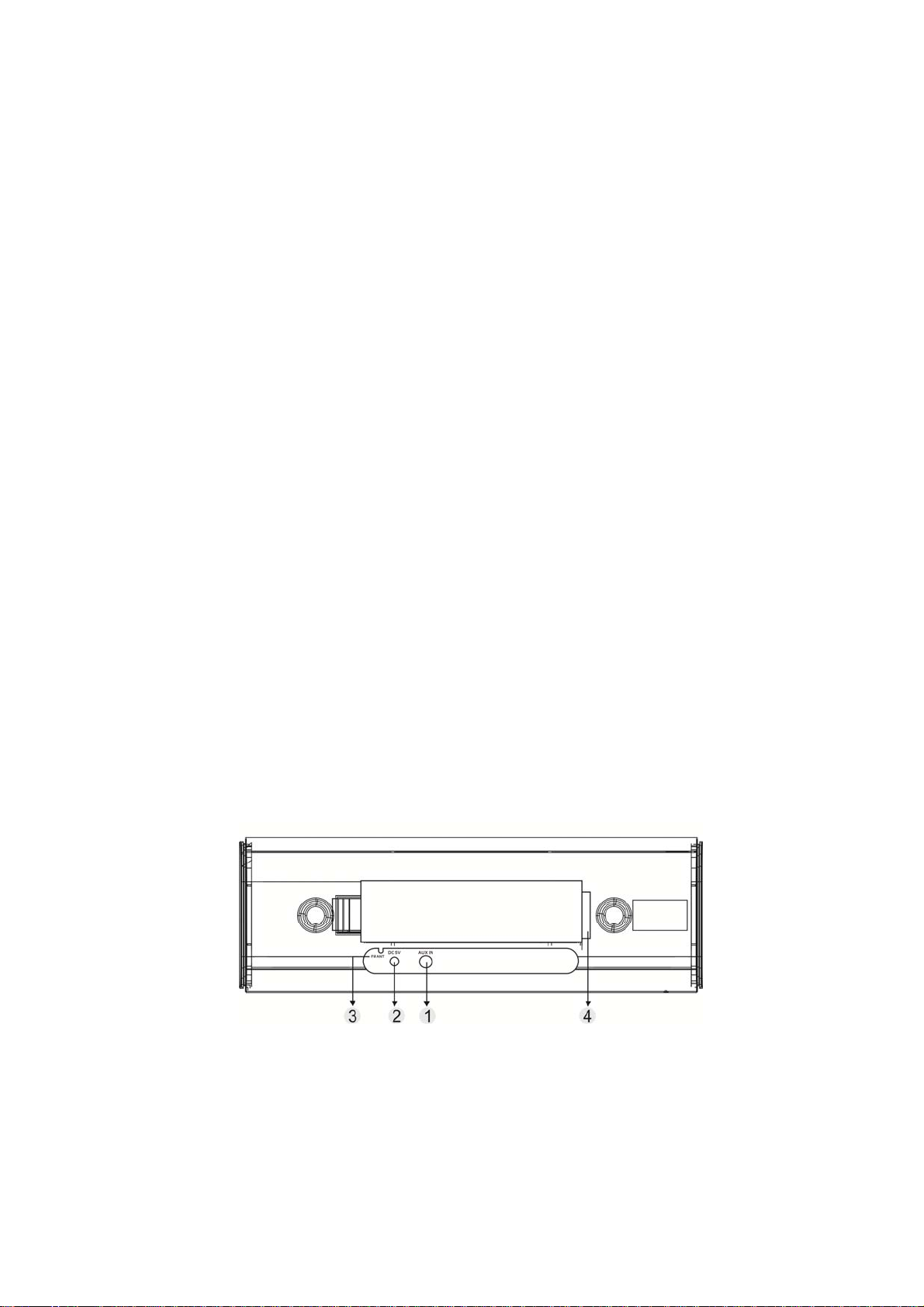
● Keypad and Interface Functions:
..
1. AUX: External sound source in jack
2. DC7V: DC In Jack
3. FM ANT: FM antenna
4. Battery cartridge
Page 4
Page 5

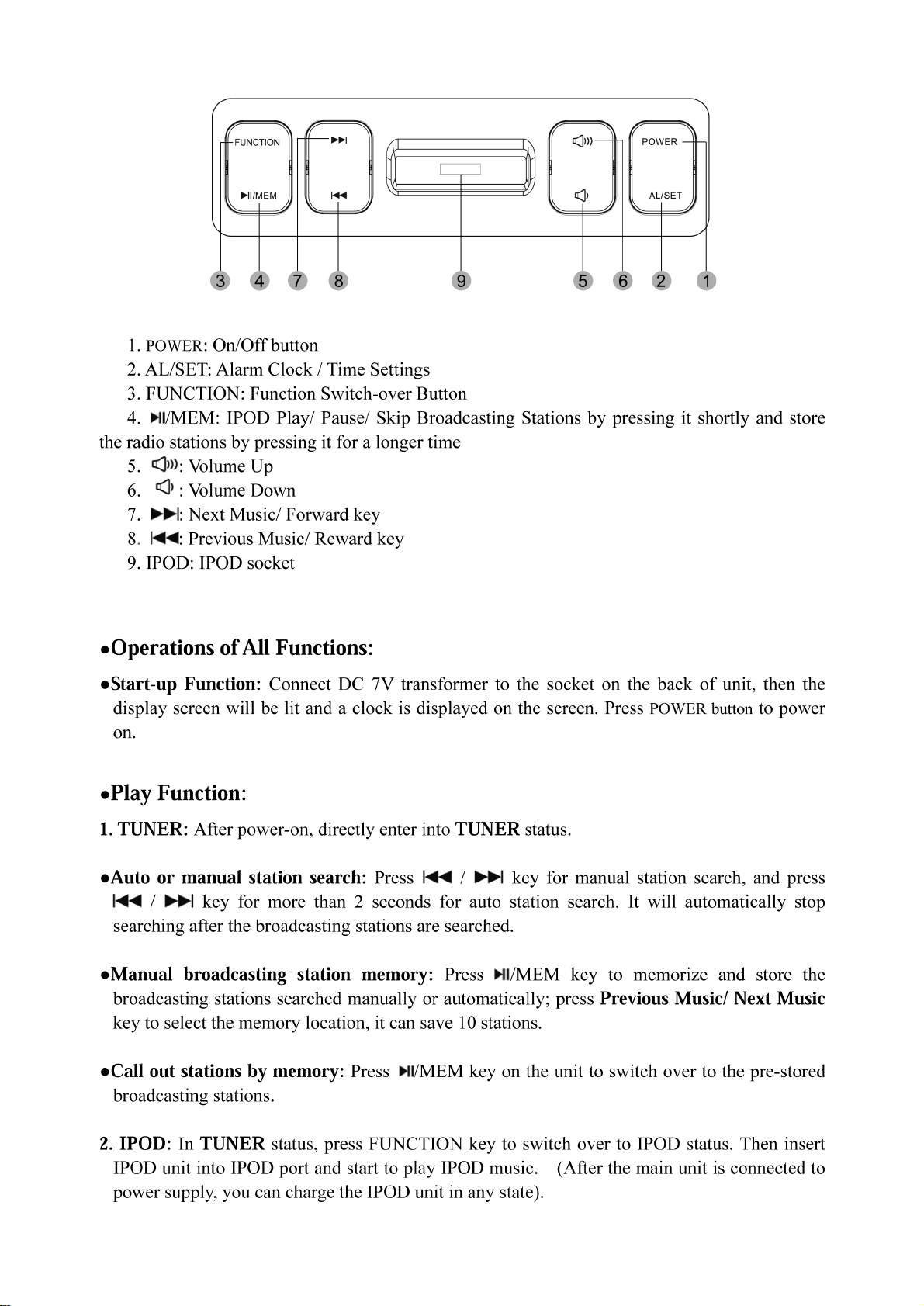
●Pause Function: In IPOD Play or Pause status, press /MEM key once to pause playing.
(Note: In IPOD Play or Pause status, LCD won’t display andǁ and they only display on
LCD of IPOD).
●Up and Down Music Selection Function: In IPOD play or pause status, press / to
call out Previous Music/ Next Music.
●Forward & Reward Function: In IPOD Play or Pause status, press / key for a
longer time to call out Forward & Reward Function.
3. AUX: In IPHONE status, press FUNCTION key to switch over to AUX status, just insert the
external sound source like MP3/CD, etc. into AUX port on the back of unit and start to enjoy the
music inputted by AUX (please adjust the volume of external sound source to the medium level
and turn it into PLAY status).
●V olume Adjustment: Volume may be tuned up or down between 00 and 30.
●Battery Function: Open the battery door on the back of unit without connecting AC power
supply and load four No.5 batteries into the battery cartridge according to the positive and
negative polarities. Then time will be displayed on the screen, press POWER key to access
power-on status to enjoy the music. In case of power supply with DC 7V transformer,
disconnect the battery and use the external DC supply.
● Clock/Alarm Clock Settings: Press AL/SET key for a longer time to enter into Clock
Settings status, then the clock will be displayed and HOUR figures on LED start to flash, you
can press Previous Music/ Next Music key to adjust the hour; press AL/SET key once again,
HOUR figures on LED will be displayed stably and MINUTE figures start to flash, you can
press and keys to adjust the minute and finally press AL/SET key once to set the
clock time and press this key again to confirm the settings and exit from the clock status.
●Alarm Clock Settings: Press POWER key to power off and enter into STAND BY status, press
AL/SET key, and the alarm clock modes will flash on LED including ring tone/ radio/ IPOD/
OFF modes, select one of these modes and press it for 2 seconds and enter into Alarm Clock
Setting. Press Previous Music/ Next Music key to adjust the time, press AL/SET key to access
Alarm Clock Settings, press
press AL/SET key to complete the settings.
● Troubleshooting Guidance and FAQs:
Before repairing this unit, please find out the possible causes as per the following FAQs to
make simple troubleshooting if necessary, they may help you to solve the problems and resume
the normal operations. If not, please get your product to the professional service men for
maintenance.
1. Q: No power
A: Please make sure the source jacket is connected well.
and keys to adjust the alarm clock time and finally
Page 6

2. Q: No voice in IPOD play mode
A: Check if IPOD unit is inserted properly.
3. Q: No voice in play mode
A: Please confirm if the unit is in PLAY status.
●Specifications:
It can play IPOD 1GB-80GB
Output voltage (1KHz 0dB) ≥3.5V
Frequency response 20Hz-20KHz
S/N Ratio ≥60dB
Max. distortion ≤15%
Output power (8Ω) ≥1.5W
Mains input DC 7V
FM sensitivity ≤20dB
Accessories:
1) User Instructions
2) Transformer
6
Page 7

Page 8

 Loading...