

Page 1
BEYOND MOTION
www.vicon.com
LBVR
V i p e r
QUICK START GUIDE
Page 2
9LSHU
QUICK START GUIDE
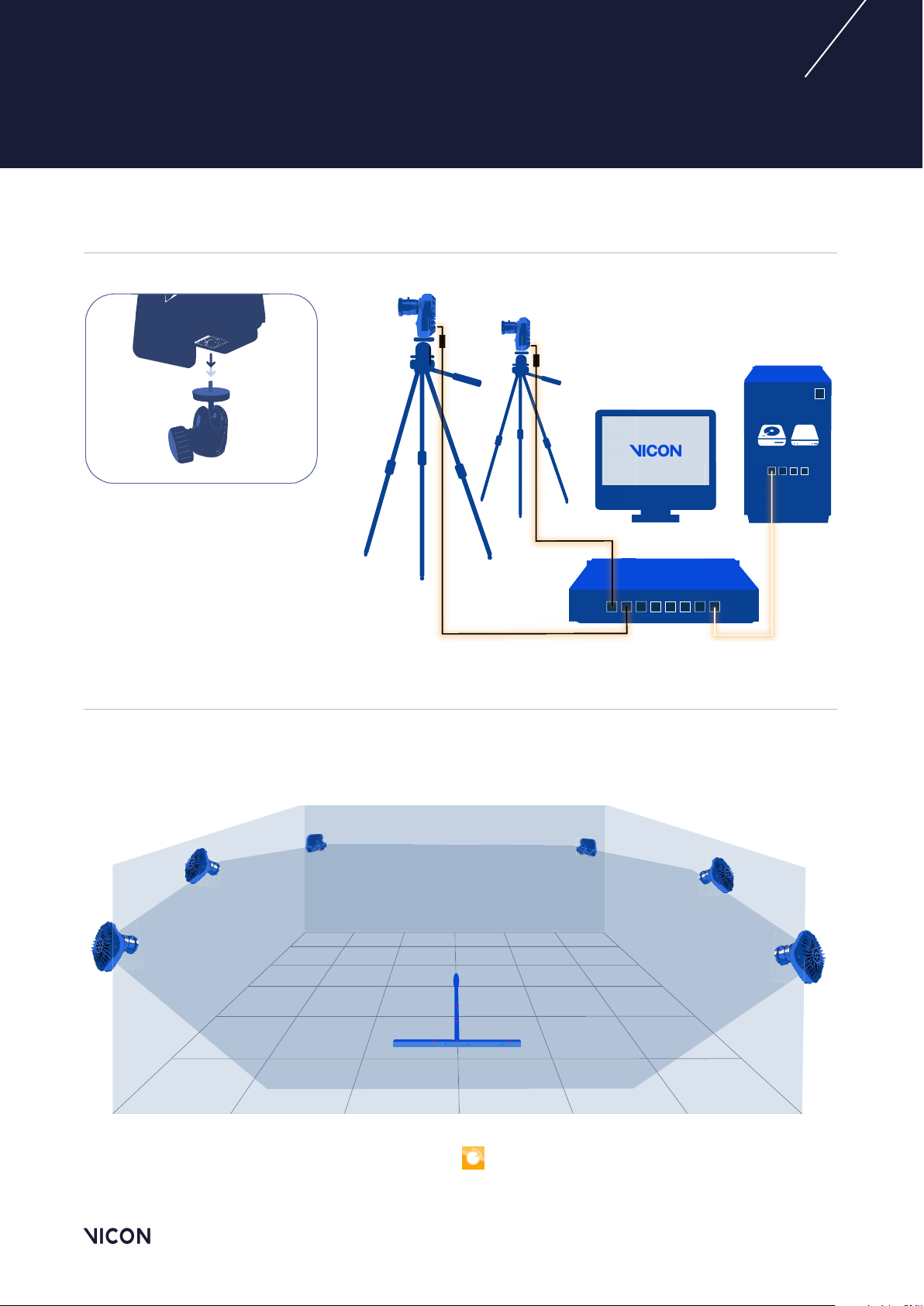
HARDWARE / Mount. Cables. Connect.
4-port NIC
HDD SSD
PoE
2
VOLUME / Visualize. Set up. Aim.
Point the cameras to provide roughly the required coverage. You will be able to refine camera aiming
later, using your Vicon software.
For easy system setup, use the Vicon Control app
See vicon.com/products/software/vicon-control.
October 2019
Page 3
9LSHU
QUICK START GUIDE
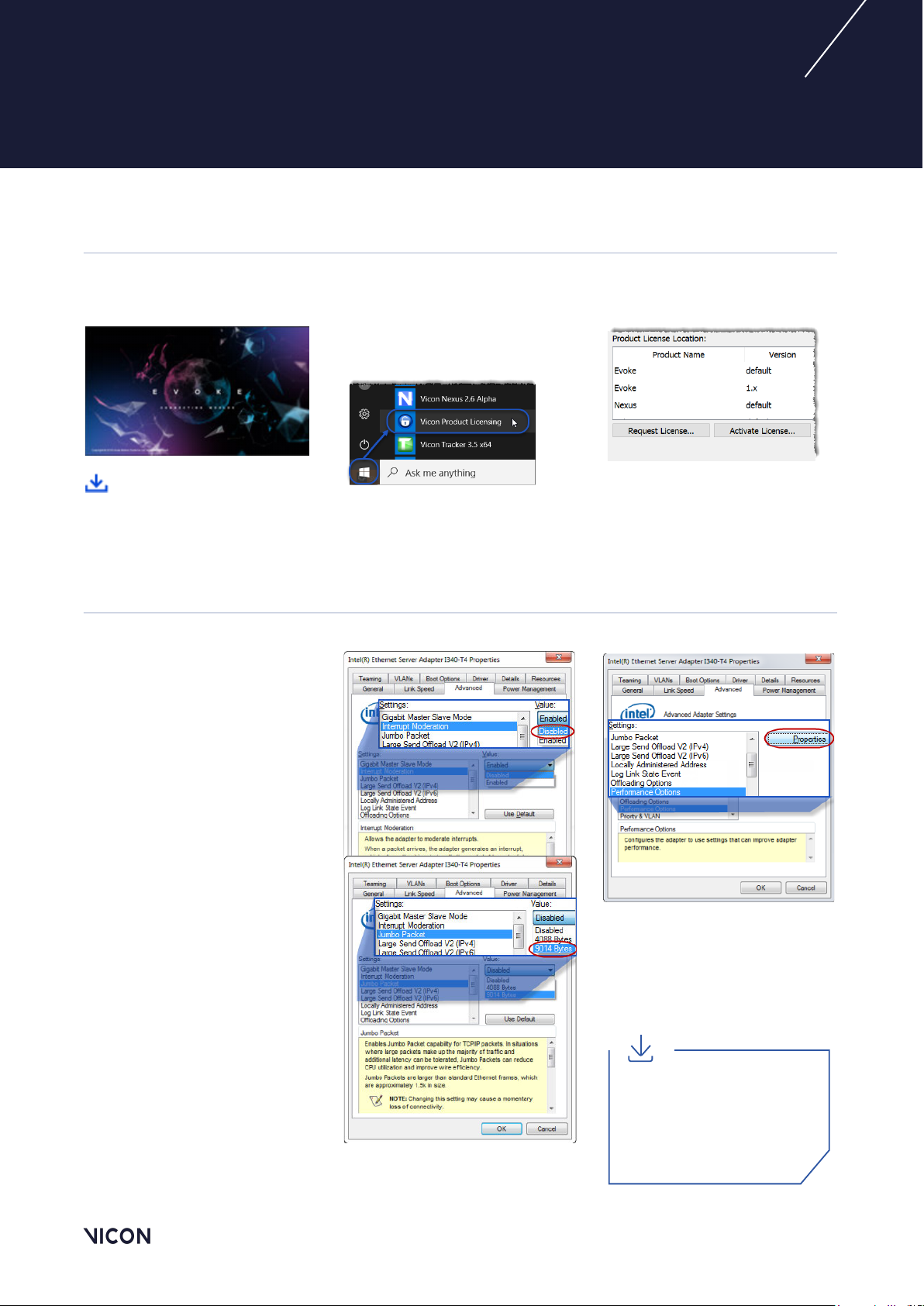
SOFTWARE / Download. Install. License.
3
➊ Obtain Vicon Evoke from
Vicon Support.
➋ Run the relevant Setup.exe.
Click the Windows button or
➌
Start button, then Vicon
Product Licensing.
➍ Request a license, save it to a
suitable location and activate it.
For details on installing and
licensing, see your Vicon
software documentation.
SYSTEM / Administrator. IP address. Adapter settings.
Important: Ensure you are
logged on as Administrator.
➊ Open the Network
Connections window.
➋ Right-click on the network
port that connects to the PoE
switch and click Properties.
➌ In the Properties dialog box,
click Configure and then the
Advanced tab.
➍ In the Settings list, ensure
the values shown (in the images
on the right and the first two
columns on page 4) are
selected, then click OK to close
the dialog box.
➎ Repeat step 2 to re-open the
Properties
dialog box.
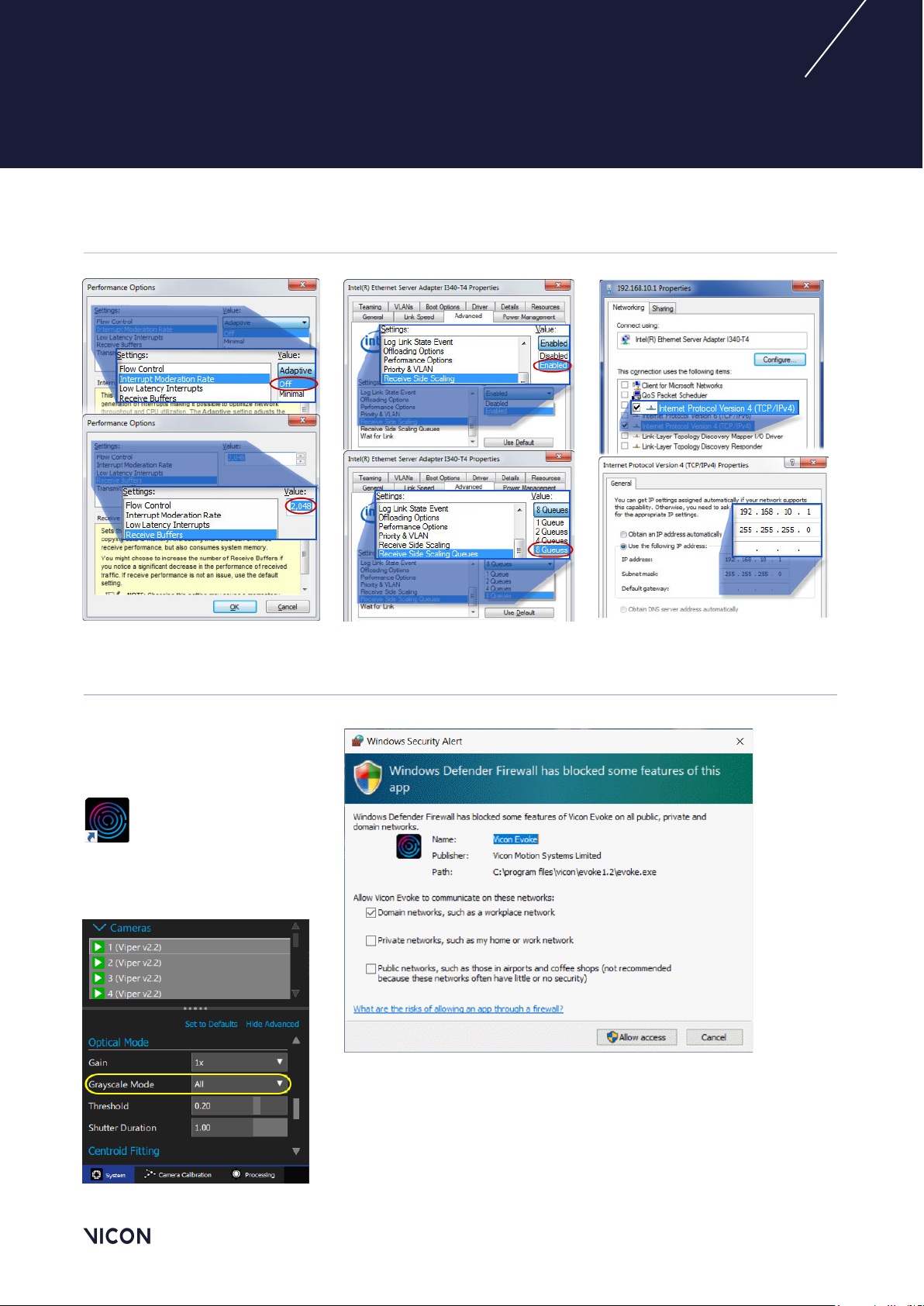
➏ Ensure only Internet
Protocol Version 4
(see page 4, last column) and
click the Properties button.
is checked
➐ Specify the IP address
192.168.10.1 and subnet
255.255.255.0 (see
mask
page 4, last column) and
click OK.
For detailed guidance on system
setup, see Vicon system
configuration information on the
Vicon website or download the
Vicon PDF PC Setup for
Vicon Systems.
October 2019
Page 4
9LSHU
QUICK START GUIDE
SYSTEM (cont.) / Administrator. IP address. Adapter settings.
4
RUN / Start software. Unblock firewall. Connect.
Start your Vicon software
➊
and ensure that it is not blocked
by a firewall (see right).
➋
In the
all the cameras are selected.
System
panel, ensure
➌
In the
Optical Mode
below, change Grayscale Mode
to All.
➍
In the
System
camera. 2
panel,
section
select a
➎ Change the View pane to
Cameras view. You can now
check the aperture for each
camera.
October 2019
Page 5
9LSHU
QUICK START GUIDE
ADJUST / Zoom. Grayscale. Check.
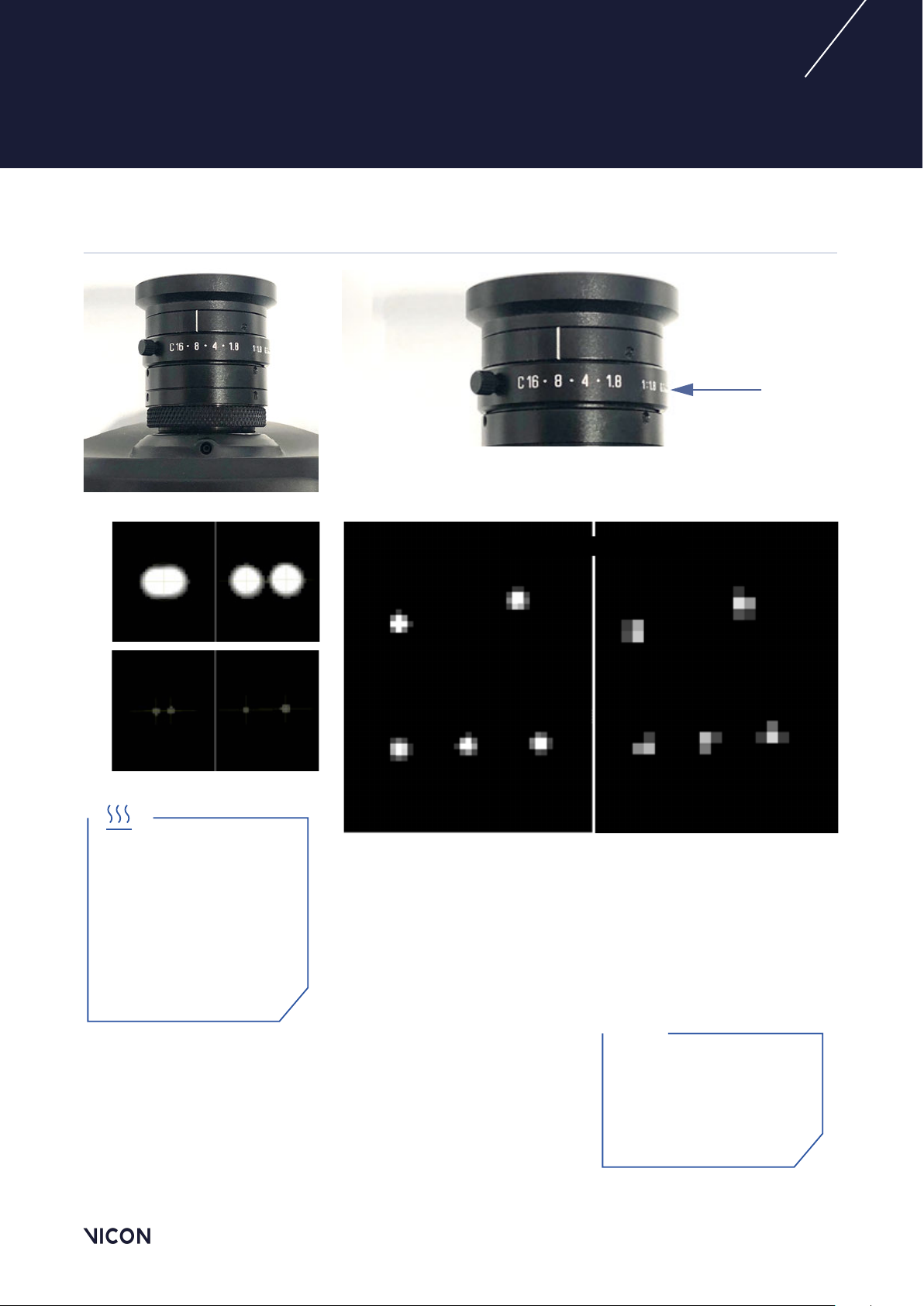
"
Note that the aperture is pre-set to f-stop 8.
Under normal conditions, you don’t need to adjust this setting.
5
Aperture
✘
✘
Aperture too open
Aperture too closed
Warning: Under normal
operation in elevated ambient
conditions, the camera’s heat sink
temperature can exceed 56ºC.
During and after camera
operation, do not touch the
heat sink for longer than
1 second.
Correct marker image
Pulsars in near FoV Pulsars in far FoV
✔ The markers are not too small, with centers just off-white (not
fully saturated) when viewed from the middle of the volume.
Important: Before you begin
system calibration, select all
cameras and change Grayscale
Mode back to Auto. For more
about calibration, see your
Vicon software documentation.
Need more help?
Visit www.vicon.com/faqs.
October 2019
Page 6

9LSHU
QUICK START GUIDE
REGULATORY INFORMATION
RADIO AND TELEVISION INTERFERENCE
6
The following topics contain information
concerning compliance with regulations of
radio and television interference:
- For United States of America
customers
- For Canadian customers
For United States of America
customers
Federal Communications Commission
(FCC) Part 15 Information
This equipment has been tested
and found to comply with the
limits for a Class B digital device,
pursuant to Part 15 of the FCC Rules. These
limits are designed to provide reasonable
protection against harmful interference in a
residential installation. This equipment
generates, uses, and can radiate radio
frequency energy and, if not installed and
used in accordance with the instructions,
may cause harmful interference to radio
communications. However, there is no
guarantee that interference will not occur in
a particular installation. If this equipment
does cause harmful interference to radio or
television reception, which can be
determined by turning the equipment off
and on, the user is encouraged to try to
correct the interference by one or more of
the following measures:
- Reorient or relocate the receiving
antenna.
- Increase the separation between the
equipment and receiver.
- Connect the equipment into an outlet
on a circuit different from that to which
the receiver is connected.
- Consult the dealer or an experienced
radio/TV technician for help
Properly shielded and grounded cables
and connectors must be used in order to
meet FCC emission limits. Vicon Motion
Systems Ltd is not responsible for any radio
or television interference caused by using
other than recommended cables and
connectors or by unauthorized changes or
modifications to this equipment.
Unauthorized changes or modifications
ENVIRONMENTAL REGULATIONS (United Kingdom and European Union customers)
could void the user's authority to operate
the equipment.
Operation is subject to the following two
conditions: (1) this device may not cause
harmful interference, and (2) this device
must accept any interference received,
including interference that may cause
undesired operation.
For Canadian customers
Conformity to the Canadian InterferenceCausing Equipment Regulations
This Class B digital apparatus meets the
requirements of the Canadian
Interference-Causing Equipment
Regulations ICES-003:2004.
Avis de conformité à la réglementation
d'Industrie Canada
Cet appareil numérique de la classe B
respecte toutes les exigences du
Règlement sur le matériel brouilleur du
Canada ICES-003:2004.
This section lists the directives that apply to
Vicon Viper systems.
Restriction of the use of certain hazardous
substances in electrical and electronic
equipment – RoHS and recast (RoHS 2)
This device is fully RoHS- and RoHS 2compliant. RoHS Directive 2002/95/EC
provides that new electrical and electronic
equipment put on the market for the first
time from 1 July 2006 should not contain
lead, cadmium, mercury, hexavalent
chromium, polybrominated biphenyls
(PBB), or polybrominated diphenyl ethers
(PBDE). The European Union Directive
2011/65/EU provides that new electrical
and electronic equipment put on the
market for the first time from 3rd January
2014 shall not contain more than permitted
levels of lead, cadmium, mercury,
hexavalent chromium, polybrominated
biphenyls (PBB), or polybrominated
diphenyl ethers (PBDE; PentaBDE,
OctaBDE; DecaBDE), Mercury (Hg).
REACH Declaration of Conformity
Vicon Motion Systems Ltd is a manufacturer
of electronic hardware. We are therefore
considered a “downstream user” as far as
the REACH document is concerned. Vicon
Motion Systems Ltd is therefore not
obligated to register with the European
Agency for Chemicals ‘ECHA’.
Products sold by Vicon Motion Systems Ltd
are “articles” as defined in REACH (Article
3 Definitions). Moreover and under normal
and reasonably foreseeable circumstances
of application, the articles supplied shall
not release any substance. For that, Vicon
Motion Systems Ltd is neither obligatory for
registration nor for the creation of material
safety data sheets.
In order to assure our customers of the
continual supply of reliable and safe
products, we ensure that our suppliers fulfill
all requirements regarding chemical
substances and prepared materials.
October 2019
Page 7

9LSHU
QUICK START GUIDE
7
Waste Electrical and Electronic Equipment
(WEEE)
(Applicable in the European Union and
other European countries with separate
collection systems)
The use of the symbol as a
marking on the equipment,
accessories or literature indicates
that this product and its electronic
accessories (e.g. USB cable) may
not be treated as household waste. By
ensuring this product is disposed of
correctly, you will help prevent potential
negative consequences for the
environment and human health, which
could otherwise be caused by
inappropriate waste handling of
this product.
Household users should contact either the
retailer where they purchased this device,
or their local government office, for details
of where and how they can take these items
for environmentally safe recycling.
Business users should contact their
supplier and check the terms and
conditions of the purchasing contract. This
device and its electronic accessories
should not be mixed with other commercial
waste for disposal.
CE DECLARATION OF CONFORMITY
Electromagnetic Compatibility to EMC Directive 2004/108/EC
Electrical Safety to Low Voltage Directive 2014/35/EU.
We, Vicon Motion Systems Limited
Unit 6, Oxford Industrial Estate
Yarnton OX5 1QU
UNITED KINGDOM
declare that the VICON Viper Camera manufactured by VICON MOTION SYSTEMS LIMITED has been tested and
demonstrated that all products of its own manufacture meet 2004/108/EC and 2014/35/EU:
Electromagnetic Compatibility to:
EN60601-1-2:2015 Class B
General Requirements for Safety to:
Cameras EN60601-1:2006 + A12:2014
Network Hub UL60950–1, 2nd Edition (LVD 2014/35/EU)
Thomas Shannon, TD PhD FIE (Aust), CPEng (Biomed.)
Director
th
7
June 2019
Not for use in an operating theater, anesthetic gas
environment, or oxygen-rich environments. Not for use where
there is a risk of compromising the essential performance of
medical electrical equipment. Not suitable for use in high
magnetic flux, ionizing radiation, sterile, or life- or
safety-critical environments.
About your Vicon camera packaging
The box in which your new Vicon Viper camera arrived is
designed to hold the camera securely. It prevents most damage
that could be caused during shipping. Vicon recommends that
you retain this box as it provides the most convenient and safe
way to ship your camera(s) in future.
October 2019
Page 8

BEYOND MOTION
Contact us to find out more
www.vicon.com/support
[email protected]
Vicon Denver
+1.303.799.8686
Open from 8am to 5pm MST (GMT -7)
Monday to Friday
Vicon LA
+1.310.437.4499
Open from 8am to 5pm PST (GMT -8)
Monday to Friday
Vicon Oxford:
+44.1865.261800
Open from 9am to 5pm GMT
(MST +7, PST +8) Monday to Friday
© Copyright 2019 Vicon Motion Systems Limited. All rights reserved.
Vicon® is a registered trademark of Oxford Metrics plc. Vicon ViperX™ and Vicon Evoke™ are trademarks of Oxford
Metrics plc. Other product and company names herein may be the trademarks of their respective owners.
For full and up-to-date copyright and trademark acknowledgements, visit
https://www.vicon.com/vicon/copyright-information.
Vicon Motion Systems is an Oxford Metrics plc company.
www.vicon.com
 Loading...