

Page 1
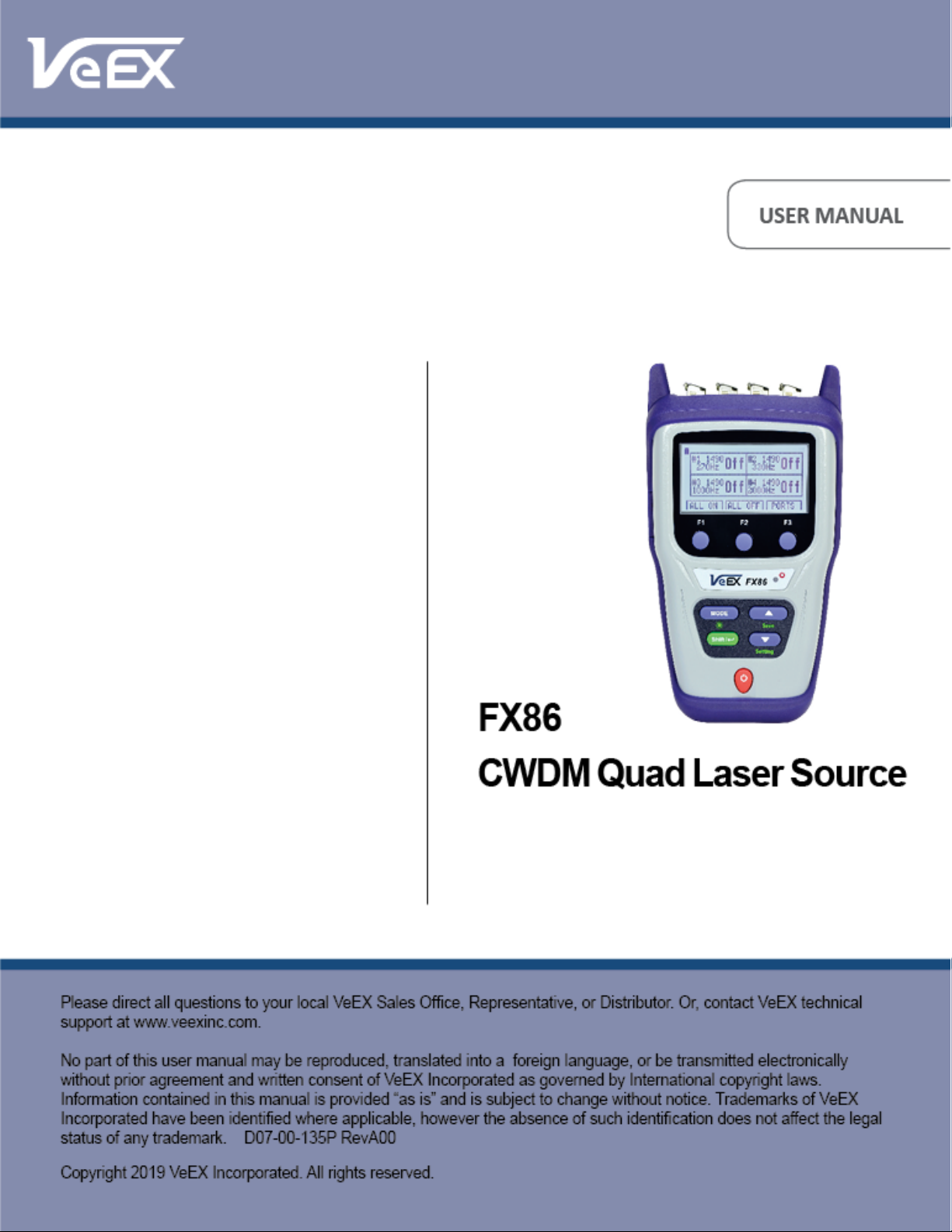
FX86 CWDM Quad Laser Source User Manual Page 1 of 17
Page 2

Contents
1.0 About This User Manual ........................................................................................... 3
2.0 Safety Information ..................................................................................................... 4
3.0 Product Introduction ................................................................................................. 5
3.1 FX86 Overview ...................................................................................................................... 5
3.2 Definitions ............................................................................................................................. 6
4.0 Basic Operation ......................................................................................................... 7
4.1 FX86 Front Panel Layout ..................................................................................................... 7
4.1.1 LED Indicators .........................................................................................................................................7
4.1.2 Rubber Keypad ........................................................................................................................................8
4.2 Test Ports .............................................................................................................................. 8
4.2.1 Optical Ports ............................................................................................................................................8
4.2.2 Service Port .............................................................................................................................................8
5.0 Getting Started .......................................................................................................... 9
5.1 Battery ................................................................................................................................... 9
5.1.1 Battery Replacement...............................................................................................................................9
5.2 Instrument Settings ............................................................................................................ 10
5.3 Resetting your FX86 ........................................................................................................... 10
6.0 Fiber Measurements ............................................................................................... 11
6.1 Optical Light Source .......................................................................................................... 11
7.0 Warranty and Software ........................................................................................... 13
8.0 Product Specifications ........................................................................................... 15
9.0 Certifications and Declarations .............................................................................. 16
10.0 About VeEX .............................................................................................................. 17
FX86 CWDM Quad Laser Source User Manual Page 2 of 17
Page 3

1.0 About This User Manual
This user manual is suitable for novice, intermediate, and experienced users and is intended to
help you successfully use the features and capabilities of the FX86 CWDM Quad Laser
Source. It is assumed that the user has basic computer experience and skills, and is familiar
with optical fiber, telecommunication concepts, terminology, and safety.
Every effort was made to ensure that the information contained in this user manual is accurate.
Information is subject to change without notice and we accept no responsibility for any errors or
omissions. In case of discrepancy, the web version takes precedence over any printed literature.
The content in this manual may vary from the software version installed in the unit.
© Copyright 2019 VeEX, Inc. All rights reserved.
VeEX, VePAL, Sunrise Telecom, Agizer, Optixsoft, Sunlite, Sunset, RXT, MTT, OPX, Fiberizer,
FX, TX and OPX, are trademarks of VeEX, Inc. and/or its affiliates in the USA and certain other
countries. All trademarks or registered trademarks are the property of their respective
companies. No part of this document may be reproduced or transmitted electronically or
otherwise without written permission from VeEX, Inc.
This device uses software either developed by VeEX, Inc. or licensed by VeEX, Inc. from third
parties. The software is confidential and proprietary of VeEX, Inc. The software is protected by
copyright and contains trade secrets of VeEX, Inc. or VeEX's licensors. The purchaser of this
device agrees that it has received a license solely to use the software as embedded in the
device, and the purchaser is prohibited from copying, reverse engineering, decompiling, or
disassembling the software.
For more technical resources, visit the VeEX, Inc. web site at www.veexinc.com.
If you need assistance or have questions related to the use of this product, call or e-mail our
customer care department for customer support. Before contacting our customer care
department, you must have your product serial number and software version ready. Please
provide this number when contacting VeEX customer service.
Customer Care:
Phone: + 1 510 651 0500
E-mail: [email protected]
Website: www.veexinc.com
FX86 CWDM Quad Laser Source User Manual Page 3 of 17
Page 4
2.0 Safety Information
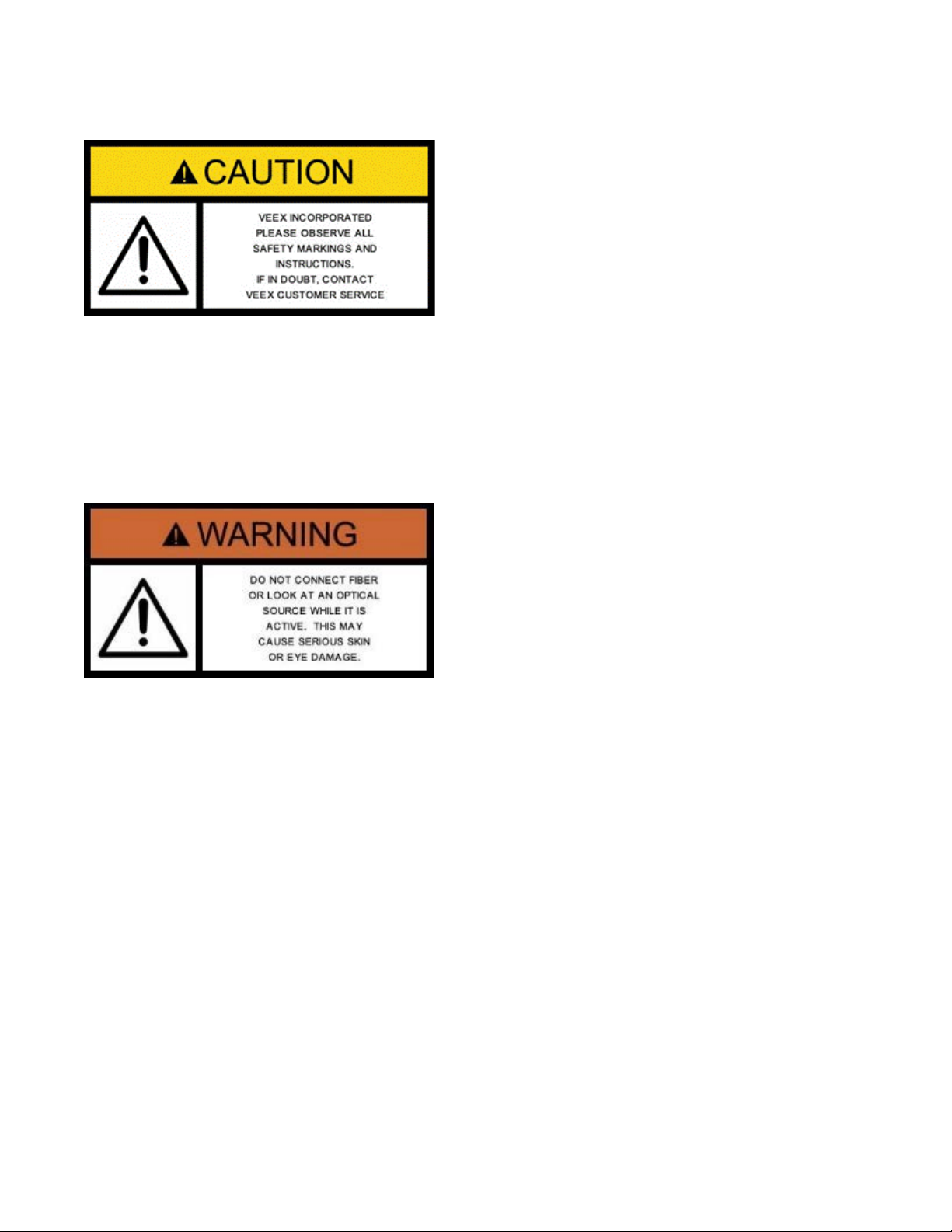
Safety precautions should be observed during all phases of operation of this instrument. The
instrument has been designed to ensure safe operation however please observe all safety
markings and instructions. Do not operate the instrument in the presence of flammable gases
or fumes or any other combustible environment. VeEX Inc. assumes no liability for the
customer's failure to comply with safety precautions and requirements.
Optical Connectors
The test platform displays a laser warning icon when the laser source is active to alert the user
about a potentially dangerous situation. Make sure that optical sources are inactive before
connecting fiber to the test set to avoid skin or eye damage, or damage to the unit. It is
recommended to:
• Deactivate the laser before connecting or disconnecting optical cables or patchcords.
• Never look directly into an optical patchcord or an optical interface (e.g. CFP, CFP2, CFP4,
QSFP+, SFP+, SFP, OTDR, LS, VFL) while the laser is enabled. Even though optical
transceivers are typically fitted with Class 1 lasers, which are considered eye safe, optical
radiation for an extended period can cause irreparable damage to the eyes.
• Never use a fiber microscope to check the optical connectors when the laser source is
active.
Electrical Connectors
Telephone lines may carry dangerous voltages. Always connect the electrical test ports to
known test interfaces which carry low level signals.
FX86 CWDM Quad Laser Source User Manual Page 4 of 17
Page 5
3.0 Product Introduction
The FX86 CWDM Quad Laser Source is a handheld optical testing device for providing
calibrated laser radiation, to be used together with an optical power meter. The accompanying
power meter must be calibrated to one of the FX86 laser wavelengths. For the power meter
operations, please see its manual.
3.1 FX86 Overview
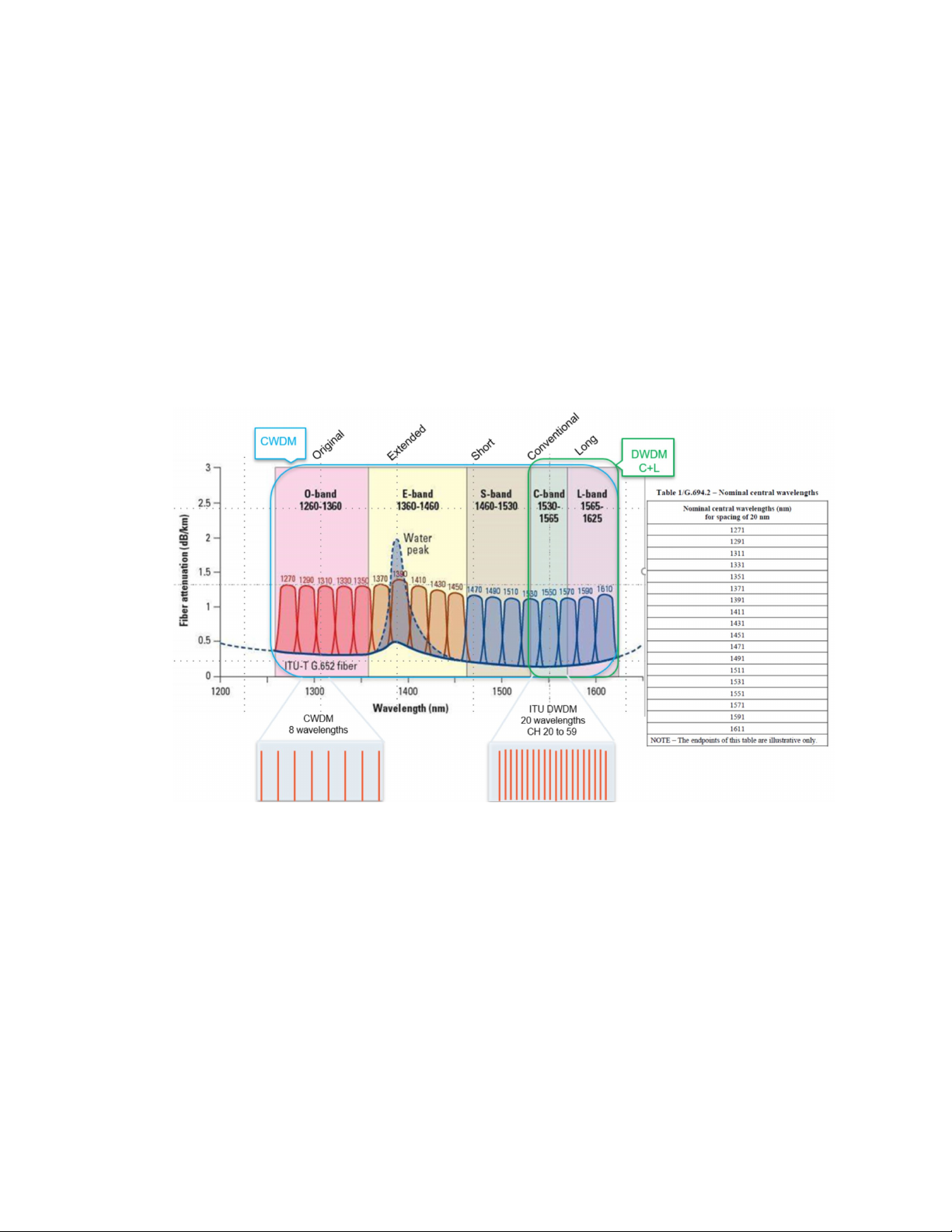
CWDM – Course Wavelength Division Multiplexing is a WDM technology characterized by
wide, 20 nm channel spacing and grid wavelengths with 1271 nm to 1611 (16 active channels)
and is typically used for shorter distances as found in city and access networks.
CWDM Spectrum Graph
The FX86 CWDM Quad Laser Source is specially engineered to test CWDM systems. A single
device can support up to 4 fixed wavelengths for OLS fiber optic network testing and
measurement, defined by the customer upon ordering. The wavelengths can be any 4 values
in the 1270 – 1610 nm range incremented by 20 nm, in any combination.
To make the fiber identification in a rack more convenient, the laser signal from FX86 with a
calibrated wavelength (see the CDWM set of calibrated wavelengths above) is also modulated
with the following frequencies:
• CW (Continuous Wave)
• 270 Hz
• 330 Hz
• 1000 Hz
• 2000 Hz
FX86 CWDM Quad Laser Source User Manual Page 5 of 17
Page 6

3.2 Definitions
• APC (Angled Physical Contact): better than -65 dB return loss
Patchcords can be made with singlemode or multimode fiber.
end face is always flat.
panels or patch panels
accommodate different male Optical Connectors.
Optical Interface: PC, UPC, APC (designates the connector end face polish type):
• PC (regular Physical Contact): better than -45 dB return loss
• UPC (Ultra Physical Contact): better than -55 dB return loss
Optical Patchcord: A fiber (typically tight-buffered) terminated with an Optical
Connector on each end (see below). Patchcords can be
configured in simplex, duplex, or ribbon cable configuration.
Optical Connector: A patchcord is terminated with a MALE type connector. There are
a wide variety of optical connectors, such as FC, SC, LC, MU, etc.
For singlemode fiber, the end face can have either ‘flat’ or ‘angled’
Optical Polish (for example, FC/UPC or FC/APC). Multimode fiber
Fixed Optical Adapter:
(mid-coupler or
bulkhead)
Variable Optical
Adapter:
The adapter is used to connect two male Optical Connectors
together (Example: FC-FC, FC-SC, FC-LC).
On a test set with universal interface option, one side of the
coupler may be changed by user using universal/variable adapters
(see Variable Optical Adapter). However, the connectors have to
be of the same Optical Polish (for example FC/UPC or FC/APC).
Optical Adapters are located on instrument test ports (OTDR,
Power Meter, Light Source, OSA, etc.), network equipment front
Unlike with the Fixed Optical Adapter, one or both end female
connectors of a Variable Optical Adapter can be changed to
FX86 CWDM Quad Laser Source User Manual Page 6 of 17
Page 7
4.0 Basic Operation
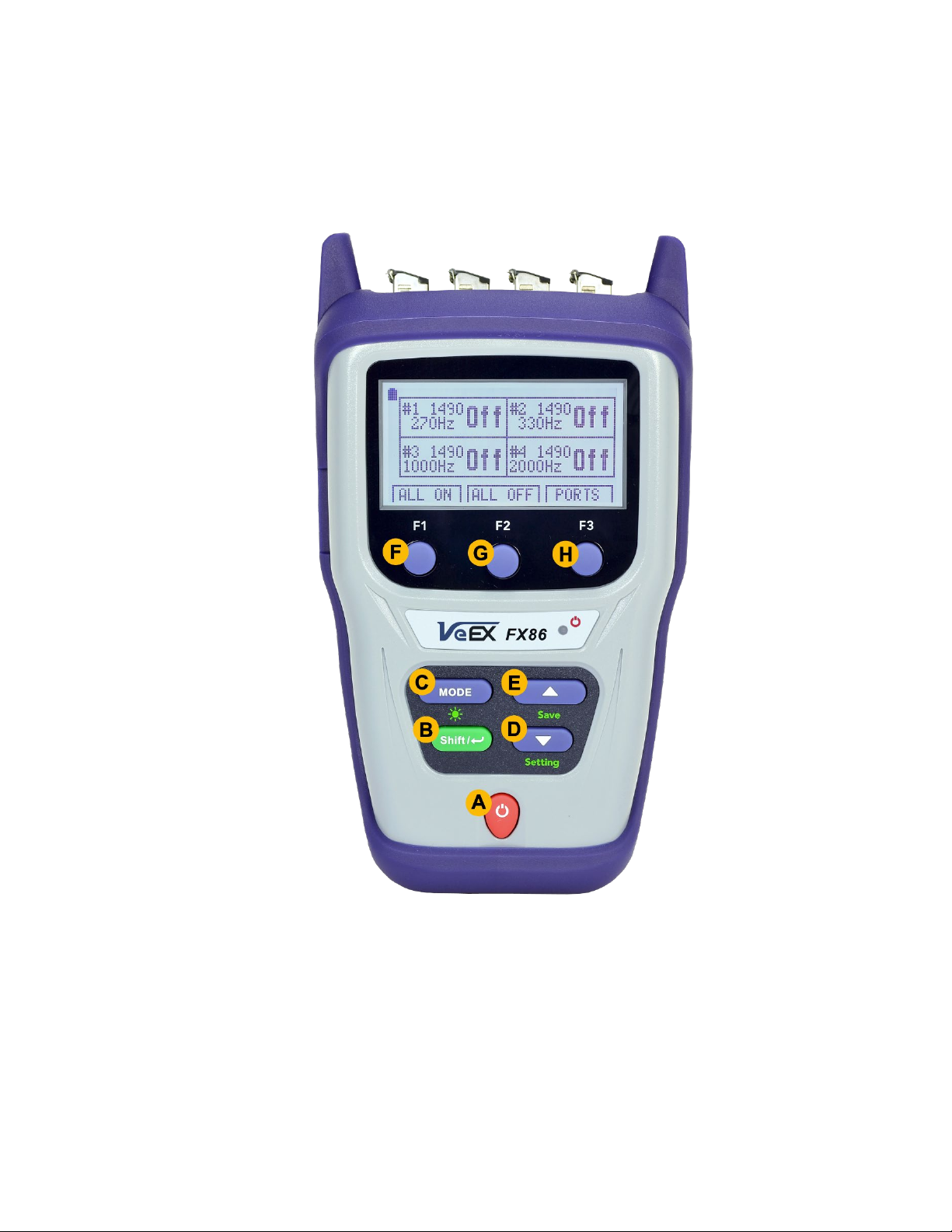
4.1 FX86 Front Panel Layout
FX86/87 Front View
4.1.1 LED Indicators
Power LED: A single LED indicates the power state of the unit.
• The LED is off when the unit is powered off.
• The LED is green when the unit is powered on.
• The LED is orange when the unit is connected to the AC power port and powered off
(charging).
FX86 CWDM Quad Laser Source User Manual Page 7 of 17
Page 8
4.1.2 Rubber Keypad
See the details below for information on the keypad functions, as labelled on the image above.
• A: Power - Press for 3 seconds to turn the test set ON or OFF (prevents accidental
ON/OFF). Initially, the display will show the current date, time, and mode of operation.
• B: SHIFT/Enter – Confirms choice when editing a parameter or starts selected action.
Depends on active application.
• D/E: Up/Down - Used to change the selected parameter. Depends on active application
and unit configuration.
• F/G/H: Soft-key functions, which vary depending upon operating mode. Function menu
options appear at the bottom of the screen.
SHIFT + MODE: Switches the backlight mode: OFF, Low-level, Mid-level, Bright-level.
SHIFT + DOWN: Instrument Settings mode
4.2 Test Ports
4.2.1 Optical Ports
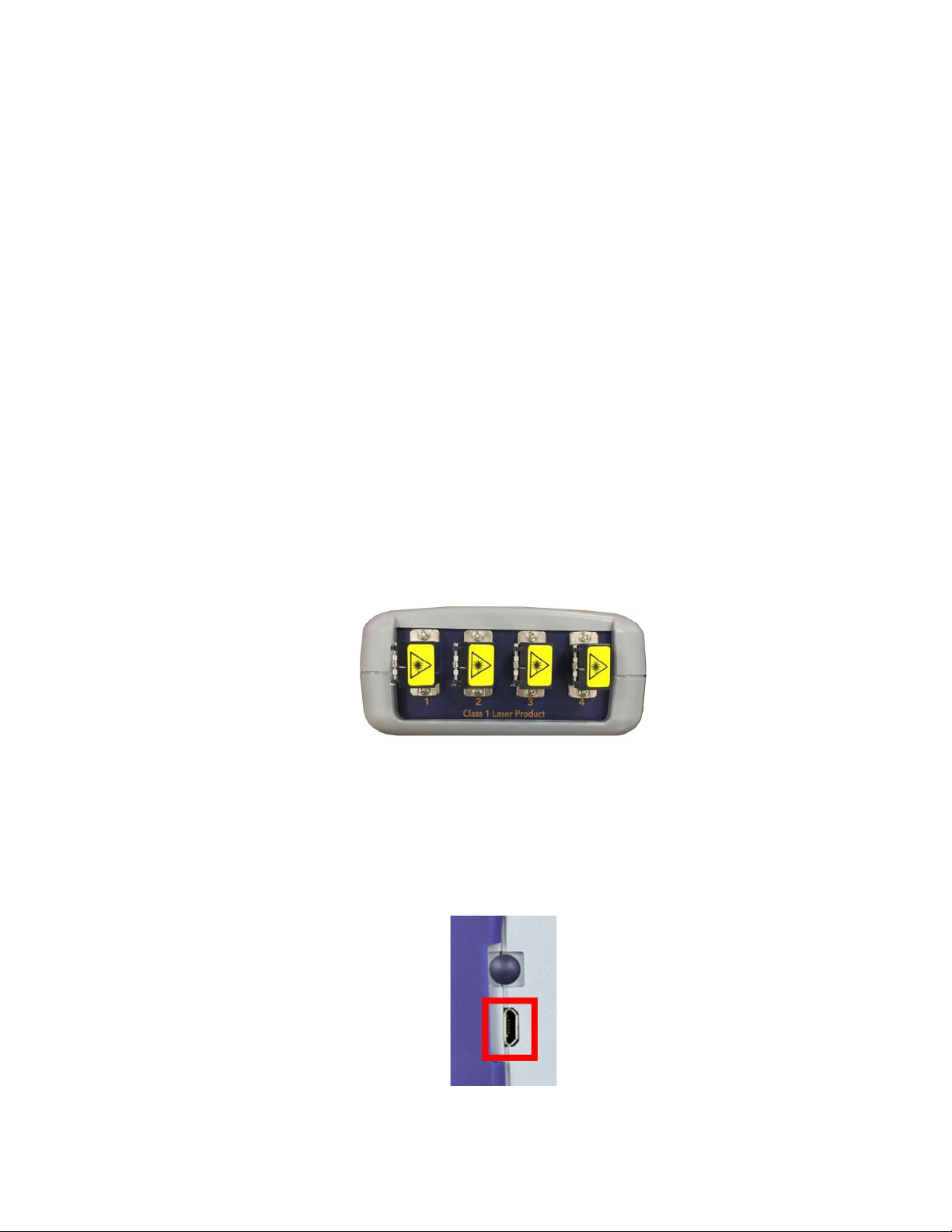
FX86 OLS Optical Ports
OLS ports: Used to provide 4 independent, continuous light sources at the specified
wavelengths. Pairing the OLS with an OPM allows you to test for loss or end-to-end continuity
on a CWDM network.
4.2.2 Service Port
FX86 Service Port
The service port (micro-USB) located on the left side of the device is used to charge the unit.
FX86 CWDM Quad Laser Source User Manual Page 8 of 17
Page 9
5.0 Getting Started
Please note that FX86 works with a power meter calibrated to one of the FX86 laser
wavelengths. For the power meter operations, see its manual.
Before using the FX86 CWDM quad laser source for the first time, fully charge the battery and
set the local date and time.
5.1 Battery
The unit is equipped with a built-in, rechargeable Li-Polymer 3A, smart charge battery and it is
partially charged upon delivery. However, VeEX recommends charging the battery to full
capacity before using the test unit for the first time.
The device is powered from the built-in Li-Polymer battery and can be operated
with the AC/ DC adaptor plugged in.
When the test unit is plugged into AC/DC power, the Plugged icon ( ) appears on the top left
corner of the display. When the unit is operating on the internal battery, the Battery icon ( )
appears.
It is recommended to charge the battery at room temperature to preserve its life
and to obtain maximum charge.
To charge the test unit, connect the AC/DC adaptor supplied with the unit to the micro-USB
service port located on the left side of the device. The battery charging time depends on the
battery condition and ambient temperature. Only use the cables provided with the device to
charge the battery.
Important: The Li-Polymer battery is designed for maximum safety. However, the
battery may explode, leak or catch fire when:
• It is exposed to high temperatures or fire.
• It is opened or dismantled.
The test unit provides up to 35 hours of battery time when operating in Broadband OPM mode
and up to 25 hours when operating in FTTx PON mode. An auto-off feature, configured in the
Settings mode, powers down the unit when a low battery condition is reached.
5.1.1 Battery Replacement
Battery replacement in the field is not authorized or permitted. The unit must be returned to an
authorized VeEX service center or partner for repair.
FX86 CWDM Quad Laser Source User Manual Page 9 of 17
Page 10
5.2 Instrument Settings
To properly save the date/time with your measurement results, you must set the device date
and time to your local date/time. To set the date and time:
1. Power ON the test unit by pressing and holding the Power button for 3 seconds. The green
LED light turns on to indicate the unit is on.
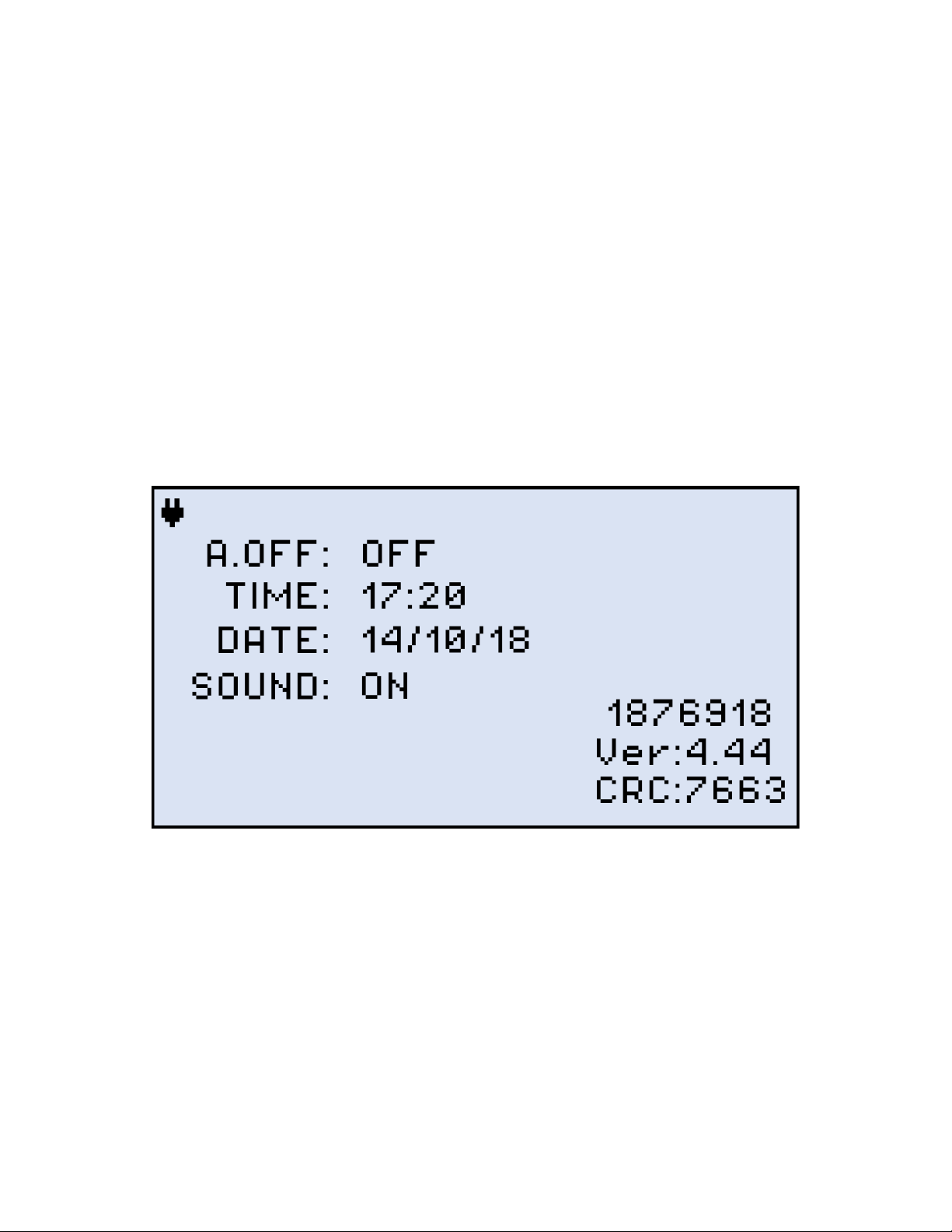
2. Press Shift/Enter + Down to enter the Settings mode. The following parameters can be
set: Auto Shutdown mode, Time and Date. The current selected test parameter available to
edit will be flashing.
3. Press Up and Down to change the parameter.
4. Press MODE to select the next field to edit, then change the value if necessary by pressing
Up and Down.
5. Press Shift/Enter to save the date and time settings.
FX86 Instrument Setting screen
5.3 Resetting your FX86
To reset your device:
1. Disconnect external power supply from the device;
2. With the device OFF, press the red Power button and hold it for at least 15 seconds. The
FX86 will reboot, but you will need to reset the date and time (see above).
FX86 CWDM Quad Laser Source User Manual Page 10 of 17
Page 11
6.0 Fiber Measurements
6.1 Optical Light Source
To use your device as a stable light source:
1. Press the red POWER button to turn the test unit on.
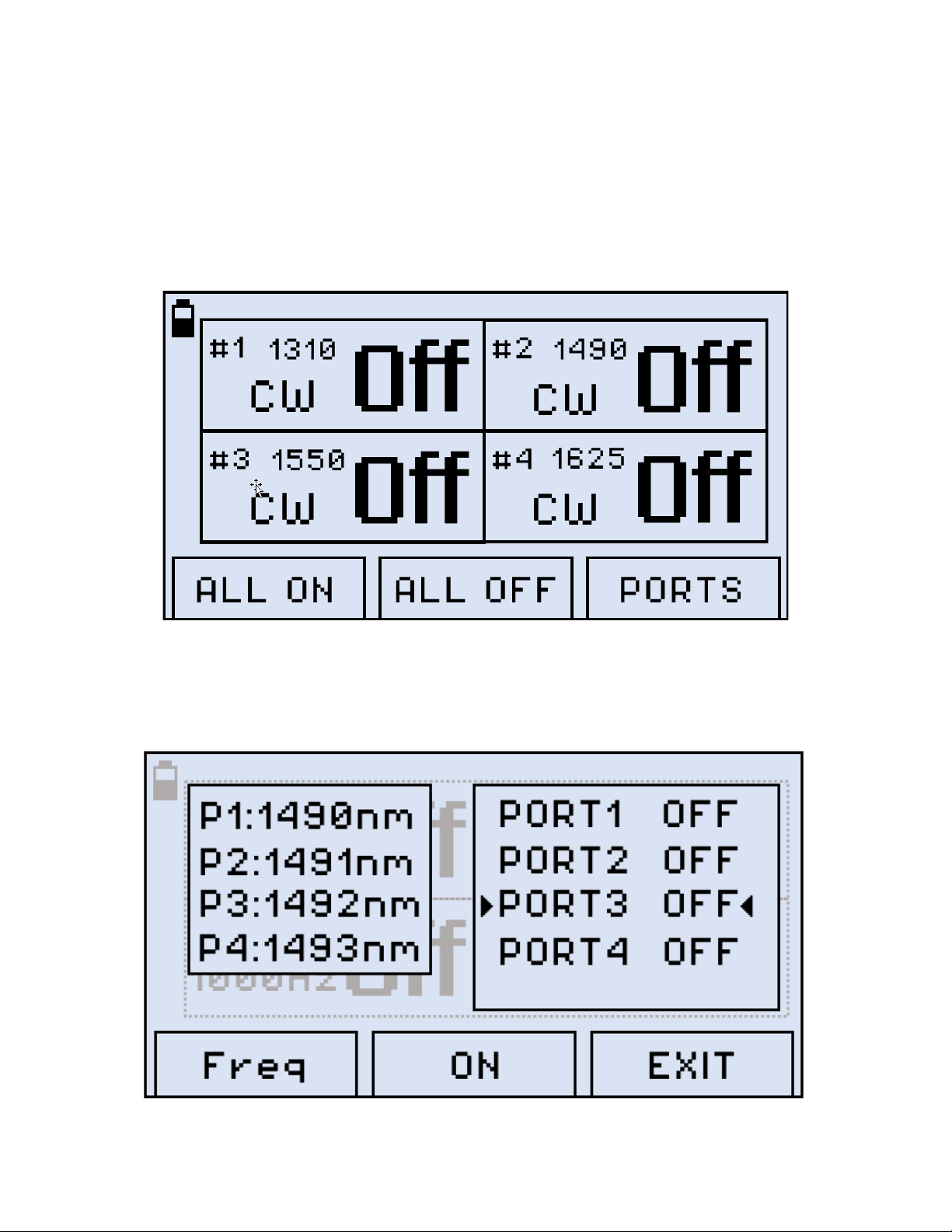
FX86 Main Menu Screen
2. To turn all ports on with the indicated frequencies, press F1 (ALL ON). To turn all ports off,
press F2 (ALL OFF).
3. To set a certain frequency to a specified port, press F3 (PORTS).
FX86 Port Settings Screen
FX86 CWDM Quad Laser Source User Manual Page 11 of 17
Page 12
4. Press Up and Down to select a port. Then press F2 (ON) to turn it on with the frequency
previously specified.
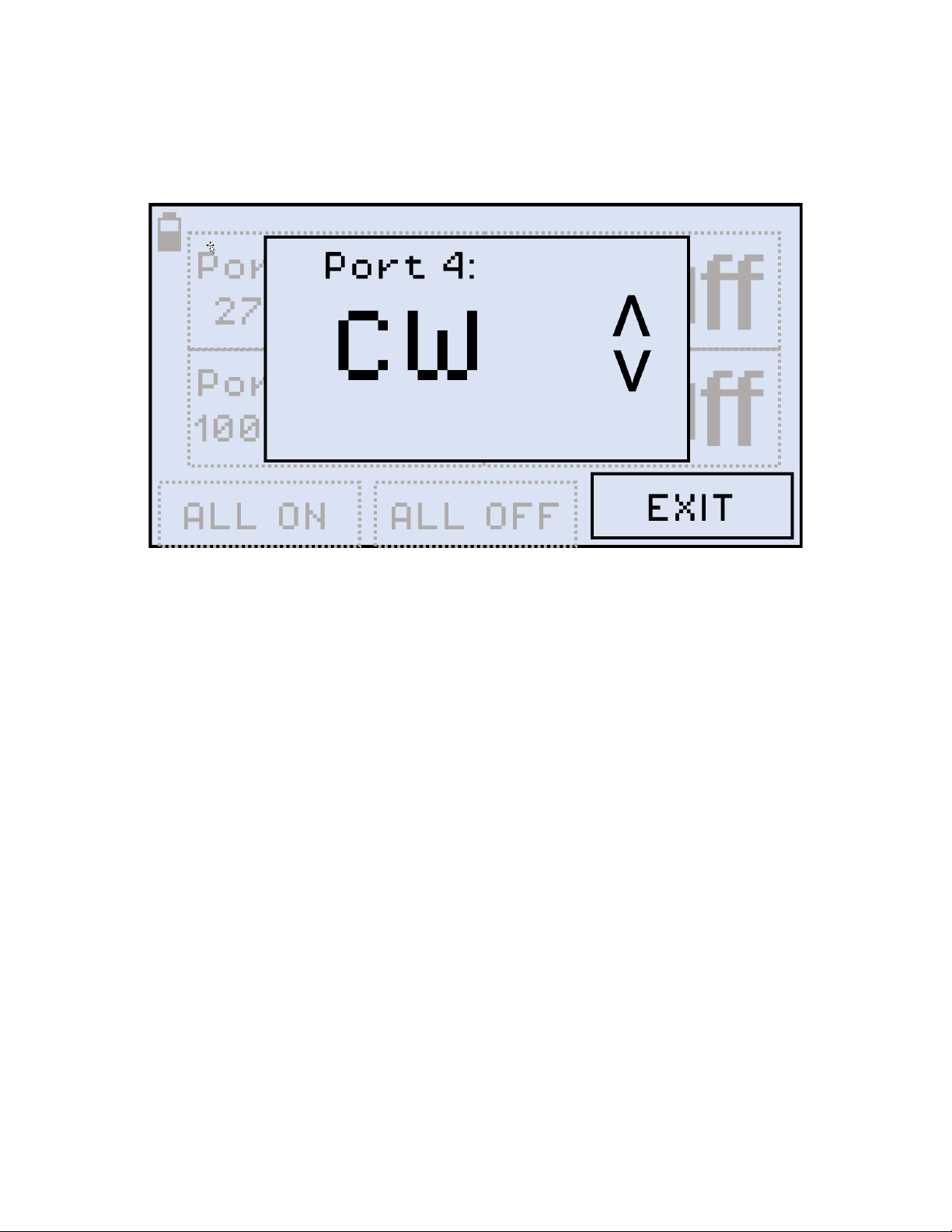
5. To change the port frequency, press F1 (Freq).
FX86 Individual Port Frequency Screen
6. Press Up and Down to select the port frequency (Continuous Wave, 270 Hz, 330 Hz,
1000 Hz, 2000 Hz). The port frequency is then saved to the device. Note that setting the
port frequency when the port is off DOES NOT turn the port on, you must do it separately.
FX86 CWDM Quad Laser Source User Manual Page 12 of 17
Page 13

7.0 Warranty and Software
Warranty Period: The warranty period for hardware, software and firmware is one (1) year
from the date of shipment to the customer. The warranty period for battery pack, LCD, LCD
touch panel, LCD protective cover, and accessories (including, but not limited to patch cords,
AC adaptor, SFP, USB adaptors, carrying case, carrying pouch) is limited to one (1) year.
Hardware Coverage: VeEX Inc. warrants hardware products against defects in materials and
workmanship. During the warranty period, VeEX Inc. will, at its sole discretion, either
• Repair the products
• Replace hardware which prove to be defective
provided that the products that the customer elects to replace are returned to VeEX Inc. by the
customer, along with Proof of Purchase, within thirty (30) days of the request by the customer,
freight prepaid.
Software Coverage: VeEX Inc. warrants software and firmware materials against defects in
materials and workmanship. During the warranty period, VeEX Inc. will, at its sole discretion,
either
• Repair the products
• Replace software and/or firmware which prove to be defective
provided that the products that the customer elects to replace are returned to VeEX Inc. by the
customer, along with proof of purchase, within thirty (30) days of the request by the customer,
freight prepaid.
Additionally, during the warranty period, VeEX Inc. will provide, without charge to the
customer, all fixes, patches and enhancements to the purchased software, firmware and
software options. VeEX Inc. does not warrant that all software or firmware defects will be
corrected. New enhancements attached to a software option require the option to be
purchased (at the time of order or the time of upgrade) in order to benefit from such
enhancements.
Limitations: The warranty is only for the benefit of the customer and not for the benefit of any
subsequent purchaser or licensee of any merchandise (hardware, software, firmware and/or
accessories).
Revoking the warranty: VeEX Inc. does not guarantee or warrant that the operation of the
hardware, software or firmware will be uninterrupted or error-free. The warranty will not apply
in any of the following cases:
• Improper or inadequate maintenance by the customer
• Damage due to software installed by the customer on the unit without prior authorization
(written) from VeEX Inc.
FX86 CWDM Quad Laser Source User Manual Page 13 of 17
Page 14

• Unauthorized alteration or misuse
• Damage occurred from operating the unit outside of the environmental specifications for the
product
• Improper installation by the customer
FX86 CWDM Quad Laser Source User Manual Page 14 of 17
Page 15

8.0 Product Specifications
The most recent product specifications can be found on the VeEX web site at
www.veexinc.com.
FX86 CWDM Quad Laser Source User Manual Page 15 of 17
Page 16
VeEX products, please contact VeEX customer service.
9.0 Certifications and Declarations
What is CE?
The CE marking is a mandatory European marking for
certain product groups to indicate conformity with the
essential health and safety requirements set out in European
Directives. To permit the use of a CE mark on a product,
proof that the item meets the relevant requirements must be
documented.
Use of this logo implies that the unit conforms to
requirements of European Union and European Free Trade
Association (EFTA). EN61010-1
For a copy of the CE Declaration of Conformity relating to
What is RoHS?
RoHS is the acronym for Restriction of Hazardous
Substances. Also known as Directive 2002/95/EC, it
originated in the European Union and restricts the use of
specific hazardous materials found in electrical and electronic
products. All applicable products imported into the EU market
after July 1, 2006 must pass RoHS compliance.
Click here for more information about RoHS compliance as it
relates to VeEX products or go to www.veexinc.com.
FX86 CWDM Quad Laser Source User Manual Page 16 of 17
Page 17

10.0 About VeEX
VeEX Inc., an innovative, customer-focused communications test and measurement company,
develops next-generation test and monitoring solutions for telecommunication networks and
services. With a blend of advanced technologies and vast technical expertise, VeEX has
developed products that diligently address all stages of network deployment, maintenance,
and field service turn-up and integrate service verification features across DSL, fiber optics,
CATV/DOCSIS, mobile backhaul and fronthaul (CPRI/OBSAI), next-generation transport
network, fiber channel, carrier and metro Ethernet technologies, WLAN, and synchronization.
Visit us online at www.veexinc.com for the latest updates and additional documentation.
VeEX Incorporated
2827 Lakeview Court
Fremont, CA 94538
USA
Phone: +1 510 651 0500
Fax: +1 510 651 0505
Customer Care
Phone: + 1 510 651 0505
Email: [email protected]
FX86 CWDM Quad Laser Source User Manual Page 17 of 17
 Loading...