

Page 1

Precision Corner
Owner’s Manual
0996070_G
© 2019 Valmont Industries, Inc., Valley, NE 68064 USA. All rights reserved.
www.valleyirrigation.com
Page 2

2
Page 3

Table of Contents
Precision Corner Owners Manual ................................................................................................................... 1
Table of Contents ............................................................................................................................................. 3
EC Declaration of Conformity.......................................................................................................................... 7
Electrical Safety Statement ............................................................................................................................. 8
About This Manual ........................................................................................................................................... 8
Ancillary Equipment Warranty ........................................................................................................................ 8
Safety ................................................................................................................................................................. 9
Recognize Safety Information ..............................................................................................................................................9
Safety Messages ..............................................................................................................................................................9
Information Messages ......................................................................................................................................................9
Use of Personal Protective Equipment ..............................................................................................................................10
Conductive Materials and Equipment ................................................................................................................................10
Fall Protection ....................................................................................................................................................................10
Minimum Working Clearance .............................................................................................................................................11
Qualified Person ................................................................................................................................................................11
Irrigation Equipment near Airports and Crop Dusting Aircraft ...........................................................................................11
Overhead Power Lines ......................................................................................................................................................12
Minimal Lockout / Tagout Procedure .................................................................................................................................. 13
Sequence of Lockout ......................................................................................................................................................13
Restoring Equipment to Service ..................................................................................................................................... 13
Operate Safely ...................................................................................................................................................................15
Safety Decals .....................................................................................................................................................................19
Overview .......................................................................................................................................................... 23
Introduction ........................................................................................................................................................................23
Overview ............................................................................................................................................................................23
Machine Components - Structural .....................................................................................................................................24
Machine Components - Operational ..................................................................................................................................24
Main or Pivot Control Panel ............................................................................................................................................25
Last Regular Drive Unit Control Panel ............................................................................................................................25
Corner Angle Sensor Box ...............................................................................................................................................25
Operator Interface Panel (OIP) ....................................................................................................................................... 26
Swing Tower Box .............................................................................................................................................................26
Steerable Drive Unit ........................................................................................................................................................27
Steering and Safety/Reference Antenna ........................................................................................................................27
Solenoid Valve Box .........................................................................................................................................................27
Theory of Operation ........................................................................................................................................................... 28
LRDU and SDU Movement Controls ..............................................................................................................................28
Corner Guidance Systems..............................................................................................................................................28
GPS Guidance System ...................................................................................................................................................28
Below Ground Guidance .................................................................................................................................................28
Corner Water Application Sequencing ............................................................................................................................29
Overview .........................................................................................................................................................................31
Control Panels ................................................................................................................................................................31
Valley Pivot with Precision Corner ..................................................................................................................................31
Retrofit Valley Precision Corners .................................................................................................................................... 31
3
Page 4

Table of Contents
Control Panels ................................................................................................................................................ 31
Pivot Control Panel .........................................................................................................................................................32
Operator Interface Panel ................................................................................................................................................ 33
Corner Interface Panel Capabilities ................................................................................................................................34
Diagnostic/Operational Status .....................................................................................................................................34
LED Display .................................................................................................................................................................34
Corner Span Indicator Lights ....................................................................................................................................... 35
Corner Safety Fault Light .............................................................................................................................................35
Corner Indicator Lights ................................................................................................................................................36
Auto Correct Procedure ..................................................................................................................................................36
Corner Operating Controls ..............................................................................................................................................36
Machine Start/Stop - Forward/Reverse Rocker Switches ............................................................................................36
Swing Tower Steer In/Steer Out - Forward/Reverse Switches .....................................................................................37
Steering Override Button .............................................................................................................................................37
Irrigate/Chemigate Rocker Switch ...............................................................................................................................37
Sprinklers Test On/Test Off Switch ...............................................................................................................................38
Variable Frequency Drive .............................................................................................................................................38
Pre Operation .................................................................................................................................................. 39
Water Application ...............................................................................................................................................................39
Sample Timer Chart ........................................................................................................................................................40
With Pressure Regulators or Flow Control Nozzles .....................................................................................................40
Without Pressure Regulators or Flow Control Nozzles ................................................................................................41
Hours Per Revolution - Actual ............................................................................................................................................42
Hours Per Revolution - Calculated .....................................................................................................................................43
Last Regular Drive Unit (LRDU) Speed .............................................................................................................................43
Transducer Setting Charts .................................................................................................................................................44
Corner Transducer Calculation ..........................................................................................................................................45
Pressure Regulated vs. Non-Regulated Revolution Time .................................................................................................. 46
Determining the Application Rate and Depth ....................................................................................................................47
Corner Machine with Regulators ....................................................................................................................................47
Corner Machine without Regulators ...............................................................................................................................47
Percentage Timer Calculations Worksheet ........................................................................................................................48
Percentage Timer/Application Depth Worksheet ...............................................................................................................49
Chemical Application .........................................................................................................................................................50
Chemigate/Irrigate Switch ...............................................................................................................................................50
Chemigate Mode..........................................................................................................................................................50
Irrigate Mode ................................................................................................................................................................ 50
Chemigation Calculations Example ................................................................................................................................50
Chemigation Worksheet ..................................................................................................................................................52
Chemigation Safety.........................................................................................................................................................53
Exposure Routes .........................................................................................................................................................53
Operation ......................................................................................................................................................... 55
Pivot Control Panels ..........................................................................................................................................................55
Percent Timer / Pivot Panel Speed Control .......................................................................................................................55
Operator Interface Panel ....................................................................................................................................................55
Startup Procedure - Irrigation Mode .................................................................................................................................. 56
Shutdown Procedure - Irrigation Mode ..............................................................................................................................56
Wet to Dry Operation .........................................................................................................................................................56
Wet to Dry Operating Procedure ....................................................................................................................................57
Operating Procedure for Chemigating ............................................................................................................................57
4
Page 5

Table of Contents
Maintenance .................................................................................................................................................... 59
Safety .................................................................................................................................................................................59
Disconnect All Power ...................................................................................................................................................... 59
Wheel Gearbox ..................................................................................................................................................................60
Optional DualDrive Gearbox ..............................................................................................................................................61
Steering Gear Motor .......................................................................................................................................................... 61
Steering Gearbox...............................................................................................................................................................62
Wheel Lug Nut Torque ....................................................................................................................................................62
Tire Pressures ................................................................................................................................................................62
Barricade ...........................................................................................................................................................................63
Wheel Tracks .....................................................................................................................................................................63
Miscellaneous ....................................................................................................................................................................64
Hose Replacement .........................................................................................................................................................64
Electrical and Grounding Conductors ............................................................................................................................. 64
Low Profile Offset Leg Bearing Lubrication ....................................................................................................................65
End Gun Arc Setting Example ........................................................................................................................................65
Annual Maintenance ..........................................................................................................................................................66
Span ...............................................................................................................................................................................66
Sprinkler ..........................................................................................................................................................................66
Steerable Drive Unit ........................................................................................................................................................67
Overhang/Booster Pump ................................................................................................................................................67
Span Flushing Procedure ..................................................................................................................................................68
Winterization ...................................................................................................................................................................... 70
Parking the Machine .......................................................................................................................................................70
Troubleshooting .............................................................................................................................................. 71
Important Information ........................................................................................................................................................71
Troubleshooting Overview .................................................................................................................................................71
Error Codes .......................................................................................................................................................................72
Terms .................................................................................................................................................................................73
Tips ....................................................................................................................................................................................73
Span Sensor Safeties ........................................................................................................................................................73
Swing Tower Box Safeties .................................................................................................................................................. 74
General ..............................................................................................................................................................................74
Corrective Procedures - Operator Interface Panel ............................................................................................................. 75
Span Sensor Safety Fault Situation Table .......................................................................................................................75
Auto Correct Procedure .....................................................................................................................................................75
Situation #1, Er16 - Span Sensor Fault ..........................................................................................................................76
Situation #2, Er16 - Span Sensor Fault ..........................................................................................................................78
Situation #3, Er16 - Span Sensor Fault ..........................................................................................................................80
Corrective Procedures - Swing Tower Box .........................................................................................................................81
Swing Tower Box Fault Situation Table ...........................................................................................................................81
Situation #1, Er08 - Swing Tower Box Fault ....................................................................................................................82
Situation #2, Er08 - Swing Tower Box Fault ....................................................................................................................84
Situation #3, Er08 - Swing Tower Box Fault ....................................................................................................................84
Corner Sprinkler Test ......................................................................................................................................................... 85
Test Procedure ................................................................................................................................................................ 85
Resetting the Over-Watering Timer ................................................................................................................................86
Additional Application Worksheets ....................................................................................................................................87
Percentage Timer/Application Depth Worksheet ............................................................................................................87
Troubleshooting List ........................................................................................................................................................... 90
5
Page 6

Table of Contents
6
Page 7

EC Declaration of Conformity
We: Valmont Industries, Inc.
28800 Ida Street
Valley, NE 68064
+1 402.359.6312
+1 402.359.6143 (Facsimile)
declare under our sole responsibility that the product,
Crop Irrigation System
to which this documentation relates, is in conformity with the following documents:
Machinery Directive 2006/42/EC
Low Voltage Directive 2014/35/EU
Electromagnetic Compatibility Directive 2014/30/EU
The above-referenced equipment is in conformity with all safety-related clauses (Not all clauses reflecting
commercial preference are met) of the following documents:
EN 60204-1:2006 Safety of Machinery – Electrical Equipment of Machines
EN 12100:2010 Safety of Machinery
EN 909:1998+A1 Irrigation Machines
Statement regarding Pressure Equipment Directive 97/23/EC:
Serial Number:
Purchase Order:
The Crop Irrigation System is excluded from the scope of the Pressure Equipment Directive, by the
language of Article 1, Sections 3.2, 3.6 & 3.10. This equipment is classified less than Category 1.
Statement regarding RoHS Directive 2011/65/EC:
The Crop Irrigation System is excluded from the scope of the RoHS Directive, by the language of Article
2, Section 4(e), being a “Large Scale Fixed Installation.”
Person Authorized to Compile the Technical File in Europe: Ruediger Claas
Relevant information will be transmitted via email Valmont Industries Inc.
in response to a reasoned request by national authorities Nordring 4
45894 Gelsenkirchen
Germany
+49(151)16716790
Ron Pollak Date of Issue: December 17, 2018
Senior Electrical Engineer Place of Issue: Valley, NE 68064
Valmont Industries, Inc.
7
Page 8

Electrical Safety Statement
About This Manual
Information contained in this manual applies to the Valley Precision Corner.
All information, specifications, descriptions and illustrative material contained in this manual were based on
information available at the time this publication was approved for printing.
Valmont Industries Inc. reserves the right to change specification or design at any time without notice and
without incurring any obligation. Specifications are applicable to equipment sold within the United States and
may vary outside of the United States.
Ancillary Equipment Warranty
The owner is responsible for warranty registration of all ancillary equipment such as engines, pumps and
generators with its respective manufacturer.
8
Page 9
Safety
Recognize Safety Information
This irrigation equipment can be powered by high voltage, which can be extremely dangerous if used improperly. For maximum safety and optimum performance of the machine, all owner/operators and maintenance
personnel must read and understand the owner/operator manual(s), all safety messages in this manual and
safety signs/decals on the machine before operating this equipment.
Anyone assembling, operating, servicing or maintaining this machine must read and understand all operation, maintenance, troubleshooting, testing, installation, assembly instructions and all safety messages in this
manual before operating the machine or beginning any maintenance, troubleshooting, testing, installation or
assembly of components.
These instructions alert you to certain things you should do carefully; if you don’t, you could hurt yourself or
others, hurt the next person who operates the equipment, or damage the equipment.
Safety Messages
Safety messages in this manual are preceded by the hazard symbol and one of three words: DANGER, WARNING or CAUTION. These messages alert you to potential hazards that could hurt you or others and or cause
property damage.
This HAZARD SYMBOL is used to alert you to information about unsafe actions or situations, and may
!
be followed by the word DANGER, WARNING or CAUTION.
!
DANGER
The HAZARD SYMBOL used with the word DANGER describes immediate hazards that can result in severe
personal injury or death.
!
WARNING
The HAZARD SYMBOL used with the word WARNING describes unsafe actions or situations that can result in
severe injury, death and/or major equipment or property damage.
!
CAUTION
The HAZARD SYMBOL used with the word CAUTION describes unsafe actions or situations that can result in
injury, and/or minor equipment or property damage.
Information Messages
Important information messages in this manual are preceded by the word NOTE.
NOTE
The word NOTE is used to alert you to information that describes procedures or tips to help you install, operate
or maintain your equipment properly.
9
Page 10

Safety
Use of Personal Protective Equipment
• People working in areas where there are potential electrical hazards must use, personal protective equipment
that is appropriate for the specific parts of the body to be protected and for the work to be performed. Refer to
U.S. Occupational Safety & Health Administration (OSHA) Regulations (Standards - 29 CFR) Safeguards for
personnel protection. - 1910.335, or applicable national, state or local regulations, for additional information.
• Personal protective equipment must be maintained in a safe, reliable condition and periodically inspected or
tested.
• Protective shields, protective barriers, or insulating materials must be used to protect each person from
shock, burns, or other electrically-related injuries while that person is working near exposed energized parts
which might be accidentally contacted or where dangerous electric heating or arcing might occur. When normally enclosed live parts are exposed for maintenance or repair, they must be guarded to protect unqualified
persons from contact with the live parts.
• Safety signs and tags. Safety signs, safety symbols, or accident prevention tags must be used where necessary to warn people about electrical hazards which may endanger them.
Conductive Materials and Equipment
Materials and equipment that can conduct electricity must be handled in a way that will prevent them from
contacting energized power lines, exposed conductors or circuit parts.
• When handling long conductive objects (such as but not limited to truss rods, pipes, angles and ladders) in
areas with energized power lines, exposed conductors or circuit parts, work practices (such as the use of
insulation, guarding, and material handling techniques) must be used to minimize the hazard.
• Portable ladders must have non-conductive side rails.
• Do not wear conductive articles of jewelry and clothing (such as but not limited to watch bands, bracelets,
rings, key chains, necklaces, metalized aprons, cloth with conductive thread, or metal headgear) that could
come in contact with energized power lines, exposed conductors or circuit parts.
Fall Protection
Identify potential fall hazards and determine if fall protection equipment is appropriate for the task, before beginning the work. Pay attention to hazards associated with routine and non-routine tasks. Inspect fall protection
equipment (harnesses, lanyards) and devices (guardrails, tie-off points) before each use. Use fall protection
equipment if required for the job. Be sure the fall protection equipment is right for the task, fits properly, and is in
good condition. Refer to U.S. Occupational Safety & Health Administration (OSHA) Regulations Standards - 29
CFR 1926.500, 1926.501 and 1926.502, or applicable national, state or local regulations for more information.
• When using scaffolds, make sure there is proper access, full planking, stable footing, and guard railing.
• When using a boom lift, keep feet firmly on the platform of a boom lift, use fall protection equipment tied-off
at all times to the guardrail or tie-off point.
• When using a ladder, make sure the ladder is non-conductive and the correct size for the task. Read the
ladder user instructions and be sure the ladder is in good condition. Make sure ladder is set on stable footing
and at the correct angle.
10
Page 11

Safety
Minimum Working Clearance
To reduce the risk of injury, all persons require adequate working clearance around the electrical panel or other
electrical equipment. The table below identifies the minimum working clearance needed. Refer to U.S. Occupational Safety & Health Administration (OSHA) Regulations (Standards - 29 CFR) Safeguards for personnel protection. -1910.303(g)(1)(i), or any other applicable national, state or local regulations, for additional information.
MINIMUM WORKING CLEARANCE 0-600 VOLTS
WIDTH
OF WORKING
CLEARANCE
AREA
30 in (760 mm)
MINIMUM OR
WIDTH OF
ENCLOSURE,
WHICH EVER IS
GREATER
Concrete, brick or tile walls shall be considered as grounded.
Qualified Person
A Qualified Person is one who, by possession of a recognized degree, certificate, or professional standing, or
who by extensive knowledge, training, and experience, has successfully demonstrated his/her ability to solve or
resolve problems related to the subject matter, the work, or the project.
Only qualified persons may work on electric circuit parts or equipment that have not been de-energized.
Refer to U.S. Occupational Safety & Health Administration (OSHA) Regulations Standards - 29 CFR 1926.32(m)
and 1910.333, or applicable national, state or local regulations for additional information.
HEIGHT
OF WORKING
CLEARANCE
AREA
78 in (1980 mm)
MINIMUM OR
HEIGHT OF
ENCLOSURE,
WHICH EVER IS
GREATER
MINIMUM WORKING CLEARANCE
IN FRONT OF ELECTRICAL PANEL/EQUIPMENT
EXPOSED LIVE PARTS
ON ONE SIDE OF WORK
SPACE AND NO LIVE
GROUNDED PARTS ON
THE OTHER SIDE.
36 in (915 mm) MINIMUM 42 in (1065 mm) MINIMUM 48 in (1220 mm) MINIMUM
EXPOSED LIVE PARTS
ON ONE SIDE OF WORK
SPACE AND LIVE
GROUNDED PARTS ON
THE OTHER SIDE.
EXPOSED LIVE PARTS
ON ONE SIDE OF WORK
SPACE AND EXPOSED
LIVE PARTS ON THE
OTHER SIDE.
Irrigation Equipment near Airports and Crop Dusting Aircraft
• If any part of the irrigation machine comes within 3200 ft (975 m) of an airport runway, especially the approach (ends) of the runway, additional warning markers may be required. In the United States, CFR Title 14,
Chapter I, Subchapter E, Part 77 – Safe, Efficient Use, and Preservation of the Navigable Airspace describes
when marking is needed.
This document is available at: www.ecfr.gov
• Marking requirements vary depending on the location of the irrigation equipment relative to the runway, the
type of airport (Civil, Military, or Heliport) and other factors. Contact the local airport authority for guidance
and specific recommendations. In the United States, guidelines for marking structures near airports are
published by the Federal Aviation Administration in Advisory Circular AC 70/7460-1L – Obstruction Marking
and Lighting.
Available here: www.faa.gov/regulations_policies/advisory_circulars
• For irrigation machines near private or unregulated airfields, including farm-based airstrips, Valley strongly
recommends complying with the same standards and requirements as Civil airports as shown in Part 77.
• Regulations vary by country, contact your local aviation authority for guidance.
Overhang cables, including overhang back cables are a particular danger. In locations where low-flying
aircraft are likely, such as within 1,500 ft (457 m) of an end of an airport runway, or where crop dusting aircraft
are common, Valley recommends adding obstruction markers to overhang cables to improve their visibility.
For large overhangs (36 ft / 10.97 m Heavy Duty and longer), five 12 in (300 mm) or 20 in (500 mm), aviation
orange marker balls are sufficient. One near the rabbit ears, two in the middle of the back cables and two in
the middle of the highest overhang cables. Refer to Section 3.5 in AC70/7460-1 for additional details. Aviation
marker balls are available online and from a variety of aviation and airport safety equipment providers.
11
Page 12

Safety
Overhead Power Lines
Assembling, towing or transporting irrigation machine components such as but not limited to the pivot point,
linear cart, span/drive unit assemblies, overhangs and/or corner assemblies underneath or near power lines is
extremely dangerous because of the risk of electrocution.
Operating equipment that elevates irrigation machine components, such as but not limited to an aerial lift or
crane, near power lines is extremely dangerous because of the risk of electrocution. Only qualified personnel
should operate this type of equipment. Before operating the equipment, qualified personnel must read the
equipment manufacturers’ operating and safety instructions.
Refer to U.S. Occupational Safety & Health Administration (OSHA) Regulations (Standards - 29 CFR) Cranes
and derricks. - 1926.550, or any other applicable national, state or local regulations for additional information.
• Always presume that any overhead power line is an energized line unless and until the person(s) owning
the line and/or the electrical utility authorities indicate that it is not an energized line and it has been visibly
grounded.
• Before operating any equipment near any power line make sure the line has been de-energized and visibly
grounded at the point of work.
• Electrocution can occur without touching an electrical power line. Electricity, depending on the magnitude,
can jump or become induced into equipment or conductive materials that come in close proximity to, but do
not touch a power line. High wind, lightning, wet ground and other environmental conditions will increase the
possibility of electrocution and require additional consideration.
• Transmitter towers can induce the equipment or materials being handled with an electrical charge. Before
working or operating equipment near transmitter towers, make sure the transmitter is de-energized.
• Select the location where the span/drive unit will be assembled to ensure that neither the irrigation machine,
or the equipment used during the assembly process, will violate the minimum clearance guidelines.
• Never operate equipment or allow the load, ropes or tag lines within 10 ft (3.05 m) of any power line rated 50
kV or lower whether it is energized or not. For lines rated over 50 kV, the minimum clearance shall be 10 ft
(3.05 m) plus 0.4 inch (1.1 cm) for each kV over 50 kVs.
• Never assemble, tow, transport or allow irrigation machine components underneath or within 10 ft (3.05 m)
of any power line rated 50 kV or lower whether it is energized or not. For lines rated over 50 kV, the minimum
clearance shall be 10 ft (3.05 m) plus 0.4 inch (1.1 cm) for each kV over 50 kVs. Overhang support angles,
cables and spinner drive components regularly extend 10 ft to 12 ft (3.1 m to 3.7 m) above the irrigation
pipeline (span).
• Use barricades to identify areas where interference with overhead power lines could occur. Keep the assembly, towing or transporting of irrigation machine components and the operation of equipment including load,
ropes or tag lines away from any power line, in the distances described above, whether the line is energized
or not.
• Always designate a person to observe clearance between the power line and all equipment being operated
or moved in order to give timely warning for all operations to STOP if the minimum clearance is violated.
12
Page 13
Safety
Minimal Lockout / Tagout Procedure
The following procedure establishes the minimum requirements for the lockout of energy isolating devices
whenever maintenance or servicing is done on machines or equipment. It is used to ensure that the machine
or equipment is stopped, isolated from all potentially hazardous energy sources and locked out before personnel perform any servicing or maintenance where the unexpectedly energized or start-up of the machine or
equipment or release of stored energy could cause injury. All personnel, upon observing a machine or piece of
equipment which is locked out to perform servicing or maintenance shall not attempt to start, energize, or use
that machine or equipment.
When the energy isolating devices are not lockable, tagout should be used and affected personnel must wear
full personal protection.
Refer to U.S. Occupational Safety & Health Administration (OSHA) Regulations (Standards - 29 CFR) Typical
minimal lockout procedures - 1910.147 App A, or applicable national, state or local regulations, for additional
information.
Sequence of Lockout
1. Notify all affected personnel that servicing or maintenance is required on a machine or equipment and that
the machine or equipment must be shut down and locked out to perform the servicing or maintenance.
2. The authorized personnel shall identify the type and magnitude of the energy that the machine or equipment utilizes, shall understand the hazards of the energy, and shall know the methods to control the energy.
3. If the machine or equipment is operating, shut it down by the normal stopping procedure (depress the stop
button, open switch, close valve, etc.).
4. De-activate the energy isolating device(s) so that the machine or equipment is isolated from the energy
source(s).
5. Lock out the energy isolating device(s) with assigned individual lock(s).
6. Stored or residual energy (such as that in capacitors, springs, elevated machine members, rotating flywheels, hydraulic systems, and air, gas, steam, or water pressure, etc.) must be dissipated or restrained by
methods such as grounding, repositioning, blocking, bleeding down, etc.
7. Ensure that the equipment is disconnected from the energy source(s) by first checking that no personnel
are exposed, then verify the isolation of the equipment by operating the push button or other normal operating control(s) or by testing to make certain the equipment will not operate.
!
CAUTION
• RETURN OPERATING CONTROL(S) TO NEUTRAL OR “OFF” POSITION AFTER VERIFYING THE
ISOLATION OF THE EQUIPMENT.
8. The machine or equipment is now locked out.
!
DANGER
• WHEN PERSONNEL WILL BE EXPOSED TO CIRCUIT ELEMENTS AND ELECTRICAL PARTS, A
QUALIFIED PERSON MUST USE TEST EQUIPMENT TO VERIFY THAT THE CIRCUIT ELEMENTS
AND EQUIPMENT PARTS OF THE EQUIPMENT ARE DE-ENERGIZED.
Restoring Equipment to Service
When the servicing or maintenance is completed and the machine or equipment is ready to return to normal
operating condition, the following steps shall be taken:
1. Check the machine or equipment and the immediate area around the machine to ensure that non-essential
items are removed and that the machine or equipment components are operationally intact.
2. Check the work area to ensure that all personnel are safely positioned or removed from the area.
3. Verify that the controls are in neutral.
4. Remove the lockout devices and re-energize the machine or equipment.
5. Notify affected personnel that the servicing or maintenance is completed and the machine or equipment is
ready to be used.
13
Page 14

Safety
14
Page 15
Safety
Operate Safely
Valley Irrigation machines are designed with safety in mind. However, if this machine is operated incorrectly, it
may pose a safety threat to the operator. A good safety program is much like a chain, it is only as strong as its
weakest link. The manufacturer, dealer, and operator must maintain and improve all safety programs. Following
is a list of safety operating tips which you and all other persons servicing or operating the machine must read
and understand:
!
CAUTION
• DO NOT OPERATE THIS MACHINE WITHOUT
FIRST READING THE OWNER’S MANUALS
FOR THE MACHINE.
• READ ALL SAFETY MESSAGES IN THIS
MANUAL AND SAFETY SIGNS ON THE MACHINE.
• DO NOT LET ANYONE OPERATE THIS MACHINE WITHOUT PROPER INSTRUCTIONS.
• UNAUTHORIZED MODIFICATIONS MAY IMPAIR THE FUNCTION AND/OR SAFETY OF
THE MACHINE.
• IF YOU DO NOT UNDERSTAND ANY PART
OF THIS MANUAL, CONTACT YOUR VALLEY
DEALER.
EMPLOYEE INSTRUCTION ON SAFETY
It is very important to instruct your employees on the
safe use of this equipment at the time of their initial
assignment to operate it. DO NOT let anyone operate this equipment without proper instructions.
Safety training should be presented annually and
the service manager should ensure employees fully
understand the safety messages and what to do in
case of emergencies.
EMERGENCY STOPPING
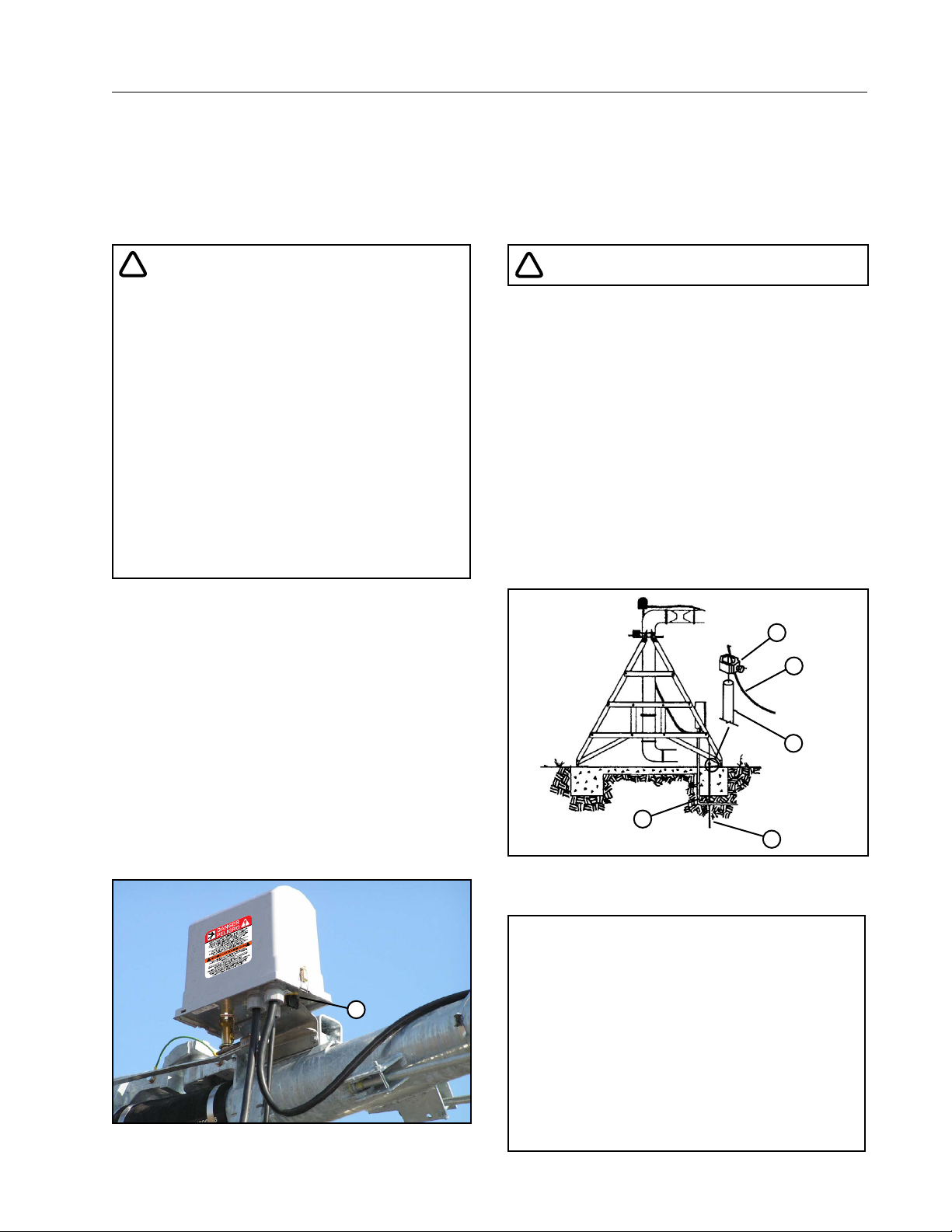
The machine can be stopped at any time at any tower
by turning the disconnect switch, located underneath
the tower box, to the OFF position. Refer to Figure
15-1.
!
WARNING
PROPER GROUNDING
DO NOT attempt to start the machine until the electrical service is properly installed and grounded by a
qualified electrician as per the electrical standards.
Refer to Figure 15-2.
If the power supplied to the machine is not grounded
properly, severe injury, or death can result should an
electrical malfunction occur.
It is your responsibility to ensure that your power
supplier and/or electrical contractor has grounded
the irrigation machine as required by the National
Electrical Code and by applicable local electrical
codes. If a machine is properly grounded and fuse
sizing is correct, there is extremely low probability of
an individual being injured by electrical shock.
5
4
3
2
1
Figure 15-2 1 . Ground Rod Installation
2. Service Conductor
3. Copper Ground Rod
4. Copper Ground Wire
5. Clamp
Figure 15-1 1 . Disconnect Switch
NOTE
• All 480 VAC, 60 Hz (380 VAC, 50 Hz) power
supply services MUST be a 4 conductor
1
service. Three 480 VAC (380 VAC) power lines
and one ground conductor which is as large
as the power carrying conductors for that
service.
• Each time a towable machine is moved,
the ground wire MUST be reattached to the
ground rod and checked for electrical integrity before restarting the machine.
15
Page 16
Safety
Operate Safely (Continued)
!
DANGER
!
CAUTION
DISCONNECT POWER WHEN SERVICING
ALWAYS disconnect electrical power before servic-
ing or performing maintenance to the machine.
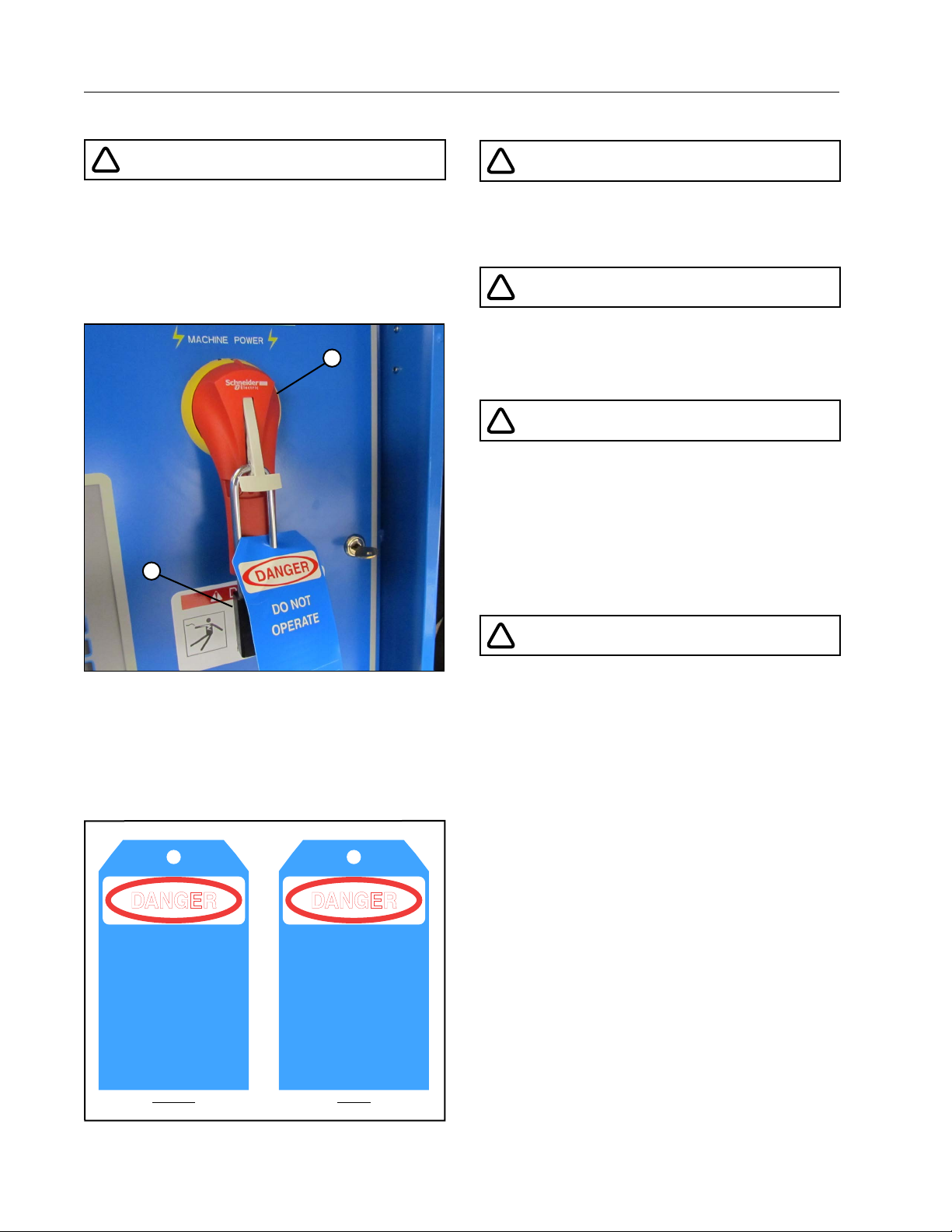
If you are going to perform maintenance on the machine, YOU MUST shut off and lock the main power
disconnect as shown below. Refer to Figure 16-1.
1
2
QUALIFIED SERVICE PERSONNEL
If you do not understand electricity or other parts of
the machine, have qualified service personnel perform any hazardous repairs or maintenance.
!
CAUTION
GUARD ALL POWER TAKE-OFF DRIVES
This includes all belt and power line drives.
Replace any guards and shields removed for maintenance.
!
WARNING
MARK AND GUARD ALL POWER LINES
Do NOT deep rip or chisel near the buried power
service wires.
Do NOT deep rip in a circle at the drive unit. The
deep chisel track will cause severe stresses on the
structure.
If you do deep rip your field, run the machine with the
percent timer at 100% for the first revolution.
!
WARNING
Figure 16-1 1. Main Power Disconnect
The blue (OSHA safety color code) tag shown below
should also be filled out and attached to the disconnect after locking. Refer to Figure 16-2.
The tag should reveal the name of a person to contact before restoring power to the machine.
SIGNED BY:
DATE:
2. Lock
DANGER
DO NOT
OPERATE
_ _ _ _ _ _ _ _ _ _ _ _ _ _ _ _ _ _ _ _ _ _ _ _ _ _ _ _ _ _ _ _ _ _ _ _
_ _ _ _ _ _ _ _ _ _ _ _ _ _ _ _ _ _ _ _ _ _ _ _ _ _ _ _ _ _ _ _ _ _ _ _
0992009
FRONT
FRONT BACK
REMARKS:
_ _ _ _ _ _ _ _ _ _ _ _ _ _ _ _ _ _ _ _ _ _ _ _ _ _ _ _ _ _ _ _ _ _ _ _ _ _ _ _ _ _ _ _ _ _ _ _
_ _ _ _ _ _ _ _ _ _ _ _ _ _ _ _ _ _ _ _ _ _ _ _ _ _ _ _ _ _ _ _ _ _ _ _ _ _ _ _ _ _ _ _ _ _ _ _
_ _ _ _ _ _ _ _ _ _ _ _ _ _ _ _ _ _ _ _ _ _ _ _ _ _ _ _ _ _ _ _ _ _ _ _ _ _ _ _ _ _ _ _ _ _ _ _
_ _ _ _ _ _ _ _ _ _ _ _ _ _ _ _ _ _ _ _ _ _ _ _ _ _ _ _ _ _ _ _ _ _ _ _ _ _ _ _ _ _ _ _ _ _ _ _
DANGER
DO NOT REMOVE
THIS TAG
_ _ _ _ _ _ _ _ _ _ _ _ _ _ _ _ _ _ _ _ _ _ _ _ _ _ _ _ _ _ _ _ _ _ _ _
SEE OTHER SIDE
BACK
SUSPECTED SHORT CIRCUITS
DO NOT touch the machine if you suspect a shortcircuit situation. Call a qualified electrician or an
authorized Valley dealer immediately.
Circumstances which may cause you to suspect hazardous voltage situations may include:
• Physical damage to the machine or span cable
• Recent electrical storms (lightning)
• Unusual operating characteristics of the machine
If you suspect a short circuit due to feeling a rippling
tingle when touching the machine, DO NOT touch
the machine again. Call a qualified electrician or an
authorized Valley dealer immediately.
Figure 16-2
16
Page 17
Operate Safely (Continued)
!
WARNING
!
CAUTION
Safety
LIGHTNING AND THE MACHINE
Stay away from the machine during an electrical
storm. An irrigation machine makes a good path to
earth. It is also probably the tallest object in the field,
which makes it a good lightning receptor!
!
CAUTION
DO NOT OVERSIZE FUSES
Fuses are sized for the protection of a specific machine.
Be certain you have the proper fuse sizes in place
before initial start-up and when replacing fuses.
!
CAUTION
PLUG - IN CONNECTORS
Disconnect power before connecting or disconnecting any plug-in connectors.
!
CAUTION
DO NOT OPERATE AT FREEZING TEMPERATURES
Spraying water has a cooling effect and water will
freeze even though the air temperature is slightly
above freezing.
Shut the machine down at 40 degrees Fahrenheit
(4.5 degrees Celsius). Do not operate machine when
temperature is below 40° F (4.5° C).
• DAMAGE TO EQUIPMENT RESULTING FROM
FREEZE-UP IS NOT COVERED UNDER WARRANTY.
• IT IS IMPORTANT TO MAKE SURE ALL PIPE
DRAINS FUNCTION PROPERLY TO PREVENT
PIPELINE FREEZE-UP DURING COLD WEATHER.
AVOID HIGH PRESSURE WATER STREAMS
Avoid body contact with high pressure water streams.
!
WARNING
AVOID CHEMICALS
Avoid exposure to sprinkler spray while chemicals
are being injected into the water. Read EPA Label
Improvement Program (PR Notice 87-1) and all instructions for chemical applications.
If you plan on chemigating, make certain you have
complied with state or local regulations in regard to
safety equipment, certification, operation and calibration of the injector pump. Make certain you have first
aid and fresh water available in case of an accident.
You must also be familiar with the correct cleanup
procedures in case of a spill.
• USE OF PROTECTIVE CLOTHING IS RECOMMENDED WHEN HANDLING CHEMICALS.
SAFETY GLASSES, GLOVES, AND PROTECTIVE
OUTERWEAR SHOULD BE WORN WHEN HANDLING CHEMICALS.
• CONTAMINATION OF THE WATER SUPPLY MAY
OCCUR IF EFFECTIVE SAFETY DEVICES ARE
NOT INSTALLED/USED IN CONNECTION WITH
INJECTION EQUIPMENT FOR CHEMIGATION.
!
DANGER
DRIVE SHAFTS START WITHOUT WARNING
An electric motor on each tower of the center pivot
powers two or more drive shafts connected to wheel
gear drives. These drive shafts start and stop without
warning.
• DO NOT TOUCH ROTATING DRIVE SHALT OR
SHIELD, CLOTHING OR LIMBS MAY BECOME
ENTANGLED, RESULTING IN SEVERE INJURY.
• DO NOT SERVICE THE MACHINE UNTIL THE
MAIN DISCONNECT IS LOCKED IN THE OFF
POSITION.
• ALWAYS REPLACE DRIVE SHAFT SHIELDS AFTER SERVICING.
• DRIVE SHAFT SHIELDS MUST ALWAYS BE IN
PLACE WHEN OPERATING THE MACHINE.
17
Page 18
Safety
Operate Safely (Continued)
!
CAUTION
!
CAUTION
CHECK WHEEL TRACKS BEFORE STARTING
Make sure all objects, livestock or persons are clear
of the machine before starting. Drive trains are powerful and can climb over vehicles, equipment, etc.
!
CAUTION
KEEP CHILDREN AWAY
Pivots are NOT playground equipment.
Prevent children from playing or climbing around
on the machine. This can be extremely dangerous,
especially if the machine is operating.
!
CAUTION
CHECK MACHINE DIRECTION
DO NOT operate the machine if it moves in the direction opposite to that which was chosen.
Forward should be clockwise, and reverse should be
counter-clockwise.
!
CAUTION
KEEP WATER OFF ROADWAYS
It is against the law in most states to allow water to
spray on state and county roadways. This is a serious hazard to passing motorists.
If end guns are used, make sure you read and understand the correct procedures for setting the on and
off positions to avoid watering the roadways.
If an end gun is watering a roadway, immediately
discontinue use and adjust the shutoff setting or
call your Valley dealer to repair the end gun shut off
mechanism.
AUTO REVERSE OPERATION SAFETY
If the machine reverses direction at a roadway or a
physical object such as a building, tree line, power
pole, etc., then you MUST provide a backup device
to stop the machine if the reversing mechanism were
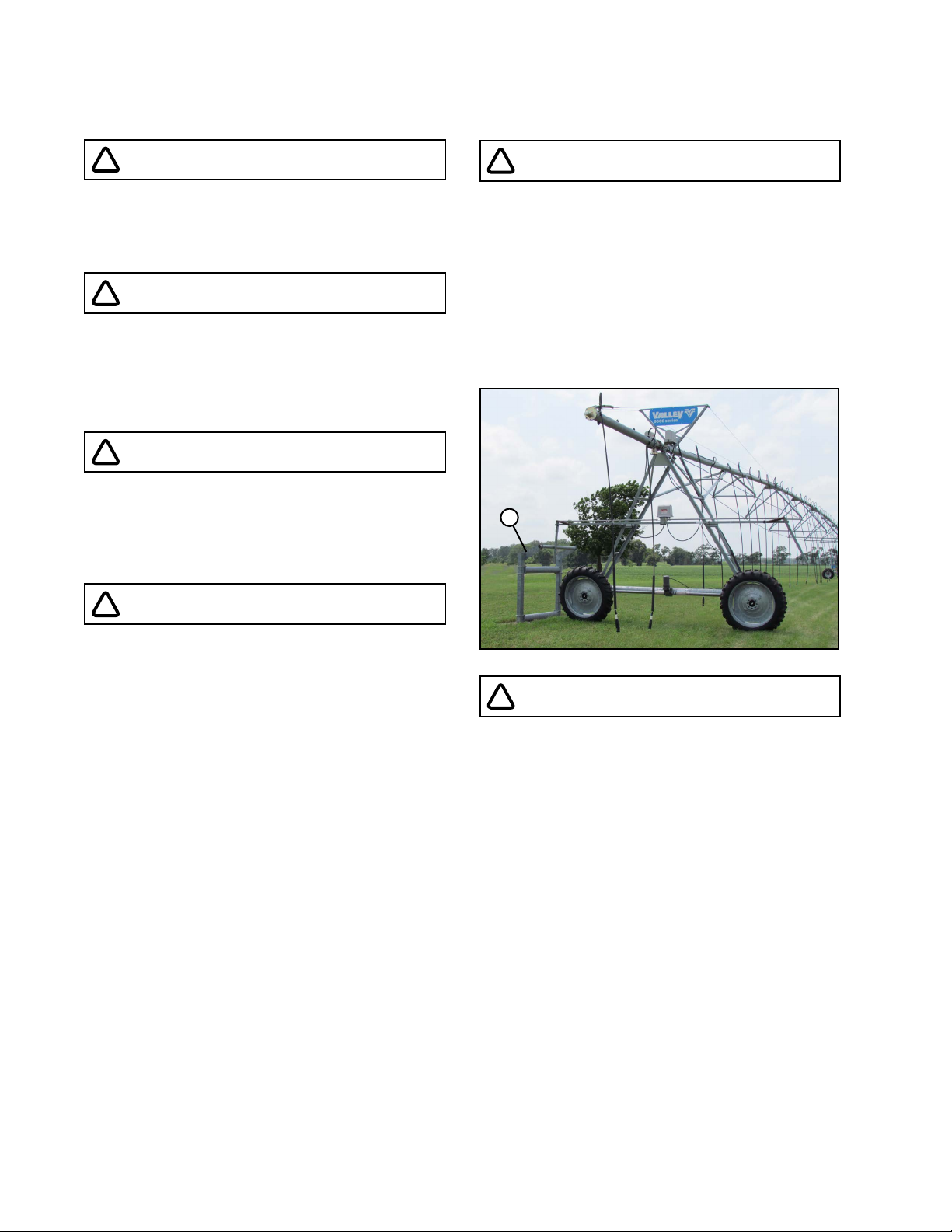
to fail. Refer to Figure 18-1.
Contact your Valley dealer for more information
concerning physical barricades for machines under
these circumstances.
1
Figure 18-1 1. Physical Barricade
!
CAUTION
PROPER USE OF THE SAFETY OVERRIDE
Caution MUST be taken by the operator when using
the safety override function as it will bypass or disable all of the machine’s automatic safety shutdown
circuits.
• NEVER DEPRESS AND HOLD THE START/STOP
SAFETY OVERRIDE SWITCH IN THE START POSITION FOR MORE THAN 3 TO 5 SECONDS.
If the machine is not in full view by the operator, do
not use the Safety Override function.
The operator MUST inspect the entire machine between each safety override start attempt.
Repeated safety override start attempts can cause
severe structural damage.
Call your Valley dealer if the machine fails to start.
18
Page 19
Safety
Safety Decals
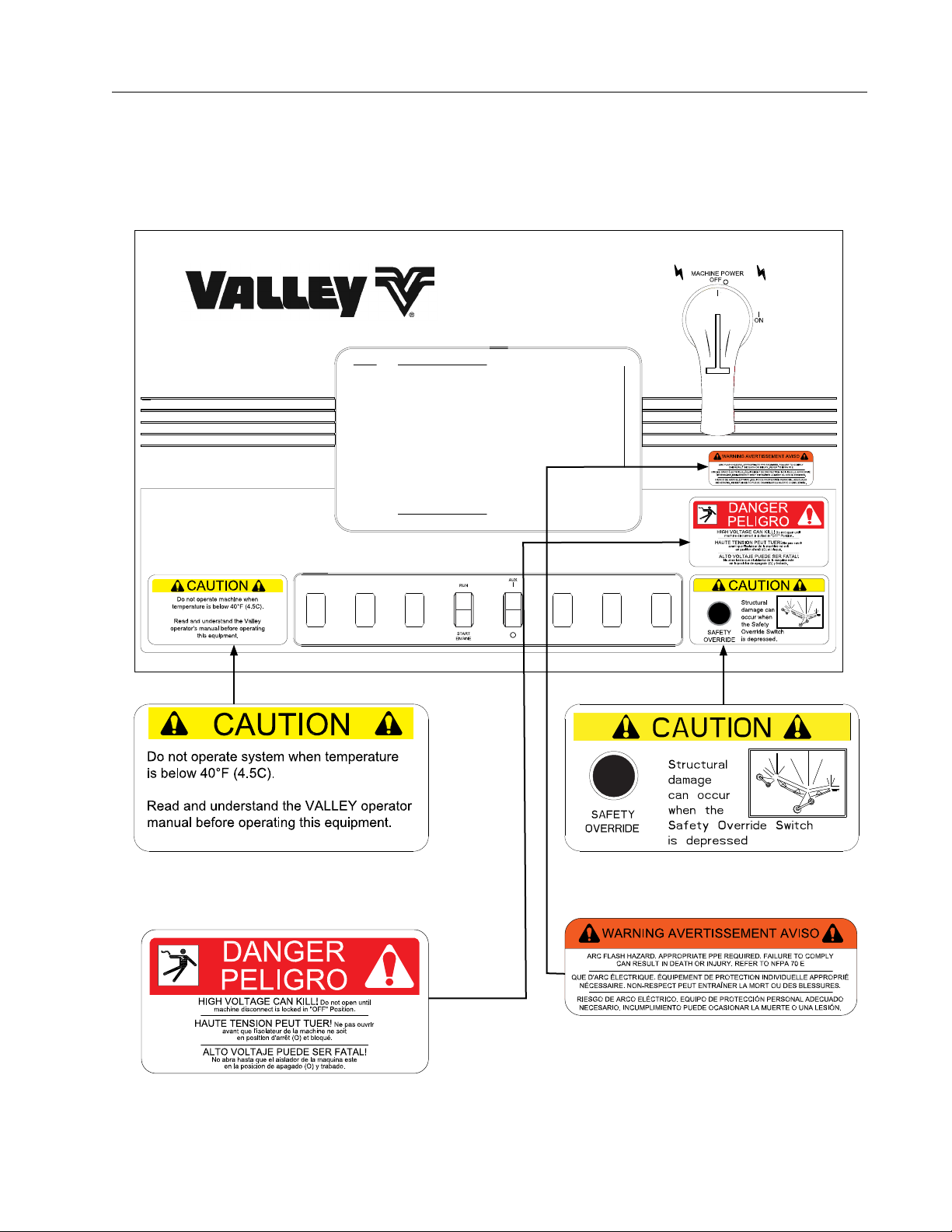
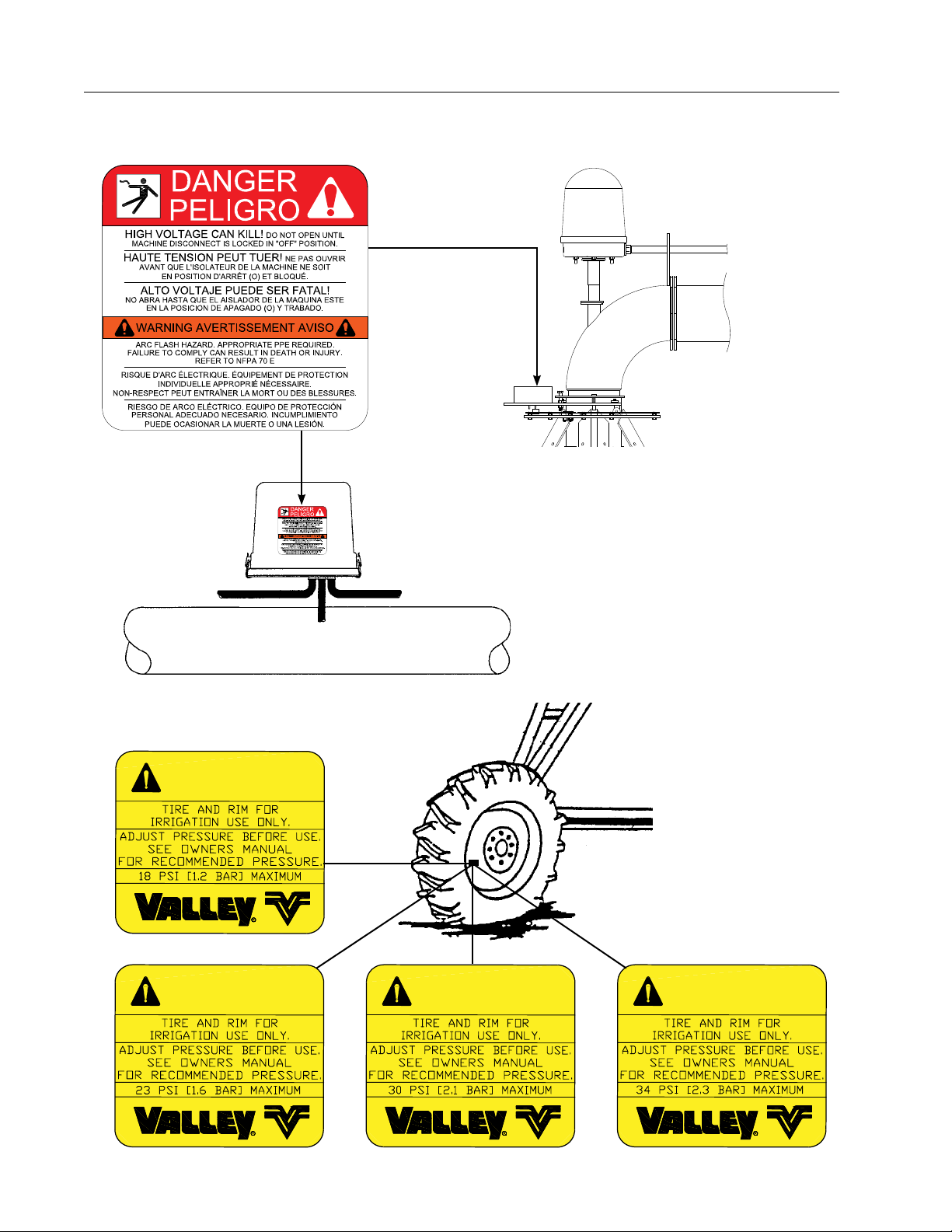
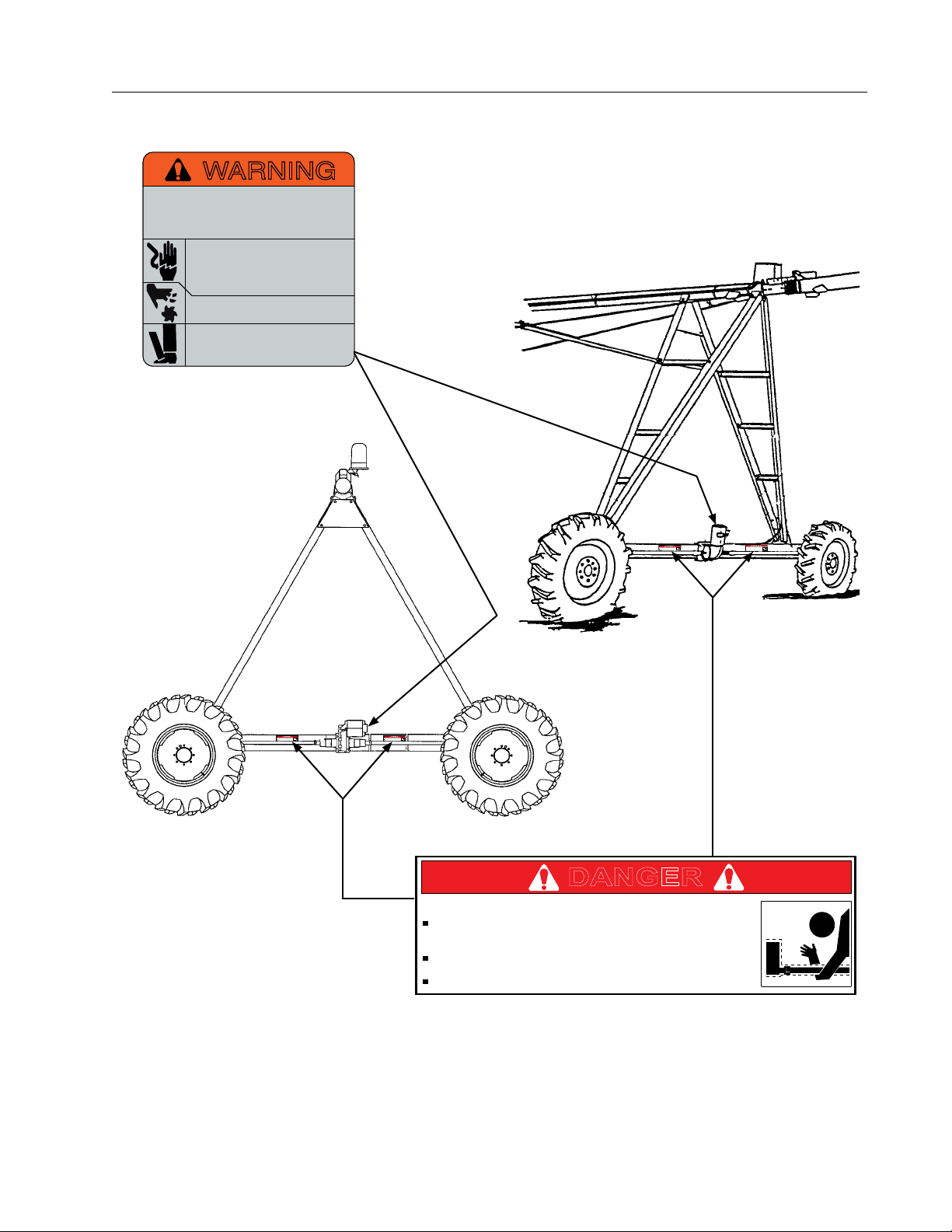
These Danger, Warning, and Caution decals appear in various locations on a Valley irrigation machine. You
MUST familiarize yourself and other operator’s with these safety decals. For replacement of any decal, contact
your local Valley dealer.
19
Page 20
Safety
Assembly / Part
8" Pivot
Standard & High Profile
End Gun & Stop-In-Slot
Auto Reverse Controls
Safety Decals (Continued)
20
WARNING
WARNING
WARNING
WARNING
Page 21
Safety Decals (Continued)
Improper installation of this motor may
Disconnect power before maintenance.
Do not touch rotating drive shaft or shield. Clothing
or limbs may become entangled, resulting in severe
injury.
DANGER
Do not touch rotating drive shaft or shield. Clothing
or limbs may become entangled, resulting in severe
injury.
Do not service until machine is locked in the off
Drive Shaft Starts Without Warning!
DANGER
injury.
Do not service until machine is locked in the off
DANGER
injury.
Do not service until machine is locked in the off
DANGER
WARNING
result in fire, explosion, electrical shock or
other personal injuries. Read operating
instructions
Open all circuits before removing conduit
box cover. Be sure motor is properly
grounded per local and national codes.
Do not place fingers or objects near
openings.
Do not use eye bolts or lifting hooks to
lift anything except the product.
Safety
Drive Shaft Starts Without Warning!
Drive Shaft Starts Without Warning!
Do not touch rotating drive shaft or shield. Clothing
or limbs may become entangled, resulting in severe
Drive Shaft Starts Without Warning!
Do not touch rotating drive shaft or shield. Clothing
or limbs may become entangled, resulting in severe
DANGER
Drive Shaft Starts Without Warning!
Do not touch rotating drive shaft or shield. Clothing
or limbs may become entangled, resulting in severe
injury.
Do not service until machine is locked in the off
position.
Always replace drive shaft shield after servicing.
21
Page 22

Safety
22
Page 23
Overview
Introduction
Understanding the operation of the corner machine requires understanding how the Center Pivot operates.
Refer to the Valley 8000, 8120, 7000 Center Pivot Owner’s Manual for a complete explanation of the operation
of the Valley Center Pivot. Operators of Valley Precision Corner machines retrofitted to earlier models of Valley
Center Pivots or other brands of Center Pivots must use the appropriate Center Pivot owners/operators manual
in conjunction with this manual.
Overview
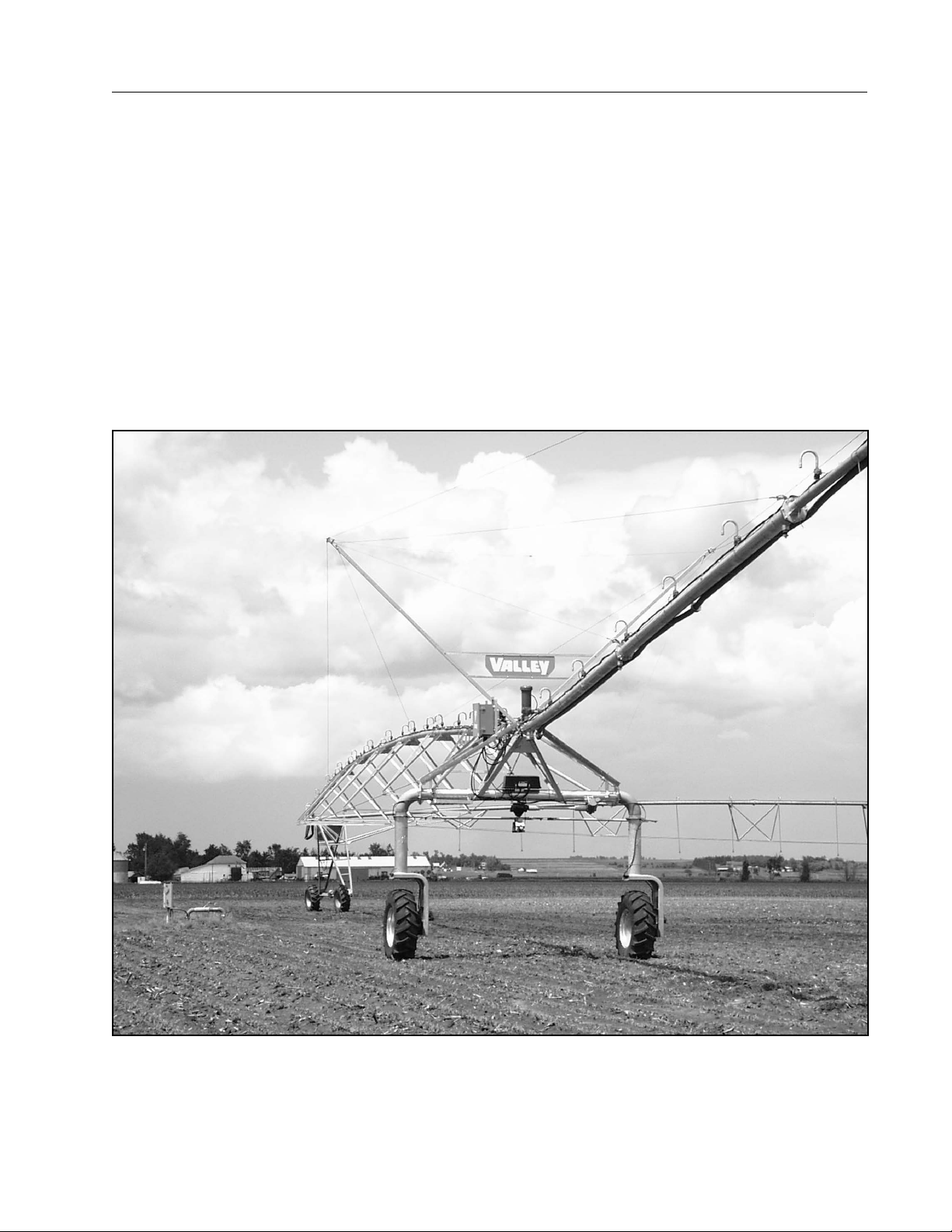
The Valley Corner is a pivoting extension (185 ft or 205 ft span, 82 ft overhang and steerable drive unit) of the
Center Pivot machine. As the Center Pivot enters a corner of the field, the corner arm moves or swings outward
to extend into the corner. At various points during extension, sprinklers or spray nozzles begin turning on in a
specific sequence to maintain optimum uniformity. This allows the corners or areas outside the Center Pivot to
be uniformly irrigated. As the corner arm reaches full extension, the end gun turns on to irrigate the area beyond
the end of the overhang. When the corner approaches the boundary of the field, the end gun shuts off and the
corner begins moving inward. At various positions during retraction, the sprinklers or spray nozzles begin to shut
off in a specific sequence. See Figure 23-1.
Figure 23-1
23
Page 24
Overview
Machine Components - Structural
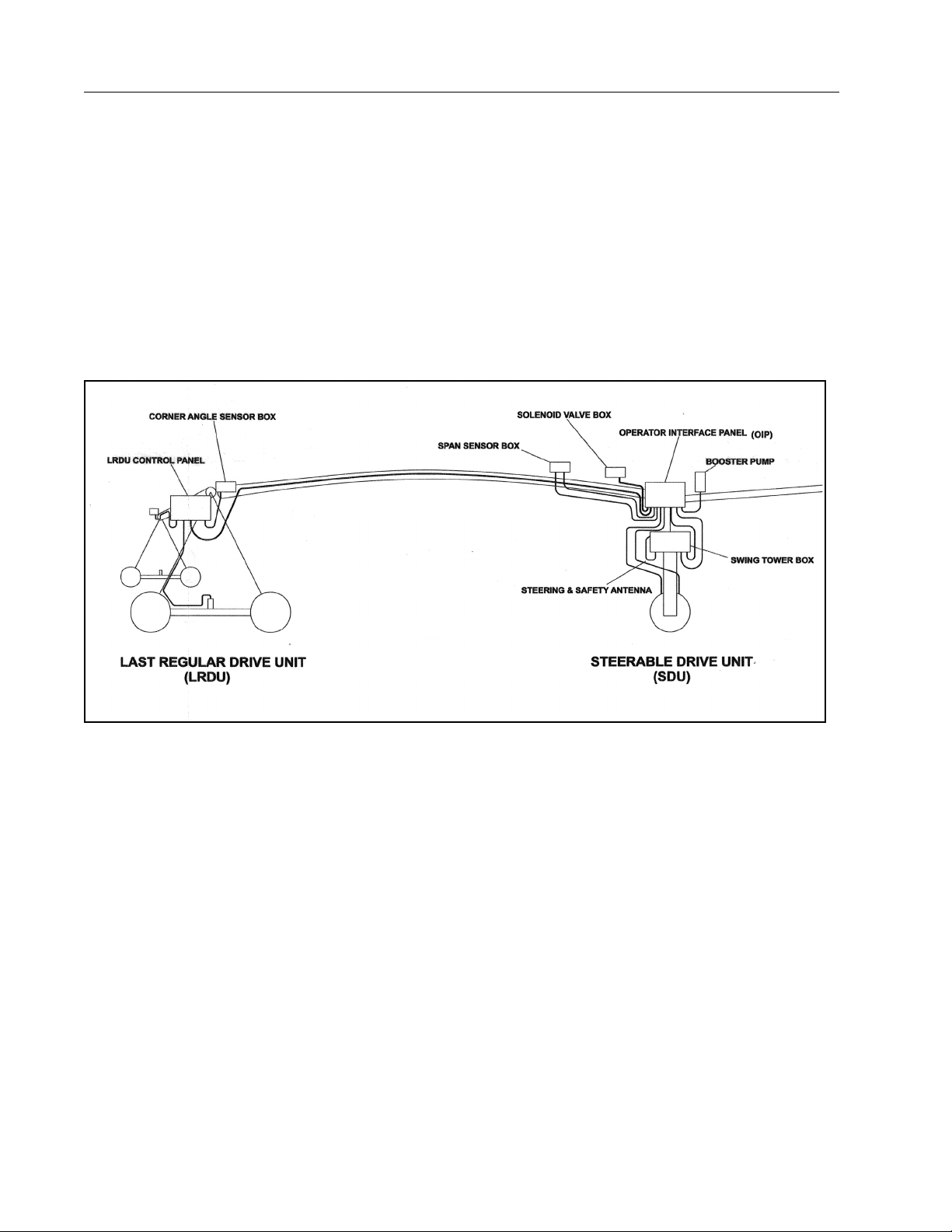
The corner structural hardware consists of a 185 ft or 205 ft span of 6 5/8 in pipe with 30 in coupler spacing,
trussing and truss rods and an 82 ft overhang. A steerable drive unit (SDU) supports the span and overhang.
See Figure 24-1.
The steerable drive unit utilizes a drive motor and gearbox on each drive unit leg. A steering motor and a steering gearbox, mounted to the SDU base beam, rotate the drive unit legs.
The corner connects to the basic Center Pivot at the Last Regular Drive Unit through a ball and socket. This
type of attachment allows movement in all directions for optimum flexibility as the LRDU and SDU negotiate
varying terrain.
The drive for the LRDU is a 34 RPM helical motor/center drive gearbox while the SDU incorporates 56 RPM
worm gear wheel-drive motor/gearboxes. Each of these drives are powered from variable speed motor controllers (Dinverters). This improves reliability and reduces maintenance, while extending the life of the drives.
Figure 24-1
Machine Components - Operational
The Valley Precision Corner utilizes a number of control boxes and other components for movement, guidance
and sprinkler package sequencing. The following is a listing of these components and their basic function. See
Figure 24-1 for operational component location.
24
Page 25
Main or Pivot Control Panel
WARNING
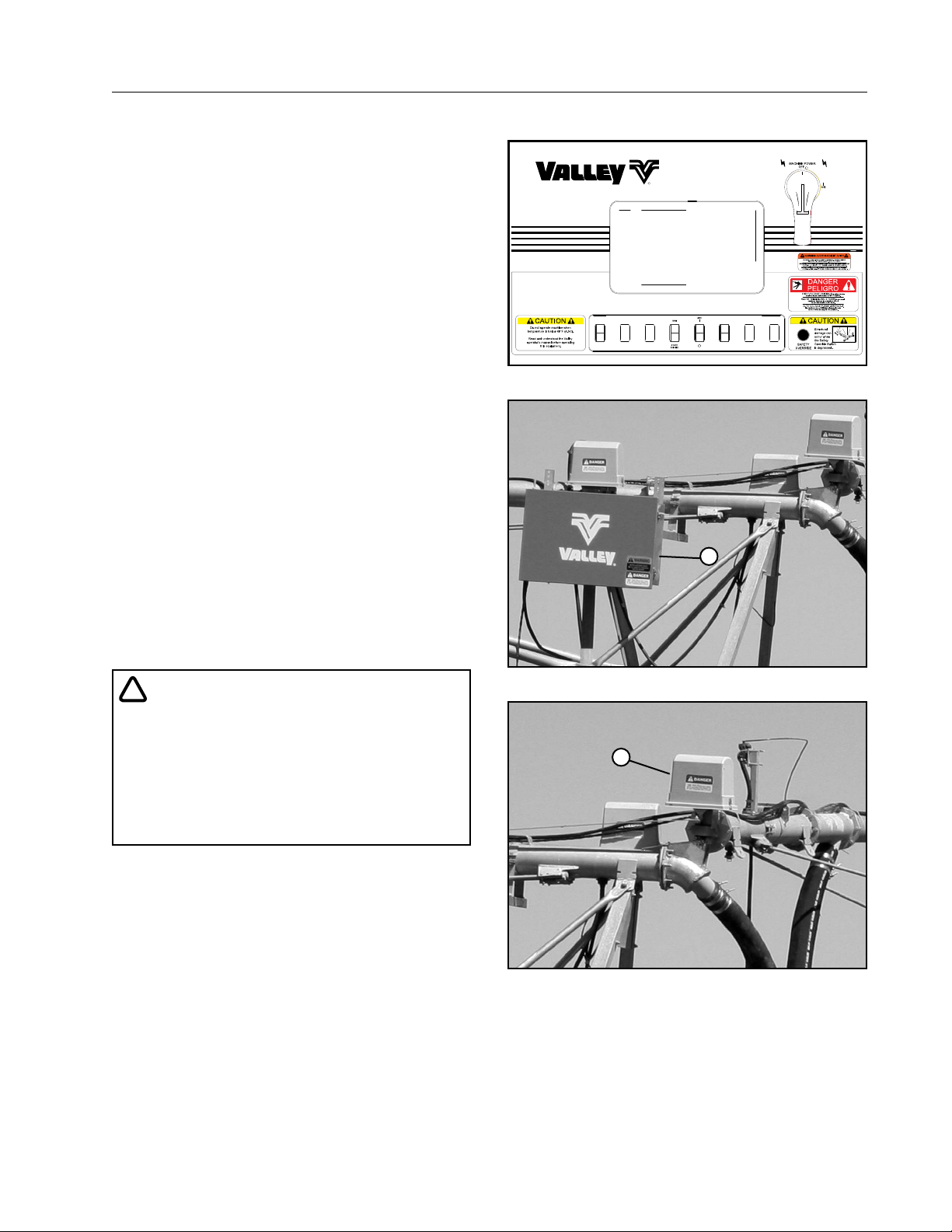
The Valley Precision Corner machine, used in conjunction with an 8000 Valley Center Pivot, is equipped
with one of three main control panels: the Standard,
the Select or the Pro. Each of these provides the basic
control functions for operation of the corner machine.
These include controls for starting and stopping the
machine, selecting the direction of operation and
setting the speed for applying the desired amount of
water to the field. See Figure 25-1.
A SERVICE/RUN rocker switch is included with the
inner panel door controls. This switch is used for corner machine diagnostics and for use of the Opera tor
Interface Panel.
The panel contains an oscillator which generates a
low voltage, high frequency signal in the buried guidance wire.
Control panels for earlier Valley Center Pivots or pivot
panels for other brands of Center Pivots are retrofitted with the appropriate components and controls for
use with the Valley Precision Corner.
AUTO
REVERSE
AUTO
STOP
Figure 25-1 Pivot Control Panel
Overview
SERVICE
RUN
Last Regular Drive Unit Control Panel
The Last Regular Drive Unit (LRDU) control panel is
responsible for supplying the Last Regular Drive Unit
drive motor with the appropriate electrical power to
achieve the desired machine operating speed. See
Figure 25-2.
!
• THE LAST REGULAR DRIVE UNIT CONTROL
PANEL CONTAINS NO OPERATOR CONTROLS. THE ELECTRI CAL COMPONENTS
CAN ONLY BE SERVICED BY VALLEY SERVICE TECHNICIANS. THE OPERATOR MUST
NEVER ATTEMPT TO SERVICE OR TROUBLESHOOT THIS PANEL.
Corner Angle Sensor Box
The Angle Sensor Box is located at the ball and
socket joint between the LRDU and the first pipe of
the corner. The Angle Sensor Box utilizes a potentiometer which monitors the angle between the Center
Pivot and the corner machine. The angle between the
two is used in conjunction with other information to
properly sequence the sprinklers on and off as the
corner extends and retracts. See Figure 25-3.
Angle sensor software also monitors the extension
and retraction angle to assure the corner arm does
not overextend or under-retract. If the angle of the
corner reaches either of these safety limits, the machine will shut off.
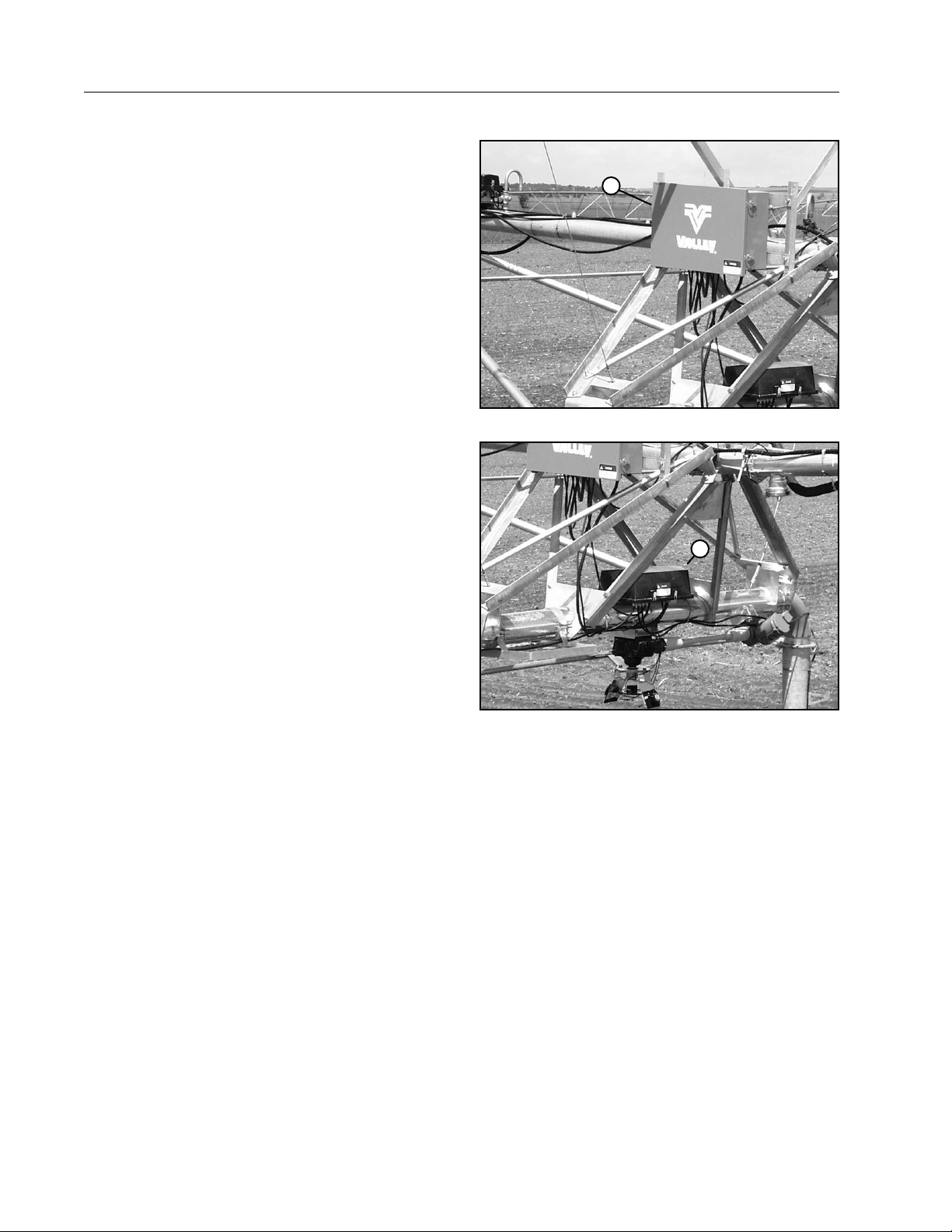
1
Figure 25-2 1 . LRDU Control Panel
1
Figure 25-3 1 . Corner Angle Sensor Box
25
Page 26
Overview
Operator Interface Panel (OIP)
The Operator Interface Panel (OIP) is positioned
above the steerable drive unit base beam. It includes
a microprocessor that receives a continuous signal
from the span sensor box and monitors any movement or change in speed of the LRDU. The processor
then directs, as necessary, a variable speed drive
motor controller to constantly adjust the RPM of the
SDU drive motors. This assures the SDU will maintain
uniform movement with the LRDU. See Figure 26-1.
In addition, the microprocessor monitors the position
of the corner in relation to the Center Pivot through
signals from the angle sensor potentiometer. This
information is used to determine the area being irrigated by the corner at any point or position in the
field. Based on this information, signals are sent to
the appropriate solenoid valves at the Solenoid Valve
Box to turn on or turn off the appropriate sprinklers.
This provides the optimum uniform water distribution
at any point around the field.
The Operator Interface Panel provides a number
of benefits to the operator and to the Valley service
technician. The Operator Interface Panel provides
information to the operator or Valley service technician on the operational status of the corner and diagnostics to aid in troubleshooting should a malfunction
occur with the corner.
1
Figure 26-1 1 . Operator Interface Panel (OIP)
1
Swing Tower Box
The Swing Tower Box includes a Corner Guidance
Box. The guidance box interprets the signal from
the buried guidance wire that’s received through the
steering and reference antenna. It then directs the
steerable drive unit to turn one direction or another
to maintain a position directly over the guidance wire.
See Figure 26-2.
The guidance box also monitors the signal strength
being received by the antenna. If the SDU moves too
far away from the guidance wire, the signal strength
drops below a preset level and relay contacts in the
guidance box open the safety circuit causing the corner machine to shut down.
The Swing Tower Box includes a cam and steering limit switches to prevent mechanical damage to
steering components should a malfunction occur.
A steering safety switch backs up the steering limit
switches should they not stop an oversteer.
Figure 26-2 1 . Swing Tower Box
26
Page 27
Steerable Drive Unit
The Steerable Drive Unit (SDU) is located at the end
of the corner span. The steering motor and steering
gearbox are located on the basebeam. A single steering gearbox is standard. There are two offset legs,
one on each end of the basebeam. At the bottom of
each offset leg is a Corner Drive Wheel Gearbox. An
optional Corner DualDrive tire configuration is available. See Figure 27-1.
Steering and Safety/Reference Antenna
The steering and safety antenna are located on the
steering arm directly below the center of the Steerable
Drive Unit (SDU) base beam. The safety (reference)
antenna and the forward or reverse steering antenna
receive the signal from the buried guidance wire and
send an electrical signal to the guidance receiver in
the Swing Tower Box. The signal is monitored by the
receiver which keeps the corner over the guidance
wire or shuts the machine down should a malfunction
occur causing the corner to move outside the guidance safety limits. See Figure 27-2.
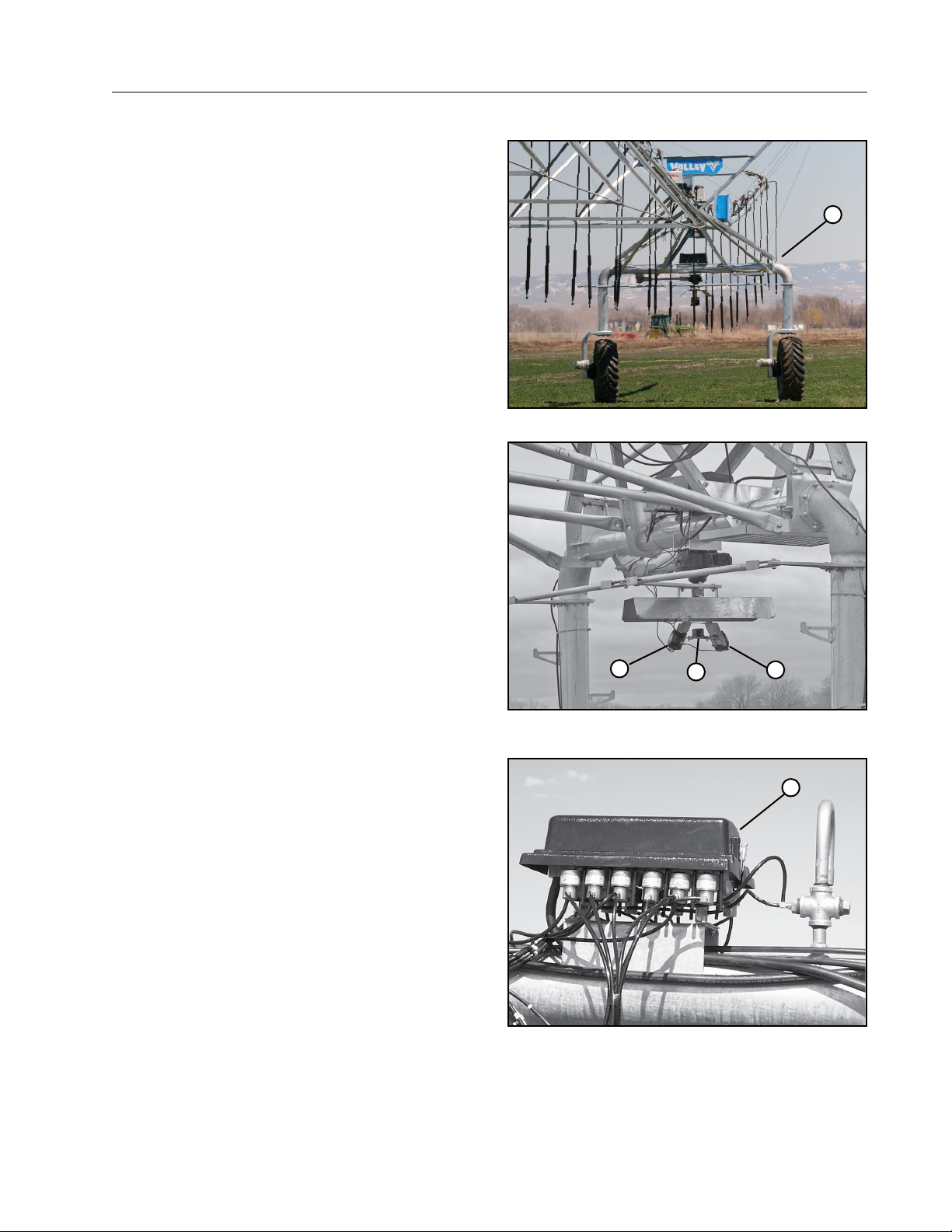
Overview
1
Figure 27-1 1 . Steerable Drive Unit
Solenoid Valve Box
The Solenoid Valve Box converts electrical signals
from the SDU control panel processor into water
hydraulic control for the sprinkler package pressure
differential valves. This allows the appropriate sprinklers to turn on and off at the appropriate points during extension and retraction. See Figure 27-3.
1
Figure 27-2 1 . Steering Antenna
2. Safety/Reference Antenna
2
1
1
Figure 27-3 1 . Solenoid Valve Box
27
Page 28

Overview
Theory of Operation
LRDU and SDU Movement Controls
Forward or reverse movement of the corner is
initiated by movement of the last regular drive unit
(LRDU). Movement of the LRDU is controlled from
the main control panel located at the pivot. The LRDU
is sent signals from the main control panel indicating the speed and direction the LRDU is to operate.
Unlike a center pivot where the last drive unit moves
so many seconds out of a minute, the LRDU moves
continuously above 15 Hertz. A variable speed motor
controller adjusts the frequency (hertz) to the drive
motor to obtain the desired operating speed or hours
per revolution. On Select2 and Pro2 panels, speed
may also be set by inputting the desired application
amount to be distributed to the field in one revolution.
To apply more water, the RPM of the LRDU motor
is decreased; to apply less water, the RPM of the
LRDU motor is increased. The motor controller for
the LRDU is located in the large control panel (LRDU
control panel) mounted on the last regular drive unit.
As the LRDU moves, an extremely sensitive electromechanical sensor (potentiometer) detects the
movement of the LRDU. Through a second variable
speed motor controller in the SDU control panel, the
RPM of the SDU drive motors are set to match the
speed of the LRDU. The span sensor is located on
the corner span near the steerable drive unit (SDU).
The panel is positioned above the SDU base beam.
Should the rate of movement or speed of the LRDU
change, the speed of the SDU will immediately
change also. Again, the controls for coordinating the
movement of the SDU are extremely sensitive allowing for precise, coordinated movement of the LRDU
and the SDU.
Incorporated into the span sensor box are two span
sensor safeties; an electrical safety limit and a mechanical safety. The electrical safety will shut the
machine off should the LRDU and SDU not maintain
the proper relationship within the safety band set in
the software. The mechanical safety switch, which is
a backup, will open and shut the machine down if
tension or compression of the corner span exceeds
the limits of the electrical safety. The span sensor
safeties are in series with the other corner and center
pivot safety devices.
Corner Guidance Systems
Guidance of the corner into and out of the corners of
a field is directed or controlled by either a GPS Guidance System or a Below Ground Guidance System.
GPS Guidance System
The GPS guidance system uses a GGS Control
panel and GPS Receiver mounted at the SDU. GPS
coordinates are compared to a pre-determined path
by the computer and converted into steering commands to guide the corner.
Below Ground Guidance
The below ground guidance system uses a signal
from a wire loop buried around the outer portions,
or perimeter, of the field to guide the corner. This
guidance wire originates at the pivot control panel, is
buried out to and around the edges of the field, then
returns to the control panel.
The pivot control panel contains a device called an
oscillator. The oscillator generates a low voltage, high
frequency AC signal that is carried by the buried wire
loop.
The steerable drive unit has three antennas; a reference or safety antenna and two steering antennas
(forward and reverse). They are mounted to the
steering arm located below the center of the SDU
base beam.
The reference antenna “listens” for the signal from
the buried wire. When the reference antenna “hears”
or receives a signal of the proper strength, a relay is
activated in the guidance box to complete a safety
circuit path through the guidance box. Various other
corner and center pivot safety switches or devices
are incorporated into the series safety circuit.
The other two antennas, in conjunction with the reference antenna, are used to tell the SDU where it is in
relation to the wire. One is used for steering when the
corner is operating in the forward mode (clockwise)
while the other is used for reverse operation (counterclockwise).
The guidance control compares the signals of the
steering antenna and the reference antenna to determine if steering action is required to keep the SDU
directly over the buried guidance wire. Steering can
only take place when the corner is moving to prevent
structural damage to the corner legs.
28
Page 29

Theory of Operation
Below Ground Guidance (Continued)
The drive wheels on the SDU should never be allowed to turn 90 in to the direction of movement of
the center pivot. Two steering limit switches in the
steerable drive unit box prevent this from occurring.
The limiting action of these switches does not shut
the corner down.
Under certain conditions the corner may move off or
away from the buried signal wire and not be able to
correct itself by steering back to the wire. If the SDU
gets far enough off or away from the guidance wire,
the signal received by the reference antenna will
weaken to a point where it ceases to receive or “hear”
the signal. If this should occur, the safety relay in the
guidance control box will “drop out” which opens the
safety circuit and shuts the corner down before structural damage can occur.
An additional mechanical steering safety switch is
used in conjunction with the steering limit switches.
Should the steering switch circuitry fail to stop the
steering action, the steering safety switch will shut
the corner down.
Corner Water Application Sequencing
Sequencing of the sprinklers on and off as the corner
extends and retracts is required for uniform water
distribution. Sequencing is accomplished through the
SDU control panel, the angle sensor box, the solenoid
valve box and pressure differential valves mounted to
water outlets on the corner span and overhang.
The angle sensor box is mounted to the first pipe
flange on the corner span. It is connected to the last
center pivot span by a linkage arm. As the corner
span begins to extend and retract, a potentiometer
in the angle sensor box rotates and sends a signal to
the microprocessor in the SDU control panel.
During extension, the processor determines the area
being covered and sequentially removes power from
a specific solenoid(s) in the solenoid valve box. This
causes the appropriate pressure differential valve(s)
to open allowing water to begin flowing to sprinklers
or spray nozzles on the span and/or overhang.
As extension continues, additional solenoids are deactivated allowing the pressure differential valves to
open and water to flow out the appropriate sprinklers
or nozzles.
Overview
During retraction, power is sent to the appropriate
solenoids which closes the appropriate pressure differential valves to shut the sprinklers or spray nozzles
off in the proper sequence. This process assures
the optimum water distribution as the corner moves
around the field.
An optional sprinkler package, called the “water utilization package”, is available for increasing the rate of
extension of the corner machine into the corners of
the field while maintaining uniform water distribution.
This package incorporates two additional sequences
along with 22 additional sprinklers on a 205 ft corner
and 19 additional sprinklers on a 185 ft corner.
The rate of extension is 2:1 versus 1.55:1 on the standard package. This allows for irrigating slightly more
area in the corners of the field and also increases the
overall uniformity of water application.
The area based sequencing used on the Precision
Corner allows for accurate chemical application. If
the “mode” rocker switch on the operator interface
panel is set on “chemigate”, the software will cause
the LRDU to slow down as the corner arm extends
and more area is being irrigated. As the corner retracts, the LRDU will speed up. This will provide for
uniform chemical application when using a fixed rate
chemical injection pump.
29
Page 30

Overview
30
Page 31

Control Panels
Overview
The Valley Precision Corner Owners Manual covers the use of the Valley Corner Operator Interface Panel along
with maintenance, winterization and troubleshooting of the Valley Precision Corner.
Startup and operating procedures of the Valley Precision Corner are the same as startup and operation of the
center pivot.
Control Panels
A Valley Precision Corner installed with a new Valley 8000 Center Pivot will include a Valley control module in
the center pivot control panel.
A Precision Corner added to an existing Valley Center Pivot or other brand of center pivot will use the existing
center pivot control panel.
If the Valley Precision Corner is used in conjunction with a New Valley Center Pivot then the Valley Center Pivot
Owners Manual, along with the appropriate Valley Control Panel Owners Manual, must be used in conjunction
with the Valley Precision Corner Owners Manual.
Valley Pivot with Precision Corner
The pivot control panel that is used with the Valley Precision Corner has a SERVICE/RUN rocker switch located
on the lower portion of the inner panel door. This switch is utilized to power the Operator Interface Panel (OIP)
and when troubleshooting the Valley Precision Corner. Its function and use is covered in-depth in other sections
of this manual.
NOTE
• The Valley Center Pivot control panel owner/operators manuals will cover the operation of the corner, including how to start/stop the machine, change the direction of operation, change the speed,
etc. You must familiarize yourself not only with this manual but also the appropriate control panel
manual.
Retrofit Valley Precision Corners
A Retrofit Valley Precision Corner added to an existing center pivot utilizes the existing center pivot control
panel whether it is a Valley or other brand. The appropriate electrical Pivot Panel components for use with the
Valley Precision Corner have been installed into the Pivot Panel by your Valley Dealer Service Technician. The
only difference you will physically see is the addition of the SERVICE/RUN switch on the inner panel door of the
Pivot Panel.
You must use the operators manual for the existing center pivot in conjunction with this manual (Valley Precision
Corner Owners Manual) for complete instructions on preoperational settings and operating procedures. The
operation of the center pivot with a Valley Precision Corner is virtually the same as the center pivot by itself.
The major difference is determining the settings for the speed of the machine to achieve the desired water
application amount.
31
Page 32
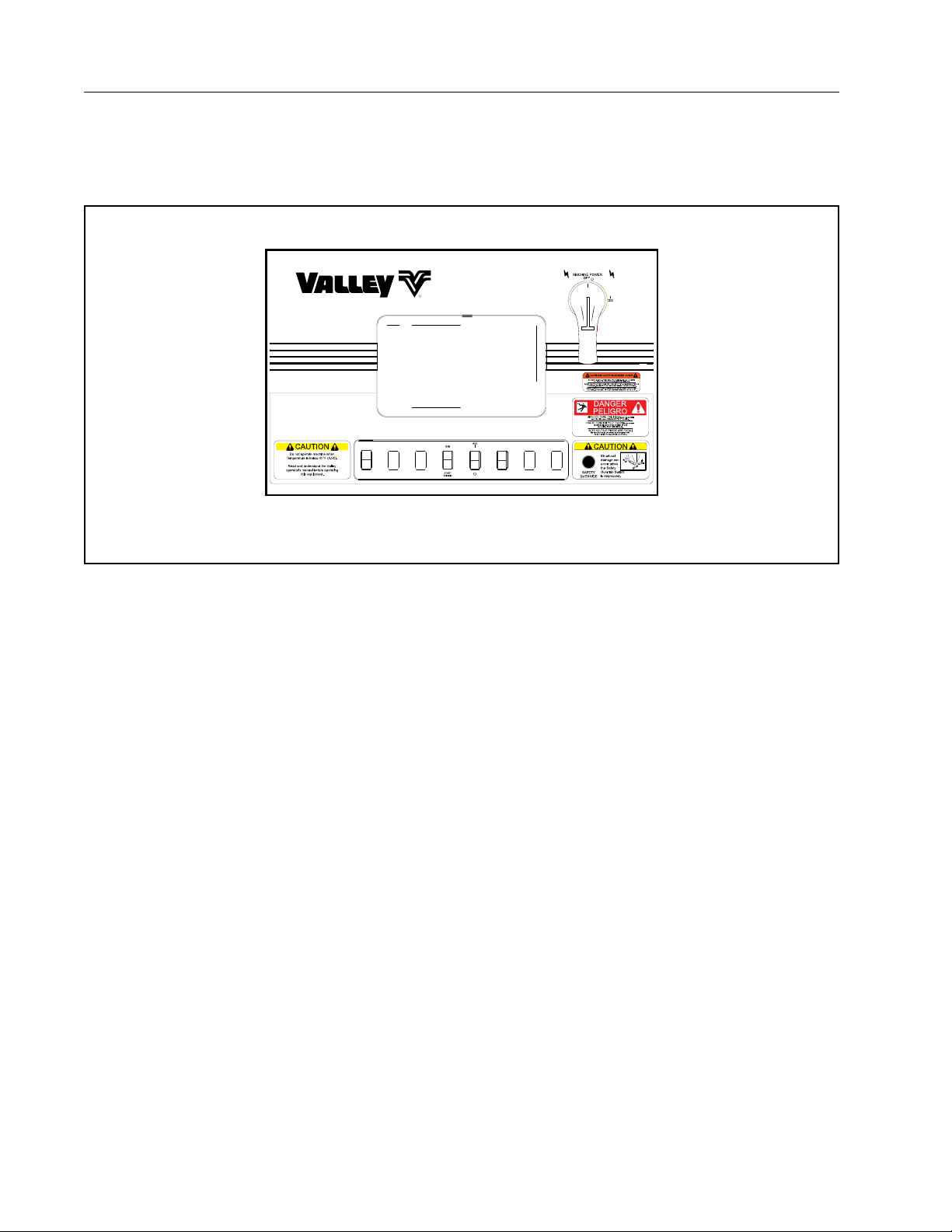
Control Panels
Pivot Control Panel
The Pivot Panel includes standard controls for operating the machine. In addition, a SERVICE/RUN switch in
the Pivot Panel is used for corner machine diagnostics and for powering the Operator Interface Panel located
on the SDU (Steerable Drive Unit).
AUTO
REVERSE
AUTO
STOP
SERVICE
RUN
Valley ClassicPlus Control Panel Shown
Figure 32-1 Typical pivot control panel for Valley Precision Corner (actual panel will depend on brand and model of center pivot, refer
to the center pivot manufacturer’s operators manual for corner operating procedures).
32
Page 33
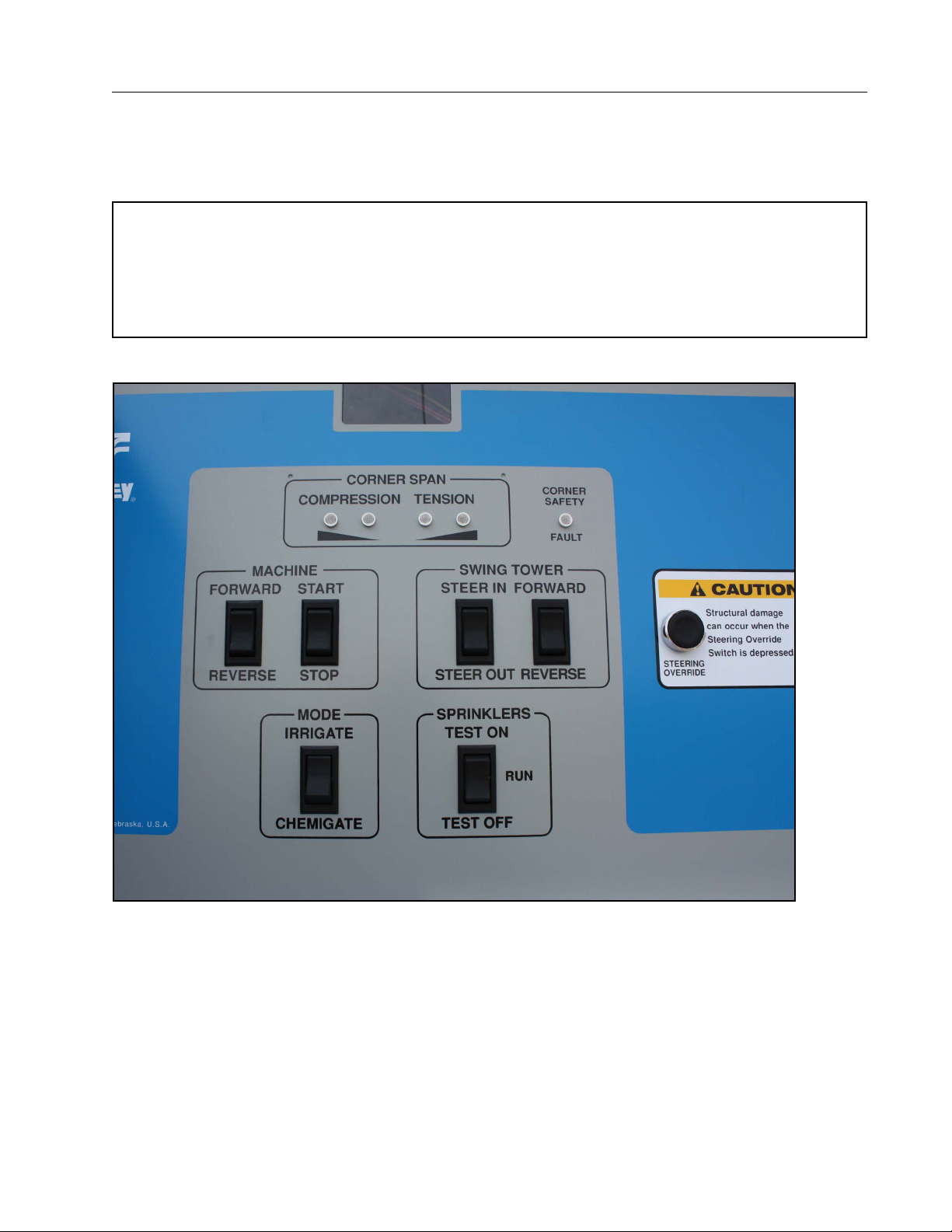
Control Panels
Operator Interface Panel
The Operator Interface Panel provides an LED display for indicating the status' of the corner and controls to
allow for operation and possible correction of certain corner machine malfunctions should they occur. The
Interface Panel is for use by the operator and by the Valley Dealer Service Technician. See Figure 33-1.
NOTE
• Some malfunctions must only be corrected by factory trained Valley Dealer Service Personnel. The
operator should never attempt to correct these malfunctions. The troubleshooting guide indicates
which may be corrected by the operator and which must be corrected by the dealer. Even though
most of the errors (faults) listed can only be corrected by Valley Trained Dealer Service Personnel, it
is of benefit for the service person to know the error code indicated when calling for service.
Figure 33-1 Valley Operator Interface Panel (located on the Steerable Drive Unit)
33
Page 34
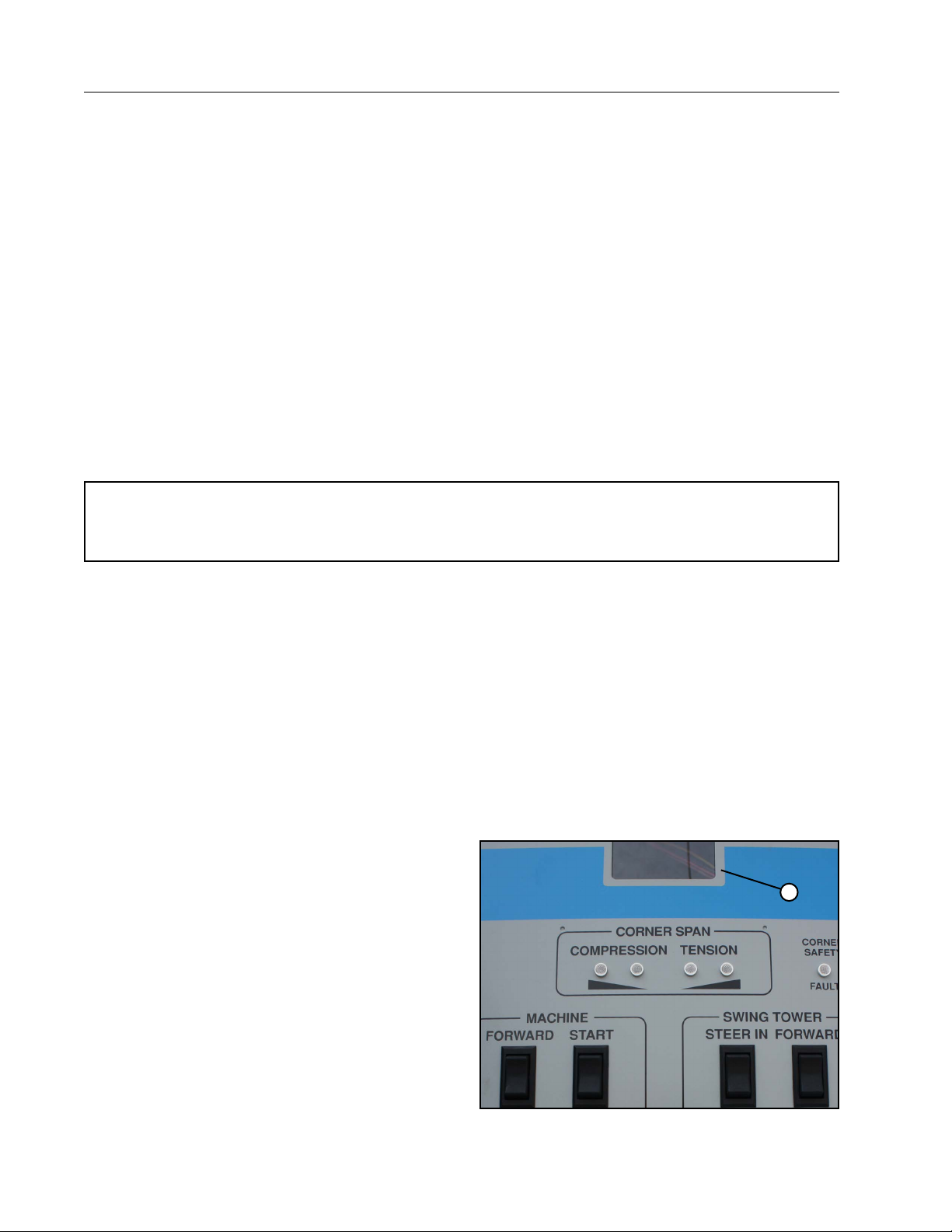
Control Panels
Operator Interface Panel (Continued)
The Operator Interface Panel is a combination diag nostics panel and a corner machine control panel. It provides
a number of functions and capabilities benefi cial to the Operator and the Valley Service Technician. Functions
and capabilities relating to the corner include the following:
1. Diagnostics and Operational Status
2. Sprinkler Testing
3. Operational Control:
• Machine Start/Stop - Forward/Reverse
• Swing Tower Steer In/Steer Out - Forward/Reverse
• Steering Override
• Irrigate/Chemigate
The reliability of the Valley Precision Corner makes it unlikely the machine will experience faults or shut downs.
Should a malfunction occur, the diagnostics and corner controls make it possible for the operator to correct
some faults. Even if a shutdown occurs that cannot be corrected by the operator, information provided by the
Interface Panel will greatly aid the Valley Service Technician. It will reduce the diagnos tics time allowing for
easier correction of the problem and less downtime.
NOTE
• The Interface Panel only provides information (Diagnostics) on the Valley Corner, it does not provide
diagnostics for the center pivot.
Use of the Operator Interface Panel requires 120 volts AC to the Interface Panel. This is achieved by placing
the Main Disconnect Switch in the Main Control Panel in the ON position and SERVICE/RUN Switch in the
SERVICE position.
Corner Interface Panel Capabilities
Diagnostic/Operational Status
Corner operational status and diagnostics information are shown by both an LED display and by indicator lights.
Diagnostics provided include the following:
• LED display for RUN and error codes
• Corner span compression and tension indicator lights
• Corner safety fault light
LED Display
The LED display indicates the operational status of
the corner and any error (error code) that may exist
as a result of a shutdown. If there is not a problem
with the corner, “rUn” will be shown on the display.
If a shutdown or fault has occurred, a flashing Error
Code number will be displayed. For example, an error
code Er16 indicates a Span Sensor Fault (Tension or
Compres sion) has occurred. See Figure 34-1.
1
34
Figure 34-1 LED Display
Page 35
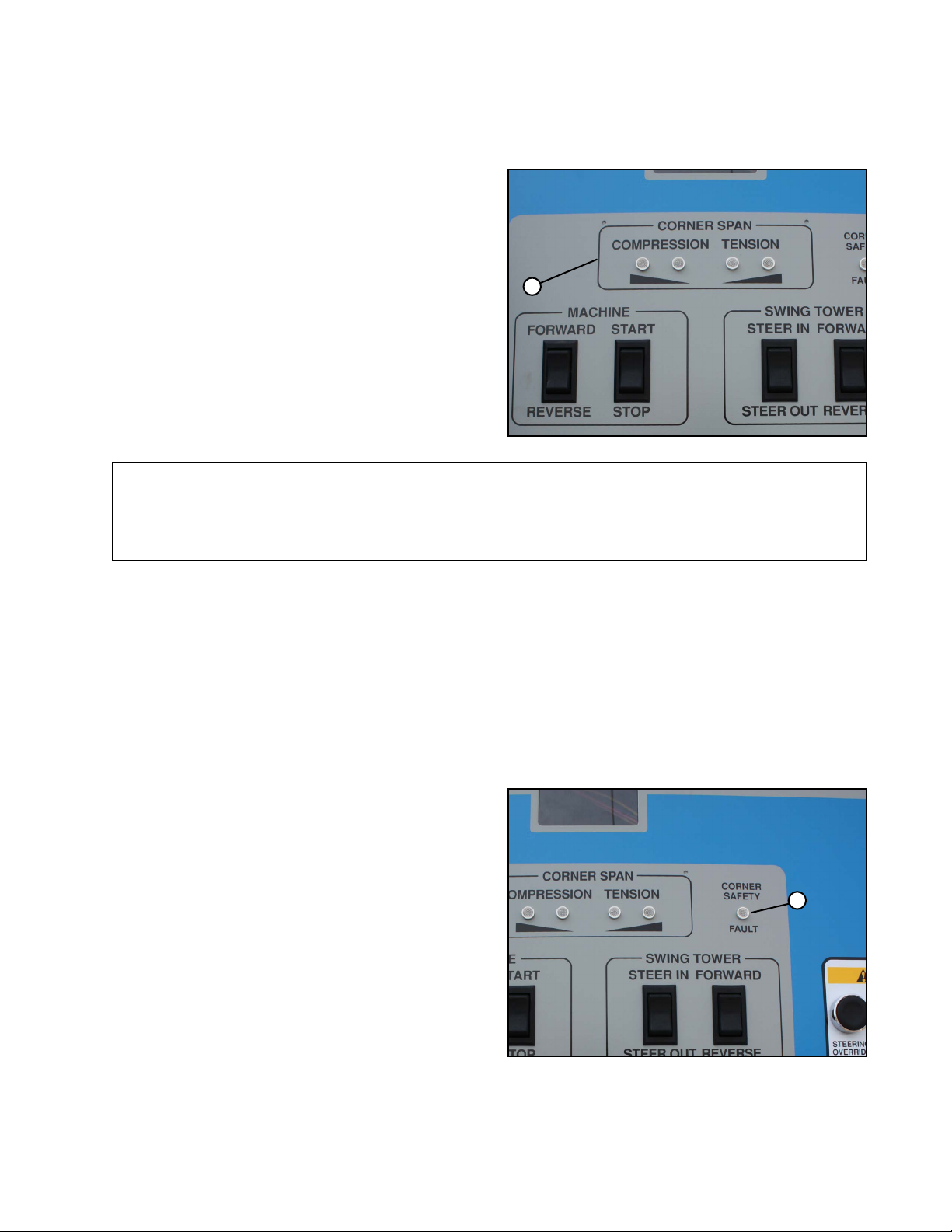
Control Panels
Corner Interface Panel Capabilities (Continued)
Corner Span Indicator Lights
In addition to the Er16 Error Code, a set of Corner
Span Compression/Tension Lights indicate whether
the corner span is in compression or tension. If the
corner span is in compression or tension then one or
two of either the compression or tension lights will be
lit. A corner span in tension means the LRDU (last
regular drive unit) and SDU (steerable drive unit)
are too far away from each other. A corner span in
com pression indicates the drive units are too close
together. See Figure 35-1.
If the left center light is on, the span is in 50% compression, while if the right center light is on, the span
is in 50% tension. If the left outside light is on, the
span is in 75% compression, while if the right outside
light is on, the span is in 75% tension.
1
Figure 35-1 1. Span Compression/Tension Indicator Lights
NOTE
• If the corner span has not reached 100% of the allowable compression or tension, the LED will still
display “rUn”. If the corner span reaches 100% of the allowable compression or tension, a flashing
error code “Er16” will appear in the LED status display.
The SWING TOWER FORWARD/REVERSE switch is used jog the corner drive unit in the necessary direction
until error code “Er16” returns to “rUn” and all lights are off.
Corner Safety Fault Light
The Corner Safety Fault Light illuminates when any of the corner mechanical faults have been activated. Mechanical Safeties include:
• Swing Tower Box Disconnect Switch
• Swing Tower Box Steering Safety Switch
• Swing Tower Guidance Box
• Span Sensor Safety Switch
Opening of any of these safeties can be a result of
mechanical or electrical malfunctions. Mechanical
possibilities include: getting stuck, flat tire, corner
drive or steering gearbox failure, failure of one of
the guidance components (oscillator, buried wire,
antenna, guidance receiver), etc. Most mechanical
failures can be corrected by the operator but
electrical malfunc tions must be left to authorized
Valley Service person nel. The operator should not
attempt to correct these malfunctions or faults unless
the computer board display indicates an “Er08” fault
(Guidance Box Fault). If “Er08” is displayed, the
STEERING OVERRIDE button should complete the
safety allowing for startup and manual steering of
the corner by using the Swing Tower Steering rocker
switches. If “Er08” is not dis played and the Corner
Safety Fault light is illuminated when the Steering
Override button is depressed, then the Valley Dealer
must be contacted to correct the problem. See Figure
35-2.
Figure 35-2 1 . Corner Safety Fault Light
1
35
Page 36
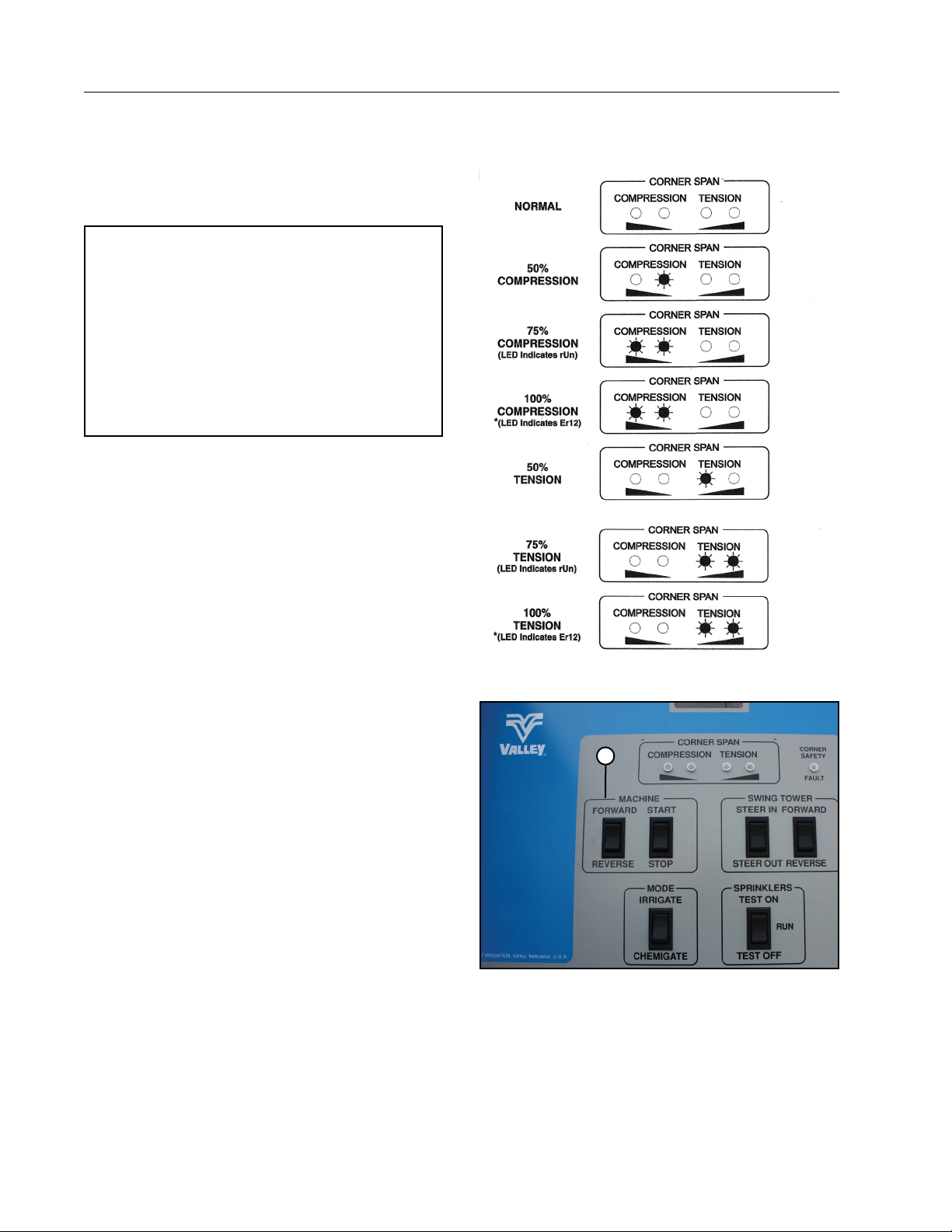
Control Panels
Corner Interface Panel Capabilities (Continued)
Corner Indicator Lights
Below are the possible combinations of Span Sensor
and Corner Safety Fault lights and the status of each
combination. See Figure 36-1.
NOTE
• If Corner Safety Fault light is ON when “Er16”
is shown on the LED, perform an auto correct
by pressing the machine start button at the
same time as the jog forward button and then
release. The smart board will display AUTO.
The SDU and LRDU should automatically jog
the correct direction until the safety fault is
resolved. If doing this does not resolve the
issue, contact your Valley Dealer.
Auto Correct Procedure
To perform an auto correct press the machine start button at the same time as the jog forward button and then
release. The smart board will display AUTO. The SDU
and LRDU should automatically jog the correct direction
until the safety fault is resolved. If doing this does not
resolve the issue, contact your Valley Dealer.
Corner Operating Controls
Controls on the inner door of the Operator Interface
Panel allow the operator or the Valley Service Technician to start the machine in forward or reverse, steer the
corner in or out, and stop the machine.
Also included is a steering override button to allow for
bypassing the steering safeties on the corner. The steering override must be used with caution as structural
damage can occur from oversteering when the override
is depressed.
Machine Start/Stop - Forward/ Reverse Rocker Switches
Once 120 Volt AC power is available to the Operator Interface Panel through the SERVICE/RUN rocker switch
in the Main Pivot Panel, the machine can be started in
either direction and stopped at the Operator Interface
Panel. See Figure 36-2.
The FORWARD/REVERSE toggle switch will change
direction of the pivot as the machine is moving. If running in Forward (clockwise), press the REVERSE side
of the switch to change directions and vice versa. This
switch will work only if the pivot is equipped with AutoReverse/Auto-Stop and it is enabled at the main pivot
control panel. Auto-Reverse must be selected rather
than Auto-Stop. If all safeties on the pivot are complete,
the LRDU will run at 25 hertz when the START BUTTON is pressed. It win run at this constant speed for five
minutes or until STOP is pressed. After the five minutes
is over, the START BUTTON can be used again for operating another five minutes.
36
Figure 36-1 Corner Indicator Lights
1
Figure 36-2 1 . Start/Stop - Forward/Reverse Rocker Switches
Page 37
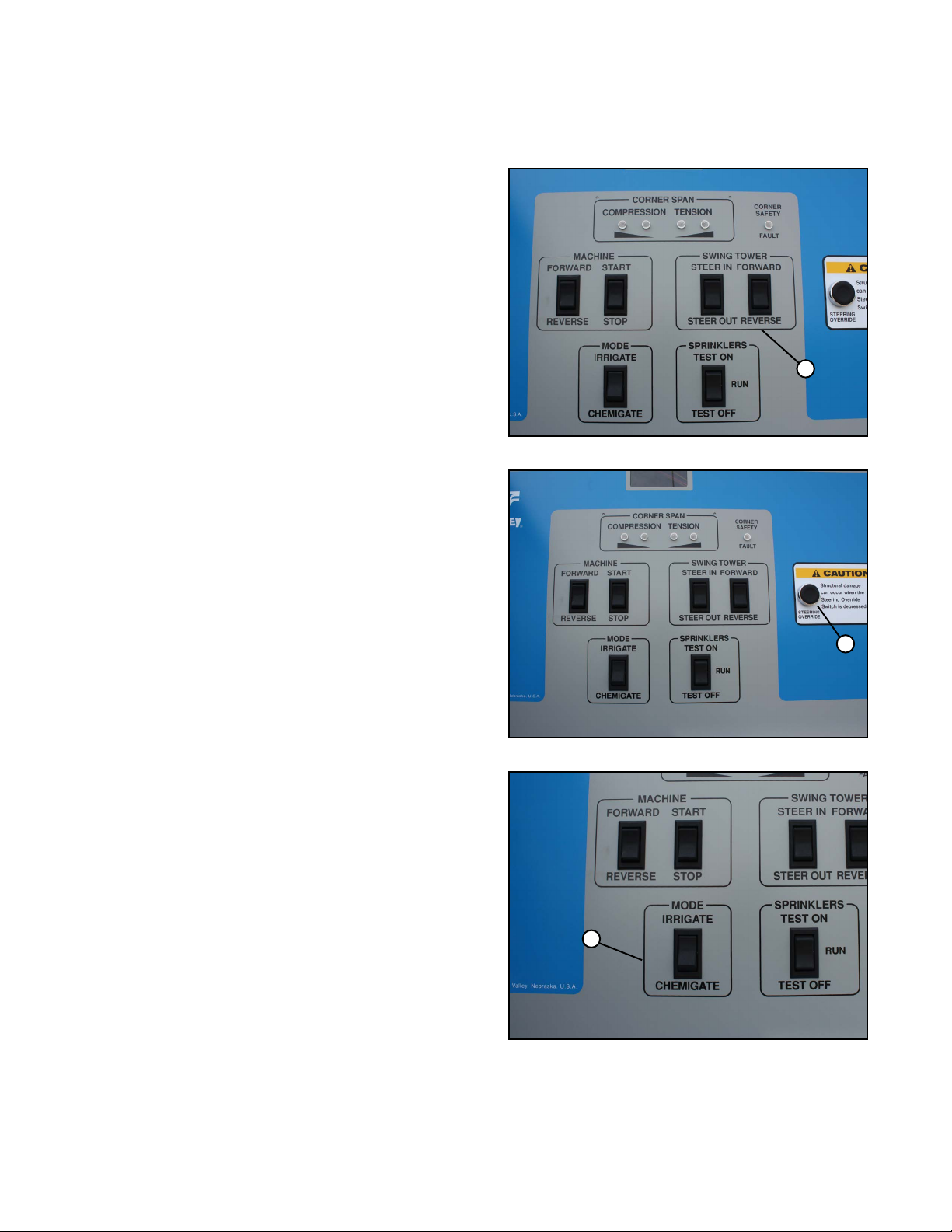
Control Panels
Corner Operating Controls (Continued)
Swing Tower Steer In/Steer Out - Forward/Reverse Switches
The STEER IN/STEER OUT switch will steer the corner drive unit wheels. STEER IN will rotate the SDU
legs so the corner drive unit will move towards the
pivot point. This is counter clockwise (when looking
down at the tires) when running in reverse and clockwise when running in forward. STEER OUT will move
the SDU away from the pivot point. This switch should
only be pushed when the corner is moving to prevent
any structural damage to the steering components.
See Figure 37-1.
The FORWARD/REVERSE rocker switch will “jog” the
SDU in the forward (clockwise) and reverse (counter
clockwise) directions. This FORWARD/REVERSE
switch can be used at the same time as the STEER
IN/STEER OUT switch, but must not be used when
the START button has been depressed and the
corner is running in normal operation, or at the same
time as the MACHINE FORWARD/REVERSE switch.
Figure 37-1 1 . Steer In/Steer Out - Fwd./Rev. Rocker Switches
1
Steering Override Button
The Steering Override Button bypasses all mechanical safeties except span sensor mechanical safety.
This button allows some inadvertent shutdowns to
be corrected by the operator. The Steering Override
Button must be used with care as structural damage
can occur when this switch is depressed. See Figure
37-2.
Irrigate/Chemigate Rocker Switch
The Irrigate/Chemigate Switch is used to access
the appropriate software program to uniformly apply
either irrigation water or agricultural fertilizers and
chemicals. The Irrigate Mode is used when distributing irrigation water and injecting chemical when
using a Variable Displacement Injection Pump. The
Chemigate Mode is used when applying fertilizer or
agricultural chemicals with a Fixed Rate Injection
Pump. See Figure 37-3.
1
Figure 37-2 1 . Steering Override Button
1
Figure 37-3 1 . Irrigate/Chemigate Rocker Switch
37
Page 38
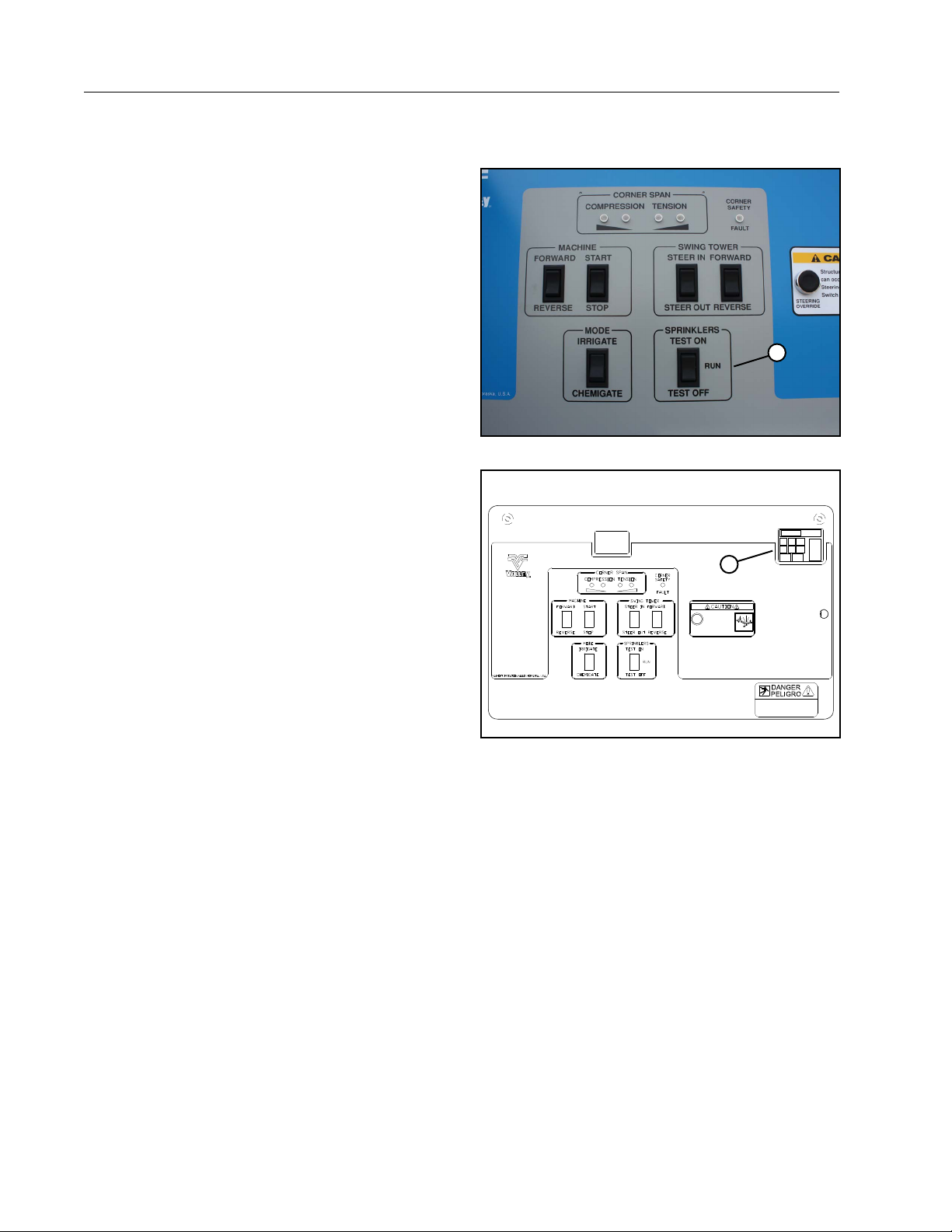
Control Panels
Corner Operating Controls (Continued)
Sprinklers Test On/Test Off Switch
The Sprinkler Test On/Off rocker switch allows the
operator to check the operation of the corner span
valve controlled sprinklers and end gun. All sprinklers
and the end gun can be turned ON or OFF assuring the sprinkler controls are operating properly. See
Figure 38-1.
Variable Frequency Drive
Two Variable Frequency Drives (VFD) are used on
the Valley Precision Corner: One in the LRDU Control
Panel and the other in the Operator Interface Panel at
the SDU. See Figure 38-2.
The VFD in the LRDU Panel controls the voltage and
frequency going to the LRDU drive unit motor which
in turn sets the speed of the machine.
The second VFD, located on the right side of the
Operator Interface Panel, controls the speed of the
two corner drive motors. This allows the corner to
maintain coordinated movement/speed with the last
regular drive unit (LRDU). During normal operation
the VFD display will show the hertz at which the corner drive motors are operating. If the SDU is stopped
and there is no problem with the VFD, it will indicate
“rdy” (Ready).
1
Figure 38-1 1 . Sprinkler Test Rocker Switch
1
38
Figure 38-2 1 . VFD
Page 39

Pre Operation
Water Application
An electromechanical or electronic percentage timer (depends on the type of pivot control panel) regulates
the speed of the corner machine which determines the amount of water being applied per revolution of the
machine. A percent timer setting of 100% means the machine is operating at its maximum speed and applying
the minimum amount of water. A setting of 50% means the machine is running at one half of its maximum speed
therefore, doubling the amount of water being applied.
Application of irrigation water through a corner machine requires uniform application as more area is irrigated
when the corner extends and less area is irrigated when the corner retracts. Maintaining uniformity is achieved
in one of two ways.
The first is to use a sprinkler package with pressure regulators at each sprinkler outlet on the machine. This will
maintain a constant flow at all sprinklers which will require the machine to move at a constant speed around the
entire field. As the corner extends, sprinklers on the corner win turn on increasing flow and as the corner retracts
sprinklers will turn off decreasing flow.
NOTE
• Flow control nozzles perform the same function as pressure regulators.
The second means of maintaining uniformity is to use a sprinkler package without pressure regulators and is
to progressively adjust the speed of the machine as it moves around the field. This is accom plished through the
corner machine sprinkler package software.
Monitoring the water pressure in the machine (pres sure transducer in the LRDU control panel) allows the
machine speed to progressively decrease as the corner extends (irrigating more acres) and increase as the
corner retracts (irrigating fewer acres).
The application amount, or depth, in inches per revolution of the Precision Corner must be calculated based
on the design of the installation i.e., length of machine and the corner, speed, gallonage, field size and shape,
crop(s), soil type, etc. The sprinkler chart for your machine will provide you with a speed chart, the distance from
the pivot to the last regular drive unit (LENGTH), the gallonage, the operating pressure, the end gun radius, the
center drive type (standard or high speed), and the tire type (standard, high float, maxi-float, etc.). Knowing the
gallonage, the center pivot and corner length and the machine speed will allow you to calculate the application
rate in inches per day, the hours per revolution and the percent timer settings for applying the amount of water
desired.
NOTE
• It is strongly recommended the machine be run one revolution at maximum speed (100% timer setting) while irrigating to establish the actual revolution time.
This is especially true on a non-pressure regulated machine as field sizes and shapes will directly impact the
revolution time of the machine. Operating one revolution at 100% percent timer setting while irrigat ing will allow
for establishing actual operating modes that will meet the needs of your application.
39
Page 40
Pre Operation
Based on IN
Based on % Timer
5.0 3.68 322.0
Field Area
Flow
Pressure
LRDU Drive Train
rotation time.
Parent Order No
Sprinkler Order No
Dealer
Customer
Field Name
Sample Timer Chart
With Pressure Regulators or Flow Control Nozzles
Valley Standard Corner VFlex Percent Timer Data
Setup Information - Valley Computer Control Panel Water Application Constants:
Minimum Application = 0.184 (in)
Hours Per Revolution = 16.1
IN Per Pivot Hours Per
360 degrees
0.184 100.0 16.1
0.20 92.0 17.5
0.30 61.4 26.2
0.40 46.0 35.0
0.50 36.8 43.8
0.60 30.7 52.4
0.70 26.3 61.2
0.80 23.0 70.0
0.90 20.5 78.5
1.00 18.4 87.5
1.25 14.7 109.5
1.50 12.3 130.9
1.75 10.5 153.3
2.00 9.2 175.0
2.50 7.4 217.6
3.00 6.1 263.9
3.50 5.3 303.8
(Ac) Total
(Ac)Pivot 360
114.7
(Ac) EG on 100%
(ft)
Machine Length
1549.0
End Gun Radius
(ft)
99.7
Disclaimer
The information presented in the attached Percent Timer Report is based on variables which cannot be totally controlled by Valmont (including, but not
limited to; pivot pressure, inside pipeline surface, end gun throw, end gun arc setting, tire slippage, tire pressure, field slopes, soil variations,
sprinkler package installation, well capacity, center drive motor voltage, center drive motor frequency, climatic conditions and other elements and
circumstances beyond Valmont's reasonable control). Valmont recommends monitoring the machine for at least one pass through field to obtain an accurate
% Timer 360 degrees
(GPM)
o
1000
(GPM per Acre)
5.10
(in per day)
0.27
(in)
0.184
(GPM)
114.7
App Rate
App Depth @ 100%
End Gun
Pivot IN Per Hours Per
% Timer
100.0 0.184 16.1
90.0 0.20 17.9
80.0 0.23 20.1
70.0 0.26 23.0
60.0 0.31 26.8
50.0 0.37 32.2
45.0 0.41 35.8
40.0 0.46 40.3
35.0 0.53 46.0
30.0 0.61 53.7
25.0 0.74 64.4
20.0 0.92 80.5
17.5 1.05 92.0
15.0 1.23 107.3
12.5 1.47 128.8
10.0 1.84 161.0
7.5 2.45 214.7
(PSI) Pivot Pressure
36
(ft)
0.0
(ft)
0.0
Pressure
Calculated
Highest Elevation
Lowest Elevation
360 degrees 360 degrees
RPM Center Drive @
34
14.9 x 24 High Float Tire
Wheel GB Ratio, LRDU Dist
52:1
Hrs/360 @ 100%
16.1
Hz freq.
60
(
8.25
(Ft per Min))
1261.2
(ft)
40
Page 41
Based on IN
IN Per
Hours Per
360 degrees
90% Timer
360 degrees
Pivot
90% LRDU Ratio
IN Per
Hours Per
360 degrees
80% Timer
360 degrees
Pivot
80% LRDU Ratio
IN Per
Hours Per
360 degrees
70% Timer
360 degrees
Pivot
70% LRDU Ratio
Field Area
Flow
Pressure
LRDU Drive Train
Parent Order No
Sprinkler Order No
Dealer
Customer
Field Name
Sample Timer Chart
Without Pressure Regulators or Flow Control Nozzles
Valley Standard Corner VFlex Percent Timer Data
Setup Information - Valley Computer Control Panel Water Application Constants:
Pre Operation
Hours Per Revolution =Minimum Application =
0.270 100.0 19.1
0.30 90.1 21.2
0.40 67.6 28.3
0.50 54.1 35.3
0.60 45.0 42.4
0.70 38.6 49.5
0.80 33.8 56.5
0.90 30.0 63.6
1.00 27.0 70.7
1.25 21.6 88.3
1.50 18.0 106.0
1.75 15.4 123.7
2.00 13.5 141.4
2.50 10.8 176.7
3.00 9.0 212.0
3.50 7.7 247.4
4.00 6.8 282.5
5.00 5.4 353.7
To Select Correct LRDU Ratio Refer To Valley Precision Corner Owner's Manual Section 3 Corner Transducer Calculation.
(Ac) Total
(Ac)Pivot 360
114.7
(Ac) EG on 100%
Machine Length
(ft)
1549.0
End Gun Radius
(ft)
99.7
Disclaimer
The information presented in the attached Percent Timer Report is based on variables which cannot be totally controlled by Valmont (including, but
not limited to; pivot pressure, inside pipeline surface, end gun throw, end gun arc setting, tire slippage, tire pressure, field slopes, soil
variations, sprinkler package installation, well capacity, center drive motor voltage, center drive motor frequency, climatic conditions and other
elements and circumstances beyond Valmont's reasonable control). Valmont recommends monitoring the machine for at least one pass through field to
obtain an accurate rotation time.
o
1000
114.7
(GPM)
0.232 100.0 17.8
0.30 77.2 23.0
0.40 57.9 30.7
0.50 46.3 38.4
0.60 38.6 46.1
0.70 33.1 53.8
0.80 29.0 61.5
0.90 25.8 69.1
1.00 23.2 76.8
1.25 18.5 96.0
1.50 15.5 115.2
1.75 13.2 134.4
2.00 11.6 153.6
2.50 9.3 192.0
3.00 7.7 230.6
3.50 6.6 268.9
4.00 5.8 307.4
0.00 0.0 0.0
(GPM)
(GPM per Acre)
(in per day)
(in)
App Rate
App Depth @ 100%
End Gun
(PSI)
36
Calculated
Highest Elevation
(ft)
0.0
(ft)
Lowest Elevation
0.0
Pivot Pressure
Pressure
0.204 100.0 16.8
0.30 68.0 24.7
0.40 51.0 33.0
0.50 40.8 41.2
0.60 34.0 49.4
0.70 29.1 57.7
0.80 25.5 65.9
0.90 22.7 74.1
1.00 20.4 82.4
1.25 16.3 103.0
1.50 13.6 123.6
1.75 11.7 144.2
2.00 10.2 164.7
2.50 8.2 205.9
3.00 6.8 247.1
3.50 5.8 288.2
4.00 5.1 329.4
0.00 0.0 0.0
RPM Center Drive @
34
14.9 x 24 High Float Tire
Wheel GB Ratio, LRDU Dist
52:1
Hrs/360 @ 100%
(
8.25
Hz freq.
60
(Ft per Min))
1261.2
(ft)
41
Page 42

Pre Operation
Hours Per Revolution - Actual
Prior to irrigation or applying agricultural chemicals (Chemigation) with the Valley Precision Corner, the time
it takes to make one revolution (hours Per Revolution - Hrs/Rev) must be determined. A number of factors
affect the revolution time. These include the speed of the machine (Standard or High Speed), the tire size, tire
slippage, the length of the center pivot from the pivot point to the last regular drive unit (DLRDU), the size and
shape of the field and the terrain.
In addition, the revolution time is affected by the type of sprinkler package (pressure regulated or non-pressure
regulated) and whether the machine is irrigating or chemigating. Individual computer based water and chemical
application programs are used to provide the optimum in uniformity of application. The IRRIGATE/CHEMIGATE
rocker switch in the Operator Interface Panel provides for selecting the desired mode.
Due to the number of variables, the machine should be operated for one revolution in the Irrigate Mode and one
revolution in the Chemigate Mode with the times recorded for use in water and chemical application calculations.
Actual revolution times will provide the most accurate Hours Per Revolution for achieving the best uniformity of
application.
Procedures and formulas are provided in this section for calculating the revolution times along with the
application rate and depth settings.
Operating the machine to determine the actual revolution times should be completed with water. This will allow
for tire slippage and the effect of a pressure regulated sprinkler package versus a non-regulated sprinkler
package. In the case of irrigating with a non -regulated sprinkler package, it allows for decreasing and increasing
speed as the corner extends and retracts. Below is a guide to determining actual revolution times.
Determining Actual Revolution Times/Hours Per Revolution (Hrs/Rev)
Pressure Regulated Sprinkler Package:
• Irrigate Mode: Operate at 100% with or without water*
• Chemigate Mode: Operate at 100% with or without water**
*Operating with water will increase the accuracy as tire slippage affects the revolution time.
**Operating with water will increase the accuracy as tire slippage affects the revolution time. Water distribution will not be uniform.
Non-Pressure Regulated Sprinkler Package:
• Irrigate Mode: Operate at 100% with water*
• Chemigate Mode: Operate at 100% with or without water**
*Changes in machine pipeline water pressure affects the speed of the machine as the corner extends and retracts.
**Operating with water will increase the accuracy as tire slippage affects the revolution time. Water distribution will not be uniform.
42
Page 43
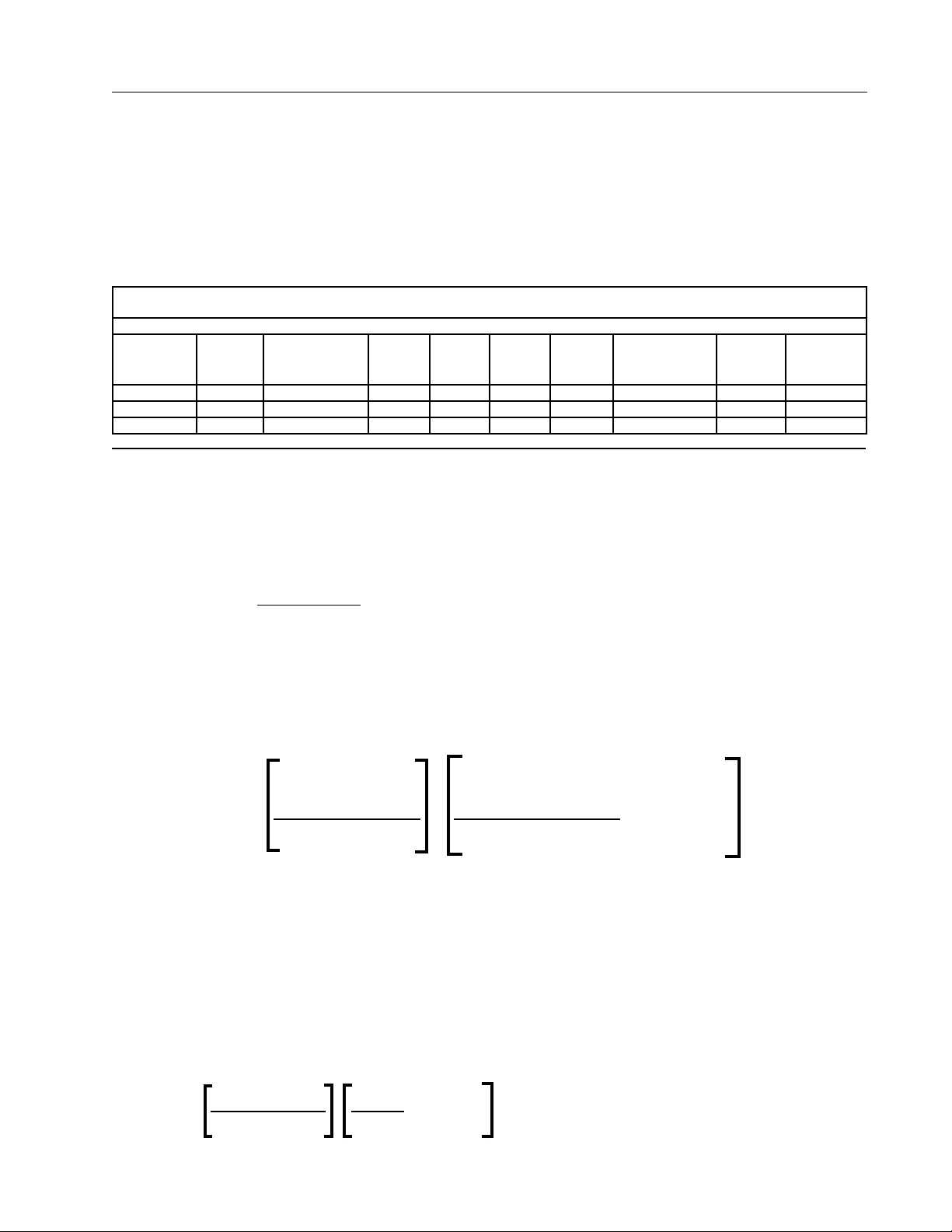
Pre Operation
Hours Per Revolution - Calculated
The revolution time for a Valley Precision Corner can be calculated using the information and formulas given below. It is
strongly recommended the machine be operated for one revolution at a 100% percentage timer setting while irrigating to
accurately determine the hours per revolution. This must be done while in the irrigate mode.
Last Regular Drive Unit (LRDU) Speed
The LRDU sets the speed for the machine. The drive motor on the last regular drive unit motor is labeled 34 RPM. This is the
RPM of the motor for a standard speed corner. The 34 RPM motor will operate at 56 RPM when the machine is equipped
with the high speed option. Motor and tire data used in calculating the revolution time is shown below.
DRIVE UNIT TRAVEL SPEED
(FEET/MINUTE)
Tire Size
11.2 x 24
Motor Speed
34 6.92 7.88 8.25 8.77 9.26 9.45 9.45 7.18 7.18
56 11.40 12.98 13.59 14.44 15.26 15.56 15.56 11.82 11.82
***RPM and speed for 480 V, 60 Hz service.
Non-Directional
14.9 x 24 14.9 x 24 16.9 x 24 18.4 x 26 11.2 x 38
Non-Directional
11.2 x 38
Recap
11R x 22.5
Recap
11R x 24.5
There are two different procedures for calculating the revolution time: one for a machine equipped with pressure
regulators and another for a machine without pressure regulators.
HRS/REVOLUTION
- Corner Systems
1. WITH PRESSURE REGULATORS:
Hours per revolution
Hrs per rev = (.105) (DLRDU)
@ 100% Speed
DLRDU = Distance From Pivot to Last Regular Drive Unit (Feet)
Speed = Travel Speed of Last Regular Drive Unit at 100% Pivot Percentage Timer setting (Feet/Minute)
2. REVOLUTION TIME FOR CORNERS WITHOUT PRESSURE REGULATORS
Following is the equation which can be used to calculate system revolution time for corner systems without pressure
regulators.
Calculation Based on
Hours/rev with
Pivot % Timer
Set at 100%
(DLRDU) (.105)
=
Field Configuration
x
see Chart A* + (1 - Chart A*)
Speed Transducer Setting
Transducer Setting based on Graph A on page 45.
Chart A* - Corner Without Pressure Regulators on page 44.
EXAMPLE:
DLRU = 1408 ft (429.1 m)
185 ft (56.3 m) Corner arm irrigating four corners
Transducer Setting = .77 (see Graph A)
Field Configuration Constant = .47 (see Chart A*)
Standard Tires
Standard speed Valmont Centerdrive = 34 RPM
Hours/rev =
Hours/rev = [21.46] [0.61 + 0.53]
Hours/rev = 24.46 hours
(1408) (0.105) 0.47
6.95 0.77
+ (1 - 0.47)
43
Page 44
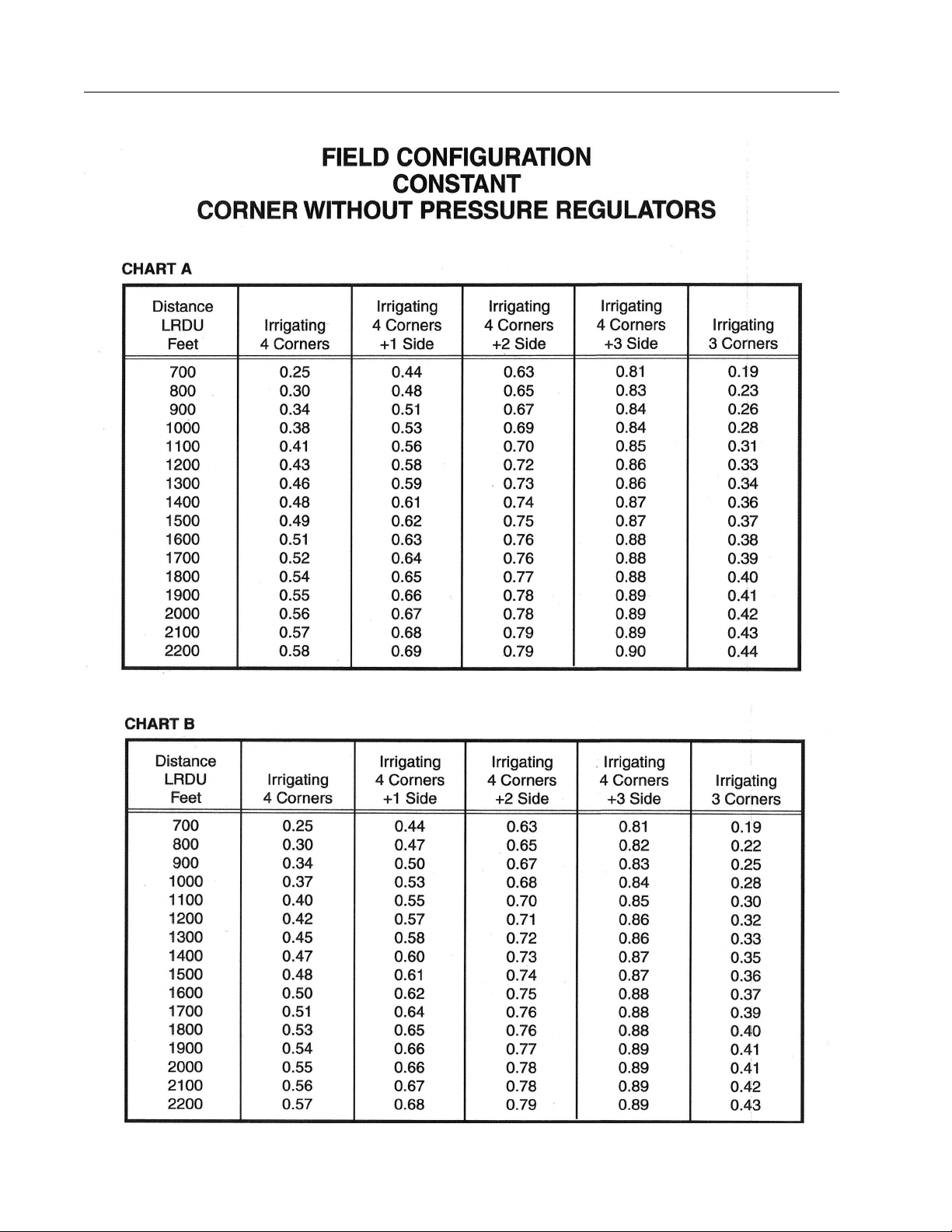
Pre Operation
Transducer Setting Charts
205 Ft Corner
Above values are based on an ideal field with the distance from the end gun boundary to the LRDU equal to 20 ft.
185 Ft Corner
Above values are based on an ideal field with the distance from the end gun boundary to the LRDU equal to 20 ft.
44
Page 45
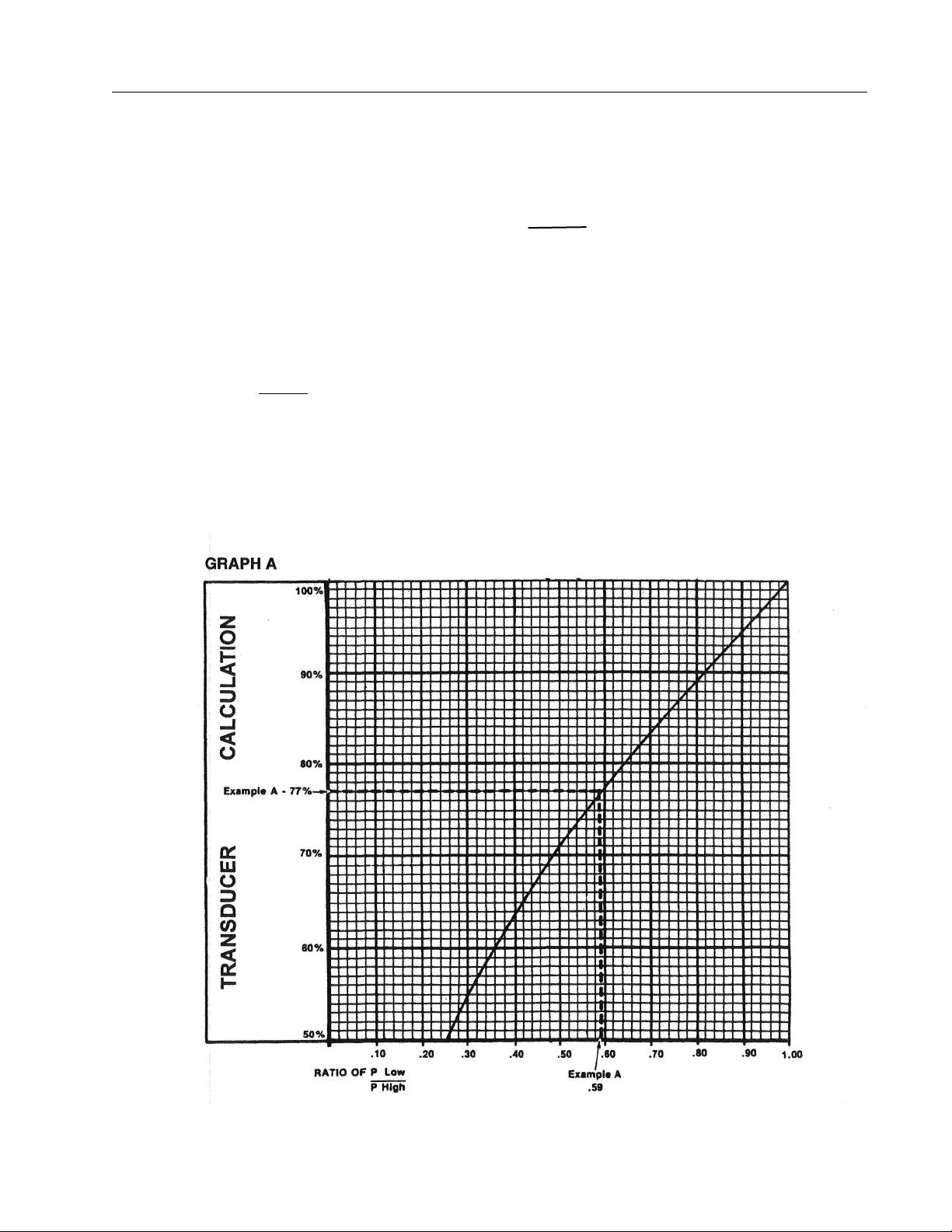
Corner Transducer Calculation
P Low to P High Ratio
Corner machines WITHOUT pressure regulators
slow down in the corners to achieve even water distribution. Consequently, the following data must be
collected for calculation of the rotation time (your Valley Dealer should provide you this information).
1. Measure the nozzle pressure or pipeline pressure at a sprinkler location on the last regular
drive unit with the corner system sprinklers all
on AND the end gun ON if the end gun is to be
used, make sure the end gun is off when the
Water Utilization Package is ON while recording the pressure unless the end gun and water
utilization package sprinkler are allowed to be on
at the same time. In this case, all sprinklers, and
the end gun, should be on. Also take a reading
with all the valve controlled sprinklers off. Allow
several minutes between readings to permit well
drawdown to stablize.
Pre Operation
2. Calculate the ratio of the lower pressure reading
to the higher pressure reading.
P Low
P High
Find this value on the lower portion of the graph
shown below. Move up from this point until you
intersect the line plotted diagonally across the
graph (see Example A). Then read the appropriate value at the left of the graph.
3. Corner machines with pressure regulators or
flow control nozzles automatically compensate
for the extra acres covered in the corners.
45
Page 46

Pre Operation
Revolution Time Calculations without Pressure Regulators
Calculation of the revolution time for a Valley Precision Corner without pressure regulators involves other inputs
into the calculations. These include a Transducer Setting or TS (Chart A) and a Field Configuration Constant or
FCC (Graph A). Again, it is recommended the actual revolution time be determined by operating the corner (not
equipped with regulators) for one revolution, while irrigating, at a 100% percentage timer setting.
Hours/rev at
100%
DLRDU = Distance to Last Regular Drive Unit
.105 is a constant.
Speed = Travel speed of the Last Regular Drive Unit at 100% Percentage Timer Setting (Feet per Minute).
FCC = Field Configuration Constant from Chart A
TS = Transducer Setting from Graph A (Contact your Valley dealer for the low and high pressures to
Example:
DLRDU = 1255 Ft New 11.2 x 38 In Tires
185 Ft Corner Arm Irrigating 4 corners High Speed (56 RPM)
Step 1.
Step 2.
= (DLRDU) (.105)
Speed Transducer Setting
calculate the low and high pressure ratio for determining the Transduce Setting or TS)
Determine the Transducer Setting From Graph A
*In this example the low pressure is 50 PSI and the high pressure is 84 PSI for a ratio of .59.
Per Graph A the TS = .77
Determine the Field Configuration Constant from Table 1
**The FFC for a 185 ft corner span irrigating 4 corners of the field is .44 (Chart A).
x
(FCC)
+ (1 - FCC)
Step 3.
Hours/rev
at 100%
=
= 8.5 x (.57 + .56)
= 8.5 x 1.13 = 9.6 Hrs Per Rev
.105 x 1255 ft
15.56 Ft/Min .77
x
.44
+ (1 - .44)
Pressure Regulated vs. Non-Regulated Revolution
The machine revolution time for a regulated sprinkler package is less compared to a non-regulated package
(both with a pivot percentage timer setting of 100%). This is because a non-regulated machine slows down
through the corners to maintain a uniform water distribution while the regulators automatically compensate or
adjust for the corner area. The machine revolution time to apply a desired application depth will be less for a
non-pressure regulated corner compared to a pressure regulated corner.
46
Page 47

Pre Operation
Determining the Application Rate and Depth
The application rate in inches per day (In/Day) is the maximum amount of water the corner machine can apply
in a 24 hour period. It is necessary to know this value to determine the percent timer settings for applying the
desired amount of water (inches). Again, calculating these amounts differ depending on whether the machine is
equipped with pressure regulators or not. The same machines as previously illustrated will be used.
Example calculations will be shown with the machines used in the previous examples. The criteria is as follows:
• Gallons Per Minute (GPM) = 900
• Distance to Last Regular Drive Unit (DLRDU) = 1255 ft
• Corner Arm Span Length = 185 ft
• Effective Corner Length (ECL) = 256 ft (185 ft corner arm w/ 82 ft overhang)
(NOTE: 276 ft for a 205 ft corner arm with an 82 ft overhang)
• End Gun Radius (EGR) = 97 ft
• Hours per Revolution @ 100% = 8.5 Hrs (Regulated Corner)
• Hours per Revolution @ 100% = 9.6 Hrs (Non-Regulated Corner)
• Transducer Setting (TS) = .77 (Non-Regulated)
• Field Configuration Constant (FCC) = .44 (Non-Regulated)
Corner Machine with Regulators
Examples:
APPLICATION RATE IN INCHES PER DAY
Inches/Day
(Application Rate)
Inches/Day
(Application Rate)
INCHES PER REVOLUTION (IN/REV) AT 100% PERCENT TIME SETTING
Inches/Rev = (Hrs Per Rev) x (In Per Day)
Inches/Rev = (8.5) x (.26) =
= (GPM) x (735.3)
(DLRDU + Eff. Corner Length + EGR)
= 4,945,579 = 661,770 =
(1255 Ft + 256 Ft + 97 Ft)
2
24
2
2,585,664
.26 Inches/Day (24 Hrs)
.09 In
24
Corner Machine without Regulators
Examples:
APPLICATION RATE IN INCHES PER DAY
Inches/Day
(Application Rate)
Inches/Day
(Application Rate)
INCHES PER REVOLUTION (IN/REV) AT 100% PERCENT TIME SETTING
Inches/Rev = (Hrs Per Rev) x (In Per Day)
= (GPM) x (735.3)
(DLRDU + Eff. Corner Length + EG Radius)
= (900) x (735.3)
x
(1255 Ft + 256 Ft + 97 Ft)
= 661,770
2,585,664
2
x .57 + .56 = .26 x 1.13 =
24
.44
.77
x
2
x (1 - .44)
(FCC)
TS
+ (1 - FCC)
.29 Inches/Day
47
Page 48

Pre Operation
Percentage Timer Calculations Worksheet
Once the Application Rate in Inches per Day and the Inches per Revolution have been determined for your
corner machine, the following table can be filled out to provide a guide to the Hours per Revolution and the Inches
per Revolution at various percentage timer settings. Below is an example for the corner machine equipped with
pressure regulators used in the previous examples. Blank copies of this worksheet are included in the Appendix
of this manual. Based on the Hours per Revolution and the Inches per Revolution for your machine, you can fill
out the worksheet to use as a Revolution Time and Application Depth guide.
PERCENTAGE TIMER SETTINGS
Hrs/Rev
at 100%
100%
90% 8.5 ÷ .9 =
80% 8.5 ÷ .8 =
70% 8.5 ÷ .7 =
60% 8.5 ÷ .6 =
50% 8.5 ÷ .5 =
40% 8.5 ÷ .4 =
30% 8.5 ÷ .3 =
20% 8.5 ÷ .2 =
10% 8.5 ÷ .1 =
8.5 .09 in
Hrs/Rev Ins/Rev
at 100%
9.4
10.6
12.1
14.2
17.0
21.3
28.3
42.5
85.0
.09 in ÷ .9 =
.09 in ÷ .8 =
.09 in ÷ .7 =
.09 in ÷ .6 =
.09 in ÷ .5 =
.09 in ÷ .4 =
.09 in ÷ .3 =
.09 in ÷ .2 =
.09 in ÷ .1 =
Ins/Cycle
0.10 in
0.11 in
0.13 in
0.15 in
0.18 in
0.23 in
0.30 in
0.45 in
0.90 in
90%
80%
70%
60%
50%
40%
30%
20%
10%
5% 8.5 ÷ .05 =
48
170.0
.09 in ÷ .05 =
1.80 in
5%
Page 49

Pre Operation
Percentage Timer/Application Depth Worksheet
Once the Application Rate in Inches per Day and the Inches per Revolution have been determined for the corner
machine, the following table can be filled out to provide a guide to the Hours per Revolution and the Inches
per Revolution at various percentage timer settings. Based on the Hours per Revolution and the Inches per
Revolution for your machine, fill out the worksheet and use as a Revolution Time and Application Depth guide.
PERCENTAGE TIMER/APPLICATION DEPTH SETTINGS
Hrs/Rev
at 100%
100%
90% ÷ .9 = ÷ .9 = 90%
80% ÷ .8 = ÷ .8 = 80%
70% ÷ .7 = ÷ .7 = 70%
60% ÷ .6 = ÷ .6 = 60%
50% ÷ .5 = ÷ .5 = 50%
40% ÷ .4 = ÷ .4 = 40%
30% ÷ .3 = ÷ .3 = 30%
20% ÷ .2 = ÷ .2 = 20%
Hrs/Rev Ins/Rev
at 100%
Ins/Cycle
10% ÷ .1 = ÷ .1 = 10%
5% ÷ .05 = ÷ .05 = 5%
VALLEY PRECISION CORNER
Machine # ______________ LOCATION _____________________ FIELD #_____________________
DLRDU _____________ FT CORNER ARM LENGTH _______ FT SPEED q STD q HI
TIRE SIZE _____________ PRESSURE REGULATORS Y N TS ______ FCC _______
49
Page 50

Pre Operation
Chemical Application
The Valley Precision Corner can be utilized to uniformly apply agricultural chemicals or fertilizer on a timely
basis.
Chemigate/Irrigate Switch
The Operator Interface Panel located on the steerable drive unit (SDU) includes a CHEMIGATE/IRRIGATE
rocker switch on the inner panel door.
Chemigate Mode
This switch must be placed in the CHEMIGATE position anytime agricultural fertilizers or chemicals are being
injected using a FIXED rate chemical injection pump. Failure to place the Chemigate/lrrigate switch to the
CHEMIGATE mode will result in uneven application of the material being used. The application software is
designed to control the speed of the machine based on the irrigated area to achieve uniform application of the
material being applied. The Chemigate mode should only be chosen when applying fertilizers or other agricultural chemicals and does not depend on the presence or absence of pressure regulators. Water application will
not be uniform while the machine is operated in the Chemigate mode.
Irrigate Mode
The IRRIGATE mode must be selected for application of irrigation water only. This will allow the machine to
provide uniform water distribution. The Irrigate mode must also be used if fertilizer or agricultural chemicals
are being applied with a variable displacement chemical injection pump. This holds true whether pressure
regulators are or are not used on the machine.
The CHEMIGATE mode should only be used when applying fertilizer or agricultural chemicals using a fixed
rate chemical injection pump regardless of the use of pressure regulators. Always return the CHEMIGATE/
IRRIGATE switch to the IRRIGATE mode for normal corner water application.
Chemigation Calculations Example
The following procedure can be used to determine the amount of chemical or fertilizer required when chemigating with the Valley Precision Corner.
NOTE
• These formulas are only used for chemigation calculations and not for water application calculations!
The Valley Precision Corner contains a software program specifically for chemigation.
CALCULATIONS
1. Calculate the acres under the center pivot spans.
Acres Under Center Pivot
2. Calculate the minimum revolution time of the center pivot without the corner.
Rev Time of Center Pivot
= (3.14) (Distance to LRDU)2= (3.14) x (1,255 Ft)2=
43,560 43,560 Sq Ft/Acre
= (3.14) (1,575,025) = 4,945,579 =
43,560 43,560
= (.105) (Distance to LRDU) = (.105) (1255 Ft) = 131.78
Ft/Min 15.56 Ft/Min 15.56
8.47 Hrs
=
113.5 Acres
NOTE
• If the machine is actually operated to determine the revolution time in lieu of the calculation in Step
2, the pivot percentage timer must be set at 100%, the Chemigate/Irrigate switch in the corner SDU
Operator Interface panel must be in the IRRIGATE mode and the machine must be run without water.
50
Page 51

Pre Operation
Chemical Application
Chemigation Calculations - Example (Continued)
3. Calculate the volume of chemical needed for under the center pivot spans only.
Gallons of Chemical
4. Calculate the Chemical Injection Pump Rate.
Injection Rate
5. Determine the Acres under the Center Pivot and the Corner Arm.***
(Your Valley Dealer should supply you with this information.)
Example =
= (Gal/Acre Req) (Acres Under Pivot) = (1 Gal/Acre) (113.5 Acres)
113.5 Gallons
=
= Gallons of Chemical = 113.5 Gal =
Rev Time of Center Pivot 8.47 Hrs
150 Acres
13.4 Gal/Hr
NOTE
• If the acres under the pivot and the corner arm are known, complete steps 6 and 7.
• If the acres under the pivot and the corner arm are not known and cannot be determined because
of irregularities in the field layout, skip steps 5-7 and use steps 5.1 and 6.1. These steps will provide
you with the total quantity of chemical or chemical solution needed for the area being covered by
the center pivot and the comer
6. Calculate the Volume of Chemical Needed for the Pivot and Corner Arm.
Gallons of Chemical for
Center Pivot And Corner
= (Gal/Acre) x (Acres under Pivot and Corner)
= (1 Gal/Acre) x (150 Acres) =
150 Gallons
7. Calculate the Chemigation Rotation Time at 100% Pivot Percentage Timer Setting.
Chemigation Rotation Time
(This is the calculated time it will take to apply the chemical to the field at a 100% percentage time setting.)
= Gallons of Chemical = 150 Gal =
Injection Rate 13.4 Gal/Hr
11.2 Hrs
NOTE
• Steps 5.1 and 6.1 - use if the number of acres is not known or can not be easily determined.
5.1 Time one complete revolution of the center pivot and corner at 100% pivot percentage timer setting. The Chemigate/Irrigate switch must be in the CHEMIGATE mode. Operation of the machine
can be performed running without water. Record this time for future use in other chemical application.
Example =
(This is the actual time it will take to apply the chemical to the field at a 100% percentage timer setting.
6.1 Calculate the amount of chemical needed for the pivot and corner arm.
Gallons of Chemical
Water application will not be uniform when operating in the CHEMIGATE mode.
The above chemigation procedure is intended as a guide only. Valmont Industries, Inc. assumes no liability for
its accuracy or use thereof. For specific chemical recommendations contact your chemical supplier.
11.4 Hours
= (Injection Rate) x (Actual Rev Time) = (13.4 Gal/Hr) x (11.4 Hrs)
152.8 Gallons
=
51
Page 52

Pre Operation
Chemigation Application
Chemigation Worksheet
1. Acres Under Center Pivot
= (3.14) x (Distance to LRDU)
43.560 (Acres - CP)
2
=
2. Rev. Time of Center Pivot
3. Volume of chemical needed
(Center pivot spans only) (Gallons under CP)
4. Calculate the Chemical Injection Pump Rate
5. Determine the Acres under the Center Pivot and the Corner Arm*
(Your Valley Dealer should supply you with this information. Go to 5.1 and
6.1 if information not available.)
6. Gallons of Chemical for Center Pivot and Corner
7. Chemigation Rotation Time
(This is the calculated time it will take to apply the
chemical to the field at a 100% percentage timer setting.)
= (.105) (Distance to LRDU) =
Ft/Min (Hrs/Rev - CP)
= (Gal/Acre Req.) x (Acres Under Pivot) =
= Gallons of Chemical =
Rev. Time of Center Pivot (Gallons/Hour)
= (Gal/Acre) x (Acres under
Pivot and Corner)
= Gallons of Chemical =
Injection Rate (Calculated Chemiga-
=
(Acres - CP and Corner)
=
(Gallons-CP and Corner)
tion Rotation Time)
NOTE
• Steps 5.1 and 6.1 - use if the number of acres (step 5) is not known or can not be easily determined.
5.1 Time one complete revolution of the center pivot and corner at 100% pivot percentage timer setting. The Chemigate/Irrigate switch must be in the CHEMIGATE mode. Operation of the machine
can be performed running without water. Record this time for future use in other chemical applications.
(This is the actual time it will take to apply the chemical to
the field at a 100% percentage timer setting.)
(Actual Hours Per
Revolution)
6.1 Calculate the amount of chemical needed for the pivot and corner arm.
= (Injection Rate) x (Actual Rev. Time) =
(Gallons-CP
and Corner)
Corner Chemigation
The IRRIGATE/CHEMIGATE ROCKER SWITCH in the Operator Interface Panel must be set in the CHEMIGATE mode if a fixed rate chemical injection pump is being used. This is regardless of whether the machine is
equipped with or without pressure regulators. The Chemigate mode achieves optimum application of chemicals
or fertilizer throughout the entire field. The Irrigate/Chemigate switch must be returned to the IRRIGATE mode
once chemigation is complete.
Water application will not be uniform when the machine is operated in the CHEMIGATE mode.
Record the number of hours required for one revolution for subsequent use in calculating chemical rates.
52
Page 53

Pre Operation
WARNING
Chemigation Safety
Proper handling of crop protection chemicals by those involved in mixing, loading, and application is essential
in order to minimize the risk of injury or intoxication. Therefore, safe handling procedures and body protection
to reduce potential exposure to crop protection chemicals are absolutely essential. When dealing with chemical
products, a simple formula to remember is:
RISK = TOXICITY (HAZARD) X EXPOSURE
The toxicity (hazard) is inherent in the product. The operator can’t change that part of the formula. But one
can reduce exposure and thereby reduce risk. Reduction of exposure risk is a principle that fits with every
farm operation, from handling and applying chemicals to driving a farm tractor, an automobile or handling farm
animals.
Methods and procedures to reduce exposure when handling crop protection chemicals take little time and in the
long run pay great dividends. Knowledge of the toxicity of a product and the potential for exposure is essential
for developing risk management strategies. For example, gasoline is extremely toxic and flammable. This is
well understood, and we have learned how to handle it safely. No matter how toxic a substance may be, if the
exposure is low enough, the risk can be minimized to an acceptable level.
Exposure Routes
Exposure occurs via four routes: (1) oral (mouth), (2) dermal (skin), (3) eyes and (4) inhalation (lungs). Each
route of exposure can occur as the result of accidents, spills, broken hoses, poor personal hygiene (transporting chemicals to the mouth, eyes and pubic areas via the hands when eating, handling tobacco products and
toileting). Each route of exposure can be significantly reduced by simply following basic principles for protection.
For example, field applicator exposure studies show the primary source of exposure is dermal (the skin) with the
forearms and hands receiving the overwhelming majority. Wearing rubber gloves can reduce potential dermal
exposure to the mixer, loader and applicator. Thus, by simply wearing appropriate chemical resistant gloves,
and washing the gloves and hands following chemical handling, potential exposure by the dermal route can be
significantly reduced. At the same time, transport of chemical residues to the mouth and eyes by unwashed
hands can be minimized or essentially eliminated.
!
• HAZARDS MAY EXIST. CONSULT LOCAL AND STATE GUIDELINES WHEN APPLYING AGRICULTURE CHEMICALS MIXED WITH IRRIGATION WATER VIA MECHANIZED SPRINKLER EQUIPMENT.
CONTACT YOUR CHEMICAL DEALER AND CHEMICAL EQUIPMENT MANUFACTURER FOR SETUP,
CALIBRATION, AND OPERATING PROCEDURES.
• CONTAMINATION OF THE WATER SUPPLY MAY OCCUR IF EFFECTIVE SAFETY DEVICES ARE NOT
INSTALLED/USED IN CONNECTION WITH INJECTION EQUIPMENT FOR CHEMIGATION. READ EPA
LABEL IMPROVEMENT PROGRAM (PR NOTICE 87-1) AND ALL INSTRUCTIONS FOR CHEMICAL
APPLICATIONS.
• AVOID EXPOSURE TO SPRINKLER SPRAY WHILE CHEMICALS ARE BEING INJECTED INTO IRRIGATION WATER.
• MAKE CERTAIN YOU HAVE COMPLIED WITH STATE AND LOCAL REGULATIONS REGARDING
SAFETY EQUIPMENT, CERTIFICATION, CALIBRATION, AND OPERATION OF THE INJECTOR PUMP
AND ASSOCIATED EQUIPMENT.
• MAKE CERTAIN FIRST AID AND FRESH WATER IS AVAILABLE IN CASE OF AN ACCIDENT. YOU
MUST BE FAMILIAR WITH CLEAN UP PROCEDURES IN CASE OF A SPILL.
• USE OF PROTECTIVE CLOTHING AND EQUIPMENT AS RECOMMENDED WHEN HANDLING CHEMICALS. SAFETY GLASSES, GLOVES, BOOTS, PROTECTIVE OUTERWEAR AND A RESPIRATOR
SHOULD BE WORN WHEN HANDLING AND WORKING WITH CHEMICALS.
53
Page 54

Pre Operation
54
Page 55

Operation
WARNING
WARNING
Pivot Control Panels
The specific center pivot control panel used in conjunction with the Valley Precision Corner depends on the
brand and model of the center pivot. Regardless of the panel used, It will have a Service/Run Rocker switch
installed in the inner door of the pivot panel. This switch must be set in the RUN position for normal operation
of the machine.
The SERVICE position is used for troubleshooting of the Valley Precision Corner and allows for operation of the
corner from the Operator Interface Panel located on the corner machine SDU (Steerable Drive Unit).
The pivot panel also includes an oscillator for providing a signal to the buried guidance wire and auto reverse
which is used in conjunction with the Operator Interface Panel.
!
• NEVER OPERATE THE MACHINE WITH THE SERVICE/RUN SWITCH IN THE SERVICE POSITION.
NORMAL OPERATION OF THE MACHINE REQUIRES THE SERVICE/RUN SWITCH BE IN THE RUN
POSITION.
Percent Timer / Pivot Panel Speed Control
The operating speed of the machine is typically controlled by a percentage timer or some timing device that
sends a signal to the Last Regular Drive Unit. The duration of the signal is dependent on the speed setting
selected. The signal can be set from 0% to 100%.
The Valley Precision Corner Operator Interface Panel on the Steerable Drive Unit and the Last Regular Drive
Unit Control Panel incorporate variable speed motor controllers called Dinverters. The signal from the pivot
panel for establishing the speed of the last regular drive unit is received by a microprocessor in the Last Regular
Drive Unit control panel.
Signals sent from the pivot panel speed control device(s) will vary in their cycle time(s) (30, 60, 120 cycle times,
etc.). The LRDU microprocessor must monitor the signal from the pivot panel percentage timer for up to 200
seconds to determine the desired speed before it can tell the variable speed motor controller at the LRDU at
what speed to operate the LRDU motor. This processing time is necessary to allow the Valley Precision Corner
to be used with all Valley and other brands of control panels using all available percentage timer cycle times. The
result of this is a delay of response from when the operator changes a speed setting on the percentage timer to
when the change actually takes place at the LRDU. Shown below are three situations:
• Every time the machine is started it will begin moving at 25%. It will run at 25% for one cycle time (usually
60 seconds) then change speed to the pivot percentage timer setting for any setting other than 0% or
100%.
• If the speed is changed during normal operation to anything other than 0% or 100%, the speed of the
LRDU will change in one cycle time (usually 60 seconds).
• If the machine is started at 100% or changed to 100% or 0%, it will take 200 seconds (3 minutes 20
seconds) to change speed.
Again, this process allows the Precision Corner to be used with all Valley control panels using all available
percentage timer cycle times.
!
• IF THE OPERATOR WERE TO CHANGE FROM ANY PIVOT PANEL PERCENT TIMER SETTING (OTHER
THAN 0%) TO A 0% SETTING, THE MACHINE WOULD CONTINUE TO MOVE AT THE PREVIOUS
SETTING FOR 200 SECONDS BEFORE CHANGING TO 0% AND STOPPING. FAILURE TO HEED THIS
WARNING CAN RESULT IN EQUIPMENT DAMAGE OR PERSONAL INJURY.
Operator Interface Panel
Startup of the machine is done at the pivot control panel. The Operator Interface Panel (OIP) is only used to
provide diagnostics for the corner and to attempt correction of a problem with the corner should one occur.
The OIP does include a CHEMIGATE/IRRIGATE switch. The switch must be set in the proper mode depending
on whether the machine is to strictly irrigate or chemigate. Failure to do so will adversely affect the uniformity
of distribution.
55
Page 56
Operation
WARNING
Startup Procedure - Irrigation Mode
1. Check the CHEMIGATE/IRRIGATE rocker switch in the Operator Interface Panel. It must be in the IRRIGATE
mode for obtaining uniformity in water application when irrigating.
2. Turn on the main power supply (service disconnect).
3. Turn on the main disconnect in the pivot panel.
4. Place the Service/Run rocker switch in the RUN position.
5. Determine the speed setting for the desired depth of water application.
6. Start the machine in the appropriate direction.
7. Refer to the appropriate center pivot Owners Manual(s).
8. Set the percentage or electronic timer to the correct speed or application setting.
NOTE
• Some computer based panels allow for directly setting the depth of water application which
automatically sets the speed of the LRDU. Refer to the appropriate center pivot manufacturer’s
operators manual.
9. Start the irrigation pump.
10. Visually check the center pivot and corner for proper operation.
Shutdown Procedure - Irrigation Mode
1. Shut off the center pivot.
!
• ALWAYS SHUT OFF THE CENTER PIVOT USING THE “STOP” BUTTON OR SWITCH. NEVER SHUT
OFF THE MACHINE USING THE CONTROL PANEL DISCONNECT SWITCH OR THE SERVICE
DISCONNECT SWITCH. FAILURE TO HEED THIS WARNING CAN RESULT IN EQUIPMENT DAMAGE
OR PERSONAL INJURY.
NOTE
• Shutting the machine down will typically shut down the irrigation pump. If this is not the case, it will
be necessary to shut the pump off. Again, use the STOP button or switch - never the pump panel
disconnect switch.
2. Turn the pivot control panel disconnect switch to OFF.
3. Turn the service disconnect switch to OFF.
Wet to Dry Operation
There may be instances where the operator wants to change directly from wet machine operation (irrigating) to
dry machine operation (running dry). It is important the machine continue to operate when the pump (irrigation
water) is shut off. Failure to do so can result in the inability to restart the machine dry until all water has drained
from the pipeline. This is due to changes in the crowns of the spans which, cumulatively, change the overall
machine length when water is shut off. This change in overall machine length can affect the corner span sensor
and allow the span sensor safety to open. By allowing the machine to operate (continue to move) while changing
from wet to dry operation, the appropriate distance between the LRDU and the SDU will be maintained assuring
continued operation.
56
Page 57

Operation
WARNING
Wet to Dry Operating Procedure
1. Allow the machine to continue to operate.
2. Disengage the machine low pressure shutoff (if applicable).
3. Shut off the pump.
Operating Procedure for Chemigating
1. Determine the amount of chemical to be applied.
2. Preliminary Setting - CHEMIGATE/IRRIGATE SWITCH
• If the chemical injector pump is a fixed rate pump: at the Operator Interface Panel on the SDU, place the
CHEMIGATE/IRRIGATE rocker switch in the CHEMIGATE mode for obtaining uniformity in fertilizer or
chemical application when irrigating.
• If the chemical injector pump is a variable rate pump: at the Operator Interface Panel on the SDU, place
the CHEMIGATE/IRRIGATE rocker switch in the IRRIGATE mode for obtaining uniformity in fertilizer or
chemical application when irrigating.
3. Turn on the main power supply (service disconnect).
4. Turn on the main disconnect in the pivot panel.
5. Place the Service/Run rocker switch in the RUN position.
6. Determine the speed setting for the desired depth of water application.
7. Start the machine in the appropriate direction. Refer to the appropriate center pivot Operators Manual(s).
8. Set the percentage or electronic timer to the correct speed or application setting.
NOTE
• Some computer based panels allow for directly setting the depth of water application which
automatically sets the speed of the LRDU. Refer to the center pivot appropriate manufacturer’s
operators manual.
9. Start the irrigation pump.
10. Start the Injection pump.
11. Visually check the center pivot and corner for proper operation.
!
• HAZARDS MAY EXIST! CONSULT LOCAL AND STATE GUIDELINES WHEN APPLYING AGRICULTURAL CHEMICALS MIXED WITH IRRIGATION WATER VIA MECHANIZED SPRINKLER EQUIPMENT.
CONTACT YOUR CHEMICAL DEALER AND CHEMICAL EQUIPMENT MANUFACTURER FOR SETUP,
CALIBRATION AND OPERATING PROCEDURES.
• CONTAMINATION OF THE WATER SUPPLY MAY OCCUR IF EFFECTIVE SAFETY DEVICES ARE NOT
INSTALLED/USED IN CONNECTION WITH INJECTION EQUIPMENT TOR CHEMIGATION. READ EPA
LABEL IMPROVEMENT PROGRAM (PR NOTICE 87-1) AND ALL INSTRUCTIONS FOR CHEMICAL
APPLICATIONS.
• AVOID EXPOSURE TO SPRINKLER SPRAY WHILE CHEMICALS ARE BEING INJECTED INTO IRRIGATION WATER.
• MAKE CERTAIN YOU HAVE COMPLIED WITH STATE AND LOCAL REGULATIONS REGARDING
SAFETY EQUIPMENT, CERTIFICATION, CALIBRATION AND OPERATION OF THE INJECTOR PUMP
AND ASSOCIATED EQUIPMENT.
• MAKE CERTAIN FIRST AID AND FRESH WATER IS AVAILABLE IN CASE OF AN ACCIDENT. YOU
MUST BE FAMILIAR WITH CLEAN UP PROCEDURES IN CASE OF A SPILL.
• USE OF PROTECTIVE CLOTHING AND EQUIPMENT AS RECOMMENDED WHEN HANDLING CHEMICALS. SAFETY GLASSES, GLOVES, BOOTS, PROTECTIVE OUTERWEAR AND A RESPIRATOR
SHOULD BE WORN WHEN HANDLING AND WORKING WITH CHEMICALS.
57
Page 58

Operation
58
Page 59
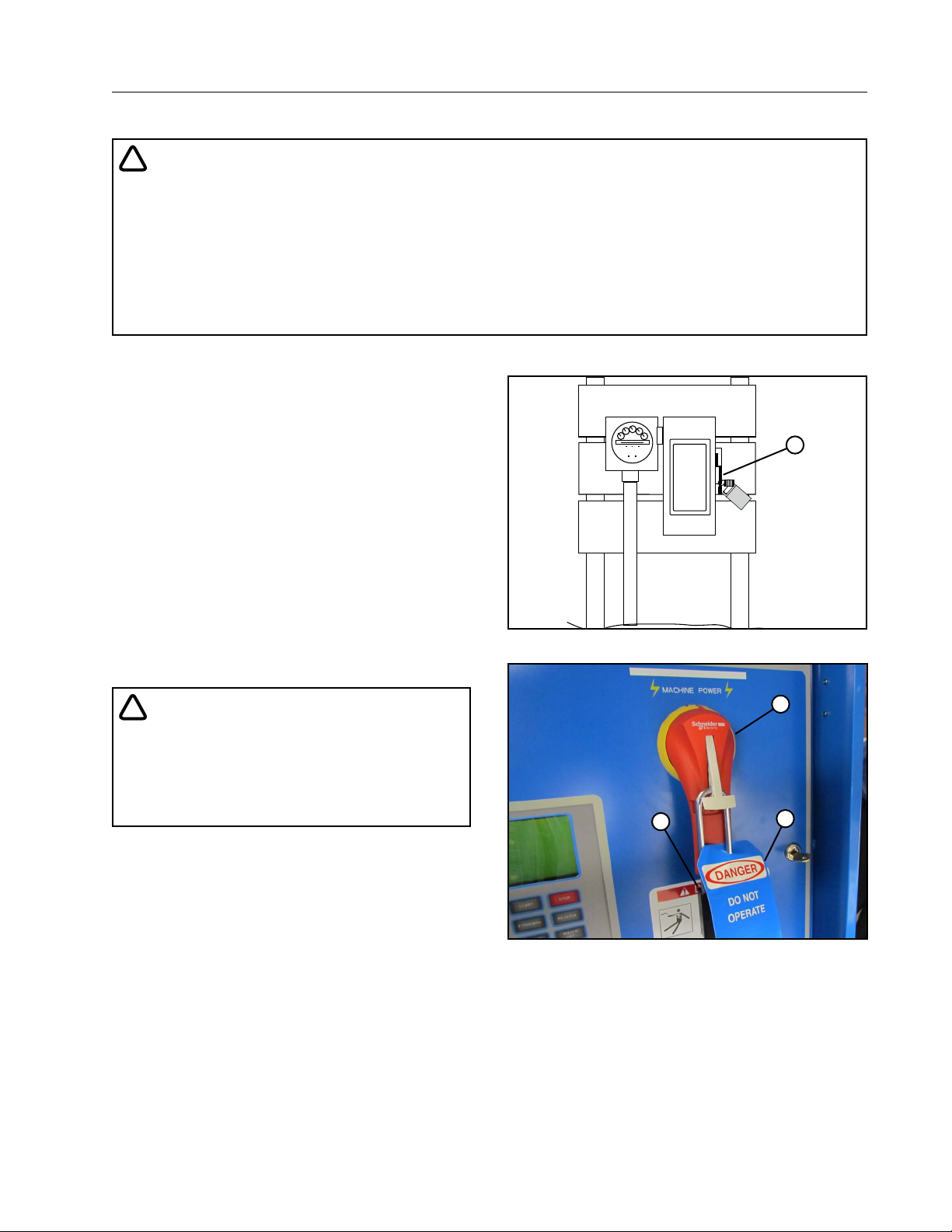
Maintenance
Safety
!
DANGER
• THE CONTROL PANEL CONTAINS HIGH VOLTAGE! 480 VOLTS CAN KILL.
• ALWAYS DISCONNECT ELECTRICAL POWER BEFORE SERVICING OR PERFORMING MAINTENANCE TO THE MACHINE.
• TESTING AND TROUBLESHOOTING SHOULD BE PERFORMED ONLY BY AN AUTHORIZED VALLEY
DEALER.
• ALWAYS REPLACE ANY GUARDS OR SHIELDS THAT ARE REMOVED FOR PERFORMING MAINTENANCE.
Disconnect All Power
Before performing service or maintenance on any
part of the machine, follow the MINIMAL LOCKOUT/
TAGOUT PROCEDURE located in the SAFETY section of this manual and do the following:
1. SHUT OFF and LOCK the public power service
disconnect to the irrigation machine. See Figure
59-1.
FILL OUT the blue (OSHA safety color code) tag
and attach to the disconnect after locking. See
Figure 59-1.
2. SHUT OFF and lock the control panel main
power disconnect. See Figure 59-2.
FILL OUT the blue (OSHA safety color code) tag
and attach to the disconnect after locking. See
Figure 59-2.
ON
OFF
DANGER
DO NOT
OPERATE
_ _ _ _ _ _ _ _ _ _ _ _ _ _ _ _ _ _ _ _ _ _ _ _ _ _ _
Signed by
_ _ _ _ _ _ _ _ _ _ _ _ _ _ _ _ _ _ _ _ _ _ _ _ _ _ _ _ _ _
Date
Figure 59-1 1 . Public Power Service Disconnect
1
_
!
DANGER
• BE AWARE OF HIGH WATER PRESSURE.
TURN OFF THE PUMP AND ALLOW THE MACHINE TO DRAIN COMPLETELY BEFORE REPAIRING OR PERFORMING MAINTENANCE
TO THE MACHINE.
2
Figure 59-2 1 . Main Disconnect
2. Lock
3. Blue Tag
1
3
59
Page 60
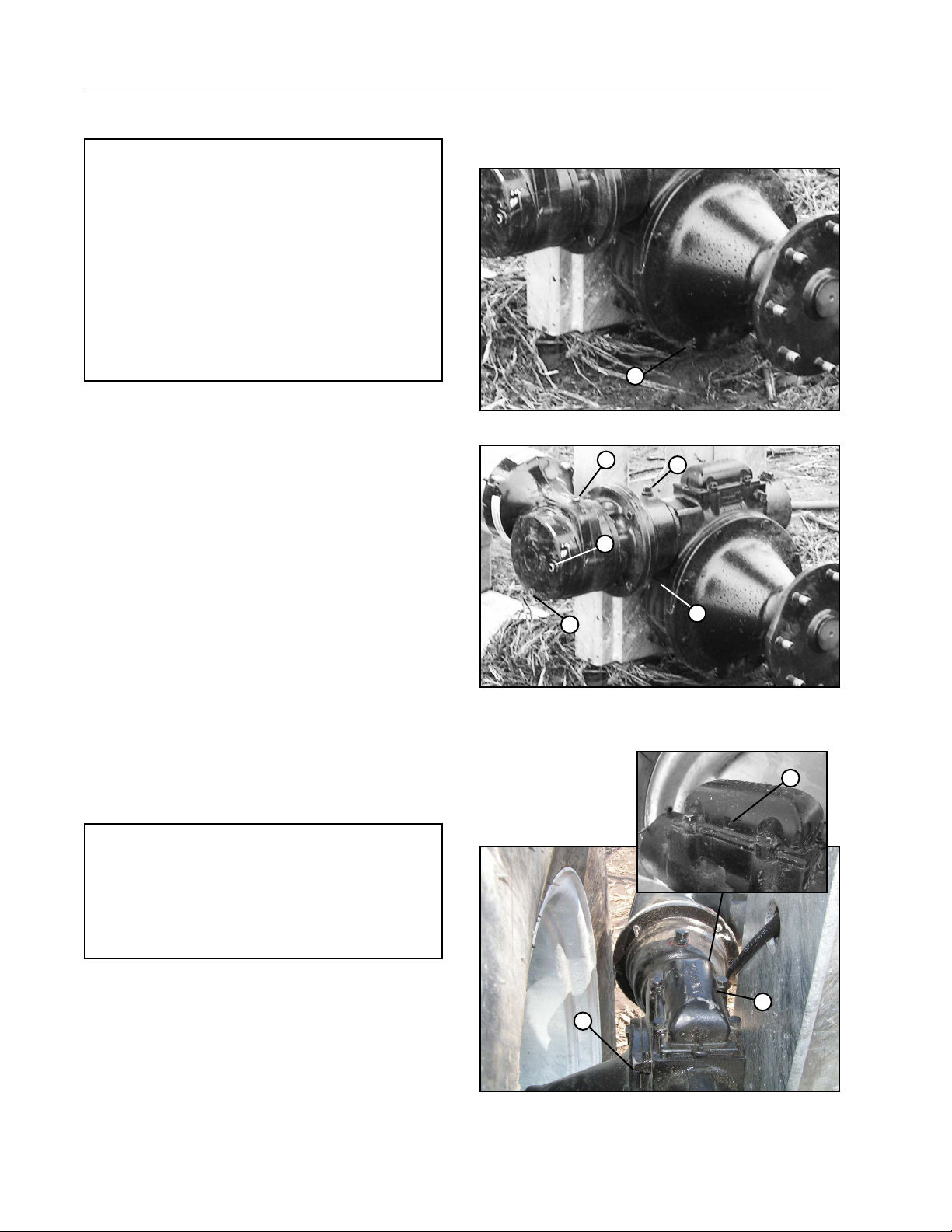
Maintenance
Wheel Gearbox
NOTE
• After the first operating season, change the oil in
all wheel gearboxes, bell housings and gear motors.
• After the first oil change, change the wheel gearbox, bell housing and gear motor oil every third
year or 3000 operating hours, whichever occurs
first.
• At the end of each operating season, drain the
wheel gearboxes of any condensation or contaminated oil that may have accumulated in the
gearbox and refill to its normal level.
1. Remove the drain plug from wheel gearbox, bell housing and gear motor. Drain oil into a container. See
Figures 60-1 and 60-2.
2. Install the drain plugs after draining oil.
3. Clean all dirt away from the expansion chamber cap
and remove the expansion chamber cap from the
wheel gearbox. Do not allow dirt to fall into the gearbox
when removing the cap. See Figure 60-3.
• Make sure the vent holes on each side of the expan-
sion chamber cap are open and unobstructed.
4. Remove fill plug and oil level plug from gear motor.
See Figure 60-2.
5. Remove fill plug from bell housing. See Figure 60-2.
6. Fill the gear motor with Valley gear lube through fill
plug hole until oil runs out of oil level hole. Install oil
level and fill plug in gear motor.
7. Fill gearbox with Valley gear lube to the top of fill line
on the inside of the gearbox or top of worm gear shaft.
The capacity is approximately 6.5 quarts (6.2 liters).
Allow time while refilling the gearbox for the oil to
equalize between the bell housing and wheel gearbox.
DO NOT over fill.
8. Fill bell housing with Valley gear lube to top of coupling
as seen through the fill plug hole.
1
Figure 60-1 1 . Wheel Gearbox Drain Plug
4
5
3
Figure 60-2 1. Drain Plug Bell Housing
2. Fill Plug Bell Housing
3. Drain Plug Gear Motor
2
1
4. Fill Plug Gear Motor
5. Oil Level Plug Gear
Motor
2
NOTE
• Use only Valley Gear Lube. Other Lubricants may
contain corrosive extreme pressure additives, which
may damage components and void your warranty.
• The oil in worm gear cases may reach temperatures up to 200˚ F (94˚ C) without alarm.
9. Install bell housing fill plug and wheel gearbox check
plug. Then install the expansion chamber cap on wheel
gearbox. Secure with original hardware and torque to
8 lb-ft (10.8 N·m). See Figure 60-3.
60
1
3
Figure 60-3 1 . Expansion Chamber Cap
2. Vent Hole
3. Check Plug
Page 61
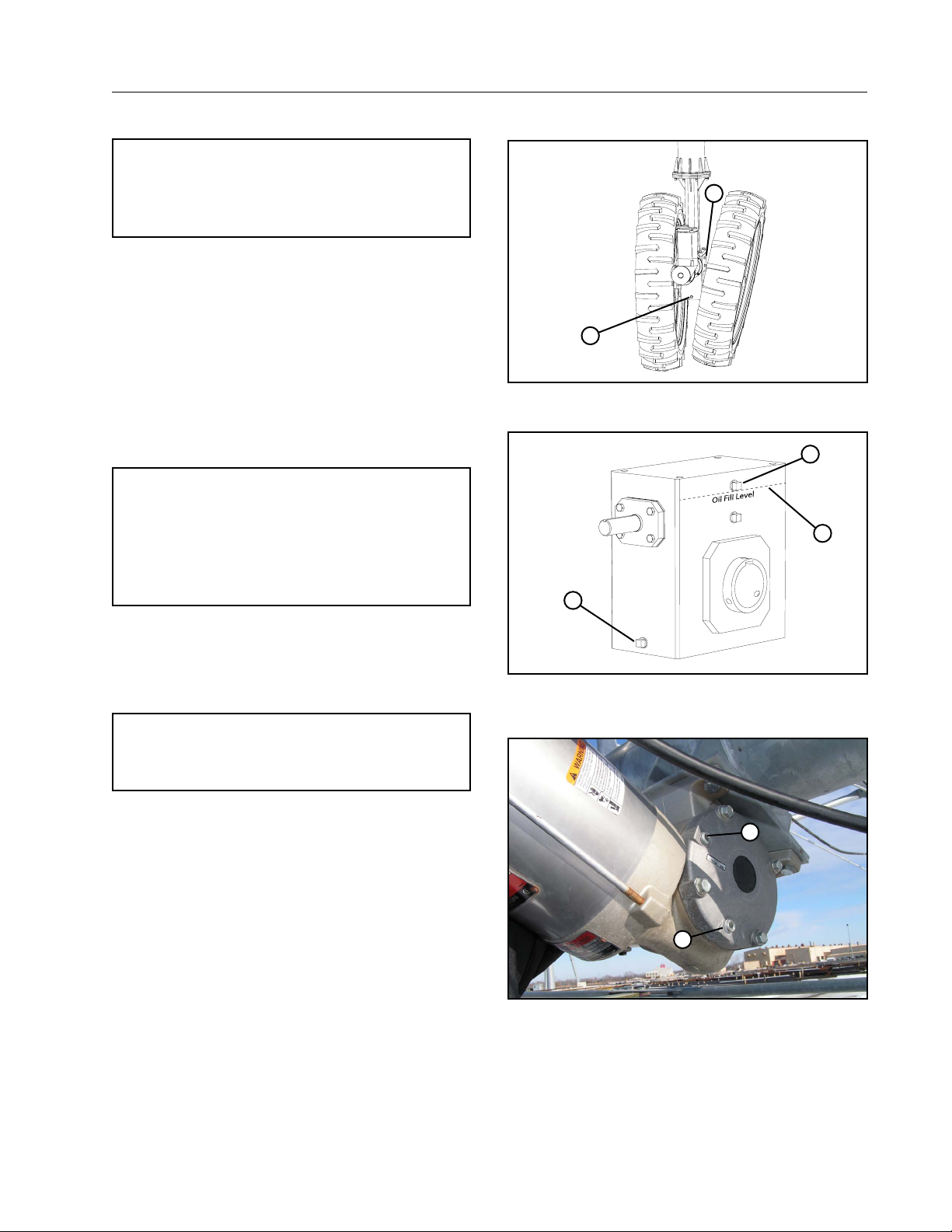
Optional DualDrive Gearbox
NOTE
• Elevation of one side tire using a block maybe required. This would allow better access
to the fill plug.
1. Loosen all lug nuts allowing one tire to tilt enough
for the removal drain/fill plugs.
2. Remove the drain plug from center drive gearbox. Drain oil into a container. See Figures 61-1
and 61-2.
3. Install the drain plugs after draining oil.
4. Remove fill plug from gearbox. See Figure 61-2.
5. Fill gearbox with Valley gear lube to the fill line,
approximately 2.5 gal (9.5 L), shown in Figure
61-2. Allow time while refilling the gearbox for the
oil to equalize in the gearbox. DO NOT over fill.
NOTE
• Use only Valley Gear Lube. Other Lubricants may
contain corrosive extreme pressure additives, which
may damage components and void your warranty.
• The oil in worm gear cases may reach temperatures up to 200˚ F (94˚ C) without alarm.
6. Secure with original hardware and torque to 20
lb-ft (27 N·m).
7. Tighten lug nuts to 125 lb-ft (169.47 N·m).
Steering Gear Motor
NOTE
• After every operating season, change the oil in the
steering motor gearbox.
1. Remove both the fill plug and drain plug from the
steering motor gearbox, then drain the oil into a
container. See Figure 61-1.
2. Install the drain plug after draining oil.
3. Fill the steering motor gearbox to .5 in (12.7 mm)
below fill plug hole with Valley Gear Lube.
4. Install fill plug after refilling the gearbox.
Maintenance
2
1
Figure 61-1 1 . Drain Plug
2. Fill Plug
2
3
1
Figure 61-2 1 . Drain Plug
2. Fill Plug
3. Oil Level
2
1
Figure 61-3 1 . Drain Plug
2. Fill Plug
61
Page 62
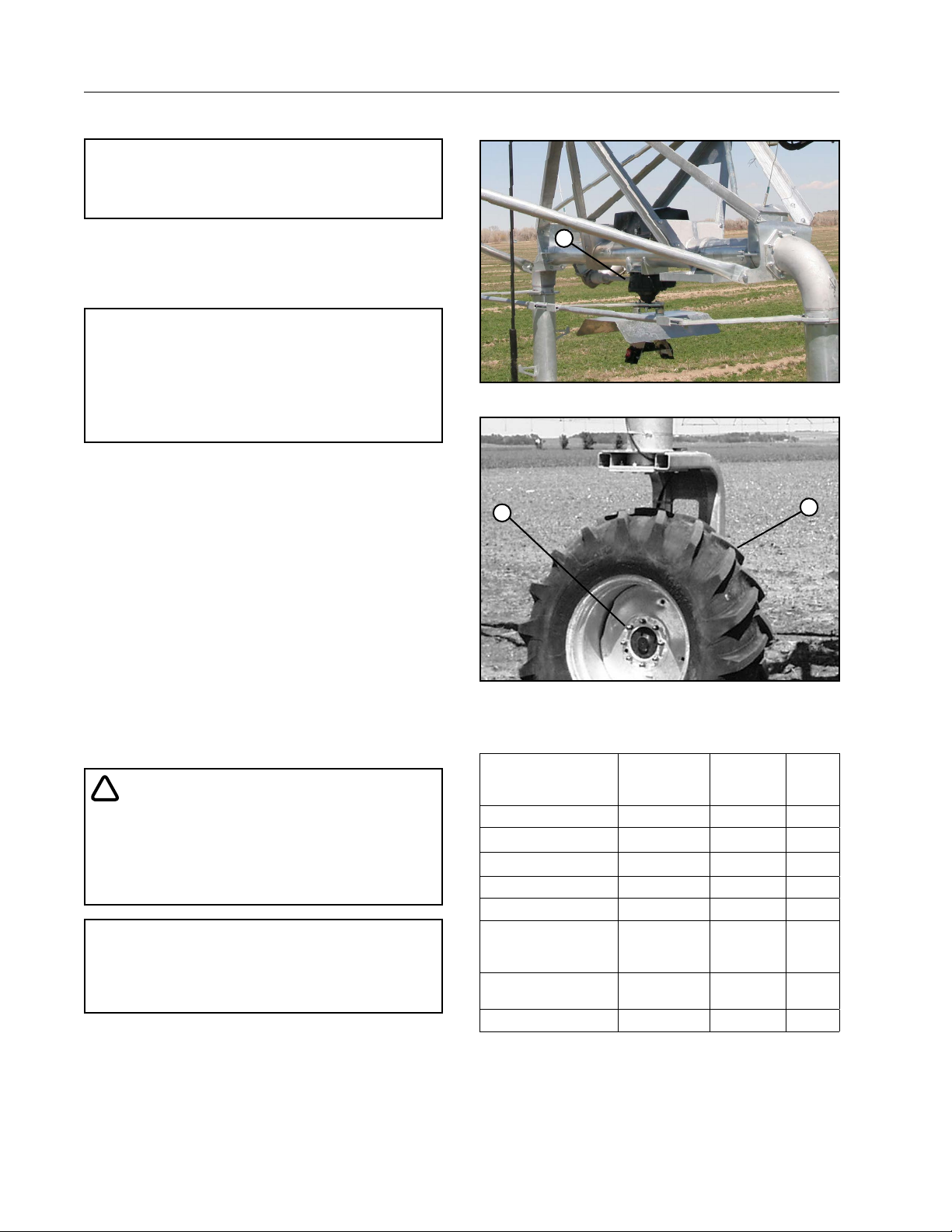
Maintenance
WARNING
Steering Gearbox
NOTE
• After every operating season, change the oil
in the steering gearbox.
Steering Gearbox will need to be removed to change
gear lube. Fill steering gear box to the top of the worm
with Valley Gear Lube. Capacity is approximately 1
gal (3.7 L).
NOTE
• Use only Valley Gear Lube. Other lubricants may contain corrosive extreme pressure additives, which may
damage components and void your warranty.
• The oil in worm gear cases may reach temperatures up to 200˚ F (94˚ C) without alarm.
Wheel Lug Nut Torque
Check the wheel lug nut torque annually to make
sure it is at 125 lb-ft (169.47 N·m). See Figure 62-2.
1
Figure 62-1 1 . Steering Gearbox
2
1
Tire Pressures
Proper tire pressure is important! Operating with low
tire pressure damages the tires and the drive train.
Check the tire pressure at these times during the
year:
• At the start of the irrigation season
• Every month of the irrigation season
• When performing fall winterization or at the end of
the irrigation season
For the correct tire pressure refer to the decal on the
rim or the tire pressure chart. See Figure 62-3.
!
• TIRES ARE SHIPPED AT A PRESSURE OF 30 TO
35 PSI (206 TO 241 KPA).
• BE SURE THE TIRES HAVE BEEN DEFLATED TO
THE CORRECT PRESSURE (SHOWN ON DECAL)
BEFORE THE TIRE IS USED.
NOTE
• When replacing tires be sure the ply rating of the
new tire is equal to or greater than the ply rating
of the old tire.
Figure 62-2 1 . Tire and Wheel
2. Lug Nut
TIRE OPERATING PRESSURE
Allowed Tire Size
(Inches)
14.9 x 24*
16.9 x 24 - 6-Ply 16 110 1.1
18.4 x 26 - 6-Ply 16 110 1.1
11R x 22.5 Recap 30 206 2.1
11.2 x 24**** 34 234 2.3
Dual Drive Option
Allowed Tire Size
Inches
11.2 x 38
Non-Driectional - 4-Ply
11.2 x 38 - 6-Ply 34*** 234 2.3
Pounds per
Square Inch
(PSI)
18** 124 1.2
23 158 1.5
Kilopascals
(kPa)
Bar
(bar)
62
Figure 62-3
* The 14.9 x 24 Non-Directional - 6 Ply tire is not allowed
on spans longer than 205 ft (62.4 m).
** Operating pressure may be reduced to 16 PSI / 110 kPa
/ 1.1 bar for increased floatation on all corner spans.
*** Operating pressure may be reduced to 23 PSI / 159
kPa / 1.1 bar for increased floatation on all corner
spans longer than 205 ft (62.4 m).
**** Not allowed on spans longer than 205 ft (62.4 m).
Page 63
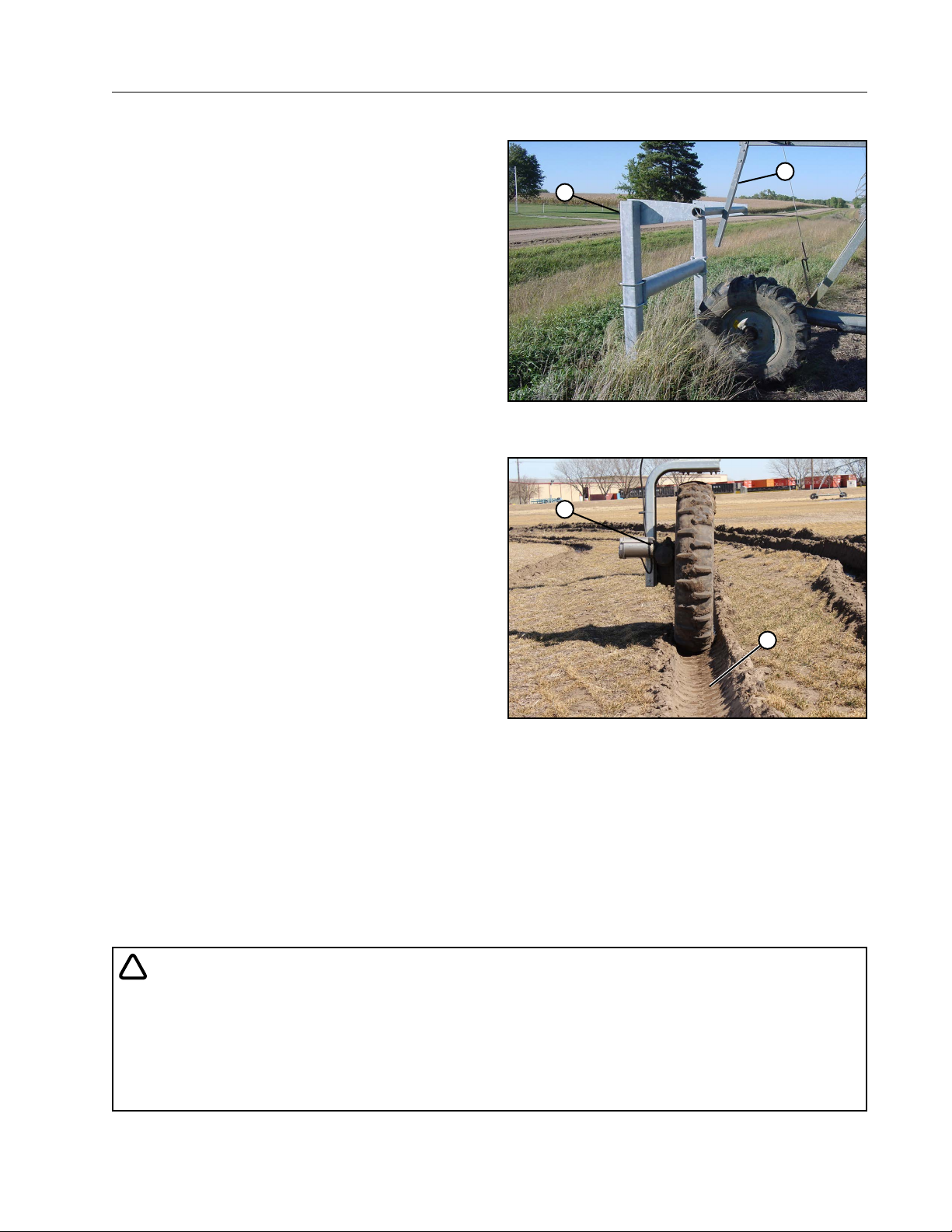
Barricade
Maintain the barricade structure and area.
Inspect the barricade structure for failure and tighten
any loose hardware completely.
Ensure that the actuator arm contacts the tripping
structure. Under certain conditions, soil may build
up in the wheel track resulting in a ramp effect. This
may allow the actuator arm to go over the top of the
structure which trips the actuator arm. See Figure
63-1.
Should this happen, the machine will not stop but
continue to move and can result in damage to the
machine. Remove any build up of soil in the barricade
area.
Wheel Tracks
It is important to maintain wheel tracks. If left in a
state of disrepair, wheel tracks can cause structural
damage to the irrigation machine. See Figure 63-2.
• Wheel tracks should be maintained and controlled.
A maximum allowable wheel track for machines is
8-10 in (20-25 cm) deep.
• Establish a wheel track with the first several revolutions of the machine at maximum speed and
minimum water application depth.
• Deep ripping or chiseling in the wheel track area
should be avoided.
• Wheel tracks can be controlled by various methods which include larger tires, dry wheel track
sprinkler packages, boombacks, wide-flat berms,
drag socks, etc. Wheel track depth can be controlled by using track fillers, tillers, discs, or flotation tires.
• If berms are built for wheel tracks it is recommended to have a width of 3 ft (1 m) to prevent
slippage off the sides and compacted to prevent
deep wheel tracks. Proper drainage may be required to prevent water buildup. Berms are not
recommended for the steerable drive unit wheel
tracks due to the potential variability of the wheel
track from season to season.
Maintenance
1
2
Figure 63-1 1 . Actuator Arm
2. Barricade
2
1
Figure 63-2 1 . Wheel Track
2. Drive Unit
!
CAUTION
• OPERATOR INTERFACE PANEL IS LOCATED ON THE CORNER STEERABLE DRIVE UNIT (SDU). IT
IS ACCESSED BY CLIMBING STEPS ON THE FORWARD SDU LEG TO OPERATOR PLATFORM. WET
OR MUDDY CONDITIONS CAN RESULT IN SLIPPERY SURFACES.
• WATCH OUT FOR THE LOCATION OF THE STEERING ARM AND TIE ROD TO INSURE YOU DO NOT
HIT YOUR HEAD OR SHOULDERS AS YOU MOVE UP SDU LEG AND NEVER ATTEMPT TO UTILIZE
STEPS WHILE CORNER IS MOVING.
63
Page 64
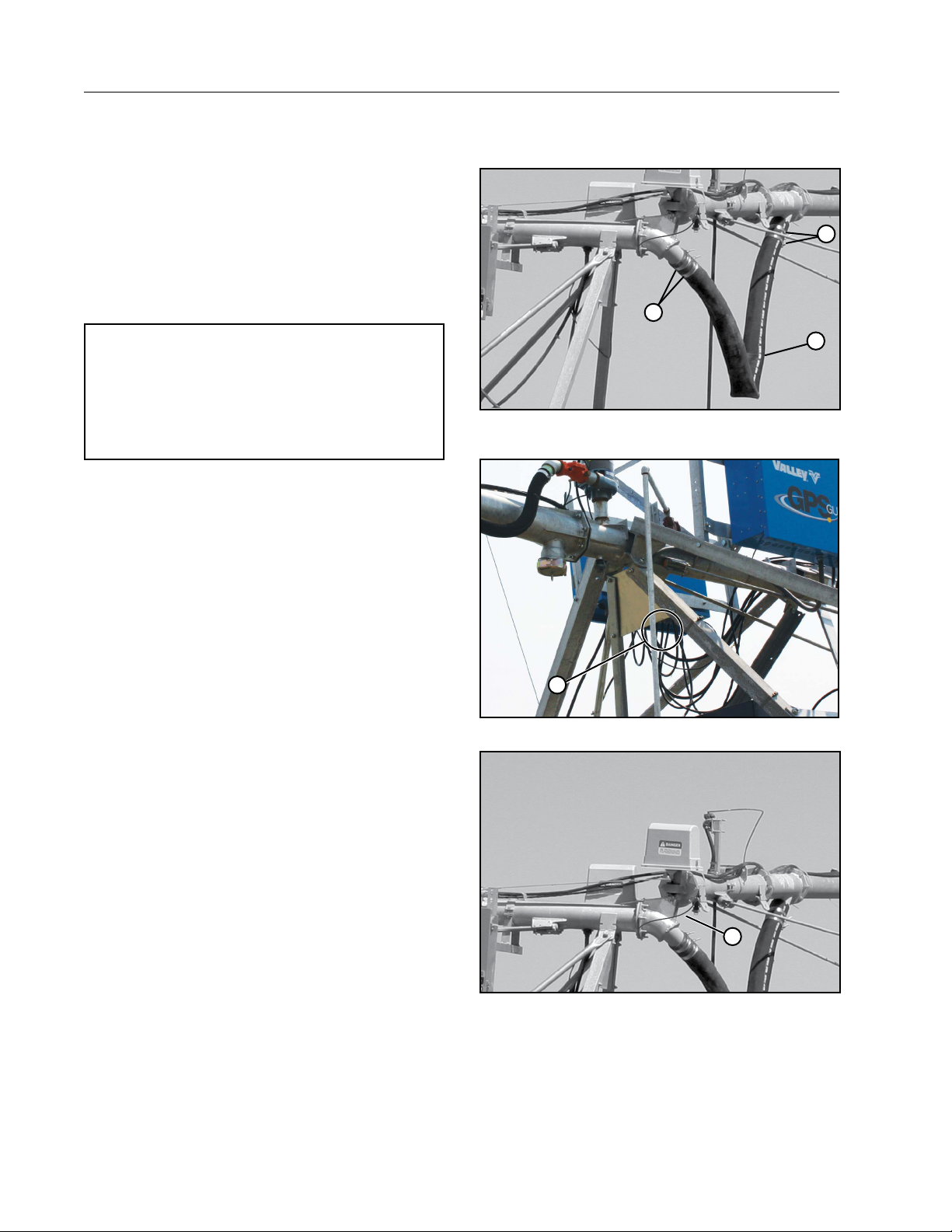
Maintenance
Miscellaneous
Hose Replacement
If the 4-1/2 in hose is sufficiently weather-cracked,
checked, or leaking, you need to replace the hose.
Follow the steps below to replace the 4-1/2 in hose.
See Figure 64-1.
1. Loosen the hose clamps. See Figure 64-1.
2. Remove the old hose.
3. Slide the hose clamps over the new hose.
2
2
NOTE
• To aid installation of the hose, a vegetable
based soap or tire bead lubricant may be
used to lubricate the barbed pipe. DO NOT
use oil, grease, or other petroleum-based
products.
4. Slide the new hose onto each stub pipe until the
hose contacts the hose stops.
5. Tighten the hose clamps. See Figure 64-1.
Contact your local Valley Dealer if you have any
questions about replacing the 4-1/2 inch hose.
Electrical and Grounding Conductors
Check the condition of all electrical wires and
grounding conductors regularly. See Figure 64-2.
Have your local Valley dealer repair or replace any
broken conduit or electrical wire that has worn or
cracked insulation.
Always make sure the ground wires are attached
securely. See Figure 64-3.
1
Figure 64-1 1 . 4-1/2 In Hose
2. 4-1/2 In Hose Clamps
1
Figure 64-2 1 . Electrical Wires
64
1
Figure 64-3 1 . Ground Wire
Page 65
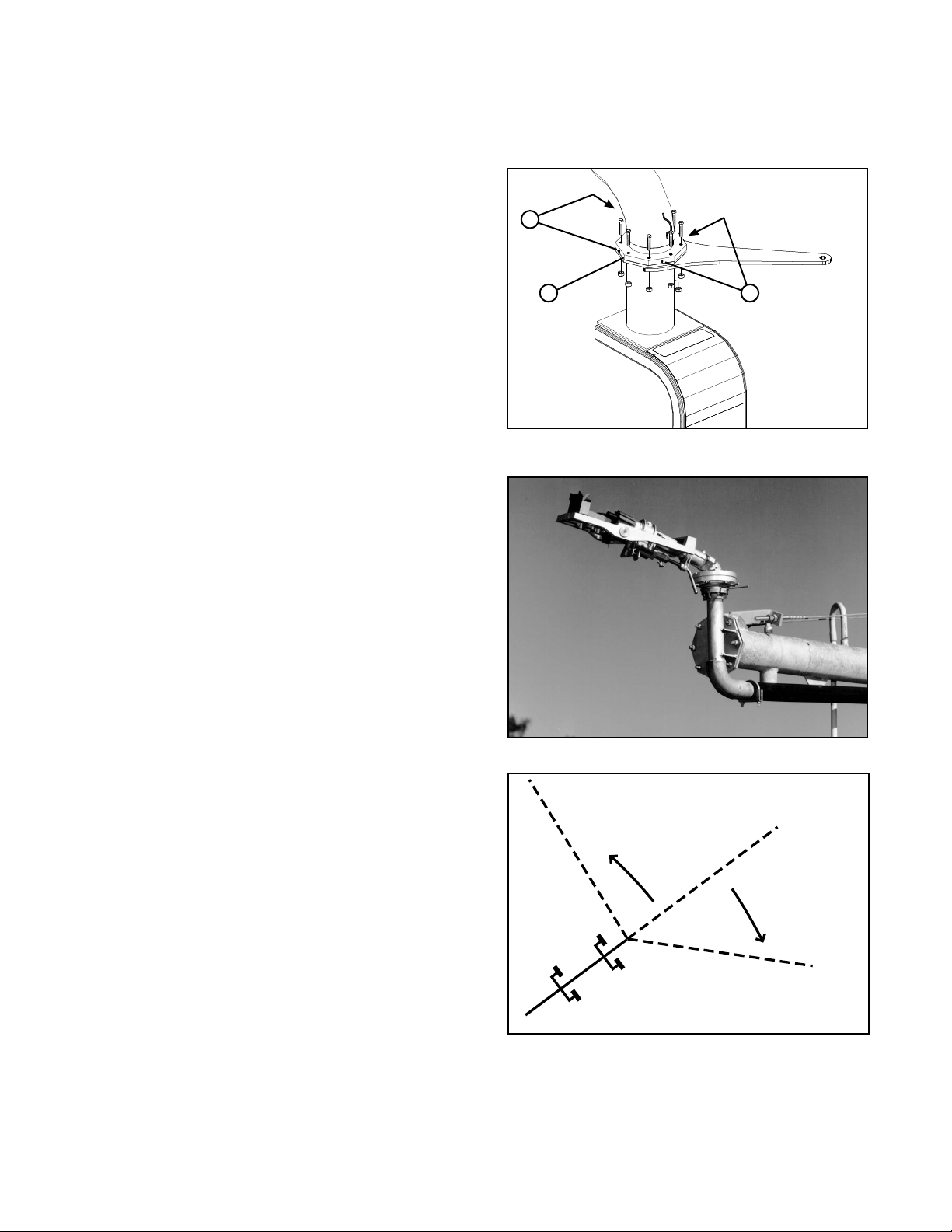
Miscellaneous
Low Profile Offset Leg Bearing Lubrication
If the machine is a low profile machine, lubricate the
low profile offset leg bearings every five to seven
revolutions with a water-resistant lithium-based
grease.
1. Lubricate the four grease fittings on each bearing
flange. See Figure 65-1.
2
End Gun Arc Setting Example
An end gun is installed at the end of the machine and
is used to increase the area irrigated beyond the end
of the machine. See Figure 65-2.
The end gun must be set to cover a specified area to
ensure the best uniformity. This area is determined
by two angles – the Forward and Backward end gun
angles which are sometimes referred to as the end
gun arc settings.
A line on the sprinkler chart for this machine specifies
the correct end gun arc settings for the machine: see
Figure 65-3.
END GUN ARC SETTING EXAMPLE:
FORWARD ANGLE = 45
BACKWARD ANGLE = 85
IMPORTANT: This is an example only. Refer to the
sprinkler chart for this machine to determine the
correct end gun arc settings.
These settings should initially be set by your Valley
Dealer at time of installation and start up.
Figure 65-1 1 . Low Profile Bearing Flange
Maintenance
1 2
2. Grease Fitting
Figure 65-2 End Gun
Backward Angle = 85°
Figure 65-3
Forward Angle = 45°
65
Page 66
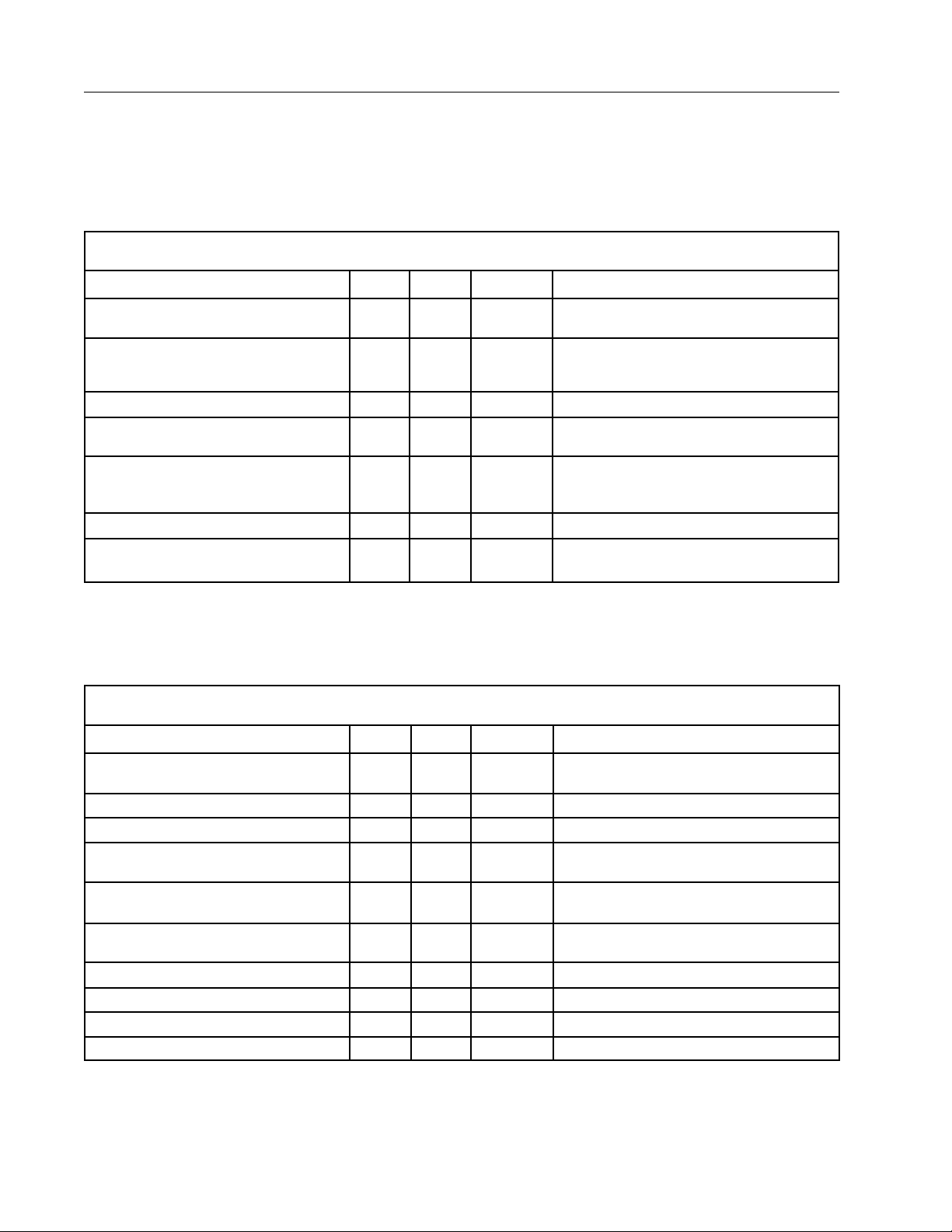
Maintenance
Annual Maintenance
Time, humidity, vibration, temperature, sand, and machine operation all contribute to wear on your VALLEY
irrigation machine. To keep the machine operating properly with a minimum amount of down time, establish
a regular preventative maintenance program using the recommended maintenance charts in this section. If
replacement parts are needed, use only genuine VALLEY PARTS.
Span
1st Pass 4th Pass Pre-season Remarks
Check flanges for leaks and tighten as
required.
Check pipe drains for proper drainage and
invert the seal when applicable. (See
Winterization procedure.)
Check structural components for tightness. X
Check power cable for damage and proper
banding to ensure proper attachment.
Check equipment grounding conductors.
Tighten or clean as required.
Check/clean cross filter. X
Check high pressure hose and poly pipe for
leaks. Tighten clamps and bands as required.
Sprinkler
1st Pass 4th Pass Pre-season Remarks
X
X These must be checked at end-of-season
shutdown.
X
X If your pivot is towable, check the grounding
conductor hook-ups prior to start up each time the
pivot is towed.
X
Check the pivot pressure to make sure it
matches the sprinkler package pressure.
Check sprinklers and nozzles for tightness. X
Check sprinkler for free movement. X
Check sprinkler nozzles for wear. X X Increasing the engine RPM or drop in pressure
Check pressure gauge or pressure transducer
for proper operation.
Check for plugged or partially plugged
nozzles.
Flush entire machine. X See Flushing Procedure.
Check end gun bearing and brake setting. X
Ensure the booster pump hose is drained. This should be done at end of season.
Check tubing harness for damage.
X X X
X X Notify your Valley dealer of any changes.
indicates wear.
X
66
Page 67

Steerable Drive Unit
Maintenance
Annual Maintenance
1st Pass 4th Pass Pre-season Remarks
Check the motor lead cable for damage. X Contact your Valley dealer if the outer insulating
Check for proper ground connection on motor
and motor lead.
Check each motor drain hole for proper
drainage.
Check steering gear box oil level.
Drain and replace the steering gear motor
lubricant.
Check the gearmotor seals and gaskets. X
Check the steering drive shaft U-joints and
U-joint covers.
Check the gearbox seals and gaskets. X
Check and tighten the wheel lug bolts. (125 ft
lbs torque).
Check the tire pressure. X See Tire Pressure in the Maintenance section.
Clean gearbox ventilation hole in expansion
chamber (3 times a year).
Lubricate the low profile offset leg bearing if
applicable.
Check the wheel gearbox and gear motor oil
levels.
X X When ever a lug nut is tightened, re-check lug
X
X
→
→
X
X Ventilation holes must be kept open to extend the
→
X See the Wheel Gearbox in the Maintenance
sheath is cracked.
See the Steering Gear Motor in the Maintenance
section.
See the Steering Gear Motor in the Maintenance
section for frequency.
nuts after the first revolution.
gearbox seal life.
See Low Profile Offset Leg Bearing Lubrication in
the Maintenance section for frequency.
section.
Drain and replace the wheel gearbox and gear
motor lubricant.
Grease SDU U-Joints if Dual Drive is present
→
X
See the Wheel Gearbox in the Maintenance
section for frequency.
Overhang/Booster Pump
1st Pass 4th Pass Pre-season Remarks
Check overhang cables for broken cable
strands.
Clean and ensure operation of the end gun
drain.
Check and clean the sand trap. X As needed. See Winterization Procedure.
Check the end gun arc settings. X Refer to the sprinkler chart.
Check the end gun bearing and brake. X
Check the end gun nozzle for wear. X
Drain the booster pump and ensure that the
booster pump is drained completely.
X Replace if cables are damaged.
X Always check at end-of-season shutdown.
See Winterization Procedure.
67
Page 68
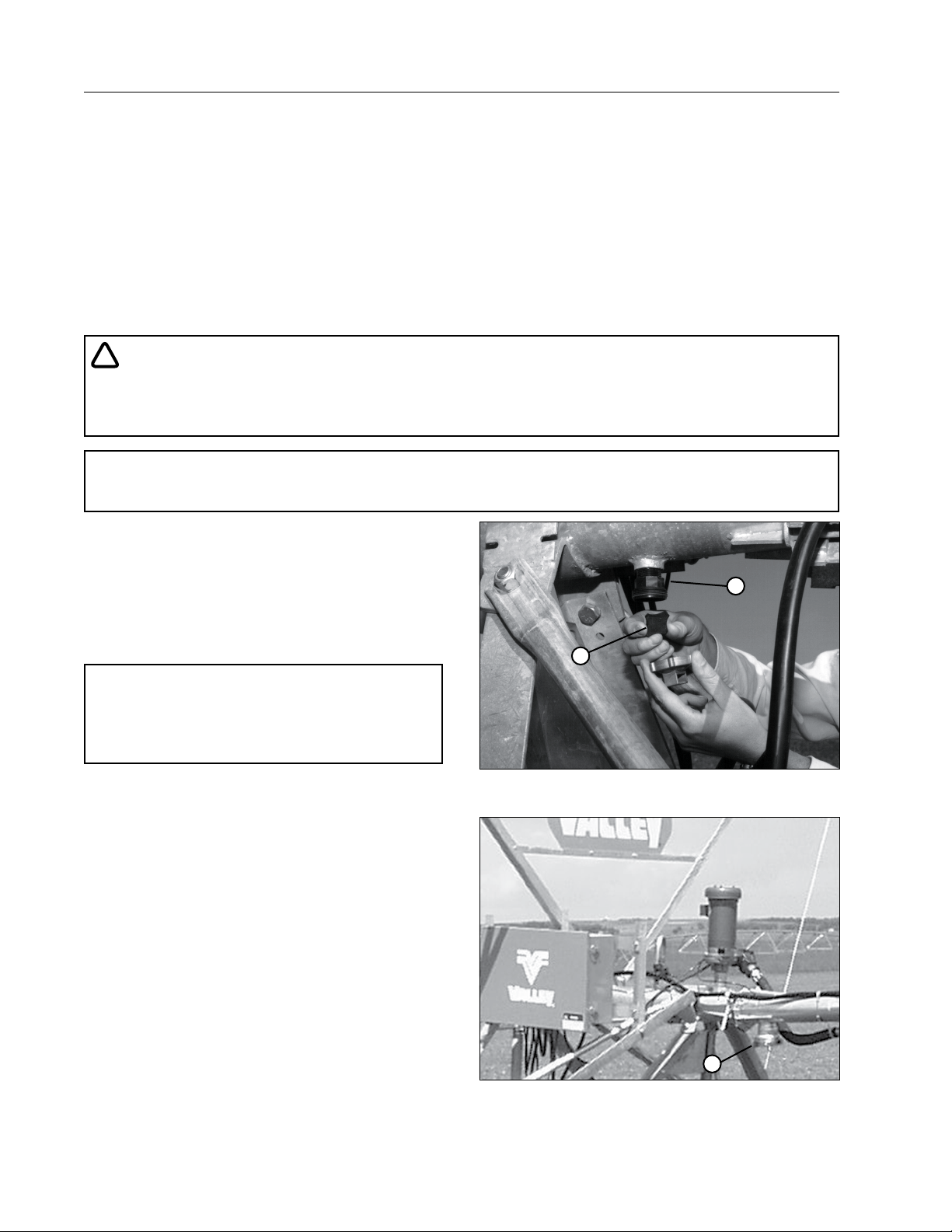
Maintenance
Span Flushing Procedure
The purpose of flushing the machine is to remove sand and debris from the pipeline. Excessive accumulation
of sand in the machine also adds weight and can cause structural damage to the machine.
The Flushing Process should be performed:
• After machine installation.
• After pump repair.
• After structural repair.
• Seasonally - prior to operating the system and after the operating season is over.
• As often as necessary according to debris or sand content in water.
!
DANGER
• DO NOT START THE FLUSHING PROCEDURE WHILE THE SYSTEM IS UNDER WATER PRESSURE.
REMOVING SAND TRAP PLUGS WHILE THE SYSTEM IS UNDER PRESSURE MAY CAUSE PERSONAL INJURY OR DEATH.
NOTE
• Excessive sprinkler problems (clogging) could be an indication of high debris or sand content.
1. Turn the main disconnect switch off. Only water
is required for this procedure - the machine does
not need to run.
2. Remove the pipe drains at each tower and clean
sand and foreign particles from these drains.
Turn the rubber drain seal over when reinstalling.
See Figure 68-1.
2
1
NOTE
• The rubber drain seals should be turned over
when being reinstalled. This practice helps to
increase the seal life.
3. Remove and clean the sand trap at the steerable
drive unit. See Figure 68-2.
Figure 68-1 1 . Pipe Drain
2. Rubber Seal
1
Figure 68-2 1 . Sand Trap
68
Page 69
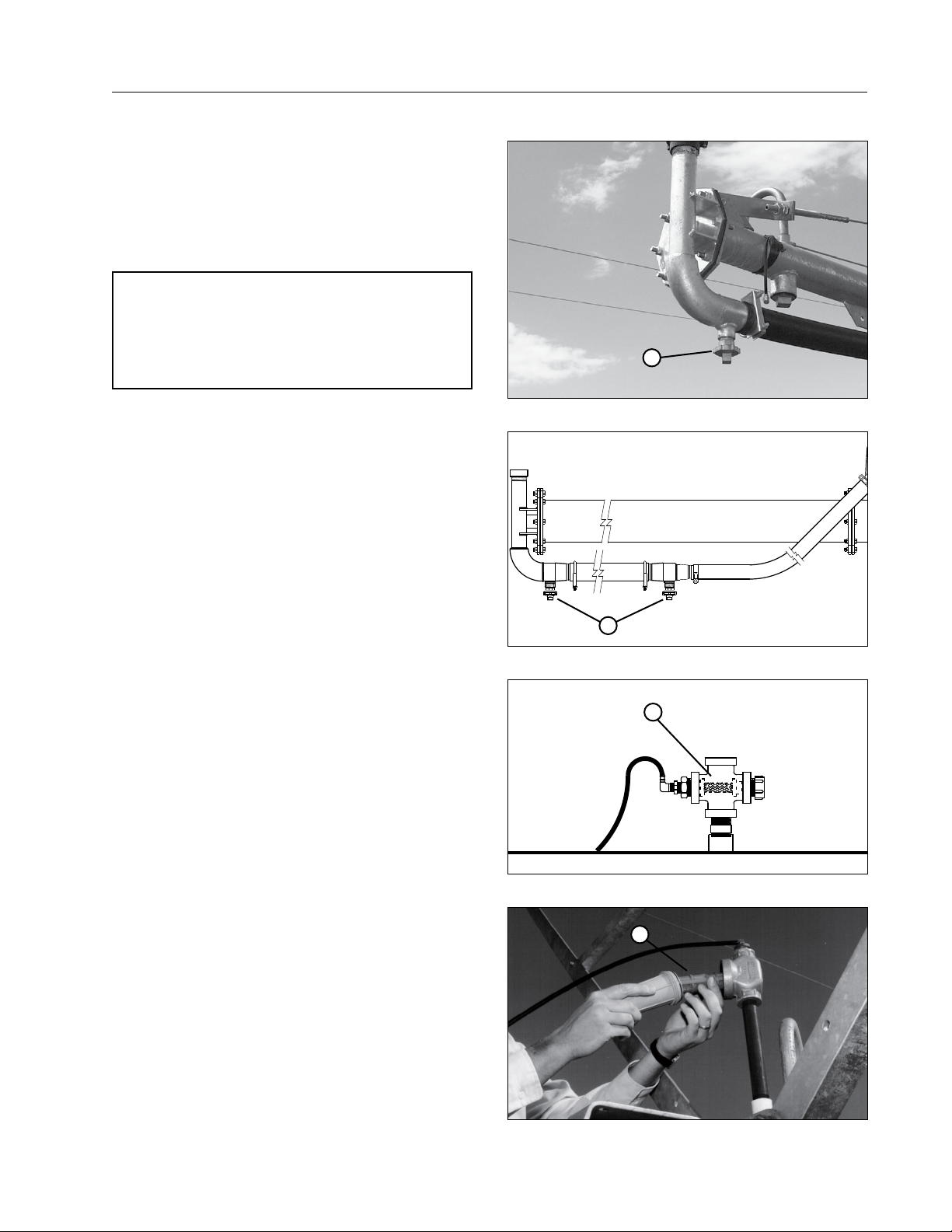
Span Flushing Procedure
4. Remove plugs from the overhang drain. See
Figure 69-1.
5. Start the pump and allow the machine to flush
thoroughly.
6. Turn off the water supply and install the pipe
drains, sand trap, and overhang plugs.
NOTE
• After flushing for winterization, ensure the
water has been allowed to drain completely
before replacing the pipe drains and plugs to
prevent freezing and splitting of the pipeline.
7. Make sure the booster pump hose drain is not
plugged with sand. See Figure 69-2.
8. Clean the solenoid valve cross filter or optional
dirty water filter. See Figures 69-3 and 69-4.
Maintenance
1
Figure 69-1 1 . Overhang Drain
1
Figure 69-2 1 . Booster Pump Hose Drain
1
Figure 69-3 1 . Cross Filter
1
Figure 69-4 1 . Optional Dirty Water Filter
69
Page 70

Maintenance
Winterization
In regions where the temperature during the winter months will drop below 40°F (4°C) and/or the growing season is
6 months or less, the irrigation machine must be winterized.
• Flush and drain the irrigation machine and all plumbing components as specified in the flushing procedure section.
After flushing for winterization, ensure the water has been allowed to drain completely from all drains and plumbing
components before replacing drains and plugs to prevent freezing and splitting of the pipeline.
• All underground pipe MUST be drained below the frost line. When drainage is complete, re-install all plugs to
prevent rodent infestation.
• Perform all post-season maintenance as specified in the recommended maintenance section.
• Winterize auxiliary equipment such as pumps, power units, mainline pipes and hoses according to the auxiliary
equipment manufacturers recommendations.
• Ensure the main pipeline is completely drained and replace all of the drains. Any low spot in the mainline
which is buried above the frost line between the pump and the pivot should have a riser installed at the low
point to provide access for pumping water from the line.
Parking the Machine
The metal in the irrigation machine will expand and contract with variances in temperature. When the machine is
being operated, this poses no threat. However, if the machine is parked in the wheel tracks which were created
during the year, shrinking due to the contraction of the metal could cause structural damage.
The possibility of structural damage due to metal contraction increases as the machine length increases. Long
machines are more susceptible to these stresses, especially where extreme temperature variances occur (90°F
(32°C) down to -0°F (-17°C)) and when wheel tracks are present.
To reduce the possibility of structural damage due to expansion and contraction of the metal, the operator should
consider one of the following methods when parking the machine in the off season:
1. Park the machine in an area where the wheel tracks have been eliminated.
2. Place wooden 2 in x 12 in planks over the wheel tracks. Park the machine with the tires on the center of the
planks.
3. Towable Drive Units – Place every third drive unit’s wheels in the tow position.
4. Remove all wheel tracks and run the machine dry (without water) for approximately 100 yards (92 m) to 200 yards
(183 m) monthly. Only run the pivot if the temperature is above 40°F (4°C).
Contact your Valley dealer for other winter storage/parking information and tips.
70
Page 71

Troubleshooting
Important Information
A shutdown of the machine can be the result of a malfunction of the center pivot or of the corner. Refer to the
appropriate center pivot and/or control panel operators manual(s) for information related to a malfunction on
the center pivot portion of the machine. Correct the malfunction on the center pivot or contact your local Valley
dealer for assistance.
The Valley Precision Corner includes software for corner diagnostics, automatically correcting some corner
faults and automatically resetting some corner electronic component or software failures should they occur. The
Operator Interface Panel provides an LED display of error codes related to corner faults. The Operator Interface
Panel provides the operator the ability to correct certain faults that might occur. Use of the Operator Interface
Panel requires a SERVICE/RUN switch in the pivot panel to be placed in the SERVICE position.
The operator may elect to attempt startup of the machine if he thinks the shutdown may have been caused by
a power drop or some other non-machine related cause. If this is done, the operator needs to be aware the
Valley Precision Corner includes software that has the ability to rectify certain corner faults. Depending on the
type of fault, the pivot contactors may engage and hold in when a startup attempt is made leading the operator
to conclude everything is OK. On certain faults, the correction or reset program(s) can take up to 3 minutes to
complete the correction or reset process. The pivot panel contactor can remain engaged for this period of time
then drop out. If the machine is restarted after a non-operator initiated shutdown (operator intentionally shutting
the machine OFF), the operator must wait for 3 minutes before leaving the pivot panel to assure the automatic
correction or reset program(s) have been successfully completed and the machine is operating properly. Some
software auto-correcting or reset programs will take less than 3 minutes. If the pivot contactor will not hold in
(stay engaged) or drops out within the 3 minute period, then there is a problem on the center pivot or corner and
it must be isolated and corrected.
In a few instances it is beneficial to install the Valley Precision Corner in the leading position (corner operates
ahead of the last regular drive unit when the machine is operating in the forward or clockwise direction). The
troubleshooting procedures contained in this manual are for corner machines operating in the trailing position.
This means the corner follows the center pivot when the pivot is operated in the forward (clockwise) direction.
Use of the controls in the Operator Interface Panel for a corner installed in the leading position will differ from
those of a trailing corner. Contact your Valley Dealer for specific instructions.
Troubleshooting Overview
The Valley Center Pivot and the Precision Corner include a number of electromechanical and software safeties
that protect the machine from structural or other damage should a malfunction occur on the pivot or the corner.
Corner safeties include the following:
• Span Compression/Tension Safeties (Software and Mechanical Safeties)
• Guidance Safety
• Over-Extension/Under-Retraction Safety
• Steering Hardware Safety
Typical center pivots include alignment and over-watering safeties (refer to the appropriate Center Pivot and/
or Center Pivot Control Panel Operator Manuals for specific information regarding these safety circuits and
troubleshooting of the same).
The Valley Precision Corner incorporates an Operator Interface Panel that provides an LED (Light Emitting
Diode) display for showing the status of the corner and controls to allow for operation and possible correction
of certain corner machine malfunctions should they occur. The Operator Interface Panel is for use by the
operator and by the Valley Dealer Service Representative. Some malfunctions should only be corrected by
Factory Trained Valley Dealer Service Personnel. The operator should not attempt to correct these malfunctions.
The troubleshooting guide Indicates which ones may be corrected by the operator and which ones must be
corrected by the dealer. Even though most of the errors (faults) listed can only be corrected by Valley Trained
Dealer Service Personnel, it is of benefit for the service person to know the error code indicated when calling for
service. Error codes (Er) potentially correctable by the Operator are in “BOLD” text in the chart on the next page.
71
Page 72

Troubleshooting
Error Codes
Error Code Error (fault) Error Explanation Correctable By
Er01 Software CSUM
Er02 Setup Constants
Er03 Communications
Er04 Software Version
Er05 LRDU Power Supply Bad Power Supply Dealer Only
Er06 SDU Power Supply Bad Power Supply Dealer Only
Er07 Drive Enable Bypass Rly
Er08 Swing Tower Box Fault
Er10 LRDU Fault Drive Motor of VSD Fault Dealer Only
Er11 SDU Fault Drive Motor or VSD Fault Dealer Only
Er12 Inclinometer Fault
Er13 Side Load Sensor Fault
Er14 Span Sensor Micro SW
Er15 Auto Correct Failed
Er16 Span Sensor Fault Span Sensor Fault
Er17 Pressure Fault
Er18 Corner Angle Fault
Er19 LRDU Timeout Waiting
Er20
Override Table Checksum
Fault
Software download
Incomplete
Set-up parameters are
not within range
Boards are not talk-
ing or both think they
are LRDU or SDU
Different versions of
software used on both
LRDU and SDU
VSD enable relay or drive
VSD relay (K4) circuit bad
Safety failure in
Guidance box
Bad Tilt Sensor
LRDU is at 15 de-
grees or greater
One motor has stopped
Side load present on SDU
Potentiometer is adjusted
incorrectly with respect
to mechanical switch
Machine Stuck
VSD Malfunction
Transducer shorted
out or wired wrong
Bad angle sensor
potentiometer, mislaid
wire, or inverted corner
LRDU stopped for 300
seconds waiting for
SDU to catch up or SDU
stuck or stopped.
Incomplete or corrupt override table
Dealer Only
Dealer Only
Dealer Only
Dealer Only
Dealer Only
Corner has over-steered,
steered off the buried pe-
rimeter wire or had a failure
of a guidance component
If the corner is on the wheel
track contact Dealer
Dealer Only
Dealer Only
Dealer Only
Attempt auto cor-
rect at the SDU
Operator/Dealer at-
tempt auto correct
Dealer Only
Dealer Only
Dealer Only
Dealer Only
72
Page 73
Troubleshooting
WARNING
Terms
• LRDU: Last Regular Drive Unit
• SDU: Steerable Drive Unit
• OIP: Operator Interface Panel
• LED: Light Emitting Diode
• Er: Error
• Fault: Open Safety/Safety Circuit
Tips
!
• NEVER TROUBLESHOOT THE CORNER MACHINE WITH THE IRRIGATION PUMP OPERATING
(MACHINE IRRIGATING).
NOTE
• All corner troubleshooting and/or operation of the corner from the Operator Interface Panel must be
performed with the pivot panel Service/Run switch in the SERVICE position.
Most all center pivot control panels include a spring loaded Safety Override switch or button. This Safety Override
is used in conjunction with the center pivot and must be used with caution. The pivot control panel Safety
Override switch or button DOES NOT override the safeties at the LRDU or on the Valley Precision Corner.
Error Codes, should a fault occur at the LRDU or on the Corner, are displayed on the LED in the Operator
Interface Panel. The Error Codes appear sequentially with the lowest code being shown first. This means if two
faults should occur, the LED will display the lowest Error Code # first. If there is a second Error Code #, it will
appear after the first Error Code is rectified. Once the last Error Code is rectified, the display will show “rUn”.
Span Sensor Safeties
Error 16 (Span Sensor Fault) can be a fault on one of two Span Sensor Safeties: the Span Sensor Software
Safety or the Span Sensor Mechanical Safety (Span Sensor Microswitch).
The Span Sensor Software Safety shuts the machine down but allows for attempting to correct the fault or
problem through the controls in the Operator Interface Panel.
• If Er16 (Span Sensor Fault) is displayed on the LED and the Corner Safety Fault light is off, the failure is
a Span Sensor Software Safety.
The Span Sensor Mechanical Safety protects the corner should the corner span experience additional tension
or compression than what the Span Software Safety allows. If the Mechanical Span Sensor Safety is faulted
(open), the controls in the Operator Interface Panel on the SDU will not function. In this situation the Dealer must
be called to correct the problem.
• If the Er16 is displayed and the Corner Safety Fault Light is ON, the Mechanical Span Sensor Safety may
be broken (open). It is possible, although unlikely, to have both an Er08 and an Er16 Error Code or Fault at
the same time. The Er08 fault would be shown on the LED but the Er16 would not be shown until the Er08
fault was corrected. To determine what the specific fault or faults are, press the Steering Override Button.
Press The Steering Override Button:
• If the Corner Safety Fault light goes OFF, there is a Span Sensor Software Safety Fault and a Swing Tower
Box Safety Fault.
• If the Corner Safety Fault light stays ON, then there is a Span Sensor Mechanical Safety Fault and the
Valley Dealer must be called to rectify the fault.
NOTE
• An Er16 Span Sensor Software Safety Fault will not result in the Corner Safety Fault light going ON.
In this situation it is not necessary to press the Steering Override to move the SDU with the Swing
Tower Forward/Reverse rocker switch.
73
Page 74

Troubleshooting
WARNING
WARNING
Swing Tower Box Safeties
Er08 (Swing Tower Box Fault) with the Corner Fault light ON: If the Steering Override button is depressed and
the Corner Fault light goes OFF, guidance/steering is the problem (Swing Tower Box Fault). The display on the
LED will change to “rUn” when the Steering Override button is depressed.
!
• IF EITHER THE STEER-IN OR STEER-OUT CONTACTOR IN THE SDU BOX IS STUCK, STRUCTURAL
DAMAGE WILL OCCUR IF THE STEERING OVERRIDE SWITCH IS HELD IN. THE STEERING ARMS
START TO BECOME PARALLEL WITH THE STEERING TIE ROD AND THE TIE ROD BEGINS TO
BOW, IMMEDIATELY RELEASE THE STEERING OVERRIDE BUTTON TO PREVENT STRUCTURAL
DAMAGE. CONTACT YOUR VALLEY DEALER FOR SERVICE.
General
Pressing and holding the start button will allow you to operate the Corner Machine from the SDU or SDU OIP.
While holding the Start button the percent that it first toggles to pivot by 10% increments then 10 - 20 - 30 etc.
When the button is released the machine is allowed to move at that speed.
The LRDU is allowed to move when the corner is operated from the Operator Interface Panel. The machine will
continue to run at this speed for 15 minutes. After 15 minutes, the Machine Start switch can be depressed for
another 15 minutes of operation.
!
• ALWAYS PRESS THE MACHINE STOP SWITCH BEFORE LEAVING THE OPERATOR PLATFORM.
NEVER ATTEMPT TO CLIMB UP THE SDU OR GET OFF THE SDU WHILE THE MACHINE IS MOVING.
PRESSING THE OPERATOR INTERFACE PANEL MACHINE START/STOP ROCKER SWITCH TO THE
STOP POSITION WILL STOP THE LRDU AND THE SDU.
• ONCE THE STOP BUTTON IS PRESSED, THE BOARDS WILL READ STOP. THE POWER AT THE MAIN
CONTROL PANEL WILL HAVE TO BE TURNED OFF AND THEN BACK ON TO CLEAR THE STOP BEFORE THE CORNER IS ALLOWED TO MOVE AGAIN. COULD ALSO PRESS THE START BUTTON AT
THE SDU SO THAT PIVOT IS SHOWN AND IT WILL RUN OFF THE PANEL % TIMER.
• WHEN THE PIVOT PANEL SERVICE/RUN SWITCH IS IN THE SERVICE POSITION, THE OPERATOR
INTERFACE PANEL STOP ROCKER SWITCH DOES NOT SHUT POWER OFF TO THE MACHINE.
SHUTTING POWER OFF TO THE MACHINE MUST BE DONE AT THE CENTER PIVOT CONTROL
PANEL.
NOTE
• If the corner is attached to the front side of the center pivot (leading corner), the procedures for
troubleshooting and use of the operator interface panel will vary from the procedures covered In
this section. Contact your Valley dealer for assistance.
74
Page 75
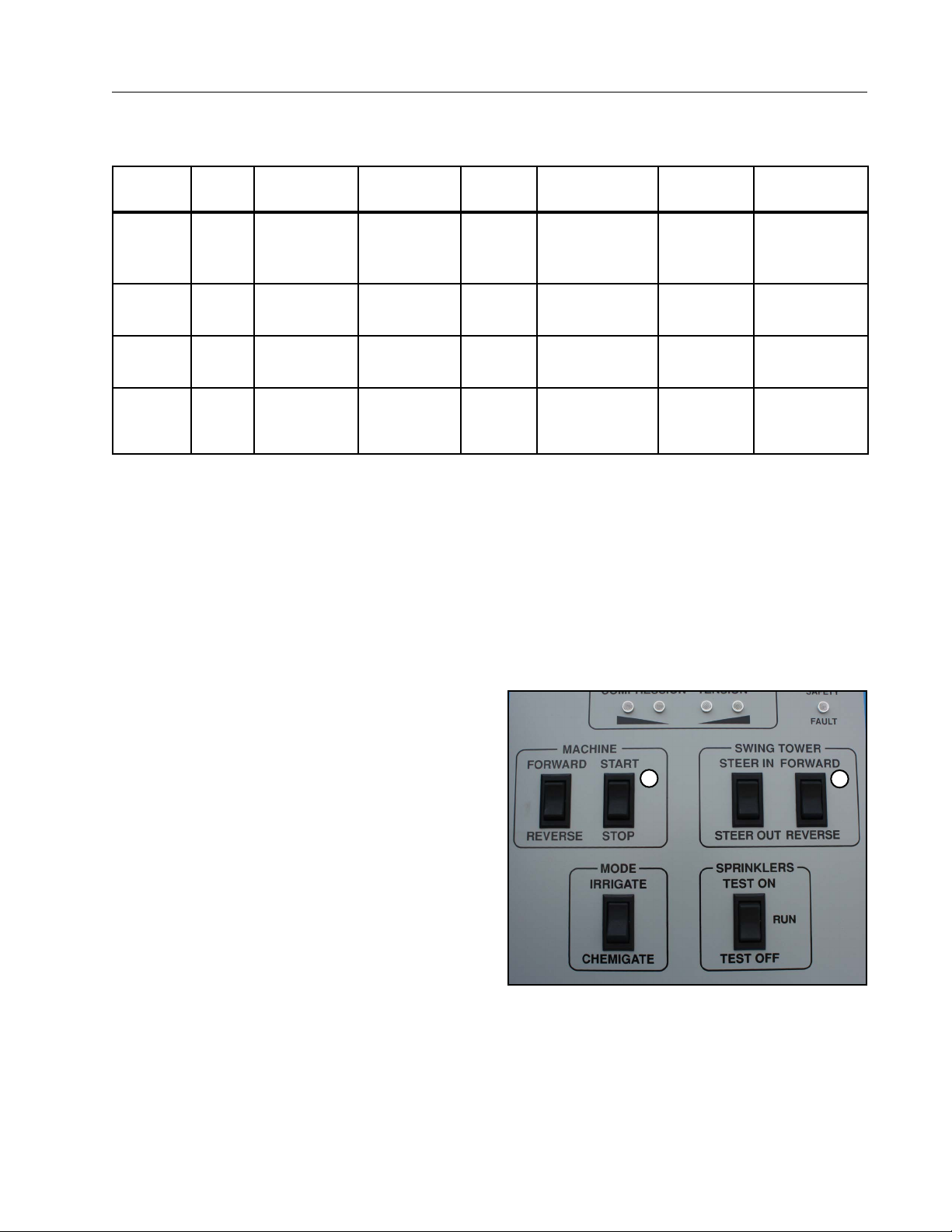
Corrective Procedures - Operator Interface Panel
Span Sensor Safety Fault Situation Table
SITUATION
#
ERROR
CODE
FAU LT
COMPRESSION
LIGHTS
TENSION
LIGHTS
CORNER SAFETY
FAULT LIGHT
Troubleshooting
PROBLEM
CORRECTIVE
ACTION
#1* ER16
#2** ER16
#3 ER16
#4 ER16
Span Sensor
(Software Safety)
Span Sensor
(Software Safety)
Span Sensor
(Software Safety)
Span Sensor
(Software Safety)
Both ON
Both OFF
Both OFF
Both ON
Both OFF OFF
Both ON
Both ON ON
Both OFF
OFF
ON
LRDU/SDU
too close
LRDU/SDU
too far apart
LRDU/SDU
too far apart
LRDU/SDU
too close
Jog SDU away
from LRDU*
Jog SDU Toward
LRDU**
Perform Auto
Correct Procedure
Perform Auto
Correct Procedure
*The cause of fault must be determined and corrected before attempting to jog (move) the SDU away from the
LRDU. An example of mechanical causes for a compression shutdown might include the SDU sliding ahead off
a ridge or bed for a machine operating in the forward direction. If the machine was operating in reverse, the fault
could be the SDU spinning out on a ridge or bed, a flat tire on SDU, a defective SDU gearbox, the SDU stuck,
etc. If the cause of the fault can not be readily identified and/or corrected, the dealer must be contacted.
**The cause of fault must be determined and corrected before attempting to jog (move) the SDU toward the
LRDU. Examples of causes for a tension shutdown include a flat tire on SDU, a defective SDU gearbox, the SDU
stuck, etc. When operating the machine in the forward direction. If the machine was operating in the reverse
direction, the cause could be the SDU sliding off a ridge or bed. If the cause of the fault can not be readily
identified and/or corrected, the dealer must be contacted.
Auto Correct Procedure
To perform an auto correct press the machine start
button at the same time as the jog forward button and
then release. The smart board will say AUTO. The
SDU and LRDU should automatically jog the correct
direction until the safety fault is resolved. If doing this
procedure does not resolve the issue, contact your
Valley Dealer.
1
2
Figure 75-1 1 . Start/Stop Switch
2. Forward/Reverse Switch
75
Page 76
Troubleshooting
WARNING
Situation #1, Er16 - Span Sensor Fault
• Both Compression Lights are ON.
• Corner Safety Fault Light is OFF.
• Problem: SDU is TOO CLOSE to LRDU.
• Corrective Action: Jog SDU away from LRDU.
!
• NEVER PERFORM THIS PROCEDURE WHILE PUMPING WATER TO THE MACHINE.
At Pivot Panel
1. Turn the Main Disconnect Switch ON at the Pivot Panel.
2. Enable and/or set the pivot control panel in the Auto-Reverse mode.
3. Place the irrigation pump in the OFF position.
4. Place the SERVICE/RUN switch in the SERVICE position.
5. Go to the SDU.
At Operator Interface Panel on the SDU
1. Carefully access the service platform on SDU.
!
CAUTION
• ACCESS THE SERVICE PLATFORM WITH EXTREME CARE! THE ACCESS STEPS MAY BE SLIPPERY
IF MUD OR MOISTURE ARE PRESENT ON THE FEEL ALSO WATCH OUT FOR THE LOCATION OF
THE STEERING ARM AND TIE ROD TO INSURE YOU DO NOT HIT YOUR HEAD OR SHOULDERS AS
YOU MOVE UP THE SDU LEG.
2. Open the outer door on the Operator Interface Panel.
3. Verify the Error Code and Indicator Lights match Situation #1, Er16.
4. Fix the cause of the shutdown.
5. Jog (move) the SDU AWAY from the LRDU by pressing the SWING TOWER FORWARD/REVERSE rocker
switch to REVERSE.
!
CAUTION
• WHEN THE CORNER SPAN IS IN COMPRESSION, ALWAYS MOVE THE CORNER AWAY FROM
THE LRDU. MOVING THE SDU THE WRONG DIRECTION MAY CAUSE THE MECHANICAL SPAN
SENSOR SAFETY TO TRIP WHICH WILL MAKE THE OPERATOR INTERFACE PANEL SWING TOWER
CONTROLS INOPERABLE AND REQUIRE THE VALLEY DEALER TO BE CALLED.
• As the SDU and LRDU move apart, the Compression Lights will sequentially go out. Move the SDU until
no compression or tension lights are on (lit).
• Error 16 (Er16) on the LED will change to “rUn”. The Variable Speed Drives will display the Hertz value
(speed of the SDU) while the SWING TOWER DIRECTION SWITCH is being depressed then will display
“rdy” once the switch is released.
6. Press the MACHINE DIRECTION ROCKER SWITCH to the desired direction of operation (FORWARD or
REVERSE operation).
7. Press the MACHINE START/STOP rocker switch to START. This will start the LRDU moving for 15 minutes.
8. Monitor the LRDU and sou movement.
9. Once the LRDU and SDU are moving smoothly and in unison, press the MACHINE START/STOP rocker
switch to the STOP position.
10. Close and latch the outer door on the Operator Interface Panel.
11. Carefully climb down from the SDU and return to the pivot panel.
76
Page 77

Troubleshooting
Situation #1, Er16 - Span Sensor Fault (Continued)
At the Pivot Panel
1. Place the SERVICE/RUN switch in the RUN Position.
NOTE
• Failure to do so will prevent the LRDU from running. If the machine Is started from the pivot panel
while the Service/Run switch Is In the SERVICE position, the pivot contactor will engage and hold
in but the LRDU will not move. Once the over-watering timer on the center pivot times out, the
contactor will drop out.
2. Disable or turn off the Auto-Reverse if the function is not needed/desired for normal operation.
3. Reengage the pump/pivot tie-in for automatic control of the machine and pump.
4. Start the machine in the desired direction and at the appropriate speed.
5. Close and latch the outer pivot panel door.
At the LRDU/SDU
1. Check for proper operation of the corner.
77
Page 78
Troubleshooting
WARNING
Situation #2, Er16 - Span Sensor Fault
• Both Tension Lights are ON.
• Corner Safety Fault Light is OFF.
• Problem: SDU is TOO FAR from LRDU.
• Corrective Action: Jog SDU toward LRDU.
!
• NEVER PERFORM THIS PROCEDURE WHILE PUMPING WATER TO THE MACHINE.
At Pivot Panel
1. Turn the Main Disconnect Switch ON at the Pivot Panel.
2. Enable and/or set the pivot control panel in the Auto-Reverse mode.
3. Place the irrigation pump in the OFF position.
4. Place the SERVICE/RUN switch in the SERVICE position.
5. Go to the SDU.
At Operator Interface Panel on the SDU
1. Carefully access the service platform on SDU.
!
CAUTION
• ACCESS THE SERVICE PLATFORM WITH EXTREME CARE! THE ACCESS STEPS MAY BE SLIPPERY
IF MUD OR MOISTURE ARE PRESENT ON THE FEEL ALSO WATCH OUT FOR THE LOCATION OF
THE STEERING ARM AND TIE ROD TO INSURE YOU DO NOT HIT YOUR HEAD OR SHOULDERS AS
YOU MOVE UP THE SDU LEG.
2. Open the outer door on the Operator Interface Panel.
3. Verify the Error Code and Indicator Lights match Situation #2, Er16.
4. Fix the cause of the shutdown.
5. Jog (move) the SDU TOWARD from the LRDU by pressing the SWING TOWER FORWARD/REVERSE
rocker switch to FORWARD.
!
CAUTION
• WHEN THE CORNER SPAN IS IN COMPRESSION, ALWAYS MOVE THE CORNER AWAY FROM
THE LRDU. MOVING THE SDU THE WRONG DIRECTION MAY CAUSE THE MECHANICAL SPAN
SENSOR SAFETY TO TRIP WHICH WILL MAKE THE OPERATOR INTERFACE PANEL SWING TOWER
CONTROLS INOPERABLE AND REQUIRE THE VALLEY DEALER TO BE CALLED.
• As the SDU moves toward LRDU, the Tension Lights will sequentially go out. Move the SDU until no
compression or tension lights are on (lit).
• Error 16 (Er16) on the LED will change to “rUn”. The Variable Speed Drive will display the Hertz value
(speed of the SDU) while the SWING TOWER DIRECTION SWITCH is being depressed then will display
“rdy” once the switch is released.
6. Press the MACHINE DIRECTION ROCKER SWITCH to the desired direction of operation (FORWARD or
REVERSE operation).
7. Press the MACHINE START/STOP rocker switch to START. This will start the LRDU moving for 15 minutes.
8. Monitor the LRDU and sou movement.
9. Once the LRDU and SDU are moving smoothly and in unison, press the MACHINE START/STOP rocker
switch to the STOP position.
10. Close and latch the outer door on the Operator Interface Panel.
11. Carefully climb down from the SDU and return to the pivot panel.
78
Page 79

Troubleshooting
Situation #2, Er16 - Span Sensor Fault (Continued)
At the Pivot Panel
1. Place the SERVICE/RUN switch in the RUN Position.
NOTE
• Failure to do so will prevent the LRDU from running. If the machine Is started from the pivot panel
while the Service/Run switch Is In the SERVICE position, the pivot contactor will engage and hold
in but the LRDU will not move. Once the over-watering timer on the center pivot times out, the
contactor will drop out.
2. Disable or turn off the Auto-Reverse if the function is not needed/desired for normal operation.
3. Reengage the pump/pivot tie-in for automatic control of the machine and pump.
4. Start the machine in the desired direction and at the appropriate speed.
5. Close and latch the outer pivot panel door.
At the LRDU/SDU
1. Check for proper operation of the corner.
79
Page 80

Troubleshooting
WARNING
Situation #3, Er16 - Span Sensor Fault
• Both Tension or Compression Lights are ON.
• Corner Safety Fault Light is ON.
• Problem: SDU is TOO far away or TOO close to LRDU.
!
• NEVER PERFORM THIS PROCEDURE WHILE PUMPING WATER TO THE MACHINE.
At Pivot Panel
1. Turn the Main Disconnect Switch ON at the Pivot Panel.
2. Enable and/or set the pivot control panel in the Auto-Reverse mode.
3. Place the irrigation pump in the OFF position.
4. Place the SERVICE/RUN switch in the SERVICE position.
5. Go to the SDU.
At Operator Interface Panel on the SDU
1. Carefully access the service platform on SDU.
!
CAUTION
• ACCESS THE SERVICE PLATFORM WITH EXTREME CARE! THE ACCESS STEPS MAY BE SLIPPERY
IF MUD OR MOISTURE ARE PRESENT ON THE FEEL ALSO WATCH OUT FOR THE LOCATION OF
THE STEERING ARM AND TIE ROD TO INSURE YOU DO NOT HIT YOUR HEAD OR SHOULDERS AS
YOU MOVE UP THE SDU LEG.
2. Open the outer door on the Operator Interface Panel.
3. Verify the Error Code and Indicator Lights match Situation #3, Er16. In this situation, one of two faults can
exist.
(a) The SPAN SENSOR MECHANICAL SAFETY (Er16) is OPEN which will require the dealer to be called
to rectify the fault.
(b) The SPAN SENSOR SOFTWARE SAFETY (Er16) and the SWING TOWER BOX SAFETY (Er08) are
both OPEN.
4. Determine the exact fault or faults by pressing the STEERING OVERRIDE PUSH BUTTON and observing
the CORNER FAULT light.
(a) If the CORNER FAULT light stays ON, the SPAN SENSOR MECHANICAL and the SPAN SENSOR
SOFTWARE SAFETIES are both OPEN. CONTACT YOUR VALLEY DEALER TO RECTIFY THE FAULT.
(b) If the CORNER FAULT light goes OFF, the SPAN SENSOR MECHANICAL SAFETY is OK or closed but
THE SPAN SENSOR SOFTWARE SAFETY and the SWING TOWER BOX SAFETY (guidance safety)
are both OPEN.
5. Rectify (fix) the cause of the shutdown.
The Swing Tower Box Fault Must Be Corrected First
Refer to the “SWING TOWER BOX FAULT/CORRECTIVE ACTION” (Situation# 1 or# 2) to correct the Swing
Tower Box Fault. The “Situation” used will depend on whether the SDU is Inside or Outside the normal SDU
tracks. If the SDU is in wheel tracks contact your Dealer.
The Span Sensor Fault Must Be Corrected Next
Refer to the appropriate “Situation” in the “SPAN SENSOR SAFETY FAULT/CORRECTIVE ACTION” portion of
this Section (Situation #1 or #2, Er16). The Situation used will depend on whether the span is in Compression
or Tension.
80
Page 81

Corrective Procedures - Swing Tower Box
Swing Tower Box Fault Situation Table
Troubleshooting
SITUATION
#
#1 ER08
#2 ER08
#3 ER08
*The cause of Fault is more than likely related to the oscillator, buried wire, antenna or receiver electronics.
Startup attempt at pivot can be performed. If unsuccessful, contact your Valley Dealer.
ERROR CODE FAULT
Swing
Tower Box
Swing
Tower Box
Swing
Tower Box
SAFETY
LIGHT
ON
ON
ON
STATUS
OF SDU
SDU
OUTSIDE SDU
TRACKS
SDU
INSIDE SDU
TRACKS
SDU
IN SDU
TRACKS
CORRECTIVE
ACTION
Steer IN to
SDU Tracks
Steer Out to
SDU Tracks
Contact Dealer*
81
Page 82
Troubleshooting
WARNING
Situation #1, Er08 - Swing Tower Box Fault
• Corner Safety Fault Light is ON.
• Problem: SDU inside SDU tracks.
!
• NEVER PERFORM THIS PROCEDURE WHILE PUMPING WATER TO THE MACHINE.
At Pivot Panel
1. Turn the Main Disconnect Switch ON at the Pivot Panel.
2. Enable and/or set the pivot control panel in the Auto-Reverse mode.
3. Place the irrigation pump in the OFF position.
4. Place the SERVICE/RUN switch in the SERVICE position.
5. Go to the SDU.
At Operator Interface Panel on the SDU
1. Carefully access the service platform on SDU.
!
CAUTION
• ACCESS THE SERVICE PLATFORM WITH EXTREME CARE! THE ACCESS STEPS MAY BE SLIPPERY
IF MUD OR MOISTURE ARE PRESENT ON THE FEEL ALSO WATCH OUT FOR THE LOCATION OF
THE STEERING ARM AND TIE ROD TO INSURE YOU DO NOT HIT YOUR HEAD OR SHOULDERS AS
YOU MOVE UP THE SDU LEG.
2. Open the outer door on the Operator Interface Panel.
3. Verify the Error Code and Indicator Lights match Situation #1, Er08.
4. Rectify (fix) the cause{s) of the shutdown. If the cause of the fault can not be readily determined, contact
your Valley dealer for service.
5. The machine should be operated in the opposite direction it was operating when moving the SDU back to
the normal SDU tracks. Steer the tires so they will follow the same tracks back to the normal SDU tracks.
• Depress and hold the STEERING OVERRIDE Button to allow for bypassing the SWING TOWER BOX
FAULT (open guidance safety circuit).
!
CAUTION
• WHEN THE STEERING OVERRIDE BUTTON IS DEPRESSED ALL STEERING SAFETIES ARE
BYPASSED. IF A STEERING CONTACTOR SHOULD BE STUCK IN THE CLOSED POSITION
(CONTACTS WELDED CLOSED), THE DRIVE WHEELS WILL CONTINUE TO STEER RESULTING
IN DAMAGE TO THE SDU. IF THE STEERING TIE ROD BEGINS TO BECOME PARALLEL WITH THE
STEERING ARMS AND THE TIE ROD BEGINS TO BOW, IMMEDIATELY RELEASE THE STEERING
OVERRIDE BUTTON. CONTACT YOUR VALLEY DEALER FOR SERVICE.
• Press the SWING TOWER STEER IN or STEER OUT rocker switch as necessary to allow the SDU to
follow the tracks back to the normal SDU tracks.
!
CAUTION
• THE STEERING OVERRIDE BUTTON MUST BE CONTINUALLY DEPRESSED. THIS ASSURES THE
SDU WILL NOT DRASTICALLY STEER TOWARD TO THE SDU WHEEL TRACKS ONCE THE GUIDANCE
PICKS UP STEERING SIGNAL FROM THE BURLED WIRE. SHOULD THIS OCCUR, THE CORNER
SPAN COULD GO INTO COMPRESSION OR TENSION THAT WOULD CAUSE THE MACHINE TO SHUT
DOWN EITHER DUE TO OPENING OF THE SOFTWARE OR MECHANICAL SPAN SENSOR SAFETY.
6. Press the MACHINE FORWARD/REVERSE switch to the appropriate direction of operation (opposite of the
direction the machine was operating when the SDU left the normal SDU tracks).
82
Page 83
Troubleshooting
WARNING
Situation #1, Er08 - Swing Tower Box Fault (Continued)
7. Press the MACHINE START/STOP; press and hold the START button until you reach the desired percent
timer setting you’d like to run at. The LRDU will begin to move and run at this percent timer setting for 15
minutes.
• Press the SWING TOWER STEER IN or STEER OUT rocker switch as necessary to allow the SDU to
follow the tracks back to the normal SDU tracks.
• As the SDU moves toward the SDU wheel tracks, the relationship/distance between the LRDU and SDU
must be maintained.
!
• NEWER ALLOW THE SDU DRIVE TIRES TO BECOME PARALLEL TO THE CENTER PIVOT. THIS WILL
RESULT IN A SHUTDOWN AND CAN CAUSE STRUCTURAL DAMAGE TO THE MACHINE.
• If either the COMPRESSION or TENSION indicator lights come on, the SWING TOWER STEER IN/
STEER OUT switch must be used to alleviate COMPRESSION or TENSION in the span.
» If the span is going into Tension, steer the LRDU.
» If the span is going into Compression, steer from the LRDU.
8. Once the SDU is back in its normal tracks, the Steering Override Button can be released. The steering and
guidance safety signal will be picked up and received by the guidance box. The LED will show rUn.
9. Start the machine in the desired direction of operation and Monitor the LRDU and SDU movement and SDU
steering.
10. Press the MACHINE START/STOP rocker switch to the STOP position.
11. Close and latch the outer door on the Operator Interface Panel.
12. Carefully climb down from the SDU and return to the pivot panel.
At the Pivot Panel
1. Place the SERVICE/RUN switch in the RUN Position.
NOTE
• Failure to do so will prevent the LRDU from running. If the machine is started from the pivot panel
while the Service/Run switch is in the SERVICE position, the pivot contactor will engage and hold in
but the LRDU will not move. Once the over-watering timer on the center pivot times out, the contactor will drop out.
2. Disable or turn OFF the Auto-Reverse if the function is not needed for normal operation.
3. Reengage the pump/pivot tie-in for automatic control of the machine and pump.
4. Start the machine in the desired direction and at the appropriate speed.
5. Close and latch the outer pivot panel door.
At the SDU
1. Check for proper operation of the corner.
83
Page 84
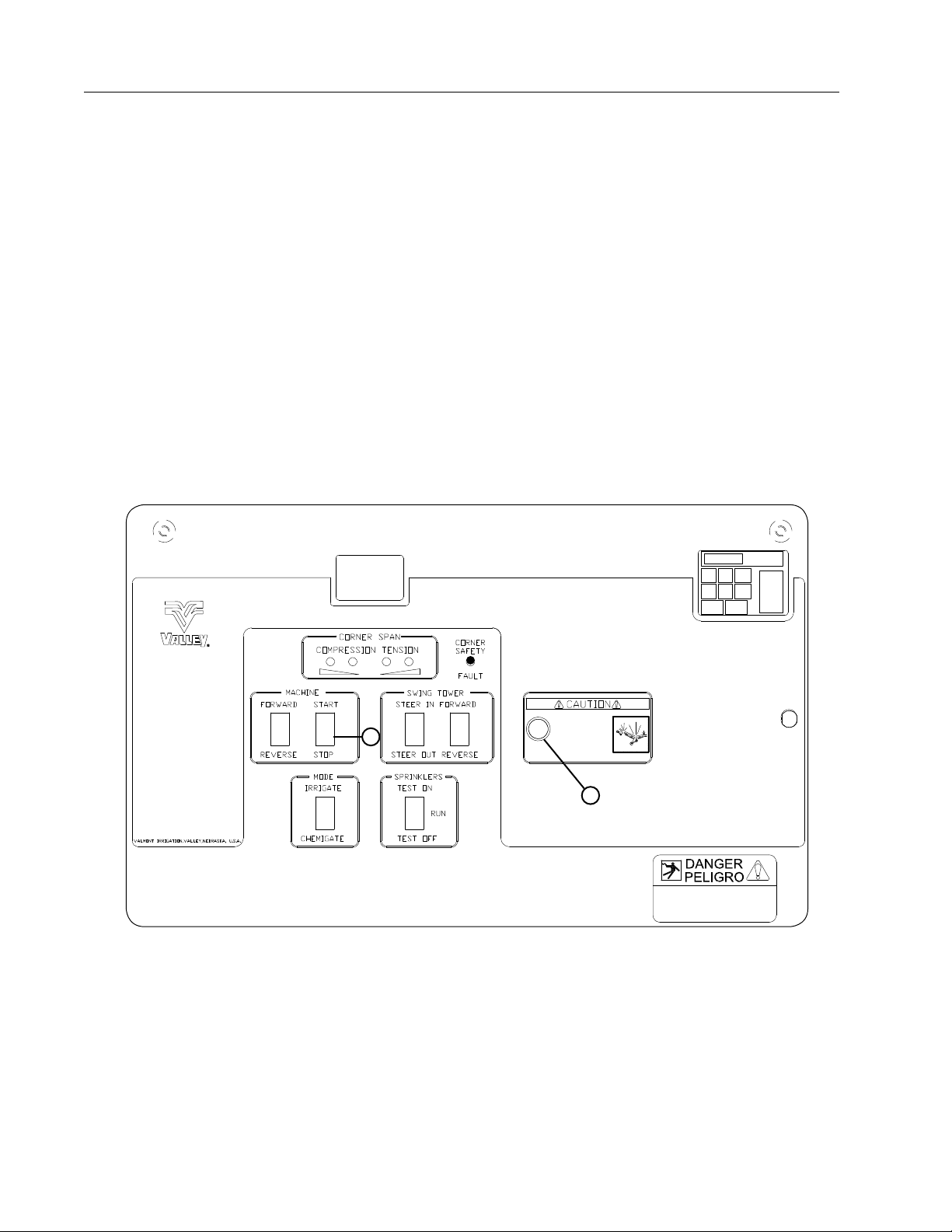
Troubleshooting
Situation #2, Er08 - Swing Tower Box Fault
• Corner Safety Fault Light is ON.
• Problem: SDU is OUTSIDE SDU tracks.
1. Verify Error Code and Indicator Light(s).
2. Rectify (fix) the cause of the shutdown. If the cause is unknown, contact your Valley Dealer for service.
3. Move the SDU back to the SDU tracks.
4. Press and hold STEERING OVERRIDE Button.
5. Press STEER IN/OUT switch to Steer In as required.
6. Press MACHINE Forward/Reverse rocker switch to appropriate direction. See Figure 84-1.
7. Press MACHINE Start/Stop to START. See Figure 84-1.
8. Once SDU in normal tracks, release STEERING OVERRIDE BUTTON. See Figure 84-1.
9. Operate the machine in the desired direction and monitor operation (Forward or Reverse).
10. Press MACHINE Start/Stop to STOP. See Figure 84-1.
11. Close and latch the outer door on the Operator Interface Panel.
12. Carefully climb down from the SDU and return to the pivot panel.
Er 08
2
1
Figure 84-1 1 . Steering Override Button
Situation #3, Er08 - Swing Tower Box Fault
• Corner Safety Fault Light is ON.
• Problem: SDU is IN SDU tracks.
The cause of Fault is more than likely related to the oscillator, buried wire, antenna, receiver or other guidance
electronics. A startup attempt at pivot can be performed. If this is unsuccessful, contact your Valley Dealer.
2. Machine Start/Stop Switch
84
Page 85
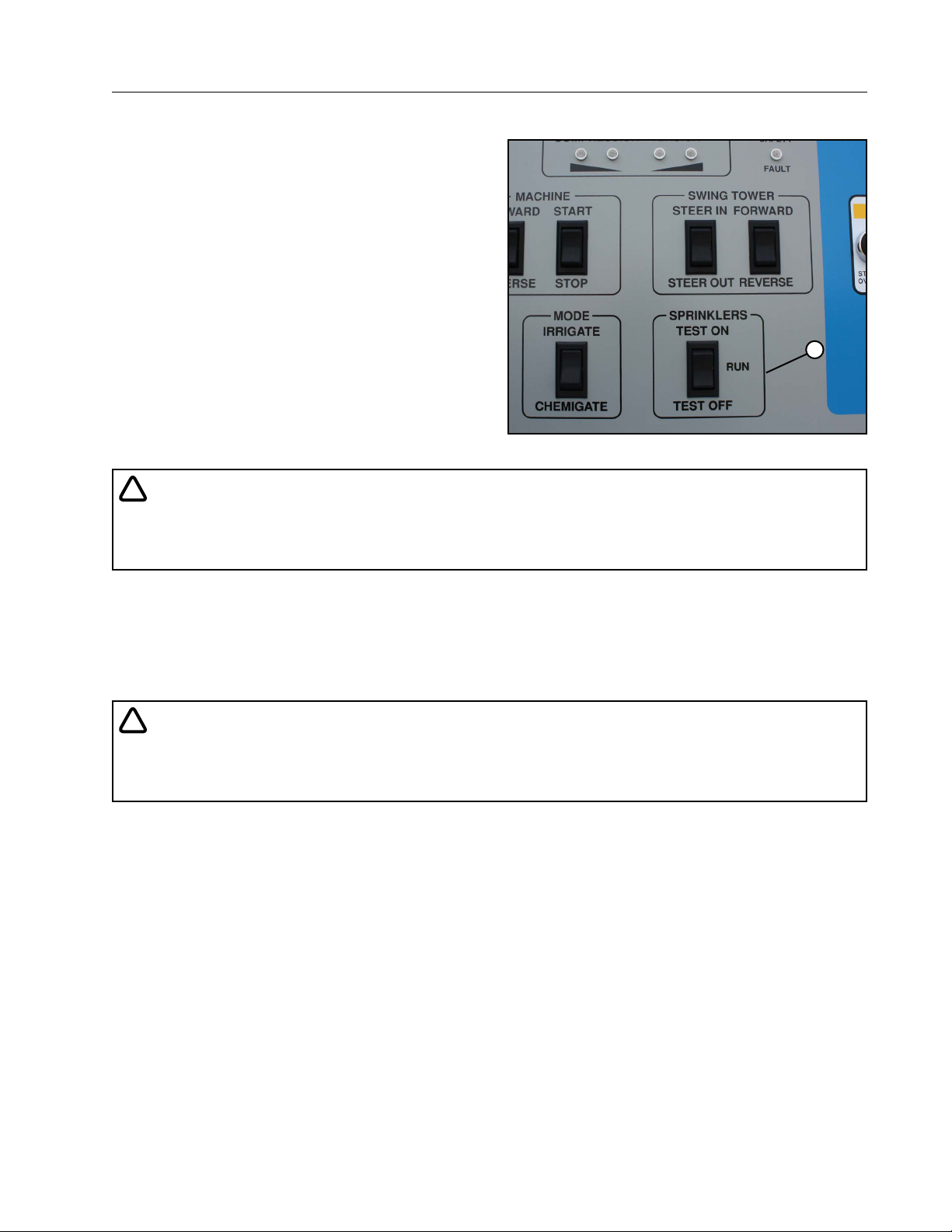
Troubleshooting
WARNING
Corner Sprinkler Test Procedure
The Sprinkler Test On/Off rocker switch allows the
operator to check the operation of the corner span
and overhang valve controlled sprinklers and end
gun. All sprinklers can be turned ON or all sprinklers
can be turned OFF to assure the electrical and hydraulic sprinkler control components are operating
properly. See Figure 85-1.
At the Pivot
Turn the main disconnect in the pivot panel ON.
1. Set the Service/Run switch to SERVICE (DO
NOT Start the machine).
2. Start the irrigation pump.
3. Enable the Auto-Reverse/Auto-Stop.
4. Proceed to the Operator Interface Panel on the
corner steerable drive unit.
!
CAUTION
• EXERCISE EXTREME CARE AS YOU ACCESS AND LEAVE THE OPERATOR PLATFORM ON THE
STEERABLE DRIVE UNIT. MUDDY FEET CAN BE VERY SLIPPERY ON THE ACCESS STEPS TO THE
OPERATOR PLATFORM.
Figure 85-1 1 . Sprinkler Test On/Off Switch
1
At the Steerable Drive Unit
1. At the Operator Interface Panel open the outer operator interface panel door.
2. Press the Machine Forward or Reverse rocker switch to select a direction of operation.
3. Press the Machine Start/Stop rocker switch to the START position. This will start the machine moving. As
soon as the Next-to-Last drive unit moves, the Over-watering Timer in the Next-to-Last drive unit will be
reset to its preset time.
!
• THE MACHINE WILL BEGIN TO MOVE. NEVER ATTEMPT TO ACCESS OR LEAVE THE OPERATOR
PLATFORM ON THE SDU WHILE THE MACHINE IS MOVING. ALWAYS PRESS THE MACHINE STOP
ROCKER SWITCH BEFORE LEAVING THE SDU.
4. Once the Next-to-Last Drive Unit moves, press the Machine Start/Stop switch to the STOP position.
5. Press the Sprinkler Test rocker switch to the desired mode; TEST ON or TEST OFF. Watch the LED to
monitor/determine the number of minutes selected/desired.
• The sprinklers and end gun on the corner arm will remain in the mode selected for 10 minutes for each
second the switch is held in the desired mode.
• To check the test time remaining, momentarily press the test switch in the same mode as originally selected.
• To increase the time in the mode selected, press and hold in the current mode.
• Remember, for each second the switch is held, the time will increase 10 minutes.
• To return to normal operation, momentarily press the test switch to the opposite test mode. The LED will
show “00”. If the test switch is held in the opposite mode for too long, the opposite mode will be activated.
• To change from one mode to the other, press the test switch to the opposite test mode and hold until the
desired time is shown on the LED.
To return to normal corner sprinkler operation, momentarily press the test switch to the opposite mode it is
currently in.
85
Page 86
Troubleshooting
WARNING
Corner Sprinkler Test Procedure
At the Steerable Drive Unit (Continued)
Center pivots are typically equipped with an Over-Watering Timer. The purpose of the Over-Watering Timer is to monitor movement of the machine. If the machine were not to move within a preset time on the Over-Watering Timer, the
Timer would open the safety circuit and shut the machine OFF. This assures the machine will not over-water should
an in-line malfunction occur.
Depending on the timer setting, the machine and pump may shut down before the Sprinkler Test is complete. The
machine and the pump can be kept running or restarted from the Operator Interface Panel by resetting the OverWatering Timer.
Resetting the Over-Watering Timer
At the Operator Interface Panel
1. Press the Machine Forward or Reverse rocker switch to select a direction of operation.
2. Press the Machine Start/Stop rocker switch to the START position. This will start the machine moving. As soon as
the Next-to-Last drive unit moves, the Over-Watering Timer will be reset to its preset time.
!
• THE MACHINE WILL BEGIN TO MOVE. NEVER ATTEMPT TO ACCESS OR LEAVE THE OPERATOR PLATFORM ON THE SDU WHILE THE MACHINE IS MOVING. ALWAYS PRESS THE MACHINE STOP ROCKER
SWITCH BEFORE LEAVING THE SDU.
3. Once the Next-to-Last Drive Unit moves, Press the Machine Start/Stop switch to the STOP position.
4. Continue the Sprinkler Test.
NOTE
• If the Sprinkler Test requires additional time to complete, It may be necessary to restart the machine. The
quickest way of resetting the timer is to restart the machine in the opposite direction It was originally
operated in.
5. Once the checks are complete, press the Sprinkler Test Switch to the appropriate mode until the LED shows
“OO”.
6. Press the MACHINE Start/Stop rocker switch to STOP.
NOTE
• The Machine Stop switch should have already been depressed (#3).
7. Close and latch the outer door on the Operator Interface Panel.
8. Carefully climb down from the SDU and return to the pivot panel.
At the Pivot Panel
1. Place the SERVICE/RUN switch in the RUN Position.
2. Turn power OFF or STOP the machine after flipping the switch to run to clear the STOP condition on the boards
before the pivot will move.
NOTE
• Failure to do so will prevent the LRDU from running. If the machine Is started from the pivot panel while
the Service/Run switch is in the SERVICE position, the pivot contactor will engage and hold In but the
LRDU will not move. Once the over-watering timer on the center pivot times out, the contactor will drop
out.
3. Start the machine in the desired direction and at the desired speed or turn the pivot panel disconnect switch to
the OFF position.
4. Close and latch the outer pivot panel door.
86
Page 87

Troubleshooting
Additional Application Worksheets
Percentage Timer/Application Depth Worksheet
Once the Application Rate in Inches per Day and the Inches per Revolution have been determined for the corner
machine, the following table can be filled out to provide a guide to the Hours per Revolution and the Inches
per Revolution at various percentage timer settings. Based on the Hours per Revolution and the Inches per
Revolution for your machine, fill out the worksheet and use as a Revolution Time and Application Depth guide.
PERCENTAGE TIMER/APPLICATION DEPTH SETTINGS
Hrs/Rev
at 100%
100%
90% ÷ .9 = ÷ .9 = 90%
80% ÷ .8 = ÷ .8 = 80%
70% ÷ .7 = ÷ .7 = 70%
60% ÷ .6 = ÷ .6 = 60%
50% ÷ .5 = ÷ .5 = 50%
40% ÷ .4 = ÷ .4 = 40%
30% ÷ .3 = ÷ .3 = 30%
20% ÷ .2 = ÷ .2 = 20%
Hrs/Rev Ins/Rev
at 100%
Ins/Cycle
10% ÷ .1 = ÷ .1 = 10%
5% ÷ .05 = ÷ .05 = 5%
VALLEY PRECISION CORNER
Machine # ______________ LOCATION _____________________ FIELD #_____________________
DLRDU _____________ FT CORNER ARM LENGTH _______ FT SPEED q STD q HI
TIRE SIZE _____________ PRESSURE REGULATORS Y N TS ______ FCC _______
87
Page 88

Troubleshooting
Additional Application Worksheets
Percentage Timer/Application Depth Worksheet
Once the Application Rate in Inches per Day and the Inches per Revolution have been determined for the corner
machine, the following table can be filled out to provide a guide to the Hours per Revolution and the Inches
per Revolution at various percentage timer settings. Based on the Hours per Revolution and the Inches per
Revolution for your machine, fill out the worksheet and use as a Revolution Time and Application Depth guide.
PERCENTAGE TIMER/APPLICATION DEPTH SETTINGS
Hrs/Rev
at 100%
100%
90% ÷ .9 = ÷ .9 = 90%
80% ÷ .8 = ÷ .8 = 80%
70% ÷ .7 = ÷ .7 = 70%
60% ÷ .6 = ÷ .6 = 60%
50% ÷ .5 = ÷ .5 = 50%
40% ÷ .4 = ÷ .4 = 40%
30% ÷ .3 = ÷ .3 = 30%
20% ÷ .2 = ÷ .2 = 20%
Hrs/Rev Ins/Rev
at 100%
Ins/Cycle
10% ÷ .1 = ÷ .1 = 10%
5% ÷ .05 = ÷ .05 = 5%
VALLEY PRECISION CORNER
Machine # ______________ LOCATION _____________________ FIELD #_____________________
DLRDU _____________ FT CORNER ARM LENGTH _______ FT SPEED q STD q HI
TIRE SIZE _____________ PRESSURE REGULATORS Y N TS ______ FCC _______
88
Page 89

Troubleshooting
Additional Application Worksheets
Percentage Timer/Application Depth Worksheet
Once the Application Rate in Inches per Day and the Inches per Revolution have been determined for the corner
machine, the following table can be filled out to provide a guide to the Hours per Revolution and the Inches
per Revolution at various percentage timer settings. Based on the Hours per Revolution and the Inches per
Revolution for your machine, fill out the worksheet and use as a Revolution Time and Application Depth guide.
PERCENTAGE TIMER/APPLICATION DEPTH SETTINGS
Hrs/Rev
at 100%
100%
90% ÷ .9 = ÷ .9 = 90%
80% ÷ .8 = ÷ .8 = 80%
70% ÷ .7 = ÷ .7 = 70%
60% ÷ .6 = ÷ .6 = 60%
50% ÷ .5 = ÷ .5 = 50%
40% ÷ .4 = ÷ .4 = 40%
30% ÷ .3 = ÷ .3 = 30%
Hrs/Rev Ins/Rev
at 100%
Ins/Cycle
20% ÷ .2 = ÷ .2 = 20%
10% ÷ .1 = ÷ .1 = 10%
5% ÷ .05 = ÷ .05 = 5%
VALLEY PRECISION CORNER
Machine # ______________ LOCATION _____________________ FIELD #_____________________
DLRDU _____________ FT CORNER ARM LENGTH _______ FT SPEED q STD q HI
TIRE SIZE _____________ PRESSURE REGULATORS Y N TS ______ FCC _______
89
Page 90

Troubleshooting
Troubleshooting List
The table below lists various problems that could occur along with their possible causes and corrective
actions.
PROBLEM POSSIBLE CAUSE OR CORRECTIVE ACTION
Machine has shut down or will not start. The pivot is out of alignment - see the Pivot Owners Manual.
Water deposits have caused the tower box alignment to bind up.
A drive unit is stuck. Fill the wheel track with dry soil to allow
movement.
A flat tire at the drive unit.
A failed drive unit U-joint.
Check the SDU for signs of motor or gearbox problems (failure,
burn out, or breakage).
Faulty LRDU drive systems.
Call your Valley Dealer.
SDU is out of its wheel track. Check the wheel track to see if the SDU is having difficulty climb-
ing over a steep soil ridge.
Check the mechanical steering motor or gearbox.
Faulty wheel gearbox motors.
Faulty antenna or guidance component.
Call your Valley dealer.
Sprinklers fail to come on or shut off. The plastic tubing is plugged or broken.
Plugged water filters.
A faulty solenoid coil - call your Valley dealer.
90
 Loading...