

Page 1

User Manual
GeoTrack - Speedy
(Automatic Vehicle Locator Terminal)
Document Version: 0.1A
Hardware Version: 0.81
Page 2

GeoTrack Speedy User Manual
Registered Trademark
GeoTrack® is a registered mark of UTOFOS WIRELESS. CO., LTD.
Notice
The information contained in this documentation is subject to change without notice.
UTOFOS WIRELESS reserves the right to make changes in content without obligation on the
part of UTOFOS WIRELESS to provide notification of such change. UTOFOS WIRELESS may
make improvements or changes in the product(s) and/or the program(s) described in this
documentation at any time. UTOFOS WIRELESS expressly disclaims all responsibility and
liability for any damage or loss arousing out of other use than as specified in this documentation.
The product(s) is owned by UTOFOS WIRELESS and is protected by patent and copyright laws.
No part of the product (including but not limited to idea(s) for the product, the manual, etc.) may
be reproduced in any form or by any means or used to make any derivative work (such as
translation, transformation, or adaptation) without written permission from UTOFOS WIRELESS.
Print Information
Release 0.1A (March, 2007)
Copyright
© 2007 UTOFOS WIRELESS CO., LTD. All rights reserved.
Printed in the Republic of Korea
UTOFOS WIRELESS CO., LTD.
152-848, #6FI, Kolon Science Valley 187-10, Guro 3 Dong, Guro Gu, Seoul, Korea
Tel : +82-2-2025-0501
Fax : +82-2-2025-0505
E-mail:
Website:
http://www.utofoswireless.com
CONFIDENTIAL 2 Page Version 0.1A
Page 3

GeoTrack Speedy User Manual
REVISION HISTORY
Version Date Name Reason
0.1A Mar, 2007 Geonchul, Lee Initial Draft
CONFIDENTIAL 3 Page Version 0.1A
Page 4

GeoTrack Speedy User Manual
Table of Contents
1. Introduction..............................................................................................................................5
2. External Appearance and Interface....................................................................................... 6
2.1 Front View ………………………………………………………………………………………6
2.2 Side View ……………………………………………………………………………………….6
2.3 POWER / GSM / GPS LEDs............................................................................................ 7
2.4 Power Connector Interface .............................................................................................. 7
2.5 SIM Card Interface ........................................................................................................... 7
2.6 MIC(Microphone) Interface .............................................................................................. 7
2.7 DM/GPS(JTAG/External GPS) Interface.......................................................................... 8
2.8 OPTION(UDM/AddMe) Interface ..................................................................................... 8
3. Specification..........................................................................................................................10
3.1 General Specification ..................................................................................................... 10
3.2 GSM/GPRS General Specification................................................................................. 10
3.3 GSM/GPRS Air Interface Specification (Test Temperature: 25℃) ................................. 11
3.4 GPS General Specification ............................................................................................ 12
3.5 GPS AC Characteristics Specification (Test Temperature: 25℃)................................... 12
4. Package.................................................................................................................................. 13
5. Installation..............................................................................................................................14
5.1 Hardware Installation ..................................................................................................... 14
CONFIDENTIAL 4 Page Version 0.1A
Page 5
GeoTrack Speedy User Manual
1. Introduction
This manual contains important technical information and instructions for the safe and reliable
use of GeoTrack Speedy. Please be sure to read this manual before installing and starting up
the device.
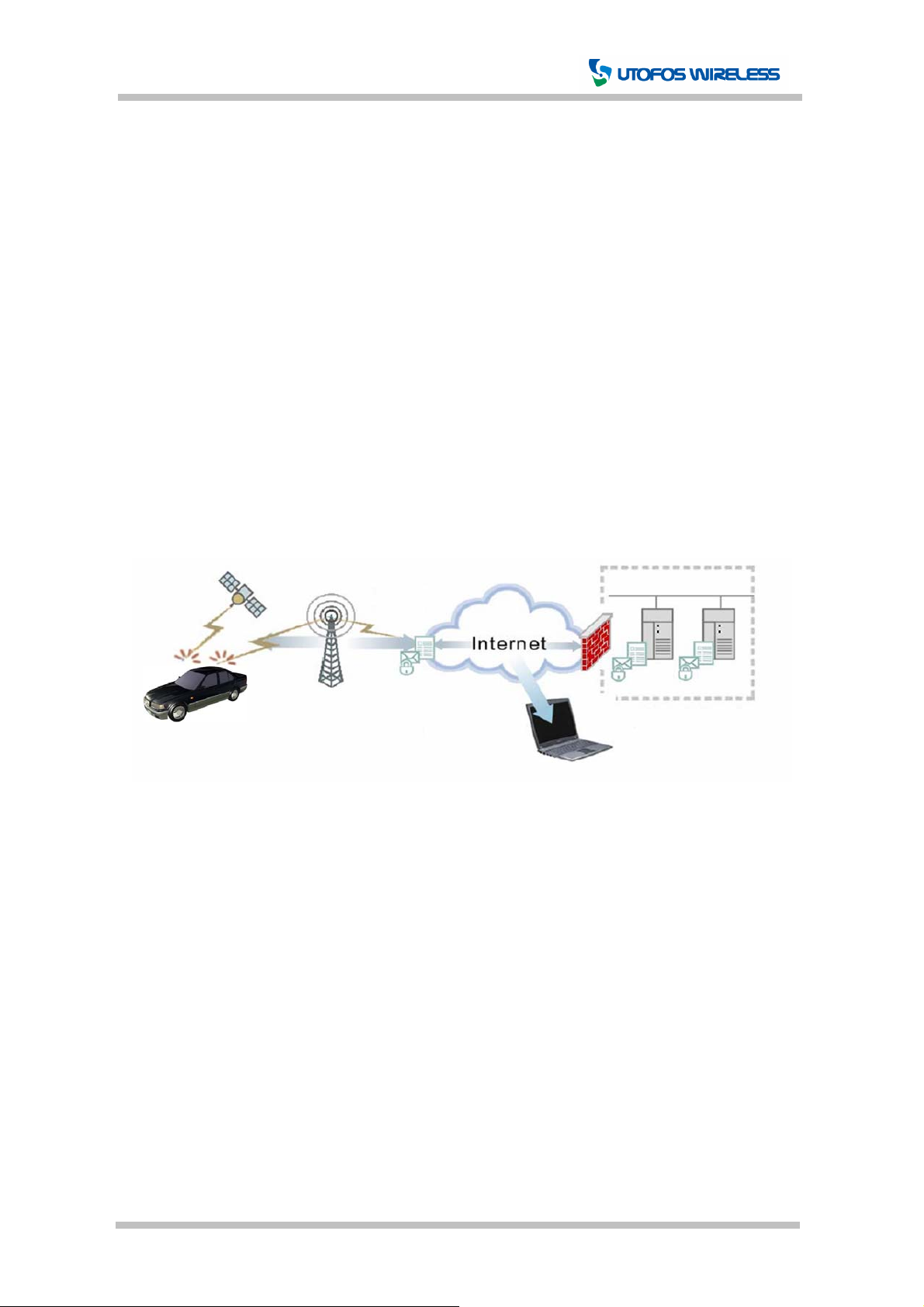
GeoTrack Speedy is a compact AVL (Automatic Vehicle Locator) terminal with GPS and GSM
integrated in one unit. It enables you to remotely track the position of your vehicle in real time
from your computer or cell phone via GPRS or SMS. The details on its features are described
further in this manual.
Hardware installation is simple three steps; GeoTrack does not have external GPS or GSM
antenna attachments. Once it is installed, you do not need to collect the device for recharging
the battery or changing configurations. Most of the functions can be performed over the air
such as turning the GPS on / off and GPS cold start.
[Figure 1-1] System Configuration and Data Flow
CONFIDENTIAL 5 Page Version 0.1A
Page 6
GeoTrack Speedy User Manual
t
2. External Appearance and Interface
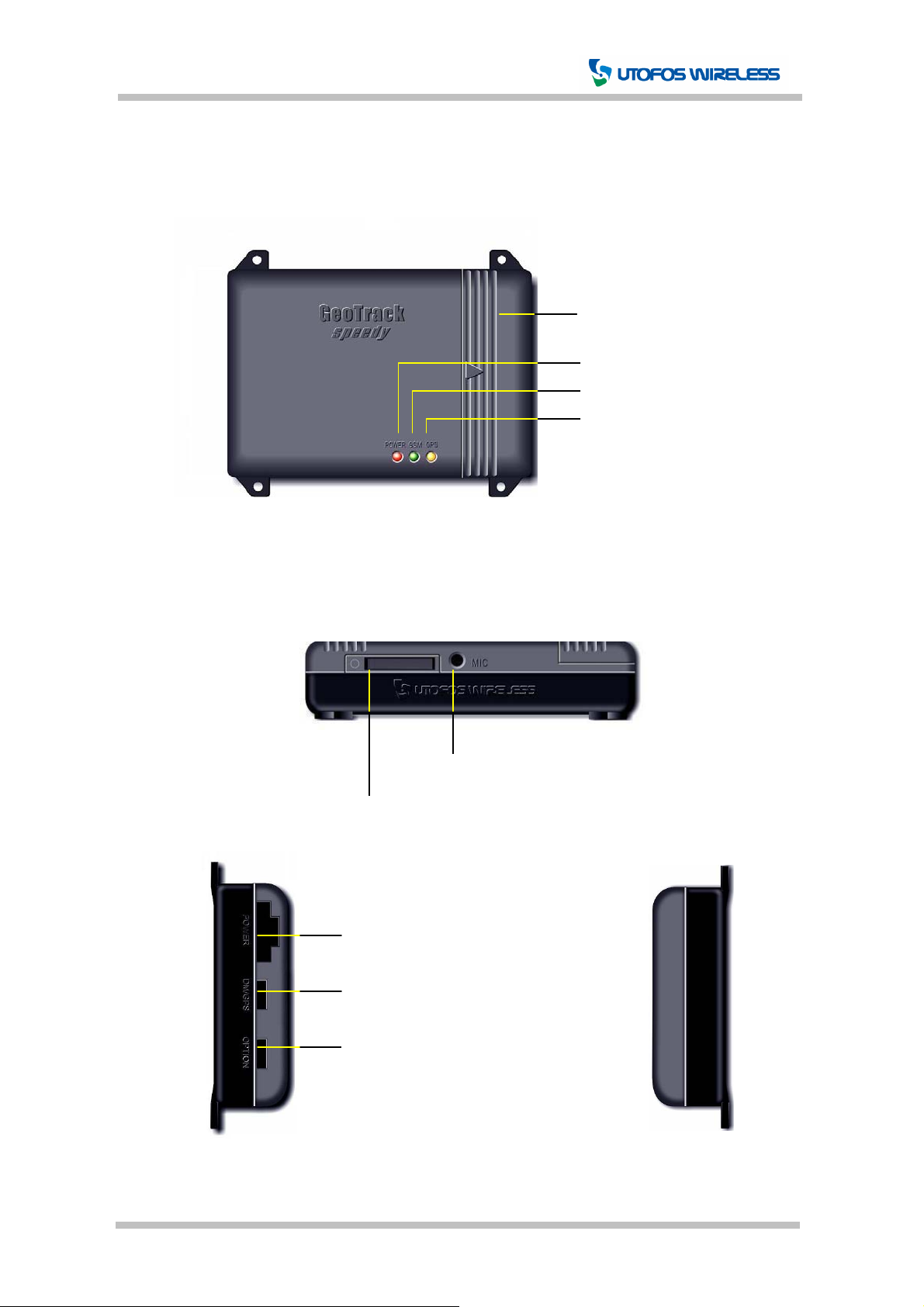
2.1 Front View
2.2 Side View
Backup Battery Cover
Speedy Status LED
GSM/GPRS Status LED
GPS Status LED
[Figure 2-1] Speedy Front View
SIM Card Holder
Power Connector
JTAG / External GPS Connection Por
UDM / AddMe Port
[Figure 2-2] Speedy Side View
Microphone Jack
CONFIDENTIAL 6 Page Version 0.1A
Page 7
GeoTrack Speedy User Manual
2.3 POWER / GSM / GPS LEDs
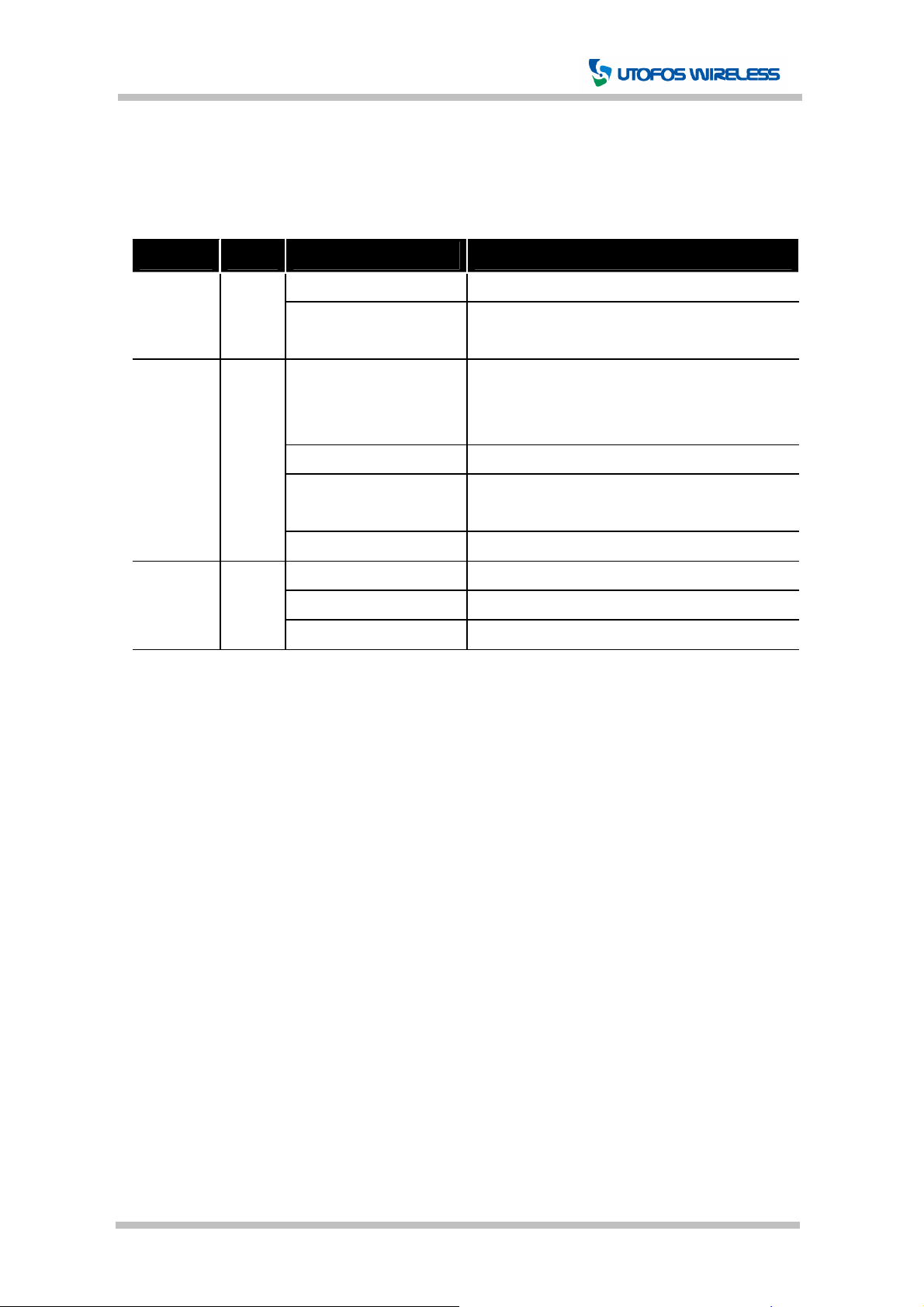
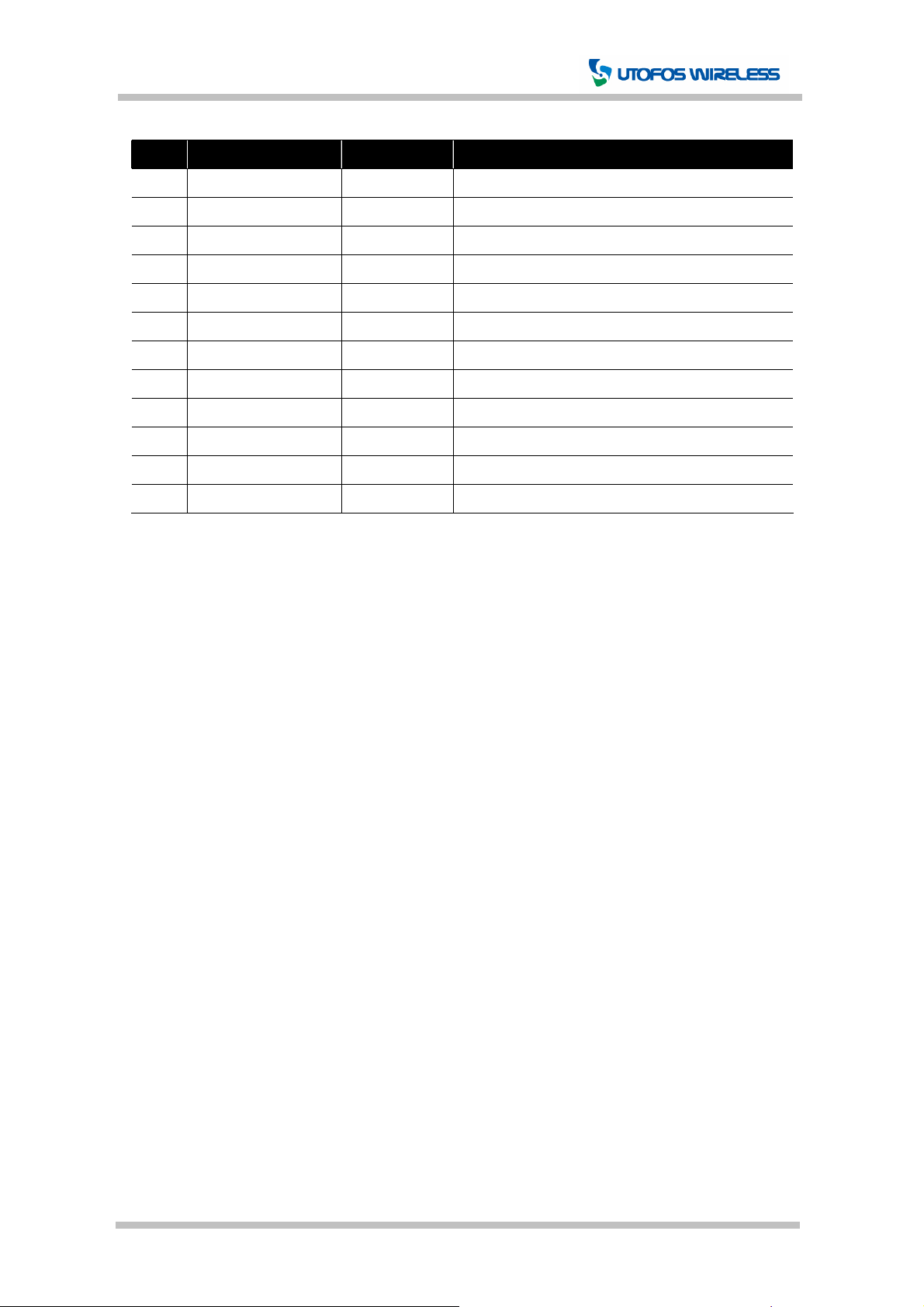
Speedy provides 3 LEDs to allow the user/administrator to see how the speedy operates.
For more details on the LEDs, please see the following [Table 2-1].
LED Color Status Explanation
0.1sec on / 0.9sec off Normal operation
POWER Red
GSM Green
GPS Yellow
0.1sec on / 0.1sec off
0.6sec on / 0.6sec off
75msec on / 3sec off Logged to GSM network
75msec on / 75msec off
75msec on / 3sec off
Permanently On Voice call
0.1sec on / 0.1sec off Position Fix - Not available or invalid
0.1sec on / 0.9sec off Position Fix - Valid
Permanently Off GPS off
2.4 Power Connector Interface
Error detected through self-diagnosis and
speedy in operation
No SIM card inserted or PIN entered, network
search in progress, user authentication in
progress, or network login in progress
GPRS contexts activated
(Gateway packet communication)
[Table 2-1] Speedy LEDs
Refer to Chapter 6. Installation - Step.3
2.5 SIM Card Interface
Refer to Chapter 6. Installation - Step.1
2.6 MIC(Microphone) Interface
Φ2.6, Mono audio 3 pole microphone input
CONFIDENTIAL 7 Page Version 0.1A
Page 8
GeoTrack Speedy User Manual
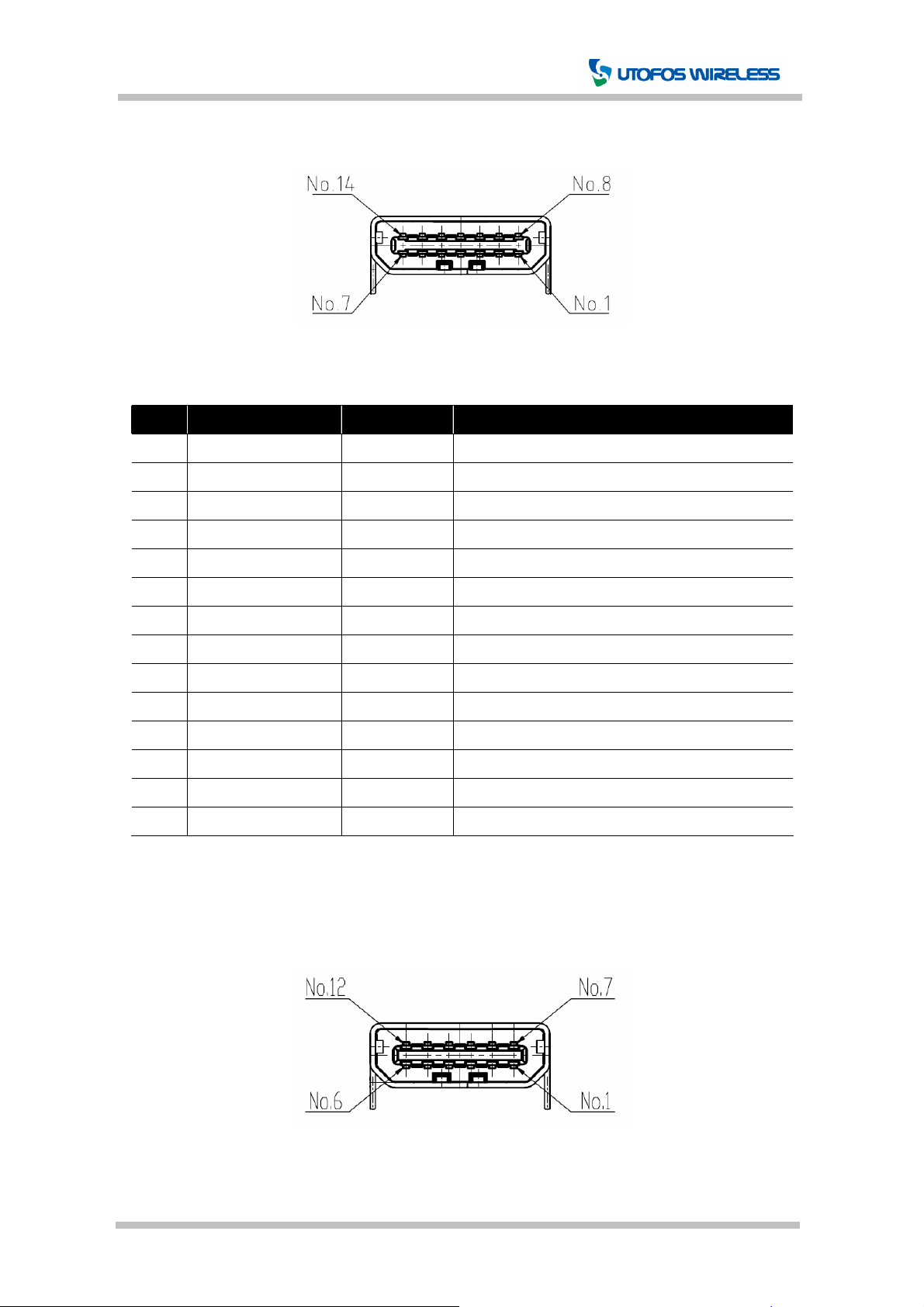
2.7 DM/GPS(JTAG/External GPS) Interface
[Figure 2-3] DM/GPS Interface Connector
Pin Signal Name Input/Output Function
1 JTAG_TDO O JTAG Serial data out
2 JTAG_TDI I JTAG Serial data in
3 NC - Not used
4 JTAG_TCK I JTAG Clock
5 NC - Not used
6 GPS_ENB O GPS Enable
7 VDD - +5VDC
8 GPS_TXD I GPS Serial data out
9 GPS_RXD O GPS Serial data in
10 GND - Ground
11 GPS_BOOT O GPS Boot select
12 JTAG_TMS I JTAG Mode select
13 RESET I Reset
14 BOOT I Boot Select
[Table 2-2] DM/GPS Interface
2.8 OPTION(UDM/AddMe) Interface
[Figure 2-4] OPTION Interface Connector
CONFIDENTIAL 8 Page Version 0.1A
Page 9
GeoTrack Speedy User Manual
Pin Signal Name Input/Output Function
1 GND - Ground
2 DOOR_LOCK O Door lock control
3 DOOR_UNLOCK O Door unlock control
4 FUEL_CUT O Fuel-cut control
5 HORN O Horn control
6 EMER_LAMP O Emergency lamp control
7 NC - Not used
8 UDM_SEL I UDM Select
9 UDM_RXD O UDM Serial data in
10 UDM_TXD I UDM Serial data out
11 VDD - +5VDC
12 VDD - +5VDC
[Table 2-3] OPTION Interface
CONFIDENTIAL 9 Page Version 0.1A
Page 10

GeoTrack Speedy User Manual
3. Specification
3.1 General Specification
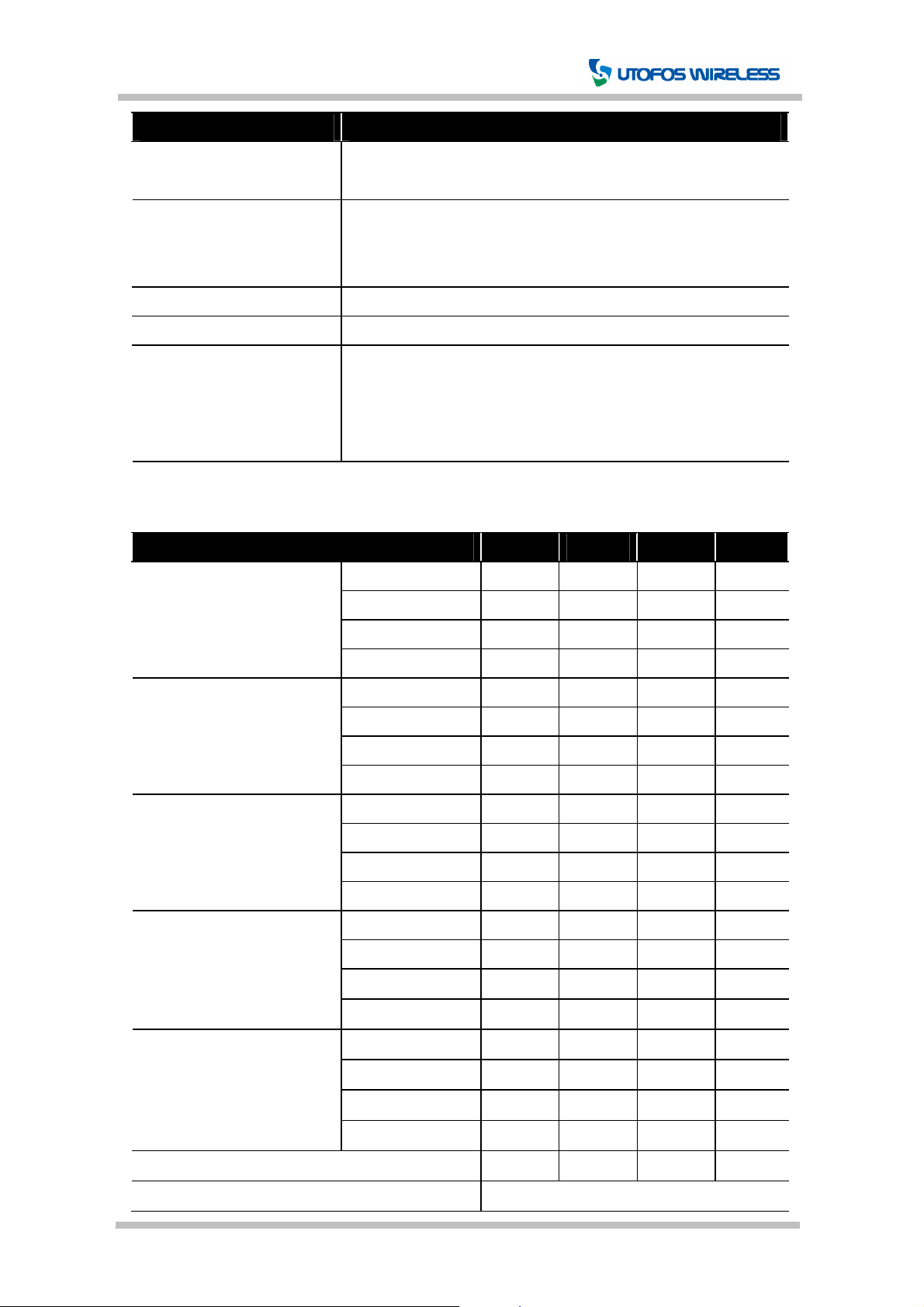
Item Description Comments
900/1800/1900: GSM 900 / 1800 / 1900MHz Wireless Network
(GSM/GPRS)
GPS SiRF III – 20CH, L1 Freq, C/A Code
Panic Receiver 315MHz, FSK, > -100 dBm Optional
Operating Voltage +10 ~ +36VDC
Backup Battery 4.2V(Maximum) / 700mAh Li-ion Optional
UDM Port RS-232 Cable Optional
Operating Temperature -20 ℃ ~ +55℃
Storage Temperature -40℃ ~ +85℃
Size 91.0mm X 62.0mm X 20.5mm
GSM/GPRS Antenna Intenna Type(Within)
GPS Antenna Ceramic Patch Type(Within)
Approvals
RoHS All hardware components are fully compliant
850/1800/1900: GSM 850 / 1800 / 1900MHz
g w/o Battery Weight
g w/ Battery
with the EU RoHS Directive
3.2 GSM/GPRS General Specification
Item Specification
Frequency Bands
GSM Class Small GSM
Data – GPRS
900/1800/1900: EGSM 900, GSM 1800, GSM 1900MHz
850/1800/1900: GSM 850, GSM 1800, GSM 1900MHz
Compliant to GSM phase 2/2+
Class 4 (2W) at GSM 850 and EGSM 900 Transmit Power
Class 1 (1W) at GSM 1800 and GSM 1900
GPRS multi-slot class 10 GPRS Connectivity
GPRS mobile station class B
GPRS data downlink transfer: max. 85.6kbps
GPRS data uplink transfer: max. 42.8kbps
Coding scheme CS-1, CS-2, CS-3 and CS-4
PBCCH support
CONFIDENTIAL 10 Page Version 0.1A
Page 11
GeoTrack Speedy User Manual
Item Specification
Transmission rates: 2.4, 4.8, 9.6, 14.4kbps, V.110 Data – CSD
USSD support
SMS
Point-to-point MT and MO
SMS Cell broadcast
Text and PDU mode
FAX Group 3: Class 1, Class 2
SIM interface Support SIM card: 3V
Audio
Triple rate codec for HR, FR and EFR
Adaptive multi-rate AMR
Echo cancellation
Noise reduction
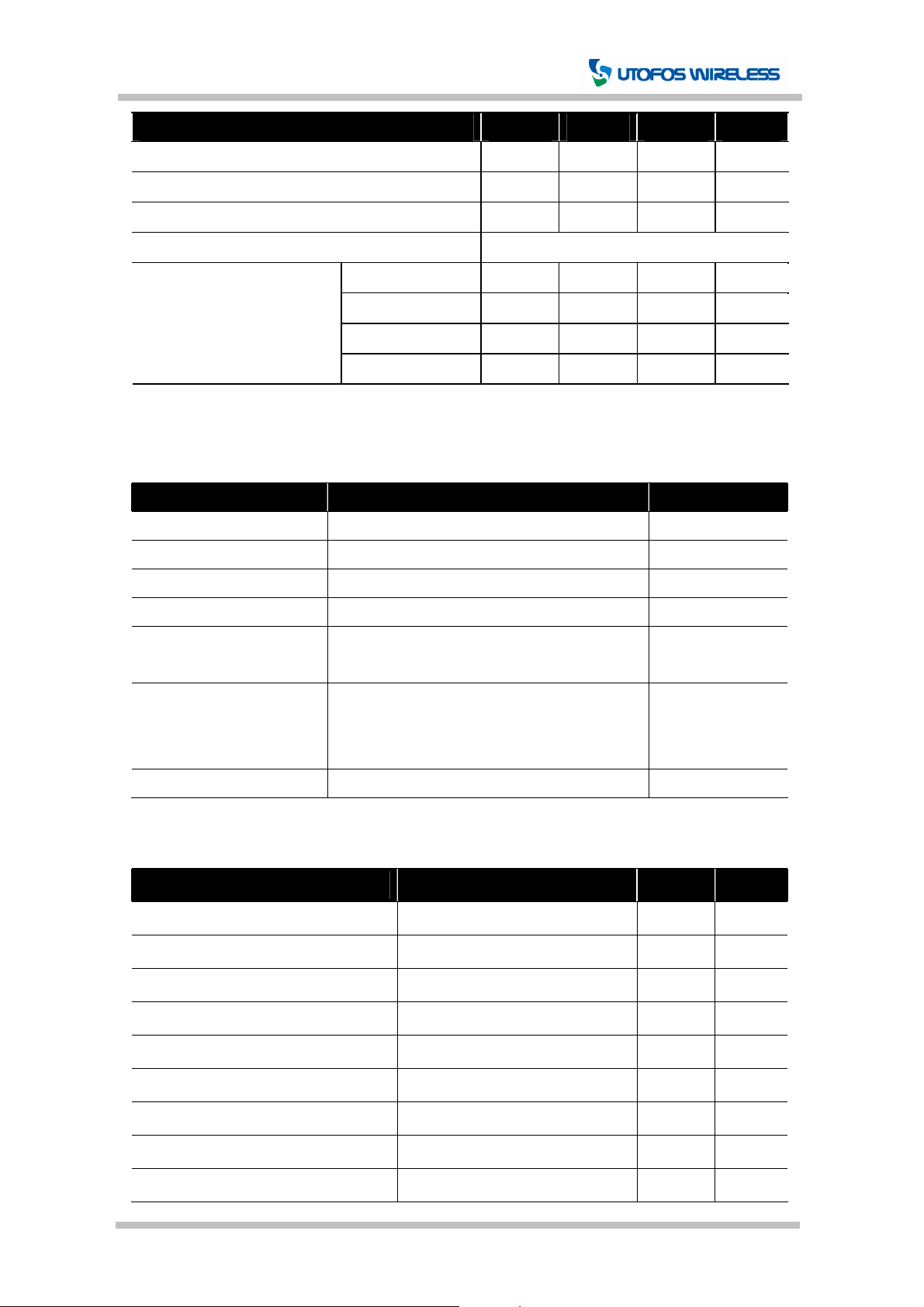
3.3 GSM/GPRS Air Interface Specification (Test Temperature: 25℃)
Item Min Typ Max Unit
Frequency Range
Uplink (MS -> BTS)
Frequency Range
Downlink (BTS -> MS)
GSM 850
EGSM 900
3)
4)
GSM 1800 1710 1785 MHz
GSM 1900 1850 1910 MHz
GSM 850
EGSM 900
3)
4)
824 849 MHz
880 915 MHz
869 894 MHz
925 960 MHz
GSM 1800 1805 1880 MHz
GSM 1900 1930 1990 MHz
RF Power @ ARP
with 50Ω Load
GSM 850
EGSM 900
GSM 1800
3)
1) 4)
2)
31 33 35 dBm
31 33 35 dBm
28 30 32 dBm
GSM 1900 28 30 32 dBm
Number of Carries
GSM 850
EGSM 900
3)
4)
124
174
GSM 1800 374
GSM 1900 299
Duplex Spacing
GSM 850
EGSM 900
3)
4)
45 MHz
45 MHz
GSM 1800 95 MHz
GSM 1900 80 MHz
Carries Spacing 200 KHz
Multiplex, Duplex TDMA/FDMA, FDD
CONFIDENTIAL 11 Page Version 0.1A
Page 12
GeoTrack Speedy User Manual
Item Min Typ Max Unit
Time Slots per TDMA Frame 8
Frame Duration 4.615 ms
Time Slot Duration 577 us
Modulation GMSK
Receiver Input Sensitivity
@ ARP
BER Class II < 2.4%
GSM 850
EGSM 900
GSM 1800 -102 -106 dBm
3)
4)
-102 -107 dBm
-102 -107 dBm
GSM 1900 -102 -105.5 dBm
1)
Power Control Level PCL 5, 2) Power Control Level PCL 0, 3) 850 Only, 4) 900 Only
3.4 GPS General Specification
Item Specification Comments
Receiver Type L1 Frequency, C/A Code, 20-Channel
Max. up-date rate 1 sec
Accuracy (SA off) Position < 10m 3DRMS -126 dBm
3D Tracking Sensitivity -156dBm at receiver input(typical)
Operational Limits Altitude < 18,000m (60,000ft)
Velocity < 515m/s (1,000knots)
Time To First Fix
Cold start : 60sec(typical) -126 dBm
Warm start : 38sec(typical) -126 dBm
Hot start : < 8 sec(typical) -126 dBm
Protocols UTOFOS, 9600bps
3.5 GPS AC Characteristics Specification (Test Temperature: 25℃)
Parameter Condition Typ Unit
Tracking Sensitivity (C/N) 3D (C/N avg. 13dBHz) -156 dBm
Re-acquisition Sensitivity (C/N) 3D (C/N avg. 16dBHz) -153 dBm
Cold start Sensitivity (C/N) 3D (SV 9EA in view) -135 dBm
Cold start time (TTFF) -126 dBm(2D) (SV 9EA) 60 sec
Hot start time -126 dBm(2D) (SV 9EA) 1 sec
Re-acquisition time (5 sec) -126 dBm(2D) (SV 9EA) 3 sec
Re-acquisition time (60 sec) -126 dBm(2D) (SV 9EA) 3 sec
Position error (Latitude, Longitude) -126 dBm (SV 9EA in view) 15 m
Position error (Elevation) -126 dBm (SV 9EA in view) 50 m
CONFIDENTIAL 12 Page Version 0.1A
Page 13
GeoTrack Speedy User Manual
4. Package
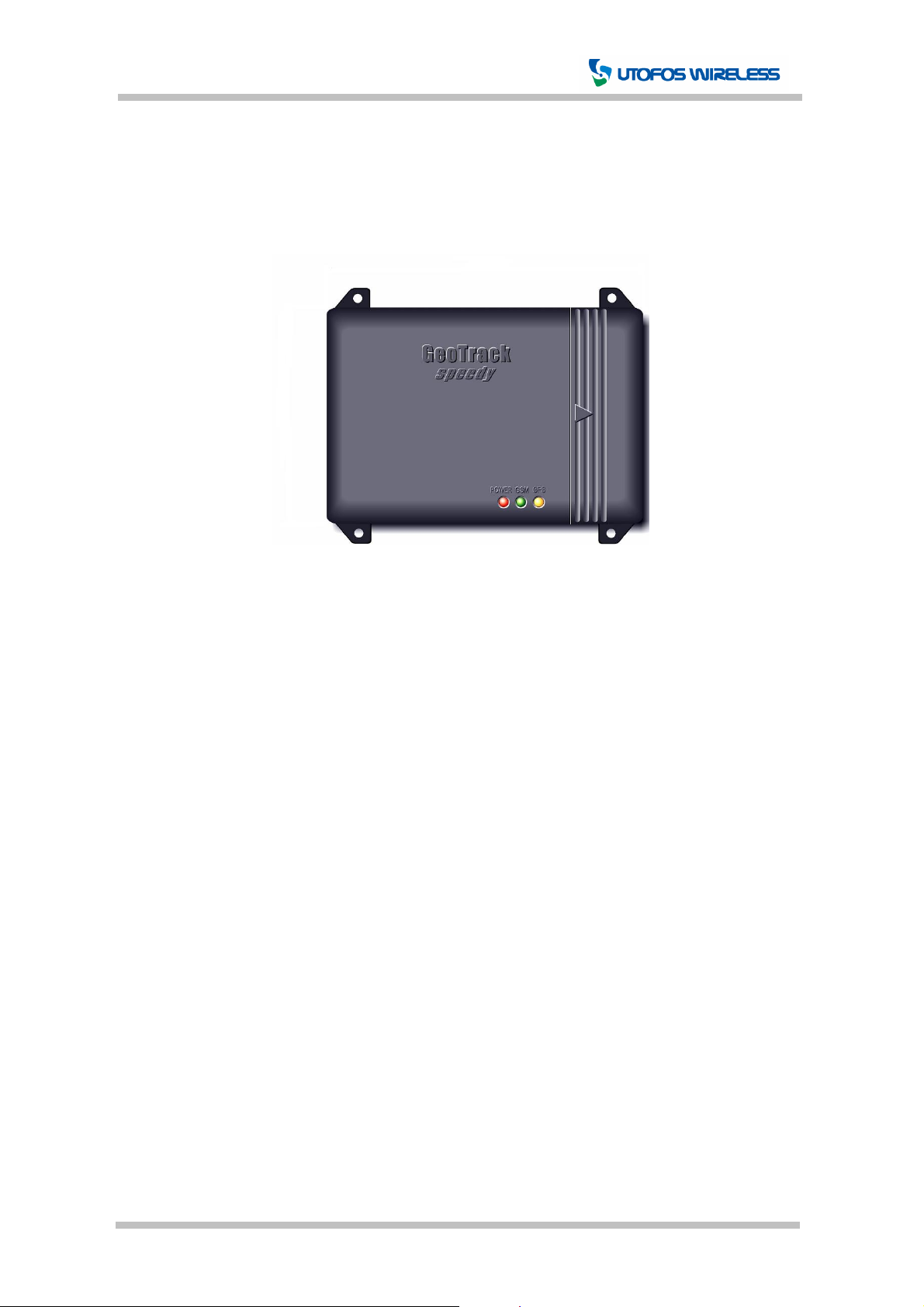
This product consists of:
Main unit, Power cable, Microphone (Optional), RS-232C Serial Cable (Optional), Backup
battery (Optional)
[Figure 4-1] Main Unit
CONFIDENTIAL 13 Page Version 0.1A
Page 14
GeoTrack Speedy User Manual
5. Installation
5.1 Hardware Installation
Step 1.
1. Eject the SIM holder by pushing the eject button with a pointed object.
2. Place the SIM card on the SIM holder.
3. Insert the SIM holder back into the SIM socket.
Step 2.
1. Open the battery cover by pressing down the triangle mark on the cover and pushing to
the direction the triangle is pointing.
2. Insert the battery and fix the connector into the slot.
Step 3.
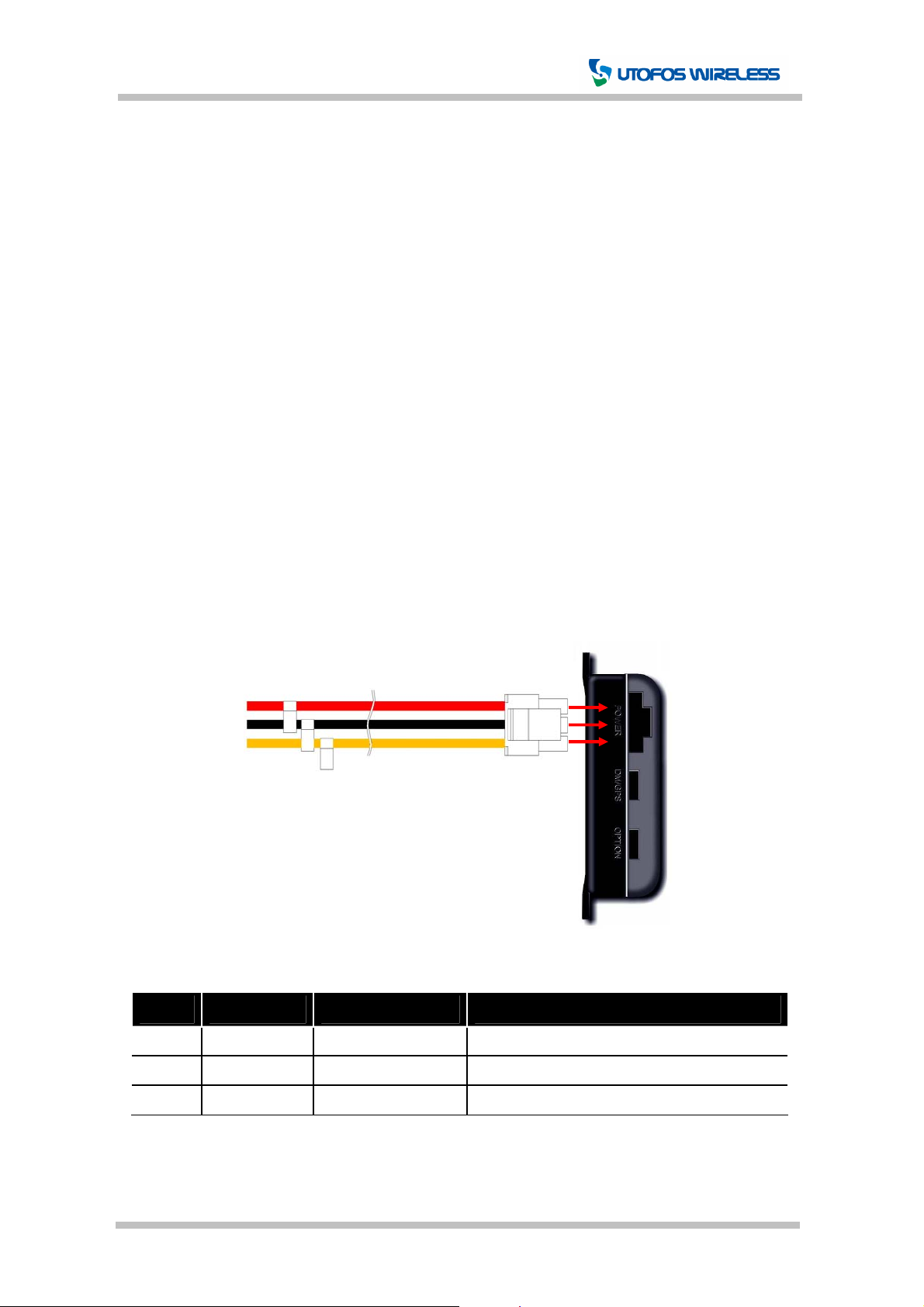
1. Plug the 3-pin-connector of the main power cable into the Power Socket on GeoTrack.
(See figure below)
2. The power cable consists of 3 wires. Connect the red wire to the car battery +, black
wire to car battery -, and orange wire to ignition switch.
①
②
③
[Figure 5-1] Power Cable Connection
Pin Color Description Function
1 RED Power + +10 ~ +36VDC
2 BLACK Ground - Ground
3 ORANGE Ignition Power Ignition Switch (Engine On Signal)
[Table 6-1] Power Interface
CONFIDENTIAL 14 Page Version 0.1A
Page 15
GeoTrack Speedy User Manual
Attention:
● The SIM card PIN code should be disabled before inserting the card.
● The SIM card must be inserted prior to power connection.
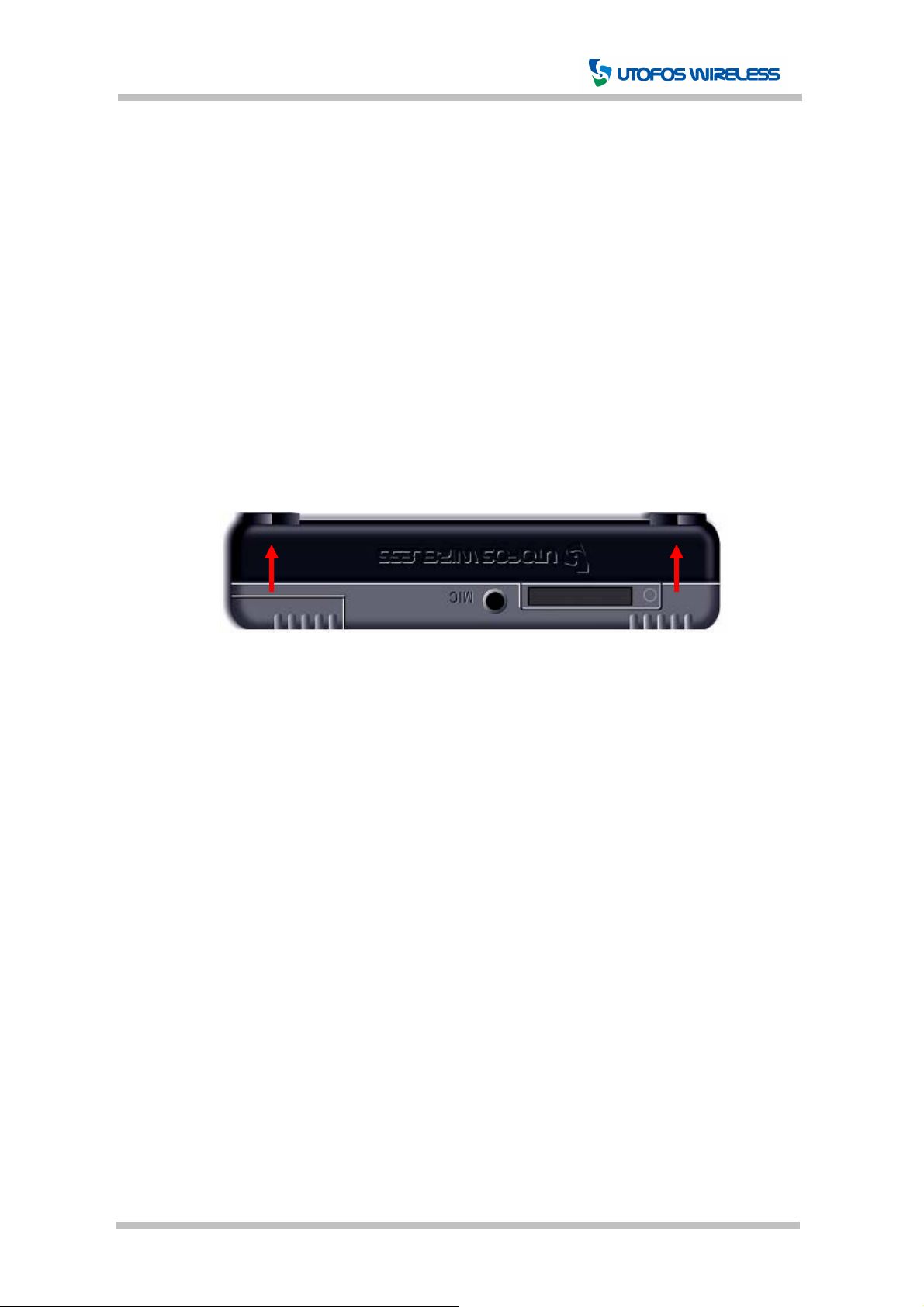
● When mounting, make sure the top & bottom are installed as pictured below. The
GPS antenna is mounted on the TOP side of GeoTrack Speedy, so the device must
be kept upright to receive clear signal from the sky.
● GeoTrack starts operation when either the backup battery or the main car battery is
connected. Either one of the power sources may be enough for the unit to operate.
If both batteries are connected, the car battery will be used as the main power
source and the portable battery will be kept charged for backup usage. When the
device loses connection with the main battery, the backup battery will serve as an
alternative power supply.
[Figure 5-2] Mounting Direction
Screw Screw
CONFIDENTIAL 15 Page Version 0.1A
 Loading...