

Page 1

EUT Type: RF Receiver
FCC ID.: OZ5URCRFX250I
Test Report No.: GETEC-E3-07-029
FCC Part 15 Subpart B
APPENDIX I
: USER’S MANUAL
Page 2
RFX-250i Installation Manual
Optimizing Narrow Band Reception
with the MRF-350i
OCE-0033F(RFX-250i)_REV01 2007.3.28 10:2 AM 페이지1
Page 3

Page 2
RFX-250i INSTALLATION MANUAL
Page 1
RFX-250i INSTALLATION MANUAL
Overview - Compatibility
The RFX-250i is a 433MHz RF receiver. It connects to an MRF-350,
MRF-350i, MSC-400 or an MSC-400i. It is not compatible with all
URC remote controls. It is only compatible with “I” series remote
controls, which transmit at 433MHz.
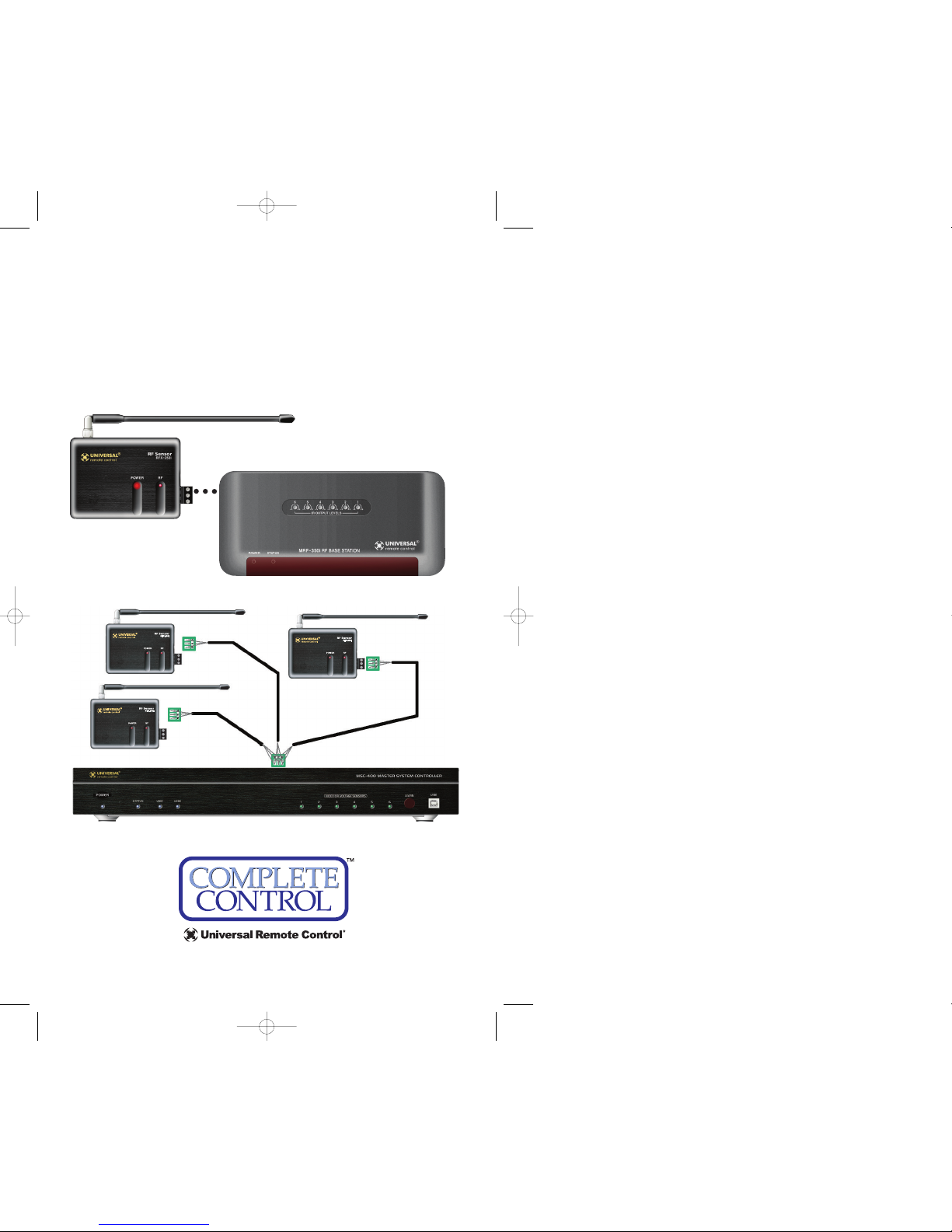
Connections
Optimizing Range and Reliability
1. Power on all AV components, dim all dimmers to 50% and power on
anything that may create RF (particularly devices with high speed
microprocessors or hard drives). Observe the RF LED of the RFX-250i by
cupping your hand over it. If it is glowing or flickering you must relocate the RFX-250i. If you cannot relocate the RFX-250i,
try removing its antenna.
2. Once you have found a location that is absolutely clean
with everything on, test to see if the range is adequate
and that macro reliability is perfect. Start with the
antenna angle set to 45 degrees and positioned so that
the long side of the antenna is facing the customer’s
favorite seating position.
3. When testing, set both the remote and the MRF/MSC to the same
VALID RFID#. Keep in mind that zero (0) is not a valid RFID#. Watch
the STATUS LED on MRF/MSC - it should light every time you press a
button on the remote. This will tell you that the signal was received
and understood. Ignore the RF LED on the RFX-250i (it only indicates
that a signal was received, not that it was understood).
4. If the range is inadequate, you may extend wire to any area that is not
giving good results and place an additional RFX-250i in that area. Up to
three RFX-250i’s can be connected to each MRF/MSC.
NOTE: The RFX-250i is ONLY compatible with additional RFX-250is. You
cannot mix RFX-250is in a system with RFX-250is.
When the RFX-250i can be placed within 10 feet
of the MRF/MSC unit, you can utilize the cable
with 3.5 mm plugs on both ends. When you
need a longer wire or are connecting up to
three RFX-250i’s, use a cable with a minimum of
three conductors. If you use CAT 5,utilize two
conductors each from two of the twisted pairs
for DATA and two from the other twisted pairs
for 5V. Use all four of the other conductors
twisted in with each pair for GND.This provides
better shielding and conductivity for long runs.
Connect ONE (only)
of either of the RFX250i’s RFOUTconnectors to ONE (only) of
either of the RF IN
connectors on the
MRF or the MSC.
Once the RFX-250i is correctly connected, the POWER LED lights.
If the RF LED lights, the RFX-250i must
be moved to a new mounting location. It
is receiving in-band RF INTERFERENCE.
Suggested antenna
angle.
OCE-0033F(RFX-250i)_REV01 2007.3.28 10:2 AM 페이지1
Page 4

500 Mamaroneck Avenue, Harrison, NY 10528
Phone: (914) 835-4484 Fax: (914) 835-4532
www
.universalremote.com
This equipment has been tested and found to comply with the limits for a Class B digital device, pursuant to part 15 of the FCC
Rules. These limits are designed to provide reasonable protection
against harmful interference in a residential installation. This equipment generates, uses and can radiate radio frequency energy and,
if not installed and used in accordance with the instructions, may
cause harmful interference to radio communications.
However, there is no guarantee that interference will not occur in a
particular installation. If this equipment does cause harmful interference to radio or television reception, which can be determined
by turning the equipment off and on, the user is encouraged to try
to correct the interference by one more of the following measures:
Reorient or relocate the receiving antenna.
Increase the separation between the equipment and receiver.
Connect the equipment into an outlet on a circuit different
from that to which the receiver is connected.
Consult the dealer or an experienced radio/TV technician
for help.
Warning
Changes or modifications not expressly approved by the manufacturer
could void the user's authority to operate the equipment.
Note : The manufacturer is not responsible for any Radio or TV interference caused by unauthorized modifications to this equipment.
Such modifications could void the user's authority to operate the
equipment.
Information To The User
OCE-0033F(RFX-250i)_REV01 2007.3.28 10:2 AM 페이지3
 Loading...