

Page 1
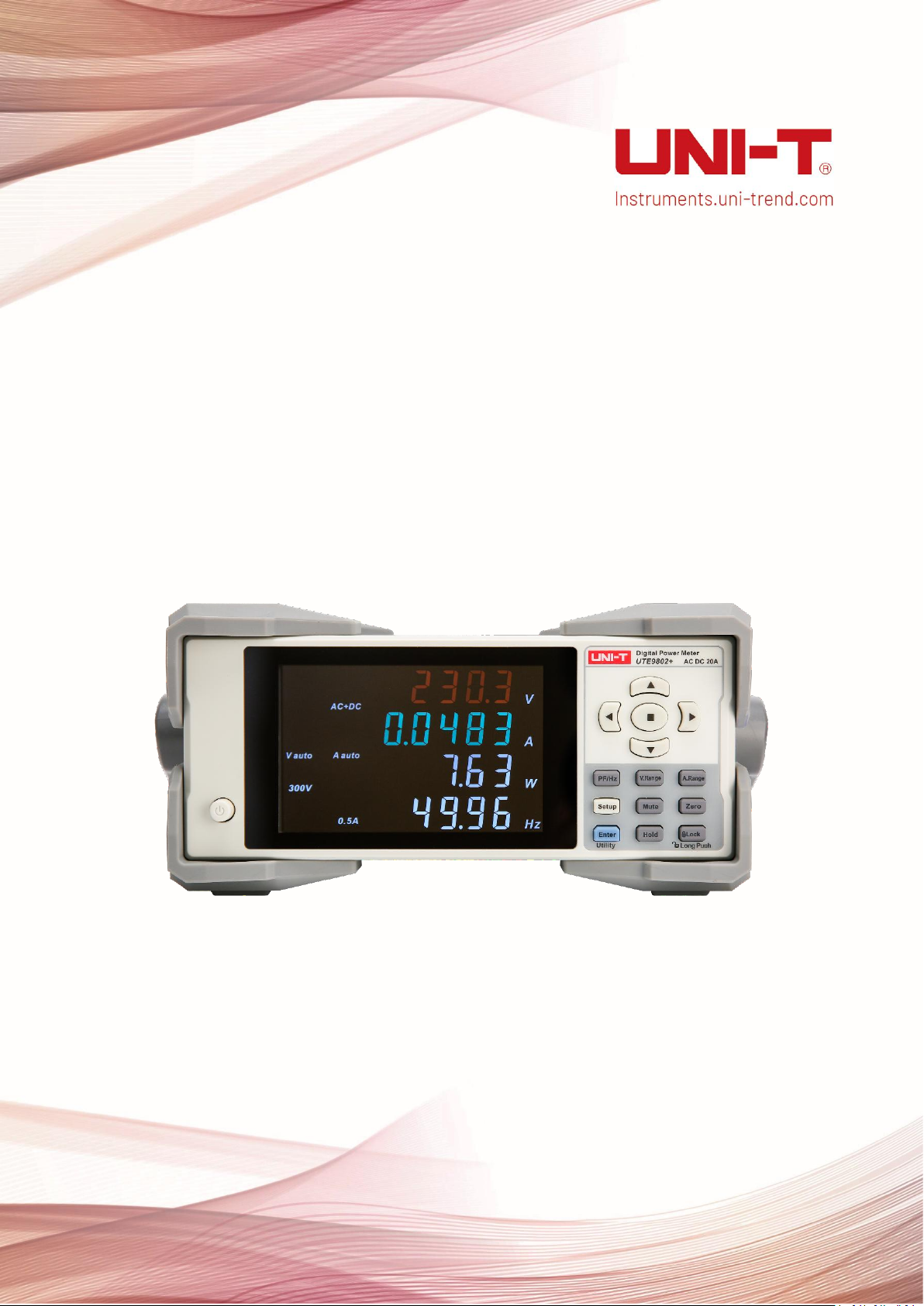
Programming Manual
UTE9800+ Series Smart Digital Power Meter
Page 2

Programming Manual UTE9800+ Series Smart Digital Power Meter
Copyright
2023 Uni-Trend Technology (China) Co., Ltd.
Trademark Information
UNI-T is the registered trademark of Uni-Trend Technology (China) Co., Ltd.
Software Version
00.00.01
Software upgrade may have some change and add more function, please subscribe UNI-T website to get the new
version or contact UNI-T.
Statement
UNI-T products are protected by patents (including obtained and pending) in China and other countries and
regions.
UNI-T reserves the right to change specifications and prices.
The information provided in this manual supersedes all previous publications.
The information provided in this manual is subject to change without notice.
UNI-T shall not be liable for any errors that may be contained in this manual. For any incidental or consequential
damages arising out of the use or the information and deductive functions provided in this manual.
No part of this manual shall be photocopied, reproduced or adapted without the prior written permission of
UNI-T.
Product Certification
UNI-T has certified that the product conforms to China national product standard and industry product standard as
well as ISO9001:2008 standard and ISO14001:2004 standard. UNI-T will go further to certificate product to meet the
standard of other member of the international standards organization.
Instruments.uni-trend.com 2 / 42
Page 3
Programming Manual UTE9800+ Series Smart Digital Power Meter
Symbol
Meaning
Example
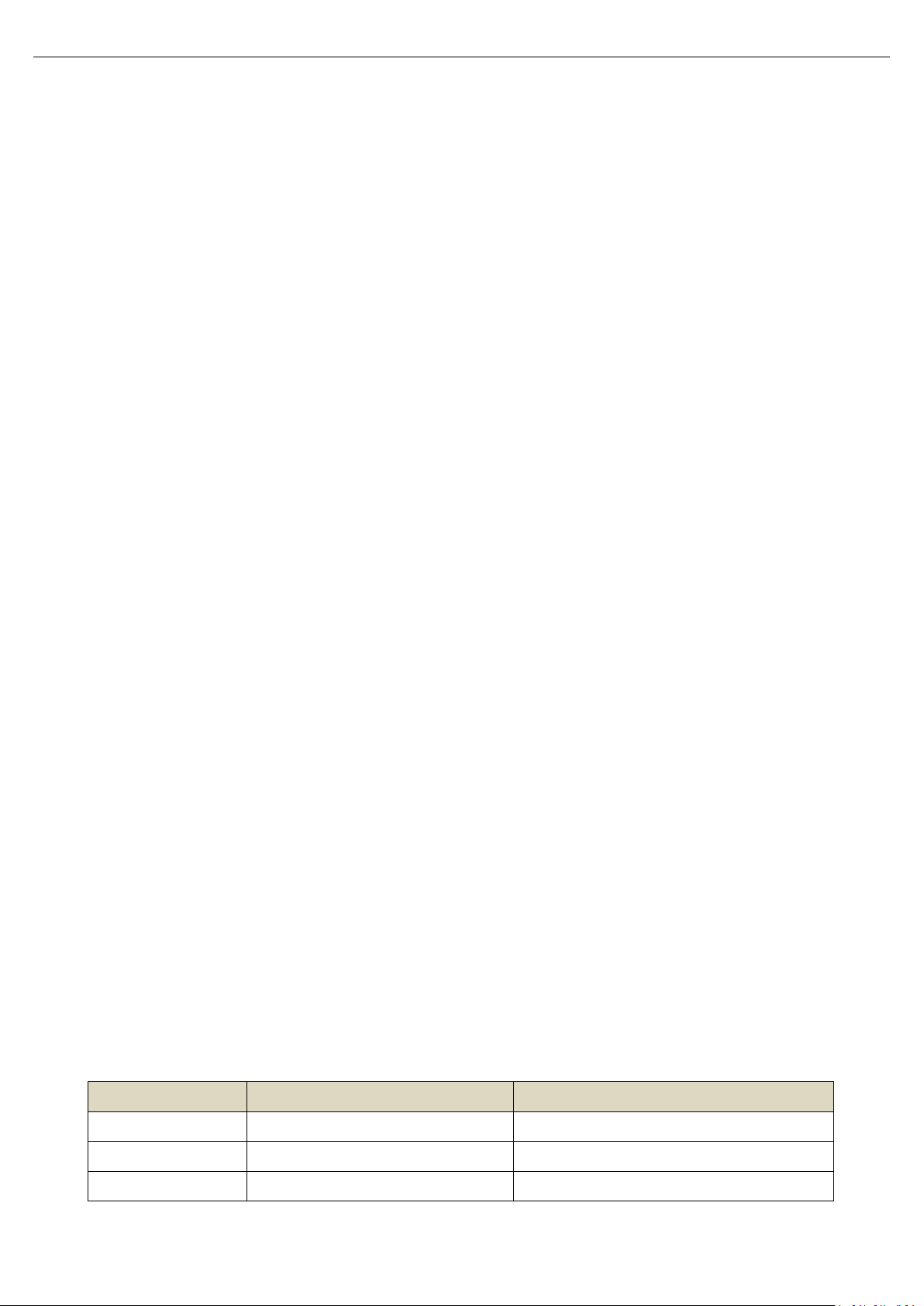
<NR1>
Integer
123, 0123
<NR2>
Fixed Floating point number
123., 12.3, 0.123, .123
<NR3>
Floating point number
123, 12.3, 123E+3
Chapter 1 SCPI
1.1 SCPI Introduction
SCPI (Standard Commands for Programmable Instruments)is a standardized instrument programming language that
builds on existing standards IEEE 488.1 and IEEE 488.2 and follows the floating point rules of IEEE 754 standard, ISO 646
message exchange 7-bit encoding notation (equivalent to ASCII programming) and many other standards.
This section introduces the format, symbols, parameters, and abbreviations of the SCPI command.
1.1.1 Instruction Format
Command is consisting of a keyword, separator, parameter domain and end marke. Take the following command
as an example.
:VOLTage:RANGe 150
VOLTage、RANGe is keyword, “:” and blank is separator, “150” is parameter (some commands have multiple
parameters and separated by ”,”), the line separator or carriage return after the command is the end mark.
For the convenience of description, the following conventions are adopted for subsequent symbols.
• Square Brackets “[ ]”
The contents in square brackets (command keywords) can be omitted.
• Braces “{ }”
It represents the parameter in command string.
• Angle Braces “< >”
The parameter enclosed in the angle brackets must be a numerical parameter.
• Vertical Bar “|”
It is used to separate multiple parameters.
• End Mark: line separator <LF> (0x0A)or carriage return <CR> (0x0D)
1.1.2 Parameter Description
The data type of programming parameters include numeric, character and Boolean type. Regardless of the type, it
is expressed as an ASCII. For more details, see the following table.
Instruments.uni-trend.com 3 / 42
Page 4
Programming Manual UTE9800+ Series Smart Digital Power Meter
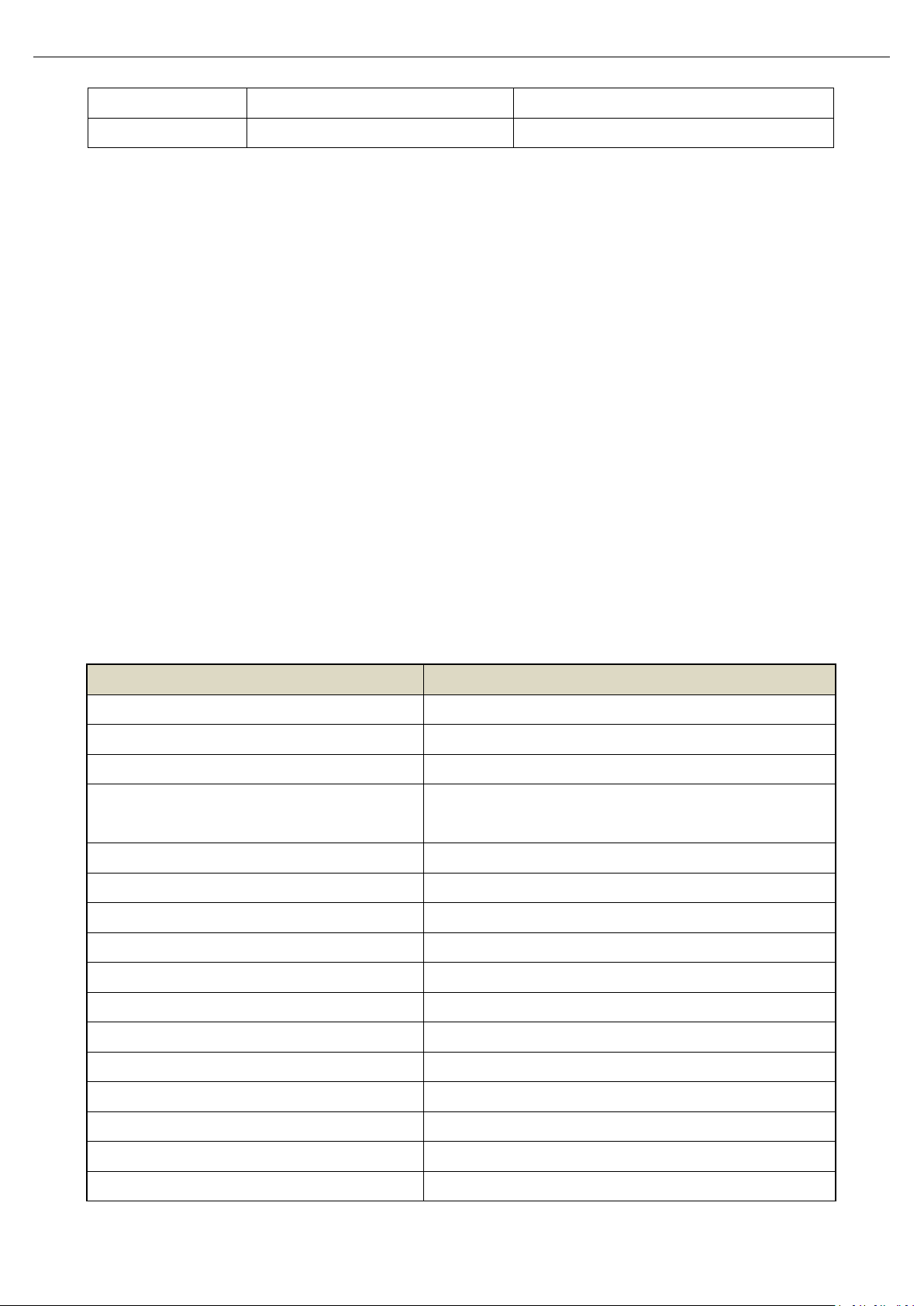
<NRF>
It may be <NR1>, <NR2> or <NR3>
<Boolean>
Boolean data
0|1|ON|OFF
Insturction
Function
*IDN?
Query the instrument information.
*RST
Restore to the factory setting.
*STB?
Query status byte register.
*SAV
Save the current setting into nonvolatile memory for next time
use.
:HOLD
Turn on or off hold mode.
:MODE
Set the measurement mode of voltage/current.
:VOLTage:RANGe
Set the voltage range.
:VOLTage:AUTo
Turn on or off auto range of voltage.
:CURRent:RANGe
Set the current range.
:CURRent:AUTo
Turn on or off auto range of current.
:RATe
Set update rate.
:AVERaging
Set the average switch and average count.
:MUTe
Turn on or off mute.
:ALARm:FLAG?
Query the alarm state.
:ALARm:CURRent:HIGH
Set the upper limit of current alarm.
:ALARm:CURRent:LOW
Set the lower limit of current alarm.
1.1.3 Shorthand Rule
All the commands are case-insensitive. The commands can be all input in uppercase letters or in lowercase letters.
For abbreviations, it should enter all the uppercase letters that exist in the command syntax.
1.2 Communication Interface and Setting
The detailed description can refer to “Chapter 6 Communication Setting” and “Chapter 8 Communication Interface in
UTE9800+ User’s Manual.
1.3 SCPI Command
1.3.1 Command List
UTE9802+ Command List
Instruments.uni-trend.com 4 / 42
Page 5
Programming Manual UTE9800+ Series Smart Digital Power Meter
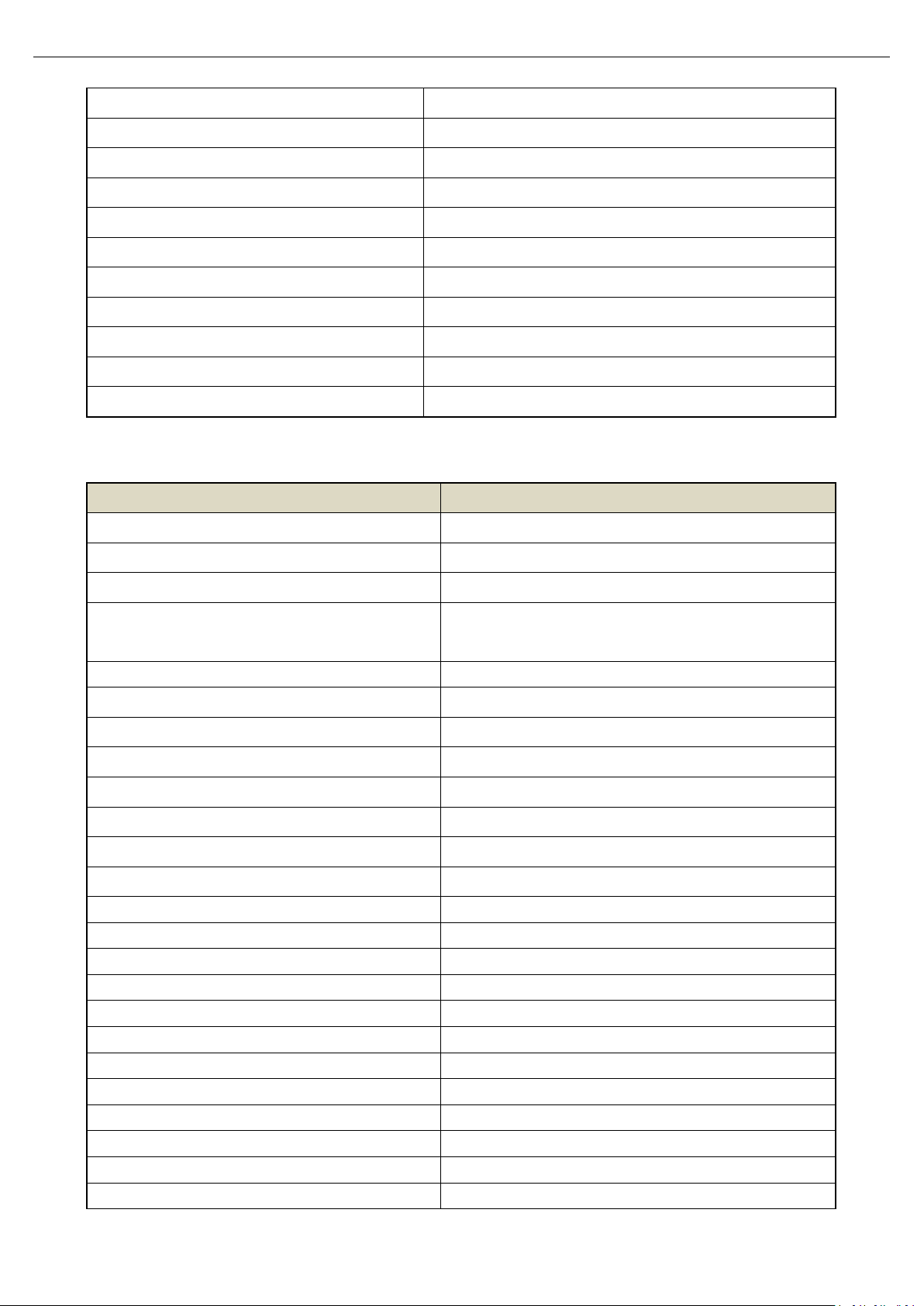
:ALARm:POWer:HIGH
Set the upper limit of power alarm.
:ALARm:POWer:LOW
Set the lower limit of power alarm.
:ALARm:TIMe
Set alarm delay.
:UPDAte:COUNt?
Query the current update count.
:MEASure:FREQuency:VOLTage?
Query the measured frequency of voltage.
:MEASure:VOLTage?
Query the currently measured value of voltage.
:MEASure:CURRent?
Query the currently measured value of current.
:MEASure:POWer:ACTive?
Query the currently measured value of power.
:MEASure:PFACtor?
Query the currently measured value of power factor.
:SYSTem:ERRor?
Query error information
:LOCK
Set the lock key on the front panel.
Instruction
Function
*IDN?
Query the instrument information.
*RST
Restore to the factory setting.
*STB?
Query status byte register.
*SAV
Save the current setting into nonvolatile memory for next
time use.
:HOLD
Turn on or off hold mode.
:VOLTage:RANGe
Set the voltage range.
:VOLTage:AUTo
Turn on or off auto range of voltage.
:CURRent:RANGe
Set the current range.
:CURRent:AUTo
Turn on or off auto range of current.
:RATe
Set update rate.
:AVERaging
Set the average switch state and average count.
:MUTe
Turn on or off mute key.
:ALARm:FLAG?
Query the alarm state.
:ALARm:VOLTageFLAG?
Query the voltage alarm state.
:ALARm:CURRentFLAG?
Query the current alarm state.
:ALARm:ACTiveFLAG?
Query the alarm state of active power.
:ALARm:APParentFLAG?
Query the alarm state of apparent power.
:ALARm:FACTorFLAG?
Query the alarm state of power factor.
:ALARm:SWItch:Total
Set the main switch of alarm.
:ALARm:SWItch:VOLTage
Set the voltage alarm switch.
:ALARm:SWItch:CURRent
Set the current alarm switch.
:ALARm:SWItch:POWer:ACTive
Set the alarm switch of active power.
:ALARm:SWItch:POWer:APParent
Set the alarm switch of apparent power.
:ALARm:SWItch:POWer:FACtor
Set the alarm switch of power factor.
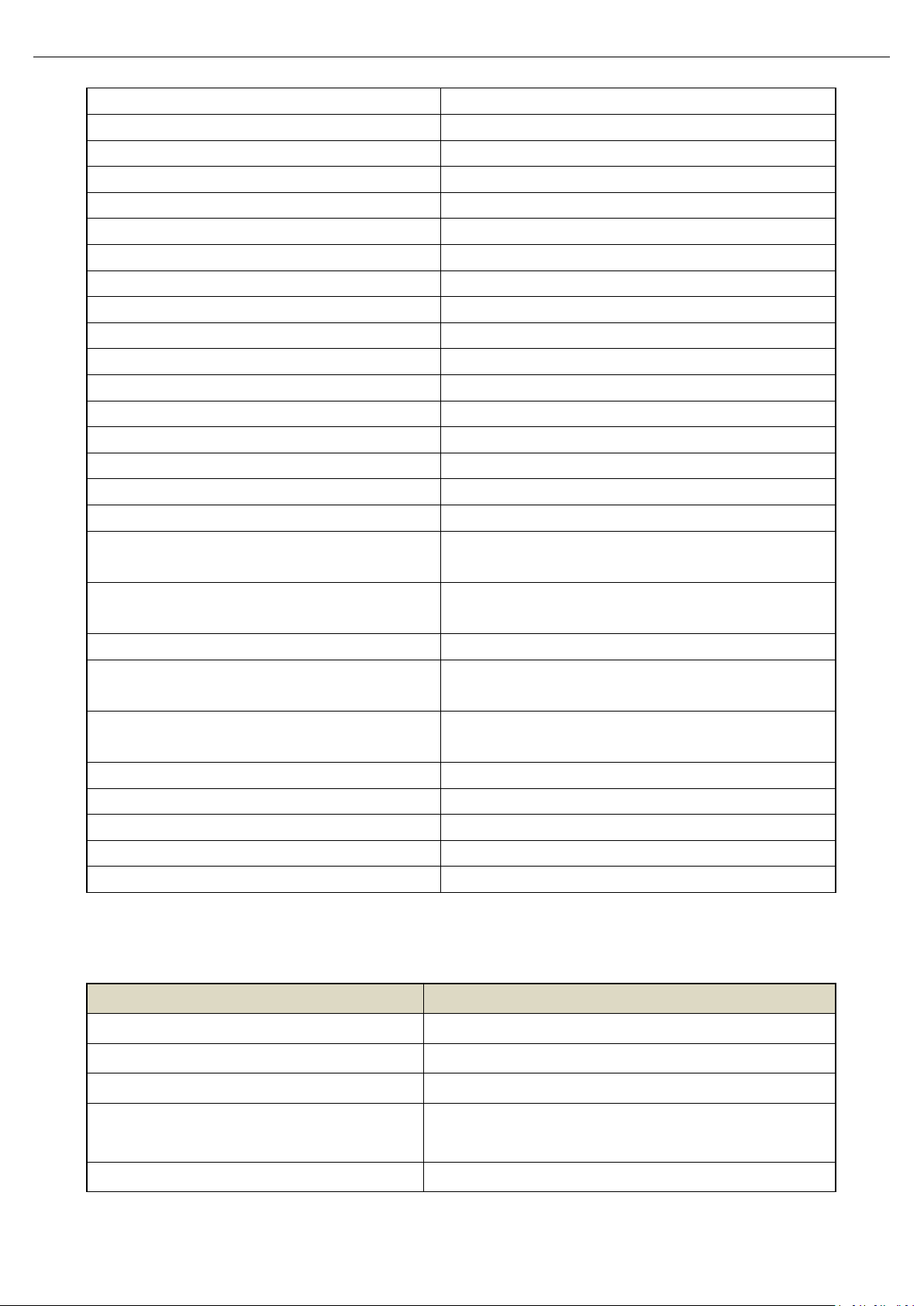
UTE9806+ Command List
Instruments.uni-trend.com 5 / 42
Page 6
Programming Manual UTE9800+ Series Smart Digital Power Meter
:ALARm:SWItch:Oout
Set the alarm switch of zero point.
:ALARm:SWItch:LEDf
Set the alarm switch of LED.
:ALARm:ALARmpar:VOLTage:HIGH
Set the upper limit of voltage alarm.
:ALARm:ALARmpar:VOLTage:LOW
Set the lower limit of voltage alarm.
:ALARm:ALARmpar:CURRent:HIGH
Set the upper limit of current alarm.
:ALARm:ALARmpar:CURRent:LOW
Set the lower limit of current alarm.
:ALARm:ALARmpar:POWer:ACTive:HIGH
Set the upper limit of active power.
:ALARm:ALARmpar:POWer:ACTive:LOW
Set the lower limit of active power.
:ALARm:ALARmpar:POWer:APParent:HIGH
Set the upper limit of apparent power.
:ALARm:ALARmpar:POWer:APParent:LOW
Set the lower limit of apparent power.
:ALARm:ALARmpar:POWer:FACTor:HIGH
Set the upper limit of power factor.
:ALARm:ALARmpar:POWer:FACTor:LOW
Set the lower limit of power factor.
:ALARm:ALARmpar:DELy
Set alarm delay times.
:ALARm:ALARmpar:BEEp
Set alarm beeper times.
:MEASure:FREQuency:VOLTage?
Query the measuring frequency of voltage.
:MEASure:FREQuency:CURRent?
Query the measuring frequency of current.
:MEASure:VOLTage?
Query the currently measured value of AC voltage.
:MEASure:VOLTage:PEAK+?
Query the currently measured value of voltage positive
peak.
:MEASure:VOLTage:PEAK-?
Query the currently measured value of voltage negative
peak.
:MEASure:CURRent?
Query the currently measured value of current.
:MEASure:CURRent:PEAK+?
Query the currently measured value of current positive
peak.
:MEASure:CURRent:PEAK-?
Query the currently measured value of current negative
peak.
:MEASure:POWer:ACTive?
Query the currently measured value of active power.
:MEASure:POWer:APParent?
Query the currently measured value of apparent value.
:MEASure:POWer:FACTor?
Query the currently measured value of power factor.
:SYSTem:ERRor?
Query error information.
:LOCK
Set the lock key state on the front panel.
Insturction
Function
*IDN?
Query the instrument information.
*RST
Restore to the factory setting.
*STB?
Query status byte register.
*SAV
Save the current setting into nonvolatile memory for next time
use.
:DISPlay:MODe
Set measurement mode
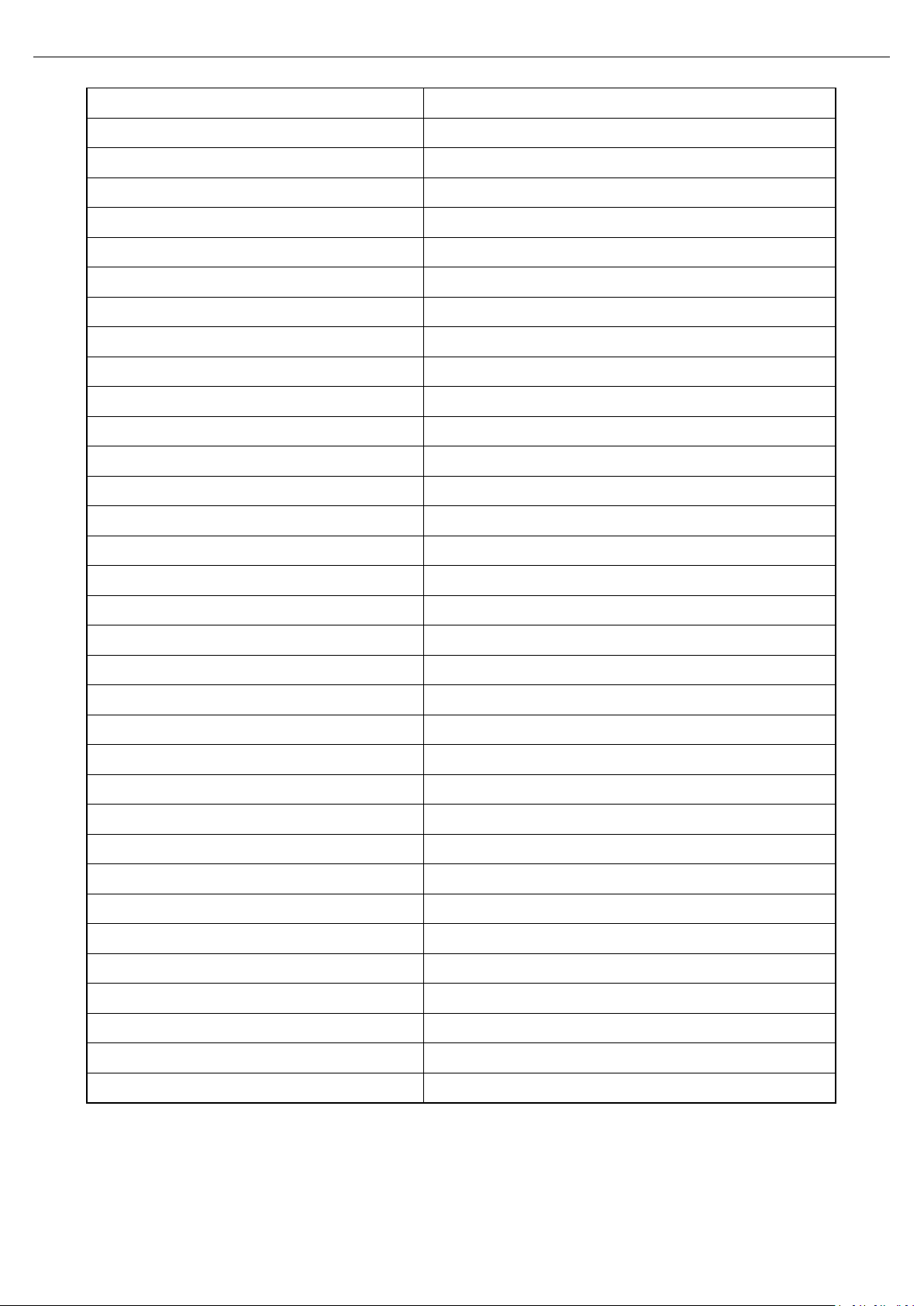
UTE9811+ Command List
Instruments.uni-trend.com 6 / 42
Page 7
Programming Manual UTE9800+ Series Smart Digital Power Meter
:DISPlay:SELect
Select window 4 to display power factor or frequency
:HOLD
Turn on or off hold mode.
:VOLTage:RANGe
Set the voltage range.
:VOLTage:AUTo
Turn on or off auto range of voltage.
:CURRent:RANGe
Set the current range.
:CURRent:AUTo
Turn on or off auto range of current.
:RATe
Set update rate.
:AVERaging
Set the average switch state and average count.
:MUTe
Turn on or off mute.
:ALARm:FLAG?
Query the alarm state.
:ALARm:CURRent:HIGH
Set the upper limit of current alarm.
:ALARm:CURRent:LOW
Set the lower limit of current alarm.
:ALARm:POWer:HIGH
Set the upper limit of power alarm.
:ALARm:POWer:LOW
Set the lower limit of power alarm.
:ALARm:TIMe
Set alarm delay.
:UPDAte:COUNt?
Query the current update count.
:MEASure:DATa:TYPe
Query the type of measurement data
:MEASure:FREQuency:VOLTage?
Query the measured frequency of voltage.
:MEASure:VOLTage?
Query the currently measured value of voltage.
:MEASure:CURRent?
Query the currently measured value of current.
:MEASure:POWer:ACTive?
Query the currently measured value of power.
:MEASure:PFACtor?
Query the currently measured value of power factor.
:MEASure:VOLTage:THD?
Query voltage total harmonic distortion.
:MEASure:CURRent:THD?
Query current total harmonic distortion.
:MEASure:VOLTage:HARMonic:ARRay?
Query voltage distortion of 1-50 times.
:MEASure:CURRent:HARMonic:ARRay?
Query current distortion of 1-50 times.
:MEASure:VOLTage:CF?
Query the measured value of voltage crest factor.
:MEASure:CURRent:CF?
Query the measured value of current crest factor.
:MEASure:VOLTage:HARMonic:RMS?
Query total RMS voltage of 1-50 times.
:MEASure:CURRent:HARMonic:RMS?
Query total RMS current of 1-50 times.
:MEASure:POWer:HARMonic:RMS?
Query total RMS active power of 1-50 times.
:SYSTem:ERRor?
Query error information.
:SYSTem:LEVel
Set the user’s grade.
:LOCK
Set the lock key on the front panel.
Instruments.uni-trend.com 7 / 42
Page 8

Programming Manual UTE9800+ Series Smart Digital Power Meter
1.3.2 Instruction Parse
UTE9802+ Instruction Parse
*IDN?
Function Query the instrument information.
Syntax *IDN?
Example *IDN?
-> UNI-T,UTE9802+,012345678,F1.02
Description The return format of instrument information is <manufacturer>,<model>,<serial number>,< firmware
version>
*RST
Function Restore to the factory setting.
Syntax *RST
Example *RST
Description Except communication configuration parameter (instruction type, baud rate, address), other configuration
parameter will restore to the factory setting.
*STB?
Function Query status byte register.
Syntax *STB?
Example *STB? -> 4
Description If returned value is 4, it represents the status byte register set to 00000100; It means the error queue is not
empty, which also means an error has been generated.
*SAV
Function Save the current setting into nonvolatile memory for next time use.
Syntax *SAV
Example *SAV
Instruments.uni-trend.com 8 / 42
Page 9

Programming Manual UTE9800+ Series Smart Digital Power Meter
:HOLD
Function Turn on/off hold mode.
Syntax :HOLD {<Boolean>}
:HOLD?
Example :HOLD OFF
:HOLD? -> 0
:MODE
Function Set the measurement mode of voltage/current.
Syntax :MODE {AC|ACDC|DC}
:MODE?
AC, ACDC = (RMS); DC
Example :MODE ACDC
:MODE? -> ACDC
:VOLTage:RANGe
Function Set the voltage range.
Syntax :VOLTage:RANGe {<Voltage>}
:VOLTage:RANGe?
<Voltage> = 75,150,300,600
Example :VOLTage:RANGe 150
:VOLTage:RANGe? -> 150
:VOLTage:AUTo
Function Turn on or off auto range of voltage.
Syntax :VOLTage:AUTo {<Boolean>}
:VOLTage:AUTo?
Example :VOLTage:AUTo 1
:VOLTage:AUTo? -> 1
Instruments.uni-trend.com 9 / 42
Page 10

Programming Manual UTE9800+ Series Smart Digital Power Meter
:CURRent:RANGe
Function Set the current range.
Syntax :CURRent:RANGe {<Current>}
:CURRent:RANGe?
<Current> = 0.5, 2, 8, 20
Example :CURRent:RANGe 2
:CURRent:RANGe? -> 2
:CURRent:AUTo
Function Turn on or off auto range of current.
Syntax :CURRent:AUTo {<Boolean>}
:CURRent:AUTo?
Example :CURRent:AUTo 1
:CURRent:AUTo? -> 1
:RATe
Function Set update rate.
Syntax :RATe {<Time>}
:RATe?
<Time> = 0.1,0.25,0.5,1,2,5
Example :RATe 0.25
:RATe? -> 0.25
:AVERaging
Function Set the average switch and average count.
Syntax :AVERaging {<Average>}
:AVERaging?
<Average> = OFF,8,16,32,64
·OFF = Average is turned off
·8,16,32,64 = Average is turned on and it represents the average count.
Example :AVERaging 16
:AVERaging? -> 16
Instruments.uni-trend.com 10 / 42
Page 11

Programming Manual UTE9800+ Series Smart Digital Power Meter
:MUTe
Function Turn on or off mute.
Syntax :MUTe {<Boolean>}
:MUTe?
Example :MUTe 1
:MUTe? ->1
:ALARm:FLAG?
Function Query the alarm state.
Syntax :ALARm:FLAG? {<Type>,<State>}
<Type> = CURRENT,POWER
CURRENT = current;POWER = power
<State> = DISABLE,WAITING,RUNNING,OK,LOW,HIGH
·DISABLE = the test is forbidden;
·WAITING = wait for connect to the load;
·RUNNING = testing;
·OK = the test is completed, the test result within the lower and upper limit;
·LOW = the test is completed, the test result is below the lower limit;
·HIGH = the test is completed, the test result is higher than theupper limit.
Example :ALARm:FLAG? CURRENT -> RUNNING
:ALARm:CURRent:HIGH
Function Set the upper limit of current alarm.
Syntax :ALARm:CURRent:HIGH {<NRf>}
:ALARm:CURRent:HIGH?
Example :ALARm:CURRent:HIGH 10.1
:ALARm:CURRent:HIGH? -> 10.1
:ALARm:CURRent:LOW
Function Set the lower limit of current alarm.
Syntax :ALARm:CURRent:LOW {<NRf>}
Instruments.uni-trend.com 11 / 42
Page 12

Programming Manual UTE9800+ Series Smart Digital Power Meter
:ALARm:CURRent:LOW?
Example :ALARm:CURRent:LOW 1.1
:ALARm:CURRent:LOW? -> 1.1
:ALARm:POWer:HIGH
Function Set the upper limit of power alarm.
Syntax :ALARm:POWer:HIGH {<NRf>}
:ALARm:POWer:HIGH?
Example :ALARm:POWer:HIGH 1000.1
:ALARm:POWer:HIGH? -> 1000.1
:ALARm:POWer:LOW
Function Set the lower limit of power alarm.
Syntax :ALARm:POWer:LOW {<NRf>}
:ALARm:POWer:LOW?
Example :ALARm:POWer:LOW 10.1
:ALARm:POWer:LOW -> 10.1
:ALARm:TIMe
Function Set alarm delay.
Syntax :ALARm:TIMe {<NRf>}
:ALARm:TIMe?
Example :ALARm:TIMe 20.2
:ALARm:TIMe? -> 20.2
:UPDAte:COUNt?
Function Query the current update count.
Syntax :UPDAte:COUNt?
Example :UPDAte:COUNt? -> 763
Description Each time the data is updated, the number of updates will be increased by one. By detecting the difference
in the number of updates before and after, it can determine whether the data update event occurs, so as
to obtain the latest updated data.
Instruments.uni-trend.com 12 / 42
Page 13

Programming Manual UTE9800+ Series Smart Digital Power Meter
:MEASure:FREQuency:VOLTage
Function Query the measured frequency of voltage.
Syntax :MEASure:FREQuency:VOLTage?
Example :MEASure:FREQuency:VOLTage? -> 50.00
:MEASure:VOLTage?
Function Query the currently measured value of voltage.
Syntax :MEASure:VOLTage?
Example :MEASure:VOLTage? -> 110.36
:MEASure:CURRent?
Function Query the currently measured value of current.
Syntax :MEASure:CURRent?
Example :MEASure:CURRent? -> 10.23
:MEASure:POWer:ACTive?
Function Query the currently measured value of power.
Syntax :MEASure:POWer:ACTive?
Example :MEASure:POWer:ACTive? -> 30.5
:MEASure:PFACtor?
Function Query the currently measured value of power factor.
Syntax :MEASure:PFACtor?
Example :MEASure:PFACtor? -> 0.519
:SYSTem:ERRor?
Function Query the last error code and information.
Instruments.uni-trend.com 13 / 42
Page 14

Programming Manual UTE9800+ Series Smart Digital Power Meter
Syntax :SYSTem:ERRor?
Example :SYSTem:ERRor? -> -113,"Undefined header"
Description If there is no error, then it returns 0,"No error"
:LOCK
Function Set the lock key on the front panel.
Syntax :LOCK {<Boolean>}
:LOCK?
Example :LOCK 1
:LOCK? -> 1
UTE9806+ Instruction Parse
*IDN?
Function Query the instrument information.
Syntax *IDN?
Example *IDN?
-> UNI-T,UTE9806+,012345678,F1.02
Description The return format of instrument information is <manufacturer>, <model>, <serial number>, < firmware
version>.
*RST
Function Restore to the factory setting.
Syntax *RST
Example *RST
Description Except communication configuration parameter (instruction type, baud rate, address), other configuration
parameter will restore to the factory setting.
*STB?
Function Query status byte register.
Syntax *STB?
Example *STB? -> 4
Description If returned value is 4, it represents the status byte register set to 00000100; it means the error queue is not
empty, which also means an error has been generated.
Instruments.uni-trend.com 14 / 42
Page 15

Programming Manual UTE9800+ Series Smart Digital Power Meter
*SAV
Function Save the current setting into nonvolatile memory for next time use.
Syntax *SAV
Example *SAV
:HOLD
Function Turn on/off hold mode.
Syntax :HOLD {<Boolean>}
:HOLD?
Example :HOLD OFF
:HOLD? -> 0
:VOLTage:RANGe
Function Set the voltage range.
Syntax :VOLTage:RANGe {<Voltage>}
:VOLTage:RANGe?
<Voltage> = 60,600
Example :VOLTage:RANGe 60
:VOLTage:RANGe? -> 60
:VOLTage:AUTo
Function Turn on or off auto range of voltage.
Syntax :VOLTage:AUTo {<Boolean>}
:VOLTage:AUTo?
Example :VOLTage:AUTo 1
:VOLTage:AUTo? -> 1
:CURRent:RANGe
Function Set the current range.
Syntax :CURRent:RANGe {<Current>}
:CURRent:RANGe?
<Current> = 0.05, 0.1, 10
Instruments.uni-trend.com 15 / 42
Page 16

Programming Manual UTE9800+ Series Smart Digital Power Meter
Example :CURRent:RANGe 0.05
:CURRent:RANGe? -> 0.05
:CURRent:AUTo
Function Turn on or off auto range of current.
Syntax :CURRent:AUTo {<Boolean>}
:CURRent:AUTo?
Example :CURRent:AUTo 1
:CURRent:AUTo? -> 1
:AVERaging
Function Set the average switch state and average count.
Syntax :AVERaging {<Average>}
:AVERaging?
<Average> = OFF, 8,16,32,64
·OFF = Average is turned off.
·8,16,32,64 = Average is turned on and it represents the average count.
Example :AVERaging 16
:AVERaging? -> 16
:MUTe
Function Turn on or off mute key.
Syntax :MUTe {<Boolean>}
:MUTe?
Example :MUTe 1
:MUTe? ->1
:ALARm:FLAG?
Function Query the alarm state.
Syntax :ALARm:FLAG? {<State>}
<State> = 0- not detecting, 1- PASS, 2- NG
Example :ALARm:FLAG?-> 0 # acquire the alarm state.
Instruments.uni-trend.com 16 / 42
Page 17

Programming Manual UTE9800+ Series Smart Digital Power Meter
:ALARm:VOLTageFLAG?
Function Query the voltage alarm state.
Syntax :ALARm:VOLTageFLAG? {<State>}
<State> = 0- not detecting, 1- PASS, 2- NG
Example :ALARm:VOLTageFLAG?-> 0 # acquire the voltage alarm state.
:ALARm:SWItch:Total
Function Set the main switch of alarm.
Syntax :ALARm:SWItch:Total {<bool>}
:ALARm:SWItch:Total?
Example :ALARm:SWItch:Total ON
:ALARm:SWItch:Total? -> ON
Description If it need to read the main switch or other switch, change the third parameter Total.
:ALARm:ALARmpar:VOLTage:HIGH
Function Set the upper limit of voltage alarm.
Syntax :ALARm:ALARmpar:VOLTage:HIGH {<NR3>}
:ALARm:ALARmpar:VOLTage:HIGH?
Example :ALARm:ALARmpar:VOLTage:HIGH 250.5
:ALARm:ALARmpar:VOLTage:HIGH? -> 250.5
Description If it need to read the upper limit of voltage alarm or the upper limit of other parameter, change the third
parameter VOLTage.
Example Set the upper limit of current alarm.
:ALARm:ALARmpar:CURRent:HIGH 1.065
:ALARm:ALARmpar:VOLTage:HIGH? -> 1.065
Set the upper limit of power.
:ALARm:ALARmpar:POWer:ACTive:HIGH 500
:ALARm:ALARmpar:POWer:ACTive:HIGH? -> 500
:ALARm:ALARmpar:VOLTage:LOW
Function Set the lower limit of voltage alarm.
Syntax :ALARm:ALARmpar:VOLTage:LOW {<NR3>}
:ALARm:ALARmpar:VOLTage:LOW?
Example :ALARm:ALARmpar:VOLTage:LOW 250.5
:ALARm:ALARmpar:VOLTage:LOW? -> 250.5
Description If it need to read the lower limit of voltage alarm or the lower limit of other parameter, change the third
parameter VOLTage.
Instruments.uni-trend.com 17 / 42
Page 18

Programming Manual UTE9800+ Series Smart Digital Power Meter
Example Set the lower limit of current alarm.
:ALARm:ALARmpar:CURRent:LOW 1.065
:ALARm:ALARmpar:VOLTage:LOW? -> 1.065
Set the lower limit of power.
:ALARm:ALARmpar:POWer:ACTive:LOW 500
:ALARm:ALARmpar:POWer:ACTive:LOW? -> 500
:ALARm:ALARmpar:DELy
Function Set the alarm delay.
Syntax :ALARm:ALARmpar:DELy {<NR1>}
:ALARm:ALARmpar:DELy?
Example :ALARm:ALARmpar:DELy 5
:ALARm:ALARmpar:DELy? -> 5
:ALARm:ALARmpar:BEEp
Function Set the alarm beeper times.
Syntax :ALARm:ALARmpar:BEEp{<NR1>}
:ALARm:ALARmpar:BEEp?
Example :ALARm:ALARmpar:BEEp 10
:ALARm:ALARmpar:BEEp? -> 10
:MEASure:FREQuency:VOLTage
Function Query the measuring frequency of voltage.
Syntax :MEASure:FREQuency:VOLTage?
Example :MEASure:FREQuency:VOLTage? -> 50.00
:MEASure:VOLTage?
Function Query the currently measured value of AC voltage.
Syntax :MEASure:VOLTage?
Example :MEASure:VOLTage? -> 110.36
:MEASure:VOLTage:PEAK+?
Function Query the currently measured value of voltage positive peak.
Syntax :MEASure:VOLTage:PEAK+?
Example :MEASure:VOLTage:PEAK+? -> 110.36
Instruments.uni-trend.com 18 / 42
Page 19

Programming Manual UTE9800+ Series Smart Digital Power Meter
:MEASure:VOLTage:PEAK-?
Function Query the currently measured value of voltage negative peak.
Syntax :MEASure:VOLTage:PEAK-?
Example :MEASure:VOLTage:PEAK-? -> -110.36
:MEASure:CURRent?
Function Query the currently measured value of current.
Syntax :MEASure:CURRent?
Example :MEASure:CURRent? -> 10.23
:MEASure:CURRent:PEAK+?
Function Query the currently measured value of current positive peak.
Syntax :MEASure:CURRent:PEAK+?
Example :MEASure:CURRent:PEAK+? -> 14.53
:MEASure:CURRent:PEAK-?
Function Query the currently measured value of current negative peak.
Syntax :MEASure:CURRent:PEAK-?
Example :MEASure:CURRent:PEAK-? -> -14.53
:MEASure:POWer:ACTive?
Function Query the currently measured value of active power.
Syntax :MEASure:POWer:ACTive?
Example :MEASure:POWer:ACTive? -> 30.5
:MEASure:POWer:APParent?
Function Query the currently measured value of apparent power.
Syntax :MEASure:POWer:APParent?
Example :MEASure:POWer:APParent? -> 30.5
Instruments.uni-trend.com 19 / 42
Page 20

Programming Manual UTE9800+ Series Smart Digital Power Meter
:MEASure:POWer:PFACtor?
Function Query the currently measured value of power factor.
Syntax :MEASure:PFACtor?
Example :MEASure:PFACtor? -> 0.519
:MEASure:POWer:PHAse?
Function Query the currently measured value of phase.
Syntax :MEASure:PHAse?
Example :MEASure:PHAse? -> 60.5
:SYSTem:ERRor?
Function Query the last error code and information.
Syntax :SYSTem:ERRor?
Example :SYSTem:ERRor? -> -113,"Undefined header"
Description If there is no error, then it returns 0,"No error"
:LOCK
Function Set the lock key state on the front panel.
Syntax :LOCK {<Boolean>}
:LOCK?
Example :LOCK 1
:LOCK? -> 1
UTE9811+ Instruction Parse
*IDN?
Function Query the instrument information.
Syntax *IDN?
Example *IDN?
-> UNI-T,UTE9811+,012345678,F1.02
Description The return format of instrument information is <manufacturer>,<model>,<serial number>,< firmware
version>.
Instruments.uni-trend.com 20 / 42
Page 21

Programming Manual UTE9800+ Series Smart Digital Power Meter
*RST
Function Restore to the factory setting.
Syntax *RST
Example *RST
Description Except communication configuration parameter (instruction type, baud rate, address), other configuration
parameter will restore to the factory setting.
*STB?
Function Query status byte register.
Syntax *STB?
Example *STB? -> 4
Description If returned value is 4, it represents the status byte register set to 00000100; It means the error queue is not
empty, which also means an error has been generated.
*SAV
Function Save the current setting into nonvolatile memory for next time use.
Syntax *SAV {<NR1>}
Example *SAV 0
:DISPlay:MODe
Function Set the current display interface.
Syntax :DISPlay:MODe {<Mode>}
:DISPlay:MODe?
Mode = RMS | CF | HARM_RMS | THD_VALUE | THD_PERCENT
·RMS = TRMS
·CF = Crest factor
·HARM_RMS = Total RMS harmonic
·THD_VALUE = Measured value of harmonic
·THD_PERCENT = Harmonic distortion factor
Example :DISPlay:MODe THD_VALUE
:DISPlay:MODe? -> THD_VALUE
Instruments.uni-trend.com 21 / 42
Page 22

Programming Manual UTE9800+ Series Smart Digital Power Meter
:DISPlay:SELect
Function Select window 4 to display power factor or frequency.
Syntax :DISPlay:SELect {<Type>}
:DISPlay:SELect?
<Type> = PF | HZ
·PF = Display power factor
·HZ = Display measurement frequency
Example :DISPlay:SELect HZ
:DISPlay:SELect? -> HZ
:HOLD
Function Turn on/off hold mode.
Syntax :HOLD {<Boolean>}
:HOLD?
Example :HOLD OFF
:HOLD? -> 0
:VOLTage:RANGe
Function Set the voltage range.
Syntax :VOLTage:RANGe {<Voltage>}
:VOLTage:RANGe?
<Voltage> = 75,150,300,600
Example :VOLTage:RANGe 150
:VOLTage:RANGe? -> 150
Notes: This instruction can only be used when set the user’s grade to High.
:VOLTage:AUTo
Function Turn on or off auto range of voltage.
Syntax :VOLTage:AUTo {<Boolean>}
:VOLTage:AUTo?
Example :VOLTage:AUTo 1
:VOLTage:AUTo? -> 1
Notes: This instruction can only be used when set the user’s grade to High.
Instruments.uni-trend.com 22 / 42
Page 23

Programming Manual UTE9800+ Series Smart Digital Power Meter
:CURRent:RANGe
Function Set the current range.
Syntax :CURRent:RANGe {<Current>}
:CURRent:RANGe?
<Current> = 0.2, 1, 4, 20
Example :CURRent:RANGe 1
:CURRent:RANGe? -> 1
Notes: This instruction can only be used when set the user’s grade to High.
:CURRent:AUTo
Function Turn on or off auto range of current.
Syntax :CURRent:AUTo {<Boolean>}
:CURRent:AUTo?
Example :CURRent:AUTo 1
:CURRent:AUTo? -> 1
Notes: This instruction can only be used when set the user’s grade to High.
:MANual:FREQuency
Function Set the input signal frequency of user defined.
Syntax :MANual:FREQuency {<NRf>}
:MANual:FREQuency?
<NRf> = 0 or 40~70;<NRf>= 0 represents this function (input signal frequency of user defined) is disabled.
Example :MANual:FREQuency 50.1
:MANual:FREQuency? -> 50.1
Notes: This instruction can only be used when set the user’s grade to High.
:RATe
Function Set update rate.
Syntax :RATe {<Time>}
:RATe?
<Time> = 0.1,0.25,0.5,1,2,5
Instruments.uni-trend.com 23 / 42
Page 24

Programming Manual UTE9800+ Series Smart Digital Power Meter
Example :RATe 0.25
:RATe? -> 0.25
:AVERaging
Function Set the average switch state and average count.
Syntax :AVERaging {<Average>}
:AVERaging?
<Average> = OFF,8,16,32,64
·OFF = Average is turned off
·8,16,32,64 = Average is turned on and it represents the average count.
Example :AVERaging 16
:AVERaging? -> 16
:MUTe
Function Turn on or off mute.
Syntax :MUTe {<Boolean>}
:MUTe?
Example :MUTe 1
:MUTe? ->1
:ALARm:FLAG?
Function Query the alarm state.
Syntax :ALARm:FLAG? {<Type>,<State>}
<Type> = CURRENT,POWER
CURRENT = current;POWER = power
<State> = DISABLE, WAITING, RUNNING, OK, LOW, HIGH
·DISABLE = the test is forbidden;
·WAITING = wait for connect to the load;
·RUNNING = testing;
·OK = the test is completed, the test result within the lower and upper limit;
·LOW = the test is completed, the test result is below the lower limit;
·HIGH = the test is completed, the test result is higher than theupper limit.
Example :ALARm:FLAG? CURRENT -> RUNNING
Instruments.uni-trend.com 24 / 42
Page 25

Programming Manual UTE9800+ Series Smart Digital Power Meter
:ALARm:CURRent:HIGH
Function Set the upper limit of current alarm.
Syntax :ALARm:CURRent:HIGH {<NRf>}
:ALARm:CURRent:HIGH?
Example :ALARm:CURRent:HIGH 10.1
:ALARm:CURRent:HIGH? -> 10.1
:ALARm:CURRent:LOW
Function Set the lower limit of current alarm.
Syntax :ALARm:CURRent:LOW {<NRf>}
:ALARm:CURRent:LOW?
Example :ALARm:CURRent:LOW 1.1
:ALARm:CURRent:LOW? -> 1.1
:ALARm:POWer:HIGH
Function Set the upper limit of power alarm.
Syntax :ALARm:POWer:HIGH {<NRf>}
:ALARm:POWer:HIGH?
Example :ALARm:POWer:HIGH 1000.1
:ALARm:POWer:HIGH? -> 1000.1
:ALARm:POWer:LOW
Function Set the lower limit of power alarm.
Syntax :ALARm:POWer:LOW {<NRf>}
:ALARm:POWer:LOW?
Example :ALARm:POWer:LOW 10.1
:ALARm:POWer:LOW -> 10.1
:ALARm:TIMe
Function Set alarm delay.
Instruments.uni-trend.com 25 / 42
Page 26

Programming Manual UTE9800+ Series Smart Digital Power Meter
Syntax :ALARm:TIMe {<NRf>}
:ALARm:TIMe?
Example :ALARm:TIMe 20.2
:ALARm:TIMe? -> 20.2
:UPDAte:COUNt?
Function Query the current update count.
Syntax :UPDAte:COUNt?
Example :UPDAte:COUNt? -> 763
Description Each time the data is updated, the number of updates will be increased by one. By detecting the difference
in the number of updates before and after, it can determine whether the data update event occurs, so as
to obtain the latest updated data.
:MEASure:DATa:TYPe
Function Set the type of measurement data
Syntax :MEASure:DATa:TYPe {<Type>}
:MEASure:DATa:TYPe?
Type = ACTUAL | LAST
·ACTUAL = Real-time measured data
·LAST = Recently update valid measured data
Example :MEASure:DATa:TYPe ACTUAL
:MEASure:DATa:TYPe -> ACTUAL
Description ·Set the type of measurement data to“ACTUAL”, query measurement data command (such
as:MEASure:VOLTage?”) , the obtained value truly reflects the current measuring state of the instrument.
The measured value is invalid when the instrument is in configuration measurement function or
switching ranges, the obtained value is “NaN”.When the instrument exits configuration measurement
function or switching ranges, the value obtained by the command is valid measurement data.
·Set the type of measurement data to“ LAST”, the value obtained by the query measurement data
command is recently update valid measured data.
:MEASure:FREQuency[:VOLTage]?
Function Query the measured frequency of voltage.
Syntax :MEASure:FREQuency:VOLTage?
Example :MEASure:FREQuency:VOLTage? -> 50.00
Instruments.uni-trend.com 26 / 42
Page 27

Programming Manual UTE9800+ Series Smart Digital Power Meter
:MEASure:VOLTage?
Function Query the currently measured value of voltage.
Syntax :MEASure:VOLTage?
Example :MEASure:VOLTage? -> 110.36
:MEASure:CURRent?
Function Query the currently measured value of current.
Syntax :MEASure:CURRent?
Example :MEASure:CURRent? -> 10.23
:MEASure:POWer[:ACTive]?
Function Query the currently measured value of power.
Syntax :MEASure:POWer:ACTive?
Example :MEASure:POWer:ACTive? -> 30.5
:MEASure:PFACtor?
Function Query the currently measured value of power factor.
Syntax :MEASure:PFACtor?
Example :MEASure:PFACtor? -> 0.519
:MEASure:VOLTage:THD?
Function Query voltage total harmonic distortion.
Syntax :MEASure:VOLTage:THD? {VALUE|PERCENT}
VALUE = Return the measured value of voltage total harmonic distortion, the unit is V.
PERCENT = Return voltage total distortion, the unit is %.
Example :MEASure:VOLTage:THD? VALUE -> 5.00
:MEASure:CURRent:THD?
Function Query current total harmonic distortion.
Instruments.uni-trend.com 27 / 42
Page 28

Programming Manual UTE9800+ Series Smart Digital Power Meter
Syntax :MEASure:CURRent:THD? {VALUE|PERCENT}
VALUE = Return the measured value of current total harmonic distortion, the unit is A.
PERCENT = Return curent total distortion,the unit is %.
Example :MEASure:CURRent:THD? VALUE -> 1.000
:MEASure:VOLTage:HARMonic:ARRay?
Function Query voltage distortion of 1-50 times.
Syntax :MEASure:VOLTage:HARMonic:ARRay? {VALUE|PERCENT}
-> <Data1>,<Data2> … <Data50>
VALUE = Return the measured voltage distortion value of1-50 times, the unit is V.
PERCENT = Return voltage distortion of 1-50 times, the unit is %.
Example :MEASure:VOLTage:HARMonic:ARRay? VALUE
-> 10.00, 1.00 … 2.00
:MEASure:CURRent:HARMonic:ARRay?
Function Query current distortion of 1-50 times.
Syntax :MEASure:CURRent:HARMonic:ARRay? {VALUE|PERCENT}
-> <Data1>, <Data2> … <Data50>
VALUE = Return the measured current distortion value of1-50 times, the unit is A.
PERCENT = Return current distortion of 1-50 times, the unit is %.
Example :MEASure:CURRent:HARMonic:ARRay? VALUE
-> 5.012,1.031 … 0.101
:MEASure:VOLTage:CF?
Function Query the measured value of voltage crest factor.
Syntax :MEASure:VOLTage:CF?
Example :MEASure:VOLTage:CF? -> 1.420
:MEASure:CURRent:CF?
Function Query the measured value of current crest factor.
Syntax :MEASure:CURRent:CF?
Example :MEASure:CURRent:CF? -> 6.125
Instruments.uni-trend.com 28 / 42
Page 29

Programming Manual UTE9800+ Series Smart Digital Power Meter
:MEASure:VOLTage:HARMonic:RMS?
Function Query total RMS voltage of 1-50 times.
Syntax :MEASure:VOLTage:HARMonic:RMS?
Example :MEASure:VOLTage:HARMonic:RMS? -> 110.23
:MEASure:CURRent:HARMonic:RMS?
Function Query total RMS current of 1-50 times.
Syntax :MEASure:CURRent:HARMonic:RMS?
Example :MEASure:CURRent:HARMonic:RMS? -> 1.236
:MEASure:POWer:HARMonic:RMS?
Function Query total RMS active power of 1-50 times.
Syntax :MEASure:POWer:HARMonic:RMS?
Example :MEASure:POWer:HARMonic:RMS? -> 120.23
:SYSTem:ERRor?
Function Query the last error code and information.
Syntax :SYSTem:ERRor?
Example :SYSTem:ERRor? -> -113,"Undefined header"
Description If there is no error, then it returns 0,"No error" .
:SYSTem:LEVel
Function Set the user’s grade.
Syntax :SYSTem:LEVel {<LEVEL>,<NR1>}
:SYSTem:LEVel?
<LEVEL> = NORMAL | HIGH
<NR1> = Secret code
Example :SYSTem:LEVel HIGH,*****(secret code)
:SYSTem:LEVel? -> HIGH
Instruments.uni-trend.com 29 / 42
Page 30

Programming Manual UTE9800+ Series Smart Digital Power Meter
:LOCK
Function Set the lock key on the front panel.
Syntax :LOCK {<Boolean>}
:LOCK?
Example :LOCK 1
:LOCK? -> 1
1.4 Acquire Newest Measurement Data
The measurement data will in breaks when in auto range or UTE9811+ is reconfigured, the acquired data is “nan”
via“:MEASure:###:###?”. If user want to acquire the newest measurement data,it need to exit break state and then to
acquire the data. By detecting the difference in the number of updates before and after, it can determine whether the
data update event occurs, so as to obtain the latest updated data. The specific method as follows.
:UPDAte:COUNt? -> 101
:UPDAte:COUNt? -> 101
...
:UPDAte:COUNt? -> 102 # data update event occurs
:MEASure:VOLTage? -> 110.36
:MEASure:CURRent? -> 10.23
...
Chapter 2 Modbus Programming Manual
2.1 Modbus Introduction
Modbus is a widely used field bus protocol. Multiple slave machines can easily network with the host through Modbus,
the host computer can be PC or PLC. Modbus has two varieties, which is Modbus-RTU and Modbus-ASC. UTE9802+
only supports Modbus-RTU.
2.2 Communication Interface and Setting
The detailed explanation can refer to “Chapter 6 Communication Setting” and “Chapter 8 Communication Interface”
Instruments.uni-trend.com 30 / 42
Page 31
Programming Manual UTE9800+ Series Smart Digital Power Meter
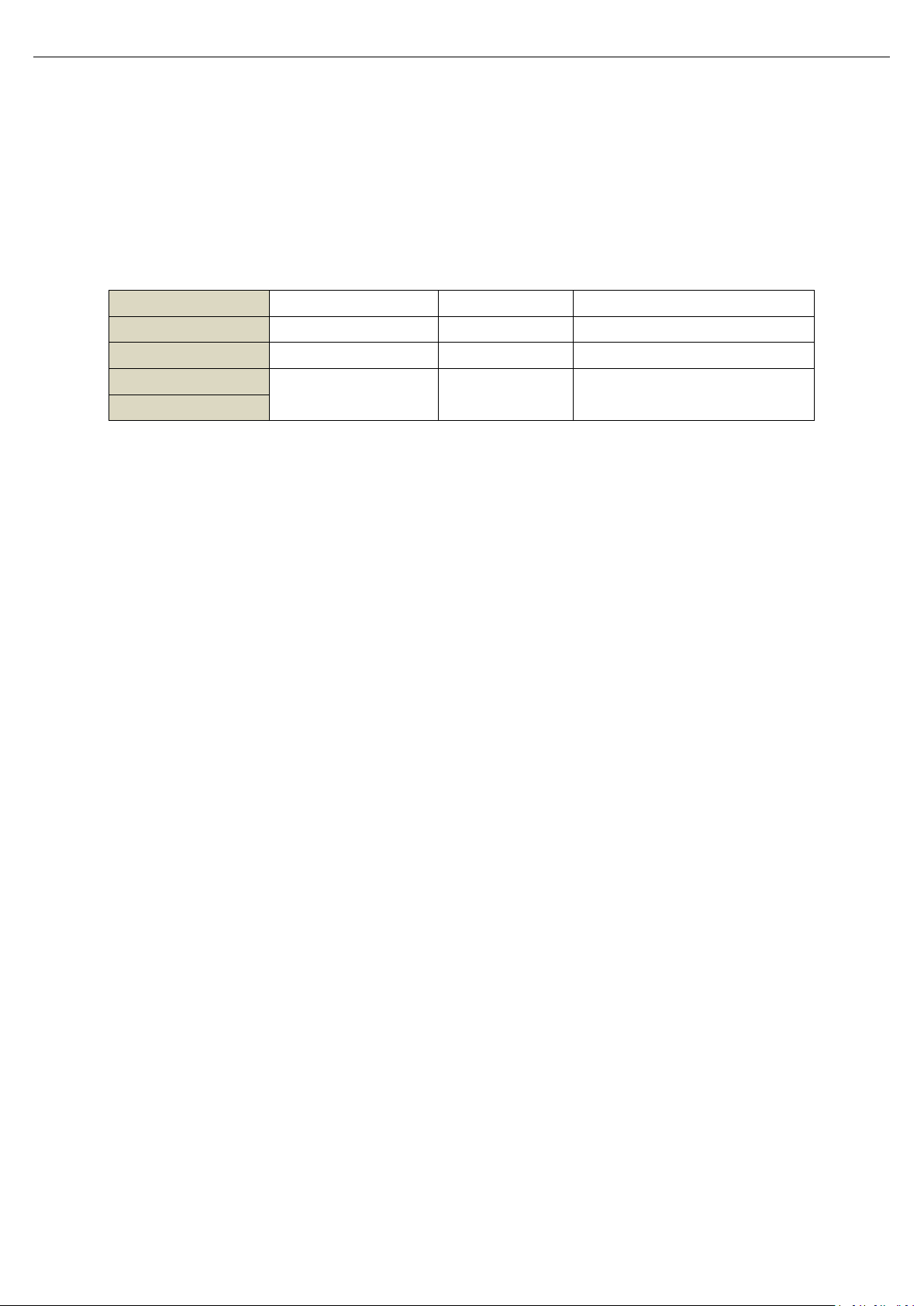
Data Format
Number of Register
Number of Byte
Description
Byte Data
1
Integer Data
1
2
A return, MSB first, then LSB.
Long Integer Data
2
4
Return in two words, MSB first,
then LSB.
Floating Point Data
of UTE9800+ User’s Manual.
2.3 Communication Data Format
During communication, data is return by word (word- two bytes). In each returned word, MSB first, then LSB. If two
bytes are continuously return (such as floating point number or long integer), MSB first, then LSB.
2.4 Interconversion of Word and Float
A register in Modbus protocol is 16 bits, that is a word. The previous section mentioned that floating-point take
up two registers, i.e., two words. After receiving byte data, user needs to convert a word to a floating-point or a
floating-point number to a word.
The following code is a good example for interconversion of word and float point.
/* C program for converting a floating point number to two words */
void FloatToWord(float Data,u16 *Word)
{
union
{
float Data;
unsigned char Byte[4];
}FloatData;
FloatData.Data=Data;
Word[0]=(u16)FloatData.Byte[3]<<8|FloatData.Byte[2];
Word[1]=(u16)FloatData.Byte[1]<<8|FloatData.Byte[0];
}
/* C program for converting two words to a floating point number */
float WordToFloat(const u16 *Word)
{
union
{
float Data;
unsigned char Byte[4];
}FloatData;
FloatData.Byte[3]=(Word[0]>>8)&0xFF;
FloatData.Byte[2]=(Word[0])&0xFF;
FloatData.Byte[1]=(Word[1]>>8)&0xFF;
Instruments.uni-trend.com 31 / 42
Page 32
Programming Manual UTE9800+ Series Smart Digital Power Meter
Slave address
01H
Function code
03H
Data number
( calculating in byte)
04H
Start data address
0096H
40H (MSB)
DDH (LSB)
The second data
address 0097H
1EH (MSB)
B8H (LSB)
CRC(Check Low)
76H (LSB)
CRC(Check High)
1BH (MSB)
Slave address
01H
Function code
03H
Position of initial
data
00H (MSB)
96H (LSB)
Data number
(calculating in word)
00H
02H
CRC(Check Low)
24H (LSB)
CRC(Check High)
27H (MSB)
Slave address
01H
Function code
83H
Error Code
02H
CRC(Check Low)
C0H (LSB)
CRC(Check High)
F1H (MSB)
FloatData.Byte[0]=(Word[1])&0xFF;
return FloatData.Data;
}
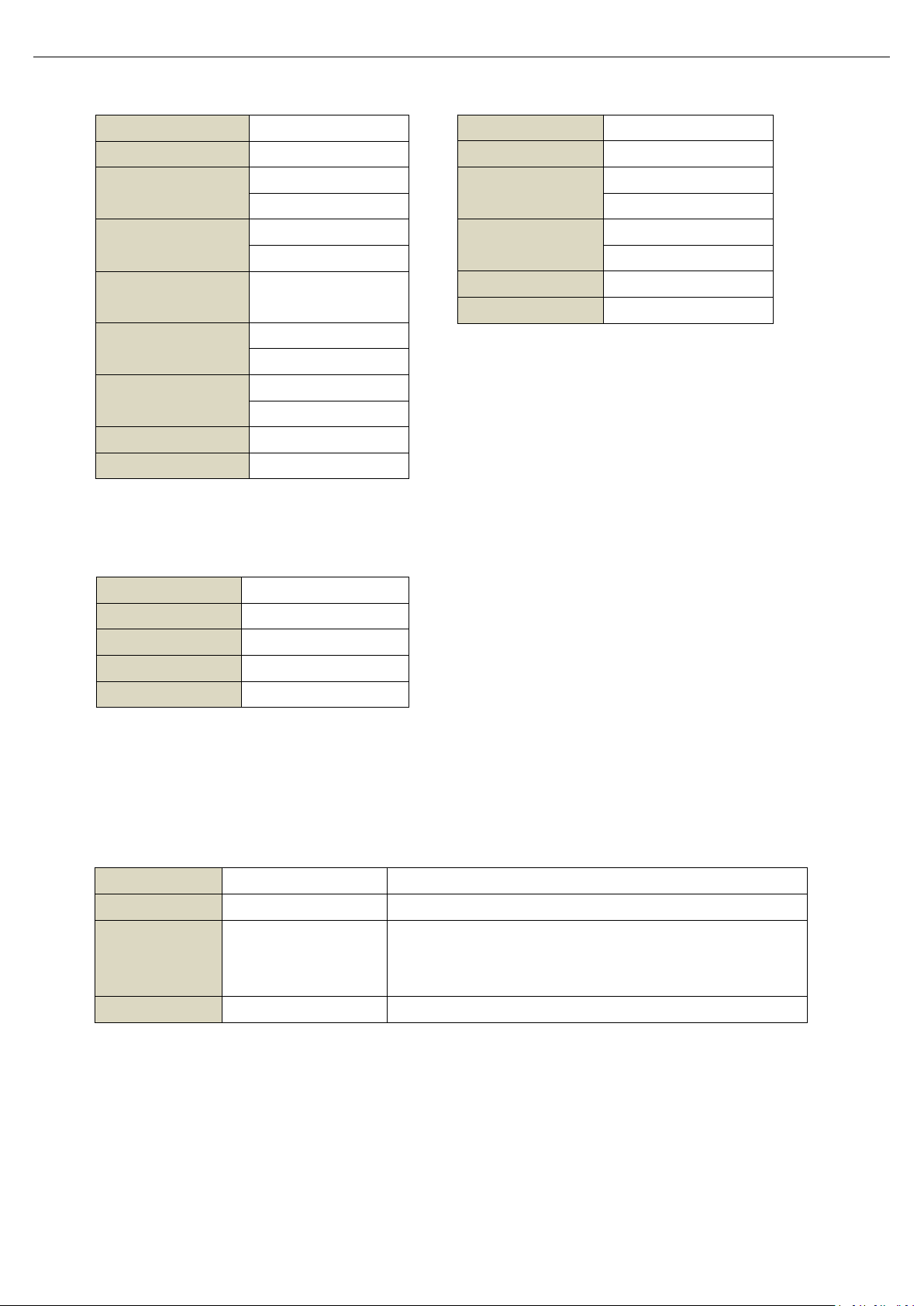
2.5 Modbus-RTU
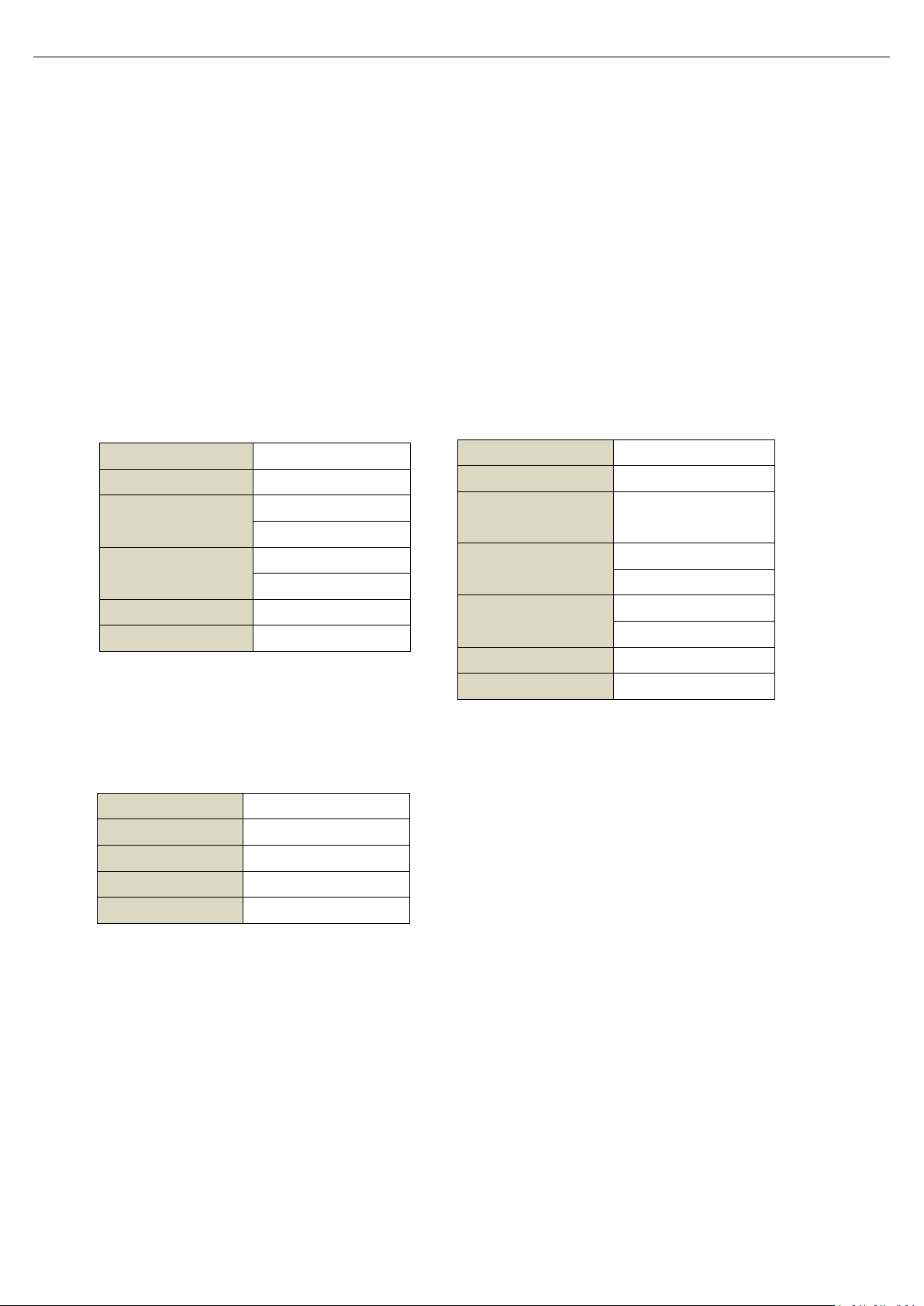
2.5.1 Function code 03H,read multiple words
This command can read at leat one word. The following example issues a read command from the master station to
slave station 1, reading two consecutive words that start from address 0096H (150) .
Command Message of Master Station Respond Message of Slave Station (Normal)
Respond Message of Slave Station (Abnormal)
2.5.2 Function code 10H, written multiple words
This command can write at least one word. The following example issues a write command from the master station to
slave station 1, written data of two words 0003H and 0002H from the start address 0065H(101) . That is write 0003H
into address 0065H, write 0002H into address 00066H. The slave replies to the master station when the write is
completed.
Instruments.uni-trend.com 32 / 42
Page 33
Programming Manual UTE9800+ Series Smart Digital Power Meter
Error Code
Name
Description
01
Illegal function code
The slave machine does not support this function code.
02
Illegal data address
The starting data position or a combination of the starting data
position and the number of transmitted data received from the
machine is not allowed.
03
Illegal data value
Data received from the machine is not allowed.
Slave address
01H
Function code
10H
Position of initial
data
00H (MSB)
65H (LSB)
Data number
(calculating in word)
00H (MSB)
02H (LSB)
CRC(Check Low)
51H (LSB)
CRC(Check High)
D7H (MSB)
Slave address
01H
Function code
10H
Position of initial
data
00H
65H
Data number
(calculating in word)
00H (MSB)
02H (LSB)
Data number
( calculating in byte)
04H
The first data address
00H (MSB)
03H (LSB)
The second data
address
00H (MSB)
02H (LSB)
CRC(Check Low)
44 (LSB)
CRC(Check High)
79 (MSB)
Slave address
01H
Function code
90H
Error Code
02H
CRC(Check Low)
CDH (LSB)
CRC(Check High)
C1H (MSB)
Command Message of Master Station Respond Message of Slave Station (Normal)
Respond Message of Slave Station (Abnormal)
2.5.3 Description of Error Code
Error code parsing for respond message of slave station (abnormal) as shown in the following table.
Instruments.uni-trend.com 33 / 42
Page 34
Programming Manual UTE9800+ Series Smart Digital Power Meter
Data Name
Data
Format
Unit
Initial
Address
Number of
Register
Read/Write
Remarks
Product Information
Product
information
ASCII050
R
"UNI-T,UTE9802+,012345678,F1.02"
Retain5050
R
Parameter Setting
Measurement
mode
U16
1001R/W
0 (AC+DC), 1 (AC), 2 (DC)
Voltage range
U16
1011R/W
0 (Auto), 1 (75V), 2 (150V),
3 (300V), 4 (600V)
Current range
U16
1021R/W
0 (Auto), 1 (0.5A), U162 (2A),
3 (8A), 4 (20A)
Update cycle
U16
1031R/W
0 (0.1s), 1 (0.25s), 2 (0.5s),
3 (1s), 4 (2s), 5 (5s)
Average
U16
1041R/W
0 (the average is turned off), 1 (8
times), 2 (16 times),
3 (32 times ), 4 (64 times)
Data hold
U16
1051R/W
0 (forbidden), 1 (enabled)
Display
U16
1061R/W
0 (display PF value), 1 (display
frequency value)
Mute
U16
1071R/W
0 (forbidden), 1 (enabled)
Upper limit of
current alarm
FloatA1082R/W
0.000~40.000
,
When the upper limit and the lower
limit is set to 0 at the same time, it
represents the alarm is forbidden.
Lower limit of
current alarm
FloatA1102R/W
Upper limit of
power limit
FloatW1122R/W
0.000~48000.0
,
When the upper limit and the lower
limit is set to 0 at the same time, it
represents the alarm is forbidden.
Lower limit of
power limit
FloatW1142R/W
Alarm delay
FloatS1162R/W
0.0~99.9
Measurement
data type
U16
1201R/W
0: real-time measurement data
1: recently update TRMS data
Parament Configuration of Instrument
Default setting
U16
1401W
0 (forbidden), 1 (set the parameter to
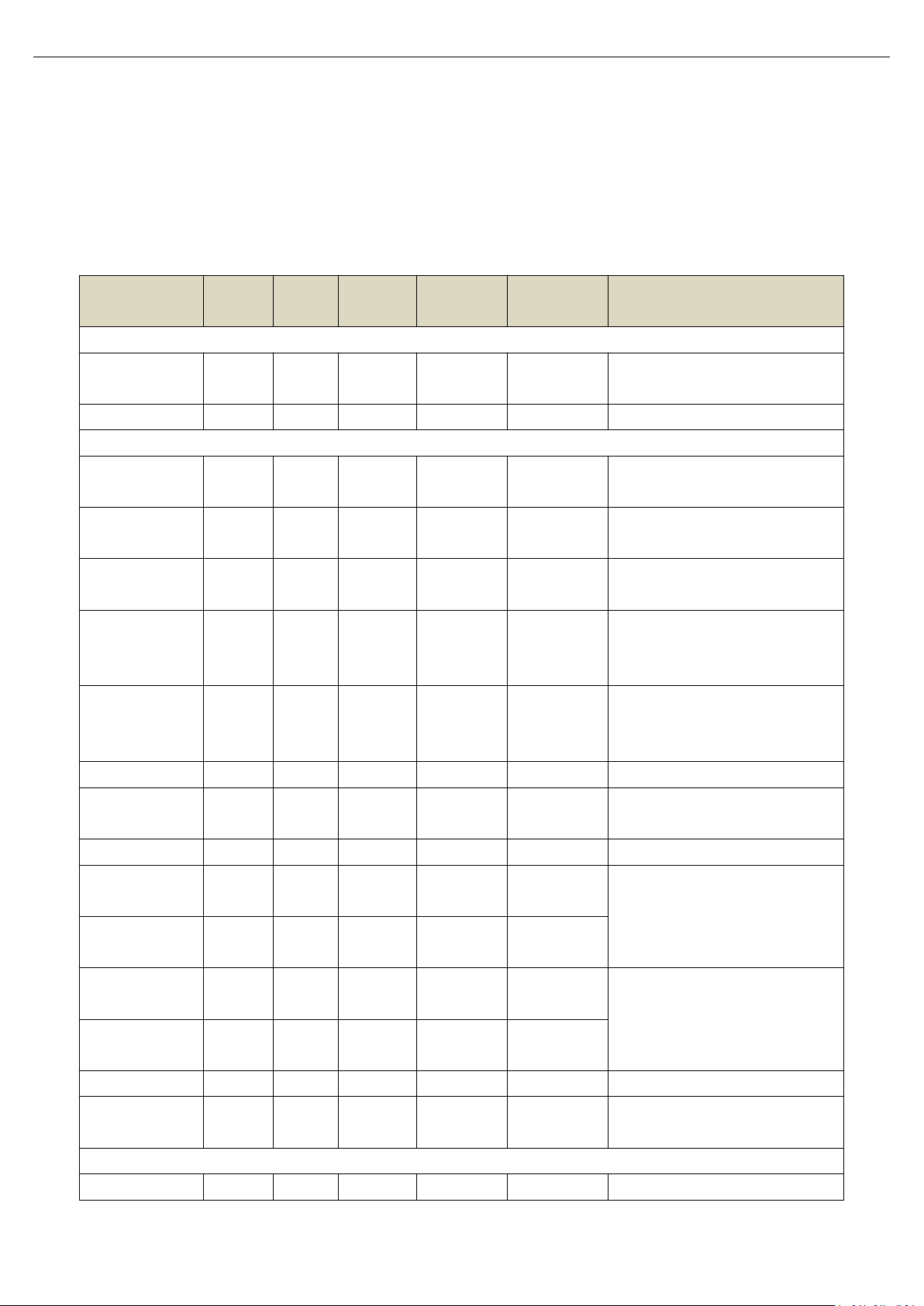
2.6 Register List
2.6.1 UTE9802+ Register List
*Notes: R represents it can be read, that is support command 03H. W represents it can be wirtten, that is support
command 10H.
Instruments.uni-trend.com 34 / 42
Page 35
Programming Manual UTE9800+ Series Smart Digital Power Meter
the default value)
Save parameter
U16
1411W
0 (forbidden), 1 (save the parameter
into system storage for next use)
Measurement Data
Voltage value
FloatV1502R
The numerical value is related to the
measurement model.
Current value
FloatA1522R
The numerical value is related to the
measurement model.
Active power
FloatW1542R
Power factor
Float
1562R
Frequency of
voltage
FloatHz1582R
Alarm state of
current
U16
1601R
0(alarm forbidden), 1 (wait for
connect to the load),
2 (testing), 3 (the result is normal),
4 (the result is low), 5 ( the result is
high)
Alarm state of
power
U16
1611R
Data update count
U16
1621R
The latest measurements are
available when changes in this data
are detected.
Data Name
Data
Format
Unit
Initial
Address
Number of
Register
Read/Write
Remarks
Product Information
Product model
ASCII
0000H3R
UTE9806+
Software version
ASCII
0006H3R
F1.02
Hardware version
ASCII
000CH3R
H1.02
Serial number
ASCII
0010H5R
012345678
Spare
0020H32R
Parameter Setting
Spare
ULong
0040H2R/W
Spare
...
...
n
Spare
Expression of Special Data
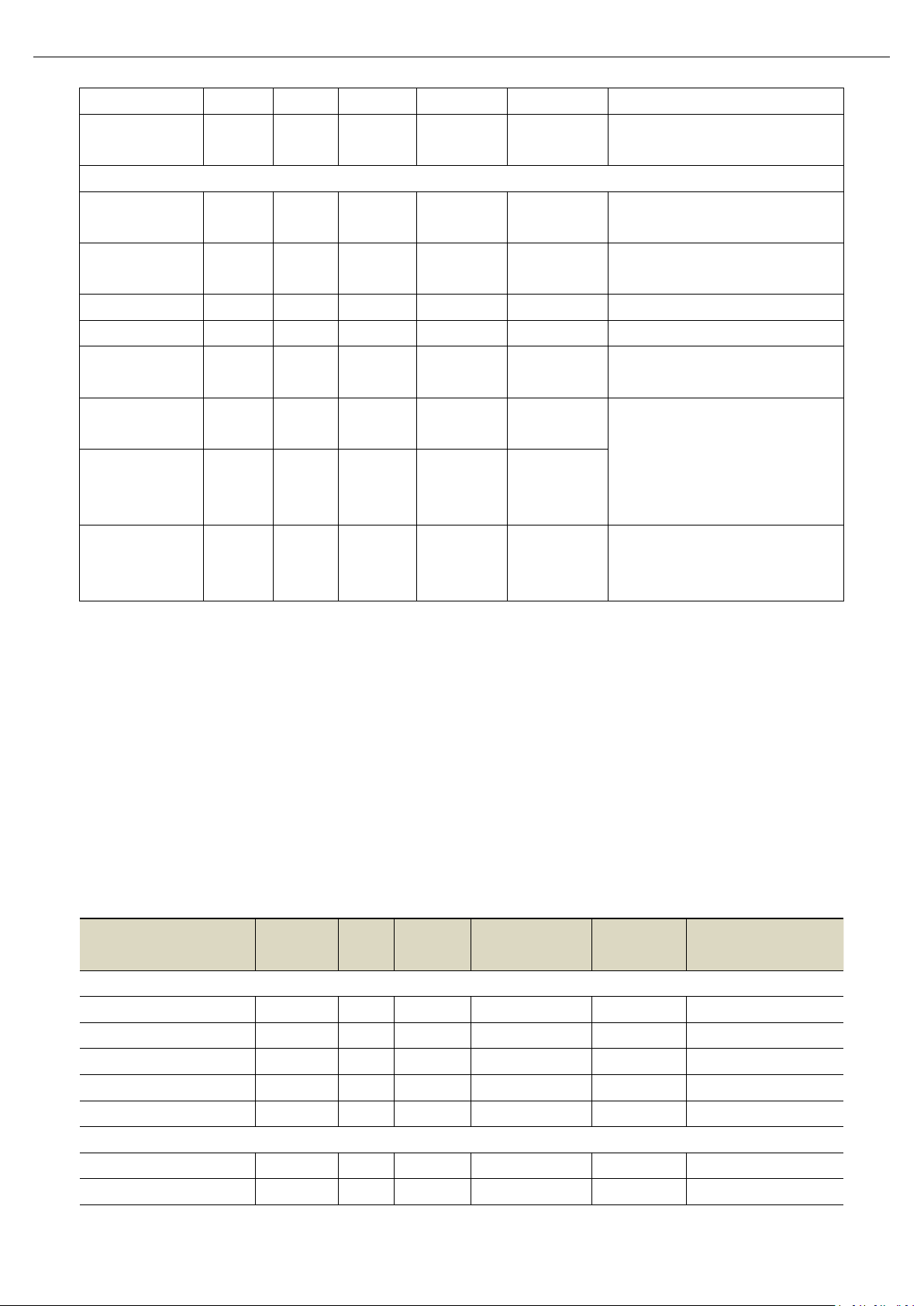
Floating point 9.91E+37 in measurement data, which represents invalid data, window displays “-----“;
Floating point 9.9E+37 in measurement data, which represents the data is overrange or overflow, window
displays “ --oL-“ or “--oF-“.
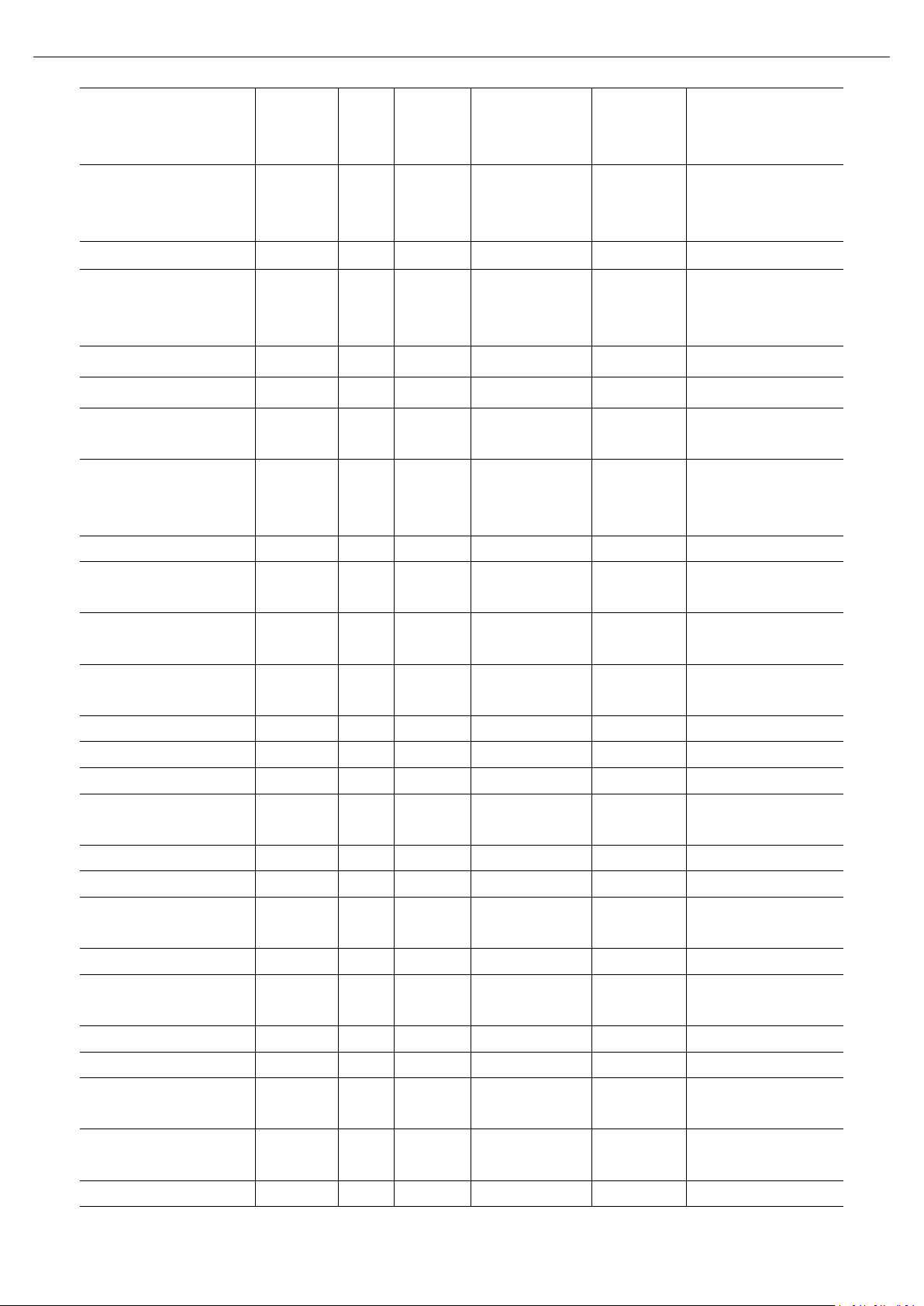
2.6.2 UTE9806+ Register List
*Notes: R represents it can be read, that is support command 03H. W represents it can be wirtten, that is support
command 10H.
Instruments.uni-trend.com 35 / 42
Page 36
Programming Manual UTE9800+ Series Smart Digital Power Meter
Update cycle
ULong
004CH2R/W
0 (0.1s), 1 (0.25s), 2
(0.5s),
3 (1s), 4 (2s), 5 (5s)
Average switch
ULong
004EH2R/W
0 (the average is turned
off), 1 (the average is
turned on)
Spare
0050H
2
Spare
Average times
ULong
0052H2R/W
0 (8 times), 1 (16 times),
2 (32 times), 3 (64
times)
Spare
0050H
2
Spare
Spare
...
n
Spare
Voltage Range
ULong
0068H2R/W
0 (Auto), 1 (60V), 2
(600V)
Current Range
ULong
006AH2R/W
0 (Auto), 1 (0.05A), 2
(0.1A),
3 (10A)
Spare
006CH
2
Spare
Lock key
ULong
006EH2R/W
0 (forbidden), 1
(enabled)
Data Hold
ULong
0070H2R/W
0 (forbidden), 1
(enabled)
Mute Key
ULong
0072H2R/W
0 (forbidden), 1
(enabled)
Spare
...
n
Spare
Alarm switch
ULong
007EH2R/W
0 (OFF), 1 (ON)
Voltage alarm control
ULong
0080H2R/W
0 (OFF), 1 (ON)
Upper limit of voltage
alarm
Float
V
0082H2R/W
0.000~9999
Lower limit of voltage alarm
Float
V
0084H2R/W
0.000~9999
Current alarm control
ULong
0086H2R/W
0 (OFF), 1 (ON)
Upper limit of current
alarm
Float
A
0088H2R/W
0.000~9999
Lower limit of current alarm
Float
A
008AH2R/W
0.000~9999
Alarm control of active
power
ULong
008CH2R/W
0 (OFF), 1 (ON)
Upper limit of active power
Float
W
008EH2R/W
0.000~9999
Lower limit of active power
Float
W
0090H2R/W
0.000~9999
Alarm control of apparent
power
ULong
0092H2R/W
0 (OFF), 1 (ON)
Upper limit of apparent
power
Float
VA
0094H2R/W
0.000~9999
Lower limit of apparent
Float
VA
0096H2R/W
0.000~9999
Instruments.uni-trend.com 36 / 42
Page 37
Programming Manual UTE9800+ Series Smart Digital Power Meter
power
Spare
0098H2R/W
Spare
009AH2R/W
Spare
009CH2R/W
Alarm control of power
factor
ULong
009EH2R/W
0 (OFF), 1 (ON)
Upper limit of power factor
Float
00A0H2R/W
0.000~9999
Lower limit of power factor
Float
00A2H2R/W
0.000~9999
Spare
...
n
Spare
Alarm delay times
ULong
00C8H2R/W
0~9999
Zero point alarm
ULong
00CAH2R/W
0 (OFF), 1 (ON)
Spare
...
2
Spare
Alarm indicator
ULong
00CEH2R/W
0 (OFF), 1 (ON)
Sound length of alarm
ULong
00D0H2R/W
0~9999 (0 represents no
sound)
Measurement Data
Voltage value
Float
V
0100H2R
AC voltage
Current value
Float
A
0102H2R
AC current
Active power
Float
W
0104H2R
Apparent power
Float
W
0106H2R
Power factor
Float
W
0108H2R
Voltage frequency
Float
Hz
010AH2R
Current frequency
Float
Hz
010CH2R
Positive peak of voltage
Float
Hz
010EH2R
Negative peak of voltage
Float
Hz
0110H2R
Positive peak of current
Float
Hz
0112H2R
Negative peak of current
Float
Hz
0114H2R
Alarm state
ULong
0116H2R
0-not detecting, 1-pass,
2-NG
Data Name
Data
Format
Unit
Initial
Address
Number of
Register
Read/Write
Remarks
Product Information
Product
ASCII050
R
"UNI-T,UTE9811+ ,012345678,F1.02"
2.6.3 UTE9811+ Register List
*Notes:
1. R represents it can be read, that is support command 03H. W represents it can be wirtten, that is support command
10H.
2. “Voltage range”, “Current range”, “User’s defined input signal frequency” can only be used when set the user’s
grade to High. The specific step can refer to section 7.5 User’s grade in UTE9800+ User’s Manaul.
Instruments.uni-trend.com 37 / 42
Page 38
Programming Manual UTE9800+ Series Smart Digital Power Meter
information
Retain5050
R
Parameter Setting
Measurement
mode
U16
1001R/W
0: normal TRMS (RMS)
1: harmonic distortion (THD%)
2: measured value of harmonic (THD)
3: crest factor (CF)
4: TRMS harmonic (HARM-RMS)
Voltage range*
U16
1011R/W
0(Auto), 1(75V), 2(150V),
3(300V), 4(600V
)
Current range*
U16
1021R/W
0(Auto), 1(0.2A), 2(1A),
3(4A),4(20A
)
Update cycle
U16
1031R/W
0(0.1s), 1(0.25s), 2(0.5s),
3(1s), 4(2s), 5(5s
)
Average
U16
1041R/W
0(the average is turned off), 1(8
times), 2(16 times),
3(32 times), 4(64 times
)
Data hold
U16
1051R/W
0(forbidden), 1(enabled
)
Display
U16
1061R/W
0(display PF value), 1(display
frequency value
)
Mute
U16
1071R/W
0(forbidden), 1(enabled
)
Upper limit of
current alarm
FloatA1082R/W
0.000~40.000
,
When the upper limit and the lower
limit is set to 0 at the same time, it
represents the alarm is forbidden.
Lower limit of
current alarm
FloatA1102R/W
Upper limit of
power limit
FloatW1122R/W
0.000~48000.0
,
When the upper limit and the lower
limit is set to 0 at the same time, it
represents the alarm is forbidden.
Lower limit of
power limit
FloatW1142R/W
Alarm delay
FloatS1162R/W
0.0~99.9
User’s defined
input signal
frequency
FloatHz1182R/W
0.0 or 40.0~70.0;0.0 represents this
function is disabled.
Measurement
data type
U16
1201R/W
0: real-time measurement data
1: recently update TRMS data
Parament Configuration of Instrument
Default setting
U16
1401W
0(forbidden), 1(set the parameter
to the default value
)
Save parameter
U16
1411W
0(forbidden), 1(save the parameter
into system storage for next use
)
Measurement Data
Voltage value
FloatV1502R
The numerical value is related to the
measurement model.
Instruments.uni-trend.com 38 / 42
Page 39
Programming Manual UTE9800+ Series Smart Digital Power Meter
Current value
FloatA1522R
The numerical value is related to the
measurement model.
Active power
FloatW1542R
Power factor
Float
1562R
Frequency of
voltage
FloatHz1582R
Alarm state of
current
U16
1601R
0(alarm forbidden), 1(wait for
connect to the load),
2(testing), 3(the result is normal),
4(the result is low), 5(the result is
high
)
Alarm state of
power
U16
1611R
Data update count
U16
1621R
The latest measurements are
available when changes in this data
are detected.
Measurement Data of Crest Factor
Voltage CF
Float
1902R
The ratio of voltage crest value and
RMS voltage.
Current CF
Float
1922R
The ratio of current crest value and
RMS current.
Measurement Data of Harmonic
Total voltage
distortion factor
Float%2002R
Total voltage distortion factor
Measured value of
total voltage
distortion factor
FloatV2022R
Measured value of total voltage
distortion factor
Total current
distortion factor
Float%2042R
Total current distortion factor
Measured value of
total current
distortion factor
FloatA2062R
Measured value of total current
distortion factor
Voltage distortion
factor of 1~50
times
Float%208
100
R
Voltage distortion factor of 1~50
times
Measured voltage
value of 1~50
times
FloatV308
100
R
Measured voltage value of 1~50 times
Current distortion
factor of 1~50
times
Float%408
100
R
Current distortion factor of 1~50
times
Measured current
value of 1~50
times
FloatA508
100
R
Measured current value of 1~50 times
Total RMS voltage
FloatV6082R
Total RMS voltage
Instruments.uni-trend.com 39 / 42
Page 40
Programming Manual UTE9800+ Series Smart Digital Power Meter
Total RMS current
FloatA6102R
Total RMS current
Total RMS active
power
FloatW6122R
Total RMS active power
Expression of Special Data
Floating point 9.91E+37 in measurement data, which represents invalid data, window displays “-----“;
Floating point 9.9E+37 in measurement data, which represents the data is overrange or overflow, window
displays “ --oL-“ or “--oF-“.
Appendix 1 CRC Calculation
const unsigned char aucCRCHi[] = {
0x00, 0xC1, 0x81, 0x40, 0x01, 0xC0, 0x80, 0x41, 0x01, 0xC0, 0x80, 0x41,
0x00, 0xC1, 0x81, 0x40, 0x01, 0xC0, 0x80, 0x41, 0x00, 0xC1, 0x81, 0x40,
0x00, 0xC1, 0x81, 0x40, 0x01, 0xC0, 0x80, 0x41, 0x01, 0xC0, 0x80, 0x41,
0x00, 0xC1, 0x81, 0x40, 0x00, 0xC1, 0x81, 0x40, 0x01, 0xC0, 0x80, 0x41,
0x00, 0xC1, 0x81, 0x40, 0x01, 0xC0, 0x80, 0x41, 0x01, 0xC0, 0x80, 0x41,
0x00, 0xC1, 0x81, 0x40, 0x01, 0xC0, 0x80, 0x41, 0x00, 0xC1, 0x81, 0x40,
0x00, 0xC1, 0x81, 0x40, 0x01, 0xC0, 0x80, 0x41, 0x00, 0xC1, 0x81, 0x40,
0x01, 0xC0, 0x80, 0x41, 0x01, 0xC0, 0x80, 0x41, 0x00, 0xC1, 0x81, 0x40,
0x00, 0xC1, 0x81, 0x40, 0x01, 0xC0, 0x80, 0x41, 0x01, 0xC0, 0x80, 0x41,
0x00, 0xC1, 0x81, 0x40, 0x01, 0xC0, 0x80, 0x41, 0x00, 0xC1, 0x81, 0x40,
0x00, 0xC1, 0x81, 0x40, 0x01, 0xC0, 0x80, 0x41, 0x01, 0xC0, 0x80, 0x41,
0x00, 0xC1, 0x81, 0x40, 0x00, 0xC1, 0x81, 0x40, 0x01, 0xC0, 0x80, 0x41,
0x00, 0xC1, 0x81, 0x40, 0x01, 0xC0, 0x80, 0x41, 0x01, 0xC0, 0x80, 0x41,
0x00, 0xC1, 0x81, 0x40, 0x00, 0xC1, 0x81, 0x40, 0x01, 0xC0, 0x80, 0x41,
0x01, 0xC0, 0x80, 0x41, 0x00, 0xC1, 0x81, 0x40, 0x01, 0xC0, 0x80, 0x41,
0x00, 0xC1, 0x81, 0x40, 0x00, 0xC1, 0x81, 0x40, 0x01, 0xC0, 0x80, 0x41,
0x00, 0xC1, 0x81, 0x40, 0x01, 0xC0, 0x80, 0x41, 0x01, 0xC0, 0x80, 0x41,
0x00, 0xC1, 0x81, 0x40, 0x01, 0xC0, 0x80, 0x41, 0x00, 0xC1, 0x81, 0x40,
0x00, 0xC1, 0x81, 0x40, 0x01, 0xC0, 0x80, 0x41, 0x01, 0xC0, 0x80, 0x41,
0x00, 0xC1, 0x81, 0x40, 0x00, 0xC1, 0x81, 0x40, 0x01, 0xC0, 0x80, 0x41,
0x00, 0xC1, 0x81, 0x40, 0x01, 0xC0, 0x80, 0x41, 0x01, 0xC0, 0x80, 0x41,
0x00, 0xC1, 0x81, 0x40
};
const unsigned char aucCRCLo[] = {
Instruments.uni-trend.com 40 / 42
0x00, 0xC0, 0xC1, 0x01, 0xC3, 0x03, 0x02, 0xC2, 0xC6, 0x06, 0x07, 0xC7,
0x05, 0xC5, 0xC4, 0x04, 0xCC, 0x0C, 0x0D, 0xCD, 0x0F, 0xCF, 0xCE, 0x0E,
0x0A, 0xCA, 0xCB, 0x0B, 0xC9, 0x09, 0x08, 0xC8, 0xD8, 0x18, 0x19, 0xD9,
0x1B, 0xDB, 0xDA, 0x1A, 0x1E, 0xDE, 0xDF, 0x1F, 0xDD, 0x1D, 0x1C, 0xDC,
0x14, 0xD4, 0xD5, 0x15, 0xD7, 0x17, 0x16, 0xD6, 0xD2, 0x12, 0x13, 0xD3,
Page 41

Programming Manual UTE9800+ Series Smart Digital Power Meter
0x11, 0xD1, 0xD0, 0x10, 0xF0, 0x30, 0x31, 0xF1, 0x33, 0xF3, 0xF2, 0x32,
0x36, 0xF6, 0xF7, 0x37, 0xF5, 0x35, 0x34, 0xF4, 0x3C, 0xFC, 0xFD, 0x3D,
0xFF, 0x3F, 0x3E, 0xFE, 0xFA, 0x3A, 0x3B, 0xFB, 0x39, 0xF9, 0xF8, 0x38,
0x28, 0xE8, 0xE9, 0x29, 0xEB, 0x2B, 0x2A, 0xEA, 0xEE, 0x2E, 0x2F, 0xEF,
0x2D, 0xED, 0xEC, 0x2C, 0xE4, 0x24, 0x25, 0xE5, 0x27, 0xE7, 0xE6, 0x26,
0x22, 0xE2, 0xE3, 0x23, 0xE1, 0x21, 0x20, 0xE0, 0xA0, 0x60, 0x61, 0xA1,
0x63, 0xA3, 0xA2, 0x62, 0x66, 0xA6, 0xA7, 0x67, 0xA5, 0x65, 0x64, 0xA4,
0x6C, 0xAC, 0xAD, 0x6D, 0xAF, 0x6F, 0x6E, 0xAE, 0xAA, 0x6A, 0x6B, 0xAB,
0x69, 0xA9, 0xA8, 0x68, 0x78, 0xB8, 0xB9, 0x79, 0xBB, 0x7B, 0x7A, 0xBA,
0xBE, 0x7E, 0x7F, 0xBF, 0x7D, 0xBD, 0xBC, 0x7C, 0xB4, 0x74, 0x75, 0xB5,
0x77, 0xB7, 0xB6, 0x76, 0x72, 0xB2, 0xB3, 0x73, 0xB1, 0x71, 0x70, 0xB0,
0x50, 0x90, 0x91, 0x51, 0x93, 0x53, 0x52, 0x92, 0x96, 0x56, 0x57, 0x97,
0x55, 0x95, 0x94, 0x54, 0x9C, 0x5C, 0x5D, 0x9D, 0x5F, 0x9F, 0x9E, 0x5E,
0x5A, 0x9A, 0x9B, 0x5B, 0x99, 0x59, 0x58, 0x98, 0x88, 0x48, 0x49, 0x89,
0x4B, 0x8B, 0x8A, 0x4A, 0x4E, 0x8E, 0x8F, 0x4F, 0x8D, 0x4D, 0x4C, 0x8C,
0x44, 0x84, 0x85, 0x45, 0x87, 0x47, 0x46, 0x86, 0x82, 0x42, 0x43, 0x83,
0x41, 0x81, 0x80, 0x40
};
unsigned short usMBCRC16( unsigned char * pucFrame, unsigned short usLen )
{
unsigned char ucCRCHi = 0xFF;
unsigned char ucCRCLo = 0xFF;
int iIndex;
while( usLen-- )
{
iIndex = ucCRCLo ^ *( pucFrame++ );
ucCRCLo = ( unsigned char)( ucCRCHi ^ aucCRCHi[iIndex] );
ucCRCHi = aucCRCLo[iIndex];
}
return ( unsigned short )( ucCRCHi << 8 | ucCRCLo );
}
unsigned char SendBuf[30];
void main(void)
{
unsigned short CRC;
unsigned short SendLen;
SendLen = 0;
SendBuf[SendLen++] = 0x01;
SendBuf[SendLen++] = 0x03;
SendBuf[SendLen++] = 0x00;
Instruments.uni-trend.com 41 / 42
Page 42

Programming Manual UTE9800+ Series Smart Digital Power Meter
SendBuf[SendLen++] = 0x96;
SendBuf[SendLen++] = 0x00;
SendBuf[SendLen++] = 0x02;
CRC = usMBCRC16(SendBuf,SendLen); /*Start to caclulating CRC */
SendBuf[SendLen++] = CRC&0xFF; /* CRC LSB */
SendBuf[SendLen++] = (CRC>>8)&0xFF; /* CRC MSB */
}
Instruments.uni-trend.com 42 / 42
 Loading...