

Page 1

PIN Pad PP190
Programme r’s Manual
Personal ID Number Pad
Revision 0
2014-02-06
Page 2
PIN Pad 190 Programmer’s Manual
2014-02-06
FEDERAL COMMUNICATIONS COMMISSION STATEMENT
This device com plies with Part 15 of the FCC Rules. Operati on is subject to the f ollow ing t wo con dit ions : (1)
this device ma y not cause harmf ul interference, and ( 2) this device m ust accept any i nterference receive d,
including interference that may cause undesired operation.
NOTE
This equipment has been t ested and found to comply with the l imits f or a Class B digital device, pur suant to
Part 15 of the FCC Rules. These limits are designed to provide reasonable protection against harmful
interference when the eq ui pment is operated in a commerc ial environment. This equipment generates, uses ,
and can radiate radio frequency energy and, if not installed and used in accordance with the instruction
manual, may cause harmful interference to radio communications. Operation of this equipment in a
residential area is likel y to cause harmful interf erence in which case the us er will be required to corr ect the
interference at his own expense.
You are cautioned th at any change or modifications to the equipment not expressly appro ve by the party
responsible for compliance could void your authority to operate such equipment.
Page 1
Uniform Industrial Corp. Proprietary and Confidential Total 160 pages
Page 3

PIN Pad 190 Programmer’s Manual
2014-02-06
NOTICE
The issuer of this manual has made every effor t to provide accurate inf ormation. T he issuer will not be held
liable for any technical and editorial omission or errors made herein; nor for incidental consequential
damages resulting from the furnishing, performance or use of this material. This document contains
proprietary information that is protected by copyright. All rights are reserved. No part of this document may be
photocopied, reproduced, or translated without the prior written consent of the issuer. The information
provided in this manual is subject to change without notice.
第十二條 經型式認證合格之低功率射頻電機,非經許可,公司、商號或使用者均不得擅自變更頻率、 大功率
或變更原設計之特性及功能。
第十四條 低功率射頻電機之使用不得影響飛航安全及干擾合法通信;經發現有干擾現象時,應立即停用,並改
善至無干擾時方得繼續使用。
前項合法通信,指依電信法規定作業之無線電通信。低功率射頻電機須忍受合法通信或工業、科學及醫療用電
波輻射性電機設備之干擾。
AGENCY APPROVED
- FCC class B
- CE class B
WARRANTY
This product is served under one-year warranty to the original purchaser. Within the warranty period,
merchandise found t o be d ef ec tive w ou ld be re pa ir ed or r epl aced. This warranty applies t o t he products only
under the normal use of the original purchas er, and in no circum stances covers incid ental or consequent ial
damages through consumers’ misuse or modification of the products.
Page 2
Uniform Industrial Corp. Proprietary and Confidential Total 160 pages
Page 4

PIN Pad 190 Programmer’s Manual
Add new function RTC(Real time clock) and new
2014-02-06
Document History
Document Version Apply to FW version Change
0A 190BL00A
190SC00A
190PM00A
0B 190BL00A
190SC00B
190PM00A
0C 190BL00A
190SC00C
190PM00A
0D 190BL00A
190SC00D
190PM00A
0E 190BL00A
190SC00E
190PM00A
First SQA
1. First SQA debug.
1. Second SQA debug.
2. Add new command ”01”、”16”.
3. Add new command “94”、”96”.
4. Add new function “self diagnostic”.
1. Third SQA debug
2. Add new function “Remote key injection” (R00 ~ R02)
1. Fourth SQA debug
2.
command “P18”
0F 190BL00A
190SC00F
190PM00A
1. Fifth SQA debug
a. Modify command 02.
b. Modify command 08.
c. Modify command 72.
d. Modify command Z 2 to response <EOT> at end of
transmit.
e. Modify command Z60.
f. Modify command 70 (PIN Entry Request with
DUKPT) to check exist of DUKPT key early.
Page 3
Uniform Industrial Corp. Proprietary and Confidential Total 160 pages
Page 5

PIN Pad 190 Programmer’s Manual
2014-02-06
Table of Contents
Section 2 PP190 Setup & Diagnostic Menu __________________________________ 7
Start Up Self Test _____________________________________________________________ 7
Call up Diagnostic Menu ______________________________________________________ 7
Diagnostic Menu 1: HW Tests __________________________________________________ 7
Diagnostic Menu 2: Display Info ________________________________________________ 8
Diagnostic Menu 3: Set LCD Backlight ___________________________________________ 8
Diagnostic Menu 4: Set Keypad Beep ____________________________________________ 8
Diagnostic Menu 5: Update Password ___________________________________________ 8
About USB virtual COM port (only applied on USB version) _________________________ 9
Section 3 Message format ______________________________________________ 10
Notation Conventions ________________________________________________________ 10
Message frame summary _____________________________________________________ 11
Section 4 Administration and maintenance messages _______________________ 12
Message 01 Self Test ________________________________________________________ 12
Message 02 Load Master Key _________________________________________________ 14
Symmetric Keys Loading Authentication ________________________________________ 18
Message 04 Check Master Key ________________________________________________ 20
Message 05 Load Serial Number _______________________________________________ 22
Message 06 Get Serial Number ________________________________________________ 23
Message 07 Test DES Implementation __________________________________________ 24
Message 08 Select Master Key ________________________________________________ 25
Message 09 Communication Test ______________________________________________ 26
Message 11 PIN Pad Device Connection Test ____________________________________ 28
Message 13 Adjust COM1 Baud Rate (RS-232 version only) ________________________ 29
Message 16 Remote self-test request ___________________________________________ 31
Message 17 Request random number __________________________________________ 32
Message 18 Get/Set PIN pad system time _______________________________________ 33
Message 19 Query Firmware Version ___________________________________________ 35
Message 1J Turn ON/OFF LCD Backlight ________________________________________ 37
Message 1M Setup Keypad Beeper _____________________________________________ 39
Section 6 Online transaction messages with Master/Session Keys (MK/SK) _____ 41
Message 70 PIN entry request (M K/SK ) _________________________________________ 41
Message 71 Encrypted PIN Block Response _____________________________________ 44
Message 72 PIN Entry Cancel _________________________________________________ 47
Message Z0 Move Display Cursor ______________________________________________ 48
Message Z1 Reset State ______________________________________________________ 49
Message Z2 Display String ____________________________________________________ 50
Message Z3 Display Line Prompts _____________________________________________ 53
Page4
Uniform Industrial Corp. Proprietary and Confidential Total 160 pages
Page 6

PIN Pad 190 Programmer’s Manual
2014-02-06
Z2 / Z3 Authen ticated mode with fixed prompt ___________________________________ 56
Z2 / Z3 PIN entry mode with fixed prompt _______________________________________ 56
Message Z2 Display String with Authentication Code _____________________________ 57
Message Z3 Display Line Prompts with Authentication Code _______________________ 59
Example to use Z2 / Z3 with Authencation Code. _________________________________ 61
Message Z42 Read Key Code ________________________________________________ 62
Message Z43 Read Key Code Response _______________________________________ 63
Message Z50 String Entry Request ___________________________________________ 64
Message Z51 String Entry Response __________________________________________ 66
Message Z60 PIN entry request with external prompt (MK/SK)_____________________ 67
Message Z62 PIN entry request with customized prompt (MK/SK) _________________ 69
Message Z64 Query Key Check Value (KCV) ____________________________________ 72
Message Z65 Key Check Value Response _______________________________________ 73
Message Z66 Message Authentication Code (MAC) Request ______________________ 74
Message Z67 Message Authentication Code (MAC) Response _____________________ 77
Message Z7 Turn ON/OFF CANCEL Message Display _____________________________ 79
Message Z8 Set Idle Prompt __________________________________________________ 80
Section 7 Online transac tion messages with Derived Unique Key per Transaction
(DUKPT) ______________________________________________________________ 81
Message 60 Pre-authorization PIN Entry Request _________________________________ 82
Message 62 Pre-authorization Amount Authorization Request ______________________ 84
Message 70 PIN Entry Request (DUKPT ) ________________________________________ 85
Message 71 Encrypted PIN Block Response _____________________________________ 87
Message 72 PIN Entry Cancel _________________________________________________ 89
Message Z60 PIN entry request with external prompt (DUKPT) ____________________ 90
Message Z62 PIN entry request with customized prompt (DUKPT) _________________ 92
Message 76 PIN Entry Test Request ____________________________________________ 95
Message 7A KSN output format _______________________________________________ 96
Message 90 Load First Initial Key Request ______________________________________ 97
Message 91 Load Initial Key Response _________________________________________ 99
Message 94 Load Second Initial Key Request ___________________________________ 100
Message 96 Select Active Key Set ____________________________________________ 101
Section 8 Remote key injection method __________________________________ 102
Message R00 Load Vender Public Key _________________________________________ 103
Message R01 Update RSA Key _______________________________________________ 106
Message R02 Remote Key Injection ___________________________________________ 112
Section 9 EMV Level 2 transaction messages _____________________________ 117
Message T51 Terminal Configuration Setup ____________________________________ 118
Message T52 Terminal Configuration Setup Response ___________________________ 121
Message T53 Certificate Authority Public Key Setup _____________________________ 122
Page5
Uniform Industrial Corp. Proprietary and Confidential Total 160 pages
Page 7

PIN Pad 190 Programmer’s Manual
2014-02-06
Message T54 Certificate Authority Public Key Setup Response ____________________ 125
Message T55 EMV Application Configuration Setup ______________________________ 126
Message T56 EMV Application Configuration Setup Response ____________________ 131
Message T61 Start Transaction _______________________________________________ 132
Message T62 Start Transaction Response ______________________________________ 134
Message T63 Get Transaction Result’s Data ____________________________________ 136
Message T64 Get Transaction Result’s Data Response ___________________________ 137
Message T65 Get Online authorization Data ____________________________________ 138
Message T66 Response of Get Online authorization Data message _________________ 139
Message T71 Send Online Authorized Code ____________________________________ 140
Message T73 Send Issuer Script Command ____________________________________ 142
Message T74 Send Issuer Script Command Response ___________________________ 143
Message T75 Revocation List Setup ___________________________________________ 144
Message T76 Revocation List Setup Response__________________________________ 145
Message T77 Exception List Setup ____________________________________________ 146
Message T78 Exception List Setup Response ___________________________________ 147
Appendix A Key management __________________________________________ 148
Appendix B PIN Block Format _________________________________________ 156
ANSI x9.8 format (MK/SK, DUKPT, and Offline clear text PIN entry) _________________ 156
Appendix C Fixed Prompts for Z2/Z3 authenticated mode ___________________ 157
Appendix D Fixed Prompts for Z2/Z3 PIN entry mode ______________________ 159
Page6
Uniform Industrial Corp. Proprietary and Confidential Total 160 pages
Page 8
PIN Pad 190 Programmer’s Manual
Display Test
** A L E R T **
ROM CHKSUM FAILD
** A L E R T **
PED WAS TAMPERED
Password 1?
Password 2?
HW Tests
Update Password
2014-02-06
Section 2 PP190 Setup & Diagnostic Menu
Start Up Self Test
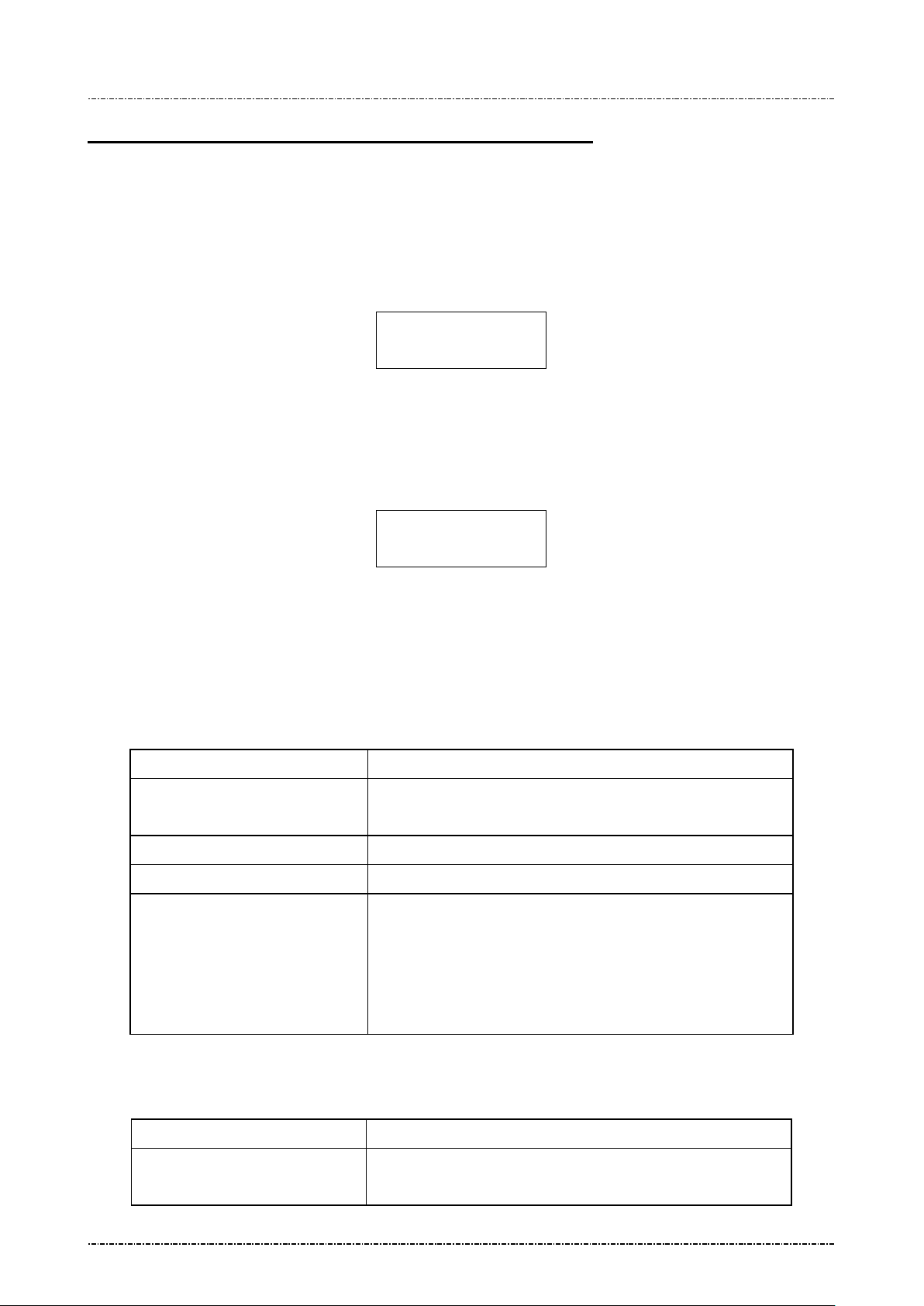
PP190 will perform a series of self-tests during start up, which include:
Internal firmware checksum: PP190 will verify the internal firmware checksum to ensure the integrity
of the firmware progr am. If firmware chec ksum er ror, PP190 wil l show follo wing prom pt and reject
further commands:
Security Memory Integrity: PP190 will verify secret personalization information written in the Battery
Powered Key (BPK) reg ister of the CPU. If BPK ver ification failed (possibly by security breach or
internal battery exhausted,) PP190 will show following prompt and reject further commands:
Call up Diagnostic Menu
Press function ke y [CLR] + [3] (quickly press ‘3 ’ after [CLR] r eleased) of PP190 will call up diagnostic
menu when PP190 in idle st ate. The default 2 passwords for diagnostic menu ar e “87806799” (both
passwords)
DISPLAY ACTION
Diagnostic Menu 1: HW Tests
Page7
Uniform Industrial Corp. Proprietary and Confidential Total 160 pages
(Idle prompt) Power on.
Press [CLR]+[3]
Input first setup password and press [ENTER]
Input second setup password and press [ENTER]
Use left button [-] and right button [-] to scroll up and down.
Display Info
Set LCD Backlight
Set Keypad Beep
DISPLAY ACTION
[ENTER] to execute.
Display two pages of test pattern:
First page is turn on all pixels to check if there are any dot
Page 9
PIN Pad 190 Programmer’s Manual
Keypad Test
Show SerialNum
Show Version
Light Always ON
3 seconds of
Beep ON
Beep OFF
2014-02-06
damage. Press any key or wait 10 sec to continue.
Second page shows PP190 character sets. Press any key or wait
5 sec to leave.
PP190 will echo user’s input key at line 2.
Press [CAN] to l eave this test.
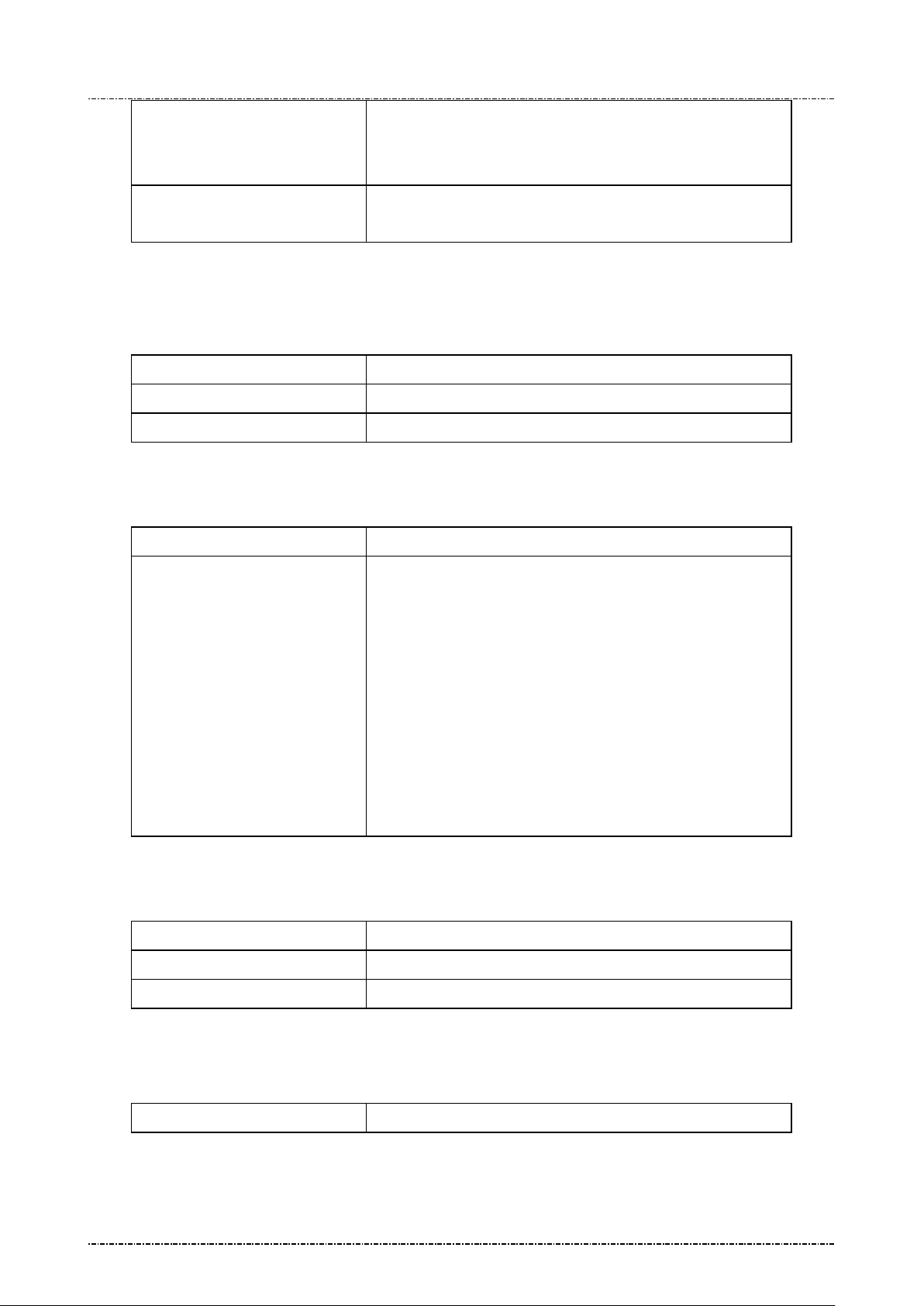
Diagnostic Menu 2: Display Info
DISPLAY ACTION
Display current serial number. Refer to message 06.
Display current firmware version.
Diagnostic Menu 3: Set LCD Backlight
DISPLAY ACTION
First item will set LCD backlight always o n. This setti ng is the
Light Auto OFF
same with message 1J with parameter 1.
Second item will set PP190 enable its backlight in following
situation:
a. Any key is pressed.
b. PIN entry command is working
c. Selecting Menu.
And backlight will automatically turn off after
above operation ends.
Diagnostic Menu 4: Set Keypad Beep
DISPLAY ACTION
Key press with beep.
Diagnostic Menu 5: Update Password
Page8
Uniform Industrial Corp. Proprietary and Confidential Total 160 pages
DISPLAY ACTION
Key press without beep.
Page 10

PIN Pad 190 Programmer’s Manual
Update Password1
password, then press [ENTER] to finish input. If two passwords
Update Password2
2014-02-06
PP190 will show following message:
NEW PASSWD
****
CONFIRM PASSWD
****
User should press 1st password, press [ENTER] to enter 2nd
mismatch the password will not be changed. Password must have
4 characters at least, with maximum 8 characters.
PP190 will show following message:
NEW PASSWD
****
CONFIRM PASSWD
****
(Usage is the same with password 1.)
About USB virtual COM port (only applied on USB version)
PP190 USB vers ion will i den tif y its elf as a virtual COM port for W indows 2000/ XP device e num eration.
When Windows requests PP190’s device driver, please provide a directory name which contains PP190
USB driver, and answer “proceed anyway” when prompted with driver certification questions.
The baud rate of PP190 vir tual COM port is determ ined by the application progr am. When AP calls
Windows API to open COM port, PP190 and W indows virtua l COM port dr iver will a djust its ba ud rate
according to the parameters sent to API function.
Page9
Uniform Industrial Corp. Proprietary and Confidential Total 160 pages
Page 11
PIN Pad 190 Programmer’s Manual
2014-02-06
Section 3 Message format
This chapter details the format of messages exchanged between the host and PIN Pad.
Notation Conventions
The following conventions are used to make the description of messages more readable:
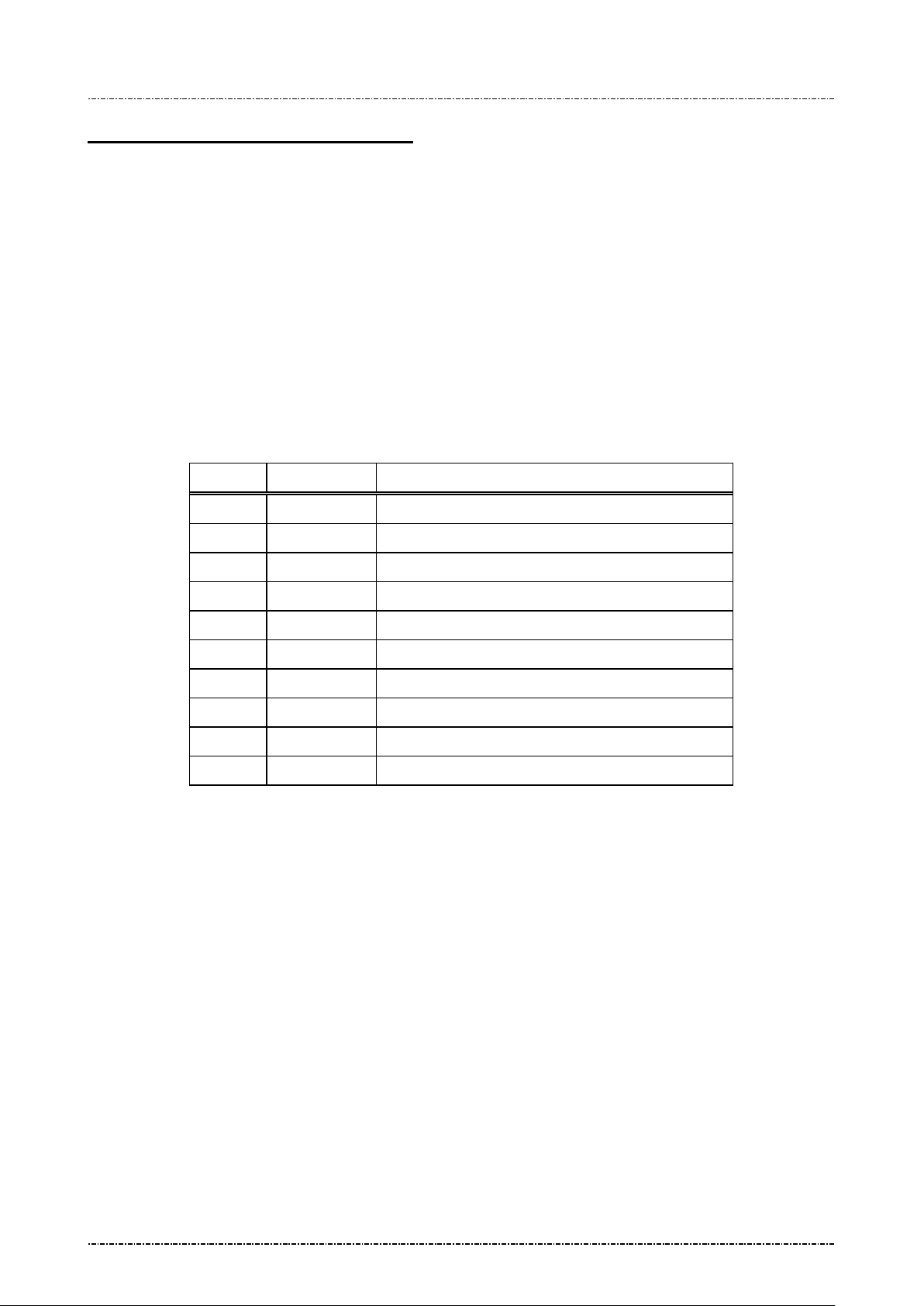
Control Codes
Control codes (non-displayable codes) are represented by two to three capital letters enclosed in angled
brackets “<>“. This PIN Pad uses 12 control codes in total. Their actual code, when referenced, is
represented by two hex di gits enclosed in angled br ackets, <0F> for ex ample. The following ta ble lists
their usage and value in hex codes.
CODE HEX VALUE USAGE
STX 02 Denotes the beginning of a message frame
ETX 03 Denotes the ending of a me s s age frame
EOT 04 Indicates communication session terminated
ACK 06 Acknowledge of message received
SI 0F Denotes the beginning of a message frame
SO 0E Denotes the ending of a me s s age frame
NAK 15 Indicates invalid message received
SUB 1A Message parameter follows
FS 1C Field separator
GS 1D Message ID follows
[LRC]
Each message fram e transmitted is follo wed by an LRC byte to d etect communicati on error. This byte
should be regarded as part of the m es sage f rame but c omes after the end ing de lim iter c haracter . [LRC]
is used to represents this LRC byte in describing message frames.
LRC is calculated as an X ORed valu e of ever y byte after s tart code in the m essage f rame ex cept itself,
that means from the next byte of <STX> or <SI> through the <ETX> or <SO> byte.
[item]
A descriptive item name enclosed in bracket denotes a string or data byte that has no fixed value.
Page10
Uniform Industrial Corp. Proprietary and Confidential Total 160 pages
Page 12

PIN Pad 190 Programmer’s Manual
2014-02-06
Message frame su mmary
Data exchanged between PIN Pad and host computer are grouped into “message frames”. Each
message frame has one of the two frame formats listed below:
<STX>[message ID][data]<ETX>[LRC]
<SI>[message ID][data]<SO>[LRC]
Each type of message has a uni que value in its mes sage ID field. In the f ollowing tex ts, we referenc e a
message type by its message ID value, e.g. “message 70”.
Message type
Messages exchanged between the Signature PIN Pad and the HOST can be divided into two categories.
One is for administration and maintenance, in general administrative messages have <SI> packet
header and will return message to HOST by the same message ID.
The other is for various transactions, in gener al transac tion mess ages have <ST X> pack et header, an d
comes in pair. Even number message packets sends command and data to Signature PIN pad, then odd
number message packets returns the result.
Time-out
Whenever the PIN Pad sends a message, a response (<ACK> character for acknowledgement or
<NAK> character if LRC error occurred) from host is expected. If the PIN Pad does not receive a
response within 5 seconds, it will retransmit the last packet. If PIN pad does not receive <ACK> or
<NAK> after two retransm it attempts, it will send <EOT > character and this com munication ses sion will
be terminated.
Transmission Error
The PIN Pad expects the hos t computer to send a NAK whe n the host decides that an inva lid frame is
received. When the PIN Pad receives a NAK, it will retransmit its last message. If the message
retransmitted is invalid again, then a NAK should be sent by host to request for another try. The PIN Pad
will keep on retransmitting until an <ACK> or <EOT> is received.
Packet Error
When PIN pad rece ived a good transmission but invalid packet (wrong mess age id) it will ignore the
packet. If the pack et has acceptabl e message id but have wrong form at. PIN pad will se nd <EOT> as
error message. When in PIN entry functions it will send more detail error code.
Page11
Uniform Industrial Corp. Proprietary and Confidential Total 160 pages
Page 13
PIN Pad 190 Programmer’s Manual
2014-02-06
Section 4 Administration and maintenance messages
Message 01 Self Test
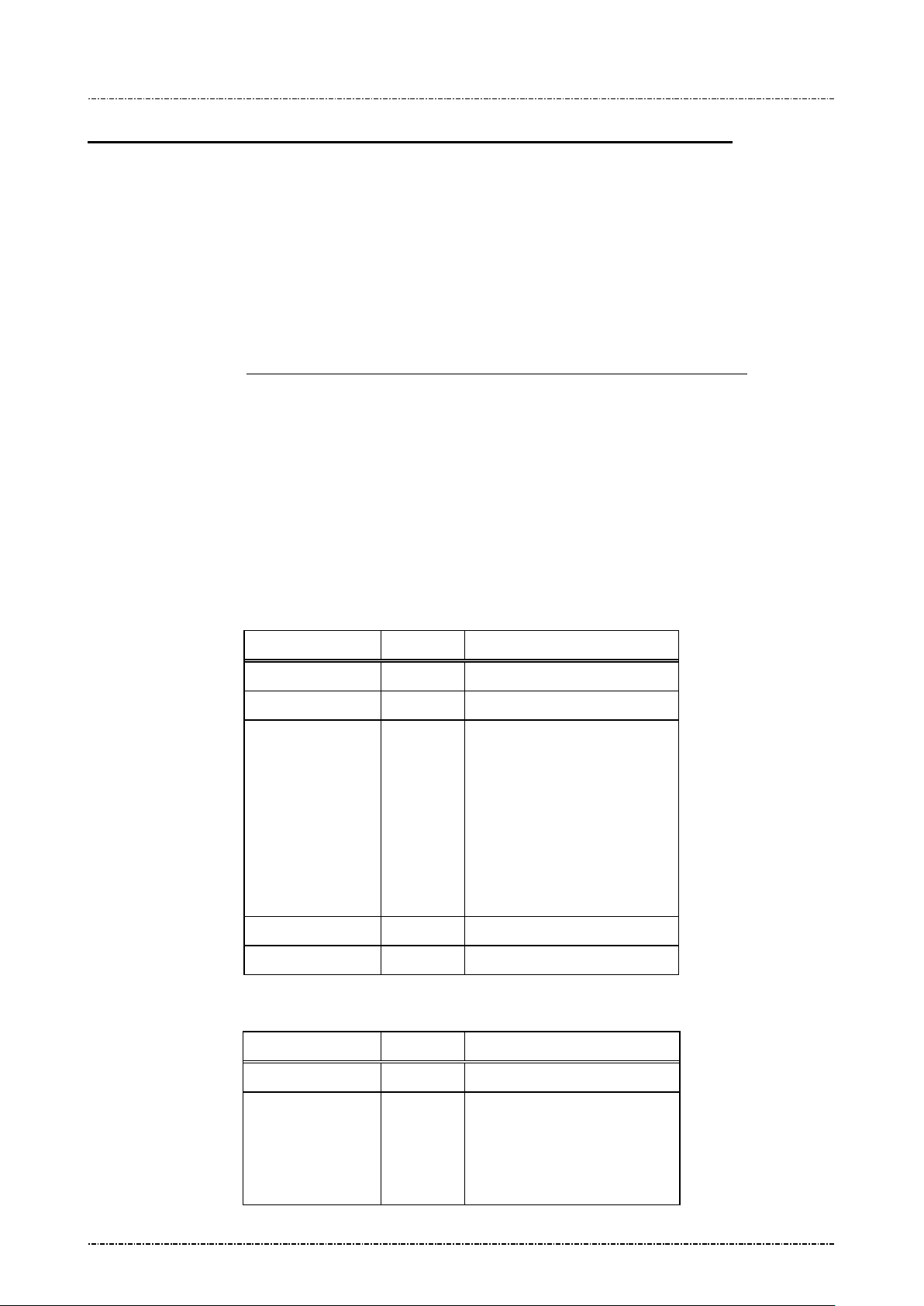
Format: <SI>01[test item]<SO>[LRC]
Message length: Fixed 7 bytes.
Usage: Field maintenance users can issue message 01 to do inter active PIN Pad self -tests.
Test results will be displayed on PIN Pad.
’04’ PIN Pad will detect spe cific patter n of k ey presses as a “correct” pattern, which is
Message element:
“[F1] [MENU] [F2] 1 2 3 4 5 6 7 8 9 [CAN] 0 [ENTER] [CLEAR]
pattern other than above will be treated as fail. Issue message 72 will interrupt this test,
too.
’05’: PIN pad will displa y 2 test pages: First one is a full screen of black dots to check
for damaged dot. Pres s [ENTER] or wait 10 s econ ds t o dis p lay page 2, which is som e
characters. Press [ENTER] again to end this test.
’06’: PIN pad will display its serial number on the LCD display.
’07’: PIN pad will execute a communication test, see next page for message flow.
Field Length Value and description
<SI> 1 <0F>
01 2 Message ID
[Test item] 2 01
02
03
”. Key press
04 Keypad test
05 Display test
06 Check serial number
07 Communication test
<SO> 1 <0E>
[LRC] 1 Checksum
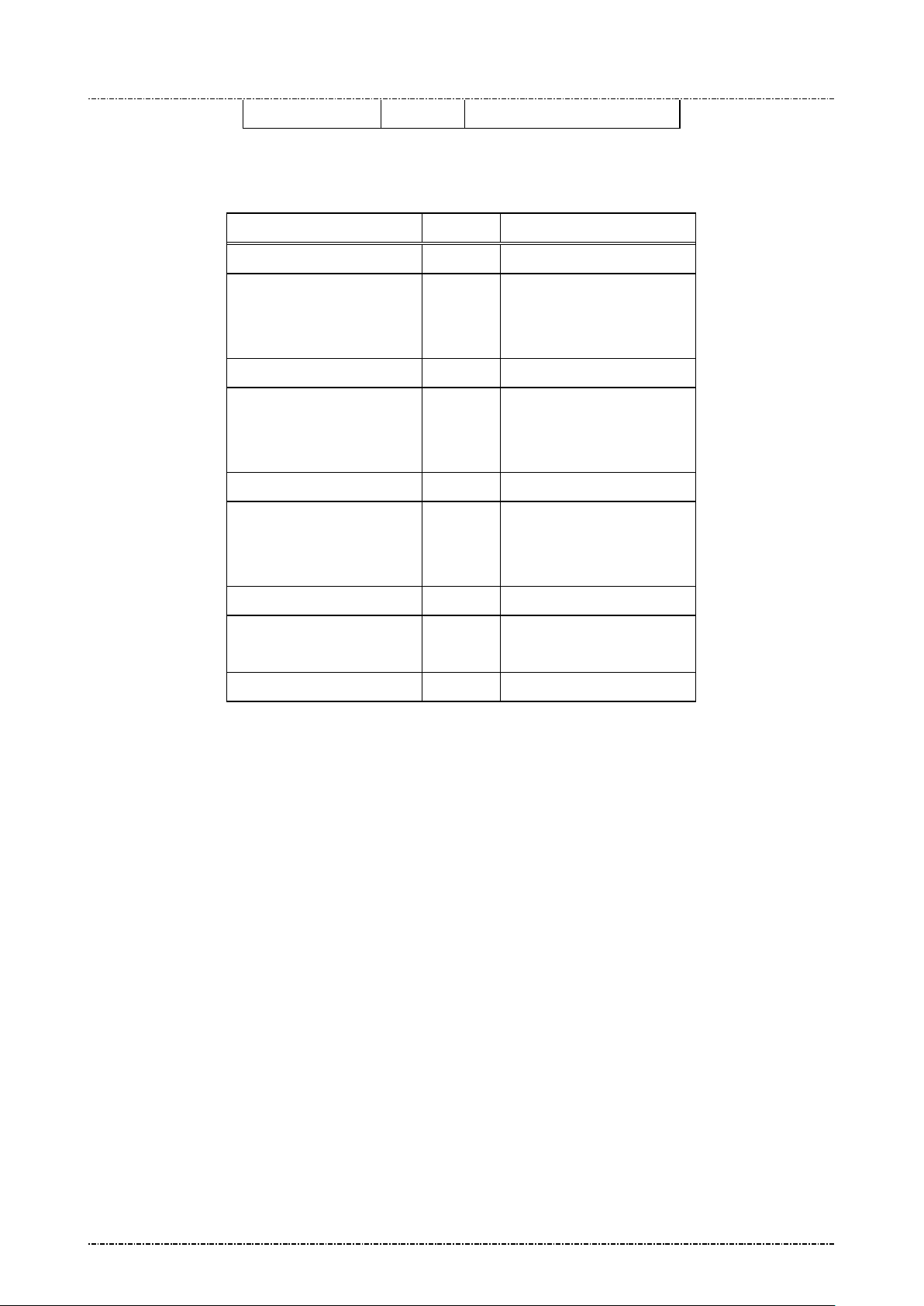
Message flow: (for test item 04 through 06)
HOST Direction PIN Pad
Message 01
(Execute self test)
Page12
Uniform Industrial Corp. Proprietary and Confidential Total 160 pages
<ACK> (Good LRC)
<NAK> (Bad LRC)
(<EOT> after 3 NAKs)
Page 14
PIN Pad 190 Programmer’s Manual
2014-02-06
<EOT> (when test done)
Message flow: (for test 07)
HOST Direction PIN Pad
Message 01
<ACK> (Good LRC)
<NAK> (Bad LRC)
(<EOT> after 3 NAKs)
09 Response Packet
<ACK> (Good LRC)
<NAK> (Bad LRC)
<ACK> (Good LRC)
<NAK> (Bad LRC)
(<EOT> after 3 NAKs)
09 Request Packet
<ACK> (Good LRC)
<NAK> (Bad LRC)
(<EOT> after 3 NAKs)
09 Response Packet
<EOT> (when test done)
Page13
Uniform Industrial Corp. Proprietary and Confidential Total 160 pages
Page 15

PIN Pad 190 Programmer’s Manual
2014-02-06
Message 02 Load Master Key
Format: <SI>02[Key ID][Key value] <FS>[Usage][Mode]<SO>[LRC]
(with clear text key)
<SI>02[Key ID][Key value (ANSI TR31 format)]<SO>[LRC]
(with encrypted key)
Message length: Variable (38 to 94 bytes).
Usage: Load Master Keys into PP190.
PP190 can store 16 master keys; each has a one digit ID. Master keys are di vi de d i n to
three groups of differ ent functions. Refer to Appendix A: Key management
usage and ID definition.
PP190 implements multiple security measures to conform Payment Card Industry (PCI)
security requirem ent. In order to load clear text mas ter keys, two authorized people
with their password are required. Otherwise the user must issue message 02 with
encrypted key value (AN SI T R31 form at). See next entit y “Symmetric Keys Loading
Authentication” for detailed information.
Note: 1. The [key value] field’s format is ASCII string with range ‘0’-‘9’, ‘A’-‘V’, which
represents a hexadecimal byte in two characters, i.e. “1F” represents 0x1F.
2. PP190 requires key loading key (master key #F) to be TDES.
3. Pass key loading authent ication and then loa d new c lear text m aster k ey will er ase
all other master ke ys, to preve nt malicious key substitution. F or more information refer
to “Symmetric Keys Loading Authentication” at page 24.
for key
Page14
Uniform Industrial Corp. Proprietary and Confidential Total 160 pages
Page 16
PIN Pad 190 Programmer’s Manual
Clear text format: 32 bytes for double length, 48
31 key usage for clear text
31 key mode for clear text
2014-02-06
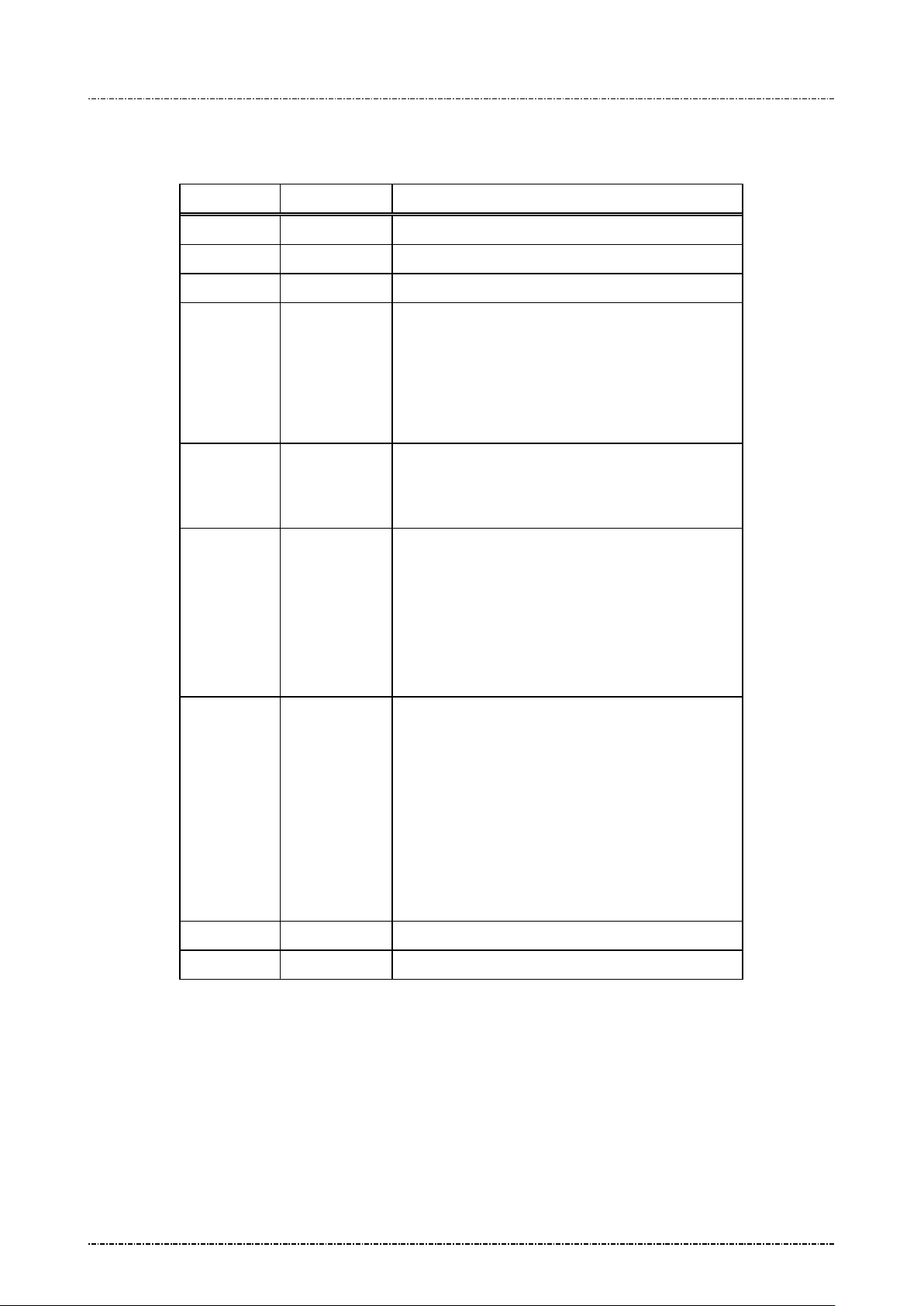
Message element:
Request fame (HOST to PP190)
Field Length Value and description
<SI> 1 <0F>
02 2 Message ID
[Key ID] 1 ‘0’ to ‘9’, ‘A’ to ‘F’ (A is not used)
[Key value] Var. Hexadecimal string for key value.
bytes for triple length.
TR31 format: 56 bytes for single length, 72 bytes
for double length, 88 bytes for triple length.
<FS> 1 Field separator.
(Optional, only available in c lear text format frame
if following [Usage] and [Mod e ] e xists)
[Usage] 2 Optional: ANSI TR-
frame. Available value are:
“K0” for key encryption. (id 0 ~ 9, B ~ F)
“P0” for PIN encryption. (id 0 ~ 9)
“M3” for MAC calculation. (id B ~ E)
If omitted, default value is “K0”
[Mode] 1 Optional: ANSI TR-
frame.
Available value are:
‘D’ for decryption only. (K0 keys)
‘E’ for encryption only (P0 / D0 keys)
‘G’ for MAC generation only (M3 keys)
‘V’ for MAC ver ification only (M3 keys)
If omitted, default value is ‘D’.
<SO> 1 <0E>
[LRC] 1 Checksum
Page15
Uniform Industrial Corp. Proprietary and Confidential Total 160 pages
Page 17
PIN Pad 190 Programmer’s Manual
loading procedure, send
2014-02-06
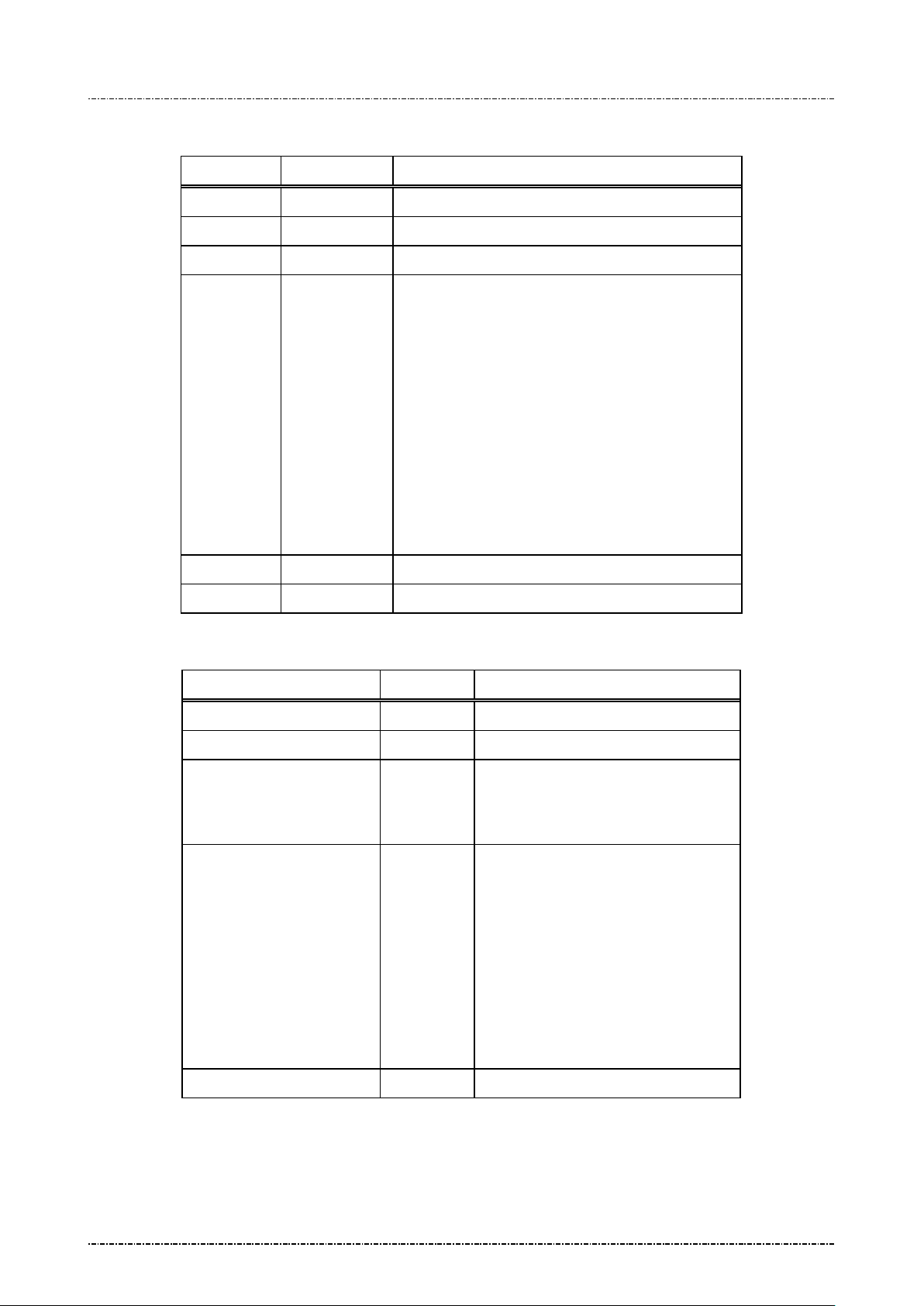
Request fame – Error message (HOST to PP190)
Field Length Value and description
<SI> 1 <0F>
02 2 Message ID
? 1
[Err msg] 1 ‘1’: KLK does not exist.
‘2’:
Key value duplicated with other existing key.
‘3’: Internal fail: fail to allocate memory
‘4’: Internal fail: fail to read key structure
‘7’: Fail to decrypt key value.
‘A’: TR31 format error.
‘B’: Insecure key inject. (New key is longe r than
the key used to protect it.)
‘C’: Fail to verify MAC value.
<SO> 1 <0E>
[LRC] 1 Checksum
Message flow:
HOST Direction PIN Pad
Message 02 (request frame)
Verify echo frame.
If verify ok, send <ACK>.
If packet LRC error, send
<NAK>.
If host want to cancel key
‘E’:
Key usage incompatible with key ID.
<ACK> /<NAK>/<EOT>
Processing request.
If format error, send <EOT> and end.
Message 02 (echo of request frame).
Page16
Uniform Industrial Corp. Proprietary and Confidential Total 160 pages
<EOT>.
Save key value and send <EOT>
Page 18

PIN Pad 190 Programmer’s Manual
2014-02-06
Example:
Clear Text
Master key to be loaded: 1919191919191919 5B5B5B5B5B5B5B5B
The Key ID you want to load: 0
The resulting 02 message : <SI>02019191919191919195B5B5B5B5B5B5B5B<SO>[LRC]
Encrypted (ANSI TR-31 2005 Key Variant Binding Method)
Key encrypting key (Mkey #F): 1919191919191919 5B5B5B5B5B5B5B5B
Master key to be loaded (K0): AA55AA55AA55AA55 3434343434343434
Key Block Header (KBH): (ASCII) A0072K0T D 00N 00 00
TDES CBC encrypted key value: 7D2D21FC9ECD3EEC BB0A2615BD8F0560 5722120BDFF2CCAC
Left 4 bytes of MAC value: 319C3198
The Key ID you want to load: 0
The resulting 02 message:
<SI>020A0072K0TD00N00007D2D21FC9ECD3EECBB0A2615BD8F05605722120BDFF2CCAC319C3
918 <SO>[LRC]
Encrypted (ANSI TR-31 2010 Key Derivation Binding Method)
Key condition: Load a double length PIN encryption key to key position #1
Key block protection key (KBPK): 1919191919191919 5B5B5B5B5B5B5B5B
PIN encryption key to be loaded: AA55AA55AA55AA55 3434343434343434
Padded key data: 0080 AA55AA55AA55AA55 3434343434343434 1C2965473CE2
Key Block Header (KBH): (ASCII) B0 080 P0TE00N0000
Derived Key block encryption key (KBEK): DB7F2A99D5647A7D D3EDFE3DA7CF5B21
Derived Key block MAC key (KBMK): 87EE6C0795954446 A34A0BB5F305BCE1
(See Appendix A for detail derive process)
CMAC of (KBH + Padded key data), using KBMK: EA391E5834C1AA0C
(See Appendix A for detail CMAC algorithm)
Use CMAC as IV to do TDES CBC encryption on padded key data, using KBEK:
Encrypted key data: 3C4F5024C59C182F 7165BC870FCB7F63 456AAE07DB736C32
The resulting 02 message:
<0F>021B0080P0TE00N0000 3C4F5024C59C182F 7165BC870FCB7F63 456AAE07DB736C32
EA391E5834C1AA0C<0E>
Page17
Uniform Industrial Corp. Proprietary and Confidential Total 160 pages
Page 19

PIN Pad 190 Programmer’s Manual
ENTER PASSWORD 1:
KEY INJECT MODE
Inject MKEY/IPEK
2014-02-06
Symmetric Keys Loading Authentication
In order to make PP190 acc ept clear text key loading frame, the ke y loading authenticat ion must be
processed.
[Enter key loading authentication menu]
Press [CLR]+[2] on the keypad of PP190, then PP190 will show key injection authentication login screen
as following:
(Default password will be sent to authentic owner separately)
The first authorized person come to enter 1
Then PP190 wil l prompt to enter 2
nd
pas sword if 1st password is correct. If 2nd pas sword is correct, to o,
PP190 will enter key loading mode and show following menu:
st
password on keypad and press [ENTER].
Update Password1
Update Password2
Use [F1] and [F4] key to navigate light bar to “Inject MKEY/IPEK”, then press [ENTER]. Then user is free
to load clear text master key by message 02, or load DUKPT initial key by message 90 and 94.
[Timing constraint and message constraint of Key Inject Mode]
According to PCI security requirement, PIN pad cannot stay in Key Inject Mode forever. Thus when
PP190 entered Key Inject Mode , its internal timer will start to countdown, and it s operating system will
monitor specific m essage p ack ets. If an y one of f ollowing criteria is matched, PP190 will exit K ey Inject
Mode and reject message 02(clear text form) and 90, 94 command:
1. When PIN pad idle d for 60 seconds, it will exit Ke y Inject Mode. (Each tim e 02 / 90 / 94 / 08 / 96 is
succeeded, the 60 seconds counter will reset to 60 again.)
2. When PIN pad has bee n in Key Inject Mode for 15 minutes. It will unconditionally ex it Key Inject
Mode.
3. When PIN pad receives messages other than 02 / 90 / 94 / 08 / 86, it will exit Key Inject Mode.
4. When user pressed CAN key on keypad, it will exit key inject mode.
[Master key substitution protecti o n ]
When user entered Key Inject Mode, PIN pad operating system will set up a new “Key Injecting
Session”.
The other master keys loaded in the same session will not erase any other master key.
DUKPT key set 0 and set 1 will not erase each other.
Page18
Uniform Industrial Corp. Proprietary and Confidential Total 160 pages
The first injected clear text master key in a new session will erase all other master keys.
Page 20

PIN Pad 190 Programmer’s Manual
2014-02-06
Example flow to load master keys with security:
In the following example we assume a bank receives a new PP190 and wants to initialize it before deploy.
And want to update some master keys after its deployed. We also assume the master key to be loaded is
position 0 and position F; their values are already stored in a Tamper Resistant Security Module (TRSM)
in a secure way.
1. The bank must generate two passwords, and make two authorized people to keep them separately.
2. Authorized people must enter KEY INJECT AUTH menu and change password 1 and password 2.
3. After password chan ged, connect PIN pad to TR SM, enter KEY INJECT AUTH m enu again and
choose Inject MKEY/IPEK function.
4. Operate TRSM to load master key #F and master key #0.
After step 4 finishes, user can issue other commands to PIN pad (such as message 08 to select key
#0 as active master key) or turn it off and deploy it.
5. To load or update master keys at field site, user should issue encrypted command 02.
Page19
Uniform Industrial Corp. Proprietary and Confidential Total 160 pages
Page 21
PIN Pad 190 Programmer’s Manual
2014-02-06
Message 04 Check Master Key
Format: <SI>04[key ID][Key Info Query]<SO>[LRC]
Message length: Variable (6 or 7) bytes.
Usage: Host sends this m essage to PIN Pad for checking if the m aster key with an ID of [ke y
ID] has been loa ded or not. Message 04 should be used bef ore loading any master
key. Message 04 can be also used to query key information (key
usage/mode/algorithm) if the designated key is not empty.
Message element:
Request frame (HOST to PIN Pad)
Field Length Value and description
<SI> 1 <0F>
04 2 Message ID
[key ID] 1 Master key ID (0~9, A~G)
[Key Info Query] 1 <Option>, 1: query key information
<SO> 1 <0E>
[LRC] 1 Checksum
Response frame ( PIN Pa d to HOST)
Field Length Value and description
<SI> 1 <0F>
04 2 Message ID
[response code] 1 0 Master key not loaded
F Master key loaded
[Key usage] 2 <Optio n, if key info query filed is set>
“K0”: Key encr ypting key. (Master key
for PIN / MAC / Data key)
“P0”: PIN key
“D0”: Data key
“M1”: MAC key for MAC algorithm 1
“M3”: MAC key for MAC algorithm 3
<FS> 1 <Option, if key info query filed is set>
<1C>, filed separator
[Mode] 2 <Option, if key info query filed is set>
“E”: Encryption use
“D”: Decryption use
<FS> 1 <Option, if key info query filed is set>
<1C>, filed separator
[Algorithm] 2 <Option, if key info query filed is set>
Page20
Uniform Industrial Corp. Proprietary and Confidential Total 160 pages
Page 22
PIN Pad 190 Programmer’s Manual
2014-02-06
“T”: Triple DES
“D”: Single DES
<SO> 1 <0E>
[LRC] 1 Checksum
Message flow:
HOST Direction PIN Pad
Message 04 (request)
<ACK> (Good LRC)
<NAK> (Bad LRC)
(<EOT> after 3 NAKs)
Check requested memory location
Message 04 (r esponse)
<ACK> (Good echo)
<NAK> (Bad LRC)
(<EOT> after 3 NAKs)
<EOT>
Page21
Uniform Industrial Corp. Proprietary and Confidential Total 160 pages
Page 23
PIN Pad 190 Programmer’s Manual
2014-02-06
Message 05 Load Serial Number
Format: <SI>05[string]<SO>[LRC]
Message length: Variable, maximum length is 21 bytes
Usage: Load the PIN Pad with the serial number given in the message frame. PIN Pad will
send the whole message frame back to host as a confirmation of good reception. Host
should then send an <A CK> to conf irm or <EOT > to canc el this s erial n um ber loading
process if the LRC is go od but s erial num ber echo ed i s incorr ect. Follo w the stan dard
<NAK> process if an invalid LRC is detected.
Message element:
Field Length Value and description
<SI> 1 <0F>
05 2 Message ID
[string] 0..16 Alphanumeric string (0~9, A~Z, a~z)
<SO> 1 <0E>
Message flow:
[LRC] 1 Checksum
HOST Direction PIN Pad
Message 05
<ACK> (Good echo)
<NAK> (Bad LRC)
(<EOT> after 3 NAKs)
<ACK> (Good LRC)
<NAK> (Bad LRC)
(<EOT> after 3 NAKs)
Message 05 (echo frame)
or <EOT> indicate error.
(Stores serial number)
<EOT>
Page22
Uniform Industrial Corp. Proprietary and Confidential Total 160 pages
Page 24
PIN Pad 190 Programmer’s Manual
2014-02-06
Message 06 Get Serial Number
Format: <SI>06<SO>[LRC]
<SI>06[string]<SO>[LRC]
Message length: Fixed 5 bytes for requesting message, variable for response message (max 21 bytes.)
Usage: This message is used to get serial number of the PIN Pad. PIN Pad will send the serial
number previousl y loaded or string of 16 ‘0’s as the serial number if it has not been
loaded. Serial number will be displayed on LCD, too.
Message element:
Request frame (HOST to PIN Pad)
Field Length Value and descriptio n
<SI> 1 <0F>
06 2 Message ID
<SO> 1 <0E>
[LRC] 1 Checksum
Message flow:
Response frame ( PIN Pa d to HOST)
Field Length Value and description
<SI> 1 <0F>
06 2 Message ID
[string] 0..16 String for serial number
<SO> 1 <0E>
[LRC] 1 Checksum
HOST Direction PIN Pad
Message 06 (request)
<ACK> (Good LRC)
<NAK> (Bad LRC)
(<EOT> after 3 NAKs)
Message 06 (response frame) or
<EOT> if read error
<ACK> (Good echo)
<NAK> (Bad LRC)
(<EOT> after 3 NAKs)
Page23
Uniform Industrial Corp. Proprietary and Confidential Total 160 pages
<EOT>
Page 25
PIN Pad 190 Programmer’s Manual
2014-02-06
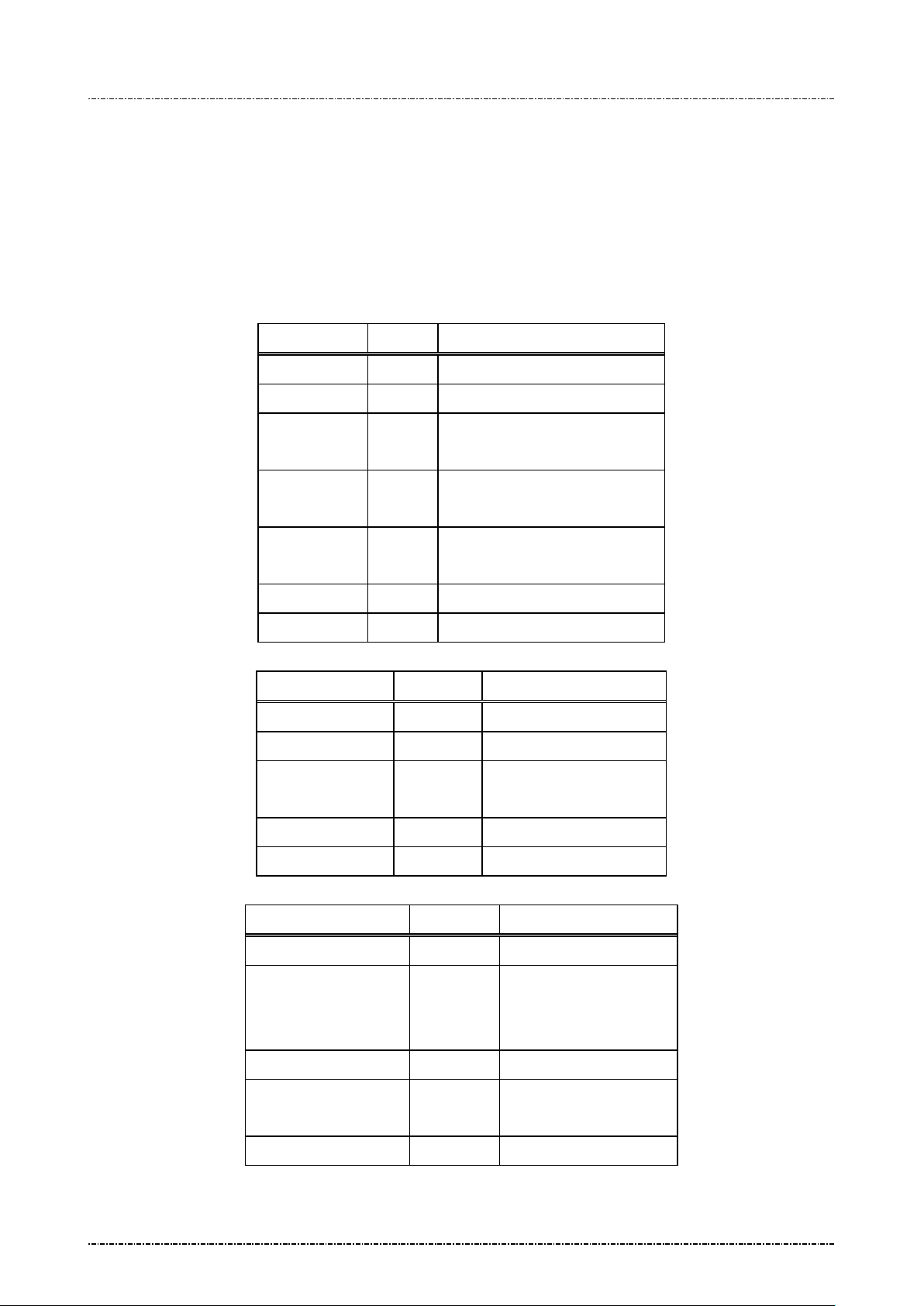
Message 07 Test DES Implementation
Format: <SI>07[master key][clear text][cipher text]<SO>[LRC]
Message length: Fixed 53 bytes.
Usage: This message is used to validat e DES implementation of PIN Pad. Testing result will
be shown on the PIN Pad display and return response code for remote diagnostic.
Message element:
Request frame (HOST to PIN Pad)
Field Length Value and description
<SI> 1 <0F>
07 2 Message ID
[Master key] 16 Master Key used of encoding
(hexadecimal string)
[Clear text] 16 Clear text for encoding
(hexadecimal string)
Message flow:
[Cipher text] 16 Known ci phered text
(hexadecimal string)
<SO> 1 <0E>
[LRC] 1 Checksum
Response frame ( PIN Pa d to HOST)
Field Length Value and description
<SI> 1 <0F>
07 2 Message ID
[response code] 1 0: Test Success
F: Test Failed.
<SO> 1 <0E>
[LRC] 1 Checksum
HOST Direction PIN Pad
Message 07 (request)
<ACK> (Good LRC)
<ACK>/<NAK>/
<EOT>
Page24
Uniform Industrial Corp. Proprietary and Confidential Total 160 pages
<NAK> (Bad LRC)
(<EOT> after 3 NAKs)
Message 07 (response)
<EOT>
Page 26
PIN Pad 190 Programmer’s Manual
2014-02-06
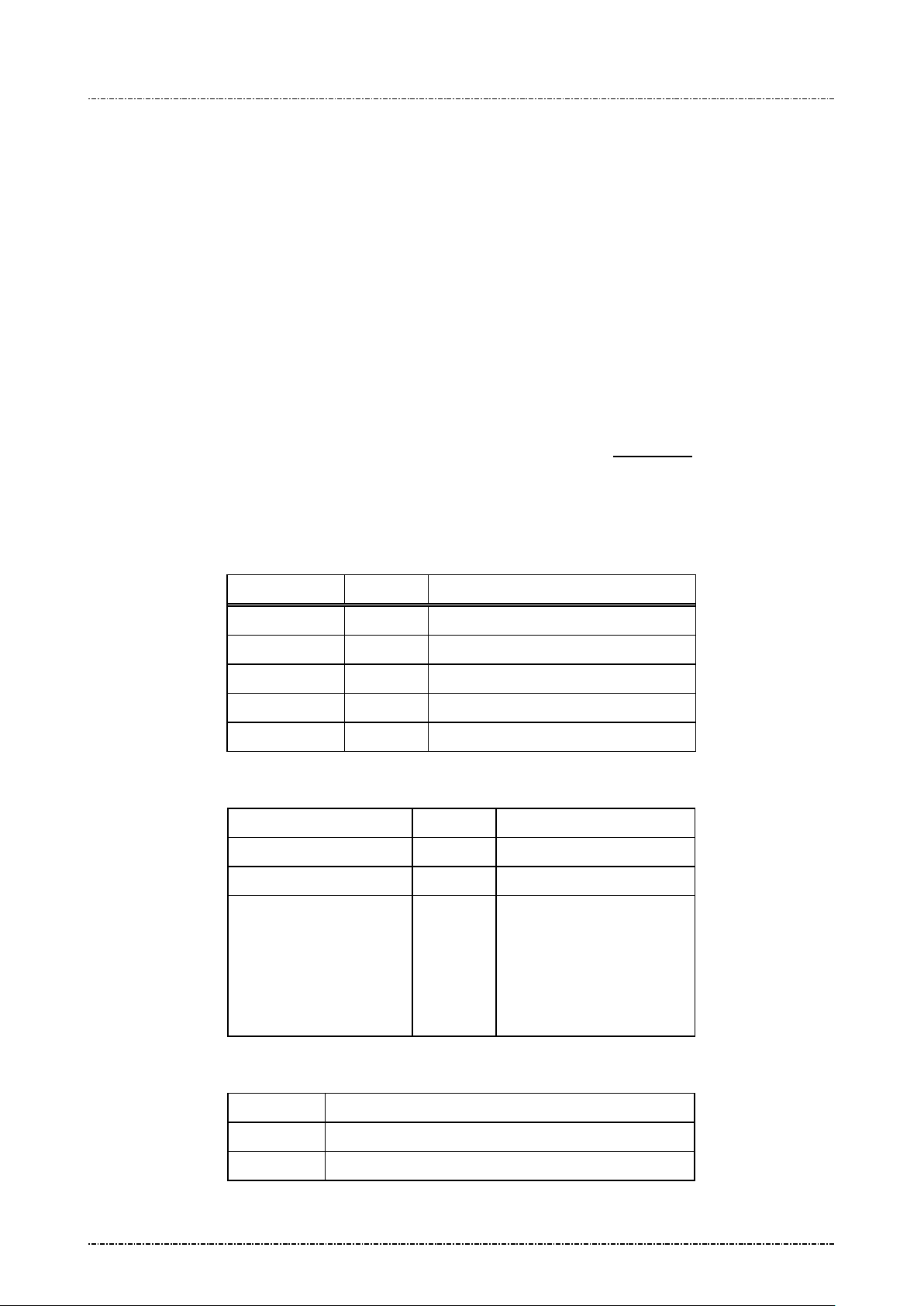
Message 08 Select Master Key
Format: <SI>08[KeyID]<SO>[LRC]
Message length: Fixed 6 bytes.
Usage: This message is used to select one of the 10 possible PIN encrypting master keys
previously loaded using message 02. The selected master key will be used in the
following transactions.
Note: Check master key existence before change:
This message does not res pond for check ing master key existenc e. You ma y choose
an empty master key without notice.
TDES capability: If selec ted master ke y is a double length key (32 char acters when
loaded with mess age 02), PP190 will treat all session keys (in MK/SK m essage 70,
Message element:
Message flow:
Z60, Z62) as EDE encrypted by this master key. (See Appendix A
Confirm key existence be fore issue 08: message 0 8 is not resp onsible for check if
[KeyID] has a valid master key, use message 04 before 08.
Field Length Value and description
<SI> 1 <0F>
08 2 Message ID
[KeyID] 1 0~9, one of Master key id.
<SO> 1 <0E>
[LRC] 1 Checksum
HOST Direction PIN Pad
Message 08
<ACK>/<NAK>/<EOT>
)
Error Message:
Error Code Meaning
‘1’ Key index > 9
Page25
Uniform Industrial Corp. Proprietary and Confidential Total 160 pages
[Success]
<SI>080<SO>
[Fail]
<SI>08[errCode]<SO>
<EOT>
Page 27
PIN Pad 190 Programmer’s Manual
2014-02-06
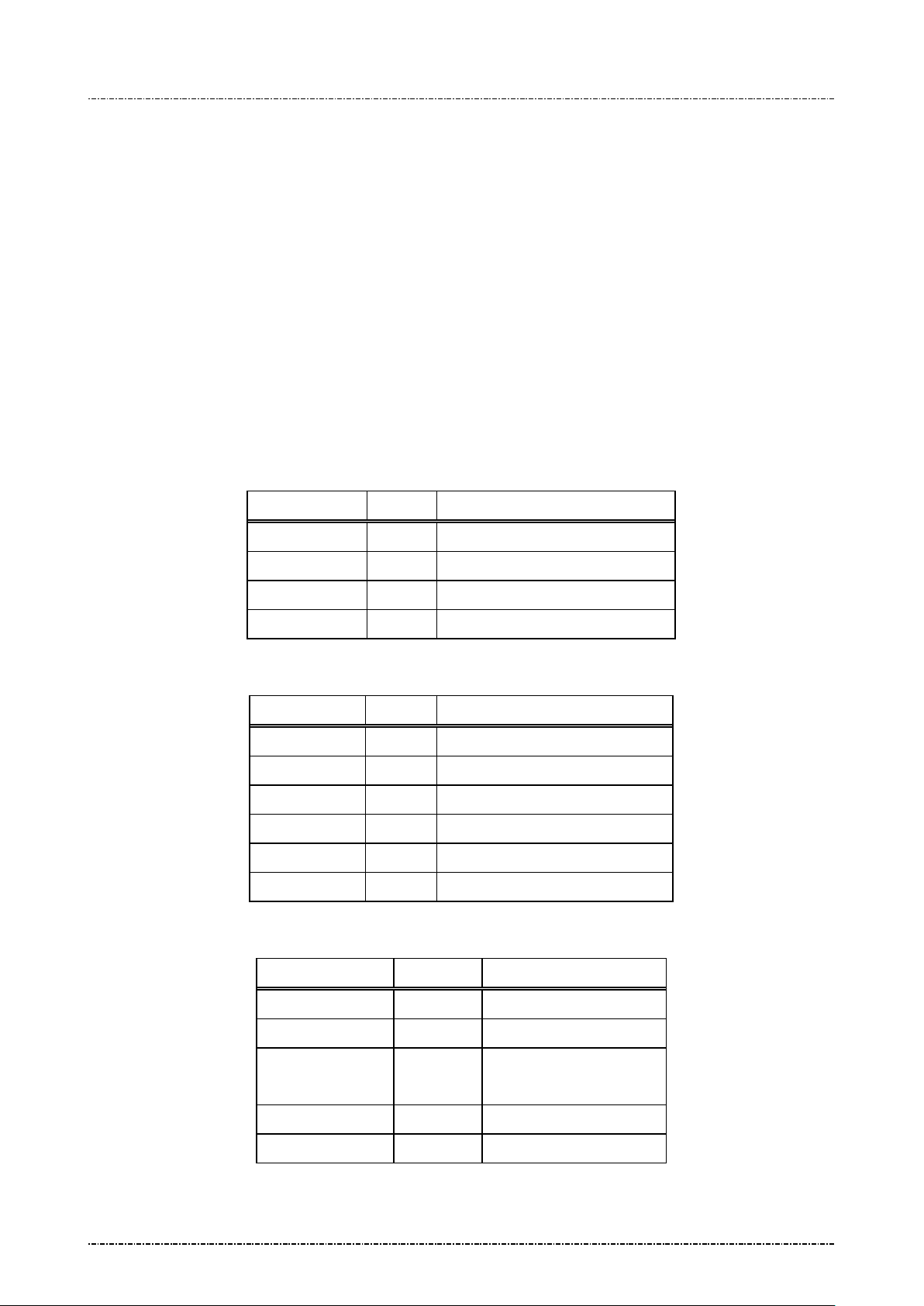
Message 09 Communicati on Test
Format: <SI>09<SO>[LRC]
<SI>09<SUB>PROCESSING<SO>[LRC]
Message length: Fixed 5 bytes for requesting message, fixed 16 bytes for response message.
Usage: This message is used to tes t communication link between HOST and the PIN Pad.
Both HOST and PIN Pa d can initiate communication test. The initiating party shou ld
send the requesting message; the other party should response with the response
message that shoul d be A CKed if rec eived c orrectl y. After ver ifying t hat the res ponse
message is correctly, the initiating party should send back the same response
message and the recei ving party should ack nowledge this message. Tes ting results
are shown on the PIN Pad display.
Message element:
Request frame (HOST to PIN Pad)
Field Length Value and description
<SI> 1 <0F>
09 2 Messa ge ID
<SO> 1 <0E>
[LRC] 1 Checksum
Response frame ( PIN Pa d to HOST)
Field Length Value and description
<SI> 1 <0F>
09 2 Message ID
<SUB> 1 <1A>
[Test string] 10 ASCII string “PROCESSING”
<SO> 1 <0E>
[LRC] 1 Checksum
Result frame (PIN Pad to HOST)
Field Length Value and description
<SI> 1 <0F>
09 2 Message ID
[response code] 1 0: Test Success
F: Test Failed.
<SO> 1 <0E>
[LRC] 1 Checksum
Page26
Uniform Industrial Corp. Proprietary and Confidential Total 160 pages
Page 28
PIN Pad 190 Programmer’s Manual
2014-02-06
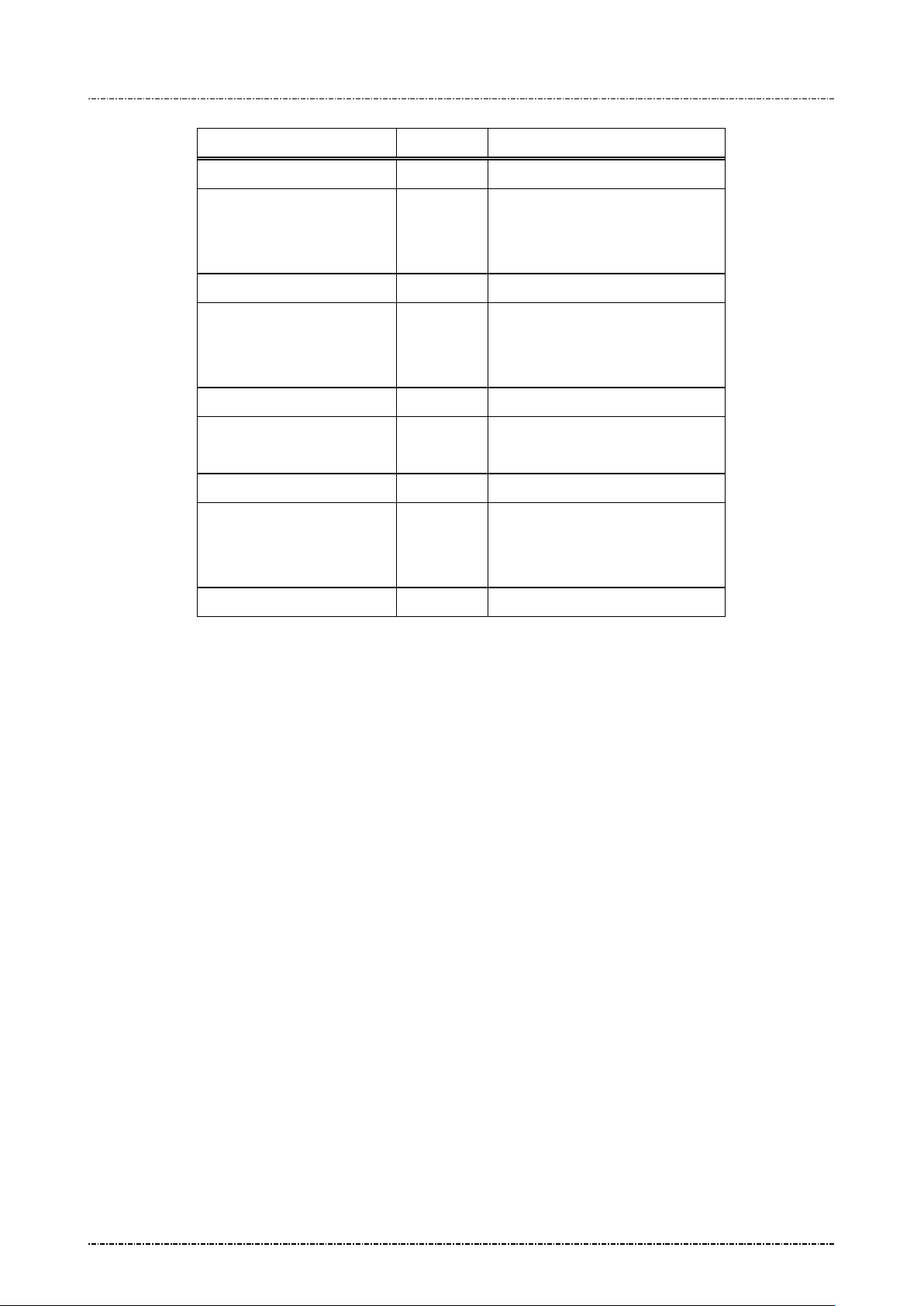
Message flow:
HOST Direction PIN Pad
Message 09 (request)
<ACK> (Good echo)
<NAK> (Bad LRC)
(<EOT> after 3 NAKs)
Message 09 (response)
<ACK> (Good echo)
<NAK> (Bad LRC)
(<EOT> after 3 NAKs)
<ACK> (Good LRC)
<NAK> (Bad LRC)
(<EOT> after 3 NAKs)
Message 09 (response frame)
<ACK> (Good LRC)
<NAK> (Bad LRC)
Message 09 (result frame)
<EOT>
Page27
Uniform Industrial Corp. Proprietary and Confidential Total 160 pages
Page 29
PIN Pad 190 Programmer’s Manual
2014-02-06
Message 11 PIN Pad Device Connection Test
Format: <SI>11<SO>[LRC]
Message length: Fixed 5 bytes.
Usage: This message is us ed to ensure that the PIN Pad is attached to the HOST working
normally. PIN Pad will response an ACK (or NAK if LRC incorrect) within one second.
Message element:
Field Length Value and description
<SI> 1 <0F>
11 2 Message ID
<SO> 1 <0E>
[LRC] 1 Checksum
Message flow:
HOST Direction PIN Pad
Message 11
<ACK> (Good LRC)
<NAK> (Bad LRC)
(<EOT> after 3 NAKs)
Page28
Uniform Industrial Corp. Proprietary and Confidential Total 160 pages
Page 30
PIN Pad 190 Programmer’s Manual
2014-02-06
Message 13 Adjust COM1 Baud Rate (RS-232 version on ly)
Format: <SI>13[baud code][mode]<SO>[LRC]
Message length: Variable, 6 bytes.
Usage: This message will change the working b aud rate and transmit m ode of PP190 for later
operations. The setting is kept in the battery-powered memory, which will not be
erased until security is breached or the battery exhausted. Baud rate will be changed
after message flow ends.
Note: If [mode] parameter is not specified, the default transmit mode is N, 8, 1.
Message element:
Request frame (HOST to PIN Pad)
Field Length Value and description
<SI> 1 <0F>
13 2 Message ID
[baud code] 1 ASCII character
‘1’ = 1200bps
‘2’ = 2400bps
‘3’ = 4800bps
‘4’ = 9600bps
‘5’ = 19200bps
‘6’ = 38400bps
‘7’ = 57600bps
‘8’ = 115200bps
<SO> 1 <0E>
[LRC] 1 Checksum
Response frame (PI N Pad to HOST)
Field Length Value and description
<SI> 1 <0F>
13 2 Message ID
[status] 1 ASCII character
‘0’ for success
‘1’ for parameter error
<SO> 1 <0E>
[LRC] 1 Checksum
Message flow:
HOST Direction PIN Pad
Message 13 (request)
Page29
Uniform Industrial Corp. Proprietary and Confidential Total 160 pages
Page 31
PIN Pad 190 Programmer’s Manual
(Change working baud
2014-02-06
<ACK> (Good LRC)
Message flow:
<NAK> (Bad LRC)
(<EOT> after 3 NAKs)
<ACK>/<NAK>/<EOT>
Message 13 (response)
<EOT>
rate and save setting)
HOST Direction PIN Pad
Message 14
(Request frame)
<ACK> (Good LRC)
<NAK> (Bad LRC)
(<EOT> after 3 NAKs)
Message 14
(Response frame)
<ACK>/<NAK>/<EOT>
<EOT>
Page30
Uniform Industrial Corp. Proprietary and Confidential Total 160 pages
Page 32
PIN Pad 190 Programmer’s Manual
2014-02-06
Message 16 Remote self-test request
Format: <SI>16<SO>[LRC]
Message length: Fixed 5 bytes.
Usage: This message is used to ensure that the PP190 attached to the HOST is working
normally. PP190 will resp ons e an ACK (or NAK if LRC incorr ect) with in one sec ond. If
multiple tests failed, response code will concatenate such as “<SI>1625<SO>”.
Message element:
Request frame (HOST to PIN Pad)
Field Length Value and description
<SI> 1 <0F>
16 2 Message ID
<SO> 1 <0E>
[LRC] 1 Checksum
Message flow:
Response frame (PI N Pad to HOST)
Field Length Value and description
<SI> 1 <0F>
16 2 Message ID
[Response] 1 .. 3 0 – Healthy
2 – System Core checksum fail
5 – Master keys CRC error
<SO> 1 <0E>
[LRC] 1 Checksum
HOST Direction PIN Pad
Message 16
(Request frame)
<ACK> (Good LRC)
<NAK> (Bad LRC)
(<EOT> after 3 NAKs)
<ACK>/<NAK>
/<EOT>
Page31
Uniform Industrial Corp. Proprietary and Confidential Total 160 pages
Message 16
(Response frame)
<EOT>
Page 33
PIN Pad 190 Programmer’s Manual
Random number block generated
2014-02-06
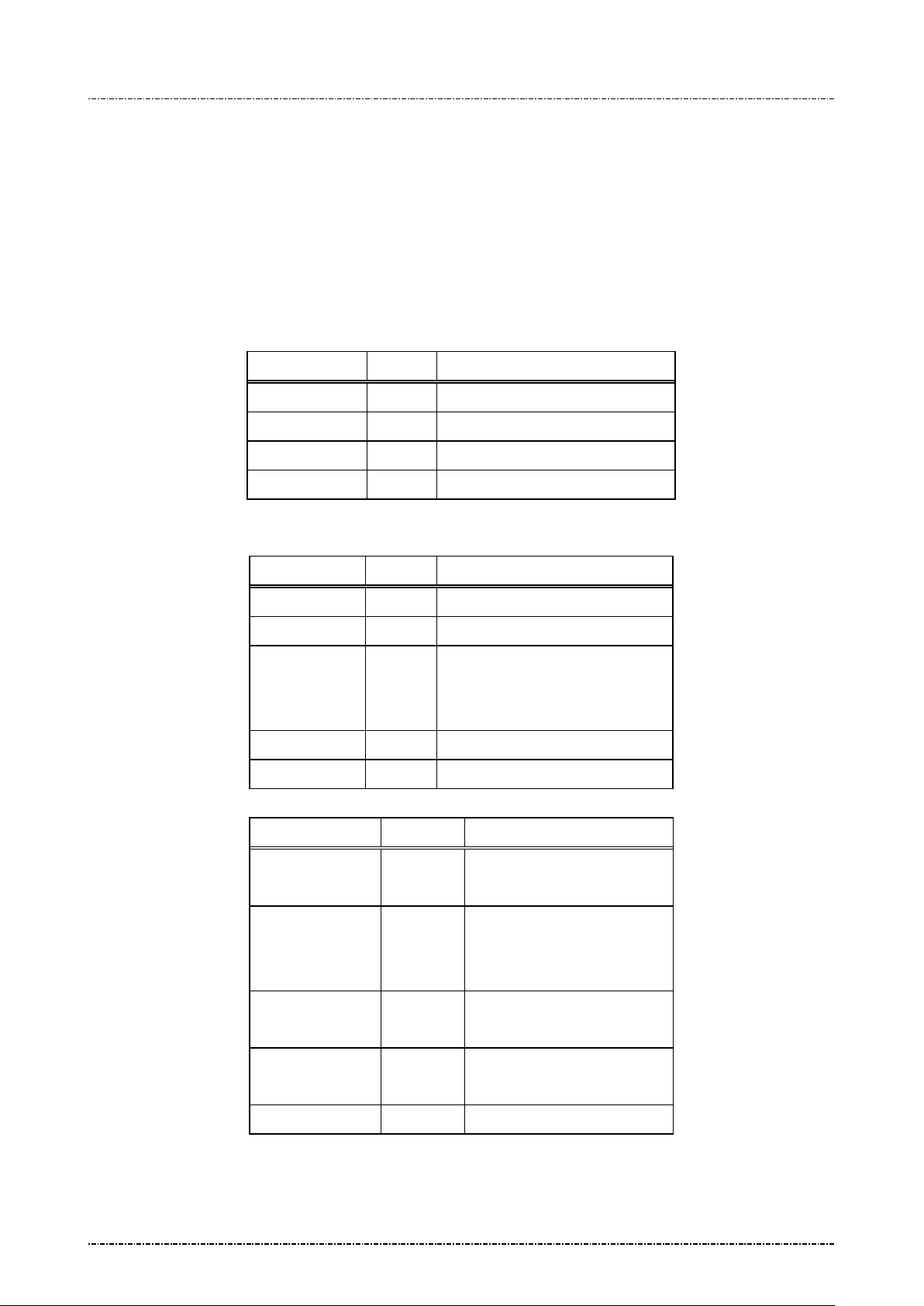
Message 17 Request random number
Format: <SI>17<SO>[LRC]
Message length: Fixed 5 bytes.
Usage: This message is used to request PIN Pad to generate an 8bytes random number block.
This random num ber is generated by hardware TRNG that is certified with sufficient
security.
Message element:
Request frame (HOST to PIN Pad)
Field Length Value and description
<SI> 1 <0F>
17 2 Message ID
<SO> 1 <0E>
[LRC] 1 Checksum
Message flow:
Response frame ( PIN Pa d to HOST)
Field Length Value and description
<SI> 1 <0F>
17 2 Message ID
[RndBlk] 16
by PP190.
Format: hexadecimal string.
<SO> 1 <0E>
[LRC] 1 Checksum
HOST Direction PIN Pad
Message 17
(Request frame)
<ACK> (Good LRC)
<NAK> (Bad LRC)
(<EOT> after 3 NAKs)
Page32
Uniform Industrial Corp. Proprietary and Confidential Total 160 pages
<ACK>/<NAK>
/<EOT>
Message 17
(Response frame)
<EOT>
Page 34
PIN Pad 190 Programmer’s Manual
2014-02-06
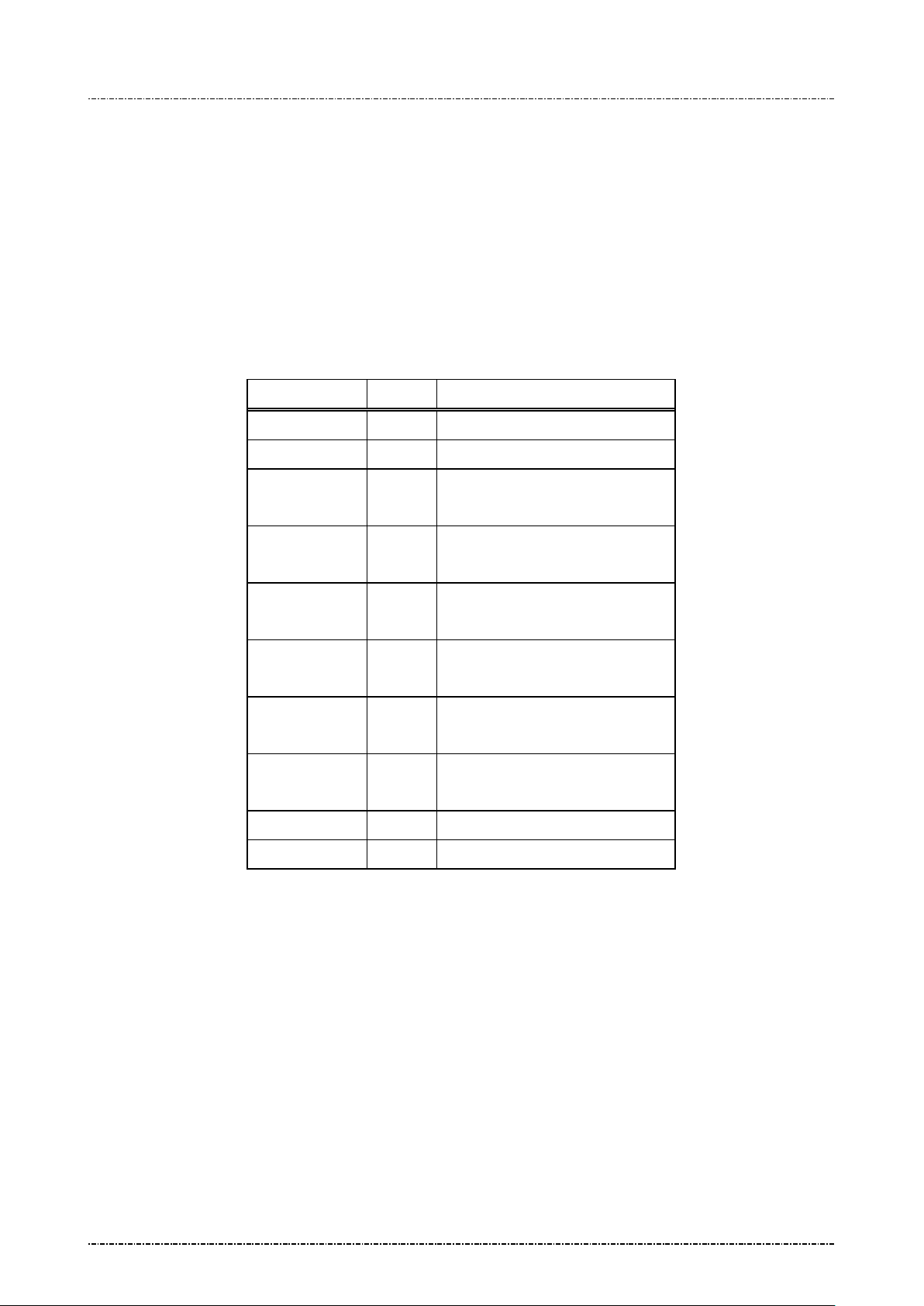
Message 18 Get/Set PIN pad system time
Format: <SI>18<SO>[LRC] (Request frame to get system time)
<SI>18[YYYY][MM][DD][HH][MM][SS]<SO>[LRC] (Request frame to set
system time)
Message length: Fixed 5 bytes or 19 bytes.
Usage: This message is use d to set real world time in PP190 and for EMV level 2 tr ansa ction
log.
Message element:
Request frame (HOST to PIN Pad)
Field Length Value and description
<SI> 1 <0F>
18 2 Message ID
[YYYY] 4 (optional, only set time need)
AD year, i.e. “2006”
[MM] 2 (optional, only set time need)
Month, “01”~”12”
[DD] 2 (optional, only set time need)
Day of month, “01”~”31”
[HH] 2 (optional, only set time need)
Hour, “00”~”23”
[MM] 2 (optional, only set time need)
Minute, “00”~”59”
[SS] 2 (optional, only set time need)
Second, “00”~”59”
<SO> 1 <0E>
[LRC] 1 Checksum
Page33
Uniform Industrial Corp. Proprietary and Confidential Total 160 pages
Page 35
PIN Pad 190 Programmer’s Manual
2014-02-06
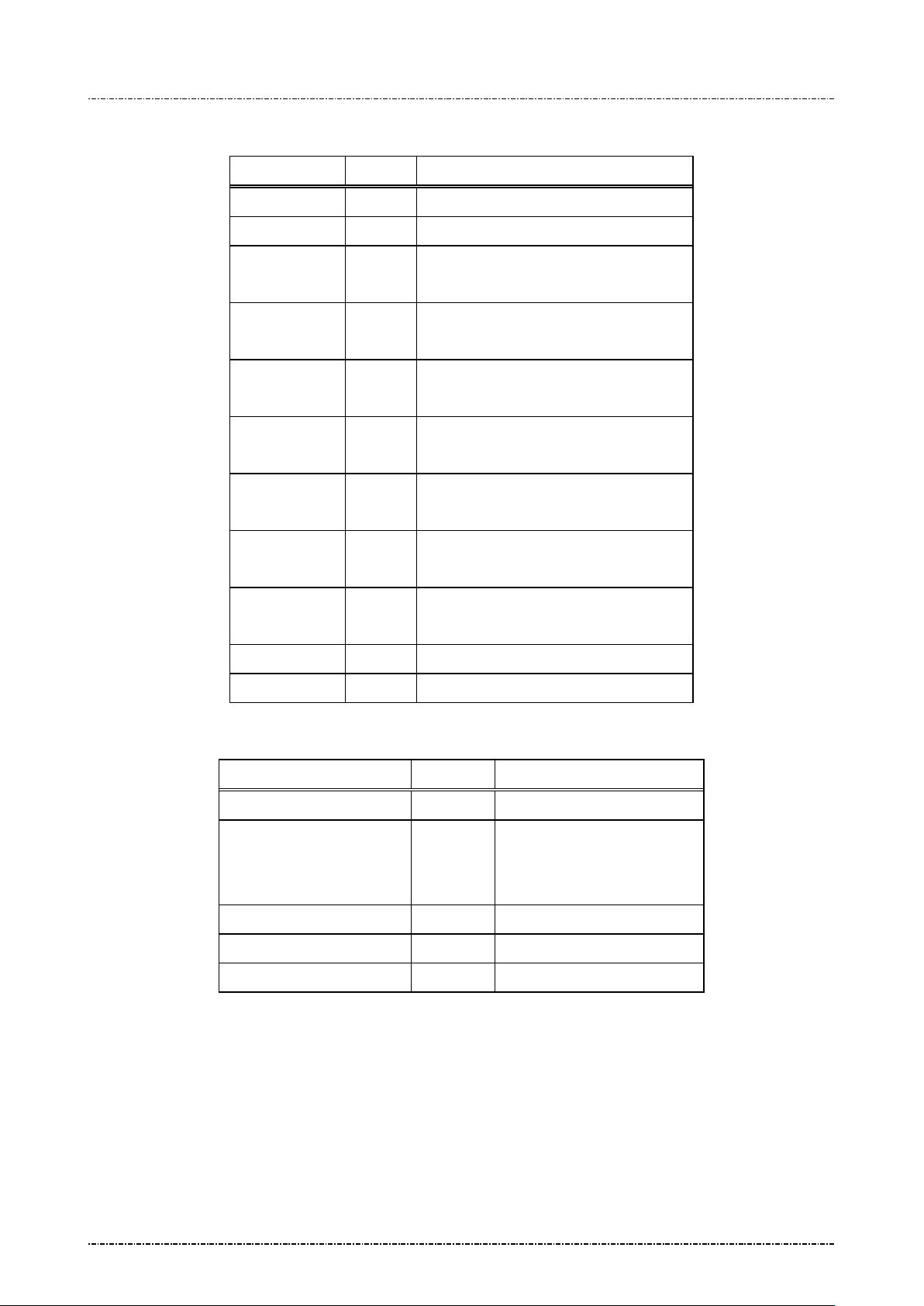
Response frame ( PIN Pa d to HOST)
Field Length Value and description
<SI> 1 <0F>
18 2 Message ID
[status] 1 0 : Success
F: Failed.
[YYYY] 4 (optional, only get time will response)
AD year, i.e. “2006”
[MM] 2 (optional, only get time will response)
Month, “01”~”12”
[DD] 2 (optional, only get time will r e sp onse)
Day of month, “01”~”31”
[HH] 2 (optional, only get time will r e sp onse)
Hour, “00”~”23”
Message flow:
[MM] 2 (optional, only get time will response)
Minute, “00”~”59”
[SS] 2 (optional, only get ti me will r e sponse)
Second, “00”~”59”
<SO> 1 <0E>
[LRC] 1 Checksum
HOST Direction PIN Pad
Message 18 request frame
<ACK> (Good LRC)
<NAK> (Bad LRC)
(<EOT> after 3 NAKs)
<ACK> /<NAK> /<EOT>
Message 18 Response Frame
Processing and send <EOT>
Page34
Uniform Industrial Corp. Proprietary and Confidential Total 160 pages
Page 36
PIN Pad 190 Programmer’s Manual
[SubVer]
2014-02-06
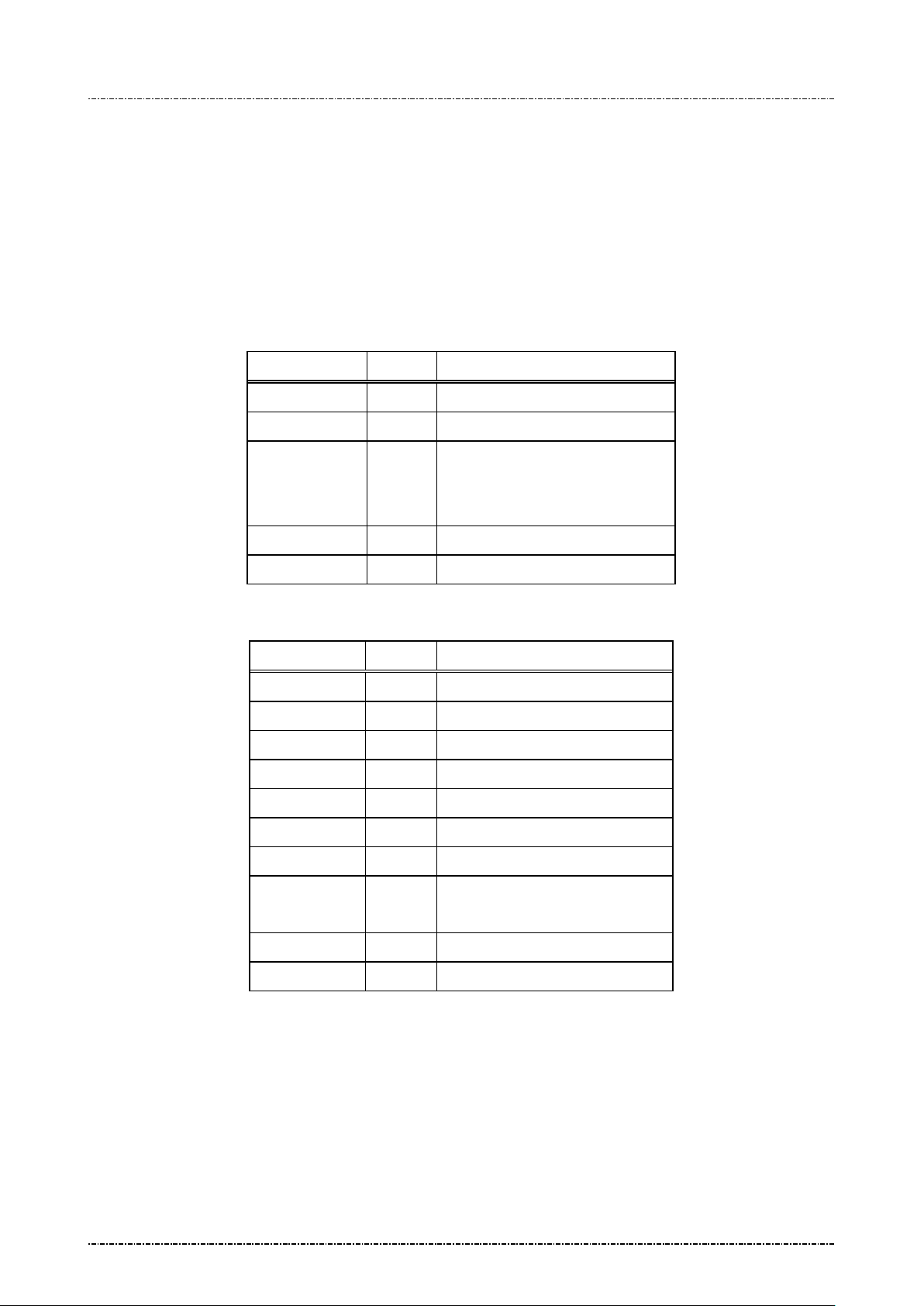
Message 19 Query Firmware Version
Format: <SI>19[part]<SO>[LRC] (request frame)
<SI>19.[Version].[SubVer].[Chksum] <SO>[LRC] (response frame)
Message length: Fixed 6 bytes (request frame) / 82 bytes (response frame).
Usage: This message is use d to query PP190 f irmware version num ber and firmware check
sum value.
Message element:
Request frame (HOST to PIN Pad)
Field Length Value and description
<SI> 1 <0F>
19 2 Messa ge ID
[part] 1 Firmware Part number
1: System Core
2: Prompt Message
<SO> 1 <0E>
[LRC] 1 Checksum
Response frame (PIN Pad to HOST)
Field Length Value and description
<SI> 1 <0F>
19 2 Message ID
. 1 <2E>, field separator
[Version] 8. Firmware version (ASCII string)
. 1 <2E>, field separator
2 Firmwa re sub version (‘0’~’9’)
. 1 <2E>, field separator
[chksum] 64 Firmware checksum (‘0’~’9, ‘A’
~’F’’)
<SO> 1 <0E>
[LRC] 1 Checksum
Page35
Uniform Industrial Corp. Proprietary and Confidential Total 160 pages
Page 37
PIN Pad 190 Programmer’s Manual
2014-02-06
Message flow:
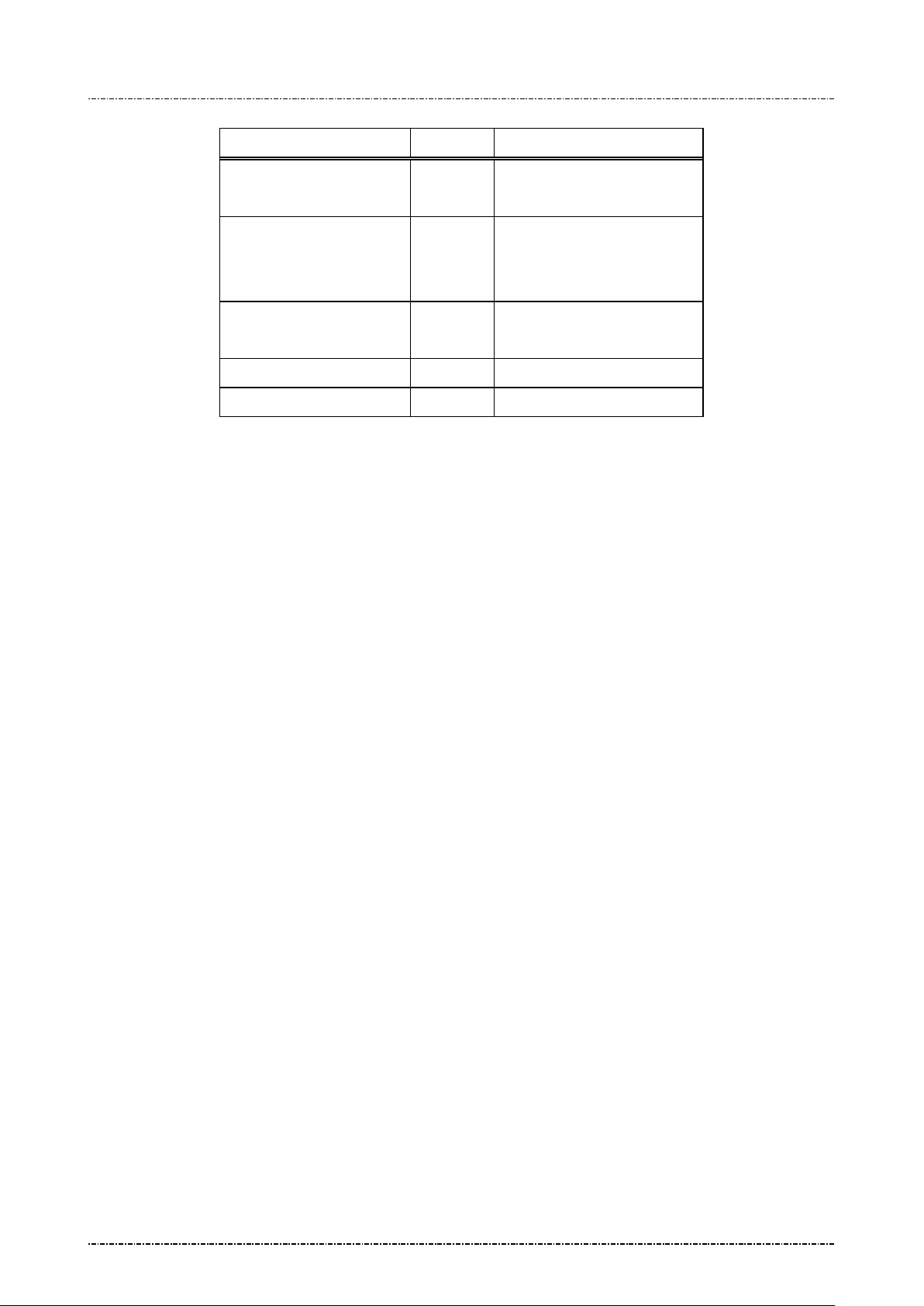
HOST Direction PIN Pad
Message 19
(Request frame)
<ACK> (Good LRC)
<NAK> (Bad LRC)
(<EOT> after 3 NAKs)
Message 19
(Response frame)
<ACK>/<NAK>/<EOT>
<EOT>
Page36
Uniform Industrial Corp. Proprietary and Confidential Total 160 pages
Page 38
PIN Pad 190 Programmer’s Manual
2014-02-06
Message 1J Turn ON/OFF LCD Backlight
Format: <SI>1J[option]<SO>[LRC]
Message length: Fixed 6 bytes.
Usage: This message can control t he global backlight ON or OF F for the LCD of PP190 with
backlight option. By default , PP190 will turn on its LCD bac k light when it rec ei ves PIN
entry or clear text entry message such as 70 or Z52, and turn it off when those
functions exits. With message “1J1”, the PP190 will keep LCD backlight turned ON
until “1J0” is issued.
Message element:
Request frame (HOST to PIN Pad)
Field Length Value and description
<SI> 1 <0F>
1J 2 Message ID
[option] 1 ASCII character
‘0’: Turn off LCD backli ght
‘1’: Turn on LCD backlight
<SO> 1 <0E>
[LRC] 1 Checksum
Response frame (PI N Pad to HOST)
Field Length Value and description
<SI> 1 <0F>
1J 2 Message ID
[status] 1 ASCII character
‘0’: Turn off LCD backli ght
‘1’: Turn on LCD backlight
<SO> 1 <0E>
[LRC] 1 Checksum
Page37
Uniform Industrial Corp. Proprietary and Confidential Total 160 pages
Page 39
PIN Pad 190 Programmer’s Manual
2014-02-06
Message flow:
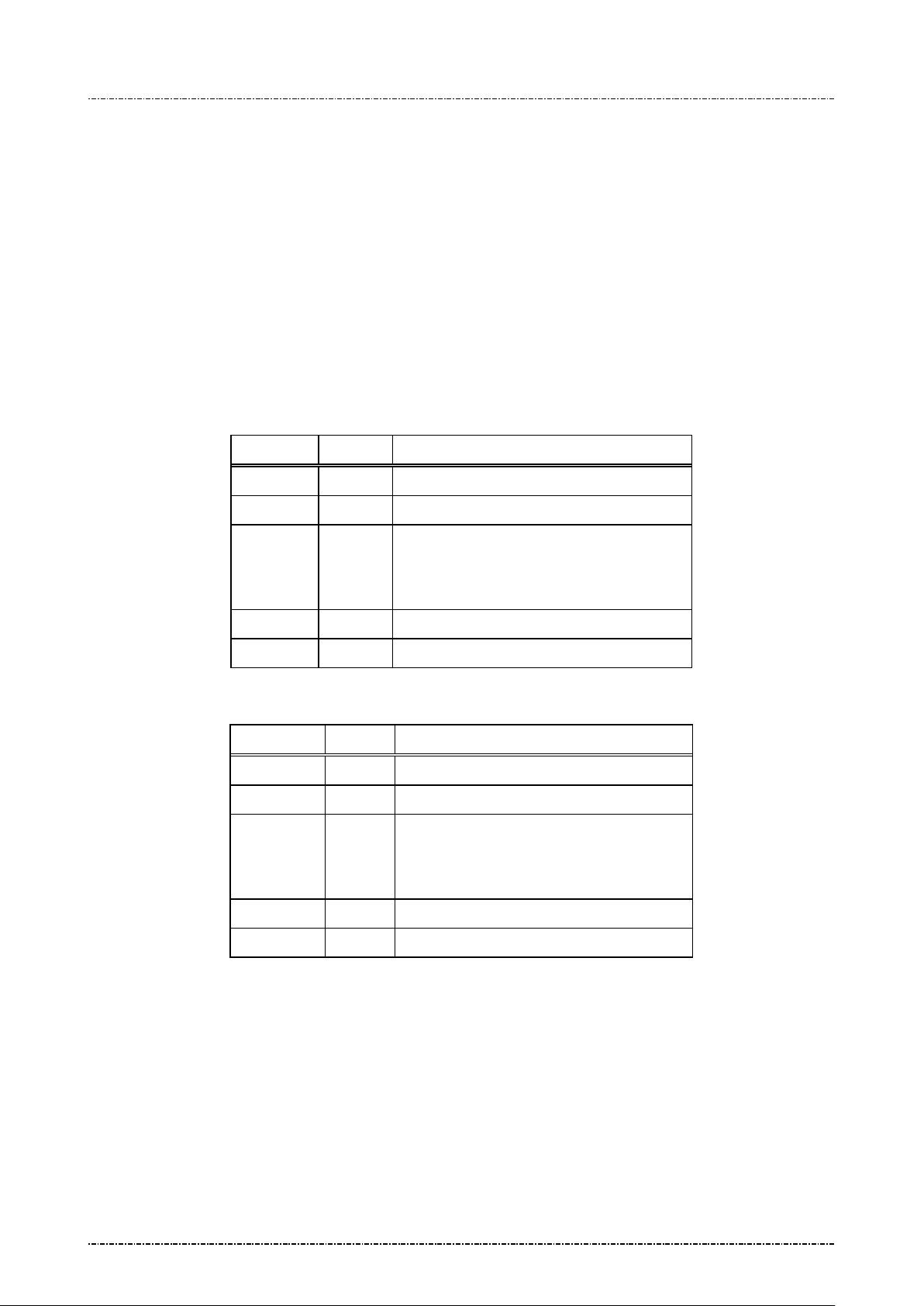
HOST Direction PIN Pad
Message 1J
<ACK> (Good LRC)
<NAK> (Bad LRC)
(<EOT> after 3 NAKs)
Message 1J
(Response frame)
<ACK>/
<NAK>/
<EOT>
<EOT>
LCD backlight turned ON/OFF
Page38
Uniform Industrial Corp. Proprietary and Confidential Total 160 pages
Page 40
PIN Pad 190 Programmer’s Manual
2014-02-06
Message 1M Setup Keypad Beeper
Format: <SI>1M[option]<SO>[LRC]
Message length: Fixed 6 bytes.
Usage: This message is used to turn on or turn off beeper when the keypad is pressing.
Message element:
Request frame (HOST to PIN Pad)
Field Length Value and description
<SI> 1 <0F>
1M 2 Me ssage ID
[option] 1 ASCII character
‘0’: Disable keypad beeper.
‘1’: Enable keypad beeper.
<SO> 1 <0E>
[LRC] 1 Checksum
Response frame (PI N Pad to HOST)
Field Length Value and description
<SI> 1 <0F>
1M 2 Message ID
[status] 1 ASCII character
‘0’: Keypad beeper disabled.
‘1’: Keypad beeper enabled.
<SO> 1 <0E>
[LRC] 1 Checksum
Page39
Uniform Industrial Corp. Proprietary and Confidential Total 160 pages
Page 41
PIN Pad 190 Programmer’s Manual
2014-02-06
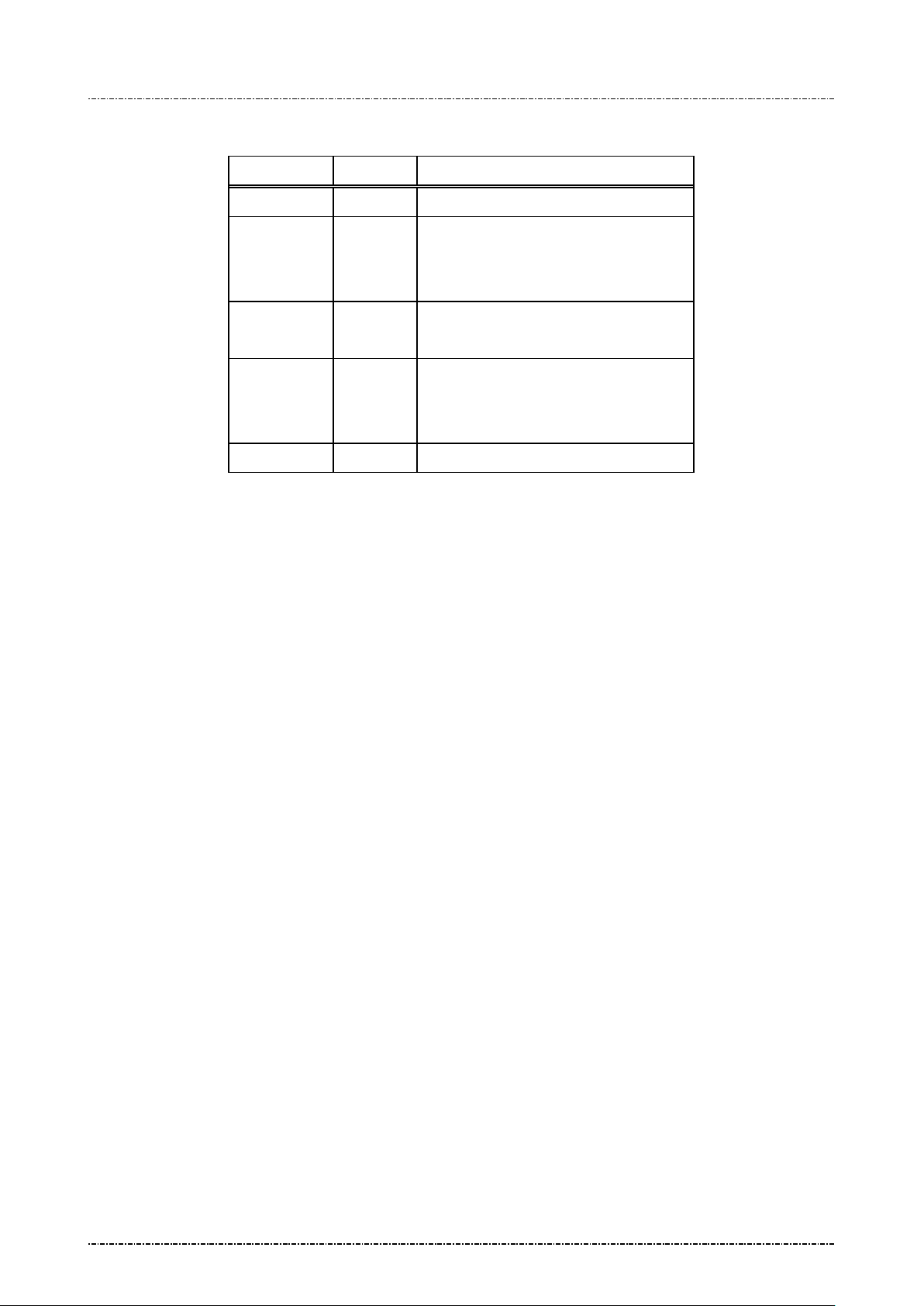
Message flow:
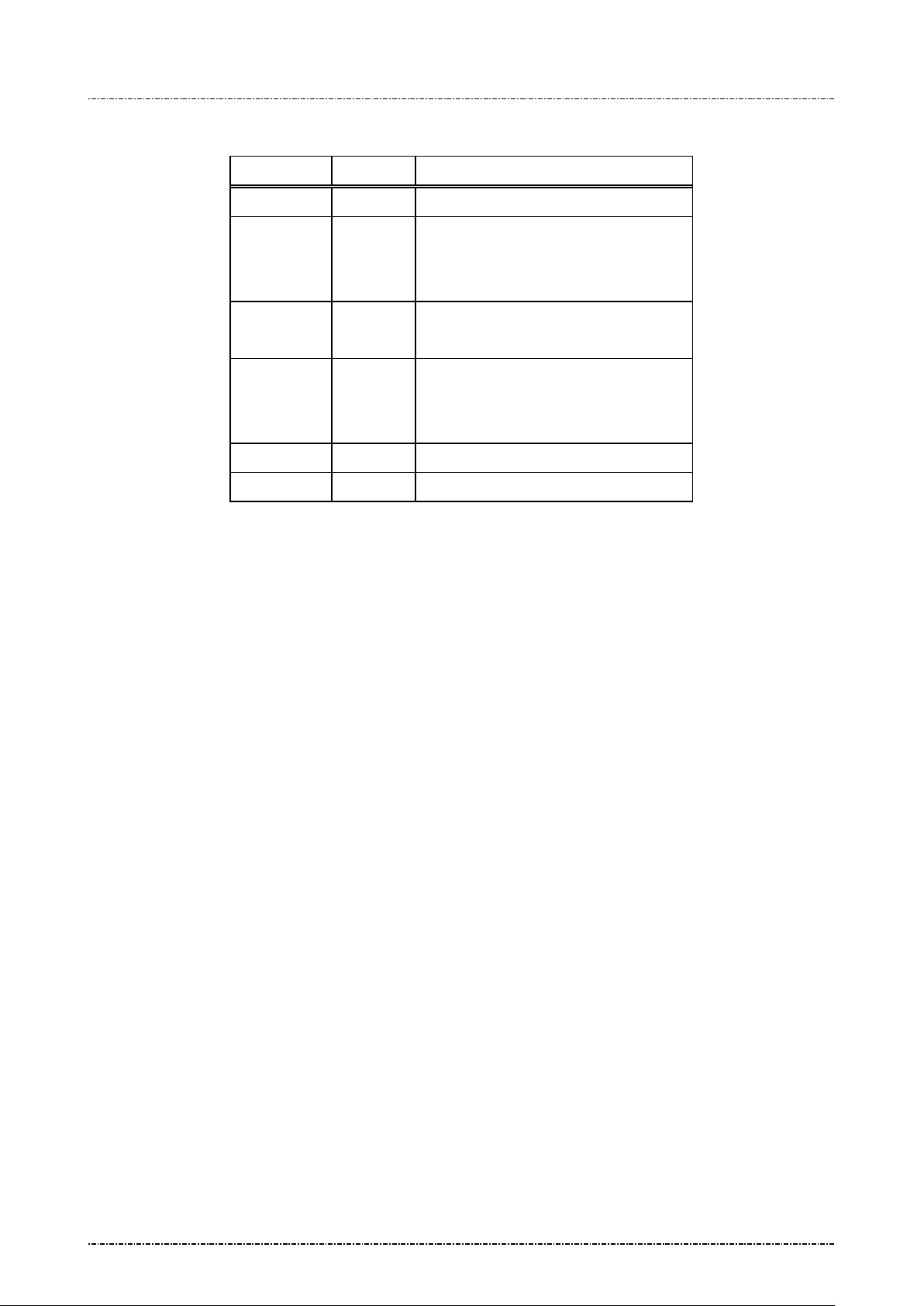
HOST Direction PIN Pad
Message 1M
<ACK>/
<NAK>/
<EOT>
<ACK> (Good LRC)
<NAK> (Bad LRC)
(<EOT> after 3 NAKs)
Message 1M
(Response frame)
<EOT>
Page40
Uniform Industrial Corp. Proprietary and Confidential Total 160 pages
Page 42

PIN Pad 190 Programmer’s Manual
key and
key of [sess ion key] va lue, usi ng
by
TDES decrypts [session key]
by
2014-02-06
Section 6 Online transaction messages with Master/Session Keys (MK/SK)
Message 70 PIN entry request (MK/SK)
Format: <STX>70.[Account]<FS>[session key][Amount]
<FS>[timeout]<ETX>[LRC]
Message length: Variable 36 to 51 bytes (max. 67 bytes for TDES session key).
Usage: Display prompt and accept customer PIN input. The following prompt will be displayed:
"Total Amount"
"$xxx.xx"
"Enter PIN"
"Push "ENTER""
The PIN Pad will then wait till the PIN entered and [ENTER] key is pressed. After
ENTER key is pressed, th e string “PIN PAD” and “PROCESSING” will be displ ayed
until the CLEAR k ey is press ed. During this p eriod, the PIN Pad will not pr ocess an y
message other than the CANCEL message (message 72).
NOTE: Aborting transaction: Press CLEAR button to reset the PIN input and CAN (canc el)
button to abort the transaction.
PIN length: According to A NSI X9.8 standar d, the length of PIN should bet ween 4 to
12 digits. If user inputs less than 4 digits and press EN TER, PP190 will beep for err or
and continue to wait f or user’s input. When user inputs 13
beep for error, conserves PIN character 1
This message has DES Time Throttle: See Appendix A
Master key must be selected before transaction: PP190 will warn and refuse
message 70 if message 08 was not issued before.
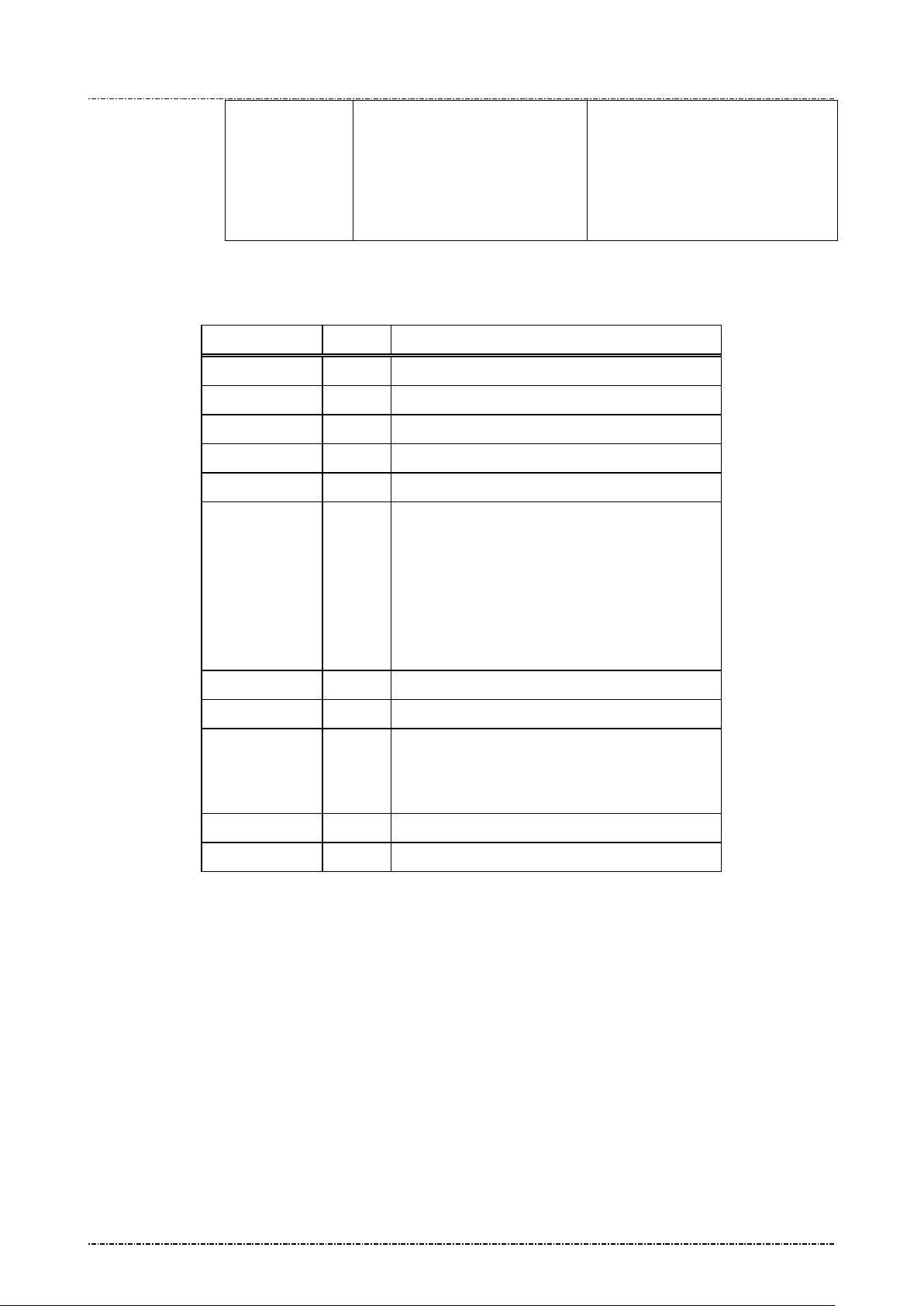
Triple DES capability: Following table shows the logic of PP190 when processing
single-length and double-length MK/SK. (TDES in EDE order, see
Ses sion Key: If the selected k ey is with usage “P0”, the session key should be all
zeros.
st
to 12th, and wait for ENTER.
th
char acter, PIN pad will
for details.
Appendix A).
Page41
Uniform Industrial Corp. Proprietary and Confidential Total 160 pages
Session key
Master key
Double length
Double length Single length
PP190 TDES decrypts LRactive master key.
PIN blocks are TDES encrypted
decrypted session key.
PP190
value, using active master key.
PIN blocks are DES encrypted
decrypted session key.
Page 43
PIN Pad 190 Programmer’s Manual
key and
, using
by
DES decrypts [session key]
by
characters session key produces TDES
2014-02-06
PP190 DES decrypts L-
PP190
Single length
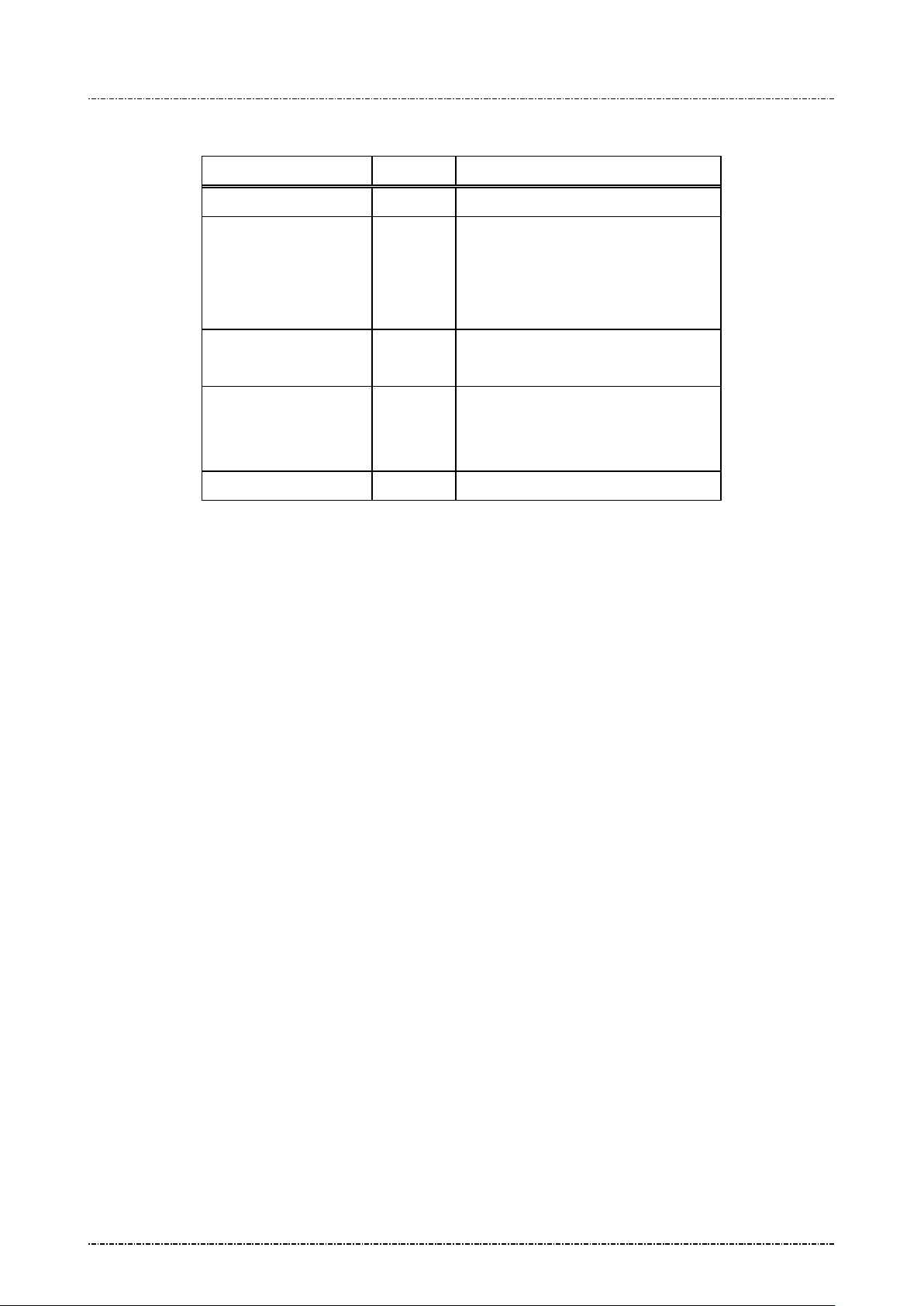
Message element:
Field Length Value and description
<STX> 1 <02>
70 2 Message ID
. 1 <2E>, delimiter
[Account] 8..19 Card account number
<FS> 1 <1C>, field separator
[session key] 16 or
R-key of [sess ion key] va lue
active master key.
PIN blocks are TDES encrypted
session key.
Working key encrypted using selected master
32
key. 32encrypted PIN block with EDE order.
value, using active master key.
PIN blocks are DES encrypted
session key.
Format: hexadecimal string.
This filed should be all zeros if the selected ke y
is with usage “P0”
[Amount] 4..8 Amount of goods to be displayed on PIN Pad.
<FS> 1 (optional) <1C>, field separator
[timeout] 1 (optional) ASCII character from ‘1’ to ‘9’ which
is the timeout value in the unit of 30 seconds.
Default = 9x30 = 270 seconds.
<ETX> 1 <03>
[LRC] 1 Checksum
Page42
Uniform Industrial Corp. Proprietary and Confidential Total 160 pages
Page 44
PIN Pad 190 Programmer’s Manual
2014-02-06
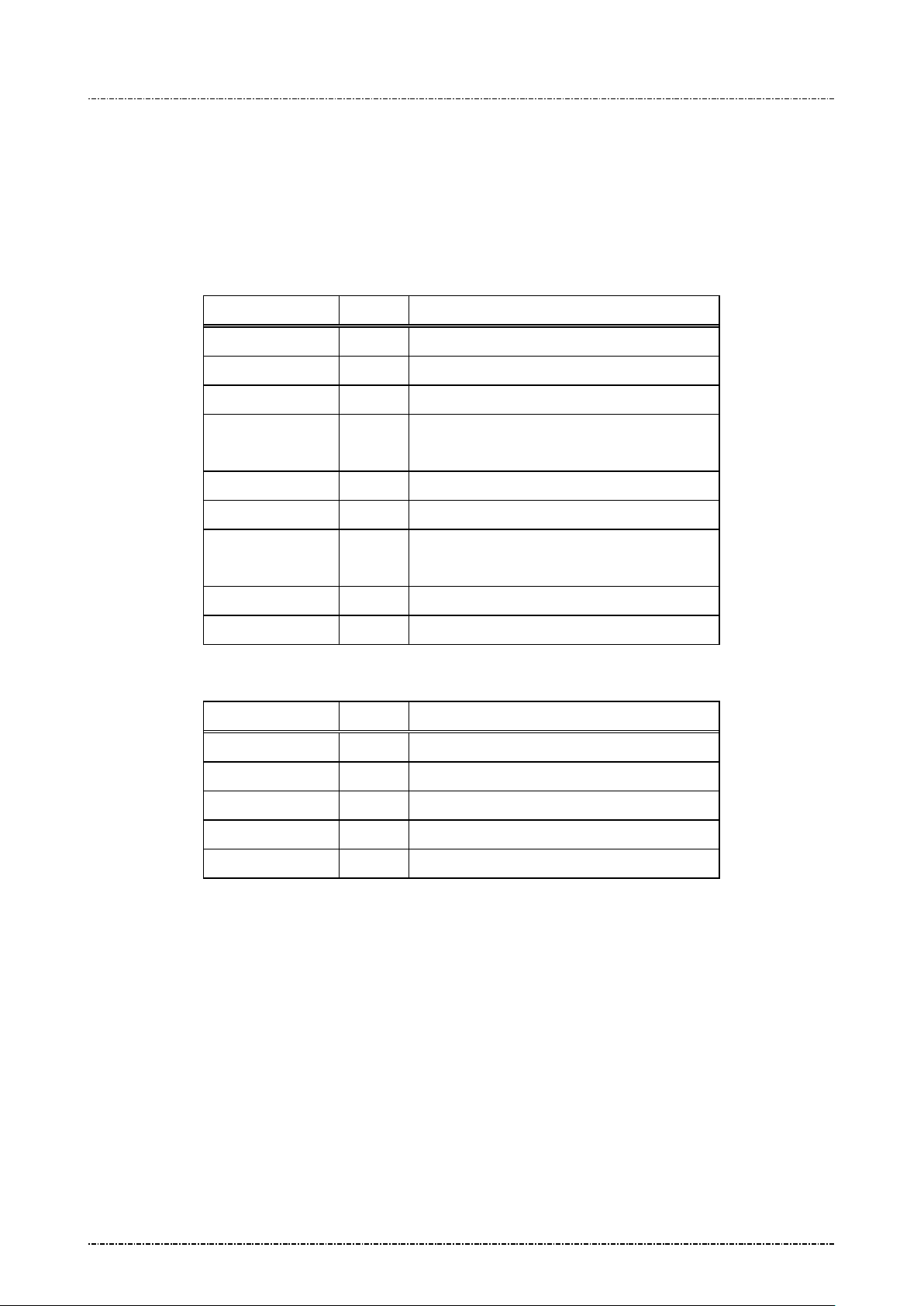
Message flow:
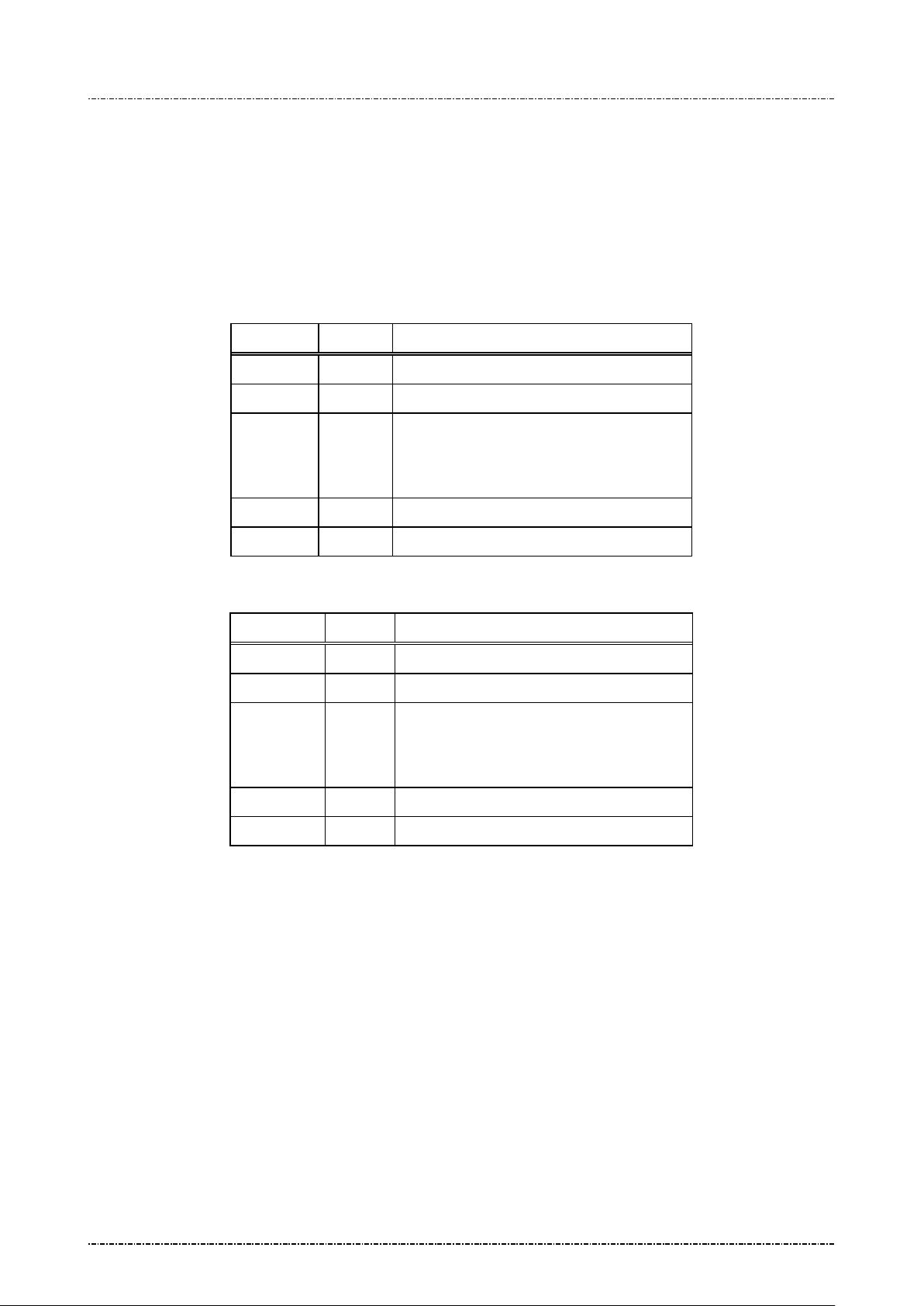
HOST Direction PIN Pad
Message 70
<ACK> (Good LRC)
<NAK> (Bad LRC)
(<EOT> after 3 NAKs)
Prompt user to enter PIN.
Message 71 or <EOT> when input
timed out or user pressed [CAN]
<ACK> (Good echo)
<NAK> (Bad LRC)
(<EOT> after 3 NAKs)
Displa y “PIN PAD PROCESSI NG”
Page43
Uniform Industrial Corp. Proprietary and Confidential Total 160 pages
Page 45
PIN Pad 190 Programmer’s Manual
2014-02-06
Message 71 Encrypted PIN Block Resp onse
Format: <STX>71.<fkey flag><PIN length>01[PIN][LRC] (PIN block frame)
<STX>71[error code]<ETX>[LRC] (Error code frame)
Message length: Fixed 27 bytes for PIN block frame, 6 bytes for error code frame.
Usage: Send the entered PIN to HOST in encrypted format.
Message element:
Field Length Value and description
<STX> 1 <02>
71 2 Message ID
. 1 <2E> delimiter
[Fkey flag] 1 Always ‘0’ (This field is kept to retain old
model compatibility.)
[PIN length] 2 0 0, 04..12 length of PIN enter ed
01 2 01 format of PIN block, always 01
[PIN] 16 Encrypted PIN blocks
Format: hexadecimal string.
<ETX> 1 <03>
[LRC] 1 Checksum
Message 71 (Error message)
Field Length Value and description
<STX> 1 <02>
71 2 Message ID
[Error code] 1 Code to indicate error (see next page)
<ETX> 1 <03>
[LRC] 1 Checksum
Page44
Uniform Industrial Corp. Proprietary and Confidential Total 160 pages
Page 46
PIN Pad 190 Programmer’s Manual
or <EOT> when
input tined out or user pressed
will cause this error message because they are supposed to do
2014-02-06
Message flow:
HOST Direction PIN Pad
Error codes:
Message 70/Z60/Z62
<ACK> (Good LRC)
<NAK> (Bad LRC)
(<EOT> after 3 NAKs)
Message 71
[CAN]
<ACK> (Good echo)
<NAK> (Bad LRC)
(<EOT> after 3 NAKs)
Display processing prompt
Code Meaning
'0' Null Account input field.
'1' Key value error.
(Active mast er key not exist, or
session key value conflicted with the usage of active master key, or
session key l ength longer than active master key)
'2' Account number shorter than 8 digits.
'3' Account number longer than 19 digits.
'4' Account number have character other than '0'-'9'.
'5' Working ke y for mat er ro r .
'6' Timeout value error
'7' No more DES operation within 60 min. (see Appendix A)
'8' From 70, Amount string format error.
From Z62, PIN count, Accept Null PIN flag, and Prompt string
format error.
'A' Currently selected master key over range (Master key slot A to F
authentication and MAC, not for PIN entry)
'B' Flash memory read/write error
'C' Memory buffer allocation error
'E' Data length error in a field.
'G' Specified file not found or authentication error.
'H' Receive command 72.
Page45
Uniform Industrial Corp. Proprietary and Confidential Total 160 pages
Page 47

PIN Pad 190 Programmer’s Manual
2014-02-06
'I' Cancel ke y is press.
'J' PIN entry timeout.
Page46
Uniform Industrial Corp. Proprietary and Confidential Total 160 pages
Page 48
PIN Pad 190 Programmer’s Manual
Optional. If PIN pad is
s PIN
2014-02-06
Message 72 PIN Entry Cancel
Format: <STX>72<ETX>[LRC]
Message length: Fixed 5 bytes.
Usage: Cancel current transaction and return the PIN Pad to IDLE state, used to interrupt
command in process. If PP190 receives message 72 while processing user input such
as swipe card or enter PIN, It will send <EOT> to acknowledge that operation is
canceled.
Message element:
Field Length Value and description
<STX> 1 <02>
72 2 Message ID
<ETX> 1 <03>
[LRC] 1 Checksum
Message flow:
HOST Direction PIN Pad
Message 72
<ACK> (Good LRC)
<NAK> (Bad LRC)
(<EOT> after 3 NAKs)
<EOT>
waiting for user’
input.
Page47
Uniform Industrial Corp. Proprietary and Confidential Total 160 pages
Page 49
PIN Pad 190 Programmer’s Manual
string from
the coordinate specified
2014-02-06
Message Z0 Move Display Cursor
Format: <STX>Z0[XX][YY]<ETX>[LRC]
Message length: Fixed 9 bytes.
Usage: Move the display cursor. Z0 message is enabled when PIN pad receives first Z2
message. Under Z2-authenticated mode, Z0 message is also disabled.
Message element:
Field Length Value and description
<STX> 1 <02>
Z0 2 Message ID
[XX] 2 X-coordinate, 01 ~ Max. Characters per line
[YY] 2 Y-coordinate, 01 ~ Max. line
<ETX> 1 <03>
[LRC] 1 Checksum
Message flow:
HOST Direction PIN Pad
Message Z2
Displa y string.
Message Z0
PIN pad moves cursor
Message Z2
(without clear
screen)
<ACK> (Good LRC)
<NAK> (Bad LRC)
(<EOT> after 3 NAKs)
<ACK> / <NAK> /
<EOT>
<ACK> / <NAK> /
<EOT>
Page48
Uniform Industrial Corp. Proprietary and Confidential Total 160 pages
Display 2nd
by Z0.
Page 50
PIN Pad 190 Programmer’s Manual
2014-02-06
Message Z1 Reset State
Format: <STX>Z1<ETX>[LRC]
Message length: Fixed 5 bytes.
Usage: Force the PIN Pad to enter IDLE state.
Message element:
Field Length Value and description
<STX> 1 <02>
Z1 2 Message ID
<ETX> 1 <03>
[LRC] 1 Checksum
Message flow:
HOST Direction PIN Pad
Message Z1
<ACK> (Good LRC)
<NAK> (Bad LRC)
(<EOT> after 3 NAKs)
Page49
Uniform Industrial Corp. Proprietary and Confidential Total 160 pages
Page 51
PIN Pad 190 Programmer’s Manual
When <SUB> exists, PIN pad will clear
screen contents and hide pop window
2014-02-06
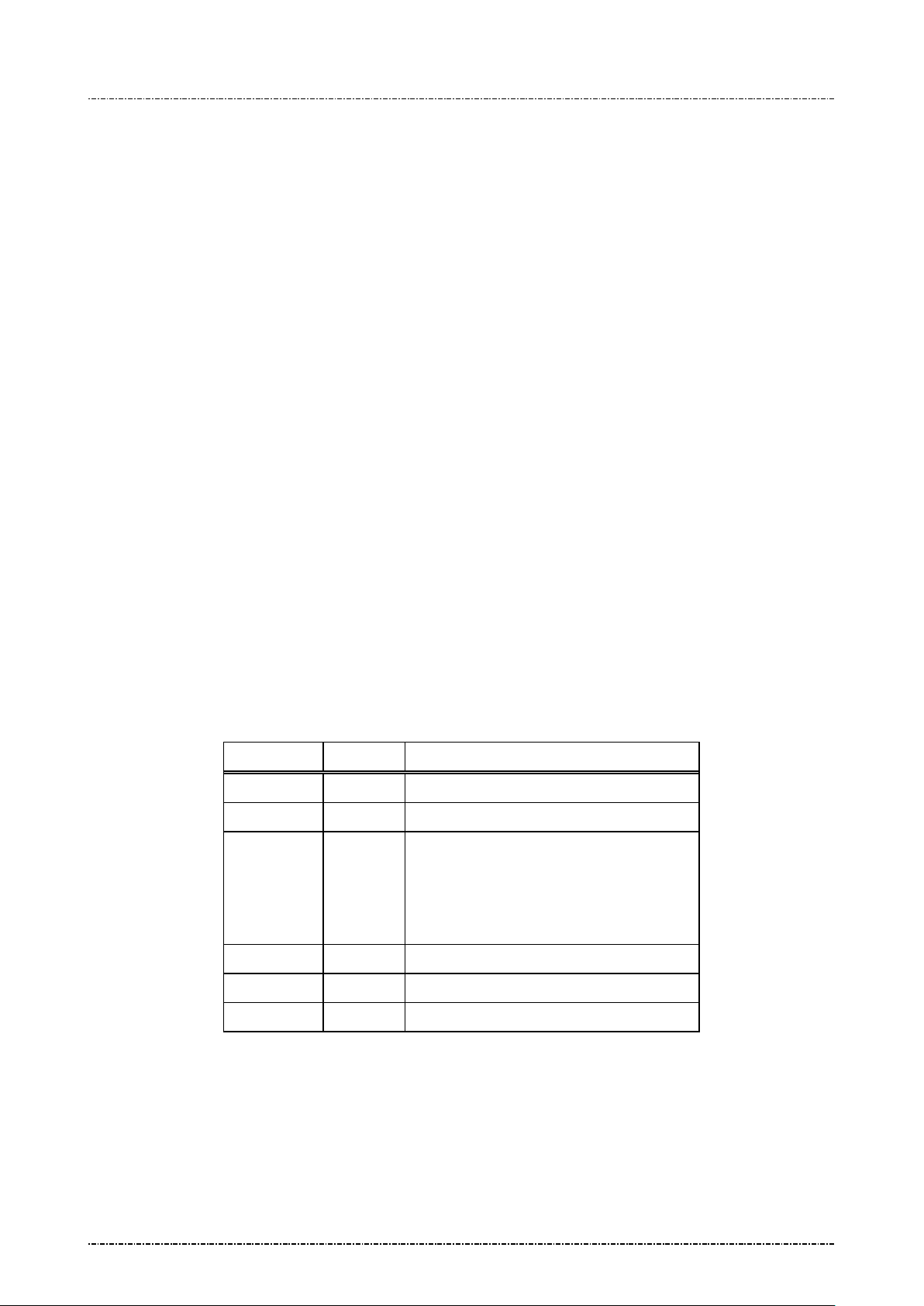
Message Z2 Display String
Format: <STX>Z2<SUB>[string]<ETX>[LRC] (Request frame, normal)
<STX>Z2<GS>[PromptID]<SUB><ETX>[LRC]
(Request frame, authenticated)
<STX>Z2<RS>[PromptID]<SUB><ETX>[LRC]
(Request frame, authenticated for PIN entry)
<STX>Z2[status]<ETX>[LRC]
(Response frame, authenticated)
Message length: Variable, at least 6 bytes.
Usage: PIN Pad to show the indicated prompt string on i ts d isplay, until [CAN] key is press ed.
If the first character of message is <GS> (0x1D) or <RS> (0x1 E), PIN pad will treat
following message str ing as ID number, and s earch its predefined m essage table for
corresponding message string, then display the string on the screen.
Note: 1. Two Z2 message with authenticated prompt ID can be issued in seria l to form a
longer sentence, or used in combination with normal string which contains only digits.
2. Z2 message with PIN entry prompt will force user issue every message with <SUB>,
which implies the PIN entry message can’t be concatenated.
3. PIN pad will temporarily tur n off timer displa y for the first Z2 m essage it received.
After Z42, Z50, Z60 are performed, [CAN] key is pressed, or any other message
received and processed, PIN pad will turn on the t im er display.
Message element:
Field Length Value and description
<STX> 1 <02>
Z2 2 Message ID
<SUB> 1 <1A> (optional)
[string] 0 .. 32 ASCII string to be displayed
Z2 request frame (normal mode)
before display string.
<ETX> 1 <03>
[LRC] 1 Checksum
Page50
Uniform Industrial Corp. Proprietary and Confidential Total 160 pages
Page 52
PIN Pad 190 Programmer’s Manual
Prompt ID that corresponds to fixed
When <SUB> exists, PIN pad will clear
screen contents and hide pop window
Prompt ID that corresponds to fixed PIN
ar clear screen contents
2014-02-06
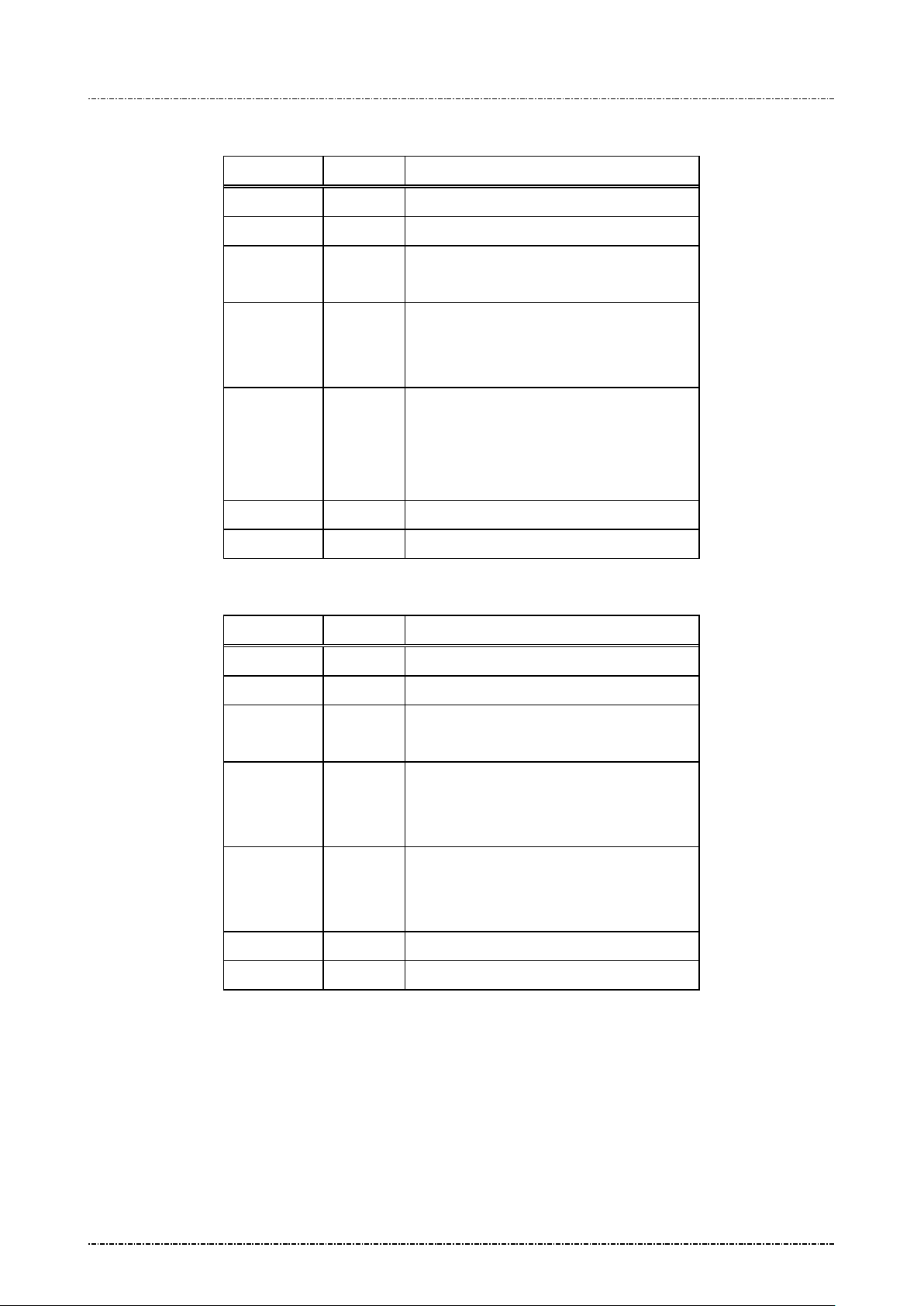
Z2 request frame (authenticated mode with fixed prompt)
Field Length Value and description
<STX> 1 <02>
Z2 2 Message ID
<GS> 1 <1D>, mark of authenticated frame with
fixed prompt.
Prompt ID 3
prompt provided by PIN pad.
Decimal string: 001 ~ 999.
<SUB> 1 <1A> (optional)
before display string
<ETX> 1 <03>
[LRC] 1 Checksum
Z2 request frame (PIN entry mode with fixed prompt)
Field Length Value and description
<STX> 1 <02>
Z2 2 Message ID
<RS> 1 <1E>, mark of PIN entry fra me with fi xed
prompt.
Prompt ID 3
entry prompt provided by PIN pad.
Decimal string: 001 ~ 999.
<SUB> 1 <1A>
PIN pad will cle
and hide pop window before display string
<ETX> 1 <03>
[LRC] 1 Checksum
Page51
Uniform Industrial Corp. Proprietary and Confidential Total 160 pages
Page 53
PIN Pad 190 Programmer’s Manual
2014-02-06
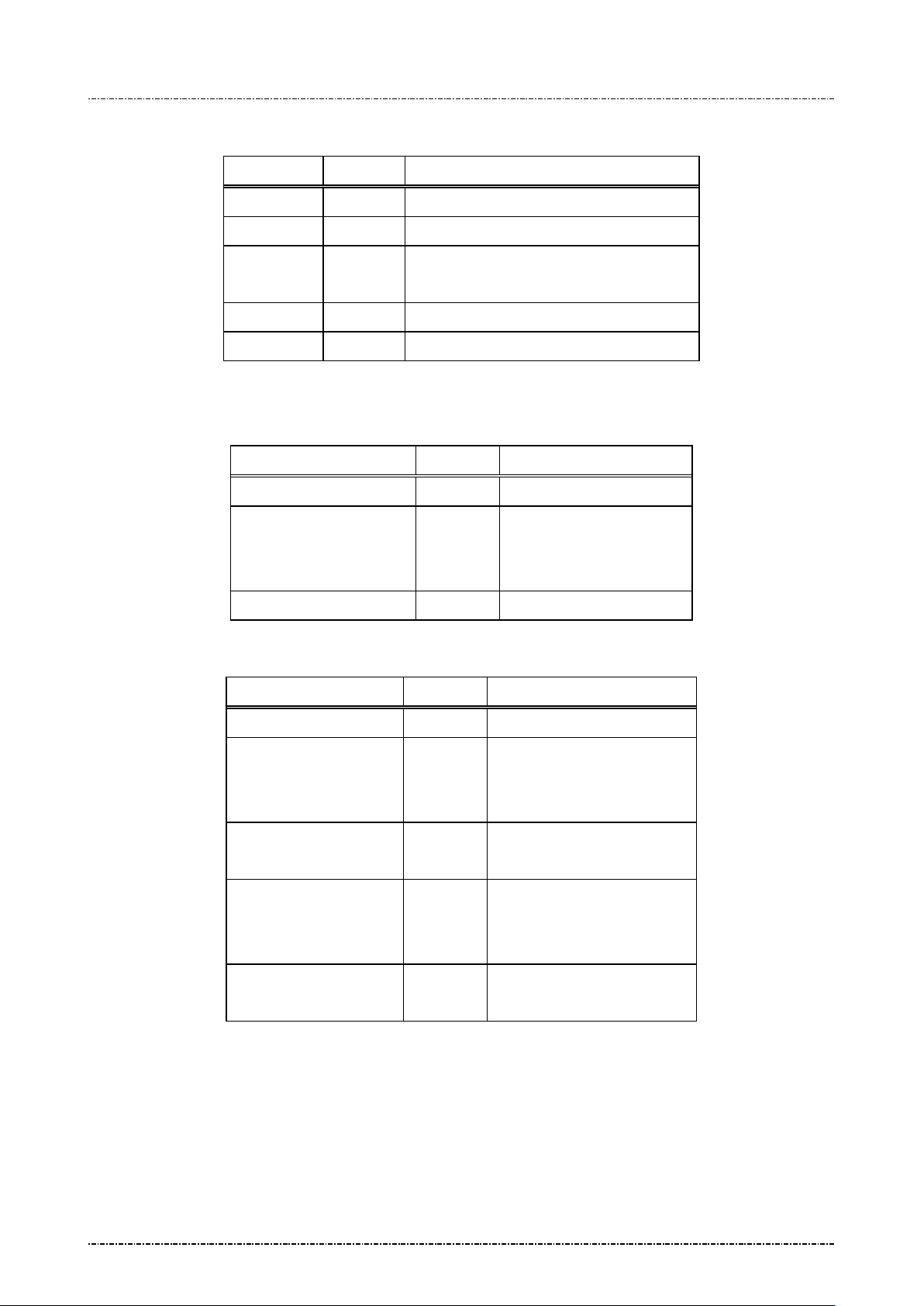
Z2 response frame (authenticated mo d e)
Field Length Value and description
<STX> 1 <02>
Z2 2 Message ID
[status] 1 ‘0’: OK
‘1’: Prompt ID not supported.
<ETX> 1 <03>
[LRC] 1 Checksum
Message flow:
Normal frame
HOST Direction PIN Pad
Message Z2
<ACK> (Good LRC)
<NAK> (Bad LRC)
(<EOT> after 3 NAKs)
Display string
Authenticated frame
HOST Direction PIN Pad
Message Z2
<ACK> (Good LRC)
<NAK> (Bad LRC)
(<EOT> after 3 NAKs)
Message Z2
(response frame)
<ACK> (Good LRC)
<NAK> (Bad LRC)
(<EOT> after 3 NAKs)
Display string
<EOT> (if received <ACK>)
Page52
Uniform Industrial Corp. Proprietary and Confidential Total 160 pages
Page 54
PIN Pad 190 Programmer’s Manual
When <SUB> exists, PIN pad will
, max
length is one line (20 or 40 characters
2014-02-06
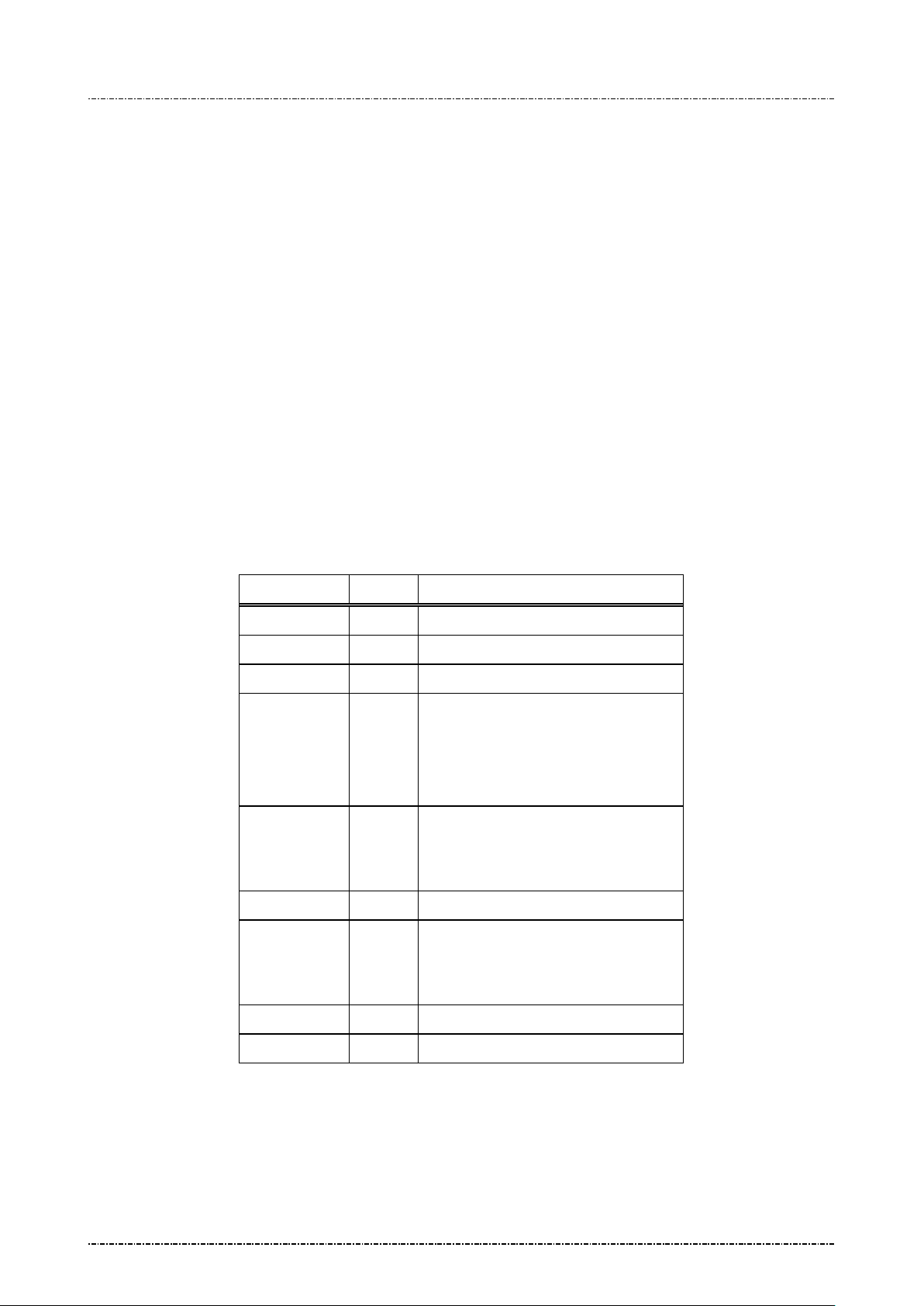
Message Z3 Display Line Prompts
Format: <STX>Z3[count]<SUB>[prompt1]<FS>[prompt2..7]<ETX>[LRC]
(Request frame, normal)
<STX>Z3<GS>[PromptID1]<FS>[PromptID2..7]<SUB><ETX>[LRC]
(Request frame, authenticated)
<STX>Z3<RS>[PromptID1]<FS>[PromptID2..7]<ETX>[LRC]
(Request frame, authenticated for PIN entry)
<STX>Z3[status] <ETX>[LRC]
(Response frame, authenticated)
Message length: Variable 8 to 124 bytes.
Usage: The PIN Pad will dis play the received prom pt strings (up to 7 lines of prompt). If the
length of prompt exceeds the maximum characters per line, this prompt will be
truncated.
Message element:
Z3 request frame (normal mode)
Field Length Value and description
<STX> 1 <02>
Z3 2 Message ID
[Count] 1 Number of prompts to be displayed
<SUB> 1 <1A> (optional)
clear clear screen contents and hide
pop window before display string
[Prompt1] var First string to be displayed
depend on font size).
<FS> 1 <1C>, field separator
[Prompt2..7] var Remaining strings to be displayed.
Note. <FS> is required between
Page53
Uniform Industrial Corp. Proprietary and Confidential Total 160 pages
messages
<ETX> 1 <03>
[LRC] 1 Checksum
Page 55
PIN Pad 190 Programmer’s Manual
sponds to fixed
2014-02-06
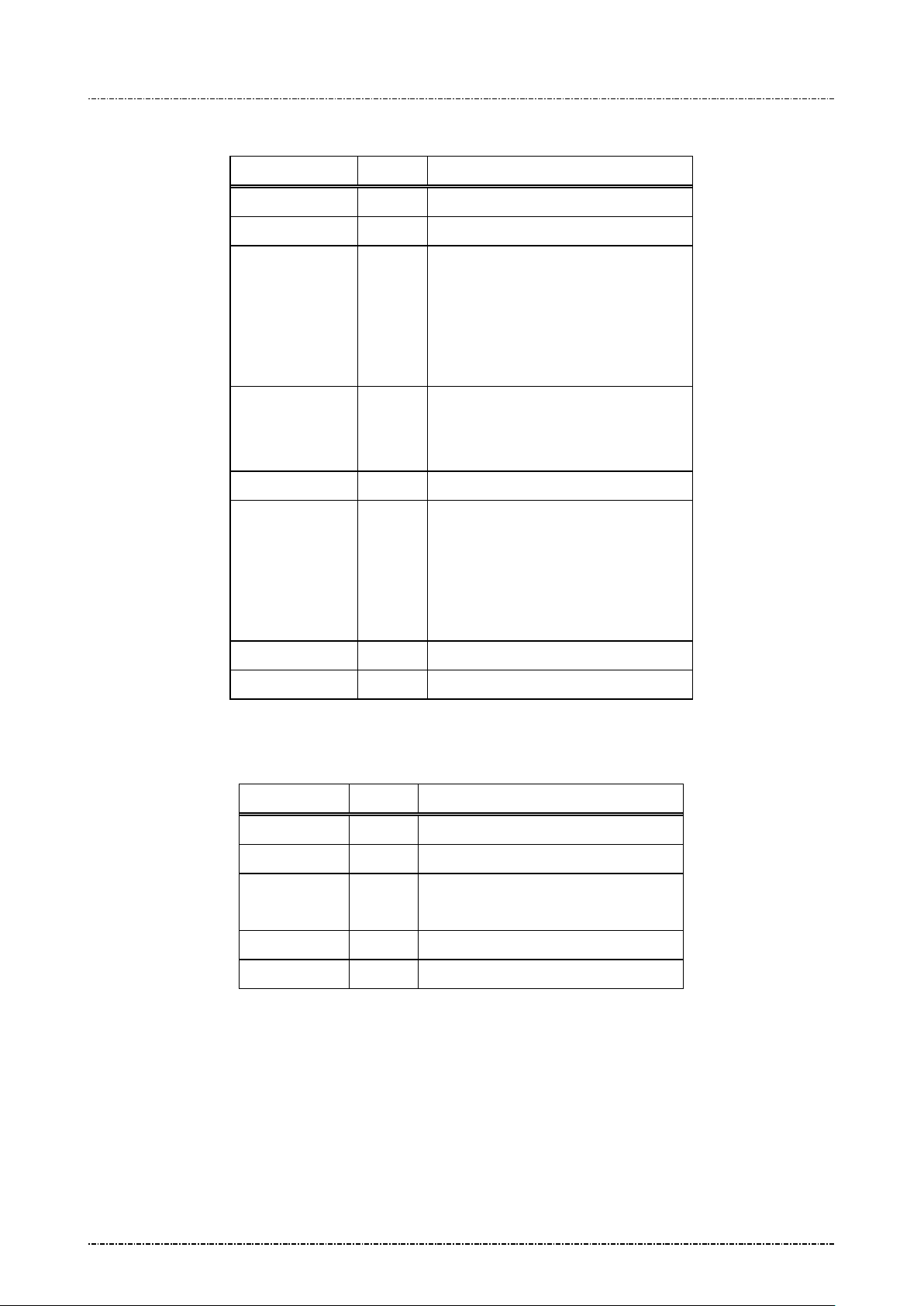
Z3 request frame (authenticated mode or PIN entry mode)
Field Length Value and description
<STX> 1 <02>
Z3 2 Message ID
<GS> or <RS> 1 <1D> for authenticated mode
<1E> for PIN entry mode
(In these mode, PIN Pad will clear
screen contents and hide pop window
before showing prompts.)
[Prompt ID1] 3 Prompt ID that corresponds to fixed
prompt provided by PIN pad.
Decimal string: 001 ~ 999.
<FS> 1 <1C>, field separator
[Prompt ID2..7] 3 Prompt ID that corre
prompt provided by PIN pad.
Decimal string: 001 ~ 999.
Note. <FS> is required between
prompt ID.
<ETX> 1 <03>
[LRC] 1 Checksum
Z3 response frame (authenticated mo d e)
Field Length Value and description
<STX> 1 <02>
Z3 2 Message ID
[status] 1 ‘0’: OK
‘1’: Prompt ID not supported.
<ETX> 1 <03>
[LRC] 1 Checksum
Page54
Uniform Industrial Corp. Proprietary and Confidential Total 160 pages
Page 56
PIN Pad 190 Programmer’s Manual
2014-02-06
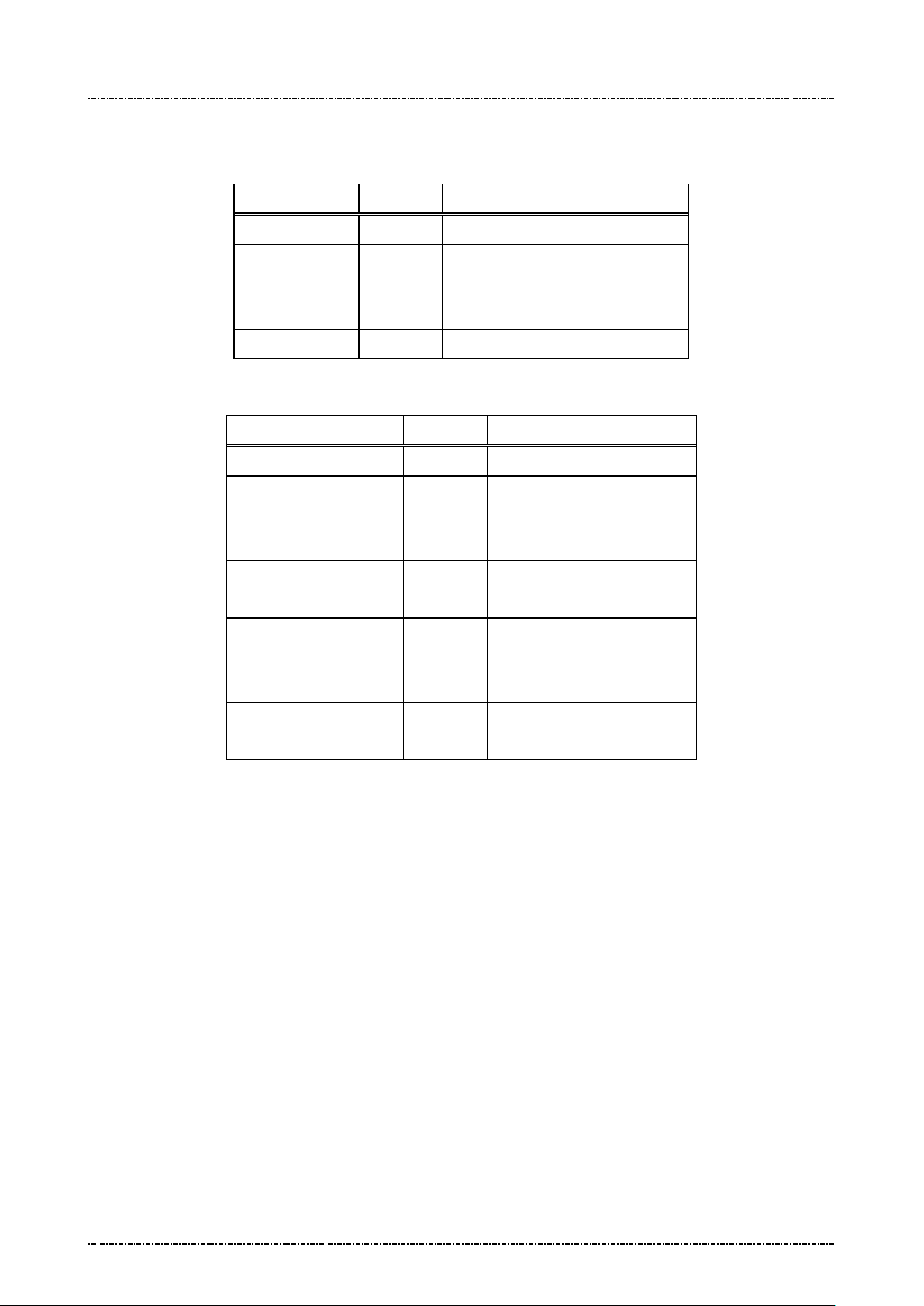
Message flow:
Normal frame
HOST Direction PIN Pad
Message Z3
<ACK> (Good LRC)
<NAK> (Bad LRC)
(<EOT> after 3 NAKs)
Display prompts as required
Authenticated frame
HOST Direction PIN Pad
Message Z3
<ACK> (Good LRC)
<NAK> (Bad LRC)
(<EOT> after 3 NAKs)
Message Z3
(response frame)
<ACK> (Good LRC)
<NAK> (Bad LRC)
(<EOT> after 3 NAKs)
Display string
<EOT> (if received <ACK>)
Page55
Uniform Industrial Corp. Proprietary and Confidential Total 160 pages
Page 57

PIN Pad 190 Programmer’s Manual
2014-02-06
Z2 / Z3 Authenticated mode with fixed prompt
To enable message Z42 and Z50, user has to issue Z2 / Z3 message with a prompt ID supported by PIN
pad (See Appendix
Conformance tests to make sure users will not expose sensitive information (such as PIN) accidentally.
For security reason, to issue authenticated frame of Z2 / Z3 at the first time, the <SUB> flag is mandatory.
After Z2 authenticated mode entered, PIN pad will accept two kind of Z2 packet:
1. Z2 packet in normal mode, without <SUB> flag, and contains only digits (0~9)
2. Z2 packet in authenticated mode, without <SUB> flag.
For example, issue Z2<GS>005<SUB> and Z2<GS>016 will show “PLEASE ENTER DRIVER LICENSE”
on the screen.
C). These prompts are verified during Payment Card Industry (PCI) Security
Z2 / Z3 PIN entry mode with fi xed prompt
To enable Z60, user has to issue Z2 / Z3 message with a prompt ID supported by PIN pad, dedicated for
PIN entry (See Appendix
Conformance tests to make sur e users wil l not m isunderstand PIN entry reques t as other non-sensitive
data. Also message Z62’s prompt1 and prompt2 w ill be checked to see if the y are listed in this prom pt
table. If not, PIN pad will reject Z62.
D). These prompts are ver ified during Payment Car d Industry (PCI) Secur ity
Any other messages other than Z2, Z3, Z42, Z50, and Z60 or any unsuccessful Z2 / Z3 messages (wrong
prompt ID, format error, Z2 message includes non decimal characters) will make PIN pad to leave Z2 / Z3
authenticated mode to avoid attack.
Page56
Uniform Industrial Corp. Proprietary and Confidential Total 160 pages
Page 58
PIN Pad 190 Programmer’s Manual
Message authentication code of following
2014-02-06
Message Z2 Display String with A uth ent ic at io n Cod e
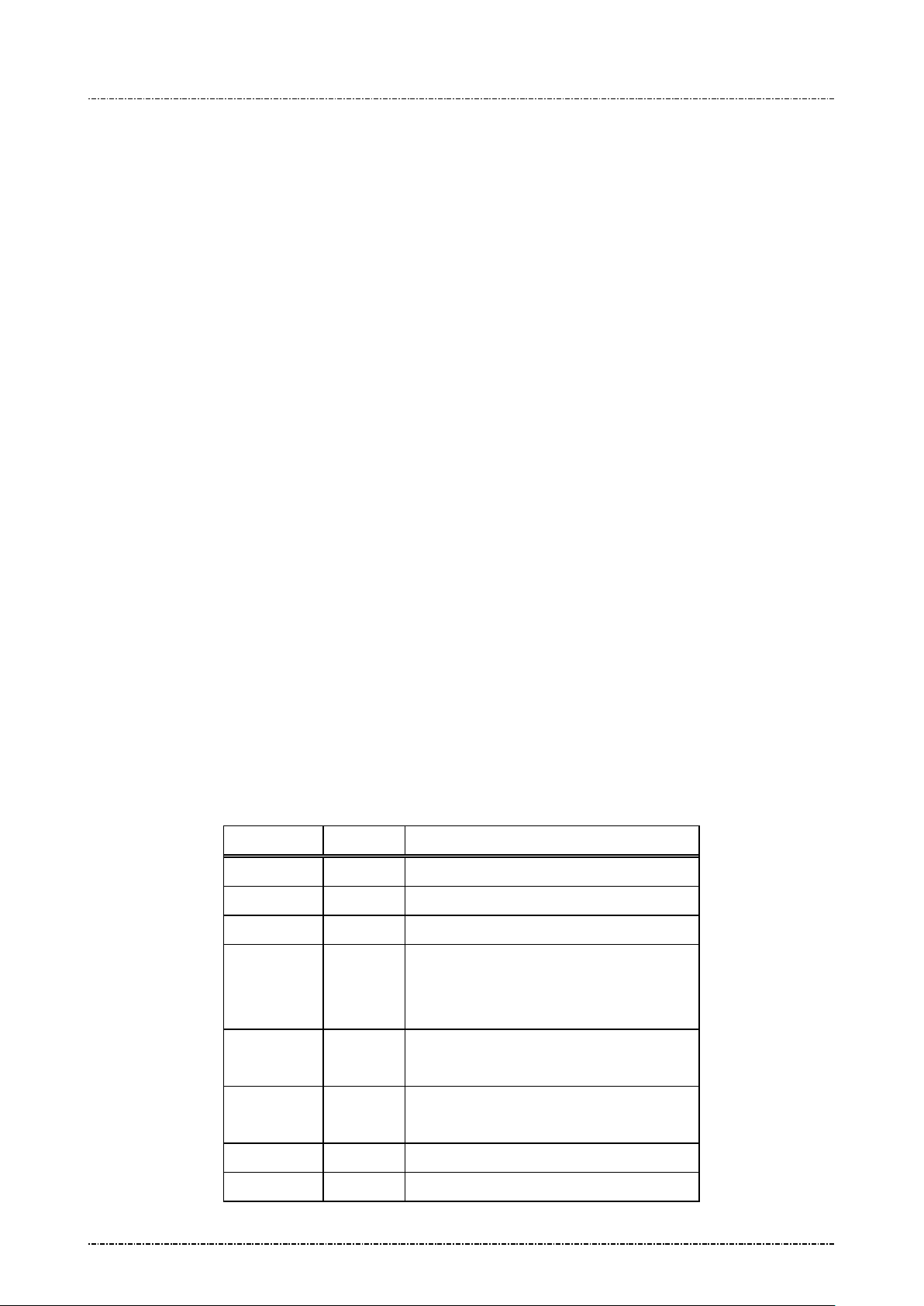
Format: <STX>Z2<FS>[KeyID][MAC][Mode][string]<SUB><ETX>[LRC]
(Request frame)
<STX>Z2[status]<ETX>[LRC] (Response frame)
Message length: Variable.
Usage: This command allows acquirer to show free m essage on screen as prompt f or clear
text entry (Z42, Z50) and PIN entry (Z60). PP190 will verify MAC value by the following
rule:
* Collect [Mode] character, [string] (exclude white space, punctuation marks and
digits), and <SUB> charac ter (if exist), as b yte array, padding with ASC II ‘0’ (0x30) to
the multiple of 8.
* Use the k ey specified b y [KeyID] and I SO-9797-1 Algorithm 3 to generate m essage
authentication code for above data.
* Compare the leftmost 4 bytes of MAC value and the one written in the Z2 command.
If MAC value matches, PP190 will display the [string] written in Z2 command.
Note: 1. If Z2 (string with MAC) is used in combinatio n with Z2 (fixed prompt), their mode
character (GS / RS) must be the same; Otherwise PIN pad will reject secondary Z2.
2. PIN pad will temporarily tur n off timer displa y for the first Z2 mes sage it received.
After Z42, Z50, Z60 are performed, [CAN] key is pressed, or any other message
received and processed, PIN pad will turn on the t im er display.
3. If continuous Z2 (string with MAC) without <SUB> cause the string out of LCD
display’s range, some character will be cut.
Message element :
Z2 with MAC, request frame
Field Length Value and description
<STX> 1 <02>
Z2 2 Message ID
<FS> 1 <1C>, field separator.
[KeyID] 1 ‘B’ ~ ‘E’, key to verify M AC value. The
[MAC] 8
[Mode] 1 <GS> (0x1D) for Non-PIN entry.
[string] 0 .. 32 ASCII string to be displayed
<SUB> 1 <1A> (optional)
Page57
Uniform Industrial Corp. Proprietary and Confidential Total 160 pages
specified key must have usage ‘M3’ and
mode ‘V’.
message (including <SUB> if exist).
<RS> (0x1E) for PIN entry.
Page 59
PIN Pad 190 Programmer’s Manual
screen contents and hide pop window
before display string, and also reset entry
2014-02-06
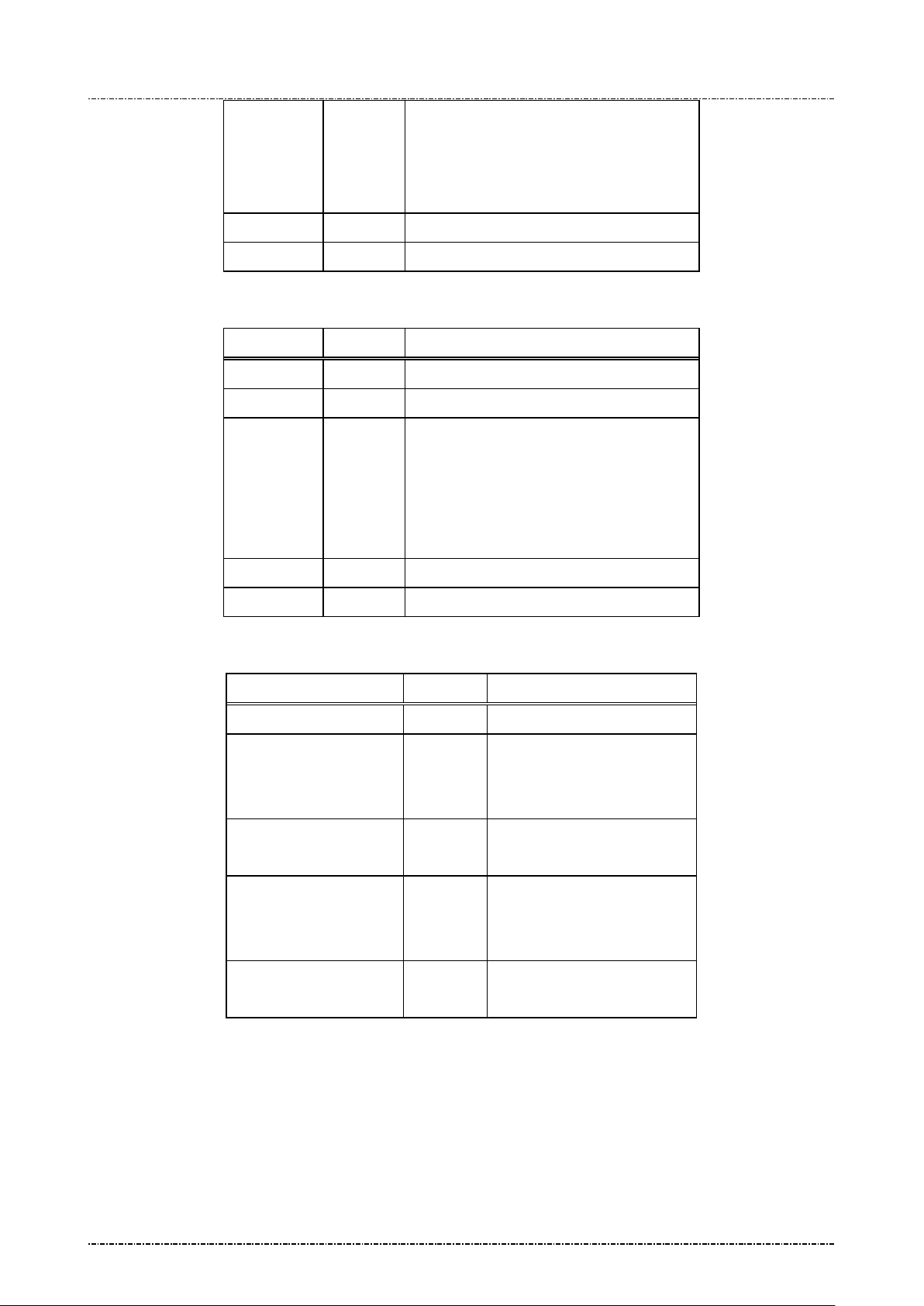
When <SUB> exists, PIN pad will clear
mode.
<ETX> 1 <03>
[LRC] 1 Checksum
Z2 with MAC, response frame
Field Length Value and description
<STX> 1 <02>
Z2 2 Message ID
[status] 1 ‘0’: OK
‘1’: MAC key ID error (out of ‘B’~’E’).
‘2’: MAC key attribute error.
‘3’: MAC value error.
Message flow:
‘4’: Packet format error.
<ETX> 1 <03>
[LRC] 1 Checksum
HOST Direction PIN Pad
Message Z2
<ACK> (Good LRC)
<NAK> (Bad LRC)
(<EOT> after 3 NAKs)
Message Z2
(response frame)
<ACK> (Good LRC)
<NAK> (Bad LRC)
(<EOT> after 3 NAKs)
Display string
<EOT> (if received <ACK>)
Page58
Uniform Industrial Corp. Proprietary and Confidential Total 160 pages
Page 60
PIN Pad 190 Programmer’s Manual
line (20 or 40 characters depend on
2014-02-06
Message Z3 Display Line Prompts with Authentication Code
Format: <STX>Z3<FS>[KeyID][MAC][count][Mode][prompt1]<FS>
[prompt2..7]<SUB><ETX>[LRC] (Request frame)
<STX>Z3[status]<ETX>[LRC] (Response frame)
Message length: Variable.
Usage: This command allows acquirer to show free mes sage on screen as prompt for clear
text entry (Z42, Z50) and PIN entry (Z60). PP190 will verify MAC value by the following
rule:
* Collect [Mode] char acter, [prompt_n] ( exclude white s pace, punctuation m arks and
digits), and <SUB> charac ter (if exist), as b yte array, padding with ASC II ‘0’ (0x30) to
the multiple of 8.
* Use the k ey specified b y [KeyID] and I SO-9797-1 Algorithm 3 to generate m essage
authentication code for above data.
* Compare the leftmost 4 bytes of MAC value and the one written in the Z2 command.
If MAC value matches, PP190 will display the [string] written in Z2 command.
Note: 1. If Z3 (string with MAC) is used in combinatio n with Z3 (fixed prompt), their mode
character (GS / RS) must be the same; Otherwise PIN pad will reject secondary Z3.
2. PIN pad will temporarily tur n off timer displa y for the first Z2 mes sage it received.
After Z42, Z50, Z60 are performed, [CAN] key is pressed, or any other message
received and processed, PIN pad will turn on the t im er display.
Message element:
Z2 with MAC, request frame
Field Length Value and description
<STX> 1 <02>
Z3 2 Message ID
<FS> 1 <1C>, field separator.
[KeyID] 1 ‘B’ ~ ‘E’, key to verify M AC value. The
specified key must have usage ‘M3’ and
mode ‘V’.
[MAC] 8 Message authentication code of following
message (including <SUB> if exist).
[count] 1 ‘1’ ~ ‘7’, number of following prompts.
[Mode] 1 <GS> (0x1D) for Non-PIN entry.
<RS> (0x1E) for PIN entry.
[prompt1] Var. First string to be displayed, max length is
one
Page59
Uniform Industrial Corp. Proprietary and Confidential Total 160 pages
Page 61
PIN Pad 190 Programmer’s Manual
Second to end string to be displayed. Each
2014-02-06
font size).
<FS> 1 <1C>, field separator
[prompt N] Var.
prompt is separated by <FS>.
<SUB> 1 <1A> (optional)
When <SUB> exists, PIN pad will clear
clear screen contents and hide pop window
before display string
<ETX> 1 <03>
[LRC] 1 Checksum
Z3 with MAC, response frame
Field Length Value and description
<STX> 1 <02>
Z2 2 Message ID
Message flow:
[status] 1 ‘0’: OK
‘1’: MAC key ID error (out of ‘B’~’E’).
‘2’: MAC key attribute error.
‘3’: MAC value error.
‘4’: Packet format error.
<ETX> 1 <03>
[LRC] 1 Checksum
HOST Direction PIN Pad
Message Z3
<ACK> (Good LRC)
<NAK> (Bad LRC)
(<EOT> after 3 NAKs)
Message Z3
(response frame)
<ACK> (Good LRC)
<NAK> (Bad LRC)
(<EOT> after 3 NAKs)
Page60
Uniform Industrial Corp. Proprietary and Confidential Total 160 pages
Display string
<EOT> (if received <ACK>)
Page 62

PIN Pad 190 Programmer’s Manual
2014-02-06
Example to use Z2 / Z3 with Authencation C ode.
[Example 1]
1. Use message 02 (ANSI TR31 frame) to load following key to position ‘B’:
BCDE90123456789ABCDE90123456789A, Usage = M3, Mode = V.
2. Assume we want to clear screen and dis play foll owing str ing for PIN entr y: “AMO UNT 123456.78
ENTER YOUR PIN”.
3. The data for MAC generation (‘A’ to ‘Z’, ‘a’ to ‘z’ and ISO8859-15 hig h page charac ter from 0x BC
to 0xFF, padded with ASCII 0):
<RS>AMOUNTENTERYOURPIN<SUB>0000
1E414D4F554E54454E544552594F555250494E1A30303030
The white spaces and digit s are not coun ted in to MAC , this f eatur e enab les ac qui rer to iss ue PI N
entry prompts with different amount, but keep the same MAC value.
4. Use the key specified in the step 1 to calculate ISO9797-1 algorithm 3 MAC.
The result is: C51401D727D761E2.
Take leftmost 4 bytes as MAC value: C51401D7
5. Send <02>Z2<1C>BC51401D7<1E>AMOUNT 123456.78 ENTER YOUR PIN<1A><03> to PIN
Pad, Then message Z60 can be issued to request PIN entry.
6. Send <02>Z2<1C>BC51401D7 <1A>AMOUNT 123.45 ENTER YOUR PIN<03> to PIN Pad to see
the same MAC applies to different amounts.
[Example 2]
1. Use message 02 (ANSI TR31 frame) to load following key to position ‘B’:
6AC292FAA1315B4D8234B3A3D7D5933A, Usage = M3, Mode = V.
2. Assume we want to clear screen and display for non-PIN entry: “MESSAGE ONE 1.0” and
“MESSAGE TWO 2.0”.
3. The data for MAC generation (padded with ASCII 0):
<GS>MESSAGEONE<FS>MESSAGETWO<SUB>0
1D4D4553534147454F4E451C4D45535341474554574F1A30
4. Use the key specified in the step 1 to calculate ISO9797-1 algorithm 3 MAC.
Take leftmost 4 bytes as MAC value: 22C0BAD9
5. Send <02>Z3<1C>B22C0BAD92 <1D>MESSAGE ONE 1.0<1C> MESSAGE TWO 2.0<1A><03>
.
.
to PIN pad.
Page61
Uniform Industrial Corp. Proprietary and Confidential Total 160 pages
Page 63
PIN Pad 190 Programmer’s Manual
ASCII character from 1 to 255, for
2014-02-06
Message Z42 Read Key Code
Format: <STX>Z42[timeout]<ETX>[LRC]
Message length: Variable 6 to 9 bytes.
Usage: Once PP190 receives this command, it begins polling functional key array until timeout.
If PP190 received Z2 / Z3 authenticated frame before Z42, it will return any key
pressed b y u s er by A SCII k ey codes via message Z43. Else it will r etu rn onl y function
key codes (F1, F2, F3, F4, CAN, CLR, ENTER), and reject numerical k ey (0 to 9).
Multiple key press or combined key press will be discarded.
Abort input: Issue message 72 to abort the operation.
Note: Z2/Z3 required: Because Z42 will not show any message to prompt user operation, Z2
or Z3 should be issued before this command, or PIN pad will send <EOT> and stop.
Message element:
Field Length Value and description
Message flow:
<STX> 1 <02>
Z42 3 Message ID
[timeout] 1 to 3
example “10” means 10 seconds timeout.
<ETX> 1 <03>
[LRC] 1 Checksum
HOST Direction PP190
Message Z2 or Z3
Show prompt message
Message Z42
<ACK> (Good LRC)
<NAK> (Bad LRC)
(<EOT> after 3 NAKs)
<ACK> (Good LRC)
<ACK>/<NAK>/<EOT>
Page62
Uniform Industrial Corp. Proprietary and Confidential Total 160 pages
<NAK> (Bad LRC)
(<EOT> after 3 NAKs)
Message Z43
Page 64
PIN Pad 190 Programmer’s Manual
2014-02-06
Message Z43 Read Key Code Resp onse
Format: <STX>Z43[Keycode]<ETX>[LRC]
Message length: Fixed 7 bytes.
Usage: This is the response frame of Z42.
Message element:
Field Length Value and description
<STX> 1 <02>
Z43 3 Message ID
[keycode] 1 ‘0’ to ‘9’
ASCII ‘A’ to ‘C’ denotes 3 function
keys.
‘A’ = [F1]
‘B’ = [F2]
‘C’ = [F3]
Message flow:
(Please refer to message Z42)
‘D’ = [F4]
‘*’ = [CAN]
‘#’ = [ENTER]
‘/’ = [CLR]
‘?’ means time out.
<ETX> 1 <03>
[LRC] 1 Checksum
Page63
Uniform Industrial Corp. Proprietary and Confidential Total 160 pages
Page 65
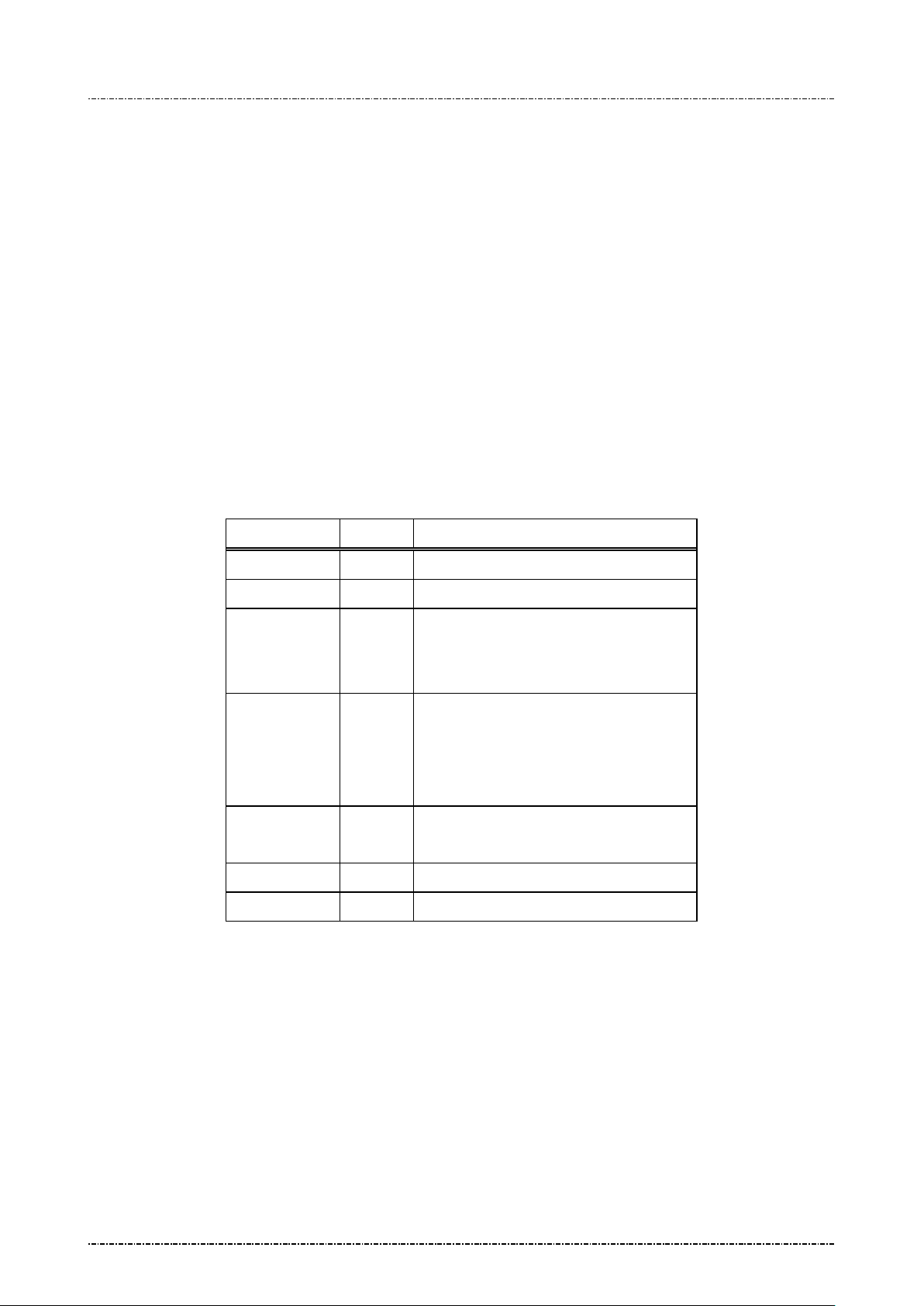
PIN Pad 190 Programmer’s Manual
timeout for each keypress, for example
means 10 seconds timeout after
2014-02-06
Message Z50 String Entry Request
Format: <STX>Z50[echo flag][timeout][max entry]<ETX>[LRC]
Message length: Variable 10 to 12 bytes.
Usage: Request user to input string on keypad.
Then PP190 will wait for keypad input and store ASCII data into intern al buffer. To
input English ch aracter on the k eypad, press [F2] k ey to rotat e the last charac ter. For
example, press [1], [F2], [F2] will input a ‘Z’ character into PP190. The maximum
length of internal buffer is 32 characters.
User can use [CLR] to clear input buffer and input again, or [CAN] to cancel input.
Press ‘0’ and press [F2] will transform ‘0’ into period or white space.
Abort input: Issue message 72 to abort the operation.
Note: A Z2 or Z3 m essage with a uthenticated frame m ust be issued before Z50. Ot herwise
PIN pad will refuse to execute.
Message element:
Field Length Value and description
<STX> 1 <02>
Z50 3 Message ID
[echo flag] 1 ‘0’: echo input as ‘*’
‘1’: echo input as is
‘2’: do not echo
[timeout] 3 ASCII character from 1 to 255 to set the
“010”
the last keypress.
[max entry] 1 or 2 (optional) Maximu m entry count.
Range from 00 to 32 (or 0 to 32)
<ETX> 1 <03>
[LRC] 1 Checksum
Page64
Uniform Industrial Corp. Proprietary and Confidential Total 160 pages
Page 66
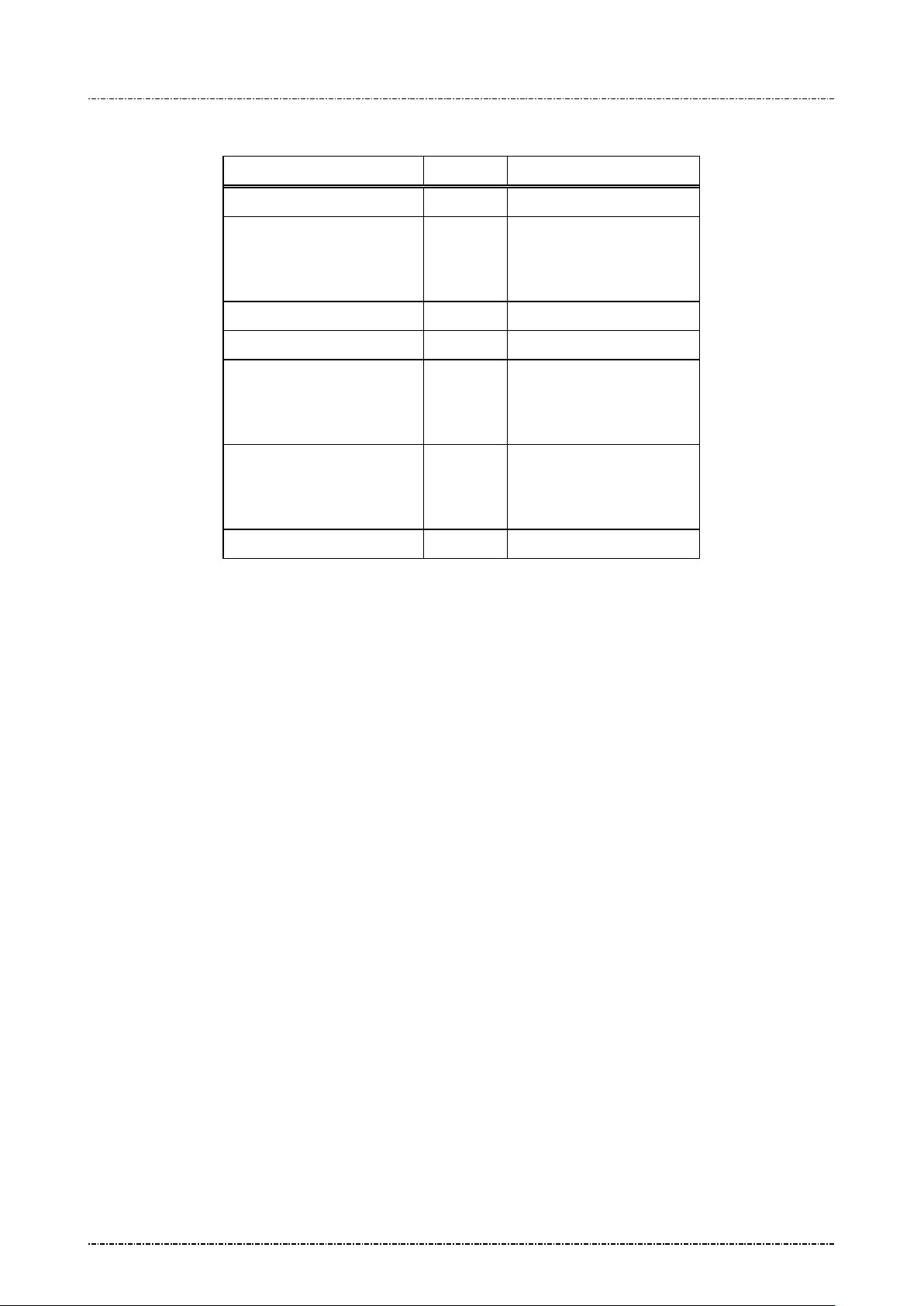
PIN Pad 190 Programmer’s Manual
(or <EOT> when input
2014-02-06
Message flow:
HOST Direction PP190
Message Z2 or Z3
<ACK> (Good LRC)
<NAK> (Bad LRC)
(<EOT> after 3 NAKs)
Show prompt message
Message Z50
<ACK> (Good LRC)
<NAK> (Bad LRC)
(<EOT> after 3 NAKs)
Message Z51
cancelled)
<ACK>/<NAK>/<EOT>
Page65
Uniform Industrial Corp. Proprietary and Confidential Total 160 pages
Page 67
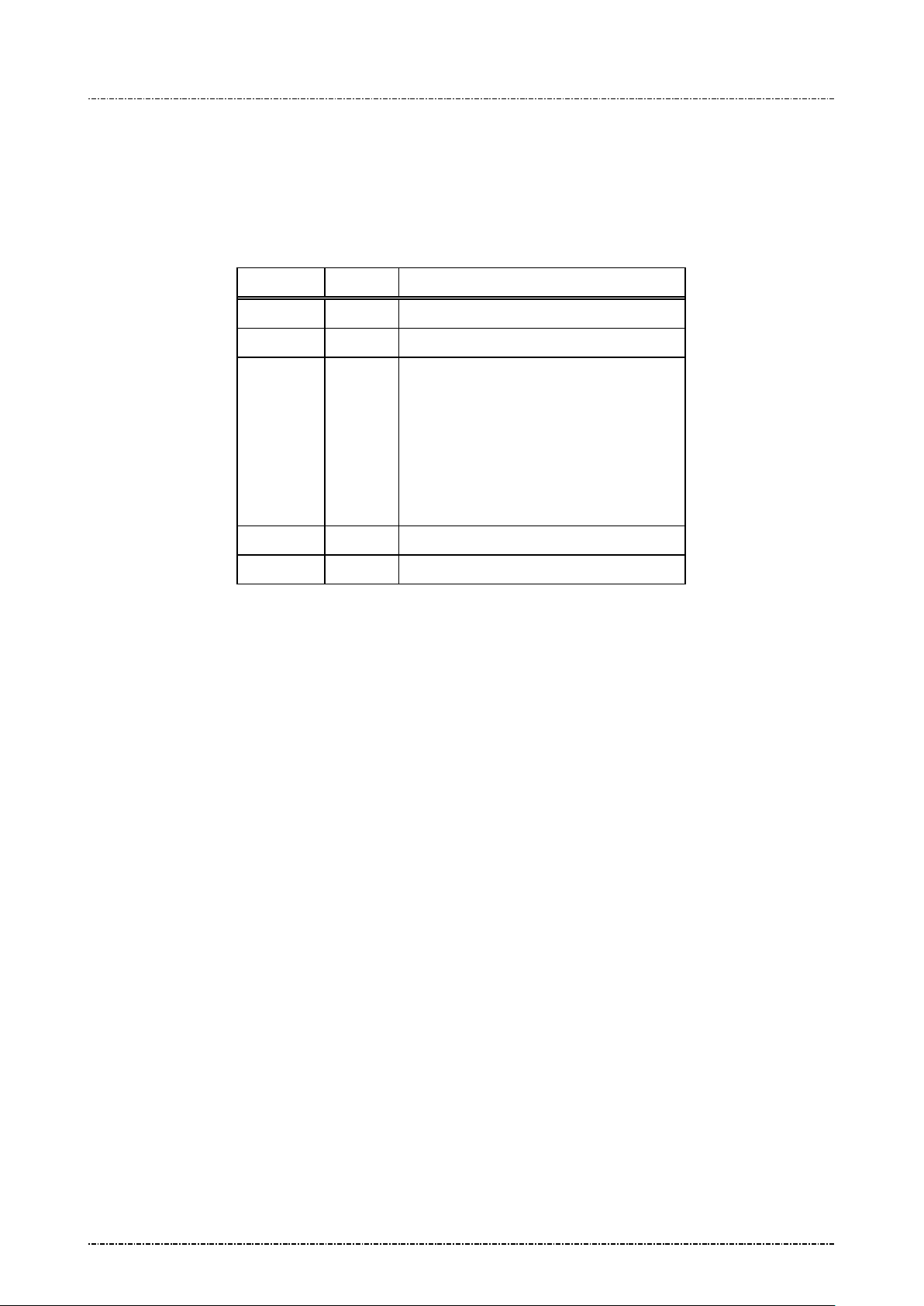
PIN Pad 190 Programmer’s Manual
means file not found or authentication
2014-02-06
Message Z51 String Entry Re sponse
Format: <STX>Z51[string]<ETX>[LRC]
Message length: Variable, maximum 55 bytes.
Usage: This is the response frame of Z50 and ZG.
Message element:
Field Length Value and description
<STX> 1 <02>
Z51 3 Messa ge ID
[string] 1..32 User inputted strin g.
‘?’ means time out.
‘!’
error. (For Message ZG error response)
‘%’ means prompt ID not supported. (For
Message ZG error response)
Message flow:
(Please refer to message Z50)
<ETX> 1 <03>
[LRC] 1 Checksum
Page66
Uniform Industrial Corp. Proprietary and Confidential Total 160 pages
Page 68
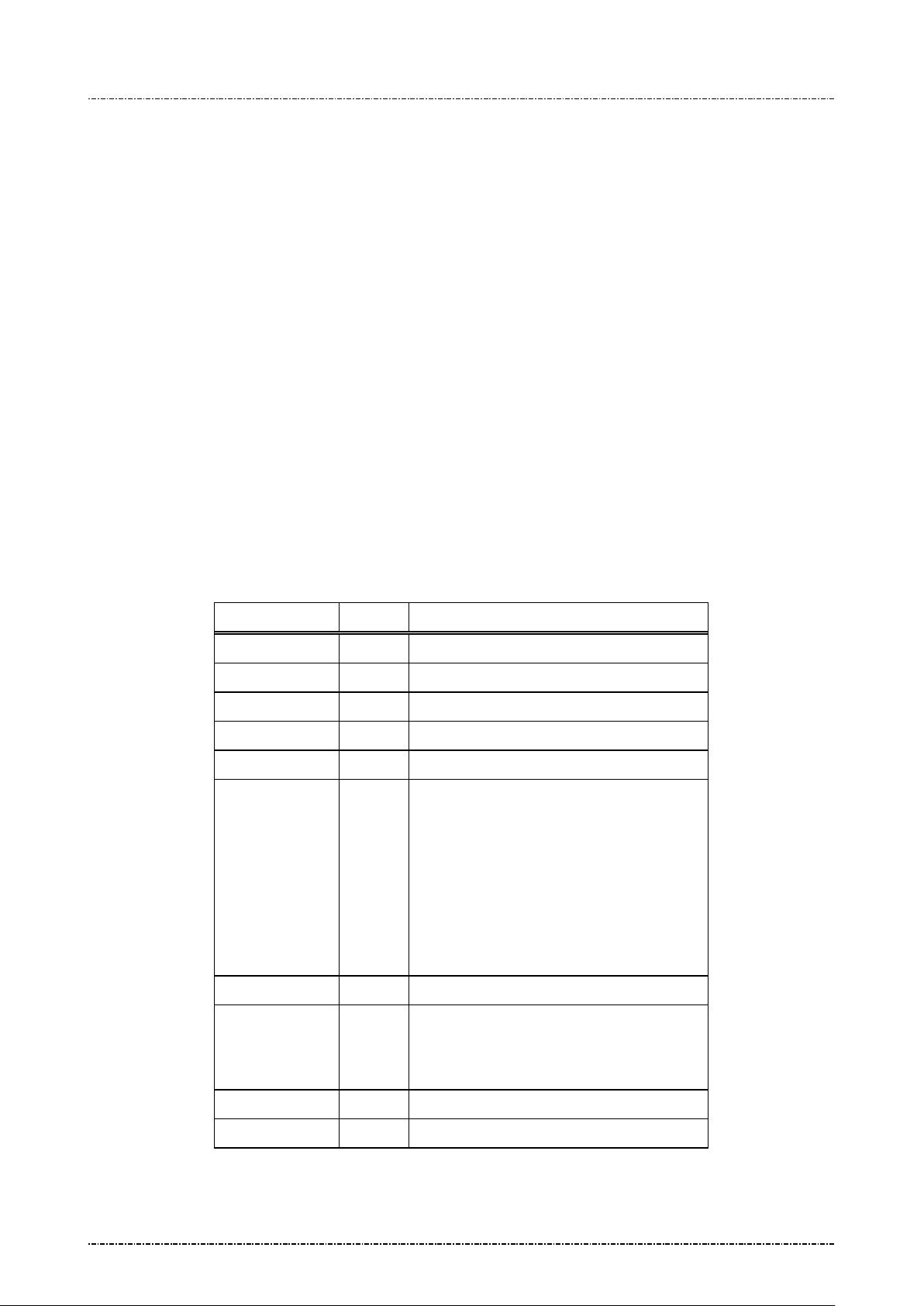
PIN Pad 190 Programmer’s Manual
characters session key produces
N block with EDE
2014-02-06
Message Z60 PIN entry request with external prompt (MK/SK)
Format: <STX>Z60.[account]<FS>[session key]<FS>[timeout]<ETX>[LRC]
Message length: Variable 32 to 43 bytes (max. 59 bytes for TDES session key).
Usage: Request the PIN Pad to ac cept customer PIN entr y and encrypt it using the account
number and work ing ke y sent along in t his m ess age. T he encr ypted PIN bloc k should
be retrieved via message 71.
Note: Z2/Z3 (PIN entry mode) required: Message Z2 or Z3 (PIN entry mode) shou ld be
issued before this command, or PIN pad will send <EOT> and stop.
Aborting Transaction: Please refer to message 70.
PIN length: Please refer to message 70.
Master key must be selected before transaction: Please refer to message 70.
Triple DES capability: Please refer to message 70.
Ses sion Key: If the selected k ey is with usage “P0”, the session key should be all
zeros.
Message element:
Field Length Value and description
<STX> 1 <02>
Z60 3 Message ID
. 1 <2E>, delimiter
[Account] 8 .. 19 Account number
<FS> 1 <1C>, Field separator
[Session key] 16 or
32
Session key encrypted with selected master
key. 32TDES encrypted PI
order.
Format: hexadecimal string.
This filed should be all zeros if the selected
key is with u s age “P0”
<FS> 1 (Optional) <1C>, Field separator
[timeout] 1 (Optional) ASCII character from ‘1’ to ‘9’
which is the t imeout va lue in the unit of 3 0
seconds. Default = 9x30 = 270 seconds.
<ETX> 1 <03>
[LRC] 1 Checksum
Page67
Uniform Industrial Corp. Proprietary and Confidential Total 160 pages
Page 69
PIN Pad 190 Programmer’s Manual
2014-02-06
Message flow:
HOST Direction PIN Pad
Message Z2 or Z3
<ACK> (Good LRC)
<NAK> (Bad LRC)
(<EOT> after 3 NAKs)
Show prompt me ssage
Message Z60
<ACK> (Good LRC)
<NAK> (Bad LRC)
(<EOT> after 3 NAKs)
Message 71
(after customer PIN entered), or
<EOT> when input timed out or
user pressed [CAN]
<ACK> (Good LRC)
<NAK> (Bad LRC)
(<EOT> after 3 NAKs)
Page68
Uniform Industrial Corp. Proprietary and Confidential Total 160 pages
Page 70

PIN Pad 190 Programmer’s Manual
2014-02-06
Message Z62 PIN entry request with customized prompt (MK/SK)
Format: <STX>Z62.[account]<FS>[session key][minPIN][maxPIN]
[null flag][prompt1]<FS>[prompt2]<FS>[proc prompt]<FS>
[timeout]<ETX>[LRC]
Message length: Variable 39 to 100 bytes (max. 116 bytes for TDES session key).
Usage: Request the PIN Pad to display the prompt message in this data frame, accept
customer PIN entry and encrypt it using the account num ber and working key sent
along in this mes sage. D isplay the [proc prompt] when the P IN has b een ent er ed. The
encrypted PIN block should be retrieved via message 71.
NOTE
: Aborting Transaction: Please refer to message 70.
PIN length: Although Z62 allow programmer to specify the maximum and minimum PIN
length, but it is not allowed to set the value of [m axPIN] and [minPIN] to exceed ANS I
x9.8 specification except allow null PIN.
Master key must be selected before transaction: Please refer to message 70.
Triple DES capability: Please refer to message 70.
Session Key: If the selected key is with usage “P0”, the session key should be
all zeros.
Page69
Uniform Industrial Corp. Proprietary and Confidential Total 160 pages
Page 71
PIN Pad 190 Programmer’s Manual
key encrypted with selected master key.
produces TDES encrypted
rompt displayed before any key is pressed, alternate
rompt displayed before any key is pressed, alternate
2014-02-06
Message element:
Field Length Value and description
<STX> 1 <02>
Z62 3 Message ID
. 1 <2E>, delimiter
[account] 8 .. 19 Account number
<FS> 1 <1C>, field separator
[session key] 16 or
32
Session
32-characters session key
PIN block with EDE order.
Format: hexadecimal string.
This filed should be all zeros if the selected key is with
usage “P0”
[minPIN] 2 00, 04 .. 12 minimum PIN length.
('00' only available whe n [null flag] set to 'Y').
[maxPIN] 2 00, 04 .. 12 maximum PIN length.
('00' only available whe n [null flag] set to 'Y').
[null flag] 1 Y Null PIN allowed
N Null PIN not allowed
[prompt1] 1 .. 16 P
with prompt2
<FS> 1 <1C>, field separator
[prompt2] 1…16 P
<FS> 1 <1C>, field separator
[proc prompt] 1…16 Prompt displayed after P I N is entered
<FS> 1 (optional) <1C>, field separator
[timeout] 1 (optional) ASCII character from ‘1’ to ‘9’ which is the
<ETX> 1 <03>
[LRC] 1 Checksum
Page70
Uniform Industrial Corp. Proprietary and Confidential Total 160 pages
with prompt1
timeout val ue i n the unit of 30 se co nd s. De fa ult = 9x30
= 270 seconds.
Page 72
PIN Pad 190 Programmer’s Manual
lay [prompt1] and [prompt2] wait for
2014-02-06
Message flow:
HOST Direction PIN Pad
Message Z62
<ACK> (Good LRC)
<NAK> (Bad LRC)
(<EOT> after 3 NAKs)
(Disp
user enter PIN)
Message 71
(after customer PIN entered)
<ACK> (Good LRC)
<NAK> (Bad LRC)
(Display [proc prompt])
(<EOT> after 3 NAKs)
Page71
Uniform Industrial Corp. Proprietary and Confidential Total 160 pages
Page 73
PIN Pad 190 Programmer’s Manual
2014-02-06
Message Z64 Query Key Check Value (KCV)
Format: <STX>Z64[KeyId]<ETX>[LRC]
Message length:
Usage:
Example: TDES key "0123456789ABCDEF FEDCBA9876543210" will have KCV as "08D7B4".
Fixed 7 bytes.
This message will export the KCV of specified master key.
KCV is calculated as following:
1. Use [KeyID] specified key as encryption key.
2. Use "0000000000000000" (8 bytes zero) as data.
3. If the encrypt key is single length (8 bytes), use DES algorithm to encrypt the data,
else, use TDES algorithm to encrypt the data.
4. Take leftmost 3 bytes as KCV, output KCV as message Z65.
Message element:
Field Length Value and description
<STX> 1 <02>
Z64 3 Message ID
[KeyID] 1 ‘0’ ~ ‘9’, ‘A’ ~ ‘G’,
The ID of master keys
Message flow:
<ETX> 1 <03>
[LRC] 1 Checksum
HOST Direction PIN Pad
Message Z64
<ACK> (Good LRC)
<NAK> (Bad LRC)
(<EOT> after 3 NAKs)
<ACK> (Good LRC)
<NAK> (Bad LRC)
Message Z65
(<EOT> after 3 NAKs)
Page72
Uniform Industrial Corp. Proprietary and Confidential Total 160 pages
Page 74
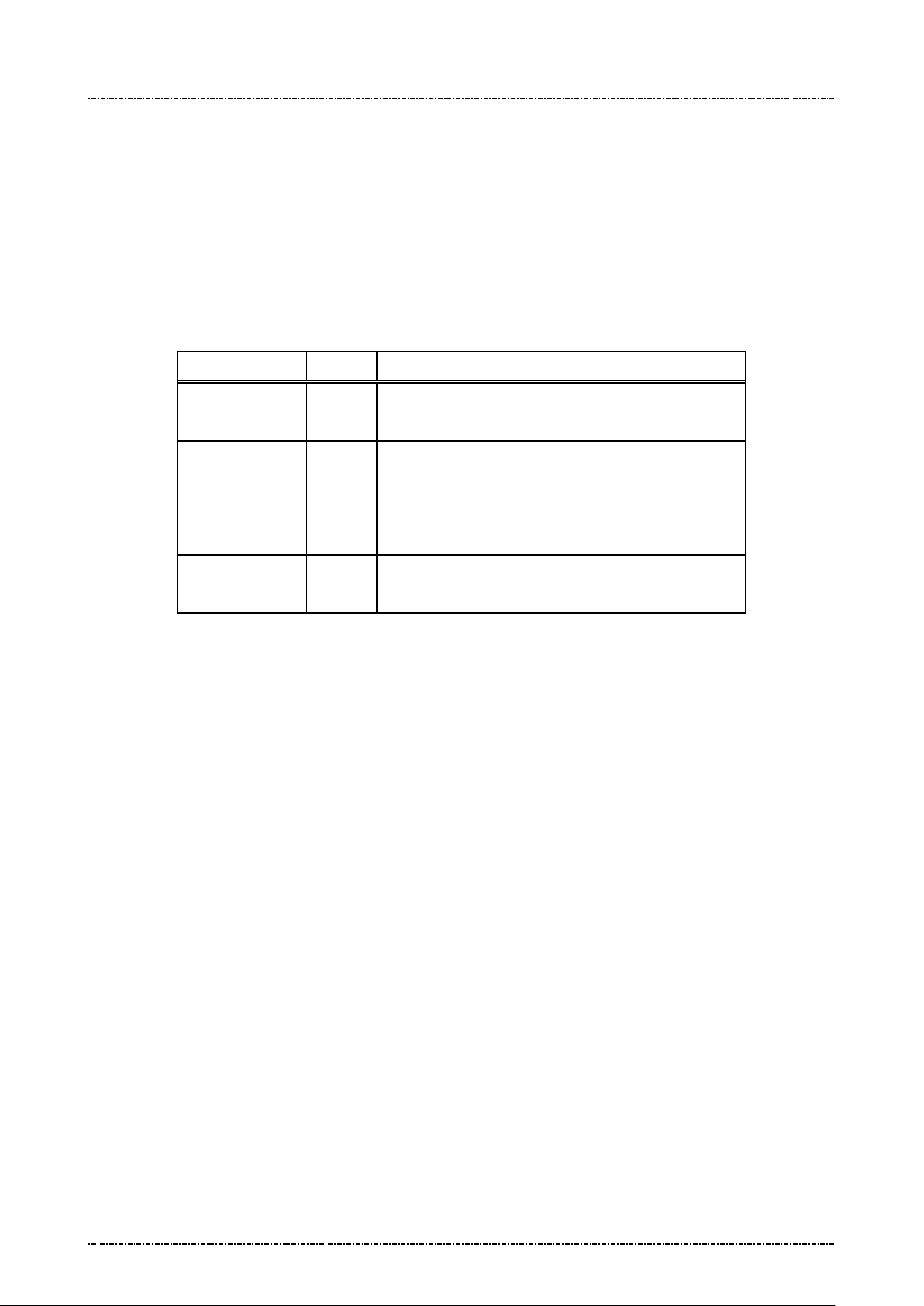
PIN Pad 190 Programmer’s Manual
2014-02-06
Message Z65 Key Check Value Response
Format: <STX>Z65[KeyId][KCV]<ETX>[LRC]
Message length:
Usage:
Message element:
Variable. 13 bytes for KCV, or 8 bytes for error code.
This message is the response of Z64.
If [KeyID] specified in Z64 is pointing to a valid master key, the KCV will be sent.
Otherwise a question mark '?' will be sent.
Field Length Value and description
<STX> 1 <02>
Z65 3 Message ID
[KeyID] 1 ‘0’ ~ ‘9’, ‘A’ ~ ‘G’,
The ID of master keys
[KCV] 6 or 1
Success: 6 characters KCV.
Fail: '?'.
<ETX> 1 <03>
[LRC] 1 Checksum
Message flow:
Refer to message Z64.
Page73
Uniform Industrial Corp. Proprietary and Confidential Total 160 pages
Page 75
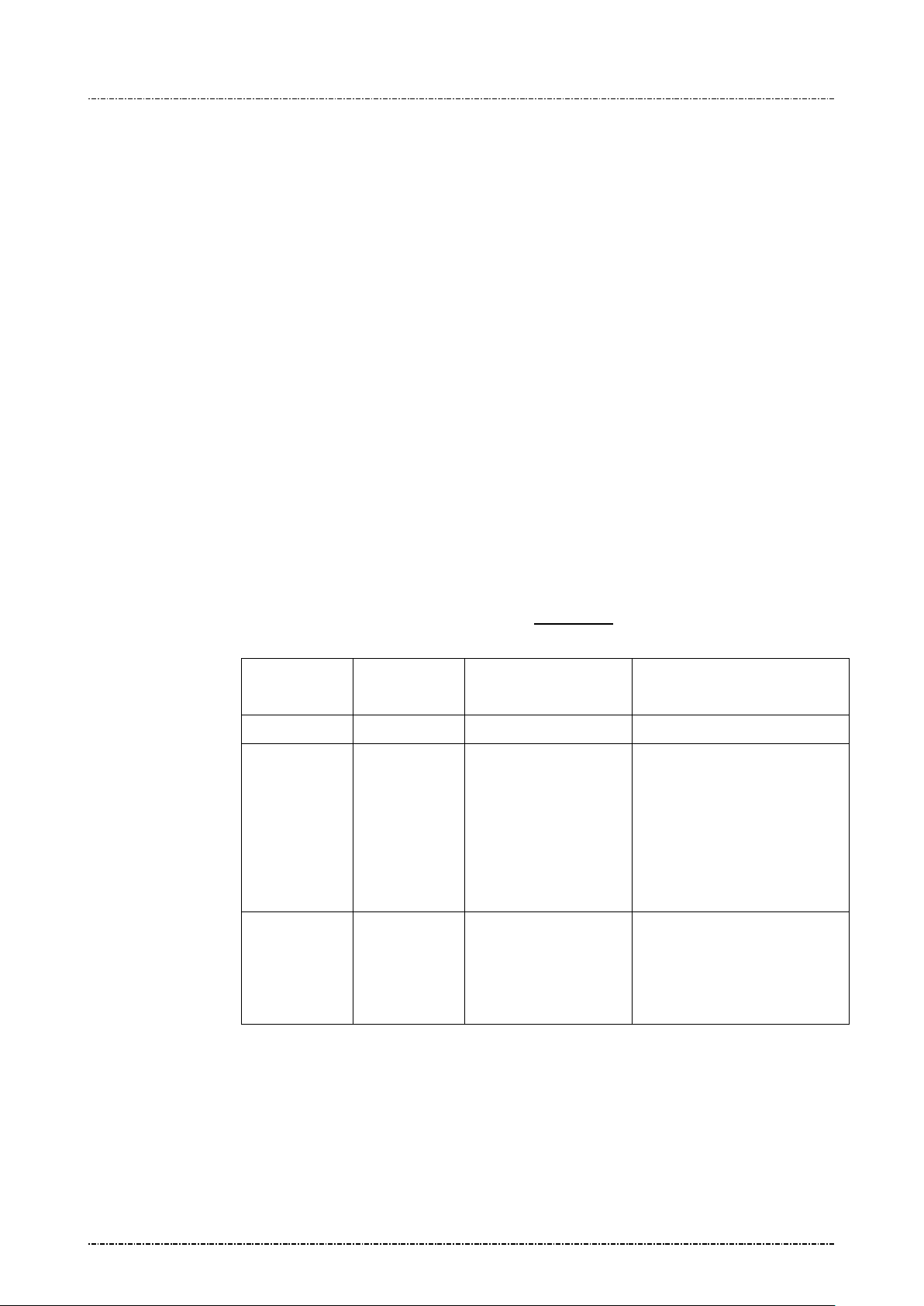
PIN Pad 190 Programmer’s Manual
2014-02-06
Message Z66 Message Authentication Code (MAC) Request
Format: <STX>Z66[PktType][SeqNo][KeyId] <FS> [SessionKey] <FS> [SecKeyId]
<FS> [Message] <ETX> [LRC]
Message length: Variable 14 to 270 bytes.
Usage: This message is used to generate MAC codes according to algorithm specified in ANSI
X9.19 (ISO 9797-1). User can send A SCII str ings or hex adecim al strings to PP190 by
Z66 message to generate its MAC. User can also separate a long message into
multiple Z66 messages with increasing sequence number to generate a MAC.
NOTE: Message Len gth: Onetime message c an be up to 224 c haracters ( equal to 112bytes
when send as hexadec imal string because 2 c haracters r epresents 1 bytes). Mul tiple
messages can have s equence number f rom 00 to 99, thus t he maximum capacity of
Z66 message is 22400 characters (or 11200 bytes in binary mode).
Multiple messages: W hen using multiple messages, [Ke yId] and [SessionKey] and
[SecKeyId] must be t he same. [Mess age] must be the m ultiple of 8 character s (or 16
characters in binary mode). Or PP190 w ill gen er ate a wrong MAC .
MAC algorithm: PP190 generate T DES MAC according to ISO97 97-1 algorithm 3.
(Padding with 0. Initial vector = 0. Refer to Appendix A
point 10 for detail algoritgm.)
Session Key: The value of session key relates to the usage of specified master keys.
Usage of 1
Key ID
st
Usage of 2nd
Key ID
Value of session key MAC Key
“K0” N/A Non-zero Session key
“M3”
(mode G)
N/A Zero Master key specified by
[KeyId].
If specified key is mode ‘V’,
this is for MAC verification
and cannot used to generate
MAC for Z66 command.
“M1”
(mode G)
“M1” Zero Master key specified by
[KeyId] as left key, and
master key specified by
[SecKeyId] as right key.
Page74
Uniform Industrial Corp. Proprietary and Confidential Total 160 pages
Page 76
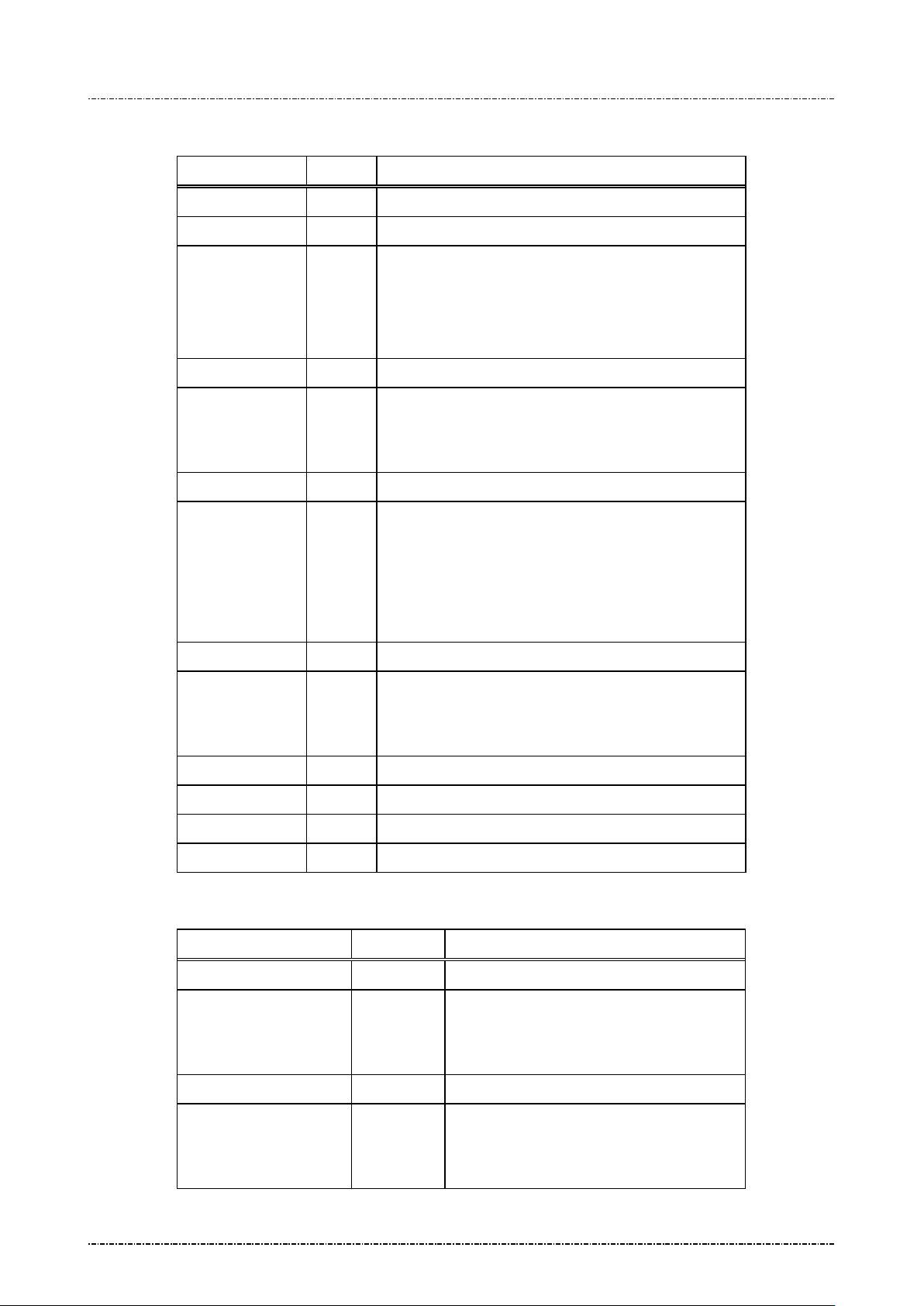
PIN Pad 190 Programmer’s Manual
usage, this field
2014-02-06
Message element:
Field Length Value and description
<STX> 1 <02>
Z66 3 Message ID
[PktType] 1 '4' = ASCII last or only packet.
'5' = ASCII first or middle of multiple packets.
'6' = Binary last or only packet.
'7' = Binary first or middle of multiple packets.
[SeqNo] 2 '00' to '99', for onetime only packet, set to 00.
[KeyId] 1 (Op tional) Master key to use, range = 'B' to 'E'. If this
filed is blank, the MAC master key will be the selected
key 0 ~ 9.
<FS> 1 <1C>, field separator
[SessionKey] 32 Session key will be decrypted by: Master key pointed
<FS> 1 <1C>, field separator
[SecKeyId] 1 (Optional) Refer to note of Z66 usage. If first [KeyId]
<FS> 1 <1C>, field separator
[Message] 1-224 ASCII string or Hexadecimal string to be MACed.
<ETX> 1 <03>
[LRC] 1 Checksum
Message flow: (Onetime only packets)
HOST Direction PIN Pad
Message Z66 (type 4,6)
by [KeyId].
Format: hexadecimal string.
This filed should be all zeros if the selected key is with
usage “M1” or “M3”
points to key with “K0” or “M3”
should be omitted.
<ACK> (Good LRC)
<NAK> (Bad LRC)
(<EOT> after 3 NAKs)
<ACK> (Good LRC)
<NAK> (Bad LRC)
Message Z67 (with MAC)
(<EOT> after 3 NAKs)
Page75
Uniform Industrial Corp. Proprietary and Confidential Total 160 pages
Page 77
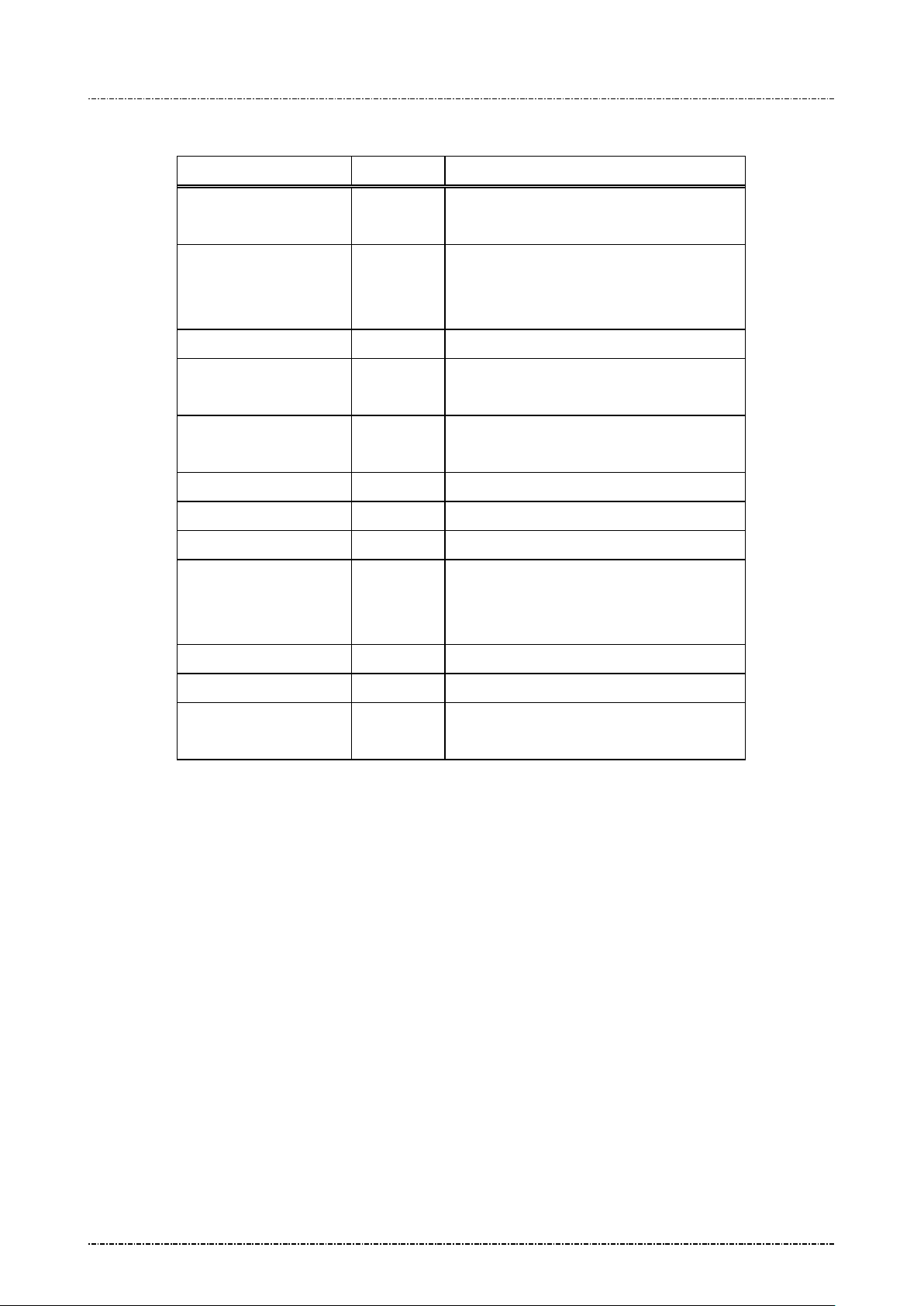
PIN Pad 190 Programmer’s Manual
(Sequence# larger than
2014-02-06
Message flow: (Multiple packets)
HOST Direction PIN Pad
Message Z66
(Seq'00' and type 5,7)
<ACK> (Good LRC)
<NAK> (Bad LRC)
(<EOT> after 3 NAKs)
<ACK> / <NAK> /
Message Z67 (with status code '1')
<EOT>
Message Z66
(Seq'01'--'98', type 5,7)
<ACK> / <NAK> / <EOT>
Message Z67 (with status code '1')
………………… …….. …………………………………..
Message Z66
last packet, type 4,6)
<ACK> / <NAK> /
<ACK> / <NAK> / <EOT>
Message Z67 (with MAC)
<EOT>
Page76
Uniform Industrial Corp. Proprietary and Confidential Total 160 pages
Page 78
PIN Pad 190 Programmer’s Manual
=Ready for next Z66 packet, user in
or range unacceptable (id 0 to A), or
'4'=Master key specified in [SecKeyId]
The [SecKeyId] only exists if [KeyId]
master key, and the
'7'=[Message] contents error (i.e. characters
, SK
2014-02-06
Message Z67 Message Authentication Code (MAC) Response
Format: <STX>Z67[status][MAC]<ETX>[LRC]
Message length: Fixed 7 (status only) or 23 (with MAC) bytes.
Usage: PP190 generated MAC calculation response. It contains status codes or MAC.
Message element:
Field Length Value and description
<STX> 1 <02>
Z67 3 Message ID
[status] 1 '0'=Success, MAC follows
'1'
multiple messages.
'2'=Sequence numbers out of order
'3'=Master key spec ified in [K eyId ] not e xist,
usage not “K0”, “M1”, “M3.
unreasonable or not exist.
points to a “M1”
[SecKeyId] itself should have “M1”
usage.
'5'=[Message] length have error (too long,
zero lengt h, or no t even n umb er in b inary
mode)
'6'=[PkyType] flag has i nvalid value
larger than 'F' in binary mode)
'8'=[SessionKey] invaild
‘9’=MAC master key length should not be 8
‘A’=Session key is incompatible to the usage
of specified master key.
[MAC] 16 Calculated MAC.
<ETX> 1 <03>
[LRC] 1 Checksum
Page77
Uniform Industrial Corp. Proprietary and Confidential Total 160 pages
(If MK’s usage is “M1” or “M3”
should contains all zero, if MK’s usage is
“K0”, SK should not be zero.)
Page 79

PIN Pad 190 Programmer’s Manual
2014-02-06
Message flow:
(Please refer to message Z66)
Page78
Uniform Industrial Corp. Proprietary and Confidential Total 160 pages
Page 80
PIN Pad 190 Programmer’s Manual
2014-02-06
Message Z7 Turn ON/OFF CANCEL Message Display
Format: <STX>Z7[option]<ETX>[LRC]
Message length: Fixed 6 bytes.
Usage: When a CANCEL m essage received or a CANCEL key pressed t o cancel a current
transaction, the PIN Pad will displa y a “CANCEL R EQUEST ED” message. T his could
be turned ON or OFF using message Z7.
Message element:
Field Length Value and description
<STX> 1 <02>
Z7 2 Message ID
[option] 1 0 CANCEL REQUESTED displayed
1 CANCEL REQUESTED not displayed
<ETX> 1 <03>
[LRC] 1 Checksum
Message flow:
HOST Direction PIN Pad
Message Z7
<ACK> (Good LRC)
<NAK> (Bad LRC)
(<EOT> after 3 NAKs)
CANCEL REQUEST prompt turned
ON/OFF
Page79
Uniform Industrial Corp. Proprietary and Confidential Total 160 pages
Page 81
PIN Pad 190 Programmer’s Manual
2014-02-06
Message Z8 Set Idle Prompt
Format: <STX>Z8[prompt]<ETX>[LRC]
Message length: Variable 6 to 21 bytes.
Usage: The PIN Pa d will displa y an idle pr ompt when it is in IDLE stat e. HOST can change
this idle prompt via m essage Z8. If the prom pt field is filled with a null str ing, then the
PIN Pad will use the default prompt afterwards.
Message element:
Field Length Value and description
<STX> 1 <02>
Z8 2 Message ID
[Prompt] 1 .. 16 Idle prompt to be used
<ETX> 1 <03>
[LRC] 1 Checksum
Message flow:
HOST Direction PIN Pad
Message Z8
Displays idle prompt
<ACK> (Good LRC)
<NAK> (Bad LRC)
(<EOT> after 3 NAKs)
Page80
Uniform Industrial Corp. Proprietary and Confidential Total 160 pages
Page 82

PIN Pad 190 Programmer’s Manual
2014-02-06
Section 7 Online transaction messages with Derived Unique Key per Transaction (DUKPT)
The following messages are designed for Derived Unique Key Per Transaction (DUKPT) key
management scheme described in ANSI X9.24-1992 and 2002 (Triple-DES DUKPT).
Note that some of the messages have the same IDs as those in MK/SK scheme, but with different
message format.
[TDES Capability]
If PP190 receives double length key in message 90/94 (Load Initial Key), the following DUKPT operation
will be done in TDES mode. PIN block will be TDES encrypted by derived key in EDE order.
[Secondary DUKPT Key Set]
PP190 provides 2
initial key into key set 0 and a T DES i nit ial key into key set 1, using key set 0 to p roc es s tr adit io nal D ES
transactions at first. When host systems ready to shift to TDES transaction, simply issue key set
nd
key set of DU KPT operation for scalabi lit y. F or ex ample, customer can inj ec t a D ES
selection comm and (96) to make PP190 switch to k ey set 1 w ithout rec all all PP190 to injec t new initi al
keys.
The following messages fall into this category:
60 Pre-Author i zation PIN Entr y Reques t
62 Pre-Authorization Amount Authorization Request
63 Pre-Authorization Amount Authorization Response
70 PIN entry request
78 PIN entry request via GUI
71 Encrypted PIN bloc k response
72 PIN entry cancel
Z60 PIN entry request with external prompt (DUKPT)
Z62 PIN entry request with customized prompt
76 PIN Entry Test Request
90 Load First Initial Key Request
91 Load Initial Key Response
94 Load Second Initial Key Request
96 Select Active Key Set
Page81
Uniform Industrial Corp. Proprietary and Confidential Total 160 pages
Page 83
PIN Pad 190 Programmer’s Manual
2014-02-06
Message 60 Pre-authorization PIN Entry Request
Format: <STX>60[account] <ETX>[LRC]
Message length: Variable 13 to 24 bytes.
Usage: PIN pad will wait till the PI N enter ed an d ENT ER k e y is press ed. Af ter PIN is en ter ed,
message 71 with PIN block will be sent as response. The HOST must transmit
message 62 to ask for confirmation on transaction amount.
Note: Z2/Z3 (PIN entry mode) required: Message Z2 or Z3 (PIN entry mode) shou ld be
issued before this command, or PIN pad will send <EOT> and stop.
Aborting Transaction: Please refer to message 70(DUKPT).
PIN length: Please refer to message 70(DUKPT).
Message element:
Field Length Value and description
<STX> 1 <02>
60 2 Message ID
[Account] 8..19 Primary account number
<ETX> 1 <03>
[LRC] 1 Checksum
Page82
Uniform Industrial Corp. Proprietary and Confidential Total 160 pages
Page 84
PIN Pad 190 Programmer’s Manual
until CLEAR pressed or another
2014-02-06
Message flow:
HOST Direction PIN Pad
Message Z2 or Z3
<ACK> (Good LRC)
<NAK> (Bad LRC)
(<EOT> after 3 NAKs)
Show Prompt Messages
Message 60
<ACK> (Good LRC)
<NAK> (Bad LRC)
(<EOT> after 3 NAKs)
(User enter PIN and press ENTER)
Message 71
<ACK> (Good LRC)
<NAK> (Bad LRC)
(<EOT> after 3 NAKs)
Display “PIN PAD PROCESSING”
Message 62
<ACK> (Good LRC)
<NAK> (Bad LRC)
(<EOT> after 3 NAKs)
message received.
<ACK> (Good LRC)
<NAK> (Bad LRC)
(<EOT> after 3 NAKs)
(User confirm the amount)
Message 63
Page83
Uniform Industrial Corp. Proprietary and Confidential Total 160 pages
Page 85
PIN Pad 190 Programmer’s Manual
2014-02-06
Message 62 Pre-authorization Amount Authorization R equest
Format: <STX>62[DC Ind][amount]<ETX>[LRC]
Message length: Variable 10 to 14 bytes.
Usage: Display prompt and accept customer PIN input. The following prompt will be displayed:
“Total Amount $xxx.xx”
“Enter – Confirm”
”Cancel – Decline”
xxx.x is the content of Amount field, with length between 4 to 8 positions. The PIN Pad
will then wait till either CAN or ENTER key is press ed. If ENTER key is press ed, the
PIN PAD will resp onse w ith posit ive co nfirm ation. If CAN is pressed, the PIN PAD will
response a negative confirmation. During this period, the PIN Pad will not process any
message other than the message 72(cancel transaction).
Message element:
Field Length Value and description
<STX> 1 <02>
62 2 Message ID
[DC Ind] 1 D/C: Debit/Credit Indicator
[amount] 4..8 Amount of goods to be displayed on PIN Pad.
<ETX> 1 <03>
[LRC] 1 Checksum
Message flow:
Please reference message 60.
Page84
Uniform Industrial Corp. Proprietary and Confidential Total 160 pages
Page 86
PIN Pad 190 Programmer’s Manual
alue in the unit of 30 seconds.
2014-02-06
Message 70 PIN Entry Request (DUKPT)
Format: <STX>70[account]<FS>[DC Ind][amount]<FS>[timeout]<ETX>[LRC]
Message length: Variable 21 to 36 bytes.
Usage: Display prompt and accept customer PIN input. The following prompt will be displayed:
"Total Amount"
"$xxx.xx"
"Enter PIN"
"Push "ENTER""
xxx.x is the content of Amount field, with length between 4 to 8 positions. The PIN Pad
will then wait till the PIN e ntered and [ENTER] k ey is pressed. After ENTER key is
pressed, the string “PIN PAD” and “PROCESSING” will be displa yed until the CLEAR
key is pressed. During th is period, the PIN Pad will not proc ess any message other
than the CANCEL message (message 72).
NOTE: Aborting transaction: Press CLEAR button to reset the PIN input and CAN (cancel)
button to abort the transaction.
PIN length: According to ANSI X9.8 standar d, the length of PIN should bet ween 4 to
12 digits. If user inputs less than 4 digits and press ENTER, PIN pa d will beep for
error and continue to wait f or us er’s input. W hen us er inp uts 1 3
will beep for error, conserves PIN character 1
Triple DES capability: If preloaded initial key is double length key, PP190 will produce
TDES encrypted PIN block (EDE order).
Message element:
Field Length Value and description
<STX> 1 <02>
70 2 Message ID
[Account] 8..19 Primary account number
<FS> 1 <1C>, field separator
[DC Ind] 1 D/C: Deb it/Credit Indicator
[Amount] 4..8 Amount of goods to be displayed on PIN Pad.
th
character, PIN pad
st
to 12th, and wait for ENTER.
<FS> 1 (optional) <1C>, field separator
[timeout] 1 (optional) ASCII character from ‘1’ to ‘9’ which
is the timeout v
Default = 9x30 = 270 seconds.
<ETX> 1 <03>
[LRC] 1 Checksum
Message flow:
Page85
Uniform Industrial Corp. Proprietary and Confidential Total 160 pages
Page 87
PIN Pad 190 Programmer’s Manual
until CLEAR pressed or another
2014-02-06
HOST Direction PIN Pad
Message 70
<ACK> (Good LRC)
<NAK> (Bad LRC)
(<EOT> after 3 NAKs)
Message 71 or
<EOT> when [CAN] pressed or input
timed out.
<ACK> (Good LRC)
<NAK> (Bad LRC)
(<EOT> after 3 NAKs)
Display “PIN PAD PROCESSING”
message received.
Page86
Uniform Industrial Corp. Proprietary and Confidential Total 160 pages
Page 88
PIN Pad 190 Programmer’s Manual
(This field is kept to retain old
Key Serial number used in encrypting PIN.
2014-02-06
Message 71 Encrypted PIN Block Resp onse
Format: <STX>71<fkey flag>[Key Serial#][PIN][LRC] (PIN block frame)
<STX>71[error code]<ETX>[LRC] (Error code frame)
Message length: Variable 32 to 42 bytes.
Usage: Send the entered PIN to HOST in encrypted format.
Message element:
Field Length Value and description
<STX> 1 <02>
71 2 Message ID
[fkey flag] 1 Always ‘0’
model compatibility.)
[Key Serial#] 10..20
Included o nly when PIN is entered.
Format: hexadecimal string.
[PIN] 16 Encrypted PIN block
<ETX> 1 <03>
[LRC] 1 Checksum
Message flow:
Please refer to message70 (DUKPT).
Error codes:
Code Meaning
‘0’ Null Account input field.
‘2’ Account number shorter than 8 digits.
‘3’ Account number longer than 19 digits.
‘4’ Account number have character other than ‘0’-‘9’.
‘5’ [D/C ind] field not exist or format error.
‘6’ Timeout value error.
Format: hexadecimal string.
'8' Amount string format error.
‘A’ No DUKPT key injected.
‘B’ Flash read/write error.
‘C’ Memory buffer allocation error.
‘F’ DUKPT operation limit (1 million) reached, program stop.
‘G’ Specified file not found or authentication error.
Page87
Uniform Industrial Corp. Proprietary and Confidential Total 160 pages
Page 89

PIN Pad 190 Programmer’s Manual
2014-02-06
'H' Receive command 72.
'I' Cancel ke y is press.
'J' PIN entry timeout.
Page88
Uniform Industrial Corp. Proprietary and Confidential Total 160 pages
Page 90
PIN Pad 190 Programmer’s Manual
Optional. If PIN pad
2014-02-06
Message 72 PIN Entry Cancel
Format: <STX>72<ETX>[LRC]
Message length: Fixed 5 bytes.
Usage: Cancel current transaction and return the PIN Pad to IDLE state, used to interrupt
command in process . If PIN Pad receives mes sage 72 while processing user input
such as signing, swip e card, enter PIN or key-in data, It will respon d with <EOT> to
acknowledge that operation is canceled.
Message element:
Field Length Value and description
<STX> 1 <02>
72 2 Message ID
<ETX> 1 <03>
[LRC] 1 Checksum
Message flow:
HOST Direction PIN Pad
Message 72
<ACK> (Good LRC)
<NAK> (Bad LRC)
(<EOT> after 3 NAKs)
<EOT>
is waiting for user’s
input.
Page89
Uniform Industrial Corp. Proprietary and Confidential Total 160 pages
Page 91
PIN Pad 190 Programmer’s Manual
2014-02-06
Message Z60 PIN entry request with external prompt (DUKPT)
Format: <STX>Z60.[account]<FS>[timeout]<ETX>[LRC]
Message length: Variable 15 to 28 bytes.
Usage: Request the PIN Pad to ac cept customer PIN entr y and encrypt it using the acc ount
number and work ing ke y sent along in t his m ess age. T he encr ypted PIN bloc k should
be retrieved via message 71.
Note: Z2/Z3 (PIN entry mode) required: Message Z2 or Z3 (PIN entry mode) shou ld be
issued before this command, or PIN pad will send <EOT> and stop.
Aborting Transaction: Please refer to message 70.
PIN length: Please refer to message 70.
Triple DES capability: Please refer to message 70.
Message element:
Field Length Value and description
<STX> 1 <02>
Z60 3 Message ID
. 1 <2E>, delimiter
[Account] 8 .. 19 Account number
<FS> 1 (Optional) <1 C>, Field separator
[timeout] 1 (Optional) ASCII character from ‘1’ to ‘9’
which is the t imeout va lue in the unit of 30
seconds. Default = 9x30 = 270 seconds.
<ETX> 1 <03>
[LRC] 1 Checksum
Page90
Uniform Industrial Corp. Proprietary and Confidential Total 160 pages
Page 92
PIN Pad 190 Programmer’s Manual
2014-02-06
Message flow:
HOST Direction PIN Pad
Message Z2 or Z3
<ACK> (Good LRC)
<NAK> (Bad LRC)
(<EOT> after 3 NAKs)
Show prompt me ssage
Message Z60
<ACK> (Good LRC)
<NAK> (Bad LRC)
(<EOT> after 3 NAKs)
Message 71
(after customer PIN entered), or
<EOT> when input timed out or
user pressed [CAN]
<ACK> (Good LRC)
<NAK> (Bad LRC)
(<EOT> after 3 NAKs)
Page91
Uniform Industrial Corp. Proprietary and Confidential Total 160 pages
Page 93

PIN Pad 190 Programmer’s Manual
2014-02-06
Message Z62 PIN entry request with customized prompt (DUKPT)
Format: <STX>Z62.[account]<FS>[minPIN][maxPIN][null flag]
[prompt1]<FS>[prompt2]<FS>[proc prompt]<FS>[timeout]<ETX>[LRC]
Message length: Variable 39 to 100 bytes.
Usage: Request the PIN Pad to display the prompt message in this data frame, accept
customer PIN entry and encrypt it using the account num ber and working key sent
along in this mes sage. D isplay the [proc prompt] when the P IN has b een ent er ed. The
encrypted PIN block should be retrieved via message 71.
NOTE: Aborting Transaction: Please refer to message 70.
PIN length: Although Z62 allow progr ammer to specify the maximum and minim um
PIN length, but it is not allowed to set the va lue of [maxPIN] and [m inPIN] to exceed
ANSI x9.8 specification except allow null PIN.
Triple DES capability: Please refer to message 70.
Page92
Uniform Industrial Corp. Proprietary and Confidential Total 160 pages
Page 94
PIN Pad 190 Programmer’s Manual
rompt displayed before any key is pressed, alternate
rompt displayed before any key is pressed, alternate
2014-02-06
Message element:
Field Length Value and description
<STX> 1 <02>
Z62 3 Message ID
. 1 <2E>, delimiter
[account] 8 .. 19 Account number
<FS> 1 <1C>, field separator
[minPIN] 2 00, 04 .. 12 minimum PIN length.
('00' only available whe n [null flag] set to 'Y').
[maxPIN] 2 00, 04 .. 12 maximum PIN length.
('00' only available whe n [null flag] set to 'Y').
[null flag] 1 Y Null PIN allowed
N Null PIN not allowed
[prompt1] 1 .. 16 P
with prompt2
<FS> 1 <1C>, field separator
[prompt2] 1…16 P
with prompt1
<FS> 1 <1C>, field separator
[proc prompt] 1…16 Prompt displayed after P I N is entered
<FS> 1 (optional) <1C>, field separator
[timeout] 1 (optional) ASCII character from ‘1’ to ‘9’ which is the
timeout val ue i n the unit of 30 se co nd s. De fa ult = 9x30
= 270 seconds.
<ETX> 1 <03>
[LRC] 1 Checksum
Page93
Uniform Industrial Corp. Proprietary and Confidential Total 160 pages
Page 95
PIN Pad 190 Programmer’s Manual
(Display [prompt1] and [prompt2] wait for
2014-02-06
Message flow:
HOST Direction PIN Pad
Message Z2 or Z3
<ACK> (Good LRC)
<NAK> (Bad LRC)
(<EOT> after 3 NAKs)
Show prompt message
Message Z62
<ACK> (Good LRC)
<NAK> (Bad LRC)
(<EOT> after 3 NAKs)
user enter PIN)
Message 71
(after customer PIN entered)
<ACK> (Good LRC)
<NAK> (Bad LRC)
(Display [proc prompt])
(<EOT> after 3 NAKs)
Page94
Uniform Industrial Corp. Proprietary and Confidential Total 160 pages
Page 96
PIN Pad 190 Programmer’s Manual
2014-02-06
Message 76 PIN Entry Test Request
Format: <STX>76[account]<FS>[DC Ind][amount]<ETX>[LRC]
Message length: Variable 19 to 34 bytes.
Usage: This message is desi gned to do DUKPT continuo us PIN entry test. PP190 will send
message71 assuming a PIN of ‘1234’.
Message element:
Field Length Value and description
<STX> 1 <02>
76 2 Message ID
[Account] 8..19 Primary account number
<FS> 1 <1C>, field separator
[DC Ind] 1 D/C: Debit/Credit Indicator
[Amount] 4..8 Amount of goods to be displayed on PIN Pad.
<ETX> 1 <03>
[LRC] 1 Checksum
Message flow: This message is identical to message70 except that a PIN of ‘1234’ is used instead of
getting keypad input.
Page95
Uniform Industrial Corp. Proprietary and Confidential Total 160 pages
Page 97
PIN Pad 190 Programmer’s Manual
2014-02-06
Message 7A KSN output format
Format: <STX>7A[KSN_format] <ETX>[LRC]
Message length: Fixed 6 bytes.
Usage: This message will set the k ey serial number (KSN) format of message 71 (DUKPT
frame). F ormat 0 is the or iginal m ode (strip l eading ‘F’ of KSN) wh ich is com patible of
PP690, PP790SE and PP795, Format 1 is full mode (output full 20 characters of KSN).
Message element:
Field Length Value and description
<STX> 1 <02>
7A 2 Message ID
[KSN_format] 1 ‘0’: message 71 output KSN without leading ‘F’
‘1’: message 71 output KSN with leading ‘F’.
<ETX> 1 <03>
Message flow:
[LRC] 1 Checksum
HOST Direction PIN Pad
Message 7A
<ACK> (Good LRC)
<NAK> (Bad LRC)
(<EOT> after 3 NAKs)
Page96
Uniform Industrial Corp. Proprietary and Confidential Total 160 pages
Page 98
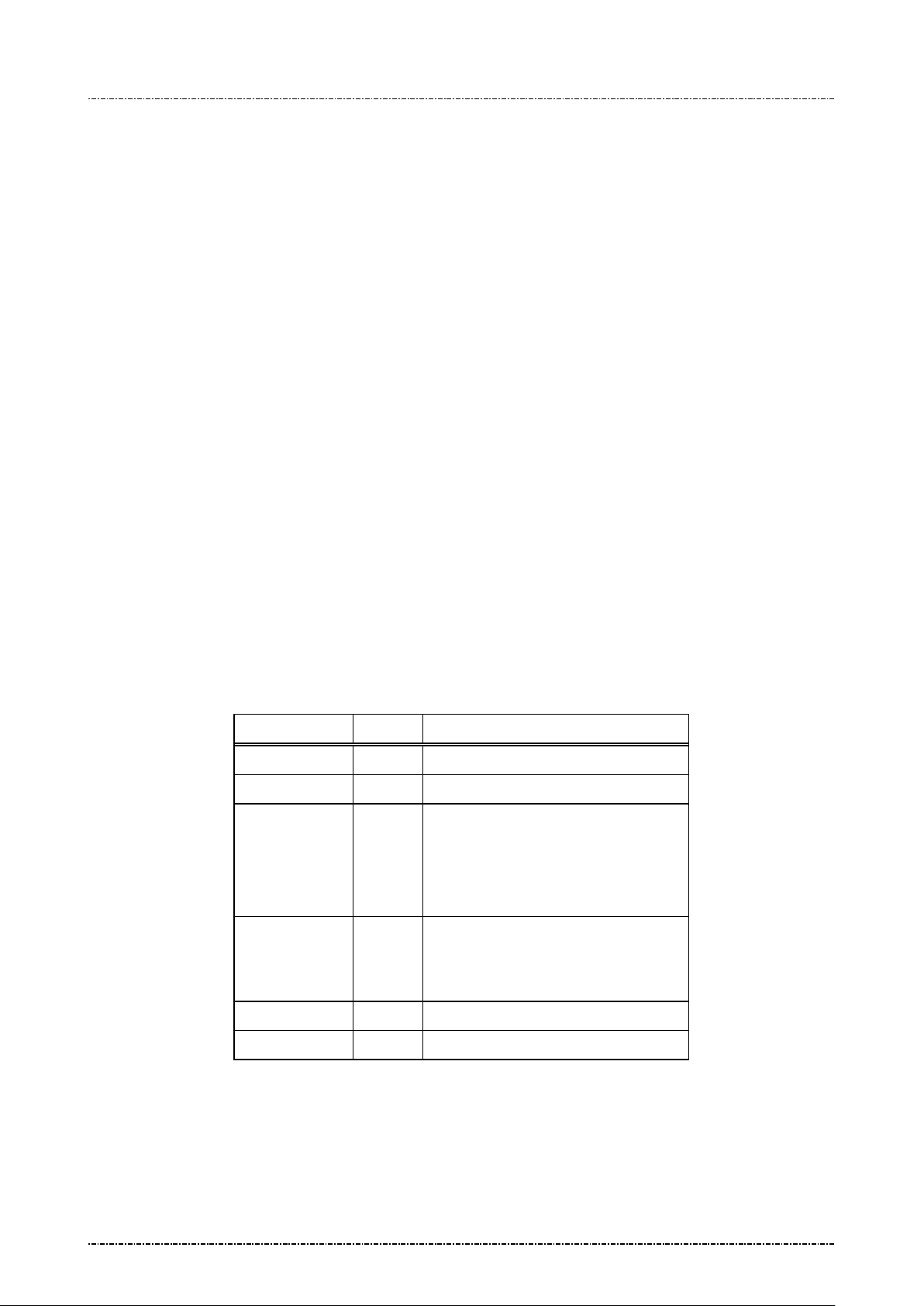
PIN Pad 190 Programmer’s Manual
characters Initial key will make
2014-02-06
Message 90 Load First Initial K ey Request
Format: <STX>90[IPEK][KSN]<ETX>[LRC] (Clear Text)
<STX>90[TR-31 Key Block]<ETX>[LRC] (Encrypted)
Message length: Fixed 41 or 57 bytes for clear text format, 93 or 109 bytes for TR-31 format.
Usage: Load first set of DUKPT initial k ey and s erial num ber key to PP190. Co nsequent ke ys
will be generated using provided data.
If 32-characters (double len gth) in iti al k ey being loaded, PP190 will do key generation,
PIN entry, and other DUKPT operations in TDES manner.
PP190 implements multiple security measures to conform Payment Card Industry (PCI)
security requirem ent. In order to lo ad clear tex t IPEK k ey, two authorized people with
their password are required. Otherwise the user must issue message 90 with
encrypted key value (ANSI TR31 format). See “Symmetric Keys Loading
Authentication” for detailed information.
Note: VISA required key serial number format are as follows:
4’F’ characters, a 6-di git keys et ident ifier , 5-digit device ID, followed by a ‘0’,
i.e. “FF FF kk kk kk dd dd d0 00 00”
Message element:
(Clear text format)
Field Length Value and description
<STX> 1 <02>
90 2 Message ID
[IPEK] 16 or
32
[KSN] 20 Ke y serial number used in generating
Initial PIN encryption key.
32PP190 act in TDES DUKPT mode.
Format: hexadecimal string.
consequent keys.
<ETX> 1 <03>
[LRC] 1 Checksum
Page97
Uniform Industrial Corp. Proprietary and Confidential Total 160 pages
Format: hexadecimal string.
Page 99
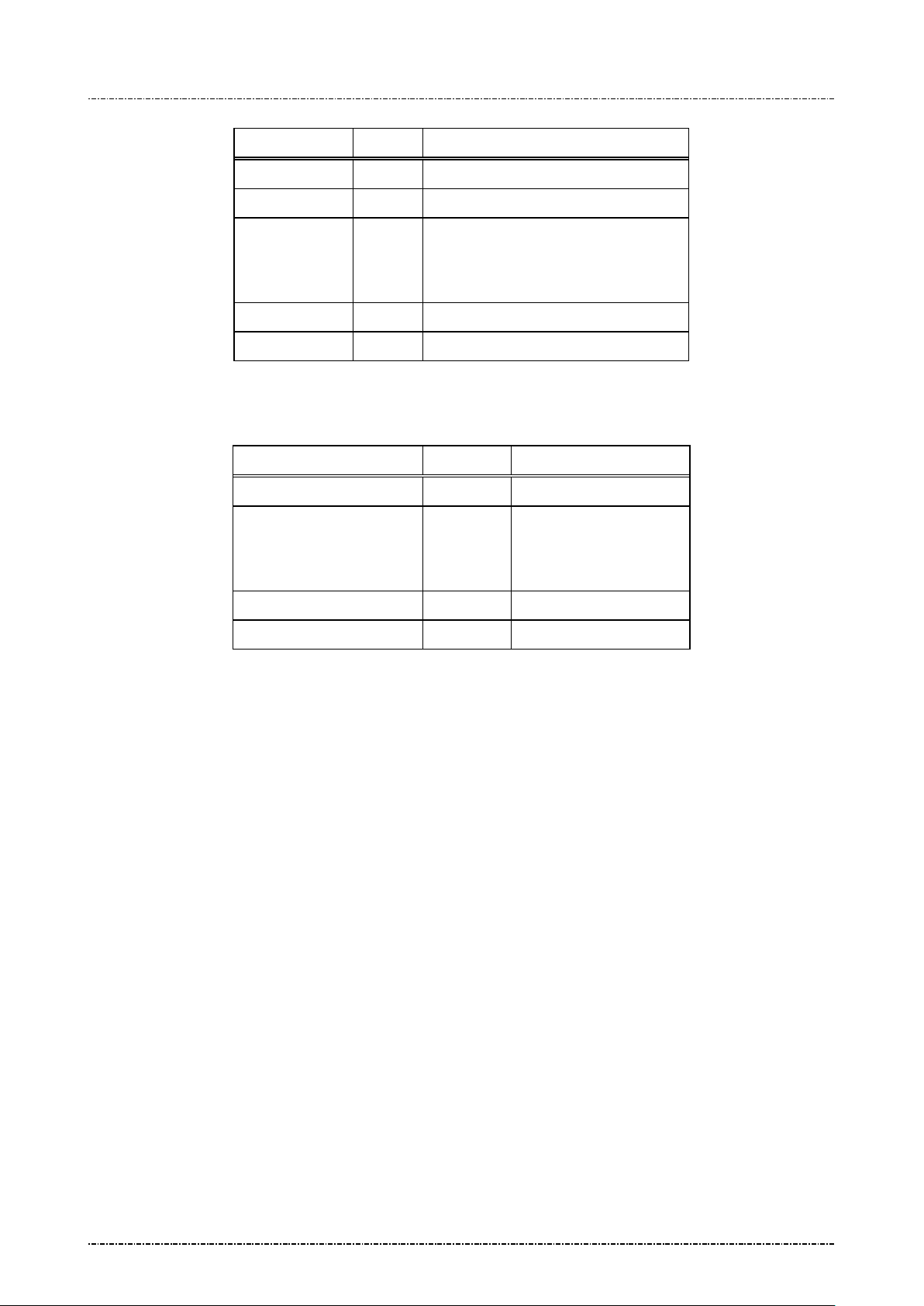
PIN Pad 190 Programmer’s Manual
31 Key
88 or
31 key block with optional header
2014-02-06
(Encrypted format)
Field Length Value and description
<STX> 1 <02>
90 2 Message ID
Message flow:
[TRBlock]
104
TRblock that contains KSN.
See Appendix A for detail.
<ETX> 1 <03>
[LRC] 1 Checksum
HOST Direction PIN Pad
Message 90
<ACK> (Good LRC)
<NAK> (Bad LRC)
(<EOT> after 3 NAKs)
<ACK>/<NAK>/<EOT>
Message 91
Example:
Clear Text
IPEK key to be loaded: ABCDEF0123456789FEDCBA9876543210
KSN: FFFF9876543210E00000
The resulting 90 message :
<STX>90ABCDEF0123456789FEDCBA9876543210FFFF9876543210E00000<ETX>[LRC]
TR-31 Key Block
Key Block Protecting Key: AA55AA55AA55AA55 3434343434343434
IPEK key to be loaded: ABCDEF0123456789 FEDCBA9876543210
KSN: FFFF9876543210E00000
Key Block Header: B0104B1TX00N0100 KS18FFFF9876543210E00000
Padded IPEK: 0080 ABCDEF0123456789 FEDCBA9876543210 30111D18CC4C
Derived KBEK: 3C50E1B7962F2171DC8643F1D923ABF7
Derived KBMK: 46FBEEB64EAE26A650952DA4F6DD8325
CMAC of (KBH + Padded key data), using KBMK: 93C3D5EBC6C407E4
Use CMAC as IV to do TDES CBC encryption on padded key data, using KBEK:
Encrypted key data: EC86E6E3B24544F97C629FB0E0586A0285D35BA78E9B13FB
Result: <02>90B0104B1TX00N0100KS18FFFF9876543210E00000EC86E6E3B24544F9
Page98
Uniform Industrial Corp. Proprietary and Confidential Total 160 pages
7C629FB0E0586A0285D35BA78E9B13FB93C3D5EBC6C407E4<03>
Page 100
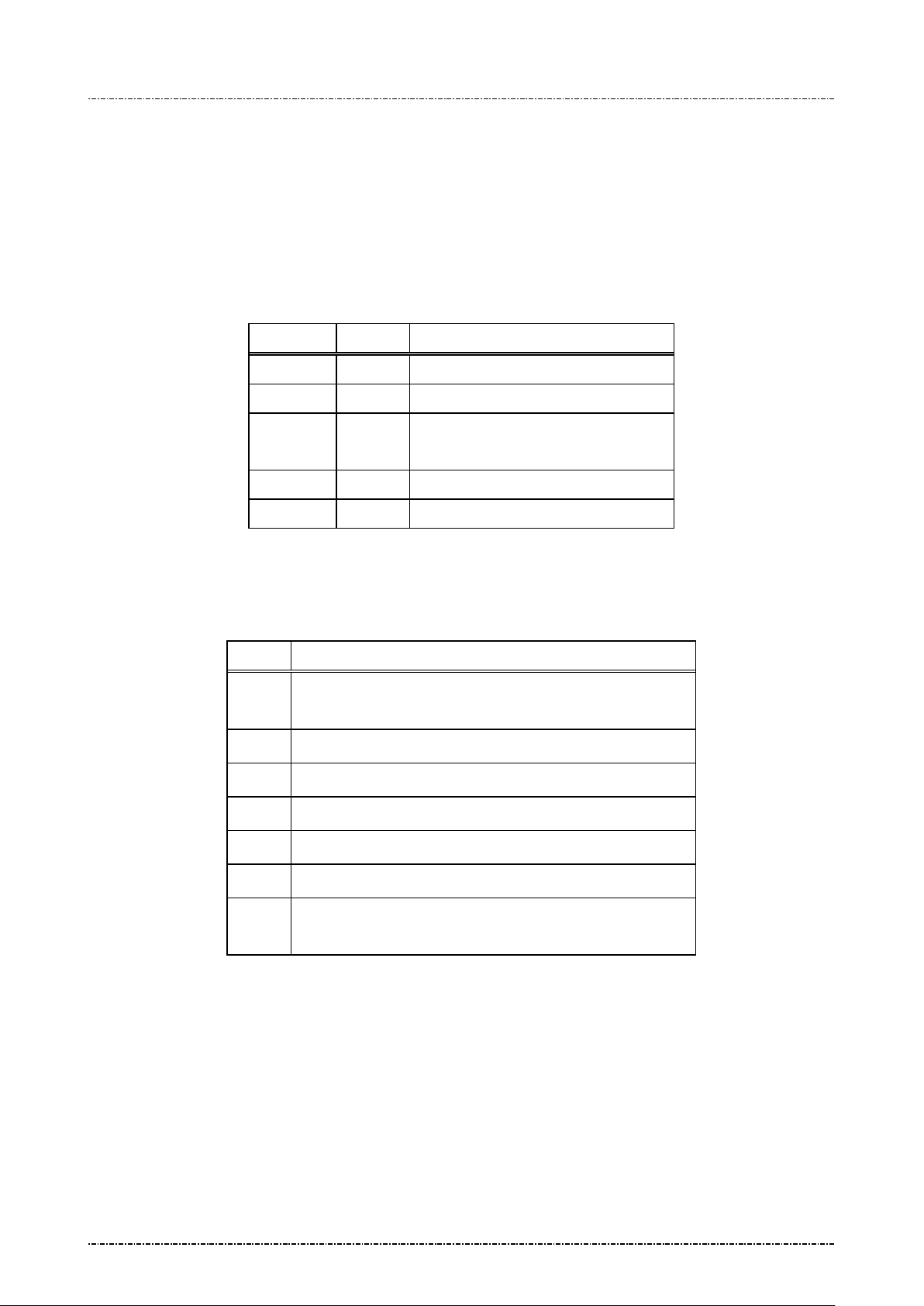
PIN Pad 190 Programmer’s Manual
Processing message 90 without authentication, process
2014-02-06
Message 91 Load Initial Key Response
Format: <STX>91[Status]<ETX>[LRC]
Message length: Variable (max 7 bytes.)
Usage: Confirmation of the initial key loading. PP190 will also show a message “IPEK n
loaded” ( n = 1 or 2) to confirm the success loading of initial key of set 1 and set 2
visually.
Message element:
Field Length Value and description
<STX> 1 <02>
91 2 Message ID
[Status] 1..2 ‘0’ if successful
‘1’ + [Error Code] if process failed.
<ETX> 1 <03>
[LRC] 1 Checksum
Message flow: Please reference message90.
Error codes:
Code Meaning
'1'
'2' IP E K and KSN format error: not hexadecimal character.
'3' Data le ngth error.
'4' Inter nal memory allocation error.
'5' Can not read inter nal flash memory.
‘7’ Cannot write new IP EK into flash memory.
‘F’
authentication at first
DUKPT 1 million limit reached or flash memory write c ycle
has been exhausted.
Page99
Uniform Industrial Corp. Proprietary and Confidential Total 160 pages
 Loading...