

Page 1

TM
Quick Start Guide
Page 2

Page 3

1
Introduction
Thank you for purchasing the FrontRow Camera. This Quick
Start Guide is designed to guide you through installation
and also includes warranty terms.
Package Contents
Page 4

2
Hardware Overview
LED Description
Solid Blu e
Fully Charged
Blinking Blue
Charging
Blinking Red
Recording
Front
The
Main Camera
The LED behavior is described below:
has a 147.5° viewing angle fisheye lens.
Page 5

3
Back
The
Reverse Cam era
incorporates a lens
with an 85° viewing
angle.
The Media Button
allows you to start and
stop recording in Video
mode or take pictures
in Photo mode.
The adjustable,
full‑color
display accesses the
controls, photos, and
videos.
The
Home
Touchscreen
button returns you to the main menu.
Page 6

4
Power
Use the Power Button to
power on the FrontRow
Camera. When the FrontRow
Camera is powered on,
pressing the Power Button
will enter or exit sleep mode.
Press and hold the Power
Button to access the Reboot
and
Power off
options.
The Type C end of the
USB
Cable
connects to this port.
Page 7

5
Connecting Attachments
FrontRow can be used with the included adjustable lanyard,
magnetic clip, an optional car dash adapter, or the optional
coil adapter for mounting. Simply attach the desired
accessory (
Magnetic Clip
The
Magnetic Clip
used as a clip, or used on a magnetic surface.
shown below).
can be tilted for use as a stand,
Page 8

6
Disconnecting Attachments
Press and hold the
connected accessory.
Release Button
while you remove the
Before You Begin
Remove the protective film from both
sides of the FrontRow Camera.
Page 9

7
Adjusting the Lanyard
To tighten, press and hold
the adjustment buttons and
slide outwards.
To loosen, pull outwards
on the cord from both
sides.
Page 10

8
Installation
1
Connect the
USB Cable
to the
USB Port
.
Page 11

9
2
Connect the other end of the
adapter, laptop, power bank, or mobile phone.
For versatility, it can be charged using the included
USB Adapter
Type C connector.
or remove the adapter to use the USB
USB Cable
to your power
Page 12

10
3
Press the
Power Button
4
Select your language.
on the side of your FrontRow.
Page 13

11
5
82%
password
q w e r t y u i o p
a s d f g h j k l
z x c v b n m
123 Done
82%
Wi-Fi
AmpliFi-OC
UBNT-OC
UBNT_Te st
UBNT_M esh
Select your wireless network.
6
Enter your password and tap
Done
.
Page 14
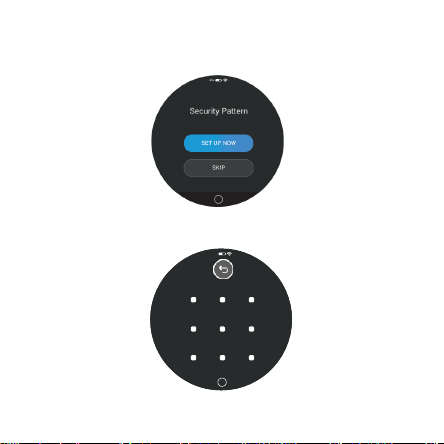
12
82%
Draw a n unloc k patte rn
7
Tap
Set Up Now
8
Draw an unlock pattern and confirm it.
to set up a security pattern.
Page 15
13
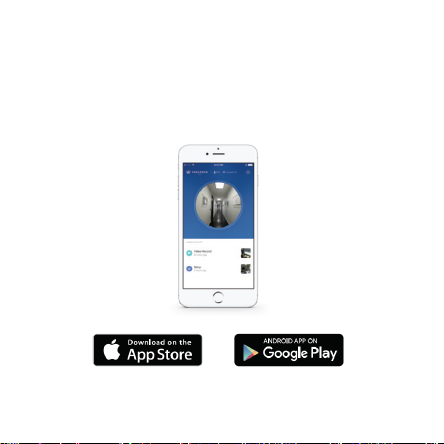
FrontRow App
Download and install the FrontRow app from the App Store
or Google Play™ Store.
Page 16

14
The FrontRow app connects your FrontRow Camera to your
mobile device for video review, editing, and remote access.
Preview the video feed, remotely start, and stop recording
without disrupting the camera view.
Page 17
15
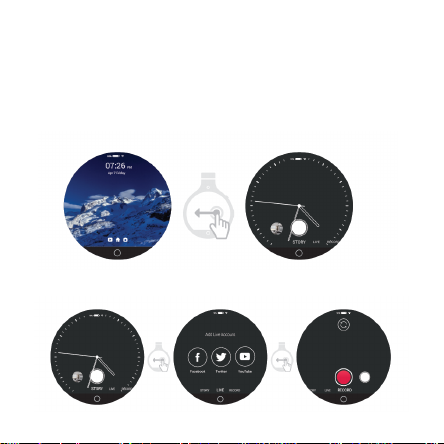
Touchscreen Features
The
Home
screen displays the battery status, wireless signal
strength, time, and date. Swipe from the right towards the
center to access the primary modes of operation.
Swipe to rotate between the
Story, Live
, and
Record.
Page 18

Page 19
15
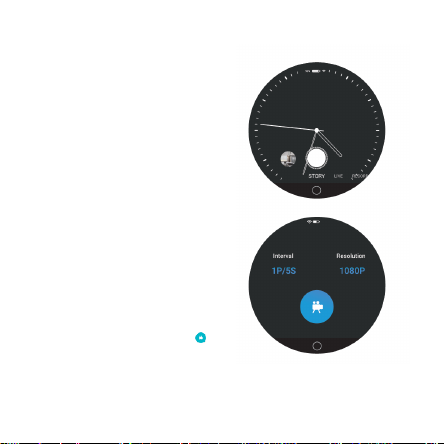
Story Mode
Story Mode snaps a photo
every few moments and
create a condensed video of
your activities.
You can adjust how often
the images are captured and
the recording resolution. To
configure, swipe down from
the home screen and tap
Settings, tap System and
then Story Options.
Interval determines the
time between captures
and
Resolution
recording quality. Tap the
home button to return or
to begin recording.
defines the
Page 20
16
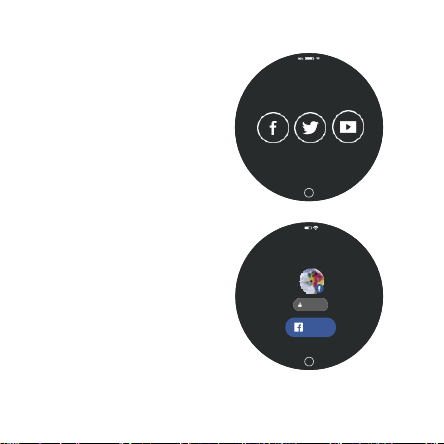
Live Mode
Add Live Account
Facebook Twitter YouTube
STORY
LIVE
RECORD
82%
Describe your liv e video
Friends
Go Live
STORY LIVE RECORD
Live mode allows you to
livestream to your
social media accounts
by connecting to a Wi‑Fi
network or tethering from
your mobile device with a
Wi‑Fi hotspot enabled.
To connect your account:
•
Select your preferred
social media platform.
•
Sign in to the platform at
the specified web address
from a computer or
smartphone and enter the
code provided.
Page 21
17
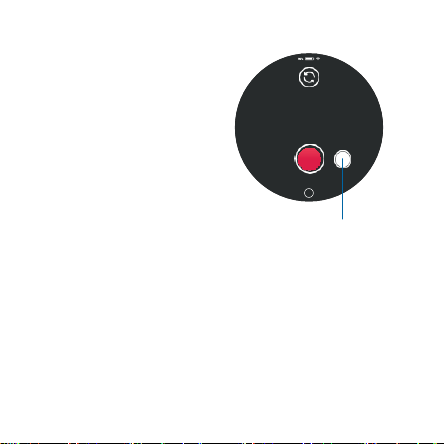
Record Mode
Record mode allows you
to record HD video or take
high‑resolution photos.
Tap the record button to
begin video recording.
Press the button to the right
O
to snap a photo.
Video and photo capture
settings can be adjusted to
your preferences. The Media
button on the device allows
you to start and stop video
recordings.
RY LIVE
RECORD
Photo Button
Page 22
18
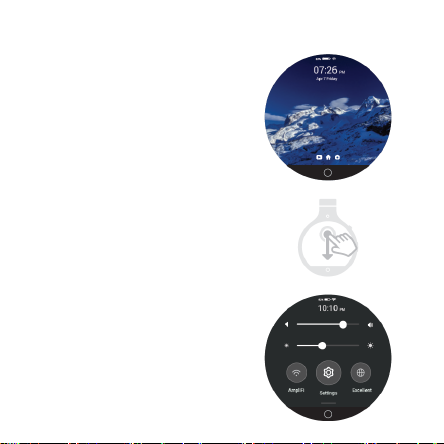
Settings
On the
Home
from the top down towards
the center to access settings.
Here you can adjust the
volume, display brightness,
enable/disable Wi‑Fi, and
access additional settings.
screen, swipe
Page 23
19
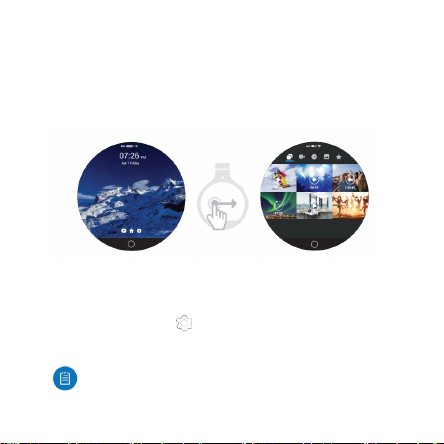
Gallery
To access your story recordings, video clips, and photos on
the FrontRow, swipe from the left towards the center on the
Home
screen.
24/7 Live Chat Support
Live chat support is available within the app, 24 hours a day,
7 days a week. Tap the icon in the upper right of the app
and then tap Live Support.
Live chat is also available at
selecting
Chat with us
help.amplifi.com
in the bottom right.
by
Page 24

20
Specifications
Dimensio ns 59.8 x 70.3 x 1 2.1 mm (2.354 x 2.768 x 0. 476")
Weight
59 g (2.08 oz)
RAM / Sto rage
2 GB / 32 GB (Shared with Other Applications)
Connectivity
USB 3.0/2.0 Type C, 802.11b/g /n/ac, Bluetooth 4.1 LE
Camera Front IMX 179 (8M) / R ear S5K5E2YA (5M)
Lens
Main F2.2 / Reverse F2.0
View Angle
Main 147.5° / Reverse 85°
Video Compression
4K @ 30 fps, 1080p @ 60 Hz, H.264, H.265, VP8
Resolution
1080p (1920 x 1080)
Maximum Fram e Rate
30 fps
Microphone / Speaker
Stereo / Mono
Sensors
Accelerometer, Gyro
Management Interface
Touchscreen UI
Display
1.96‑inch LTPS Round, 640 x 572, 327 ppi
G+F Virtual Multi‑Touch, Full Color
Max. Power Consumption
6W
Power M ethod
USB (5V, 3A)
Certifications
FCC, CE, IC
Page 25

21
Operating Temperature Information
In very col d conditions, outside of or the same as the operating range, may
temporarily shorten battery life an d could cause the device to turn off. FrontRow
does generate heat during operation to help keep the b attery pack from getting too
cold and therefore help minimiz e a reduction in run times. FrontRow does include
a rechargeable lithium ion battery pack, which holds up b est in cold t emperatures.
Product Warranty
Warranty Terms
Each of our manufactured products (a “Product”) is warranted against defects in
materials and workmanship fo r a period of one (1) ye ar from the date of original
purchase when used under normal conditions and consistent with applicable Pro duct
documentation, subject to the oth er terms in this Product Warranty.
Warranty Service
If we determine that the hardware components of a Pro duct do not conform to this
Product Warranty during the applicable warranty period we will, at our option, repair
or replace the Product, or refund the original purchase price of the Product.
Returns
To benefit from this Product Warranty, you must obtain an RMA during the warranty
period. You will be respo nsible for delivering the Product to the designated RMA
address, freight prepaid, for warranty service. We will pay the return freight for the
Product using a service of our choice. You may requ est, and will be solely responsible
for, payment of an y shipping upgrades. Any Product shipped to us u nder an RMA, but
which is not covered by this Product Warranty, will not be returned.
Page 26

22
To obtain an RMA, please use our online RM A Request form, located at:
www.amplifi.com/RMA
You will be required to supply the following i nformation: name, contact information,
and shipping information; date of purchase of the Product (we may request a copy of
the invoice as proof of purchase); problem description; MAC Address of the Product;
and troubleshooting actions taken so far. By submitting an RMA Request, you confirm
all terms in this Product Warranty.
Following warranty service, a repaired or replacement product may be returned to
you as the Product was configured when originally purchas ed. You are respo nsible for
all bac k‑up, recovery a nd reinstallation of other software or data.
For customers outside of the United States: you are required to use your own shipping
account when sending the Product; the commercial invoic e must declare “return for
repair” and “no commercial value”; the total value of the commercial invoice cannot
exceed $10.00 USD. If these steps are not followed, the RMA Re quest will not be
accepted or fulfilled. You are responsible for all applicable duties and c ustoms charges
for shipment of a Pro duct to and fro m us.
Limitations of Warranty and Liability
This Product Warranty sets forth our sole and exclus ive liability, and the sole and
exclusive remedies available in relation to any non‑conformity, defect or simila r claim.
This Product Warranty is provided only to the original purchaser of th e Product. This
Product Warranty does not, among other things, cover labor cost for remo ving and
reinstalling a Product for repair, any consumable parts that are readily replaced in
normal use, problems c aused by normal wear and tear or otherwise due to the normal
aging of the Product, or cosm etic damage. No representation or warranty is made
with respect to services that may be d elivered or made available in connection with
a Product.
Page 27

23
This Product Warranty does not apply to any Product that we determine has bee n,
in any way: dis‑assembled, modified or altered, other than by us or as authorized by
us; painted, rebranded or physically modified; improperly installed or not used at all
times in accordance with the applicable Product docum entation; damaged due to
improper cabling or installation; subjected to misuse, abuse, negligence, or abn ormal
physical, electromagnetic or electrical stress; damaged or impaired as a result of the
use of third party hardware, firmwar e or software; or, has had its original Ubiquiti
Networks MAC address label removed; or, has not b een received by us within thirty
(30) days of issuance of the RMA.
For a Pro duct to be eligible under this Product Warranty, you shall: use only CAT5
(or above) cabling for all Et hernet cabling runs; use shielded Ethernet cabling for
outdoor installations; follow indoo r cabling requir ements for indoor installations;
operate the Product in accordance with the applicable Product documentation; use
all software updates made available for your Product; comply with all applicable laws
and regulations governing the installation and use of the Product; obtain all locally
required authorizations, permits, and licenses; not export to, or use the Product in,
any jurisdiction or for an y person in a manner that would cause a violation of U.S.
or other laws.
TO THE EXTENT PERMITTED BY APPLICABLE LAW, NEIT HER UBIQUITI NETWORKS
NOR ANY OF ITS AFFILITATES ARE LIABLE FOR ANY DIRECT, INDIRECT, INCIDEN TAL
OR CONSEQUENTIAL DAMAGES ARISING OUT OF THE PURCHASE OR USE OF A
PRODUCT, INCLUDING WITHOUT LIMITATION ANY LOST PROFITS OR LOST SAVINGS
(INCLUDING LOSS OF REVENUE OR PROFITS ON CONTRACTS, LOSS OF THE USE OF
MONEY, LOSS OF GOO DWILL, LOSS OF OPPORTUNITY, DAMAGE TO REPUTATION, OR
LOSS OF USE OR INTE RRUPTION OF BUSINESS, COST OF COVE R OR PROCUREMENT
OF SU BSTITU TE GOODS), HOWEVER CAUSED, ARISING IN CONTRACT, TORT, BREACH
OF WARRANTY, NEGLIGENCE, STRICT LIABILITY OR OTHE RWISE. THIS PRODUCT
WARRANTY AND REMEDIE S SET FORTH HEREIN ARE EXCLUSIVE AND IN LIEU OF
Page 28

24
ALL OTHER WARRANTIES, REMEDIES, AND CONDITIONS, WHETHER ORAL, WRITTEN,
EXPRESS, STATUTORY OR IMPLIED. EXCEPT FOR ANY EXPRESS WARRANTIES SET
FORTH HEREIN, UBIQUITI NETWORKS, ITS AFFILIATES, AND ITS AND THEIR SUPPLIERS,
LICENSORS, SERVICE AND OTHER PROVIDERS HEREBY DISCLAIM AND MAKE NO
OTHER R EPRESENTATION OR WARRANTY OF AN Y KIND, EXPRESS, IMPLIED OR
STATUTORY, INCLUDING, BUT NOT LIMITED TO, REPRESENTATIONS, GUARANTEES, OR
WARRANTIES OF MERCHANTABILITY, ACCURACY, QUALITY OF SERVI CE OR RESULTS,
AVAILABILITY, SATISFA CTORY QUALITY, LACK OF VIRUSES, LACK OF VULNERABILITY
TO INTRUSION OR ATTACK, QUIET ENJO YMEN T, FITNESS FOR A PARTICULAR PURPOSE
AND NON‑INFRINGEME NT AND ANY WARRANTIES ARISING FROM ANY COURSE OF
DEALING, USAGE OR TRADE PRACTICE IN CONNECTION WITH SUCH PRODUCTS
AND SERVICES. YOU ACKNOWLEDGE THAT NEIT HER UBIQUITI NETWORKS NOR
ITS THIRD PARTY PR OVIDERS CONTROL YOUR EQUIPMENT OR T HE TRANSFER OF
DATA O VER COMMUNICATION S FACILITIES, INCLUDING THE INTERNET, AND THAT
THE PRODUCTS AND SERVICES MAY BE SUBJECT TO LIMITATIONS, INTERRUPTIONS,
DELAYS, CANCELL ATIONS AND OTHER PROBLEMS INHERENT IN THE USE OF
COMMUNICATIONS FACILITIES. UBIQUITI NETWO RKS, ITS AFFILIA TES AND ITS AND
THEIR SUPPLIERS AND SERVICE AND OTHER PROVIDERS ARE NOT RESPONSIBLE FOR
ANY INT ERRUPTIONS, DELAYS, CANCELLATIONS, DELIV ERY FAILURES, DATA LOSS,
CONTENT CORRUPTION, PACKET LOSS, OR OTHER DAMAGE RESULTING FROM ANY
OF THE FOREGOING. IF IMPLIED WARR ANTIES CANNOT BE DISCLAIM ED, THEN SUCH
WARRANTIES ARE LIMITED IN DURATION TO THE DURATION OF THIS WARRANTY OR
AS OTHERWISE REQUIRED BY LAW. EXC EPT FOR THE WARR ANTIES EXPLICITL Y MADE
TO YOU UNDER THIS PRODUCT WARRANTY, AND ANY OTHER WARRANTY REQUIRED
BY APPLICABLE LAW, ALL PRODUCTS AND S ERVICES ARE PROVIDED ON AN “AS IS”
BASIS WI THOUT ANY WARRANTY WH ATSOEV ER. WE DO NOT WARRANT THAT THE
OPERATIO N OF THE PRODUCT WILL BE ERROR FR EE OR UNINTERRUPTED, OR THAT
THE PRODUCT WILL CONFORM TO SPECIFICATIONS THAT ARE NOT DEFINED IN THIS
PRODUCT WARRANTY. NO WARRANTY OR R EMEDY SHALL APPLY OR BE AVAILABLE
Page 29

25
TO A PRODUCT FOR W HICH AN RMA HAS NOT BEEN REQUESTED DURING THE
WARRANTY PERIOD. These limitations and disclaimers apply even if th e ex press
warranty may be deemed to fail of its essential purpose. No person is authorized to
waive or modify the terms of this Product Warranty. Some jurisdictions do not allow
the exclusions of certain implied warranties or certain terms and conditions, so some
of the ab ove limitations and exclusions may not apply to you. T he United Nations
Convention on Contracts for the International Sale of Goods shall not apply to any
transactions regarding the sale of the Product.
Compliance
FCC
Changes or modifications not expressly approved by the party responsible for
complian ce could void the us er’s authority to operate the equipment.
This device com plies with Part 15 of the FCC Rules. Operation is subject to the
following two conditions.
1 This d evice may not cause harmful interference, and
2 This d evice must accept any int erference r eceived, including interference that
may caus e undesired operation.
This equipment has been tested and found to comply with the limits for a Class
B digital device, pursuant to Part 15 of the FCC Rules. These limits are designed
to provide reasonable protection against harmful interference in a residential
installation. This equipment generates, uses , and can radiate radio frequency
energy and, if not installed and used in accordance with the instructions, may cause
harmful interference to radio communications. However, there is no guarantee that
interference will not occur in a particular installation. If this equipment does cause
harmful interference to radio or television reception, which can be determined
Page 30

26
by turning the e quipment off and on, the user is encouraged to try to correct the
interference by one or more of t he following measures:
•
Reorient or r elocate the receiving antenna.
•
Increase the separation between th e equipment a nd receiver.
•
Connect the equipment into an outlet on a circuit different from that to which the
receiver is connected.
•
Consult the dealer or an experienced radio/TV t echnician for help.
The FrontRow Camera has been approved by the FCC under FCC ID: SWX‑FR
CAN ICES‑3(B)/NMB‑3(B)
This Class B digital apparatus complies with Canadian CAN ICES‑003.
To reduce potential radio interference to other users, the antenna type and its gain
should be so chosen that the equivalent isotropically radiated power (e.i.r.p.) is not
more than that permitted for successful communication.
This device complies with Industry Canada licence‑exempt RSS standard(s).
Operation is subject to the following two conditions:
1 This device may not cause interference, and
2 This device must accept any interference, including interference that may cause
undesired operation of the device.
The FrontRow Camera has been approved by Industry Canada under IC: 6545A‑FR.
device could automatically discontinue transmission in case of absence of
information to transmit, or operational failure. Note that this is not intended to
The
Page 31

27
prohibit trans mission of control or signaling information or the use of repetitive co des
where required by the technology.
The device for operation in the band 5150‑5250 MHz is only for indoor use to reduce
the potential for harmful interference to co‑channel mobile satellite systems. In
addition, high‑power radars are allocated as pri mary users (i.e. priority users) of the
bands 5250‑5350 MHz and 5650‑5850 MHz and thes e radars could cause interference
and/or damage to LE‑LAN devices.
CAN ICES‑3(B)/NMB‑3(B)
Cet appareil numérique de la classe B est conform e à la norme NM B‑003 du Canada.
Pour réduire le risque d’interférence aux autres utilisateurs, le type d’antenne et son
gain doivent être choisies de façon que la puissanc e isotrope rayonnée équivalent e
(PIRE) ne dépasse pas ce qui est né cessaire pour une communication réussie.
Cet appareil est conforme à la norme RSS Industrie Canada exempts de licence
norme(s). Son fonctionnement est soumis au x deu x conditions suivantes:
1 Cet appareil ne peut pas provoquer d’interférences et
2 Cet appareil doit accepter toute interférence, y compris les interférences qui
peuvent causer un mauvais fonctionnement du dispositif.
La Caméra FrontRow a été approuvé e par Industri e Canada en vertu IC : 6545A‑FR.
Le dispos itif doit interr ompre automatiquement l’é mission en cas d’absence
d’information à transmettre ou en cas de panne. À noter que l’objectif de cette
disposition n’est pas d’empêcher la transmission d’informations de contrôle ou de
signalisation, ni l’utilisation de codes répé titifs exigés par la techniqu e.
Les dispositifs fonctionnant dans la bande de 5 150 à 5 250 MHz s ont réservés
uniquem ent pour une utilisation à l’intérieur afin de réduire les risques de brouillage
préjud iciable aux systèmes de satellites mobiles utilisant les mê mes canaux. De plus,
Page 32

28
les radars de haute puissance sont dé signés utilisateurs principaux (c.‑à‑d., qu’ils ont
la priorité) des bandes de 5 250 à 5 350 MHz et de 5 650 à 5 850 MHz et, ces radar s
pourraient causer du brouillage et/ou des do mmag es aux dispositifs de RL‑EL.
CAUTION
RISK OF EXPLOSION IF BATTERY IS REPLACED BY AN INCORRECT TY PE.
DISPOSE OF USED BATTERIE S ACCORDING TO THE INSTRUCTIONS
RF Exposure Warning
This device has been tested and meets applicable limits for Radio Frequency (RF)
exposure. Specific Absorption Rate (SAR) refers to the rate at which the body absorbs
RF energy. SAR limits are 1.6 Watts per kilogram (over a volume containing a mass
of 1 gram of tissue) in countries that follow the U nited States FCC limit and 2.0 W/
kg ( averaged over 10 grams of tissue) in countries that follow the Council of the
European Unio n limit. Tests for SAR are conducted using standard operating positions
with the device transmitting at its highest certified power level in all tested frequency
bands.
CE Marking
CE marking on this product represents the pro duct is in co mpliance with all directives
that are applic able to it.
Alert Sign (!) Follows CE Marking
Alert sign must be indic ated if a restriction on use applied to the product and it must
follow the CE mar king.
Page 33

29
RoHS/WEEE Compliance Statement
English
European Directiv e 2012/19/EU requires that the equi pment b earing this symbol on
the product and/or its packaging must not be disposed of with unsorted municipal
waste. The symbol indicates that this product should be disposed of separately from
regular household waste streams. It is your responsibility to dispose of this and other
electric and electronic equipment via designated collection facilities appointed by
the government or local aut horities. Correct disposal and recycling will help prevent
potential negative consequences to the environ ment and human health. For more
detailed information about the disposal of your old equipment, please contact
your local authorities, waste disposal service, or the shop where you purchased the
product.
Page 34

30
Deutsch
Die Europä ische Richtlinie 2012/19 /EU verl angt, dass technische Ausrüstung, die
direkt am Gerät und/oder an de r Verpackung mit diesem Symbol versehen ist,
nicht zusammen mit unsortiertem Gemeindeabfall entsorgt werden darf. Das
Symbol weist darauf hin, dass das Produkt von regulärem Haushaltmü ll getrennt
entsorgt werden sollte. Es liegt in Ihrer Verantwort ung, dieses Gerät und andere
elektrische und ele ktronische Geräte ü ber die d afü r zuständigen und von der
Regierung oder örtlic hen Behö rden dazu bestimmten Sammelstellen zu entsorgen.
Ordnungsgemä ßes Entsorgen und Rec yceln trägt dazu bei, potentielle negative
Folgen für Umwelt und die menschlich e Gesundheit zu verm eiden. Wenn Sie weitere
Informationen zur Entsorgun g Ihrer Altger äte benötigen, wenden Sie sich bitte an die
örtlichen Behörden oder städtischen Entsorgungsdienste oder an den Händler, bei
dem Sie das P rodukt erworben haben.
Español
La Directiva 2012/19/EU exige que los equipos que lleven este símbolo en el propio
aparato y/o en su embalaje no d eben eliminarse ju nto con otros residuos urbanos no
seleccion ados. El símbolo indica que el producto en cuestió n debe separarse de los
residuos domésticos convencionales con vistas a su eliminació n. Es responsabilidad
suya desech ar este y cualesquiera otros aparatos eléctricos y electró nicos a través
de los puntos de recogida que ponen a su disposició n el gobierno y las autoridades
locales. Al desechar y reciclar correctamente estos aparatos estará contribuyendo
a evitar posibles consecu encias negativas para el medio ambiente y la salud de las
personas. Si desea obtener informació n más detallad a sobre la eliminación segura
de su aparato usado, consulte a las autoridades locales, al servicio de recogida
y eliminació n de residuos de su zona o pre gunte en la tienda donde adquirió el
producto .
Page 35

31
Français
La directive europé enne 2012/19/EU exige que l’équipement sur lequel est apposé ce
symbole sur le produit et/ou son emballage ne soit pas jeté avec les autres ordures
ménagères. Ce symbole indique que le produit doit être éliminé dans un circu it
distinct de c elui pour les déchets des ménages. Il est de votre r espons abilité de jeter
ce matériel ainsi que tout autre maté riel électrique ou électronique par les moyens
de collect e indiqués par le gou vernement et les pou voirs publics des collectivités
territoriales. L’éliminatio n et le recyclage en bonne et due forme ont pour but de
lutter contre l’impact néfaste potentiel de ce type de produits sur l’environ nement et
la sant é publique. Pour plus d’informations sur le mode d’élimination de votre ancien
équip ement, veuillez prendre contact avec les pouvoirs publics locaux, le service de
traitement des déchets, ou l’endroit où vous avez acheté le produit.
Italiano
La direttiva europea 2012/19/EU richied e che l e apparecchiature contrass egnate
con questo sim bolo sul prodotto e/o sull’imballaggio n on siano smaltite insieme
ai rifiuti urbani non differenzi ati. Il simbolo indica che questo prodotto non deve
essere smaltito insieme ai normali rifiuti domestici. È responsabilità d el proprietario
smaltire sia questi prodotti sia le altre apparecchi ature elettriche ed elettroniche
mediante le specifiche strutture di raccolt a indicate dal governo o dagli enti pubblici
locali. Il corretto smaltimento ed il riciclaggio aiuteranno a prevenire conseguenze
potenzialmente negativ e per l’amb iente e per la salute dell’ess ere umano. Per ricevere
informazioni più dettagliate circa lo smalti mento delle vecc hie apparecchi ature in
Vostro possesso, Vi invitiamo a contattare gli enti pubblici di competenza, il servizio di
smaltimento rifiuti o il negozio nel quale avete acquistato il prodotto.
Page 36

32
Česky
[Czech]
UBIQUITI NETWORKS tímto prohlašuje, že toto UBIQUITI NETWORKS
zařízení, je ve shodě se základními požadavky a d alšími příslušnými
ustanoveními směrnice 1999/5/ES.
Dansk
[Danish]
Hermed, UBIQUITI NETWORKS, erklæ rer at denne UBIQUITI NETWORKS
enhed, er i overensstemmelse med de væ sentlige krav og ø vrige relevante
krav i direktiv 1999/5/EF.
Nederlands
[Dutch]
Hierbij verklaart UBIQUITI NETWORKS, dat deze UBIQUITI NETWORKS
apparaat, in overeenstemming is met de essentiële eisen en de andere
relevante bepalingen van richtlijn 1999/5/EG.
English
Hereby, UBIQUITI NETWORKS, declares that this UBIQUITI NETWORKS
device, is in compliance with the essential requirements and other relevant
provisions of Directive 1999/5/EC.
Eesti
[Estonian]
Käesolevaga UBIQUITI NETWORKS kinnitab, et antud UBIQUITI NETWORKS
seade, on vastavus olulistele nõuetele ja teistele asjakohastele sätetele
direktiivi 1999/5/EÜ .
Suomi
[Finnish]
Täten UBIQUITI NETWORKS vakuu ttaa, että tä mä UBIQUITI NETWORKS
laite, on yhdenmukainen olennaisten vaatimusten ja muiden sitä
koskevien direktiivin 1999/5/EY.
Français
[French]
Par la présente UBIQUITI NETWORKS déclare que l’appareil UBIQUITI
NETWORKS, est con forme aux exigences essentielles et aux autres
dispositions pertinentes de la directive 1999/5/CE.
Deutsch
[German]
Hiermit erklärt UBIQUITI NETWORKS, dass sich dieses UBIQUITI NETWORKS
Gerät, in Ü bereinstimmung mit den grundlegenden Anforderungen und
den anderen relevanten Vorschriften der Richtlinie 1999/5/EG befindet.
Declaration of Conformity
Page 37

33
Ελληνική
[Greek]
Δια του παρόντος, UBIQUITI NETWORKS, δηλώνει ότι αυτή η συσκευή
UBIQUITI NETWORKS, είναι σε συμμόρφωση με τις βασικές απαιτήσεις και
τις λοιπές σχετικές διατάξεις της οδηγίας 1995/5/ΕΚ.
Magyar
[Hungarian]
Ezennel UBIQUITI NETWORKS kijelenti, hogy ez a UBIQUITI NETWORKS
készü lé k megfelel az alapvető követelményeknek és más vonatkozó
1999/5/EK irányelv rendelkezéseit.
Íslenska
[Icelandic]
Hér, UBIQUITI NETWORKS, því yfir að þ etta UBIQUITI NETWORKS tæ ki er í
samræ mi við grunnkrö fur og önnur viðeigandi ákvæ ð i tilskipun 1999/5/EB.
Italiano
[Italian]
Con la p resente, UBIQUITI NETWORKS, dichiara che questo dispositivo
UBIQUITI NETWORKS, è conforme ai requisiti essenziali ed alle altre
disposizioni pertinenti della direttiva 1999/5/CE.
Latviski
[Latvian]
Ar šo, UBIQUITI NETWORKS, deklarē, ka UBIQUITI NETWORKS ierīce, ir
saskaņā ar būtiskajām prasībām un citiem attiecīgiem noteikumiem
Direktīvā 1999/5/EK.
Lietuviškai
[Lithuanian]
UBIQUITI NETWORKS deklaruoja, kad šis UBIQUITI NETWORKS įrenginys
atitinka esminius reikalavimus ir kitas 1999/5/EB Direktyvos nuostatas.
Malti
[Maltese]
Hawnhekk, UBIQUITI NETWORKS, tiddikj ara li dan il‑mezz UBIQUITI
NETWORKS huwa konformi mar‑rekwiżiti essenzjali u dispożizzjonijiet
rilevanti oħrajn ta ‘Direttiva 1999/5/KE.
Norsk
[Norwegian]
Herved UBIQUITI NETWORKS, erklæ rer at denne UBIQUITI NETWORKS
enheten, er i samsvar med de grunnleggende kravene og andre relevante
bestemmelser i direktiv 1999/5/EF.
Polski
[Polish]
Niniejszym, Ubiquiti Networks, oświadcza, że urządzenie UBIQUITI
NETWORKS, jest zgodny z zasadniczymi wymaganiami oraz pozostałymi
stosownymi postanowieniami Dyrektywy 1999/5/WE.
Page 38

34
Português
[Portuguese]
UBIQUITI NETWORKS declara que este dispositivo UBIQUITI NETWORKS,
está conforme com os requisitos essenciais e ou tras disposições da
Directiva 1999/5/CE.
Română
[Romanian]
Prin prezenta, UBIQUITI NETWORKS declară că acest dispozitiv UBIQUITI
NETWORKS este în conformitate cu cerințele esențiale și alte prevederi
relevante ale Directivei 1999/5/CE.
Slovensky
[Slovak]
Týmto UBIQUITI NETWORKS, prehlasuje, že toto UBIQUITI NETWORKS
zariadenie, je v súlade so základnými požiadavkami a ďalšími relevantnými
ustanoveniami smernice 1999/5/ES.
Español
[Spanish]
Por medio de la presente UBIQUITI NETWORKS declara que este dispositivo
UBIQUITI NETWORKS, cumple con los requisitos esenciales y cualesquiera
otras disposiciones aplicables o exigibles de la Directiva 1999/5/CE.
Svenska
[Swedish]
Härmed UBIQUITI NETWORKS, intygar att denna UBIQUITI NETWORKS
enhet är i överensstämmelse med de väsentliga egenskapskrav och övriga
relevanta bestämmelser som framgår av direktiv 1999/5/EG.
Page 39

35
Online
help.amplifi.com
Email
Support
© 2017 Ubi quiti Networks, Inc. All rights reserved. Ubiquiti, Ubiquiti N etworks, the
Ubiquiti U logo, U Labs, the U Labs logo, an d FrontRow are trademarks or registered
trademarks of Ubiquiti Networks, Inc. in the United States and in other countries.
Apple, the Apple logo, and iPhon e are trademarks of Apple Inc., registered in the
U.S. and other countries. App Stor e is a service mark of Apple Inc. Android, Google,
Google Play, the Google Play logo and other marks are trad emarks of Google Inc. All
other trademarks are the property of their respective o wners.
640‑00231‑01 • RRJL042017
Page 40

Page 41

Page 42

 Loading...