

Page 1
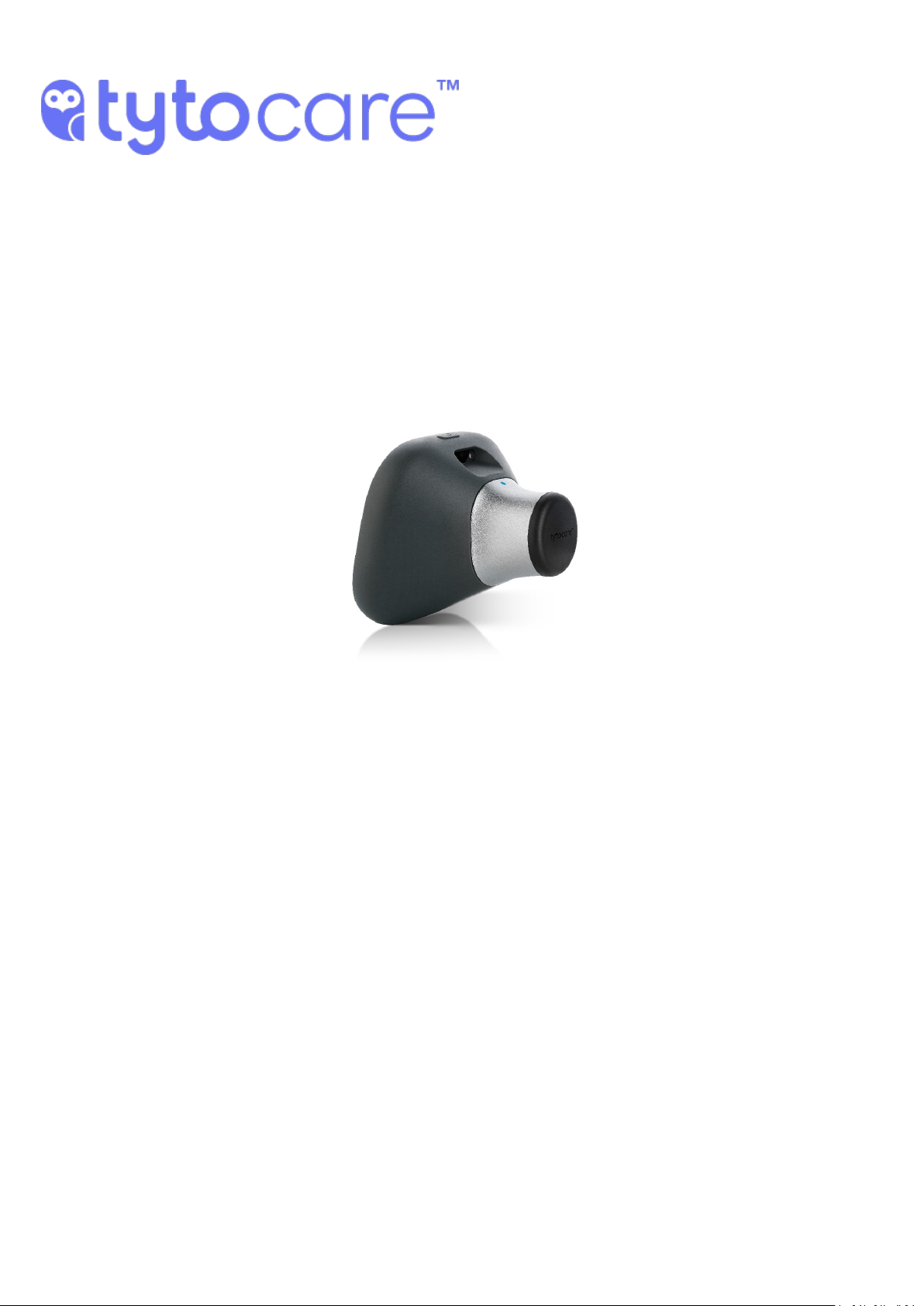
TytoPro
Tyto Stethoscope
User Guide
Document Version 3.2
December 2018
Document Number: 760-00047 B01
Page 2

TytoPro Tyto Stethoscope User Guide
Important Notice
All information included in this document, such as text, graphics, photos, logos and images, is the
exclusive property of TytoCare Ltd. and protected by United States and international copyright
laws. Permission is granted to view and photocopy (or print) materials from this document for
personal, non-commercial use only. Any other copying, distribution, retransmission or modification
of the information in this document, whether in electronic or hard copy form, without the express
prior written permission of TytoCare Ltd., is strictly prohibited. In the event of any permitted
copying, redistribution or publication of copyrighted material, no changes in, or deletion of, author
attribution, trademark legend or copyright notice shall be made.
© 2018 TytoCare Ltd. All rights reserved.
© 2018 TytoCare All rights reserved. 2 of 26
Page 3

TytoPro Tyto Stethoscope User Guide
Table of Contents
General Safety Messages/Product Overview 4
General Safety Messages 4
Product Overview 4
Intended Use and Indications for Use 5
Before the Exam 6
Connect the Stethoscope Tip 6
User Role: Performing Guided and Unguided Exams 7
Exam Menu 8
Guided Exams 10
Heart Exam and Lungs Exam 10
Using the Tyto Stethoscope for Heart and Lungs 11
Signal Strength 11
Move on to the Next Examination Point 13
Redoing an Examination Point 14
Heart Rate Exam 15
Completing the Exam 16
Completing the Visit 16
Unguided Exams 17
Connecting Headphones to the Device 17
Lungs Exam 18
Lung Lobes Tagging 19
Volume and Sound Filters 20
Completing the Lungs Exam 21
Heart Exam 22
Heart Auscultation Areas Tagging 23
Volume and Sound Filters 24
Finishing the Heart Exam 25
Heart Rate Exam 25
General Audio Exam 26
© 2018 TytoCare All rights reserved. 3 of 26
Page 4
TytoPro Tyto Stethoscope User Guide
General Safety Messages/Product Overview
General Safety Messages/Product Overview
General Safety Messages
Warning: A warning indicates precautions to avoid the possibility of personal injury or
death.
Caution: A caution indicates a condition that may lead to damage to equipment, or a lower
quality of treatment.
Note: A note provides other important information.
Disclaimer
Information provided by TytoCare is believed to be accurate and reliable. However, TytoCare
assumes no responsibility for the use of such information, nor for any infringements of patents or
other rights of third parties, that may result from its use.
Note: The Tyto Stethoscope is a class II device intended for use under prescription.
Product Overview
The Tyto Stethoscope™ is a user-friendly, electronic stethoscope that digitally records heart, lung
and other internal auscultation, and transmits this sound data to a medical professional in another
location.
The Tyto Stethoscope connects to your Apple (iOS) devices to facilitate the process of
communicating data and video with the clinician. Computer software manages the process on the
clinician’s end.
This Tyto Stethoscope is designed for use either in a home environment or at a clinic. It can be
used in a number of scenarios and on any person:
● By a clinician/healthcare professional from a remote location, via live video conference.
● By a clinician/healthcare professional with the patient physically present in the clinic.
● By an adult at home, to perform an examination on themselves or others, with the results
submitted for subsequent review by a clinician.
● By an adult at home, to initiate a live virtual visit with a clinician and enable examination
during the video conference.
© 2018 TytoCare All rights reserved. 4 of 26
Page 5
TytoPro Tyto Stethoscope User Guide
General Safety Messages/Product Overview
Warning: Users must have a basic understanding of smartphone operation to ensure proper
use of the product.
Warning: Users must have sufficient vision and hearing to follow the prompts on the
product to ensure proper use.
Intended Use and Indications for Use
The Tyto Stethoscope is an electronic stethoscope that enables transmission of auscultation sound
data, whereby a clinician at one location on an IP network can listen to the auscultation sounds of
a patient on site or at a different location on the IP network with the signal carried on an IP
connection between the two locations. The Tyto Stethoscope is intended for use by professional
users in a clinical environment or in conjunction with patients or lay users in a non-clinical
environment.
Rx Only
Caution: Federal law (USA) restricts this device to sale by or on the order of a licensed prac-
titioner.
© 2018 TytoCare All rights reserved. 5 of 26
Page 6
TytoPro Tyto Stethoscope User Guide
Before the Exam
Before the Exam
Connect the Stethoscope Tip
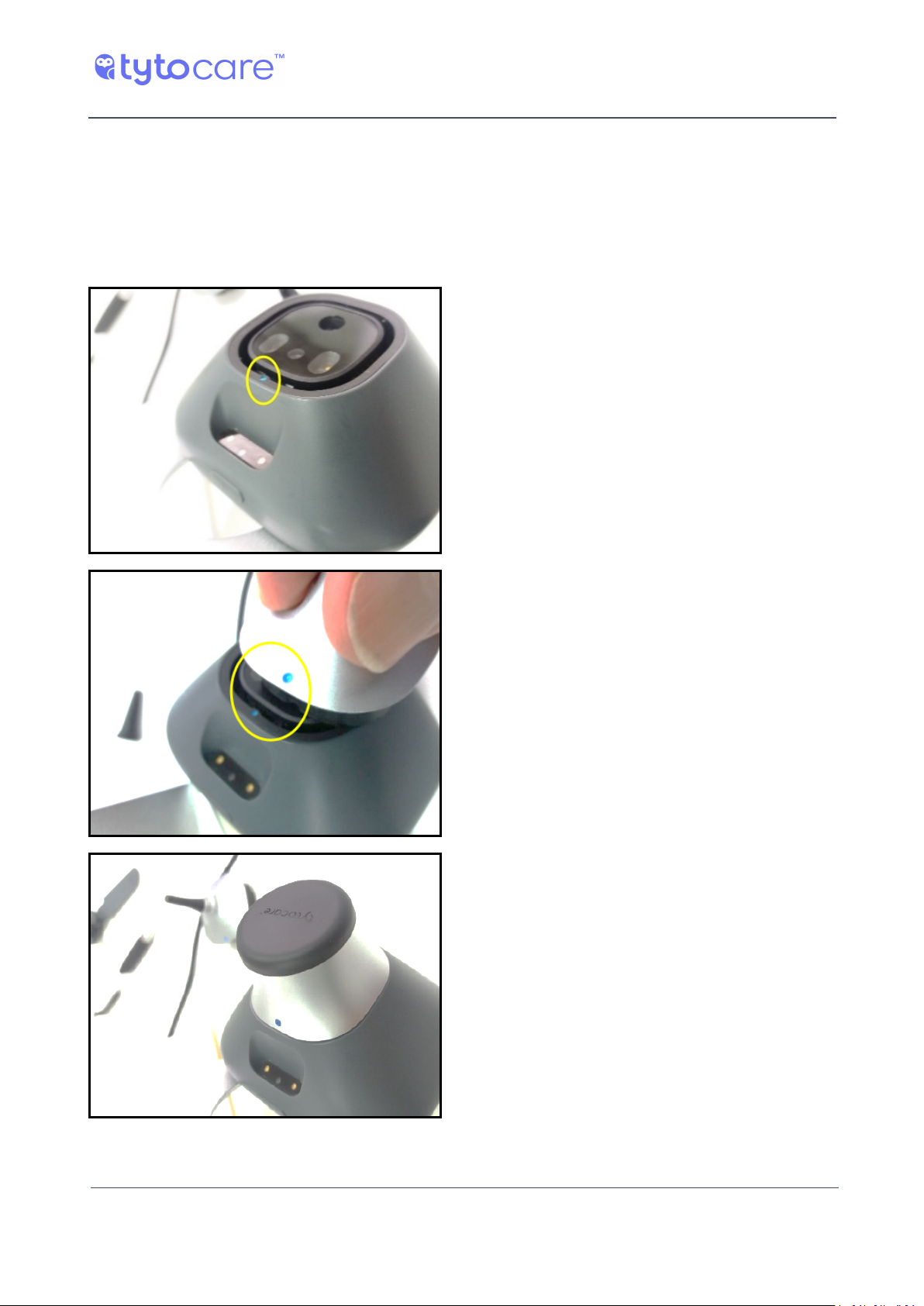
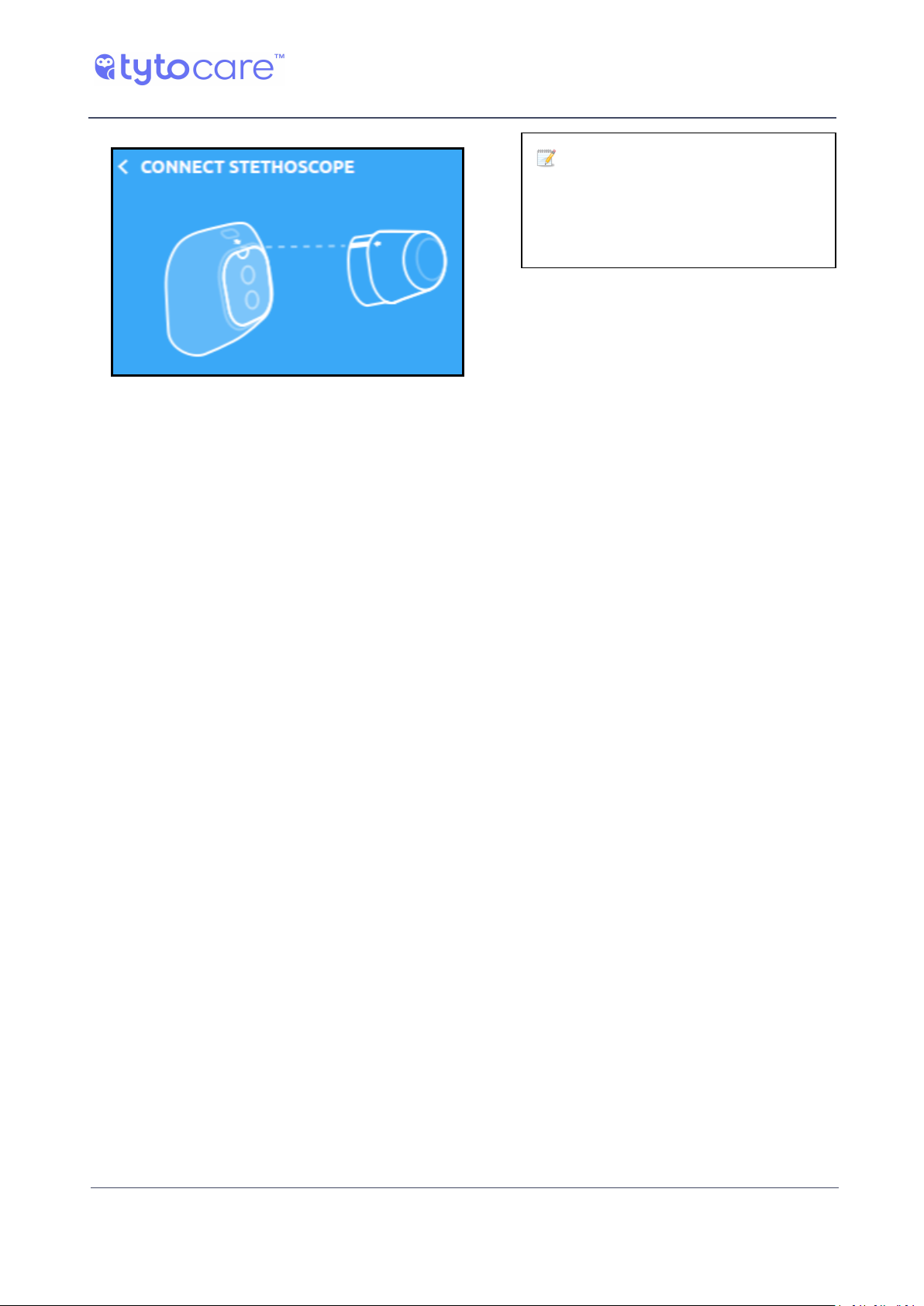
Before you start an exam, connect the Tyto Stethoscope tip to the Tyto device using the blue dot
guiding marks:
© 2018 TytoCare All rights reserved. 6 of 26
Page 7
TytoPro Tyto Stethoscope User Guide
Before the Exam
Note: As the Tyto Stethoscope is placed directly on the skin, please use alcohol wipes to dis-
infect the membrane of the Tyto Stethoscope (black surface touching the skin) before each
use.
User Role: Performing Guided and Unguided Exams
Two methods can be used for examinations conducted with the TytoProTMsystem.
Guided exams are intended for use by any person who is not a healthcare professional, or a
healthcare professional who is not qualified to perform auscultation and/or a physical exam, and
who requires a more detailed, step-by-step approach to the exam. Guided exams lead the user
through the process of performing and viewing exams. See Section Guided Exams for more
information.
Unguided exams are intended for healthcare professionals, who have medical knowledge, and are
proficient in heart and lungs auscultation. Unguided exams provide a streamlined approach
allowing more flexible recording and faster operation, with minimal instructions for use. See
Section Unguided Exams for more information.
The type of user role, guided or unguided, is defined by the System Administrator when your user
was created.
Contact the System Administrator of your TytoCare system to determine whether your user is
defined as Guided or Unguided, or in case you wish to change your user role.
© 2018 TytoCare All rights reserved. 7 of 26
Page 8
TytoPro Tyto Stethoscope User Guide
Exam Menu
Exam Menu
Note: Refer to the TytoPro™ General Operation User Guide for preliminary instructions on
logging in to the system and viewing the Exam menu.
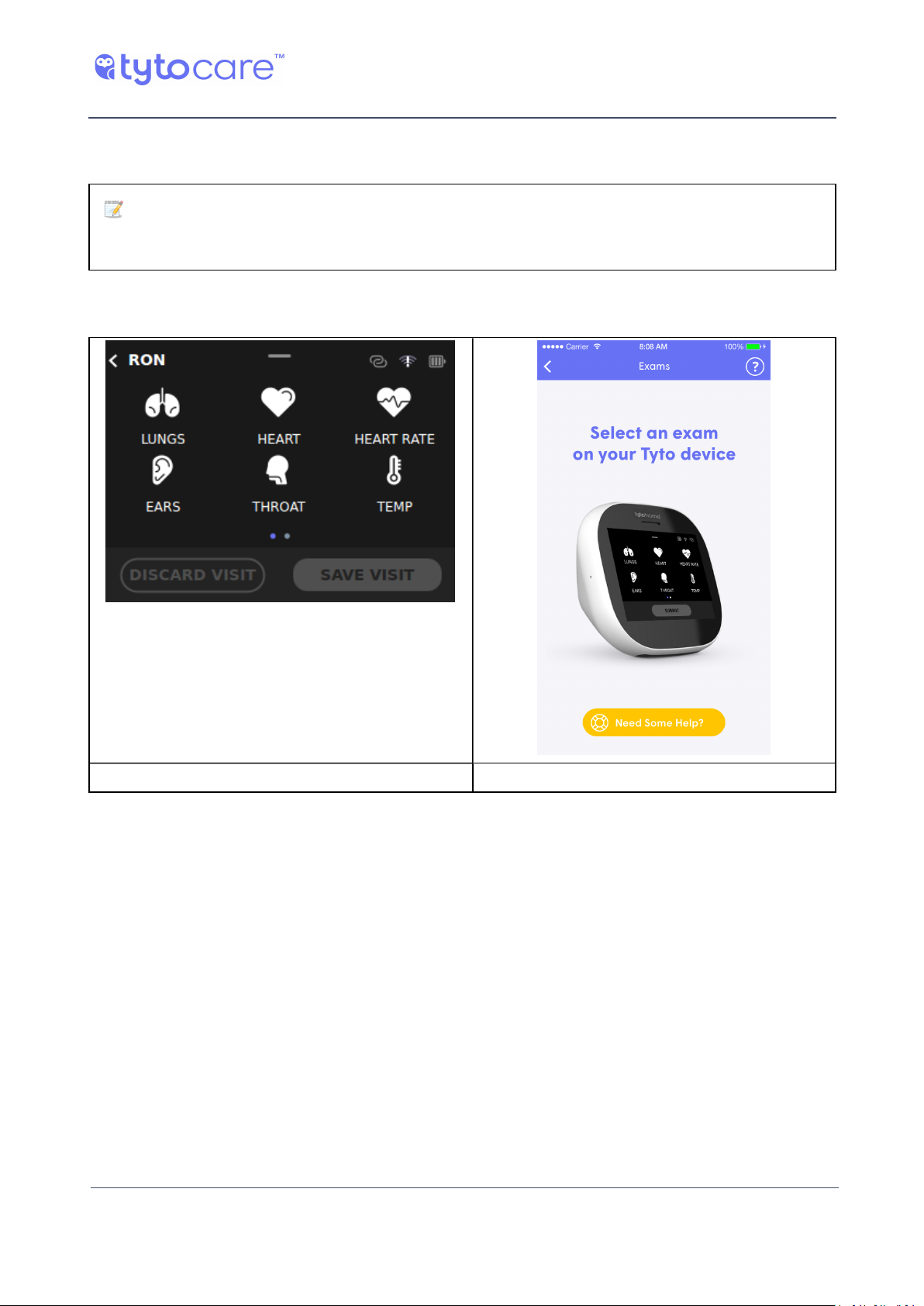
To start one of the Tyto Stethoscope exams, please select the relevant exam from the exams
selection screen in the Tyto device, as shown below:
Tyto Device Tyto App
The Tyto Stethoscope tip is used to perform the following four types of exams:
● The Lungs exam enables lungs auscultation, listening to both the front and the back of the
body
● The Heart exam enables heart auscultation
● The Heart Rate exam measures heart rate
● The General Audio Exam enables general body auscultation, such as bowel sounds, carotid
blood flow etc.
© 2018 TytoCare All rights reserved. 8 of 26
Page 9
TytoPro Tyto Stethoscope User Guide
Exam Menu
Note: Make sure the Tyto Steth-
oscope tip is connected prior to starting the exam. If it’s not, you’ll see a
message asking you to connect it:
© 2018 TytoCare All rights reserved. 9 of 26
Page 10
Guided Exams
Heart Exam and Lungs Exam
TytoPro Tyto Stethoscope User Guide
Guided Exams
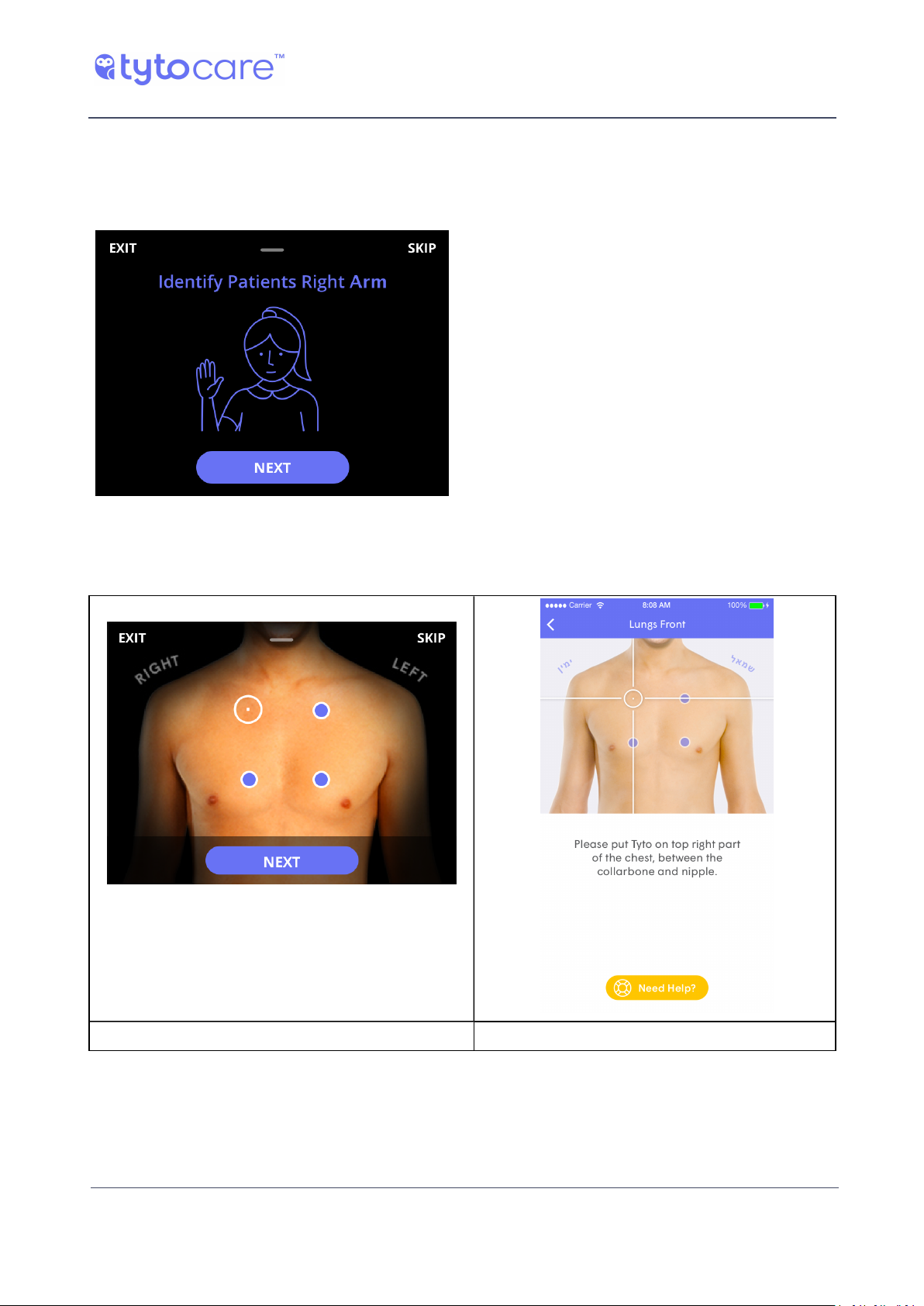
To avoid confusion between left and right
sides, in the Heart exam and the Lungs
exam you will first be asked to confirm
which is the patient’s right arm. This will
help you in positioning the stethoscope
correctly on the correct points.
Then tap NEXT on the device. You will see
a picture with the first measurement point
highlighted on the screens of both the Tyto
device and the Tyto App.
When the Tyto Stethoscope is positioned on the desired point, tap NEXT on the device to begin the
recording.
Tyto Device Tyto App
© 2018 TytoCare All rights reserved. 10 of 26
Page 11
TytoPro Tyto Stethoscope User Guide
Guided Exams
Using the Tyto Stethoscope for Heart and Lungs
When using and placing the Tyto Stethoscope on the body, please take special care to note the
placement positioning — the left or right side — as indicated by the software.
When performing a lung exam on another person, you first perform the exam on the back of the
patient’s body and only afterwards on the front, as guided by the software. During the lung exam,
the person being examined should breathe in and out deeply and slowly.
● Place the Tyto Stethoscope firmly on the patient’s body at the indicated position. Place the
device directly on the skin, if possible. Otherwise it may be used over thin clothing (e.g. a
shirt).
● Place the Tyto Stethoscope in full contact with the patient’s body or clothing. Hold the Tyto
Stethoscope steady during recording, and don’t move the device until the countdown
completes. Try to remain as quiet as possible, eliminating external sounds.
Note: In order to achieve a high quality and clear recording of the lungs sound, please
make sure the patient breathes deeply and slowly, through the mouth, and sits in an upright
position. In addition, please make as little noise as possible during the exam, to prevent ambient noise from disturbing the lungs sound recording.
Note: Please make sure that the surface of the Tyto Stethoscope is parallel to the patient's
skin, and the entire membrane touches the patient's skin. This is necessary to achieve strong
signal strength.
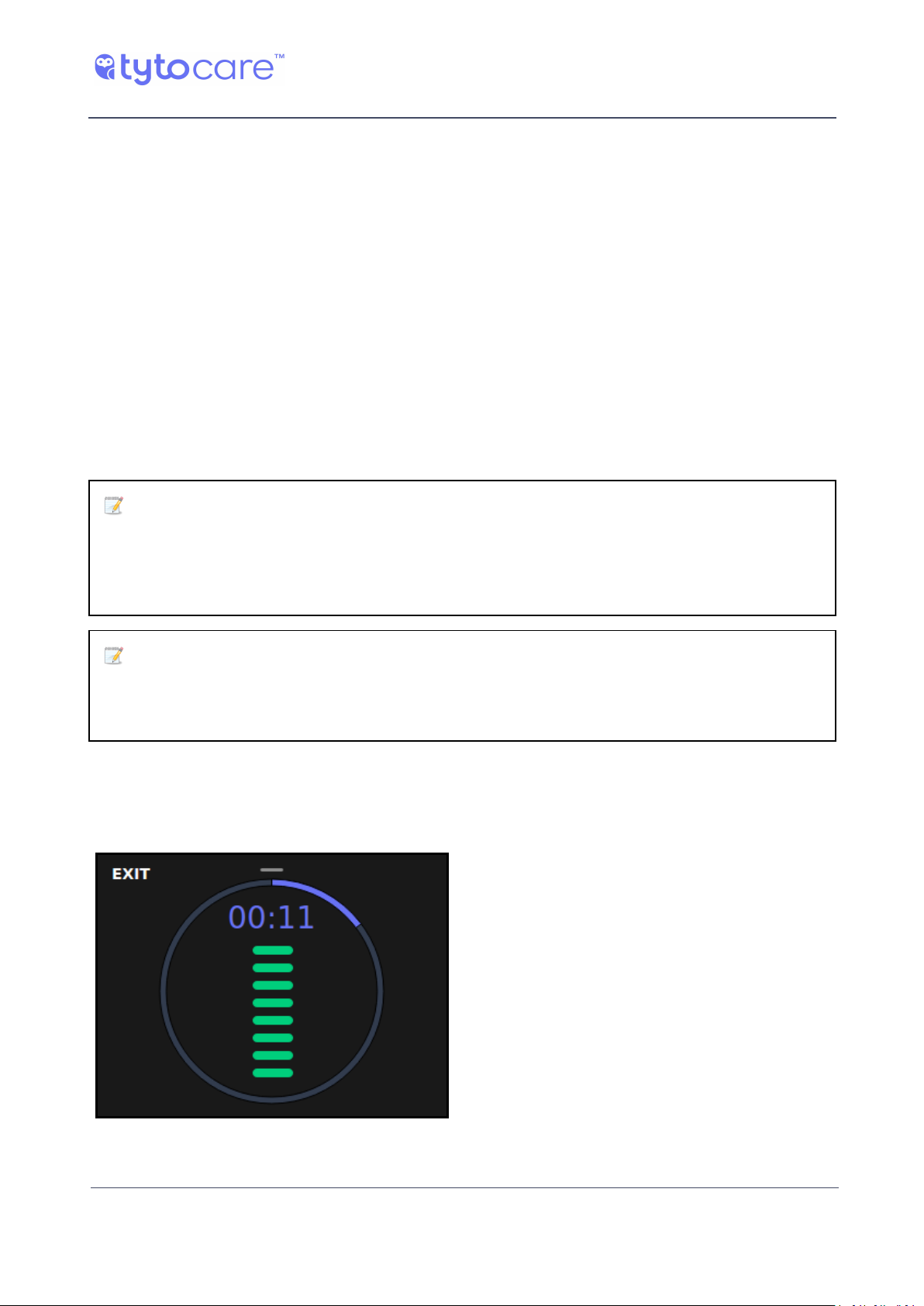
Signal Strength
During the recording, a signal strength bar will be displayed, indicating the quality of your
recording.
Try to keep the bar high and green.
© 2018 TytoCare All rights reserved. 11 of 26
Page 12
TytoPro Tyto Stethoscope User Guide
Guided Exams
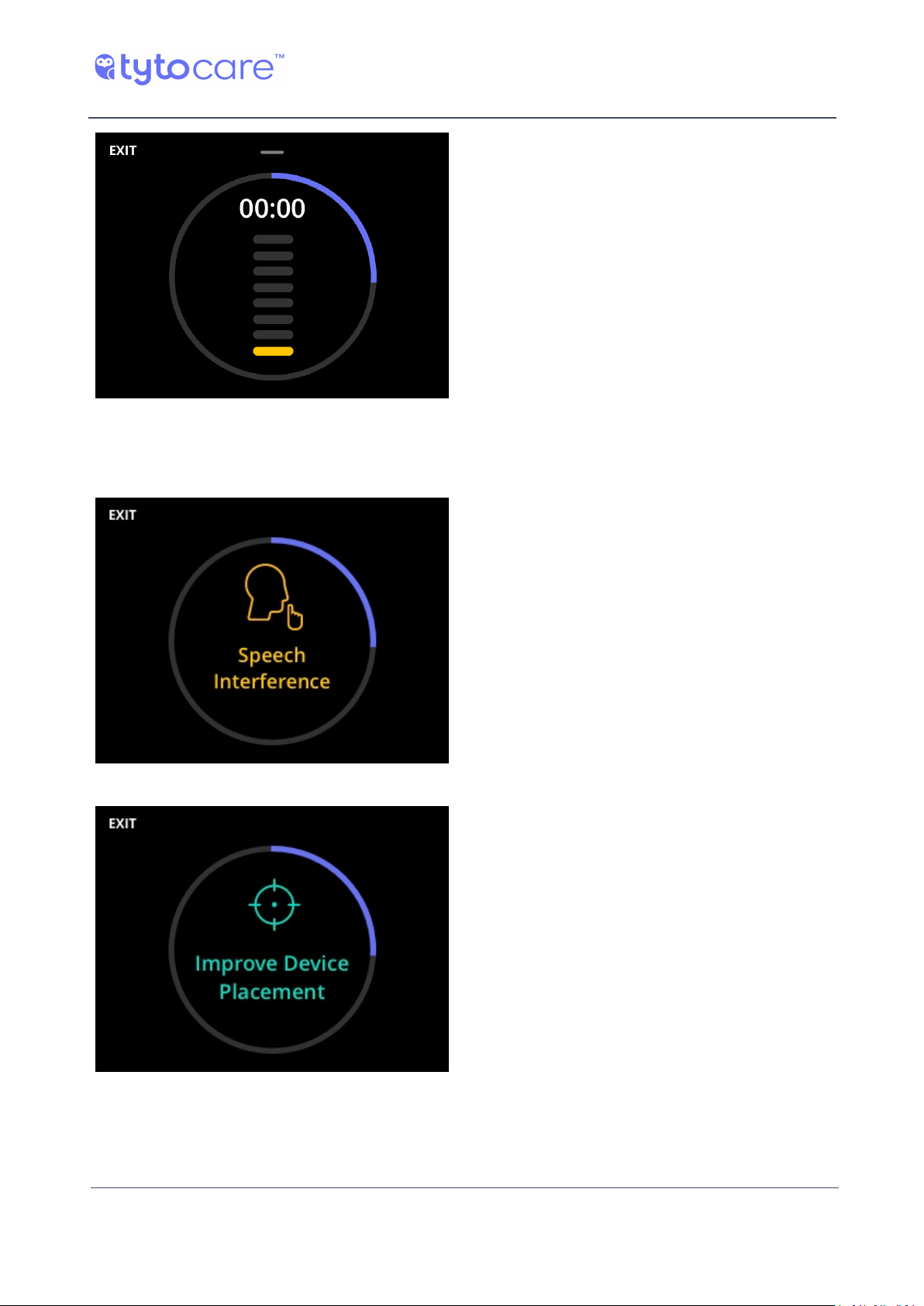
If it turns yellow or isn’t displayed, check
that you’re in the right spot and that Tyto is
attached properly to the body.
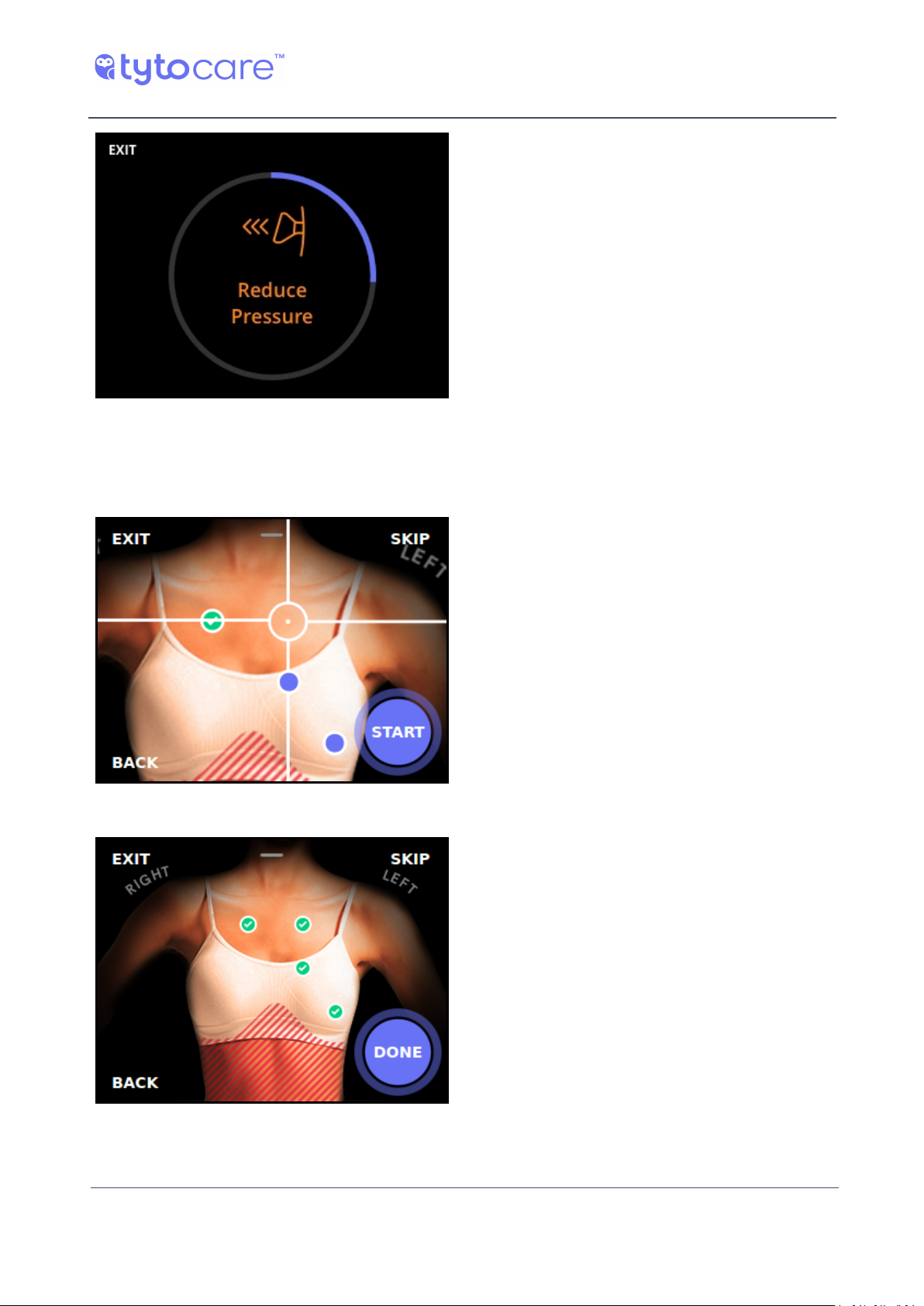
Tyto will alert you If there are interfering noises during the recording, such as voices talking,
device movement, lots of noise in the room, or if the device is pressed to hard against the body:
Speech Interference
Improve Device Placement
© 2018 TytoCare All rights reserved. 12 of 26
Page 13
Reduce Pressure
Move on to the Next Examination Point
TytoPro Tyto Stethoscope User Guide
Guided Exams
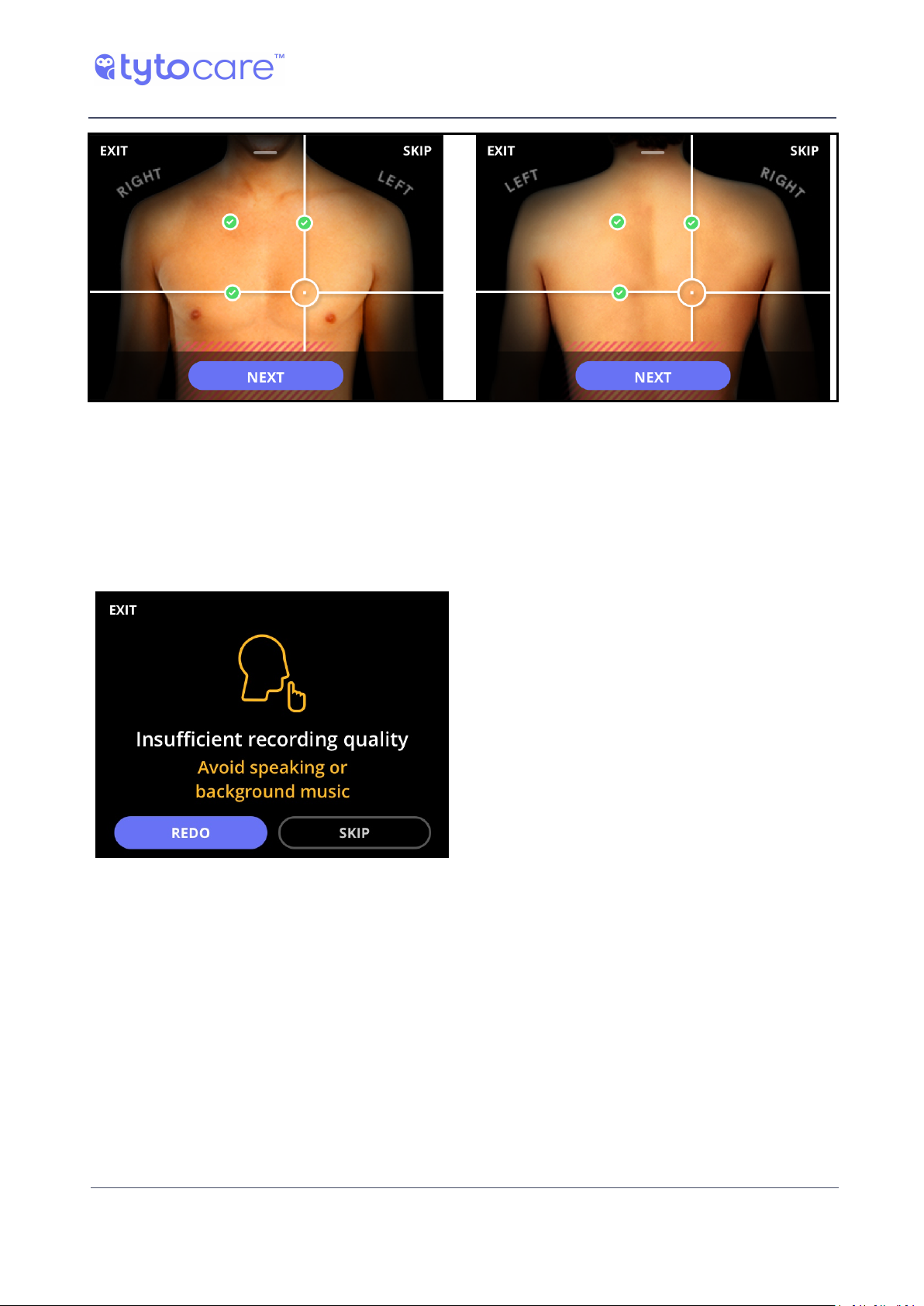
Once the countdown is over and the
point recording is complete, Tyto device
labels the point with a green label, and
the exam moves automatically to the
next measurement point in the
sequence.
Continue until you complete all
measurement points. There are four
measurement points for the heart exam,
and eight for the lungs exam: four on the
front and four on the back.
Heart Exam [4 points]
© 2018 TytoCare All rights reserved. 13 of 26
Page 14
TytoPro Tyto Stethoscope User Guide
Front & Back Body Lungs Exam [4 points]
Guided Exams
Redoing an Examination Point
Once the countdown ends, Tyto analyzes the recording.
If the recording needs improvement, try
again. Tyto will recommend how to
improve.
Tap REDO to redo the same point.
You can also choose to move to the next
point by tapping SKIP.
© 2018 TytoCare All rights reserved. 14 of 26
Page 15
TytoPro Tyto Stethoscope User Guide
Guided Exams
Heart Rate Exam
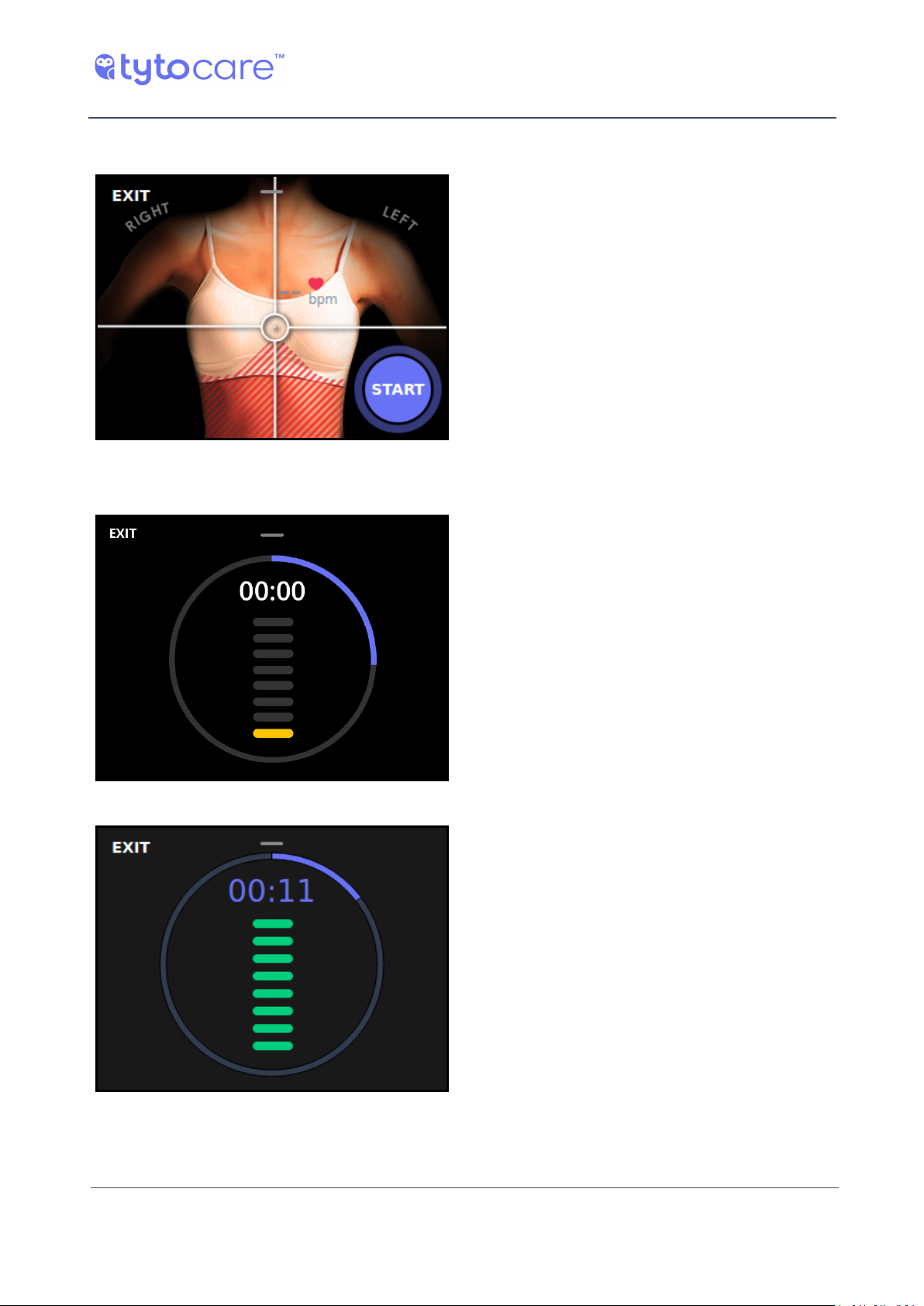
In the Heart Rate exam, place the Tyto
Stethoscope on the middle of the chest (on
the sternum), as indicated on the device
and App. Tap START on the device to begin
the exam.
Please conduct the exam silently, as
speaking or other external noise may cause
the measurement to fail.
During the 20-second exam, you will see an indication of the signal quality received by the system:
Poor signal quality
Good signal quality
© 2018 TytoCare All rights reserved. 15 of 26
Page 16
Completing the Exam
TytoPro Tyto Stethoscope User Guide
Guided Exams
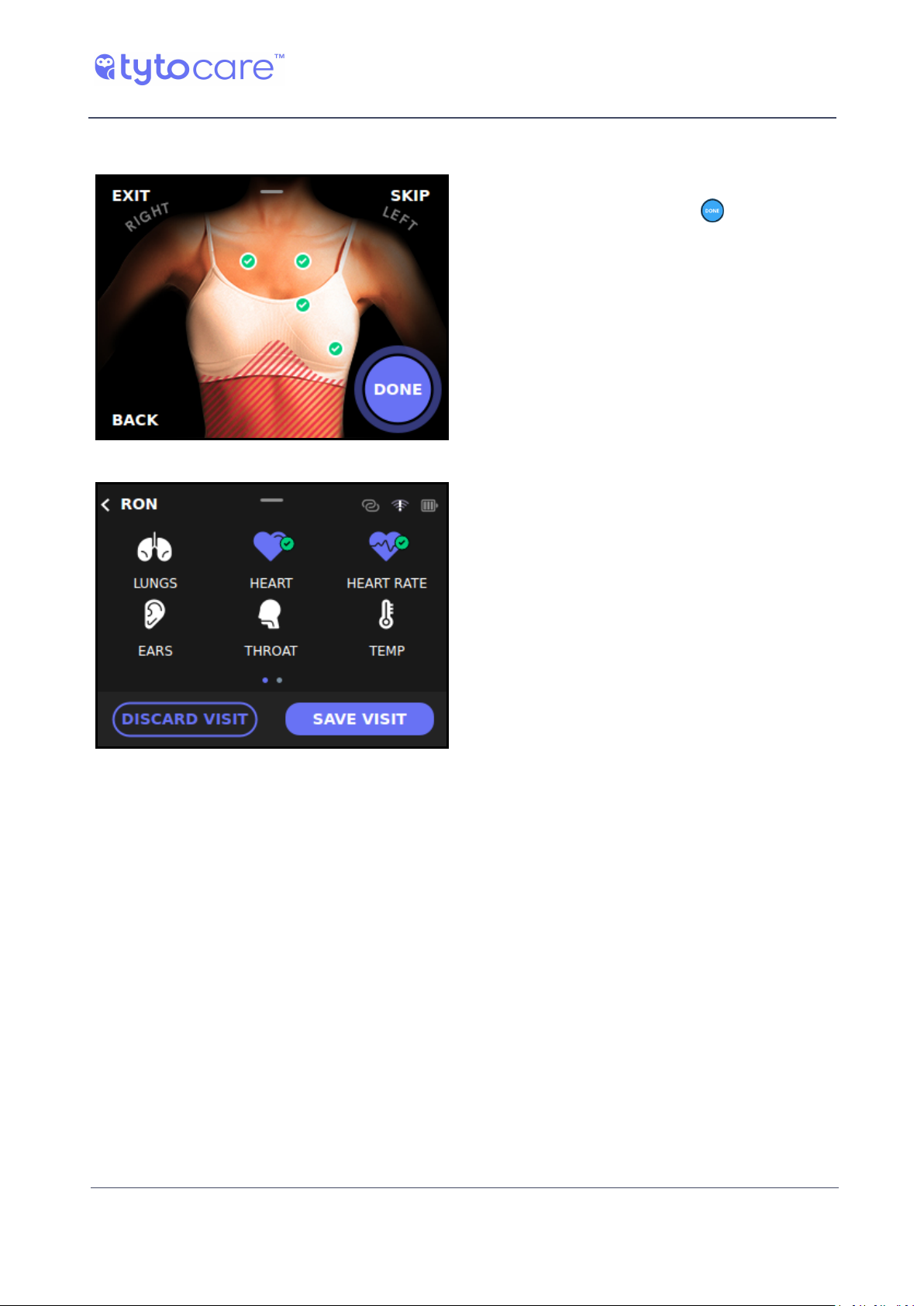
Once you have collected data from all
measurement points, tap (DONE) to
complete the exam.
The Exams screen will show the completed
exam in purple (Heart and Heart Rate
exams in this example) to indicate that
data was collected. At this point, you can
choose to collect data for additional exams.
Completing the Visit
To complete the visit, refer to Section - Completing the Exam, Section - Completing the Exam, and
Section - Sending the Store-and-Forward Data to the Clinician, in the Tyto Device User Guide.
© 2018 TytoCare All rights reserved. 16 of 26
Page 17
TytoPro Tyto Stethoscope User Guide
Unguided Exams
Unguided Exams
Connecting Headphones to the Device
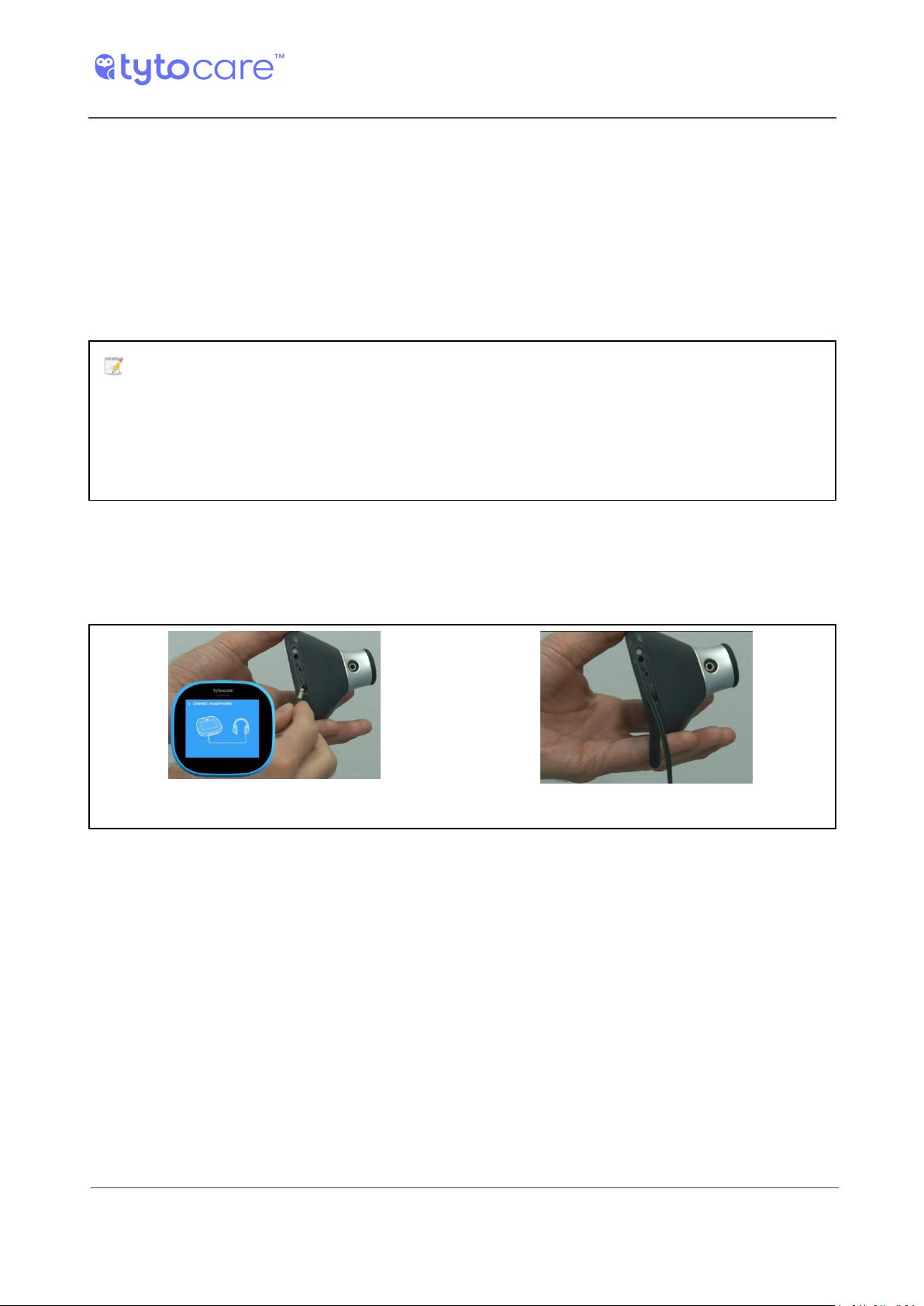
To listen to the auscultation sounds directly, connect headphones to the Tyto device audio jack,
which is located at the bottom of the device, usually covered by a rubber band, as shown in the
images below. Prior to entering the exam (heart, heart rate or lungs) a notification will be shown
until the headphones are connected. Once connected, the exam will continue.
Note: The headphones must meet the following specifications:
● Impedance minimum: 16 ohm, typical 32 ohm
● Frequency response: minimum 20 – 10,000Hz
● Plug jack: 3.5mm stereo
Please make sure you insert the headphones into the correct socket, as the charger socket is
located next to the headphones jack.
Please note that you can also insert the headphones into the audio jack, located on the Tyto
Stethoscope tip itself.
Connect headphones to the Tyto device. Headphones connected.
© 2018 TytoCare All rights reserved. 17 of 26
Page 18
TytoPro Tyto Stethoscope User Guide
Unguided Exams
Lungs Exam
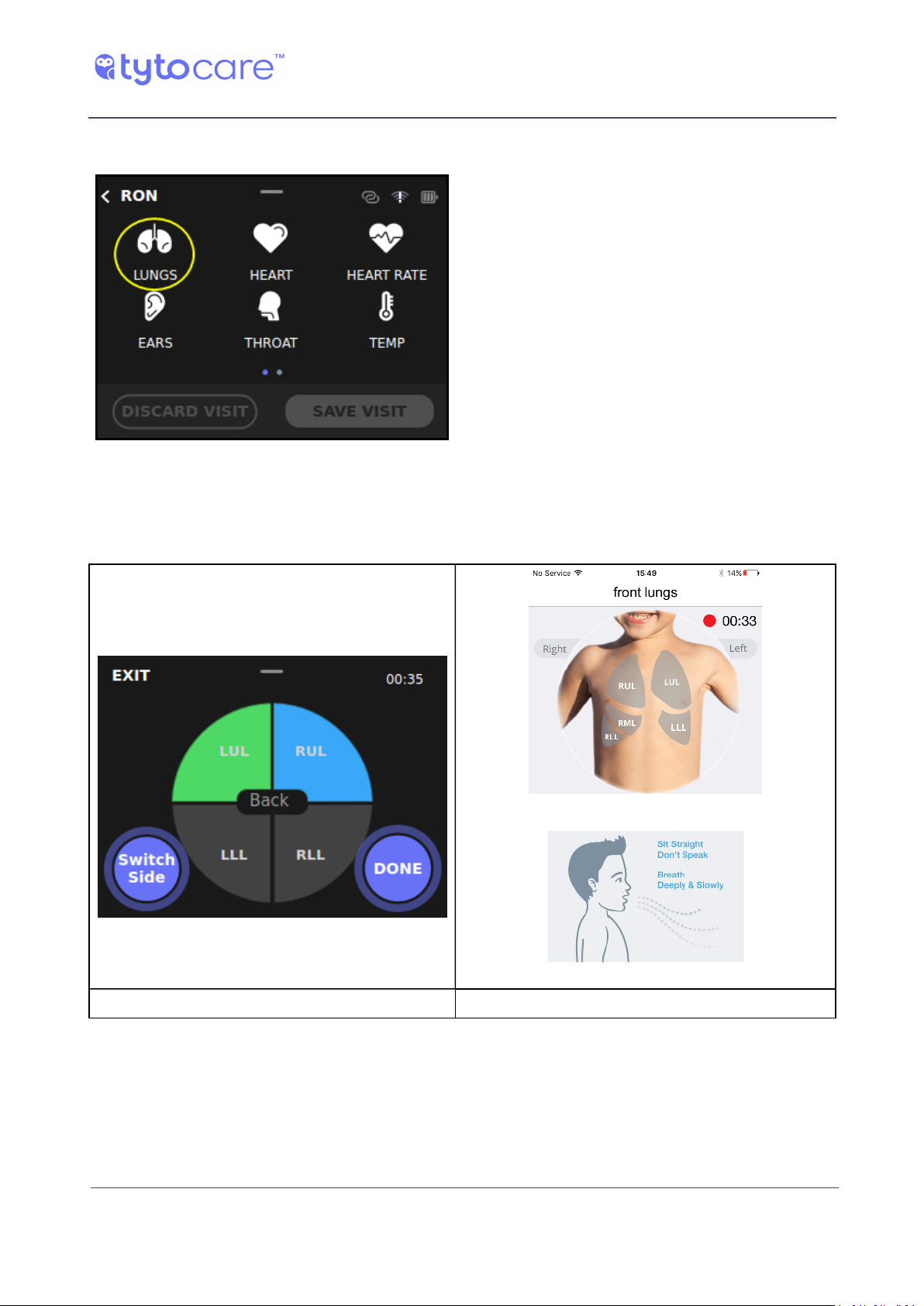
Tap LUNGS to begin the examination.
The device will immediately begin to record lungs auscultations. The red blinking dot, located at
the upper-right corner of the device, as well as in the App, indicates that sound recording is
activated.
Tyto Device. Tyto App
© 2018 TytoCare All rights reserved. 18 of 26
Page 19
TytoPro Tyto Stethoscope User Guide
Unguided Exams
Lung Lobes Tagging
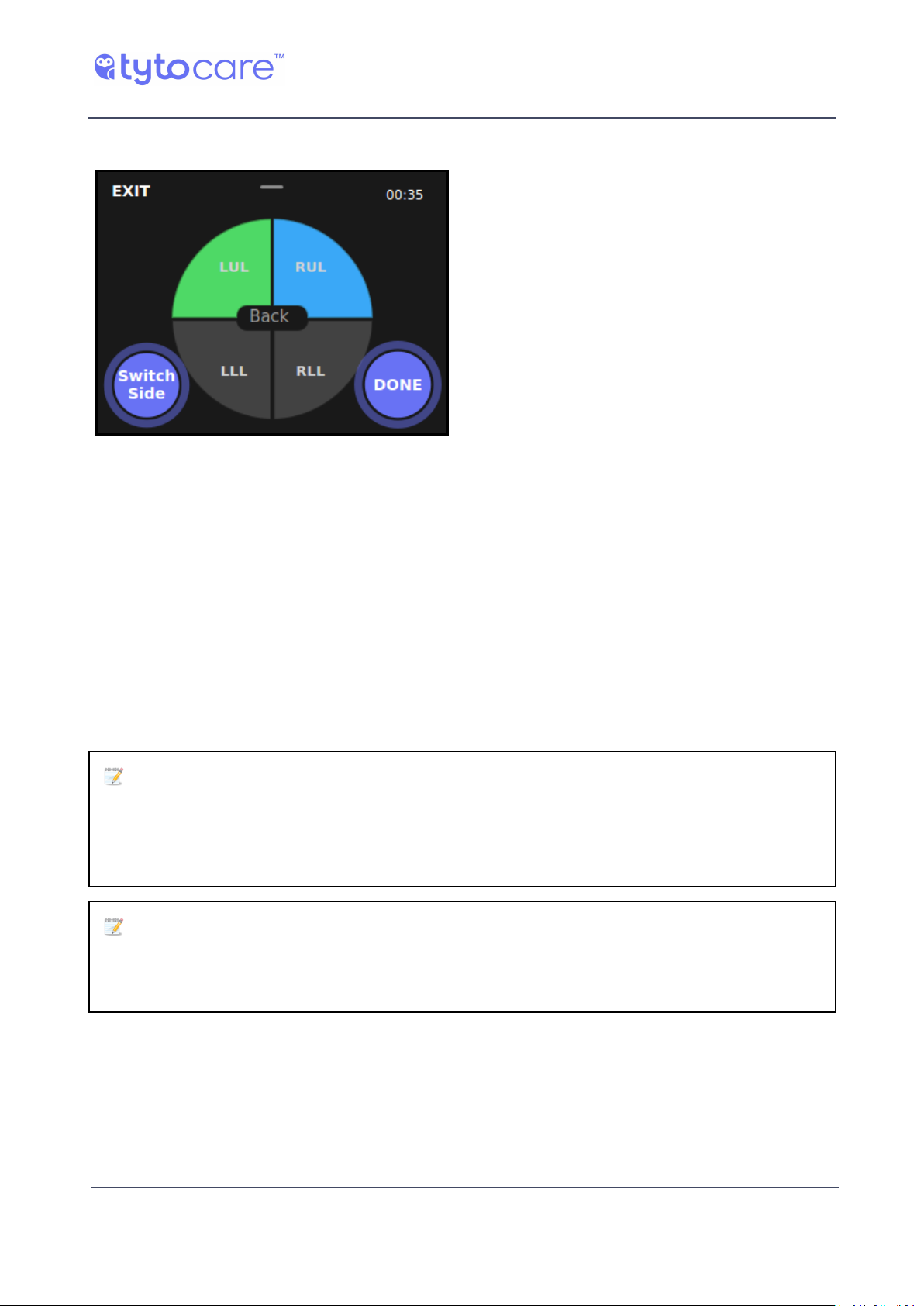
Example of an exam where LUL was
examined at least once, and LLL is being
examined now.
To indicate where on the chest or back you are placing the Tyto Stethoscope (which lung lobe you
are currently listening to), press on the appropriate tag (LUL, RUL, etc.) to indicate the area of
auscultation. This tagging is essential to allow the diagnosing physician, who will listen to the
recorded sound remotely, to know which lobe he is listening to at a given moment. Every time you
move the Tyto Stethoscope to a different area, make sure you accompany this action by pressing
the relevant lobe in the device.
This tagging information will be displayed to the clinician when he listens to the recorded exam.
Note that the selected lobe, the area being recorded, will be marked in blue. A green tag
indicates an area that has already been examined at least once. Press on SWITCH SIDE to toggle
between back and front.
Note: In order to achieve a high quality and clear recording of the lungs sound, please
make sure the patient breathes deeply and slowly, using his mouth, and sits in an upright position. In addition, please minimize noise during the exam, to prevent ambient sounds from
affecting the recording.
Note: Please make sure the surface of the Tyto Stethoscope is parallel to the patient's skin,
and that the entire membrane touches the patient's skin. This is necessary to achieve strong
signal strength.
© 2018 TytoCare All rights reserved. 19 of 26
Page 20
TytoPro Tyto Stethoscope User Guide
Unguided Exams
Volume and Sound Filters
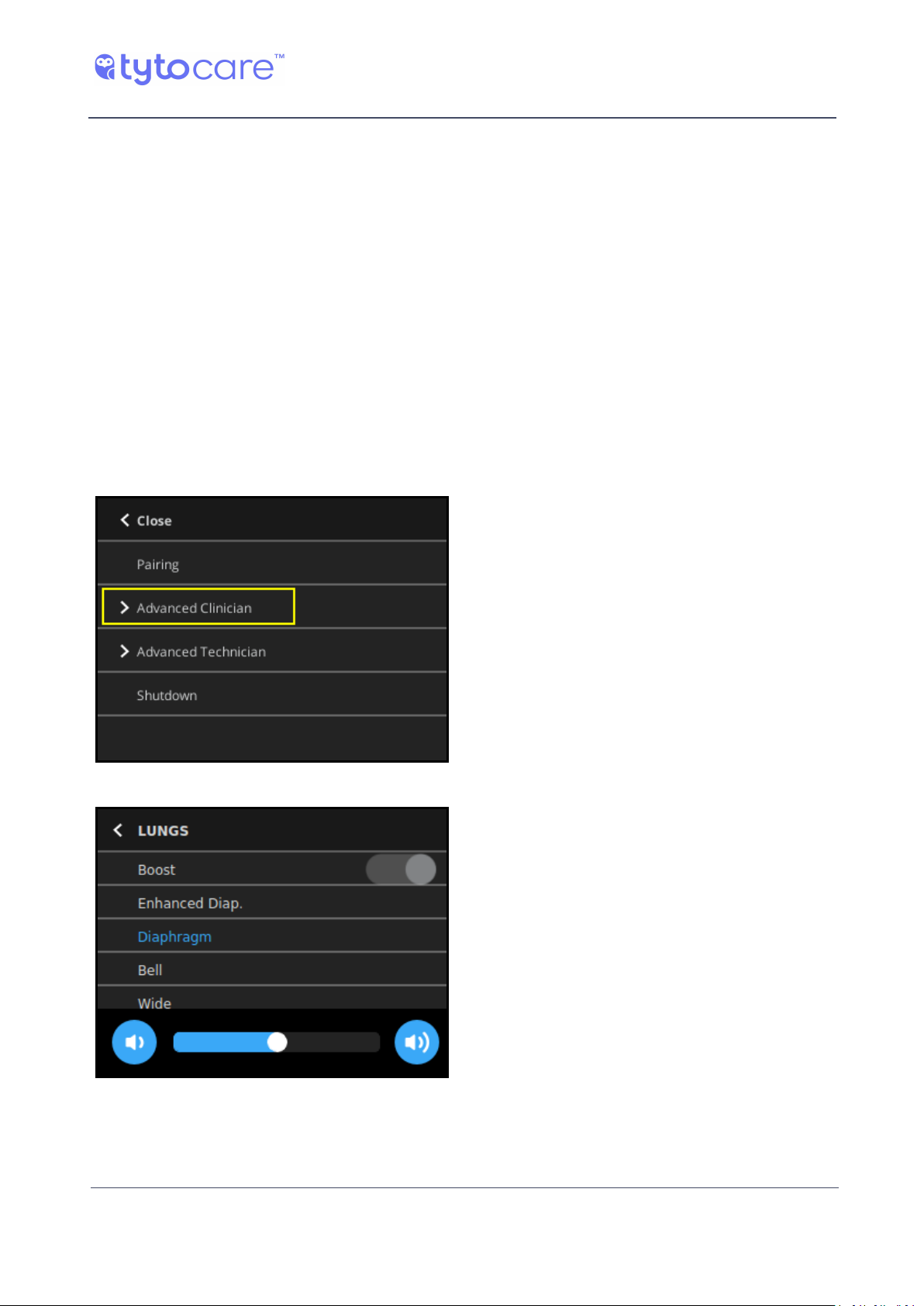
To access the Advanced Clinician options of the device Settings menu, swipe down on the device.
These settings can be used to change the default audio filters. The default audio filter for heart /
heart rate exam is Bell and for lungs exam is Diaphragm.
Other optional filters for lungs sounds are Wide for amplification of a wider range of frequencies,
or Enhanced Diaphragm, which amplifies the lungs sound frequencies and lowers other
frequencies, such as the heart sounds.
In addition, you have a Boost option, which amplifies the sound acquisition. The Boost is helpful in
cases of shallow breathing or low breathing sounds. The Boost option is enabled by default for the
Lungs exam. If you wish to reduce the sound amplification, turn off the Boost option.
Additionally, the volume of sound heard via the headphones can also be controlled by swiping
down the device screen anytime during the recording, and moving the volume slider at the bottom
to the right or left
Tap ‘Advanced Clinician’
Tap Audio Filter and Adjust Volume
© 2018 TytoCare All rights reserved. 20 of 26
Page 21
TytoPro Tyto Stethoscope User Guide
Unguided Exams
Completing the Lungs Exam
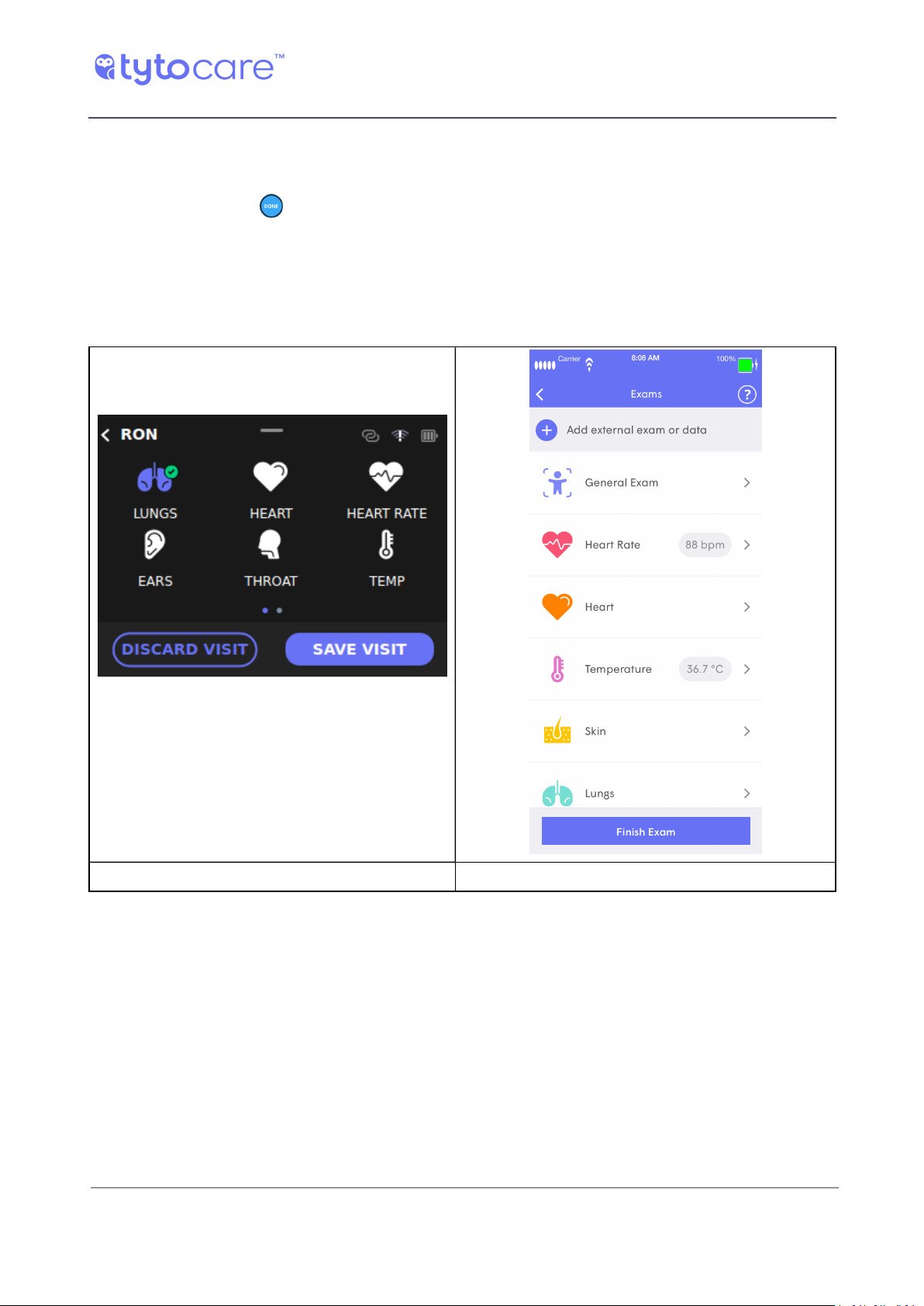
When you have performed the necessary auscultations, and have recorded all necessary locations
on back and front, tap (DONE) on the device. This will stop the sound recording and exit the
Lungs exam.
The device will indicate with a green check mark that the lungs exam was recorded.
The App displays the recorded lungs exam, and enables listening to the exam. Please note that the
back and front sides will be displayed as separate recordings/lines.
Tyto Device. Tyto App
Please refer to Section - After the Exam in the Tyto Device General Operation User Guide for
further instructions.
© 2018 TytoCare All rights reserved. 21 of 26
Page 22
TytoPro Tyto Stethoscope User Guide
Unguided Exams
Heart Exam
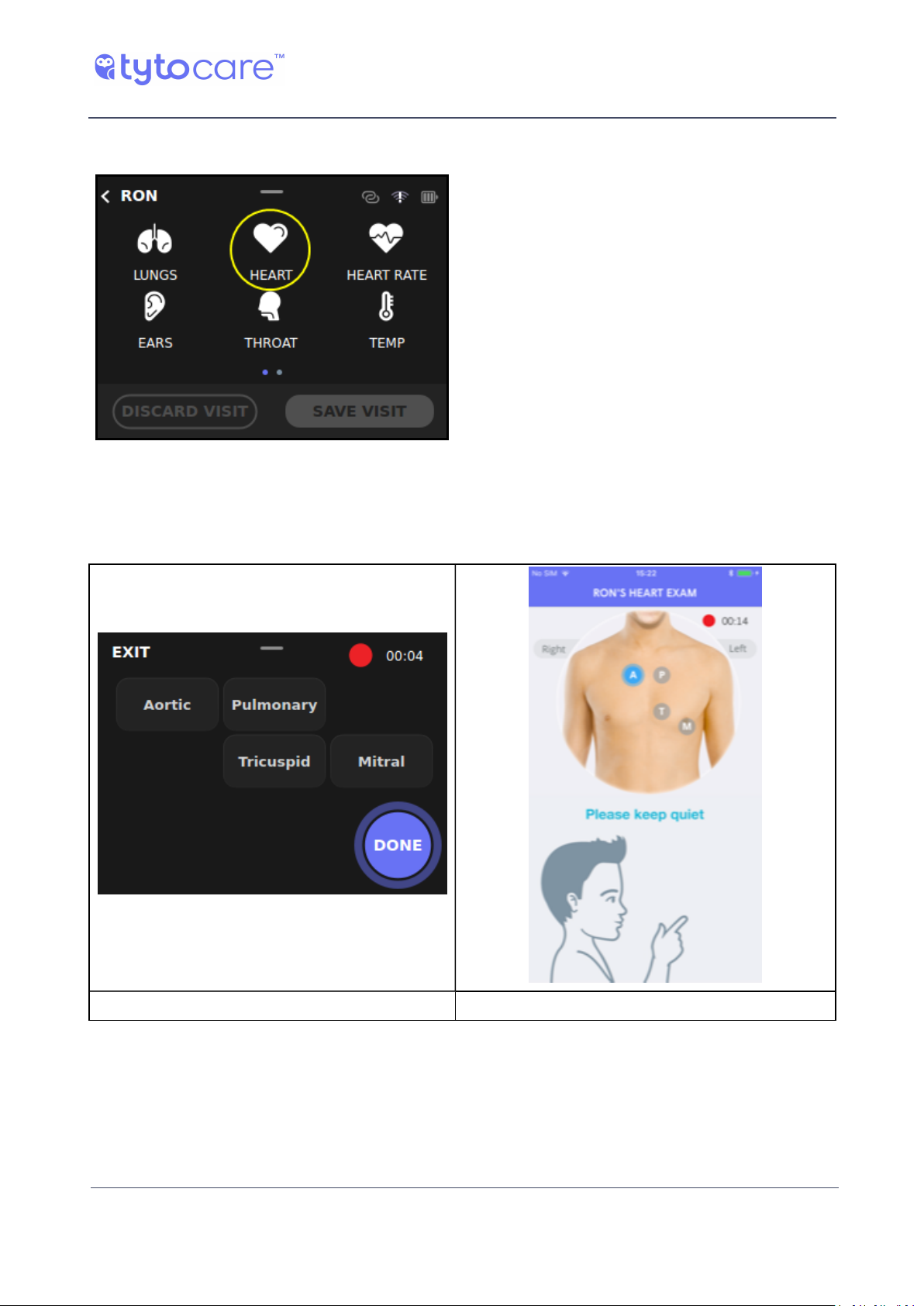
Tap Heart to begin the examination.
The device will immediately begin to record heart auscultations. The red blinking dot, located at
the upper-right corner of the device, as well as in the App, indicates that sound recording is
activated:
Tyto Device. Tyto App
© 2018 TytoCare All rights reserved. 22 of 26
Page 23
TytoPro Tyto Stethoscope User Guide
Unguided Exams
Heart Auscultation Areas Tagging
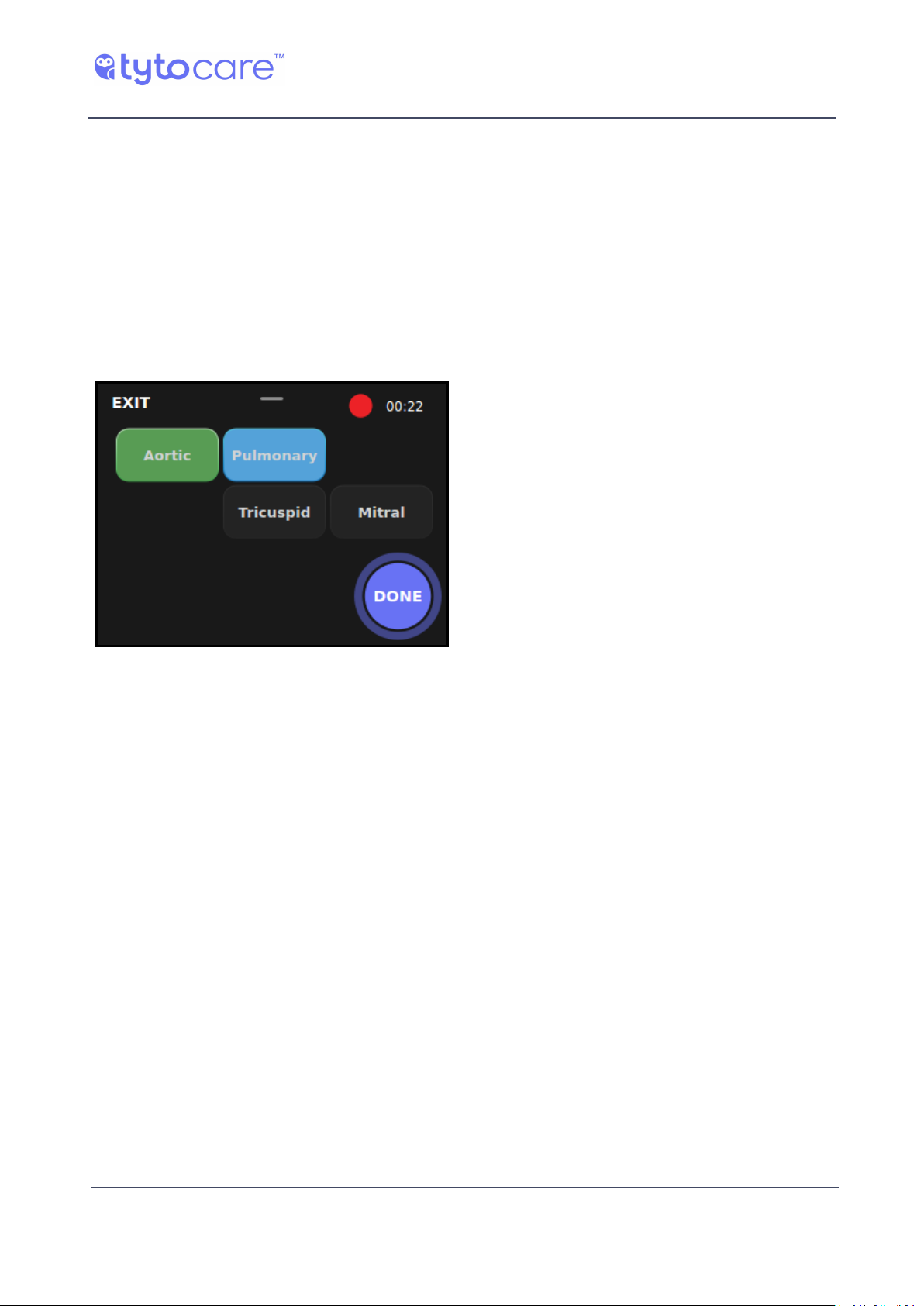
To indicate on which heart auscultation area (heart valve) you place the Tyto Stethoscope, tap on
the appropriate tag (Aortic, Pulmonary, Tricuspid or Mitral). This tagging is essential to allow the
diagnosing physician, who will listen to the recorded sound remotely, to know which auscultation
area he is listening to at a given moment. When you move the Tyto Stethoscope to a different
area, make sure you tap the relevant valve area in the device. This tagging information will be
displayed to the clinician when he listens to the recorded exam.
The area being recorded is marked blue. A green tag indicates an area that has been examined at
least once.
Example of an exam where Aortic area was
examined at least once, and Pulmonary
area is being examined now.
© 2018 TytoCare All rights reserved. 23 of 26
Page 24
TytoPro Tyto Stethoscope User Guide
Unguided Exams
Volume and Sound Filters
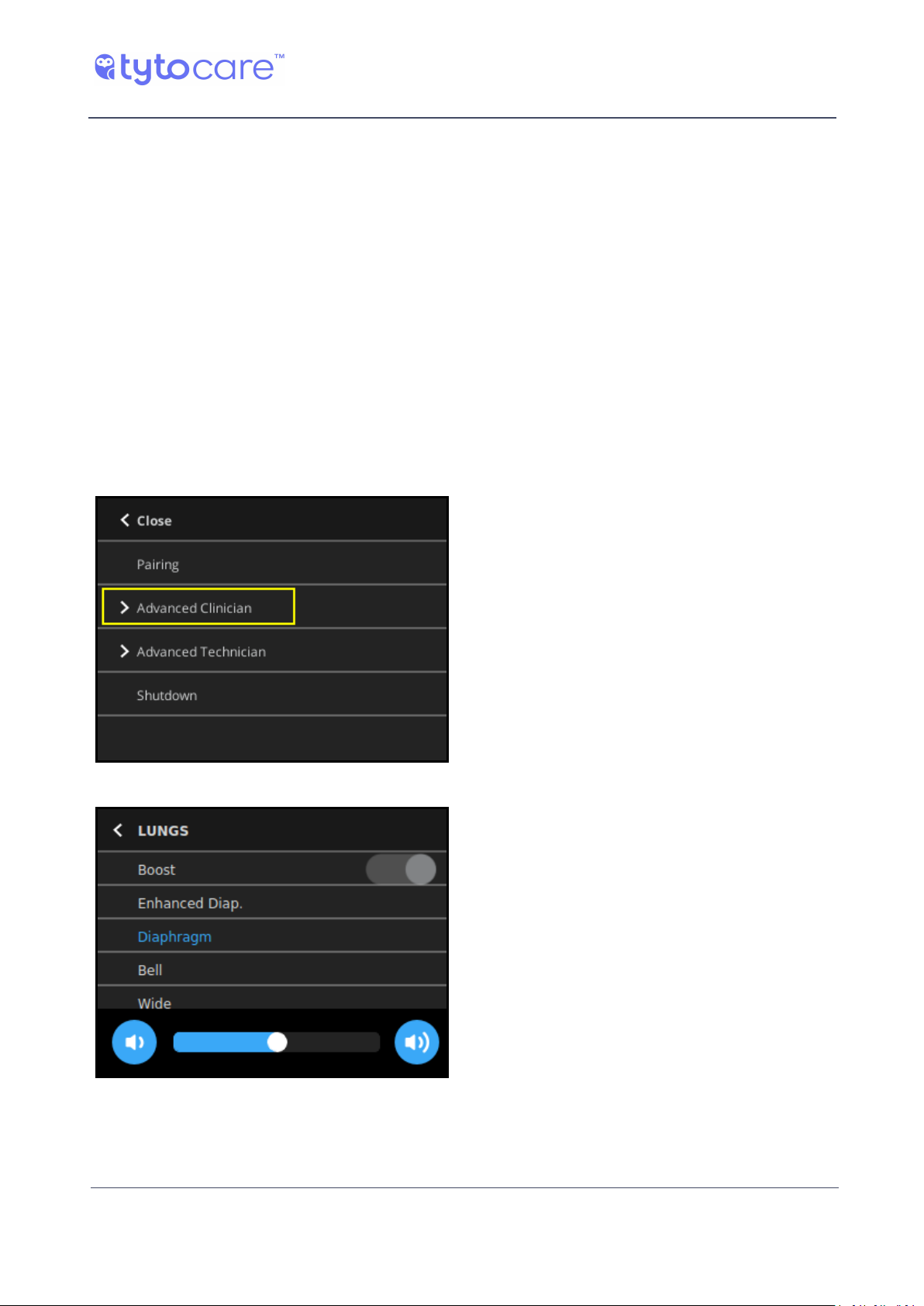
To access the Advanced Clinician options of the device Settings menu, swipe down on the device.
These settings can be used to change the default audio filters. The default audio filter for heart /
heart rate exam is Bell and for lungs exam is Diaphragm.
Other optional filters for lungs sounds are Wide for amplification of a wider range of frequencies,
or Enhanced Diaphragm, which amplifies the lungs sound frequencies and lowers other
frequencies, such as the heart sounds.
In addition, you have a Boost option, which amplifies the sound acquisition. The Boost is helpful in
cases of shallow breathing or low breathing sounds. The Boost option is enabled by default for the
Lungs exam. If you wish to reduce the sound amplification, turn off the Boost option.
Additionally, the volume of sound heard via the headphones can also be controlled by swiping
down the device screen anytime during the recording, and moving the volume slider at the bottom
to the right or left
Tap ‘Advanced Clinician’
Tap Audio Filter and Adjust Volume
© 2018 TytoCare All rights reserved. 24 of 26
Page 25
TytoPro Tyto Stethoscope User Guide
Unguided Exams
Finishing the Heart Exam
When you have completed the necessary heart auscultations, and have recorded all necessary
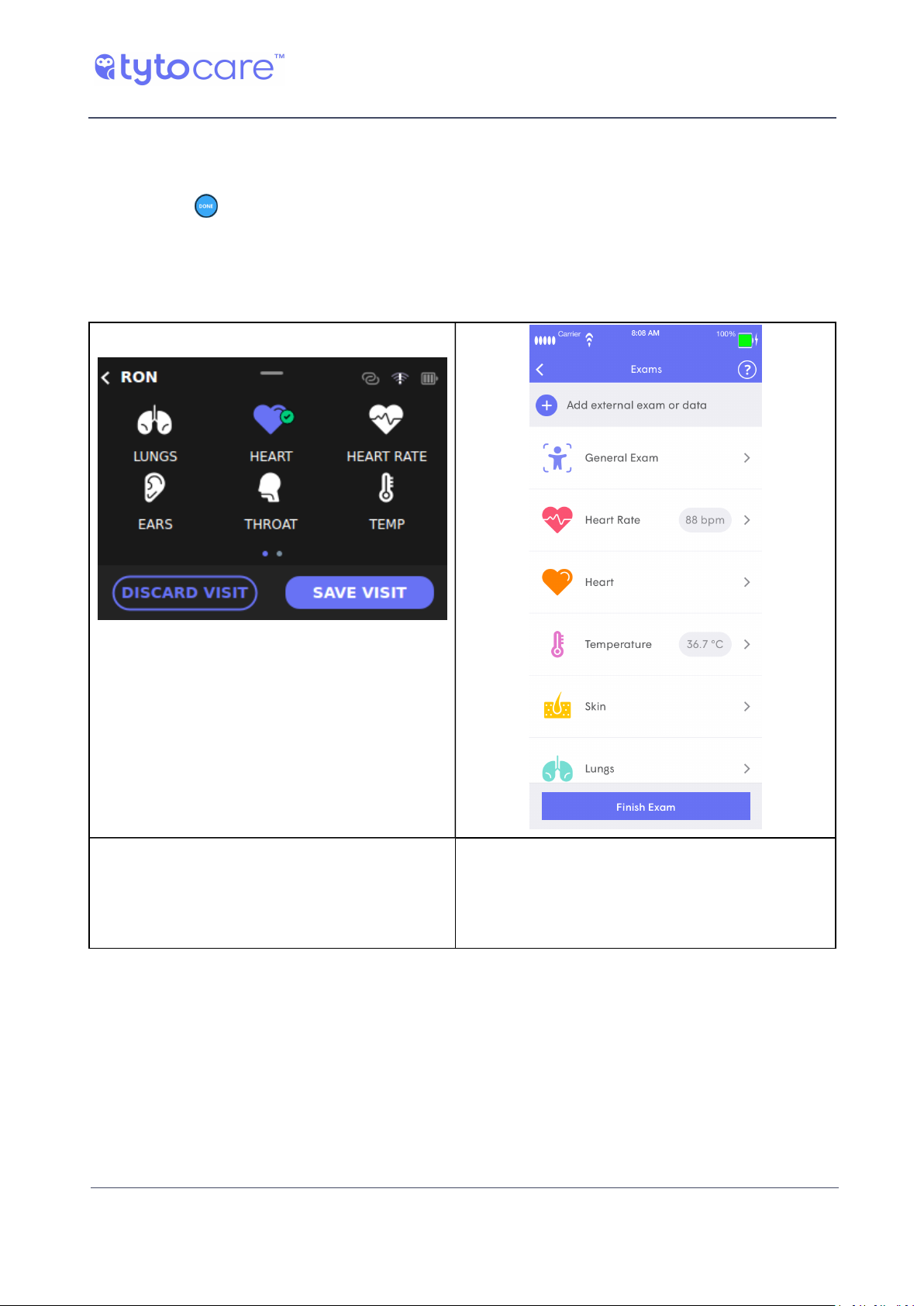
locations, tap (DONE) on the device. This will stop the recording and exit the Heart exam.
The device indicates with a green check mark that the heart and lungs exams were recorded.
The App displays the recorded heart exam, and enables listening to the exam, if necessary, or
deleting it if the recording was not as desired.
Tyto Device
The device indicates with a green check mark
that the heart and lungs exams were recorded.
The App displays the recorded heart exam, and
enables listening to the exam, if necessary, or
deleting it if the recording was not as desired
Tyto App
Heart Rate Exam
Please refer to Section - Heart Exam for instructions on performing this examination.
© 2018 TytoCare All rights reserved. 25 of 26
Page 26

TytoPro Tyto Stethoscope User Guide
Unguided Exams
General Audio Exam
The general Audio exam enables general body auscultation, such as for bowel sounds, carotid
blood flow (bruit) sounds, etc. The Audio exam is accessed using the second screen of the exam
selection in the device (next to the Skin exam). Swipe right to navigate to the second screen, and
then press the Audio icon.
Please insert the stethoscope before starting the exam, as in heart and lungs exams. Then, place
the stethoscope on the required position, depending on the clinical need. Tap Start to begin audio
recording, and Done when finished.
© 2018 TytoCare All rights reserved. 26 of 26
 Loading...