

Page 1

T-TeleSec LineCrypt DSL
User's Guide
Page 2

1.Contents
General.............................................................................................................................3
Overview of pictorial symbols..................................................................................3
Safety notes................................................................................................................3
Power failure.............................................................................................................4
Function Overview..........................................................................................................5
Assembly.........................................................................................................................6
Included in delivery...................................................................................................6
Preparation.................................................................................................................7
Installation place.....................................................................................................11
Start-Up .........................................................................................................................12
CD/configuration software. .................................................................................12
Operation.......................................................................................................................13
LED on the top side................................................................................................13
LED on the rear side ..............................................................................................14
Technical Data..............................................................................................................15
Glossary.........................................................................................................................16
1
Page 3

Registered trademarks, trademarks, and service names are used in this manual.
Even if they are not marked as such, the relevant protection regulations apply.
TM
IDEA
2
is a trademark of Ascom Systec AG
Page 4
General
General
We strongly recommend that you read this user manual before using LineCrypt.
Deutsche Telekom cannot be held liable for any possible damage caused to
the device or other facilities arising from the failure to follow the instructions in
this manual.
Overview of pictorial symbols
Safety symbol to warn against danger for people and property is identified with
a triangular warning sign.
Important messages for data security are identified with the hand icon.
Important messages for operation of the LineCrypt DSL are identified with the
bulb icon.
Safety notes
Do not open the LineCrypt. By opening the four screws on the base of the
•
housing you may endanger the user and any warranty claim will be waived.
Allow no liquids to seep into the LineCrypt.
•
Assemble the device as described in the section “Assembly”.
•
Do not plug in or detach any connections to the LineCrypt during a thunder-
•
storm.
The LineCrypt is only intended for use in dry indoor areas.
•
Lay the cables in such a way that they cannot be stood on or tripped over by
•
anyone.
Before any maintenance work on the LineCrypt pull out the mains plug.
•
3
Page 5

General
Only terminal equipment that delivers SELV voltage and/or corresponds
•
with ETS 300 047 may be connected to the LineCrypt DSL.
Connect the device to a freely accessible earthed socket so that you can pull
•
out the mains plug without delay when required.
Power failure
The configuration remains unchanged in case of a power failure.
The LineCrypt DSL is not provided with an emergency operation. In the event of
a power failure you cannot communicate via the LineCrypt DSL.
4
Page 6
Function Overview
Function Overview
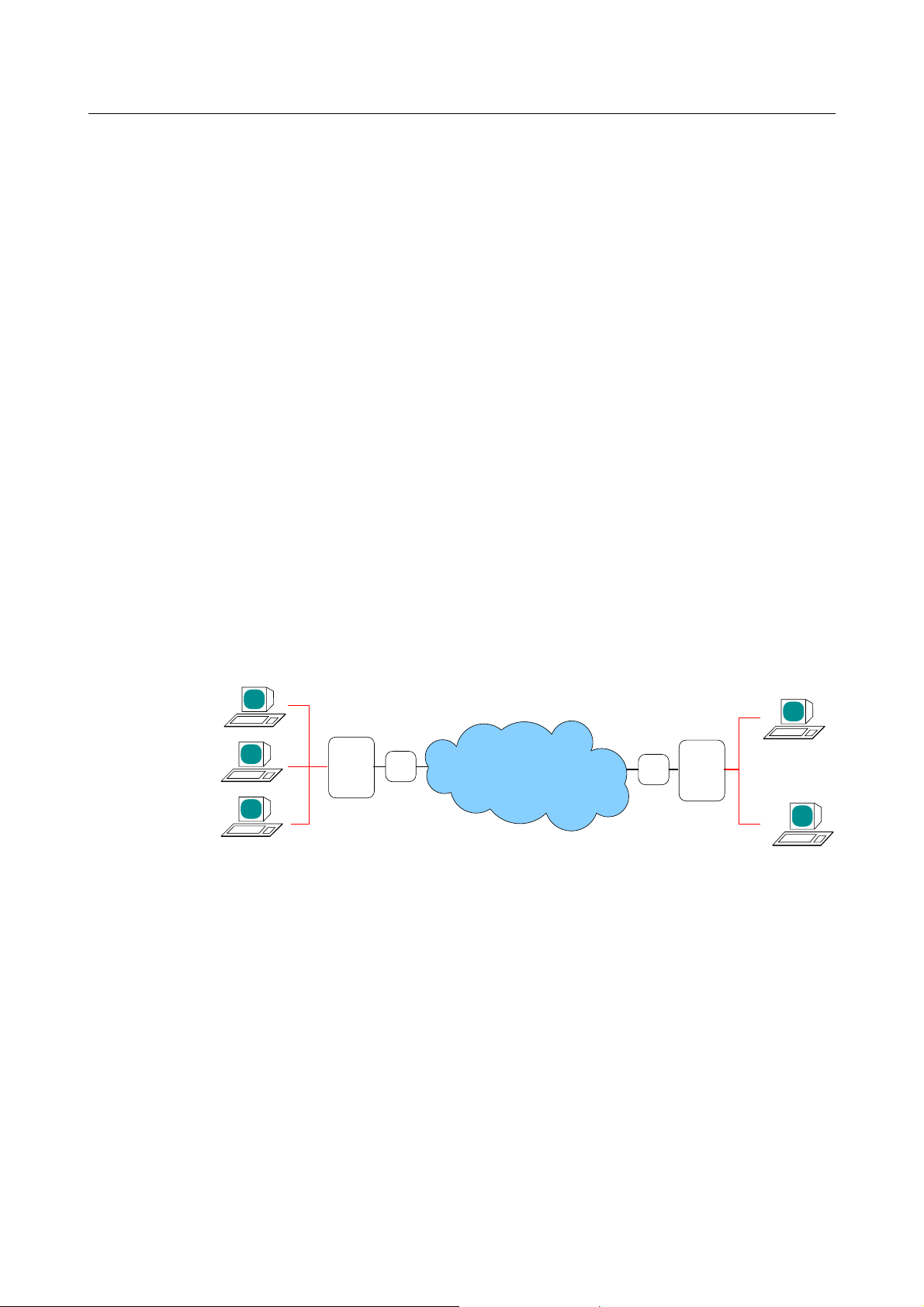
The T-TeleSec LineCrypt DSL provides protected data transfer via networks
that uses the PPPoE protocol.
The LineCrypt DSL acts as a link between a protected internal network and an
unprotected external network. The LineCrypt DSL is based on IP communication. That means: All other protocols, IPX for example, are not forwarded between internal and external sides by LineCrypt DSL.
LineCrypt DSL transfers the encrypted data through an IP Tunnel. In this way,
two or more LineCrypt in an unprotected network allow a protected Virtual Private Network (VPN) to be set up.
The LineCrypt DSL can set up IP tunnels to LineCrypt DSL, L and SOHO. If the
IP addresses are assigned dynamically for the connection configuration, two LineCrypt DSL require a directory service, which can be provided, for example,
by a LineCrypt L. The option of unencrypted connections with other IP equipment can also be configured.
LineCrypt
DSL
Ethernet
DSL−
Modem
Internet
Fig. 1: LineCrypt protecting your network
Ethernet
Router/
Gateway
LineCrypt
L
5
Page 7

Assembly
Assembly
The LineCrypt DSL complies with the legal requirements for telecommunication equipment. End users may carry out the assembly and installation themselves. You can connect the LineCrypt DSL to the DSL modem and connect it
with your internal network or your PC.
Included in delivery
Open the packaging and check that the contents is complete.
1 LineCrypt DSL with mains cable and Chip card
1 Crossed Ethernet connection cable with RJ45 plug
1 Serial PC cable with mini DIN 8 plug
1 CDROM with LineCryptConfig software for Windows 95/98/ME/NT/2000/XP
and operating instructions
1 Connection scheme for LineCrypt DSL
1 Drilling template
2 Dowels and 2 screws for wall mounting
6
Page 8
Assembly
Preparation
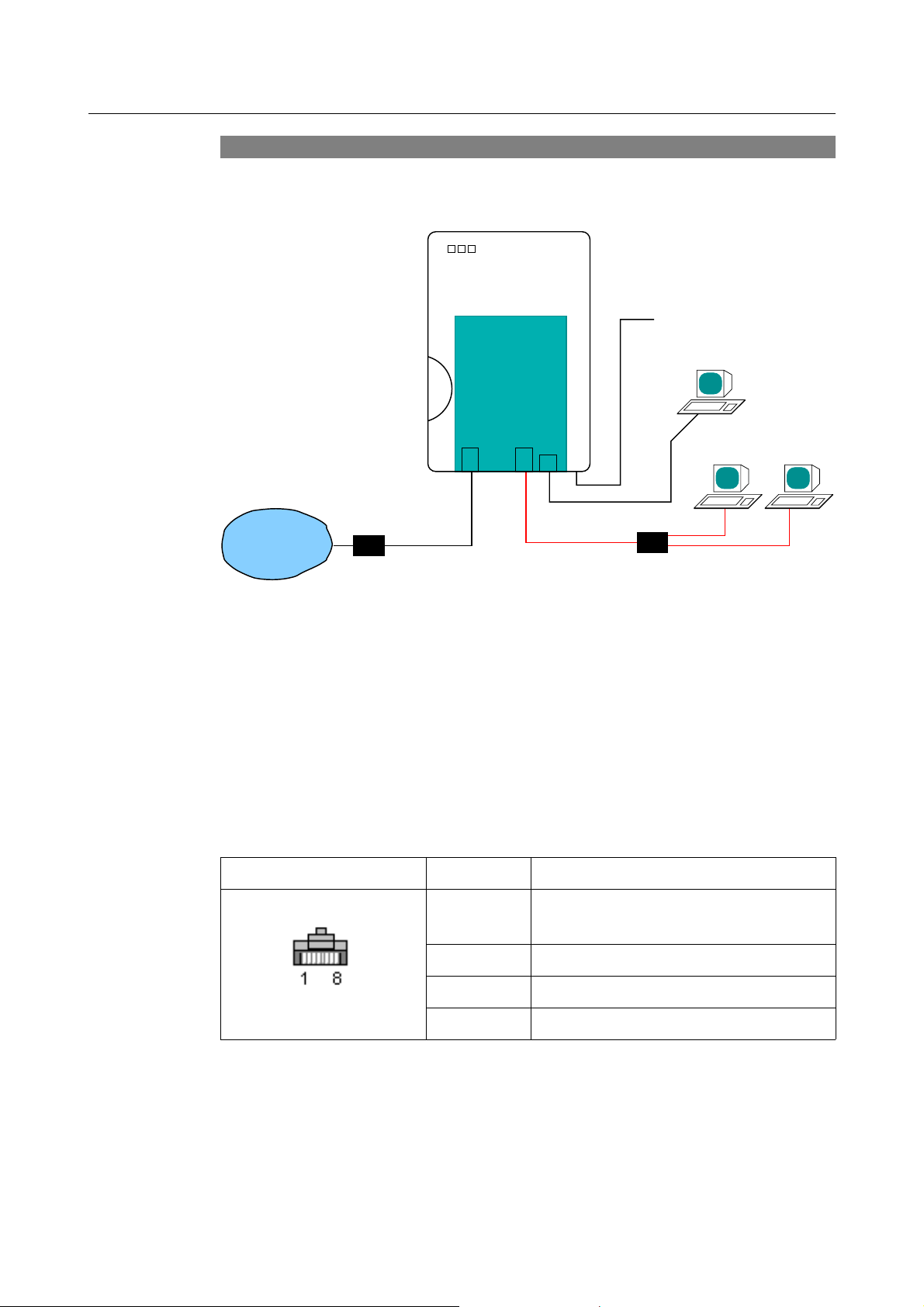
Connect the cable to the LineCrypt according to the connection scheme.
LineCrypt
T−TeleSec
110 ... 230 V
local management
PC
Internet
Modem
10BaseT
external
V.24
10BaseT
internal
Hub
Fig. 2: Connection scheme, LineCrypt DSL
Plug the connection to your internal network into the 10BaseT internal socket.
The connection to InternetGateway is made via the 10BaseT
external socket. As the pin assignment of the Ethernet socket corresponds to
the pin assignment of a network card, the following applies for the cable to be
used:
Use a crossed cable when connecting to a network card (e.g. PC).
•
Use an uncrossed cable when connecting to a hub or an Ethernet switch.
•
Contact Line
Transmission lines (LineCrypt
1,2
transmits)
3 Not used
4,5 Reception lines (LineCrypt receives)
6,7,8 Not used
Table 1: Allocation of the RJ-45 plug
If you wish to manage the LineCrypt DSL locally, plug the PC cable into the
mini DIN 8 socket ”[ ... ]” for the local management.
7
Page 9
Assembly
10BaseT 10BaseT
external internal
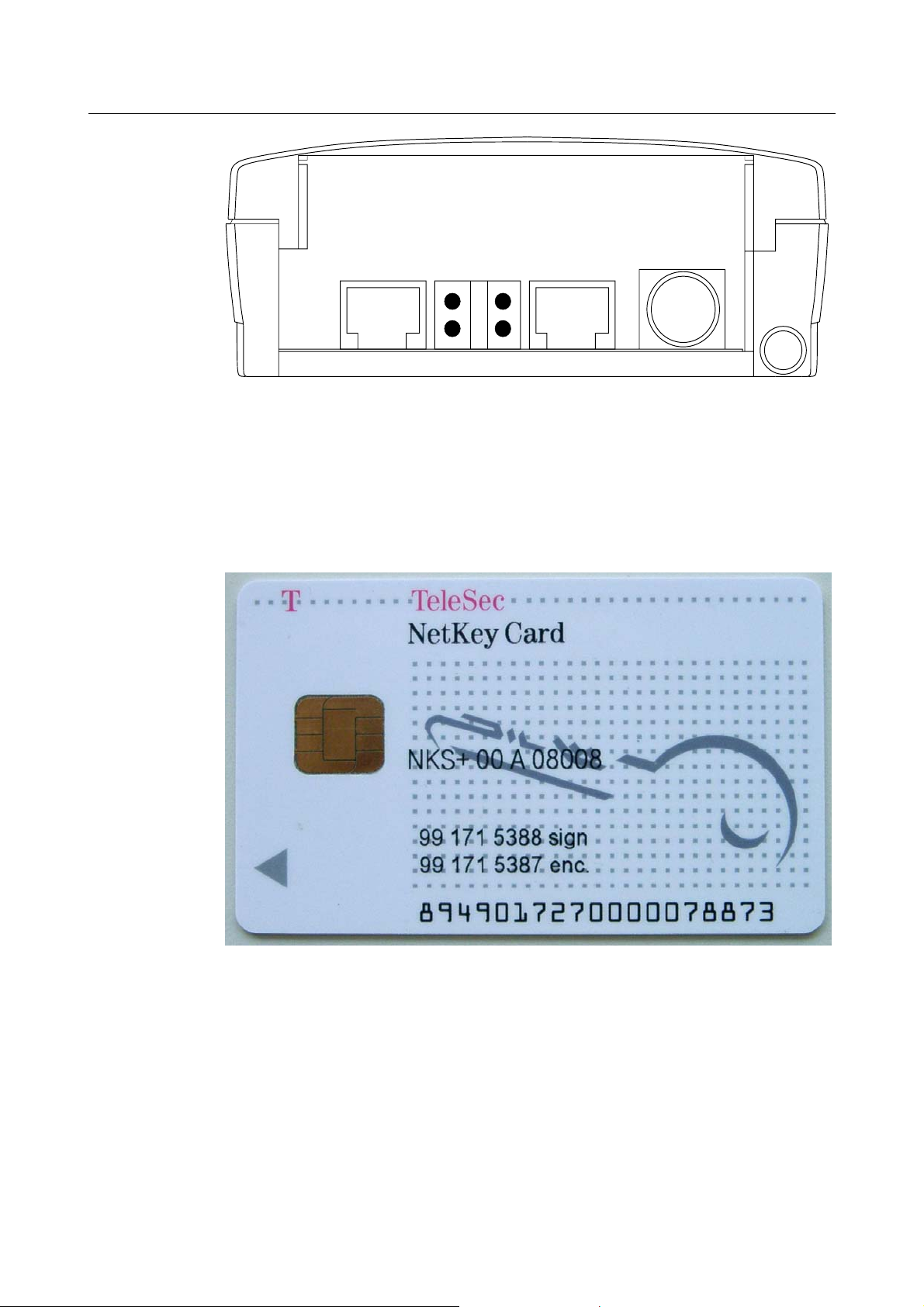
Fig. 3: Overview of sockets
[...]
If the authorizations based on the certificate number, your communications
partner requires this number. You can find the certificate number directly on
the Chip card (“enc.” at end of number) or you can read it with the help of a PC
and the configuration software from the LineCrypt.
Fig. 4: Chip card, type NetKey Card with certificate
number 991715387
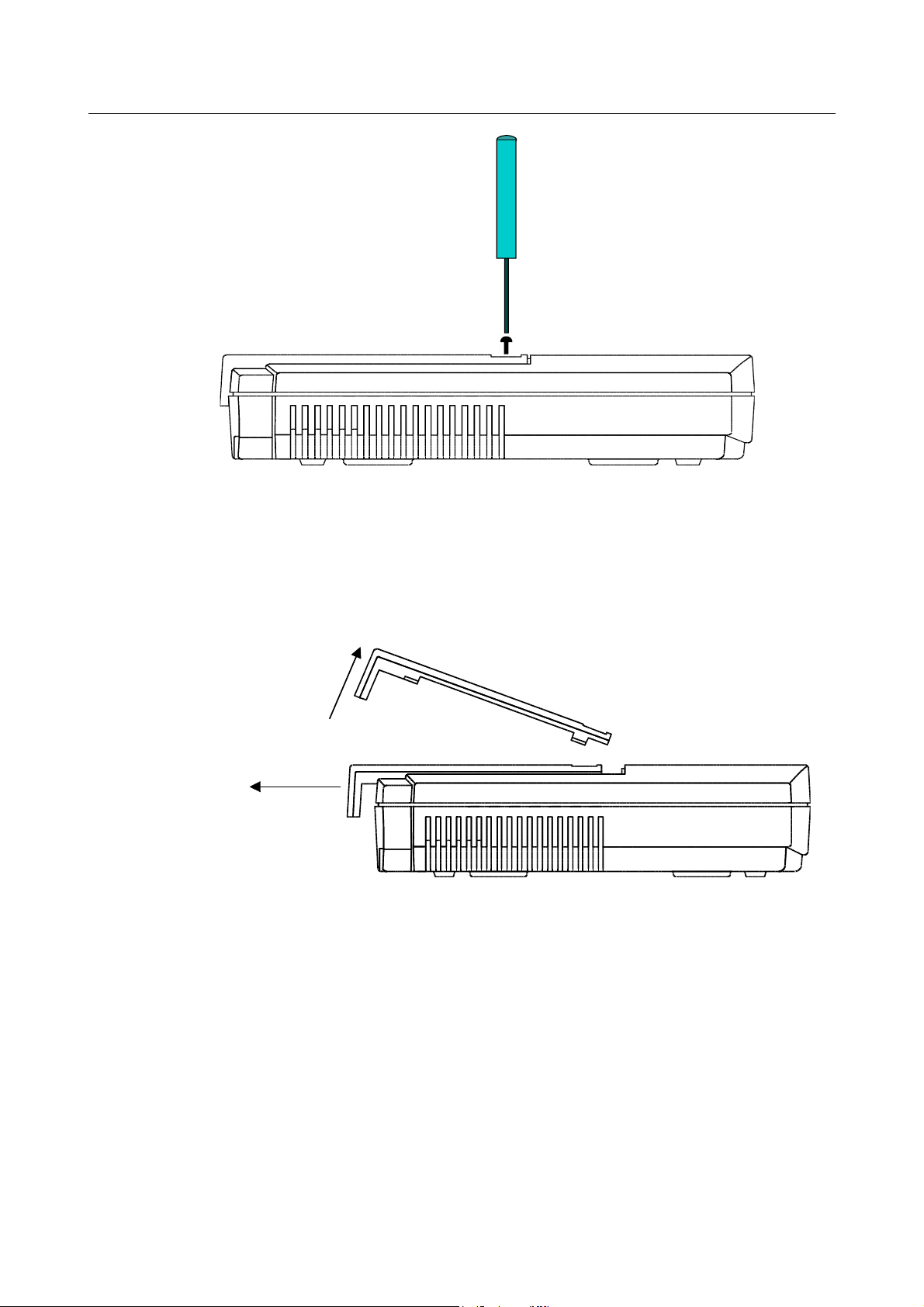
To remove the Chip card, first open the lock by removing the housing cover.
Using a small phillips head screwdriver to unscrew the central locking screw
from the housing cover.
8
Page 10
Assembly
Fig. 5: Unscrewing the cover
Now remove the cover horizontally until the limit stop (approx. 9 mm) and then
lift it up.
To remove the Chip card, pull the card lock out.
2.
1.
Fig. 6: Removing the cover
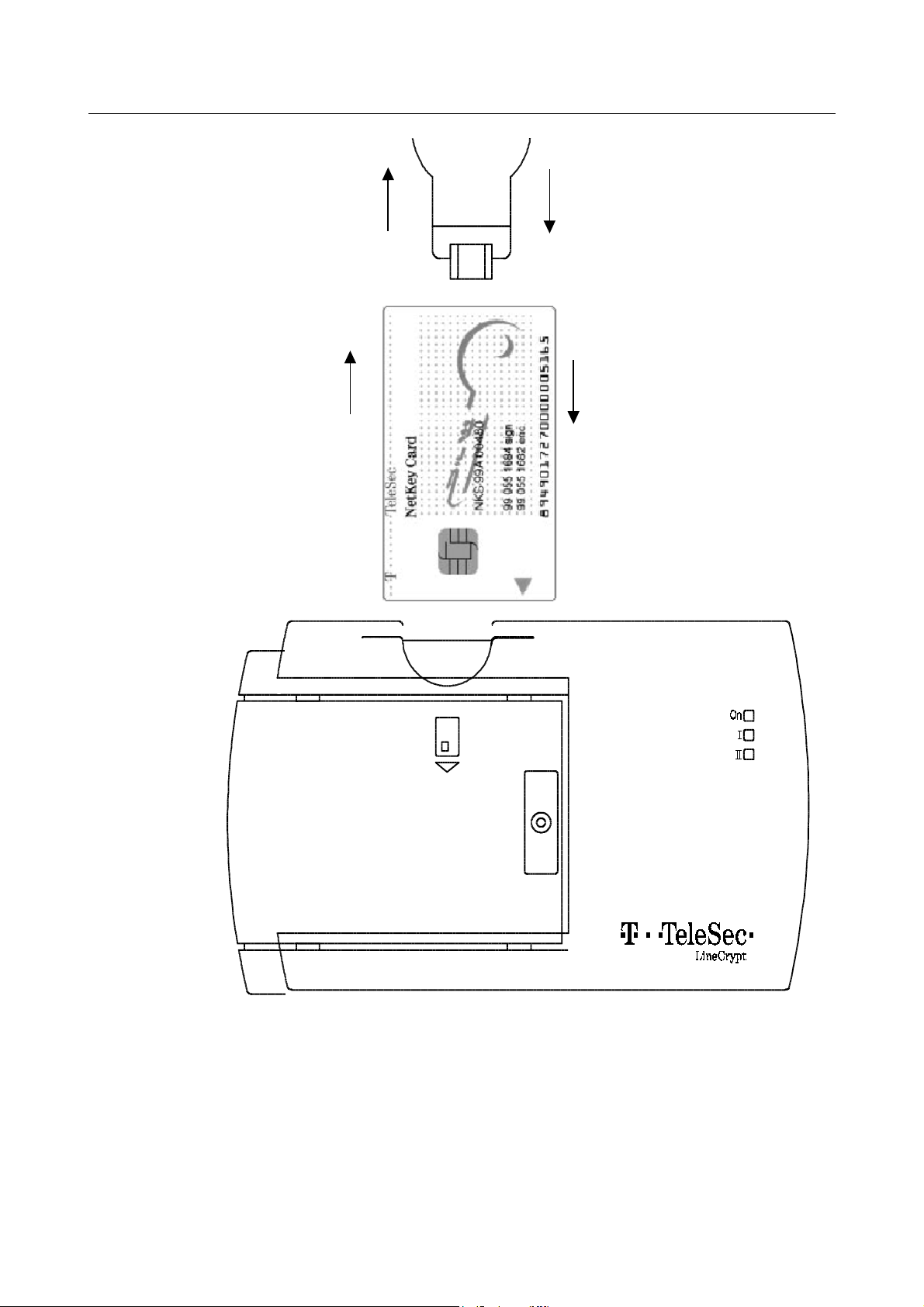
Now remove the Chip card and note the Certificate ID. Plug the Chip card back
into the card slot.
9
Page 11
Assembly
k
d
2
1
4
Card loc
3
Chip car
Fig. 7: Chip card installation
If the Chip card should remain permanently in the LineCrypt DSL, put the card
lock back into its operational position.
Assemble the cover to the device and fix it with the screw.
10
Page 12

Assembly
Installation place
Place or hang the LineCrypt DSL in a suitable place. For wall mounting, please
use the enclosed drilling template and mount the LineCrypt with the sockets on
the underside. The installation place should be dry and free from dust. The LineCrypt is designed for an environmental temperature range of +41°F to
+104°F. Therefore, do not expose the LineCrypt in direct sunlight and be sure
that there is sufficient ventilation.
11
Page 13

Start-Up
Start-Up
After the appropriate installation, connect the LineCrypt DSL with the mains cable plug to a earthed socket. The LineCrypt DSL perform a self-test. After 10 to
15 seconds it will start up normal operation.
It is not possible to set up connections with other equipment in the delivery
status. To be able to configure encrypted connections with other LineCrypt
equipment or unencrypted connections with other Ethernet devices, a corresponding configuration of the LineCrypt DSL is required. Use the provided PC
program “lcc” to configure the LineCrypt.
Via the local management you also have the option of configuring authorized
system administrators for remote maintenance.
CD/configuration software.
The settled CD contains the configuration software for the LineCrypt DSL, the
operating instructions for the software as well as further documents. Latest information can be found in the file “readme.txt”
12
Page 14

Operation
Operation
LED on the top side
On the top side of the LineCrypt there are three multi-colored light-emitting diodes (LED), which are labeled, On, I and II.
The On LED signals the ready status of the equipment. The I LED serves to display the data traffic on the network. The II LED serves to display key exchanges
and faults in the equipment management.
LED On
Green light No Chip card plugged in
Orange light Valid Chip card plugged in
Orange blinking
1x Authorization file/configuration missing
2x
3x
4x
5x
8x
9x
LED I
Red blinking Encrypted data traffic
Green blinking Unencrypted data traffic
LED II
Orange light Key exchange in progress
Green light Key exchange successful
Problem with the Chip card.
Recovery: Plug Chip card in properly, or
change Chip card (TeleSec NetKey Card 2.x)
Internal error detected during self-test
Red light Key exchange failed
Orange blinking Configuration fault
Red blinking Configuration fault
13
Page 15

Operation
LED on the rear side
On the rear side there are four LED. Two of the LED (green and yellow) provide
information about the status of the peer Ethernet interface and have the following meaning:
Yellow: The Ethernet connection is intact.
•
Green: Data is being transferred.
•
14
Page 16

Technical Data
Technical Data
Power supply 110 to 230 V~
Power consumption Max. 5 VA
Environmental temperature +41 °F to + 104 °F
+4 °C to + 50 °C
Ethernet interface Ethernet interfaces 2 x 10BaseT (10 Mbps, half
duplex / full duplex) with Western RJ45-WE8/8
sockets
PC interface V.24, Mini DIN 8
Chip card T-TeleSec NetKey Card (with TCOS 2.x)
Payload data encryption IDEA, DES or Triple-DES
Authentication RSA
Table 2: Technical data
15
Page 17

Glossary
Glossary
C
Certificate
Authenticated allocation of a public key for an identity expressed by the
digital signature of a Trust Center (of Deutsche Telekom AG). Each TTeleSec NetKey Card has an individual certificate
Certificate ID
Number in a certificate that provides the certificate with unambiguous
identification.
Company Card
TCOS Chip card that, unlike the →NetKey Card, contains information
→
about a closed user group. Company Cards can be obtained from Deutsche Telekom if required.
Connection scheme
Schematic diagram of possible connection variants.
E
EMC – Electromagnetic compatibility
The ability of an appliance, installation, or system to function satisfactorily
in the electromagnetic environment without introducing electromagnetic
interference to any appliance or system in that environment (quoted from
the EC EMC guideline, article 1, clause 4).
Ethernet
LAN standard (Local Area Network). Supports
The most widely used
data rates of up to 10 Mbps (10Base-T) or 100 Mbps (100Base-T).
I
IP (Internet Protocol)
The task of the Internet Protocol (IP, layer 3) is to transport data packets
from a sender to a receiver across several networks. The transmission is
packet-oriented, connectionless, and non-guaranteed. The data packets
→
16
Page 18

(also called datagrams) are transported by the IP as independent data
packets (even in the case of identical senders and receivers). IP
guarantees neither observance of a particular sequence nor delivery to
the receiver (that is, datagrams can be lost on account of network
overload, for example). There are no receive acknowledgements on the IP
layer.
IP Network
Network based on the Internet Protocol. Every device in the network is
addressed through an IP number.
IP Tunnel
A connection between two subnetworks, which conceals the precise
addresses of the communication partners. At the start of the tunnel, all
data packets receive an additional header that refers to the tunnel end.
Here the external frame is removed and the original data packet is
forwarded to its actual receiver.
Glossary
L
LAN (Local Area Network)
A spatially restricted network. The most widely used LAN standard is
Ethernet.
→
LED – Light-Emitting Diode
For displaying the operational status of the device and of the connection.
LineCrypt Company Card
Special chip cards with information on closed user groups. Can be
obtained from Deutsche Telekom if required.
N
NetKey Card
TCOS Operating System. The private asymmetrical
SmartCard with
key and a
Telekom
Certificate for →Authentication awarded by the Deutsche
→
TrustCenter is stored on the → NetKey Card.
→
→
17
Page 19

Glossary
T
TCP/IP (Internet Protocol and Transmission Control Protocol)
TCP is a connection-oriented transport protocol for use in packet
switched networks. The protocol builds on the IP protocol, supports the
functions of the transport layer, and establishes a secure connection between the entities before data transfer.
TCOS (TeleSec Chip card Operating System)
Operating system for processor-controlled Chip cards (smart cards).
V
VPN (Virtual Private Network)
A protected virtual sub-network is set up in an unprotected network using
encryption mechanisms.
18
Page 20

Index
Authentication 15
Certificate ID 9, 16
Chip card 6, 8ff, 13, 15, 18
Connection scheme 6, 16
drilling template 11
Environmental temperature 15
Ethernet 6f, 12, 14ff
IDEA 15
IP Network 17
IP Tunnel 5, 17
LAN 17
LED 13, 17
NetKey Card 13, 15, 17
Operating System 17f
RSA 15
self-test 12f
TCP/IP 18
VPN 5, 18
19
Page 21

Important telephone numbers
In the event of malfunctions:
Sales enquiries:
Please enter the telephone number
when handing over the unit.
The LineCrypt fulfils the requirements of the following EU Directive:
1999/5/EG
For this reason the LineCrypt bears the CE mark.
Responsible for content: T-TeleSec Products
Further information :
Internet http://www.telekom.de/t-telesec
e-mail [email protected]
Issued by:
Deutsche Telekom AG
Edition: 04.04.03
Subject to change without notice
 Loading...