

Page 1
3012A WIRELESS NUMERIC KEYPAD & MINI MOUSE
Product information
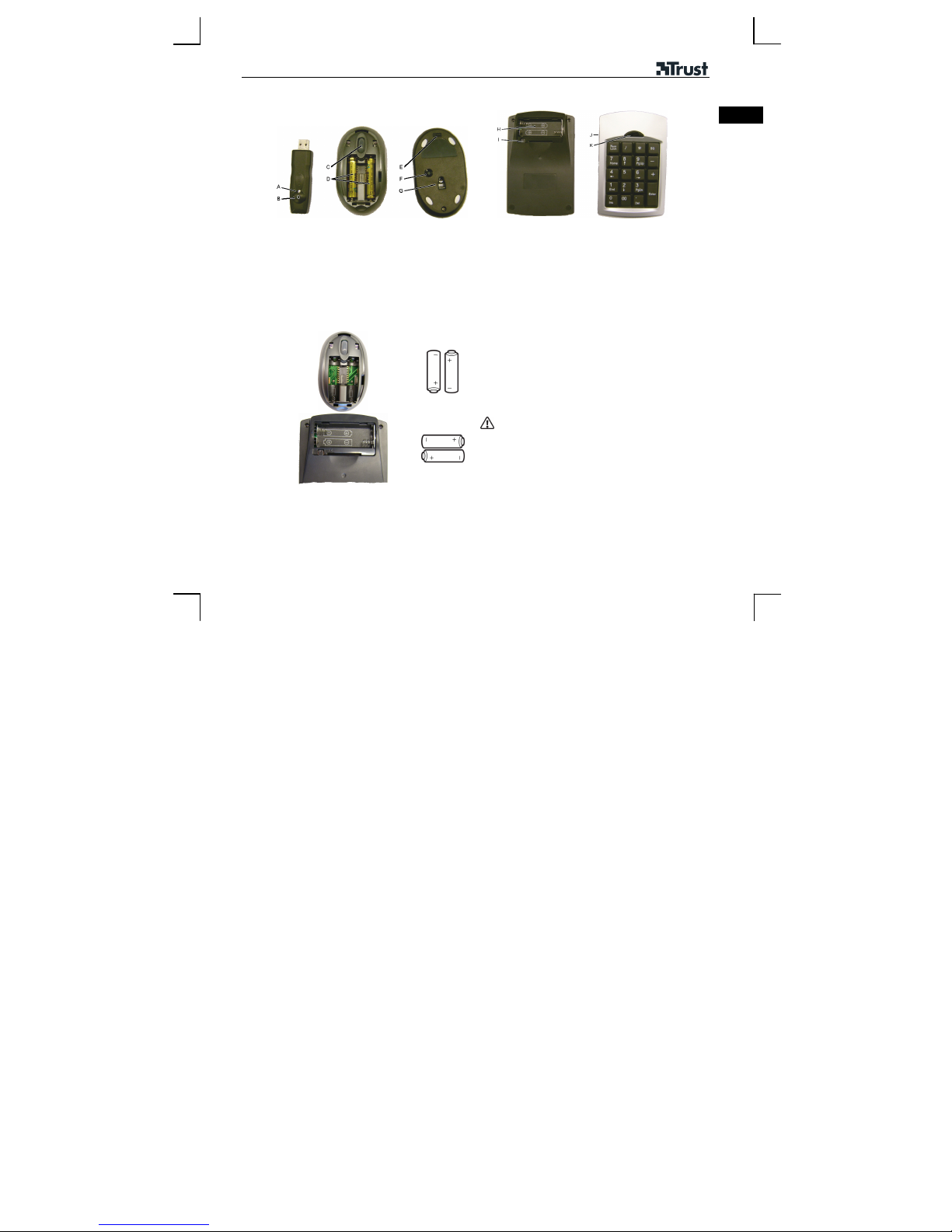
Receiver Mouse Keypad
A: Indicator
B: Connection button
Installation
1
C: Scroll wheel
D: Battery holder
E: On/Off switch
F: Connection button
G: Optical motion sensor
H: Battery holder
I: Connection button
J: On/Off switch
K: Calculator button
Open the battery cover.
Insert the batteries.
Close the battery cover (only for the mouse).
Make a new connection after replacing the
batteries (see steps 4a and 4b).
UK
1
Page 2
3012A WIRELESS NUMERIC KEYPAD & MINI MOUSE
2
Windows 98SE
2A
…
3
Start Windows (98 SE or a later release).
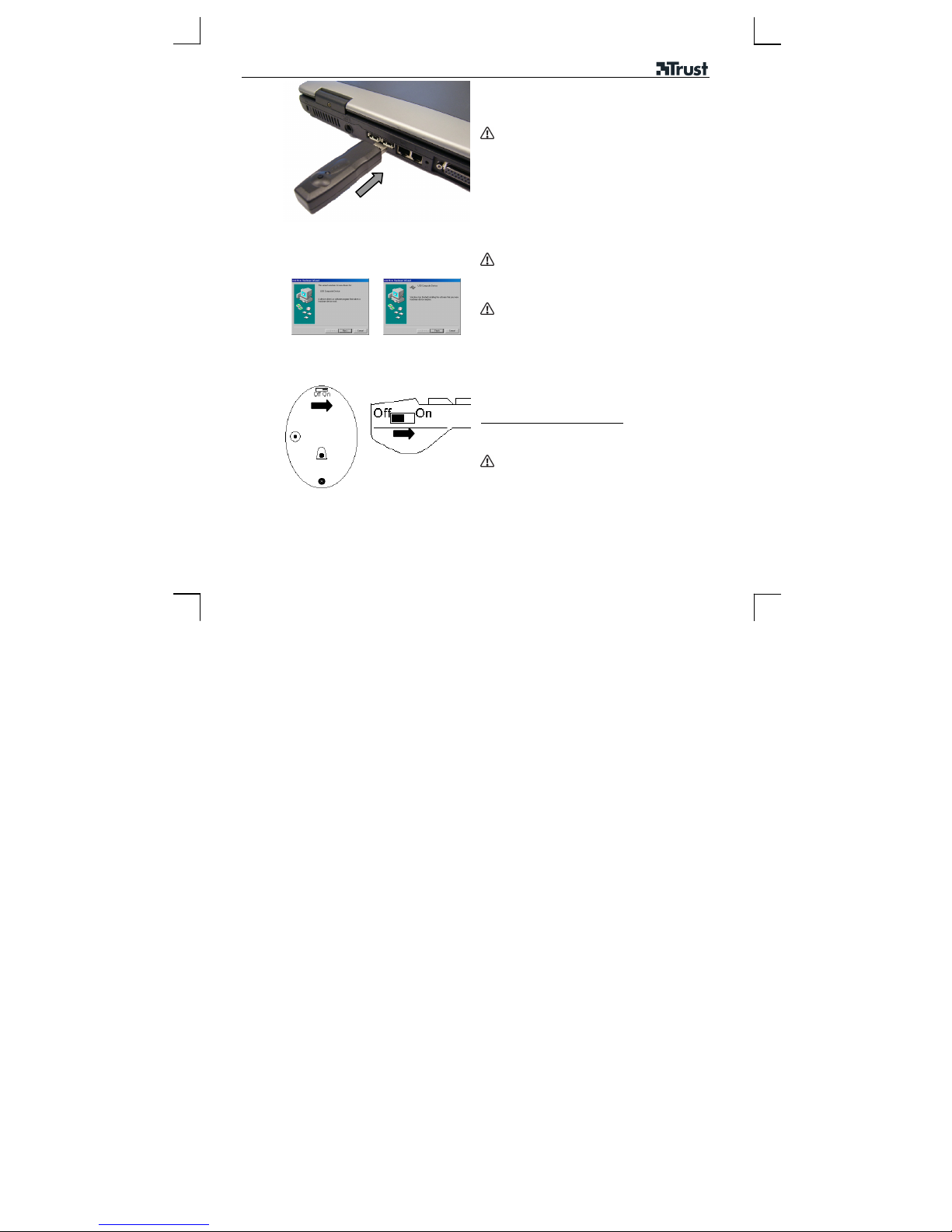
Connect the receiver to a USB port.
Use the USB extension lead if the receiver
blocks the USB port.
New hardware will be detected.
• Windows 98SE: Æ 2A , 3
Windows 2000, Windows ME and Windows XP:
•
the driver will be installed automatically. Æ 3
Windows 98SE:
Follow the on-screen instructions.
Leave your existing mouse connected to your
computer for the installation process. If it has
already been removed, use the Tab and Enter
keys on your keyboard.
Insert the W indows 98SE Installation CD-ROM
into your CD-ROM drive.
Three components will be installed. If necessary,
specify the location of the files at the Windows 98SE
CD-ROM.
Turning on the mouse and keypad
Mouse: Set the On/Off switch to “ON”
Set the On/Off switch to “ON”
Keypad:
Set the switches to "OFF" during transport.
2
Page 3
3012A WIRELESS NUMERIC KEYPAD & MINI MOUSE
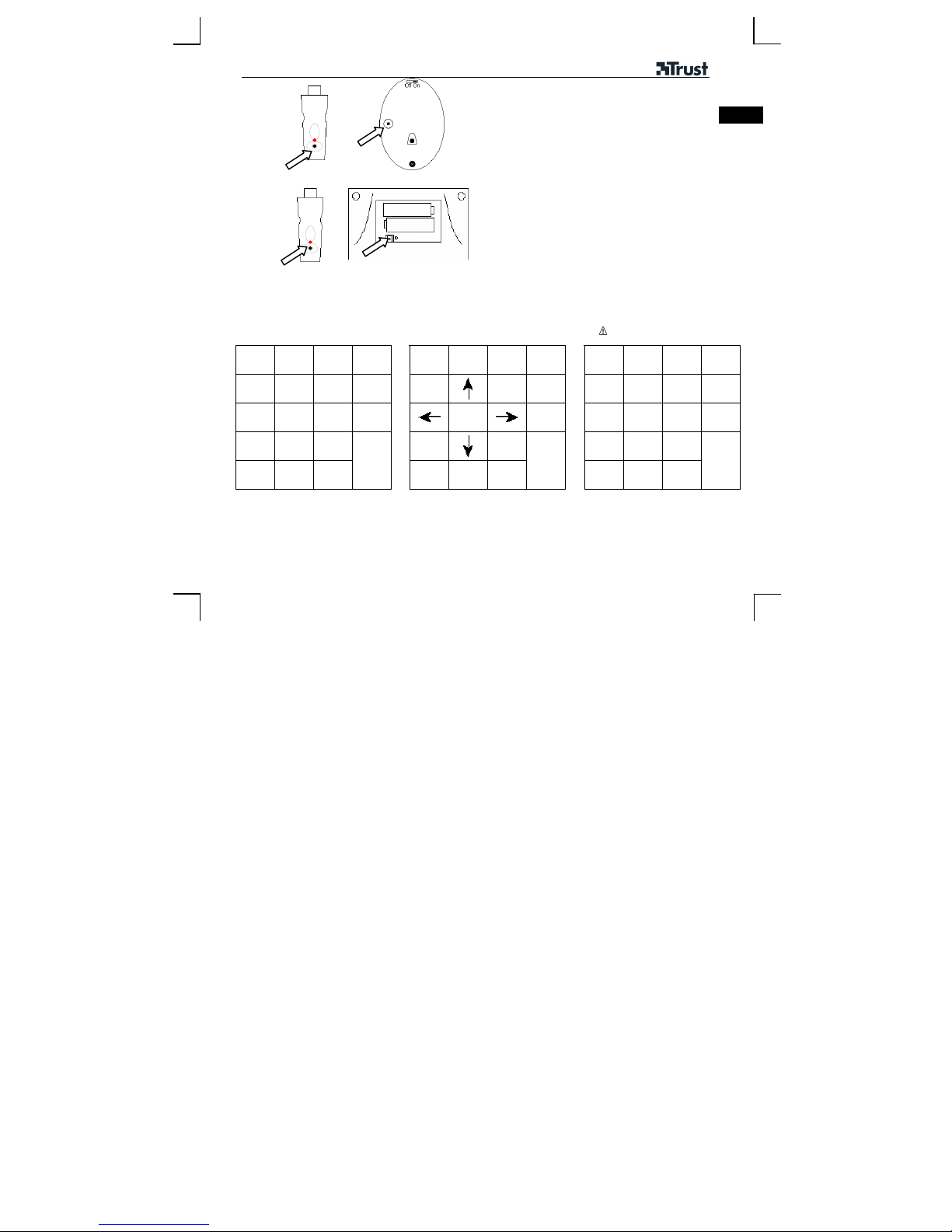
Connecting the mouse to the receiver
1) Press the connection button (receiver).
4a
2) Press the connection button (mouse).
Connecting the keypad to the receiver
1) Press the connection button (receiver).
4b
5
Keypad functions
Num Lock on Num Lock off
Num
/ * BS
Lock
7 8 9 - Home
4 5 6 +
1 2 3 End
0 00 .
Press “Calc” Æ Starts Windows Calculator
The devices are now ready for use.
Num
Lock
Enter
Ins Shift Del
2) Press the connection button (keypad).
3) Close the keypad’s battery cover.
/ * BS
The indicator A will go out.
The indicator A will flash and then be lit
continuously.
UK
The indicator A will go out.
The indicator A will flash and then be lit
continuously.
Num Lock off, press Shift + Key
Only Windows ME, Windows 2000
and Windows XP
Num
Lock
PgUp -
+
PgDn Euro
Enter
Shift
BS
Inter-
net
appli.
E-
mail
3
Page 4

3012A WIRELESS NUMERIC KEYPAD & MINI MOUSE
Configuring the mouse sensitivity
The default setting is 800 CPI. If this is too sensitive, set the mouse sensitivity to 400 CPI.
When the batteries have been removed: make a new connection (steps 4a and 4b)
Life span of the mouse batteries: 32 hours.
Life span of the keypad batteries: 78 hours.
Use Trust rechargeable batteries (www.trust.com/battery-chargers) for the mouse.
SOFTWARE
A program is available on the Trust website (www.trust.com/14190) for checking the battery status.
The program also supports the Calculator, E-mail, Euro and Internet function.
400 CPI
+
800 CPI
Setting the mouse sensitivity to 400 CPI
1. Press the connection button (receiver).
The indicator A will go out.
2. Press the scroll wheel and the connection button
(mouse) at the same time.
The indicator A will flash and then be lit
continuously.
Setting the mouse sensitivity to 800 CPI
1. Press the connection button (receiver).
The indicator A will go out.
2. Press the connection button (mouse).
The indicator A will flash and then be lit
continuously.
4
Page 5

3012A WIRELESS NUMERIC KEYPAD & MINI MOUSE
Note
Batteries
The batteries supplied with the device are not rechargeable.
Only use AAA alkaline batteries with the keypad.
Do not use old and new batteries together.
Rechargeable AAA batteries are only suitable for the mouse.
The battery status may be incorrect when using the software in combination with rechargeable batteries.
Bad wireless connection.
There are metal objects close to or between the mouse and the receiver (for example, a metal table top).
The batteries are (almost) empty.
There is another wireless device nearby.
120 cm
Go to www.trust.com/14190 for up-to-date FAQs, drivers and instruction manuals.
UK
5
Page 6

3012A WIRELESS NUMERIC KEYPAD & MINI MOUSE
0470
• This device meets the essential requirements and other relevant conditions of the applicable European
directives. The Declaration of Conformity (DoC) is available at www.trust.com/14190/ce.
Wireless
• This wireless device works at a frequency of 27,045/27,145 MHz. It meets the essential requirements and
other relevant conditions of R&TTE Directive 1999/5/EC and can be used in the following countries: DE, FR,
IT, ES, NL, GR, PT, BE, HU, CZ, DK, SE, CH, AT, IE, IS, PL, SK, UK, NO, FI, LU. There are no limitations
per channel for the above-mentioned countries. Go to www.trust.com/14190 for an updated list of the
countries where the use of this device is permitted.
• There may be restrictions for the use of this device outside of the EU. If this device is used outside of the EU,
check whether this device meets the local regulations. Frequency: 27,045/27,145 MHz, Bandwidth: approx.
10 kHz, Power: 1 mW.
• Nowadays, there are an increasing number of wireless products (video, audio, computer, etc.) which work in
the same frequency range as this device. It may, therefore, be possible that the functionality of this device is
limited by or is limiting for other wireless devices. This can only be avoided by paying attention to the
distance between devices and, where possible, by changing channels.
• Be careful when using wireless devices if you have a pacemaker or are dependent on other life-saving,
sensitive electronic equipment, because this product transmits radio signals.
Warranty & copyright
• This device has a two-year product warranty which is valid from the date of purchase. Go to
www.trust.com/warranty for more information.
• It is forbidden to reproduce any part of this instruction manual without the permission of Trust International
B.V.
6
 Loading...