

Page 1

Truma iNet X
EN Operating instructions
To be kept in the vehicle
Seite 02
BG, CS, EL, ES, ET, FI, HR,
HU, IS, LT, LV, NO, PL, PT,
RO, RU, SK, SL, TR
Page 2

Truma iNet X
Table of contents
Symbols used ........................................................................ 2
Intended use ....................................................................... 2
Operating instructions
Safety instructions ............................................................ 3
Important notes ................................................................. 3
Display and control elements .......................................... 4
Display ................................................................................... 4
Home button ......................................................................... 4
Back button ........................................................................... 4
Initial start-up ..................................................................... 4
Start-up ................................................................................ 4
Switching off ...................................................................... 5
Standby mode .................................................................... 5
Restarting the control panel ............................................ 5
Operation ............................................................................. 5
Touchscreen .......................................................................... 5
App control (Bluetooth) ......................................................... 5
Connection with mobile devices ........................................... 5
Resetting faults .................................................................. 6
Maintenance ....................................................................... 6
Disposal ............................................................................... 6
Technical specifications ................................................... 6
Dimensions ........................................................................... 7
Manufacturer's Warranty
(European Union) ................................................................ 7
Symbols used
The device must only be installed and repaired by an
expert.
Symbol indicates possible hazards.
Note containing information and tips.
Intended use
The electronic control unit Truma iNet X is used to control
and monitor Truma appliances and accessories from selected
third-party manufacturers.
The Truma iNet X is intended for installation in caravans and
motor homes. Installation in boats is not permitted.
2 EN
Page 3

Operating instructions
– Only the time switch of the Truma iNet X may be used to
define the start and end time of a required period.
Safety instructions
– The Truma iNet X must not be operated unless it is in tech-
nically perfect condition.
– Repairs must be carried out immediately. Only carry out
repairs yourself if the solution is described in the trouble-
shooting guide of the control panel or the App.
– Do not repair or modify the Truma iNet X.
– A defective Truma iNet X may only be repaired by the man-
ufacturer or the manufacturer’s service department.
– Never use LP gas appliances when refuelling, in multi-storey
car parks, in garages or on ferries. Switch off the Truma iNet X
to prevent the heater being switched back on by the
TrumaApp or the time switch (see “Switching on/off”).
– Do not switch on the appliance if the housing is damaged
or if liquid has entered it.
Important notes
– If a new or replacement appliance (heater, air conditioning
system) is connected to the bus system, the procedure de-
scribed in “Initial start-up” must be repeated.
– In case of problems, the appliance is reset to the last func-
tioning version.
Air conditioning systems – joint use of IR remote control and Truma iNet X
– Even when the Truma iNet X has been connected, the IR
remote control is still available to control the air condi-
tioning system. The Truma iNet X recognises all settings
that are made on the air conditioning system using the
IR remote control. The IR remote control only transmits
the settings that are shown in its display (no bidirectional
communication).
– This device corresponds to Section 15 of the FCC reg-
ulations and the RSS standards of Industry Canada for
licence-exempt radio devices. For operation, the following
conditions must be fulfilled:
(1) The device must not cause any damaging interference.
(2) The device must be immune to interference, also interference that could cause unwanted operating states.
– This device complies with Part 15 of the FCC Rules and
contains licence-exempt transmitter(s)/receiver(s) that comply with Innovation, Science and Economic Development
Canada’s licence-exempt RSS(s). Operation is subject to the
following two conditions:
(1) This device may not cause interference.
(2) This device must accept any interference, including interference that may cause undesired operation of the device.
– L’émetteur/récepteur exempt de licence contenu dans
le pré-sent appareil est conforme aux CNR d’Innovation,
Sciences et Développement économique Canada applicables aux appa-reils radio exempts de licence. L’exploitation
est autorisée aux deux conditions suivantes :
(1) l’appareil ne doit pas produire de brouillage, et
(2) l’utilisateur de l’appareil doit accepter tout brouillage
radioélectrique subi, même si le brouillage est sus-ceptible
d’en compromettre le fonctionnement.
3EN
Page 4

Display and control elements
1
23
Home button
Briefly press the Home button to go back to the dashboard .
Press the Home button longer to put the control panel in
standby mode.
Back button
Briefly press the Back button to go back to the previous menu
level. The last set value remains unchanged.
Press the Back button longer to open the device manager.
Initial start-up
Figure 1
1 = Display
2 = Home button
3 = Back button
– Ensure that all connected appliances have power.
The control panel recognises the connected appliances and
guides the user through the start-up procedure.
Start-up
Display
The Truma iNet X has a touchscreen display with which the
connected appliances can be monitored and controlled.
When the Truma iNet X is connected to the power supply, the
dashboard is displayed after a few seconds.
4 EN
Page 5

Switching off
The Truma iNet X can be put into stand-by mode or switched
off using the menu on the dashboard .
Operation
Touchscreen
If the Truma iNet X is switched off, all connected heating
and air conditioning systems are also switched off.
Standby mode
If there is no input for a certain time, the display switches off
automatically to save power. If the Truma iNet X is in standby
mode, the connected appliances can still be controlled via the
App.
You can also press the Home button longer to put the
control panel in standby mode.
If the Truma iNet X is in standby mode, briefly press
the Home button or the Back button to activate the
Truma iNet X. After a few seconds the lock screen is displayed.
Press again to unlock the display and show the dashboard.
Restarting the control panel
Press and hold the Home button and the Back button together to restart the control panel.
The control panel is operated with your fingers via the
touchscreen.
App control (Bluetooth)
The Truma iNet X can also be connected to a mobile device
(smartphone/tablet) with Bluetooth so that connected appliances can be controlled with the App .
Depending on the operating system, the App must be installed on the mobile device from the Google Playstore
( Android) or App Store (iOS) in order to use this function.
Only a limited number of mobile devices can be stored in the
Truma iNet X. The stored mobile devices can be managed via
the Truma iNet X.
Only one mobile device at a time can be connected with
the Truma iNet X and be used to control appliances.
If you encounter problems with the App, check that you
have the latest version and, if not, update it.
Connection with mobile devices
– Enable Bluetooth on the mobile device. If you have any
questions with regard to the settings of your mobile device,
contact the manufacturer.
5EN
Page 6
The connection can be made via the Truma iNet X or via
the mobile device with the help of the App.
– Follow the instructions of the set-up wizard on the screen.
Resetting faults
If a fault occurs in a connected appliance, this is shown on the
Truma iNet X.. Solutions to rectify the fault are suggested in
the display. The fault can then be reset with the Truma iNet X.
Maintenance
The Truma iNet X requires no maintenance. Use a damp,
non-scouring cloth to clean the front panel. If this is not sufficient, use a neutral soap solution.
Technical specifications
Display (touch) TFT-LCD 4.3" (resistive)
Operating temperature
range -30°C to +70°C
Storage temperature
range -30°C to +70°C
Interfaces TIN bus, CI bus, CAN bus
Bluetooth Low Energy (BLE)
Power supply 8V – 16V
Power consumption typ. 1.5 W
Weight approx. 150g
Protection class Class III
Protection type IP 10
Disposal
Neither the appliance nor the batteries may be disposed
of with domestic refuse, instead they must be sent for
recycling separately via a collection point. By doing this
you are contributing towards reuse and recycling. National
regulations and laws must be observed.
6 EN
Subject to technical changes.
Page 7
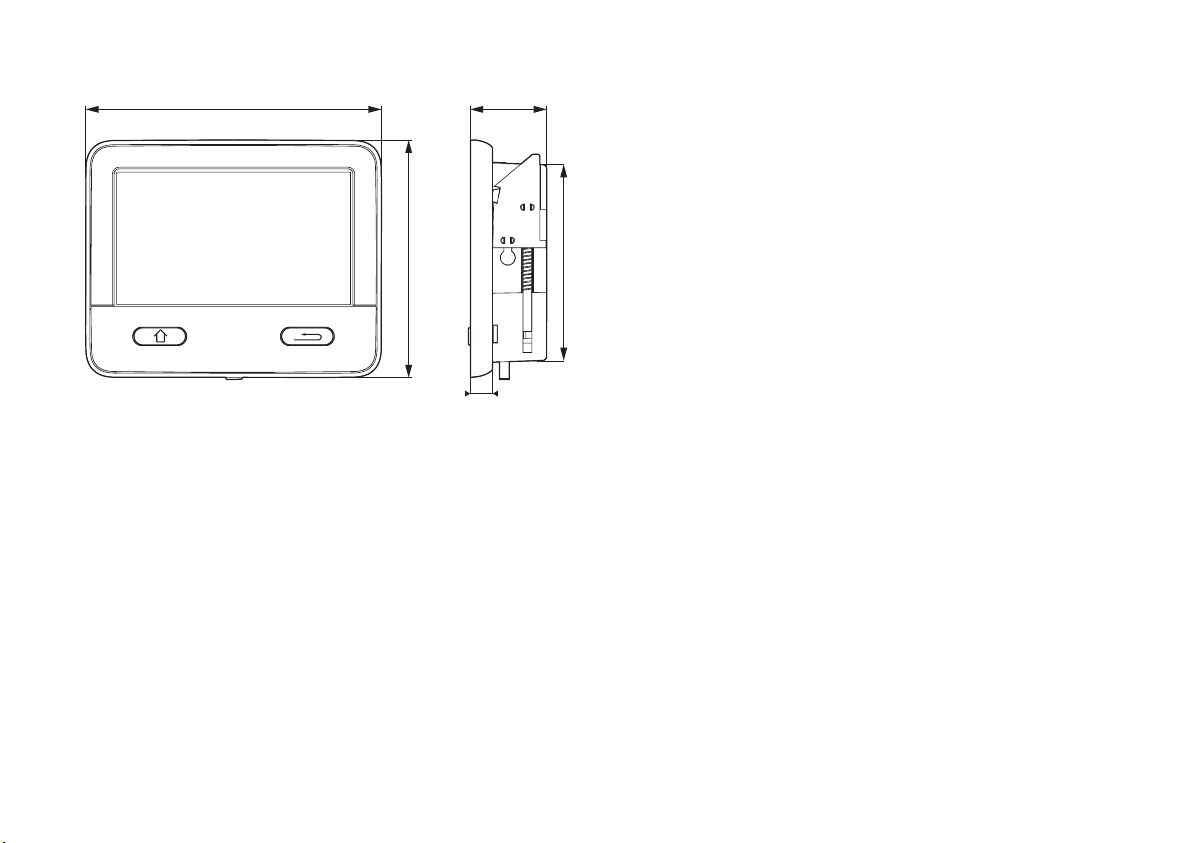
Dimensions
120,1 31
81
96,7
Manufacturer's Warranty
(European Union)
1. Scope of Manufacturer’s Warranty
As the Manufacturer of the appliance, Truma undertakes a
warranty towards the Consumer that covers any material and/
or manufacturing defects of the appliance.
This Warranty is applicable in EU member states as well as
in Iceland, Norway, Switzerland and Turkey. A Consumer is
the natural person who was the first one to purchase the
appliance from the Manufacturer, OEM or dealer and who
neither resold the appliance in a commercial or self-employed
professional capacity nor installed it for a third party in such a
capacity.
9
Figure 2 – Dimensions in mm. Illustration not to scale
The Manufacturer’s Warranty covers any of the aforementioned defects that occur within 24 months upon concluding
the purchase agreement between the seller and the Consumer. The Manufacturer or an authorised service partner
undertakes to remedy such defects through subsequent
fulfilment, i.e. at its discretion either by repairing or replacing
the defective item. Defective parts shall become the property
of the Manufacturer or the authorised service partner. If the
appliance is no longer manufactured at the time of defect notification and if replacement delivery has been opted for, then
the Manufacturer may deliver a similar product.
If the Manufacturer remedies a defect under its Warranty
commitment, the term of the Warranty shall not start again
with regard to the repaired or replaced parts; rather, the original warranty period shall continue to be applicable to the
appliance. Only the Manufacturer itself or an authorised service partner shall be entitled to conduct a warranty job. Any
costs that occur in the event of a warranty claim shall be settled directly between the authorised service partner and the
7EN
Page 8

Manufacturer. The Warranty does not cover additional costs
arising from complicated removal or installation jobs on the
appliance (e.g. dismantling of furnishings or parts of the vehicle body), and neither does it cover travel expenses incurred
by the authorised service partner or the Manufacturer.
No further-reaching claims shall be permitted, especially damage claims presented by the Consumer or third parties. This
shall not affect the provisions of the German Product Liability
Act (Produkthaftungsgesetz).
The voluntary manufacturer’s warranty does not affect the
Consumer’s legally valid claims for defects against the seller
in the relevant country of purchase. In individual countries
there may be warranties that can be issued by the relevant
dealer (official distributor, Truma Partner). In such cases the
warranty can be implemented directly through the dealer from
whom the Consumer bought the appliance. The warranty regulations of the country in which the appliance was purchased
by the Consumer for the first time shall also be applicable.
2. Warranty exclusions
No warranty claim shall be applicable under the following
circumstances:
– Installation of replacement, supplementary or accessory
parts that are not original manufacturer’s parts or which
have not been approved by the manufacturer. This applies
in particular if the appliance is subject to networked control,
if the control units or the software have not been approved
by Truma or if the Truma control unit (e.g. Truma CP plus
or Truma iNet Box) has not been exclusively used for controlling Truma appliances or appliances approved by Truma.
– As a consequence of damage arising from foreign sub-
stances (e.g. oil, or plasticisers in the gas), chemical or
electrochemical influences in the water, or cases when the
appliance has come into contact with unsuitable substances (e.g. chemical products, flammable substances or unsuitable cleaning agents)
– Damage caused by abnormal environmental or unsuitable
operating conditions
– Damage caused by force majeure or natural disasters or
any other influences not within Truma’s responsibility
– Damage resulting from improper transport
– End customer’s or third-party modifications of the appli-
ance, including any replacement, supplementary or acces-
sory parts, or installation of the same, especially concerning
the exhaust gas system or the cowl.
3. Making a warranty claim
– Improper, unsuitable, faulty or negligent use and any use
that is not compliant with the intended purpose
– Improper installation, assembly or commissioning, contrary
to operating or installation instructions
– Improper operation or operation contrary to operating or
installation instructions, particularly any disregard for maintenance, care or warning notes,
– Instances where installations, repairs or any other proce-
dures have been conducted by non-authorised parties
– Consumable materials and parts which are subject to natu-
ral wear and tear
8 EN
The warranty must be claimed with an authorised service partner or at the Truma Service Centre. All the relevant addresses
and phone numbers can be found at www.truma.com, in the
“Service” section.
The Manufacturer’s address is:
Truma Gerätetechnik GmbH & Co. KG
Truma Servicezentrum
Wernher-von-Braun-Straße 12
85640 Putzbrunn, Germany
Page 9

To ensure a smooth procedure, we would be grateful if you
could have the following details ready before contacting us:
– Detailed description of the defect
– Serial number of the appliance
– Date of purchase
The authorised service partner or the Truma Service Centre
will then specify the further procedure. To avoid transport
damage, the affected appliance must only be shipped by
prior arrangement with the authorised service partner or the
Truma Service Centre.
If the warranty claim is recognised by the Manufacturer, then
the transport expenses shall be borne by the same. If no
warranty claim is applicable, the Consumer will be notified
accordingly and any repair and transport expenses shall then
be the Consumer’s liability. We ask you not to send in an appliance without prior arrangement.
9EN
Page 10

DE Bei Störungen wenden Sie sich bitte an das Truma
Servicezentrum oder an einen unserer autorisierten
Servicepartner (siehe www.truma.com). Für eine rasche
Bearbeitung halten Sie bitte Gerätetyp und Seriennummer
(siehe Typenschild) bereit.
EN Should problems occur, please contact the Truma Service
Centre or one of our authorised service partners (see www.
truma.com). In order to avoid delays, please have the unit
model and serial number ready (see type plate).
FR Veuillez vous adresser au centre de SAV Truma ou à un de
nos partenaires de SAV agréés en cas de dysfonctionnements
(voir www.truma.com). Pour un traitement rapide de votre
demande, veuillez tenir prêts le type d’appareil et le numéro
de série (voir plaque signalétique).
DA Ved fejl kontaktes Trumas serviceafdeling eller en af vores
autoriserede servicepartnere (se www.truma.com). Sørg for
at have oplysninger om apparattype og serienummer (se
typeskiltet) klar for hurtig behandling.
SV Vid fel kontakta Truma servicecenter eller någon av
våra auktoriserade servicepartner (se www.truma.com).
För snabb handläggning bör du ha aggregatets typ och
serienummer (se typskylten) till hands.
BG Ръководството за употреба и за монтаж на езика на
Вашата страна можете да поръчате от производителя
Truma или от сервиза на Truma във Вашата страна.
CS Návod k použití a montážní návod si lze v řeči Vaší země
vyžádat u výrobce Truma nebo servisu Truma ve Vaší zemi.
IT In caso di guasti rivolgersi al centro di assistenza
Truma o a un nostro partner di assistenza autorizzato
(consultare il sito www.truma.com). Affinché la richiesta
possa essere elaborata rapidamente, tenere a portata di
mano il modello dell’apparecchio e il numero di matricola
(vedere targa dati).
NL Bij storingen kunt u contact opnemen met het
Truma Servicecentrum of met een van onze erkende
servicepartners (zie www.truma.com). Voor een snelle
bediening dient u apparaattype en serienummer (zie
typeplaat) gereed te houden.
EL Μπορείτε να ζητήσετε τις οδηγίες χρήσης και τοποθέτησης
στη γλώσσα της χώρας σας από τον κατασκευαστή Truma
ή από το σέρβις της Truma στη χώρα σας.
ES Las instrucciones de uso y de montaje en su idioma pueden
solicitarse al fabricante Truma o al Servicio postventa
Truma en su país.
ET Kasutus- ja paigaldusjuhendit Teie riigikeeles saab taotleda
tootjalt Truma või Truma Service’lt Teie riigis.
Page 11

FI Saat käyttö- ja asennusohjeen pyynnöstä omalla kielelläsi
valmistajalta (Truma) tai maasi Truma-huoltoon.
HR Upute za uporabu i montažu na jeziku Vaše zemlje možete
tražiti kod proizvođača Truma ili kod Truma Service u Vašoj
zemlji.
HU Az Ön nyelvén a használati és beszerelési utasítás a Truma
gyártójától vagy az adott ország Truma szerviztől szerezhető
be.
IS Þú getur nálgast notkunar- og uppsetningarleiðbeiningar á
þínu tungumáli hjá framleiðandanum Truma eða hjá Truma
Service í þínu landi.
LT Naudojimo ir įmontavimo instrukciją jūsų šalies kalba galite
gauti iš gamintojo „Truma“ ir jūsų šalies „Truma“ klientų
aptarnavimo centruose.
LV Lietošanas un instalācijas instrukciju attiecīgās valsts
valodā Jūs varat pieprasīt pie ražotāja Truma vai Truma
Service Jūsu valstī.
NO Spør om bruks- og monteringsanvisning på norsk hos
produsenten Truma eller Trumas serviceavdeling i landet
ditt.
PL Instrukcję obsługi i instrukcję montażu w Państwa wersji
językowej można otrzymać w firmie Truma lub serwisie
firmy Truma znajdującym się w Państwa kraju.
PT As instruções de utilização e montagem podem ser
solicitadas junto do fabricante Truma ou do serviço de
assistência da Truma no seu país.
RO Puteți solicita instrucțiunile de utilizare și instrucțiunile de
montaj în limba dumneavoastră la producătorul Truma sau
la service-ul Truma din țara dumneavoastră.
RU Руководство по эксплуатации и монтажу на Вашем
национальном языке можно запросить у изготовителя
Truma или в сервисной службе фирмы Truma в Вашей
стране.
SK Návod na použitie a montáž vo Vašom štátnom jazyku si
môžete vyžiadať u výrobcu Truma alebo v servise Truma vo
Vašej krajine.
SL Navodila za uporabo in vgradnjo v vašem jeziku lahko
naročite pri proizvajalcu Truma oz. v servisni službi podjetja
Truma v vaši državi.
TR Dilinizdeki kullanma ve montaj talimatı, üretici Truma'dan
veya ülkenizdeki Truma servisinden talep edilebilir.
Page 12

AU In Australia, always notify the Service Australia if problems
are encountered; in other countries the relevant service
partners should be contacted
(www.truma.com).
Having the equipment model and the serial number ready
(see type plate) will speed up processing.
Manufacturing
Truma Gerätetechnik GmbH & Co. KG
Wernher-von-Braun-Straße 12
D - 85640 Putzbrunn
Germany
www.truma.com
Service Europe
Telefon +49 (0)89 4617-2020
Telefax +49 (0)89 4617-2159
[email protected]
Service Australia
Leisure-Tec Australia Pty. Ltd.
50 Metrolink Circuit,
Campbellfield, VIC 3061
Australia
Telephone: +61 1300 07 2018
E-Mail: [email protected]
47000-00083 · 00 · 05/2019 · ©
 Loading...