

Truma Cooler C36, Cooler C73, Cooler C44, Cooler C60, Cooler C105 Operating Instructions Manual
...Page 1
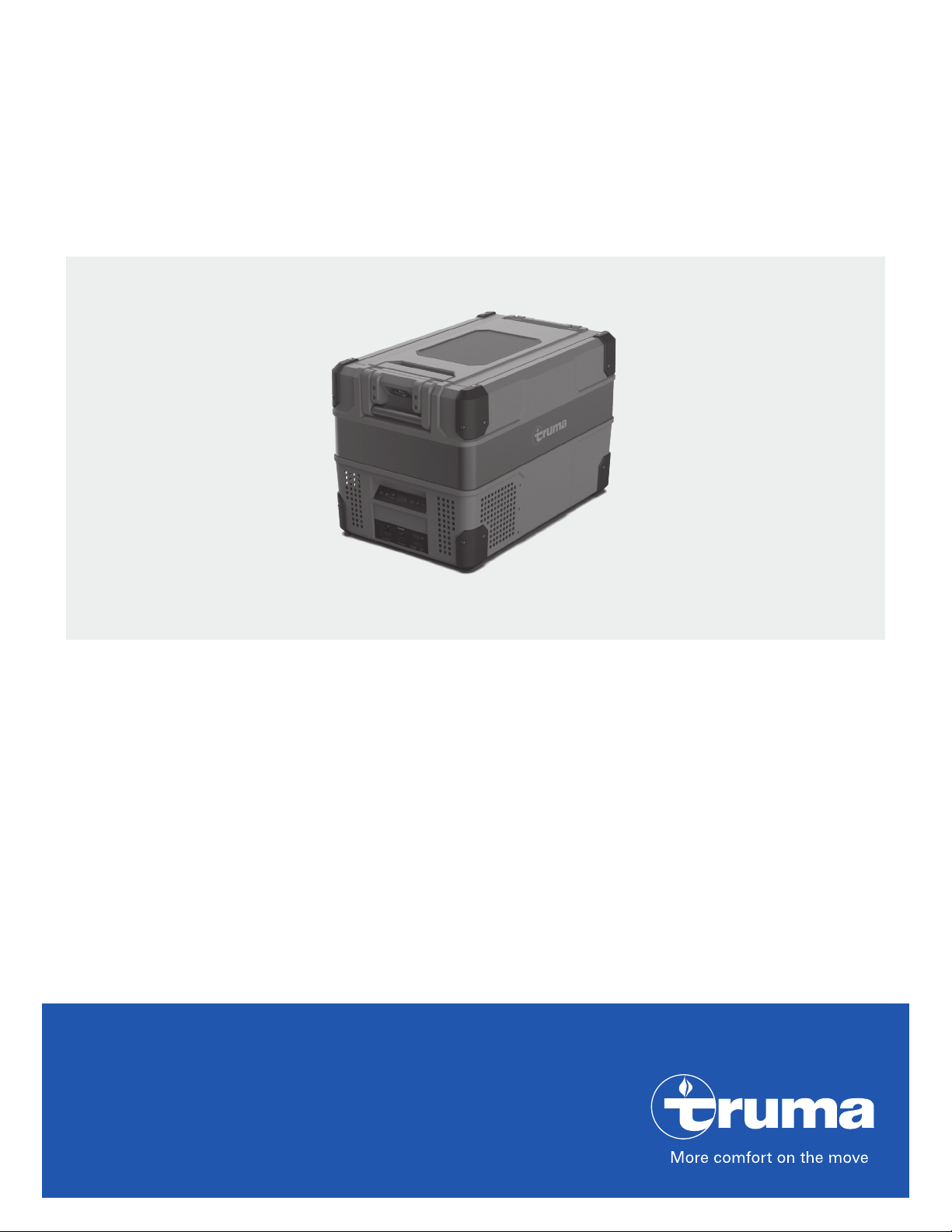
Truma Cooler
Portable Fridge / Freezer
Operating instructions
This document is part of the product.
READ ALL INSTRUCTIONS BEFORE
USING THIS PRODUCT.
Models
Single Zone Models
C36 / C44 / C60 / C73 / C105
Dual Zone Models
C69 DZ / C96 DZ
Page 2
Truma Cooler
Table of Contents
Trademark information ........................................................ 2
Scope of delivery ................................................................... 2
Intended Use .......................................................................... 2
Prohibited use ........................................................................ 2
Important product information ........................................... 4
Operating instructions
Product features .................................................................... 5
Control panel Single Zone ........................................................ 5
Control Panel Dual Zone ........................................................... 5
Turning the appliance on/off ............................................... 5
Temperature setting ............................................................. 6
Temperature unit setting .......................................................... 6
Battery protect voltage setting ........................................... 6
Bluetooth setting ................................................................... 6
Multi voltage system / Emergency Override ..................... 6
AC/DC, USB connection, fuse and
emergency override in front ..................................................... 6
DC connection in the back ....................................................... 7
Two way opening and removable lid ................................. 7
Remove the lid .......................................................................... 7
Attach the lid ............................................................................ 7
Truma Cooler App Instructions ........................................... 8
Cleaning .................................................................................. 8
Troubleshooting .................................................................... 8
Fault indicator ........................................................................ 9
Technical Data ..................................................................... 10
“Truma Cooler” MANUFACTURER’S LIMITED
WARRANTY .......................................................................... 11
Intended Use
The appliance is designed for cooling and freezing foods.
The product is designed for camping and other
mobile use.
This mobile appliance can be used in household
and similar applications such as
• staff kitchen areas in shops, offices and other working environments
• farm houses
• clients in hotels, motels and other residential
type environments
• bed and breakfast type environments
• catering and similar non-retail applications
The cooler is designed to be operated from:
• 12V or 24VDC on-board power supply of a
vehicle or recreational vehicle
• 12V or 24VDC auxiliary battery
• 100V - 240VAC power supply (50-60Hz)
Prohibited use
The product is not designed
• to be exposed to rain or wet environment,
• to be used as a household refrigerator
• to store chemicals and other non-food
products,
• to be used for medical transportation
Trademark information
Truma Cooler referred to as Cooler below.
Scope of delivery
Quantity Description
1 Truma Cooler
1 12/24 VDC connector cable
1 100V-240VAC connector cable
1 QR Code
2
Safety instructions
Safety symbols and signal words
This is the safety alert symbol. This symbol
alerts you to potential hazards that can kill or
hurt you and others.
indicates a hazardous situation
which, if not avoided, could result in death or
serious injury.
indicates a hazardous situation
which, if not avoided, could result in minor or
moderate injury.
Other important information or tips
Page 3
• Risk of injury.
Do not operate the Cooler if it is visibly
damaged.
• Risk of electrical shock.
Do not use this product if any of the electrical cables, connections and plugs are
trapped, worn, frayed or otherwise damaged. Always check cables for mechanical
damage, cuts in the insulation, and heat/
moisture damage before use.
– When positioning the appliance, ensure the
supply cord is not trapped or damaged.
• Risk of injury.
Repairs of the product should only be performed by a suitably qualified and authorized
person (experts) using original manufacturer
parts.Experts are persons who, based on
their specialist instruction and training, their
knowledge and experience with Truma products and the relevant standards, can carry
out the necessary work properly and identify
potential hazards.
Poor or faulty repairs could be dangerous
and will void the warranty.
• Risk of suffocation.
Do not allow children or pets to climb inside
the appliance.
• Risk of injury.
This appliance is not intended for use by persons (including children) with reduced physical, sensory or mental capabilities, or lack
of experience and knowledge, unless they
have been given supervision or instruction
concerning use of the appliance by a person
responsible for their safety.
• Risk of injury.
This appliance is not intended for use by children without supervision. Children should be
supervised to ensure that they do not play
with the appliance.
• Risk of electrical shock.
Do not expose the appliance to rain.
The power connection must be especially
protected against moisture and wetness.
Protect the appliance from moisture and
never put it in the water. Protect the appliance from salty air.
• Risk of electrical shock.
Do not handle electrical connections with
wet hands.
• Risk of electrical shock.
Do not locate multiple portable socket-outlets or portable power supplies at the rear of
the appliance.
• Risk of electrical shock and
fire.
Do not place electrical items in the
appliance.
• Risk of injury.
The Cooler must be secured appropriately
when it is transported in a vehicle. National
rules and regulations must be observed.
Do not drop the appliance. If the appliance
falls down, have it checked by an expert.
• Risk of injury.
Do not store dangerous items inside the
appliance, such as e.g. spray cans, aerosol
cans, explosives, and/or flammable liquids /
propellants.
• Risk of injury.
Any alteration to the appliance or its controls
can cause unforeseen serious hazards and
will void the warranty.
• Risk of fire.
The use of wrong cable cross sections or
damaged cables can lead to fire.
• For best performance operate the appliance in environments whereunder the
ambient temperature is +10°C/50°F to
+32°C/89°F. Beyond these temperatures
performance will drop and power consumption increase. Do not operate the appliance
in environments where the and max. ambient temperature exceeds +43 °C/109 °F.
• Protect the appliance against open flames
and hot surfaces.
• Do not fill appliance with water or other
liquid for longer periods because the water
acts as a breeding ground for bacteria. Also
beware of melting ice when the temperature
inside the appliance is not low enough. Food
stored in the appliance shall be stored in appropriate containers.
• If your appliance has been turned off or lost
power with food stored inside, exercise caution and do not consume the food.
• Do not attempt to remove frost from the
appliance with a scraper or knife. Serious
damage to the cooling system could occur.
3
Page 4
• Buildup of heat in a vehicle can be extreme.
The appliance will shut down at extreme
temperatures if cooling is not possible.
• The Cooler must not be used at very dusty
locations (e.g. at the beach), as dust and and
sand grains could be sucked in and damage
the appliance.
• Changes or modifications not expressly
approved by the party responsible for compliance could void the user’s authority to operate the equipment.
• This appliance complies with Part 15 of the
FCCRules and with Industry Canada licenseexempt RSS standard(s). Operation is subject to the following two conditions:
– (1) this appliance may not cause harmful
interference, and
– (2) this appliance must accept any interfer-
ence received, including interference that
may cause undesired operation.
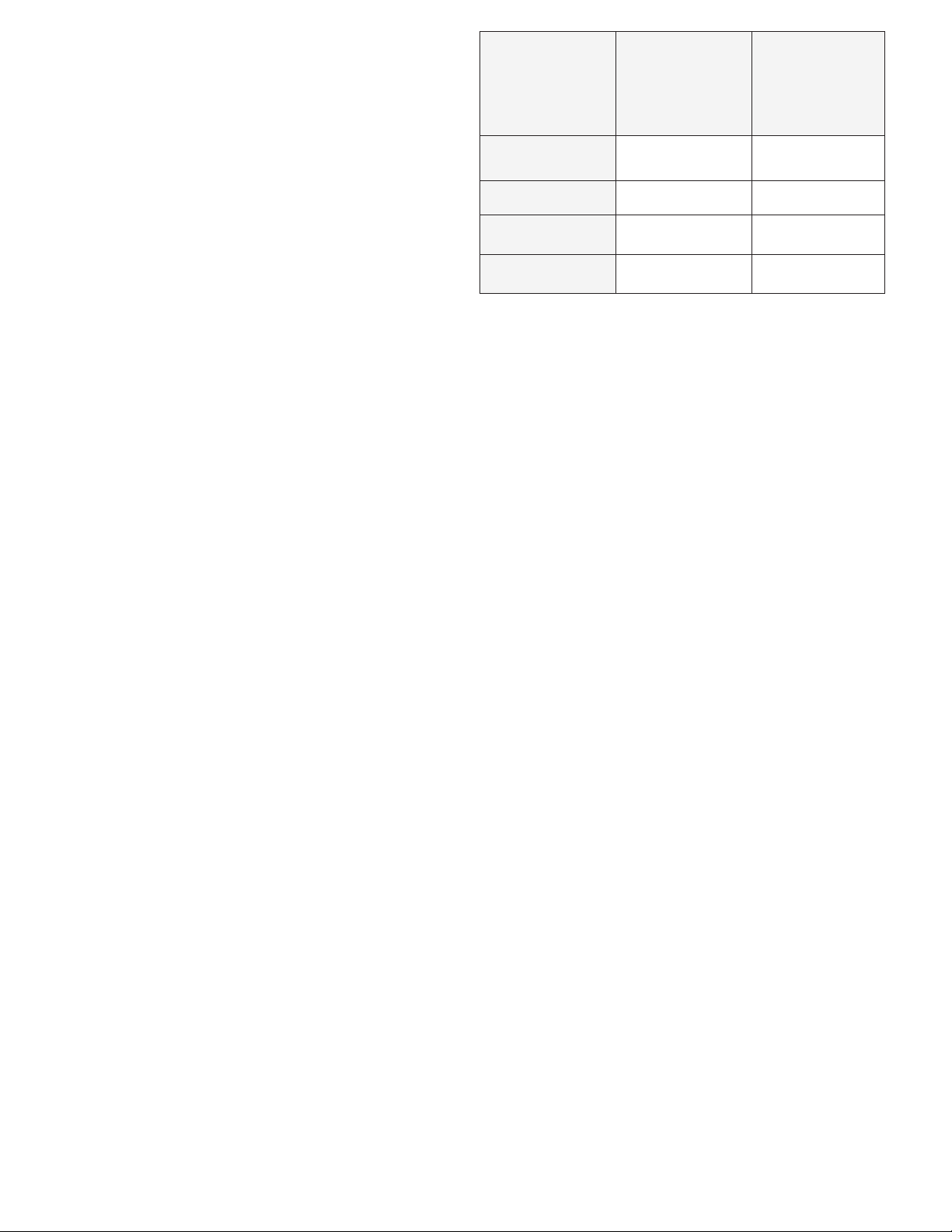
Cable cross
Section in
mm² (AWG)
2.5 (13) 2.5 (8.2) 5 (16.4)
4 (11) 4 (13.1) 8 (26.2)
6 (10) 6 (19.6) 12 (39.3)
10 (7) 10 (32.8) 20 (65.6)
• The appliance may make more noise if operated on a surface lean of over 15°, but this
should not have an effect on refrigeration.
• When using the appliance ensure the circuit
being used has a fuse or circuit breaker.
The recommended size for DC12V is 10A,
DC24V is 5A.
12 V
maximum
cable length
in m (ft)
24 V
maximum
cable length
in m (ft)
Important product information
• The appliance requires good ventilation, especially around the vents of the refrigerator.
Ensure at all times that there is sufficient
ventilation so that the heat that arises during
operation does not build up. Make sure that
the appliance is sufficiently far away from
walls and other objects so that the air can
circulate. Ensure that the ventilation openings are not covered.
• The lower the ambient temperature, the
lower the power usage. In order to maximise
efficiency keep the appliance in a cool location out of direct sunlight.
• Do not allow a large amount of ice to build
up on the inside walls as this may impair
cooling. Defrost by turning the appliance off,
allowing the ice to melt and wipe out the
water or remove the drain plug.
• Make sure that the voltage data on the type
plate matches the existing power supply.
Incorrect mains supply can damage the appliance. This is especially important for AC
generators that can generate voltage spikes.
• If your appliance is plugged in to a DC vehicle socket, ensure that you disconnect
from power when the vehicle is not in use to
prevent battery drainage.
• Never disconnect the appliance by pulling
the cable instead of the plug.
• It is recommended to operate the appliance
on a flat surface, but it will operate at angles
up to 30º.
• Damage may occur if the DC cable supply
is not appropriately sized. This will cause
low voltage. The table below provides recommended cable sizing from battery to
appliance:
4
Page 5
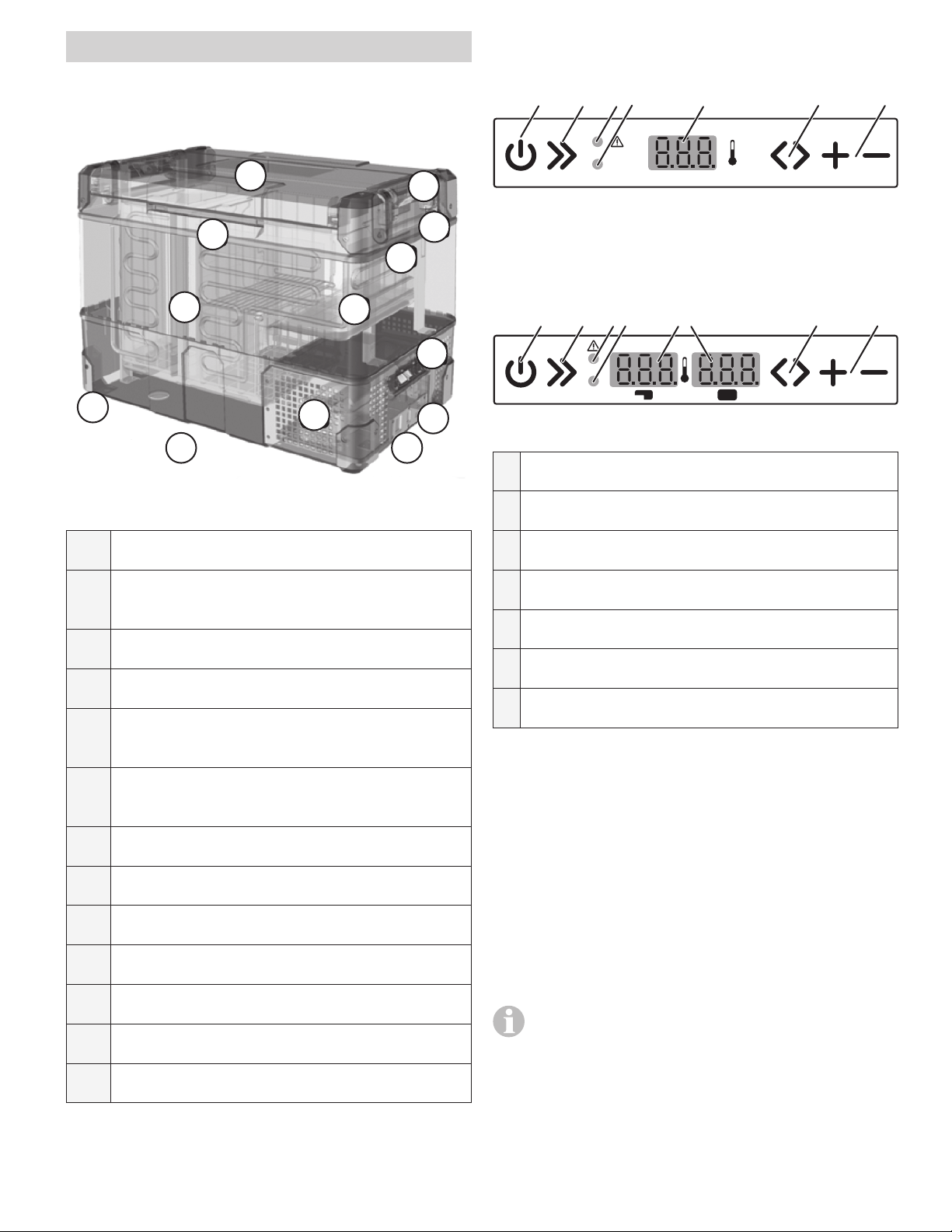
Operating instructions
Control panel Single Zone
(C30 / C36 / C44 / C60 / C73 / C105)
Product features
2
12
10
8
13
Fig. 1
1
11
9
6
3
5
4
7
1 2 3 4 5 6 7
Turbo
Fig. 2
Control Panel Dual Zone
(C69 DZ / C96 DZ)
1 2 3 4 5 6 7
Turbo
Fig. 3
1 Power switch
2 Turbo switch
1 Powered by 12 / 24VDC compressor
2 Two way opening lid
(not Model C36 / C44)
3 Bottle openers on both sides
4 Flat carry and tie down handles
5 Digital display for each compartment
(only dual zones)
6 Multi-voltage system AC (100-240V)
and DC (12 / 24V) - DC inlet on two ends
7 USB port and charger with 3A
8 Stylish robust corners for protection
9 LED interior light
10 Divided compartment storage
3 Power indicator / Fault light
4 Turbo indicator light
5 LED-Display
6 Switch compartments / Mode
7 Temperature settings
Turning the appliance on/off
• Plug in the AC or the DC power cable. If
the appliance does not start automatically,
press the power switch to turn on the appliance. The LED display on the control panel
will turn on and the interior temperature is
displayed.
• Press the power switch for three seconds to
switch off the appliance.
11 Fully refrigerated stepped compartment
12 Headroom for upright standing bottles
13 Bluetooth App for mobile use
The system will remember the previous set-
tings when power is off. If the power supply is cut off or disconnected, the appliance will
switch off automatically and once the power
supply is restored it will automatically switch
back on.
5
Page 6
Temperature setting
Battery protect voltage setting
Temperature setting range –22°C to +10°C
(-8 °F to + 50°F) in each compartment
• Press the “switch compartments / mode”
button and use the “temperature settings” buttons to increase or decrease the
temperature.
• Press the “Switch compartments / Mode”
button again to change the temperature setting in the second compartments (only Dual
zone models).
• Press the “turbo switch” button for Turbo
mode to increase the speed of the compressor. This setting can be used when you need
to cool products quicker.
Temperature unit setting
• Press the “Switch compartments / Mode”
button two times to switch between °F / °C
for single zone models and three times for
dual zone models. °F or °C will be shown at
the display. Then press the “temperature settings” buttons to change.
• For the dual zone model, press “+” for three
seconds, and you can switch off the cooling
function of the compartment on the left. Also
press “-” for three seconds, you can switch
off the cooling function of the compartment
on the right. Press the same button again for
three seconds to re-start refrigeration in the
corresponding compartment.
• Press the “Switch compartments / Mode”
button one more time after change °F or °C,
to enter battery protect voltage setting. Then
press the “temperature settings” buttons to
choose HI, MED or LO of protect level.
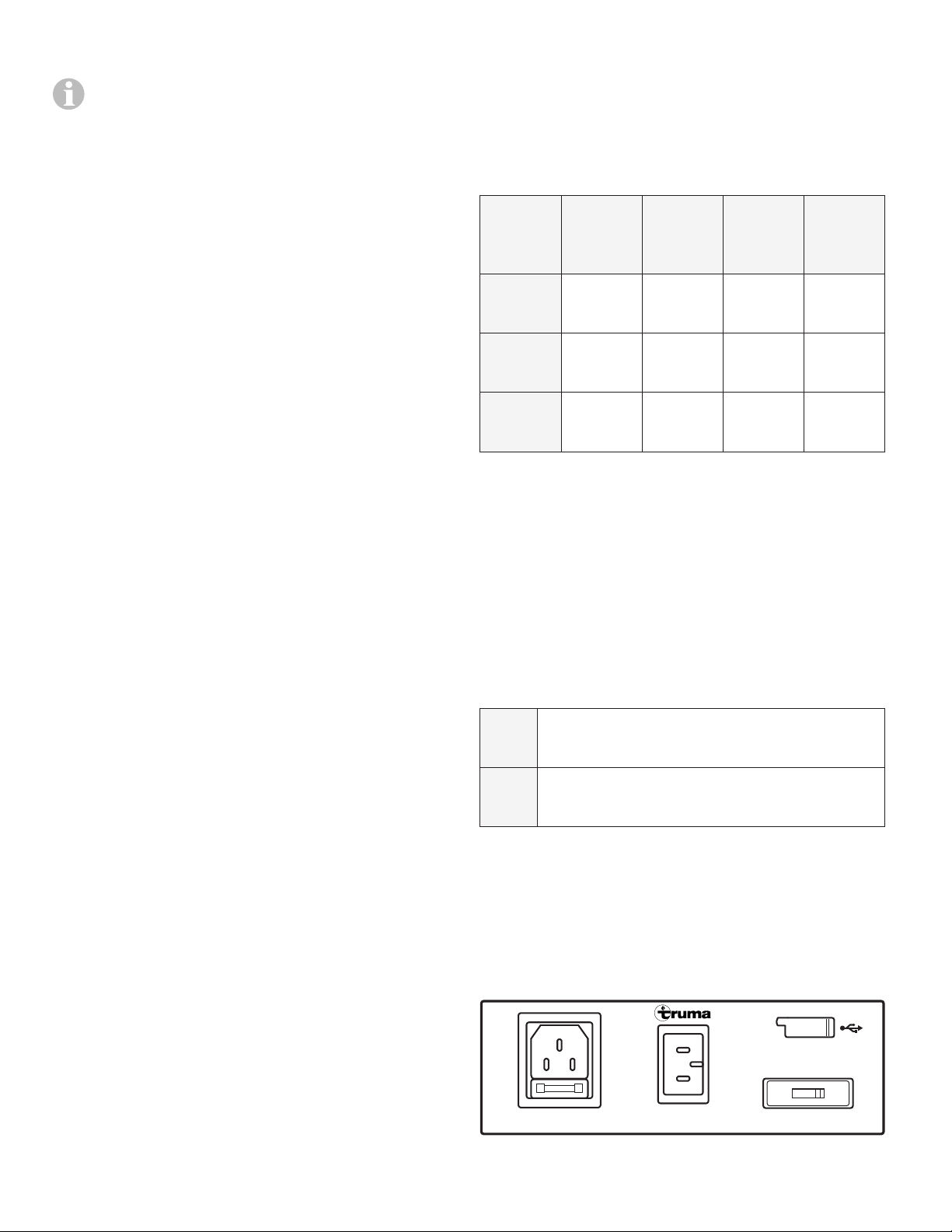
Battery
protect
level:
LO 11.1 ±
MED 12.2 ±
HI 12.6 ±
On
(12 V)
0.3 V
0.3 V
0.3 V
Off
(12 V)
10.1 ±
0.3 V
11.4 ±
0.3 V
11.8 ±
0.3 V
On
(24 V)
23.3 ±
0.3 V
25.3 ±
0.3 V
26.2 ±
0.3 V
Off
(24 V)
21.5 ±
0.3 V
24.1 ±
0.3 V
24.6 ±
0.3 V
Bluetooth setting
• Press the “Switch compartments / Mode”
button one more time after battery protect
voltage setting, to enter Bluetooth activity.
Then press “temperature settings” buttons
to choose ON or OFF.
• Press the “Switch compartments / Mode”
button and “+” button for three seconds, at
the same time to enter the Bluetooth mode.
CLO Connect to the refrigerator by scan the
QR code only.
OPE Scan and find your refrigerator by mo-
bile Bluetooth, and then connect.
Multi voltage system /
Emergency Override
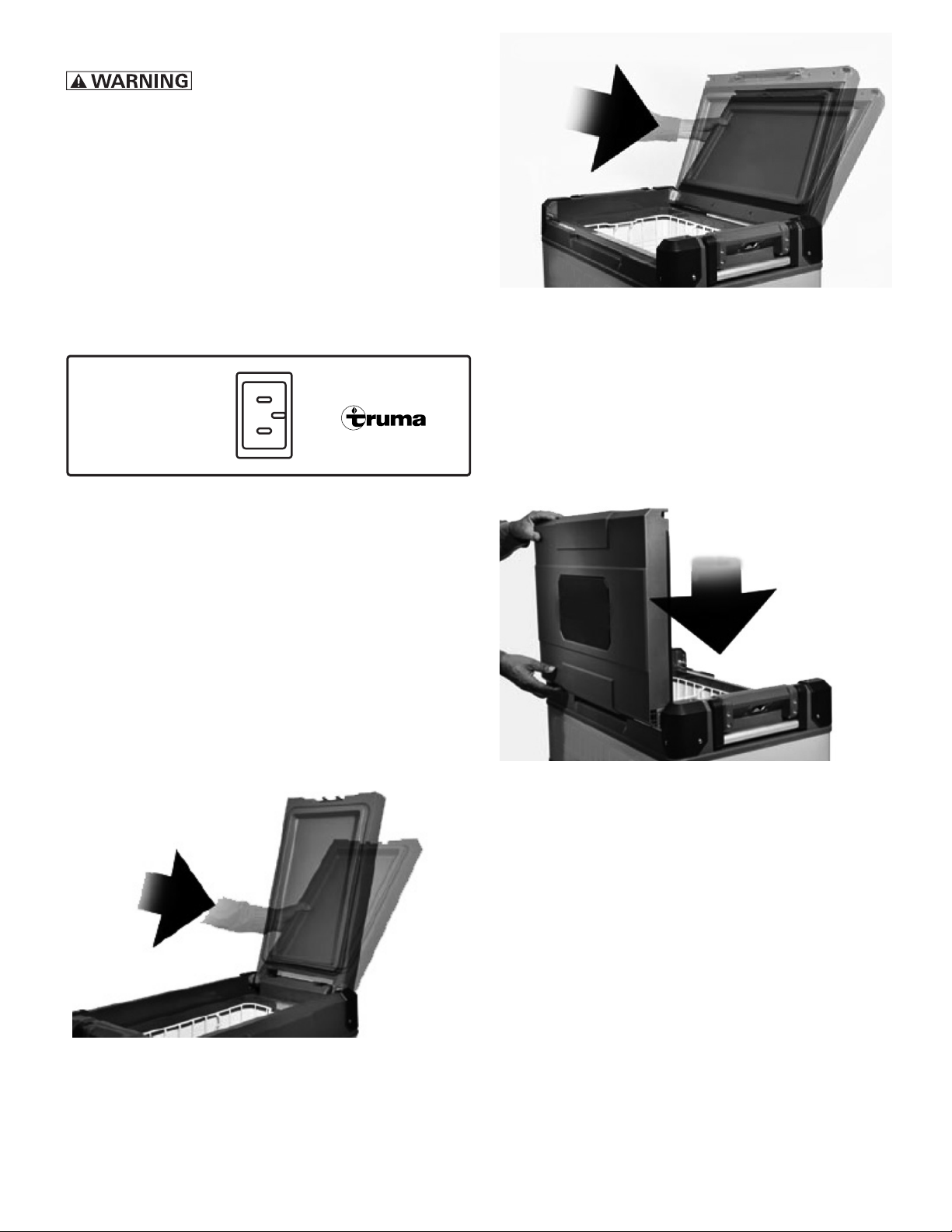
AC/DC, USB connection, fuse and
emergency override in front
AC 100-240V DC 12V/24V
Fig. 4
6
emergency
override
normal
use
Page 7
Fuse
The fuse (6.3A) may only be
replaced by an expert.
Emergency Override Switch
For normal operation the switch is in the “NORMAL USE” position. If an electronic control or
display board failure occurs, slide the switch
to “EMERGENCY OVERRIDE” position. In this
case, the cooler runs with full cooling capacity
and may freeze.
DC connection in the back
DC 12V/24V
Fig. 5
Fig. 7
Attach the lid
Put the lid on the side of the box and press it
down firmly (all models).
On the following models the lid can also be put
on the opposite side of the box. (C60/ C69 DZ/
C73/ C96 DZ/ C105)
The second DC socket allows the optimal use in
every position.
Two way opening and
removable lid
Remove the lid
Open the lid, push it over the aiming position
and remove it (all models).
Fig. 8
Fig. 6
7
Page 8
Truma Cooler App Instructions
Cleaning
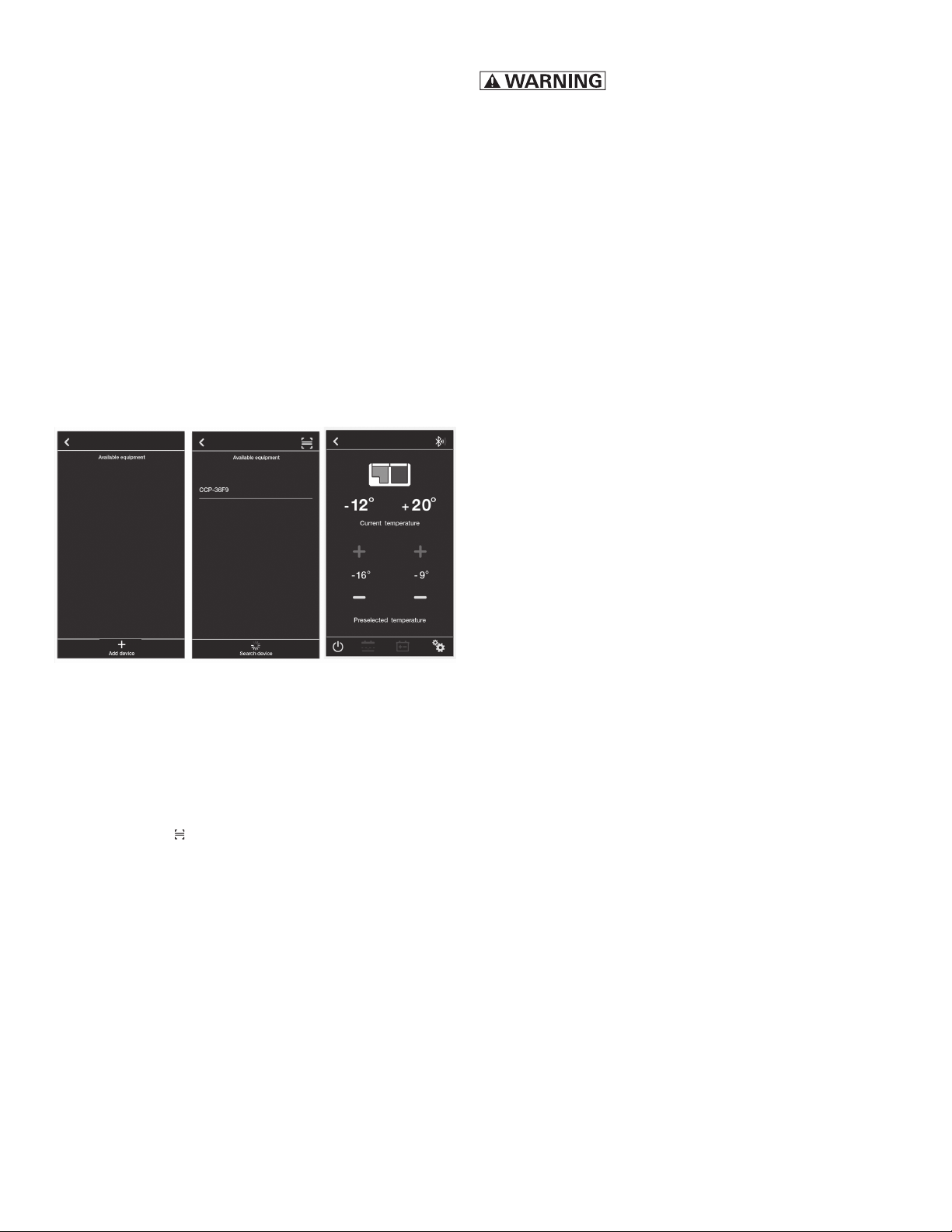
To control your Truma Cooler with your smartphone you can use the Truma Cooler smartphone app of Truma.
Activate the Bluetooth function of the appliance
(see “Bluetooth setting” on page 6)
Activate the Bluetooth function of your phone
and then download the Truma Cooler smartphone app from Google Play or Apple App
Store.
When you open the app you will see picture A.
Then you can click “Add device” to search the
appliance, then you will see the available equipment, as shown in B.
A B C
Dissconnect the appliance from
the power supply before cleaning.
Clean the appliance inside and outside with a
clean damp cloth every week. If it is dirty, use
baking soda (sodium bicarbonate) dissolved in
lukewarm water to clean the appliance.
Do not use abrasive products, detergents, soap
or hard objects to clean as these can damage
your refrigerator.
After cleaning, wipe out with a clean damp
cloth and dry carefully.
Never clean the appliance under running water
or in dish water.
Do not store products inside appliance if the appliance is not on.
Do not store the appliance if it is wet inside or
without leaving the lid open.
Fig. 9
When you click for example the equipment
CCP-36F9 to connect the appliance, finally
you will see picture C which means connect
successful.
Or if you do not choose to click “Add device”
but to choose to scan the individual QR code
which is delivered with the appliance for connecting, then will directly enter to picture C.
Now linked to your appliance, you can:
• Easily switch between appliances.
• Adjust your appliances temperature from
–22°C to +10°C (-8 °F to + 50°F).
• Check current temperature.
• Choose from Celsius and Fahrenheit temperature scales.
• Turn your appiance on and off.
• Turn Turbo modes on and off.
• Choose battery voltage protection mode.
• Monitor battery voltage.
• Show the fault reason automatically.
• Customize your refrigerator name.
Troubleshooting
The appliance is not turning on
• Check whether the appliance has been
turned on.
• Check the power supply (try a different power source/vehicle/socket).
• Check whether the plug and the socket have
a good connection.
Low refrigeration performance
• Too much product has been placed inside
the appliance.
• There is too much warm product inside the
appliance.
• The lid is unlatched or open.
• The lid seal is broken.
• Poor ventilation. Make sure that the appliance is sufficiently far away from walls and
other objects so that the air can circulate.
Ensure that the ventilation openings are not
covered.
• The ambient temperature is too high.
• The temperature setting is too high.
Can hear the sound of running water from
inside the appliance
• This is normal, due to the flow of refrigerant
inside the appliance.
8
Page 9
Unusual noise when refrigerator is working
• The refrigerator is not placed on a level surface
If none of the above solves your issue please contact the Truma Service Center (855-558-7862).
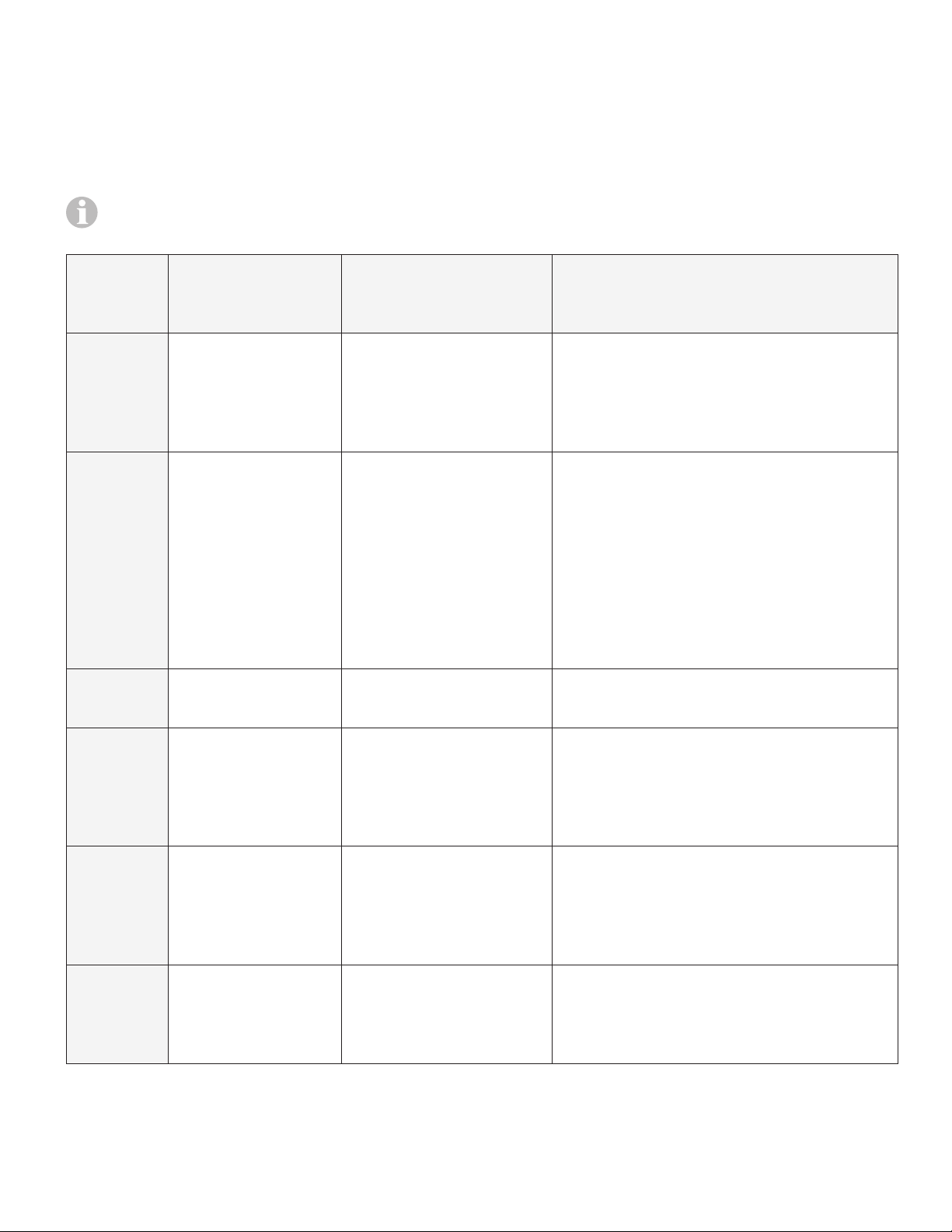
Fault indicator
Please note that the fault indicator will always be green if normal. When flashing, it will
change to orange color.
Errorcode
(App)
ER 0 - Broken temperature
ER 1 1
ER 2 2
Number of flashes
(every 4 seconds)
Fault Descripton / Solution
sensor
Low voltage
Fan issue
• When the LED display will show E0,
means NTC (the temperature sensor) broken circuit or short circuit.
Please contact the Truma Service
Center for support.
• Try on different power source (vehicle or 240VAC power). If changing power source fixed issue, then
possible issue with original power
source.
• Ensure cabling between appliance
and battery is at least 1.5mm²
(AWG15), if the distance is more
than 2 meters use at least 2.5mm
(AWG13) cable.
• Fan is drawing too many amps (over
0.6 amps).
• Unplug cable and allow appliance to
ER 3 3
ER 4 4
ER 5 5
If these measures do not remedy the malfunction, contact your dealership, Truma Service or one of
our authorized Service Partners.
Compressor start issue
Low motor speed
Over temperature
rest for 10 minutes.
• Try on different power source (vehicle or 240VAC power).
• Electronic box fault.
• Reduce products/items inside
appliance.
• Move so appliance is in a lower ambient temperature, clean vents/ensure clear air flow over compressor.
• Move so appliance is in a lower ambient temperature.
• Clean vents/ensure clear air flow
over compressor.
9
Page 10
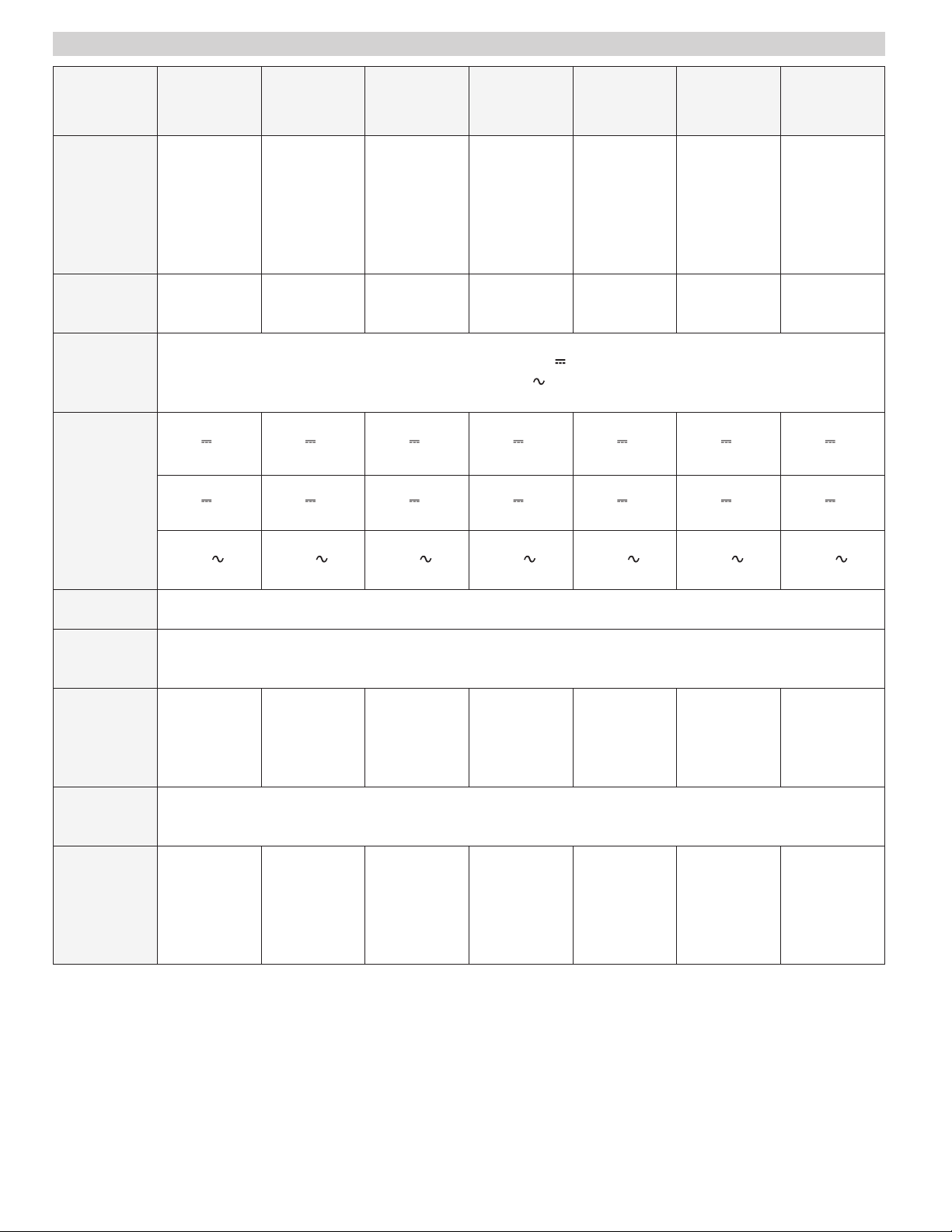
Technical Data
Model C36
Single
Zone
Dimensions in
mm (in.)
Weight in
kg (lb)
Connection
voltage
Rated
current
Length
652 (25.7)
Width
412 (16.2)
Height
428 (16.9)
21.8
(48.4)
12V
5.53 A
24V
2.54 A
C44
Single
Zone
Length
652 (25.7)
Width
412 (16.2)
Height
488 (19.2)
23.4
(52)
12V
5.49 A
24V
2.81 A
C60
Single
Zone
Length
732 (28.8)
Width
456 (18)
Height
488 (19.2)
25.6
(56.9)
DC 12 / 24 V or
AC 100-240V / 50-60Hz
12V
6.35 A
24V
2.92 A
C73
Single
Zone
Length
732 (28.8)
Width
456 (18)
Height
555 (21.85)
28.2
(62.7)
12V
6.10 A
24V
3.00 A
C105
Single
Zone
Length
912 (36)
Width
536 (21.1)
Height
500 (19.7)
33.2
(73.8)
12V
6.40 A
24V
3.20 A
C69 DZ
Dual
Zone
Length
732 (28.8)
Width
456 (18)
Height
555 (21.85)
29.4
(65.3)
12V
6.30 A
24V
3.10 A
C96 DZ
Dual
Zone
Length
912 (36)
Width
536 (21.1)
Height
500 (19.7)
34.9
(77.6)
12V
6.30 A
24V
2.95 A
120V
0.583 A
USB 5V / 3 A
Climate
class
Refrigerant /
quantity
in g (lb)
Cooling
capacity
Volume
in l (gal)
R134a /
43
(0.08)
36
(9.5)
120V
0.63
R134a /
45
(0.1)
44
(11.6)
120V
0.62 A
R134a /
65
(0.15)
-22°Cto +10°C (-8 °F to +50°F)
60
(15.85)
120V
0.66 A
N, T
R134a /
70
(0.17)
73
(19.28)
120V
0.73 A
R134a/
100
(0.19)
105
(27.7)
120V
0.63 A
R134a /
75
(0.15)
69
24 + 45
(18.2)
(6.3+ 11.9)
120V
0.74 A
R134a /
96
(0.22)
96
41 + 55
(25.3)
(10.8 + 14.5)
10
Page 11

Truma Gerätetechnik GmbH & Co. KG
(“Truma”)
“Truma Cooler”
MANUFACTURER’S LIMITED
WARRANTY
This limited warranty pertains solely to the
“Truma Cooler” (Single Zone Models C36, C44,
C60, C73, C105 and Dual Zone Models C69 DZ
and C96 DZ) the “Product”) manufactured by
Truma and sold through its affiliates and dealers in
North America.
Truma warrants subject to the below stated conditions that the Product will be free from defects in
material and workmanship, and will perform in accordance with the technical specifications set forth
in the description of the Product for a period of
twelve (12) months for newly manufactured parts
from the original date of purchase. The original
purchaser is advised to register the Product within
two (2) months of purchase at www.truma.net
in order to receive an extended warranty of an
additional twelve (12) months. This limited warranty shall only apply if the Product was properly
installed according to the installation instructions
provided and in compliance with applicable codes.
During the warranty period, Truma will repair or replace, at its own discretion and costs, the defective
Product or parts or components of such Product
reported to Truma and which Truma determines
was defective due to a warranty defect. Costs
of diagnosis for a warranty defect are borne by
Truma. Other costs of diagnosis are not included
in this warranty. At the discretion of Truma, the replacement of the Product or parts or components
thereof (i) may be newly manufactured, (ii) may
be assembled from new or serviceable used parts
that are equivalent to new parts in performance, or
(iii) may have been previously installed.
The customer shall not attempt to repair the
Product or resolve the problem without the
prior consent of Truma. Any attempt by the
customer to repair the Product or resolve the
problem without the prior consent of Truma
will void this warranty.
This limited warranty does not cover any defects
attributable in whole or in part to (i) non-Truma
products and services and / or alterations of outof-specification supplies, (ii) accidents, misuse,
negligence or failure of the customer to follow
instructions for the proper use, care and cleaning
(September 2014)
of the Product, (iii) damages caused in gas pressure regulation systems due to foreign substances
in the gas (i.e. oil, plasticizers), (iv) external factors (e.g., fire, flood, severe weather), (v) failure of
proper transport packaging, or (vi) failure by the
purchaser to comply with Truma’s installation and
user manual regarding the Product.
All warranty claims must be reported to Truma’s
authorized warranty service center in the United
States:
Truma Corp Service Center,
2800 Harman Drive, Elkhart, IN 46514,
toll free: (855) 558-7862, fax. (574) 538-2426,
[email protected], www.truma.net
The purchaser shall provide the following
information regarding the potential warranty claim
(i) serial number of the defective device, (ii) proof of
purchase, (iii) purchaser’s contact information.
EXCEPT AS EXPRESSLY STATED AND SET
FORTH HEREIN, THERE ARE NO WARRANTIES
OR REPRESENTATIONS, EXPRESS OR IMPLIED,
CONCERNING THE PRODUCT AND NO SUCH
WARRANTIES OR REPRESENTATIONS SHALL
BE IMPLIED UNDER ANY APPLICABLE LAW,
IN EQUITY OR OTHERWISE, INCLUDING
WITHOUT LIMITATION, A WARRANTY OF
MERCHANTABILITY, A WARRANTY OF
FITNESS FOR A PARTICULAR PURPOSE, OR
ANY OTHER WARRANTY WHICH MAY BE
IMPLIED UNDER COMMON LAW OR UNDER
THE UNIFORM COMMERCIAL CODE OF ANY
STATE OR OTHER JURISDICTION OF THE
UNITED STATES OF AMERICA.
Unless further limited herein, the entire liability
of Truma and the customer’s exclusive remedy
for damages from any cause related to or arising
out of a warranty defect, regardless of the form
of action, whether in contract or in tort, will not
exceed the amount of the purchase price for
each purchase order for the Product which is the
subject matter or directly related to the causes of
action asserted.
Unless prohibited under applicable state law, in
no event will Truma, its agents, subcontractors,
affiliates, suppliers and employees be liable for (a)
any incidental, indirect, special or consequential
damages, including, but not limited to, loss of use,
revenue, profits or savings, substitute rental or for
any other reason, even if Truma knew or should
have known of the possibility of such losses or
damages, (b) claims, demands or actions against
the customer by any person, except as provided
by applicable law.
11
Page 12

In case you encounter any problems,
please contact the Truma Service
Center at 855-558-7862 or one of our
authorized service partners. For details see
www.truma.net.
Please have the model number and serial
number (see type plate) handy when you
call.
Manufacturing
Truma Gerätetechnik
GmbH & Co. KG
Wernher-von-Braun-Straße 12
D - 85640 Putzbrunn
Germany
www.truma.com
Sales & Service
Truma Corp
2800 Harman Drive
Elkhart, IN 46514
USA
Toll Free 1-855-558-7862
Fax 1-574-538-2426
[email protected]
www.truma.net
40092-00001 · 00 · 10/2019 · ©
 Loading...