

Page 1
V5.0.2 Padl-R UF
Page 2
Padl-R UF
RFID Reader User Manual
Page 3

Quick Start Guide
Thank you for choosing the RFID Reader from Tracient. Before you start using
the RFID Reader please read the following instructions:
Install the software provided on the CD-ROM, before connecting your RFID
Reader to the PC.
To install the software you need a PC that runs Microsoft Windows XP and is
compatible with the provided USB cable.
The RFID Reader will need charging for at least 10 hours before use. After
installing the software, charge the RFID Reader by connecting it to the PC using
the provided USB cable.
After installation of the software, user manuals for the RFID Reader and
TraceConnect software are available in electronic format on the PC or CD-ROM.
Important Notice!
Install the software supplied with the Reader before connecting the Reader to the PC.
Failure to do so may cause problems when using the Reader with the PC.
Overview of Features
Hardware
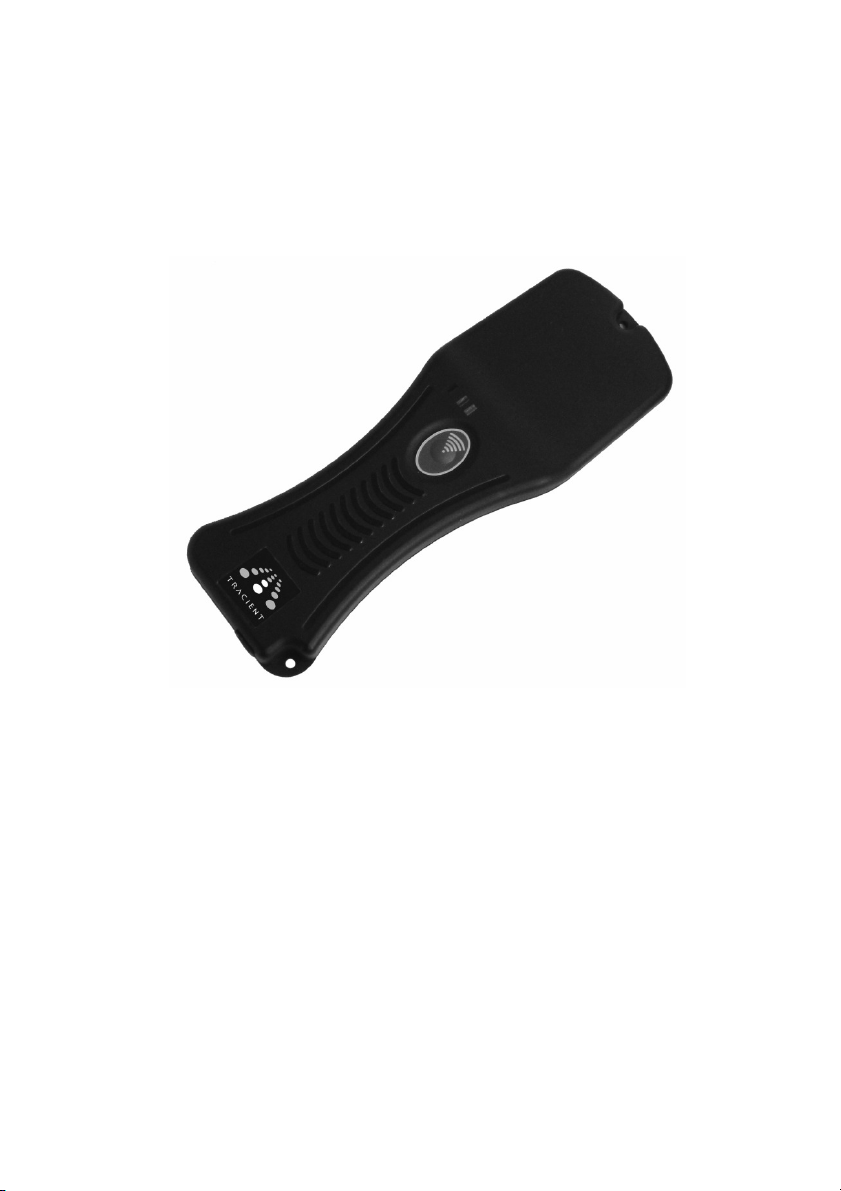
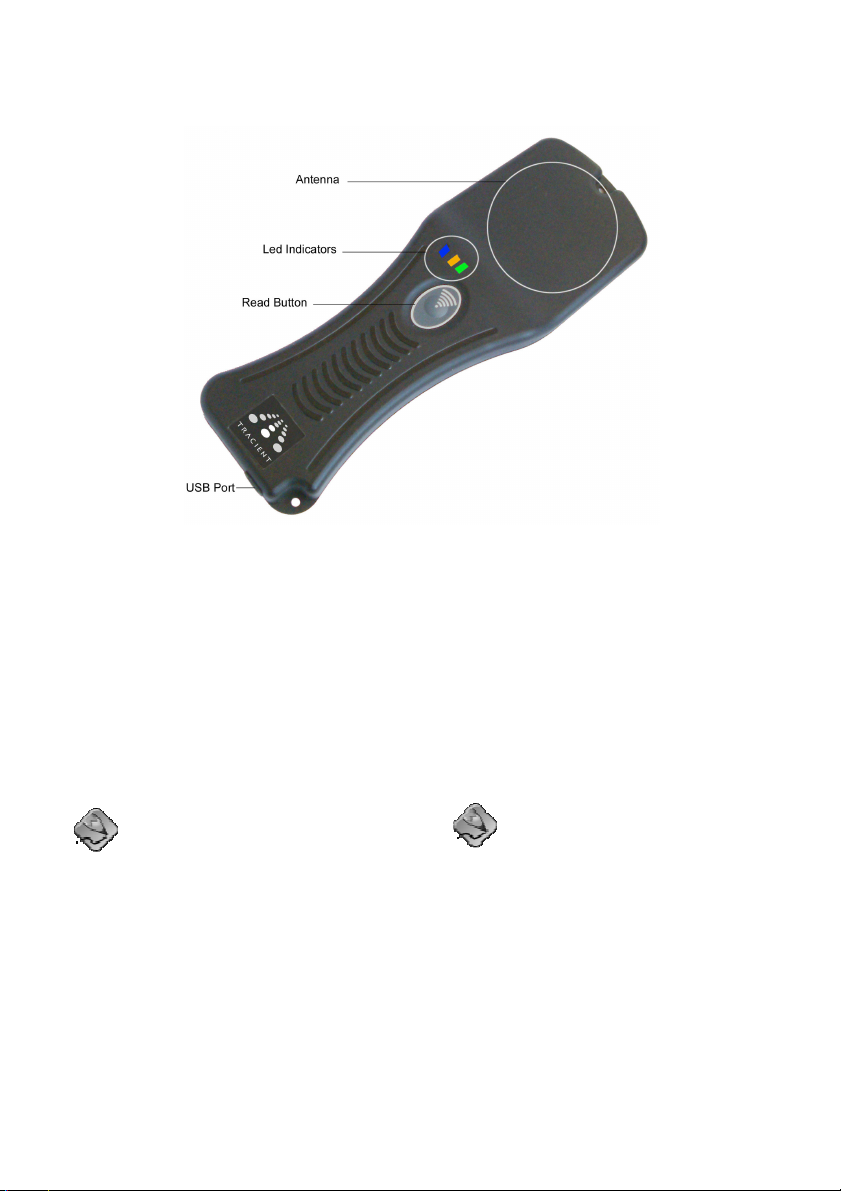
The Padl-R RFID Reader has the following features:
Battery powered.
Touch Sensitive button.
Status LED’s.
Bluetooth Enabled.
USB Connection for battery charging, data downloads and configuration.
ID log storage for 1000 Tag ID’s.
Software
The TraceConnect software supplied with the Reader gives you everything you need to
evaluate your RFID reader. The software supplied has the following features:
Control Panel Applet for configuration of the Reader for both the PC and PDA.
Page 4

RFID Wedge for capturing Tags for PC and PDA applications.
RFID Sync log download application for the PC.
Software Developers Kit (SDK)
If you have purchased the SDK version, software will be provided that gives you the
tools to begin developing your own applications. The SDK includes:
The SDK, a programming interface for Tracient RFID products.
Example software (Including source code) for PC.
Documentation.
Page 5
Using the Padl-R UF
Using the Button
The button on the Padl-R is touch
sensitive and as such responds to a
finger either pressing the button or
lightly resting over it. To prevent
unexpected operation please remove
your finger from the button when not in
use.
Single button press – Press or
touch the button, then remove your
finger
Long Press – Hold your finger on
the button until the reader responds
and then remove your finger from
the button
Charging the Padl-R Battery
The Padl-R is powered by a Lithium-Ion
battery. The battery is charged via a
USB port on a PC or via one of the other
charging accessories that can be
purchased separately. Whenever the
Padl-R is connected to a PC the battery
will be charged. When charging, the
Amber LED will be on.
Charging times vary depending on
the state of the battery. It is
recommended that the battery is
charged when not in use. Doing
so ensures the battery is kept in
working order. A full charge takes
approx 10 Hrs.
Page 6
Low Battery Indication
The Padl-R indicates a low battery
condition by continuously flashing the
Amber LED. If this happens it is
recommended that you give the PadlR a full charge.
Turning the Padl-R ON
successful read and Red to indicate
a failed read attempt.
In Burst Mode the Reader will start a
period of continuous reading. This
will continue as long as there are
tags in the Readers reading range.
During this period another single
press cancels Burst Mode operation
Press the button. The Blue LED
flashes 3 times and the Padl-R plays a
short multi tone tune.
If the battery is flat the Padl-R will
turn straight off again. This will be
seen as the Blue LED flashing 6
times in quick succession.
Turning the Padl-R OFF
Press and hold the button. The Blue
LED flashes 3 times and the Padl-R
plays a different multi tone tune. The
Padl-R is also equipped with an
automatic shutdown feature. The
factory default for this feature is to
shutdown after 20 minutes of inactivity.
If the Padl-R is plugged into a
USB port, the auto power OFF will
not operate.
Reading a Tag
To read a Tag, present a compatible
Tag to the Reader’s antenna area.
Press and release the button.
In Single Read Mode the Reader
will flash Green to indicate a
The button is touch sensitive
technology. Please remove your
finger from the button when not in
use. Keeping your finger on the
button will turn the Padl-R OFF.
Padl-R Use and Maintenance
Firmware Upgrades
Your Reader has the ability to have its
firmware upgraded in the field via the
USB interface. These upgrades will be
available for download from the Tracient
website (www.tracient.com).
Accessories
A full range of accessories are available
for the Padl-R. These include:
Various charging options, such as
mains and car chargers
Protective boots, to provide
additional weather and mechanical
protection
Key fobs and chains
Other RFID Tags
For a complete list of available
accessories or requests for other RFID
products or services, please contact
Page 7

Tracient or visit the website
(www.tracient.com).
Battery Handling and Care
This RFID Reader contains a LithiumIon battery. To get maximum
performance from the Reader follow
the instructions relating to charging in
the supplied manual.
Battery charging is controlled by the
device when connected either to a PC
via a USB cable, or to other Tracient
specified chargers.
The battery should not be removed,
unless done so by an authorized
Tracient service engineer.
Charging the Battery
Charge the battery for at least 10
hours before use.
Be sure to follow the warnings listed
below while charging the battery.
Failure to do so may cause the battery
to become hot, explode, or ignite and
cause serious injury.
When charging the battery, use a
specified battery charger.
Do not continue charging the
battery if it does not recharge
within the specified charging time.
Doing so may cause the battery to
become hot, explode, or ignite.
The temperature range over which the
battery can be charged is 0°C to 45°C.
Charging the battery at temperatures
outside this range may cause severe
damage to the battery or reduce
battery life.
Using the Battery
Battery packs may get hot, explode, or
ignite and cause serious injury if
exposed to abuse conditions. Be sure to
follow the safety warnings listed below:
Do not place the battery in fire or
near a heat source. Doing so may
cause the battery to explode, ignite,
or result in a loss of performance.
Do not install the battery backwards.
Do not short circuit the battery.
Do not puncture the battery, deform
or subject it to strong impacts or
shocks.
Do not allow the battery to get wet.
Do not disassemble or modify the
battery. The battery contains safety
and protection devices, which, if
damaged may cause the battery to
generate heat, explode, or ignite.
Immediately discontinue use of the
device if during use or charging, the
battery emits an unusual smell, feels
hot, changes colour or shape, or
appears abnormal in any other way.
Do not place the battery in
microwave ovens, high-pressure
containers, or on induction
cookware.
In the event the battery leaks and
the fluid gets into one's eye, do not
rub. Rinse well with water and
immediately seek medical care. If
left untreated, the battery fluid could
cause damage to the eye.
Discharging the Battery
Do not discharge or use the battery in
devices other than the RFID Reader.
Doing so may reduce the battery’s life or
cause abnormal battery conditions which
Page 8

may result in the battery becoming hot,
exploding, or causing serious injury.
The temperature range over which the
battery can be discharged is -20°C to
60°C. Use of the battery outside this
temperature range may reduce the
performance of the battery.
Page 9
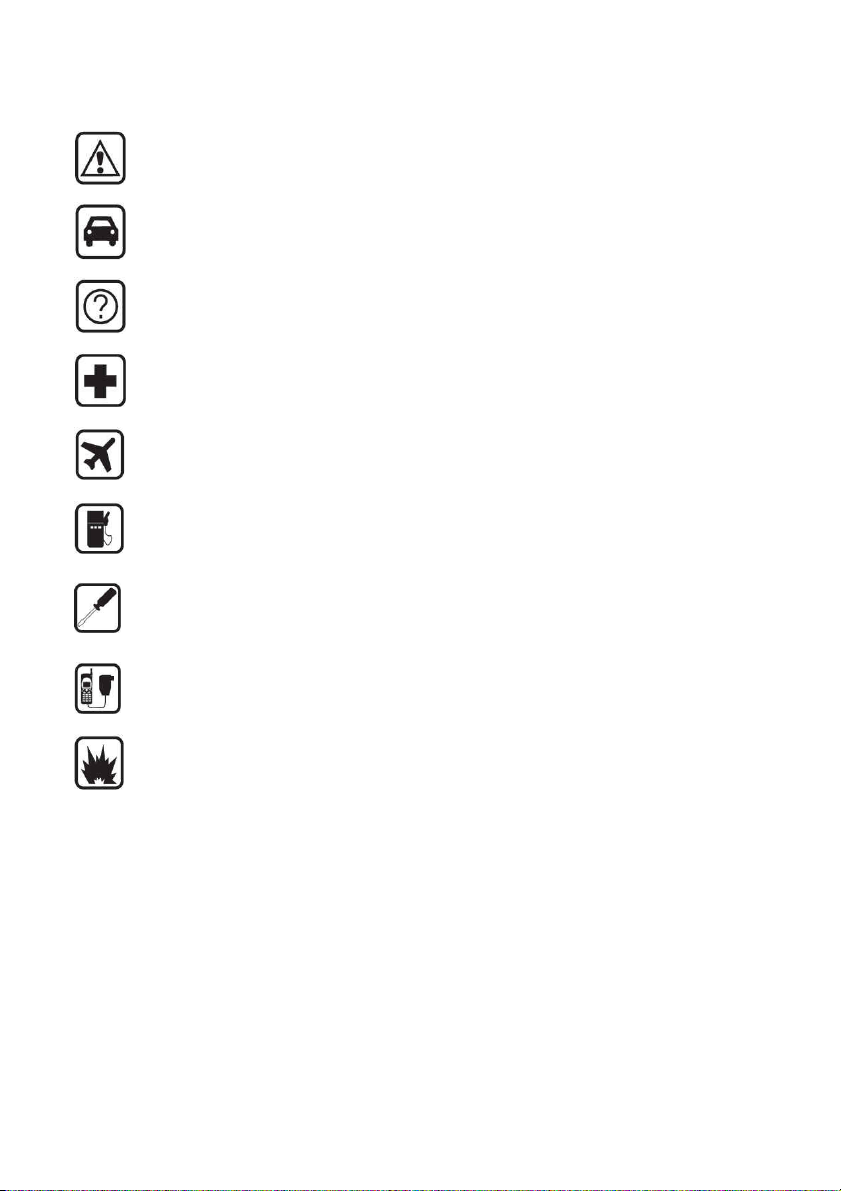
For Your Safety
Read these guidelines before using your Reader. Failure to comply with
these guidelines may be dangerous or illegal.
Road Safety
Do not operate a vehicle while using the Reader.
Interference
Device performance may be affected by interference.
Hospitals and Pacemakers
Do not operate the Reader near medical equipment or pacemakers.
Aircraft
It is illegal to use wireless devices on aircraft.
Refueling
Do not use the Reader when refueling or near chemicals.
Use Qualified Service
This Reader has no user-serviceable parts. Only qualified personnel may
repair or service this equipment.
Accessories
Use only approved accessories. Do not connect incompatible products.
Batteries
This Reader is equipped with a Lithium Ion Battery. Do not incinerate.
Page 10
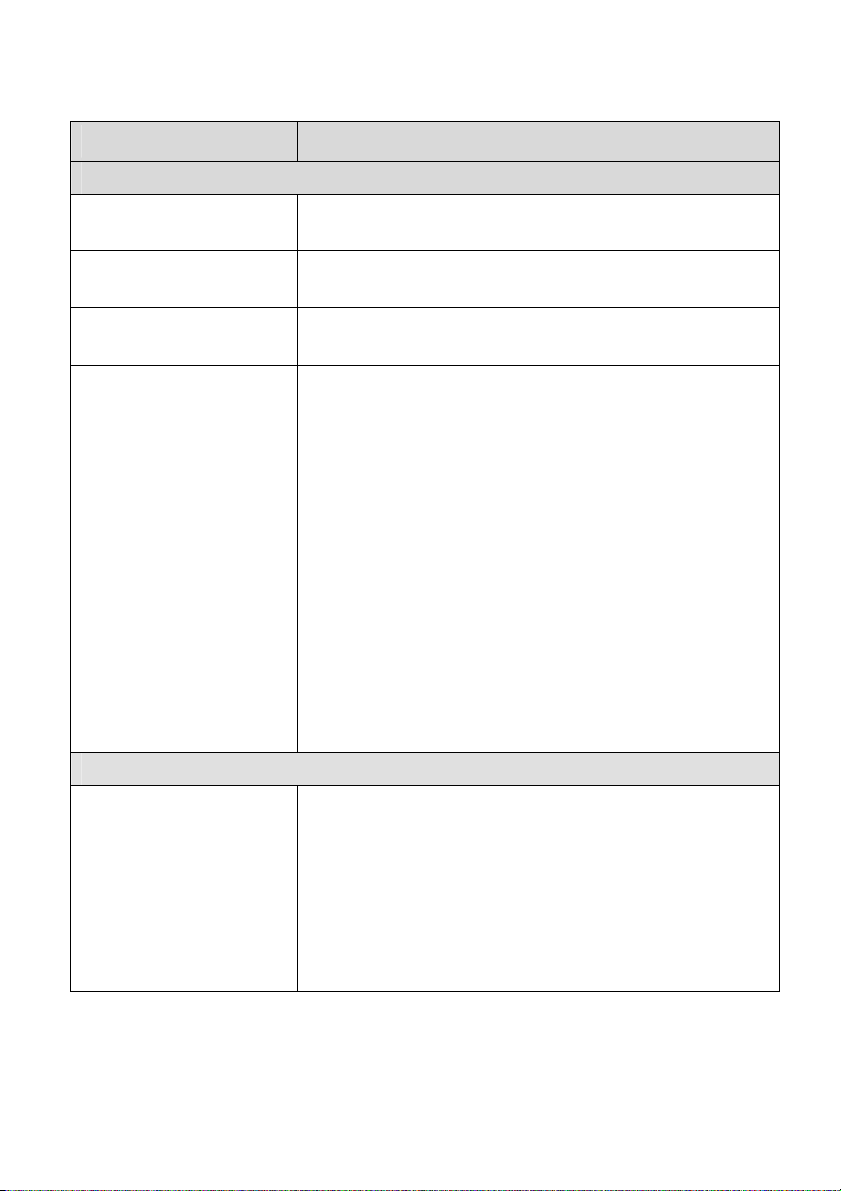
Troubleshooting Guide
Problem Possible Cause / Suggested Action
Power Problems
The Padl-R will not turn
ON.
The battery is flat. Plug the Padl-R into a PC (The PC
must be ON) for charging.
Reader switches OFF
very frequently.
Amber LED flashing
continuously.
Red LED flashing
continuously.
Bluetooth Problems
Cannot connect to the
Padl-R via Bluetooth.
Check the Auto Power OFF setting using the Control
Panel Applet.
The battery needs charging.
The Padl-R is indicating a fault. To determine the
precise fault, connect to the Reader using the Control
Panel Applet. The Status message will indicate the
error.
The following are the most probably causes.
Memory Full. To clear this:
The Reader log can be downloaded by connecting
the Padl-R a PC using RFID Sync.
The memory can be cleared using either RFID
Sync or the Control Panel Applet.
Time Invalid:
Connect the Padl-R using the Control Panel Applet,
then on the Settings tab, click Synchronize clock.
This will re-sync the Padl-R to the PC clock.
Check the following:
Connect to the Reader from a PC via USB using
the Control Panel Applet and ensure the Enable
Bluetooth feature under the Settings tab is enabled.
Disconnect the Padl-R USB cable.
Turn on the Padl-R.
Charge the battery.
Page 11

I cannot find the Padl-R
when searching using
Bluetooth.
When ever I lose the
Bluetooth Connection
the Padl-R turns off.
I still cannot get the
Bluetooth working.
USB Problems
I cannot find the Padl-R
when searching using
USB.
I cannot connect to the
Padl-R using USB.
The Padl-R is not
recognised when
Connected via USB.
The Padl-R is OFF.
The Padl-R is connected to a PC via the USB
cable.
Connect to the Reader from a PC via USB using
the Control Panel Applet and ensure the Enable
Bluetooth feature under the Settings tab is enabled.
There is a problem with your PC or PDA.
Select the Unplug and Stay ON feature under the
Settings tab in the Control Panel Applet.
Check the Bluetooth address on the Main tab of the
Control Panel Applet. If this is blank, contact Tracient
for assistance.
The Padl-R is OFF.
The Padl-R is not connected to the PC via the USB
cable.
There is a problem with your PC.
The Padl-R is OFF.
The Padl-R is not connected to the PC via the USB
cable.
The USB Driver for the Padl-R may not be installed
correctly.
Open Control Panel and select the System program
Select the System Tab and click on the Device
Manager button
With the Padl-R connected to the PC, check for an
Unknown Tracient device in the list.
Uninstall this device
Re connect the Padl-R, The device should install
correctly as long as the RFID connect software has
been installed fully.
Page 12
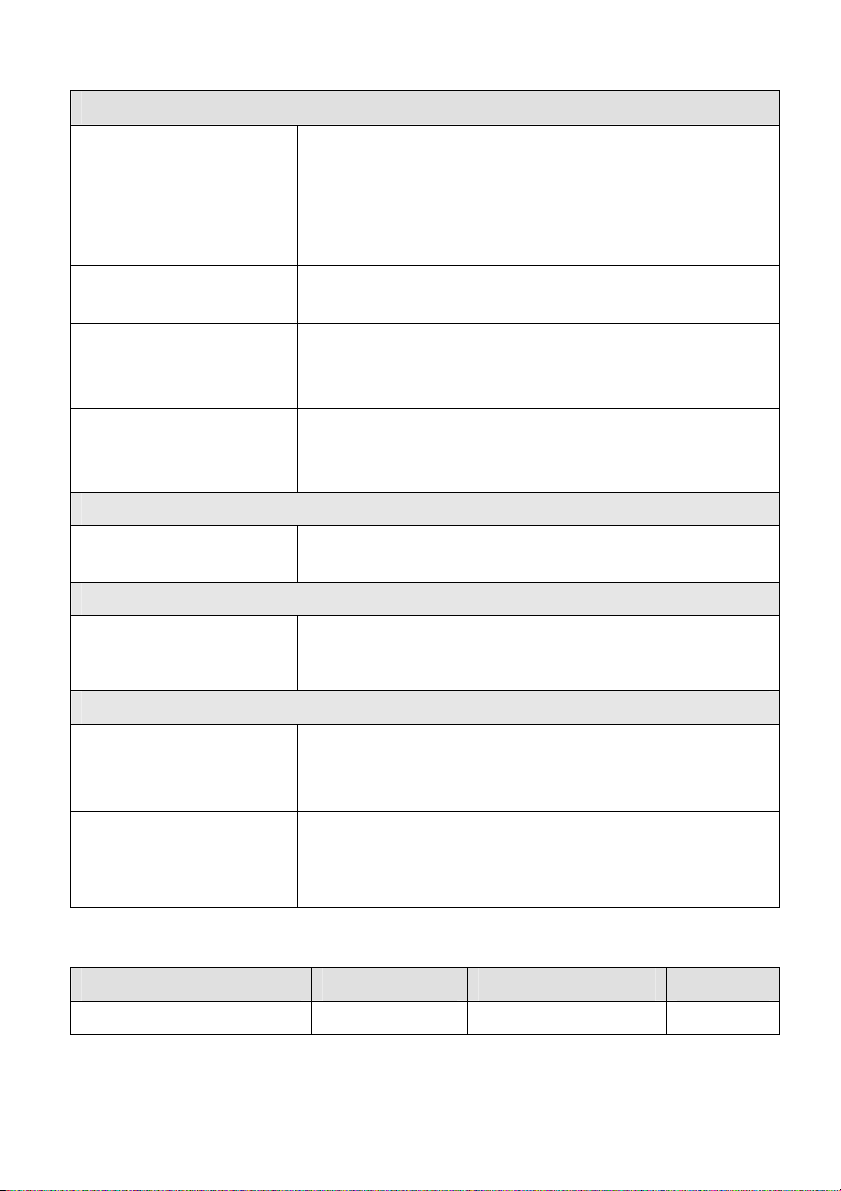
Tag Reading Problems
Padl-R fails to read the
Tag.
Every time I read a Tag
the Padl-R turns off.
Every time I read a Tag
the Padl-R loses the
Bluetooth connection.
The green LED flashes
but the beeper does not
sound.
Other
The Padl-R does not
beep.
PDA Problems
I cannot find the
applications on the
PDA.
Tag logging problems – RFID Sync
I cannot download Tag
IDs from the Reader
log.
The time column is
empty after I have
downloaded Tag IDs.
Check:
The Padl-R is set up to read that particular Tag.
Check the Tag type settings in the Control Panel
Applet.
The Tag is not too far from the Padl-R’s antenna.
The battery is low. Recharge the Padl-R.
The battery is low. Recharge the Padl-R.
De-select the Mute setting under the Settings tab in the
Control Panel Applet.
De-select the Mute setting under the Settings tab in the
Control Panel Applet.
Synchronize the PDA to the PC. The applications and
necessary software will be installed automatically.
Ensure Tag ID logging is enabled.
There are no Tag IDs to download. Test by
disconnecting the Padl-R and reading some Tags.
Enable the Log Time with Tag ID option under the
Reader tab of the Control Panel Applet. Also ensure
that Timestamp is added under Output Fields in the
Settings page of the RFID Sync.
LED Flash Indications
Condition Duration Sequence Colour
Power On Temporary 3 Short Flashes Blue
Page 13
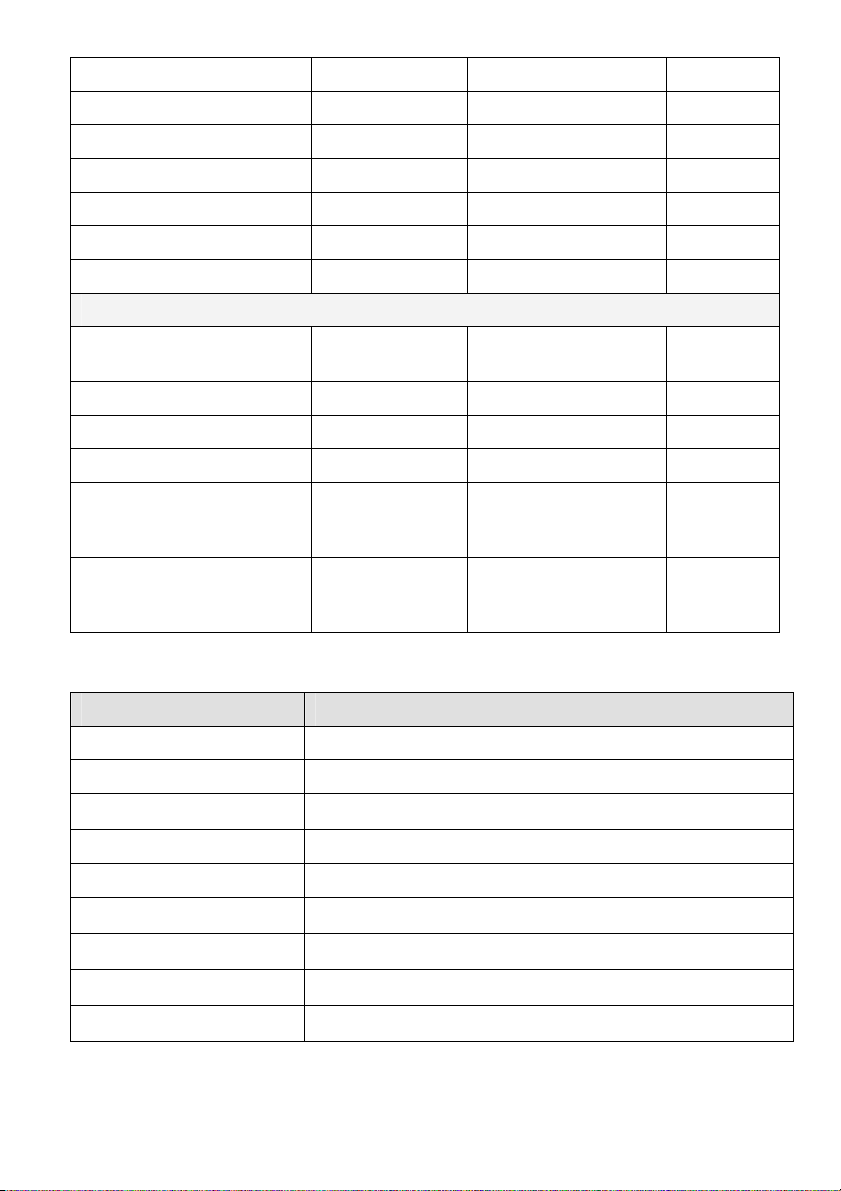
On Continuous 1 Short Flash Blue
Power Down Temporary 3 Short Flashes Blue
BT Connected Continuous 2 Short Flashes Blue
Battery Low Continuous 1 Short Flash Amber
Battery Charging Continuous On Amber
Battery Charged Continuous Off Amber
Fault Continuous 1 Short Flash Red
Read Tag Modes
Continuous Read Mode Continuous
Good Read Temporary 2 Short Flashes Green
Bad Read Temporary 2 Short Flashes Red
Good Read (Burst Mode) Temporary 1 Short Flash Green
Burst Mode Complete
With At Least 1
Successful Read
Burst Mode Complete
With No Successful
Reads
Temporary 1 Long Flash Green
Temporary 1 Long Flash Red
1 Long Flash + 1
Short Flash
Blue
Audio Beep Indications
Tune Action
Ascending Tune Turn ON
Descending Tune Turn OFF
Low Blip Button Pressed
High Beep RFID Read OK (during One Time mode)
High, Low Beep RFID Read Error (during One Time mode)
Double High Beep Bluetooth Connected
Double Low Beep Bluetooth Disconnected
Low Tone Memory Full
Low Blip RFID Read OK (during Auto Read mode)
Page 14

Low ,High Beep Burst Mode Activated
Low Blip RFID Read during Burst Mode
Double Long High Beep Burst Mode completed with at least one successful
read
Double Long Low Beep Burst mode completed with no successful reads.
Page 15
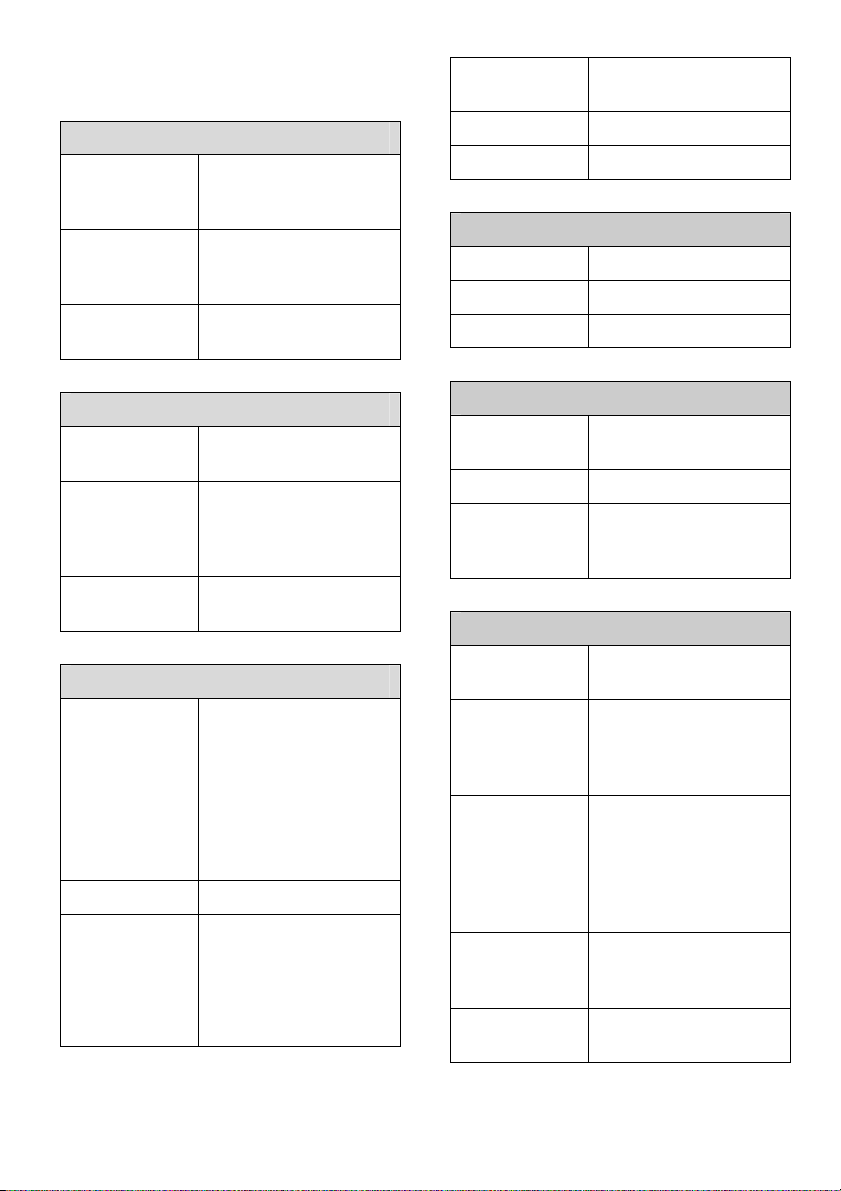
Padl-R UF Specifications
1hour all axis.
Power Supply
Power
Supply
(Internal)
Power
Supply
(External)
Battery
Charging
Wireless Interface
Bluetooth Bluetooth Standard
Pairing with
other
devices
Profile Serial Port Profile
RF
Operating
Frequency
Read Range Approx 1.5 Metres
Air Interface
Standards
3.7V / 1000mAh LiIon battery
+5V DC @ 100mA
Max
Via USB Mini-B
Connector
V1.1
Can be discovered
and paired by a
PDA or Bluetooth
enabled device.
(SPP)
862 - 955MHz (Max)
Operating frequency
bands for regions
are Restricted by
reader’s firmware.
US Region:
902.3 – 927.7MHz
ISO 18000-6A
ISO 18000-6B
ISO 18000-6C
EPC Class 0
EPC Class 1
(GEN2)
Tag Type Passive
Antenna Internal
User Interface
Visual Coloured LEDs
Audio Multi tone buzzer
Operation Single button
Mechanical
Dimensions
(L x W x D)
Weight 132 grams
Material and
Finish
Environment
Water and
Dust Ingress
Shock Can withstand a
Vibration Random 1.9grms
Operating
Temperatur
e
Humidity 10 - 90% non
21x72x16 mm
ABS, Black Color
with Light Textured
Finish
IEC 529 IP54
drop of 1.2m to
plywood on all faces
and corners.
(non operational),
Random 0.95grms
(operational), 1hour
all axis.
-10 - 55 deg C
condensing
Page 16
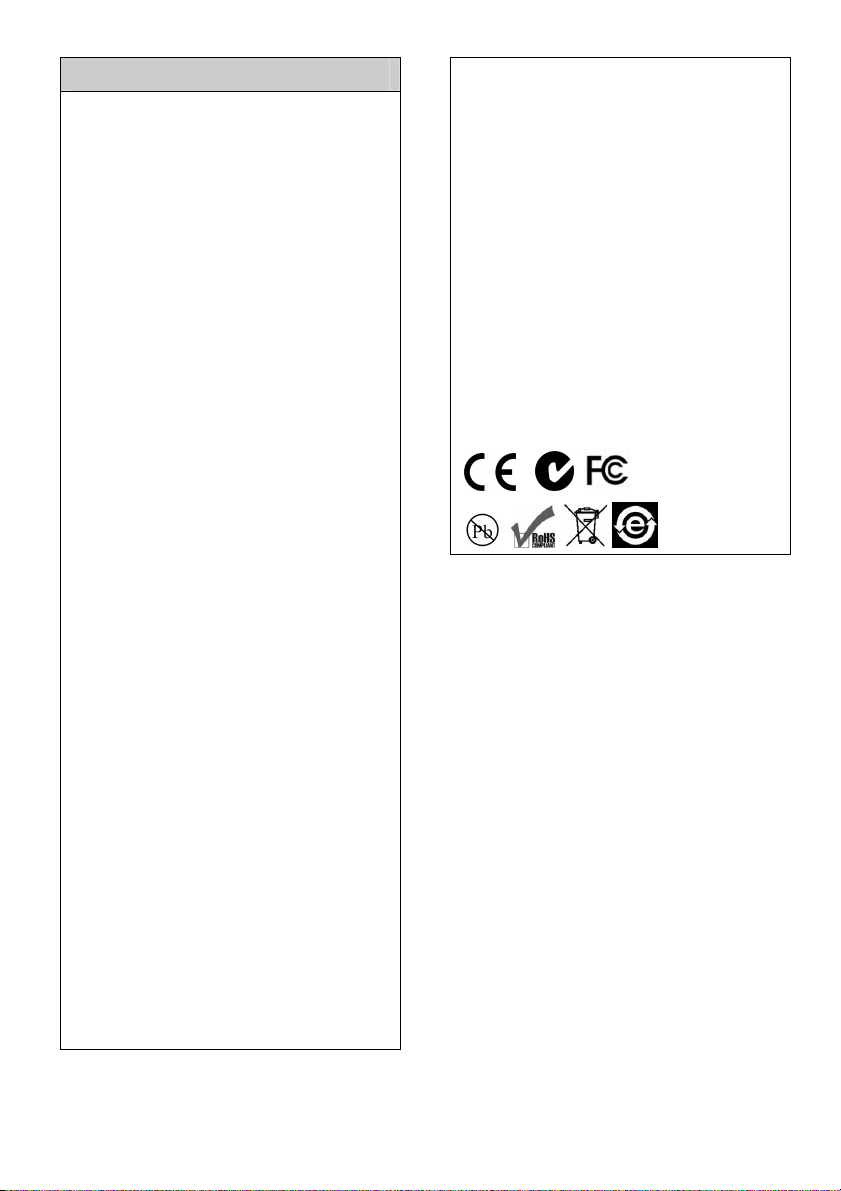
Compliance
EN 302-208
AS/NZS 4268
EN 301 489-1
EN 301 489-3
EN 60950
C-Tick: Z997
Canada:
IC: 7453A-UFP001007
Operation is subject to the following
two conditions: (1) This device may
not cause interference and (2) This
device must accept any interference,
including interference that may cause
undesired operation of the device.
See RSS-GEN 7.1.5.
FCC:
FCC Part 15 Part C
FCC ID:VRJUFP001007
This device complies with Part 15 of
the FCC Rules. Operation is subject to
the following two conditions: (1) this
device may not cause harmful
interference, and (2) this device must
accept any interference received,
including interference that may cause
undesired operation.
FCC RF Radiation Exposure
Statement
This equipment complies with FCC
RF radiation exposure limits set forth
for an uncontrolled environment. This
equipment should be installed and
operated with a minimum distance of
20 centimeters between the radiator
and your body.
RoHS Directive 2002/95/EC
WEEE Directive 2002/95/EC
This product must not be disposed of
with other waste. Instead, it is your
responsibility to dispose of your waste
equipment by handing it over to a
designated collection point for the
recycling of waste electrical and
electronic equipment. The separate
collection and recycling of your waste
equipment at the time of disposal will
help conserve natural resources and
ensure that it is recycled in a manner
that protects human health and the
environment. For more information
about where you can drop off your
waste equipment for recycling, please
contact your local city recycling office
or the dealer from whom you
purchased the product.
Limitations and Recommendations
Tracient accepts no liability for
damage to devices connected to, or
operated with the RFID Reader. The
examples, code and SDK are
provided for end users and are to be
used at the end user’s own risk.
In order to avoid or minimise potential
risk of ergonomic injury follow the
recommendations below:
Reduce or eliminate repetitive
motion
Maintain a natural position
Keep device within easy reach
Improve work procedures
All Tracient devices are designed to
be compliant with rules and
Page 17

regulations applicable for the
locations they are sold into. Any
changes or modifications made to the
device without Tracient’s approval
could void the user’s authority to
operate the device.
items will carry a 30-day limited
warranty.
Warranty coverage and procedure
Warranty Statement
Tracient manufactures its hardware
products in accordance with industry
standard practices. Tracient warrants
that for a period of twelve (12) months
from date of shipment, products will
be free from defects in materials and
workmanship. This warranty is
provided to the original owner only
and is not transferable to any third
party. It shall not apply to any product
(i) which has been repaired or altered
unless done or approved by Tracient,
(ii) which has not been maintained in
accordance with any operating or
handling instructions supplied by
Tracient, (iii) which has been
subjected to unusual physical or
electrical stress, misuse, abuse,
power shortage, negligence or
accident, or (iv) which has been used
other than in accordance with the
product operating and handling
instructions. The Customer must
notify Tracient in writing within 7 days
of the alleged defect first coming to
the Customer’s notice, and the
Customer must at this time also state
the date and place of the purchase.
Preventive maintenance is the
responsibility of the customer and is
not covered under this warranty.
Tracient shall not be responsible for
any defect in products arising as a
result of defects in any third party
software or hardware.
Items and accessories having a
Tracient serial number will carry a 90day limited warranty. Non-serialized
During the warranty period, Tracient
will repair or replace defective
products returned to Tracient’s
headquarters in Christchurch, New
Zealand or an authorized service
agent. Products must be shipped in
the original or comparable packaging,
shipping and insurance charges
prepaid. Tracient will ship the repaired
or replacement product freight and
insurance prepaid within New
Zealand only. The removal of the
defective equipment and the
installation of any repaired or
replacement parts shall be performed
by the Customer at its own expense.
Subject to any service contract
between the Customer and Tracient
and with respect to products not
capable of removal and return to
Tracient, in such cases Tracient will
use its best endeavors to remedy any
defect by remote repair, advice or
upgrade. In the event that such defect
is not able to be repaired in the
manner provided above,
Tracient will, at the Customer’s
request, undertake repairs at the cost
of the Customer.
Tracient will use new or refurbished
parts at its discretion and will own all
parts removed from repaired
products. The customer will pay for
the replacement product in case it
does not return the replaced product
to Tracient within 3 days of receipt of
the replacement product. The process
for return and Customer’s charges will
be in accordance with Tracient’s
Page 18

Exchange Policy in effect at the time
of the exchange.
The customer accepts full
responsibility for its software and data
including the appropriate backup
thereof. Repair or replacement of a
product during warranty will not
extend the original warranty term.
General
Except for the warranties stated
above,
Tracient disclaims all warranties,
express or implied, on products
furnished hereunder, including without
limitation implied warranties of
merchantability and fitness for a
particular purpose. The stated
express warranties are in lieu of all
obligations or liabilities on part of
Tracient for damages, including
without limitation, special, indirect, or
consequential damages arising out of
or in connection with the use or
performance of the product.
Tracient’s liability for damages to
buyer or others resulting from the use
of any product shall in no way exceed
the purchase price of said product,
except in instances of injury to
persons or property. Some states (or
jurisdictions) do not allow the
exclusion or limitation of incidental or
consequential damages, so the
proceeding exclusion or limitation
may not apply to you.
 Loading...