

Page 1
TRACEABLE® DUAL-DISPLAY DIGITAL STOPWATCH INSTRUCTIONS
COUNTDOWN TIMER MODE
Maximum setting time: 9 Hour, 59 Minutes and 59 seconds.
BATTERY LIFE INDICATOR
Battery life indicator (upper left corner) on the display will be on when the battery
needs to be replaced. Lithium battery CR 2032 or equivalent is used.
IF THERE IS ANY IRREGULAR SEGMENTS OR MALFUNCTIONS, PLEASE HOLD
DOWN THE 4 BUTTONS TO RESET THE STOPWATCH
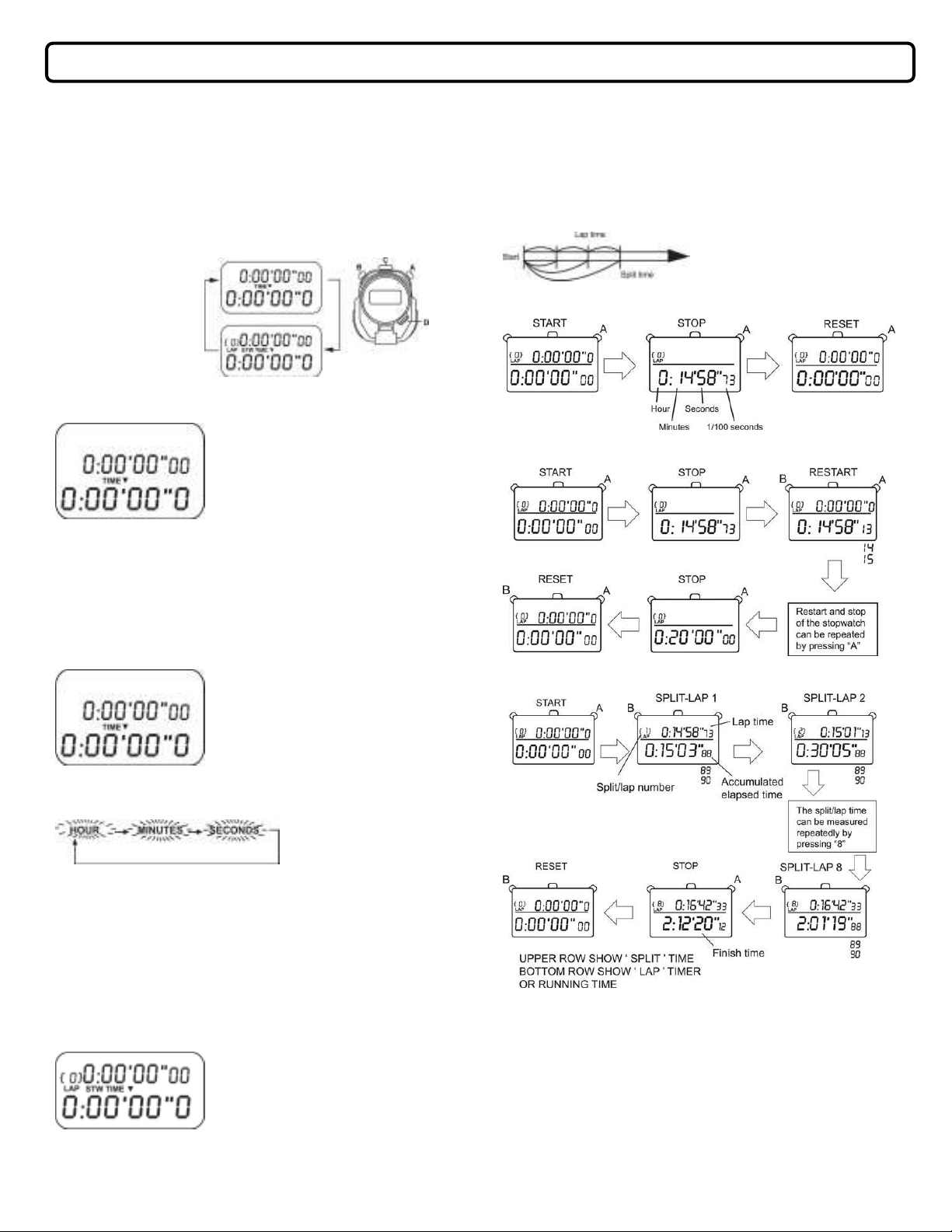
Before using the stopwatch, be sure to reset the digits to “0:000000 When the
●
stopwatch is stopped, press “B”.
When the stopwatch is counting, press “A” to stop the measurement and then
press “B”.
“Split time” refers to an elapsed time required to cover a distance from the start
●
to a given point.
“Lap time” refers to an elapsed time required to cover a given section of the
whole distance.
<TIMER>
DISPLAY
<STOPWATCH>
DISPLAY
COUNTDOWN TIMER MODE
Maximum setting time: 9 Hour, 59 Minutes and 59 seconds. If started from zero,
counting time is 10 hours.
Upper left corner shows the repeat counter.
Middle Row shows the setting time. Hour, Minute
and Second (Initial value: 0:00’00”0)
“TMR▼” icon will display.
Bottom Row shows the running time: Hour, Minute
and Second (Initial value: 0:00’00”0
1. Press “A”: Start/Stop the Timer
2. Press “B”: If Timer is stopped: reload the Timer Run value to Timer Set
value. If timer is running: No function.
3. Press “C”: Hold for 2 seconds will enter into Timer setting Mode
4. Press “D”: Change to next mode.
SETTING MODE
(Repeat counter will clear to zero when enter this setting mode)
Hour digits will be set first
After enter the setting mode:
1. Press “B” to select the digits (flashing ) to be adjusted in the following order.
1. Standard Measurement
2
. Accumulated Elapsed Time Measurement
3. Split Time/Lap Time measurement
2. Press “ A “to set the flashing digits. *The digits move quickly if “A” is kept press
over 2 seconds.
3. After all the adjustment are completed, press “C”.
Notes:
When the Timer Alarm is on, it will last for 5 seconds:
After exit setting, the Lower Row will load the set value of the Middle Row.
STOPWATCH MODE
The Stopwatch can measure up to 10 hours in hours, minutes, seconds and 1/100
seconds.
Press “D” to enter this mode
After enter this mode, display will
show “STW” icon.
Find Quality Products Online at: [email protected]
www.GlobalTestSupply.com
H
OW TO USE THE MEMORY FUNCTION.
The stopwatch can store up to the first 8 split / lap times and the total elapsed time.
They are automatically entered into the memory. In additional, the fastest lap, and the
slowest lap can also be recalled
Page 2
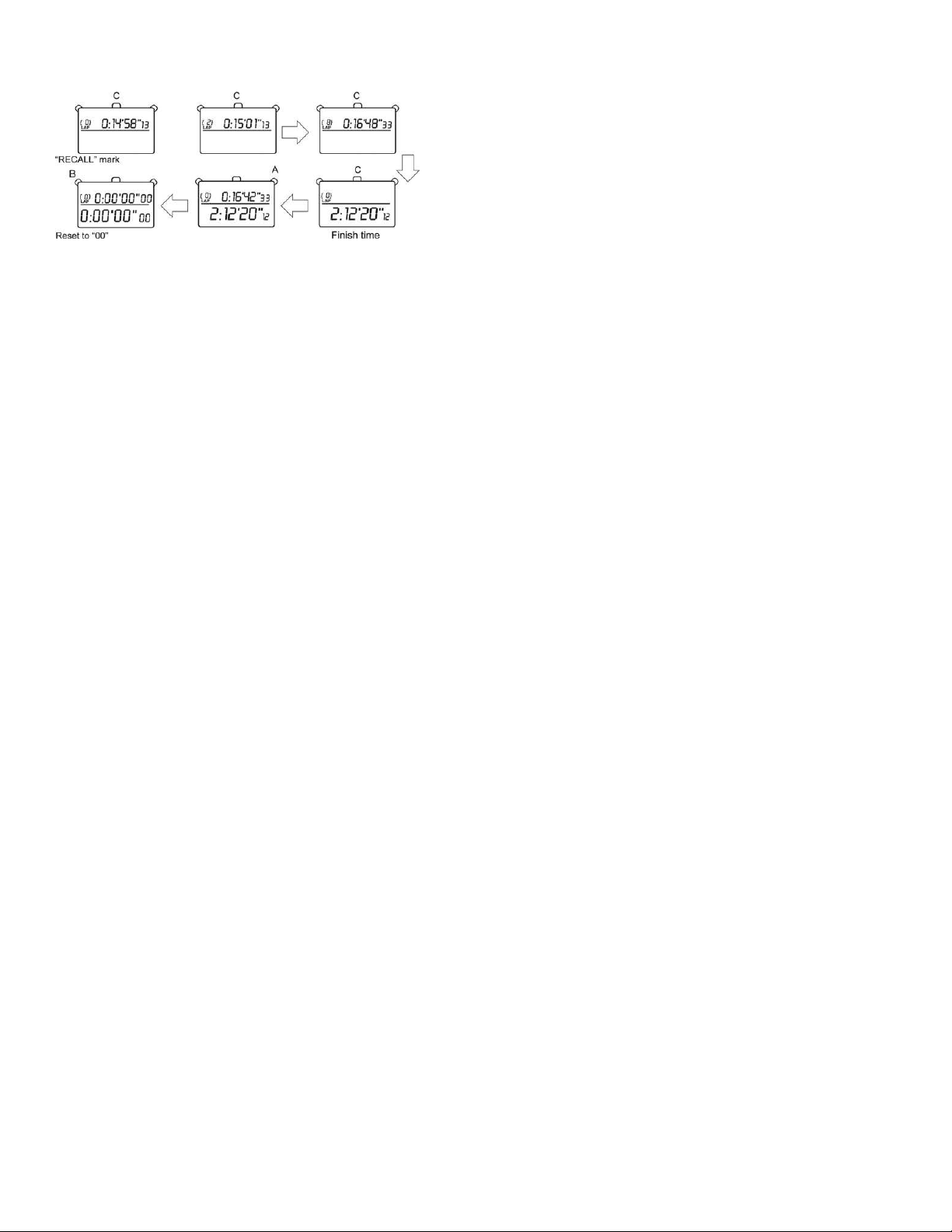
With each press of “C”, the time stored is recalled. The time can be recalled
●
successively be keeping the button pressed.
To stop the recall of the stored data, press “A”, “B” or “D”. The measurements
●
when the stopwatch was stopped will be shown. Then press “B” to reset the
digits to “00”.
The time stored in the memory can be recalled even while the stopwatch is
●
measuring.
WITH EACH PRESS OF “C”
When the stopwatch is stopped Fastest Lap, Slowest Lap, after that.
Split time and lap time are recalled starting with
the first ones.
When the stopwatch is running Fastest Lap, Slowest Lap, after that, Split time
and lap time are recalled starting with the last
ones.
Notes:
1. To measure the lap time and split time while the stored data is recalled, operate
the buttons as follows. Press “B” to measure new lap time and split time. Press
“A” to stop or start the measurement.
2. When the memory is full, “split / lap number” flash, extra split / lap times will not
store into memory but the memory counter will still show extra split/lap times.
The fastest, slowest and average laps will not store into the memory.
Find Quality Products Online at: [email protected]
www.GlobalTestSupply.com
 Loading...