

Page 1

QUICK RE FERENCE GUIDE
PRIUS ALPHA
2 0 1 2
mycar.pk
Page 2

!
A word about safe vehicle operations
This Quick Reference Guide is a summary of basic vehicle
operations. It contains brief descriptions of fundamental operations
so you can locate and use the vehicle’s main equipment quickly
and easily.
The Quick Reference Guide is not intended as a substitute for the
Owner’s Manual located in your vehicle’s glove box. We strongly
encourage you to review the Owner’s Manual and supplementary
manuals so you will have a better understanding of your vehicle’s
capabilities and limitations.
Your dealership and the entire staff of Toyota Motor Sales & MYCAR
k
wish you many years of satisfied driving in your Prius
Alpha.
This Quick Reference Guide is not a full description of Prius
Alpha operations. Every owner should review the Owner’s
Manual that accompanies this vehicle.
Pay special attention to the boxed information highlighted in
color throughout the Owner’s Manual. Each box contains safe
operating instructions to help you avoid injury or equipment
malfunction.
All information in this Quick Reference Guide is current at the
time of printing. Toyota reserves the right to make changes at any
time without notice.
Prius
ALPHA
IND
OVE
FEAT
SAF
EME
1
Visi
2
Hom
mycar.pk
Page 3

OVERVIEW
FEATURES/OPERATIONS
SAFETY AND EMERGENCY FEATURES
1
INDEX
OVERVIEW
FEATURES/OPERATIONS
SAFETY AND
EMERGENCY FEATURES
Engine maintenance 9
Fuel tank door release and cap 8
Hood release 8
Indicator symbols 4-5
Instrument cluster 4
Instrument panel 2-3
Keyless entry
1
6
Light control-Instrument panel 9
Smart Key system
1
7
Air Conditioning/Heating 17
Audio 18
Auto lock/unlock
1
10
Clock 23
Cruise control 20
Dynamic Radar Cruise Control 21
EV drive mode 12
Garage door opener (HomeLink®)
2
23
Hill-start Assist Control (HAC) 23
Hybrid Synergy Drive System 10
Lights1& turn signals 15
Panoramic roof shades
1
19
Parking brake 12
Power outlets 20
Seat adjustments-Front 13
Seat heaters 16
Seat-Folding down rear seat 14
Seats-Flattening front seatbacks 13
Seats-Head restraints 13
Steering wheel switches 19
Telephone controls (Bluetooth®) 22
Tilt and telescopic steering wheel 12
Transmission 11
Trip information display 22
Windows-Power 16
Windshield wipers & washers 14
Doors-Child safety locks 25
Door locks 25
Floor mat installation 27
Seat belts 24
Seat belts-Shoulder belt anchor 24
Spare tire & tools 25
Star Safety System
TM
26-27
Tire Pressure Monitoring (warning) System 24
1
Visit your Toyota dealer for information on customizing this feature.
2
HomeLink®is a registered trademark of Johnson Controls, Inc.
mycar.pk
Page 4
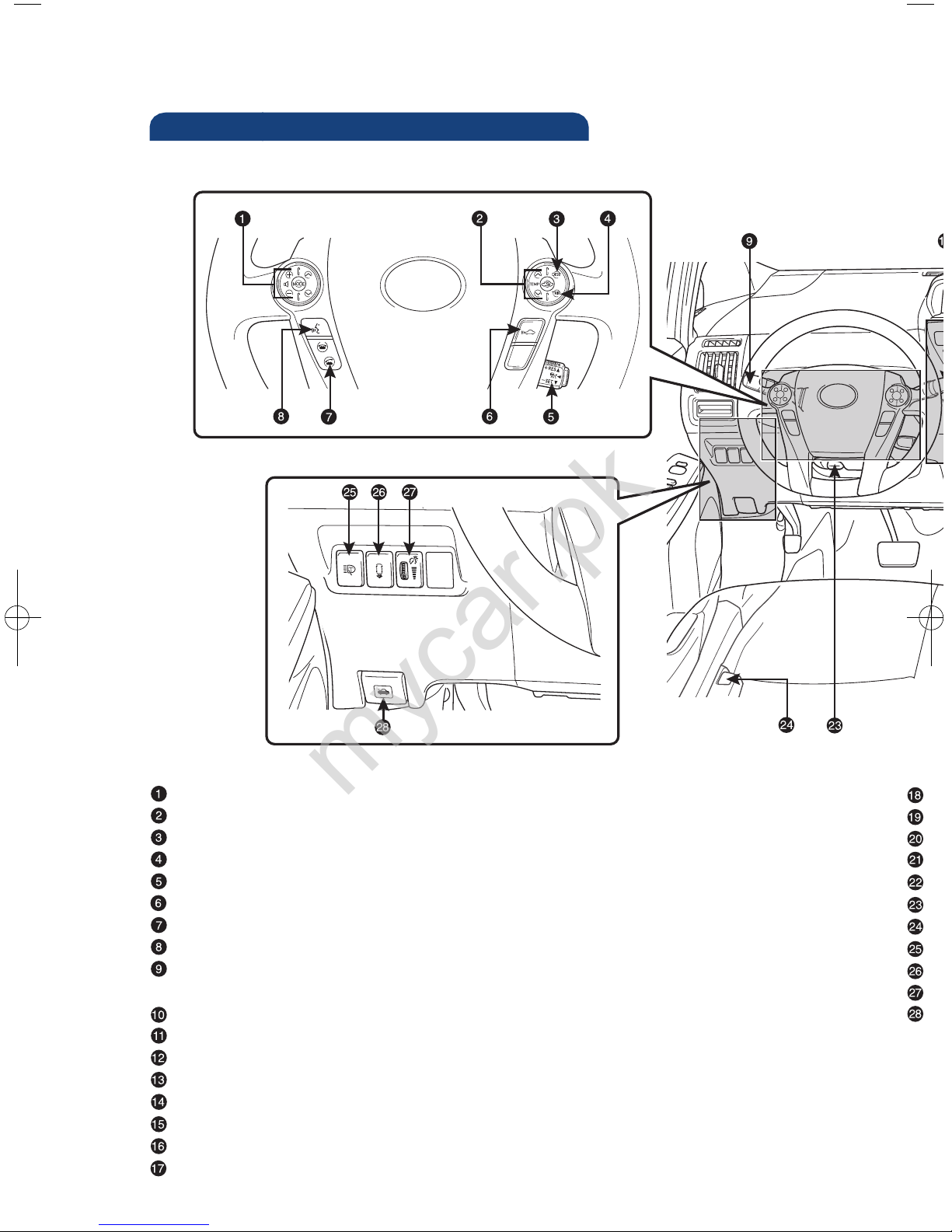
2
OVERVIEW
Instrument panel
A
O
A
P
S
T
F
H
A
In
H
1
2
NOT
Syste
Steering wheel audio controls
Steering wheel climate controls
Trip information display button
“TRIP” button
Cruise control
Radar cruise control distance switch
1
Telephone controls
2
Voice command button
1,2
Headlight and turn signal controls/Headlight, turn signal and front fog light
controls
1
Wiper and washer controls
Trip information display
Audio system or navigation system-integrated audio system
1,2
Mph or km/h button
Emergency flasher button
Power button
“P” position switch
Shift lever
mycar.pk
Page 5
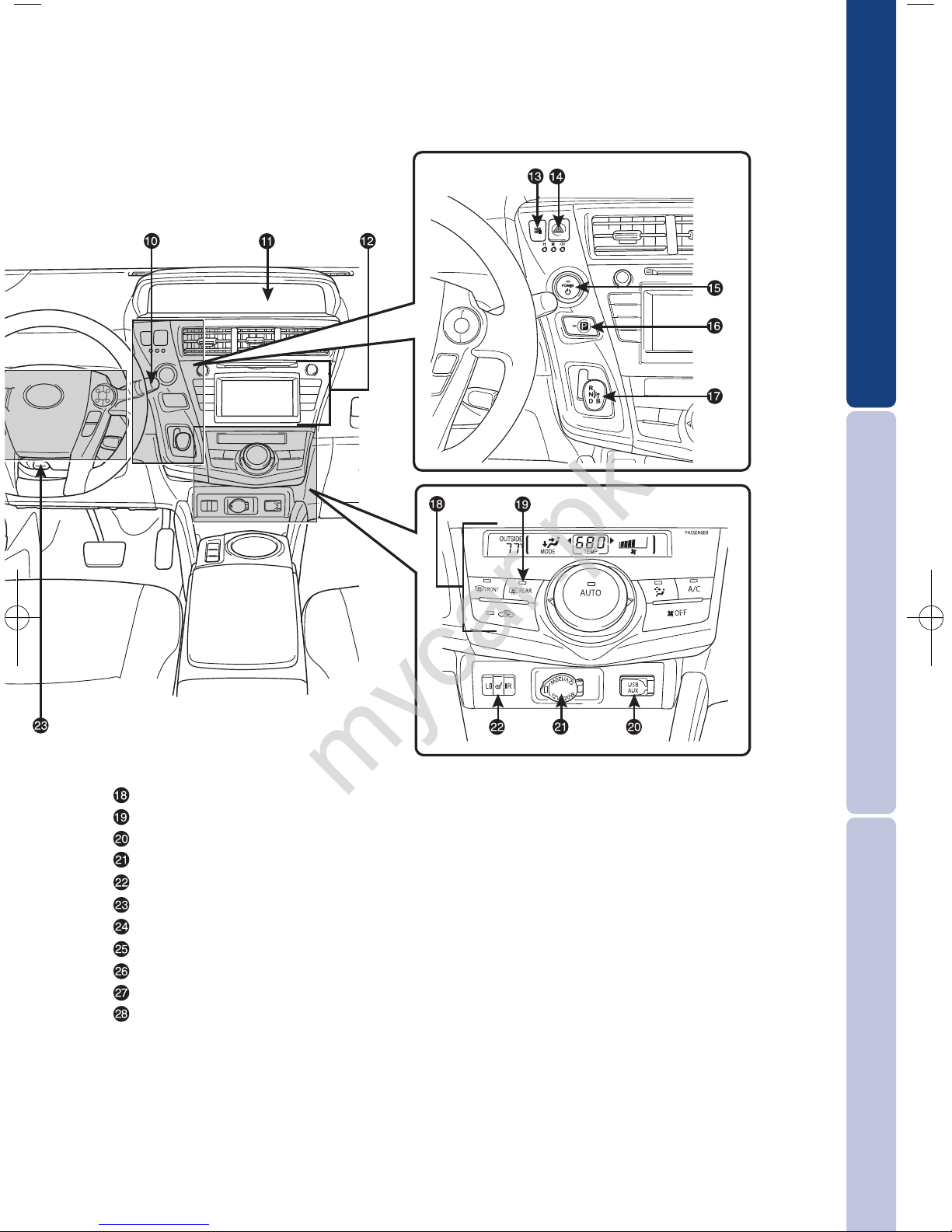
OVERVIEW
FEATURES/OPERATIONS
SAFETY AND EMERGENCY FEATURES
3
Air Conditioning controls
Outside rearview mirror/Rear window defogger button
AUX port/USB port
Power outlet
Seat heater switches
1
Tilt and telescopic steering lock release lever
Fuel filler door opener
Headlight cleaner switch
1
Advanced Parking Guidance System switch
1,2
Instrument panel light control
Hood lock release lever
1
If equipped
2
For vehicles with a display audio or navigation system, refer to the “Display
Audio Owner’s Manual” or “Navigation System Owner’s Manual.”
NOTE: For vehicles equipped with Entune
TM
, please consult the “Navigation
System With Entune Quick Reference Guide” or www.toyota.com/entune.
mycar.pk
Page 6
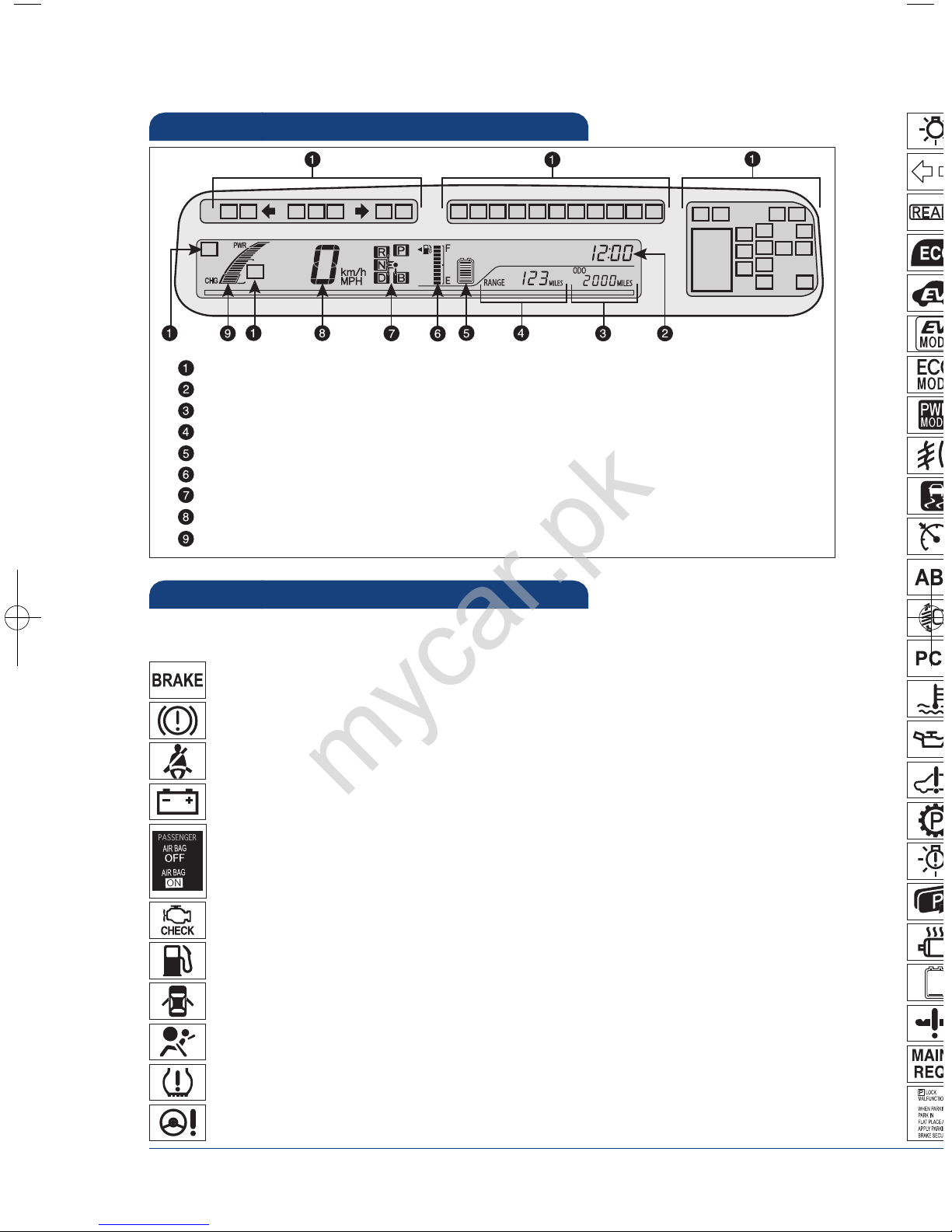
4
OVERVIEW
Indicator symbols
Instrument cluster
Service indicators and reminders
Clock
Odometer and trip meter display
Trip information display
Hybrid battery (traction battery) status
Fuel gauge
Transmission shift position indicator
Speedometer
Hybrid System indicator
Charging system warning
1
Brake system warning
1
Front passenger occupant classification or front passenger airbag ON/OFF
indicator
2
If th
Low Tire Pressure Warning
1
Open door warning
Airbag SRS warning
1
Driver seat belt reminder and/or front passenger seat belt reminder
(alarm will sound if speed is over 12 mph)
Malfunction/Check Engine indicator
1
Low fuel level warning
Electric power steering system warning
1
Brake system warning light (yellow indicator)
1
1
If indicator does not turn off within a few seconds of starting hybrid system, there may be a
malfunction. Have vehicle inspected by your Toyota dealer.
For details, refer to “Indicators and warning lights,” Section 2-2, 2012 Owner’s
Manual.
mycar.pk
Page 7
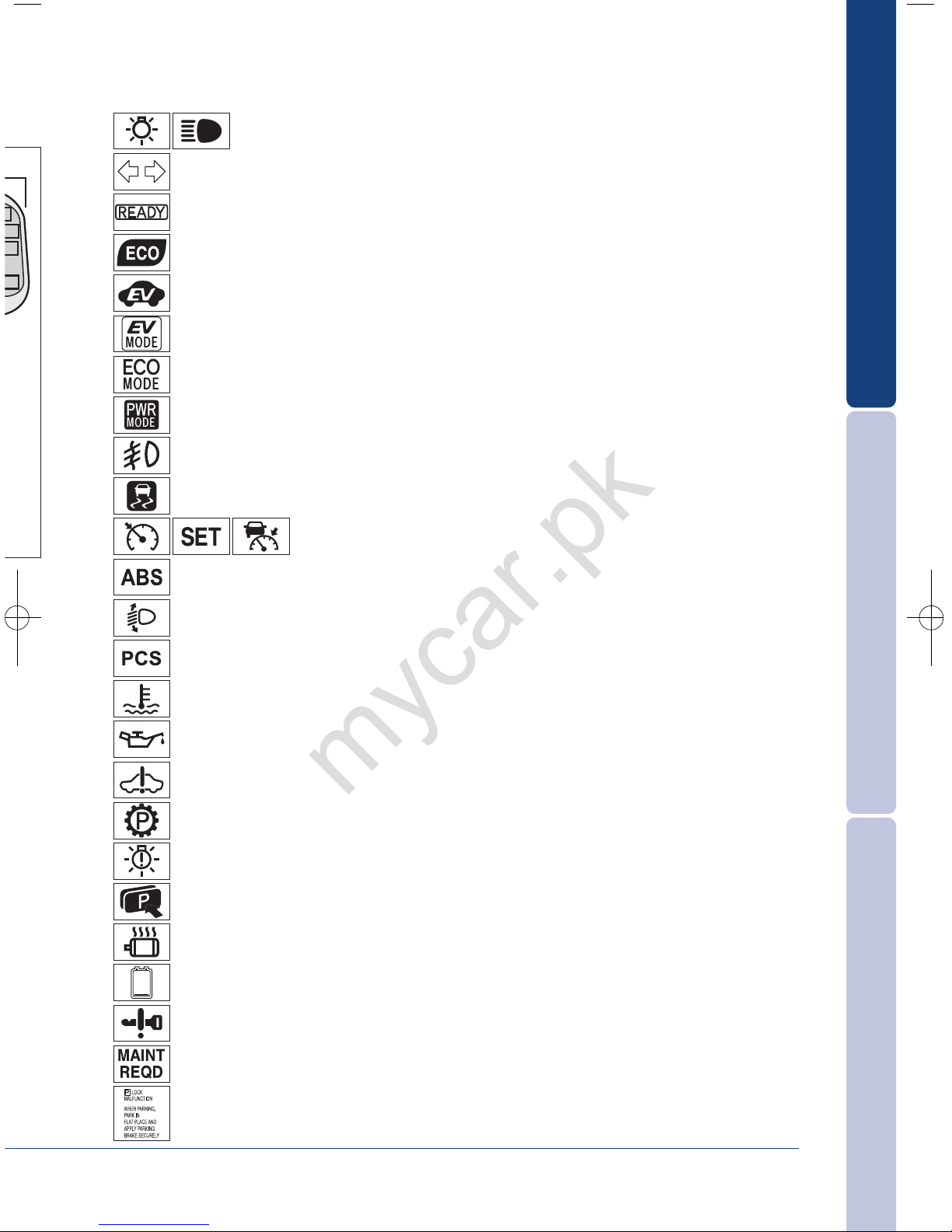
OVERVIEW
FEATURES/OPERATIONS
SAFETY AND EMERGENCY FEATURES
5
2
If this light flashes, refer to “Cruise control,” Section 2-4, 2012 Owner’s Manual.
Anti-lock Brake System warning
1
Headlight low/high beam indicators
Turn signal indicator
Slip indicator/Hill-start Assist Control indicator
1
Cruise control indicators
2
READY indicator
Front fog light indicator
Eco Mode indicator
EV drive mode indicator
Automatic headlight leveling system warning
1
Pre-Collision System warning light
1
High coolant temperature warning light
1
Power Mode indicator
EV indicator
Eco driving indicator
1
Low engine oil pressure warning
1
Maintenance required reminder
1
Hybrid System warning
1
Smart Key system warning
Hybrid System overheat warning
1
P position request indicator
1
Low Hybrid battery (traction battery) warning
LED headlight warning
1
Parking lock system warning
1
Parking lock system warning message
mycar.pk
Page 8
6
OVERVIEW
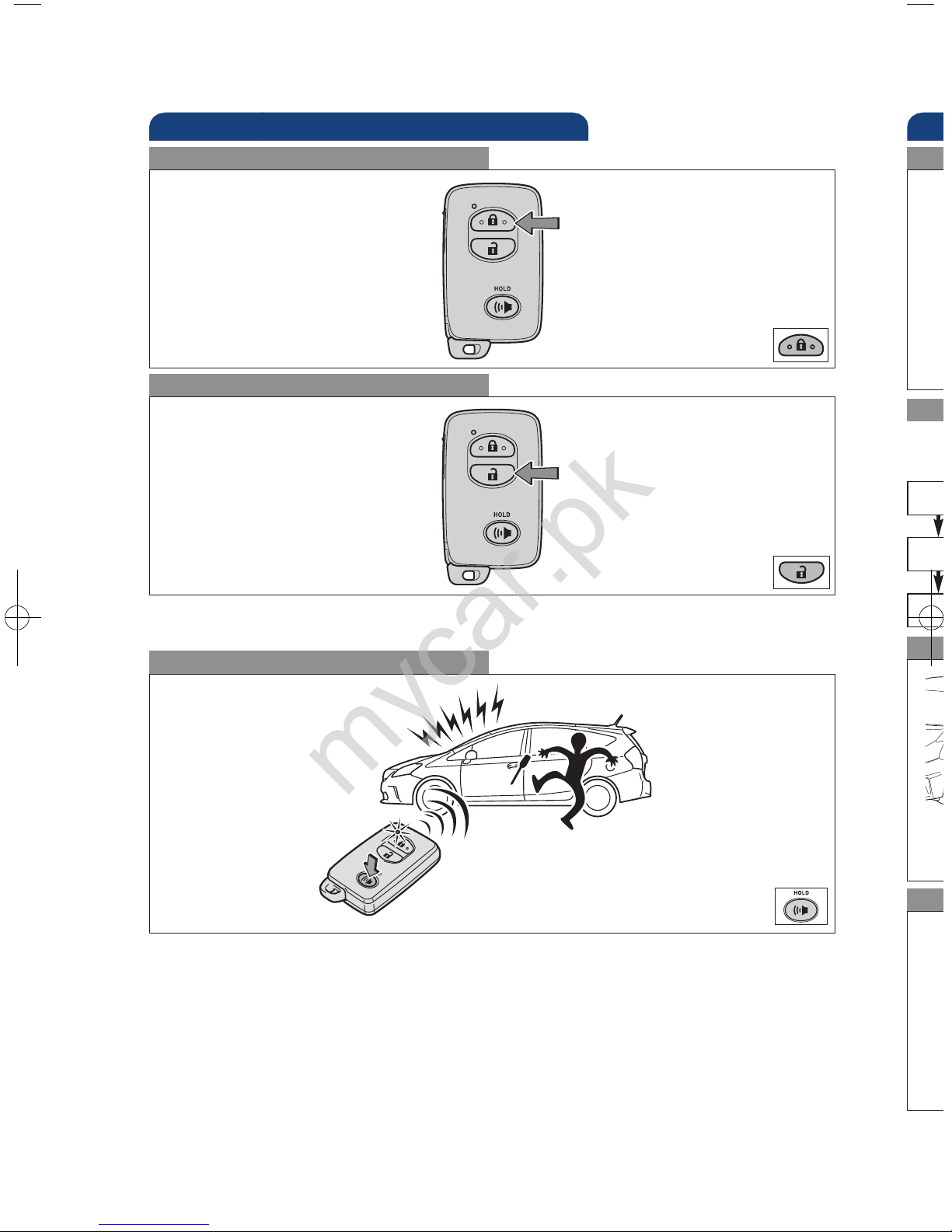
Keyless entry
Push
Push ONCE: Driver door
TWICE: All doors
Locking operation
Unlocking operation
Sm
Star
AC
ON
OF
With
oper
Pow
Panic button
Push and hold
NOTE: If a door is not opened within 60 seconds of unlocking, all doors will relock for
safety.
* Dri
all
NOT
Loc
Carr
Bac
Carr
lock
mycar.pk
Page 9
OVERVIEW
FEATURES/OPERATIONS
SAFETY AND EMERGENCY FEATURES
7
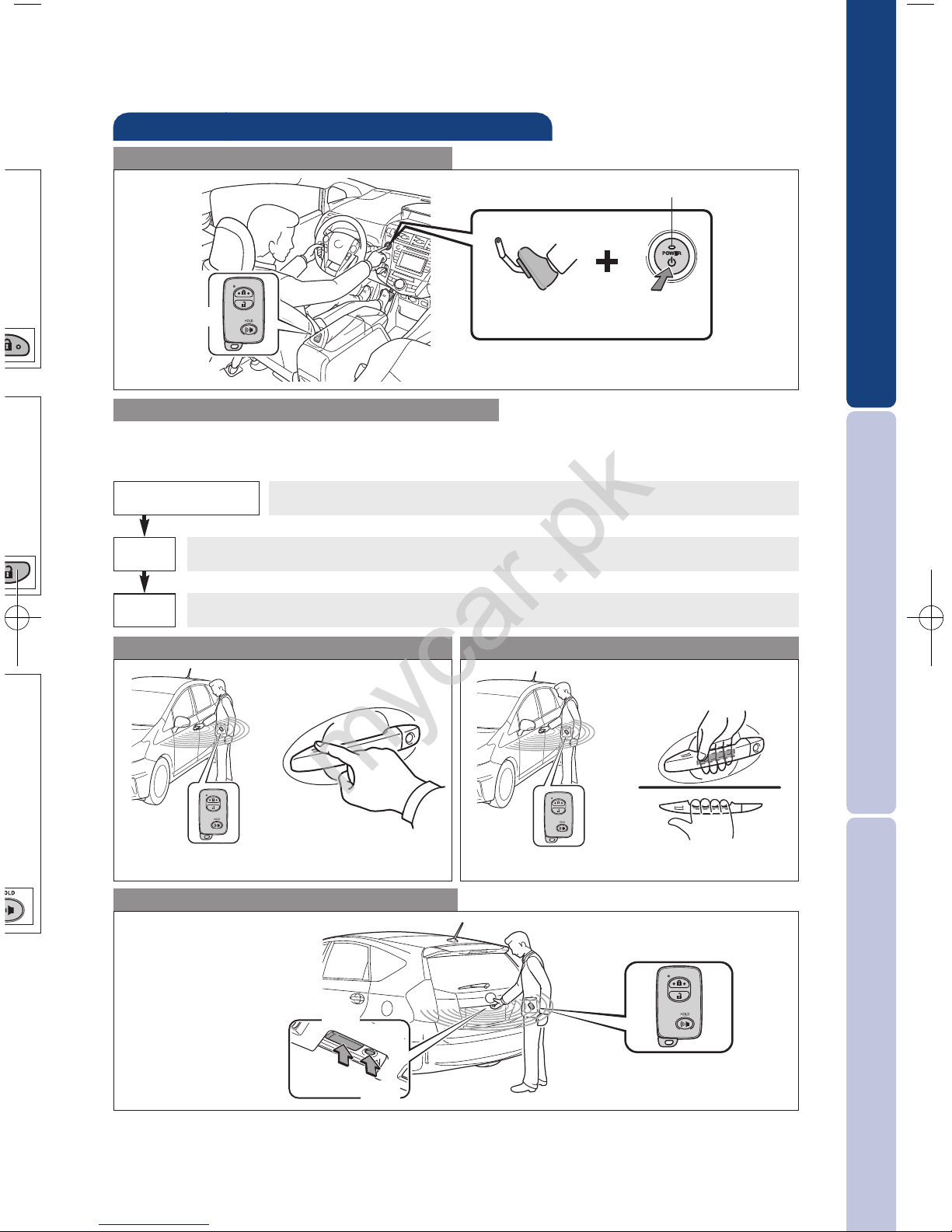
Smart Key system
Start function
Accessories such as the radio will operate.
Power ON; Hybrid System is not engaged.
All systems OFF.
ACCESSORY
ON
OFF
Push
Depress
brake pedal
Carrying
Green indicator ON
Without depressing the brake pedal, pressing the “POWER” switch will change the
operation mode in succession from:
Power (without starting Hybrid System)
* Driver door unlocking function can be programmed to unlock driver door only, or
all doors. Grasping passenger door handle or rear hatch will unlock all doors.
NOTE: Doors may also be locked/unlocked using remote.
Locking operation
Unlocking operation
Carry remote to lock Carry remote to unlock
All-door lock
Driver door unlock*
Back door lock/unlock
Carry remote to
lock/unlock
Touch
Grasp
Push
Lock
Push
Unlock
mycar.pk
Page 10
8
OVERVIEW
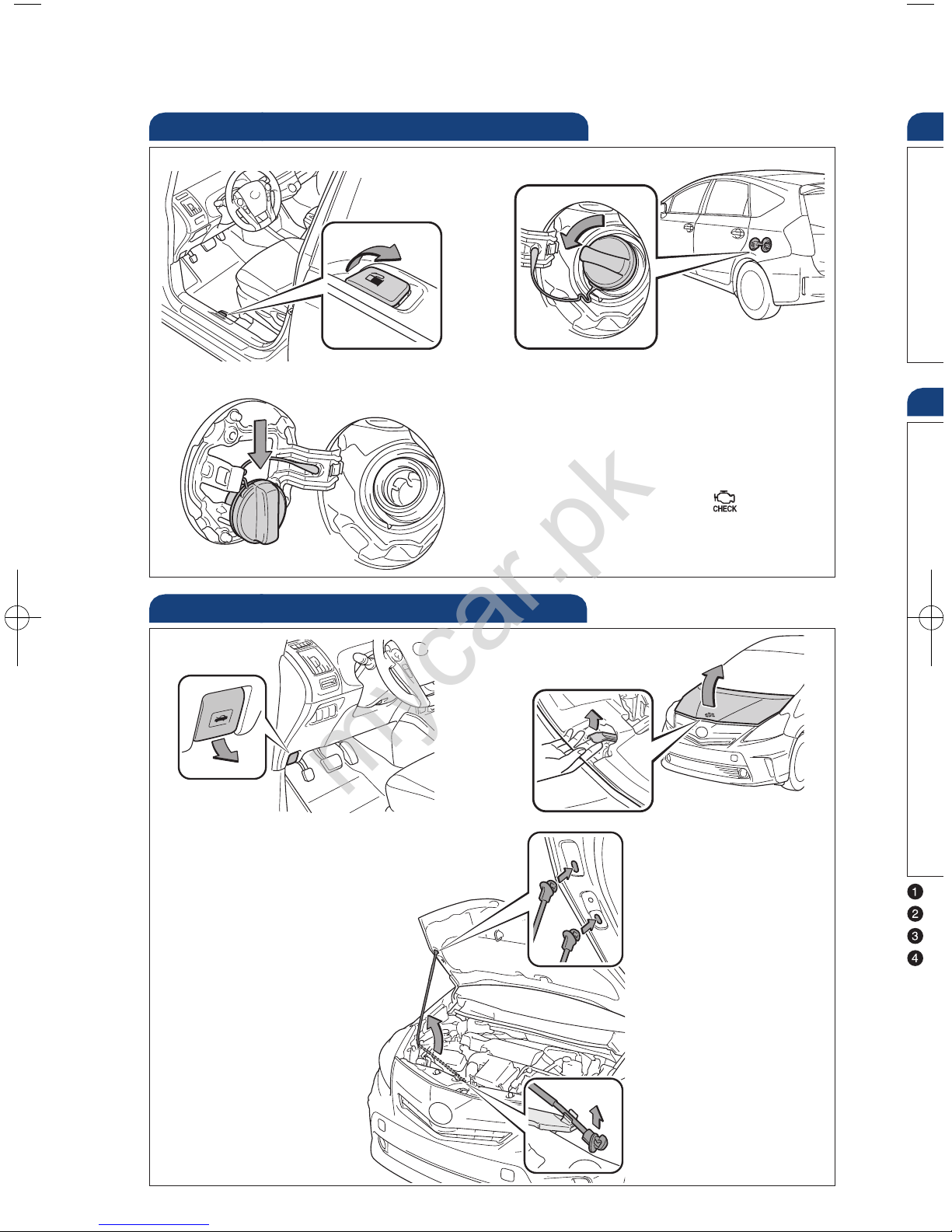
Hood release
Pull up latch and
raise hood
Fuel tank door release and cap
NOTE: Tighten until one click is
heard. If the cap is not tightened
enough, Check Engine “ ”
indicator may illuminate.
Pull
Turn to open
Store
E
E
E
W
NOT
En
Lig
Engage support rod
Pull
Upper slot:
to open normally
Lower slot:
to open widely
mycar.pk
Page 11
OVERVIEW
FEATURES/OPERATIONS
SAFETY AND EMERGENCY FEATURES
9
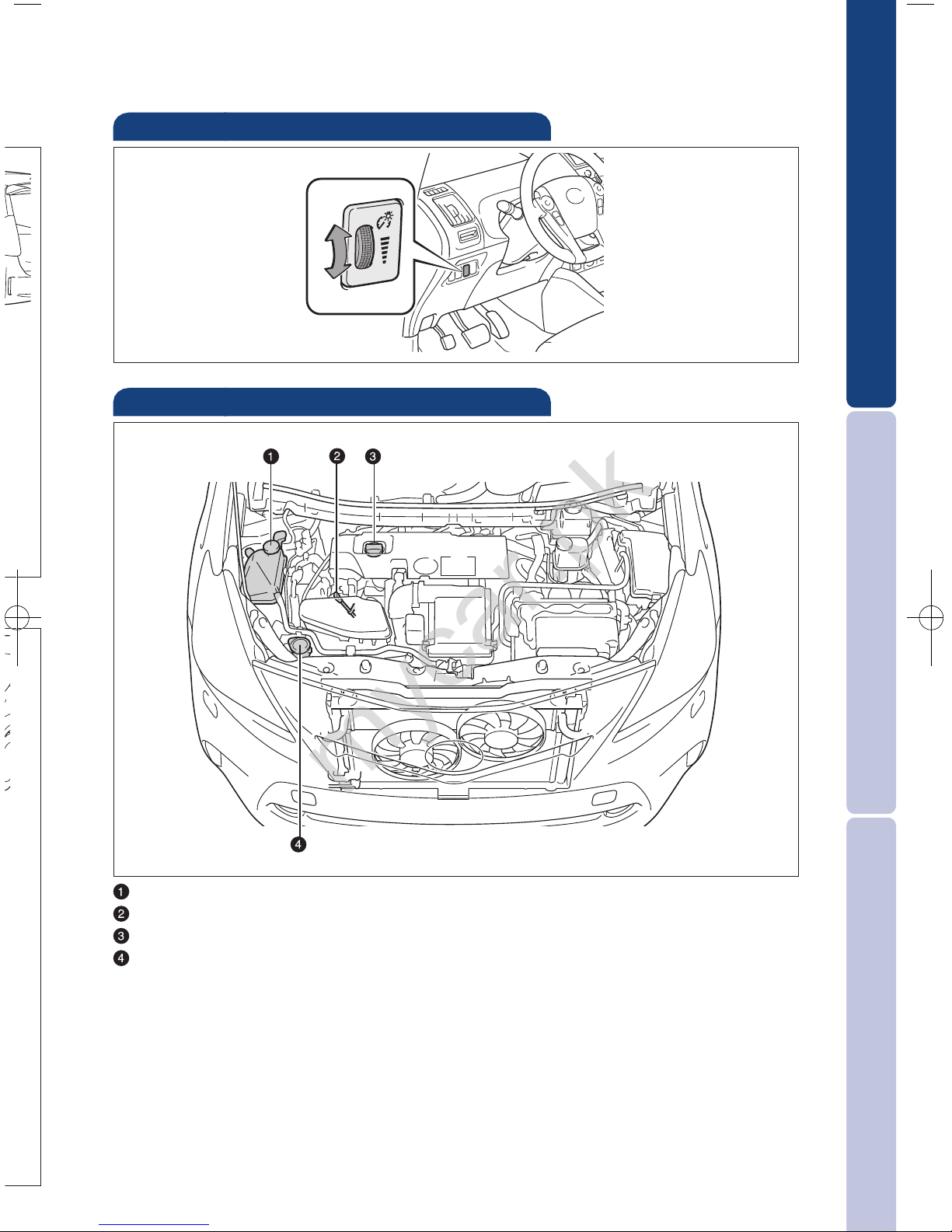
Engine coolant reservoir
Engine oil level dipstick
Engine oil filler cap
Windshield washer fluid tank
NOTE: Regularly scheduled maintenance, including oil changes, will help
extend the life of your vehicle and maintain performance. Please refer
to the “Warranty Maintenance Guide.”
Engine maintenance
Light control-Instrument panel
Brightness
control
-
+
mycar.pk
Page 12
10
FEATURES/OPERATIONS
Tra
* The
bra
Eco
Eco
acce
Refe
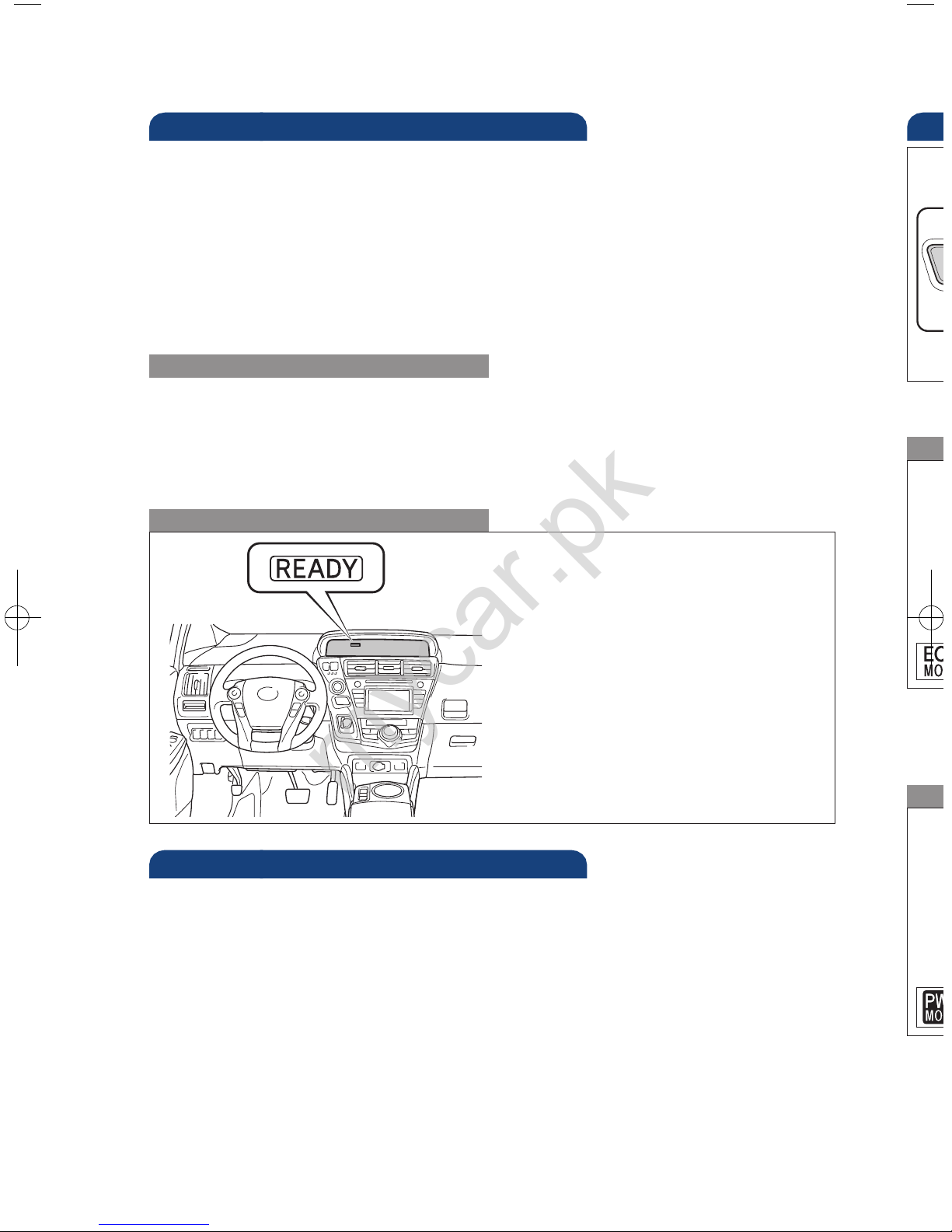
(1) Depress the brake pedal, and
press the “POWER” switch
briefly and firmly.
(2) The “READY” light will blink.
After a few seconds, when the
light remains steady and a
beep sounds, you may begin
driving.
Starting the Hybrid System
The Hybrid Synergy Drive System utilizes a computer-controlled gasoline engine
and electric motor to provide the most efficient combination of power for the
vehicle. To conserve energy, when the brakes are applied the braking force
generates electricity which is then sent to the traction battery. In addition, the
engine shuts off when the vehicle is stopped. The benefits are better fuel
economy, reduced vehicle emissions and improved performance.
NOTE: Fuel consumption and energy information of the Hybrid System are
shown on the Display Audio system screen or the navigation system
screen.
Tips for improved fuel economy
-Ensure tire pressures are maintained at levels specified in the Owner’s Manual.
-When possible, link trips to reduce engine cold starts.
-Avoid driving at speeds that are higher than necessary, especially on the highway.
-When possible, avoid sudden stops to maximize regenerative braking energy.
-Minimize use of the Air Conditioning.
Hybrid Synergy Drive System
Auto lock/unlock
Automatic door locks can be programmed to operate in two different modes, or
turned OFF.
-Doors lock when shifting from Park.
-Doors lock when the vehicle speed is approximately 12 mph or higher.
-Doors unlock when shifting into Park.
-Doors unlock when the driver’s door is opened within 10 seconds after turning the
“POWER” switch OFF.
Refer to the Owner’s Manual for more details.
Pow
Use
mou
Refe
mycar.pk
Page 13
OVERVIEW
FEATURES/OPERATIONS
SAFETY AND EMERGENCY FEATURES
11
Transmission
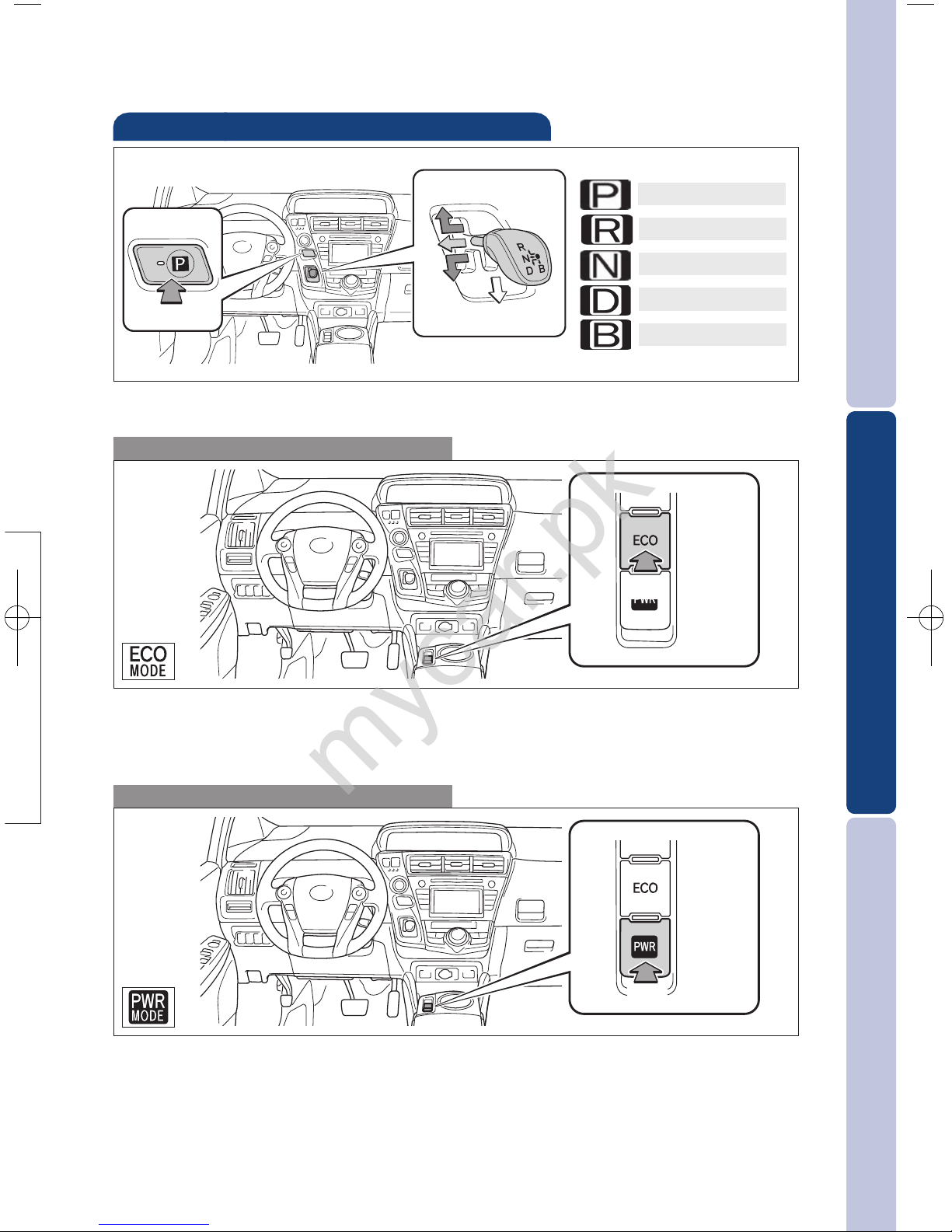
* The engine brake is the equivalent of downshifting. Shift to “B” when engine
braking is desired (i.e. downhill driving, coasting to a stop, etc.).
Eco Mode
Push
Eco Mode helps achieve low fuel consumption during trips that involve frequent
accelerating and braking.
Refer to the Owner’s Manual for more details.
Park button
Reverse
Neutral
Drive
Engine brake*
r
the
Power Mode
Use when a higher level of response is desired, such as when driving in
mountainous regions.
Refer to the Owner’s Manual for more details.
Push
mycar.pk
Page 14
12
FEATURES/OPERATIONS
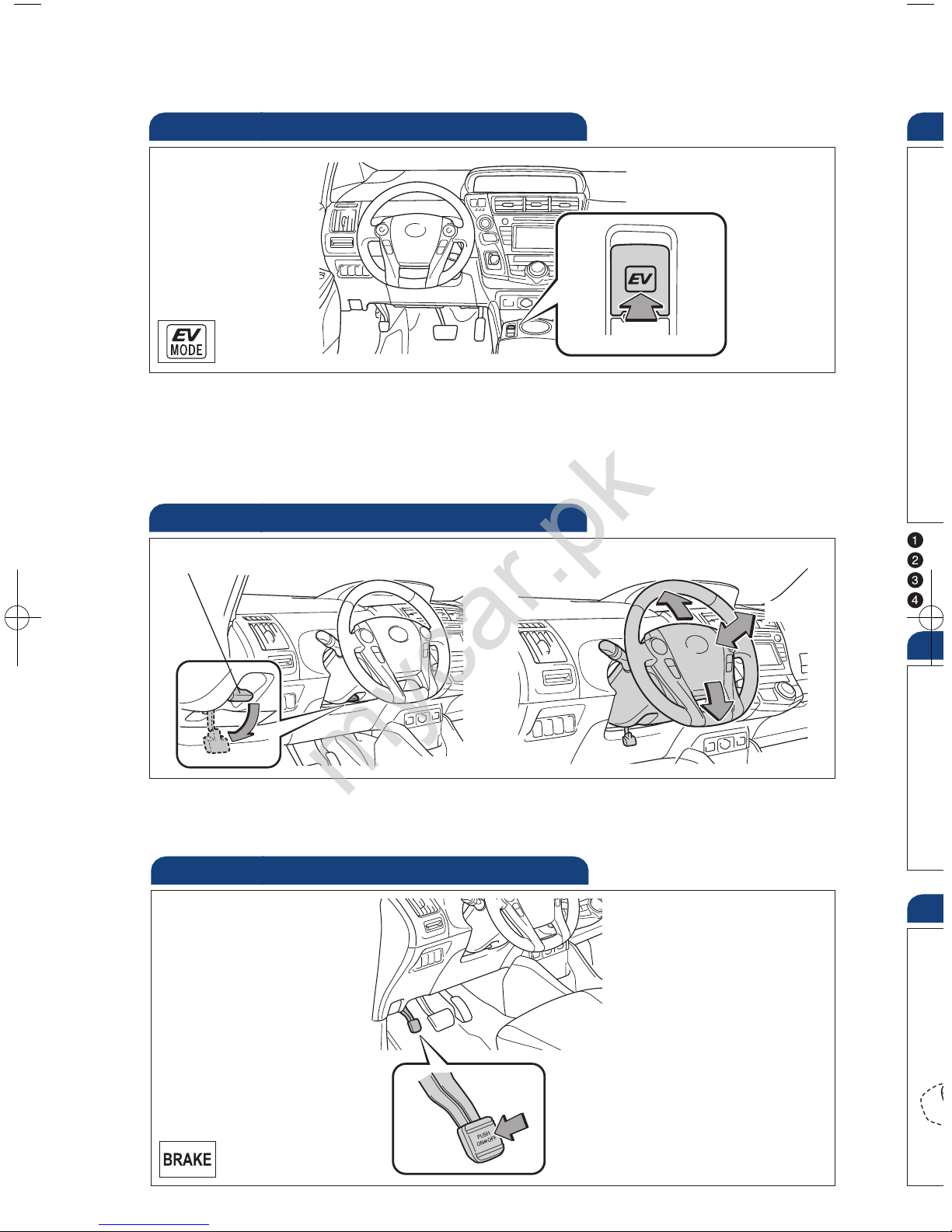
Hold wheel, push lever down, set angle and length, and return lever.
NOTE: Do not attempt to adjust while the vehicle is in motion.
Tilt and telescopic steering wheel
EV drive mode
EV drive mode allows the electric motor (traction motor), powered by the hybrid
battery (traction battery), to be used to drive the vehicle under certain driving
conditions.
Refer to the Owner’s Manual for more details.
Push
Angle
Length
Lock release lever
Parking brake
Set: Depress
Release: Depress again
Se
S
H
S
L
Se
Se
(1) M
mycar.pk
Page 15
OVERVIEW
FEATURES/OPERATIONS
SAFETY AND EMERGENCY FEATURES
13
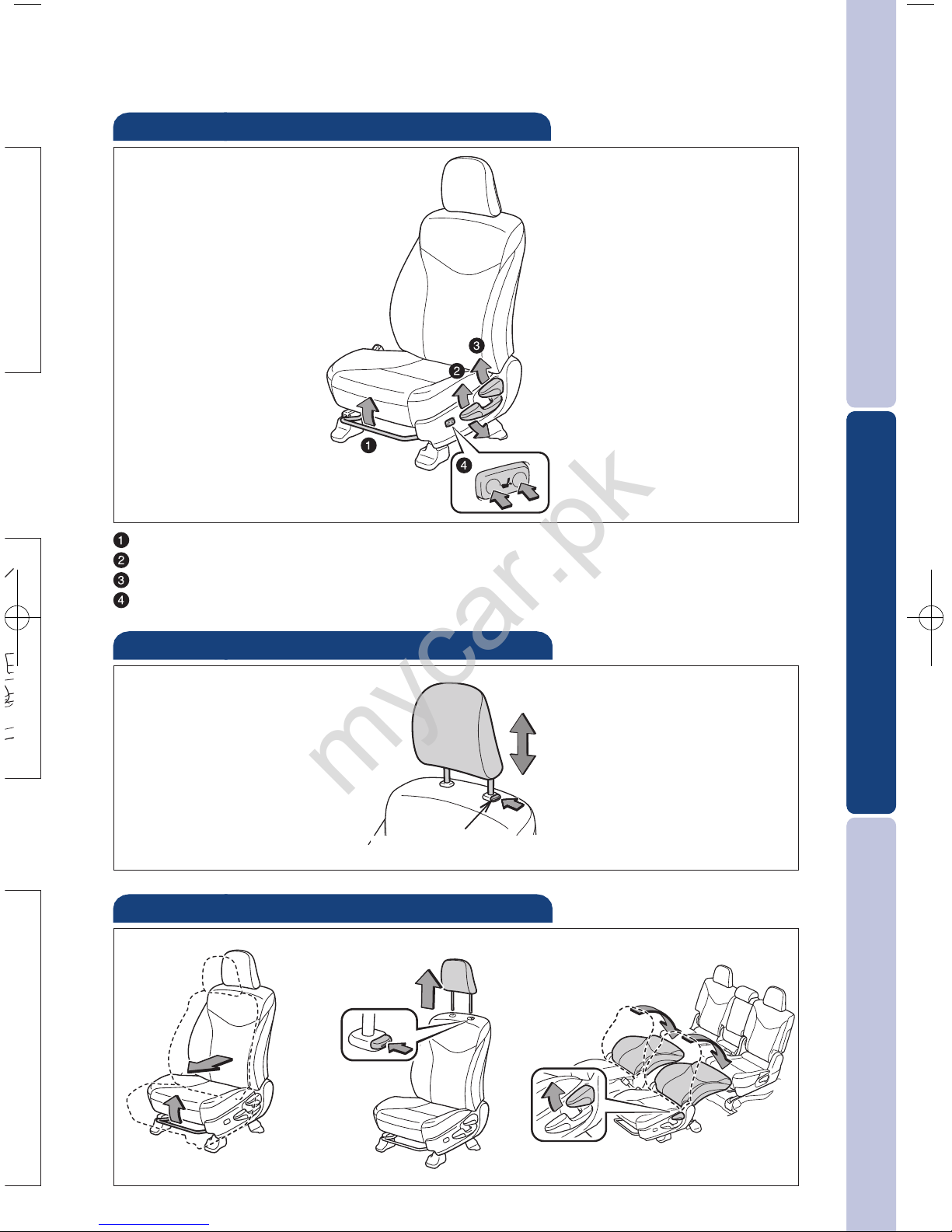
Seat adjustments-Front
Seat position (forward/backward)
Height crank (driver side)
Seatback angle
Lumbar support (driver side)
Seats-Head restraints
Lock release button
Seats-Flattening front seatbacks
(1) Move front seats forward
(2) Remove head restraints
(3) Pull up
(4) Flatten seatbacks
mycar.pk
Page 16
14
FEATURES/OPERATIONS
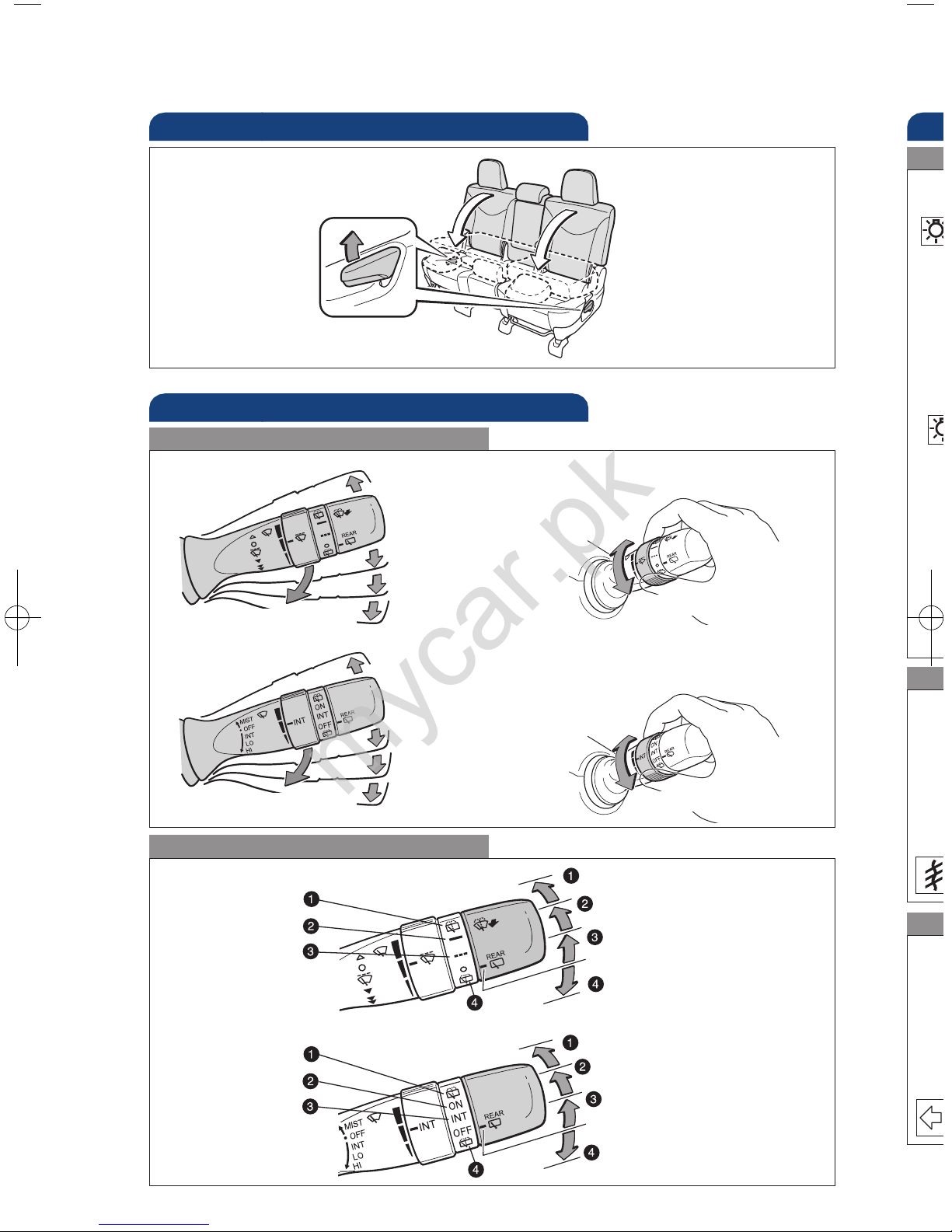
Windshield wipers & washers
Interval wipe
Single wipe
Slow
Fast
Pull to wash and wipe
Front
Rear
Wash and wipe
Wipe
Interval wipe
Wash and wipe
Lig
Tur
Hea
Fro
Aut
sec
Par
* If e
Intermittent windshield
wiper frequency
Increase
Decrease
Type A
Interval wipe
Single wipe
Slow
Fast
Pull to wash and wipe
Intermittent windshield
wiper frequency
Increase
Decrease
Type B
Wash and wipe
Wipe
Interval wipe
Wash and wipe
Type A
Type B
Typ
Par
Typ
Typ
Pull up
Seat-Folding down rear seat
mycar.pk
Page 17
OVERVIEW
FEATURES/OPERATIONS
SAFETY AND EMERGENCY FEATURES
15
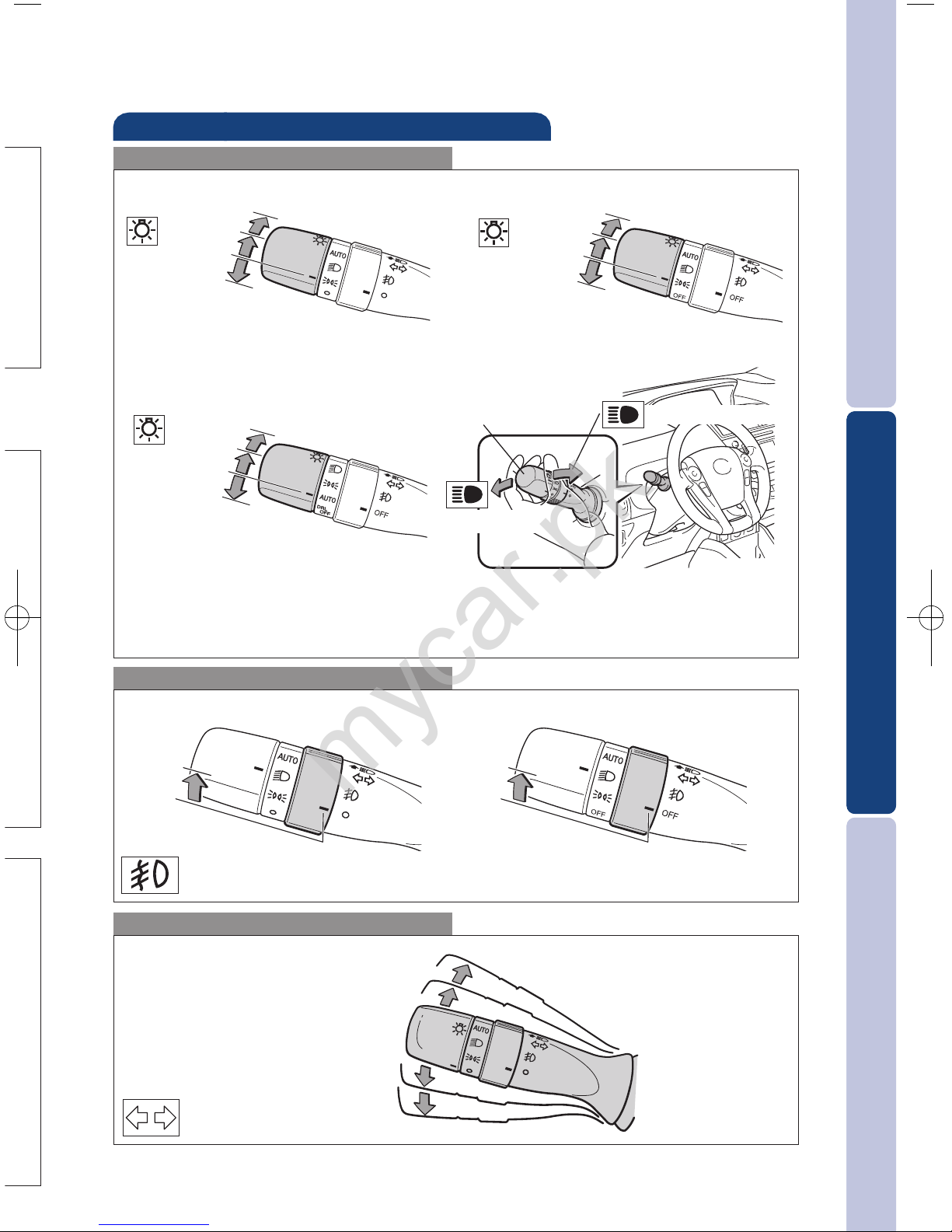
Lights & turn signals
Turn signals
Headlights
High beam flasher
Low beam
Front fog lights (if equipped)
Automatic light cutoff system Automatically turns lights off after a delay of 30
seconds.
Front fog lights come on only when the headlights are on low beam.
Right turn
Lane change
Lane change
Left turn
High beam
Auto*
Headlights
Parking lights
Turn
* If equipped
OFF
Type A Type B
Auto*
Headlights
Parking lights
OFF
Auto*
Headlights
Parking lights
OFF
Type C
Type A Type B
Turn
mycar.pk
Page 18
16
FEATURES/OPERATIONS
Air
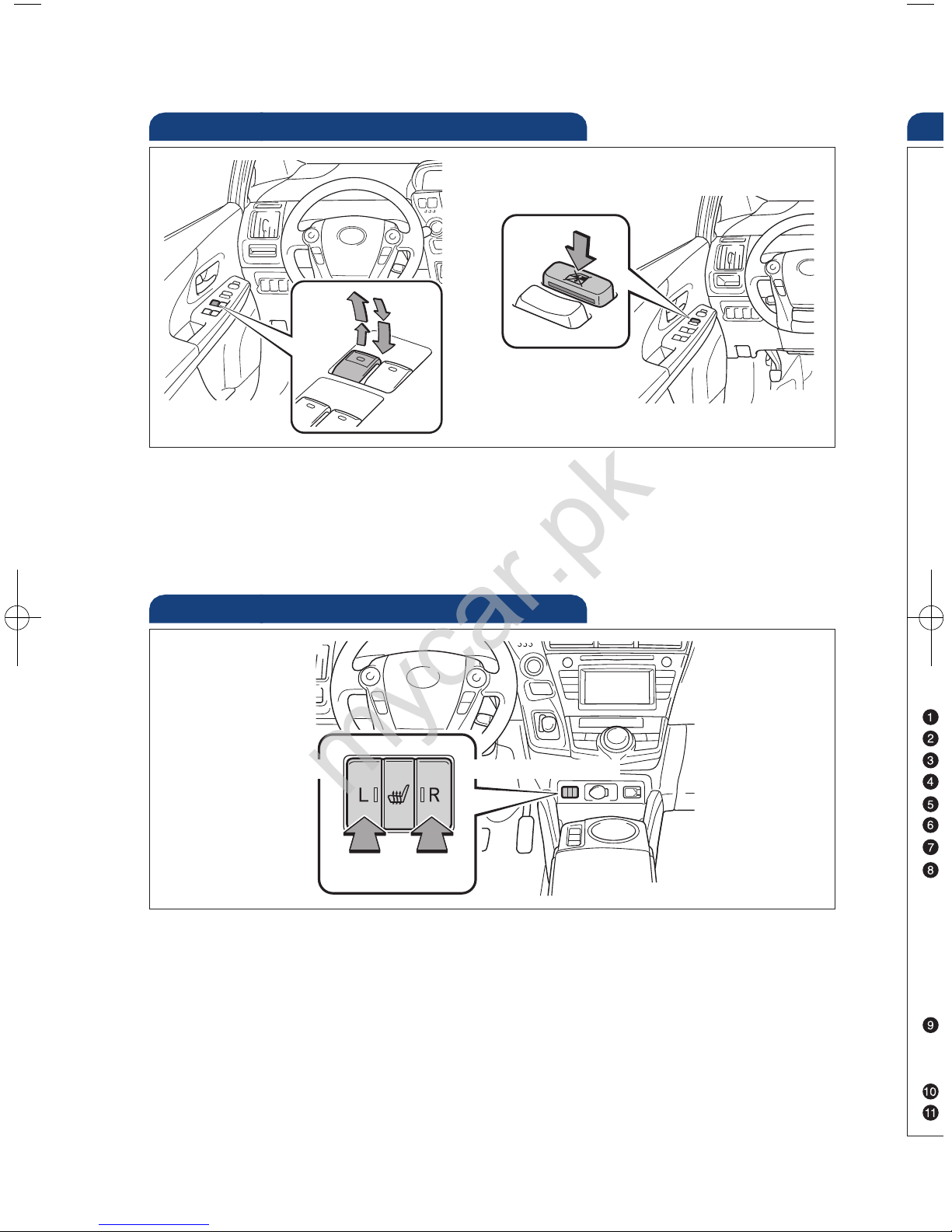
Seat heaters (if equipped)
Push
Push
Driver seat
Front passenger seat
Windows-Power
Up
Down
Window lock switch
Automatic operation Push the switch completely down or pull it completely up
and release to fully open or close. To stop window midway, push the switch in the
opposite direction.
Window lock switch Deactivates all passenger windows. Driver’s window remains
operable.
mycar.pk
Page 19
OVERVIEW
FEATURES/OPERATIONS
SAFETY AND EMERGENCY FEATURES
17
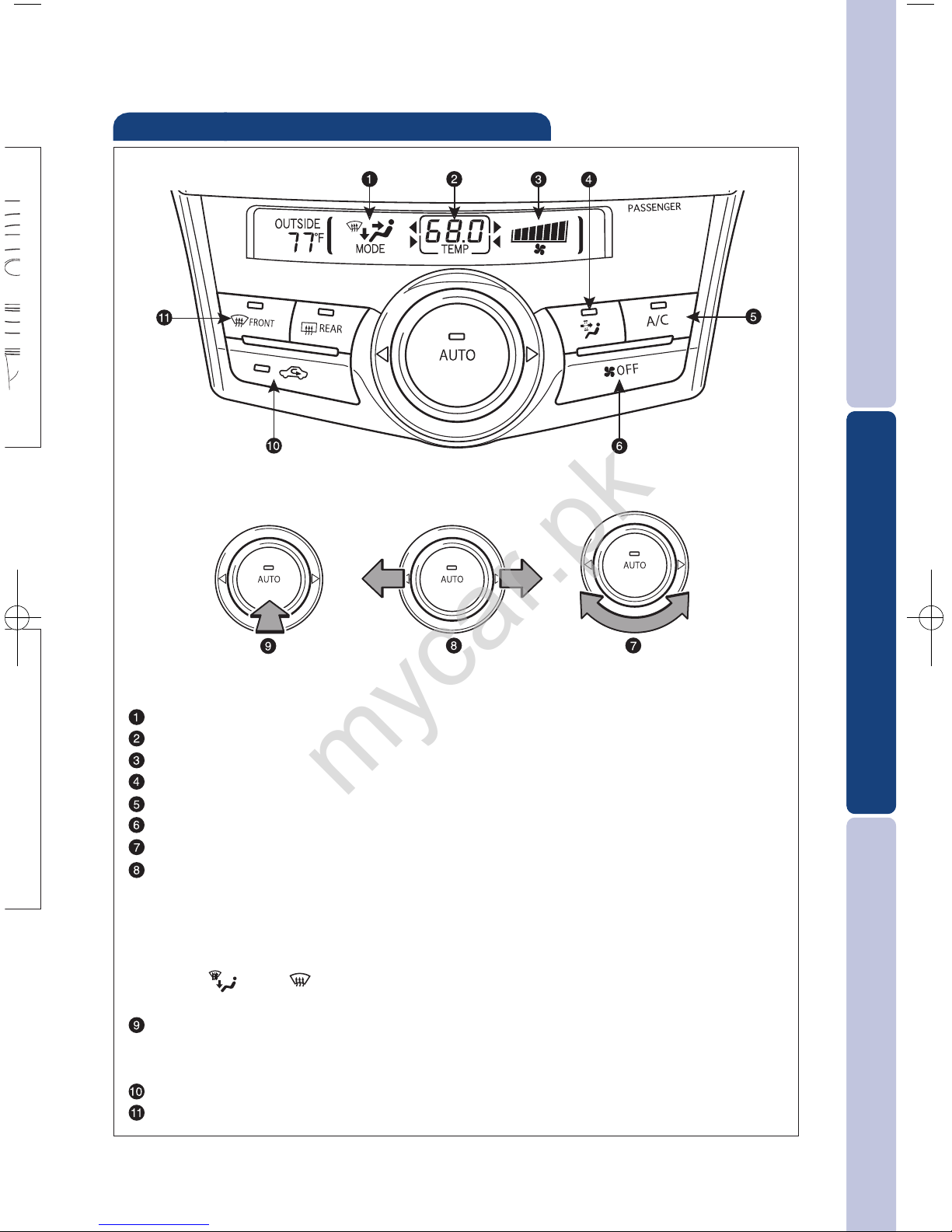
Air Conditioning/Heating
Air outlet display
Temperature setting display
Fan speed display
Micro dust and pollen filter mode (turns off automatically after 3 minutes)
Air Conditioning ON/OFF
Climate control OFF
Adjust/select
Function select
Slide the dial left and right to select the function:
-Fan speed control
-Temperature selector
-Airflow vent
Use “ ” or “ ” mode to reduce window fogging (system automatically
switches to fresh air mode).
Automatic climate control ON
Adjusting the temperature setting will cause the airflow vents, air intake
and fan to adjust automatically.
Recirculate cabin air (fresh air when OFF)
Windshield defogger
ns
mycar.pk
Page 20
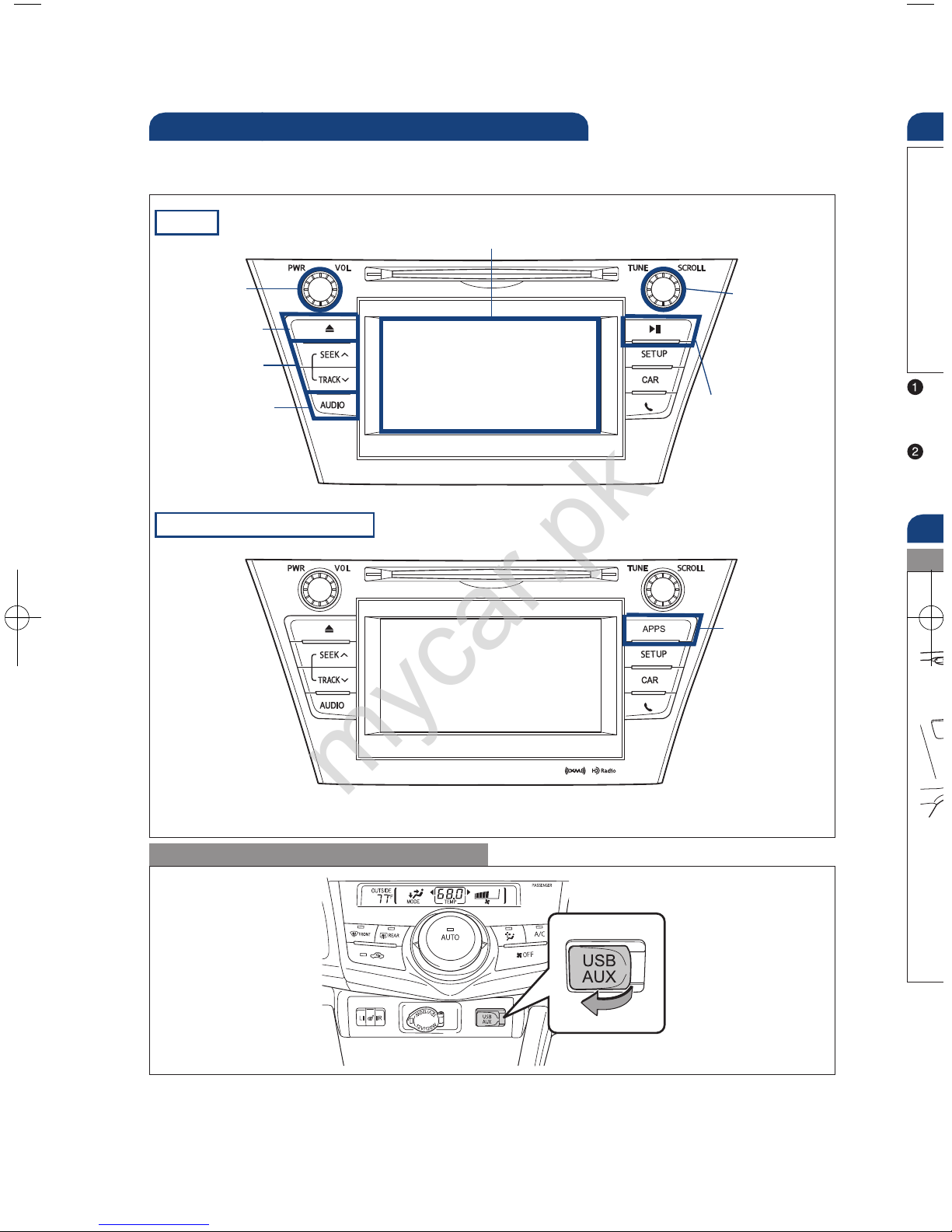
18
FEATURES/OPERATIONS
Type 2 (additional function)
Audio (if equipped)
Type 1
* Refer to the “Navigation System With Entune Quick Reference Guide.”
By inserting a mini plug into the USB/AUX port, you can listen to music from a
portable audio device through the vehicle’s speaker system while in USB/AUX mode.
Refer to the “Display Audio System Owner’s Manual” for instructions and more
information.
USB/AUX port
Ste
Aud
“
P
a
“
U
V
Eject CD
Push to turn
ON/OFF
Seek station/
CD track select
Push to display
audio screen
Turn to tune
radio stations
manually or
select tracks
or files
Touch screen display
Push to pause
or resume
playing
Pa
Ope
Pus
pre
Access to
navigation
system*
Refer to the “Display Audio System Owner’s Manual” for instructions and more
information.
mycar.pk
Page 21
OVERVIEW
FEATURES/OPERATIONS
SAFETY AND EMERGENCY FEATURES
19
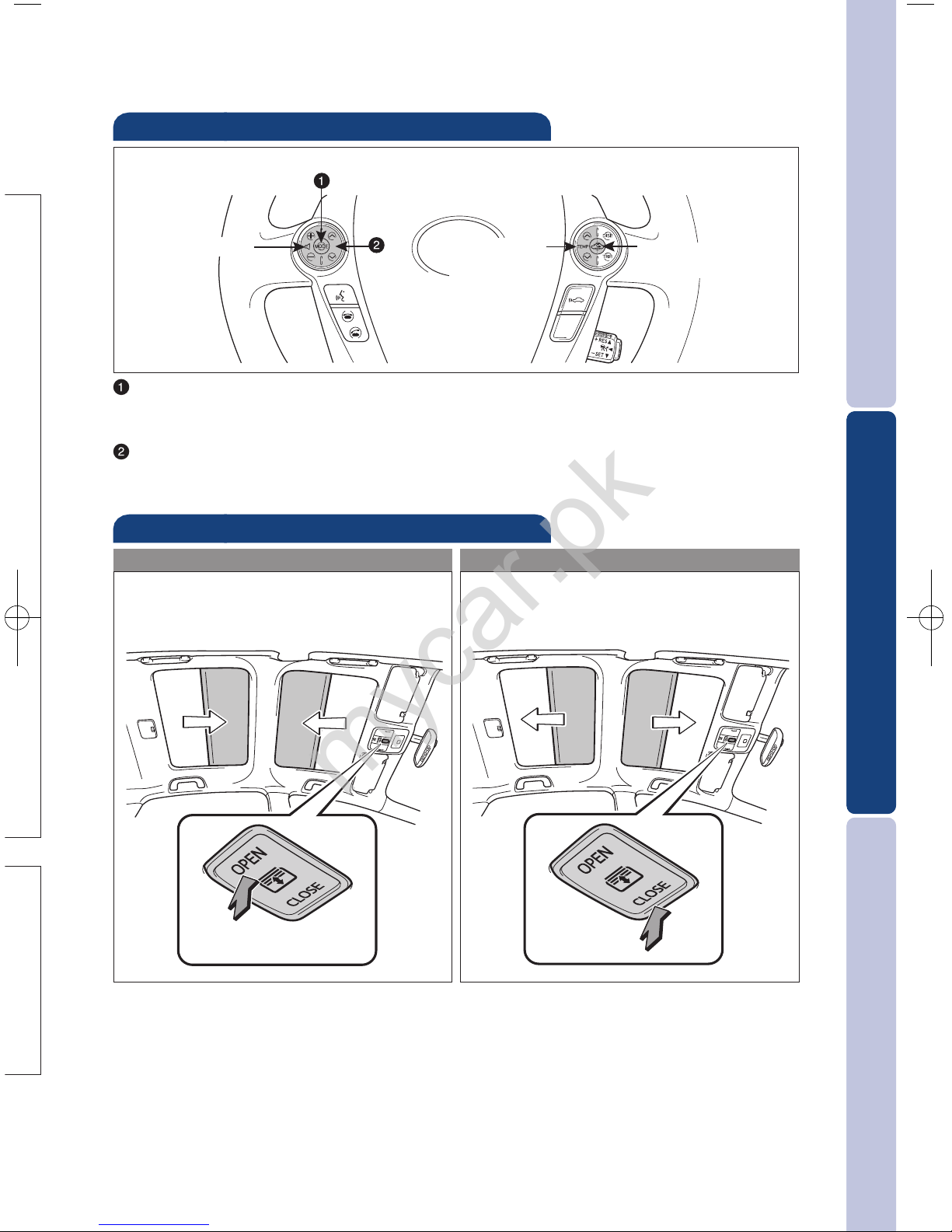
Steering wheel switches
Audio control
Climate control
“MODE”
Push to turn audio ON and select an audio mode. Push and hold to turn the
audio system OFF.
“ ”
Use to search within the selected audio medium (radio, CD, iPod
®
, etc.).
v
v
Volume control
Temperature
selector
Fresh or recirculated
cabin air
or
se
Panoramic roof shades (if equipped)
Opening operation
Closing operation
Push once to close. To stop partway,
press the switch lightly.
Push once to open. To stop partway,
press the switch lightly.
Push
Push
mycar.pk
Page 22
20
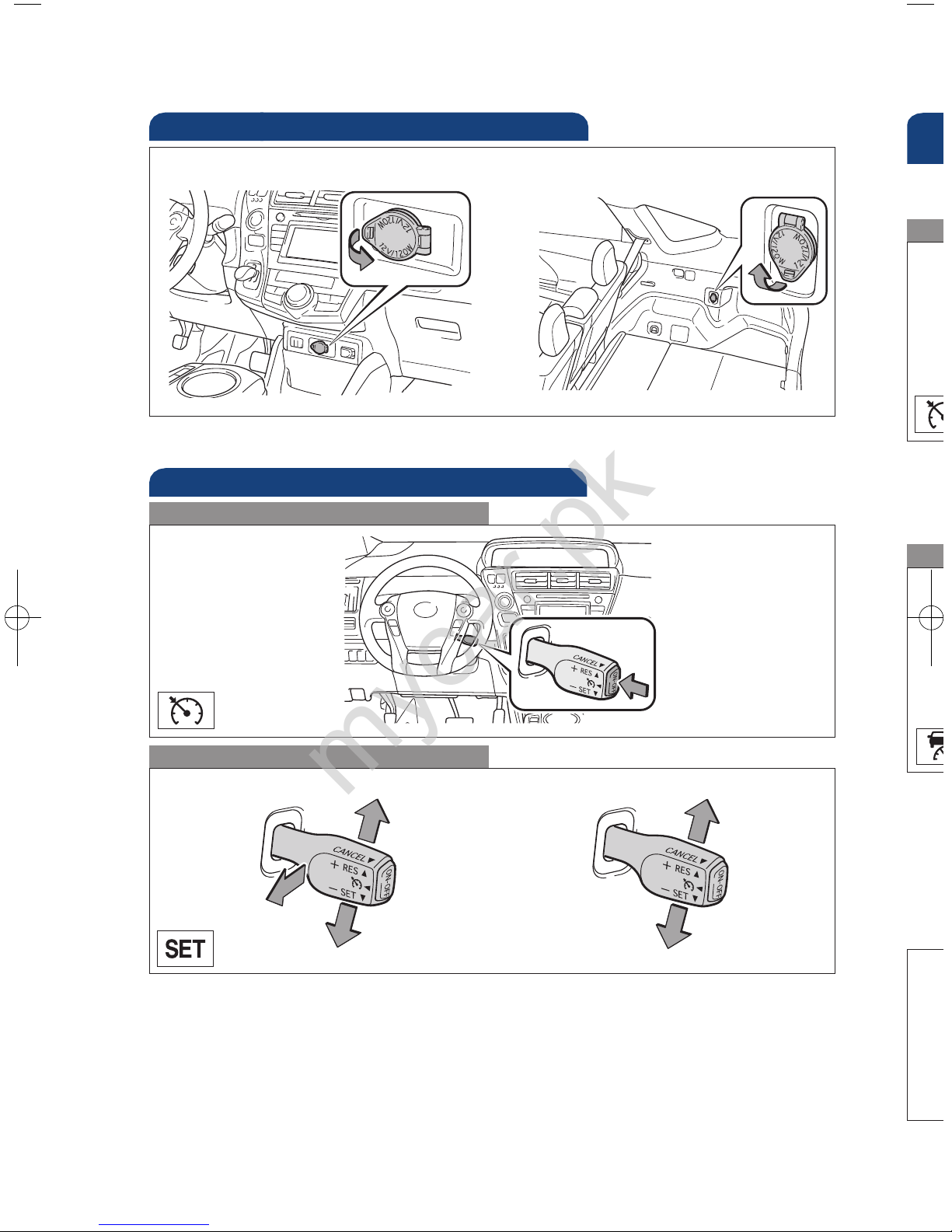
Cruise control
(if equipped)
1
The set speed may also be cancelled by depressing the brake pedal.
2
The set speed may be resumed once vehicle speed exceeds 25 mph.
Turning system ON/OFF
Functions
System ON/OFF
Increase speed
Decrease speed
Cancel
1
Resume
2
Set
Dista
dista
the s
(1) T
c
(2) T
s
(3) T
P
p
(1) T
P
(2) T
s
Fixe
Refe
befo
Dist
FEATURES/OPERATIONS
Dy
(if
Power outlets
Center console
Luggage compartment (if equipped)
Power switch must be set at “ACCESSORY” or “ON” mode to be used.
mycar.pk
Page 23
OVERVIEW
FEATURES/OPERATIONS
SAFETY AND EMERGENCY FEATURES
21
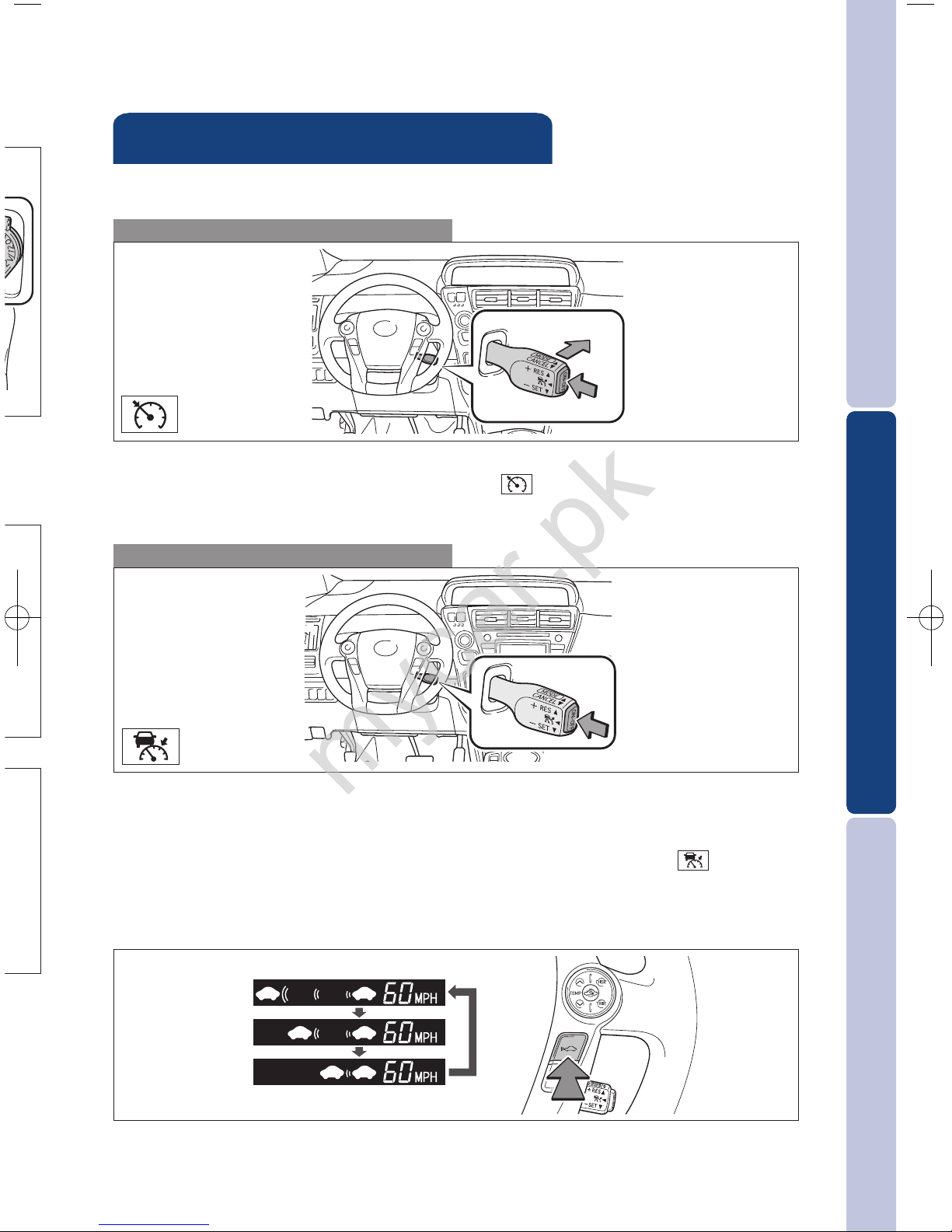
Distance control mode will cruise at a set speed, decelerate to maintain selected
distance from a slower vehicle traveling in front of you, and accelerate back up to
the selected speed if the vehicle in front of you changes lanes or speeds up.
(1) To select distance control mode Push the ON-OFF button. The “ ” will
come on.
(2) To set, cancel or resume a speed Refer to instructions for Cruise Control
section.
(3) To change the vehicle-to-vehicle distance
Push the distance button to cycle through the settings, which will change
progressively from LONG to MIDDLE to SHORT.
(1) To select conventional/fixed speed control Push the ON-OFF button.
Push the lever forward and hold until the “ ” indicator appears.
(2) To set, cancel and resume a speed Refer to instructions in the Cruise Control
section.
Fixed speed mode
Refer to the Owner’s Manual for more details and complete safety precautions
before attempting to use “Dynamic Radar Cruise Control.”
Distance control mode
Dynamic Radar Cruise Control
(if equipped)
LONG
MIDDLE
SHORT
mycar.pk
Page 24
22
FEATURES/OPERATIONS
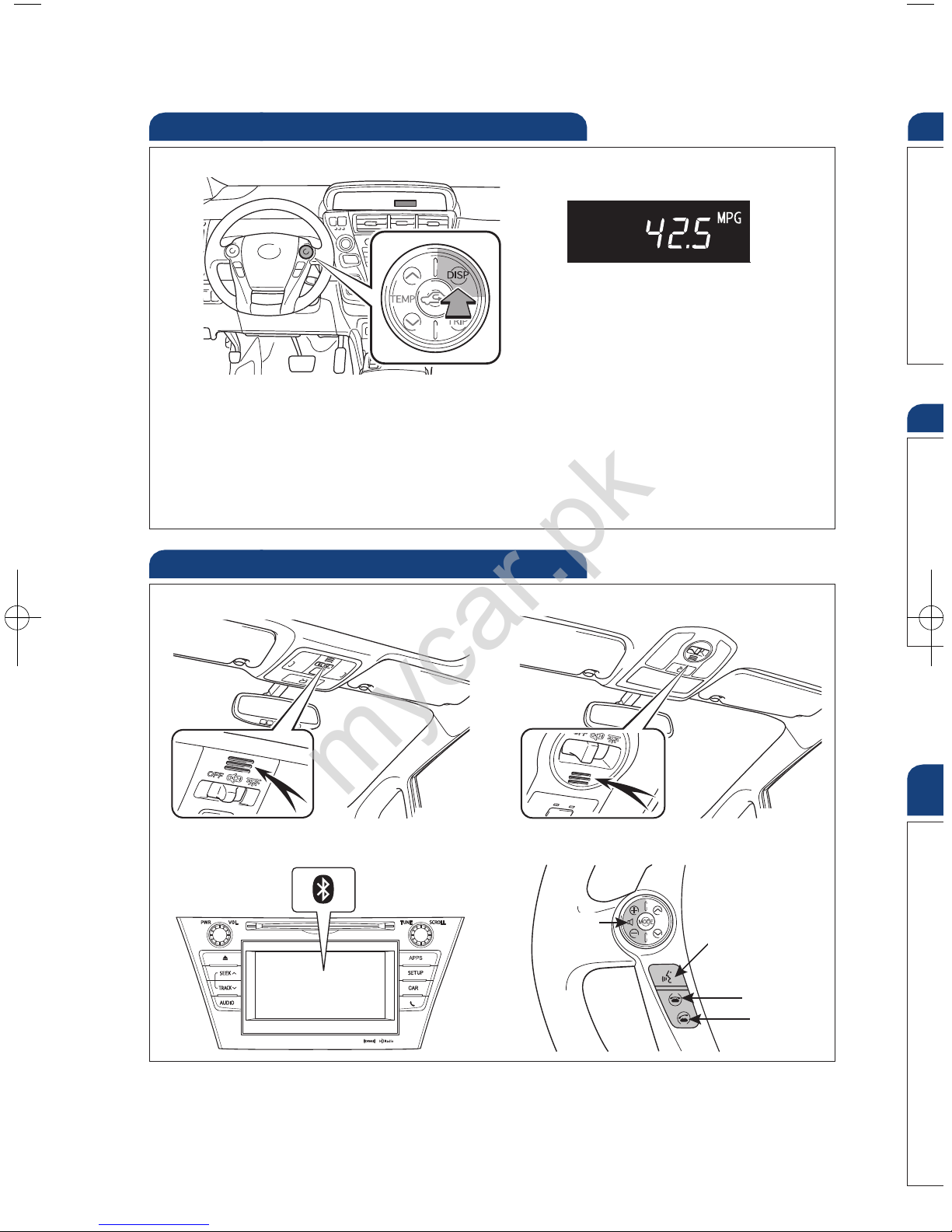
Trip information display
Push “DISP” to change between the following information screens:
(1) Current fuel consumption
(2) Average fuel consumption
(3) Cruising range
(4) Hybrid System Indicator set up
Bluetooth®technology allows dialing or receipt of calls without taking hands from
the steering wheel or using a cable to connect the telephone and the system.
Refer to the “Display Audio System Owner’s Manual” or the “Navigation System
Owner’s Manual” for more information about phone connections and compatibility.
Microphone (type A)
Audio unit
Steering wheel telephone switches
Volume
Start call
End call
Voice command
button
Microphone (type B)
Clo
Refe
HAC
on b
illum
Refe
Hi
Gar
pro
Ref
det
For
htt
* Ho
Ga
(if
Telephone controls (Bluetooth®)
mycar.pk
Page 25
OVERVIEW
FEATURES/OPERATIONS
SAFETY AND EMERGENCY FEATURES
23
lity.
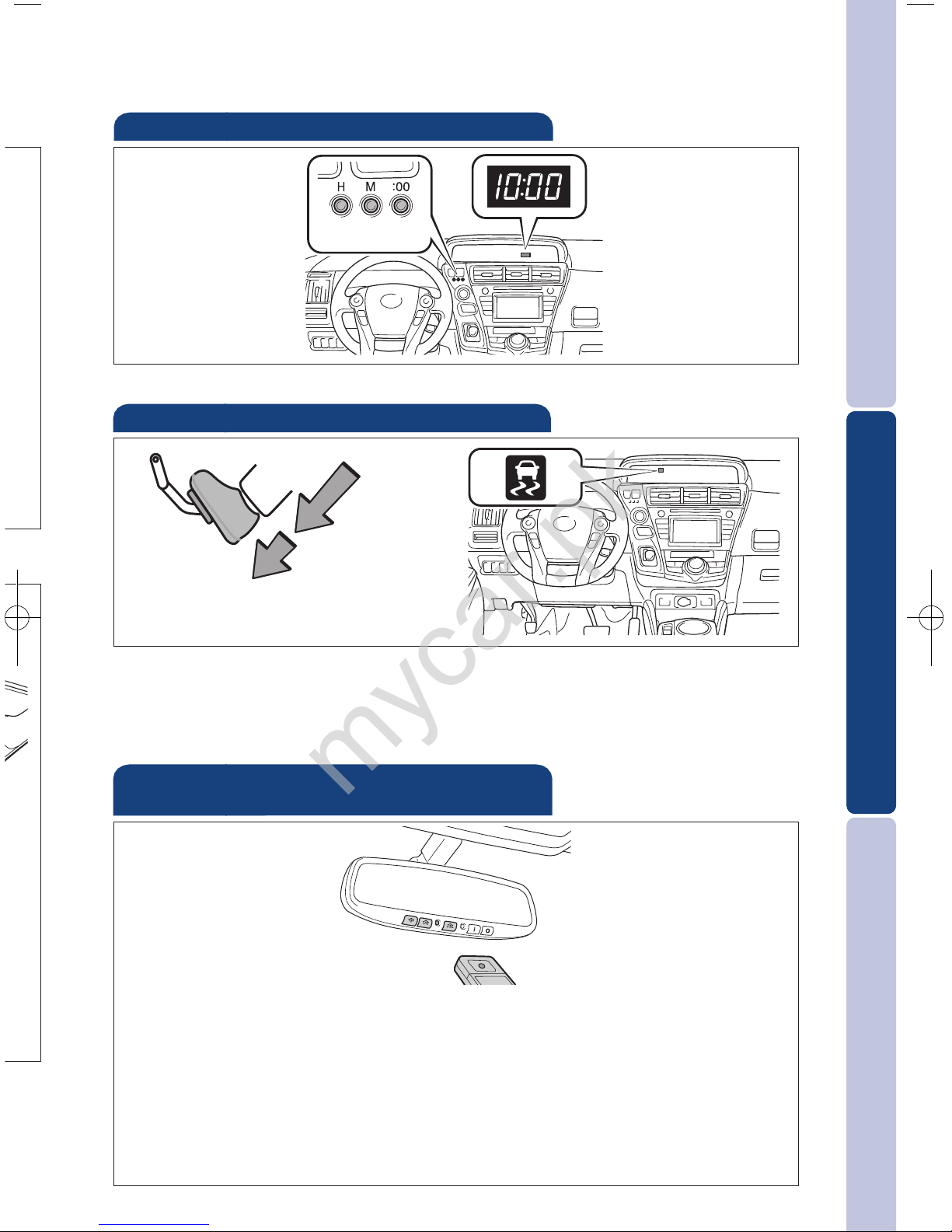
Clock
Refer to the Owner’s Manual for details on adjusting time.
H- Hour set
M- Minute set
:00- Round off
minutes
HAC helps prevent rolling backwards on an incline. To engage, push further down
on brake pedal while at a complete stop until a beep sounds and slip indicator
illuminates. HAC holds for approximately two seconds after releasing brake pedal.
Refer to the Owner’s Manual for more details.
Brake
pedal
Hill-start Assist Control (HAC)
Garage door openers manufactured under license from HomeLink®* can be
programmed to operate garage doors, estate gates, security lighting, etc.
Refer to “Garage door opener,” Section 3-5 in the Owner’s Manual for more
details.
For programming assistance, contact HomeLink
®
at 1-800-355-3515, or visit
http://www.homelink.com.
* HomeLink®is a registered trademark of Johnson Controls, Inc.
Garage door opener (HomeLink®)*
(if equipped)
mycar.pk
Page 26
24
SAFETY AND EMERGENCY FEATURES
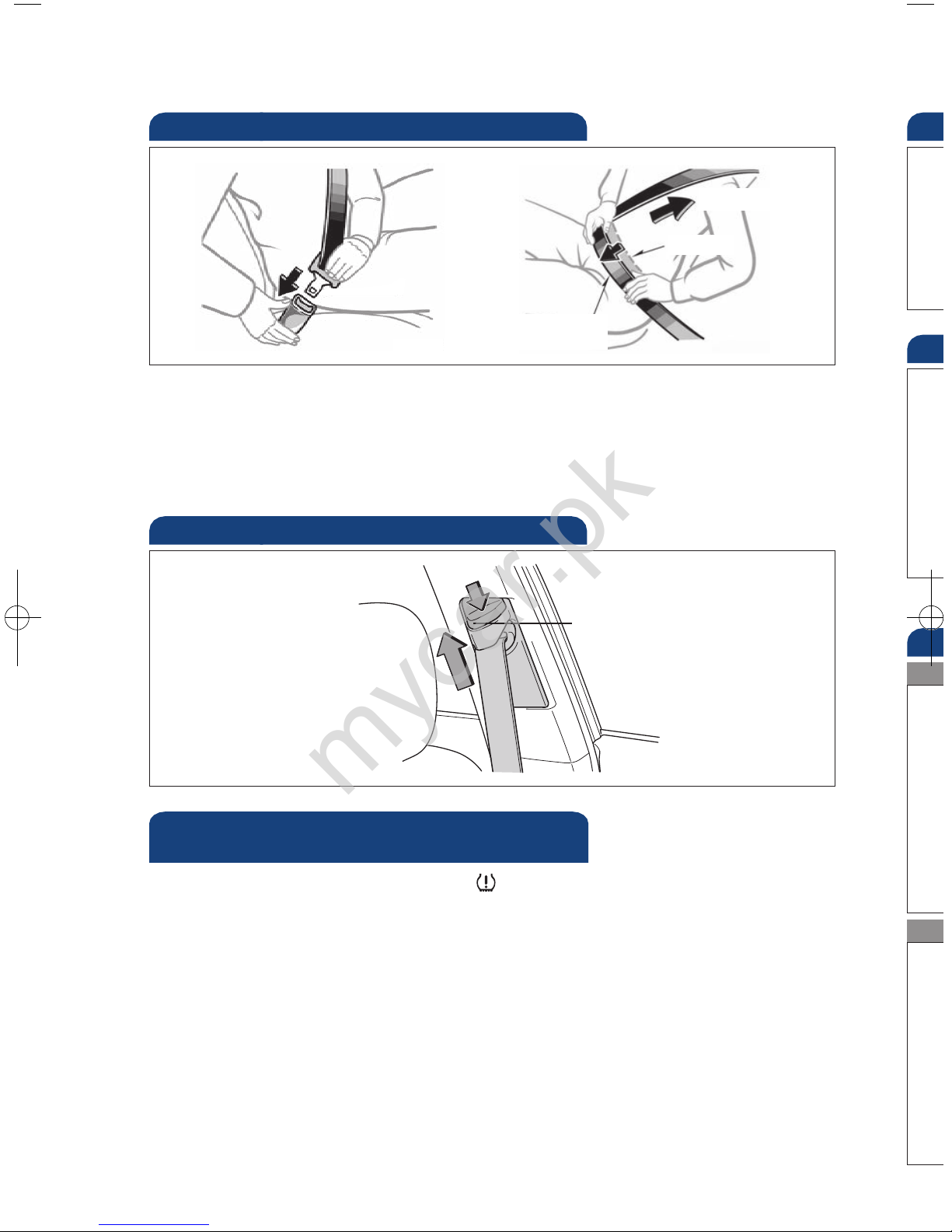
If belt is fully extended, then retracted even slightly, it cannot be re-extended
beyond that point, unless fully retracted again. This feature is used to help hold
child restraint systems securely.
To find more information about seat belts, and how to install a child restraint
system, refer to the Owner's Manual.
Keep as low on
hips as possible
Take up slack
Too high
Seat belts
Push up, or squeeze
lock release to lower
Seat belts-Shoulder belt anchor
Do
If the Tire Pressure Warning indicator “ ” illuminates without blinking, adjust
tire pressures to factory-specified levels.* The light will turn off after a few
minutes. The warning light may come on due to temperature changes or changes
in tire pressure from natural air leakage.
If the tire pressure indicator flashes for more than 60 seconds and then remains
on, take the vehicle to your local Toyota dealer.
Refer to the Owner’s Manual for more details.
* Refer to load label on door jamb or the Owner’s Manual for tire inflation specifications.
Tire Pressure Monitoring (warning)
System
Sp
To o
Rem
Refe
Movi
Rea
Do
Lef
mycar.pk
Page 27
OVERVIEW
FEATURES/OPERATIONS
SAFETY AND EMERGENCY FEATURES
25
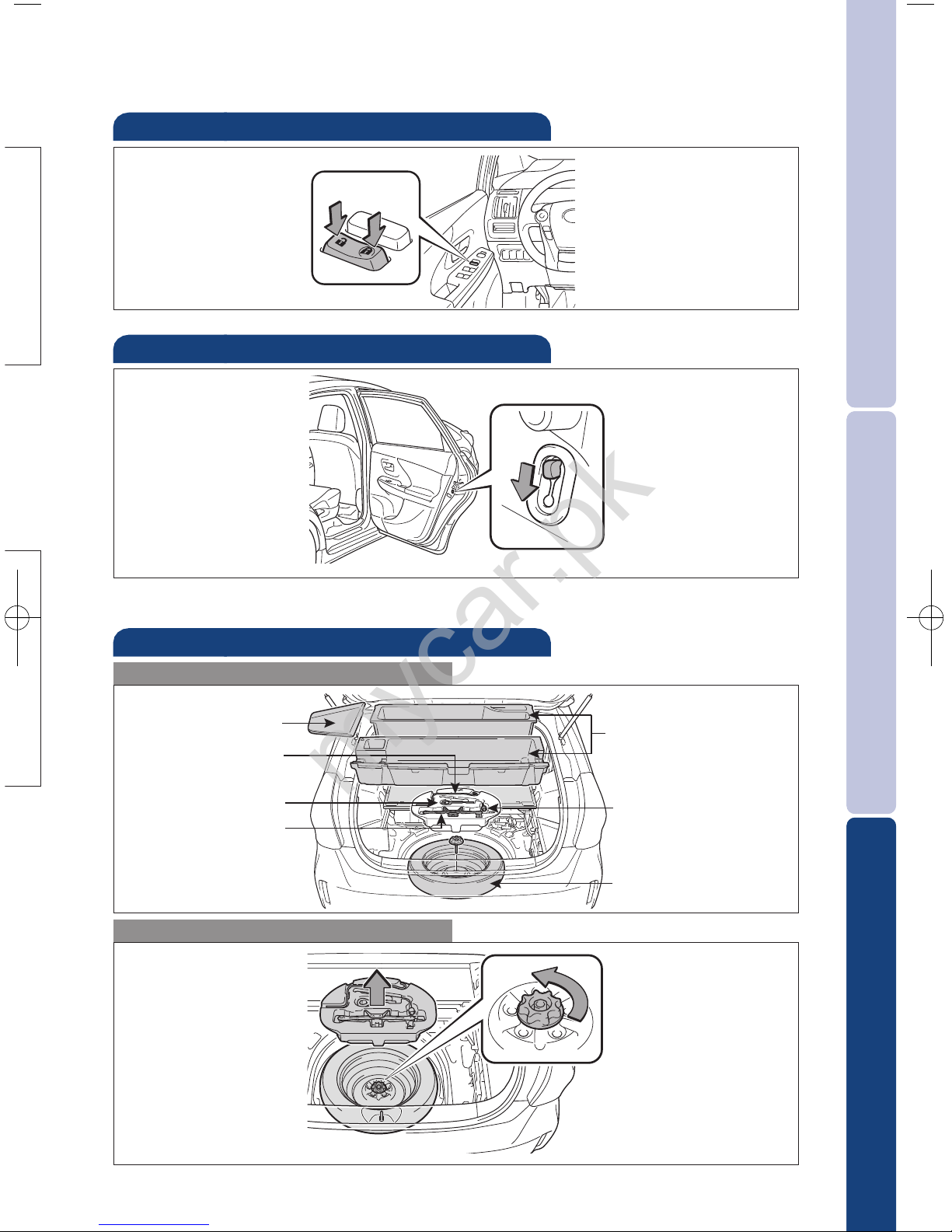
Door locks
t
Spare tire & tools
Tool location
Removing the spare tire
Refer to the Owner’s Manual for tire changing and jack positioning procedures.
Wheel nut wrench
Spare tire
Towing eyelet
Center auxiliary box
Moving the lever to “LOCK” will allow the door to be opened only from the outside.
Rear door
Jack
Jack handle
Doors-Child safety locks
Lock
Unlock
Left side deck board
mycar.pk
Page 28

26
Ther
has m
For s
•O
• Us
pl
• In
Flo
Smar
and
SST e
firml
SST d
allow
back
Sma
SAFETY AND EMERGENCY FEATURES
Star Safety System
TM
VSC helps prevent loss of traction during cornering by reducing engine power and
applying brake force to selected wheels.
Toyota’s VSC monitors steering angle and the direction your vehicle is traveling.
When it senses that the front or rear wheels begin to lose traction, VSC reduces
engine power and applies braking to selected wheels. This helps restore traction
and vehicle control.
Vehicle Stability Control (VSC)
Anti-Lock Brake System (ABS)
Brake Assist (BA)
ABS helps prevent brakes from locking up by "pulsing" brake pressure to each
wheel. This limits brake lockup and provides the maximum brake effectiveness for
the current road conditions.
Toyota's ABS sensors detect which wheels are locking up and limits wheel lockup by
"pulsing" each wheel's brakes independently. Pulsing releases brake pressure
repeatedly for fractions of a second. This helps the tires attain the maximum
traction that the current road conditions will allow, helping you stay in control.
Brake Assist is designed to detect sudden or “panic” braking, and then add braking
pressure to decrease the vehicle’s stopping distance. When there’s only a split
second to react, Brake Assist can add additional brake pressure more quickly than
just the driver alone can.
VSC helps prevent loss of traction during cornering by reducing engine power, and
Traction Control helps maintain traction on loose gravel and wet, icy, or uneven
surfaces by applying brake force to the spinning wheel(s).
Toyota’s TRAC sensors are activated when one of the drive wheels starts to slip.
TRAC limits engine output and applies the brakes to the spinning wheel. This
transfers power to the wheels that still have traction to help you drive safely.
Traction Control (TRAC)
Electronic Brake Force Distribution (EBD)
Toyota’s ABS technology has Electronic Brake-force Distribution (EBD) to help
maintain stability and balance when braking. Abrupt stops cause the vehicle to tilt
forward, reducing the braking power of the rear wheels. EBD responds to sudden
stops by redistributing brake force to maximize the braking effectiveness of all
four wheels.
All new Toyota vehicles come standard with the Star Safety System
TM
, which
combines Vehicle Stability Control (VSC), Traction Control (TRAC), Anti-lock Braking
System (ABS), Electronic Brake-force Distribution (EBD), Brake Assist (BA) and Smart
Stop Technology (SST).
mycar.pk
Page 29
OVERVIEW
FEATURES/OPERATIONS
SAFETY AND EMERGENCY FEATURES
27
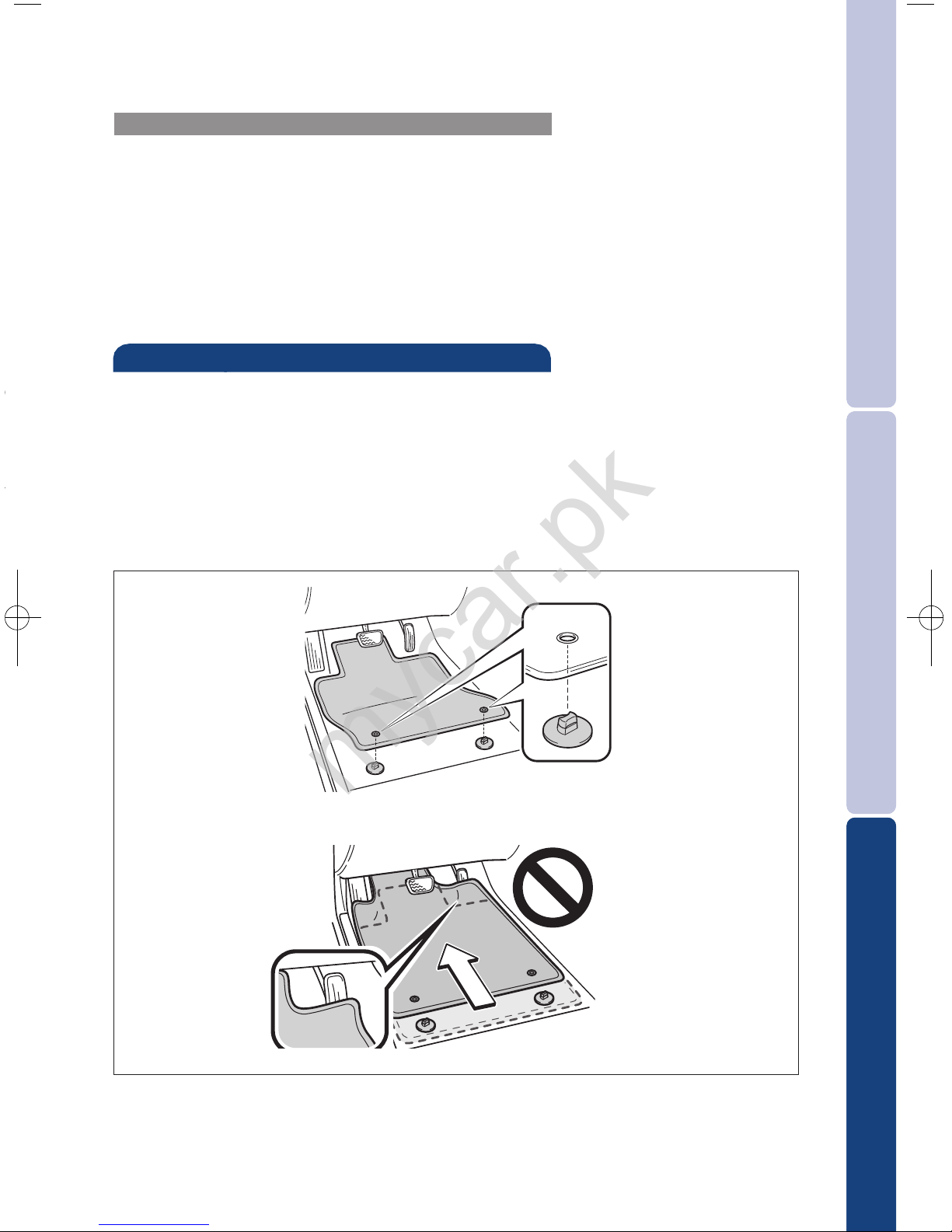
There are two types of Toyota floor mats: carpeted and all-weather. Each vehicle
has model-specific floor mats. Installation is easy.
For safety, follow these steps:
• Only use floor mats designed for your specific model.
• Use only one floor mat at a time, using the retaining hooks to keep the mat in
place.
• Install floor mats right side up.
Floor mat installation
Smart Stop Technology automatically reduces engine power when the accelerator
and brake pedals are pressed simultaneously under certain conditions.
SST engages when the accelerator is depressed first and the brakes are applied
firmly for longer than one-half second at speeds greater than five miles per hour.
SST doesn’t engage if the brake pedal is depressed before the accelerator pedal,
allowing vehicles to start on a steep hill and safely accelerate without rolling
backward.
Smart Stop Technology (SST)
for
tilt
king
mycar.pk
Page 30

28
NOTES
mycar.pk
Page 31

OVERVIEW
FEATURES/OPERATIONS
SAFETY AND EMERGENCY FEATURES
29
mycar.pk
Page 32
CUSTOMER E XPERIENCE CENTER
1-800 - 3 31- 43 31
00505-QRG12-PRIV11- TCS-0 5107
PRIUS v
mycar.pk
Page 33
mycar.pk
Page 34
mycar.pk
Page 35
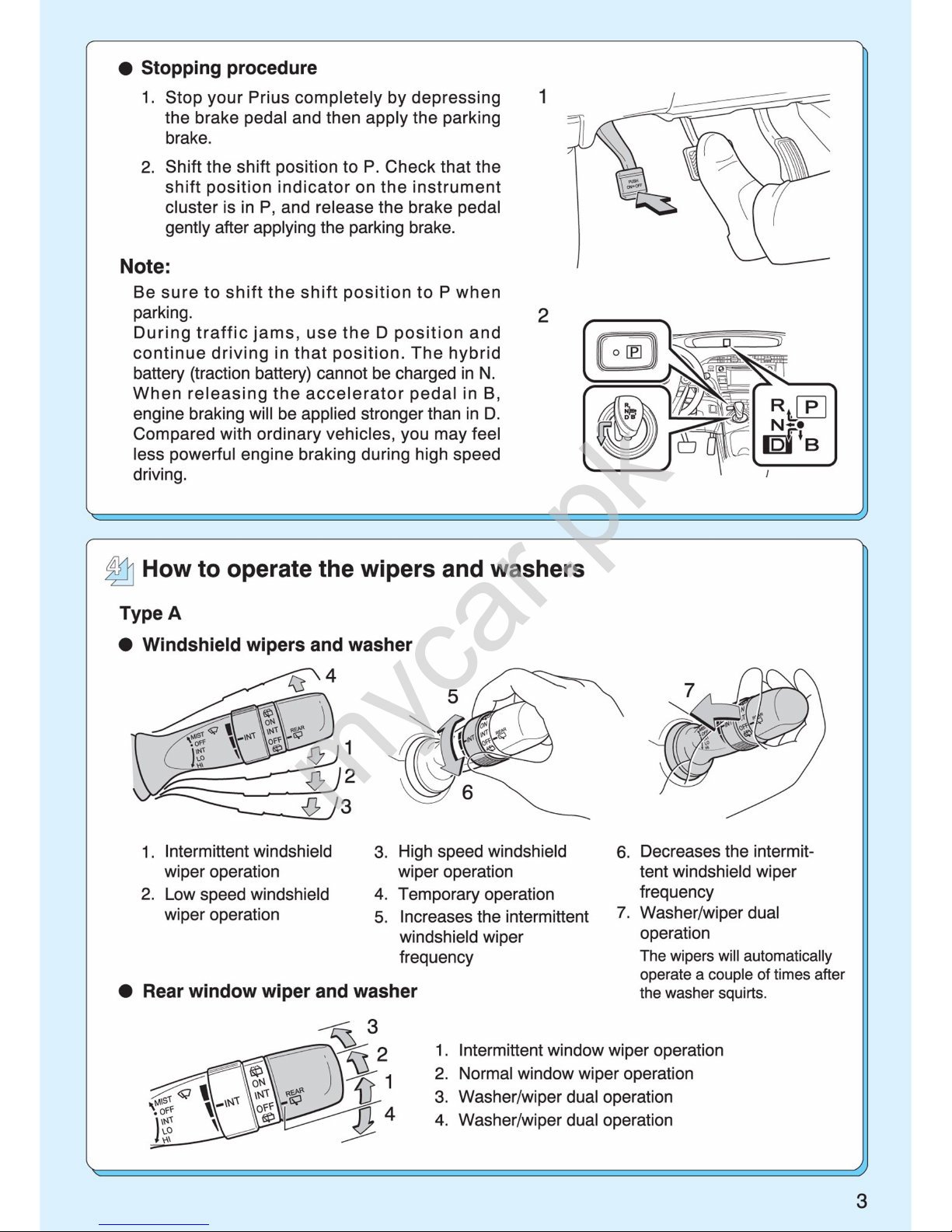
mycar.pk
Page 36
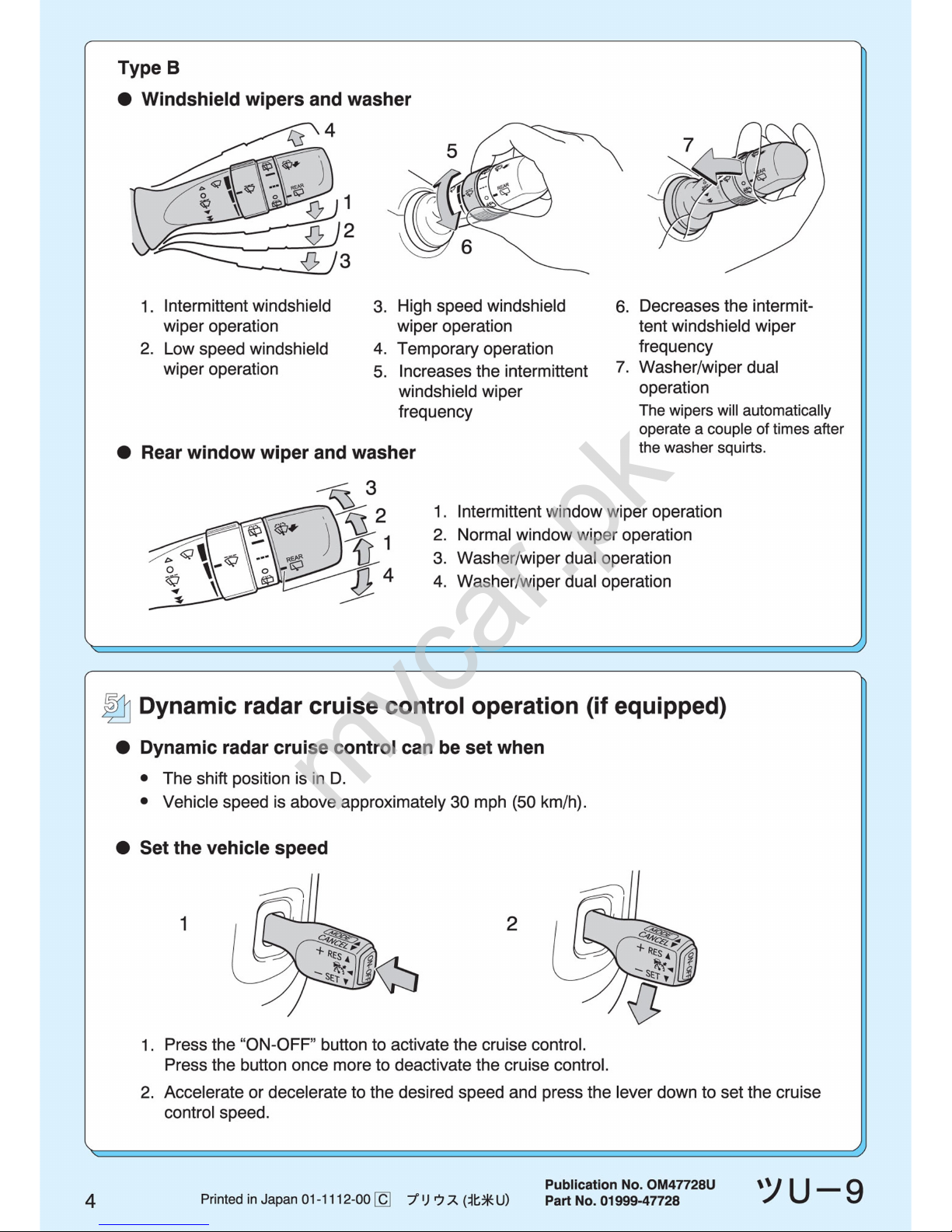
mycar.pk
Page 37
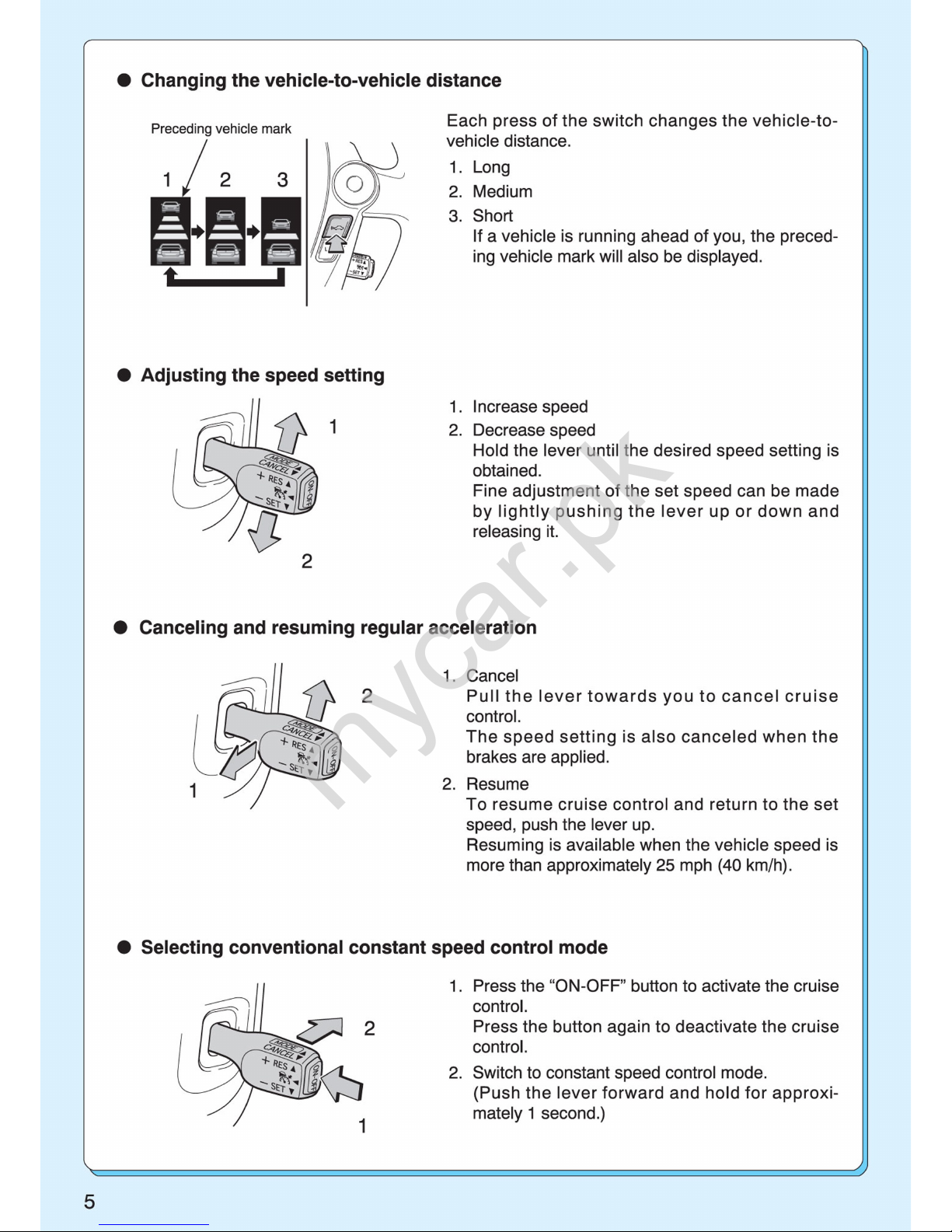
mycar.pk
Page 38
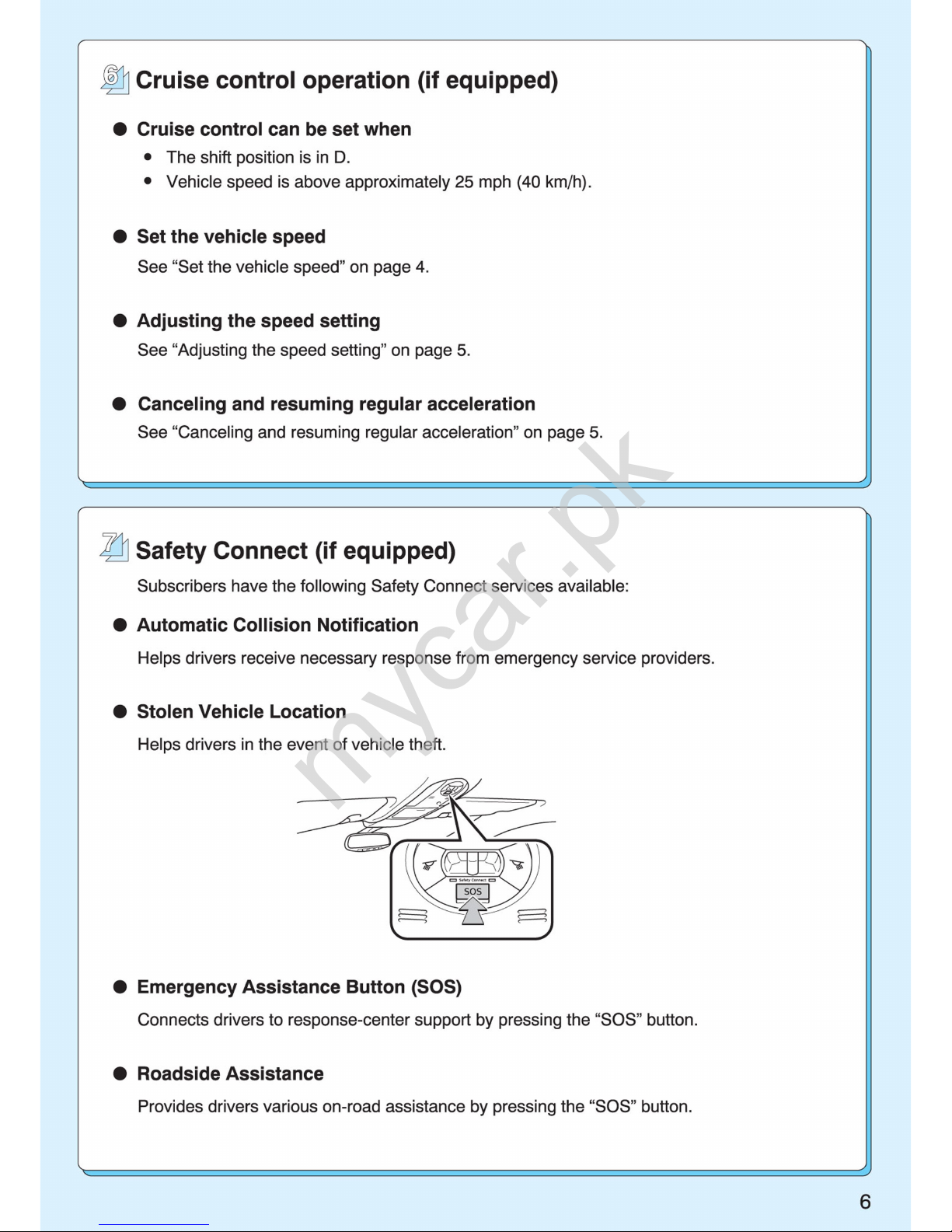
mycar.pk
Page 39
mycar.pk
Page 40
mycar.pk
Page 41

TABLE OF CONTENTS
1
1
Before driving
Information on the hybrid system and adjusting and operating features such as door locks, mirrors, and steering column
2
When driving
Driving, stopping and safe-driving information
3
Interior
features
Air conditioning and audio systems, as well as other interior features for a comfortable driving experience
4
Maintenance
and care
Cleaning and protecting your vehicle, performing do-ityourself maintenance, and maintena nce informa tion
5
When trouble
arises
What to do if the vehicle needs to be towed, gets a flat
tire, or is involved in an accident
6
Vehicle
specifications
Detailed vehicle information
7
For owners
Reporting safety defects for owners, and seat belt and
SRS airbag instructions
for Canadian owners
Index
Alphabetical listing of information contained in this
manual
mycar.pk
Page 42

20
For your information
Main Owner’s Manual
Please note that this manual applies to all models and explains all equipment, including options. Therefore, you may find some explanations for
equipment not installed on your vehicle.
All specifications provided in this manual are current at the time of printing.
However, because of the Toyota policy of continual product improvement, we
reserve the right to make changes at any time without notice.
Depending on specifications, the vehicle shown in the illustrations may differ
from your vehicle in terms of color and equipment.
Noise from under vehicle after turning off the hybrid system
Approximately five hours after the hybrid system is turned off, you may hear
sound coming from under the vehicle for several minutes. This is the sound
of a fuel evaporation leakage check and, it does not indicate a malfunction.
Accessories, spare parts and modification of your Toyota
A wide variety of non-genuine spare parts and accessories for Toyota vehicles are currently available in the market. You should know that Toyota does
not warrant these products and is not responsible for their performance,
repair, or replacement, or for any damage they may cause to, or adverse
effect they may have on, your Toyota vehicle.
This vehicle should not be modified with non-genuine Toyota products. Modification with non-genuine Toyota products could affect its performance,
safety or durability, and may even violate governmental regulations. In addition, damage or performance problems resulting from the modification may
not be covered under warranty.
mycar.pk
Page 43

21
Installation of a mobile two-way radio system
The installation of a mobile two-way radio system in your vehicle could affect
electronic systems such as:
● Multiport fuel injection system/sequential multiport fuel injection system
● Cruise control system
● Anti-lock brake system
● SRS airbag system
● Seat belt pretensioner system
Be sure to check with your Toyota dealer for precautionary measures or special instructions regarding installation.
High voltage parts and cables on the hybrid vehicles emit approximately the
same amount of electromagnetic waves as the conventional gasoline powered vehicles or home electronic appliances despite of their electromagnetic
shielding.
Unwanted noise may occur in the reception of the mobile two-way radio.
Scrapping of your Toyota
The SRS airbag and seat belt pretensioner devices in your Toyota contain
explosive chemicals. If the vehicle is scrapped with the airbags and seat belt
pretensioners left as they are, this may cause an accident such as fire. Be
sure to have the systems of the SRS airbag and seat belt pretensioner
removed and disposed of by a qualified service shop or by your Toyota
dealer before you scrap your vehicle.
mycar.pk
Page 44

22
Perchlorate Material
Special handling may apply,
See www.dtsc.ca.gov/hazardouswaste/perchlorate.
Your vehicle has components that may contain perchlorate. These components may include airbag, seat belt pretensioners, and wireless remote control batteries.
Vehicle control and operation data recording
Your Toyota is equipped with sophisticated computers that record certain
information about your vehicle’s operation, such as:
• Engine speed
• Motor speed
• Accelerator status
• Brake status
• Vehicle speed
• Shift position
The data recorded varies according to the grade level and options the vehi-
cle is equipped with. The computers do not record conversations, sound or
pictures.
● Data usage
Toyota may use the data recorded in these computers to diagnose malfunc-
tions, conduct research and development, and improve quality.
Toyota will not disclose the recorded data to a third party except:
• With the consent of the vehicle owner or with the consent of the lessee if
the vehicle is leased
• In response to an official request by the police, a court of law or a government agency
• For research purposes where the data is not tied to a specific vehicle or
vehicle owner
mycar.pk
Page 45

23
● Event data recorder
Your vehicle has computers that monitor and control certain aspects of your
vehicle. These computers assist in driving and maintaining optimal vehicle
performance.
Besides storing data useful for troubleshooting, there is an event data
recorder (EDR) that records data in a crash or near crash event.
The SRS airbag sensor assembly contains the EDR. In a crash or near crash
event, this device may record the following information:
• Engine speed
• Whether the brake pedal was depressed or not
• Vehicle speed
• To what extent the accelerator pedal was depressed
• Hybrid transmission shift position
• Whether the driver and front passenger wore seat belts or not
• Driver’s seat position
• SRS airbag deployment data
• SRS airbag system diagnostic data
• Front passenger’s occupant classification
The information above is intended to be used for the purpose of improving
vehicle safety performance. Unlike general data recorders, the EDR does
not record sound data such as conversation between passengers.
● Disclosure of the EDR data
Toyota will not disclose the data recorded in an EDR to a third party except
when:
• An agreement from the vehicle’s owner (or the leasing company for a
leased vehicle) is obtained
• Officially requested to by the police or other authorities
• Necessary, for use as a defense for Toyota in a lawsuit
• Ordered to by a court of law
However, if necessary, Toyota will:
• Use the data for research on Toyota vehicle safety performance
• Disclose the data to a third party for research purposes without disclosing
details of the vehicle owner, and that only when deemed necessary
• Disclose summarized data cleared of vehicle identification information to a
non-Toyota organization for research purposes
mycar.pk
Page 46
24
●
Safety Connect MYCAR mainland only)
If your Toyota has Safety Connect and if you have subscribed to those services, please refer to the Safety Connect Telematics Subscription Service
Agreement for information on data collected and its usage.
CAUTION
■ General precautions while driving
Driving under the influence: Never drive your vehicle when under the influence of alcohol or drugs that have impaired your ability to operate your vehicle. Alcohol and certain drugs delay reaction time, impair judgment and
reduce coordination, which could lead to an accident that could result in
death or serious injury.
Defensive driving: Always drive defensively. Anticipate mistakes that other
drivers or pedestrians might make and be ready to avoid accidents.
Driver distraction: Always give your full attention to driving. Anything that distracts the driver, such as adjusting controls, talking on a cellular phone or
reading can result in a collision with resulting death or serious injury to you,
your occupants or others.
■ General precaution regarding children’s safety
Never leave children unattended in the vehicle, and never allow children to
have or use the key.
Children may be able to start the vehicle or shift the vehicle into neutral.
There is also a danger that children may injure themselves by playing with
the windows or other features of the vehicle. In addition, heat build-up or
extremely cold temperatures inside the vehicle can be fatal to children.
■ Disposal of the hybrid battery (traction battery)
If your vehicle is disposed of without the hybrid battery (traction battery) having been removed, there is a danger of serious electric shock if high voltage
parts, cables and their connectors are touched. In the event that your vehicle
must be disposed of, the hybrid battery (traction battery) must be disposed
of by your Toyota dealer or a qualified service shop. If the hybrid battery
(traction battery) is not disposed of properly, it may cause electric shock that
can result in death or serious injury.
mycar.pk
Page 47
25
Symbols used throughout this manual
Cautions & Notices
Symbols used in illustrations
CAUTION
This is a warning against something which, if ignored, may cause death or
serious injury to people. You are informed about what you must or must not do
in order to reduce the risk of death or serious injury to yourself and others.
NOTICE
This is a warning against something which, if ignored, may cause damage to
the vehicle or its equipment. You are informed about what you must or must
not do in order to avoid or reduce the risk of damage to your Toyota and its
equipment.
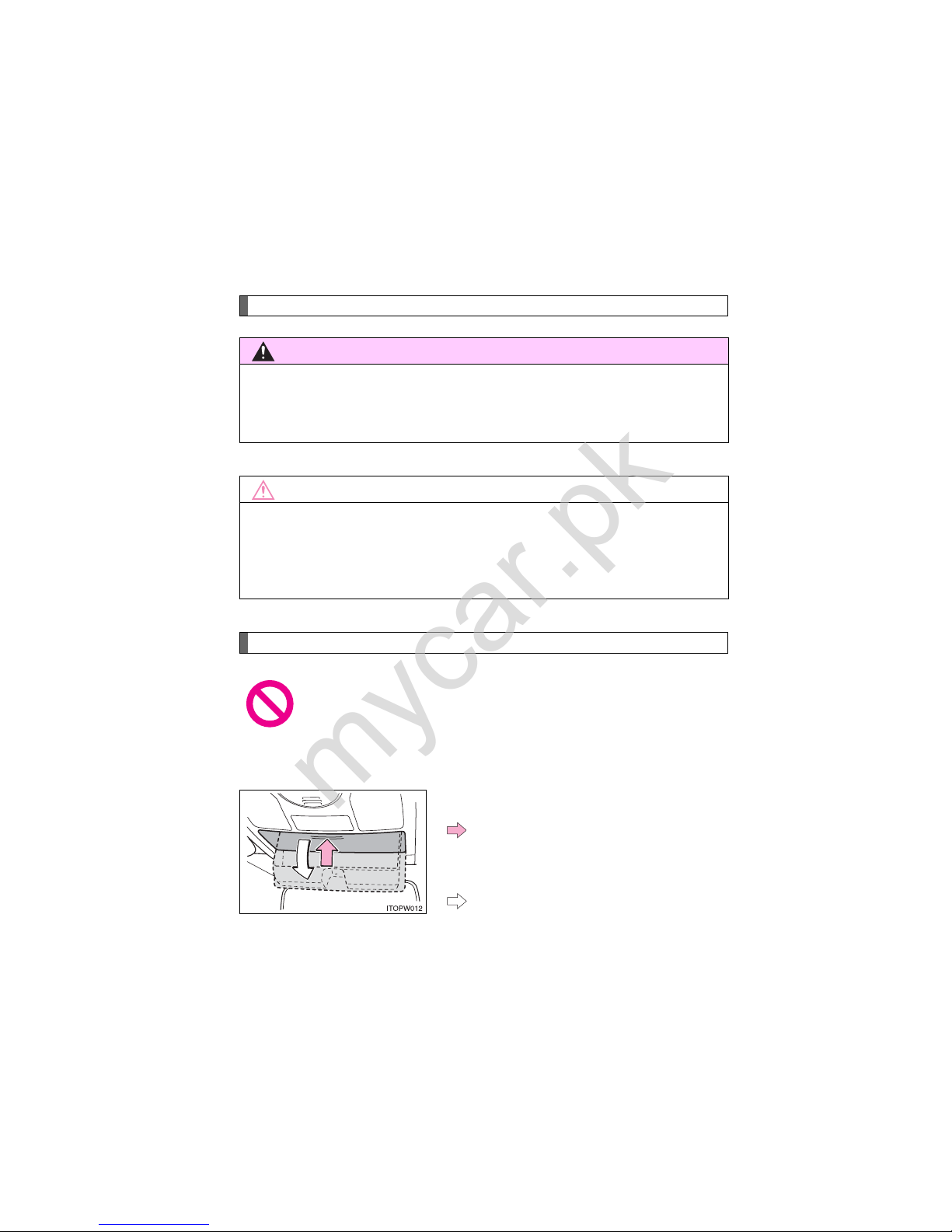
Safety symbol
The symbol of a circle with a slash through it means “Do not”,
“Do not do this”, or “Do not let this happen”.
Arrows indicating operations
Indicates the action (pushing, turning, etc.) used to operate switches
and other devices.
Indicates the outcome of an operation (e.g. a lid opens).
mycar.pk
Page 48

26
mycar.pk
Page 49
28
1-1. Hybrid system
Hybrid system features
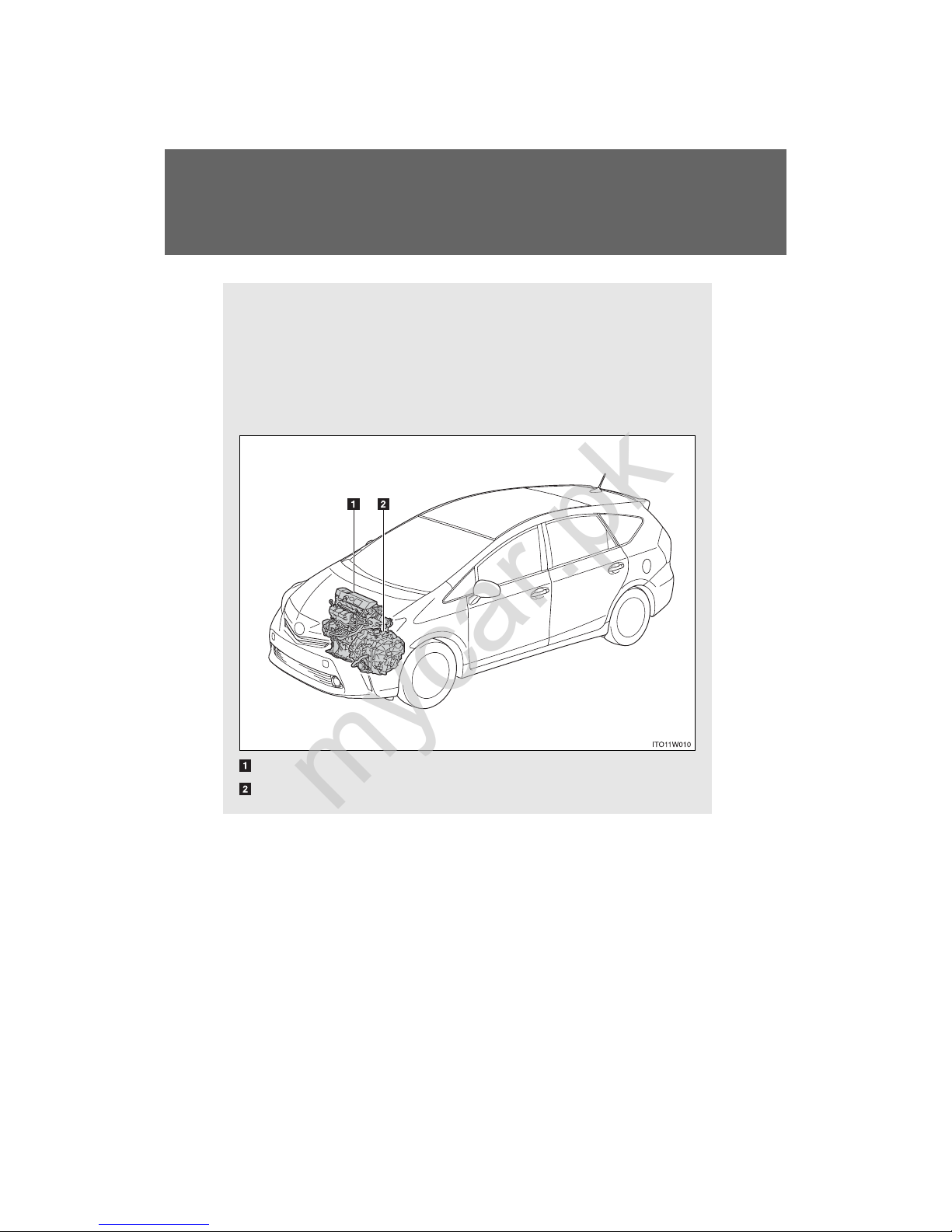
Your vehicle is a hybrid vehicle. It has characteristics different from
conventional vehicles. Be sure you are closely familiar with the characteristics of your vehicle, and operate with care.
The hybrid system combines the use of a gasoline engine and an
electric motor (traction motor) according to driving conditions,
improving fuel efficiency and reducing exhaust emissions.
Gasoline engine
Electric motor (traction motor)
mycar.pk
Page 50

29
1-1. Hybrid system
1
Before driving
■ When stopped/during start off
The gasoline engine stops
* when the vehicle is stopped. During
start off, the electric motor (traction motor) drives the vehicle. At
slow speeds or when traveling down a gentle slope, the engine
is stopped
* and the electric motor (traction motor) is used.
When shift position is in N, the hybrid battery (traction battery)
will not be charged. Thus, shift to P when the vehicle is stopped.
In addition, when driving in heavy traffic, use D or B.
*: However, when the hybrid battery (traction battery) need to be
charged or while the engine is being warmed up, the gasoline
engine may not stop automatically. (→P. 31)
■ During normal driving
The gasoline engine is predominantly used. The electric motor
(traction motor) charges the hybrid battery (traction battery) as
necessary.
■ When acce lerating sharply
When the accelerator pedal is depressed heavily, the power of
the hybrid battery (traction battery) is added to that of the gasoline engine via the electric motor (traction motor).
■ When braking (regenera tive braking)
The electric motor (traction motor) charges the hybrid battery
(traction battery).
mycar.pk
Page 51
30
1-1. Hybrid system
Vehicle proximity notification system
When driving with the gasoline engine stopped, a sound, which
changes in accordance with the driving speed, will be played in order
to warn people nearby of the vehicle’s approach. The sound will stop
when the vehicle speed exceeds approximately 15 mph (25 km/h).
■ Regenerative braking
In the following situations, kinetic energy is converted to electric energy and
deceleration force can be obtained in conjunction with the recharging of the
hybrid battery (traction battery).
● The accelerator pedal is released while driving with the shift position in D
or B.
● The brake pedal is depressed while driving with the shift position in D or
B.
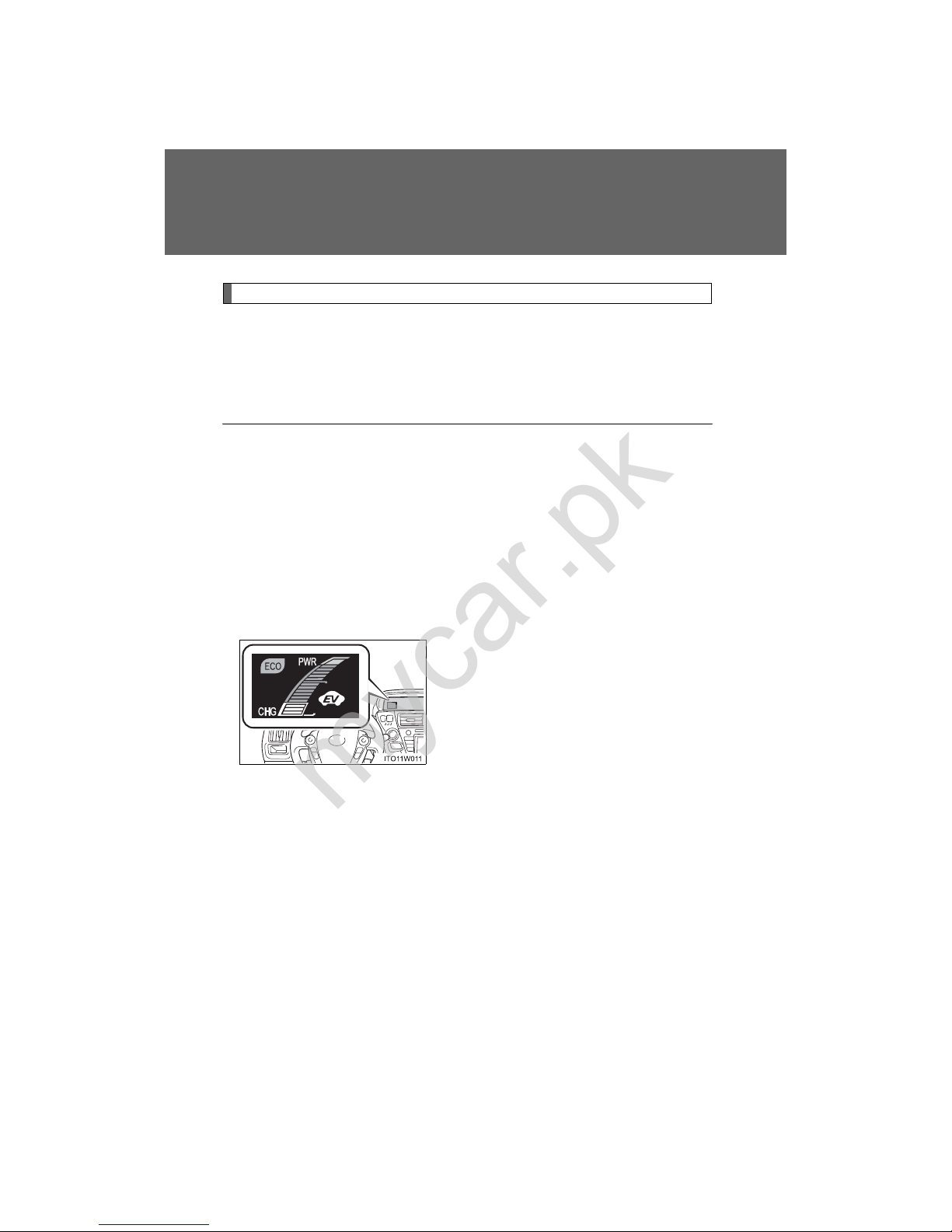
■ Hybrid System Indicator
Hybrid System Indicator represents the
hybrid system power output and regenerative charging. (
→P. 201)
mycar.pk
Page 52

31
1-1. Hybrid system
1
Before driving
■ Conditions in which the gasoline engine may not stop
The gasoline engine starts and stops automatically. However , it may not stop
automatically in the following conditions
*:
● During gasoline engine warm-up
● When the temperature of the hybrid battery (traction battery) is high or
low
● During hybrid battery (traction battery) charging
● When the heater is switched on
*: Depending on the circumstances, the gasoline engine may also not stop
automatically in situations other than those above.
■ Charging the hybrid battery (traction battery)
● As the gasoline engine charges the hybrid battery (traction battery), the
battery does not need to be charged from an outside source. However, if
the vehicle is left parked for a long time the hybrid battery (traction battery) will slowly discharge. For this reason, be sure to drive the vehicle at
least once every few months for at least 30 minutes or 10 miles (16 km).
If the hybrid battery (traction battery) becomes fully discharged and you
are unable to jump-start the vehicle with the 12-volt battery, contact your
Toyota dealer.
● If the shift position is in N, the hybrid battery (traction battery) will not be
charged. Always shift the shift position in P when the vehicle is stopped.
When driving in heavy traffic, operate the vehicle with the shift position in
D or B to avoid discharging the hybrid battery (traction battery).
■ Charging the 12-volt battery
→P. 482
■ After the 12-volt battery has discharged or has been changed or
removed
The gasoline engine may not stop even if the vehicle is running on the hybrid
battery (traction battery). If this continues for a few days, contact your T oyot a
dealer.
mycar.pk
Page 53

32
1-1. Hybrid system
■ Sounds and vibrations specific to a hybrid vehicle
There may be no engine sounds or vibration even though the vehicle is able
to move. For safety, apply the parking brake and make sure to shift the shift
position to P when parked.
The following sounds or vibrations may occur when the hybrid system is
operating and are not a malfunction:
● The brake system operation sound heard from the front of the vehicle
when the driver’s door is opened.
● Motor sounds may be heard from the engine compartment.
● Sounds may be heard from the hybrid battery (traction battery) when the
hybrid system starts or stops.
● Sounds may be heard from the transmission when the gasoline engine
starts or stops, when driving at low speeds, or during idling.
● Engine sounds may be heard when accelerating sharply.
● Sounds may be heard due to regenerative braking when the brake pedal
is depressed and accelerator is loosened.
● Other sounds, such as motors and mechanical noises, may be heard
from the brake system when the brake pedal is depressed.
● Vibration may be felt when the gasoline engine starts or stops.
● Cooling fan sounds may be heard from the air intake vent. (
→P. 35)
● The operation sound of the air conditioning system (air conditioning com-
pressor, blower motor).
mycar.pk
Page 54

33
1-1. Hybrid system
1
Before driving
■ Vehicle proximity notification system
In the following cases, the vehicle proximity notification system may be difficult for surrounding people to hear.
● In very noisy areas
● In the wind or the rain
Also, as the vehicle proximity notification system is installed on the front of
the vehicle, it may be more difficult to hear from the rear of the vehicle compared to the front.
■ Maintenance, repair, recycling, and disposal
Contact your Toyota dealer regarding maintenance, repair , recycling and disposal. Do not dispose of the vehicle yourself.
mycar.pk
Page 55
34
1-1. Hybrid system
PRIUS Aplha_U (OM47674U)
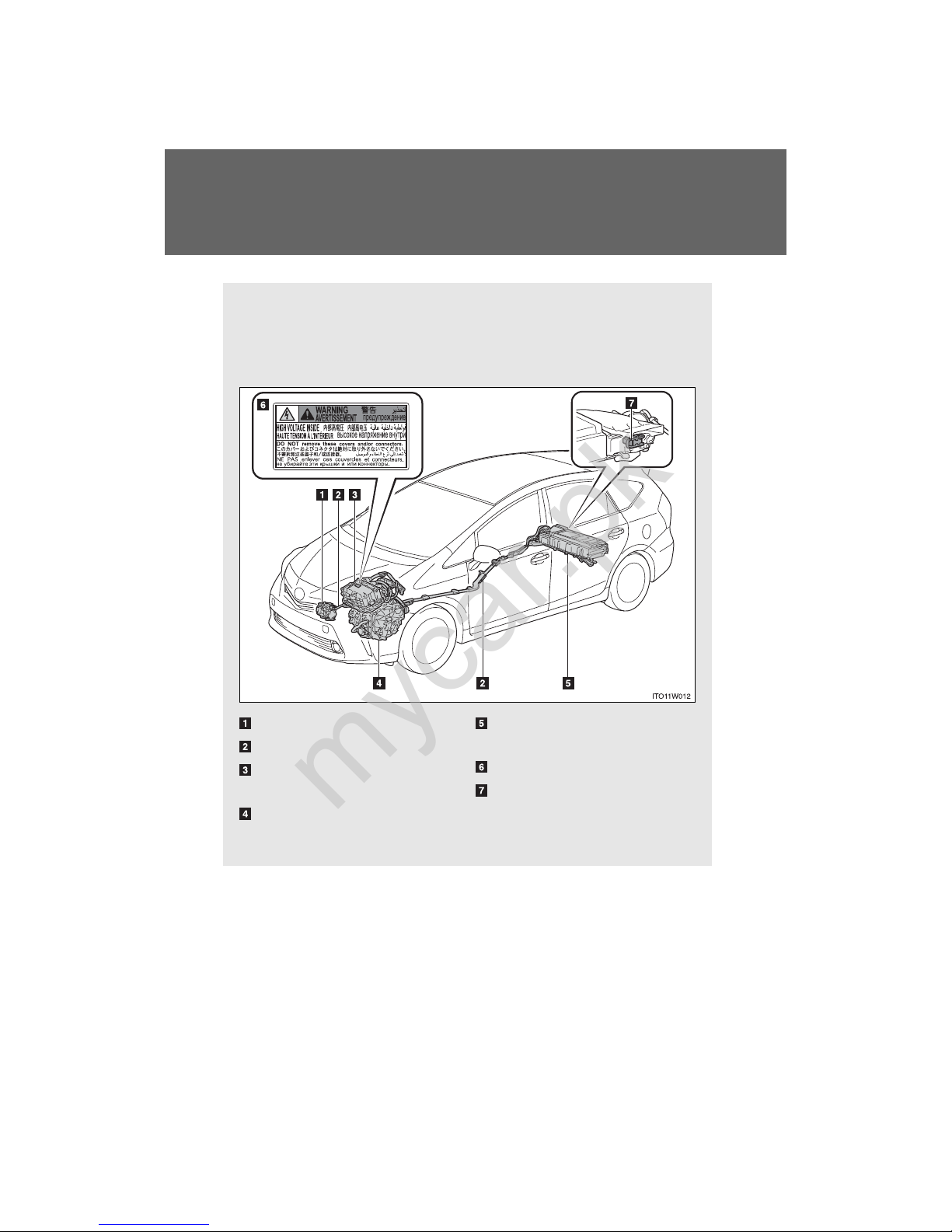
Hybrid system precautions
Take care when handling the hybrid system, as it contains a high
voltage system (about 650V at maximum) as well as parts that
become extremely hot when the hybrid system is operating. Obey
the caution labels attached to the vehicle.
Air conditioning compressor
High voltage cables (orange)
Power control unit and DC/
DC converter
Electric motor (traction
motor)
Hybrid battery (traction battery)
Caution label
Service plug
/
mycar.pk
Page 56
35
1-1. Hybrid system
1
Before driving
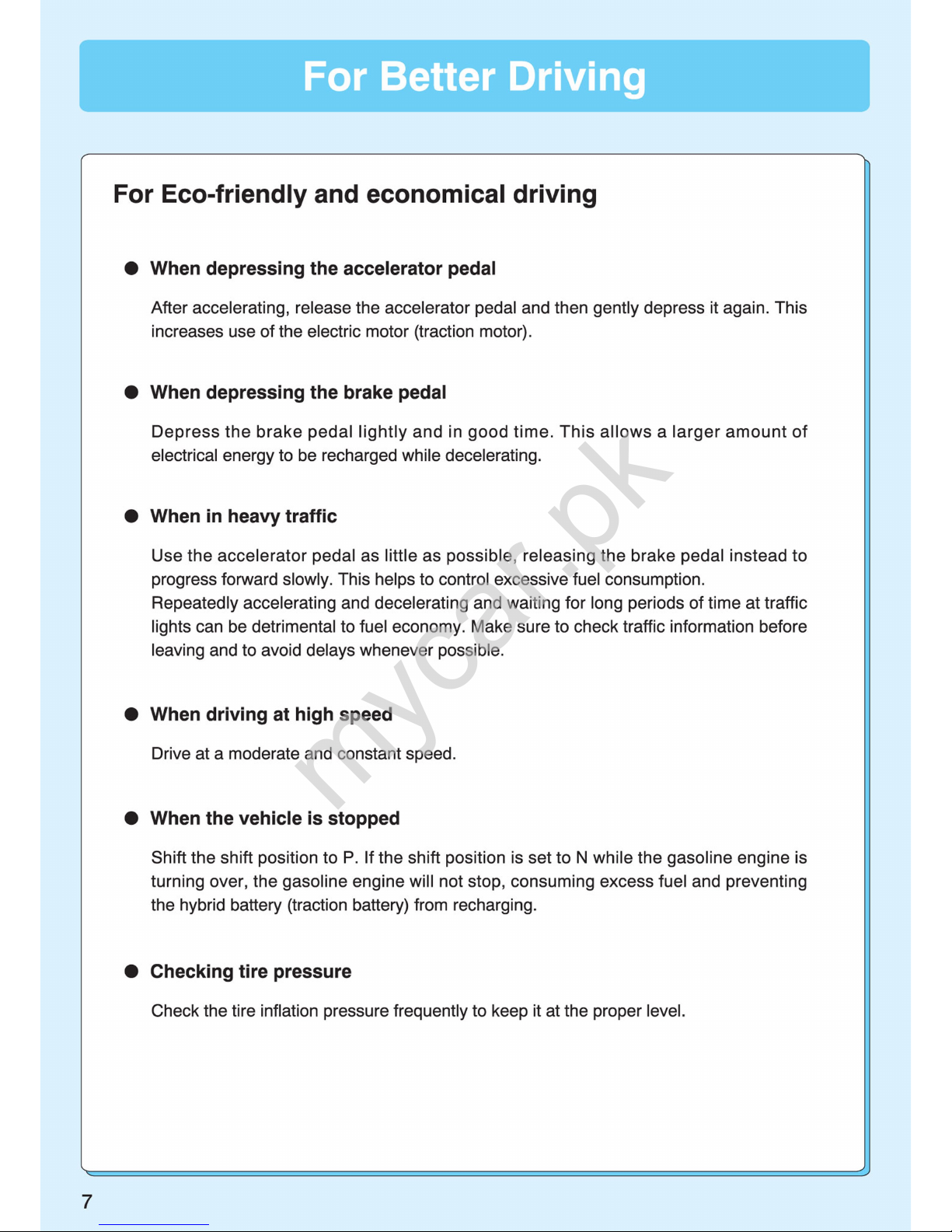
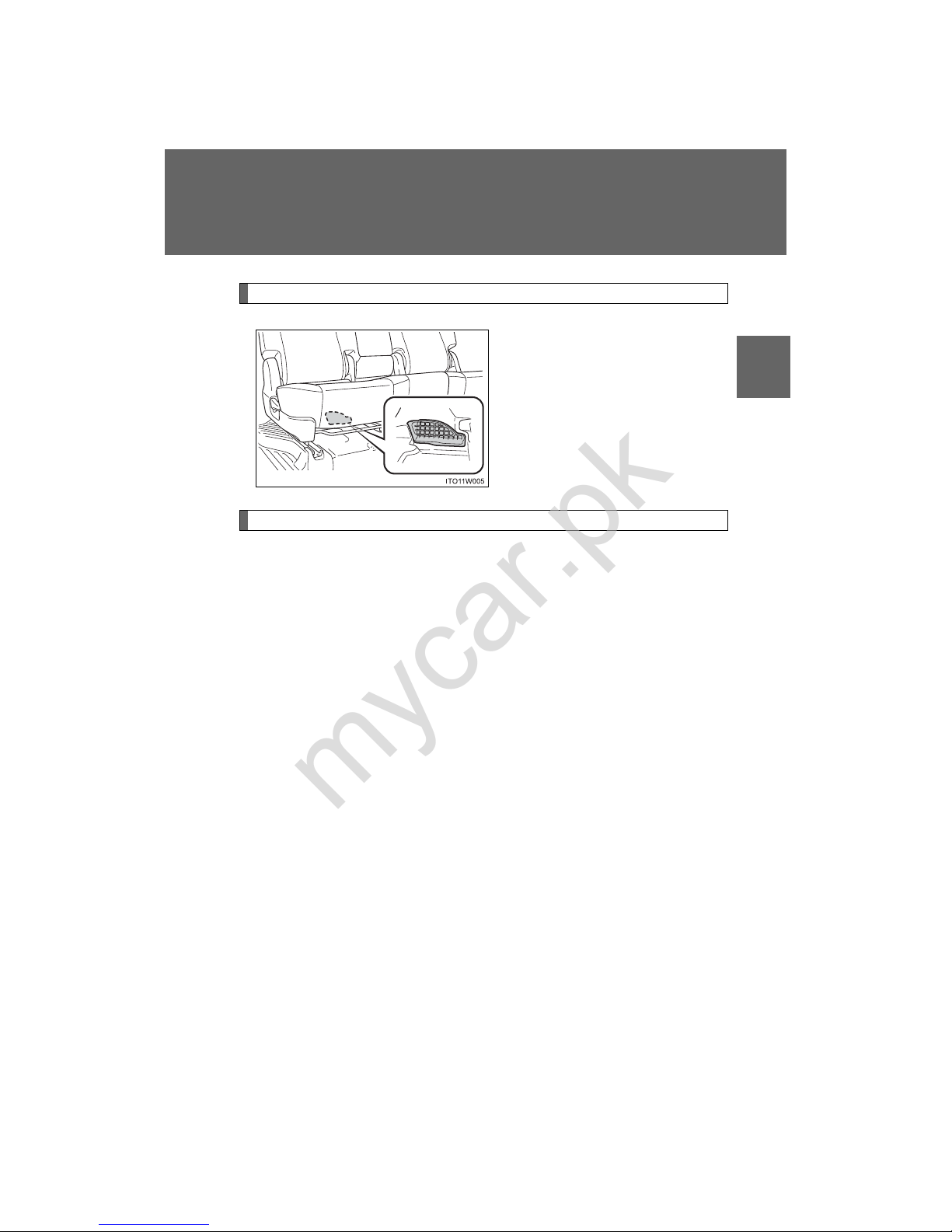
Hybrid battery (traction battery) air vent
There is an air intake vent under
the rear seat for the purpose of
cooling the hybrid battery (traction battery). If the vent become
blocked, the hybrid battery (traction battery) may overheat, leading to a reduction in hybrid
battery (traction battery) output.
Emergency shut off system
When a certain level of impact is detected by the impact sensor, the
emergency shut off system blocks off the high voltage current and
stops the fuel pump to minimize the risk of electrocution and fuel
leakage. If the emergency shut off system activates, your vehicle will
not restart. To restart the hybrid system, contact your Toyota dealer.
mycar.pk
Page 57

36
1-1. Hybrid system
■ If a warning light comes on, a warning message is displayed or the 12-
volt battery is disconnected
The hybrid system may not start. In that case, try to start the system again. If
the “READY” indicator does not come on, contact your Toyota dealer.
■ Running out of fuel
When the vehicle has run out of fuel and the hybrid system cannot be
started, refuel the vehicle with at least enough gasoline to make the low fuel
level warning light (→P. 449) go off. If there is only a small amount of fuel,
the hybrid system may not be able to start. (The minimum amount of fuel to
add to make the low fuel level warning light go out is about 1.8 gal. [7 L,
1.5 Imp.gal.], when the vehicle is on a level surface. This value may vary
when the vehicle is on a slope.)
■ Electromagnetic waves
● High voltage parts and cables on the hybrid vehicles incorporate electro-
magnetic shielding, and therefore emit approximately the same amount
of electromagnetic waves as conventional gasoline powered vehicles or
home electronic appliances.
● Your vehicle may cause sound interference in some third party-produced
radio parts.
■ Hybrid battery (traction battery)
The hybrid battery (traction battery) has a limited service life. The lifespan of
the hybrid battery (traction battery) can change in accordance with driving
style and driving conditions.
mycar.pk
Page 58
37
1-1. Hybrid system
1
Before driving
CAUTION
■ High voltage precautions
The vehicle has high voltage DC and AC systems as well as a 12-volt system. DC and AC high voltage is very dangerous and can cause severe burns
and electric shock that may result in death or serious injury.
● Never touch, disassemble, remove or replace the high voltage parts,
cables or their connectors.
● The hybrid system will become hot after starting as the system uses high
voltage. Be careful of both the high voltage and the high temperature, and
always obey the caution labels attached to the vehicle.
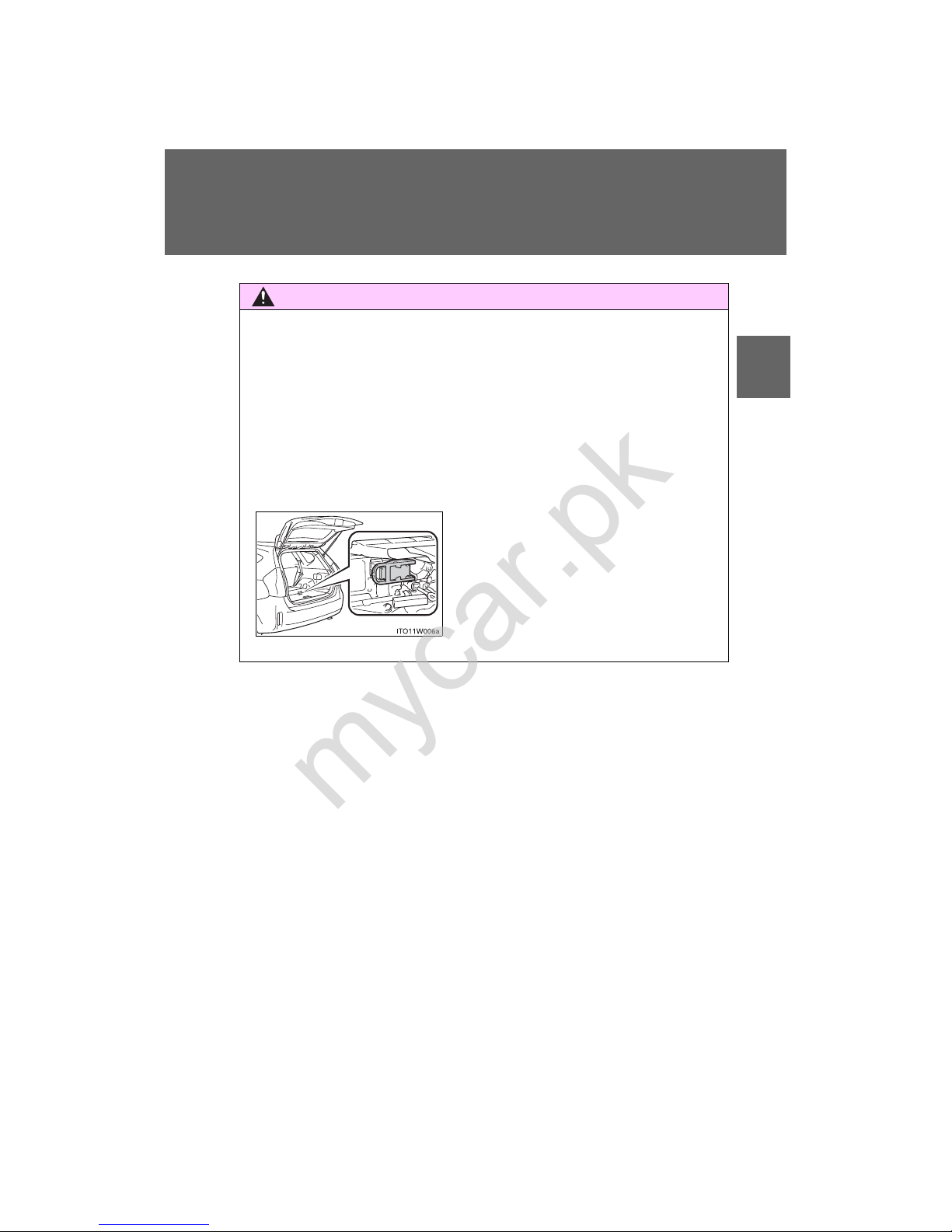
● Never try to open the service plug
access hole located in the luggage
compartment. The service plug is used
only when the vehicle is serviced and is
subject to high voltage.
mycar.pk
Page 59
38
1-1. Hybrid system
CAUTION
■ Road accident cautions
If your vehicle is involved in an accident, observe the following precautions
to reduce the risk of death or serious injury:
● Stop the vehicle in a safe place to prevent subsequent accidents.
While depressing the brake pedal, apply the parking brake and shift the
shift position to P to stop the hybrid system. Then, slowly release the
brake pedal.
● Do not touch the high voltage parts, cables and connectors.
● If electric wires are exposed inside or outside your vehicle, an electric
shock may occur. Never touch exposed electric wires.
● If a fluid leak occurs, do not touch the fluid as it may be strong alkaline
electrolyte from the hybrid battery (traction battery). If it comes into contact
with your skin or eyes, wash it off immediately with a large amount of water
or, if possible, boric acid solution. Seek immediate medical attention.
● If a fire occurs in the hybrid vehicle, leave the vehicle as soon as possible.
Never use a fire extinguisher that is not meant for electric fires. Using even
a small amount of water may be dangerous.
● If your vehicle needs to be towed, do so with front wheels raised. If the
wheels connected to the electric motor (traction motor) are on the ground
when towing, the motor may continue to generate electricity. This may
cause an electricity leakage leading to a fire. (→P. 435)
● Carefully inspect the ground under the vehicle. If you find that liquid has
leaked onto the ground, the fuel system may have been damaged. Leave
the vehicle as soon as possible.
■ Hybrid battery (traction battery)
Your vehicle contains a sealed nickel-metal hydride battery. If disposed of
improperly, it is hazardous to the environment and there is a risk of severe
burns and electrical shock that may result in death or serious injury.
mycar.pk
Page 60
39
1-1. Hybrid system
1
Before driving
NOTICE
■ Hybrid battery (traction battery) air vent
● Do not put foreign objects near the air vent. The hybrid battery (traction
battery) may overheat and be damaged.
● Clean the air vent regularly to prevent the hybrid battery (traction battery)
from overheating.
● Do not wet or allow foreign substances to enter the air vent as this may
cause a short circuit and damage the hybrid battery (traction battery).
● Do not carry large amounts of water such as water cooler bottles in the
vehicle. If water spills onto the hybrid battery (traction battery), the battery
may be damaged. Have the vehicle inspected by your Toyota dealer.
mycar.pk
Page 61
40
1-1. Hybrid system
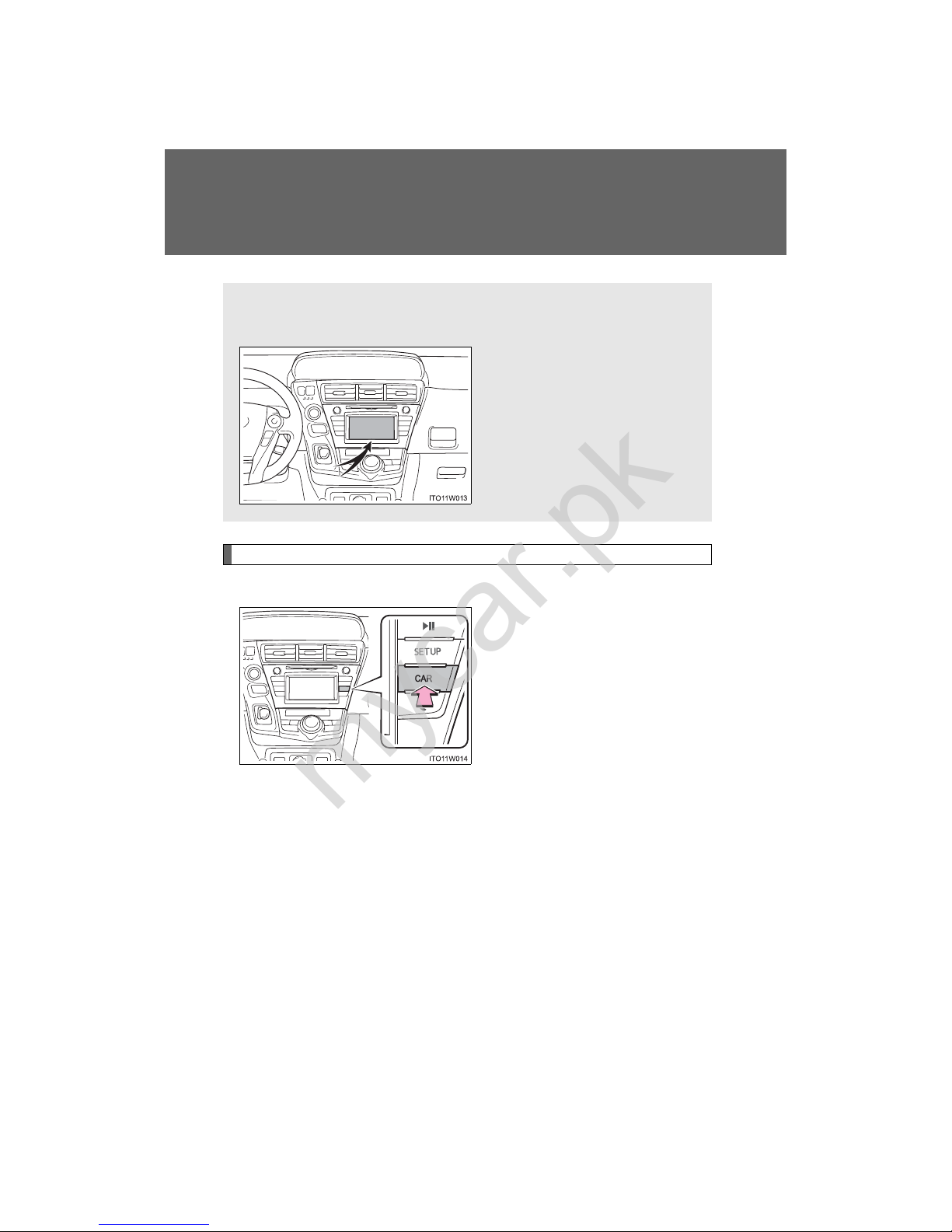
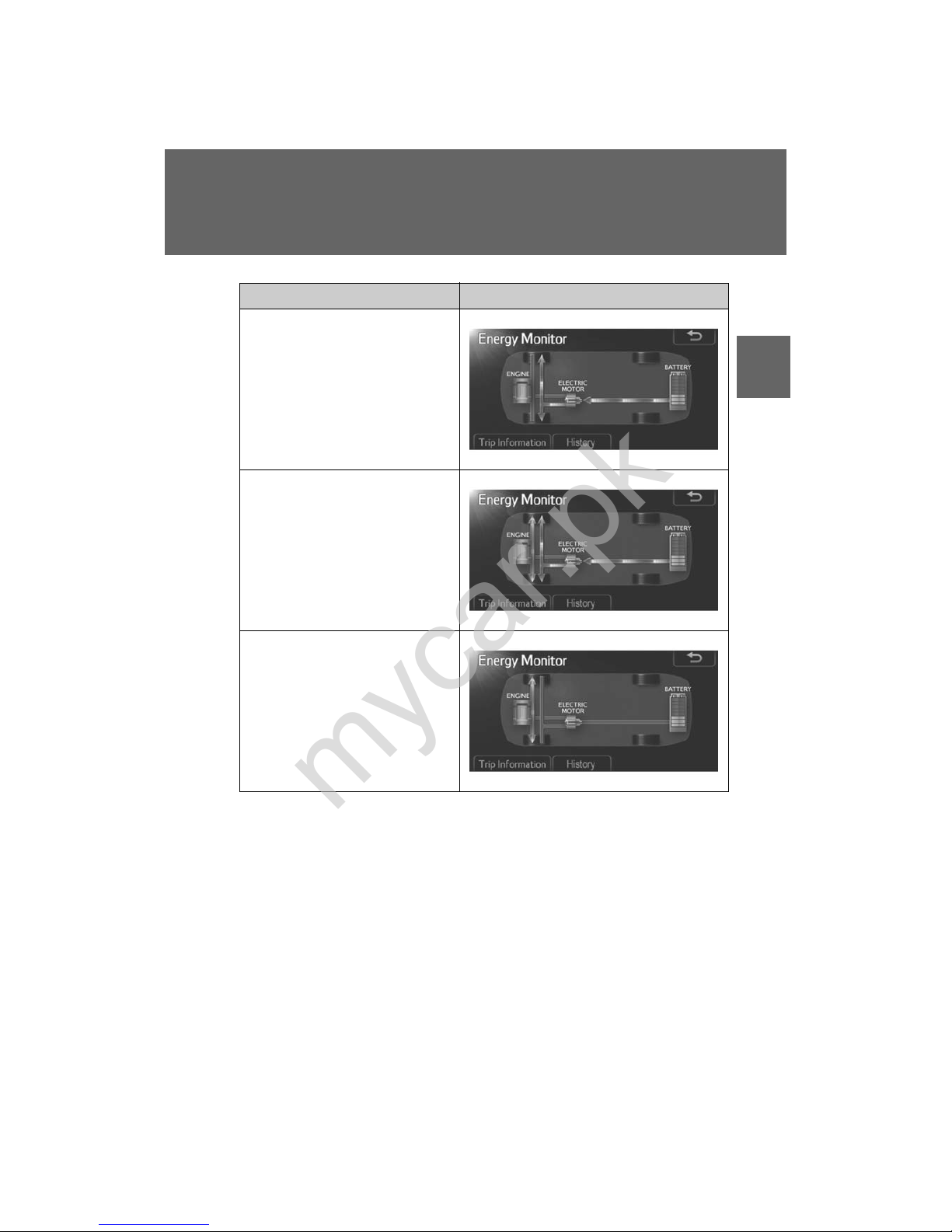
Energy monitor/consumption screen
Energy monitor
Display Audio system
Press “CAR”.
If the “Trip Information” or “History” screen is displayed, touch
“Energy”.
You can view the status of your hybrid system on the Display Audio
system screen or the navigation system screen.
Display Audio system screen
or navigation system screen
mycar.pk
Page 62
41
1-1. Hybrid system
1
Before driving
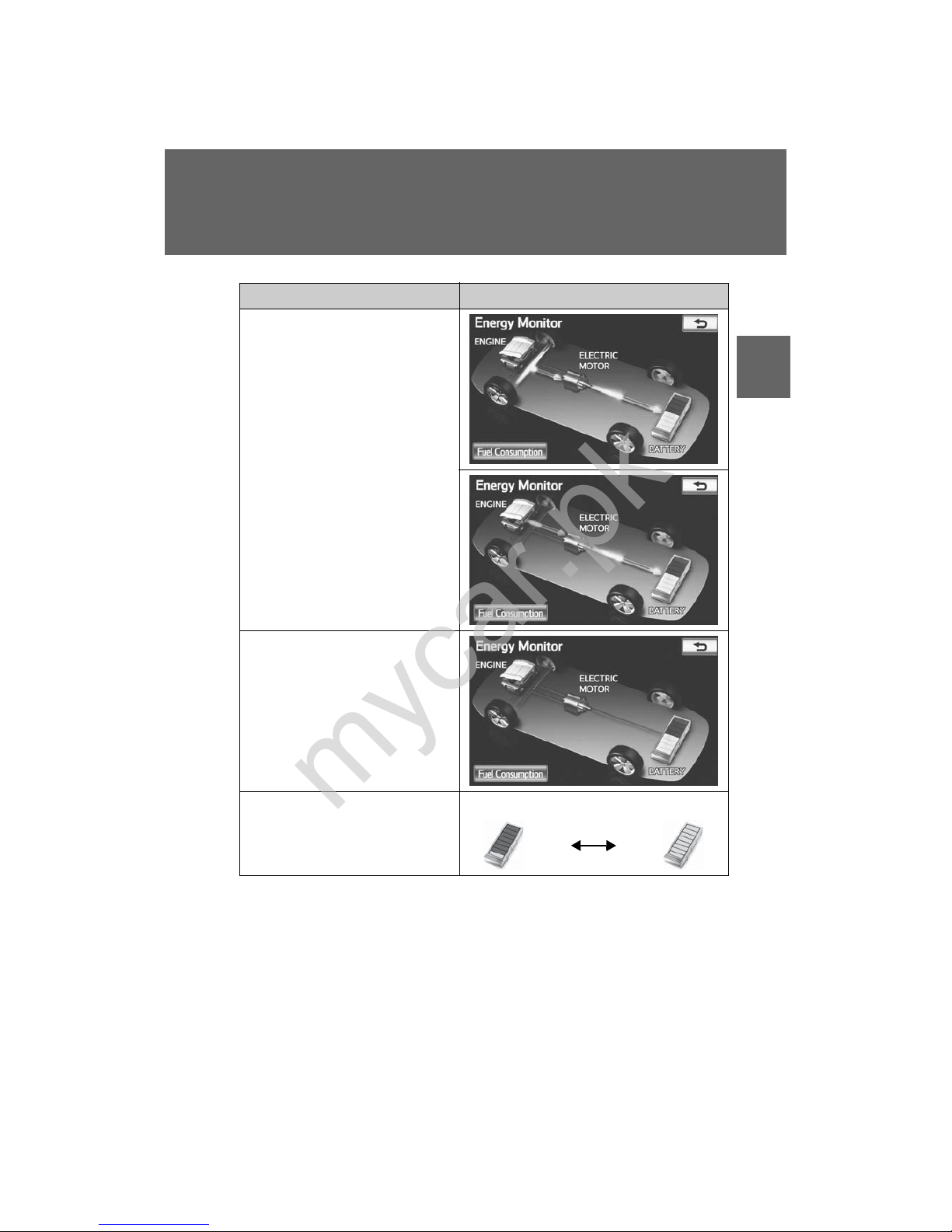
Condition Display
When the vehicle is powered by
the electric motor (traction
motor)
When the vehicle is powered by
both the gasoline engine and the
electric motor (traction motor)
When the vehicle is powered by
the gasoline engine
mycar.pk
Page 63
42
1-1. Hybrid system
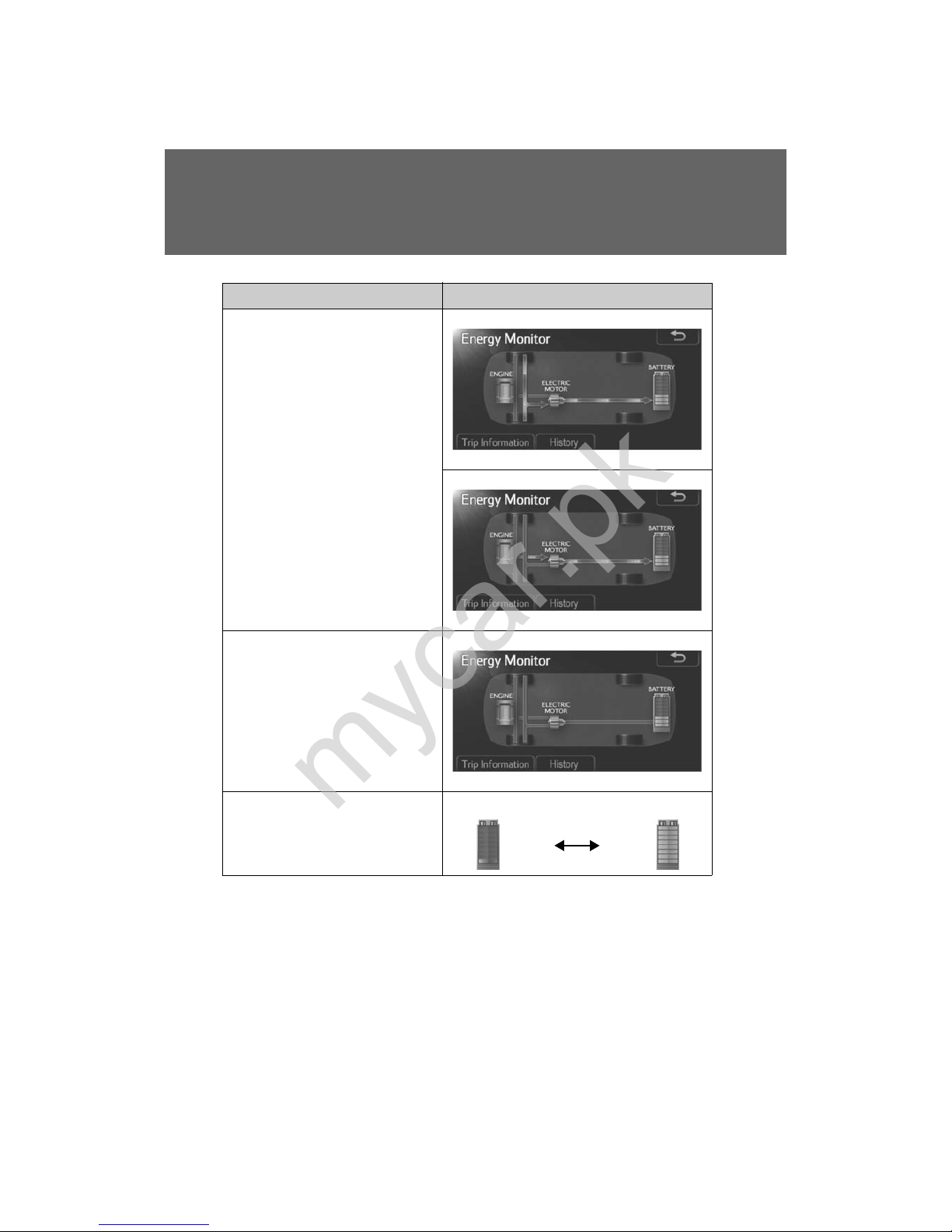
These images are examples only, and may vary slightly from actual conditions.
Condition Display
When the vehicle is charging the
hybrid battery (traction battery)
When there is no energy flow
Hybrid battery (traction battery)
status
Low Full
mycar.pk
Page 64
43
1-1. Hybrid system
1
Before driving
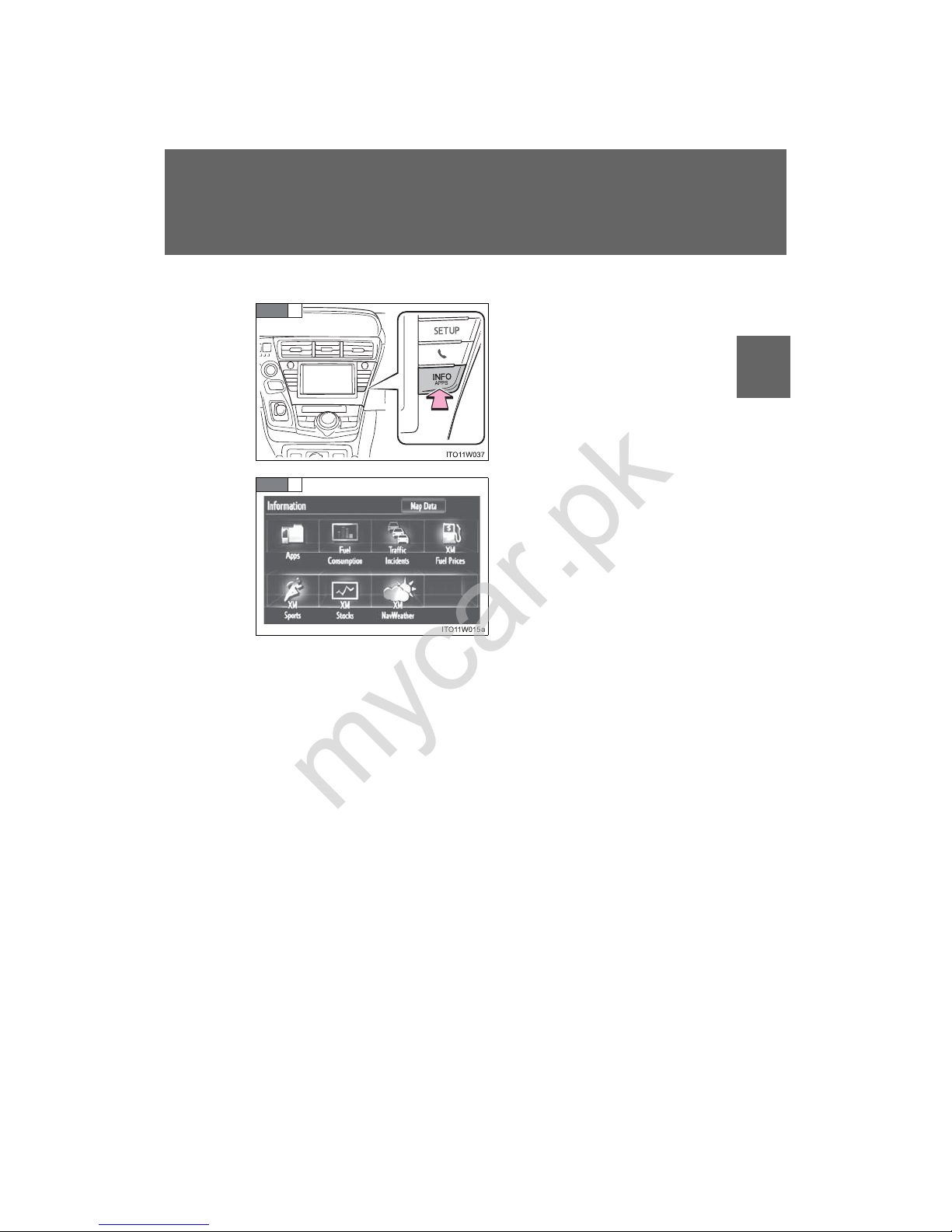
Navigation system
Press “INFO APPS” or “INFO”.
Touch “Fuel Consumption” on
the “Information” screen .
If the “Trip Information” or “Past
Record” screen is displayed,
touch “Energy”.
STEP
1
STEP
2
mycar.pk
Page 65
44
1-1. Hybrid system
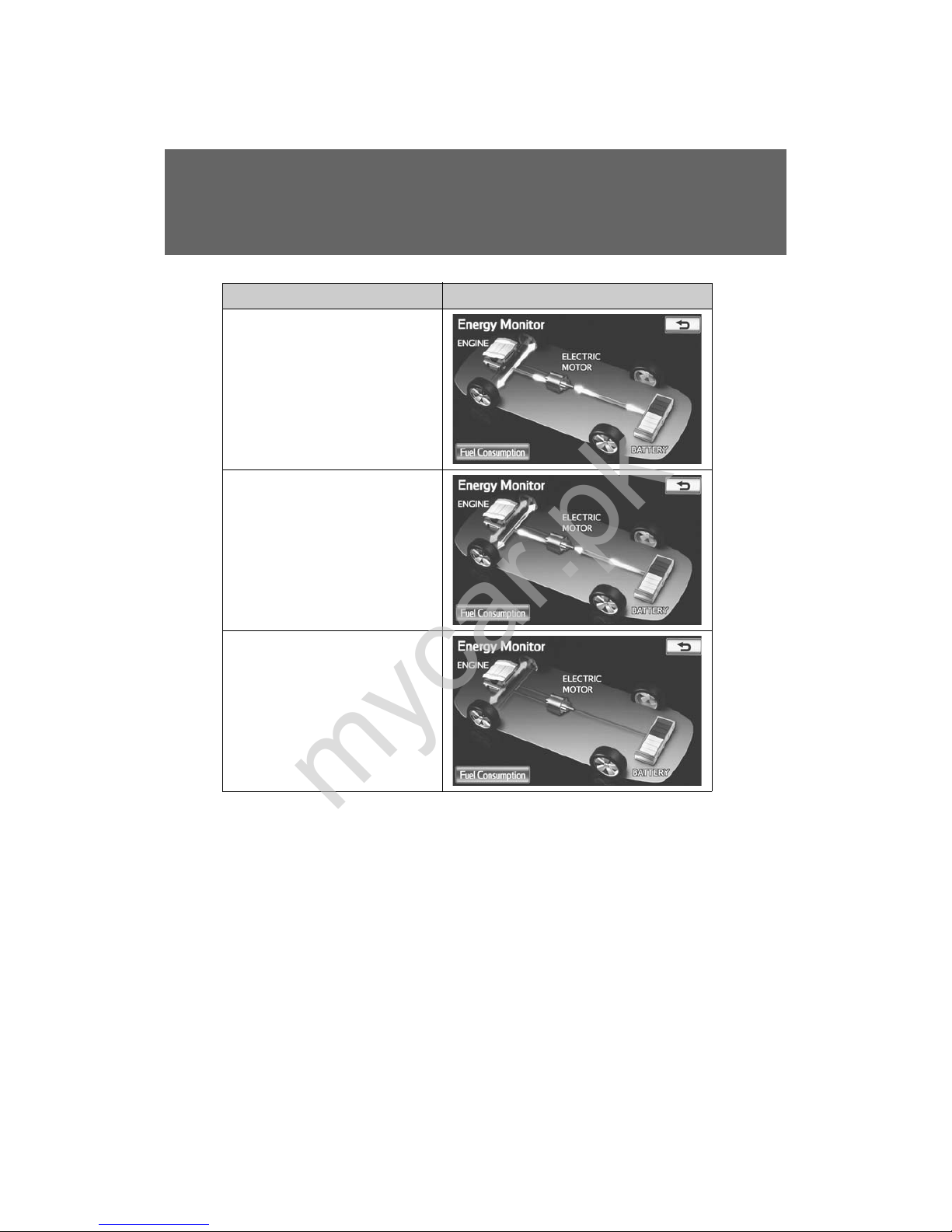
Condition Display
When the vehicle is powered by
the electric motor (traction
motor)
When the vehicle is powered by
both the gasoline engine and the
electric motor (traction motor)
When the vehicle is powered by
the gasoline engine
mycar.pk
Page 66
45
1-1. Hybrid system
1
Before driving
These images are examples only, and may vary slightly from actual conditions.
Condition Display
When the vehicle is charging the
hybrid battery (traction battery)
When there is no energy flow
Hybrid battery (traction battery)
status
Low Full
mycar.pk
Page 67
46
1-1. Hybrid system
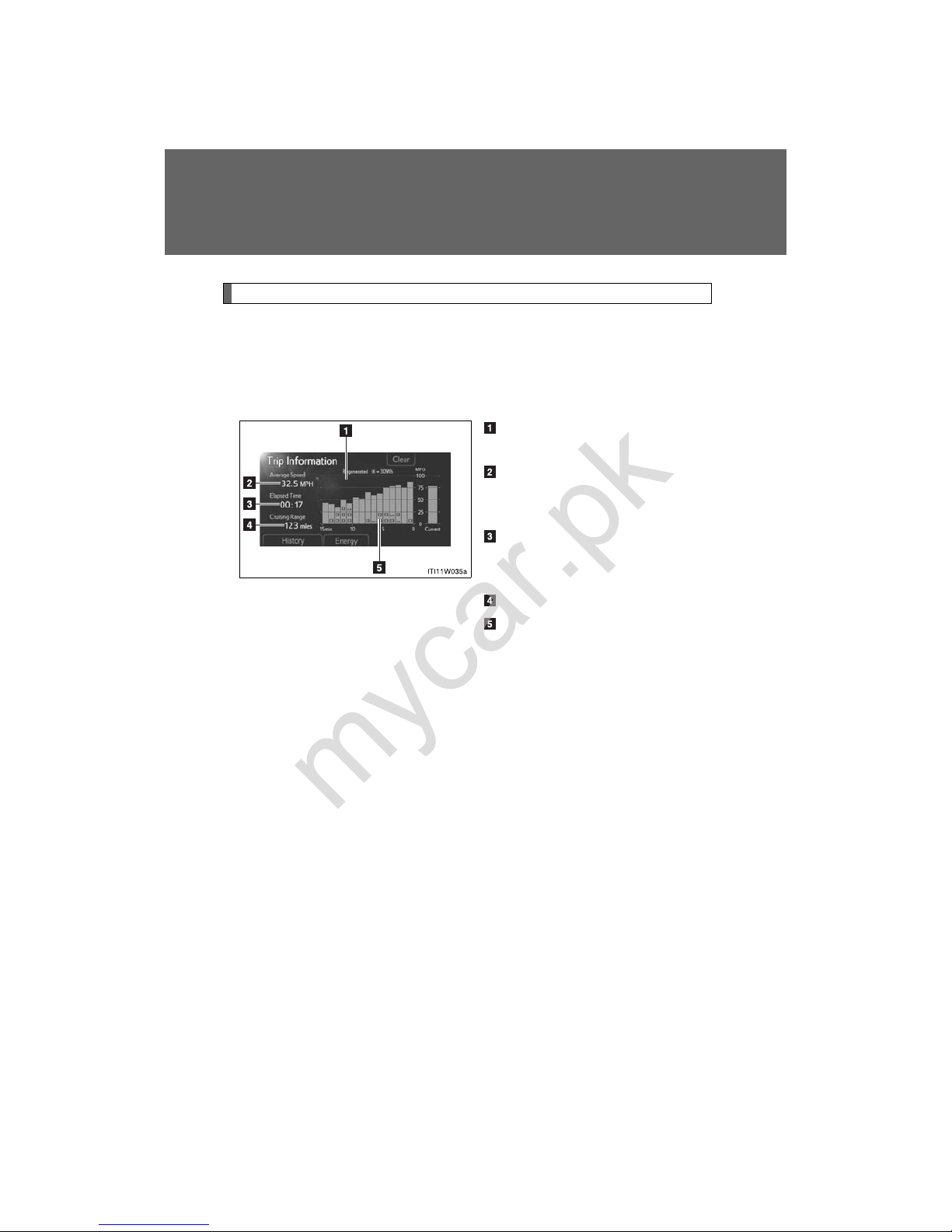
Trip information screen
Display Audio system
Press “CAR”.
If the “Energy Monitor” or “History” screen is displayed, touch “Trip Information”.
Fuel consumption in the past
15 minutes
Displays the average vehicle
speed since the hybrid system
was started
Displays the elapsed time
since the hybrid system was
started
Cruising range (→P. 49)
Regenerated energy in the
past 15 minutes
One symbol indicates 30 Wh. Up
to 4 symbols are shown.
The image is example only, and may vary slightly from actual conditions.
mycar.pk
Page 68
47
1-1. Hybrid system
1
Before driving
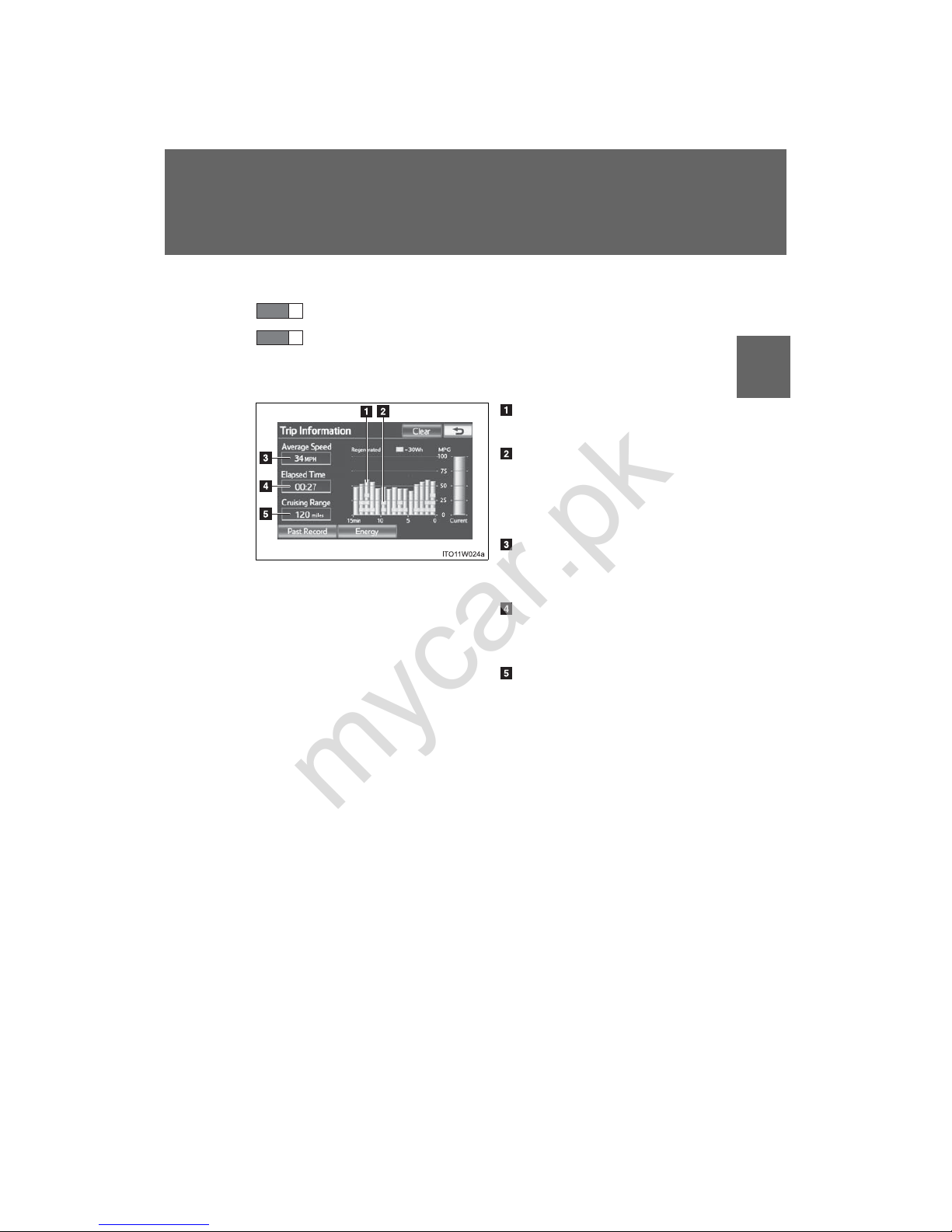
Navigation system
Press “INFO APPS” or “INFO”.
Touch “Fuel Consumption” on the “Information” screen.
If the “Energy Monitor” or “Past Record” screen is displayed, touch
“Trip Information”.
Fuel consumption in the past
15 minutes
Regenerated energy in the
past 15 minutes
One symbol indicates 30 Wh. Up
to 4 symbols are shown.
Displays the average vehicle
speed since the hybrid system
was started
Displays the elapsed time
since the hybrid system was
started
Cruising range (→P. 49)
The image is example only, and may vary slightly from actual conditions.
STEP
1
STEP
2
mycar.pk
Page 69
48
1-1. Hybrid system
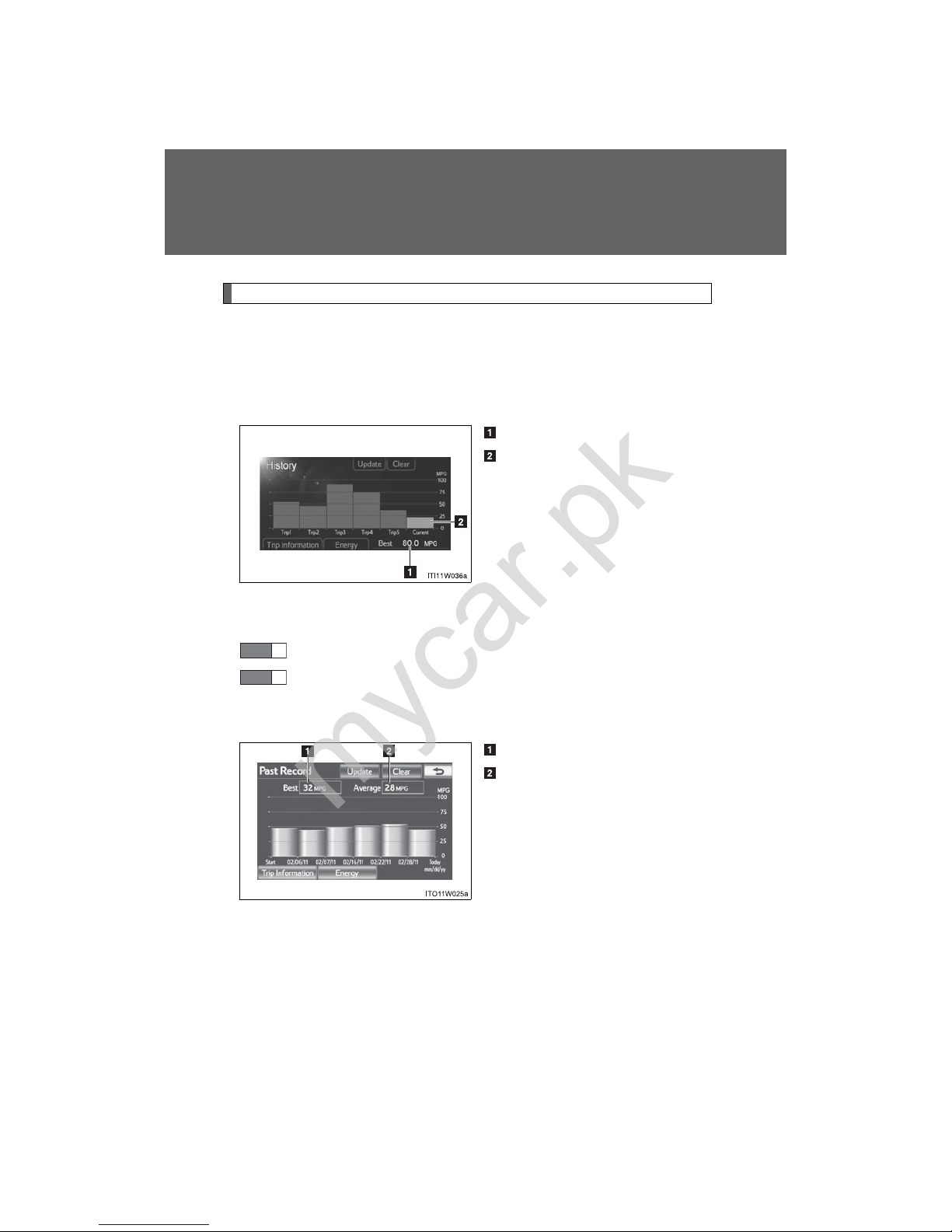
Past record screen
Display Audio system
Press “CAR”.
If the “Energy Monitor” or “Trip Information” screen is displayed, touch
“History”.
Best past fuel consumption
Average fuel consumption
Displays a maximum of 5 past
record of the total average fuel
consumption.
The image is example only, and may vary slightly from actual conditions.
Navigation system
Press “INFO APPS” or “INFO”.
Touch “Fuel Consumption” on the “Information” screen.
If the “Energy Monitor” or “Trip Information” screen is displayed,
touch “Past Record”.
Best past fuel consumption
Average fuel consumption
Displays a maximum of 5 past
record of the total average fuel
consumption.
The image is example only, and may vary slightly from actual conditions.
STEP
1
STEP
2
mycar.pk
Page 70

49
1-1. Hybrid system
1
Before driving
■ Resetting the consumption data
Display Audio system
Selecting “Clear” on the “Trip Information” screen will reset the fuel consumption and the regenerated energy for the past 15 minutes.
Selecting “Clear” on the “History” screen will reset the past records and best
past fuel consumption.
Selecting “Yes” on the following screen will confirm resetting of all the data.
Navigation system
Selecting “Clear” on the “Trip Information” screen will reset the fuel consumption and the regenerated energy for the past 15 minutes.
Selecting “Clear” on the “Past Record” screen will reset the past records and
best past fuel consumption.
Selecting “Yes” on the following screen will confirm resetting of all the data.
■ Cruising range
Displays the estimated maximum distance that can be driven with the quantity of fuel remaining.
This distance is computed based on your average fuel consumption.
As a result, the actual distance that can be driven may differ from that displayed.
mycar.pk
Page 71

50
1-1. Hybrid system
Hybrid vehicle driving tips
For economical and ecological driving, pay attention to the following
points:
■ Using Eco drive mode
When using Eco drive mode, the torque corresponding to the accelerator pedal depression amount can be generated more smoothly than it is
in normal conditions. In addition, the operation of the air conditioning
system (heating/cooling) will be minimized, improving the fuel economy. (→P. 185)
■ Use of Hybrid System Indicator
Eco-friendly driving is possible by keeping the indicate of Hybrid System Indicator within Eco area or Charge area. (→P. 201)
■ When braking the vehicle
Make sure to operate the brakes gently and in good time. A greater
amount of electrical energy can be retained when slowing down.
■ Delays
Repeated acceleration and deceleration, as well as long waits at traffic
lights, will lead to bad fuel consumption. Check traffic reports before
leaving and avoid delays as much as possible. When encountering a
delay, gently release the brake pedal to allow the vehicle to move forward slightly while avoiding overuse of the accelerator pedal. Doing so
can help control excessive gasoline consumption.
■ Highway driving
Control your speed and keep at a constant speed. Also, before stopping at a toll booth or similar, allow plenty of time to release the accelerator and gently apply the brakes. A greater amount of electrical energy
can be retained when slowing down.
mycar.pk
Page 72

51
1-1. Hybrid system
1
Before driving
■ Air conditioning on/off
Switch the air conditioning ( ) to off when it is not needed. Doing
so can help control excessive gasoline consumption.
In summer: In high temperatures, use the recirculated air mode. Doing
so will help to reduce the burden on the air conditioner and reduce fuel
consumption as well.
In winter: Because the gasoline engine will not automatically cut out
until the gasoline engine and the interior of the vehicle are warm, it will
consume fuel. Also, fuel consumption can be improved by avoiding
overuse of the heater.
■ Checking tire inflation pressure
Make sure to check the tire inflation pressure frequently. Improper tire
inflation pressure can cause poor fuel consumption.
Also, as snow tires can cause large amounts of friction, their use on dry
roads can lead to poor fuel consumption. Use a tire that is appropriate
for the season.
■ Luggage
Carrying heavy luggage can lead to poor fuel consumption. Avoid carrying unnecessary luggage. Installing a large roof rack can also cause
poor fuel consumption.
■ Warming up before driving
Since the gasoline engine starts up and cuts out automatically when
cold, warming up the engine is unnecessary. Moreover, frequently driving short distances will cause the engine to repeatedly warm up, which
can lead to poor fuel consumption.
mycar.pk
Page 73
58
1-2. Key information
Keys
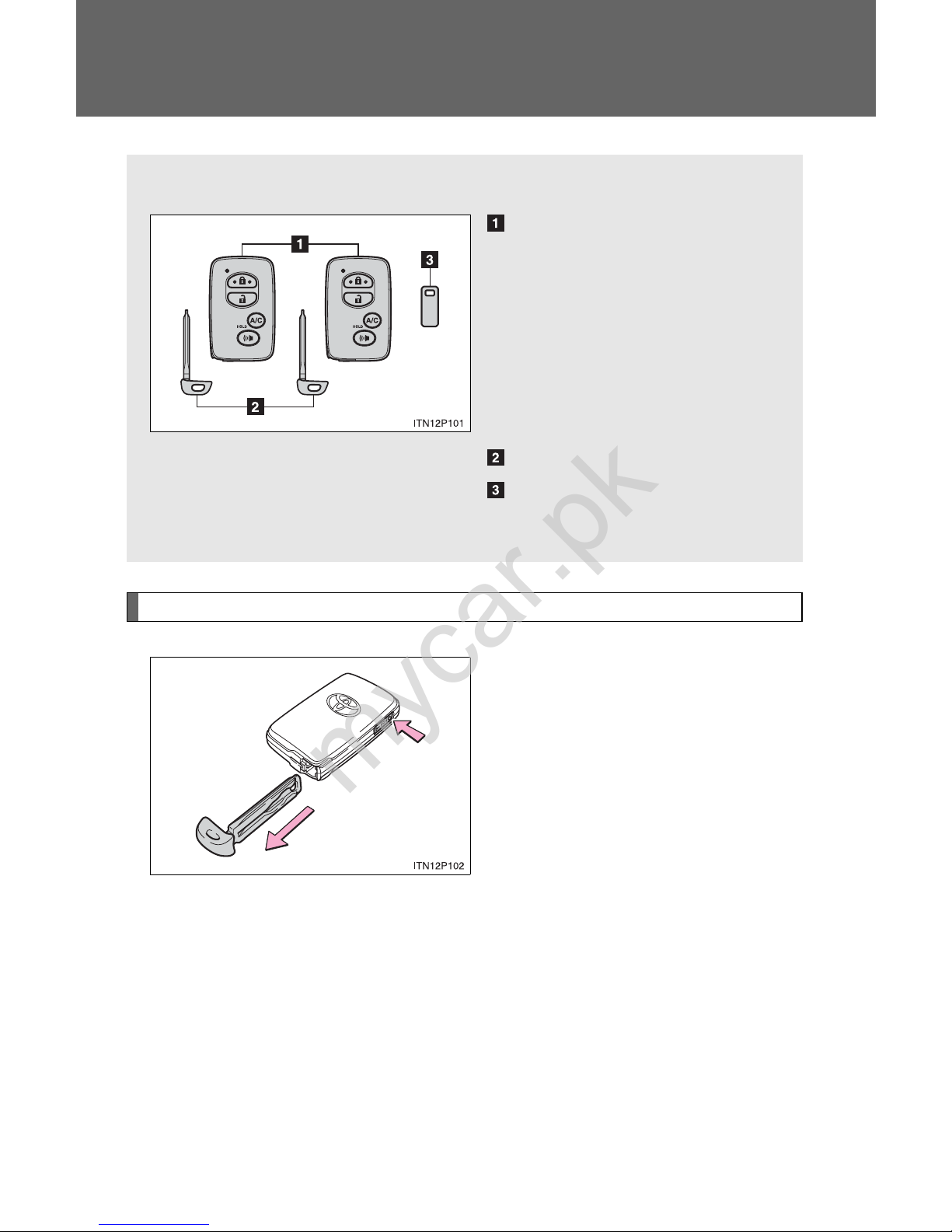
Using the mechanical key
To take out the mechanical key,
push the release button and take
the key out.
After using the mechanical key,
store it in the electronic key. Carry
the mechanical key together with
the electronic key . If the electronic
key battery is depleted or the
entry function does not operate
properly, you will need the
mechanical key. (→P. 541)
The following keys are provided with the vehicle.
Electronic keys
• Operating the smart key
system (→P. 61, 79)
• Operating the wireless
remote control function
(→P. 85)
• Operating the Remote Air
Conditioning System
*
(→P. 342)
Mechanical keys
Key number plate
*: If equipped
mycar.pk
Page 74

59
1-2. Key information
1
Before driving
■ Key number plate
Keep the plate in a safe place such as your wallet, not in the vehicle. In the
event that a mechanical key is lost, a new key can be made at your Toyota
dealer using the key number plate. (→P. 540)
■ When riding in an aircraft
When bringing an electronic key onto an aircraft, make sure you do not
press any buttons on the electronic key while inside the aircraft cabin. If you
are carrying an electronic key in your bag etc., ensure that the buttons are
not likely to be pressed accidentally. Pressing a button may cause the electronic key to emit radio waves that could interfere with the operation of the
aircraft.
mycar.pk
Page 75

60
1-2. Key information
NOTICE
■ To prevent key damage
Observe the following:
● Do not drop the keys, subject them to strong shocks or bend them.
● Do not expose the keys to high temperatures for long periods of time.
● Do not get the keys wet or wash them in an ultrasonic washer etc.
● Do not attach metallic or magnetic materials to the keys or place the keys
close to such materials.
● Do not disassemble the keys.
● Do not attach a sticker or anything else to the surface of the electronic key.
● Do not place the keys near objects that produce magnetic fields, such as
TVs, audio systems and glass top ranges, or medical electrical equipment,
such as low-frequency therapy equipment.
■ Carrying the electronic key on your person
Carry the electronic key 3.9 in. (10 cm) or more away from electric appliances that are turned on. Radio waves emitted from electric appliances
within 3.9 in. (10 cm) of the electronic key may interfere with the key, causing
the key to not function properly.
■ In case of a smart key system malfunction or other key-related prob-
lems
Take your vehicle with all the electronic keys provided with your vehicle to
your Toyota dealer.
■ When a vehicle key is lost
If the key remains lost, the risk of vehicle theft increases significantly. Visit
your Toyota dealer immediately with all remaining electronic keys that was
provided with your vehicle.
mycar.pk
Page 76
61
1
Before driving
1-3. Opening, closing and locking the doors
Smart key system (with entry function)
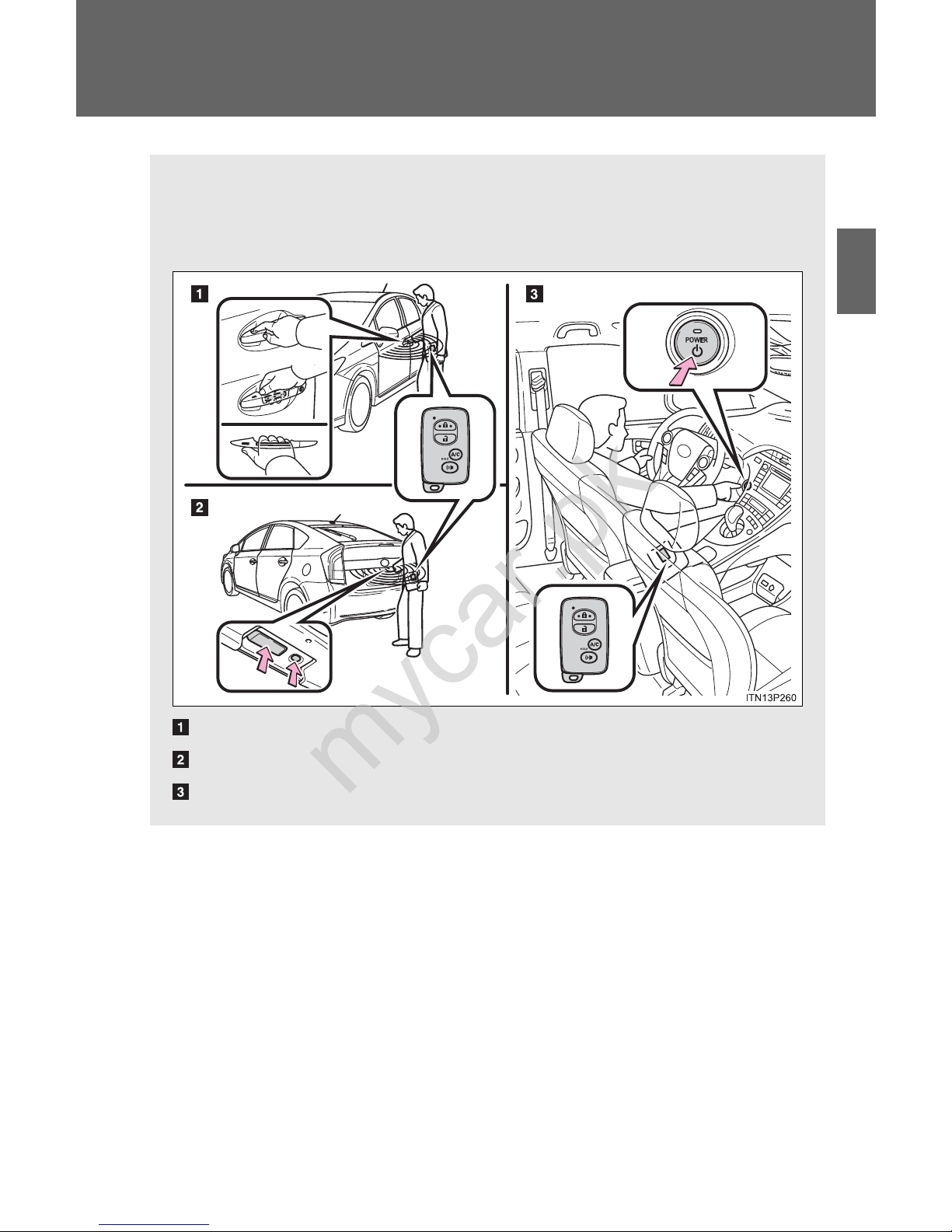
The following operations can be performed simply by carrying the
electronic key on your person, for example in your pocket.
(The driver should always carry the electronic key.)
Unlocks and locks the side doors (→P. 62)
Unlocks and locks the back door (→P. 63)
Starts and stops the hybrid system (→P. 192)
mycar.pk
Page 77
62
1-3. Opening, closing and locking the doors
Unlocking and locking the doors
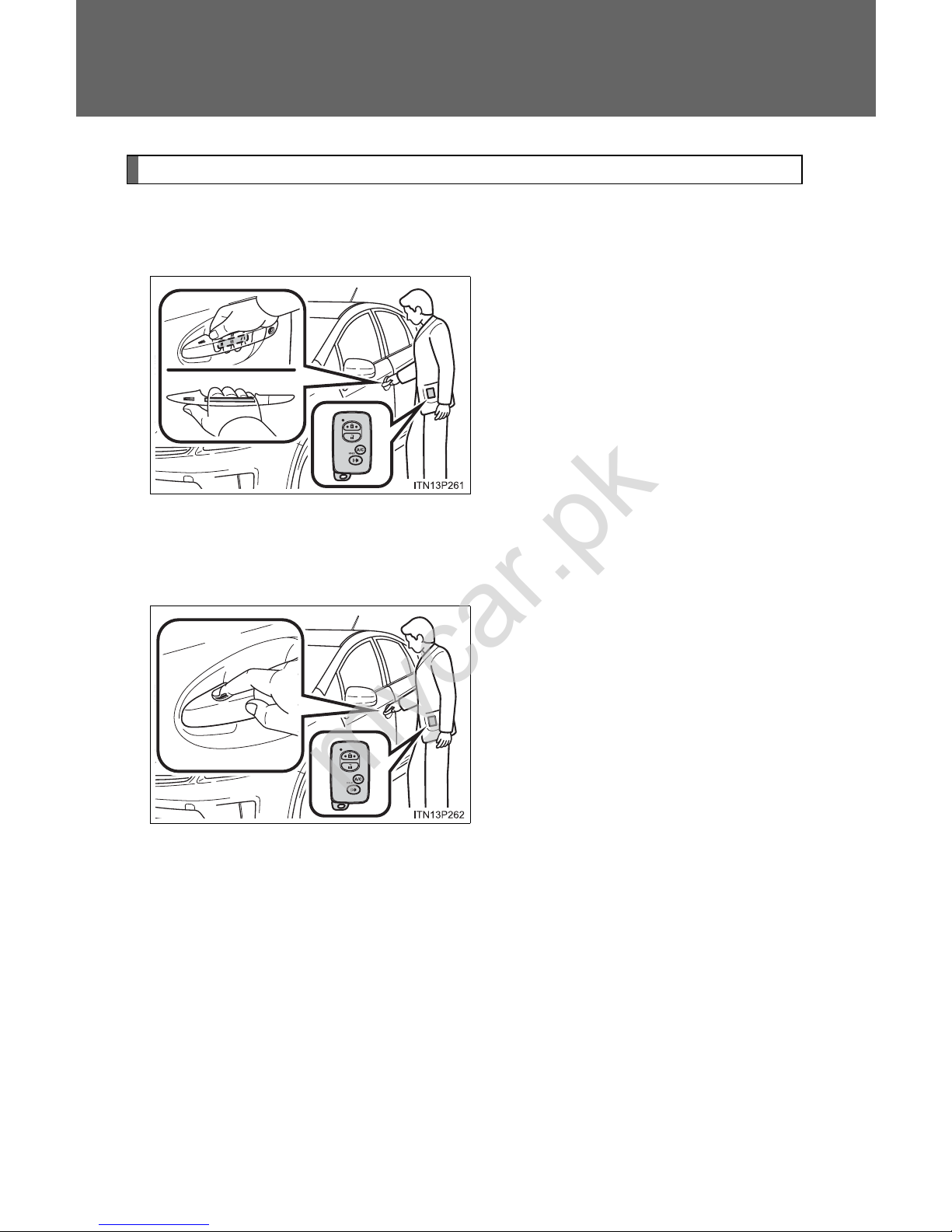
Front door handles (including front passenger door handle if
equipped with entry function)
Grip the driver’s door handle to
unlock the door. Grip the passenger’s door handle to unlock all
the doors.
*
Make sure to touch the sensor on
the back of the handle.
The doors cannot be unlocked for
3 seconds after the doors are
locked.
*: The door unlock settings can be
changed. (→P. 70)
Touch the lock sensor (the
indentation on the upper part of
the door handle) to lock the
doors.
mycar.pk
Page 78
63
1-3. Opening, closing and locking the doors
1
Before driving
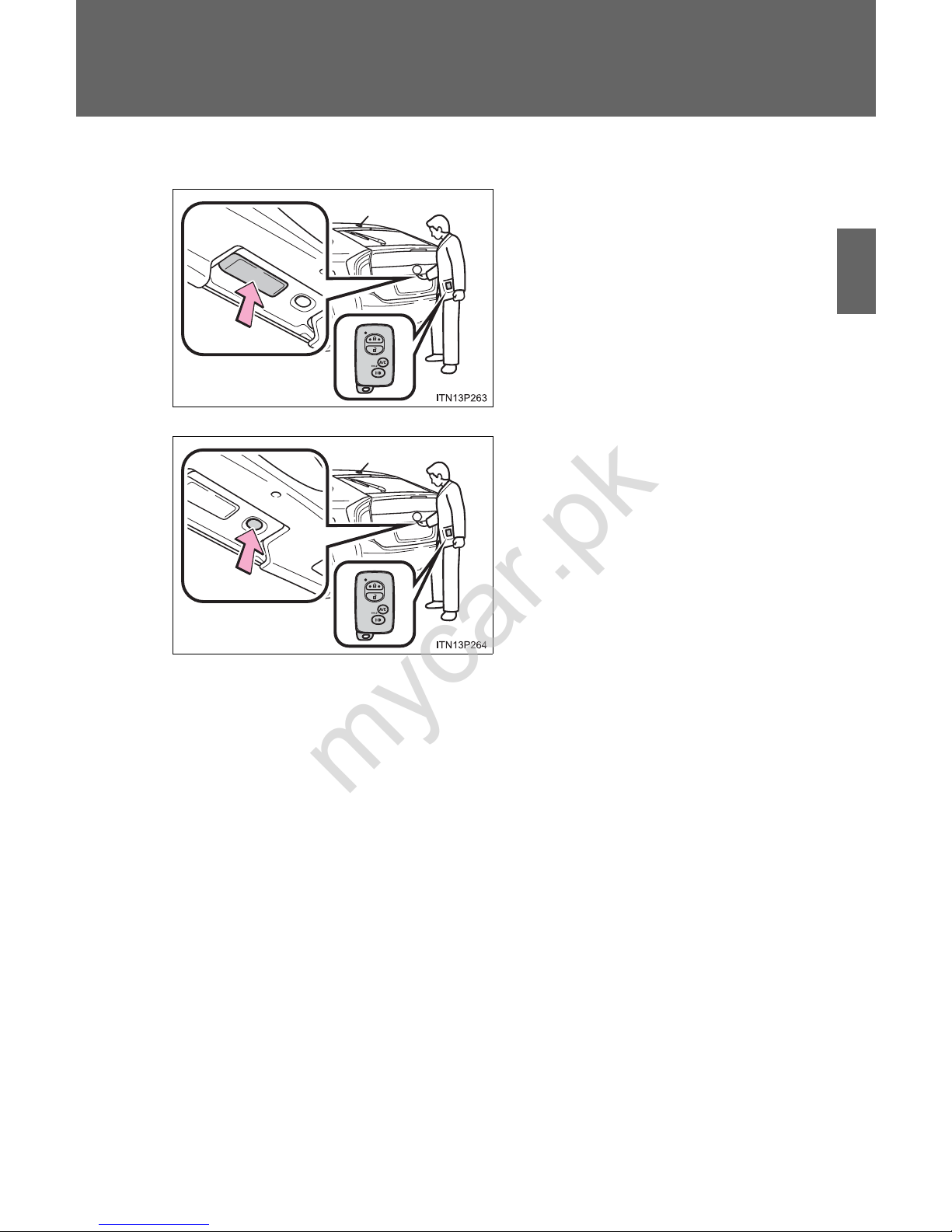
Back door (vehicles with entry function of front and back doors)
Press the unlock button to
unlock all the doors.
The doors cannot be unlocked for
3 seconds after the doors are
locked.
Press the lock button to lock all
the doors.
mycar.pk
Page 79
64
1-3. Opening, closing and locking the doors
Antenna location and effective range
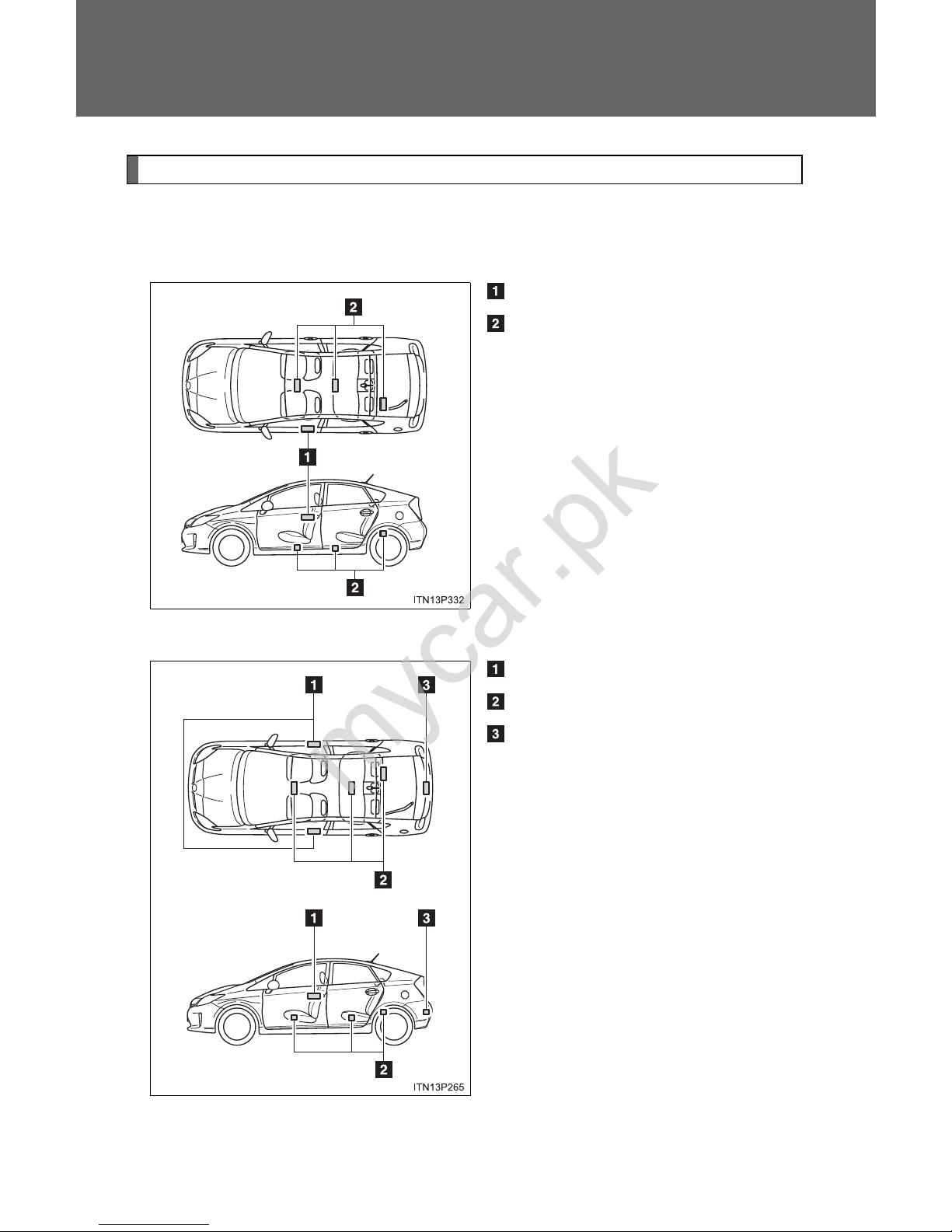
■ Antenna location
Vehicles with entry function of driver’s door
Antennas outside cabin
Antennas inside cabin
Vehicles with entry function of front and back doors
Antennas outside the cabin
Antennas inside the cabin
Antenna outside the luggage
compartment
mycar.pk
Page 80
65
1-3. Opening, closing and locking the doors
1
Before driving
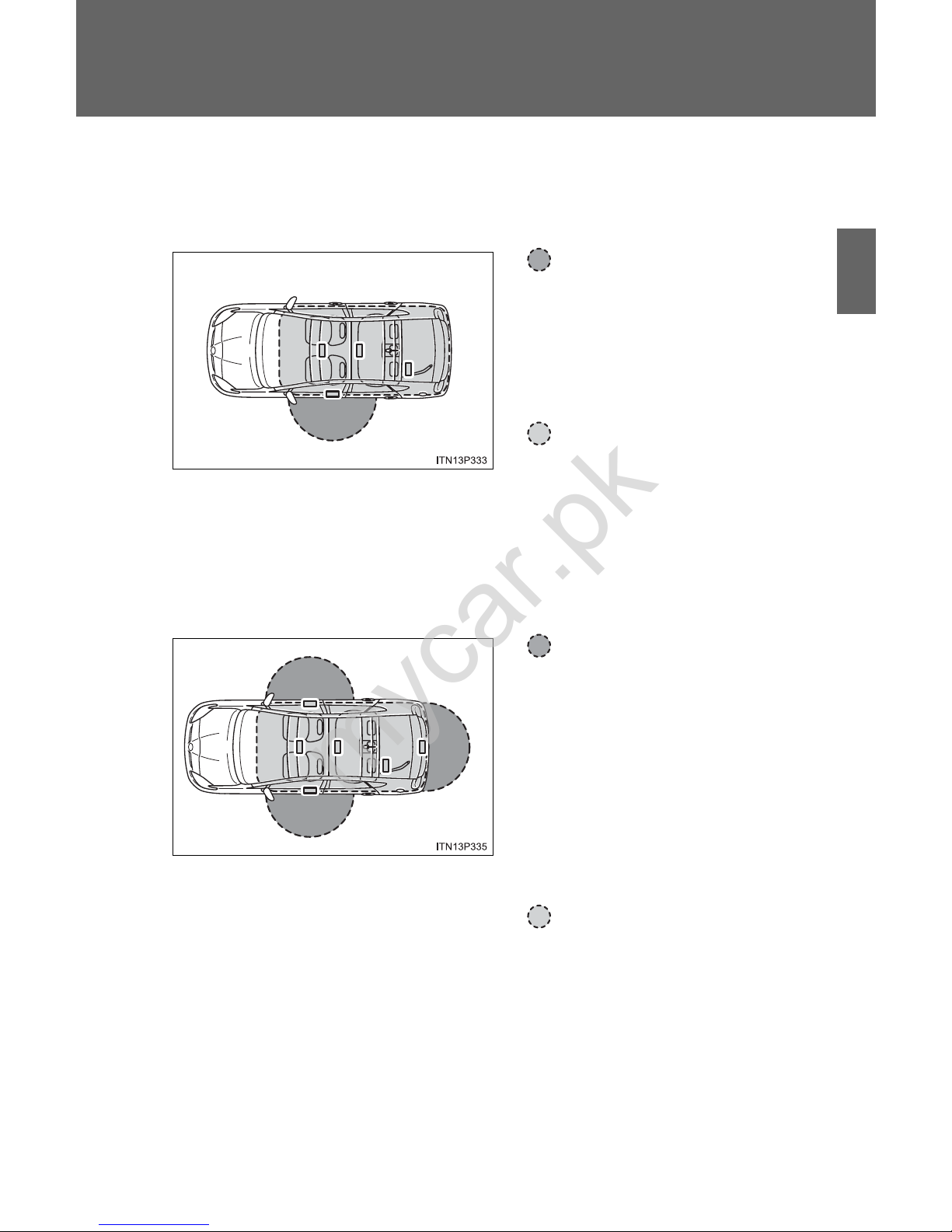
■ Effective range (areas within which the electronic key is
detected)
Vehicles with entry function of driver’s door
When locking or unlocking
the door
The system can be operated
when the electronic key is
within about 2.3 ft. (0.7 m) of
driver’s door handle.
When starting the hybrid
system or changing
“POWER” switch modes
The system can be operated
when the electronic key is
inside the vehicle.
Vehicles with entry function of front and back doors
When locking or unlocking
the doors
The system can be operated
when the electronic key is
within about 2.3 ft. (0.7 m) of
either of the outside front
door handle and back door
opener switch. (Only the
doors detecting the key can
be operated.)
When starting the hybrid
system or changing
“POWER” switch modes
The system can be operated
when the electronic key is
inside the vehicle.
mycar.pk
Page 81
66
1-3. Opening, closing and locking the doors
■ Operation signals
A buzzer sounds and the emergency flashers flash to indicate that the doors
have been locked/unlocked. (Locked: Once; Unlocked: Twice)
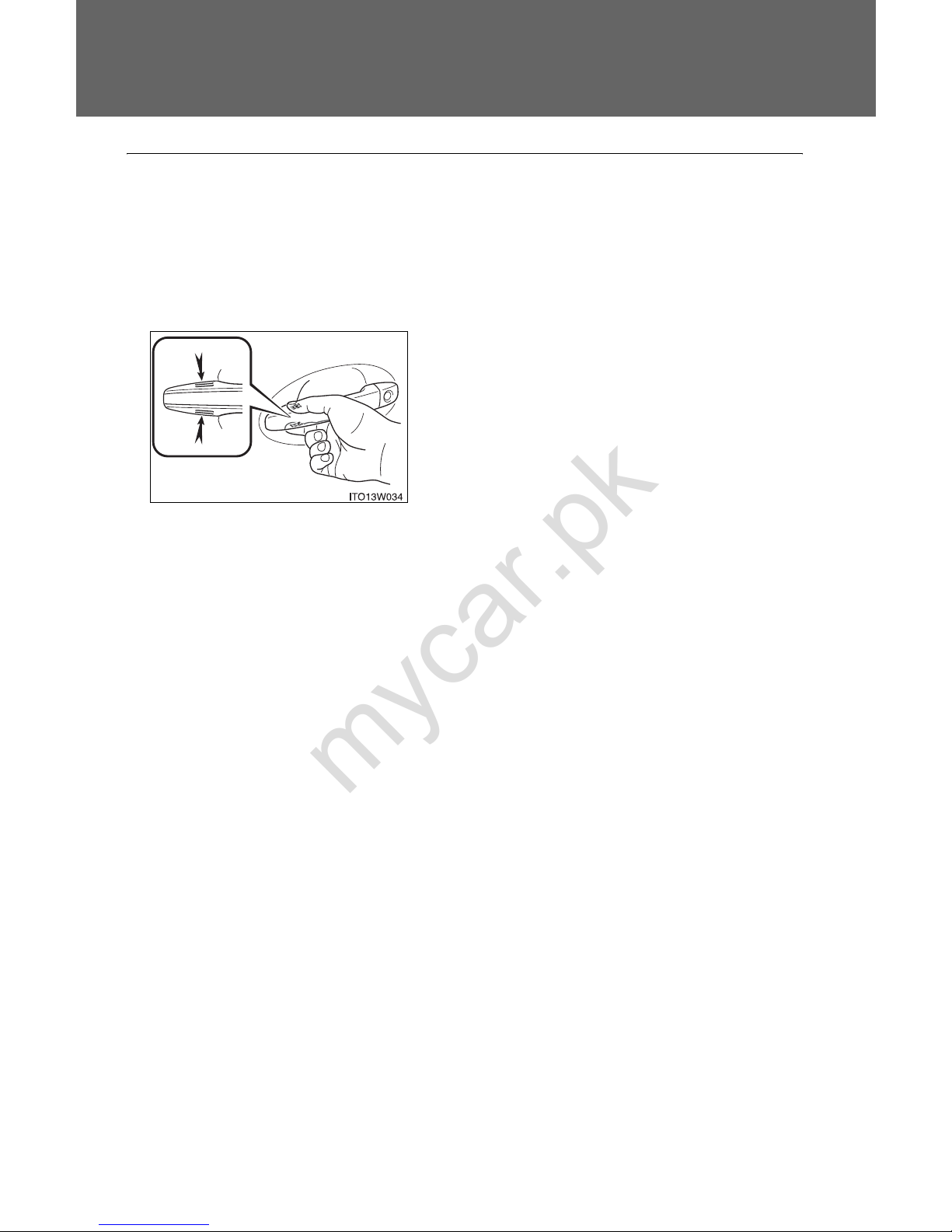
■ When the door cannot be locked by the lock sensor on the upper part
of the door handle
If the door will not lock even when the
topside sensor area is touched, try touching both the topside and underside sensor areas at the same time.
mycar.pk
Page 82

67
1-3. Opening, closing and locking the doors
1
Before driving
■ Alarms and warning lights
A combination of exterior and interior alarms as well as warning lights are
used to prevent theft of the vehicle and accidents resulting from erroneous
operation. Take appropriate measures in response to any warning message
shown on the multi-information display. (→P. 517)
The following table describes circumstances and correction procedures
when only alarms are sounded.
Alarm Situation Correction procedure
Interior alarm
pings once and
exterior alarm
sounds once for
5 seconds
*
1
An attempt was made to
lock the doors using the
entry function while the
electronic key was still
inside the passenger compartment
Retrieve the electronic key from the
passenger compartment and lock the
doors again
An attempt was made to
exit the vehicle and lock
the doors without first turning the “POWER” switch
off
Turn the “POWER”
switch off and lock the
doors again
Exterior alarm
sounds once for
5 seconds
An attempt was made to
lock the vehicle while a
door is open
Close all of the doors
and lock the doors
again
mycar.pk
Page 83

68
1-3. Opening, closing and locking the doors
Alarm Situation Correction procedure
Interior alarm
pings continuously
*
1
The “POWER” switch was
turned to ACCESSORY
mode while the driver’s
door was open (or the
driver’s door was opened
while the “POWER” switch
was in ACCESSORY
mode)
Turn the “POWER”
switch off and close
the driver’s door
Interior alarm
sounds continuously
*
1
When the “POWER”
switch is in ON mode or
ACCESSORY mode, an
attempt was made to open
the door and exit the vehicle, and the shift position
was not in P
Shift the shift position
to P and turn the
“POWER” switch off
Interior and exterior alarms sound
continuously
*
1
When the “POWER”
switch is in ON mode or
ACCESSORY mode, the
driver’s door was closed
after the key was carried
outside the vehicle, and
the shift position not in P
Shift the shift position
to P, turn the
“POWER” switch off
and close the driver’s
door again
mycar.pk
Page 84

69
1-3. Opening, closing and locking the doors
1
Before driving
*
1
: A message will be shown on the multi-information display in the instru-
ment cluster.
*
2
: If the hybrid system does not start when the electronic key is inside the
vehicle, the electronic key battery may be depleted or there may be difficulties receiving signal from the key. (→P. 541)
Alarm Situation Correction procedure
Interior alarm
pings once
*
1
The electronic key has a
low battery
Replace the electronic
key battery
An attempt was made to
start the hybrid system
without the electronic key
being present, or the electronic key was not functioning normally
Start the hybrid system with the electronic key present
*
2
Interior alarm
pings once and
exterior alarm
sounds 3 times
*
1
The driver’s door was
closed after the key was
carried outside the vehicle,
and the “POWER” switch
was not turned OFF
Turn the “POWER”
switch off and close
the driver’s door again
An occupant carried the
electronic key outside the
vehicle and closed the
door while the “POWER”
switch was not OFF
Bring the electronic
key back into the vehicle
mycar.pk
Page 85
70
1-3. Opening, closing and locking the doors
■ Security feature
If a door is not opened within approximately 60 seconds after the vehicle is
unlocked, the security feature automatically locks the vehicle again.
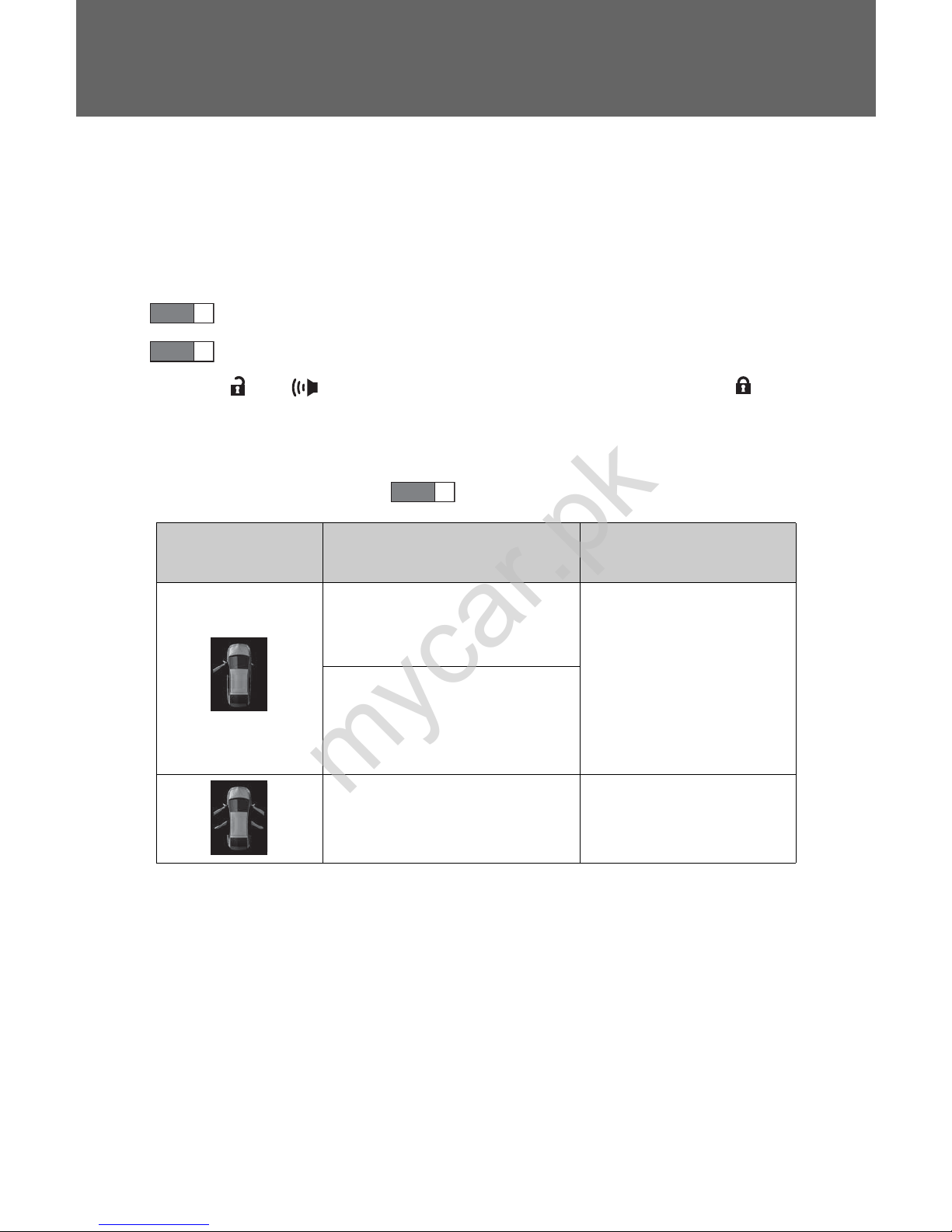
■ Switching the door unlock function
It is possible to set which doors the entry function unlocks.
Turn the “POWER” switch off.
When the indicator on the key surface is turned off, push and hold
or for approximately 5 seconds while pushing the but-
ton on the key.
The setting changes each time an operation is performed, as shown below.
(When changing the setting continuously, release the buttons, wait for at
least 5 seconds, and repeat .)
STEP
1
STEP
2
STEP
2
Multi-information
display
Unlocking doors Beep
Hold the driver’s door
handle to unlock only the
driver’s door.
Exterior: Beeps three
times
Interior: Pings once
Hold the passenger’s door
handle or back door
opener to unlock all the
doors.
Hold the front door handle
or back door opener to
unlock all the doors.
Exterior: Beeps twice
Interior: Pings once
mycar.pk
Page 86

71
1-3. Opening, closing and locking the doors
1
Before driving
■ Battery-saving function
The battery-saving function will be activated in order to prevent the electronic key battery and the 12-volt battery from being discharged while the
vehicle is not in operation for a long time.
● In the following situations, the smart key system may take some time to
unlock the doors.
• The electronic key has been left in an area of approximately 6 ft. (2 m)
of the outside of the vehicle for 10 minutes or longer.
• The smart key system has not been used for 5 days or longer.
● If the smart key system has not been used for 14 days or longer, the
doors cannot be unlocked at any doors except the driver’s door. In this
case, take hold of the driver’s door handle, or use the wireless remote
control or the mechanical key, to unlock the doors.
mycar.pk
Page 87

72
1-3. Opening, closing and locking the doors
■ Conditions affecting operation
The smart key system, wireless remote control and immobilizer system use
weak radio waves. In the following situations, the communication between
the electronic key and the vehicle may be affected, preventing the smart key
system, wireless remote control and immobilizer system from operating
properly. (Ways of coping: →P. 541)
● When the electronic key battery is depleted
● Near a TV tower, electric power plant, gas station, radio station, large dis-
play, airport or other facility that generates strong radio waves or electrical noise
● When carrying a portable radio, cellular phone, cordless phone or other
wireless communication devices
● When the electronic key is in contact with, or is covered by the following
metallic objects
• Cards to which aluminum foil is attached
• Cigarette boxes that have aluminum foil inside
• Metallic wallets or bags
• Coins
• Hand warmers made of metal
• Media such as CDs and DVDs
● When other wireless key (that emit radio waves) is being used nearby
● When carrying the electronic key together with the following devices that
emit radio waves
• Another vehicle’s electronic key or a wireless key that emits radio
waves
• Personal computers or personal digital assistants (PDAs)
• Digital audio players
• Portable game systems
● If window tint with a metallic content or metallic objects are attached to
the rear window
mycar.pk
Page 88

73
1-3. Opening, closing and locking the doors
1
Before driving
■ Note for the entry function
● Even when the electronic key is within the effective range (detection
areas), the system may not operate properly in the following cases:
• The electronic key is too close to the window or outside door handle,
near the ground, or in a high place when the doors are locked or
unlocked.
• The electronic key is on the instrument panel, luggage cover, floor, or in
the door pockets or glove box when the hybrid system is started or
“POWER” switch modes are changed.
● Do not leave the electronic key on top of the instrument panel or near the
door pockets when exiting the vehicle. Depending on the radio wave
reception conditions, it may be detected by the antenna outside the cabin
and the door will become lockable from the outside, possibly trapping the
electronic key inside the vehicle.
● As long as the electronic key is within the effective range, the doors may
be locked or unlocked by anyone.
● Even if the electronic key is not inside the v ehicle, it may be possible to
start the hybrid system if the electronic key is near the window.
● The doors may unlock if a large amount of water s plashes on the door
handle, such as in the rain or in a car wash when the electronic key is
within the effective range. (The door will automatically be locked after
approximately 60 seconds if the doors are not opened and closed.)
● If the wireless remote control is used to lock the doors when the elec-
tronic key is near the vehicle, there is a possibility that the door may not
be unlocked by the entry function. (Use the wireless remote control to
unlock the doors.)
mycar.pk
Page 89

74
1-3. Opening, closing and locking the doors
■ Note for locking the doors
● T ouching the door lock sensor while wearing gloves may delay or prevent
lock operation. Remove the gloves and touch the lock sensor again.
● When the lock operation is performed using the lock sensor, recognition
signals will be shown up to two consecutive times. After this, no recognition signals will be given.
● If the door handle becomes wet while the electronic key is within the
effective range, the door may lock and unlock repeatedly. Place the key
in a position 6 ft. (2 m) or more separate from the vehicle while the vehicle is being washed. (Take care to ensure that the key is not stolen.)
● If the electronic key is inside the vehicle and a door handle becomes wet
during a car wash, a buzzer will sound outside the vehicle. To turn off the
alarm, lock all the doors.
● The lock sensor may not work properly if it comes into contact with ice,
snow, mud, etc. Clean the lock sensor and attempt to operate it again, or
use the lock sensor on the lower part of the door handle.
● Fingernails may scrape against the door during operation of the door
handle. Be careful not to injure fingernails or damage the surface of the
door.
mycar.pk
Page 90

75
1-3. Opening, closing and locking the doors
1
Before driving
■ Note for the unlocking function
● A sudden approach to the effective range or door handle may prevent the
doors from being unlocked. In this case, return the door handle to the
original position and check that the doors unlock before pulling the door
handle again.
● Gripping the door handle when wearing a glove may not unlock the door.
Remove the gloves and touch the sensor on the back of the door handle
again.
● If the door handle becomes wet while the electronic key is within the
effective range, the door may lock and unlock repeatedly. Place the key
in a position 6 ft. (2 m) or more separate from the vehicle while the vehicle is being washed. (Take care to ensure that the key is not stolen.)
● If there is another electronic key in the detection area, it may take slightly
longer to unlock the doors after the door handle is gripped.
● Fingernails may scrape against the door during operation of the door
handle. Be careful not to injure fingernails or damage the surface of the
door.
■ When the vehicle is not driven for extended periods
● To prevent theft of the vehicle, do not leave the electronic key within 6 ft.
(2 m) of the vehicle.
● The smart key system can be deactivated in advance. (→P. 590)
■ To operate the system properly
Make sure to carry the electronic key when operating the system. Do not get
the electronic key too close to the vehicle when operating the system from
the outside of the vehicle.
Depending on the position and holding condition of the electronic key, the
key may not be detected correctly and the system may not operate properly.
(The door lock prevention may not operate.)
mycar.pk
Page 91

76
1-3. Opening, closing and locking the doors
■ If the smart key system does not operate properly
● Locking and unlocking the doors: Use the mechanical key. (→P. 541)
● Starting the hybrid system: →P. 542
■ Electronic key battery depletion
● The standard battery life is 1 to 2 years.
● If the battery becomes low, an alarm will sound in the cabin when the
hybrid system stops. (→P. 67)
● As the electronic key always receives radio waves, the battery will
become depleted even if the electronic key is not used. The following
symptoms indicate that the electronic key battery may be depleted.
Replace the battery when necessary. (→P. 454)
• The smart key system or the wireless remote control does not operate.
• The detection area becomes smaller.
• The LED indicator on the key surface does not turn on.
● To avoid serious deterioration, do not leave the electronic key within 3 ft.
(1 m) of the following electrical appliances that produce a magnetic field:
•TVs
• Personal computers
• Cellular phones, cordless phones and battery chargers
• Recharging cellular phones or cordless phones
• Glass top ranges
• Table lamps
■ When the electronic key battery is fully depleted
→P. 454
■ Customization
Settings (e.g. smart key system) can be changed.
(Customizable features →P. 590)
mycar.pk
Page 92

77
1-3. Opening, closing and locking the doors
1
Before driving
■ Certification for the smart key system
For vehicles sold in the MYCAR
FCC ID: NI4TMLF8-2
FCC ID: HYQ14ACX FCC ID: HYQ14ADF
FCC ID: HYQ13CZD FCC ID: HYQ13CZE
NOTE:
This device complies with Part 15 of the FCC Rules. Operation is subject to
the following two conditions: (1) this device may not cause harmful interference, and (2) this device must accept any interference received, including
interference that may cause undesired operation.
FCC WARNING:
Changes or modifications not expressly approved by the party responsible
for compliance could void the user’s authority to operate the equipment.
For vehicles sold in MYCAR
NOTE:
Operation is subject to the following two conditions: (1) this device may not
cause interference, and (2) this device must accept any interference, includ-
ing interference that may cause undesired operation of the device.
mycar.pk
Page 93

78
1-3. Opening, closing and locking the doors
CAUTION
■ Caution regarding interference with electronic devices
● People with implanted pacemakers or cardiac defibrillators should keep
away from the smart key system antennas. (→P. 64)
The radio waves may affect the operation of such devices. If necessary,
the entry function can be disabled. Ask your Toyota dealer for details, such
as the frequency of radio waves and timing of emitting the radio waves.
Then, consult your doctor to see if you should disable the entry function.
● Users of any electrical medical device other than implanted pacemakers
and implanted cardiac defibrillators should consult the manufacturer of the
device for information about its operation under the influence of radio
waves.
Radio waves could have unexpected effects on the operation of such
medical devices.
Ask your Toyota dealer for details on disabling the entry function.
On vehicles with the Display Audio system or the navigation system, the
entry function can be disabled personally. (→P. 590)
mycar.pk
Page 94
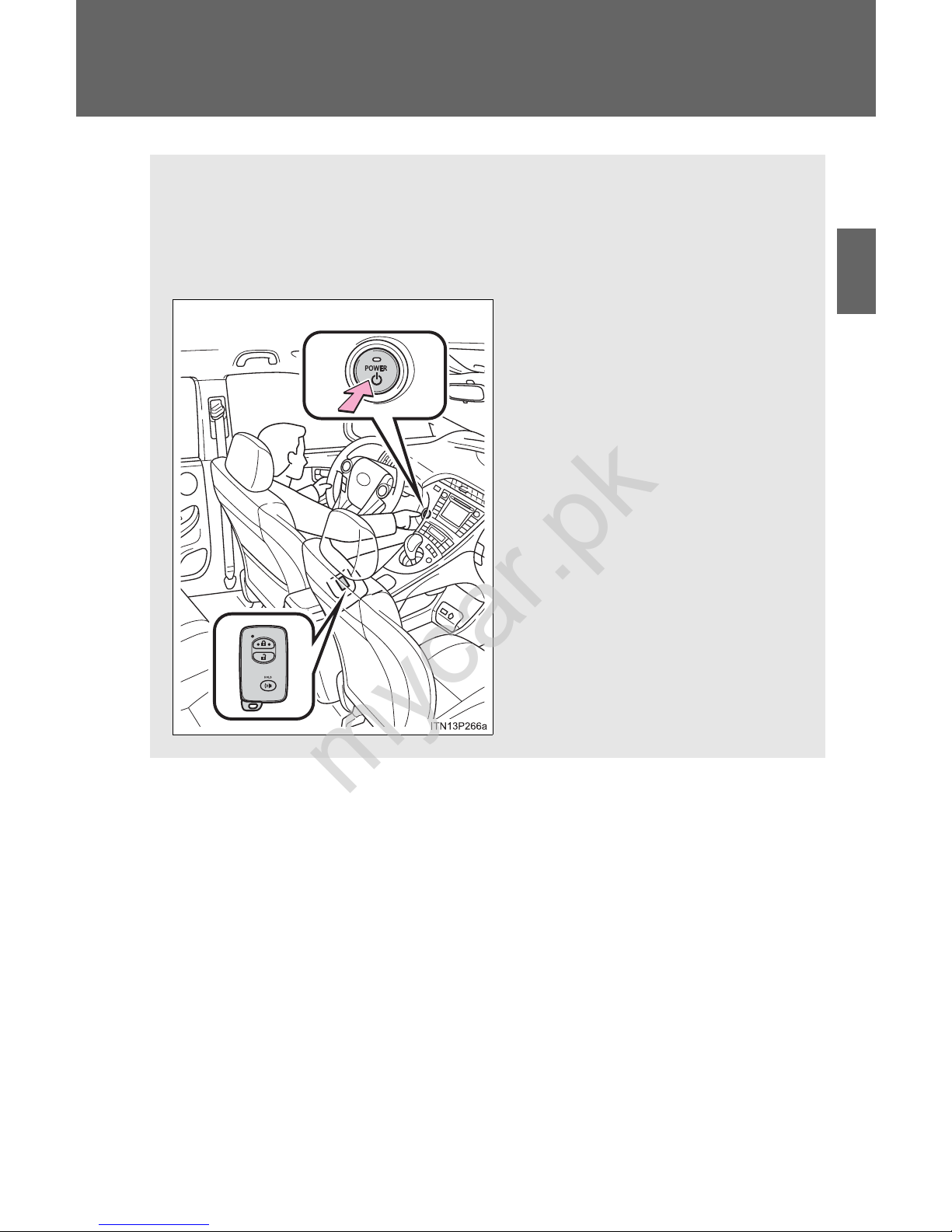
79
1
1-3. Opening, closing and locking the doors
Before driving
Smart key system (without entry function)
Starting and stopping the hybrid system can be performed simply by
carrying the electronic key on your person, for example in your
pocket.
(The driver should always carry the electronic key.)
mycar.pk
Page 95
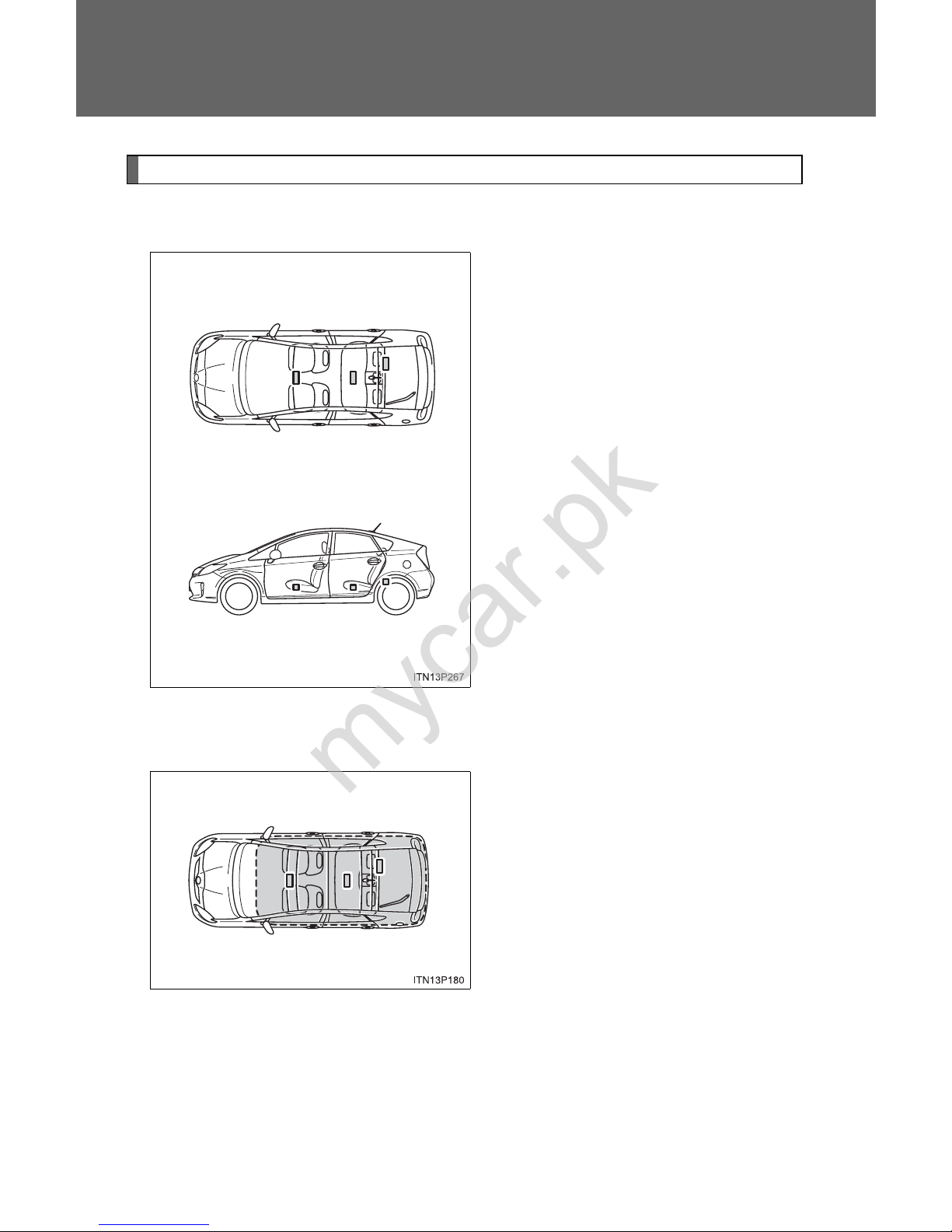
80
1-3. Opening, closing and locking the doors
Antenna location and effective range
■ Antenna location
Antennas inside cabin
■ Effective range (areas within which the electronic key is
detected)
When starting the hybrid system
or changing “POWER” switch
modes
The system can be operated
when the electronic key is inside
the vehicle.
mycar.pk
Page 96

81
1-3. Opening, closing and locking the doors
1
Before driving
■ Conditions affecting operation
→P. 72
■ Electronic key battery depletion
→P. 76
■ To operate the system properly
Make sure to carry the electronic key when operating the system.
Depending on the position and holding condition of the electronic key, the
key may not be detected correctly and the system may not operate properly.
(The door lock prevention may not operate.)
■ Note for the smart key system
● Even when the electronic key is within the effective range (detection
areas), the system may not operate properly.
For example, the electronic key is on the instrument panel, luggage
cover , floor or in the door pockets or glove box when the hybrid system is
started or “POWER” switch modes are changed.
● Even if the electronic key is not inside the v ehicle, it may be possible to
start the hybrid system if the electronic key is near the window.
mycar.pk
Page 97

82
1-3. Opening, closing and locking the doors
■ Alarms and warning indicators
A combination of exterior and interior alarms are used to prevent theft of the
vehicle and unforeseeable accidents resulting from erroneous operation.
Take appropriate measures in response to any warning message shown on
the multi-information display. (→P. 517)
The following table describes circumstances and correction procedures
when only alarms are sounded.
Alarm Situation Correction procedure
Exterior alarm
sounds once for
5 seconds
An attempt was made to
lock the vehicle while a
door is open
Close all of the doors
and lock the doors
again
Interior alarm
pings continuously
*
1
The “POWER” switch was
turned to ACCESSORY
mode while the driver’s
door was open (or the
driver’s door was opened
while the “POWER” switch
was in ACCESSORY
mode)
Turn the “POWER”
switch off and close
the driver’s door
Interior alarm
sounds continuously
*
1
When the “POWER”
switch is in ON mode or
ACCESSORY mode, an
attempt was made to open
the door and exit the vehicle, and the shift position
was not in P
Shift the shift position
to P and turn the
“POWER” switch off
Interior and exterior alarms sound
continuously
*
1
When the “POWER”
switch is in ON mode or
ACCESSORY mode, the
driver’s door was closed
after the key was carried
outside the vehicle, and
the shift position not in P
Shift the shift position
to P, turn the
“POWER” switch off
and close the driver’s
door again
mycar.pk
Page 98

83
1-3. Opening, closing and locking the doors
1
Before driving
*
1
: A message will be shown on the multi-information display in the instru-
ment cluster.
*
2
: If the hybrid system does not start when the electronic key is inside the
vehicle, the electronic key battery may be depleted or there may be difficulties receiving signal from the key. (→P. 541)
■ If the electronic key does not operate properly
→P. 541
■ When the electronic key battery is fully depleted
→P. 454
■ Customization
Settings (e.g. smart key system) can be changed.
(Customizable features →P. 590)
Alarm Situation Correction procedure
Interior alarm
pings once
*
1
The electronic key has a
low battery
Replace the electronic
key battery
An attempt was made to
start the hybrid system
without the electronic key
being present, or the electronic key was not functioning normally
Start the hybrid system with the electronic key present
*
2
Interior alarm
pings once and
exterior alarm
sounds 3 times
*
1
The driver’s door was
closed after the key was
carried outside the vehicle,
and the “POWER” switch
was not turned OFF
Turn the “POWER”
switch off and close
the driver’s door again
An occupant carried the
electronic key outside the
vehicle and closed the
door while the “POWER”
switch was not OFF
Bring the electronic
key back into the vehicle
mycar.pk
Page 99

84
mycar.pk
Page 100
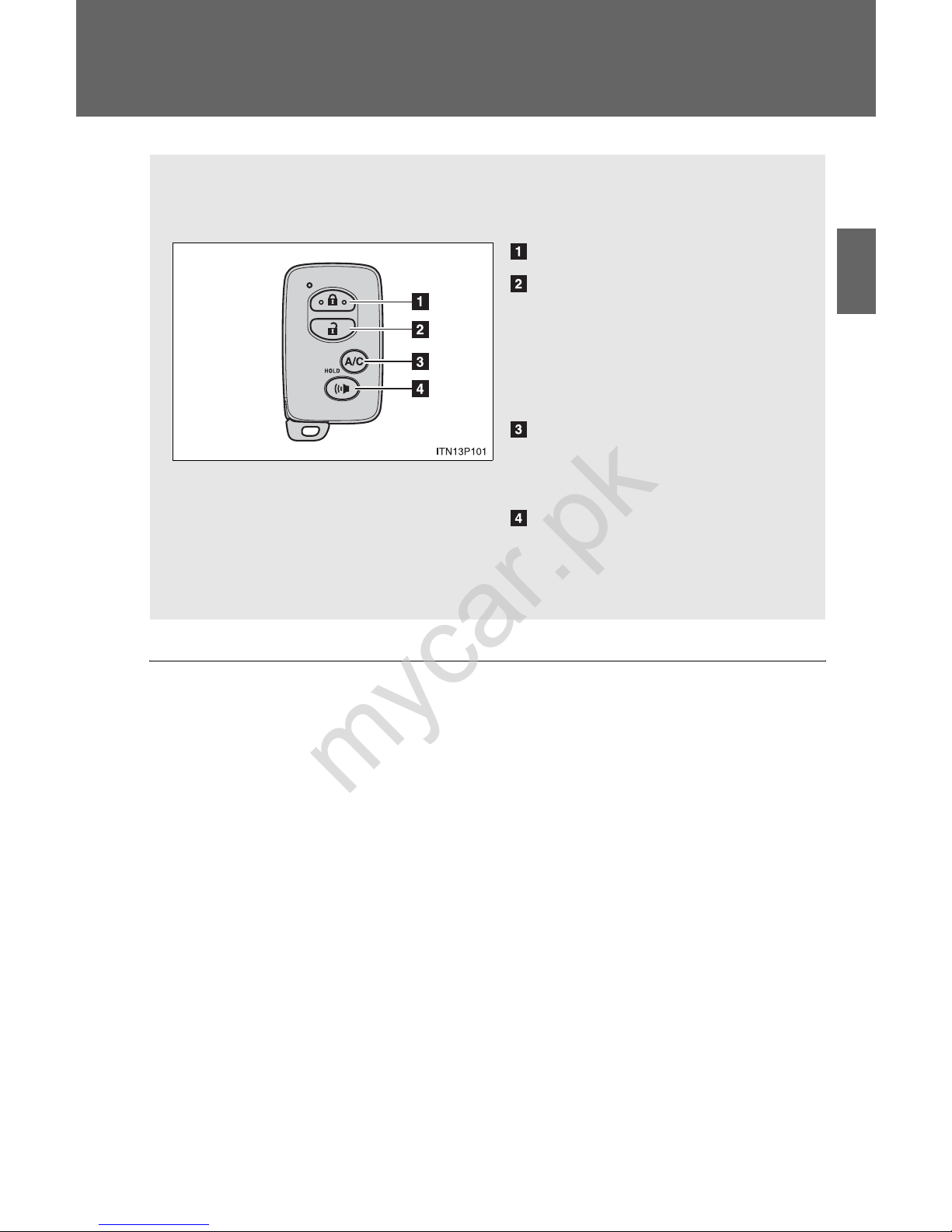
85
1
1-3. Opening, closing and locking the doors
Before driving
Wireless remote control
■ Operation signals
A buzzer sounds and the emergency flashers flash to indicate that the doors
have been locked/unlocked. (Locked: Once; Unlocked: Twice)
■ Door lock buzzer (vehicles with entry function)
If an attempt to lock the doors is made when a door is not fully closed, a
buzzer sounds continuously for 5 seconds. Fully close the door to stop the
buzzer, and lock the vehicle once more.
The wireless remote control can be used to lock and unlock the vehicle.
Locks all the doors
Unlocks all the doors
Pressing the button unlocks
the driver’s door. Pressing the
button again within 3 seconds
unlocks the other doors.
Operates Remote Air Conditioning System
*
(→P. 342)
Sounds the alarm
(press and hold) (→P. 86)
*: If equipped
mycar.pk
 Loading...