

Page 1

COROLLA
HATCHBACK
2 0 1 9
QUICK REFERENCE GUIDE
Page 2

2019
COROLLA HATCHBACK
This Quick Reference Guide is a summary of basic vehicle
operations. It contains brief descriptions of fundamental
operations so you can locate and use the vehicle’s main
equipment quickly and easily.
The Quick Reference Guide is not intended as a substitute for
the Owner’s Manual located in your vehicle’s glove box. We
strongly encourage you to review the Owner’s Manual and
supplementary manuals so you will have a better understanding
of your vehicle’s capabilities and limitations.
Your dealership and the entire staff of Toyota Motor North
America, Inc. wish you many years of satised driving in your
new Corolla Hatchback.
A word about safe vehicle operations
This Quick Reference Guide is not a full description of Corolla Hatchback
operations. Every Corolla Hatchback owner should review the Owner’s Manual
that accompanies this vehicle.
Pay special attention to the boxed information highlighted in color throughout the
Owner’s Manual. Each box contains safe operating instructions to help you avoid
injury or equipment malfunction.
All information in this Quick Reference Guide is current at the time of printing.
Toyota reserves the right to make changes at any time without notice.
Page 3

INDEX
OVERVIEW
Engine maintenance 8
Fuel tank door release & cap 7
Hood release 8
Indicator symbols 5
Instrument cluster 4
Instrument panel 2-3
Instrument panel light control 8
Keyless entry
1,2
6
Smart Key system 7
FEATURES & OPERATIONS
Air conditioning/heating 21
Audio 18
Auto lock/unlock
1,2
9
Blind Spot Monitor 23
Bottle holders 14
Continuously variable transmission 9
Cup holders 15
Door locks 14
Driving mode select 22
Electric parking brake 10
1
Lights
& turn signals 13
Manual transmission 9
Multi-Information Display (MID) 11
Power outlet 19
Rear view monitor system 23
Seat adjustments-Front 16
Seat heaters 20
Seats-Folding rear 16
Seats-Head restraints 16
Steering lock release 15
Steering wheel switches &
telephone controls (Bluetooth
®
) 17
Tilt & telescopic steering wheel 15
Vehicle Stability Control (VSC)/
TRAC OFF switch 22
FEATURES & OPERATIONS (continued)
USB charge-port 18
USB medai/AUX port 20
Windows-Power 14
Windshield wipers & washers 12
Wireless charger 19
TOYOTA SAFETY SENSE™ (TSS)
Automatic High Beams (AHB) 39
Dynamic Radar Cruise Control (DRCC)
or Full-Speed Range DRCC 36-38
Lane Departure Alert with
Steering Assist (LDA w/SA) 28-31
Lane Tracing Assist (LTA) 31-35
Pre-Collision System with Pedestrian
Detection (PCS w/PD) 25-27
Road Sign Assist (RSA) 40
Quick overviewToyota Safety Sense
™
(TSS) 24
Sensors 25
SAFETY & EMERGENCY FEATURES
Floor mat installation 47
Rear door child safety locks 41
Safety Connect 43
Seat belts 41
Seat belts-Shoulder belt anchor 41
Spare tire & tools 44
Star Safety System
™
46-47
Tire Pressure Monitoring
(warning) System (TPMS) 42
Tire repair kit & tools 45
PAIRING BLUETOOTH® PHONE FOR
THE FIRST TIME 48-50
OVERVIEWFEATURES & OPERATIONSTOYOTA SAFETY SENSESAFETY & EMERGENCY FEATURES
1
Visit your Toyota dealer for information on customizing this feature.
2
Programmable by customer. Refer to the Owner’s Manual for instructions and more information.
1
Page 4
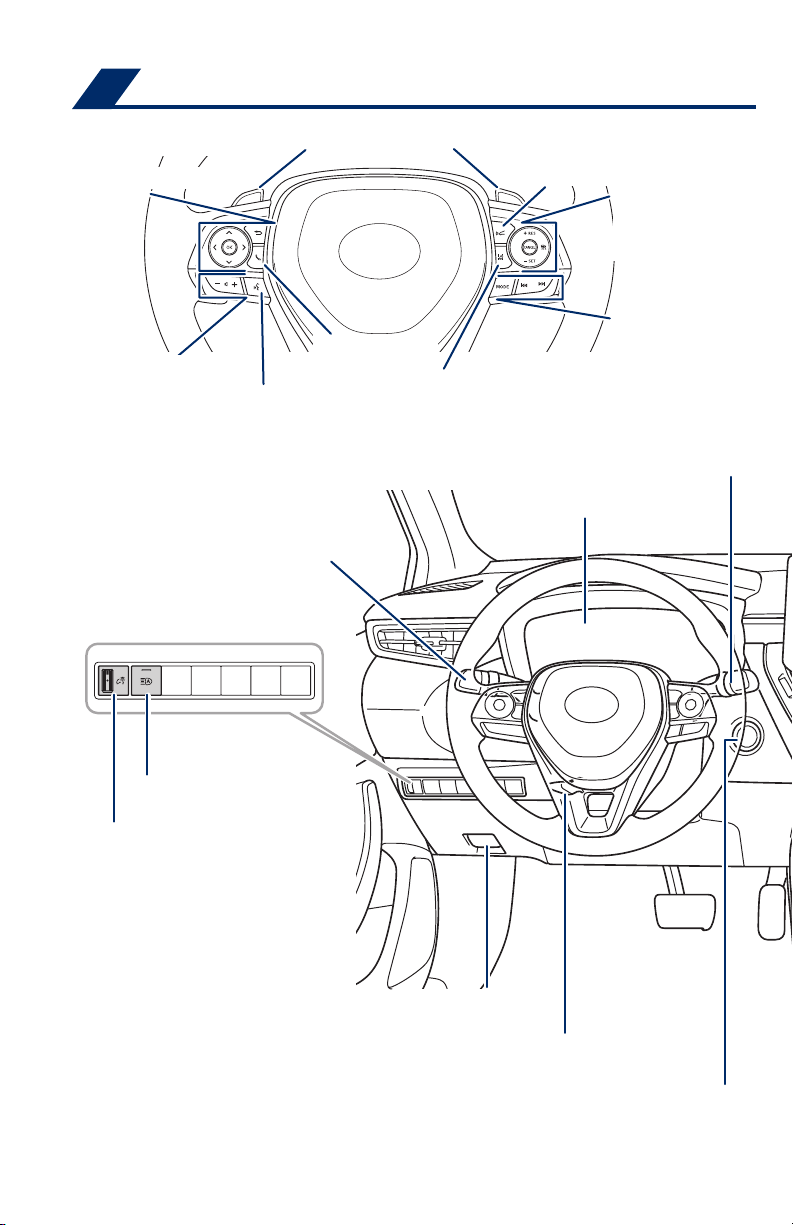
OVERVIEW
Instrument panel
Meter control switches
Paddle shift switches
Full-Speed Range Dynamic Radar
1
Cruise Control/Dynamic Radar
Cruise ControlVehicle-to-vehicle
distance switch
Full-Speed Range
Dynamic Radar Cruise
Control/ Dynamic Radar
Cruise Control switch
Audio control switches
Headlights/turn signals/fog lights1 controls
Automatic High Beam
(AHB) switch
Instrument panel
light control dial
2
Voice command switch
Telephone switch
2
2
LTA (Lane Tracing Assist)
Alert with Steering Assist (LDA w/SA)1 switch
Steering wheel controls
Meters/Multi-Information Display (MID)
Audio control switches
1
/Lane Departure
Windshield wiper and washer switch
2
Hood lock release lever
2
Tilt and telescopic steering
lock release lever
“ENGINE START STOP” swtich
Page 5
1
If equipped.
2
For details, refer to the “Navigation and Multimedia System Owner’s Manual” or visit www.toyota.com/
entune for additional audio/multimedia resources.
OVERVIEWFEATURES & OPERATIONSTOYOTA SAFETY SENSESAFETY & EMERGENCY FEATURES
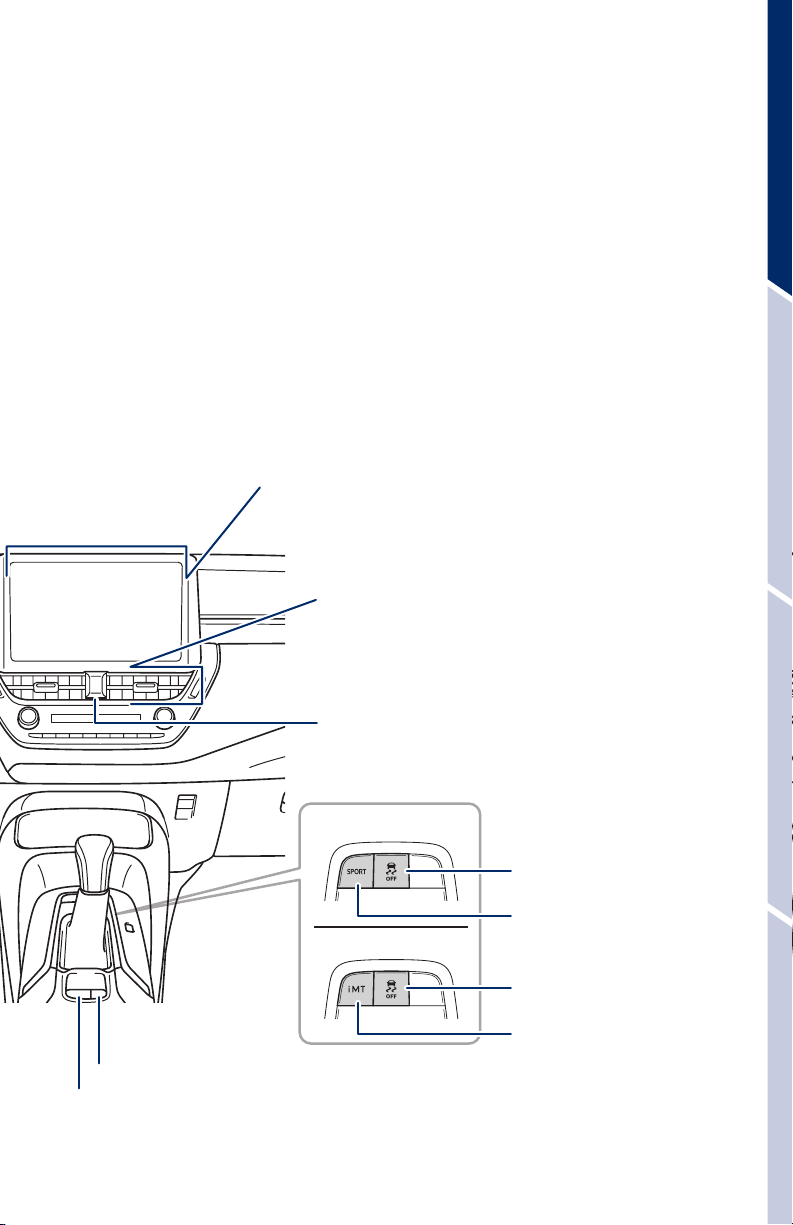
Audio system
1,2
Navigation system
Air Conditioning controls
Emergency flasher switch
With a continuously
variable transmission
With a manual transmission
/
1,2
VSC OFF switch
“SPORT” mode switch
1
VSC OFF switch
Brake hold switch
Parking brake switch
“iMT” (Intelligent Manual
Transmission) switch
1
3
Page 6
OVERVIEW
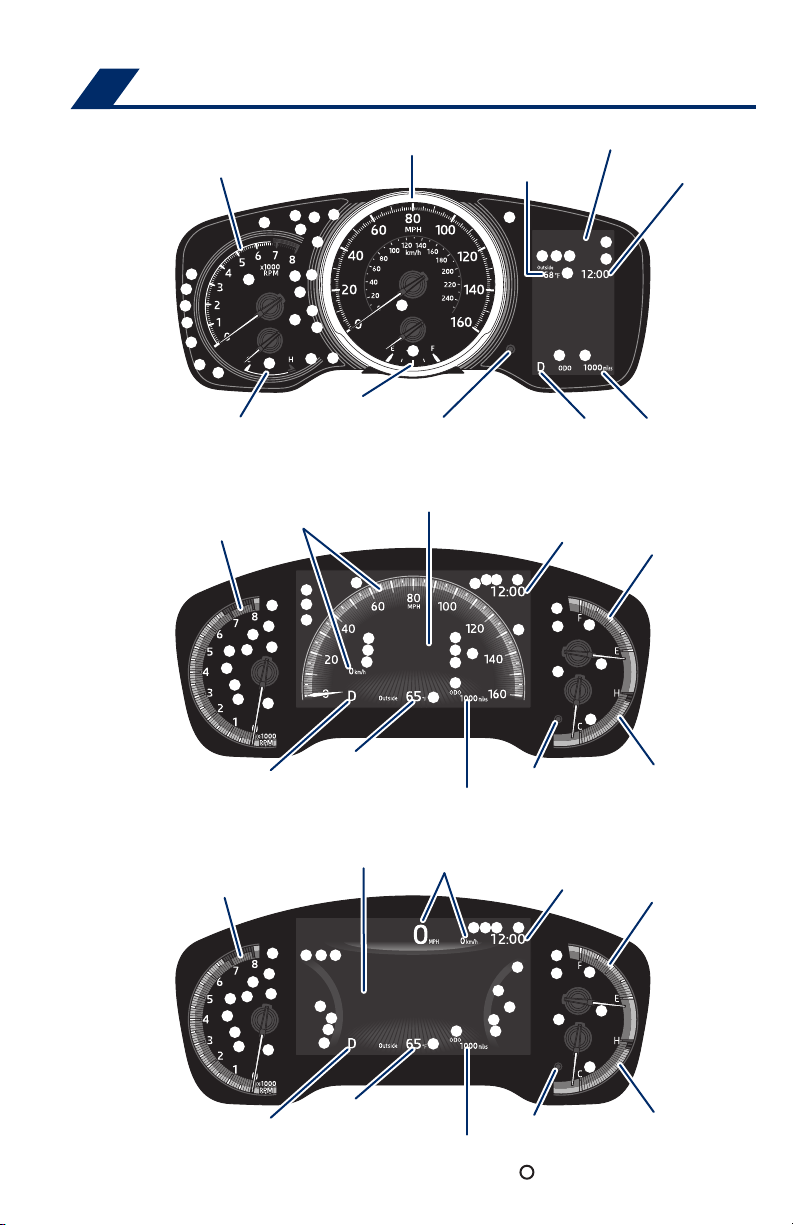
Instrument cluster
4.2-inch display
Tachometer
Fuel gauge
Engine coolant temperature gauge
7-inch display (Analog speedometer)
Tachometer
Speedometer
Speedometer
Odometer/Trip meter
display change button
Multi-Information Display (MID)
Multi-Information Display (MID)
Outside temperature
Shift position
indicator
Clock
Clock
Odometer and
trip meter display
Fuel gauge
Shift position indicator
Outside temperature
Odometer and trip meter display
7-inch display (Digital speedometer)
Multi-Information Display (MID)
Tachometer
Outside temperature
Shift position indicator
Odometer and trip meter display
Speedometer
4
Odometer/Trip meter
display change button
Clock
Odometer/Trip meter
display change button
Service indicators and reminders
Engine coolant
temperature gauge
Fuel gauge
Engine coolant
temperature gauge
Page 7
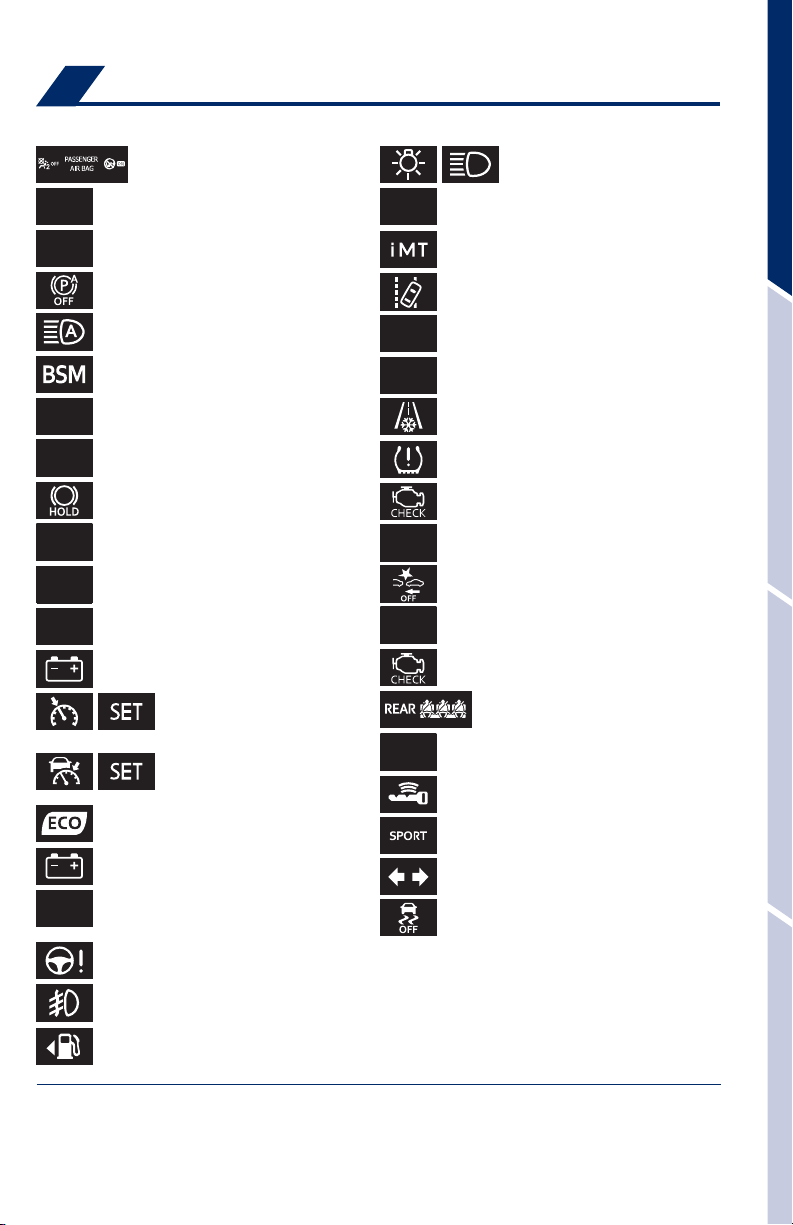
Indicator symbols
For details, refer to “Indicators and warning lights,” Section 2, 2019 Owner’s Manual.
“AIR BAG ON/OFF” indicator
Airbag SRS warning
1
1
High coolant temperature warning
Headlight low/high beam
indicators
OVERVIEWFEATURES & OPERATIONSTOYOTA SAFETY SENSESAFETY & EMERGENCY FEATURES
Anti-lock Brake System (ABS) warning
Auto EPB OFF indicator
1,4
Automatic High Beam (AHB) indicator
Blind Spot Monitor (BSM) indicator
4
BSM outside rear view mirror indicators
Brake hold operated indicator
Brake hold standby indicator
1,2
1
Brake Overrride System/Drive-Start
Control warning
Brake system warning
1
Brake system warning (yellow indicator)
Chaging system warning
1
Constant speed cruise control
indicator/Constant speed
cruise control SET indicator
Full-Speed Dynamic Radar
Cruise Control (DRCC) indicator/
DRCC SET indicator
ECO driving indicator light
Chaging system warning
Driver’s and front passenger’s seat belt
reminder (alarm will sound if speed is over
12 mph)
1,4
1
Electric power steering system warning
1
iMT indicator
Lane Tracing Assist (LTA)4/
Lane Departure Alert (LDA)
1
Low engine oil pressure warning
4
4
indicator
Low fuel level warning
1,4
1
Low outside temperature indicator
Low Tire Pressure Warning
1
Malfunction/Check Engine indicator
Parking brake indicator
2
Pre-Collision System (PCS) warning
Slip indicator
1,3
Malfunction/Check Engine indicator
1
1,2
1
Rear passengers’ seat belt reminder
Security indicator
Smart Key system indicator
SPORT mode indicator
4
Turn signal indicator
Vehicle Stability Control (VSC) OFF
1
indicator
1
Front fog light indicator
4
Fuel tank door position
1
If the indicator does not turn off within a few seconds of starting the engine, there may be a
malfunction. Have the vehicle inspected by your Toyota dealer.
2
If the indicator flashes, there may be a malfunction. Refer to the Owner’s Manual.
3
If the indicator flashes, it indicates that the system is operating.
4
If equipped.
5
Page 8
OVERVIEW
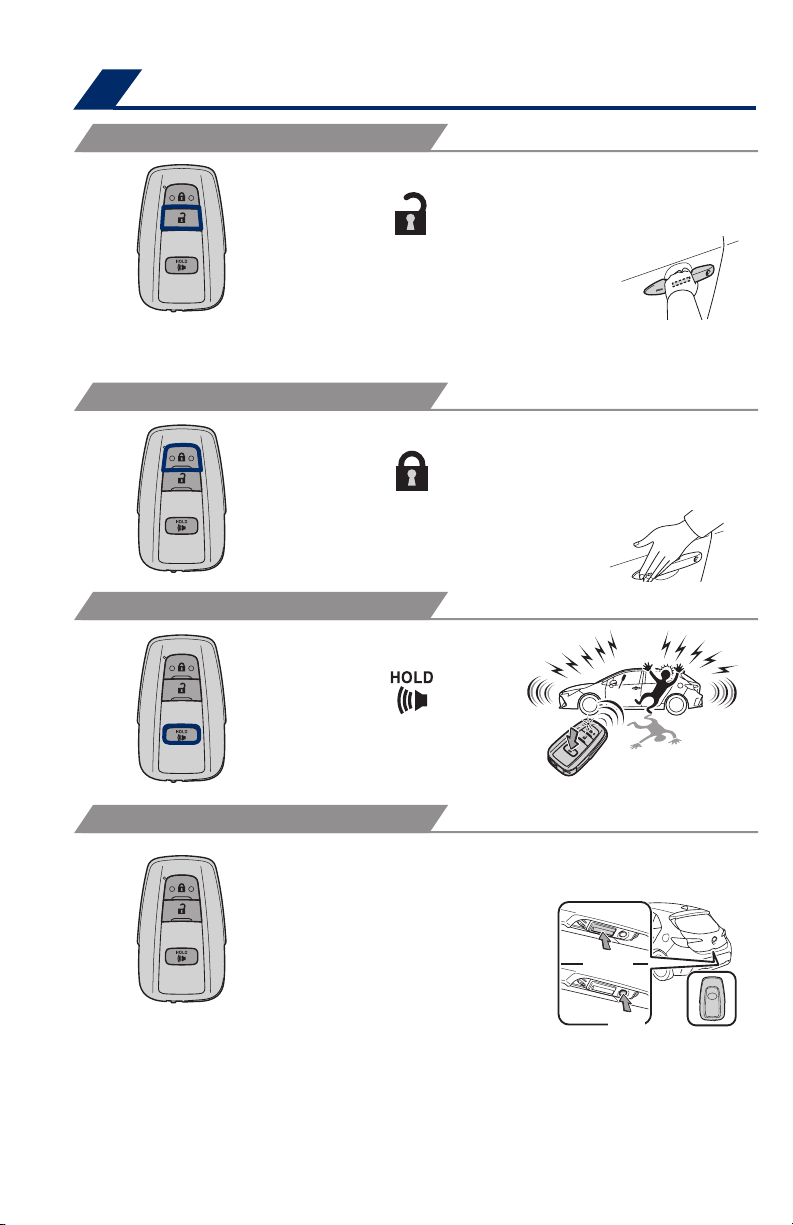
Keyless entry
UNLOCKING OPERATION
Carry Smart
Key remote
Front door unlock*
Push
ONCE: Driver door
TWICE: All doors
NOTE: If a door is not opened within 60 seconds of unlocking, all doors will
relock for safety.
LOCKING OPERATION
Push
PANIC BUTTON
Grasp
Carry Smart
Key remote
All-door lock
Touch
Push and hold
BACK DOOR LOCKING/UNLOCKING
Carry Smart
Key remote
Unlock
Lock
* Driver door unlocking function can be programmed to unlock driver door only,
or all doors. In some models, grasping front passenger door handle will unlock all
doors. Please refer to the Owner’s Manual for more details on how to program the
doors.
NOTE: Doors may also be locked/unlocked using remote.
6
Page 9
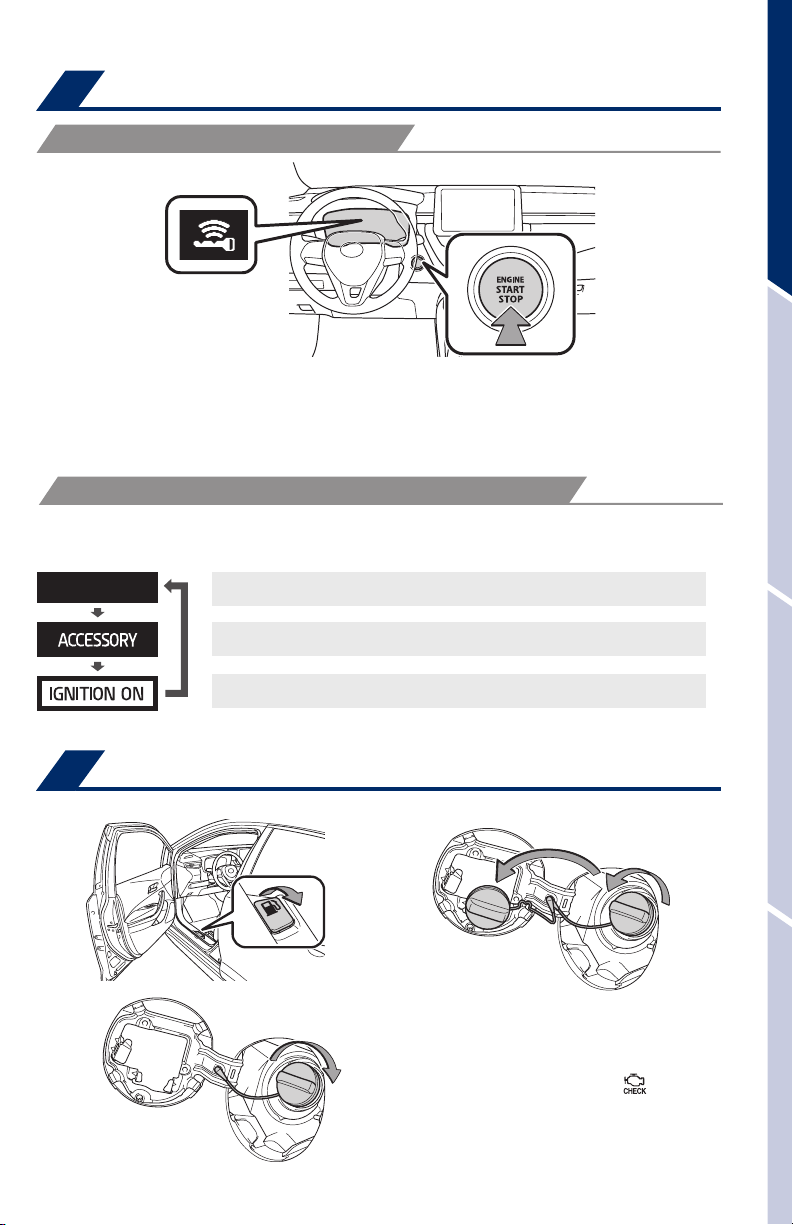
Smart Key system
START FUNCTION
NOTE: The Smart Key must be carried to enable the start function. With gear
shift lever in Park* or N** and the brake pedal* or clutch pedal** depressed,
push the “ENGINE START STOP” switch.
* Continuously variable transmission, ** Manual transmission
POWER (WITHOUT STARTING ENGINE)
Without depressing the brake pedal, pressing the “ENGINE START STOP” switch
will change the operation mode in succession from:
Off - All systems OFF. Emergency flashers can be used.
Accessory – Some electrical components can be used.
OVERVIEWFEATURES & OPERATIONSTOYOTA SAFETY SENSESAFETY & EMERGENCY FEATURES
On - All electrical components can be used.
Fuel tank door release & cap
Close
NOTE: Tighten until one click is
heard. If the cap is not locked or
tightened, Check engine “
indicator may illuminate.
7
Store
Turn to open
”
Page 10
OVERVIEW
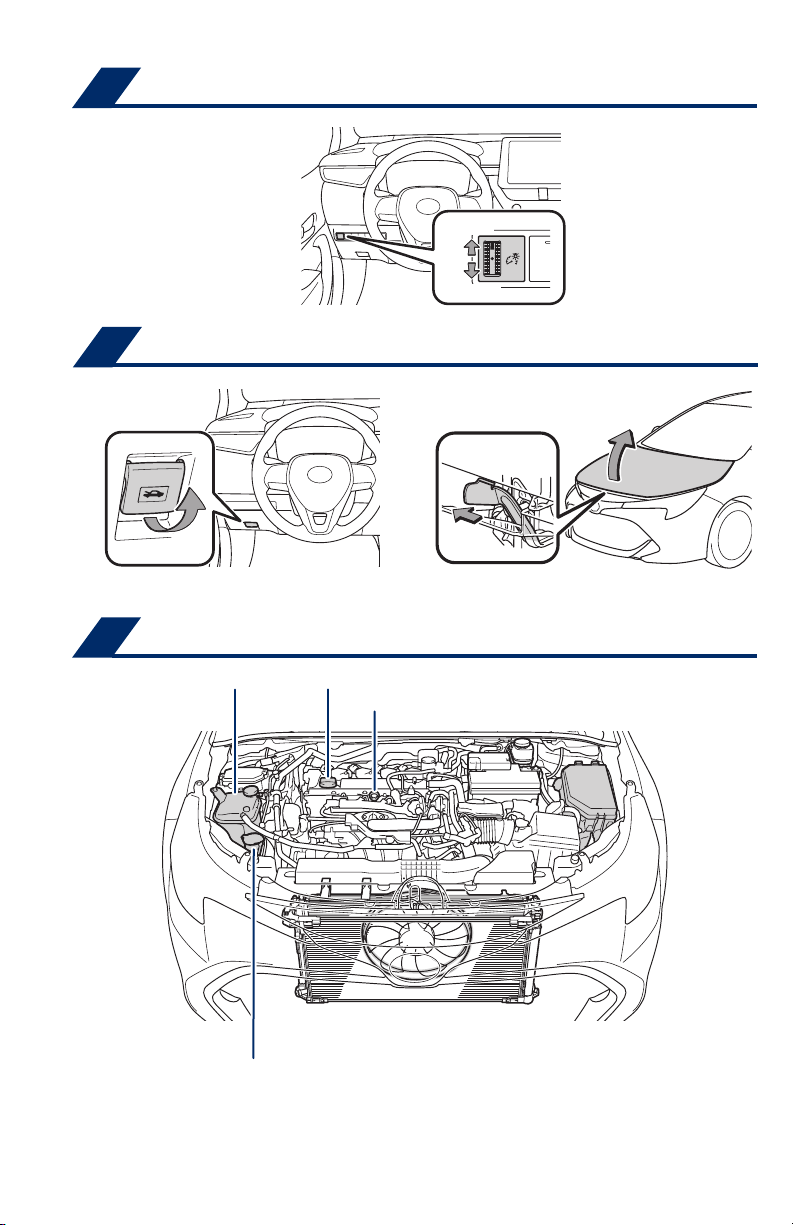
Instrument panel light control
Hood release
Pull
Darker
Brighter
Pull up latch and raise hood
Engine maintenance
Engine coolant reservoir
Windshield washer fluid tank
NOTE: Regularly scheduled maintenance, including oil changes, will help
extend the life of your vehicle and maintain performance. Please refer to the
“Warranty & Maintenance Guide.”
Engine oil filler cap
Engine oil level dipstick
8
Page 11
FEATURES & OPERATIONS
P
D
M
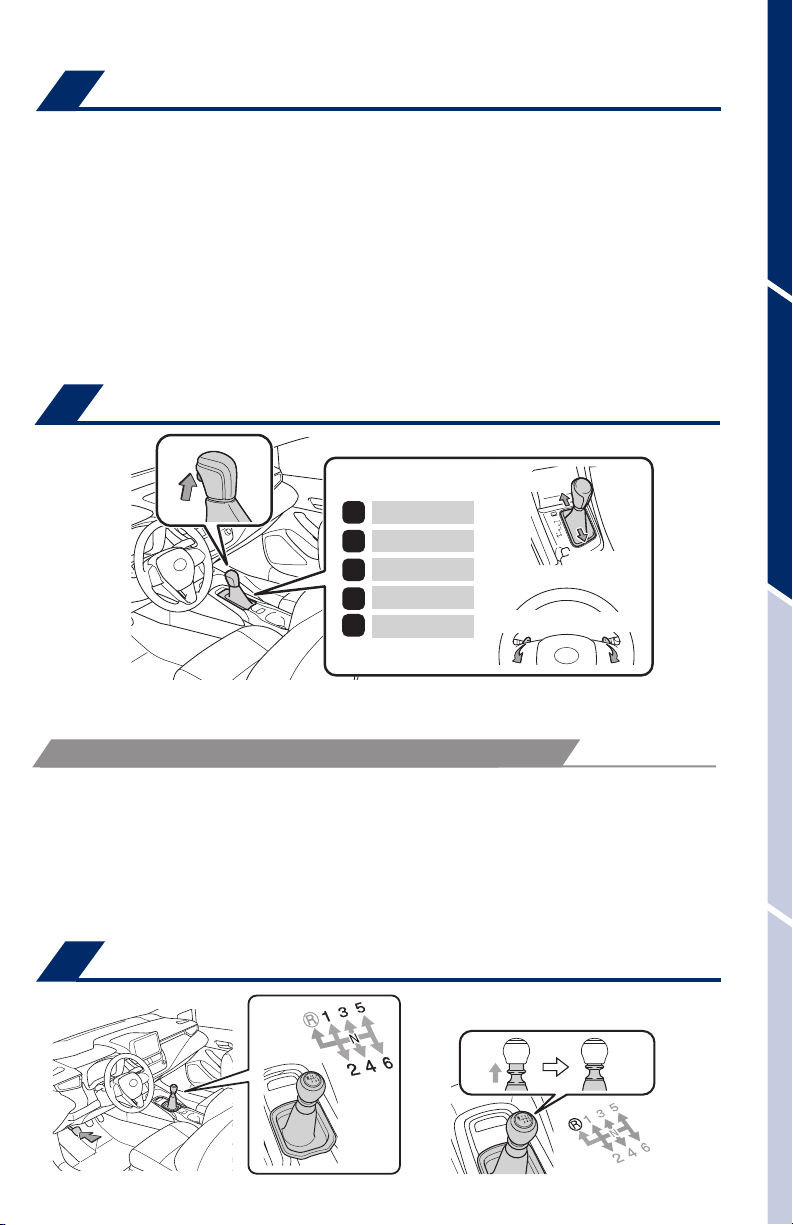
Auto lock/unlock
Automatic door locks can be programmed to operate in different modes, or turned
OFF.
Shift position linked door locking/unlocking function
-Doors lock when shifting from Park.
-Doors unlock when shifting into Park.
Speed linked door locking function
-Doors lock when the vehicle speed goes above approximately 12 mph (20 km/h).
Driver’s door linked door unlocking function
-Doors unlock when the engine switch is set to OFF and driver’s door is opened.
Refer to the Owner’s Manual for more details.
Continuously variable transmission (if equipped)
+ (“M” mode)
Park*
Reverse
R
N
Neutral
Drive
“M” mode
- (“M” mode)
- (“M” mode)
+ (“M” mode)
OVERVIEWFEATURES & OPERATIONSTOYOTA SAFETY SENSESAFETY & EMERGENCY FEATURES
* The “ENGINE START STOP”switch must be “IGNITION ON” and the brake pedal
depressed to shift from Park.
“M” 10-SPEED SPORT SEQUENTIAL SHIFTMATIC MODE
Push shift lever to the left from “D” position, to “M” position.
+ : Upshift (push and release)
- : Downshift (pull and release)
Downshifting increases power going uphill, or provides engine braking downhill. For
best fuel economy during normal driving conditions, always drive with the shift lever in
the “D” position.
Manual transmission (if equipped)
Lift up ring to shift into reverse
9
Page 12
FEATURES & OPERATIONS
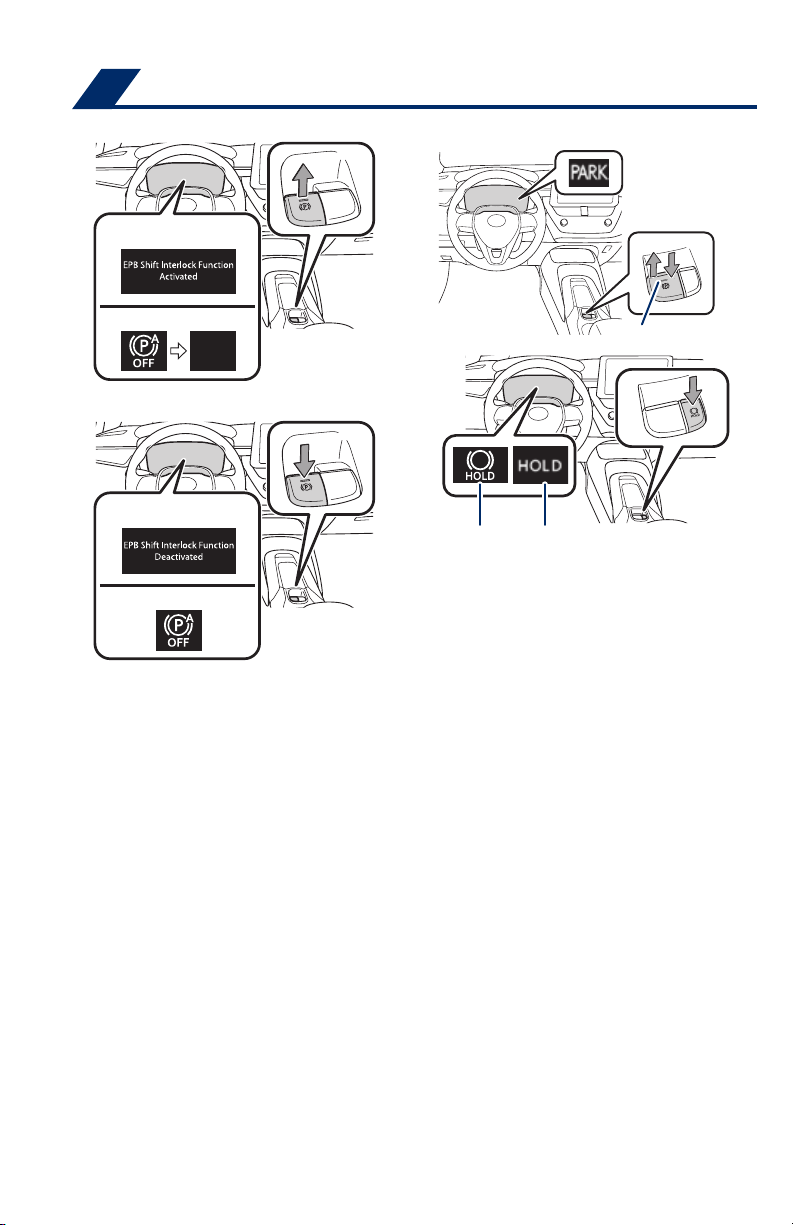
Electric parking brake
Driver side
Automatic mode ON
Continuously variable
transmission
Manual mode (Brake HOLD switch)
Manual transmission
Driver side
Automatic mode OFF
Continuously variable
transmission
Manual transmission
Automatic (shift lever operation)
Standby indicator Operated indicator
* Continuously variable transmission
** Manual transmission
Parking brake light
To turn automatic mode ON, while vehicle is stopped, pull and hold switch until
“EPB Shift Interlock Function Activated”* displays in Multi-Information Display
(MID) or auto EPB OFF indicator** turns off. While depressing brake, shifting into
P position will automatically set the brake and turn the parking brake indicator and
parking brake light on. To release brake, depress brake and shift out of P. The
indicator light and the light on the switch turn off.
To turn automatic mode OFF, push and hold parking brake switch until “EPB Shift
Interlock Function Deactivated”* displays on the MID or auto EPB OFF indicator**
turns on.
Manual
While vehicle is stopped and brake pedal is depressed, pull to set parking brake
and turn the parking brake indicator and parking brake light on. To release, press
the brake pedal and push switch. The indicator light turns off.
Brake hold
The brake hold system keeps the brake applied when the shift lever is in D, M*/a
forward driving position** or N with the system on and the brake pedal has been
depressed to stop the vehicle. The system releases the brake when the accelerator
pedal is depressed with the shift lever in D or M*/a forward driving position** to
allow smooth start off.
Refer to the Owner’s Manual for limitations and more details.
10
Page 13
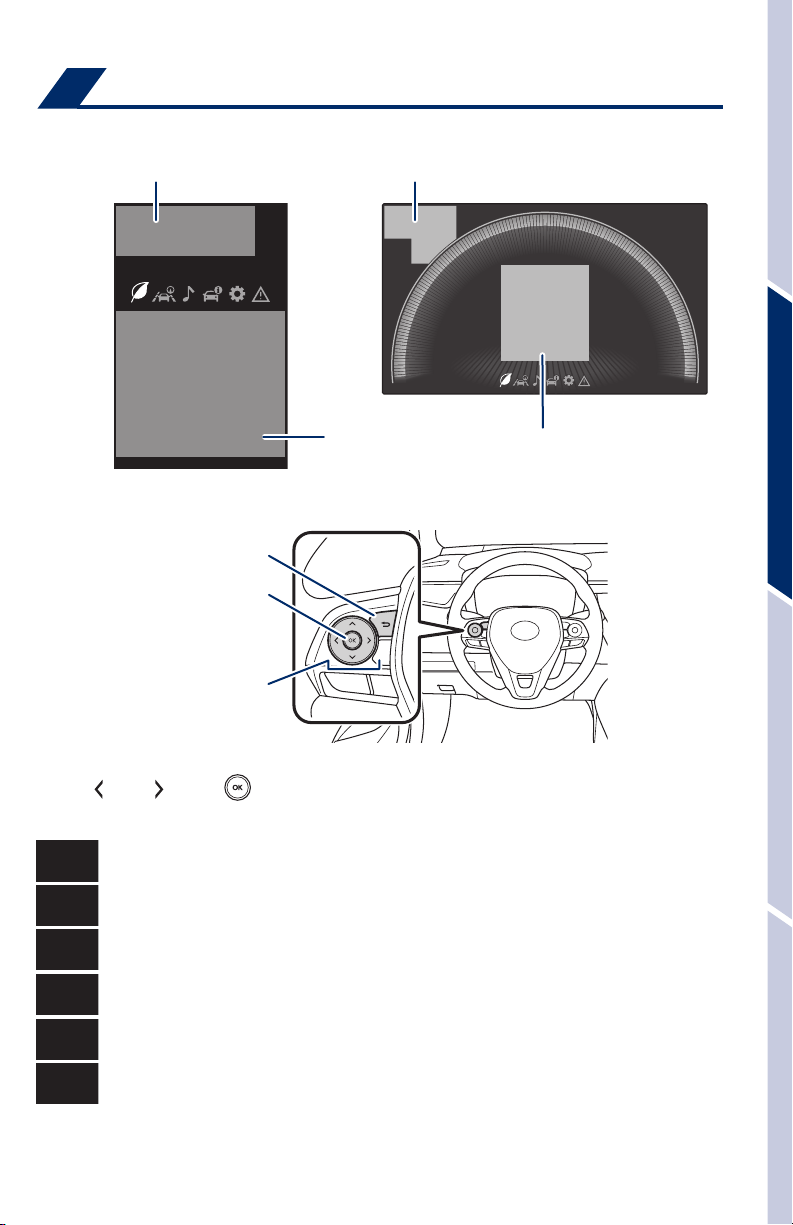
Multi-Information Display (MID)
4.2-inch display
Driving assist system status display area Driving assist system status display area
7-inch display
Content display areaContent display area
Meter control switches
Previous screen
Enter/Select
Scroll/search screens
OVERVIEWFEATURES & OPERATIONSTOYOTA SAFETY SENSESAFETY & EMERGENCY FEATURES
Push “ ” or “ ” and “ ” on steering wheel to change and select information in
the following:
Driving information
Driving support system information
Audio system-linked display
Vehicle information
Settings display
Warning display
11
Page 14
FEATURES & OPERATIONS
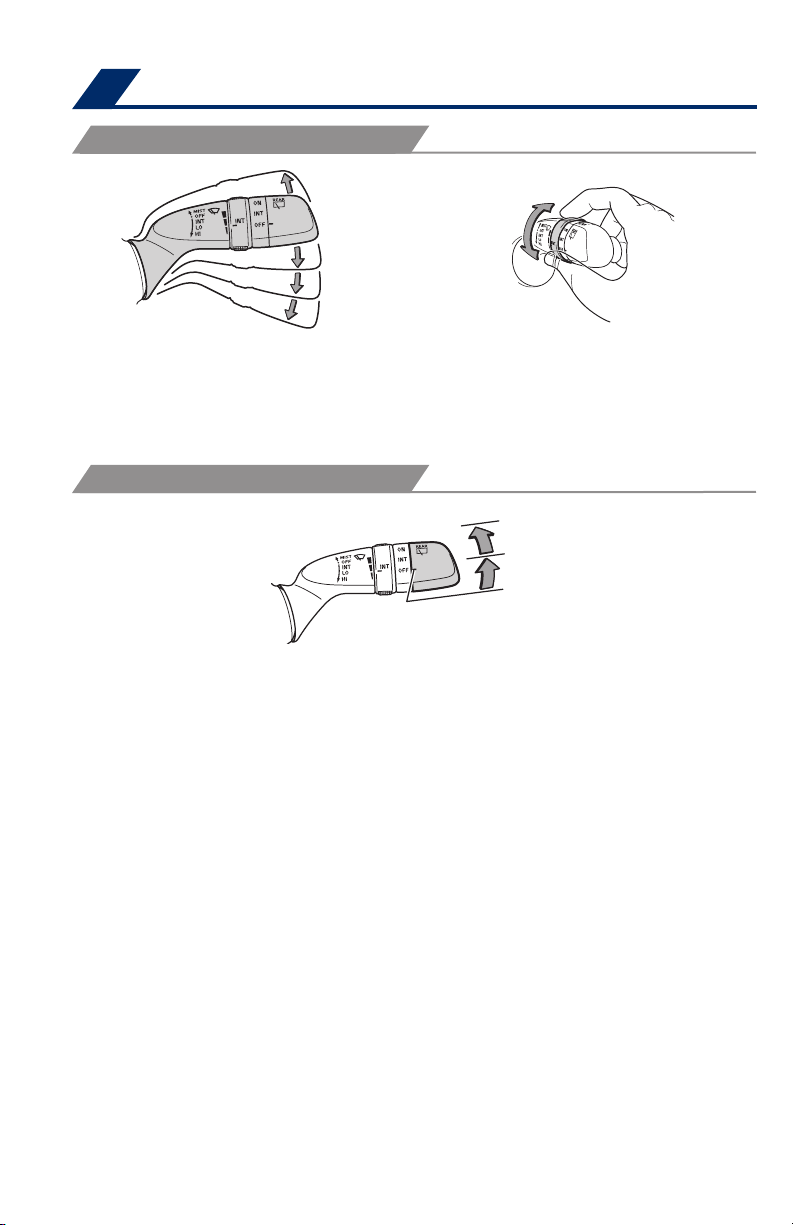
Windshield wipers & washer
FRONT
Mist
Interval wipe
Slow
Fast
Pull to wash and wipe
*
Intermittent windshield wiper frequency adjustment Rotate to increase/
decrease wipe frequency.
Refer to the Owner’s Manual for more information.
REAR
Adjust frequency*
Pull to wash and wipe
On
Interval wipe
Push lever to wash and wipe
12
Page 15
Lights & turn signals
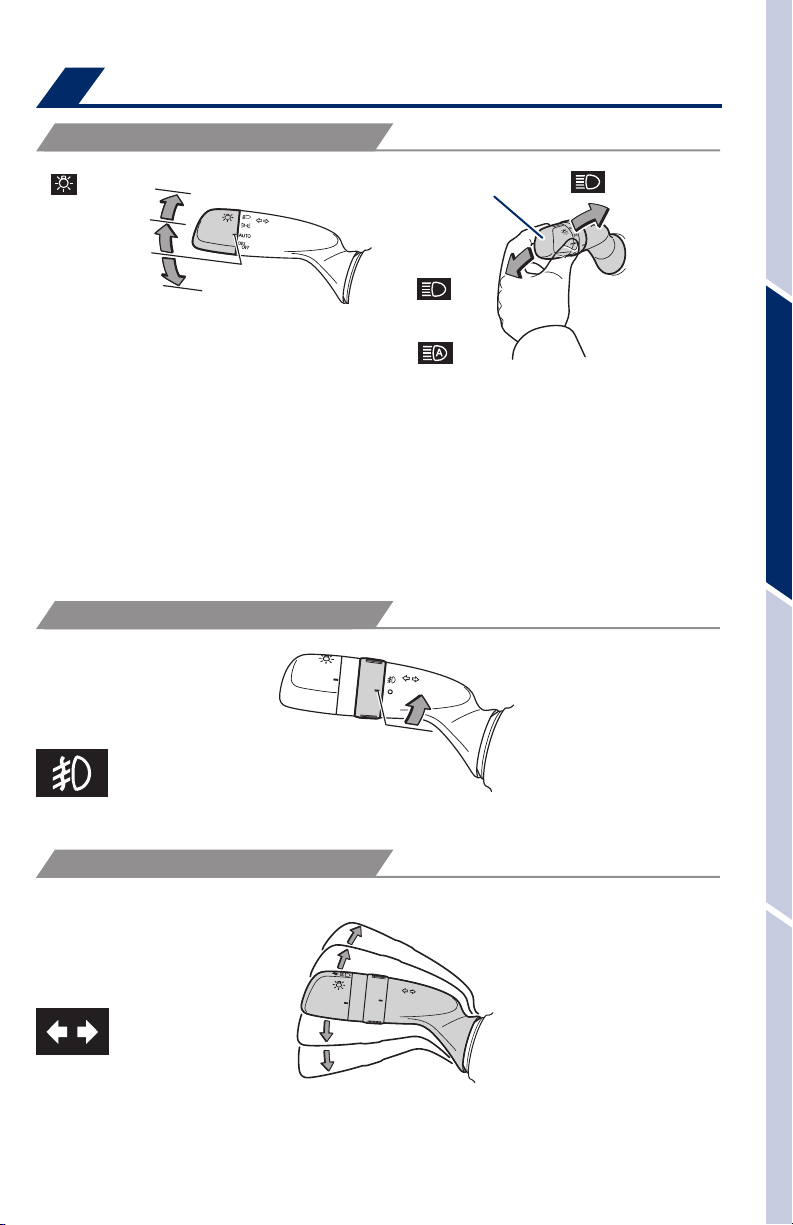
HEADLIGHTS
Low beam
Headlights
Parking lights
AUTO
OFF
(Original position)
High beam (Push)
or
Auto High Beam*
-Daytime Running Light system (DRL) Automatically turns on the headlights at
a reduced intensity.
-Automatic light cut off system Automatically turns lights off after 30-second
delay, or lock switch on remote may be pushed after locking.
-Automatic High Beam (AHB) system Automatically switches between high
and low beams as appropriate to provide the most light possible and enhance
forward visibility. Refer to Toyota Safety Sense™ (TSS) in this guide or the
Owner’s Manual for more details on the Automatic High Beam feature.
* Operating conditions must be met. Refer to Owner’s Manual for details.
FRONT FOG LIGHTS (IF EQUIPPED)
High beam flasher
(Pull)
OVERVIEWFEATURES & OPERATIONSTOYOTA SAFETY SENSESAFETY & EMERGENCY FEATURES
Turn
Front fog lights come on only when the headlights are on low beam.
TURN SIGNAL
Right turn
Lane change
Lane change
1
The right hand signals will flash three times.
2
The left hand signals will flash three times.
1
2
Left turn
13
Page 16
FEATURES & OPERATIONS
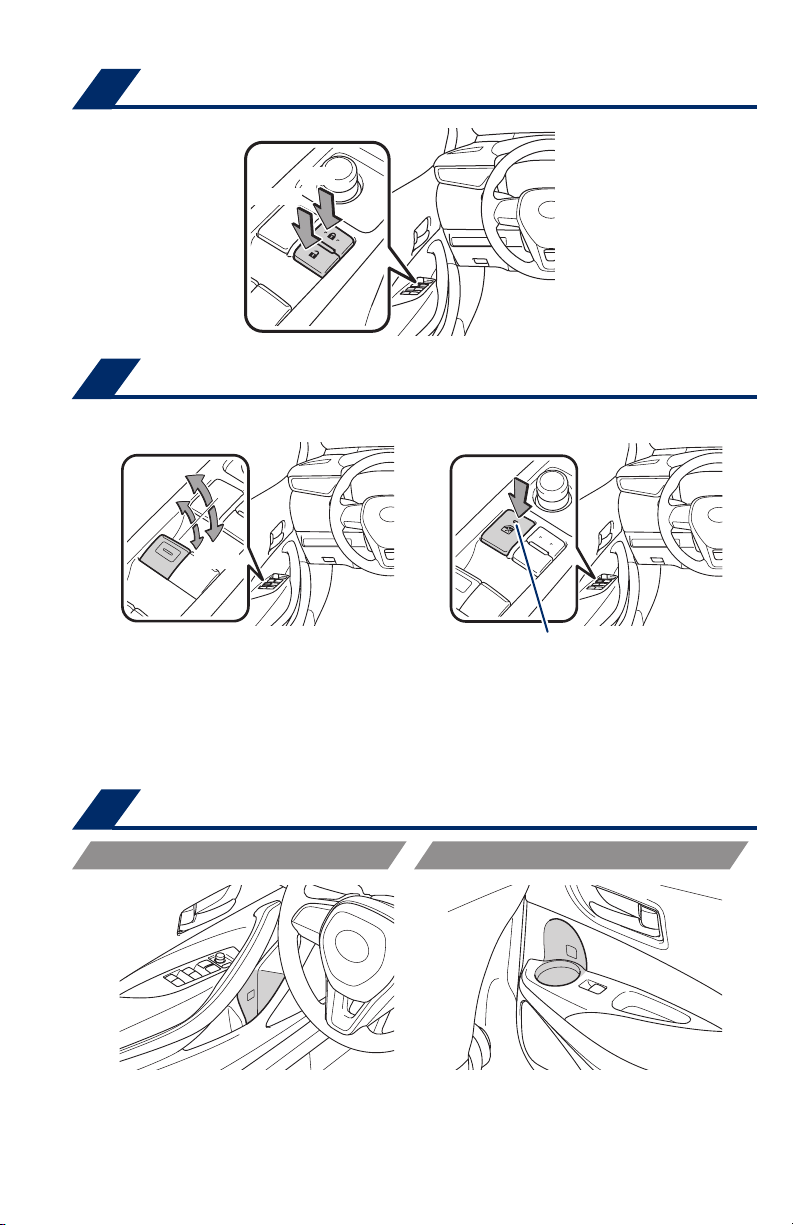
Door locks
Lock
Unlock
Windows-Power
Driver side
Up
Down
All Window Auto Up/Down Push the switch completely down or pull it completely
up and release to fully open or close. To stop the window partway, operate the switch
in the opposite direction.
Window lock switch Deactivates all passenger windows. Driver’s window remains
operable.
Window lock switch
Indicator
Bottle holders
FRONT
REAR
14
Page 17
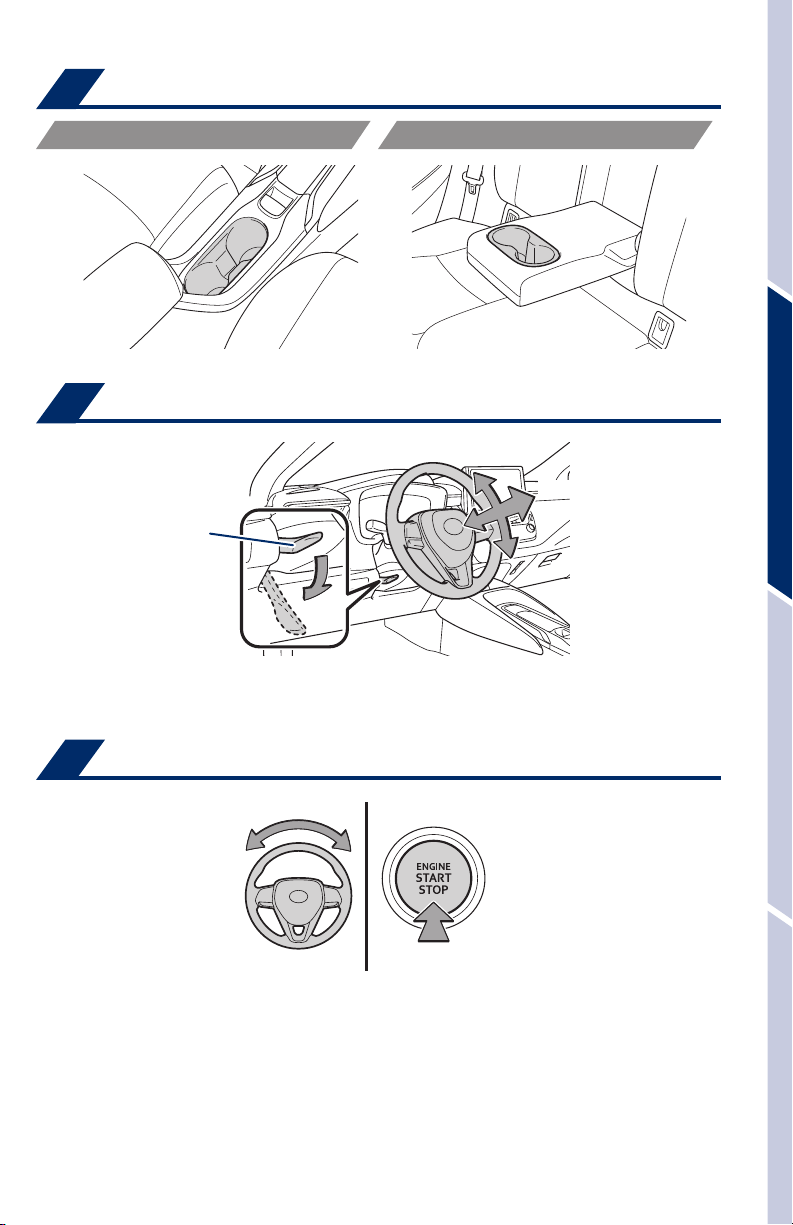
Cup holders
FRONT
REAR
Tilt & telescopic steering wheel
Angle
Length
Lock release lever
Hold wheel, push lever down, set angle and return lever.
NOTE: Do not attempt to adjust while the vehicle is in motion.
OVERVIEWFEATURES & OPERATIONSTOYOTA SAFETY SENSESAFETY & EMERGENCY FEATURES
Steering lock release
Turn
The green indicator light on the engine switch will flash and a message will be
shown on the multi-information display. Press the engine switch while turning the
steering wheel left and right.
15
Page 18
FEATURES & OPERATIONS
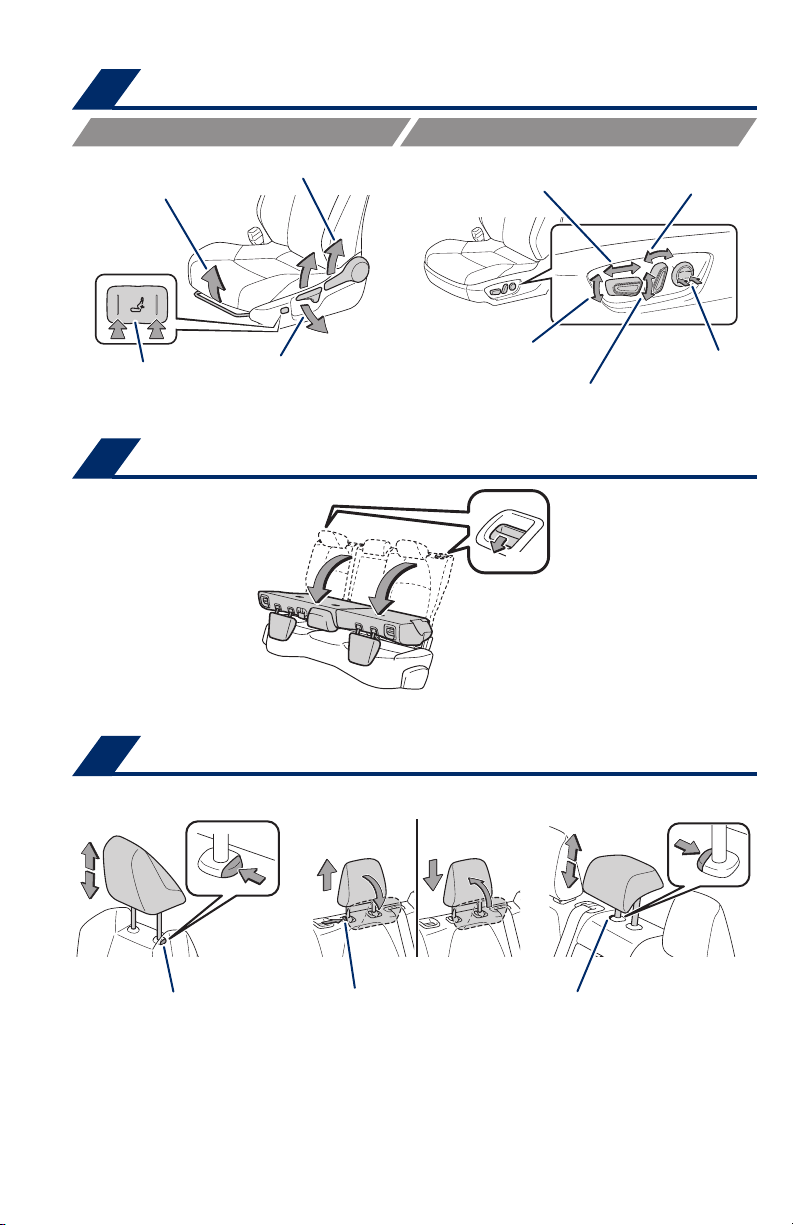
Seat adjustments-Front
MANUAL SEAT
Seat position
(forward/backward)
Lumbar support
(driver’s side only/
if equipped)
Seatback angle
Height crank
(driver’s side only)
Seats-Folding rear
Each seatback may be folded separately.
POWER SEAT
Seat cushion (front) angle
Fold down
(DRIVER’S SIDE ONLY)
Seat position
(forward/backward)
Height crank
Pull
Seatback angle
Lumbar support
Seats-Head restraints
Front seats Rear outside seats Rear center seat
Lock release button Lock release button Lock release button
16
Page 19
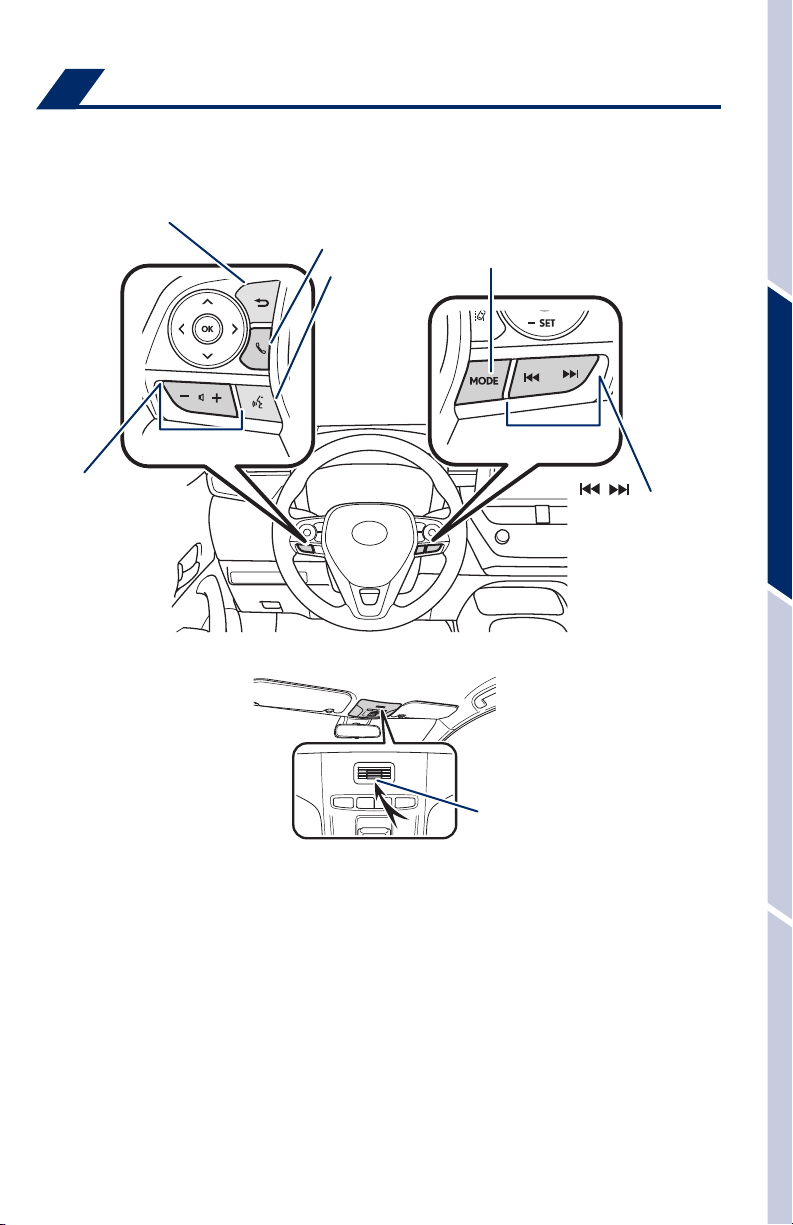
Steering wheel switches
& telephone controls (Bluetooth
Steering wheel telephone switches
Back switch
Start and end call/
Mobile Assistant
access*
Voice command
switch
®
)
“MODE”
Push to change an audio
mode. Push and hold to turn
the audio mutes or pauses.
OVERVIEWFEATURES & OPERATIONSTOYOTA SAFETY SENSESAFETY & EMERGENCY FEATURES
Volume control
Microphone
Microphone
“ ”
Use to search within the
selected audio medium
(radio, CD, etc.).
Bluetooth® technology allows dialing or receipt of calls without removing your hands
from the steering wheel or using a cable to connect the compatible telephone and
the system.
*
Push and hold to access Mobile Assistant. When a compatible smartphone is
Bluetooth
Siri
Refer to the “Bluetooth
®
connected push and hold the off hook switch 2-3 seconds to access
®
Eyes Free.
®
Device Pairing Section” in this guide for more information
about phone connections and compatibility.
Refer to the “Owner’s Manual” and the “Navigation System Owner’s Manual” for
more details.
NOTE: Concentrating on the road should always be your first priority while
driving. Do not use the Entune system if it will distract you.
17
Page 20
FEATURES & OPERATIONS
Audio
™
ENTUNE
ENTUNE
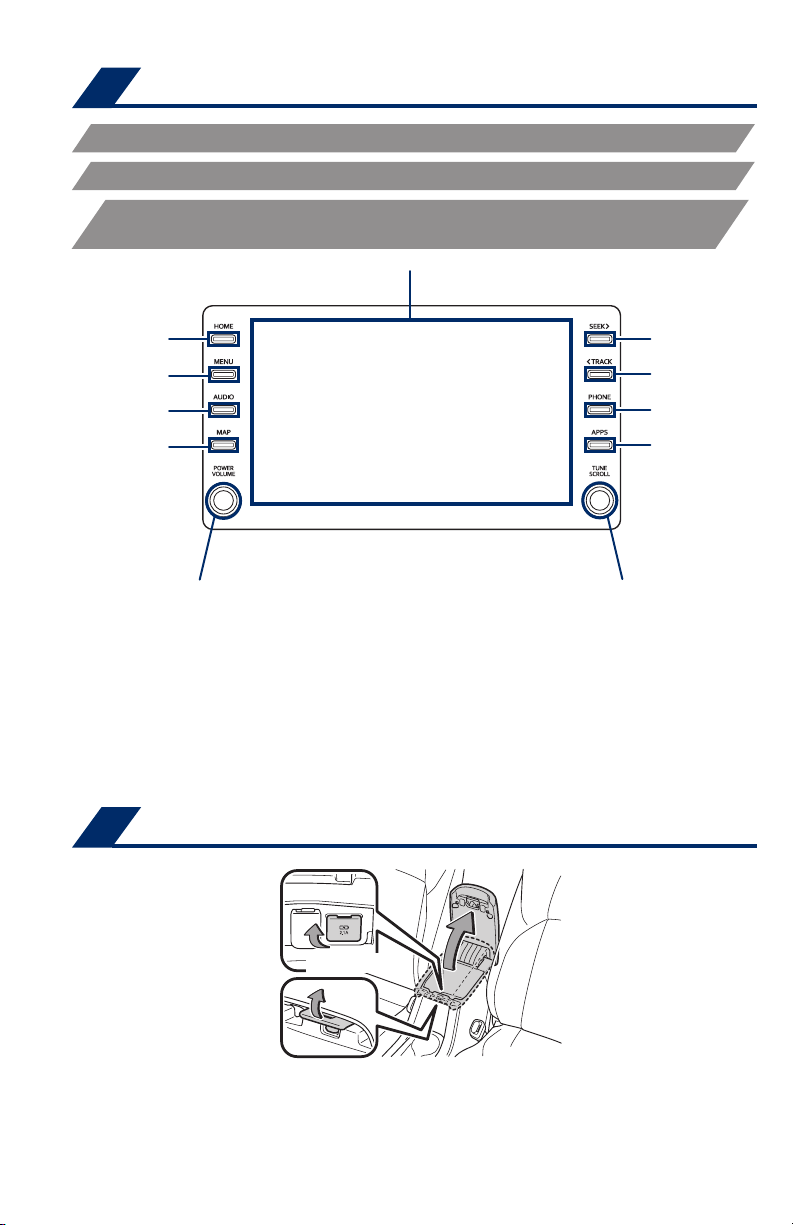
ENTUNE™ 3.0 PREMIUM AUDIO, WITH APP SUITE AND DYNAMIC
NAVIGATION
Access
HOME screen
Access
MENU screen
Access
AUDIO screen
Access
MAP screen
3.0 AUDIO
™
3.0 AUDIO PLUS
Touch screen display
Seek
station/CD
track select
Access
Bluetooth
hands-free system
Access
APPS screen
Push to turn ON/OFF or
turn to adjust volume
Turn to tune radio stations
manually or select tracks or files
Refer to the “Navigation System Owner’s Manual” or visit www.toyota.com/entune
for additional audio/multimedia resources.
NOTE: Concentrating on the road should always be your first priority while
driving. Do not use the Entune system if it will distract you.
Visually match your vehicle’s Entune
TM
3.0 audio system to one featured in
this guide for the most accurate information.
USB charge-port
(Charge-only)
18
Page 21
Wireless charger (if equipped)
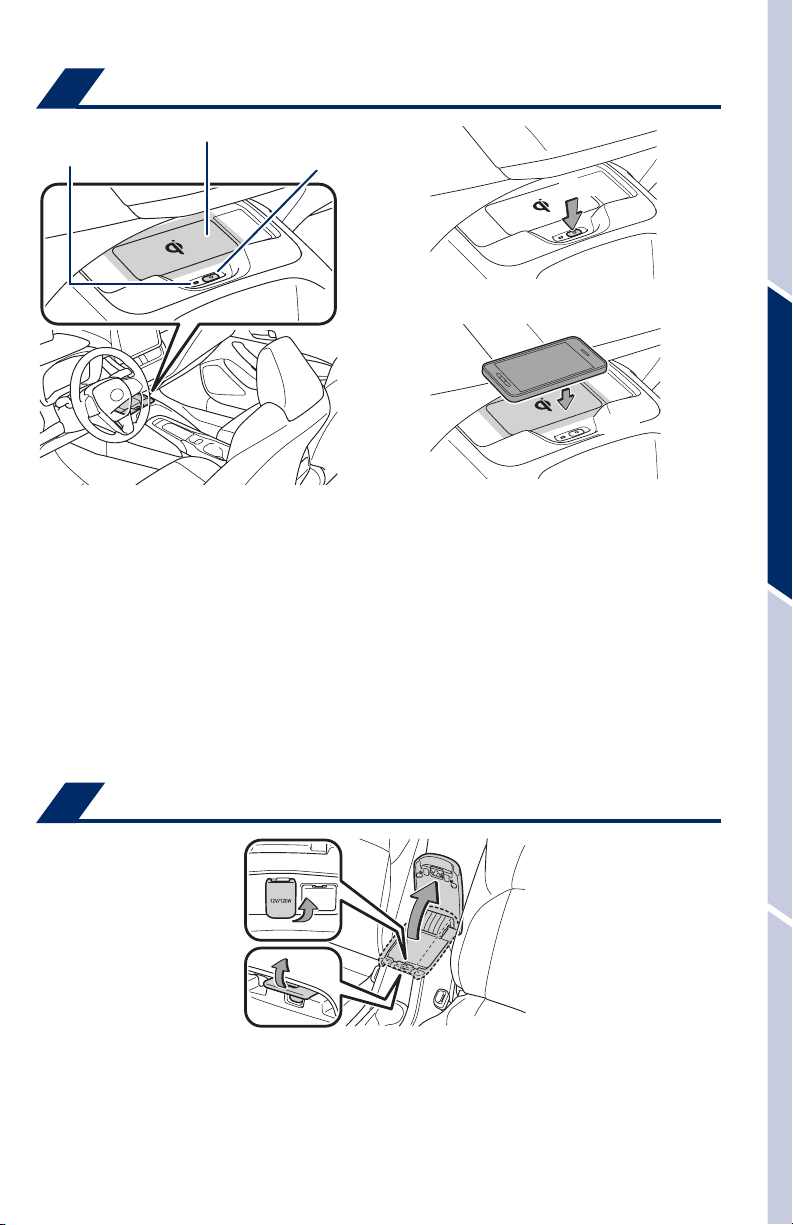
(1)
Press
When the engine is turned off, the last state (ON/
OFF) of the charger is memorized.
Operation indicator light
Charge area
Power switch
(2)
Place
Place device nearest the center of charging area for
best results. Moving device may result in stopping
or restarting the charging process.
A mobile device can be charged wirelessly on the tray. (1) Press the wireless
charger power switch and the green operation indicator light turns on. (2) Place a
mobile device on the tray as shown in the illustration. An amber indicator illuminates
while charging is in progress. When charging is complete, the indicator illuminates
green. Some phones, cases or cover type wireless chargers may not cause the
green indicator to illuminate even though it is fully charged.
OVERVIEWFEATURES & OPERATIONSTOYOTA SAFETY SENSESAFETY & EMERGENCY FEATURES
Refer to the Owner‘s Manual for more details on this system before attempting to
use it.
Power outlet
The “ENGINE START STOP” switch must be in the ACCESSORY or IGNITION ON
mode for use.
19
Page 22
FEATURES & OPERATIONS
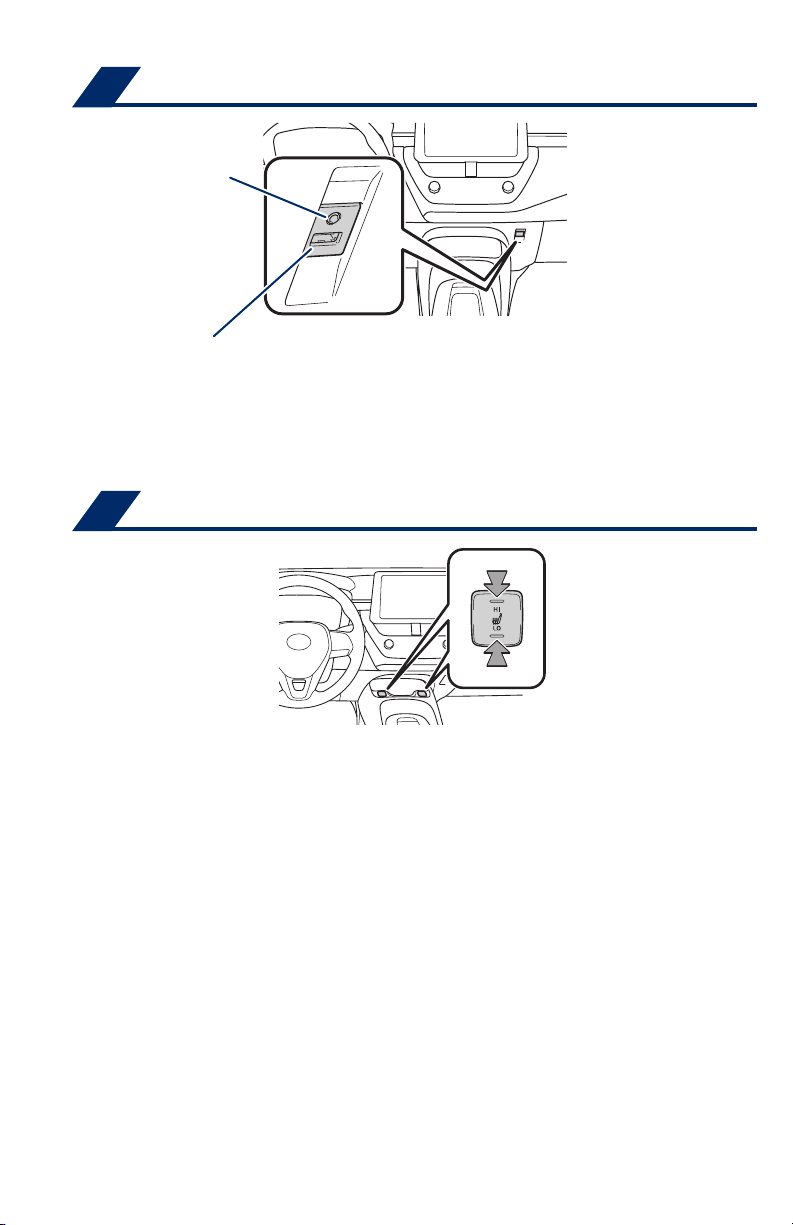
USB media/AUX port
AUX port
USB media port
By connecting a USB-compatible portable audio device or USB memory stick into
the USB media port, you can listen to music through the vehicle’s speaker system.
AUX port
By inserting an AUX cable into the AUX port, you can listen to music from a
portable audio device through the vehicle’s speaker system while in AUX mode.
Seat heaters (if equipped)
The engine switch must be in the “IGNITION ON” mode.
20
Page 23
Air conditioning/heating
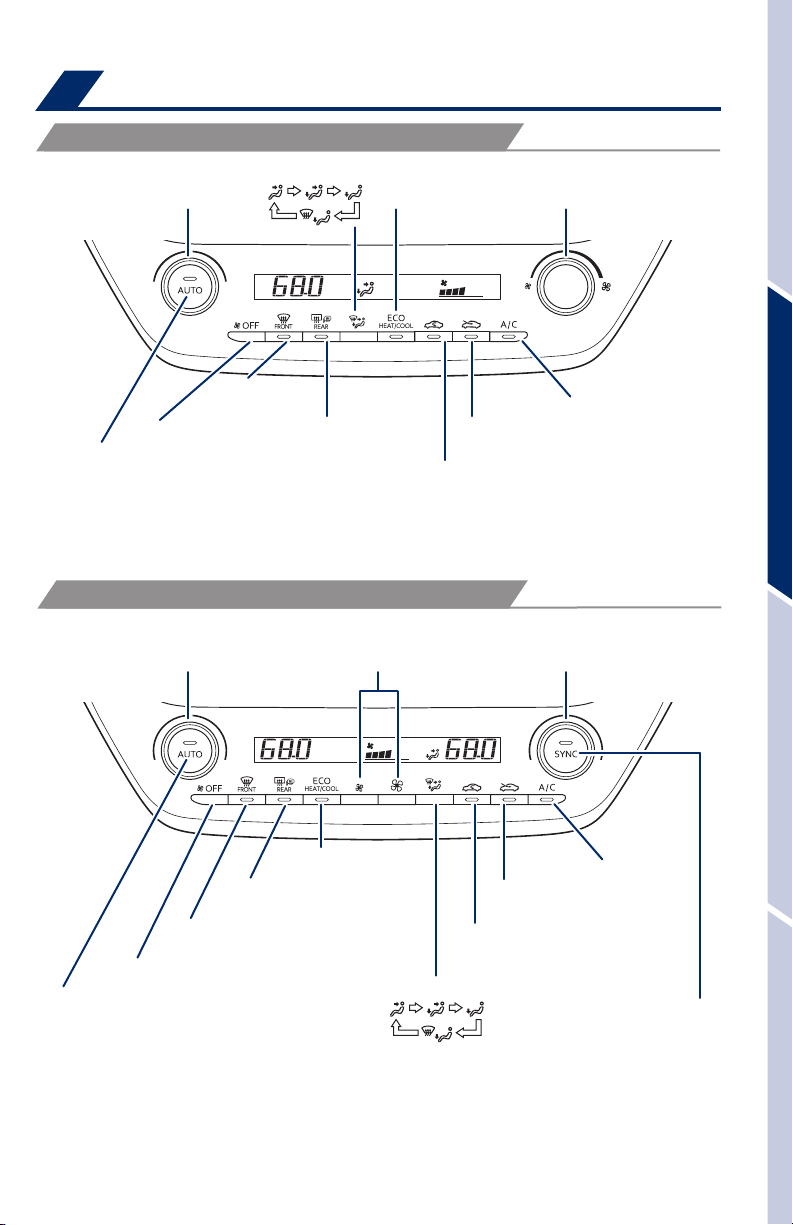
WITHOUT DUAL AIR CONDITIONING SYSTEM
Airflow vent mode
Temperature control
Windshield
airflow/defogger
Climate control OFF
Automatic climate control ON
Adjusting the temperature setting
will cause the airflow vents,
air intake and fan to adjust
automatically.
Outside rearview
mirror/Rear defogger
WITH DUAL AIR CONDITIONING SYSTEM
Eco air
conditioning mode
Fan speed
Air Conditioning
Outside air
Recirculate cabin air
(outside air when OFF)
ON/OFF
OVERVIEWFEATURES & OPERATIONSTOYOTA SAFETY SENSESAFETY & EMERGENCY FEATURES
Temperature control
(driver side)
Outside rearview
mirror/Rear defogger
Windshield
airflow/defogger
Climate control OFF
Automatic climate control ON
Adjusting the temperature setting
will cause the airflow vents,
air intake and fan to adjust
automatically.
Fan speed
increases/decreases
Eco air
conditioning mode
Airflow vent mode
21
Temperature control
(passenger side)
Air Conditioning
Outside air
Recirculate cabin air
(outside air when OFF)
ON/OFF
“SYNC” button
Indicator ON: Synchronized
temperature settings for
driver’s and front passenger’s
seat.
Indicator OFF: Separate
temperature settings for
driver’s and front passenger’s
seat.
Page 24
FEATURES & OPERATIONS
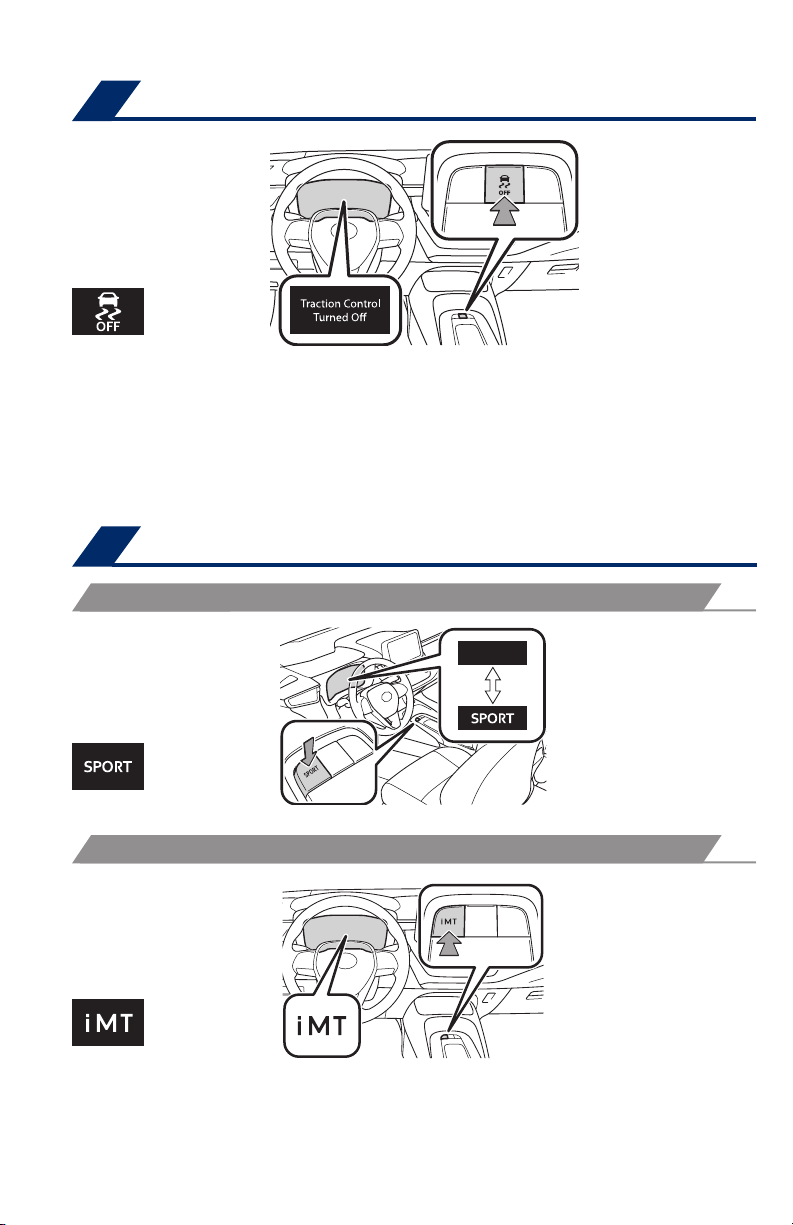
Vehicle Stability Contorl (VSC)/ TRAC OFF switch
The VSC OFF switch can be used to help free a stuck vehicle in surroundings like
mud, dirt or snow. While car is stopped, press switch to disable the TRAC system.
To disable both VSC and TRAC systems, press and hold the switch for at least 3
seconds.
Refer to the Owner’s Manual for more details.
Driving mode select
SPORT MODE (WITH A CONTINUOUSLY VARIABLE TRAMSMISSION)
iMT (INTELLIGENT MANUAL TRANSMISSION, WITH A MAUAL TRANSMISSION)
Refer to the Owner’s Manual for more information.
22
Page 25
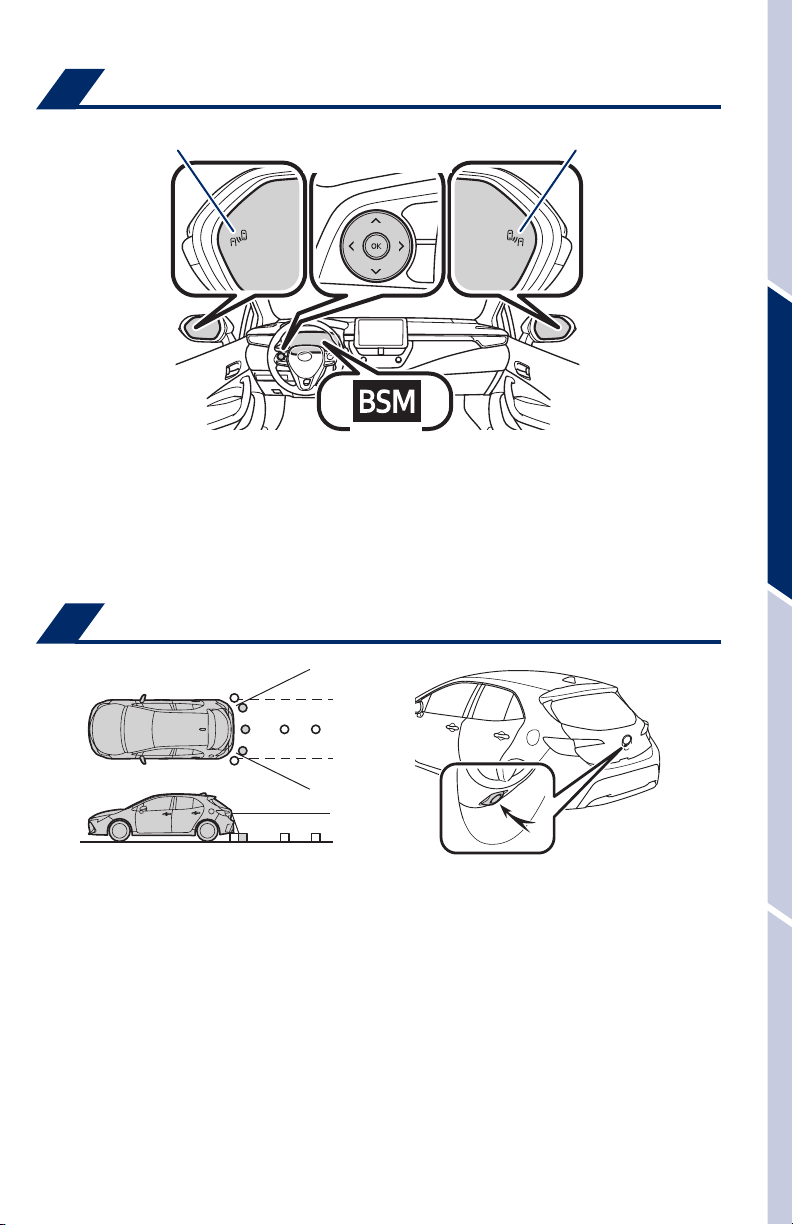
Blind Spot Monitor (if equipped)
Outside rear view mirror indicators
Meter control switches
Indicators
The system is designed to use radar sensors to detect vehicles traveling in the
Corolla Hatchback’s blind spot and advises the driver of the vehicles’ presence via
the outside rear view mirror indicators.
Refer to the Owner‘s Manual for limitations and more details on this system before
attempting to use it.
Outside rear view mirror indicators
Rear view monitor system
OVERVIEWFEATURES & OPERATIONSTOYOTA SAFETY SENSESAFETY & EMERGENCY FEATURES
The rear view monitor system displays an image of the view from the bumper of
the rear area of the vehicle. The camera for the rear view monitor system is located
above the license plate.
To adjust the image on the rear view monitor screen, press the “MENU” button and
select “Display” on the screen. Select “Camera” to adjust the screen contrast and
brightness.
Refer to the Owner’s Manual and the Navigation Owner‘s Manual for limitations and
more details on this system.
23
Page 26

TOYOTA SAFETY SENSE
™
Quick overview-Toyota Safety Sense™ 2.0
Toyota Safety Sense™ (TSS) is a set of active safety technologies designed to help
mitigate or prevent collisions across a wide range of traffic situations, in certain
conditions. TSS is designed to help support the driver’s awareness, decision
making and vehicle operation contributing to a safe driving experience.
Refer to the Owner’s Manual for operation, setting adjustments, limitations and
more details to understand these functions and complete safety precautions. For
more information, please go to http://www.toyota.com/safety-sense
Pre-Collision System with Pedestrian Detection (PCS w/PD)
PCS w/PD is designed to provide alert, mitigation, and/or avoidance
support in certain conditions, when the system detects a potential
collision with a preceding vehicle is likely to occur.
Advanced millimeter-wave radar sensor system is designed to work
with the camera sensor to help recognize a preceding pedestrian or
bicyclist, and provide an alert, mitigation and/or avoidance support in
certain conditions.
Lane Departure Alert with Steering Assist (LDA w/SA)*
LDA w/SA is designed to provide notification when the system detects
an unintended lane departure.
The Steering Assist function is designed to provide small corrective
steering inputs to the steering wheel for a short period of time to help
keep the vehicle in its lane.
The Sway Warning function is designed to detect vehicle swaying
(based on the vehicle location and steering wheel operation) and alert
the driver with an audio and visual alert, urging them to take a break.
Lane Tracing Assist (LTA)**
LTA contains all the features of LDA described above and additionally
is designed to help keep the vehicle in the center of a lane by assisting
the driver in steering control when using Full-Speed Range DRCC**.
Dynamic Radar Cruise Control (DRCC)* or
Full-Speed Range Dynamic Radar Cruise Control (DRCC)**
DRCC is designed to help maintain a pre-set distance to a preceding
vehicle when the preceding vehicle is traveling at a lower speed.
Full-Speed Range DRCC is the same as regular DRCC except the
available speed range is extended down to 0 MPH.
Automatic High Beams (AHB)
AHB is designed to detect the headlights of oncoming vehicles and
the tail lights of preceding vehicles and switch between high beams
and low beams as appropriate.
Road Sign Assist (RSA)
RSA is designed to recognizes specific road signs using the forward
facing camera to provide information to the driver via the display.
* Manual transmission, ** Continuously variable transmission
24
Page 27
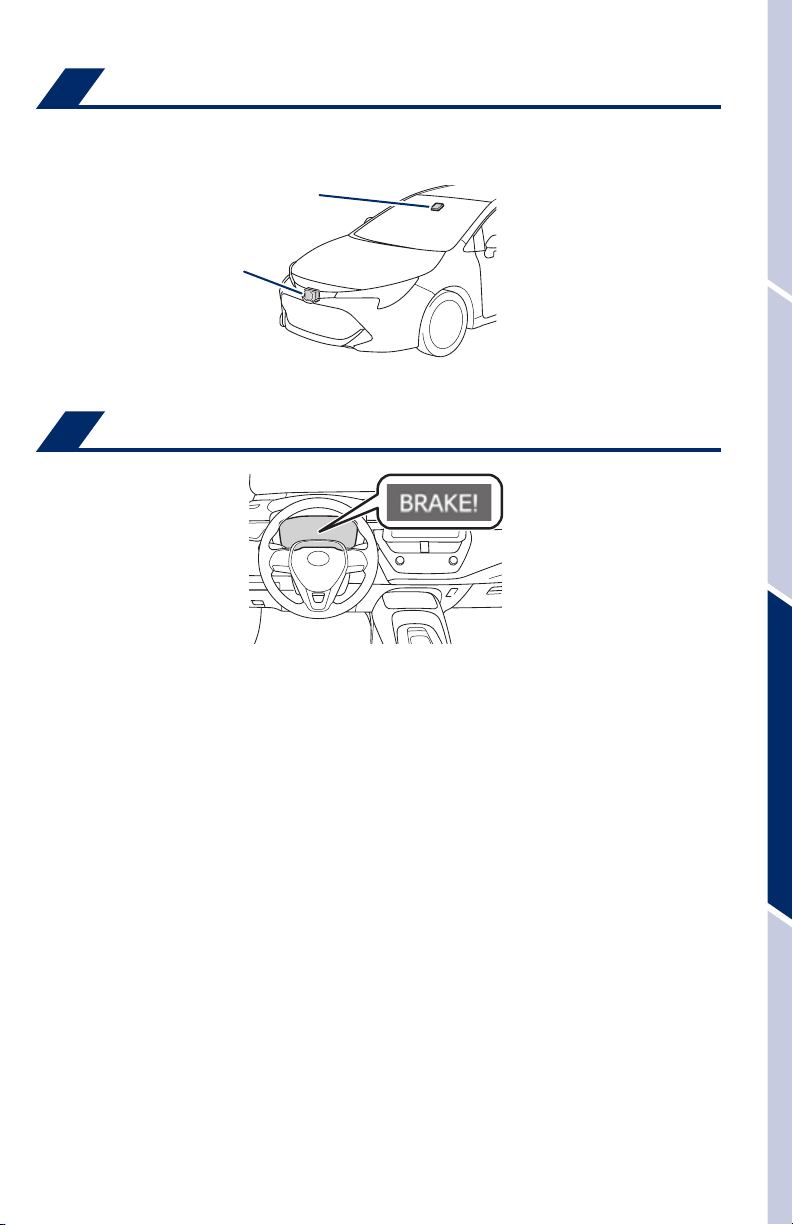
Sensors
TSS-P combines an in-vehicle camera mounted in front of the inside rear view mirror
and a radar mounted in the front grill. These sensors support the driver assist systems.
Camera sensor
Radar sensor
Pre-Collision System with Pedestrian Detection (PCS w/PD)
The Pre-Collision System uses a radar sensor and camera sensor to help detect a
vehicle or pedestrian or bicyclist in front of your vehicle.
As there is a limit to the degree of recognition accuracy and control performance that
this system can provide, do not overly rely on this system. This system will not prevent
collisions or lessen collision damage or injury in every situation. Do not use PCS
instead of normal braking operations under any circumstances. Do not attempt to test
the operation of the Pre-Collision System yourself, as the system may not operate or
engage, possibly leading to an accident. In some situations, such as when driving in
inclement weather such as heavy rain, fog, snow or a sandstorm or while driving on a
curve and for a few seconds after driving on a curve, a vehicle may not be detected
by the radar and camera sensors, preventing the system from operating or engaging
properly.
Refer to a Toyota Owner’s Manual for a list of additional situations in which the
system may not operate properly.
OVERVIEWFEATURES & OPERATIONSTOYOTA SAFETY SENSESAFETY & EMERGENCY FEATURES
Pre-Collision Warning
When the system determines that the possibility of a frontal collision is high, a buzzer
will sound and a warning message will be displayed on the Multi-Information Display
(MID) to urge the driver to take evasive action.
Pre-Collision Brake Assist
If the driver notices the hazard and brakes, the system may provide additional braking
force using Brake Assist. This system may prime the brakes and may apply greater
braking force in relation to how strongly the brake pedal is depressed.
25
Page 28
TOYOTA SAFETY SENSE
PRE-COLLISION SYSTEM (CONTINUED)
Pre-Collision Braking
If the driver does not brake in a set time and the system determines that the possibility
of a frontal collision with a preceding vehicle is extremely high, the system may
automatically apply the brakes, reducing speed in order to help the driver reduce the
impact and in certain cases avoid the collision.
Refer to the Toyota Owner’s Manual for additional information on PCS operation,
settings adjustments, limitations, and precautions before attempting to use it.
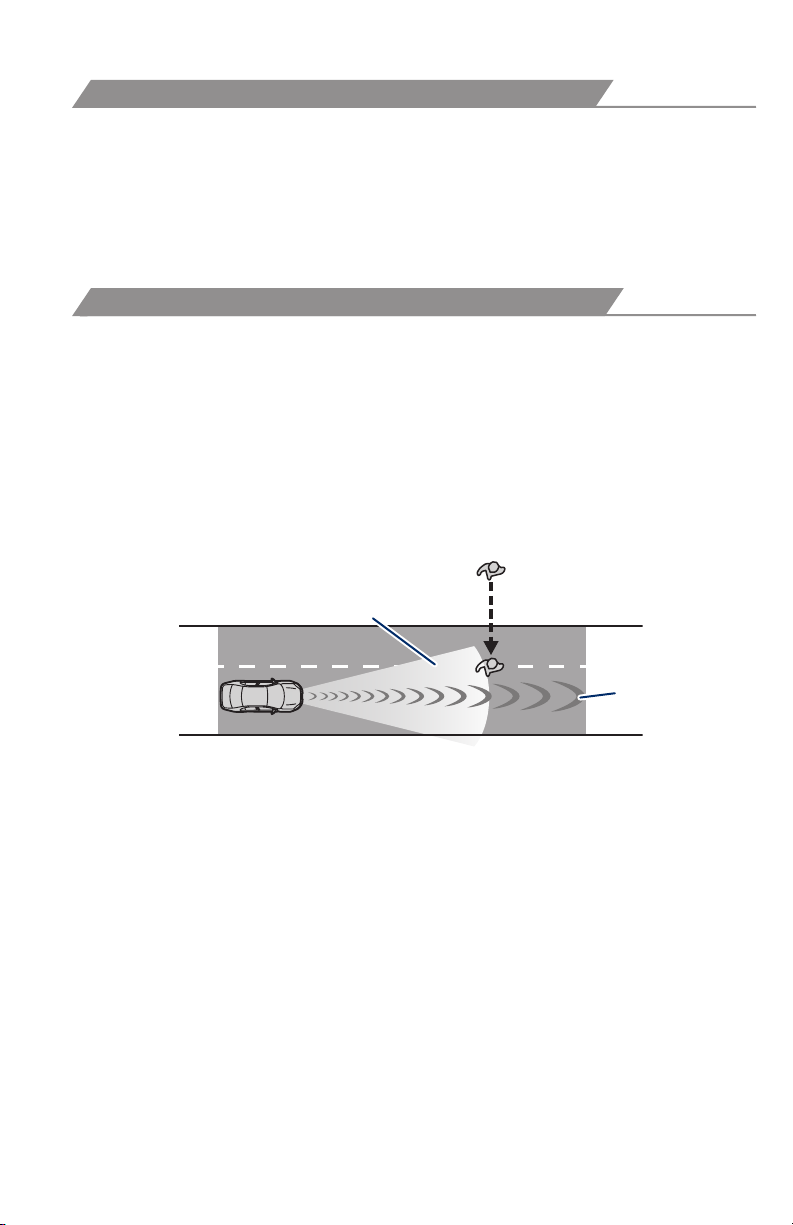
PCS PEDESTRIAN DETECTION
In certain conditions, the PCS system included with the TSS package may also
help to detect a pedestrian or bicyclist in front of your vehicle. With Toyota Safety
Sense™, PCS uses an in-vehicle camera and front-grill mounted millimeter-wave
radar to help detect a pedestrian or bicyclist in front of your vehicle in certain
conditions. The in-vehicle camera of PCS detects a potential pedestrian or bicyclist
based on size, profile, and motion of the detected pedestrian or bicyclist. However,
a pedestrian or bicyclist may not be detected depending on the conditions,
including the surrounding brightness and the motion, posture, size, and angle of
the potential detected pedestrian or bicyclist, preventing the system from operating
or engaging. Refer to a Toyota Owner’s Manual for additional information.
Monocular camera sensor
™
Millimeter
wave radar
As part of the Pre-Collision System, this function is also designed to first provide an
alert and then automatic braking if needed.
26
Page 29
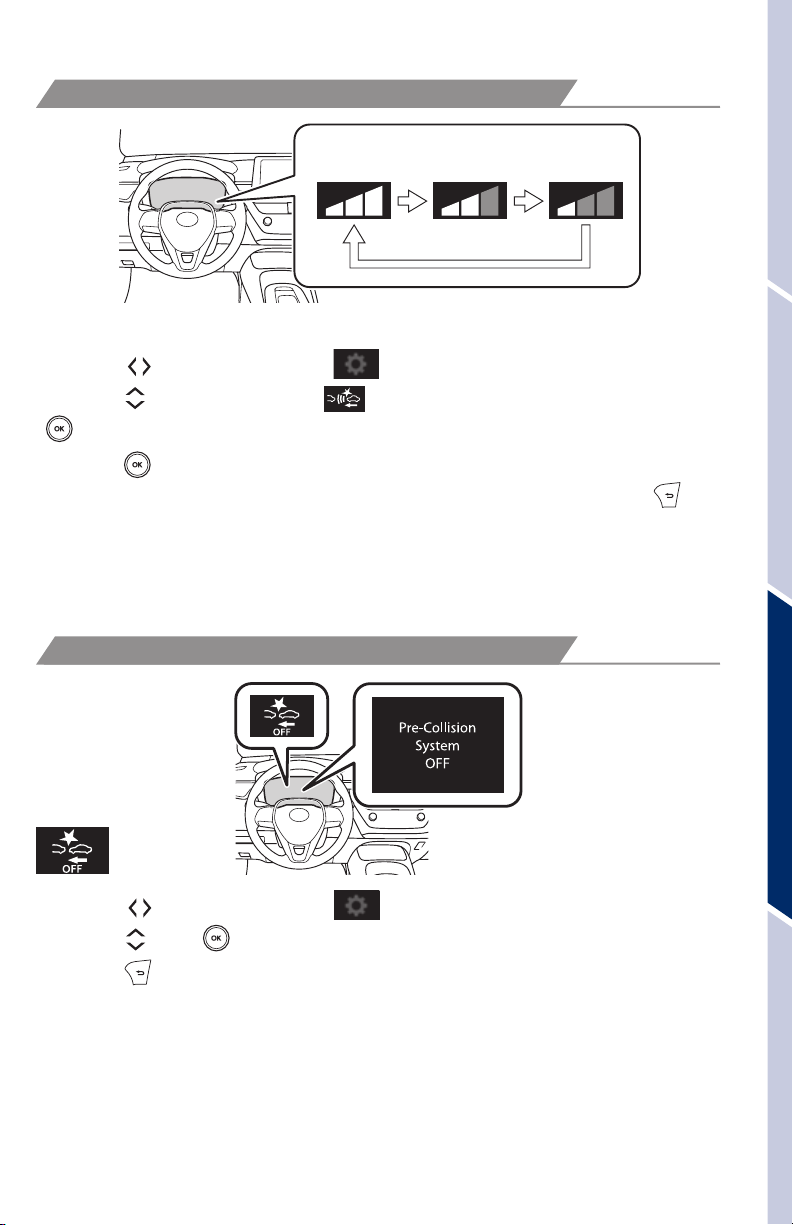
CHANGING PRE-COLLISION ALERT TIMING
Far
Middle
(default)
Near
Each time the PCS switch is pressed, the response to the PCS alert timing changes.
(1) Press “ ” switches and select from the Multi-Information Display (MID).
(2) Press “
”. The setting screen is displayed.
“
(3) Press “
response to the PCS alert timing changes as shown above. You can press “
” switches and select from the MID and then press
” each time to change the setting. Each time it is pressed, the
” to
go back to the menu.
Note: PCS is enabled each time the engine switch is turned to Ignition On.
The system can be disabled/enabled and the alert timing of the system can be
changed. (Alert timing only, brake operation remains the same).
DISABLING PRE-COLLISION SYSTEM (PCS)
OVERVIEWFEATURES & OPERATIONSTOYOTA SAFETY SENSESAFETY & EMERGENCY FEATURES
(1) Press “
(2) Press “
(3) Press “
” switches and select from the Multi-Information Display (MID).
” and “ ” switches to change the setting.
” to go back to the menu.
Note: The system is enabled each time the power switch is turned to ON
mode.
Refer to a Toyota Owner’s Manual for additional information on PCS operation,
settings adjustments, limitations, and precautions before attempting to use it.
27
Page 30
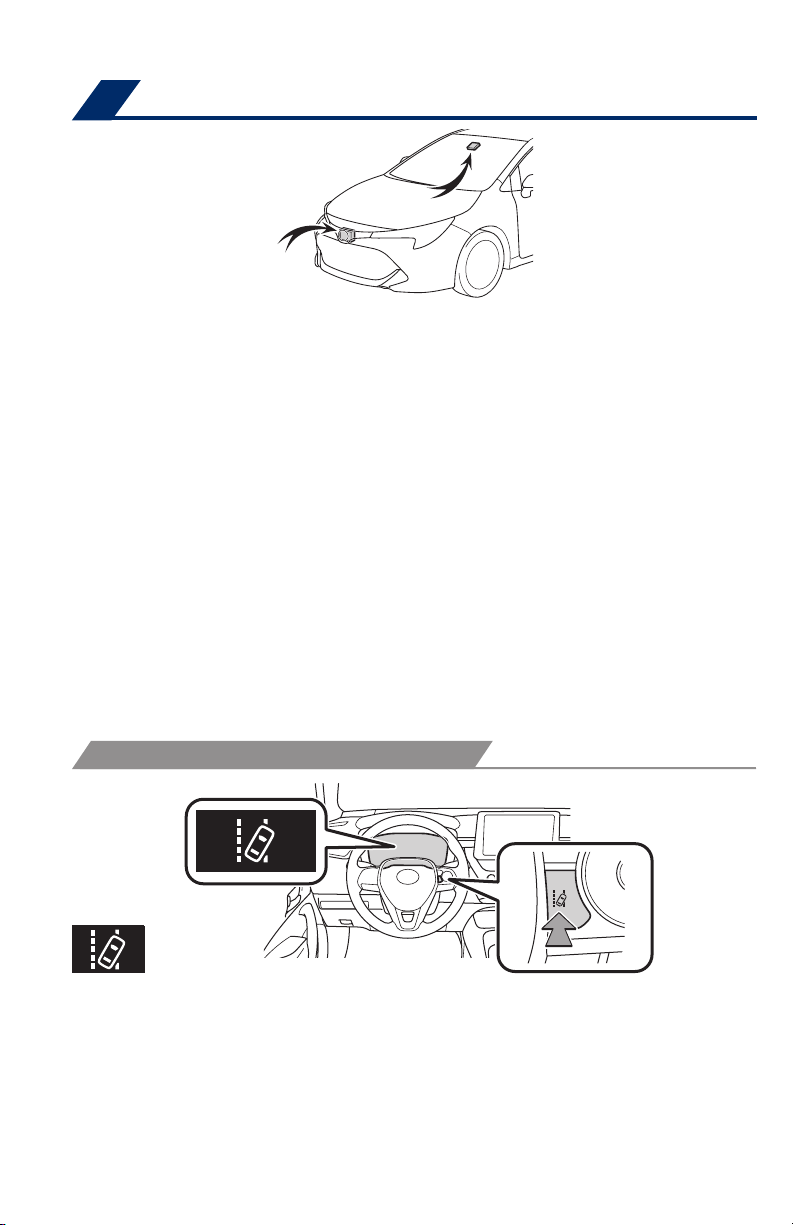
TOYOTA SAFETY SENSE
™
Lane Departure Alert with Steering Assist (LDA w/SA)*
* Manual transmission
LDA in TSS uses an in-vehicle camera designed to detect visible white and yellow
lane markers or road edge in front of the vehicle and the vehicle’s position on the
road. If the system determines that the vehicle is starting to unintentionally deviate
from its lane, the system alerts the driver with an audio and visual alert. When the
alerts occur, the driver must check the surrounding road situation and carefully
operate the steering wheel to move the vehicle back to the center part of their lane.
LDA is designed to function at speeds of approximately 32 mph (50 km/h) or higher
on relatively straight roadways.
In addition to the alert function, LDA w/SA also features a steering assist
function. When enabled, if the system determines that the vehicle is on a path to
unintentionally depart from its lane, the system may provide small corrective steering
inputs to the steering wheel for a short period of time to help keep the vehicle in its
lane.
If the vehicle repeatedly deviates from the lane, the vehicle drifts within the lane due
to inattention, or the driver abruptly operates the steering wheel after an inattentive
period, when enabled, the vehicle sway warning function alerts the driver with an
audio and visual alert, urging them to take a break.
TURNING THE LDA SYSTEM ON/OFF
Press the LDA switch to turn the LDA system on. Depress again to turn it off.
Note: Operation of the LDA system and setting adjustments continues in the
same condition regardless of Ignition cycle until changed by the driver or the
system is reset.
Refer to a Toyota Owner’s Manual for additional information on LDA operation,
settings adjustments, limitations, and precautions before attempting to use it.
28
Page 31
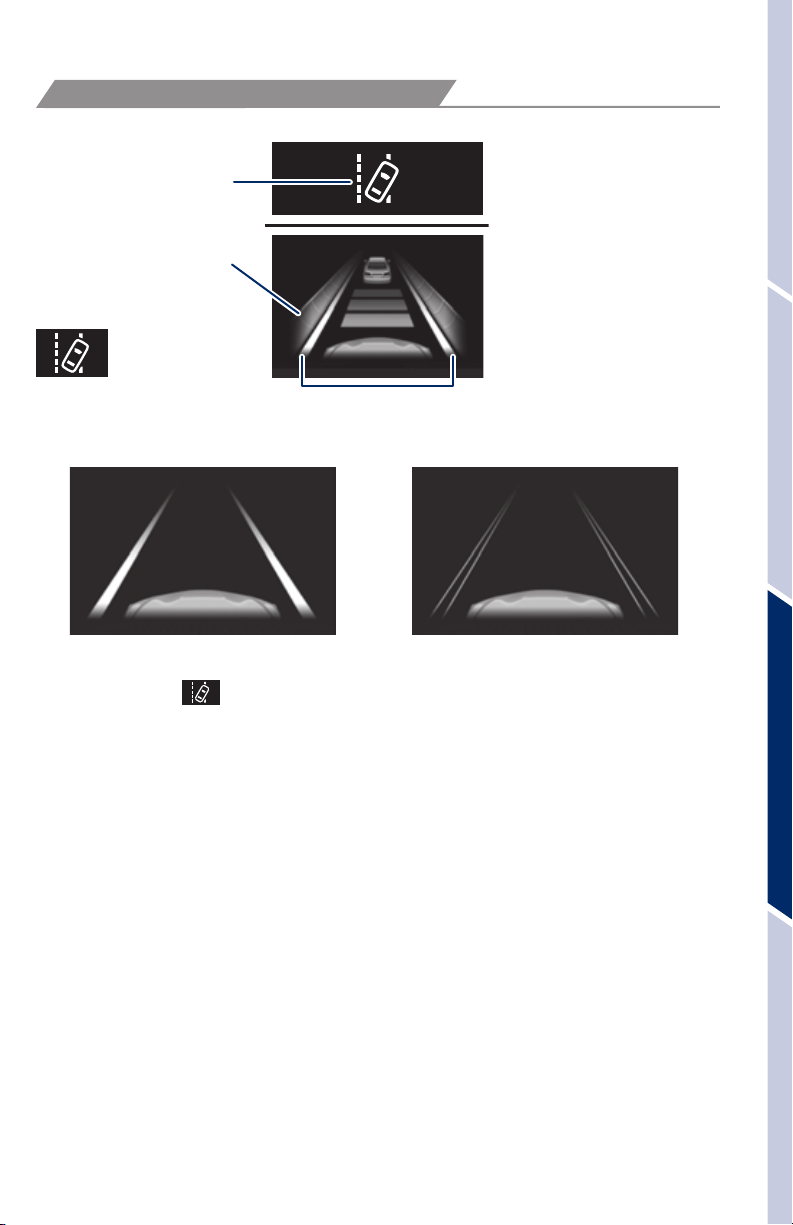
LANE DEPARTURE ALERT
LDA function display
LDA indicator
Operation display
of steering wheel
operation support
Lane marker
Lane Departure Alert (LDA) indicator flashes orange when operating.
(2)(1)
The LDA function displays when the Multi-Information Display (MID) is switched
to the driving assist system information screen.
(1) The system displays solid white lines on the LDA indicator when visible lane
markers on the road are detected. A side flashes orange to alert the driver when the
vehicle deviates from its lane.
(2) The system displays outlines on the LDA indicator when lane markers on the road
are not detected or the function is temporarily cancelled.
OVERVIEWFEATURES & OPERATIONSTOYOTA SAFETY SENSESAFETY & EMERGENCY FEATURES
Note: When operation conditions are no longer met, a function may be
temporarily canceled. However, when the operation conditions are met again,
operation of the function is automatically restored. For example, LDA may not
function on the side(s) where white/yellow lines are not detectable.
Refer to a Toyota Owner’s Manual for additional information on LDA operation,
settings adjustments, limitations, and precautions before attempting to use it.
29
Page 32
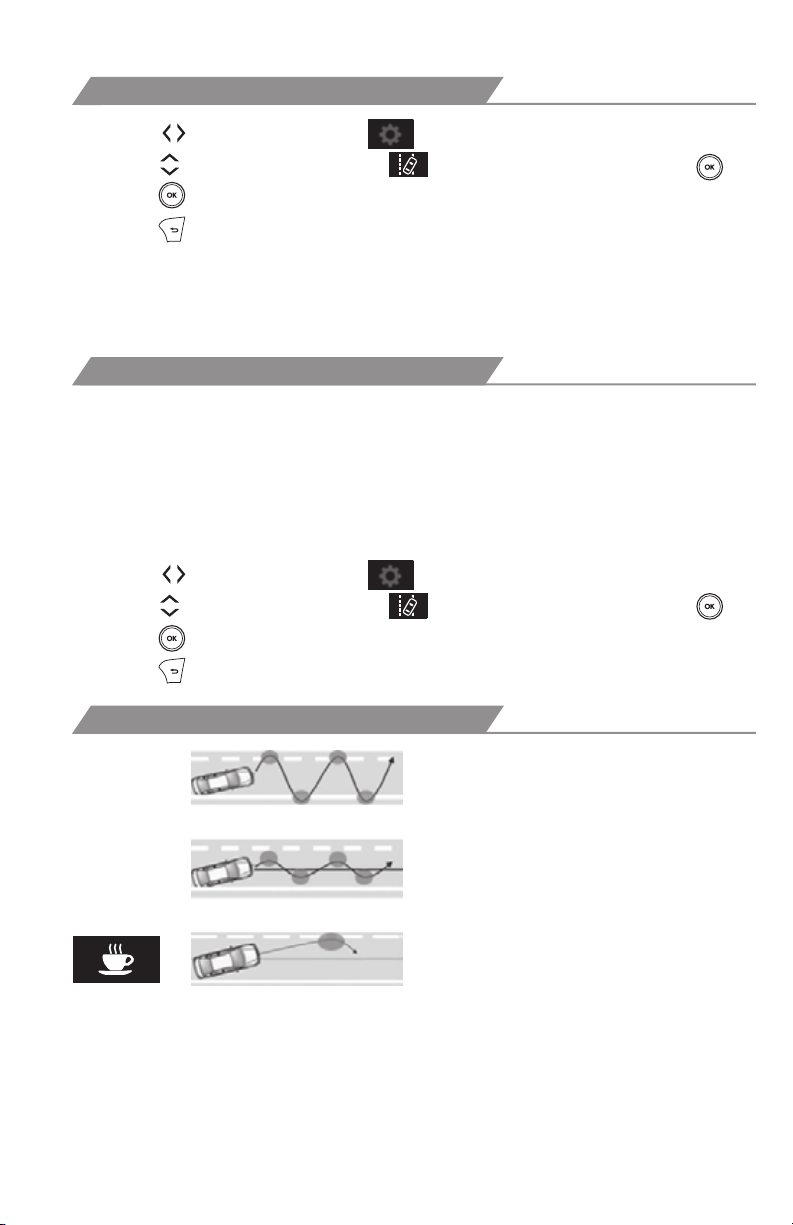
TOYOTA SAFETY SENSE
DISABLING STEERING ASSIST
™
(1) Press “
(2) Press “
(3) Press “
(4) Press “
” switches and select from the Multi-Information Display (MID).
” switches and select the setting function and then press “ .”
” each time to change the setting.
” to go back to the menu.
Note: Operation of the LDA system and setting adjustments continues in the
same condition regardless of Ignition cycle until changed by the driver or the
system is reset.
ADJUSTING LDA ALERT SENSITIVITY
The driver can adjust the sensitivity of the LDA (warning) function from the
Multi-Information Display (MID) customization screen.
High - Is designed to warn approximately before the front
tire crosses the lane marker.
Normal - Is designed to warn approximately when the front
tire crosses the lane marker.
(1) Press “
(2) Press “
(3) Press “
(4) Press “
” switches and select from the Multi-Information Display (MID).
” switches and select the setting function and then press “ .”
” each time to change the setting.
” to go back to the menu.
SWAY WARNING SYSTEM
Continuous lane deviations from
swaying.
Gentle swaying from driver’s
inattentiveness.
Acute steering wheel operation after the
number of operations decrease due to driver’s
inattentiveness.
SWS is a function of LDA and is designed to detect swaying based on the vehicle
location in the lane and the driver’s steering wheel operation. To help prevent
swaying, the system alerts the driver using a buzzer sound and a warning displays
in the MID.
30
Page 33
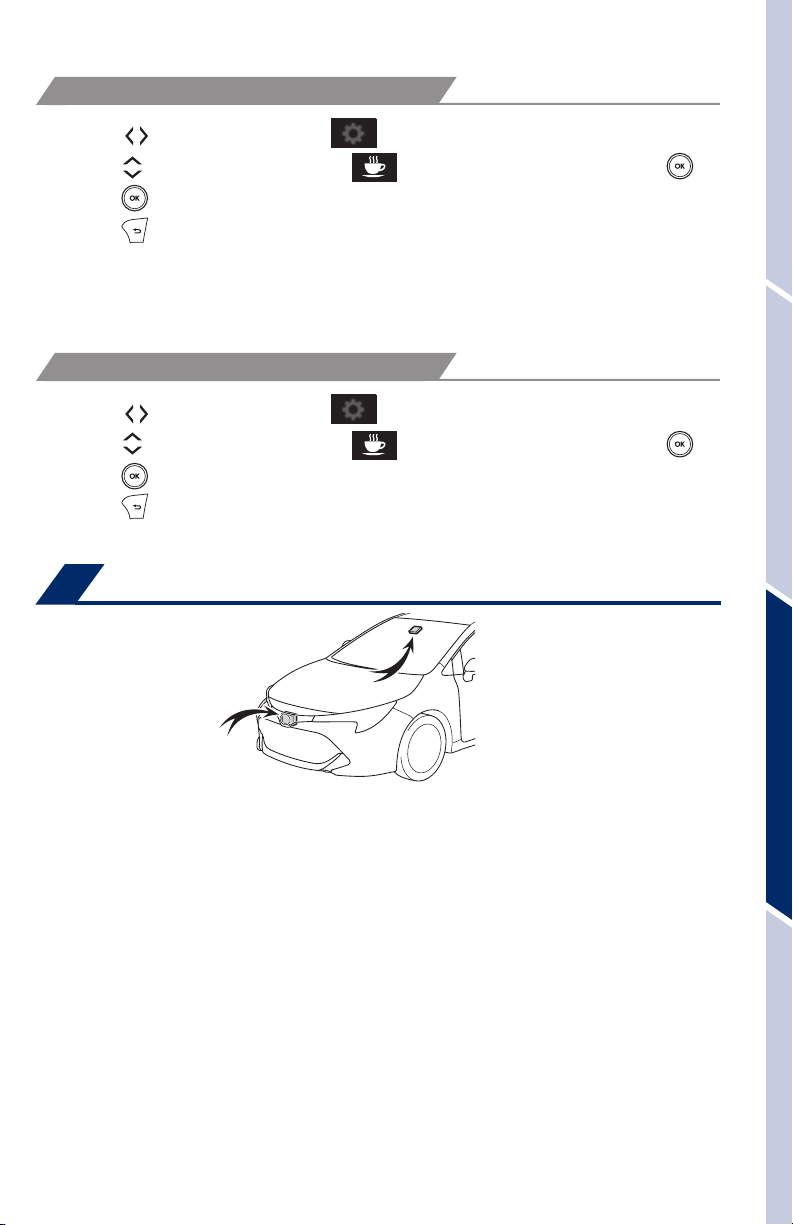
DISABLING LDA SWAY WARNING ALERT
(1) Press “
(2) Press “
(3) Press “
(4) Press “
Note: Operation of the LDA system and setting adjustments continues in the
same condition regardless of Ignition cycle until changed by the driver or the
system is reset.
ADJUSTING SWAY ALERT SENSITIVITY
(1) Press “ ” switches and select from the Multi-Information Display (MID).
(2) Press “
(3) Press “
(4) Press “
” switches and select from the Multi-Information Display (MID).
” switches and select the setting function and then press “ .”
” each time to change the setting.
” to go back to the menu.
” switches and select the setting function and then press “ .”
” each time to change the setting.
” to go back to the menu.
Lane Tracing Assist (LTA)*
OVERVIEWFEATURES & OPERATIONSTOYOTA SAFETY SENSESAFETY & EMERGENCY FEATURES
* Continuously variable transmission
The LTA system is comprised of the lane departure alert function, the steering
assist function, the lane centering function, and the vehicle sway warning function.
The in-vehicle camera detects the visible white and yellow lane markers in front the
vehicle and the vehicle’s position on the road. If the vehicle starts to unintentionally
deviate from its lane when the LTA system is on, the lane departure alert function
alerts the driver with an audio and visual alert. When the steering assist function
is enabled, if the system determines that the vehicle is on a path to unintentionally
depart from its lane, the system may provide small corrective steering inputs to
the steering wheel for a short period of time to help keep the vehicle in its lane.
Additionally, when enabled, the lane centering function will automatically provide
assistance to help keep the vehicle in the center of the lane when Full-Speed DRCC
is set. If the vehicle repeatedly deviates from the lane, the vehicle drifts within the
lane due to inattention, or the driver abruptly operates the steering wheel after an
inattentive period, when enabled, the vehicle sway warning function alerts the driver
with an audio and visual alert, urging them to take a break.
31
Page 34
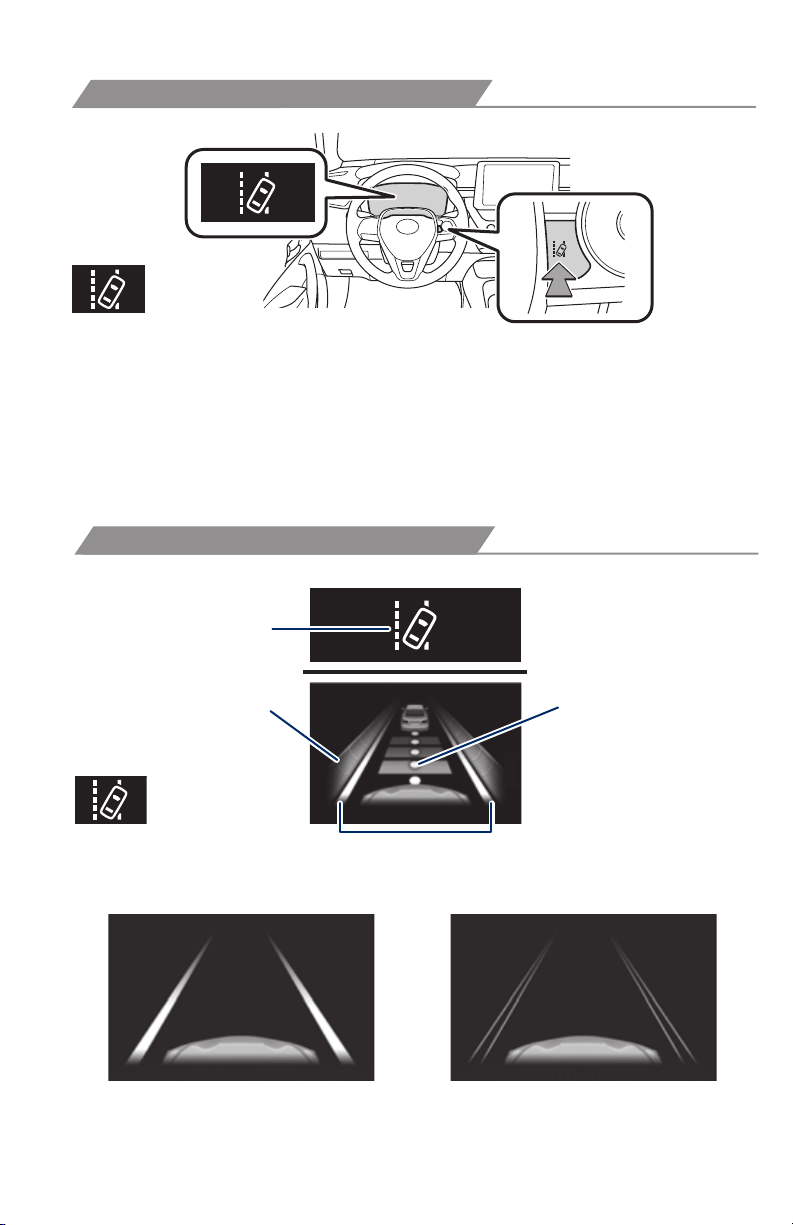
TOYOTA SAFETY SENSE
™
TURNING THE LTA SYSTEM ON/OFF
Press the LTA switch to turn the LTA system on. Depress again to turn it off.
Note: Operation of the LTA system and setting adjustments continues in the
same condition regardless of Ignition cycle until changed by the driver or the
system is reset.
Refer to a Toyota Owner’s Manual for additional information on LTA operation,
settings adjustments, limitations, and precautions before attempting to use it.
LANE TRACING ASSIST
LTA function display
LTA indicator
Operation display
of steering wheel
operation support
Lane marker
Follow-up
cruising display
Lane Tracing Assist (LTA) indicator flashes orange when operating.
(2)(1)
32
Page 35
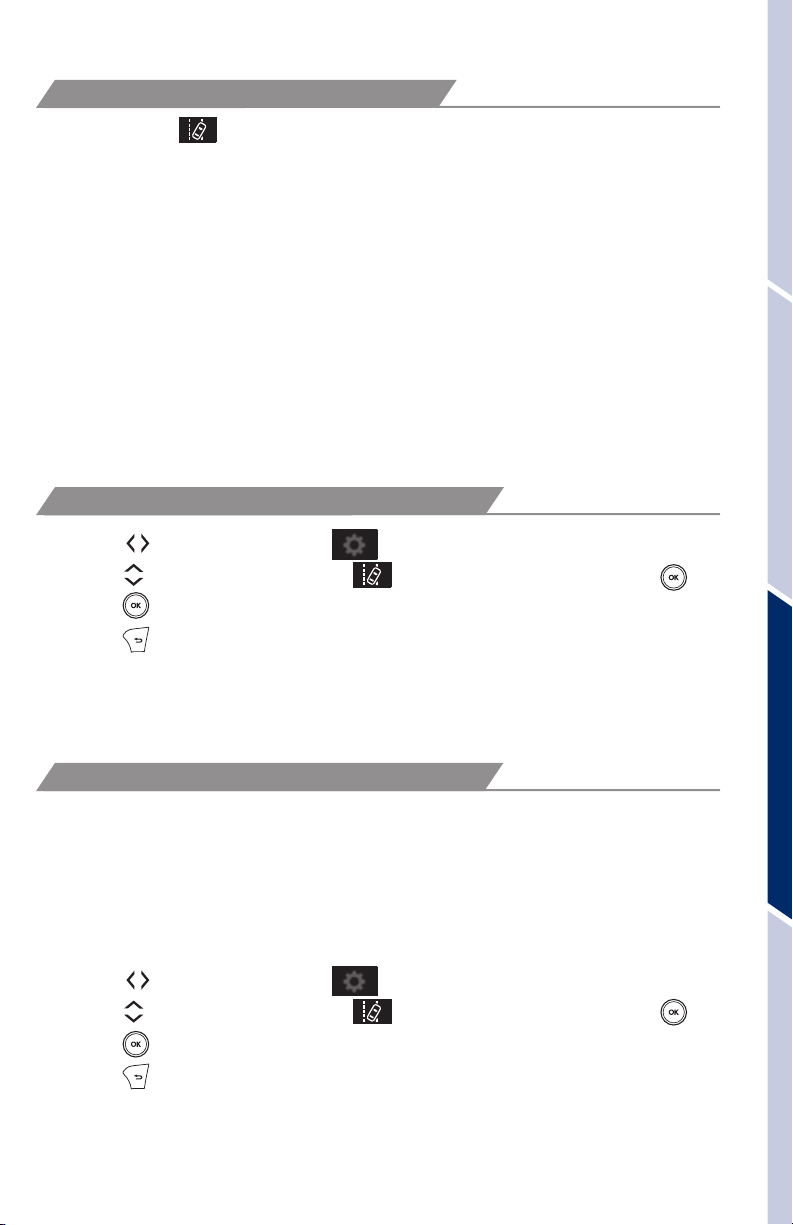
LANE TRACING ASSIST (CONTINUED)
The LTA function displays when the Multi-Information Display (MID) is switched
to the driving assist system information screen.
(1) The system displays solid white lines on the LTA indicator when visible lane
markers on the road are detected. A side flashes orange to alert the driver when the
vehicle deviates from its lane.
(2) The system displays outlines on the LTA indicator when lane markers on the road
are not detected or the function is temporarily cancelled.
Note: When operation conditions are no longer met, a function may be
temporarily canceled. However, when the operation conditions are met again,
operation of the function is automatically restored. For example, LTA may not
function on the side(s) where white/yellow lines are not detectable.
Refer to a Toyota Owner’s Manual for additional information on LTA operation,
settings adjustments, limitations, and precautions before attempting to use it.
DISABLING STEERING ASSIST
OVERVIEWFEATURES & OPERATIONSTOYOTA SAFETY SENSESAFETY & EMERGENCY FEATURES
(1) Press “
(2) Press “
(3) Press “
(4) Press “
” switches and select from the Multi-Information Display (MID).
” switches and select the setting function and then press “ .”
” each time to change the setting.
” to go back to the menu.
Note: Operation of the LTA system and setting adjustments continues in the
same condition regardless of Ignition cycle until changed by the driver or the
system is reset.
ADJUSTING LTA ALERT SENSITIVITY
The driver can adjust the sensitivity of the LTA (warning) function from the
Multi-Information Display (MID) customization screen.
High - Is designed to warn approximately before the front
tire crosses the lane marker.
Normal - Is designed to warn approximately when the front
tire crosses the lane marker.
(1) Press “
(2) Press “
(3) Press “
(4) Press “
” switches and select from the Multi-Information Display (MID).
” switches and select the setting function and then press “ .”
” each time to change the setting.
” to go back to the menu.
33
Page 36
TOYOTA SAFETY SENSE
™
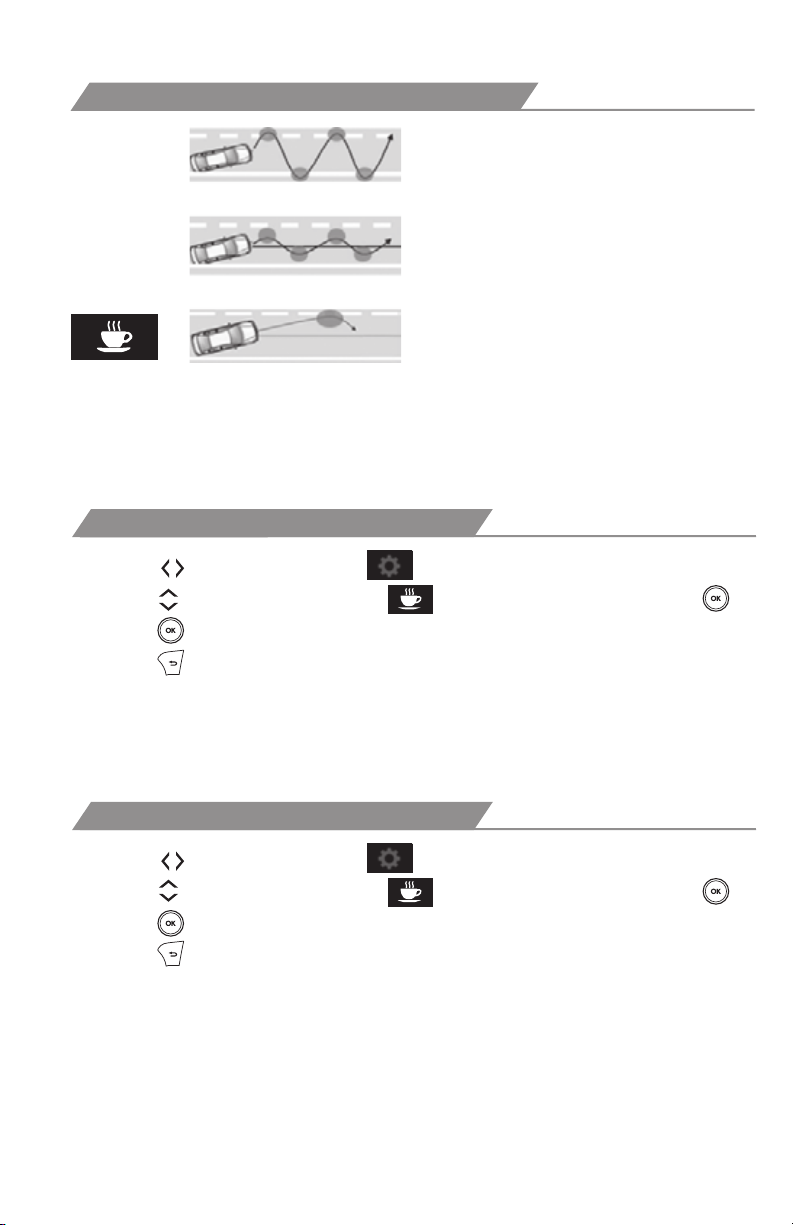
SWAY WARNING SYSTEM
Continuous lane deviations from
swaying.
Gentle swaying from driver’s
inattentiveness.
Acute steering wheel operation after the
number of operations decrease due to driver’s
inattentiveness.
SWS is a function of LTA and is designed to detect swaying based on the vehicle
location in the lane and the driver’s steering wheel operation. To help prevent
swaying, the system alerts the driver using a buzzer sound and a warning displays
in the MID.
DISABLING LTA SWAY WARNING ALERT
(1) Press “
(2) Press “
(3) Press “
(4) Press “
” switches and select from the Multi-Information Display (MID).
” switches and select the setting function and then press “ .”
” each time to change the setting.
” to go back to the menu.
Note: Operation of the LTA system and setting adjustments continues in the
same condition regardless of Ignition cycle until changed by the driver or the
system is reset.
ADJUSTING SWAY ALERT SENSITIVITY
(1) Press “ ” switches and select from the Multi-Information Display (MID).
(2) Press “
(3) Press “
(4) Press “
” switches and select the setting function and then press “ .”
” each time to change the setting.
” to go back to the menu.
34
Page 37
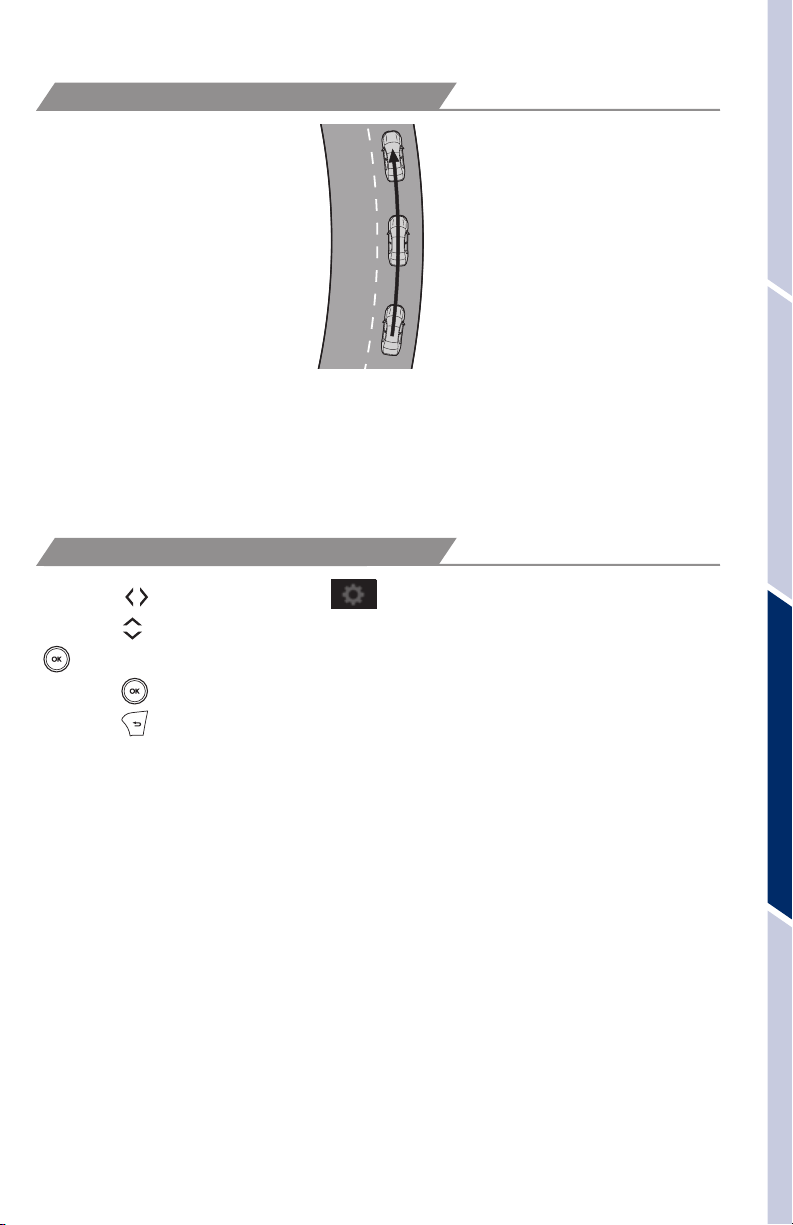
LANE CENTERING
The lane centering function is linked with Full-Speed Range Dynamic Radar Cruise
Control (DRCC) and provides the required assistance by operating the steering
wheel to keep the vehicle in its current ane.
When dynamic radar cruise control with full-speed range is not operating, the lane
centering function does not operate.
DISABLING LANE CENTERING FUNCTION
(1) Press “ ” switches and select from the Multi-Information Display (MID).
(2) Press “
.”
“
(3) Press “
(4) Press “
” switches and select the “Lane center” setting function and then press
” each time to change the setting.
” to go back to the menu.
OVERVIEWFEATURES & OPERATIONSTOYOTA SAFETY SENSESAFETY & EMERGENCY FEATURES
Note: Operation of the LTA system and setting adjustments continues in the
same condition regardless of Ignition cycle until changed by the driver or the
system is reset.
35
Page 38
TOYOTA SAFETY SENSE
™
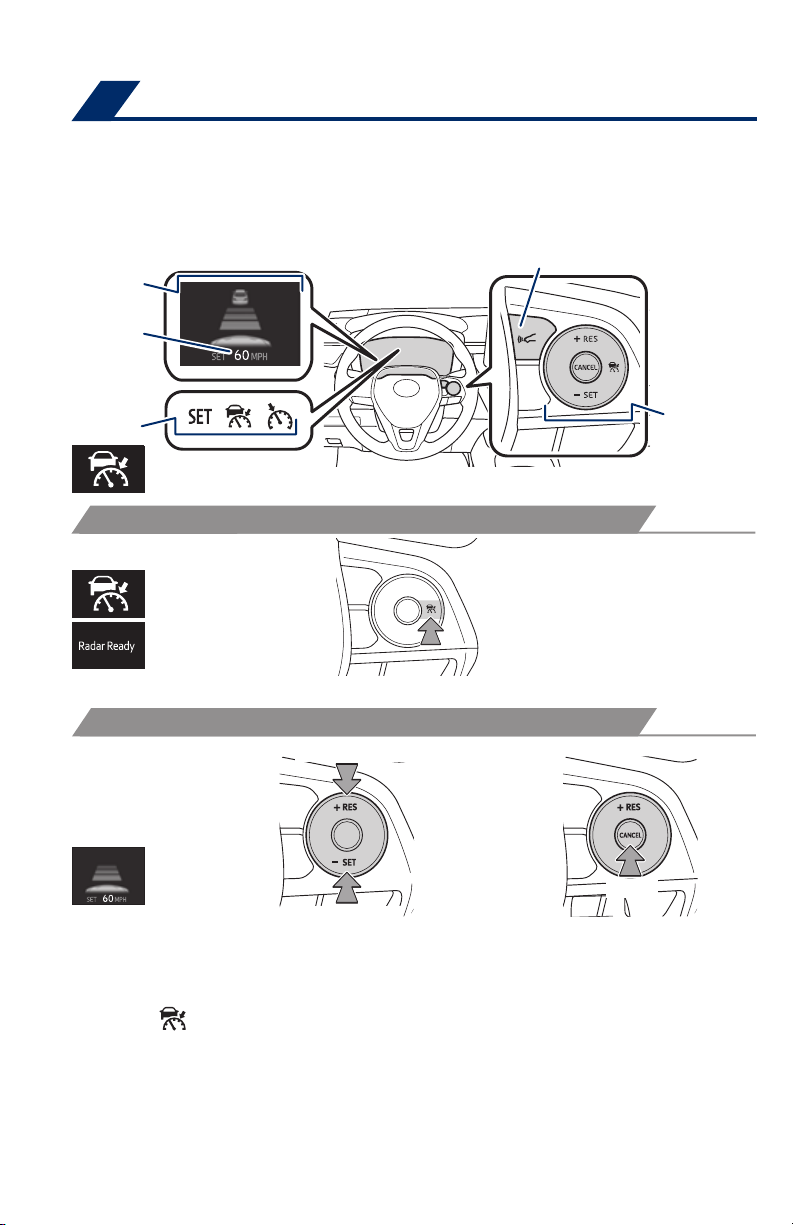
Dynamic Radar Cruise Control (DRCC)* or Full-Speed Range DRCC**
DRCC helps maintain a pre-set distance to a preceding vehicle when the preceding
vehicle is traveling at a lower speed. This mode is always selected first when the
cruise control button is depressed. Constant speed cruise control mode is also
available. Full-Speed Range DRCC is designed to function at speeds between 0 to
approximately 110 MPH and is intended for highway use.
Display
Set speed
Dynamic Radar Cruise Control
vehicle-to-vehicle distance button
Indicators
* Manual transmission, ** Continuously variable transmission
Cruise control
switch
TURNING SYSTEM ON/OFF
(1)
Push once: On
Push twice: Off
Refer to page 38 for switching to Constant Speed (Cruise) Control Mode.
ADJUSTING SET SPEED
(2)
Increase speed/Resume
Decrease speed
1
(3)
2
Cancel
Vehicle will cruise at a set speed, decelerate to maintain selected distance from a
slower vehicle traveling in front and accelerate back up to the selected speed if the
vehicle in front changes lanes or speeds up.
(1) Push “
” to turn DRCC system ON.
(2) Use the steering wheel controls to increase speed by pushing “+RES” or
decrease the speed by pushing “-SET”. Push and hold to make a large
adjustment or push each time to make fine adjustments (1 mph [1.6 km/h] or 1
km/h [0.6 mph] increments).
(3) Push “Cancel” to cancel the adjusting speed operation.
1
The set speed may be resumed once vehicle speed exceeds 25 mph.
2
The set speed may also be cancelled by depressing the brake pedal.
36
Page 39
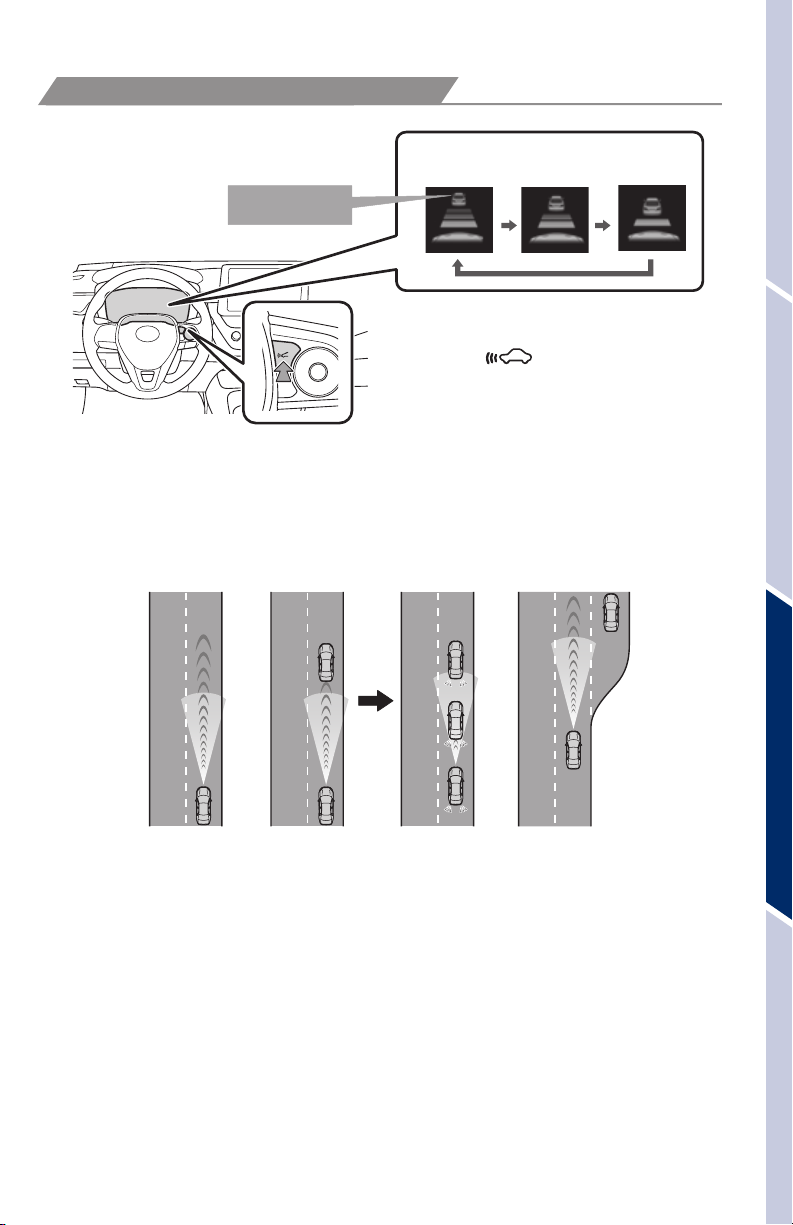
ADJUSTING DISTANCE
Preceding vehicle
mark
LONG
(default setting)
To change the vehicle-to-vehicle distance
Push the “ ” button to cycle
through the settings, which will
change progressively.
MIDDLE
SHORT
This mode employs a radar sensor to detect the presence of a preceding vehicle
up to approximately 328 ft (100m) ahead, determines the current vehicle-to-vehicle
following distance and operates to maintain a preset following distance from the
vehicle ahead. These distances vary based on vehicle speed.
Note: Vehicle-to-vehicle distance will close in when traveling on long downhill
slopes.
(1) (2) (3)
OVERVIEWFEATURES & OPERATIONSTOYOTA SAFETY SENSESAFETY & EMERGENCY FEATURES
(1) Constant speed cruising when there are no vehicles ahead
The vehicle travels at the speed set by the driver. The desired vehicle-to-
vehicle distance can also be set by operating the vehicle-to-vehicle distance
control.
(2) Deceleration cruising and follow-up cruising when a preceding vehicle
driving slower than the set speed appears
When a vehicle is detected running ahead of you, the system automatically
decelerates your vehicle. When a greater reduction in vehicle speed is
necessary, the system applies the brakes (the brake lights will come on at this
time). The system will respond to changes in the speed of the vehicle ahead
in order to maintain the vehicle-to-vehicle distance set by the driver. A warning
tone warns you when the system cannot decelerate sufficiently to prevent your
vehicle from closing in on the vehicle ahead.
37
Page 40
TOYOTA SAFETY SENSE
ADJUSTING DISTANCE (CONTINUED)
(3) Acceleration when there are no longer any preceding vehicles driving
slower than the set speed
The system accelerates until the set speed is reached. The system then
returns to constant speed cruising.
Note: When your vehicle is too close to a vehicle ahead, and sufficient automatic
deceleration via the cruise control is not possible, the display will flash and the
buzzer will sound to alert the driver. An example of this would be if another driver
cuts in front of you while you are following a vehicle. Depress the brake pedal to
ensure an appropriate vehicle-to-vehicle distance.
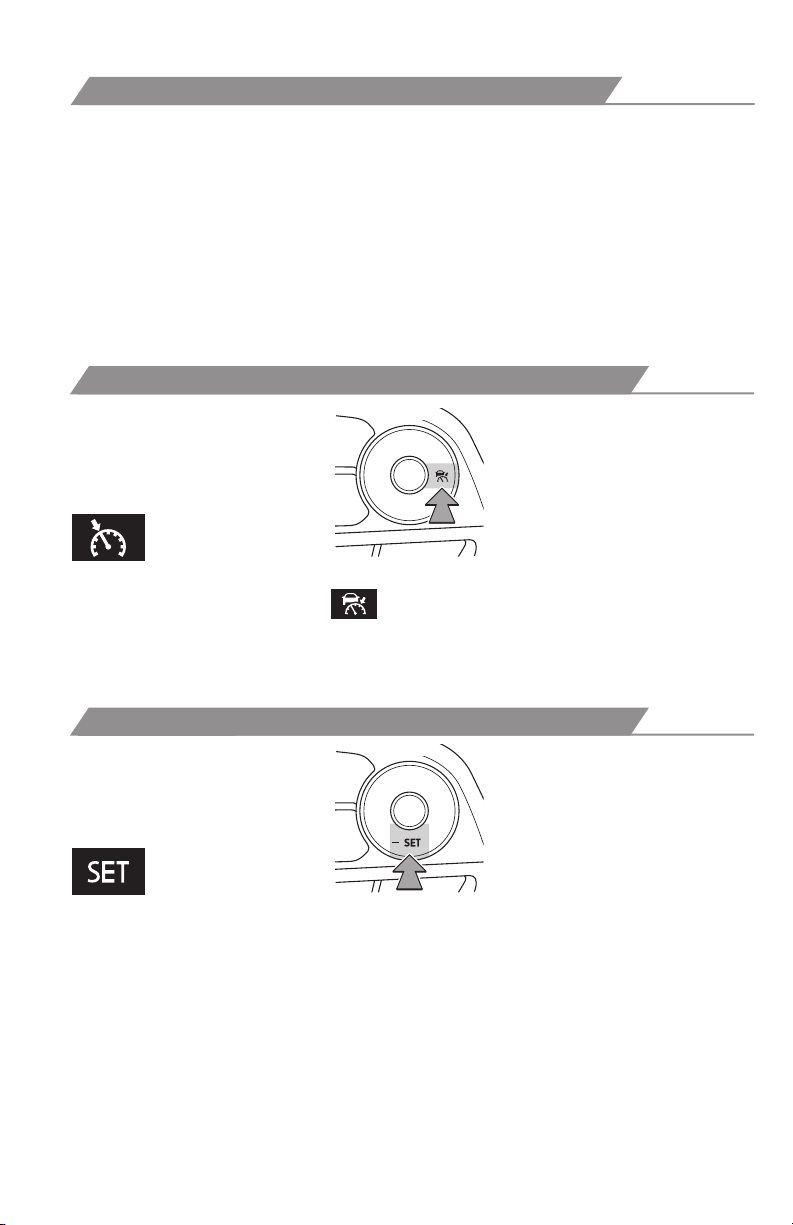
SWITCHING TO CONSTANT SPEED (CRUISE) CONTROL MODE
If you are already using DRCC “ ”, push ON-OFF button to turn the system off
first, then push and hold ON-OFF button for at least 1.5 seconds to switch.
Note: When the engine is turned off, it will automatically default to DRCC.
™
1.5 seconds
SETTING CONSTANT SPEED (CRUISE) CONTROL
Set
To adjust speed or cancel, see steps (2) and (3) of ADJUSTING SPEED on
page 36.
Refer to a Toyota Owner’s Manual for additional information on DRCC operation,
settings adjustments, limitations, and precautions before attempting to use it.
38
Page 41
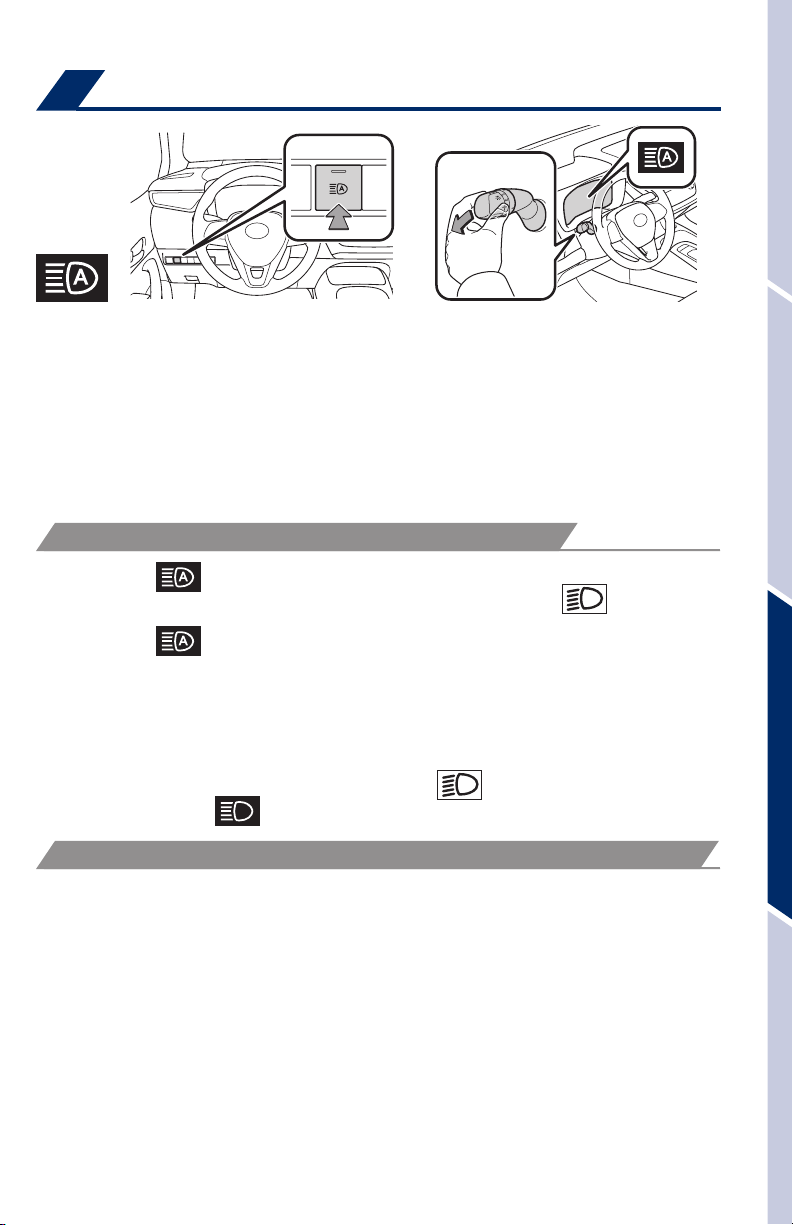
Automatic High Beams (AHB)
(1)
AHB is a safety system designed to help drivers see more of what’s ahead at nighttime
without and reduce glare for oncoming drivers, AHB uses an in-vehicle camera to
help detect the headlights of oncoming vehicles and tail lights of preceding vehicles,
then automatically switches between high and low beams as appropriate to provide
the most light possible and enhance forward visibility. By using high beams more
frequently, the system may allow earlier detection of pedestrians and obstacles.
Refer to the Toyota Owner’s Manual for additional information on AHB operation,
settings adjustments, limitations, and precautions before attempting to use it.
ACTIVATING THE AHB SYSTEM
(1) Press the “
(2) Push lever away from you with the headlight switch is in the “
position.
(3) Press the “
The AHB indicator will come on when the headlights are turned on automatically
to indicate that the system is active.
Note: Pull the lever back toward you or press the AHB switch to turn the AHB
system off.
The AHB indicator will turn off. To turn switch to “
high beam indicator “
” switch.
” switch.
” turns on.
(2)
” or “AUTO”
” position and the manual
OVERVIEWFEATURES & OPERATIONSTOYOTA SAFETY SENSESAFETY & EMERGENCY FEATURES
CONDITIONS WHERE AHB WILL TURN ON/OFF AUTOMATICALLY
When all of these conditions are met, high beams will be automatically turned on
(after approximately 1 second):
• Vehicle speed is above approximately 21 mph (34 km/h).
• The area ahead of the vehicle is dark.
• There are no oncoming or preceding vehicles with headlights or tail lights turned
on.
• There are few streetlights on the road ahead.
If any of these conditions occur, high beams will be automatically turned off:
• Vehicle speed drops below approximately 17 mph (27 km/h).
• The area ahead of the vehicle is not dark.
• Oncoming or preceding vehicles have headlights or tail lights turned on.
• There are many streetlights on the road ahead.
39
Page 42
TOYOTA SAFETY SENSE
™
Road Sign Assist (RSA)
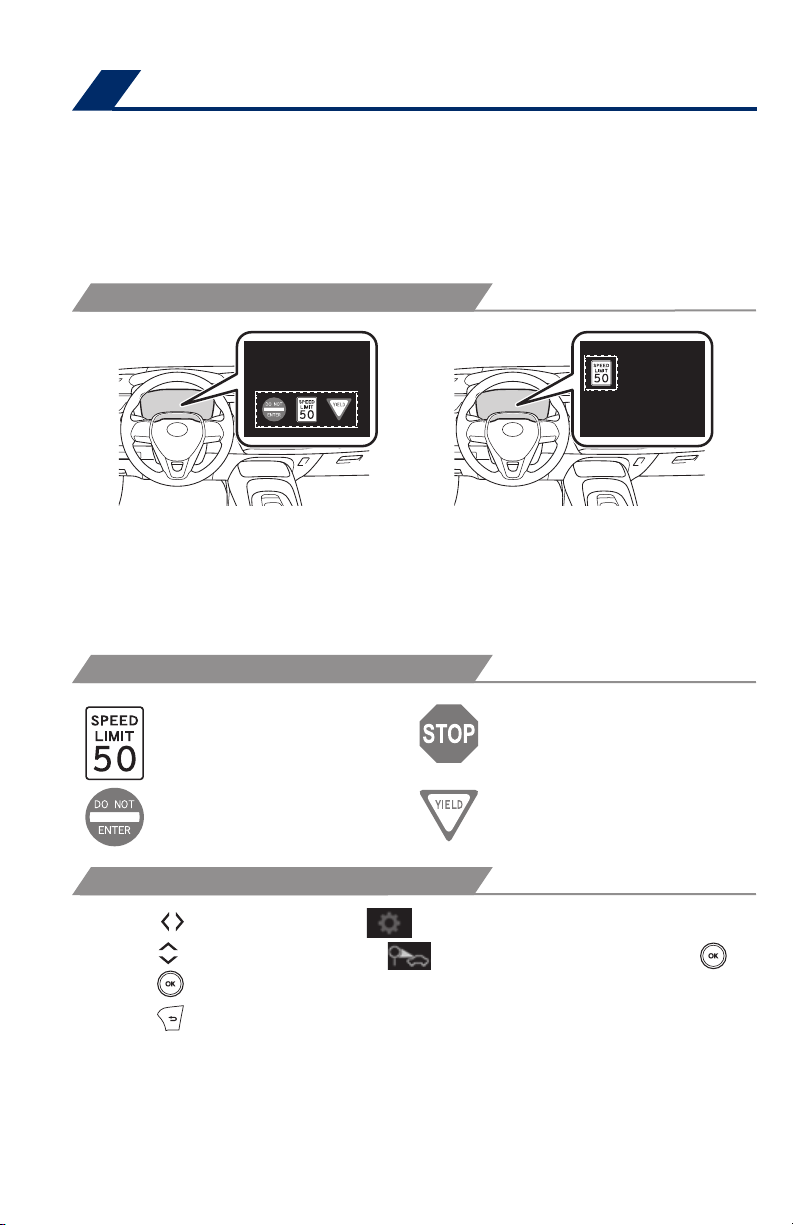
Road Sign Assist is designed to help ensure drivers are kept informed. The RSA
system recognizes specific road signs using a forward-facing intelligent camera to
provide information to the driver via a Multi-information Display (MID). If the system
judges that the vehicle is being driven over the speed limit, or performing actions
prohibited by other support types of road signs. It alerts the driver using a warning
display and may sound a warning buzzer.
RSA DISPAY
When the driving support system
information is selected, a maximum of
3 signs can be displayed.
SUPPORTED TYPES OF ROAD SIGNS
Speed limit Stop
Do Not Enter Yield
SETTING RSA
(1) Press “
(2) Press “
(3) Press “
(4) Press “
Note: If the engine switch was last turned off while a speed limit sign was
displayed on the multi-information display, the same sign displays again when
the engine switch is turned to ON.
” switches and select from the Multi-Information Display (MID).
” switches and select the setting function and then press “ .”
” each time to change the setting.
” to go back to the menu.
When a tab other than the driving
support system information is selected,
only a recognized speed limit sign or
do not enter sign (when notification is
necessary) will be displayed.
Refer to a Toyota Owner’s Manual for additional information on RSA operation,
settings adjustments, limitations, and precautions before attempting to use it.
40
Page 43
SAFETY & EMERGENCY FEATURES
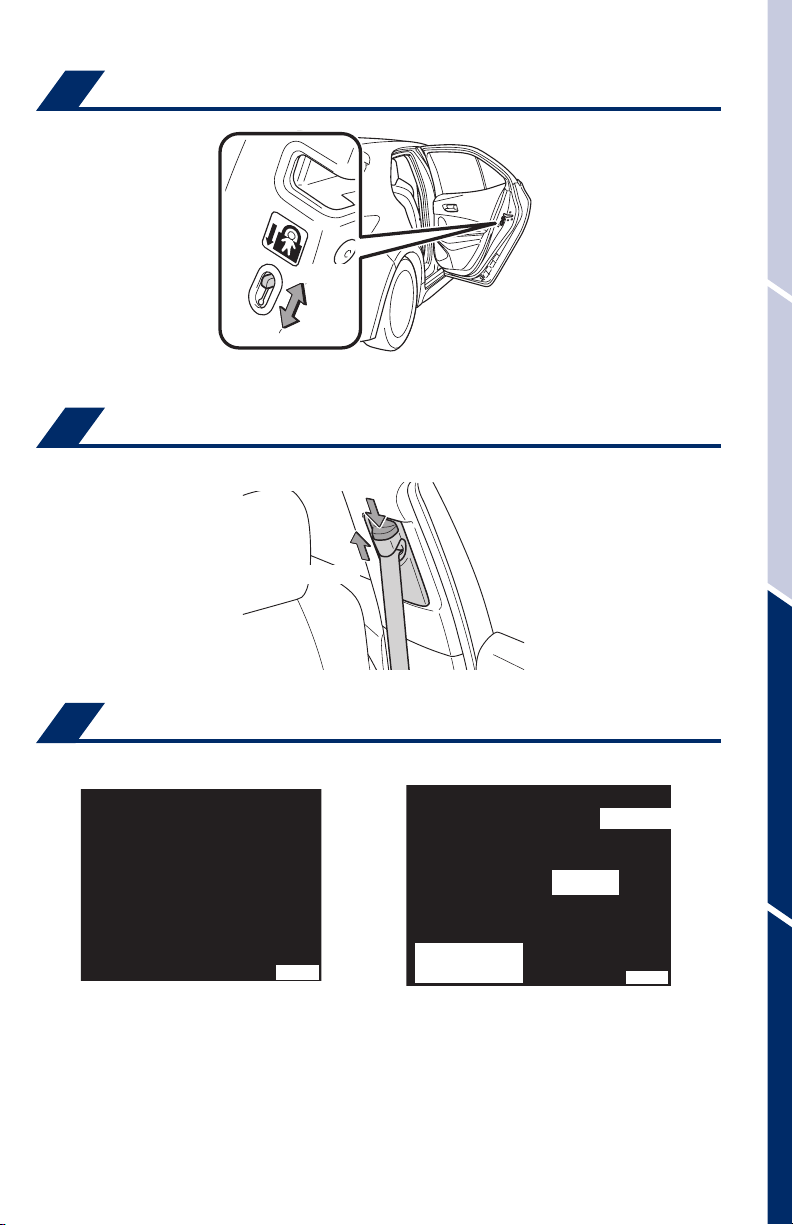
Rear door child safety locks
Unlock
Lock
Moving the lever downward will allow the door to be opened only from the outside.
Seat belts-Shoulder belt anchor
Push lock release to lower
Push up to raise
OVERVIEWFEATURES & OPERATIONSTOYOTA SAFETY SENSESAFETY & EMERGENCY FEATURES
Seat belts
Take up slack
Too high
Keep as low on
hips as possible
NOTE: If a passenger’s seat belt is fully extended, then retracted even slightly,
the Automatic locking retractor (ALR) will prevent it from being re-extended
beyond that point, unless fully retracted again. This feature is used to help
hold child restraint systems securely.
To find more information about seat belts, and how to install a child restraint
system, refer to the Owner’s Manual.
41
Page 44
SAFETY & EMERGENCY FEATURES
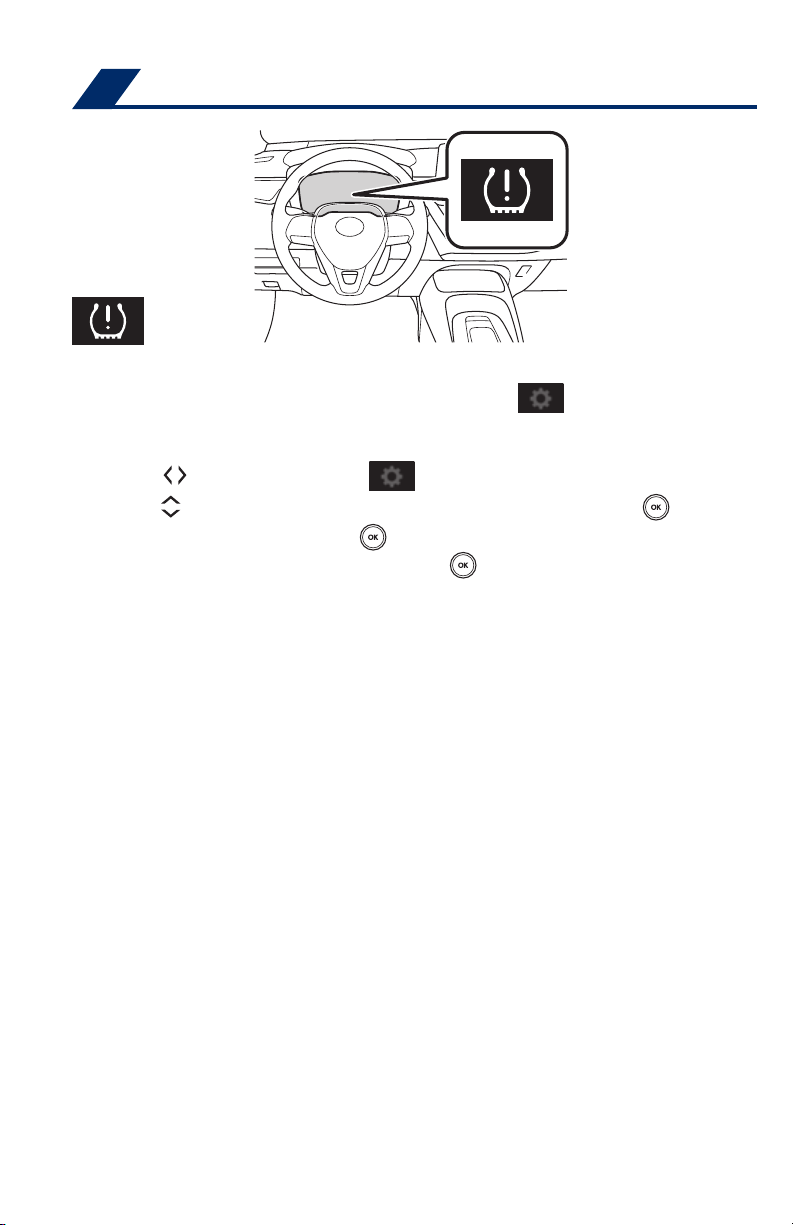
Tire Pressure Monitoring (warning) System (TPMS)
The tire pressure warning system can be selected on “ ” of the multiinformation display (MID).
System rest initialization
(1) Press “ ” switches and select from the Multi-Information Display (MID)..
(2) Press “
(3) Select “TPWS” and them push “
(3) Select “Set Pressure” then push and hold “
three times.
The tire pressure detected by the tire pressure warning system can
be displayed on the multi-information display (MID).
Refer to the load label on the door jamb or the Owner’s Manual for tire inflation
specifications.
” switches and select the “Vehicle Settings”, them push “ ”.
”.
” until the warning light blinks
If the tire pressure indicator flashes for more than 60 seconds and then remains on,
take the vehicle to your local Toyota dealer.
NOTE: The warning light may come on due to temperature changes or
changes in tire pressure from natural air leakage. If the system has not been
initialized recently, setting the tire pressures to factory specifications should
turn off the light.
42
Page 45
Safety Connect
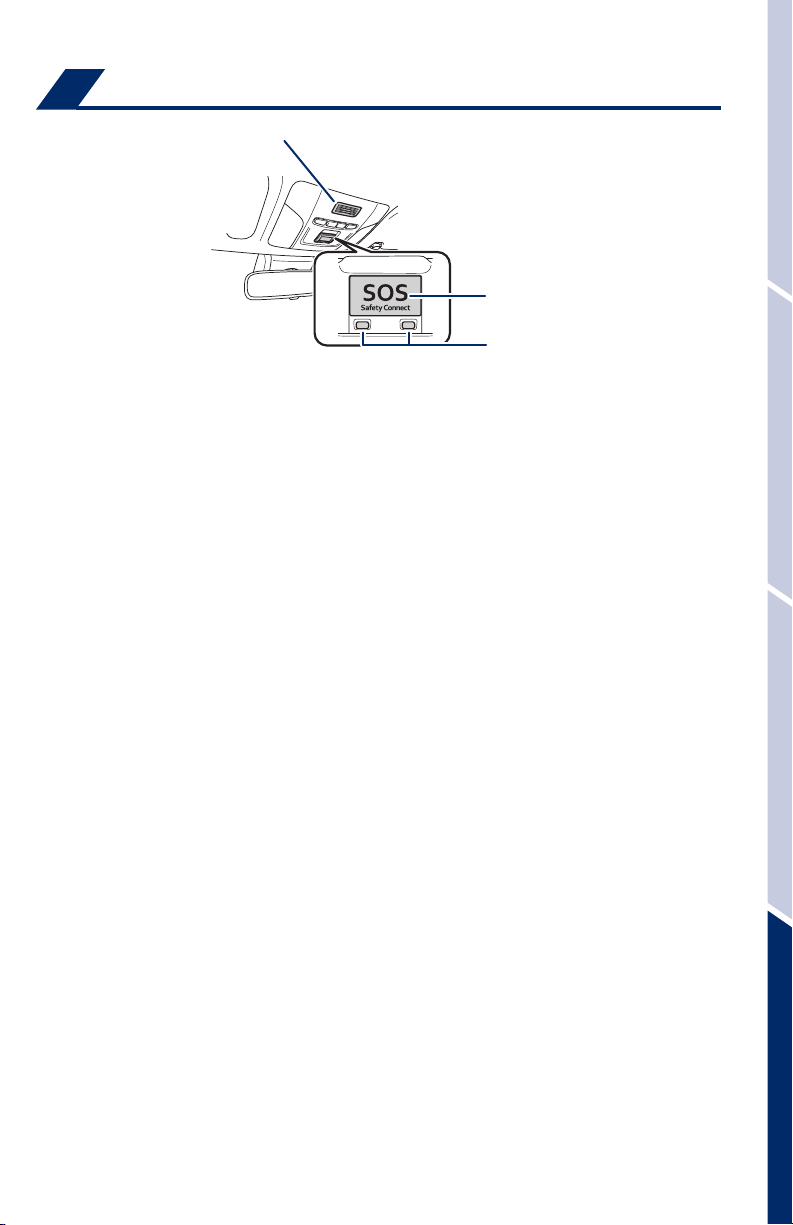
Safety Connect is a subscription-based telematics service that uses Global
Positioning System (GPS) data and embedded cellular technology to provide safety
and security features to subscribers. Safety Connect is supported by Toyota’s
designated response center, which operates 24 hours per day, 7 days per week.
Services for subscribers include:
• Automatic collision notification
• Stolen vehicle location
• Emergency assistance (“SOS” button)
• Enhanced roadside assistance
Contact your dealer for more information about Safety Connect.
For details, refer to the “Owner’s Manual” or visit www.Toyota.com/safety-connect.
(if equipped)
Microphone
“SOS” button
LED light indicators
OVERVIEWFEATURES & OPERATIONSTOYOTA SAFETY SENSESAFETY & EMERGENCY FEATURES
43
Page 46
SAFETY & EMERGENCY FEATURES
Spare tire & tools
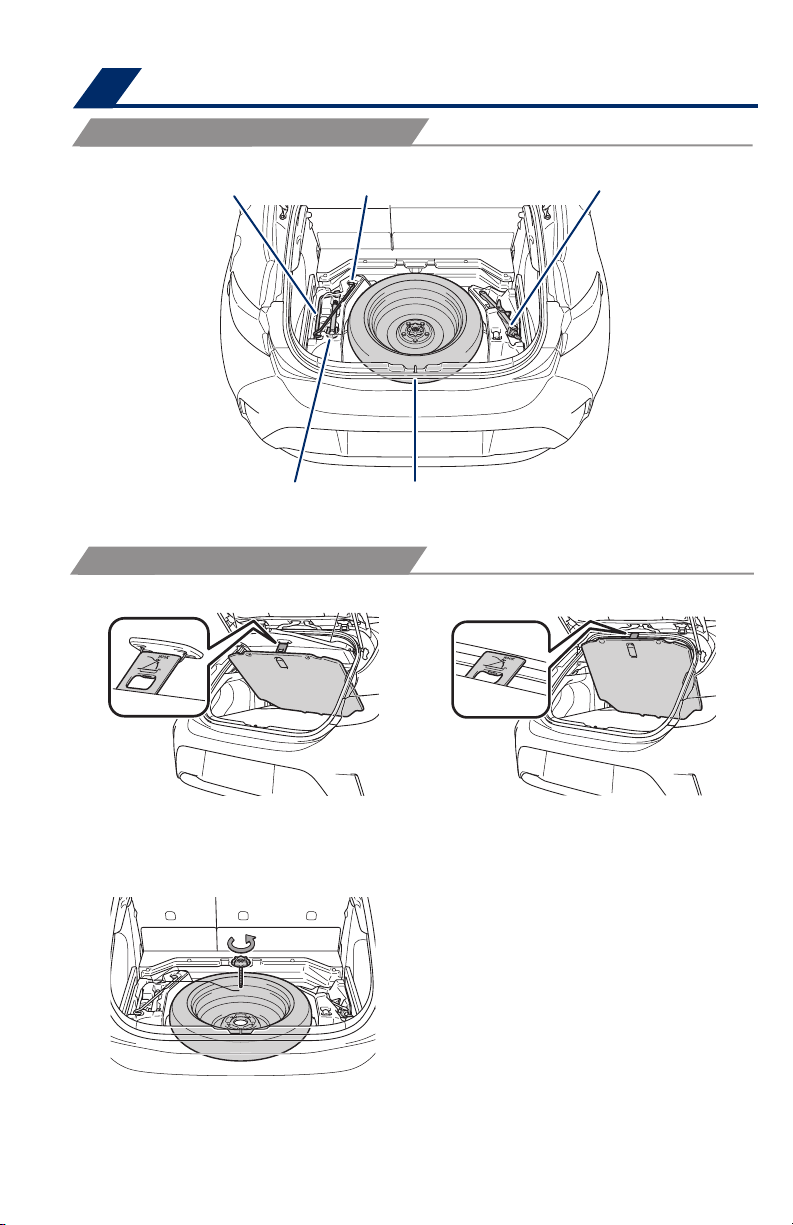
TOOL LOCATION
Wheel nut wrench
Towing eyelet
REMOVING THE SPARE TIRE
(1) Remove the deck board.
Jack handle
Spare tire
Jack
(When the luggage cover is installed) (When the luggage cover is not installed)
(2) Loosen the center fastener that
secures the spare tire.
Refer to the Owner’s Manual for jack positioning and tire changing procedures.
44
Page 47
Tire repair kit & tools
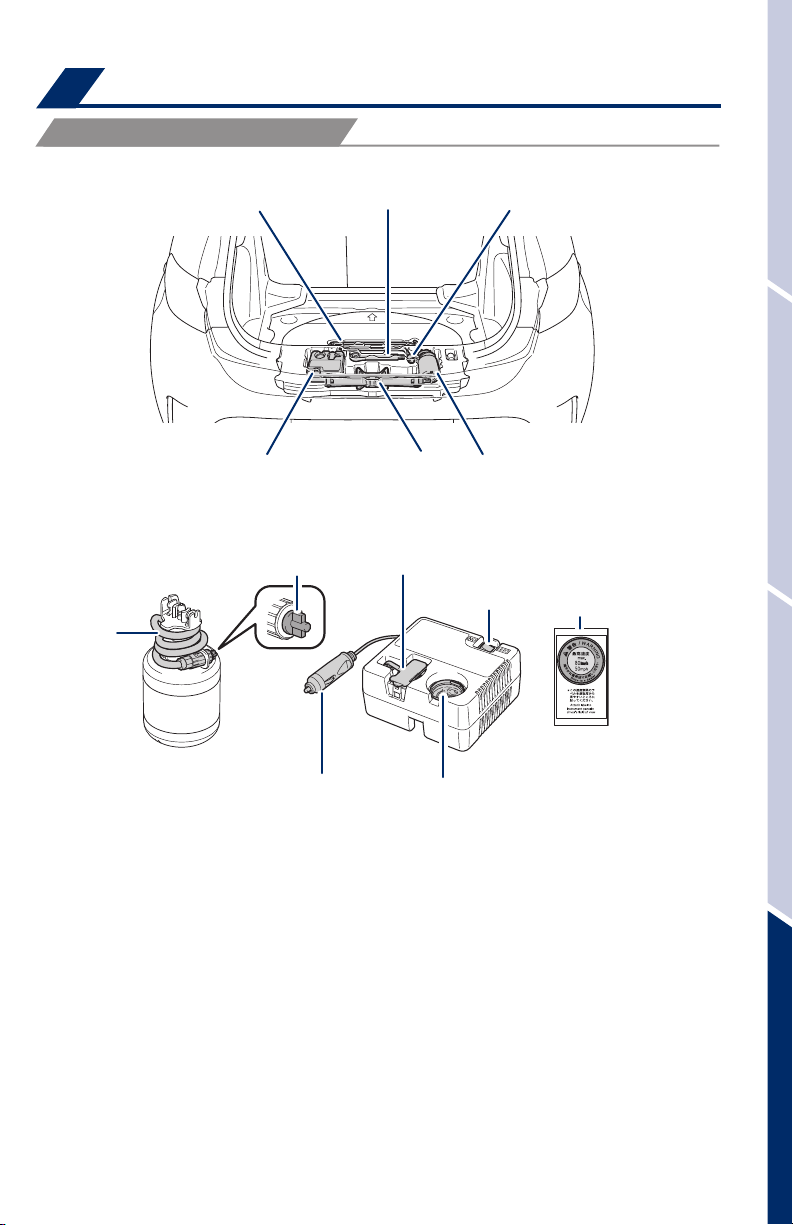
TOOL LOCATION
Jack and tools
Jack handle*
Towing eyelet
OVERVIEWFEATURES & OPERATIONSTOYOTA SAFETY SENSESAFETY & EMERGENCY FEATURES
Wheel nut wrench*
Emergency tire
puncture repair kit
Jack*
Emergency tire
puncture repair kit
*If equipped.
Tire repair kit components
Air release cap Rubber stopper
Hose
Power plug
Compressor switch
Air pressure gauge
Sticker
Refer to the Owner’s Manual for jack positioning and tire changing procedures.
45
Page 48

SAFETY & EMERGENCY FEATURES
Star Safety System
Your vehicle comes standard with the Star Safety SystemTM, which combines Anti-lock
Braking System (ABS), Brake Assist (BA), Electronic Brake-force Distribution (EBD),
Smart Stop Technology (SST), Traction Control (TRAC) and Vehicle Stability Control
(VSC).
Refer to the Owner’s Manual for more details and important information on
limitations to these systems.
ANTI-LOCK BRAKE SYSTEM (ABS)
Toyota’s ABS sensors detect which wheels are locking up and limits wheel lockup
by “pulsing” each wheel’s brakes independently. Pulsing releases brake pressure
repeatedly for fractions of a second. This helps the tires attain the traction that current
road conditions will allow, helping you to stay in directional control.
BRAKE ASSIST (BA)
Brake Assist is designed to detect sudden or “panic” braking, and then add braking
pressure to help decrease the vehicle’s stopping distance. When there’s only a split
second to react, Brake Assist can add additional brake pressure more quickly than just
the driver alone can.
ELECTRONIC BRAKE FORCE DISTRIBUTION (EBD)
Toyota’s ABS technology has Electronic Brake-force Distribution (EBD) to help maintain
control and balance when braking. Abrupt stops can cause a vehicle to tilt forward,
reducing the braking power of the rear wheels. EBD responds to sudden stops by
redistributing brake force to enhance the braking effectiveness of all four wheels.
™
SMART STOP TECHNOLOGY (SST)
Smart Stop Technology automatically reduces engine power when the accelerator and
brake pedals are pressed simultaneously under certain conditions.
SST engages when the accelerator is depressed first and the brakes are applied firmly
for longer than one-half second at speeds greater than five miles per hour.
SST doesn’t engage if the brake pedal is depressed before the accelerator pedal,
allowing vehicles to start on a steep hill and safely accelerate without rolling backward.
ENHANCED VEHICLE STABILITY CONTROL (VSC)
Enhanced Vehicle Stability Control provides cooperative control of the ABS, TRAC,
VSC and EPS.
Enhanced VSC helps to maintain directional stability when loss of traction occurs
during a turn.
46
Page 49
TRACTION CONTROL (TRAC)
VSC helps prevent loss of traction during cornering by reducing engine power, and
Traction Control helps maintain traction on loose gravel and wet, icy, or uneven
surfaces by applying brake force to the spinning wheel(s).
Toyota’s TRAC sensors are activated when one of the drive wheels starts to slip. TRAC
limits engine output and applies the brakes to the spinning wheel. This transfers power
to the wheels that still have traction to help keep you on track.
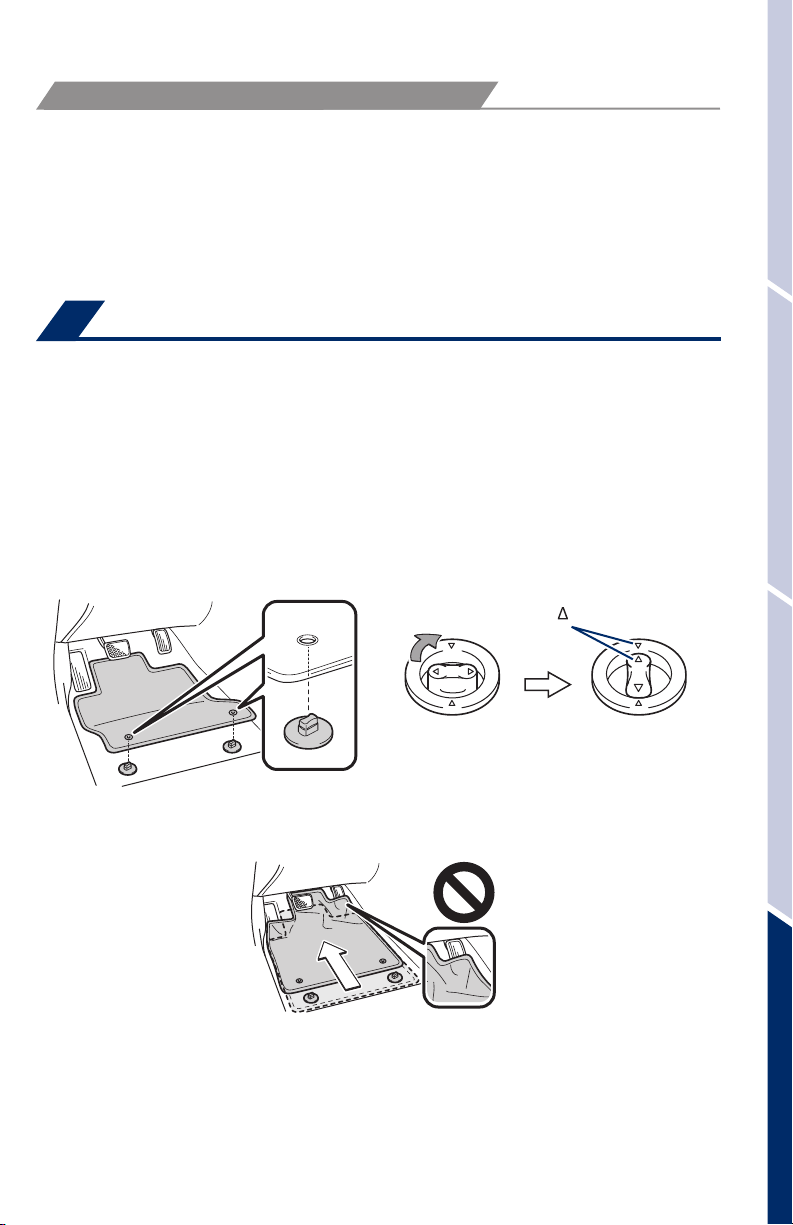
Floor mat installation
There are two types of Toyota floor mats: carpeted and all-weather. Each vehicle has
model-specific floor mats. Installation is easy.
To keep your floor mat properly positioned, follow these steps:
• Only use Toyota floor mats designed for your specific model.
• Use only one floor mat at a time, using the retaining hooks to keep the mat in place.
• Install floor mats right side up.
Always align the marks
OVERVIEWFEATURES & OPERATIONSTOYOTA SAFETY SENSESAFETY & EMERGENCY FEATURES
The shape of the retaining hooks (clips) may
differ from that shown in the
illustration.
47
Page 50

BLUETOOTH® DEVICE PAIRING
SECTION
Do not attempt the Bluetooth® Pairing process while driving.
48
Page 51
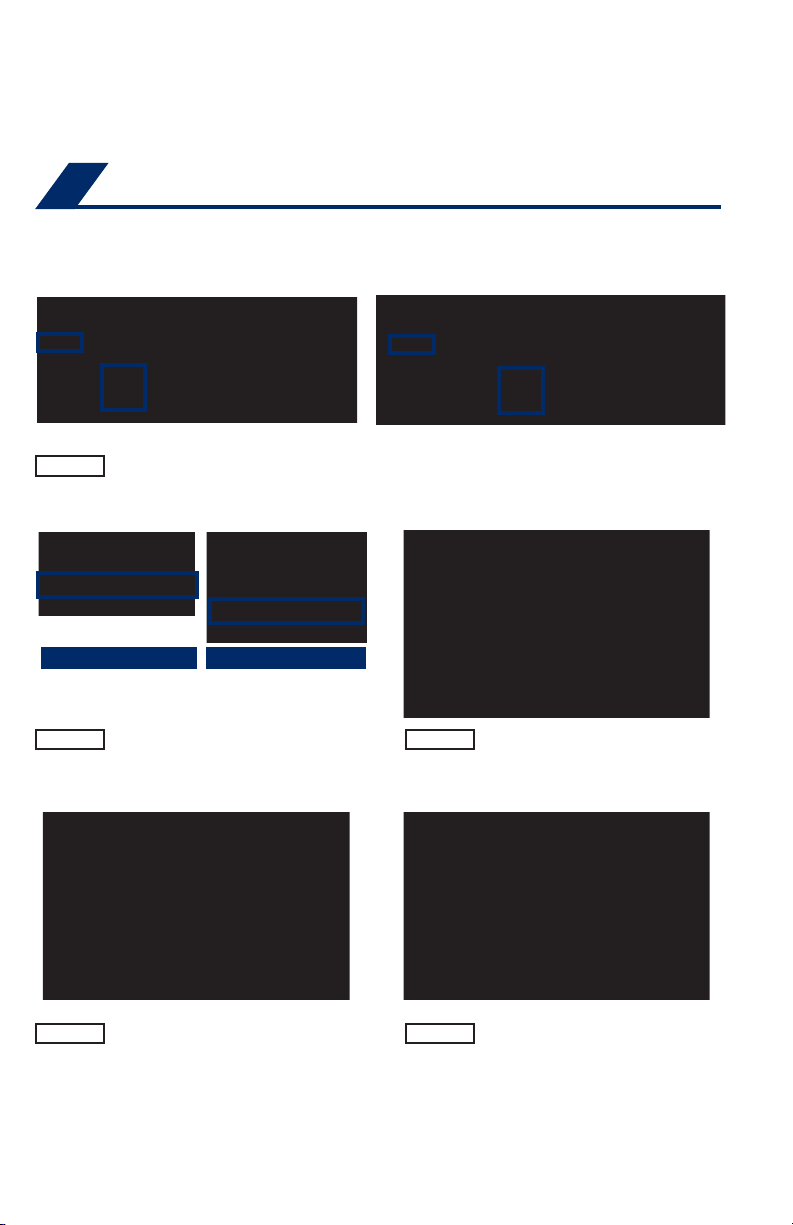
To begin the Bluetooth® Pairing process, press the HOME button on the faceplate of
your multimedia system.
Bluetooth® Pairing for your phone
Pairing your phone is the first step in connecting with your Toyota for hands-free
calling and for audio streaming via Bluetooth. This pairing process is quick and easy.
All you have to do is setup the phone and multimedia system to form a connection.
1
STEP 1
iPhone bluetooth Menu
STEP 2
Press [MENU] on the faceplate, then select "Setup" on display screen.
Ensure Bluetooth is turned on for
your device.
Entune Audio/Entune Audio Plus
Android bluetooth Menu
STEP 3
Entune Premium Audio
Select "Bluetooth", then select
"Add New Device"on display
screen.
STEP 4
1
Some Android devices may have slightly different SETTINGS screen layout depending on manufacturer of device and Android OS version.
Select "Device Name".
STEP 5
Check the display on your smart
phone. Does the PIN XXXX
match the PIN displayed? If it
does select "Pair".
49
Page 52
BLUETOOTH® DEVICE PAIRING
Bluetooth® Pairing for your phone (cont.)
STEP 6
STEP 8
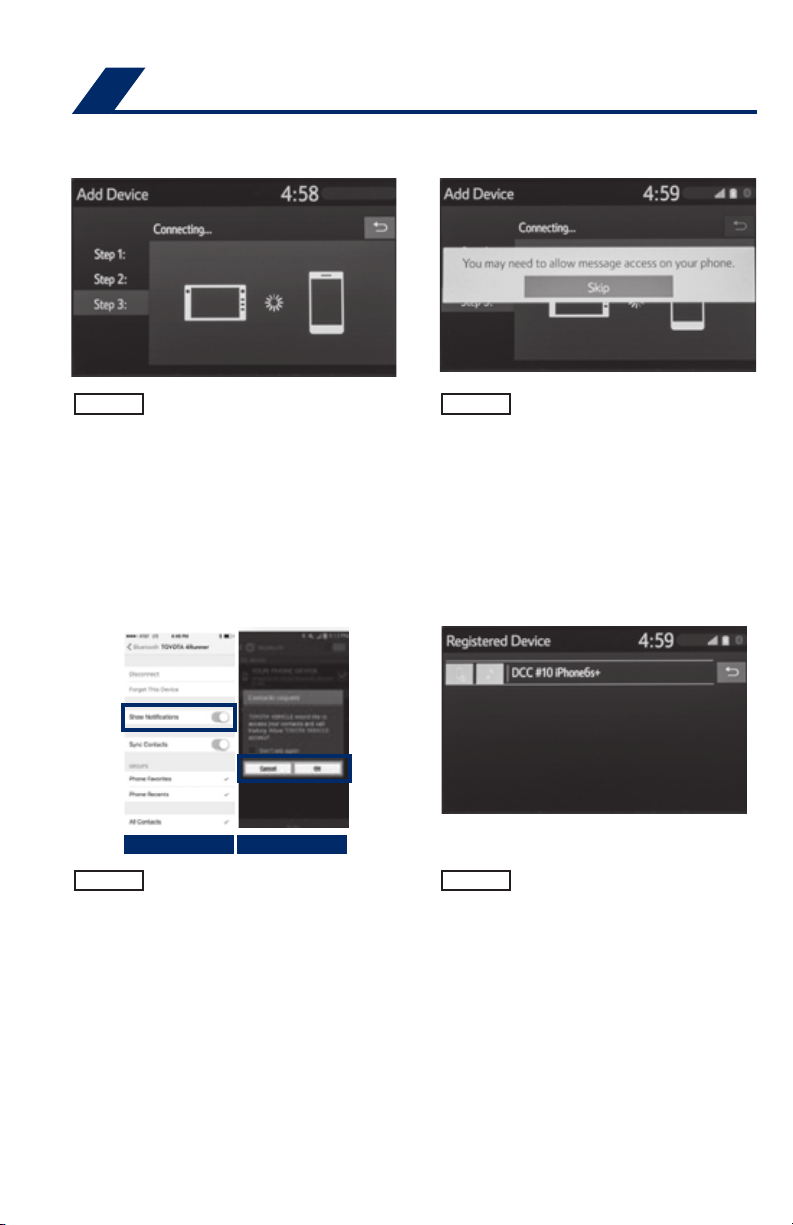
"Connecting" displays while
device is forming the connection
to your multimedia system.
iPhone Android
Turn on "Show Notifications" for
iPhone or "ON" for Android.
STEP 7
STEP 9
Enable Notifications (text
message). While pairing your
device message will display:
"You may need to allow
message access on your
phone".
Note: You may also select
"Skip" on display screen to skip
enabling notifications. If skipped
proceed to Step 8.
A confirmation will appear once
your phone has been paired and
connected.
50
Page 53

NOTES
51
Page 54

NOTES
52
Page 55

Page 56
www.toyota.com/owners
CUSTOMER EXPERIENCE CENTER
1-80 0 -3 31- 4331
Printed in U. S.A . 5 /18
18 - MKG -11873
00505QRG19CORHB
 Loading...