

Page 1

i-digits™ quantum
User Manual
MA01347, Issue 1, November 2015
Page 2

This document provides information for i-digits™ quantum users and should be used in conjunction
with advice from your clinical team.
This symbol signifies important information and is used throughout the manual.
Refer to www.touchbionics.com/downloads/document-library to ensure you have the latest copy of
this document.
2
Page 3

Table of Contents
1.0 i-digits™ quantum 4
1.1 Product Description 4
1.2 Intended Use 4
1.3 Prosthesis overview 5
1.4 Prosthesis Overview: Control Strategies 6
2.0 Control and Batteries 7
2.1 Wristband componentry 8
2.2 Control Options 8
2.3 Battery Charging 9
3.0 Covers 11
3.1 Cover Options 11
3.2 General Precautions 11
4.0 Grip Review 12
4.1 Grip Options 12
5.0 Support Information 14
5.1 Storage and Maintenance 14
5.2 Troubleshooting 15
5.3 General Safety, Warnings and Precautions 16
6.0 User Information 17
6.1 User Details 17
7.0 Appendix 18
7.1 Technical Information 18
7.2 i-digits™ quantum Information 18
7.3 Component Compatibility 18
7.4 Warranty 18
MA 01347, Issue 1, November 2015
3 of 20
Page 4

1.0 i-digits™ quantum
1.1 Product Description
design. dexterity. intelligent motion.
Based on the industry-leading design of our i-limb™ product
range, i-digits™ quantum combines unsurpassed functionality
with style. i-digits™ quantum incorporates gesture control via
the patented and ground-breaking i-mo™ technology and is
the first partial hand prosthesis that can change grips with a
simple gesture.
Key features include:
• Smarter
- gesture control powered by i-mo™ technology uses
simple gestures to change grips
- proximity control made available via grip chips™
technology
• Faster
- adjustable speed boost increases speed up to 30%
• Stronger
- up to 30% more power when needed
- improved component design for easier and more reliable fabrication
- 50% longer battery life
• Smaller
- new form fitting design decreases device size in
every dimension
- smaller digits now available
We are pleased that you and your clinical team decided that
i-digits™ quantum is the most appropriate prosthesis for your
needs. You will have discussed your functional goals with your
clinical team. This manual, along with the training and support of your clinical team, should help you understand how
i-digits™ quantum will help you accomplish these goals.
i-digits™ quantum is a fully customized partial hand prosthesis
with individually powered fingers. i-digits™ quantum fingers
move independently and bend at the joint to work in conjunction with any remaining fingers to help significantly increase
functional capabilities.
Each digit of the device has its own motor that allows the digits
to run until they meet the object being grasped. The result of
this is the device taking the shape of that object (compliant
grip). The power for the prosthesis comes from two batteries
which are located in the wristband. Initially, you and your clinical team will develop control of opening and closing your hand.
At this stage, you should be able to carry out a wide range of
functional daily activities using your i-digits™ quantum device.
It takes time and practice to gain control and master the best
way to perform tasks with your prosthetic device. The pace at
which individuals gain this control varies.
Your i-digits™ quantum is covered under the Touch Care program. Please contact your clinician for details about your specific Touch Care coverage.
1.2 Intended Use
i-digits™ quantum is intended to be used by individuals with
partial hand loss or deficiency. Devices are suited to individualswith any 3, 4 or 5 digit loss, while patients or users with 1 or
2 digit loss are also indicated when the digits of loss are either
the thumb or the main digits of opposition, namely the index
and middle fingers.
MA 01347, Issue 1, November 2015
4 of 20
Page 5
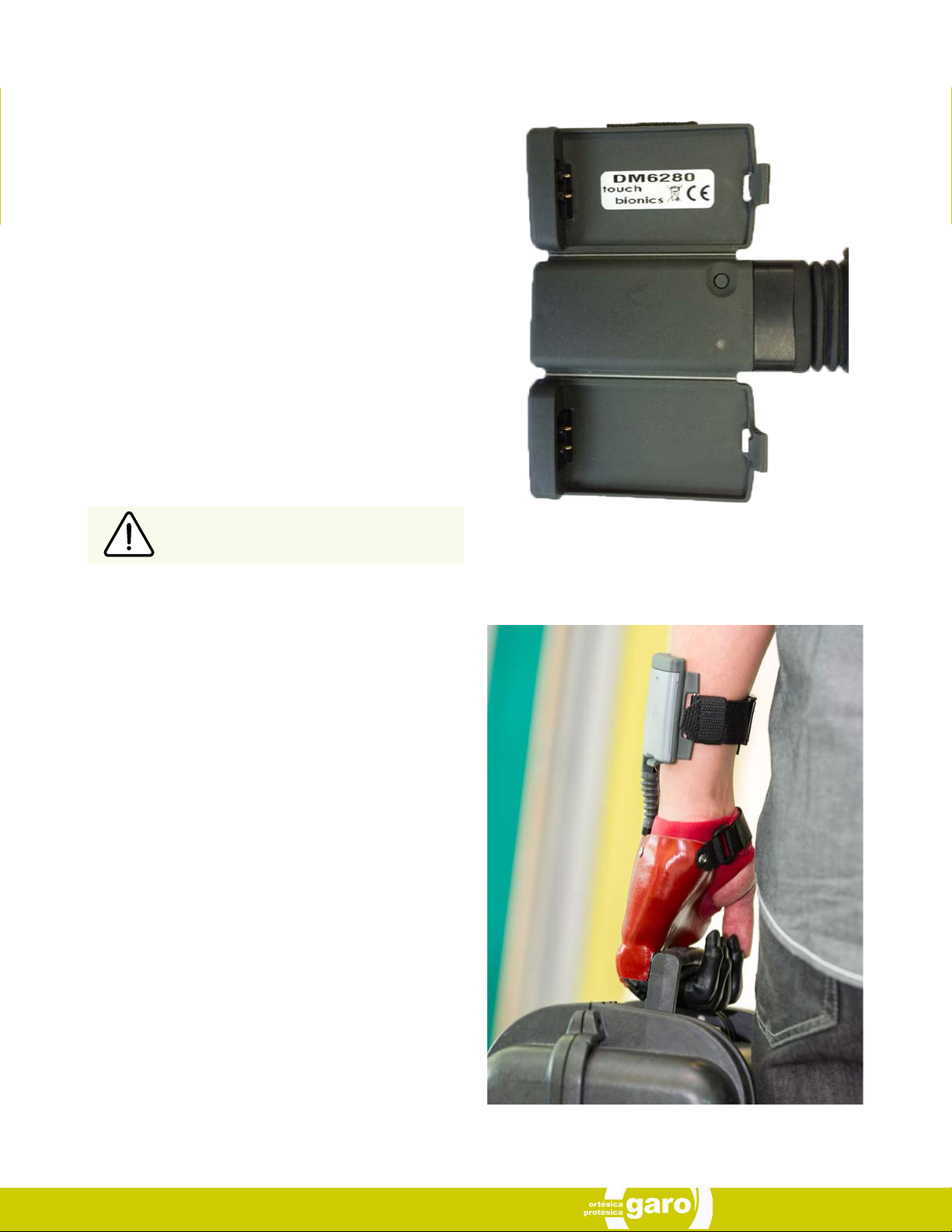
1.3 Prosthesis overview
Each i-digits™ quantum has a unique identifying number
called the serial number as depicted on the image to the right
(fig.1). This is an important piece of information and we recommend that you make a note of it on page 16 of this manual.
i-digits™ quantum will not provide you with sensation and so
you will not be able to feel things such as heat and moisture. idigits™ quantum cannot absorb any shock as your own body
is able to do. If high degrees of force are applied, you may
cause damage to your i-digits™ quantum. If this does happen, then please contact your clinical team who will contact
Touch Bionics Customer Support team to resolve the matter
as quickly as possible. To best protect the hand when carrying objects, the weight should be distributed evenly across
the digits as close to the knuckles and palm of the device as
possible rather than out on the tips of the digits. The image to
the right (fig.2) is an example of how to correctly carry objects.
i-digits™ quantum is like any other electrical device so do not
immerse in water and do not pour water over the device. When
cleaning the covering use a damp cloth to remove any dirt.
Do not use i-digits™ quantum without an approved cover.
Fig. 1: Serial Number
If you have any specific questions about your i-digits™ quantum device then please contact your clinical team or visit the
Touch Bionics website www.touchbionics.com for the latest
information and news.
Fig. 2: Weight distribution
MA 01347, Issue 1, November 2015
Page 6
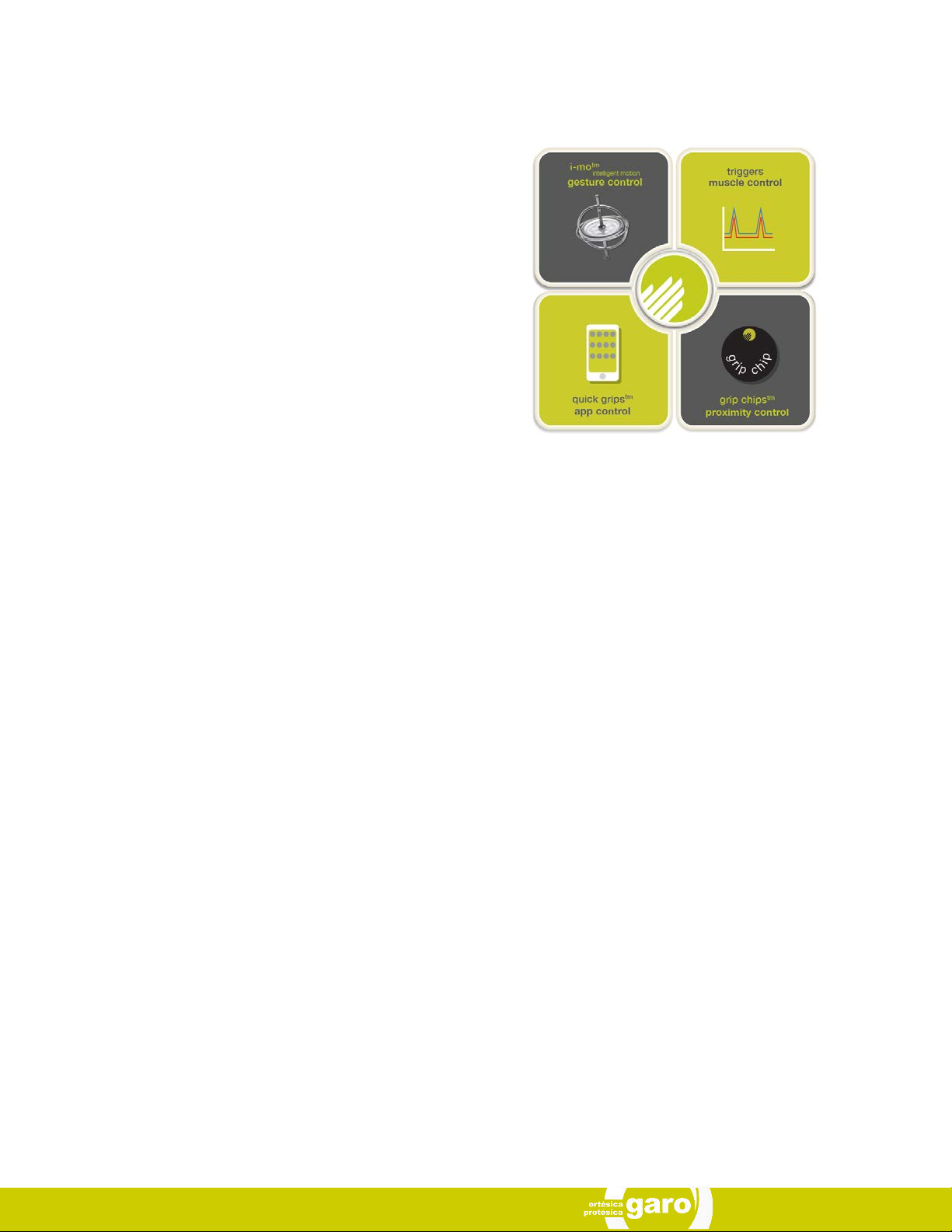
1.4 Prosthesis Overview: Control Strategies
i-digits™ quantum can access automated grips using a range
of control options.
gesture control:
By enabling i-mo™ technology, gesture control allows an au-
tomated grip to be accessed through a smooth and natural
motion of the prosthesis in 1 of 4 directions.
To access gesture control:
• Device must be in full open hand mode
• Hold arm parallel to ground (elbow bent to 90°)
• Maintain an open signal until finger twitches
• Move the hand (within 1 second) in direction assigned to
desired grip
• i-digits™ quantum will adopt the grip
app control:
i-digits™ quantum can access a grip at the touch of an icon on
the my i-limb™ app, enabling all automated grips to be avail-
able. These are called quick grips™.
i-digits™ quantum will exit automated grip when icon is tapped
again, or by selecting another grip icon.
Speed boost is also available on the app using a simple slider
bar. This increased speed can provide benefits of a more responsive action, more natural appearance of motion and increased grip force.
muscle control:
Triggers are specific muscle signals that you can use to instruct i-digits™ quantum to activate an automated grip. There
are 4 potential triggers: hold open, double impulse, triple impulse and co-contraction.
proximity control:
Grip chips™ are small Bluetooth chips which can change the
grip programming of i-digits™ quantum when you position it
near to the chip. The grip chips™ can be positioned around
the user’s environment in practical locations to allow access
to the optimum grip for particular daily tasks. Individual grip
chips™can be programmed using the biosim™ or my i-limb™
app.
MA 01347, Issue 1, November 2015
6 of 20
Page 7
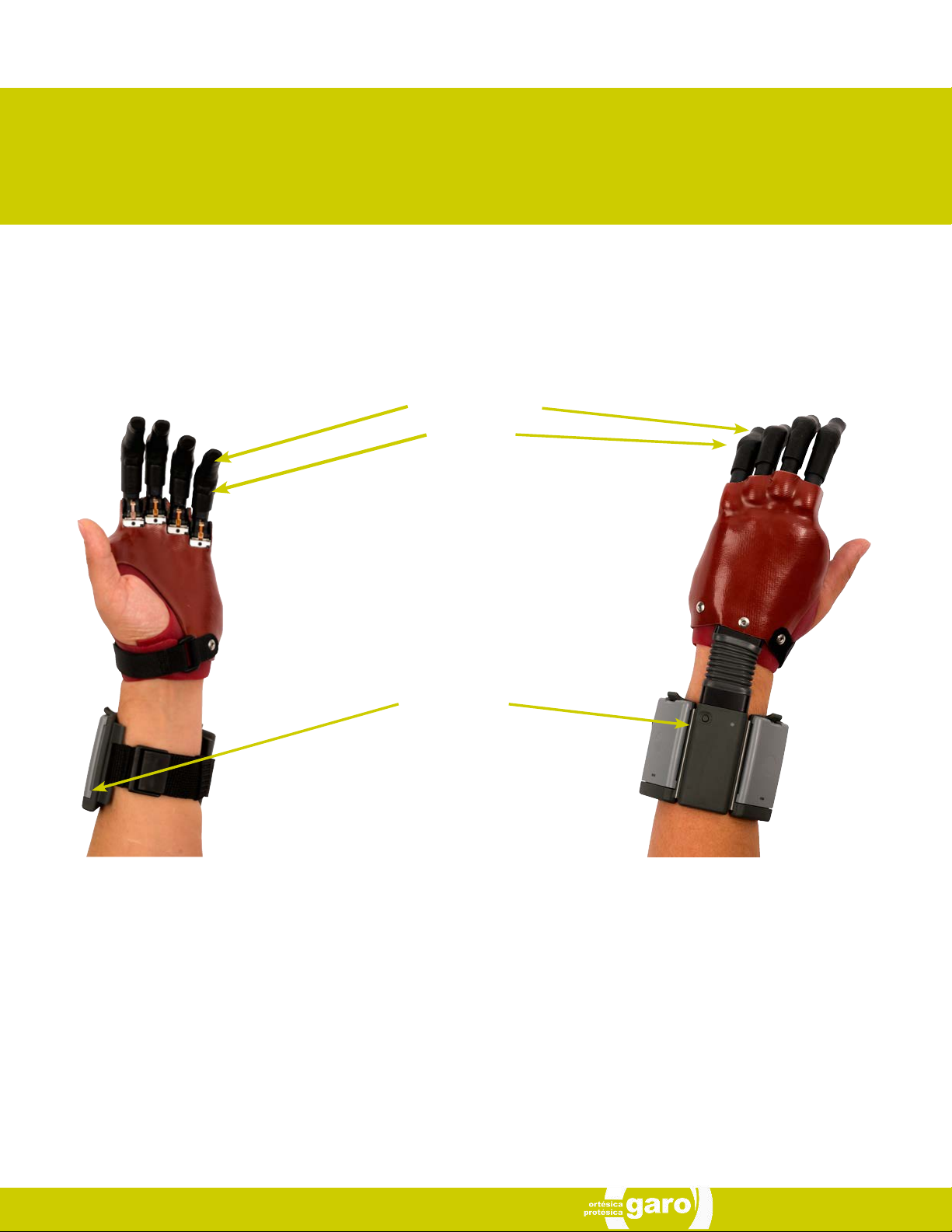
2.0 Control and Batteries
Fig. 3: Prosthesis overview
Motorized Digit
Knuckle
Wristband
and batteries
Palmer view
This illustration above depicts an i-digits™ quantum for users with sound thumb and 4 i-digits™.
Dorsal view
MA 01347, Issue 1, November 2015
Page 8
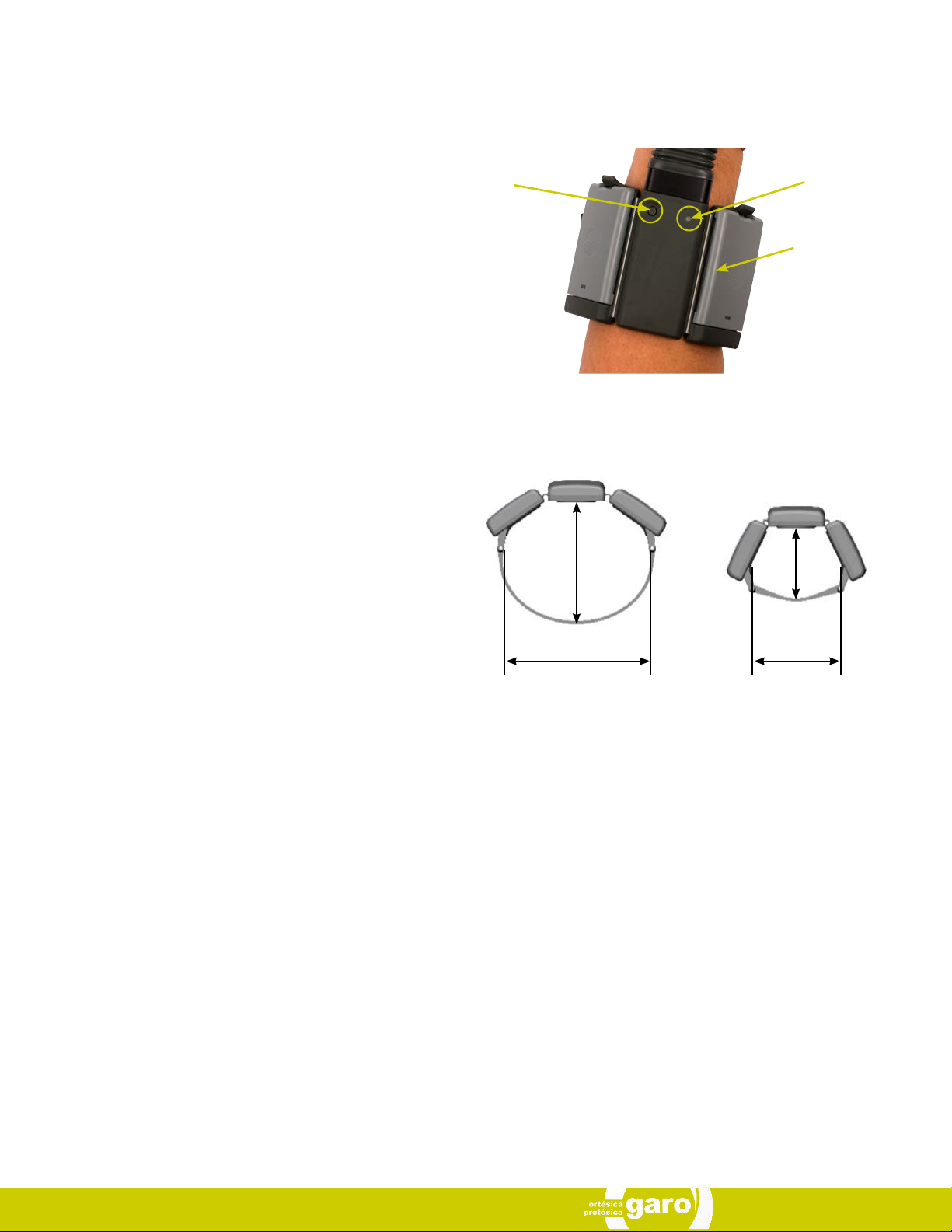
2.1 Wristband componentry
The Wristband houses the microprocessor and the batteries
unit. It is buckle fastened, designed to fit loosely around the
forearm. To switch the device on, press the button and the
LED light will illuminate. To switch it off, press the button again
and the LED will light momentarily.
The wristband is designed to fit loosely around the forearm. It
is not designed to be used for suspension of the prosthesis or
to hold electrodes in position against the skin.
Fig. 4: Wristband
On/Off button LED display
Batteries
Fig. 5: Wristband circumference range
76mm
(3”)
45mm
(1.75”)
2.2 Control Options
To fit i-digits™ quantum a socket interface has been specially
created by your prosthetist team. They will have made this to
ensure it is comfortable and fits directly to your residual hand
You may experience some minor redness on your residual
hand but this should not last very long after you remove the
device. If the device is causing you discomfort or affecting you
using your i-digits™ quantum then we recommend that you
contact your clinician.
As part of the fitting process, your prosthetist selected the best
method for you to provide control of your device. This communicates to the processor whether you want i-digits™ quantum
device to open or close. The most common control option is
called an electrode. Electrodes pick up on the electrical activity that your body gives off when you contract a muscle. While
gaining good control may take time and practice, your method
of input should not cause pain. Talk with your prosthetist if you
do not understand how your input control is working or if it is
causing discomfort.
95mm (3.75”)
Maximum
58mm (2.3”)
Minimum
MA 01347, Issue 1, November 2015
8 of 20
Page 9
2.3 Battery Charging
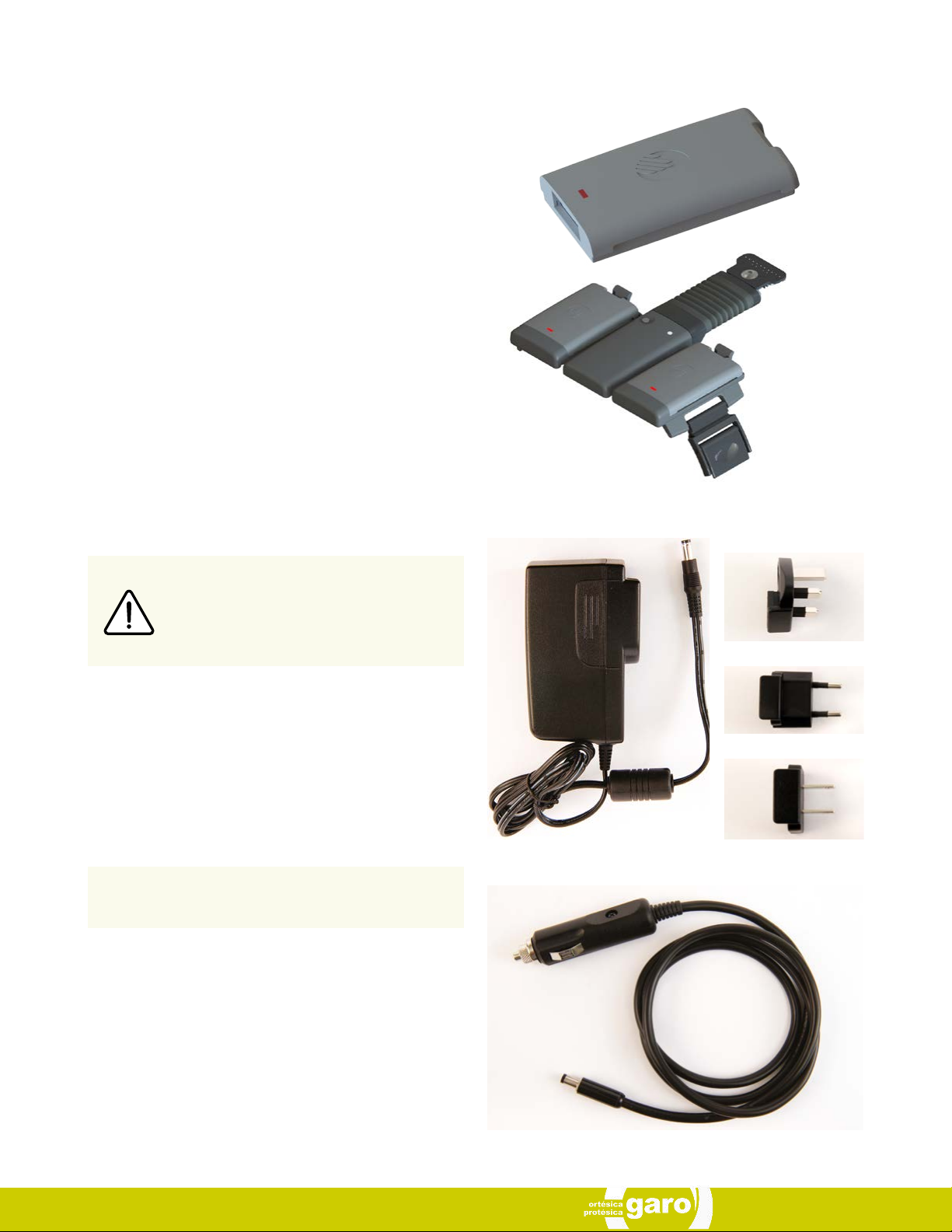
i-digits™ quantum is powered by two, 800mAh, 3.7 Volt batteries which have been specifically designed to meet the
power requirements of i-digits™ devices. Four batteries are
provided, two for the wristband and two spares. Two 3.7v batteries will be needed with the Wristband (the wristband will not
work with only one battery).
Each battery is equipped with a LED display alerting you when
the battery is low on charge. If the battery is low on charge the
LED will illuminate RED. The LED will remain illuminated until
the battery is adequately charged.
Fig. 6: batteries
Please view the below instruction for proper battery charging.
Only use supplied Touch Bionics charger to
charge batteries. Depending on your location,
you will receive one of the chargers shown on
the right side (fig. 8).
If you intend to travel outside of your home country you will
need to ensure that you have a Touch Bionics charger that
will work in the country to which you are traveling. Additional
chargers are available from Touch Bionics (see fig.7).
As an alternative to charging directly from domestic
power, a car charger is also provided with the i-digits™
quantum.
Fig. 7: charger
UK
Europe
USA and Japan
Fig. 8: car charger
MA 01347, Issue 1, November 2015
Page 10
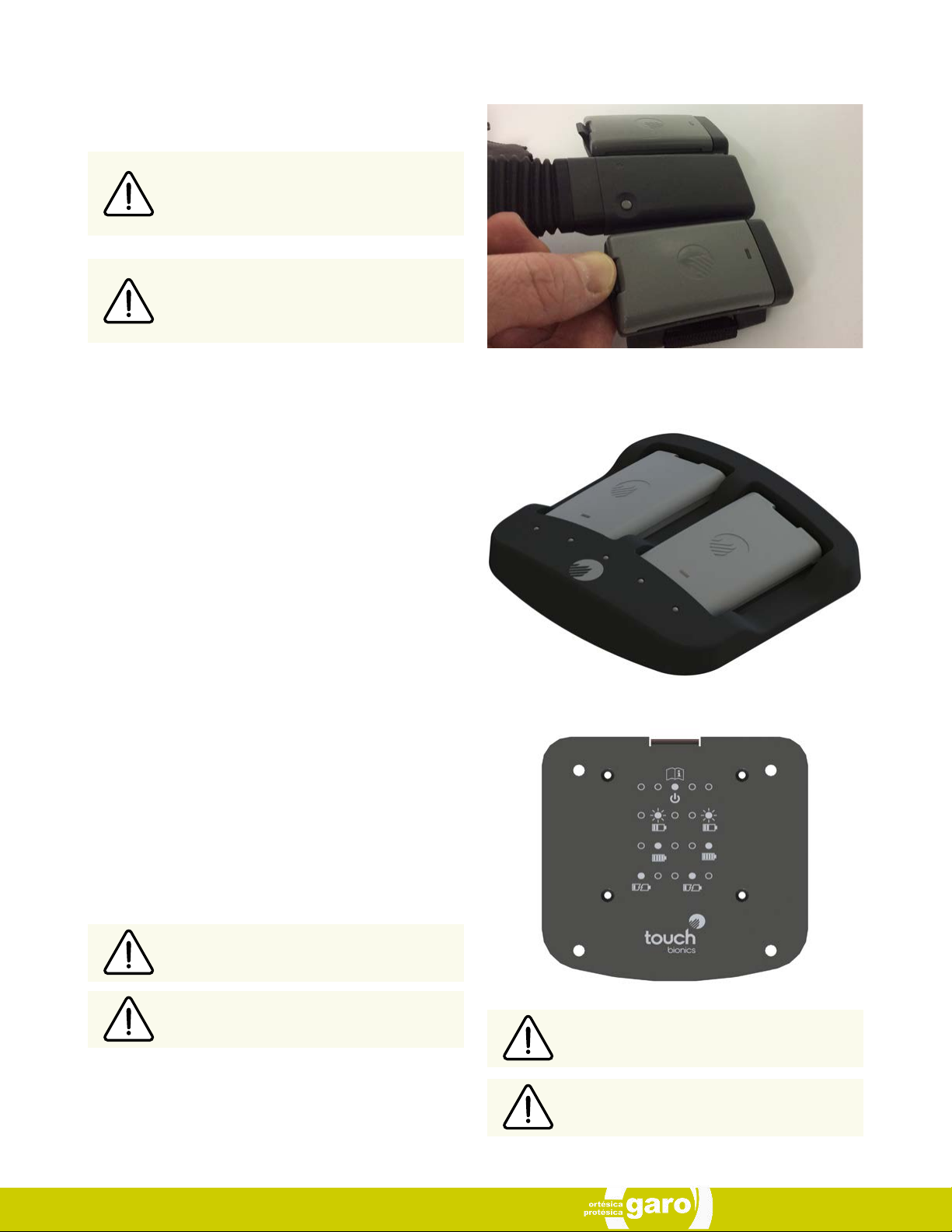
Batteries are fitted into the Wristband battery housing and secured by the holding catch at the wrist side of the Wristband
Release the holding catch to remove the battery.
The batteries provided are designed to work
specifically with the Touch Bionics i-digits™
Wristband and are not to be used with any
other device.
Only Touch Bionics batteries are approved for
use with i-digits™, use of alternative batteries
will invalidate the warranty.
Fig. 9: wristband battery housing
Charging time from full discharge is approximately 2 hours.
i-limb™ Power Pack batteries for i-digits™ quantum should
only be charged using the Touch Bionics battery charger (fig.7)
supplied. Place the batteries in the charger as illustrated. Insert
the charger lead from the battery powerpack into the charge
port. Insert the charger into the power outlet (fig.10).
On the base plate of the charger you will see the various light
sequences:
• Middle light on: Charger is plugged in
• 2nd and 5th lights blinking Green: Batteries are charging
• 2nd and 5th lights solid Green: Batteries are charged
• 1st and 4th Red lights on: Battery fault, unplug and try
again. If lights continue to illuminate, contact Touch
Bionics or your clinical team.
Fig. 10: charge port
To ensure i-digits quantum is continually functional, charge at the end of each day.
Replace the battery annually for optimal performance.
MA 01347, Issue 1, November 2015
Do not pull cable to remove the lead.
Switch the device OFF to preserve battery
power when not in use.
10 of 20
Page 11
3.0 Covers
3.1 Cover Options
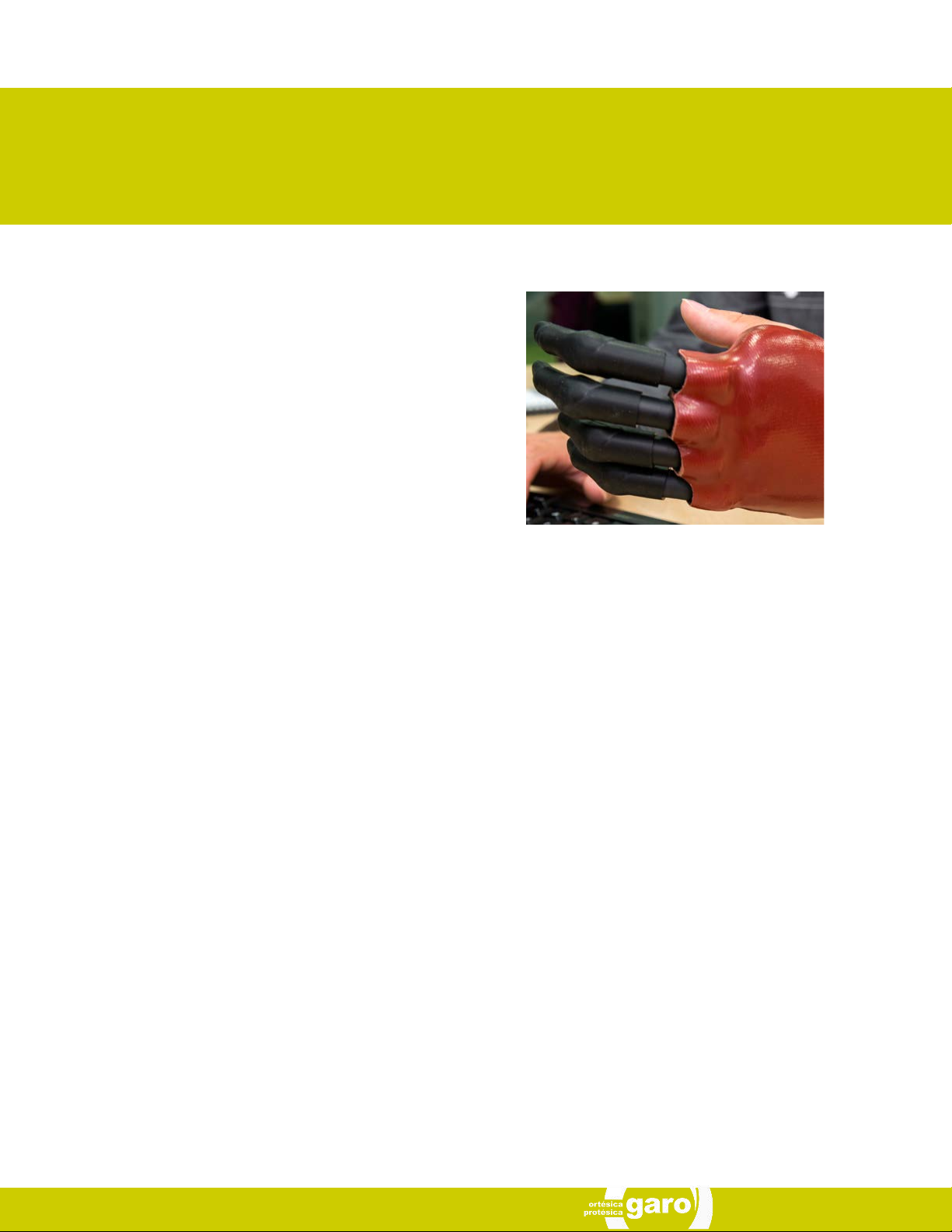
Coverings are an important part of the appearance and durability of upper limb prostheses. The Touch Bionics i-digits™
quantum products are the first prosthetics and fingers to imitate the individual digit articulation of the human hand, and we
provide flexible coverings which enable that articulation.
Covers will be provided for i-digits™ quantum device. Digit
covers will be ready to fit and are designed to cover each digit.
Touch Bionics’ approved digit covers must be used with each
digit of the device. The warranty will become void if the device
is used without an approved cover.
3.2 General Precautions
• i-digits™ quantum device must be used with approved
Touch Bionics’ digits covers.
• Ensure covers are fitted properly.
i-digits™ quantum covers do not provide full protection from
moisture, oil, dust and dirt ingress. Caution should be observed.
MA 01347, Issue 1, November 2015
Page 12
4.0 Grip Review
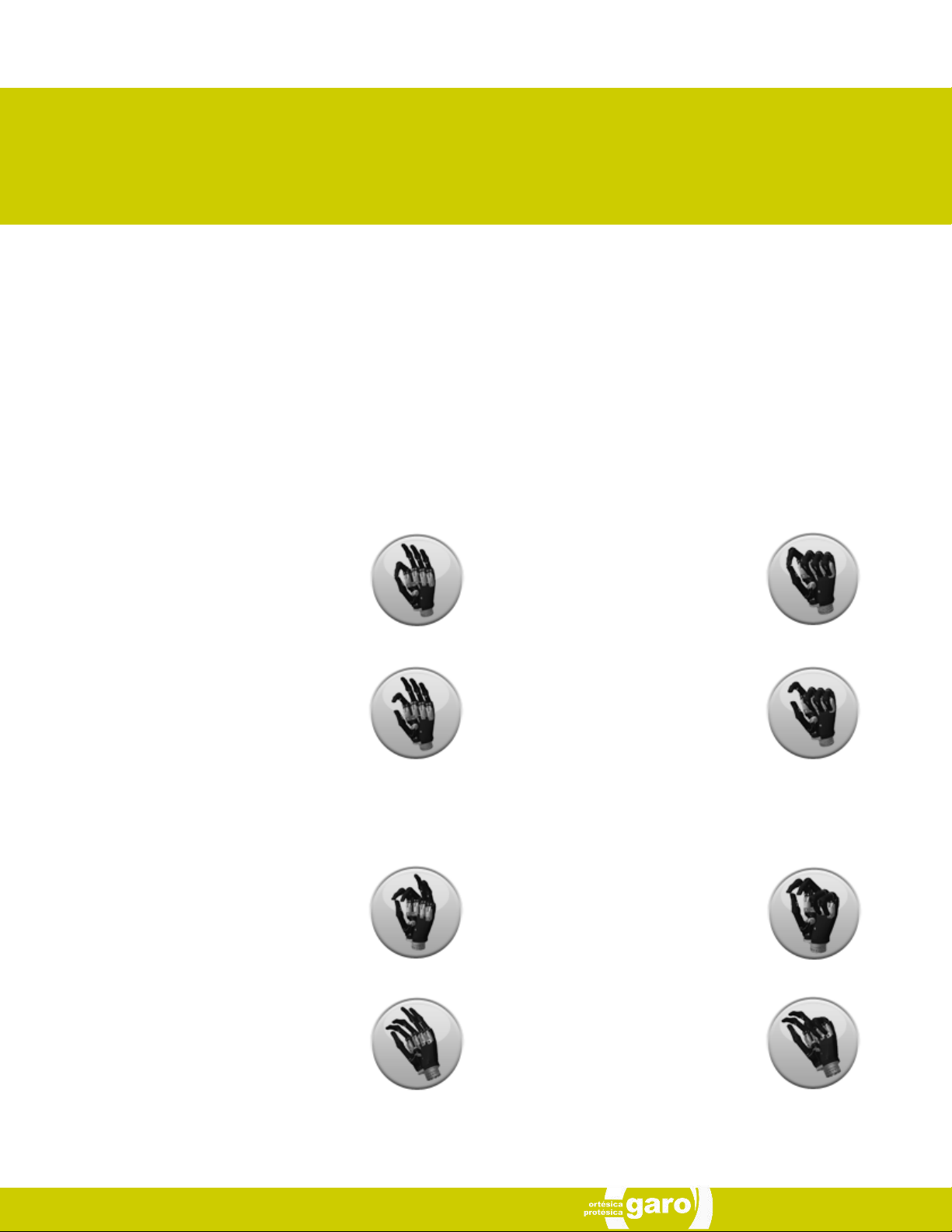
i-digits™ quantum has 20 different grip options available and 12 customizable my grips™ (not shown). These grips can be ac-
cessed and programmed through the software package called my i-limb™ app. The following features catalogue reviews the
various available grips and provide a functional description of each.
The range of grips available is dependent on your i-digits™ quantum device configurations and the level of absence. The range
of grips are represented below as per a 5 digit device.
4.1 Grip Options
Precision Pinch Grip Options
Standard Precision Pinch Opened
middle, ring and little finger remain fully
opened and switch off. Index finger and
thumb provide grip.
Thumb Precision Pinch Opened
middle, ring and little finger remain fully
opened and switch off. Thumb automatically moves to a partially closed position. Index finger will move to provide grip against
a fixed thumb.
Tripod Grip Options
Standard 3 Jaw Chuck (Tripod) Opened
ring and little finger remain fully opened and
switch off. Thumb, index and middle fingers
move to provide grip.
Standard Precision Pinch Closed
middle, ring and little finger automatically close and switch off. Index finger and
thumb provide grip.
Thumb Precision Pinch Closed
middle, ring and little finger automatically
close and switch off. Thumb automatically
moves to a partially closed position. Index
finger will move to provide grip against a
fixed thumb.
Standard 3 Jaw Chuck (Tripod) Closed
ring and little finger move to terminal close.
Thumb, index and middle fingers move to
provide grip.
Thumb 3 Jaw Chuck (Tripod) Opened
ring and little finger remain fully opened and
switch off. Thumb automatically moves to a
partially closed position. Index and middle
fingers move to provide grip against a fixed
thumb.
MA 01347, Issue 1, November 2015
Thumb 3 Jaw Chuck (Tripod) Closed
ring and little finger move to terminal close.
Thumb automatically moves to a partially
closed position. Index and middle fingers
move to provide grip against a fixed thumb.
12 of 20
Page 13
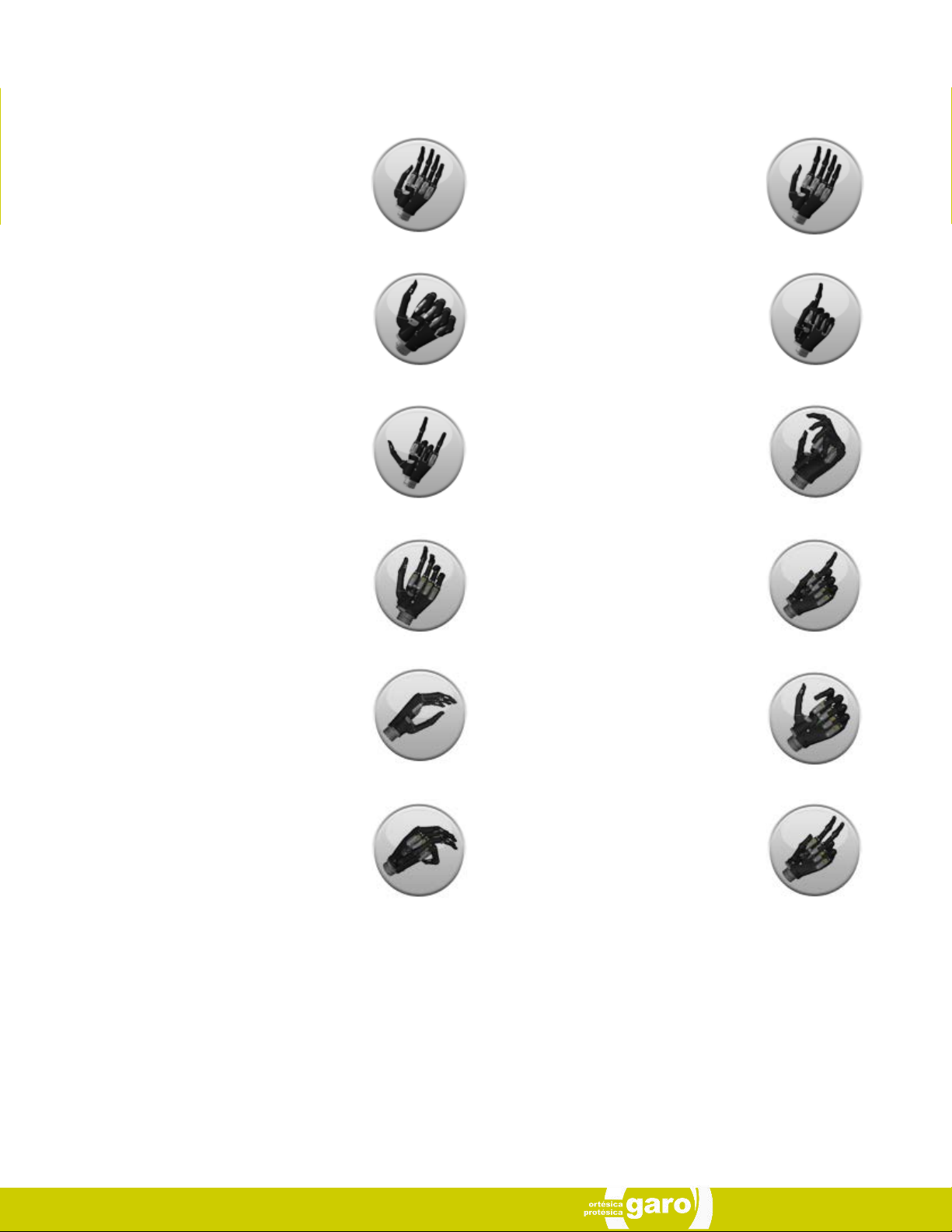
Additional Grip and Gesture Options
Thumb Park Continuous
all four fingers remain open and switch off,
only the thumb will move.
Lateral Grip
all four fingers fully close and switch off.
Only thumb will move.
Custom Gesture
all fingers automatically move to a user defined fully opened or fully closed position
and switch off.
Grasp
hand forms a shape appropriate for grasping an object. Fingers flex rapidly when any
user signal is applied
Thumb Park Quick
all four fingers remain open and switch off,
for 1.5 seconds the thumb will close and
then automatically return to an open position.
Index Point
thumb, little, ring and middle fingers close
and switch off. Only the index finger will
move.
Custom Grip
all fingers automatically move to a user defined position. The user can choose to keep
certain digits active and switch others off.
One Finger Trigger
hand forms a shape appropriate for using a
spray bottle with the index finger active
Handshake
hand forms a shape appropriate for shaking
another persons hand
Mouse
hand forms shape appropriate for using a
computer mouse
Thumb Trigger
hand forms shape appropriate for using an
aerosol spray can with thumb active
Trigger Two Finger
hand forms a shape appropriate for using a
spray bottle with the index and middle finger active
MA 01347, Issue 1, November 2015
Page 14

5.0 Support Information
5.1 Storage and Maintenance
Always turn off your i-digits™ quantum device when not in use.
Aim to charge the battery each day after use.
Replace the batteries every 12 months.
Ensure your i-digits™ quantum is serviced every 12 months.
MA 01347, Issue 1, November 2015
14 of 20
Page 15

5.2 Troubleshooting
Problem
Prothesis does not operate Ensure the prosthesis is switched on
One digit does not operate Check if the digit operates correctly using the Hand Health Check in my i-limb™ app
Device stops halfway during an action Contact your Prosthetist
Prosthesis opens when a close signal
is provided
Battery is not working Check the battery is connected
For additional FAQ’s please visit our website at: www.touchbionics.com
Actio
n
Ensure the battery is connected
Ensure the battery is charged
Check the electrodes have good contact
Contact your Prosthetist
Check the battery is charged
Check the device using one of the spare i- digits™ quantum batteries
MA 01347, Issue 1, November 2015
Page 16

5.3 General Safety, Warnings and Precautions
i-digits™ quantum
Do not use without an approved cover.
Do not use under water.
Do not use to operate heavy / industrial machinery.
Do not use with machinery with moving parts that may cause
personal injury or damage.
Users must comply with local regulations on the operation of
automobiles, aircraft, sailing vessels of any kind and any other
motorized vehicle or device.
Do not use for extreme activities that may cause injury to a
natural hand.
Do not expose to excessive moisture, liquid, dust, vibration or
shock.
Do not expose to high temperatures.
Do not expose to flames.
Do not use or expose to explosive atmospheres.
Do not disassemble componentry or modify in any way.
Maintenance, repairs and upgrades may only be performed
by qualified Touch Bionics technicians and technical partners.
Do not use with a damaged cover.
Damaged covers must be replaced or repaired by a qualified
Touch Bionics technician or technical partner.
Only approved Touch Bionics accessories and tooling may be
used with i-digits™ quantum.
Do not use an i-digits™ quantum device to operate your mobile device whilst it is connected to a mains outlet, as this can
affect EMG signal.
Failure to comply with the above guidelines will invalidate the
wa rra nty.
Batteries
Do not bend or exert excessive pressure on the battery.
Do not pierce the battery.
Do not disassemble.
Do not expose to high temperatures.
Do not incinerate batteries.
Do not short circuit the battery.
Do not store batteries inside a vehicle.
Dispose of batteries in accordance with US, European or local
regulations.
Only use the appropriate Touch Bionics charger to charge
Touch Bionics batteries.
If the battery has visibly ballooned or swelled:
• discontinue the charging process immediately
• disconnect the battery
• remove to a safe area
• leave and observe for 15 minutes
• replace with new battery
• do not re-use
• dispose of any leaking batteries in an appropriate man-
ner
Failure to comply with the above guidelines will invalidate the
wa rra nty.
MA 01347, Issue 1, November 2015
If you experience technical problems
with i-digits™ quantum contact
Touch Bionics as follows:
16 of 20
North America (Canada, Mexico & US)
Tel: +1 855 MYiLIMB (694 5462)
Germany/Europe:
Tel: +49 6221 357 9060
France:
Tel: 0805 110478
UK/International
Tel: +44 1506 438 556
Page 17

6.0 User Information
6.1 User Details
Provision of the following information will enable easy identification of your device, should it be returned to customer service.
Please forward to Touch Bionics as per the contact information on the back page of this manual.
User Name: ..............................................................................................................................................................
Fitting Date: .............................................................................................................................................................
Device Purchase Date: .............................................................................................................................................
Device Serial Number: .............................................................................................................................................
Prosthetist Name & Contact Information: .................................................................................................................
Therapist Name & Contact Information: ...................................................................................................................
It is recommended that the above information is also included in the user notes.
MA 01347, Issue 1, November 2015
Page 18

7.0 Appendix
7.1 Technical Information
i-digits™ quantum
Voltage 7.4 V (nominal)
Max. Current 5 A
Battery Capacity Rechargeable lithium polymer 7.4 V (nominal); 800 mAh capacity
Max device load 20kg
Finger Carry Load (static limit) 5kg
Time from full open to full close 0.8 seconds
7.2 i-digits™ quantum Information
Hazardous Area Classification
i-digits™ quantum device is not intended for use outside the boundaries of the environments listed below.
The user of i-digits™ quantum device should assure that it it not used in such environments.
Condition Level
Maximum temperature +70 ˚c
Minimum temperature -40˚c
Hazardous Area Classification Non Hazardous
7.3 Component Compatibility
Please refer to www.touchbionics.com/downloads/document-library for Electro Magnetic Compatibility (EMC) and Electrical Information for i-digits™ quantum products.
7.4 Warranty
Refer to www.touchbionics.com/downloads/document-library to review warranty information.
MA 01347, Issue 1, November 2015
18 of 20
Page 19
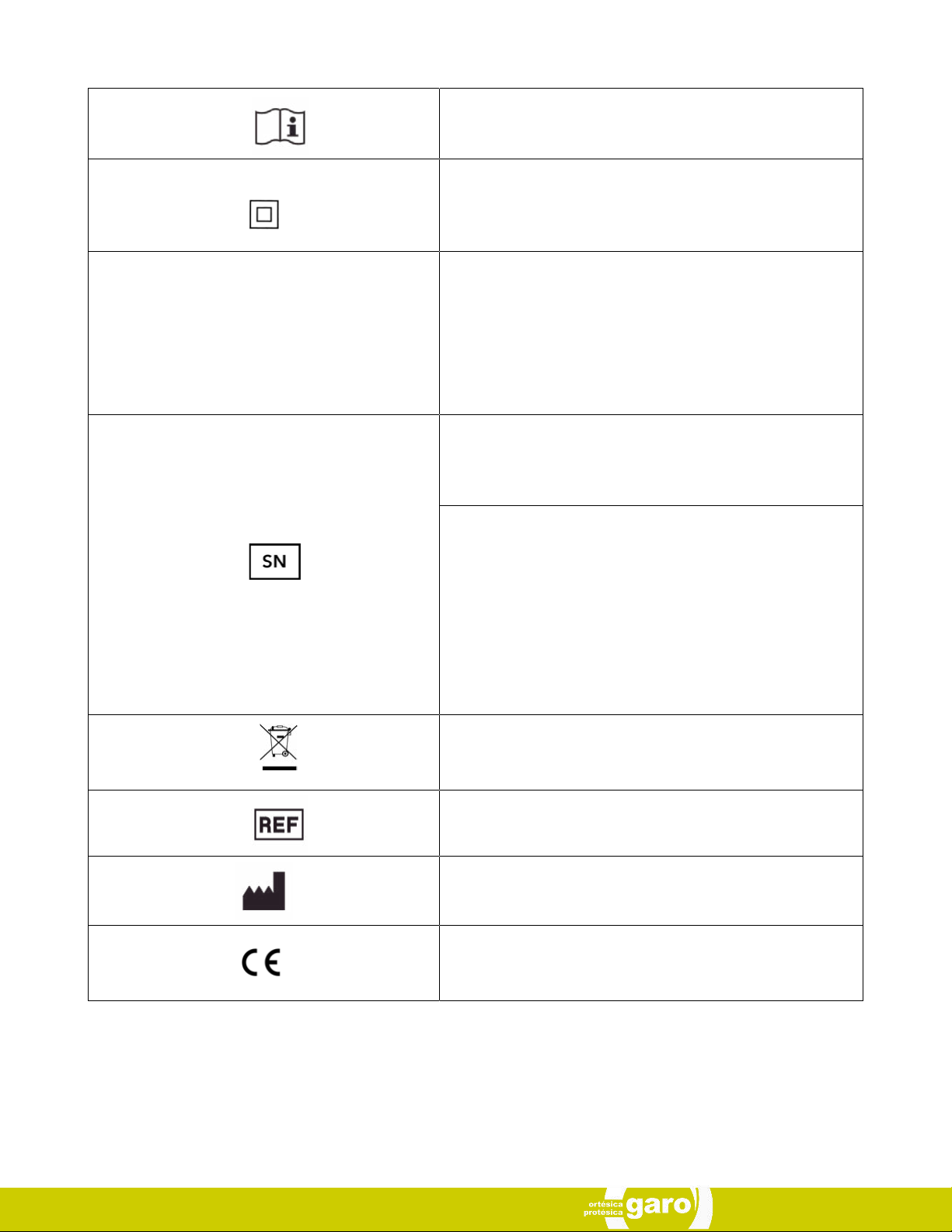
Consult instructions for use
Class II equipment – provides double Isolation to protect against
electric shock
Degree of protection – IP40
IP40
Protection against penetration by solid particles with diameters
larger than 1 mm. No special protection against penetration by
water
Serial Number
For i-digits™ quantum devices:
The unique serial number for i-digits™ quantum devices is a “DM”
with a 4 digit alpha / numeric number.
WEEE Compliance
MA 01347, Issue 1, November 2015
Catalogue number
Manufacturer/Date of Manufacture
European Conformity
Page 20

North America
Touch Bionics Inc.
35 Hampden Road
Mansfield MA 02048
USA
+1 855 MY iLIMB (694 5462)
Europe
Touch Bionics GmbH
Langer Anger 3
69115 Heidelberg
Germany
+49 6221 357 9060
International
Touch Bionics Ltd.
Unit 3, Ashwood Court
Oakbank Park Way
Livingston EH53 0TH
UK
+44 1506 438 556
For address details and further information
please visit www.touchbionics.com
Third party products and brand names
may be trademarks or registered
trademarks of their respective owners
© Copyright 2016 Touch Bionics Inc. and Touch Bionics Limited
All rights reser ved.
MA01347, issue 1, November 2015
 Loading...