

Page 1

TM-586 TX3 User’s Manual
Introduction
A. Specifications
System Chipset Intel 82430 TX chipset.
CPU One 321-pin socket 7 for Intel Pentium
(P54C/CQS/ CS, P55C), AMD 5k86, K5, K6, Cyrix
6x86 (L, M), IDT C6 processors, support 90/100/
120/133/150/166/180/200/225/233/266/300MHz.
Memory Expandable to 256MB (4 banks) with four 72-pin
SIMM sockets onboard (Support Fast Page Mode
and EDO DRAM 5-2-2-2) and two 168-pin DIMM
socket (support Syncchronous DRAM module 51-1-1).
Cache 64-bit 256/512KB L2 Pipeline Burst SRAM
onboard.
I/O Winbond 83977, two high speed 16550
compatible serial ports, one Multi-Mode.
Parallel Port support SPP/EPP/ECP standard
mode.
Two onboard PCI DE Ports (32 bit data transfer).
Support two 360/720KB/1.2/1.44/2.88MB floppy
disk devices.
One PS/2 Mouse port.
BIOS Award System BIOS installed in socket (Flash
and PnP).
Expansion slots Four PCI Master Slots and three 16-bit ISA Slots.
Dimension 4-layer PCB, 2/3 baby size (220mm x 250mm).
Others Support Ultra DMA/33, ACPI, SM Bus, GPID,
USB Bus, Keyboard Power On/Off, Modem Ring
On, ATX Power supply.
1
Page 2
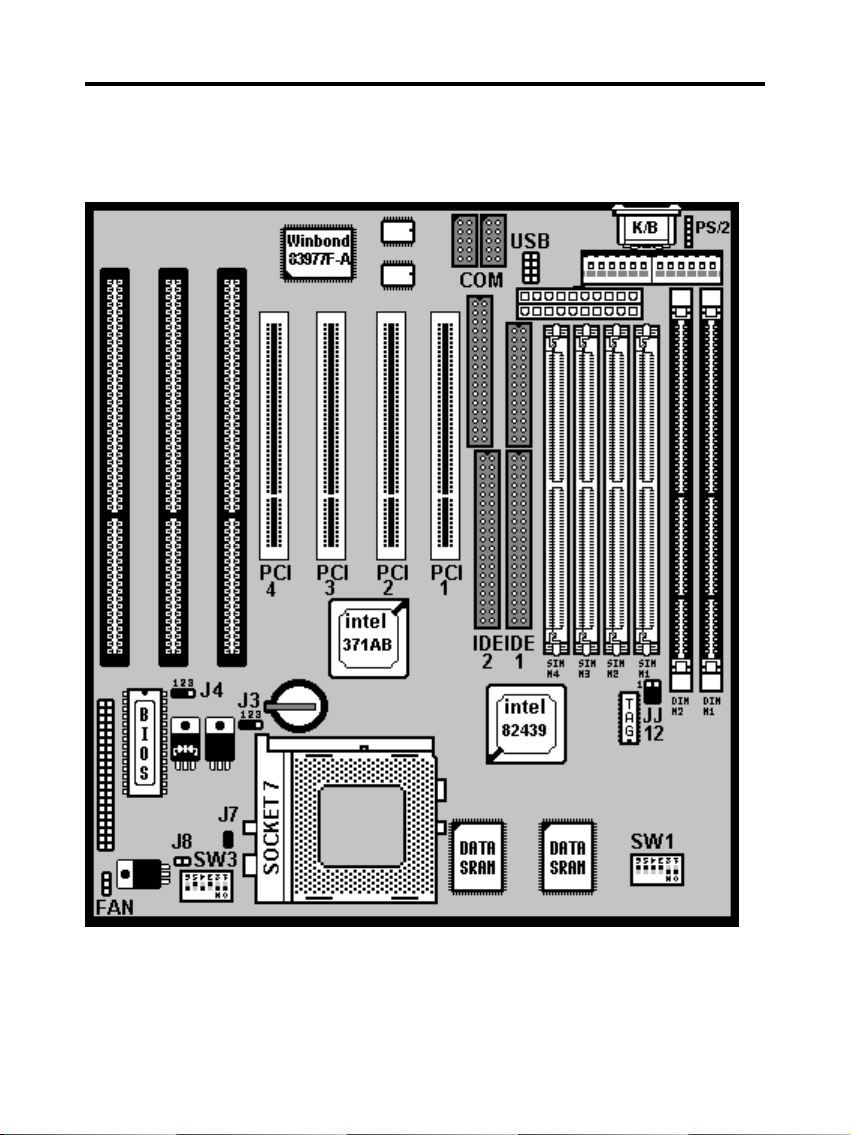
TM-586 TX3 User’s Manual
Setup Guide
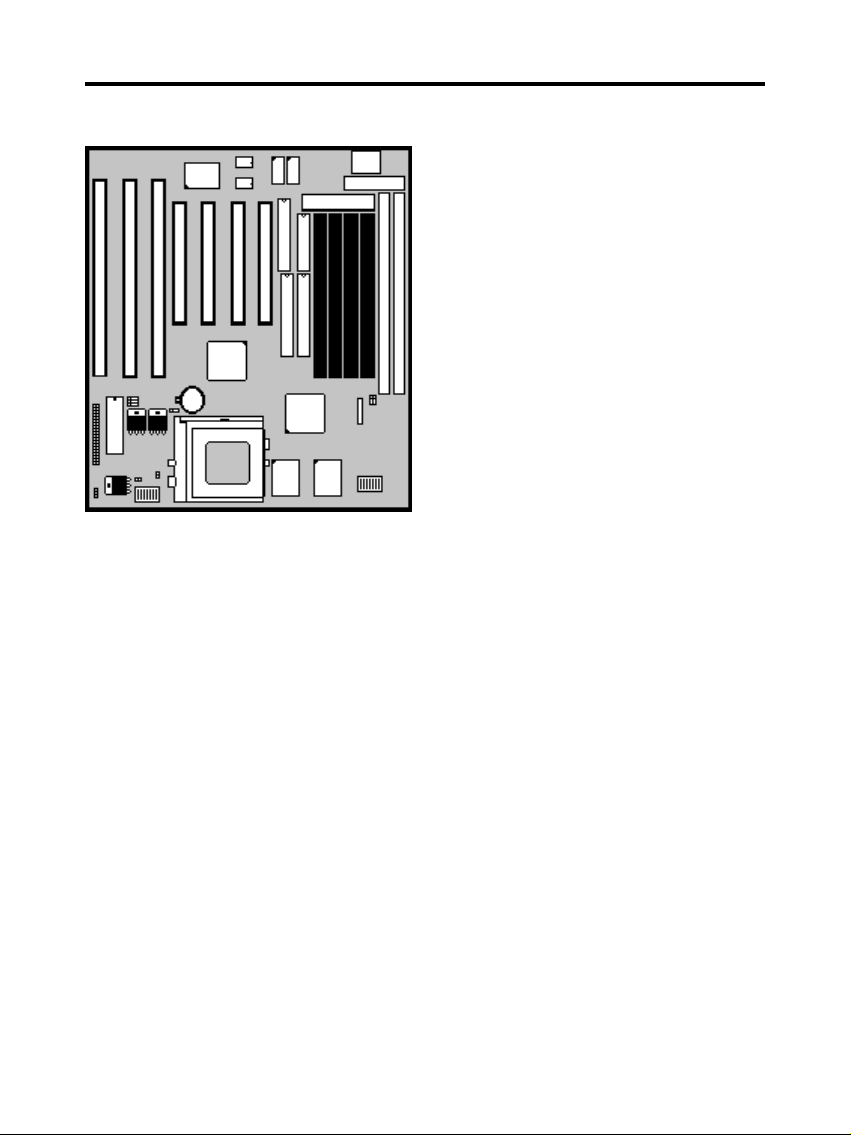
A. Layout Diagram
2
Page 3
TM-586 TX3 User’s Manual
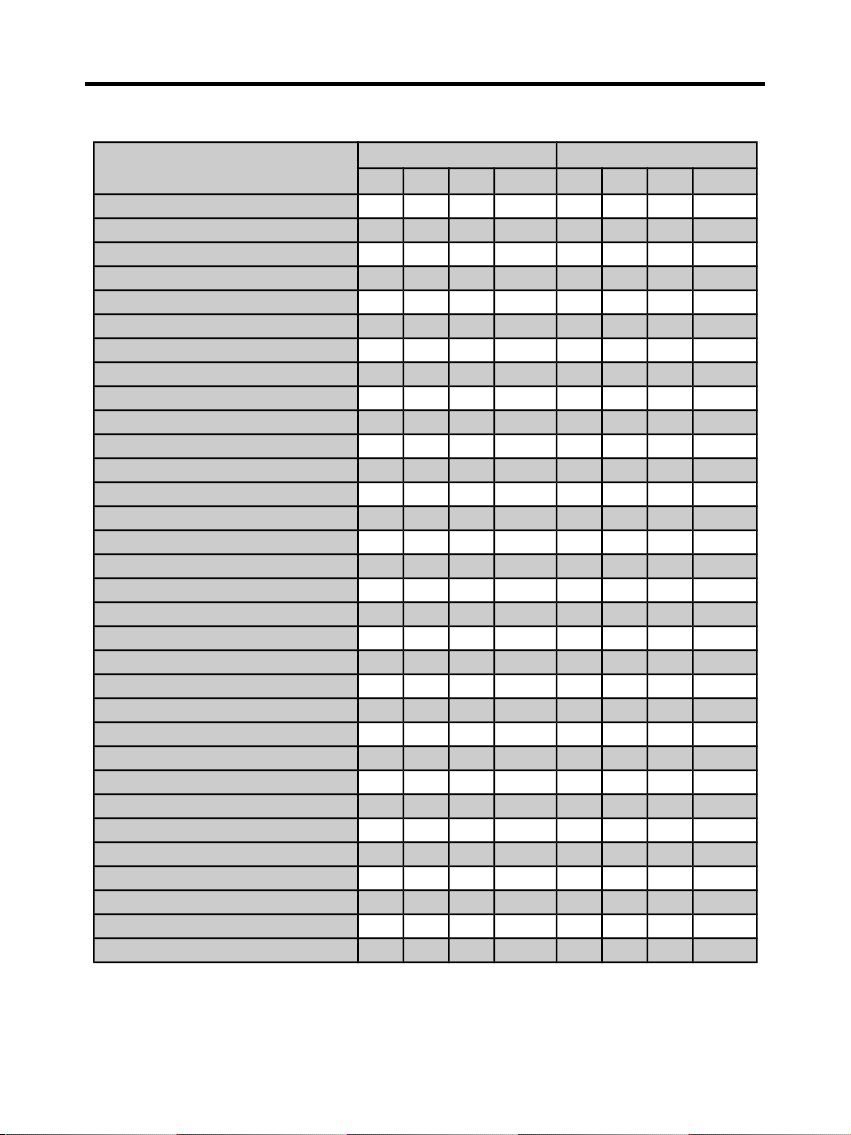
B. Switch Settings for CPUs
On = Short; Off = Open
Intel, AMD, Cyrix SW1 SW1
1 2 3 RATE 4 5 6 CLK
Pentium 75 MHz
Off
Off
Off
1.5XXX50
Pentium 90 MHz
Off
Off
Off
1.5OnOff
Off60Pentium 100 MHz
Off
Off
Off
1.5
Off
Off
Off66Pentium 120 MHz
On
Off
Off2On
Off
Off60Pentium 133 MHz
On
Off
Off2Off
Off
Off66Pentium 150 MHz
OnOnOff
2.5OnOff
Off60Pentium (MMX) 166 MHz
OnOnOff
2.5
Off
Off
Off66Pentium (MMX) 200 MHz
OffOnOff3Off
Off
Off66Pentium (MMX) 233 MHz
Off
Off
Off
3.5
Off
Off
Off66Pentium (MMX) 266 MHz
On
OffOn4
Off
Off
Off66AMD-5k86-P75-75MHz
Off
Off
Off
1.5XXX50
AMD-5k86-P90-90MHz
Off
Off
Off
1.5OnOff
Off60AMD-K5-75MHz -PR75
Off
Off
Off
1.5XXX50
AMD-K5-90MHz -PR90
Off
Off
Off
1.5OnOff
Off60AMD-K5-100MHz-PR100
Off
Off
Off
1.5
Off
Off
Off66AMD-K5-90MHz-PR120
Off
Off
Off
1.5OnOff
Off60AMD-K5-100MHz-PR133
Off
Off
Off
1.5
Off
Off
Off66AMD-K5-133MHz-PR166
OnOnOff
1.75
Off
Off
Off66AMD-K6(MMX)-166MHz
OnOnOff
2.5
Off
Off
Off66AMD-K6(MMX)-200MHz
OffOnOff3Off
Off
Off66AMD-K6(MMX)-233MHz
Off
Off
Off
3.5
Off
Off
Off66AMD-K6(MMX)-266MHz
On
OffOn4
Off
Off
Off66AMD-K6(MMX)-300MHz
OnOnOn
4.5
Off
Off
Off66Cyrix 6x86-100MHz-P120+
On
Off
Off2XXX50Cyrix 6x86-110MHz-P133+
On
Off
Off2OnOnOff55Cyrix 6x86-120MHz-P150+
On
Off
Off2On
Off
Off60Cyrix 6x86-133MHz-P166+
On
Off
Off2Off
Off
Off66Cyrix 6x86-150MHz-P200+
On
Off
Off2OffOnOff75Cyrix MX-150MHz-PR166
OnOnOff
2.5OnOff
Off60Cyrix MX-166MHz-PR200
OnOnOff
2.5
Off
Off
Off66Cyrix MX-200MHz-PR233
OffOnOff3Off
Off
Off66Cyrix MX-233MHz-PR266
Off
Off
Off
3.5
Off
Off
Off
66
3
Page 4
TM-586 TX3 User’s Manual
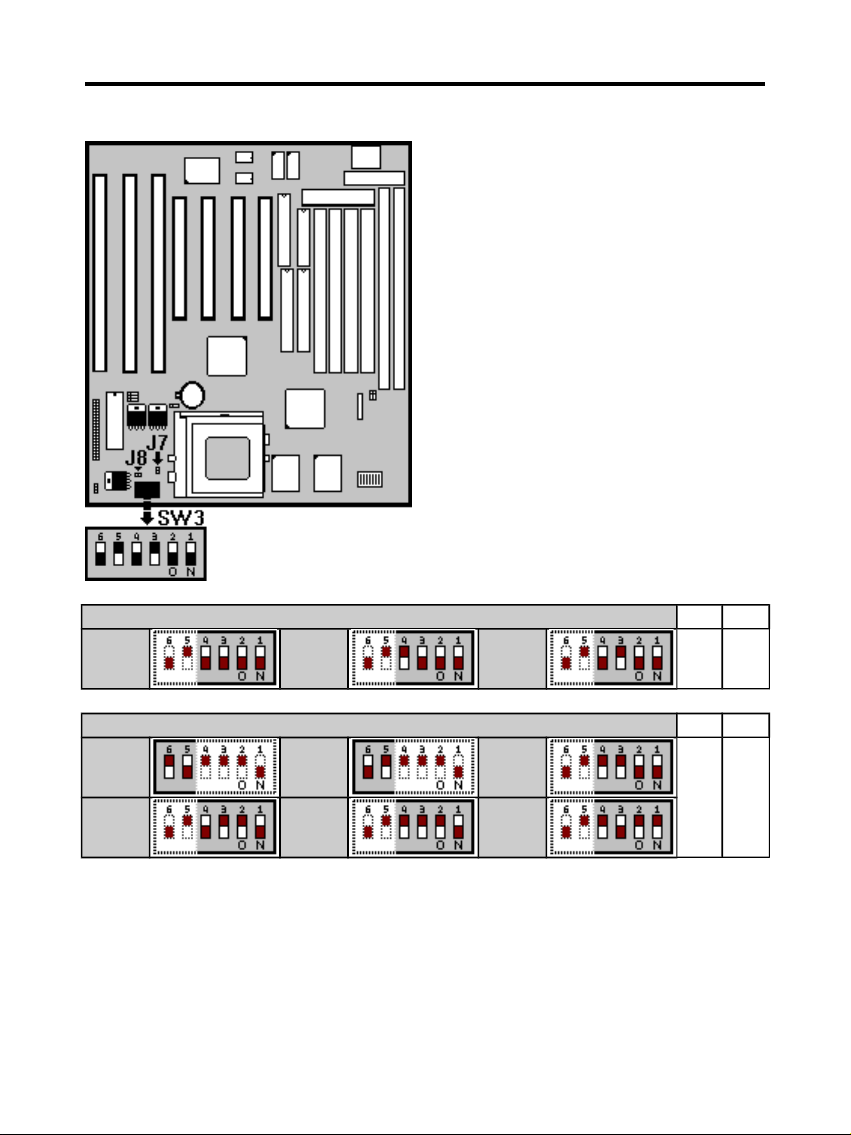
C. CPU Voltage Settings
Single voltage CPU (Intel P54C, Cyrix 6x86, AMD 5k86/K5)
J7
J8
3.52V 3.45V 3.30V
On Off
Dual voltage CPU(Intel P55C, Cryrix 6x86L, MX-6x86, AMD-K6)
J7
J8
V I/O
3.45V
V I/O
3.30V
Vcore
3.20V
Off On
Vcore
2.90V
Vcore
2.80V
Vcore
2.20V
The CPU voltage default
setting is 3.30V(for Intel
P54C), and
J7=On(Short), J8=Off(Open).
Switch voltage is applied,
making the temperature lower
and voltage steadier.
All the voltage specifications
adopted here are the averages
of the working voltage
suggested by the CPU makers,
to make any CPU applied work
with the best performance.
Set the V I/O and Vcore to the
same voltage, if you use a
single voltage CPU.
In Single voltage CPU
4
Page 5
TM-586 TX3 User’s Manual
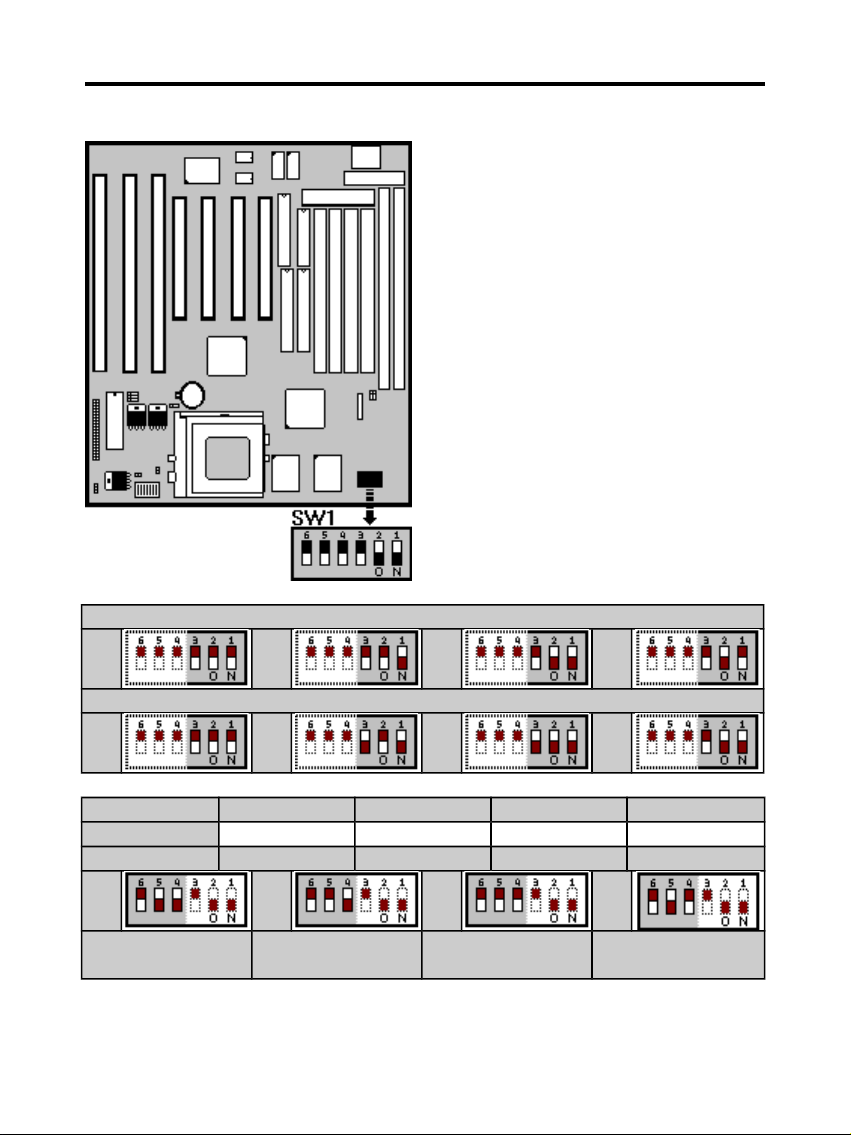
D. CPU Frequencies
Multipliper Factor for Intel CPU
1.5 2 2.5 3
Multipliper Factor for AMD-K6 or Cyrix MX-6x86 CPU
3.5 4 4.5 5
Intel P54C X1.5 X2 X2.5 X3
Cyrix 6x86(L) None X2 None None
AMD-5k86/K5 X1.5 None X1.75 None
55
MHz
60
MHz
66
MHz
75
MHz
PCI Bus Clk
27 MHz
PCI Bus Clk
30 MHz
PCI Bus Clk
33 MHz
PCI Bus Clk
37 MHz
The CPU type default setting is
Intel Pentium 166MHz=66 MHz
*2.5.
When a CPU with 75MHz is
applied, the PCI Bus CLK output
becomes 37MHz. Under this
circumstance, some VGA cards
may not fit well. Then the
system becomes unsteady,
tends to hang up easily or even
results in boot failure. Use
another VGA card instead when
any of the above-mentioned
conditions happens.
5
Page 6
TM-586 TX3 User’s Manual
E. DRAM, EDO RAM Installation Procedures:
Change nothing if EDO RAM is used. BIOS automatically detects the
RAM type.
With 586 CPUs, two FPM/EDO RAM Modules are required on SIMM
sockets to compose a bank for the system to start.
SIMM Socket output voltage is
5V, expandable to 256MB.
Support 5V Fast Page Mode/
Extended Data Out RAM.
The BIOS DRAM default setting
is 70 ns. Change the BIOS
“Chipset Feature Setup” default
setting to 60ns for better
performance, if the chipset is
marked 60ns.
6
Page 7
TM-586 TX3 User’s Manual
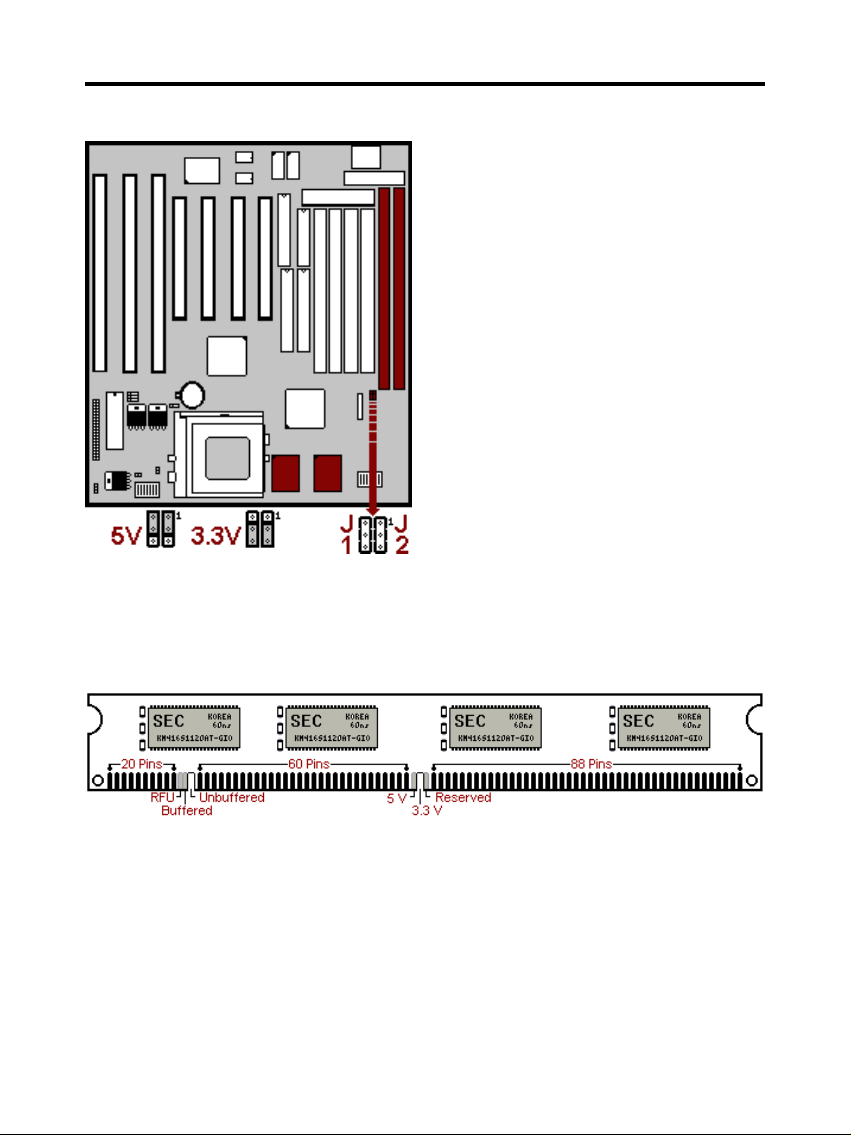
F. SDRAM, Cache Memory Installation Procedures:
The Dual Inline Memory Module (DIMM) must be 3.3 Volt and
Unbuffered Synchronus DRAM (SDRAM) 8MB, 16MB, 32MB or 64MB.
The following illustration shows the type of DIMM Module.
168-PIN SDRAM DIMM Notch Key Definitions
Sync SRAM (Pipeline Burst SRAM) If Sync SRAM Modules are
installed, they consists of Pipeline Burst 2 PCs 32K x 32-6 for 256KB or
2 PCs 64Kx32-6) for 512KB Sync SRAM.
A 168-pin DIMM can support up to
128MB EDO/SDRAM.
Default setting: 3.3V.
First, verify the working voltage of
the EDO/SDRAM module in either
DIMM socket (DIMM1 or DIMM2table free).
You can set up the BIOS “Chipset
Feature Setup” to the best working
condition basing on the type of
EDO/SDRAM you are using.
7
Page 8
TM-586 TX3 User’s Manual
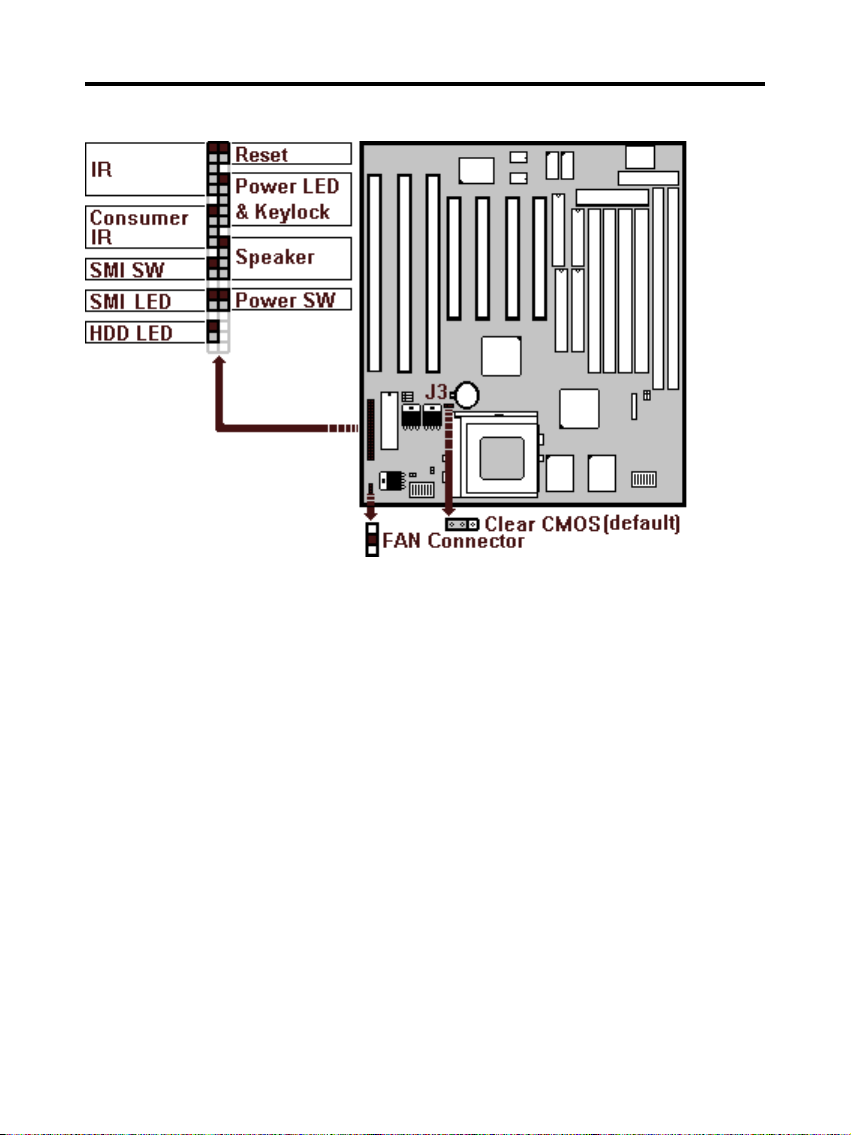
G. Other Jumper Settings
Speaker:
Connect to the system’s speaker for beeping.
Keylock:
Keyboard lock switch and Power LED connector.
Reset:
Short to restart system.
HDD LED:
LED ON when on board PCI IDE hard disk activates.
SMI LED:
LED ON when system is in any Saving mode.
Keyboard Power On/Off Function (Patent Is Under Application!!!)
1.Turn on the system by pressing the “Ctrl-***” keys simultaneously
(Strike the “*” key 3 times while holding the “Ctrl” key.)
2. Press “Ctrl-***” again to turn off the system. This function becomes
invalid during POST (Power-On-Self-Test).
3. CPU Fan Auto Turn Off: The CPU fan automatically turns off when
the
system enters the Suspend state. Remember to connect the CPU fan
8
Page 9
TM-586 TX3 User’s Manual
to its connector on the mainboard to enable this function.
SMI SW:
Short to enter sleep mode. A keystroke or mouse movement (mouse
driver exits) will instantly “wake up” the system.
POWER SW (FOR ATX POWER SUPPLY):
The button should be a momentary switch that is normally open.
Pushing the ATX Power Switch will immediately change the system
status. Before or during “POST”, you need to hold the button for four
seconds in order to turn off the system.
J3: Clear CMOS
Turn off the system and short pins 2-3 (J3) to clear CMOS. Then short
pins 1-2 before turning it on. You may damage the chipset if you power
on the system by shorting pins 2-3.
J3
1-2 Normal operation(Default).
2-3 for clearing CMOS Data.
CPU Cooler Fan connector
This is the connector for CPU cooler. Never use the jumper to short the
connector. Serious damages caused this way will not be warrantied.
Modem Ring On Function Operation: (Only available by using ATX
Power Supply)
1. Enter BIOS setup.
2. Select Power Management Setup.
3. Resume by Ring: Enable.
4. Save BIOS setup and Reboot.
5. Booting from DOS, Windows, or Windows 95.
6. Turn off the system by:
a. ATX-Power Switch
b. Keyboard Power On/Off
c. Windows 95 Software Power Off
7. System Waiting for Modem Ring On
When Modem Ringing Signal Active, System will wake-up.
9
Page 10
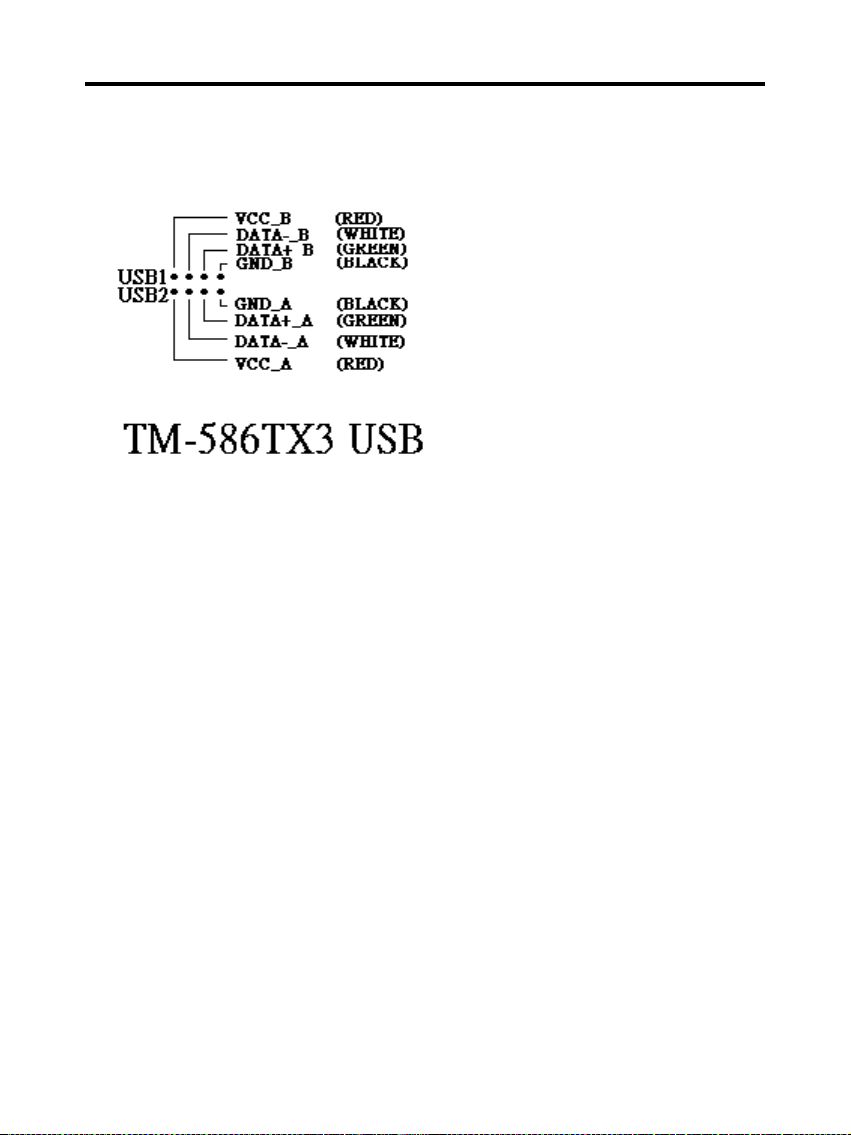
TM-586 TX3 User’s Manual
USB1/USB2: USB Connector
10
 Loading...