

Page 1
IP NETWORK INTERCOM SYSTEM
IP Network Intercom Exchange
N-8000EX/N-8010EX
Master Stations
N-8000MS
N-8010MS
N-8011MS N-8031MS N-8500MS
Board Unit
N-8031SB
N-8050SB
DESCRIPTION
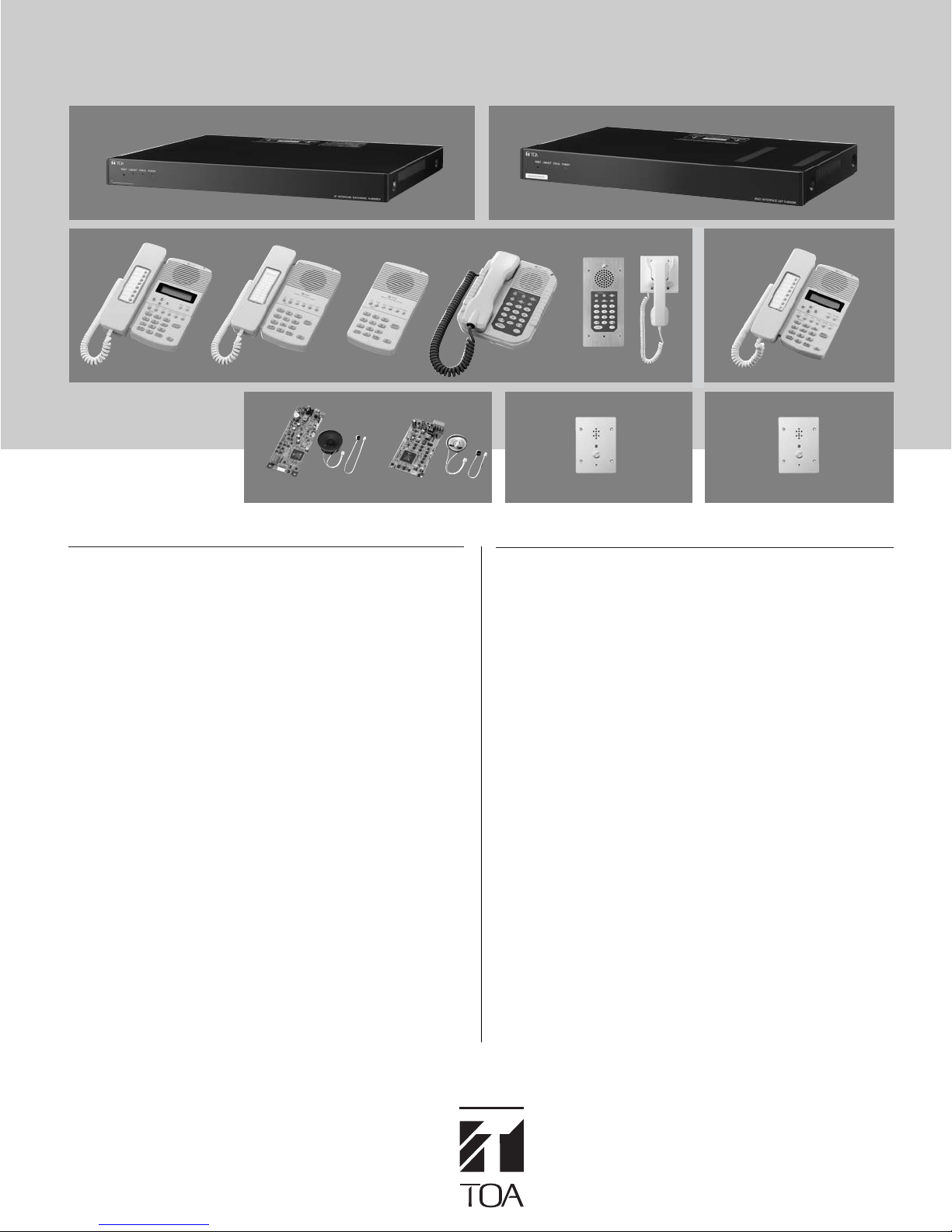
The N-8000 Series is a packet intercom system (IP network
compatible intercom) employing packet audio technology*
connecting IP intercom exchanges (which can connect up to 16
stations per exchange), Multi interface units and IP Stations to a
network (LAN or WAN), an optimal system can be constructed for
in-house or wide area information communications such as
duplex conversations between stations, periodical broadcasts,
and BGM broadcasts.
A basic N-8000 Series system is comprised of an intercom
exchange unit such as the N-8000EX IP Intercom Exchange.
Stations are available in different configurations with different
features:
Master Stations: N-8000MS Multifunctional Master Station,
N-8010MS Standard Master Station, N-8011MS Hands-Free
Master Station, N-8020MS Industrial Use Master Station,
N-8031MS Wall Mount Master Station and for network
applications, N-8500MS IP Master Station.
Door Stations: N-8050DS Door Station, N-8540DS IP Door Station
Up to 80 exchanges, multi interface units and IP stations can be
combined. When 80 exchanges are used, systems of up to 1,280
stations can be realized. The system's "echo cancellation"*
makes hands-free duplex conversation possible (conversations
made without using a handset at both parties) between stations. In
addition, the multi interface unit features a contact bridge function
to be performed by way of contact input and output control.
*1Technology related to audio transmission over a network.
2
A circuit that prevents acoustic feedback or echo generated when the voice
*
output from the station's internal speaker enters the microphone.
1
. By
2
feature
Multi Interface Unit
N-8000MI
IP Master Station
N-8020MS
Door Station
N-8050DS
RS-191
IP Door Station
N-8540DS
FEATURES
●
Exchanges, Multi Interface units and IP Stations can be
distributed over a data communications network.
●
Can be connected to an existing local area network (LAN) or
wide-area network (WAN). The system can also be easily
connected to fiber-optic networks without restrictions on
operating distance.
●
Two types of exchanges are available:
N-8000EX; 4 internal and 8 external speech links with
N-8010EX; 1 internal and 2 external speech links
●
System configured employing IP stations make communications
possible without having to use an exchange unit.
(IP Door Stations alone cannot be configured into systems
without incorporating a IP Master Station.)
●
The dedicated software program enables centralized control
with a personal computer.
●
System maintenance (verifying operation log and Line
supervision) can also be performed with a personal computer
and Internet browser.
●
Can be connected to the Exchange of the EXES-2000 or
EXES-6000 Intercom System by a tie-line, or the PBX
exchange via the E&M lead signaling interface.
●
The Multi Interface unit can interlock with an electronic lock
system or CCTV surveillance system by way of contact
input/output control function.
PA paging output.
without PA paging output.
Page 2
Internal: 4 links
N-8000EX
(
External: 8 links
IP Network Intercom Exchange
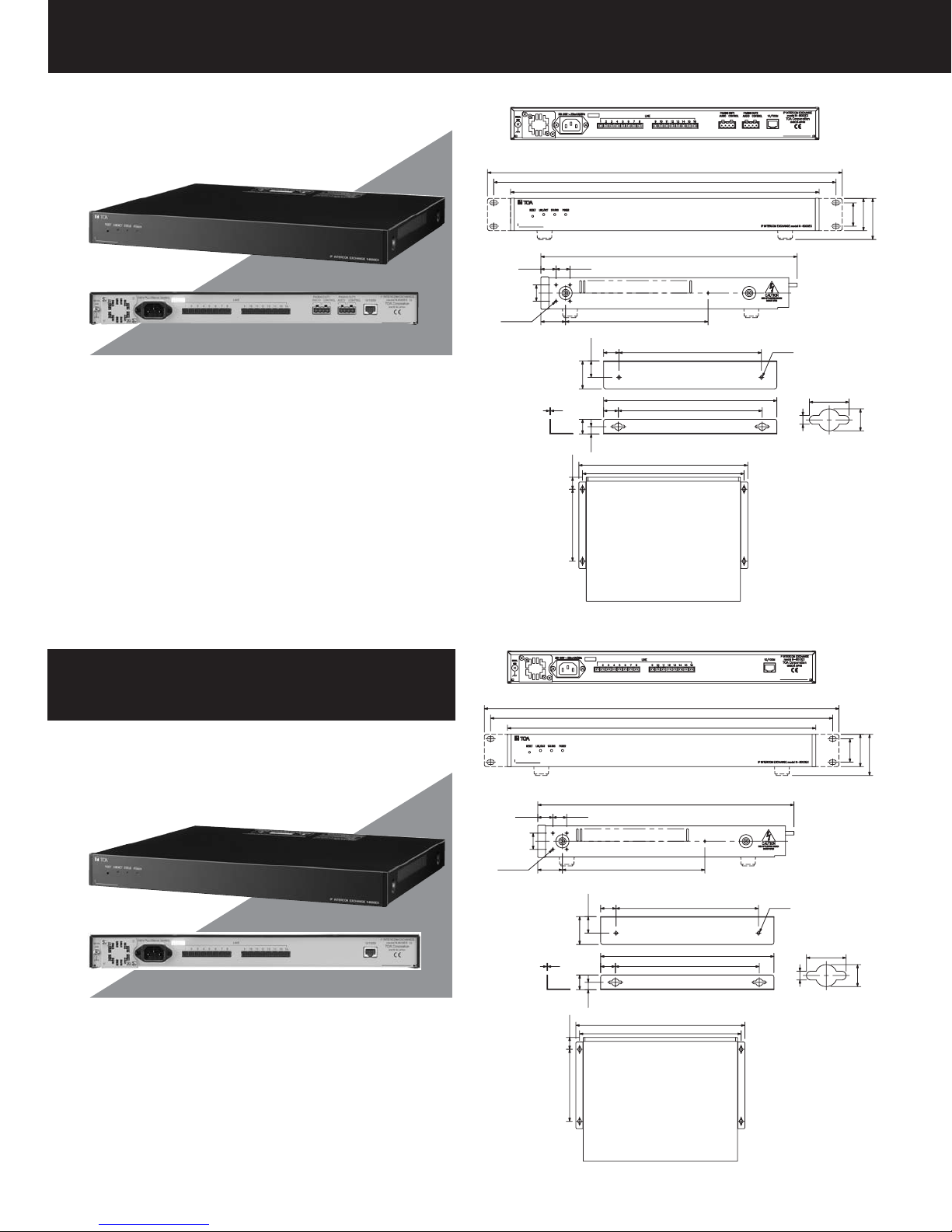
The IP Network Intercom Exchange uses paket audio technology to
permit connection of up to sixteen N-8000 Series stations, and
features two outputs for public address paging. Simultaneous handfree conversation is possible between staions. Moreover, the
exchange is equipped with a networking interface, allowing up to 80
exchanges to be connected over a network using additional network
intercom exchanges. The Exchange can be mounted in an EIA
standard rack (1-unit size) or to a wall using the supplied bracket.
)
10–ø2.4
20.6
Rear View
483
466
420
56
31.8
44.3
Front View
18.9
22
33,6
21
22.5
38
1
20
20
10
32.6
349
194
Side View
194
236
196
Wall mounting bracket (accessory)
460
440
2–ø4
wall mounting hole
18
4
Dimensions of
10
Internal: 1 link
N-8010EX
(
External: 2 links
IP Network Intercom Exchange
The IP Network Intercom Exchange uses paket audio technology to
permit connection of up to sixteen N-8000 Series stations.
Simultaneous hand-free conversation is possible between staions.
Moreover, the exchange is equipped with a networking interface,
allowing up to 80 exchanges to be connected over a network using
additional network intercom exchanges. The Exchange can be
mounted in an EIA standard rack (1-unit size) or to a wall using the
supplied bracket.
)
10–ø2.4
20.6
(196)
Wall mounting installation
Rear View
483
466
420
56
31.8
44.3
Front View
18.9
22
33,6
21
22.5
38
1
20
20
10
32.6
(196)
349
194
Side View
194
236
196
Wall mounting bracket (accessory)
460
440
2–ø4
wall mounting hole
18
4
Dimensions of
10
Wall mounting installation
Page 3
SPECIFICATIONS
Model No.
Power Source
Power Consumption
Type of Speech Path
Speech Link
Hands-free Speech Method
Line Capacity
Wiring Method
Transmission System
Signal Level
Transmission Range
Power Supply to Station
Paging Output
Connecting Terminal
Others
Network Section
Network I/F
Network Protocol
Audio Packet
Transmission System
Connector
Voice Sampling Frequency
Quantifying Bit Number
Voice Encoding Method
Audio Packet Omission
Compensation System
Audio Delay Time
Indication
Setting Method
Operating Temperature
Operating Humidity
Finish
Dimensions
Weight
Accessory
*0dB = 1V
N-8000EX N-8010EX
N-8000EX/N-8010EX (CE): 230V AC, 50/60Hz/ N-8000EX/N-8010EX (CU): 120V AC, 50/60Hz
50W (at rated), 75W (max.)
Space sharing/Time Space sharing
Internal: 4/External: 8 (Both Half duplex/Full duplex use) Internal: 1/External: 2 (Both Half duplex/Full duplex use)
Simultaneous conversation by way of echo canceller or Half-duplex conversation by way of voice switch
Up to 16 stations
Non-polar one pair stranded wire system
2 wire 160kbps echo canceller transmission system
Under 0dB*
Max. 1500m (ø0.65mm. Loop resistance 170 ohms)
48V DC, Max. 70mA
Audio: 2 channels Max. 0dB*, 600Ω, balanced, detachable terminal block
Control: 2 channels, no-voltage make contact output (24V DC/0.5A), Station paging only
detachable terminal block
RJ-11 modular jack
Firmware update function, System registration data entry hold facility, Time of day hold facility, Forced air-cooling,
Reset switch (front panel)
10BASE-T/100BASE-TX (Automatic change)
TCP/IP, UDP, ARP, ICMP, HTTP, RTP, IGMP
Unicast (Simultaneous paging to up to 16 zones)
Multicast (Simultaneous paging to up to 79 zones)
RJ45 connector
16kHz, 8kHz (Controllable on the software)
16-bit
Sub-band ADPCM, Cryptosystem
Silence insertion
80ms, 320ms (Controllable on the software)
Network LINK/ACT indication, Status Lamp, Power-on indication lamp
Rack, Desk, Surface mount
0°C to +40°C
Under 90% RH (no condensation)
Pre-coated steel plate, black, 30% gloss
420 (W) × 44.3 (H) × 349 (D)mm
4.2kg
AC power cord (2m) × 1, AC power cord (2m) × 1,
CD (for PC setting, maintenance use) × 1, CD (for PC setting, maintenance use) × 1,
Detachable terminal plug (4P) × 2, Detachable terminal plug (2P) × 20,
Detachable terminal plug (2P) × 20, Plastic foot × 4,
Plastic foot × 4, Screw for fitting plastic foot × 4,
Screw for fitting plastic foot × 4, Rack mounting bracket × 2,
Rack mounting bracket × 2, Screw for rack mounting × 4,
Screw for rack mounting × 4, Wall mounting bracket × 2,
Wall mounting bracket × 2, Screw for mounting bracket × 8,
Screw for mounting bracket × 8, Screw for wall mounting × 4
Screw for wall mounting × 4
Page 4
N-8000MI
Multi Interface Unit
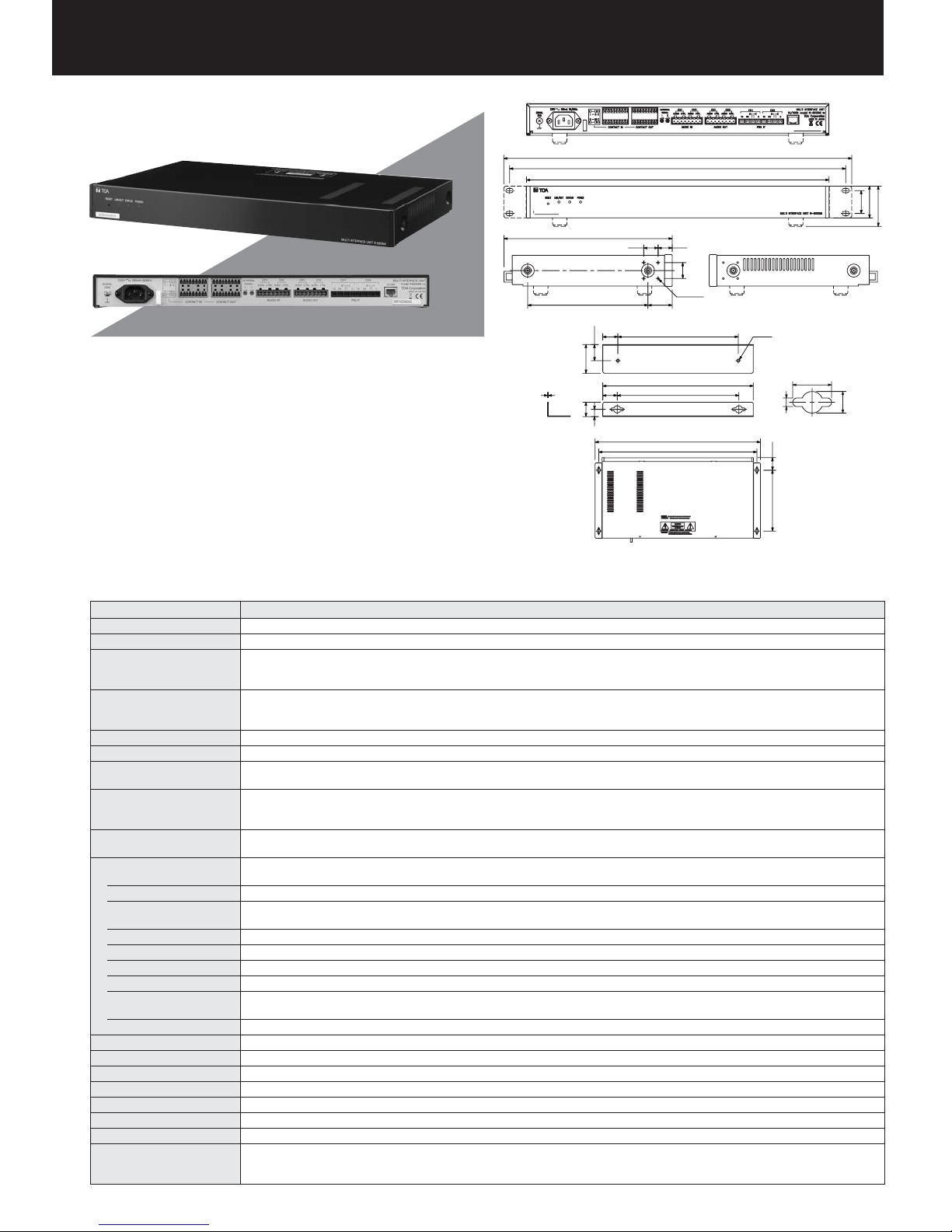
The N-8000MI is a multi-interface unit designed for use with TOA's packet
intercom system (IP network-compatible intercom system) that employs the
packet audio technology. Connecting the multi-interface to a local area
network permits the ideal system for in-house or wide-area information
transmission applications, such as paging, periodical broadcasts, and
background music broadcasts, to be built between the multi-interface and
IP intercom exchange or other multi-interface unit. The contact bridge
function can be realized through contact input and output control. The
N-8000MI also features the tie-line function to be connected the the
EXES-2000 intercom system or the EXES-6000 system. A total of up to 80
multi-interface units and IP intercom exchanges can be connected to a
network. The unit can be mounted in an EIA standard rack (1-unit size) or
to a wall using the supplied bracket.
Rear View
483
466
420
233.5
167
Left Side View Right Side View
21
22.5
40
1
20
20
10
Front View
19.9 19.6
22
10–ø2.4
33.6
167
209
169
Wall mounting bracket (accessory)
459
439
2–ø4
18
4
Dimensions of
wall mounting hole
34.6
(169)
Wall mounting installation
10
31.8
44.3
56
SPECIFICATIONS
Model No.
Power Source
Power Consumption
Audio Input*
Audio Output*
Control Input*3
Control Output*
PBX I/F*
Tie-line I/F*
3
3
3
3
3
Others
Network Section
Network I/F
Network Protocol
Audio Packet
Transmission System
Connector
Voice Sampling Frequency
Quantifying Bit Number
Voice Encoding Method
Voice Packet Loss
Recovery
Audio Delay Time
Indication
Setting Method
Operating Temperature
Operating Humidity
Finish
Dimensions
Weight
Accessory
*3 Each input and output can be combined in 9 patterns (refer to last page).
N-8000MI
N-8000MI (CE): 230V AC, 50/60Hz/ N-8000MI (CU): 120V AC, 50/60Hz
N-8000MI (CE): 19W (180mA) (at rated), 24W (230mA) (max.)/ N-8000MI (CU): 16W (250mA) (at rated), 21W (330mA) (max.)
Input: 2 inputs (2P/input), Max. 0dB*
Control: 2 inputs (2P/input), no-voltage make contact input, open voltage: 12V DC, short-circuit current: 10mA
Removable terminal block (8 pins)
Output: 2 outputs (2P/output), Max. 0db*
Control: 2 outputs (2P/output), relay contact output, contact capacity: 24V DC/0.5A
Removable terminal block (8 pins)
16 inputs, no-voltage make contact input, open voltage; 12V DC, short-circuit current: 10mA, removable terminal block (9 pins)
16 outputs, relay contact output, contact capacity: 24V DC/0.5A, removable terminal block (9 pins)
PBX input and output: 2 channels, Max.: Under 0dB*
with adjustment functions for both input and output (Input: 0 to +15dB, Output: –15 to 0dB), Analog E & M interface
Tie-line input and output: 2 channels, Max.: Under 0dB*
Signal method: EXES-2000/EXES-6000 tie-line method
Selective signal: DTMF signal
Firmware update function, System registration data entry hold facility, Time of day hold facility,
Reset switch (front panel)
10BASE-T/100BASE-TX (Automatic change)
TCP/IP, UDP, ARP, ICMP, HTTP, RTP, IGMP
Unicast (Simultaneous paging to up to 16 zones)
Multicast (Simultaneous paging to up to 79 zones)
RJ45 connector
16kHz, 8kHz (Controllable on the software)
16-bit
Sub-band ADPCM, Cryptosystem
Silence insertion
80ms, 320ms (Controllable on the software)
Network LINK/ACT indication, Status Lamp, Power-on indication lamp
Rack, Desk, Surface mount
0°C to +40°C
Under 90% RH (no condensation)
Pre-coated steel plate, black, 30% gloss
420 (W) × 44.3 (H) × 233.5 (D)mm
2.8kg
AC power cord (2m) × 1, CD (for PC setting, maintenance use) × 1, Mini-clamp plug (2 pins) × 10, Remote terminal plug (8 pins) × 2,
Removable terminal plug (9 pins) × 4, Plastic foot × 4, Screw for fitting plastic foot × 4, Rack mounting bracket × 2,
Screw for rack mounting × 4, Wall mounting bracket × 2, Screw for mounting bracket × 8, Screw for wall mounting × 4
1
0dB = 1V, *20dB = 0.775V
*
1
, under 600Ω, balanced, with a semi-fixed volume for adjustment (0 to –25dB)
1
, under 600Ω, balanced
2
, Average: Under –15dB*2, 600Ω, balanced, mini-clamp connector (2 pins),
2
, Average: Under –15dB*2, 600Ω, balanced, mini-clamp connector (2 pins)
Page 5
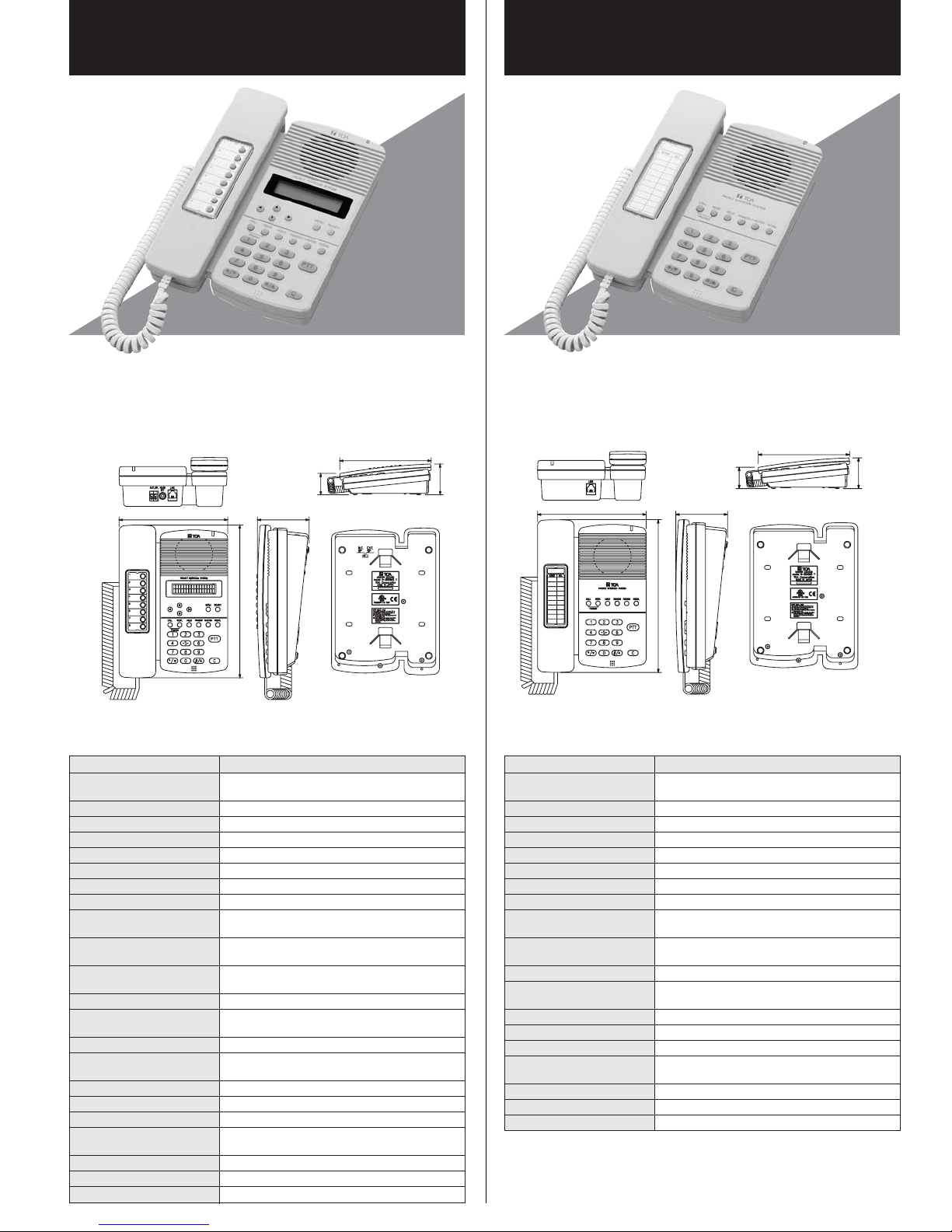
N-8000MS
Multifunctional Master Station
N-8010MS
Standard Master Station
This Master Station is designed to connect to the Network intercom Exchange, and
provides hands-free or handset conversation of high sound quality. In addition to the
functions of the standard Master Station, the Multifunctional Master Station provides
LCD display. Auto-dialer function enabling one-touch dialing, headset terminal and
external speaker terminal. This station can be mounted to the wall using and optional
YC-280 wall mounting bracket.
Top View
148 70.5
208
48.3
SPECIFICATIONS SPECIFICATIONS
Model No.
Power Source
Power Consumption
Wiring Method
Transmission System
Signal Level
Speech Method
Audio Frequency Range
Transmission Range
Hands-free
Handset
Display
Line Connecting Terminal
Headset Terminal
External Speaker Terminal
Setting Method
Operating Temperature
Operating Humidity
Finish
Dimensions
Weight
Accessory
1
Option*
N-8000MS
48V DC
(supplied from the IP network intercom exchange)
2.4W
Non-polar one pair stranded wire system
2 wire 160kbps echo canceller transmission system
Under 0dB*
Hands-free or handset conversation
300 – 7,000Hz
Max. 1500m (ø0.65mm. Loop resistance 170 ohms)
Speaker: 0.6W, 8 ohms, 5.7cm cone-type,
Mic.: Omni-directional electret condenser microphone
Receive path: Cone-type,
Send path: Electret condenser microphone
Alphanumeric characters
(16 characters × 2 lines LCD)
RJ-11 modular jack
Speaker: 3mW, 32 ohms,
Microphone: –49dB*, ø3.5mm mini jack
0.6W, 8 ohms, screwless connector (2P)
Desk/Surface mounted master station (When
mounting to the wall, use the optional bracket*
0°C to +40°C
Under 90% RH (no condensation)
Body, Handset: ABS resin, gray
148 (W) × 208 (H) × 70.5 (D)mm
(excluding a curl cord section)
800g
Connection cord (3m) × 1
Wall mounting bracket: YC-280
Figure of the
desktop installation
207.3
Rear ViewSide ViewFront View
This Master Station is designed to connect to the Network intercom Exchange, and
provides hands-free or handset conversation of high sound quality. This station can
be mounted to the wall using and optional YC-280 wall mounting bracket.
207.3
69.7
unit: mm
*0dB = 1V *0dB = 1V
1
.)
Top View
148 70.5
Model No.
Power Source
Power Consumption
Wiring Method
Transmission System
Signal Level
Speech Method
Audio Frequency Range
Transmission Range
Hands-free
Handset
Line Connecting Terminal
Setting Method
Operating Temperature
Operating Humidity
Finish
Dimensions
Weight
Accessory
1
Option*
208
N-8010MS
48V DC
(supplied from the IP network intercom exchange)
2.4W
Non-polar one pair stranded wire system
2 wire 160kbps echo canceller transmission system
Under 0dB*
Hands-free or handset conversation
300 – 7,000Hz
Max. 1500m (ø0.65mm. Loop resistance 170 ohms)
Speaker: 0.6W, 8 ohms, 5.7cm cone-type,
Mic.: Omni-directional electret condenser microphone
Receive path: Cone-type,
Send path: Electret condenser microphone
RJ-11 modular jack
Desk/Surface mounted master station (When
mounting to the wall, use the optional bracket*
0°C to +40°C
Under 90% RH (no condensation)
Body, Handset: ABS resin, gray
148 (W) × 208 (H) × 70.5 (D)mm
(excluding a curl cord section)
700g
Connection cord (3m) × 1
Wall mounting bracket: YC-280
48.3
Figure of the
desktop installation
Rear ViewSide ViewFront View
69.7
unit: mm
1
.)
Page 6
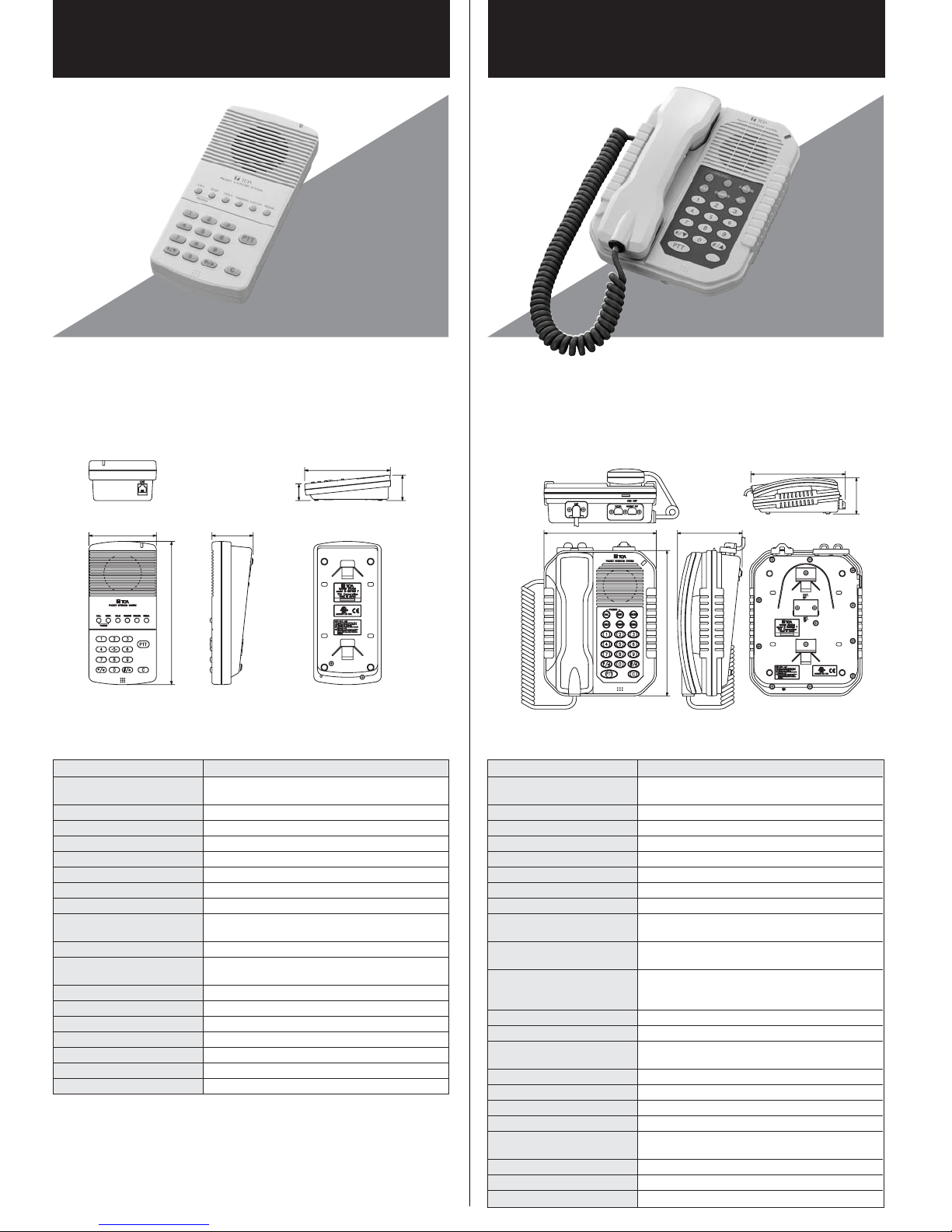
N-8011MS
Standard Hands-Free Master Station
N-8020MS
Industrial-Use Master Station
This Master Station is designed to connect to the Network intercom Exchange, and
provides hands-free or handset conversation of high sound quality. With its spacesaving design, this Master Station features the same functions as the Standard Master
Station. This station can be mounted to the wall using and optional YC-290 wall
mounting bracket.
Top View
92 56.1
195
38.3
desktop installation
SPECIFICATIONS
Model No.
Power Source
Power Consumption
Wiring Method
Transmission System
Signal Level
Speech Method
Audio Frequency Range
Transmission Range
Hands-free
Line Connecting Terminal
Setting Method
Operating Temperature
Operating Humidity
Finish
Dimensions
Weight
Accessory
1
Option*
N-8011MS
48V DC
(supplied from the IP network intercom exchange)
2.4W
Non-polar one pair stranded wire system
2 wire 160kbps echo canceller transmission system
Under 0dB*
Hands-free conversation
300 – 7,000Hz
Max. 1500m (ø0.65mm. Loop resistance 170 ohms)
Speaker: 0.6W, 8 ohms, 5.7cm cone-type,
Mic.: Omni-directional electret condenser microphone
RJ-11 modular jack
Desk/Surface mounted master station (When
mounting to the wall, use the optional bracket*
0°C to +40°C
Under 90% RH (no condensation)
Body: ABS resin, gray
92 (W) × 195 (H) ×56.1 (D)mm
400g
Connection cord (3m) × 1
Wall mounting bracket: YC-290
194.4
Figure of the
Rear ViewSide ViewFront View
57.9
This Master Station is designed to connect to the Network intercom Exchange, and
provides hands-free or handset conversation of high sound quality. It features
dustproof and waterproof construction, and can be used in locations exposed to
ambient temperatures ranging from –10°C to +50°C. In addition to the functions of the
standard Master Station, the Industrial-Use Station permits connection of external
speaker and can take out control signal for dial-in indicator from its contact output.
This station can be mounted to the wall using and optional YC-280 wall mounting
bracket.
Top View
170
97.8
220
SPECIFICATIONS
Model No.
Power Source
Power Consumption
Wiring Method
Transmission System
Signal Level
Speech Method
Audio Frequency Range
Transmission Range
Hands-free
Handset
1
.)
Dial-in Contact Output
Line Connecting Terminal
External Speaker Terminal
Setting Method
Operating Temperature
Operating Humidity
Dust/Water Protection
Finish
Dimensions
Weight
Accessory
1
Option*
N-8020MS
48V DC
(supplied from the IP network intercom exchange)
2.4W
Non-polar one pair stranded wire system
2 wire 160kbps echo canceller transmission system
Under 0dB*
Hands-free or handset conversation
300 – 7,000Hz
Max. 1500m (ø0.65mm. Loop resistance 170 ohms)
Speaker: 0.6W, 8 ohms, 5.7cm cone-type,
Mic.: Omni-directional electret condenser microphone
Receive path: Cone-type,
Send path: Electret condenser microphone
Open collector output (The contacts have polarity.)/
Withstand voltage: Max. 30V DC, Control current:
Max. 50mA, screwless connector (2P)
RJ-11 modular jack
0.6W, 8 ohms, screwless connector (2P)
Desk/Surface mounted master station (When
mounting to the wall, use the optional bracket*
–10°C to +50°C
Under 90% RH (no condensation)
IP54
Body, Handset: ABS resin, gray
170 (W) × 220 (H) × 97.8 (D)mm
(excluding a curl cord and projection sections)
1kg
Rubber cap × 2
Wall mounting bracket: YC-280
238
Figure of the
desktop installation
Rear ViewSide ViewFront View
91
*0dB = 1V*0dB = 1V
1
.)
Page 7
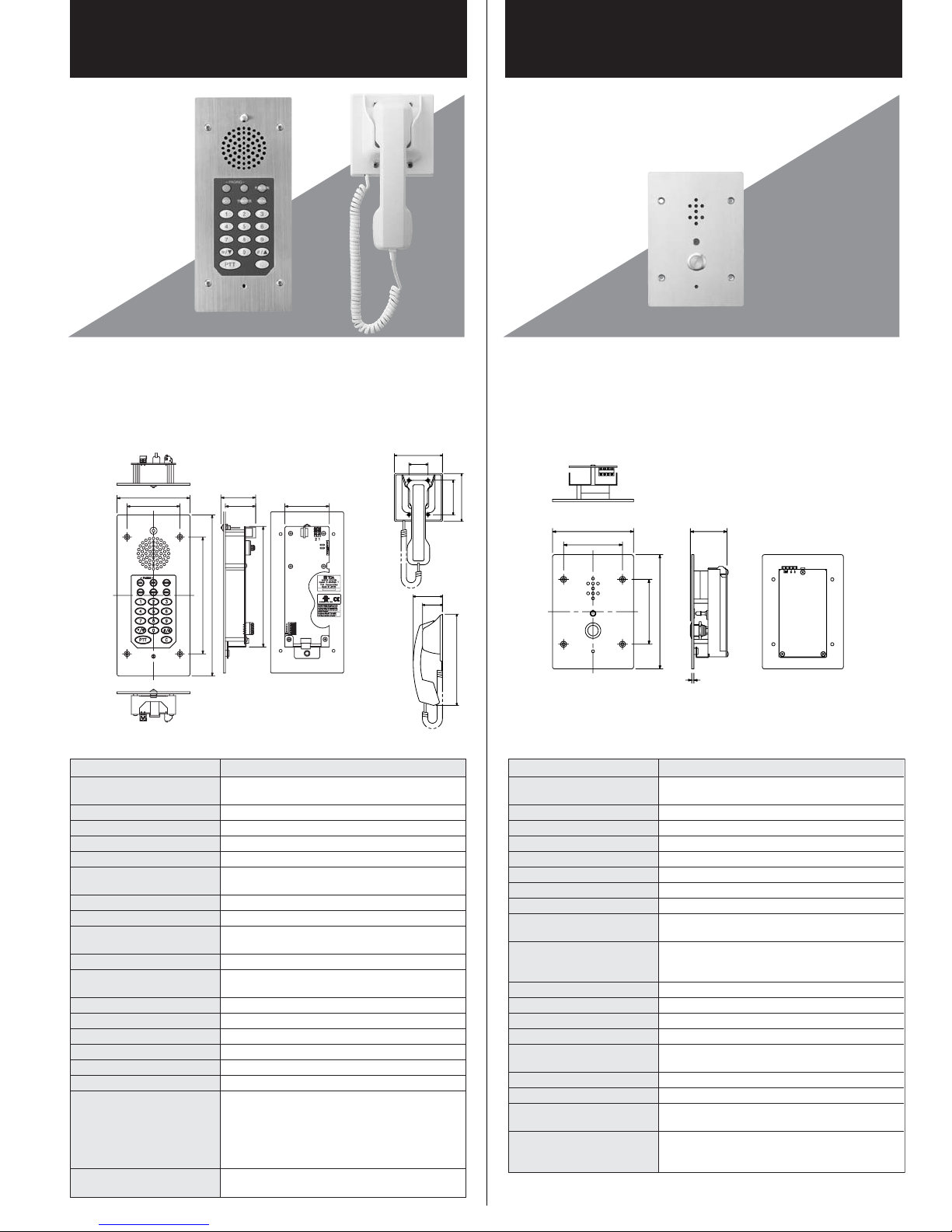
N-8031MS
Flush-Mount Hands-Free Master Station
RS-191
N-8050DS
Door Station
The N-8031MS is a flush- or surface-mount master station designed to operate in
conjunction with TOA IP Intercom Exchange and features high quality hands-free
conversation.
Connecting a foot switch or other external switch to the external dial input terminal
permits one-touch dialing operation by way of such switches.
Handset conversation can be established in conjunction with the optional RS-191.
Top View
Bottom View
115
83.5
Front View
54.6
47.6
184
254
70
190
Rear ViewSide View
116
46
70
48
SPECIFICATIONS
Model No.
Power Source
Power Consumption
Wiring Method
Transmission System
Signal Level
Speech Method
Audio Frequency Range
Transmission Range
Hands-free
Line Connecting Terminal
External Dial Input
Setting Method
Operating Temperature
Operating Humidity
Finish
Dimensions
Weight
Accessory
Option
N-8031MS
48V DC
(supplied from the IP network intercom exchange)
1.8W (rated), 2.4W (max.)
Non-polar one pair stranded wire system
2 wire 160kbps echo canceller transmission system
Under 0dB*
Hands-free conversation (Handset conversation can
be established in conjunction with the RS-191(option))
300 – 7,000Hz
Max. 1500m (ø0.65mm. Loop resistance 170 ohms)
Speaker: 0.6W, 8 ohms, 5.7cm cone-type,
Mic.: Omni-directional electret condenser microphone
Pin header (2 pins)
No-voltage make contact input,
screwless connector (5 pins)
Flush-mount/Surface-mount
0°C to +40°C
Under 90% RH (no condensation)
Panel: Stainless steel (SUS304), hairline
115 (W) × 254 (H) × 54.6 (D)mm
850g
Box mounting screw (No.6-32UNC × 18) × 4,
Box mounting screw (M4 × 25) × 4,
Removable terminal plug (2 pins, preinstalled on
the unit) × 1,
Handset jumper (8 pins, preinstalled on the unit) × 1,
Ferrite clamp ×1
For flush-mount: Back Box YC-241,
Wall surface-mount: Wall mount Box YC-251
83.5
The N-8050DS is an indoor use flush- or surface-mount door station designed to
operate in conjunction with TOA IP Intercom Exchange, and features high quality
hands-free conversation. It can be used in locations where the ambient temperature
ranges from –10°C to +50°C.
Contact output (One-shot make contact) is provided for controlling an electronic lock.
115
220
SPECIFICATIONS
Model No.
Power Source
Power Consumption
Wiring Method
Transmission System
Signal Level
Speech Method
Audio Frequency Range
Transmission Range
Hands-free
Contact Output
Line Connecting Terminal
Setting Method
Operating Temperature
Operating Humidity
Finish
Dimensions
Weight
Accessory
Option
Top View
115
83.5
52
92
162
3
N-8050DS
48V DC (supplied from the IP network intercom
exchange (option))
1.8W (rated), 2.4W (max.)
Non-polar one pair stranded wire system
2 wire 160kbps echo canceller transmission system
Under 0dB*
Hands-free conversation
300 – 7,000Hz
Max. 1500m (ø0.65mm. Loop resistance 170 ohms)
Speaker: 1W, 8 ohms, 3.5cm cone-type,
Mic.: Omni-directional electret condenser microphone
Open collector output, withstand voltage: Max. 30V DC,
control current: Max. 50mA, one shot: can be set from
1 to 9 sec, screw terminal (polarized)
2 wire, screw terminal (non-polar)
Flush-mount/Surface-mount
–10°C to +50°C
Under 90% RH (no condensation)
Panel: Stainless steel (SUS304), hairline
Call button: Metal
115 (W) × 162 (H) × 52 (D)mm
840g
Box mounting screw (No.6-32UNC × 18) × 4,
Box mounting screw (M4 × 25) × 4
For flush-mount: 3-gang electrical box or
Back Box YC-150,
For wall mount: Wall mount Box YC-13A
Rear ViewSide ViewFront View
*0dB = 1V*0dB = 1V
Page 8
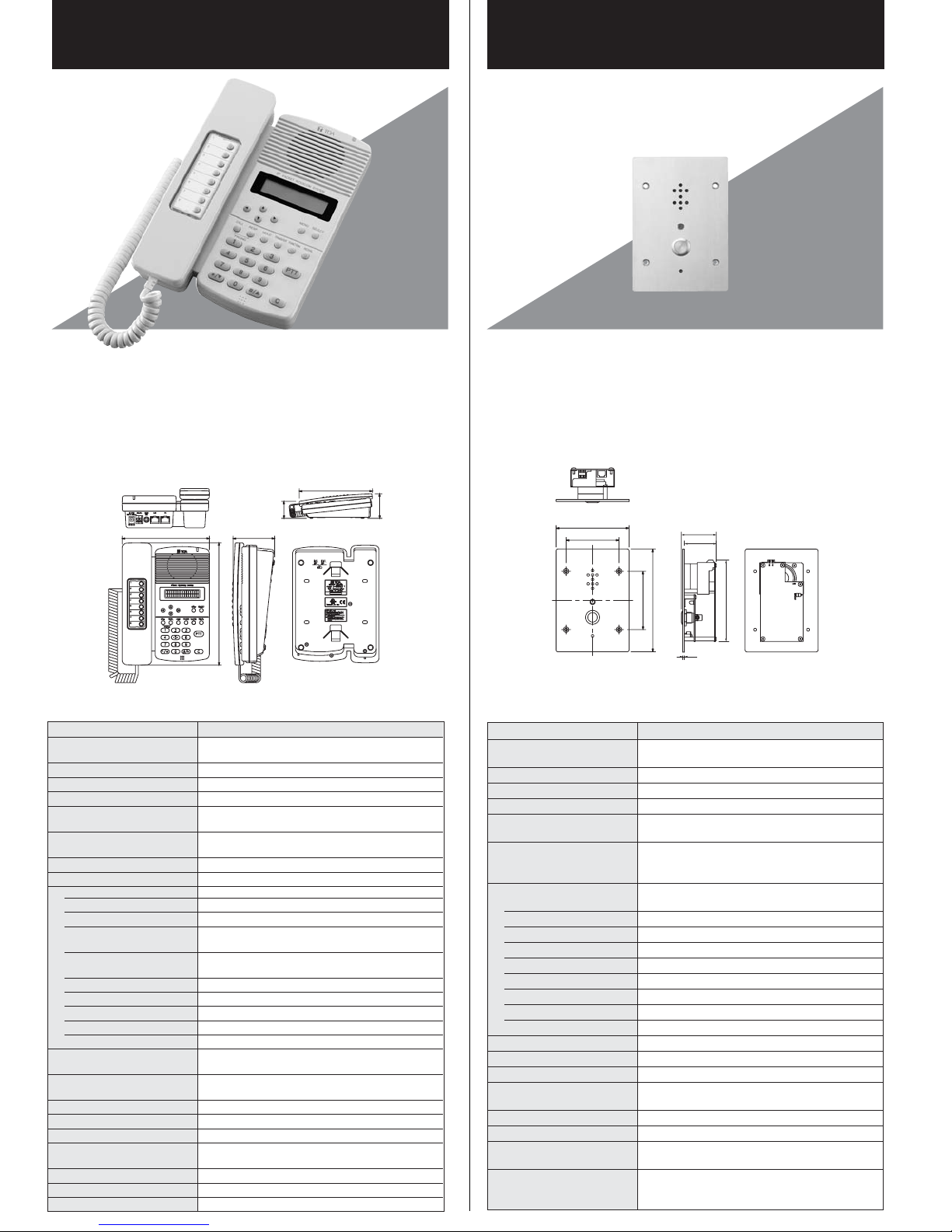
N-8500MS
IP Multifunctional Master Station
N-8540DS
IP
Door Station
The N-8500MS is an IP multifunctional master station employing packet audio technology.
Connecting the N-8500MS to a network (LAN or WAN) permits hands-free or handset
conversation of high sound quality to be made between the N-8500MS and intercom
stations connected to the IP Intercom Exchange, or between the N-8500MS units.
Besides, the N-8500MS can be used in conjunction with the Multi Interface units through a
network. In addition to the functions of the standard Master Station, The Multifunctional
Master Station provides LCD display, Auto-dialer function enabling one-touch dialing,
headset terminal and external speaker terminal. Power can be supplied from the PoE
(Power over Ethernet) switching hub. (In this case, an AC adapter is not required)
This station can be mounted to the wall using an optional YC-280 wall mounting bracket.
Top View
148 70.5
208
48.3
Figure of the
desktop installation
SPECIFICATIONS
Model No.
Power Source
Power Consumption
Speech Method
Audio Frequency Range
Hands-free
Handset
Handset Terminal
External Speaker Terminal
Network Section
Network I/F
Network Protocol
Audio Packet
Transmission System
Connector
Voice Sampling Frequency
Quantifying Bit Number
Voice Encoding Method
Voice Packet Loss Recovery
Audio Delay Time
Display
Setting Method
Operating Temperature
Operating Humidity
Finish
Dimensions
Weight
Accessory
Option
N-8500MS
Power supply device that complies with IEEE802.3af
standard or 12V DC (supplied from the AC adapter (option))
4.2W (at rated), 6W (max.)
Hands-free or handset conversation
300 – 7,000Hz
Speaker: 0.6W, 8 ohms, 5.7cm cone-type,
Mic.: Omni-directional electret condenser microphone
Receive path: Cone-type,
Send path: Electret condenser microphone
Speaker: 3mW, 32Ω, Microphone: –49dB*, ø3.5mm mini jack
0.6W, 8 ohms, screwless connector (2P)
10BASE-T/100BASE-TX (Automatic-Negotiation)
TCP/IP, UDP, ARP, ICMP, HTTP, RTP, IGMP
Unicast (1 speech link, simultaneous paging to up to 16 zones)
Multicast (simultaneous paging to up to 79 zones)
LAN: RJ45 connector (compatible with PoE)
PC: RJ45 connector (not-compatible with PoE)
16kHz, 8kHz (controllable on the software)
16-bit
Sub-band ADPCM, Cryptosystem
Silence insertion
80ms, 320ms (controllable on the software)
LCD alphanumeric characters
(16 characters × 2 lines)
Desk/Surface mounted master station (When
mounting to the wall, use the optional bracket YC-280.)
0°C to +40°C
Under 90% RH (no condensation)
Body, Handset: ABS resin, gray
148 (W) × 208 (H) × 70.5 (D)mm
(excluding a curl cord section)
810g
CD (for PC setting, maintenance use) × 1
Wall mounting bracket: YC-280, AC adapter: AD-1210P
Rear ViewSide ViewFront View
207.3
The N-8540DS is an IP door station employing packet audio technology. Connecting
the N-8540DS to a network (LAN or WAN) permits hands-free conversation of high
sound quality to be made between the N-8540DS and intercom stations connected to
the IP Intercom Exchange, or between the N-8540DS units. Besides, the N-8540DS
can be used in conjunction with the Multi Interface units through a network. The
N-8540DS is designed for indoor use and can be surface mounted or flush mounted
to the wall.
Contact output (One-shot make contact) is provided for controlling and electronic lock.
69.7
unit: mm
*0dB = 1V
SPECIFICATIONS
Model No.
Power Source
Top View
115
83.5
55.1
50.1
92
162
128.5
3
Rear ViewSide ViewFront View
*0dB = 1V
N-8540DS
Power supply device that complies with IEEE802.3af
standard or 12V DC (supplied from the AC adapter (option))
Power Consumption
Speech Method
Audio Frequency Range
Hands-free
4.2W (at rated), 6W (max.)
Hands-free conversation
300 – 7,000Hz
Speaker: 1W, 8 ohms, 3.5cm cone-type,
Mic.: Omni-directional electret condenser microphone
Contact Output
Open collector output, withstand voltage: Max. 30V DC,
control current: Max. 50mA, one shot: can be set from
1 to 9 sec, screw terminal (polarized)
Network Section
Network I/F
Network Protocol
Audio Packet
Connector
Voice Sampling Frequency
Quantifying Bit Number
Voice Encoding Method
Vice Packet Loss Recovery
Audio Delay Time
Setting Method
Operating Temperature
Operating Humidity
Finish
10BASE-T/100BASE-TX (Automatic-Negotiation)
TCP/IP, UDP, ARP, ICMP, HTTP, RTP, IGMP
Unicast, Multicast
RJ45 connector (compatible with PoE)
16kHz, 8kHz (controllable on the software)
16-bit
Sub-band ADPCM, Cryptosystem
Silence insertion
80ms, 320ms (controllable on the software)
Flush-mount/Surface-mount
–10°C to +50°C
Under 90% RH (no condensation)
Panel: Stainless steel (SUS304), hairline
Call button: Metal
Dimensions
Weight
Accessory
115 (W) × 162 (H) × 53.5 (D)mm
700g
Box mounting screw (No.6-32UNC × 18) × 4,
Box mounting screw (M4 × 25) × 4, Ferrite clamp × 1
Option
AC adapter: AD-1210P, For flush-mount: 3-gang
electrical box or Back Box YC-150,
For wall mount: Wall mount Box YC-13A
Page 9
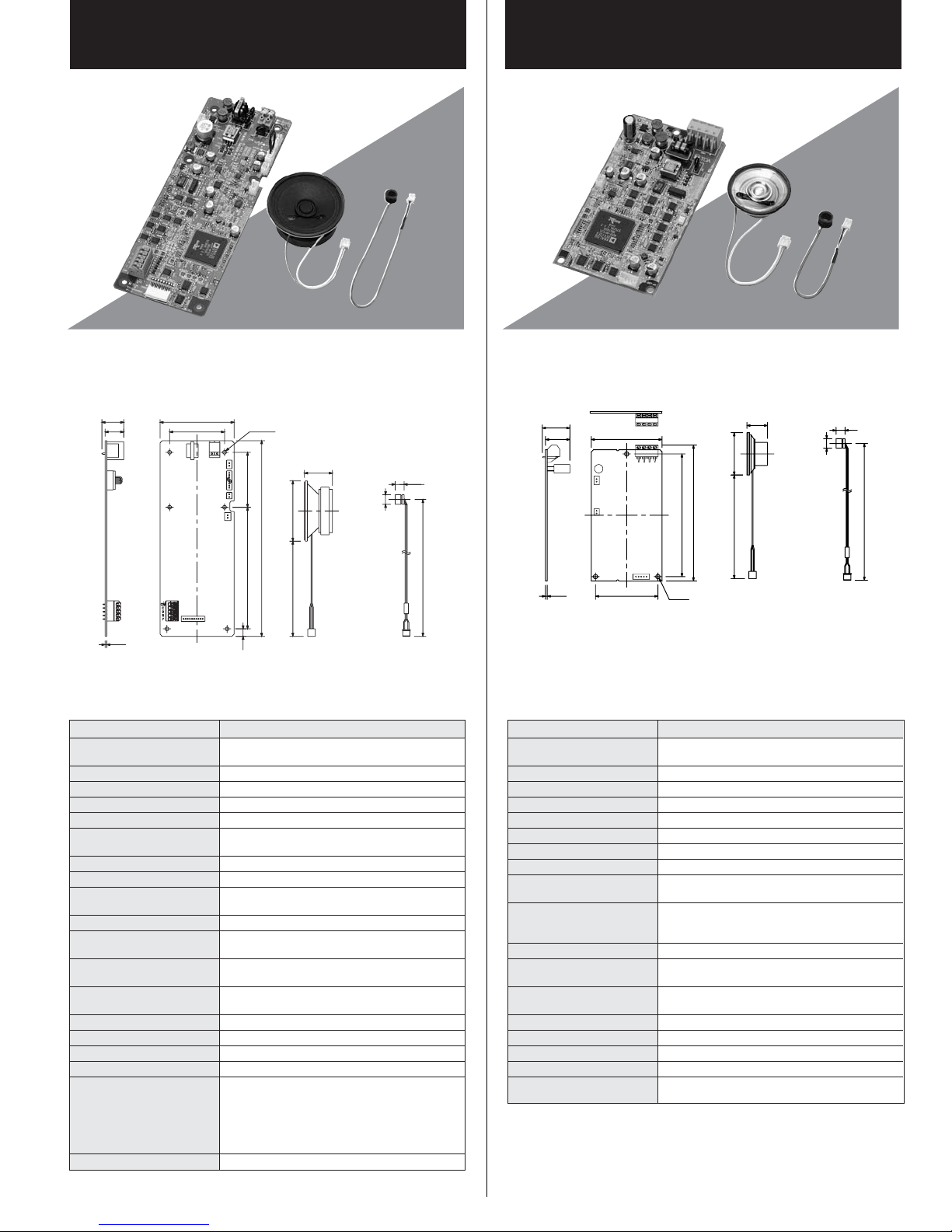
N-8031SB
Hands-Free Master Station Board Unit
N-8050SB
Hands-Free Substation Board Unit
The N-8031SB is a printed circuit board unit for the N-8031MS Flush-mount HandsFree Master Station. You can make the master station suitable for applications using
the N-8031SB in combination with the operation panel section to be prepared
separately.
20.6
17.6
1.6
Printed circuit board
SPECIFICATIONS
Model No.
Power Source
70
52
6–ø3.5
52
185
115
7
184
254
26
ø57
90
Hands-free speaker
(accessory)
Hands-free microphone
N-8031SB
48V DC (supplied from the IP network intercom
8.5
ø9
200
(accessory)
*0dB = 1V
exchange (option))
Power Consumption
Wiring Method
Transmission System
Signal Level
Speech Method
Audio Frequency Range
Transmission Range
Hands-free
1.8W (rated), 2.4W (max.)
Non-polar one pair stranded wire system
2 wire 160kbps echo canceller transmission system
Under 0dB*
Hands-free conversation (Handset conversation can
be established in conjunction with the RS-191(option))
300 – 7,000Hz
Max. 1500m (ø0.65mm. Loop resistance 170 ohms)
Speaker: 0.6W, 8 ohms, 5.7cm cone-type,
Mic.: Omni-directional electret condenser microphone
Line Connecting Terminal
Status Indicator LED
Connecting Terminal
Dial Input
Pin header (2 pins)
Solderless connector (2 pins, male), voltage: 5V,
maximum load current: 5mA
Solderless connector (10 pins, male),
open voltage: 3.3V DC, short-circuit current: 1mA
External Dial Input
Operating Temperature
Operating Humidity
Dimensions
Weight
Accessory
No-voltage make contact input, open voltage: 5V DC,
short-circuit current: 1mA, screwless connector (5 pins)
0°C to +40°C
Under 90% RH (no condensation)
70 (W) × 185 (H) × 20.6 (D)mm
205g (including accessories)
Removable terminal plug (2 pins, preinstalled on
the unit) × 1,
Handset jumper (8 pins, preinstalled on the unit) × 1,
Ferrite clamp × 1,
Hands-free speaker (with connection cord) × 1
Hands-free microphone (with connection cord) × 1
Option
Handset: RS-191
The N-8050SB is a printed circuit board unit for the N-8050DS Door Station. You can
make the sub station suitable for applications using the N-8050SB in combination
with the operation panel section to be prepared separately.
26
23
1.6
67
59
Printed circuit board
SPECIFICATIONS
Model No.
Power Source
116
128.3
3–ø4
N-8050SB
48V DC (supplied from the IP network intercom
19.5
ø40
98
Hands-free speaker
(accessory)
8.5
ø9
200
Hands-free microphone
(accessory)
*0dB = 1V
exchange (option))
Power Consumption
Wiring Method
Transmission System
Signal Level
Speech Method
Audio Frequency Range
Transmission Range
Hands-free
1.8W (rated), 2.4W (max.)
Non-polar one pair stranded wire system
2 wire 160kbps echo canceller transmission system
Under 0dB*
Hands-free conversation
300 – 7,000Hz
Max. 1500m (ø0.65mm. Loop resistance 170 ohms)
Speaker: 1W, 8 ohms, 3.5cm cone-type,
Mic.: Omni-directional electret condenser microphone
Contact Output
Open collector output, withstand voltage: Max. 30V DC,
control current: Max. 50mA, one shot: can be set from
1 to 9 sec, screw terminal (polarized)
Line Connecting Terminal
Status Indicator LED
Connecting Terminal
Call Button Connecting
Terminal
Operating Temperature
Operating Humidity
Dimensions
Weight
Accessory
2 wire, screw terminal (non-polar)
Solderless connector (5 pins, male), voltage: 5V,
maximum load current: 4.1mA
Solderless connector (5 pins, male),
open voltage: 3.3V DC, short-circuit current: 1.5mA
–10°C to +50°C
Under 90% RH (no condensation)
67 (W) × 128.3 (H) × 26 (D)mm
100g (including accessories)
Hands-free speaker (with connection cord) × 1
Hands-free microphone (with connection cord) × 1
Page 10
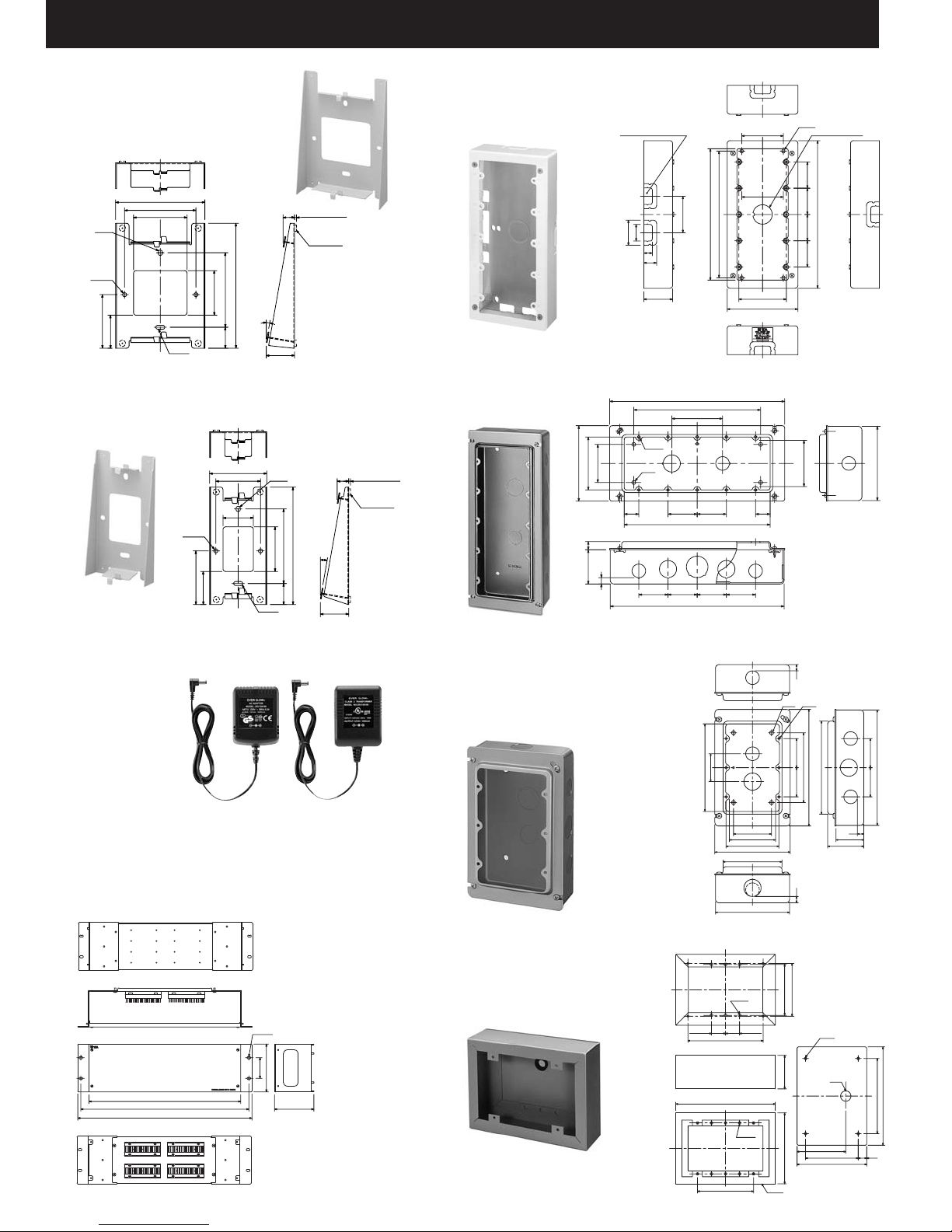
TERMINAL BOARD/BRACKETS/AC ADAPTER
YC-280
Wall Mounting Bracket
for N-8000MS, N-8010MS
and N-8020.
Top View
100
80
4.6x6
Front View
2–ø4.5
60
37
60
Side View
140
50
83.5
4.5x10
23.5
YC-290
Wall Mounting Bracket
for N-8011MS.
Top View
64
50
2–ø4.5
34
60
37
Front View
10°
4.5x10
31.8
4.6x6
50
13
83.5
131.5
23.5
2 (desktop view)
Rubber foot
(accessory)
Side View
10°
31.8
13
2 (desktop view)
Rubber foot
(accessory)
YC-251
Surface Mount Back Box
for N-8031MS.
5– double knockout hole
29
44
15
22.5
50.5
Left Side View
YC-241
Flush Mount Back Box
for N-8031MS.
10–M4
60
119
83.5
13
54
4–ø6
BACAB
10
46 46 46 46
Top View
73
73
64
230
222
83.5
124
Front View
Bottom View
276
200
80
AB
4623
230
Front View
274
Bottom View
46
23
4–5X7
ø34 knockout hole
46 464646
258.5
Right Side View
unit: mm
73
B
Side View
Dimension of knockout hole
A: 27.1
B: 21.5
C: 34
unit: mm
117
AD-1210P (CE)/(CU)
AC Adapter
for N-8500MS
and N-8540DS.
E-7000TB
Terminal Board
The E-7000TB is Terminal Board for IP Network Intercom. It is
used for a hookup between the exchange and the station, and
allows connection of up to 40 lines.
Under View
Top View
420
465
482
Front View
(Without front panel)
4–6x10
57.2
132.6
108.8
Side View
unit: mm
YC-150
Flush Mount Back Box
for N-8050DS and N-8540DS.
YS-13A
Surface Mount Back Box
for N-8050DS and N-8540DS.
Top View
Front View
Bottom View
unit: mm
A
44
138
B
B
6–ø4.5
23 23
123.5
Rear View
Top View
163.5
6–ø4.5
92
Front View
CASE
4–ø6
83.5
55
116.5
10
4646
10
86.5
6–M4
A
147
110
184
B
A
10
44
57
Side View
Dimension of knockout hole
A: 21.5
B: 27.1
4–ø6
ø17
80
86.5
114.5
Bottom Plate
unit: mm
4646
182
123.5
161.5
14
A
60
73
83.5
119
93
117
Page 11
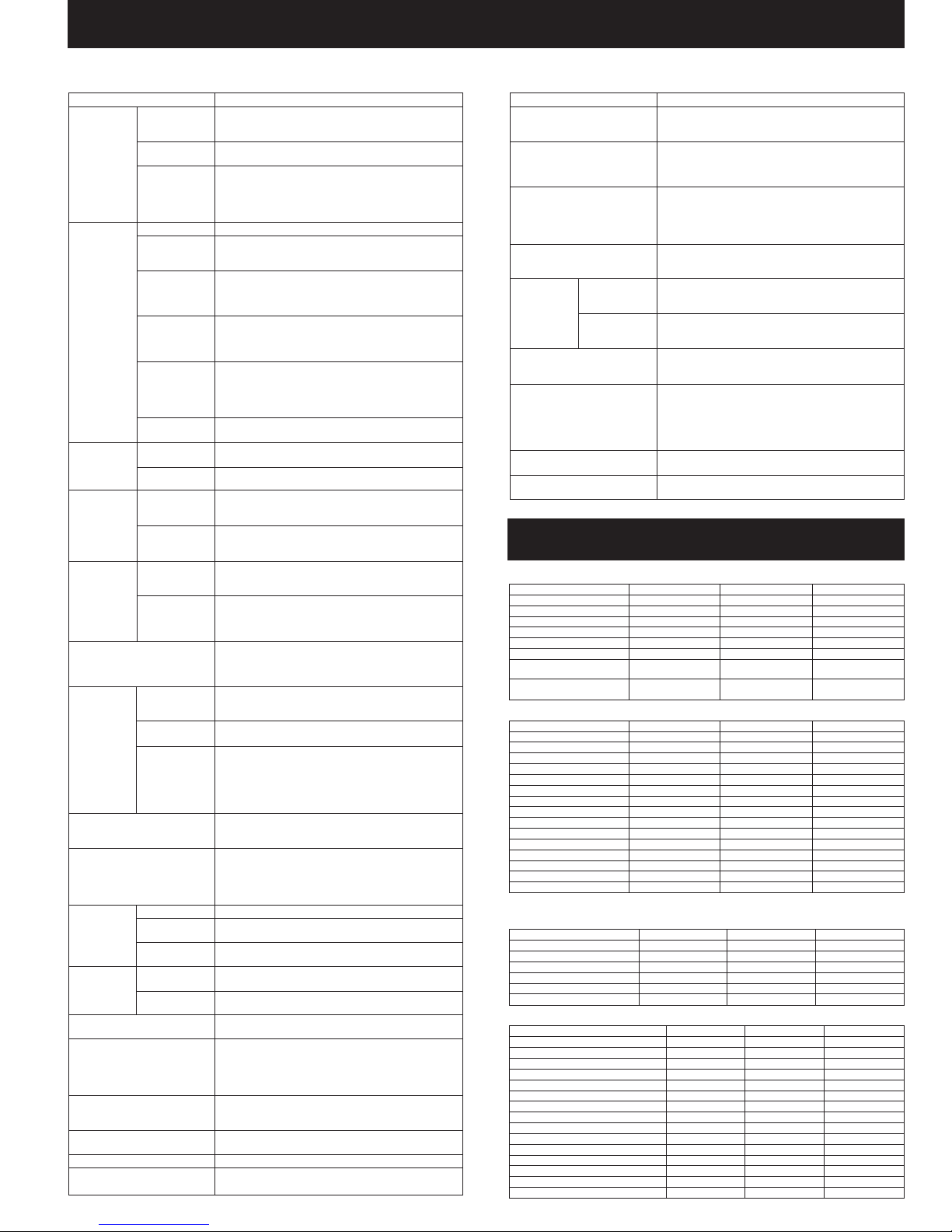
SYSTEM FUNCTION TABLE
Basic Functions Multi Interface Unit's Functions
Function Description
Hands-free Permits conversations to be made without lifting the handset
Conversation
conversation when another party is called or when a call is received in
Handset
conversation
PTT conversation Pressing the PTT key during a hands-free conversation
automatic connection mode.
Calls can be made or received by lifting the handset.
enables one-way conversation from the party who pressed the
PTT key. Conversation flow is reversed when the key is released.
This function makes announcements and conversations possible
to areas with a high ambient noise level.
Individual call The desired party can be called by dialing its station number.
Call
Incoming
Call
Selection
Speed
Dialing
Hold
Call transfer
Automatic
Transfer
Remote Response
Executive Priority
Redialing Pressing the Redial key automatically redials the last number
Recall The last conversation partner can be recalled by pressing
Voice calling Holding down the PTT key while making a call by means of
Group call When a station is assigned to a call group, if the station is
Master call The pre-programmed master station can be called by pressing
Automatic Incoming calls are automatically connected after a brief call
connection tone (1 second) or without a call tone.
Continuous call
Auto-dialing The dial operation (up to 20-digit numbers) programmed into
the station's auto dialer can be called by one-touch dialing.
One-touch dialing The dial operation (up to 20-digit numbers) programmed into the
Mic Off When it is desirable to hold the line during a conversation, if any
Call hold Pressing the Hold key during a conversation places the
Group hunting Calls to a busy station are automatically transferred to another
Absence transfer When no response is made to a call for a set period of time, the
Call forwarding Calls to stations are automatically transferred to another
called. Only Multifunctional Master Station permits selection from
the most recent 10 numbers.
the [#/▲] key regardless of whether the call was made or
received. Only Multifunctional Master Station permits selection
from the most recent 10 numbers.
a continuous call tone permits a voice calling to be made to
the called station. The voice calling reverts to the original
continuous tone call when the PTT key is released.
called, all stations within that group are simultaneously called
by a continuous call tone regardless of their call connection
mode settings. If any one of the stations within the group
responds, calls to the other stations stop.
the door station's call button.
Calls continue with a continuous call tone (or without a call tone) and
a status indicator continuously flashes as long as no response is made.
(Multifunctional Master station only)
station's [7], [8], [9], [0] or off-hook keys can be called by
one-touch dialing.
dialing key ([0] - [9]) is pressed, the microphone is disabled
as long as the key is pressed.
conversation on hold, transmitting a hold tone to both parties.
If the Hold key is pressed again, the hold mode is cancelled,
and the original conversation is restored.
Current conversations can be placed on hold to call a third party
by pressing the Transfer key. The original conversation can be
subsequently restored or transferred to the third party after
conclusion of the second call.
designated station, if group hunting function is set to the called
station.
call is automatically transferred to another designated station.
designated station without sounding a call tone. Two different
modes are available: one is call forwarding, in which calls are
manually rerouted to the selected station, and the other is
time-based call forwarding, which transfers calls only when the
preset time is reached.
Calls to a station can be answered by pressing the PTT key of
another station, provided both stations are assigned to the
same group.
If a called station is busy, as indicated by a busy tone, pressing
the [9] key transmits a short priority call tone, then forcibly
terminates the current conversation, allowing the call to go
through. Access to priority call operation or refusal of priority
calls can be set individually for each station.
Zone paging Calls can be made to one of the pre-programmed zones.
Paging
Paging
Response response to the paging last received.
Scan Monitor
Door Remote Control
(Door Station only)
Time-out
Group blocking
Paging Calls can be made to up to 10 zones of the preprogrammed
All-call paging Calls can be made simultaneously to all of the preprogrammed
Automatic response
Zone number response
The station can scan an arbitrary group of pre-programmed
multiple zones.
zones.
Dialing the Paging Response key automatically initiates a
Dialing the number assigned to paging response automatically
initiates a response to a next-to-last paging.
stations for auditory monitoring.
Door station's contact output can be used to remotely control
external equipment such as electronic lock.
The contact output terminals can be shorted for a set period of
time by the dial operation to perform this function from the
master station engaged in conversation with the door station.
The duration of calls, conversations and paging can be limited by
pre-programming time intervals (10 - 990 seconds) for individual
exchanges or multi interface units.
Arbitrary station groups (up to 31 groups) can be set to permit or
disallow calls between groups.
Station Speaker Output Setting Permits adjustment of the station speaker sound volume.
Ambient Noise Control
Automatically measures the ambient noise level of the station
and sets the station for proper hands-free conversation.
Extermal Input Paging
PBX connection
Tie-Line Connection
BGM
External
Equipment
Control
Calling Station
Indication/CCTV Interlock
Door Remote Control
Contact Bridge
Paging Busy Input
SYSTEM SETTING ITEMS
General System
Contents ● ——
Equipment number ● ——
Equipment name ●●—
Station number digit ● ——
Station number ● — ●*
Station name ● ——
Network communications
ON or OFF between exchanges
Multicast communications
ON or OFF between exchanges
Network setting
IP address*
Subnet Mask*
Default Gateway*
Web server port number ●●—
TCP start port number ● ——
UDP start port number ● ——
Multicast port number ● ——
NAPT compatible ● ——
Network ID ● ——
WAN IP address ● ——
WAN Web server port number ● ——
WAN TCP start port number ● ——
WAN UDP start port number ● ——
Broadcast specification ● ——
Communication capacity ● ——
*1Settings can only be performed from Multifunctional Master station.
2
Be sure to set this since settings and conversations are performed via a network.
*
Sampling frequency correction
Sampling frequency correction ● ——
Function settings
Call forwarding function ● ——
Time-based call forwrding function ● ——
Group hunting function ● ——
Absence transfer function ● ——
Oneshot make time ● ——
Call time-out ● ——
Convarsation time-out ● ——
Paging time-out ● ——
Paging response mode ● ——
Paging priority mode ● ——
Calling party indication ● ——
BGM input ● ——
Function Description
Activating the control input after connecting the Remote
microphone or playback components to the Multi interface unit
enables broadcasting to the preprogrammed zone(s).
If the Multi interface unit is connected to the PBX's E&M interface,
call or conversations can be mutually made between the N-8000
system's stations and the PBX's extension telephones or paging
calls can be initiated from the PBX extension telephone.
Using the Multi interface unit for tie-line connection between the
N-8000 Series intercom system exchange and other series
intercom system exchanges via 4-wire private lines permits calls,
conversations, or paging to be mutually made between staions
connected to the tie-lined excanges.
Connecting playback components to the Multi interface unit
premits Background music selectable from up to 8 programs to be
One-shot make External equipment can be controlled by momentarily colsing the
output Multi interface unit's corresponding contact through operation of
Make/break output External equipment can be controlled by closing or opening the
Closes the Multi interface unit's output contact terminal when the
Item Setting from software Setting from browser Setting from station
Item Setting from software Setting from browser Setting from station
2
2
2
Item Setting from software Setting from browser Setting from station
Transmitted party IP address ● ——
Transmitted party port number ● ——
Recipient party IP address ● ——
Reception multicast ON/OFF ● ——
Reception multicast address ● ——
Item
Time-based call forwarding start time ● ——
Time-based call forwarding end time ● ——
Absence transfer call duration ● ——
heard from each station speaker while in standby mode.
the station.
Multi interface unit's corresponding contact through operation of
the station.
Closing the Multi interface unit's contact in synchroization with
calls received enables calling station indication or CCTV system
control.
Control of such external equipment as electronic locks can be
performed by momentarily closing the Multi interface unit's
corresponding contact through operation of the station.
Operatin the door remote control function at the station in
conversation mode closes the Multi interface unit's preset contact
output terminal for a specified period of time.
input contact terminal is closed.
Notifies the busy status of connected external PA paging
equipment.
● ——
● ——
●●●*
●●●*
●●●*
Setting from software Setting from browser Setting from station
1
1
1
1
Page 12
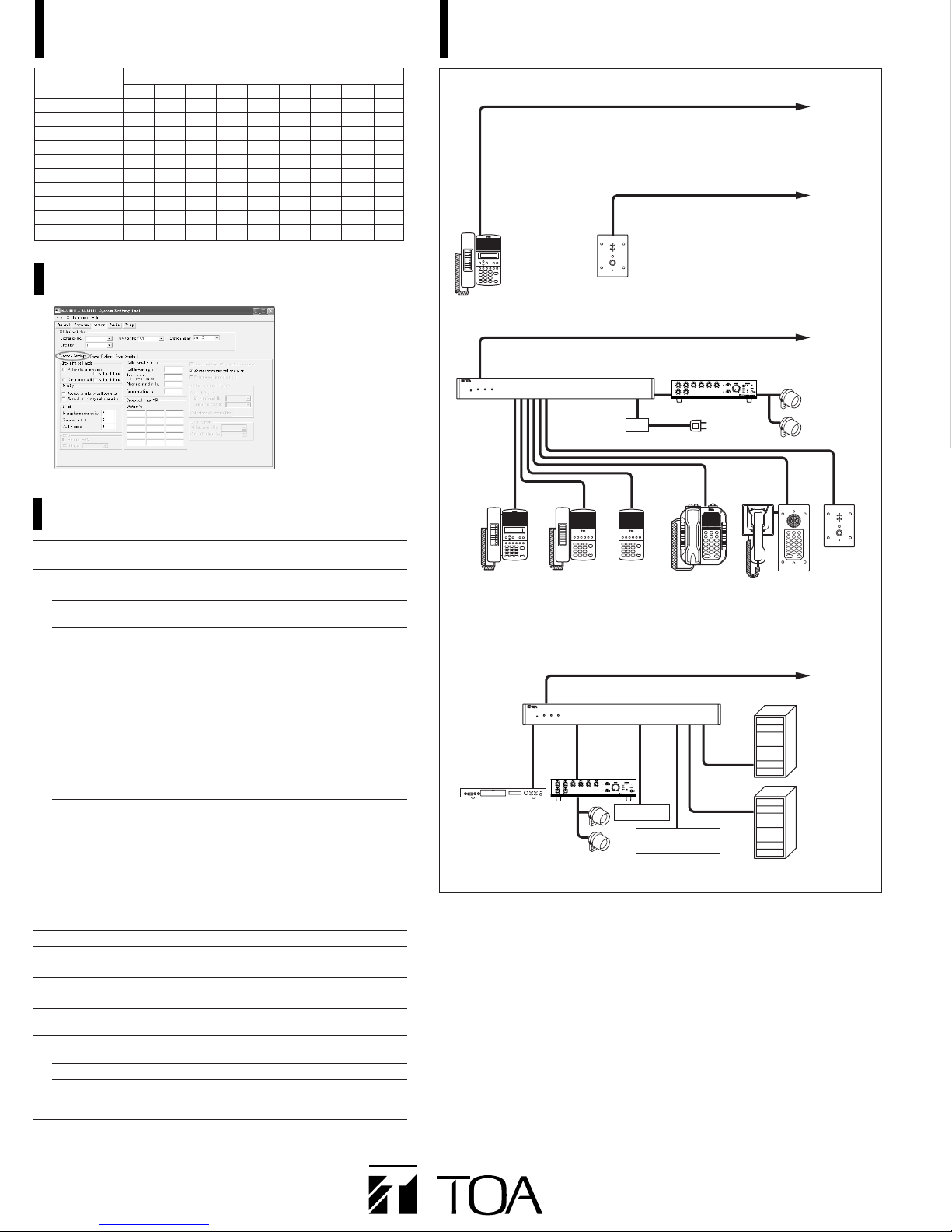
N-8000MI COMBINATION PATTERN SYSTEM CONFIGURATION EXAMPLE
I/F type
123456789
PBX-1 ●●●——————
PBX-2 ● ——●●————
Tie-line-1 — — — ● — ●●——
Tie-line-2 — ● ———● — ● —
Audio output-1 — — — — ● —— ●●
Audio output-2 — — ● ———● — ●
Audio input-1 — — — — ● —— ●●
Audio input-2 — — ● ———● — ●
Contact output ●●●● ●●●● ●
Contact input ●●●●●●● ●●
Combination pattern
To LAN
To LAN
PC WINDOW EXAMPLE
SYSTEM SPECIFICATIONS
Number of Units
Connectable to LAN
Line Capacity
Speech Link Capacity
In a Exchange
(Internal)
Exchange to Exchange
(External)
Paging
Number of Zones
PA Paging Output
Simultaneous
Operation Capacity
Paging Destinations Via
Network
BGM Input
PBX Interface
Tie-line Interface
External Contact Output
External Contact Input
System Settings
Network Related
Voice Delay Time
Connection Delay Time
Usage Bandwidth
Max. 80 (a total of Exchanges, Multi interface units and IP stations)
Max. 1,280 (80 Exchanges x 16 stations per exchange)
Max. 320 (when 80 N-8000EX Exchanges connected )
N-8000EX: 4 links
N-8010EX: 1 link
N-8000EX: 8 links
N-8010EX: 2 links
N-8000MI: 2 links
Speech: Max. 2
Audio input: Max. 2
Audio output: Max. 2
N-8500MS: 1 link
N-8540DS: 1 link
Max. 160
Max. 160 (when 80 Exchanges or Multi interface units connected)
N-8000EX: 2 outputs
N-8000MI: 2 outputs
N-8000EX: Multicast paging: Max. 4 links
Unicast paging: 1 link
N-8010EX: Multicast paging: Max. 2 links
Unicast paging: 1 link
N-8000MI: Multicast paging: Max. 2 links
Unicast paging: 1 link
N-8500MS: Multicast paging: Max. 1 links
Unicast paging: 1 link
Max. 79 (multicast paging)
Max. 16 (unicast paging)
Max. 8 channels (number of inputs per exchange)
Max. 160 (when 80 Multi interface units are connected)
Max. 160 (when 80 Multi interface units are connected)
Max. 1,280 (when 80 Multi interface units are connected)
Max. 1,280 (when 80 Multi interface units are connected)
Personal computer setting using a dedicated software program
(over LAN)
80 or 320 ms, selectable
Max. 1 second (when multicast paging is made to 79 destinations)
Max. 2.08 Mbps (one way)/when unicast paging is made to
Max. 130 kbps (two-way)/one call
16 destinations
N-8540DS
N-8500MS
N-8000EX
Speaker
UPS
N-8011MS
Contact input
Contact output
(door remote control)
(Uninterruptible power supply system)
N-8000MS N-8010MS N-8020MS N-8031MS N-8050DS
BGM player, digital
announcer, or other
sound source
Amplifier
Amplifier
N-8000MI
Speaker
To AC Mains
RS-191
To LAN
To LAN
EXES-2000
EXES-6000
PBX
TOA Corporation
URL : http://www.toa.jp/
Specifications are subject to change without notice.
Printed in Japan (0508) 833-52-339-80 U
 Loading...