

Page 1

INSTALLATION MANUAL
Remote Keypads
THANK YOU FOR VOTING TEXECOM
THANK YOU FOR VOTING TEXECOMTHANK YOU FOR VOTING TEXECOM
THANK YOU FOR VOTING TEXECOM
Page 2
2 INS037-6
1. Installation
The Veritas Excel remote keypad is only suitable for use with the Texecom Veritas Excel
and Veritas R8Plus control panels. The Veritas RKP remote keypad is suitable for use
with all Texecom Veritas control panels.
Mounting
Open the keypad by carefully inserting a small flat-blade screwdriver into each slot at
the base of the unit. Gently push the screwdriver to ease the retaining clips upward,
DO NOT LEVER OR TWIST. Excessive force is NOT required. The front flap and front
cover can now be removed.
Mount the keypad using at least two appropriate countersunk screws (no larger than
No. 8). A keyhole slot has been provided to assist mounting and aid levelling.
Wiring
It is strongly recommended that the system is completely powered down (mains and
battery) before wiring a keypad. Connect the keypad to the control panel using 4-core
cable as follows:
Keypad Control Panel
12V +
0V -
T T
R R
Up to six keypads may be connected in parallel (star) or series (daisy-chain) or any
combination.
! "
When using long cable runs or connecting keypads in series (daisy-chain)
ensure that the voltage at the keypad is no less than 10.0V.
When using 6-core or 8-core cable always use the spare cores to “double-up”
on 0V. This will allow longer cable runs particularly when connecting keypads in
series (daisy-chain). As a rule ‘trebling-up’ on 0V will be more beneficial than
‘doubling-up’ on 12V and 0V.
Page 3
INS037-6 3
Selecting an Address
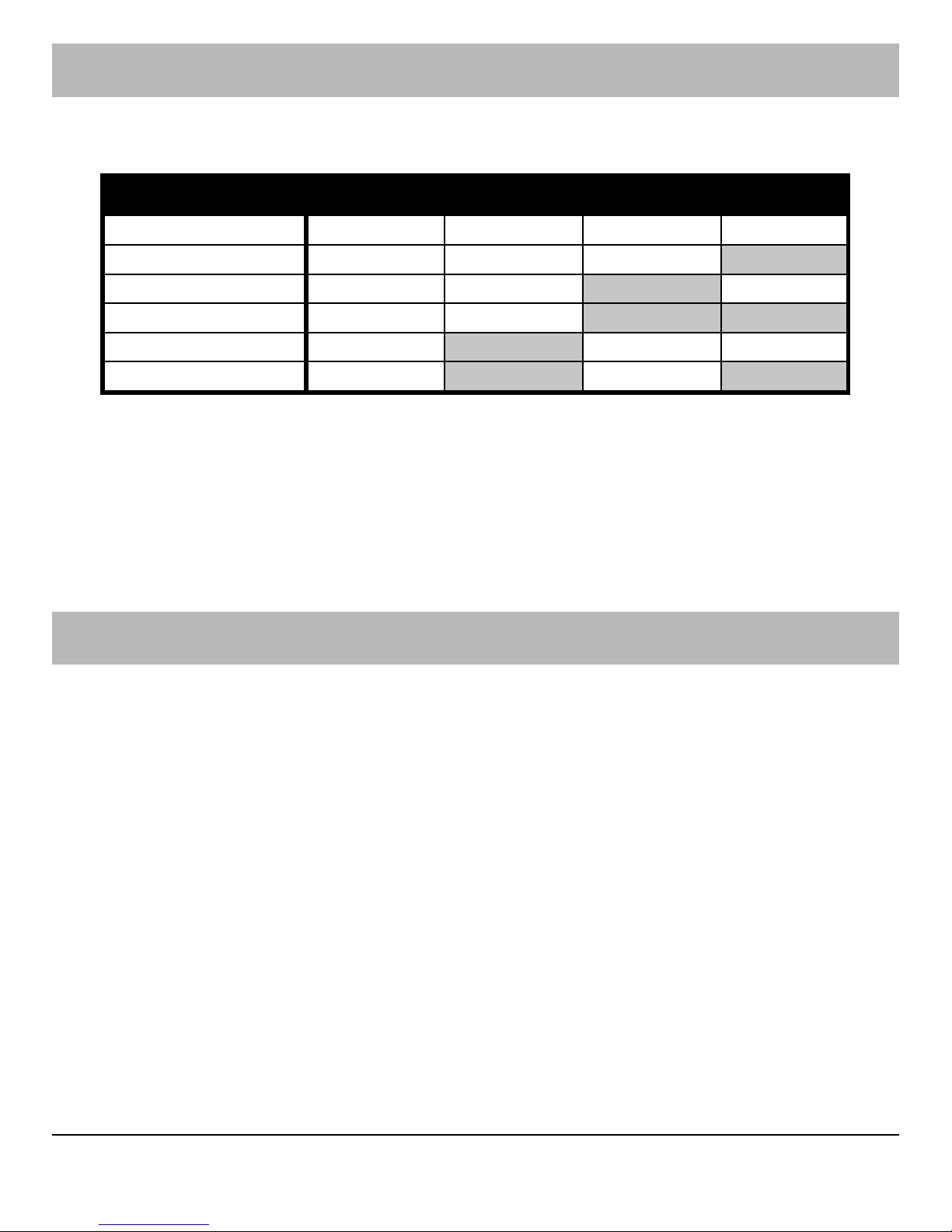
Each keypad MUST be given a different address using the DIP switch on the PCB as
follows:
Address DIP 1 DIP 2 DIP 3 DIP 4
1 N/A Off Off Off
2 N/A Off Off On
3 N/A Off On Off
4 N/A Off On On
5 N/A On Off Off
6 N/A On Off On
! "
NEVER set two RKPs to the same address.
Keypads are factory set to Address 1.
If the keypad is powered but offline (i.e. T and R not connected) it will display its
address.
If an invalid address is selected, the keypad will sound an error tone
Configuring the Keypad
When the system is powered up it automatically checks and configures all connected
keypads. It is strongly recommended that the system is completely powered down
(mains and battery) before wiring a keypad. If a keypad is added without removing
power then it must be configured as follows:
From the unset state:
Enter your Engineer code
!!!!
Press
"
to access the Programming Menu
Enter
#$
to select the Configure RKPs option
Press
"
, the system will chime & scan for RKP addresses 1 - 6
Press
%
to return to the Programming Menu
Press
%
to return to the unset state
! "
If an RKP is configured but off-line the system will have a tamper fault.
Page 4

INS037-6
2. Specifications
Operating Voltage 10 - 13.7VDC
Current Consumption: <85mA
Volume: Dual Level
Cable: 4-Core, ≤100m
Data Bus: Star, Daisy Chain or any combination
Operating Temperature: -10°C (+14°F) to +50°C (+122°F)
Storage Temperature: -20°C (-4°F) to +60°C (+140°F)
Maximum Humidity: 95% non-condensing
EMC Environment:
Residential
Commercial
Light Industrial
Industrial
Standards
Conforms to European Union (EU) Electro-Magnetic Compatibility (EMC) Directive
89/336/EEC (amended by 92/31/EEC and 93/68/EEC).
The CE mark indicates that this product complies with the European requirements for
safety, health, environmental and customer protection.
Warranty
All Texecom products are designed for reliable, trouble-free operation. Quality is
carefully monitored by extensive computerised testing. As a result Veritas keypads are
covered by a two year warranty against defects in material or workmanship (details on
request).
As the Veritas keypad is not a complete alarm system but only a part thereof, Texecom
cannot accept responsibility or liability for any damages whatsoever based on a claim
that the Veritas keypad failed to function correctly. Due to our policy of continuous
improvement Texecom reserve the right to change specification without prior notice.
Veritas is a trademark of Texecom Ltd.
 Loading...