

Page 1
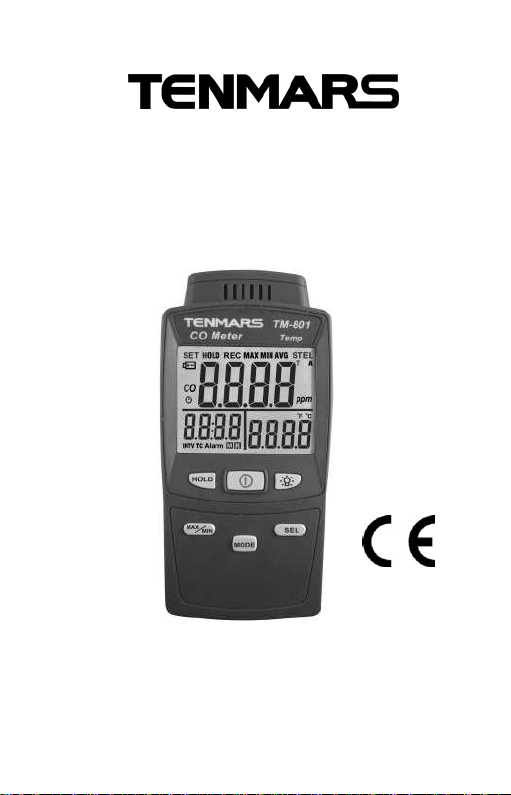
Carbon Monoxide Meter
TM-801
User’s Manual
HB2TM8010003
TENMARS ELECTRONICS CO., LTD
Page 2

Page 3

TABLE OF CONTENTS
1. PREFACE.........................................................1
2. GENERAL DESCRIPTION................................1
3. TECHNICALSPECIFICATIONS........................2
3.1. Characteristics........................................2
3.2. General data...........................................2
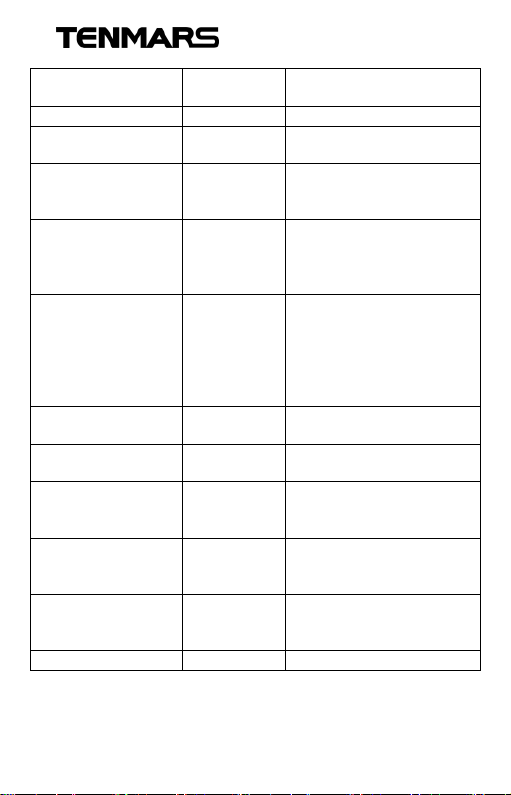
4. CO LEVELS AND STANDARDS........................3
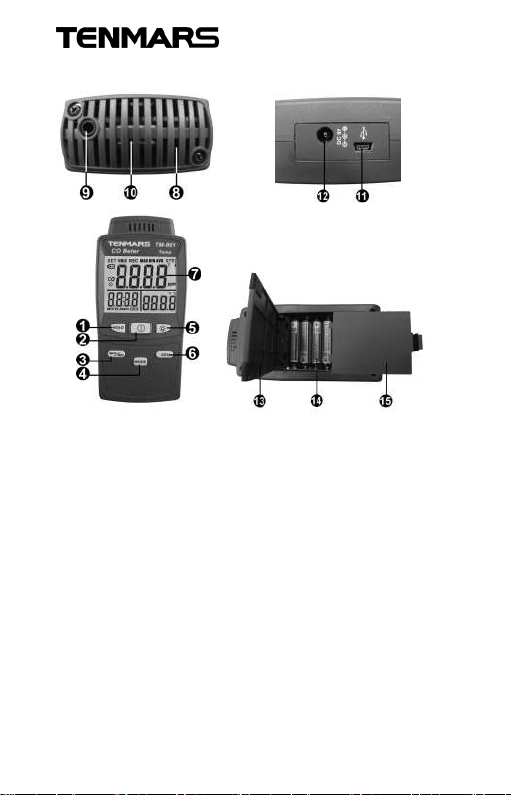
5. INSTRUMENT DESCRIPTION..........................5
6. LCD DESCRIPTION..........................................6
7. POWER ON/OFF..............................................7
8. AUTO POWER OFF..........................................7
9. BACKLIGHT......................................................7
10. CHANGE THE TEMP UNIT...............................7
11. DATAHOLD......................................................8
12. CO ALARM SETTING .......................................8
13. MAXIMUM/MINIMUM/AVERAGE......................9
14. CALIBRATION ..................................................9
15. PRECAUTIONS..............................................10
16. COMPUTER GRADE...................................... 11
17. EXTERNAL DC POWER.................................11
18. SAFETYAND MAINTENANCE STANDARDS.11
19. BATTERY REPLACEMENT ............................12
20. END OF LIFE..................................................12
Page 4
TM-801
1. PREFACE
Thank you for purchasing our product.
Please, read the operating instructions in details
before you use this CO meter,so you will operate
the meter correctly. This meter can be operated in
industry and home.
WARNING
Non-compliance warning and/or
operating instructions may damage
the instrument or its parts or injuring
the operator.
2. GENERAL DESCRIPTION
Adjustable alarm: Adjustable alarm threshold
level(25/35/50/100/250/400/800/Randomly
Adjustable); Enable/Disable alarm.
Dual and digital display of the CO and
temperature measuring.
Maximum/Minimum/Average hold.
Data hold(HOLD).
Low battery indication “ ”.
LED Backlight.
Auto power OFF and disable function.
1
Page 5
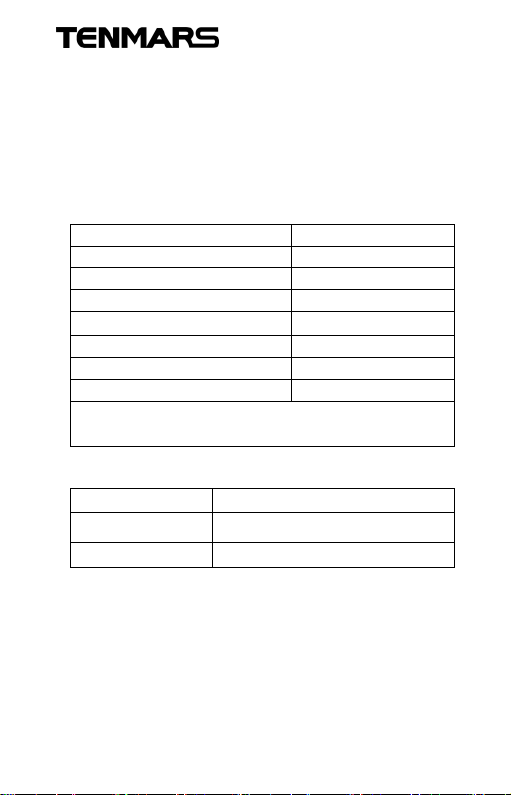
3. TECHNICAL SPECIFICATIONS
3.1.
Characteristics
Temperature
Accuracy is indicated as [% ofreading
+ppm]. It is referred to the following reference
conditions: 23°C ± 5°C with RH<75%.
CO※Carbon monoxide
Range 0 ~ 1000ppm
Resolution ±1ppm
Accuracy ±(5% +2ppm)
Repeatability < 2%
Response time
Zero drift in long term < 5ppm
Sensitivity drift < 5% (per year)
Typical sensor life 3 years
※
The response time refers to the fixed value
of 90% of the value.
※
< 30 seconds.
TM-801
Range
Resolution
Accuracy
-20~50℃/-4~122℉
±0.1℃/±0.1℉
±1.0℃/±1.8℉
3.2. General data
4 dgt LCD with maximum 1000 counts.
60mm(W)x 47mm(L) monochrome LCD and
backlight.
Sample rate:1 times/second
2
Page 6
TM-801
Dimension: 156×73×35mm(LxWxH).
Weight: approx 250g (Batteries not included).
Power Supply :
UM-4(AAA)1.5V× 6 PCS or AC100~240V
DC9V/0.5A(9mm) Adaptor.
Battery life : approx 90 hours.
Operating Temperature & Humidity :
-20°C to +50°C,<80% RH。
Storage Temperature & Humidity :
-10°C to +50°C,<70% RH。
Data output : USB PC serial interface.
StandardAccessories :
UM-4(AAA)1.5V battery ×6 PCS
、User’s manual
WARNING
To ensure that the accuracy of the
meter,We recommend for calibration
once a month.
EMC :This test was designed in accordance
with EMC Standards in force and its
compatibility has been tested in
accordance with EN61326-1(2006).
4. CO LEVELS AND STANDARDS
3
Page 7
TM-801
Carbon monoxide
content in the air
0-1 ppm Normal background levels.
9 ppm
35 ppm 8 hours
50 ppm 8 hours
0.01%(100 ppm) 2~3 hours
0.04%(400 ppm) 1~2 hours
0.08%(800 ppm) 45-min
0.16%(1600 ppm) 20-min
0.32%(3200 ppm) 5~10 min
0.64%(6400 ppm) 1~2 min
1.28%(12800 ppm) 1~3 min Will die.
Inspiration
time
Symptoms and applicable
standard
Maximum indoor air
quality level.
The average exposure
level per U.S. OSHA
workplace standards.
The maximum average
exposure of the U.S.
OSHA workplace
standards.
evacuate people from
enclosed space if the CO
concentration exceeds
100 ppm per OSHA
exposure limit.
Mild headache.
Headache occur in 2.5
hours to 3.5 hours.
Dizziness, nausea,
cramps(convulsions).
Headache, dizziness and
will be dead within 2
hours.
Headache, dizziness,
vomiting and will be dead
in 30 minutes.
Headache, dizziness and
will be dead within 10 to
15 minutes
4
Page 8
TM-801
5. INSTRUMENT DESCRIPTION
1. HOLD Button 10. CO SENSOR
2. Power Button 11. USB
3. MAX/MIN/AVG
Button
4. MODE Button 13. HOLDER
5. Backlight Button 14. Battery Holder
6. SEL Button 15. Battery Cover
7. LCD
8. Temperature
Sensor
9. Earphone Jack
12. DC POWER
5
Page 9
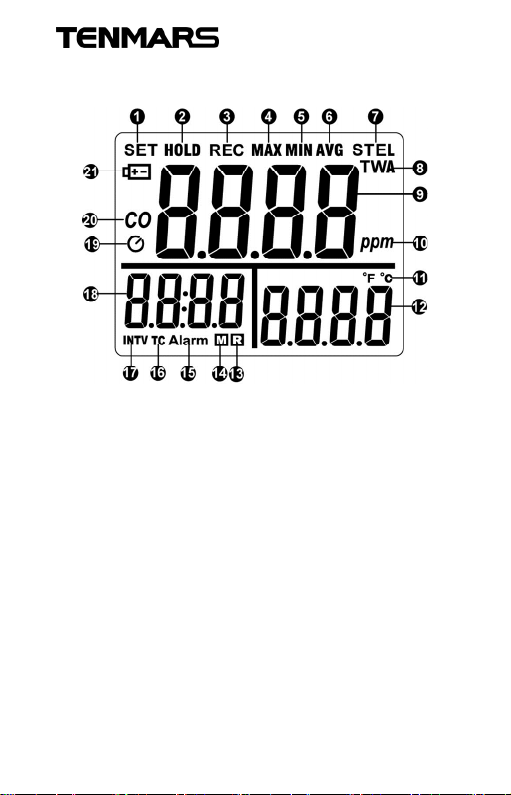
6. LCD DESCRIPTION
TM-801
1. SET symbol
2. HOLD symbol
3. REC symbol
4. MAX symbol
5. MIN symbol
6. AVG symbol
7. STEL symbol
8. TWAsymbol
9. Numeral reading
value
10.PPM unit
11.Temperature unit
12.Temperature Reading
13.Reading symbol
14.Memory symbol
15.Alarm symbol
16.Time constant symbol
17.Interval symbol
18.Time display
19.Auto power off
20.CO symbol
21.Low Battery symbol
6
Page 10

TM-801
7. POWER ON/OFF
Press button to turn on or turn off the meter.
It will be unable to turn off under setting up alarm,
and correction.
8. AUTO POWER OFF
The duration of auto power off time is 15 minutes.
If you want disable auto power off, please hold
button and press button at the power
shutdown mode. When you see the “n-SL” display
on the LCD, that means the auto power off
function is off. If you want enable auto power off,
please restart the meter.
※ The auto power off will disable if the alarm is
enabled.
9. BACKLIGHT
Press button to turn on the backlight, press
this button again to turn it off.
The backlight time is 15 seconds.
10.CHANGE THE TEMP UNIT
Press button to change the temperature
℃, ℉ unit。
7
Page 11
TM-801
11.DATA HOLD
Freezes the reading present on the LCD screen at
the moment the button is pressed.
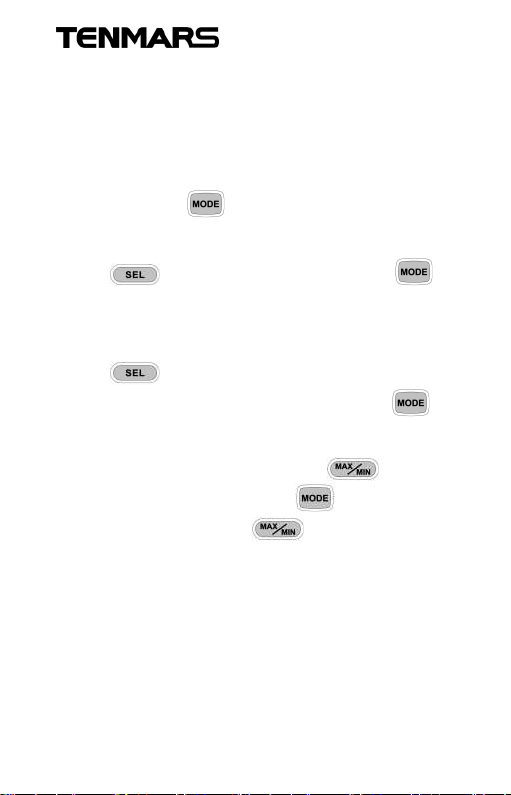
12.CO ALARM SETTING
Hold and press button for more than 2
seconds to enter into the alarm setting mode,
press button to choose and press
button to turn on(A-on) or turn off(A-oF) the alarm.
If you select the alarm to be turned on(A-on),
press button to select alarm value
(25/50/100/250/400/800/0000) and press
button to enable.
If you select the “0000”, press button
to adjust the value and press button to
enable.(Hold and press button to
High value adjustment, the highest setting value is
1200, and the lowest is 0.)
8
Page 12

TM-801
13.MAXIMUM/MINIMUM/AVERAGE
Press button simultaneously Lockup data
maximum and minimum and average value of
measuring data. Press the “ ” button for
more than 2 seconds to disable this feature.
14.CALIBRATION
Please shutting down the meter first, then hold
and press button and press button
to enter into calibration mode. It will show a
blinking 0 ppm on the upper display and the
lower-left corner of the screen will display the
value of the ADC.
※ In the calibration, must away from the
environment or equipment with
electromagnetic waves.
0 ppm Calibration
The meter is running 0 ppm calibration as
default.
Put the meter in an area free of CO and enter
the calibration mode. It calibrates automatically.
The duration of calibration time is 5 minutes.
9
Page 13

TM-801
100 ppm/500 ppm Calibration
After end of the 0 ppm calibration, the screen
will display 100 ppm, then press
button to select 100 ppm or 500 ppm value
and press button to start calibration. It
will show a blinking 100 ppm or 500 ppm on
the upper display and the lower-left corner of
the screen will display the value of the ADC
and place the meter into the sealed box filled
with standard gas(e.g. 100 ppm/500 ppm) for
5 minutes, then the calibration will be done
automatically.
※ Check if the reading meets calibration value. If
it does, the calibration is not, repeat the
procedure.
15.PRECAUTIONS
Keep the meter away from electromagnetic
interference (EMI) which may cause erratic
readings.
Recovering time is required when meter
exposed to high level CO. The longer the
exposure, the longer recovering time is
needed.
10
Page 14
TM-801
16.COMPUTER GRADE
• CPU:Pentium Ⅲ 1000MHZ.
• RAM:SDRAM 256MB.
• HARD DISK:200MB.
• OS:Windows 2000, Windows XP.
• DISPLAY :800×600 256 color
17.EXTERNAL DC POWER
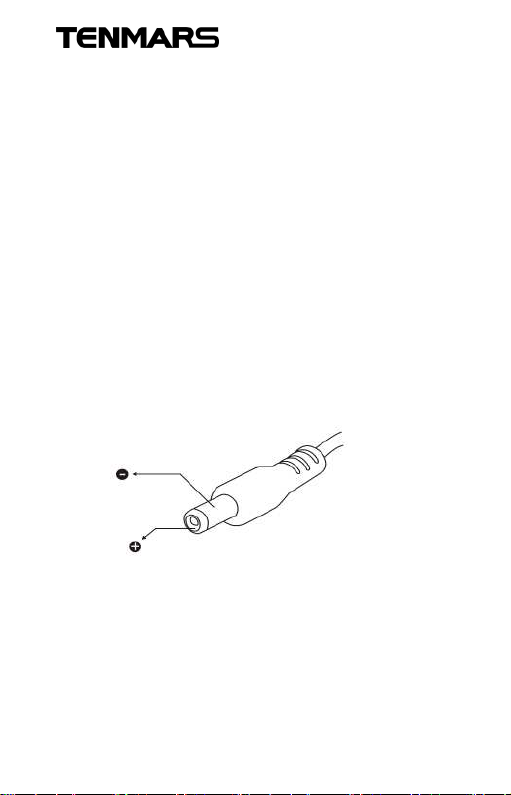
External AC to DC adapter : Voltage 9 VDC(8~14
VDCMax).
Socket :Pin positive, Ground casing negative.
External Diameter 5.5mm ;Internal Diameter
2.1mm.
18.SAFETY AND MAINTENANCE
STANDARDS
• Do not put this device in direct sunlight or
where it is hot and/or damp.
• Operating altitude: below 2,000m.
11
Page 15
TM-801
19.BATTERY REPLACEMENT
WARNING
If the LCD displays “ ”symbol, please
replace the battery immediately.
Turn off the power and unplug all cables, remove
the battery and replace into the new battery.
Please use the correct specification of the battery,
and correctly installed in the battery holder.
20.END OF LIFE
Caution : This symbol indicates that
equipment and its accessories shall
be subject to a separate collection
and correct disposal.
WARNING
If not using the meter, please remove the
battery to avoid possible damage.
12
Page 16

TM-801
1
Page 17

Professional Electrical and
TENMARS ELECTRONICS CO., LTD
Environment Test & Measurement
Instruments:
Battery Capacity / Impedance Tester
LED light meter, Temperature & Humidity meter,
Infrared Thermometer, Sound level meter
Light meter, EMF meter, UV Light meter,
RF meter, Hot wireAnemometer,CO meter
Anemometer, Lan cable tester, CO2meter,
Solar power meter, Radiation meter,
Clamp meter, Multimeter, Phase Rotation test,
Digital Insulation tester
Our products of high quality are selling
well all over the world
6F, 586, RUI GUANG ROAD, NEIHU,
TAIPEI 114, TAIWAN.
E-mail: [email protected]
http: //www.tenmars.com
 Loading...