

Page 1
TM
TM
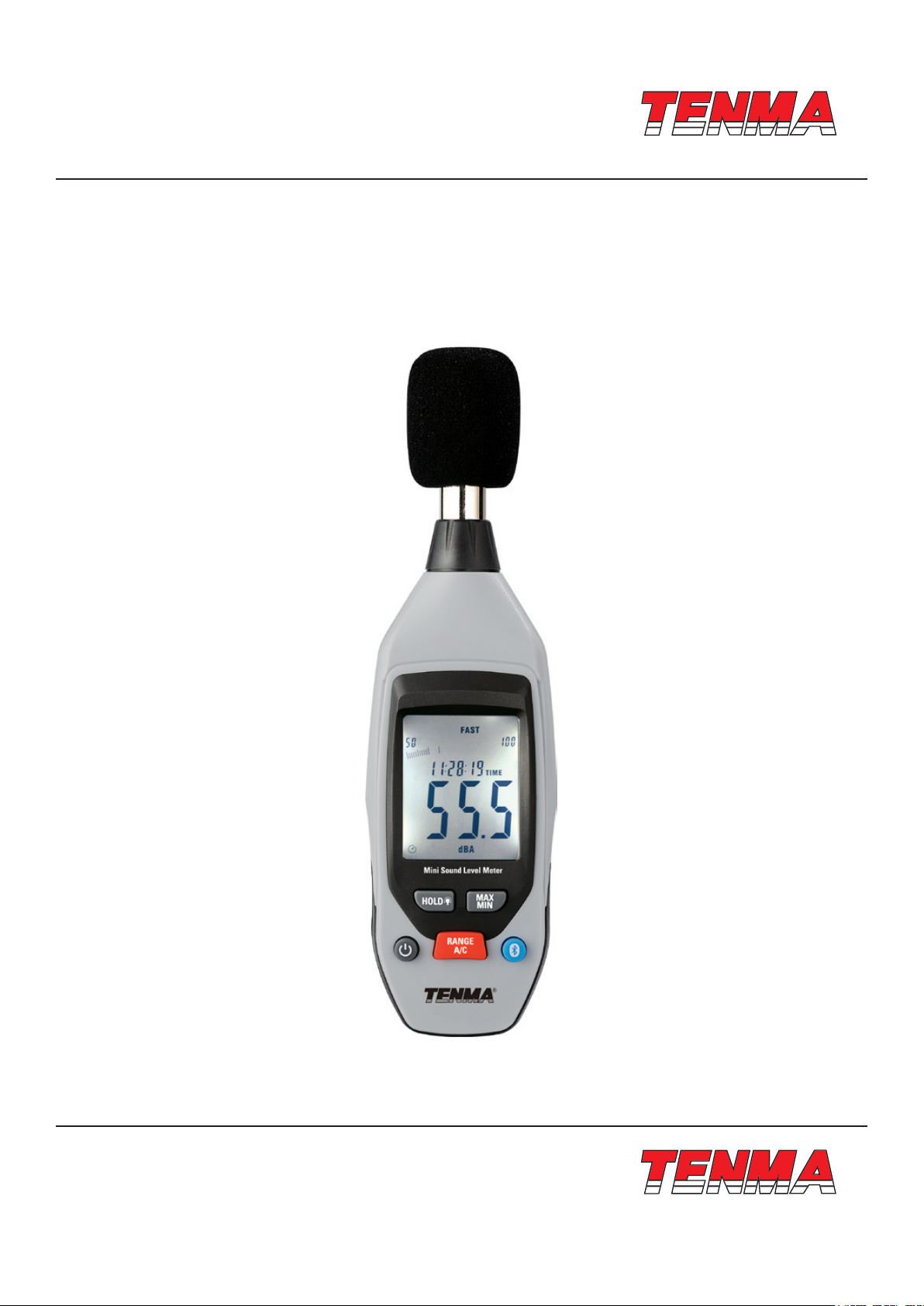
Sound Level Meter
User Manual
www.element14.com
www.farnell.com
www.newark.com
www.cpc.co.uk
Part Number: ST-95
Page <1>
V1.012/04/18
Page 2
TM
TM
1. Safety Information
Read the following safety information carefully before attempting to operate or service the meter, and please use the
meter as specied in this manual
• Environmental conditions
1. Altitude below 2000 meters
2. Relatively humidity 90% max.
3. Operation Ambient 0-40°C
• Maintenance & Clearing
1. Repairs or servicing not covered in this manual should only be performed by qualied personnel.
2. Periodically wipe the case with a dry cloth. Do not use abrasives or solvents on this instruments.
2. General Description
This Sound Level Meter is designed to meet the measurement requirements of Noise engineering, sound quality control,
Health, Industrial safety ofces in various environments. Such as factory, school, ofce and trafc lines.
• MAX/MIN measurement
• Over range indicate
• Low range indicate
• A & C weighting selection
• Bluetooth communication
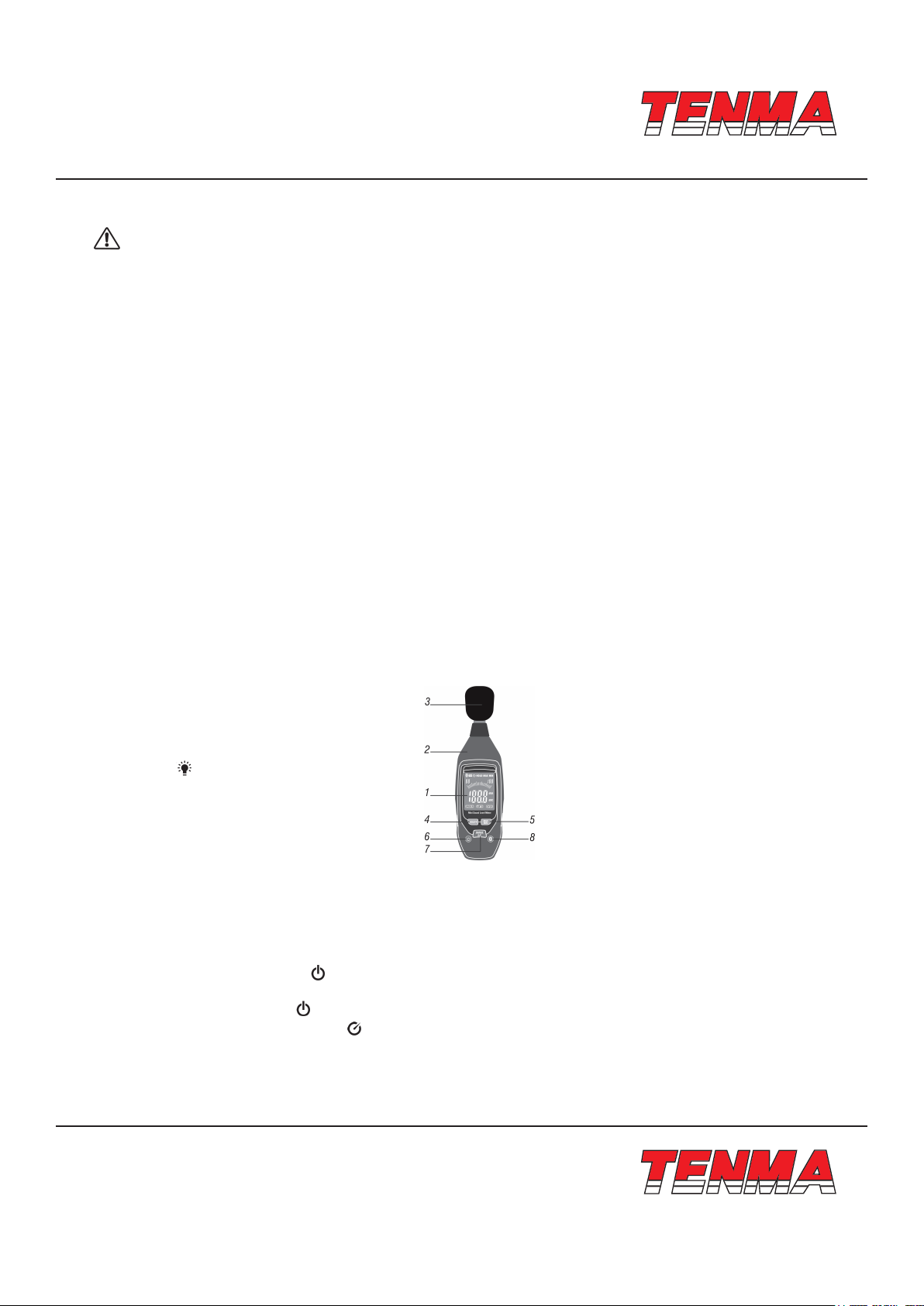
3. Meter Description
1 - LCD Display
2 - Body of Meter
3 - Microphone
4 - HOLD/ button
5 - MAX/MIN button
6 - Power on/off button
7 - UNITS button
8 - Bluetooth button
4. Button Description
Power on/off, Auto-power off:
Power on: Short press button to “ ” power on, system default auto power off. Long press to power on and disable auto
power off function. Long press the button again to enable the auto power off function
Power off: Short press button “ ” to power off.
Auto-power off: Auto-power off signal “ ” displays in the left corner of LCD and the instrument will auto-power off in
10 minutes of no button operations.
If press the power on/off button for over 1 minute, it will be recognized as faulty operation and the instrument will auto
power off.
www.element14.com
www.farnell.com
www.newark.com
www.cpc.co.uk
Page <2>
V1.012/04/18
Page 3
TM
TM
RANGE/(A/C) button: Short press to switch range gear; Long press to switch unit.
Bluetooth button: Long press to active or deactive Bluetooth.
HOLD/ button: Short press to hold the current data; Long press to activate or deactivate backlight.
MAX/MIN button: Press to record Maximum, Minimum
Note: MAX/MIN button, range button and A/C button will be deactivated when hold the current readings and the instrument
will exit MAX/MIN recording function when switch range gear.
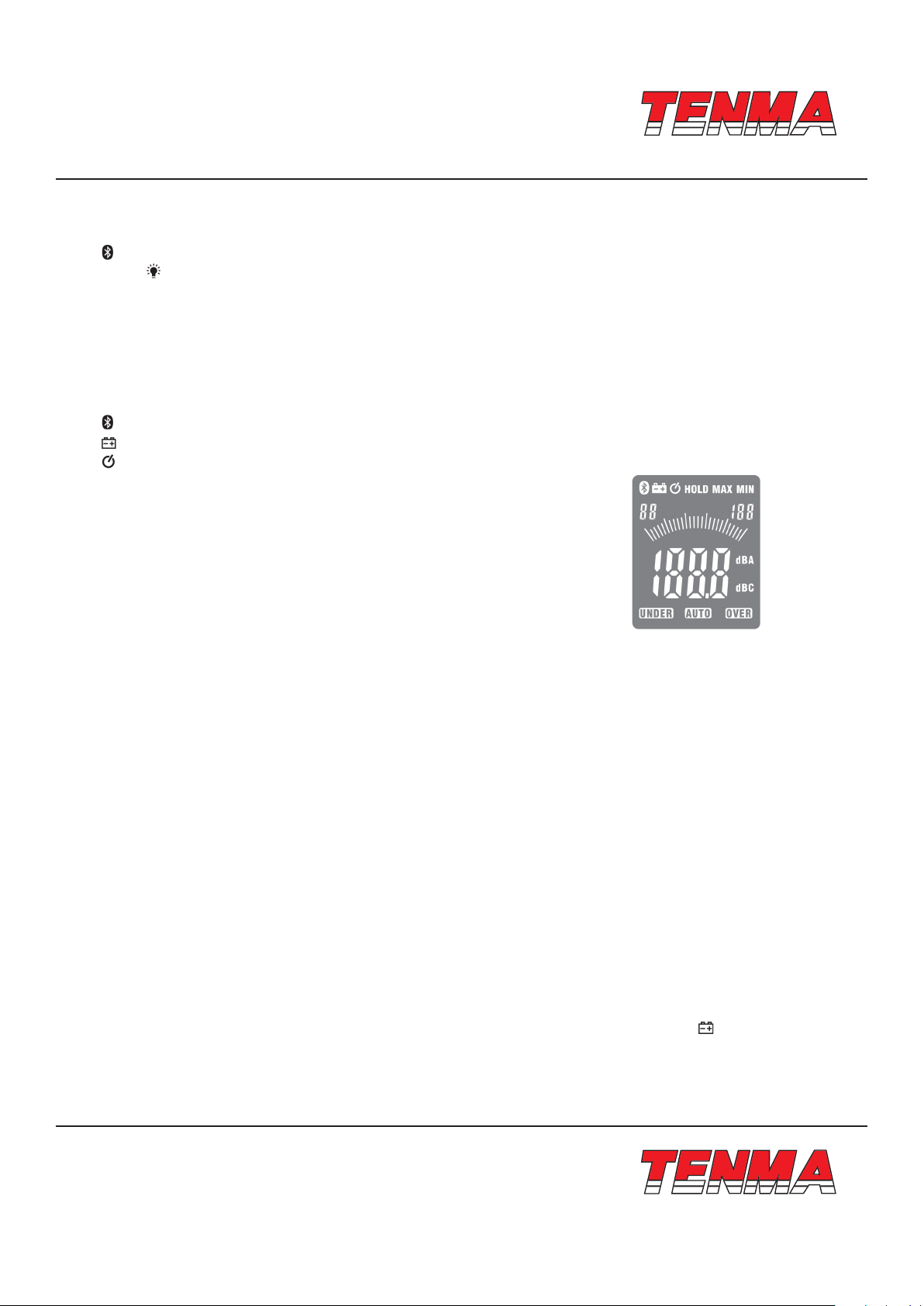
5. Display Layout
: Bluetooth symbol
: Low battery indicate
: Timing power off symbol
MAX: Maximum hold
MIN: Minimum hold
Two smaller digits at upper left of display: Minimum range
Three smaller digits at upper right of display: Maximum range
UNDER: under range
OVER: over range
dBA, dBC: A-weighting, C-weighting.
AUTO: Auto range selection
HOLD: Data hold function
Four larger digits in middle of display: Measurement data.
Measurement Operation
• Turn on the instrument by pressing power on/off button.
• Short press button “RANGE” and select suitable measurement range based on no “UNDER” or “OVER” display on LCD.
• Select “dBA” for general noise sound level and “dBC” for measuring sound level of acoustic material.
• Hold the instrument in hand or x it on tripod, take measure at a distance of 1-1.5 meters between microphone and
source.
Data Hold
Press hold button to freeze the readings and “HOLD” symbol displays LCD. Press hold button again to return normal
measurement.
MAX/MIN reading
• Press MAX/MIN button for the rst time, the instrument will enter Max tracking mode, the tracked Max reading will display
on the LCD.
• Press MAX/MIN button for the second time, the instrument will enter Min tracking mode, the tracked Min reading will
display on the LCD.
• Press MAX/MIN button for the third time, the current reading will display on the LCD.
Bluetooth communication
Long press Bluetooth button to activate Bluetooth function, it communicates after connect with the software. The instrument
can transmit measured data and instrument status to software and the software can control the instrument.
The instrument will automatically turn off in order to lengthen the battery working life. When symbol appears on the LCD,
please replace the old battery with new ones.
• Open the battery compartment with a suitable screwdriver.
• Replace 9V battery.
• Mount the battery compartment again.
www.element14.com
www.farnell.com
www.newark.com
www.cpc.co.uk
Page <3>
V1.012/04/18
Page 4
TM
TM
Meterbox Pro Operation Download Meterbox Pro APP to the smartphone before using the Bluetooth communication
function. Meterbox Pro APP is compatible with instruments with Bluetooth: Laser Distance Meters, Multimeters Clamp
Meters, Multifunction Insulation Tester, Environment Meter etc. The Meterbox Pro for Environment Meter detailed
introduction please look at the help les in GUIDE which is in the Environment Meter interface of Meterbox Pro.
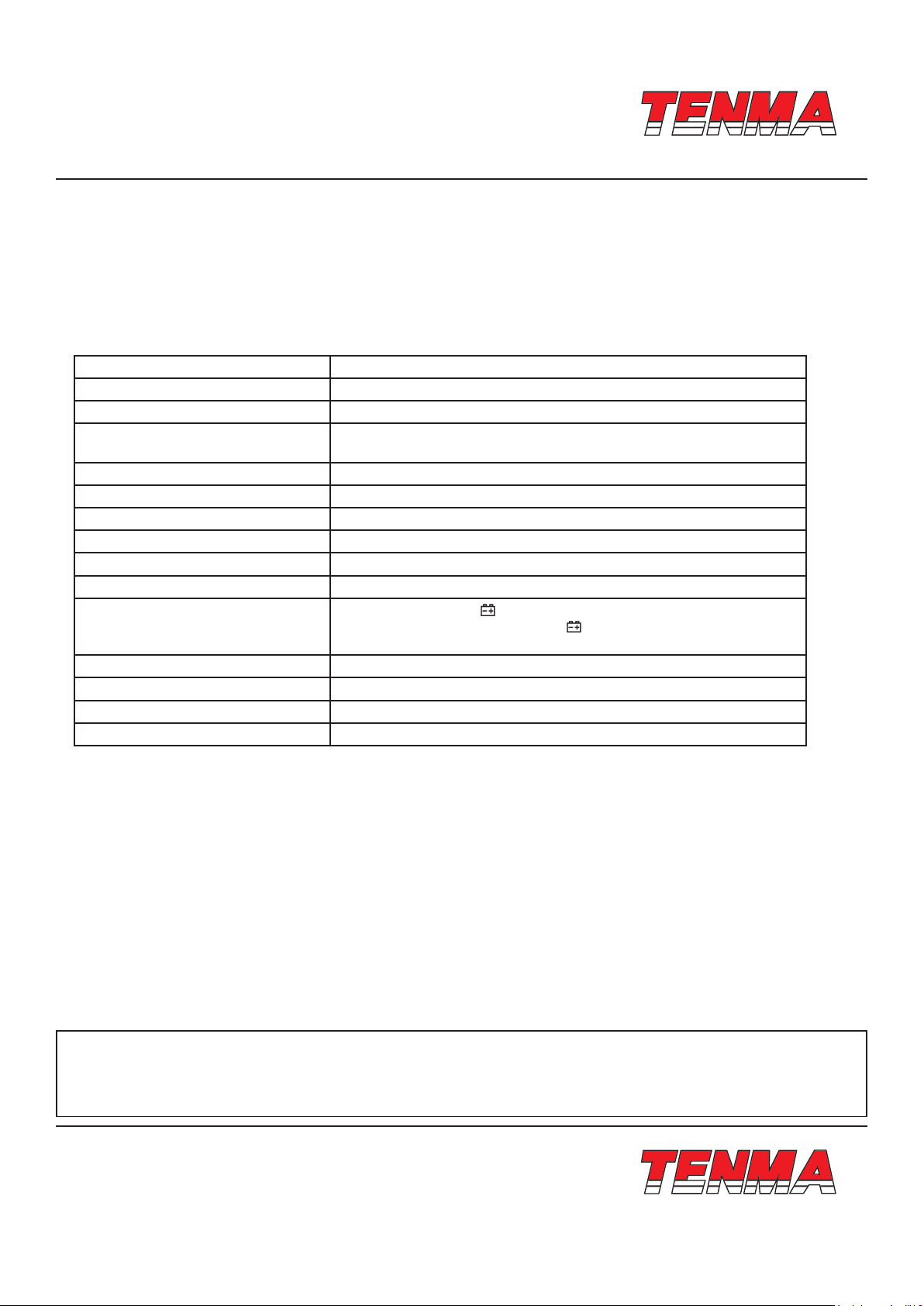
6. Specications
Frequency range 31.5Hz~8kHz
Accuracy 3dB (under reference condition of 94dB, 1kHz)
Range 35~130dB
Measuring range
Frequency weighting A and C
Microphone 1/2 inch electret condenser microphone
Digital display 4 digits LCD display with a resolution: 0.1 dB
Display Update 2 times/sec
Auto power off Meter automatically shuts down after approx. 10 minutes of inactivity.
Power supply One 9V battery
Low battery indication
Operation temperature and humidity 0°C~40°C, 10%RH ~ 90%RH
Storage temperature and temperature -10°C ~ +60°C, 10%RH ~ 75%RH
Weight 184g
Dimensions 185mm × 54mm × 36mm
LO: 35dB~80dB Med: 50dB~100dB
Hi: 80dB~130dB Auto: 35dB~130dB
The low battery signal “ ” ash when battery voltage drops below 7.2V;
The backlight and low battery signal “ ” ash twice when battery voltage
drops below 6.5V, then auto power off.
7. Notice
• Do not store or operate the instrument at high temperature and high humidity environment.
• When not in use for long time, please take out the battery to avoid battery liquid leakage and cautery on the instrument.
• When using the instrument outdoors, please mount the windscreen on microphone in order to not pick up
undesirable signals.
• Keep microphone dry and avoid severe vibration.
Important Notice : This data sheet and its contents (the “Information”) belong to the members of the Premier Farnell group of companies (the “Group”) or are licensed to it. No licence is granted
for the use of it other than for information purposes in connection with the products to which it relates. No licence of any intellectual property rights is granted. The Information is subject to change
without notice and replaces all data sheets previously supplied. The Information supplied is believed to be accurate but the Group assumes no responsibility for its accuracy or completeness, any
error in or omission from it or for any use made of it. Users of this data sheet should check for themselves the Information and the suitability of the products for their purpose and not make any
assumptions based on information included or omitted. Liability for loss or damage resulting from any reliance on the Information or use of it (including liability resulting from negligence or where the
Group was aware of the possibility of such loss or damage arising) is excluded. This will not operate to limit or restrict the Group’s liability for death or personal injury resulting from its negligence.
Tenma is the registered trademark of the Group. © Premier Farnell Limited 2016.
www.element14.com
www.farnell.com
www.newark.com
www.cpc.co.uk
Page <4>
V1.012/04/18
 Loading...