

Page 1
User Manual
Model TT-100
Introduction to TempTraq™
Welcome to TempTraq™ , hands-free temperature monitoring.
This guide is for your benefit to make sure you fully understand how to use the Tem pTra q™
system. Tem pTraq™ is a wearable, wireless, intelligent thermometer in the form of a one-time
use, disposable patch. The patch senses, records and transmits body temperature for 24 hours
via Bluetooth® Version 4.0. Temperature information from the patch is “read” using a smart
device (Apple® or Android™ with Bluetooth® Version 4.0 capability running the TempTraq™ app).
TempTraq ™ allows your child to rest when they are ill with an elevated temperature. There is no
need to disturb your child to take a temperature measurement so your child can rest and you can
have the peace of mind knowing your child’s temperature.
Important: Read instructions carefully before use.
High, prolonged fever requires medical attention.
If symptoms persist, contact your healthcare provider.
Warnings and Precautions
When using this product always follow these basic safety precautions to insure that the patch accurately
reads temperature and to avoid skin irritation. Failure to follow these precautions could result in
inaccurate temperature readings resulting in delay in treatment, or could result in skin irritation and
mild discomfort.
DO NOT use the patch for any other purpose besides measuring human body temperature.
DO NOT place the patch over wounds, sores or abrasions.
DO NOT excessively bend or twist the Tem pTra q™ patch prior to application.
DO NOT immerse the patch in water. Patch may be removed for a bath or shower and
then re-applied afterwards.
DO NOT use the patch if it has been damaged or immersed in water.
DO NOT attempt to take apart the patch; there are no user serviceable parts.
DO NOT wear successive patches under the same arm. When removing one patch and
starting another, place the second patch on the other side of the body.
Consult with your doctor before using on children under 2 years of age.
Patch adhesive may irritate sensitive skin. Contact your doctor if irritation persists.
Clinical Temperature Information
Intended Use
The wireless thermometer, model TT-100, is a battery-operated electronic device with an intended
use of measuring human body temperature precisely. This device is single-use and intended for
armpit temperature measurement for persons of all age.
For Best Results
• Apply the patch to clean dry skin
• The sensor - the corner marked with “underarm” - must be positioned in the
center of the armpit.
• The arm should be relaxed along the side of the body to enclose the Tem pTraq™
sensor in the armpit.
• Temperature measurements can be aected by ambient temperatures,
particularly if the patch is exposed to cold ambient temperatures.
• Temperature data from the TempTra q™ patch can be read up to 40 feet away
depending upon a number of factors, including obstructions between the patch
and the smart device, and the position of the patch on the body. For improved
performance, move the smart device closer to the Tem pTraq™ patch.
TempTraq Temperature Measurement
Normal body temperature is not a single temperature, but a range of temperatures
influenced by age, time of day, and measurement site. We recommend that you
take the temperatures of your family members when they are well to establish their
normal body temperature. Many people may not have an elevated temperature
when they are sick. These include, but are not limited to, infants under 90 days
old, people on steroids, antibiotics or antipyretics (acetaminophen, ibuprofen, and
aspirin), people with compromised immune systems (including the elderly and those
having HIV/AIDS). See your doctor if you feel someone is ill even if their temperature
is not elevated.
A doctor should be consulted in the following situations where fever is present:
vomiting, diarrhea, changes in appetite, activity or breathing, or with children who
are irritable, lethargic or unusually sleepy.
Troubleshooting Guide Specifications
Problem Troubleshooting Hints
Patch ID is not visible in the app
when setting up a new profile
App is showing "Out of Range" for
a patch
Temperatures from the patch are
lower than expected
Temperatures from the patch are
higher than expected.
No audible alert is received
from the smart device when the
device is out of range or when a
temperature alert is generated.
No alert is received when
temperature measured by the
patch exceeds the user set alert
level.
• Patch may not be activated. Press button on patch to
activate.
• Move the smart device running the TempTraq™ app closer
to the patch. The patch can send temperature data up to
40ft. This distance is reduced by walls and objects between
the patch and the smart device.
• Check to make sure that the patch is properly positioned
with the sensor - marked "underarm" - correctly positioned
in the armpit as shown in the instructions for use.
• Lower than expected temperature readings can also be
caused by exposure to cold ambient temperatures, for
example, when the arm is raised exposing the patch to cold
ambient temperatures.
• Confirm the patch is correctly reading temperature by
measuring oral temperature with a digital thermometer.
• Confirm the patch is correctly reading temperature by
measuring oral temperature with a digital thermometer.
• Check to insure that the phone volume is set to an audible
level and is not set to mute.
• Check settings for the app to insure that notifications are
enabled and sound is enabled for notifications.
• Note that the audible alert only sounds for a short period.
The visual notification remains active in the app until
canceled by the user.
• Check to make sure that the smart device running the app
is in range of the patch. A temperature alert will not be
generated if the smart device is out of range of the patch.
• Check to insure that the app is running. No alerts will be
generated if the app is not running.
TempTr aq™ measures under-the-arm "axillary" temperature and converts this
temperature to display body temperature which is equivalent to a temperature
measurement taken orally.
Fever Guidance
The TempTr aq™ app uses color coding to aid the user:
indicates a temperature is in the normal range.
GREEN
indicates a possible fever of 100.4°F (38.0°C) or higher.
ORANGE
indicates a temperature equal to or higher than the alert
RED
temperature that you selected.
Model Number TT-100
Patch Dimensions Length: 99.2mm, Height: 49.2mm, Thickness: 2.5mm
Patch Weight 4.5 grams
Patch Operating Life 24 hours
Patch Environmental Conditions
• Transport and Storage
• Use
Temperature Measurement Location Axillary (under the arm) - app converts axillary temperature to body temperature
Temperature Range 87.0 °F - 109.3 °F (30.6 °C - 42.9 °C). Temperatures below this range will be
Temperature Indications Less than 100.4 °F (38.0 °C) - GREEN
Accuracy Conforms with ASTM E1112-00 (2011); +/- 0.1 °C or +/- 0.2 °F over the temperature
Display Resolution 0.1 °F (0.1 °C)
Response Time Once applied to the underarm, the patch requires up to 3 minutes to reach a
Transmission Distance Patch will transmit up to 40 feet when applied to the underarm
Compatible Smart Devices Smartphones and tablets with Bluetooth® 4.0 running Apple® operating system
Standards ASTM E1112-00 (2011) standard for electronic thermometers
Radio Regulations FCC Part 15
Water Ingress Protection IP22 - Protected from damage due to water dripping on the product.
-4 to 122 °F (-20 to 50 °C) / 15 - 95% RH (non-condensing) / atmospheric
pressure range of 700 hPA to 1,060 hPA
61 to 104 °F (16 to 40 °C) / 15 - 95% RH (non-condensing) / atmospheric pressure
range of 700 hPA to 1,060 hPA
which is equivalent to temperature measurement taken orally
displayed in the app as "Lo". Temperatures above this range will be displayed in
the app as "Hi".
Equal to or greater than 100.4 °F (38.0 °C) - ORANGE
Equal to or greater than the user defined alert temperature - RED
range of the device
stable reading
iOS 7.1 or later or Android™ operating system 4.3 or later. Visit temptraq.com for
a list of compatible devices.
IEC 60601-1 Medical Design Standards, 3rd Edition
IEC 60601-1-2 Electromagnetic Compatibility
Bluetooth® Version 4.0
Industry Canada License exempt RSS standard(s)
ISO/IEC 60601-1-2 Electromagnetic Compatibility
Additional User Information
IMPORTANT:
Read instructions carefully
before use.
Type BF Applied Part
WARNING: No modification of this equipment is allowed.
The device or its components are not intended to be serviced,
replaced, or repaired.
Device is powered by a 3V non-rechargeable battery. Not
intended to be recharged, serviced, replaced, or repaired.
The device is single use only. Do not reuse
May be safely applied to self or used on others.
May be discarded in common household waste.
Warranty FCC Statement and Legal Notices
TempTr aq™ warrants each new TempTraq™ patch against defects in materials or
workmanship for a period of one year from the date of purchase, and agrees to replace
any defective product without charge.
IMPORTANT:
This warranty does not cover damage resulting from accident, misuse or abuse, or lack of
reasonable care. No responsibility is assumed for any special, incidental or consequential
damages. In order to obtain warranty replacement, simply call TempTra q™ Customer
Care at 1 (440) 249-5440 for return instructions.
NOTE:
No other warranty, written or verbal is authorized by Tem pTraq ™. This warranty gives
you specific legal rights and you may also have other rights which vary from state to
state. Some states do not allow the exclusion or limitation of incidental or consequential
damages, so the above exclusion and limitations may not apply to you.
This device complies with part 15 of the FCC rules. Operation is subject to the following two conditions (1) this device may not cause harmful interference,
and (2) this device must accept any interference received including interference that may cause undesired operation.
FCC WARNING: any changes or modifications not expressly approved by the party responsible for compliance could void the user's authority to operate
this equipment under FCC regulations.
NOTE: this equipment has been tested and found to comply with the limits for a Class B digital device, pursuant to part 15 of the FCC Rules. These limits
are designed to provide reasonable protection against harmful interference in a residential installation. This equipment generates, uses and can radiate
radio frequency energy and, if not installed and used in accordance with the instructions, may cause harmful interference to radio communications.
However, there is no guarantee that interference will not occur in a particular installation. If this equipment does cause harmful interference to radio or
television reception, which can be determined by turning the equipment o and on, the user is encouraged to try to correct the interference by one or
more of the following measures:
• Reorient or relocate the receiving antenna.
• Increase the separation between the equipment and receiver.
• Connect the equipment into an outlet on a circuit dierence from that to which
the receiver is connected.
• Consult the dealer or an experienced radio/TV technician for help.
© 2015 Blue Spark Technologies, Inc.
TempTraq™ and other related marks are owned by Blue Spark Technologies, Inc.
Protected by U.S. Patent Nos. 8,029,927;8,268,475;8,722,235. Other foreign patents pending.
All other trademarks are property of their respective owners.
Need More?
VISIT TEMPTRAQ.COM
CALL 1 440 2495440
Page 2
Get Started
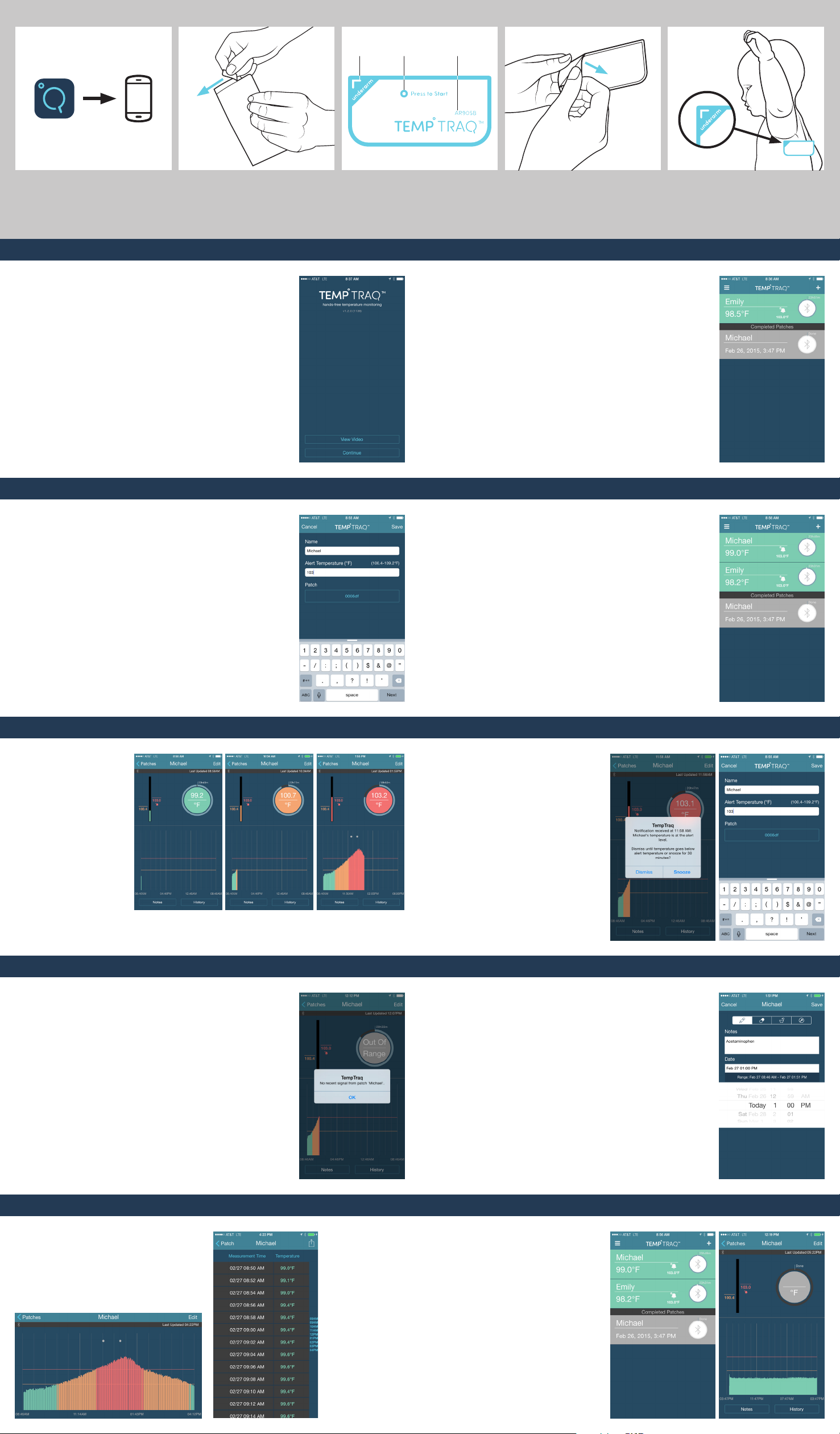
1. 2. 3. 4. 5.
SENSOR
ACTIVATION
SWITCH
ID NUMBER
DOWNLOAD AND INSTALL APP
The Tem pTraq ™ app can be downloaded from
the App StoreSM or Google Play™ store.
Start App
Open the app on your smartphone. Please
take time to review an in-depth video on the
use of Tem pTraq™.
OPEN PACKAGING
When you are ready to use Tem pTraq ™, open
the foil packaging and remove the patch. Be
careful not to excessively bend the patch.
ACTIVATE PATCH
Squeeze the area marked by "Press to Start"
between the thumb and forefingers to activate
the patch. You will feel the switch "click" when
you have successfully activated the patch.
Add New Patch
As soon as the patch is started and applied to
your child, it immediately begins monitoring body
temperature. For accurate temperature readings,
your child's arm should be relaxed at their side.
The patch needs approximately 3 minutes to reach
an accurate and stable temperature reading after
it is applied to your child. To monitor your child's
temperature with the app, you will need to add a
new patch by selecting the "+" sign in the upper
right of this screen.
Add a New Patch Patch List
REMOVE BACKING
Remove the backing from the patch just prior
to application.
APPLY PATCH
Apply the patch directly under the arm with the
sensor - the corner marked "underarm" - in the
center of the armpit. The patch can be placed
on either side of the body. The Tem pTra q™
logo should be in an upright position.
Enter your child's name; then enter an alert
temperature. The app indicates a possible fever for
temperatures of 100.4 °F (38.0 °C) or higher. Enter an
alert temperature for when you want the app to alert
you. Next, select a patch by choosing the ID number
that corresponds to the ID number on the front of the
patch on your child. Selecting "Save" will set up the
patch and take you to the next screen.
This is your patch list, which shows a status bar for
each active patch. Tem pTraq ™ enables you to monitor
multiple patches at one time. Within each status bar,
you will find the current temperature of each child, the
child's alert temperature and the time remaining for
the patch. Within the circle, the Bluetooth® symbol will
pulse whenever new data is received from the patch.
By swiping across a status bar from right to left you
can access the option to edit or delete a patch. Patches
that have completed their 24 hour monitoring period
are also shown on this screen. These patches and their
data are retained in the app until you delete them.
By tapping on the status bar for your child, you can
navigate to your child's dashboard.
NOTE: To switch between Celsius and Fahrenheit,
choose the appropriate selection within settings for
the Tem pTraq™ app.
Dashboard Alert Notification and Alert Temperature
The dashboard shows
your child's current
temperature, the alert
temperature, and time
remaining for the patch.
The graph at the bottom
of the screen illustrates
your child's temperature
over time. The app uses
colors to show the current
temperature status for
each child.
GREEN indicates a
temperature that is in
the normal range
ORANGE indicates a possible
fever of 100.4 °F (38.0 °C)
or higher
RED indicates a reading equal
to or higher than the user alert
temperature (ex. 103.0 °F)
If your child's temperature is equal to the user
selected alert temperature - 103.0 °F in this
example - the background color within the
circular display for current temperature will
change to red and your device will receive an
alert notification. Select "Snooze" to snooze the
alert for 30 minutes. If your child's temperature
remains above the alert level at the end of
the 30 minute snooze period, you will receive
another alert. If your child's temperature falls
below the alert temperature during this 30
minute snooze period, the alert notification
will be canceled. Choose "Dismiss" to cancel
the alert until your child's temperature drops
below the user selected alert level and then
once again increases to the alert temperature.
The alert temperature can be changed by
selecting the "Edit" button in the upper right
corner of the dashboard screen to navigate to
the "Add a New Patch" screen.
Patch Out of Range Adding Notes
When the patch is out of range of the smart device
running the TempTraq™ app for more than 15
minutes, the app will notify you that the smart device
is not receiving temperature data from the patch
and you will not be able to monitor the current
temperature or receive alerts based on your selected
alert temperature. To correct an "Out of Range"
condition, move your smart device running the app
closer to the patch until you once again begin to
receive current temperature data. When in range,
the app shows the current temperature. When out of
range the app displays the message "Out of Range"
and no current temperature is displayed.
The TempTr aq™ app allows you to add notes to
your child's temperature history. Access Notes by
selecting the "Notes" button at the bottom of the
Dashboard Screen. Select "+" to add a note. You can
choose from three preset events - medication, bath,
or feeding - or create a custom note. Select the date
and time that corresponds to the event or note and
then press "Save" to save the note. Notes will be
listed on this screen for review and editing and can
be exported by tapping the export icon. A note icon
is also added to the temperature history graph for
each new note. Tap a note icon on the graph at any
time to see the details of a previously entered note.
Graph View and Table View Patch Done
When in the dashboard screen, turn your smart
device horizontally to display an expanded
graph. Use pinch and zoom to view portions
of the graph in more detail. You may also tap
on note icons in this view to review previously
entered notes. Rotate your smart device back to
vertical to return to the dashboard screen.
When in the
dashboard screen
monitoring an
individual patch,
select the "History"
button to view a
list of temperature
measurements for a
more detailed look
at the temperature
changes over time.
You may also tap
the icon in the upper
right of this screen
to export data via
e-mail. The data
is sent as a .csv file
which can be viewed
in Microsoft© Excel©.
The patch stops measuring after
24hrs at which point it no longer
sends the current temperature to
the app. It will continue to send
temperature history for the 24
hour use period just completed
for an additional 24 hour period.
The app shows the word "Done" to
indicate that the 24 hour period of
monitoring is completed. Remove
the patch from your child when
finished and dispose of it in common
household waste. The patch and the
data for the patch are retained in
the app until you delete them.
 Loading...