

Page 1

Ref.769330
CoaxBox User Guide
EN
Page 2

Important Safety Instructions...................................................................................................................................3
Introduction.............................................................................................................................................................. 4
CoaxData CoaxBox................................................................................................................................................................4
Other CoaxData devices.........................................................................................................................................................5
CoaxBox Package content......................................................................................................................................................6
Knowing CoaxBox................................................................................................................................................... 6
Device Connections................................................................................................................................................................6
LED device..............................................................................................................................................................................7
Installing CoaxBox................................................................................................................................................... 8
Configure CoaxBox................................................................................................................................................. 9
CoaxBox Web.........................................................................................................................................................................9
CoaxBox Administration Web...............................................................................................................................................10
Device access via ssh...........................................................................................................................................................10
Configure network interfaces................................................................................................................................................11
Security Considerations........................................................................................................................................................13
Operating Considerations.....................................................................................................................................................13
User Account Management..................................................................................................................................................13
CoaxBox services.................................................................................................................................................. 14
CoaxProv............................................................................................................................................................... 14
Web interface........................................................................................................................................................................15
Calculation of storage capacity.............................................................................................................................................16
Install/Uninstall CoaxProv service.........................................................................................................................................17
Documentation......................................................................................................................................................................17
CoaxData AccessControl...................................................................................................................................... 18
Installation diagram...............................................................................................................................................................18
Main Features.......................................................................................................................................................................18
AccessControl Web interface................................................................................................................................................19
Enable/Disable AccessControl Service.................................................................................................................................19
Documentation......................................................................................................................................................................20
CoaxBox Characteristics....................................................................................................................................... 20
Page 3
CoaxBox - User Guide Ref.769330
3
Important Safety Instructions
Before handling or connecting the equipment, please read this manual!
This equipment has been built in accordance with international safety standards.
Dispose of electronic devices you no longer need in a respectful way with the environment and in accordance with
the relevant regulations.
Please read the following safety tips carefully.
POWER:
Adapter ~ 108-254V 50 / 60Hz, 12V output 0.7A.
The base socket must be near the equipment and easily accessible.
OVERLOAD:
No overload electrical, extensions or adapters to avoid the risk of fire or electric shock.
LIQUIDS:
Do not expose the adapter to the fall or splashing water.
Not place containers containing liquids near of equipment.
SMALL OBJECTS:
Avoid proximity of small metal objects. They could enter in slots or connectors on the computer and cause serious
damage.
CLEANING:
Unplug the network adapter before cleaning.
Using a soft cloth, moistened in water (without detergents) to clean the outside of the machine.
VENTILATION:
Place the computer in a place all right ventilated with uncovered slots.
Avoid exposure to sunlight, heat sources or flames (such as burning candles).
Do not place other equipment on top.
CONNECTIONS:
Perform only recommended to prevent possible damage connections.
LOCATION:
Place equipment in a protected inner place to avoid electric shocks, rain or direct sunlight.
COMPLIANCE IN RELATION TO HUMAN EXPOSURE TO ELECTROMAGNETIC FIELDS
Safety information
This product has been evaluated in relation to RF exposure in humans with reference to the limits set by the
ICNIRP (International Commission on Radiation Protection Non-Ionizing). For low power transmissions,
evaluation was based on EN 62479. For other wireless transmissions, evaluation has been based on EN 50385,
determining a limit under 20 cm.
Installation instructions
Install the device with a minimum distance separation of 20 cm from the areas where people normally remain
sure.
ENGLISH
2017 © Copyright, Televés S.A. www.televes.es
This symbol indicates that equipment meets the
CE marking requirements
This symbol indicates that this product can not
be treated as conventional household waste.
Make sure product is disposed of correctly.
This symbol indicates that equipment meets
the safety requirements for Class II
equipment
This symbol indicates that the equipment meets
the safety requirements for Class II equipment
Page 4
Televes
4
Introduction
CoaxData CoaxBox
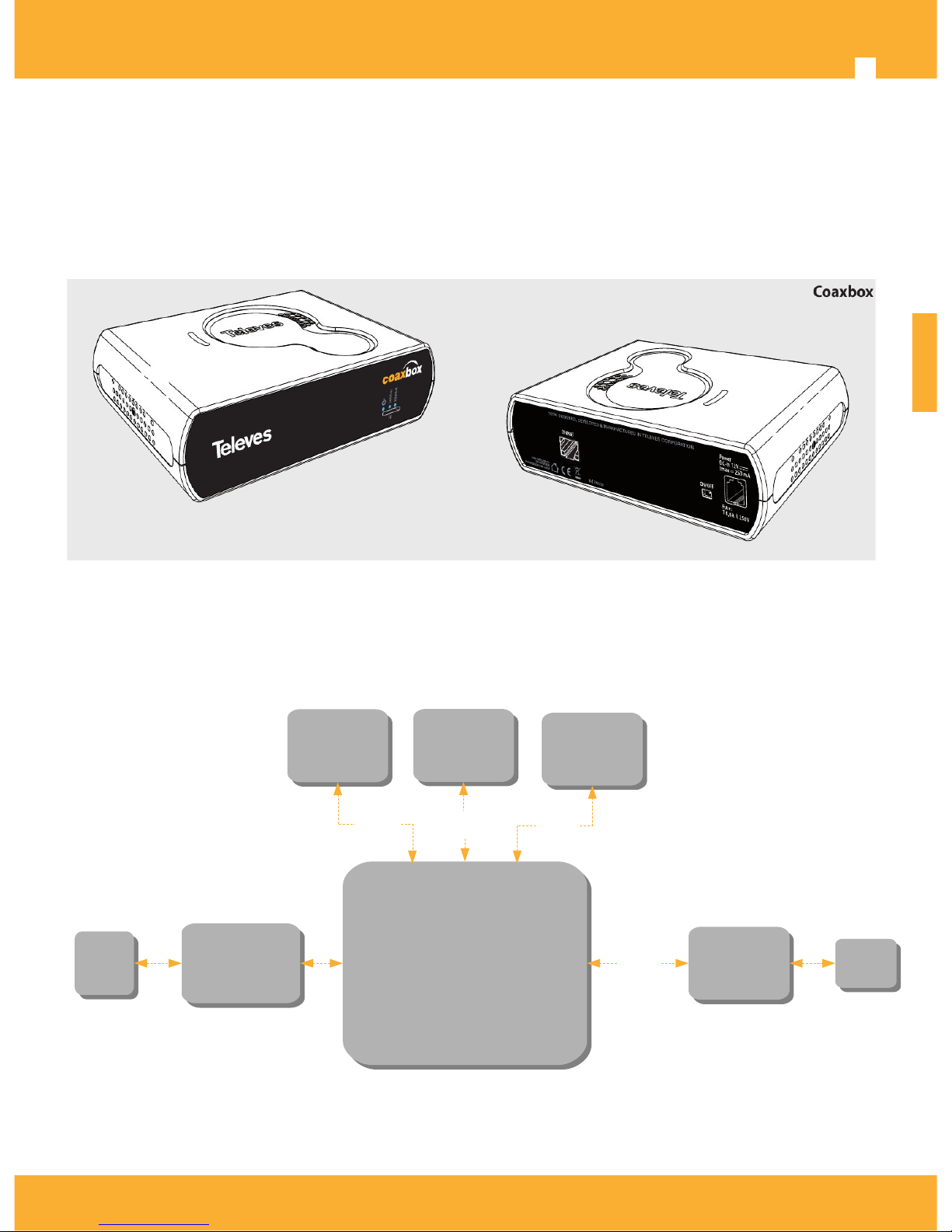
CoaxBox, ref.769330, is a device with preinstalled software to manage CoaxData networks. It allows the
provisioning and monitoring of Coaxdata networks in a simple and intuitive way.
Technical feature:
CoaxBox incorporates a powerful iMX.6 ARM quad-core CPU at 1Ghz that allows management and
monitoring of one or more CoaxData networks.
Gigabit Ethenet connector 1000BASE-T to connect device to the installation
RJ9 power connector, with a flange which prevents accidental disconnection.
Ref.769330 Block Diagram
ENGLISH
2017 © Copyright, Televés S.A. www.televes.es
RJ45
RJ45
ARM Cortex A9
ARM Cortex A9
Ethernet
Gigabit
PHY
Ethernet
Gigabit
PHY
SPI
NOR Flash
16MBytes
SPI
NOR Flash
16MBytes
Power
Management
Power
Management
EMMC
NAND Flash
4Gbyte
EMMC
NAND Flash
4Gbyte
DDR3
1GByte
DDR3
1GByte
64bits
SPI
SDIO
RGMII
12Vdc
12Vdc
Page 5
CoaxBox - User Guide Ref.769330
5
Main features
Monitoring the state of coaxial network through the Access Control application.
Monitoring and provisioning of the devices 769301 by CoaxProv application.
It has three LEDs to indicate that the device is properly accessing Internet and indicates services are
running correctly.
System Requirements
The system is Plug and Play and requires no additional software or driver.
To use this device requires a PC with an Ethernet interface.
Support HTML5 Web browser. Mozilla Firefox or Google Chrome are strongly recommended.
Other CoaxData devices
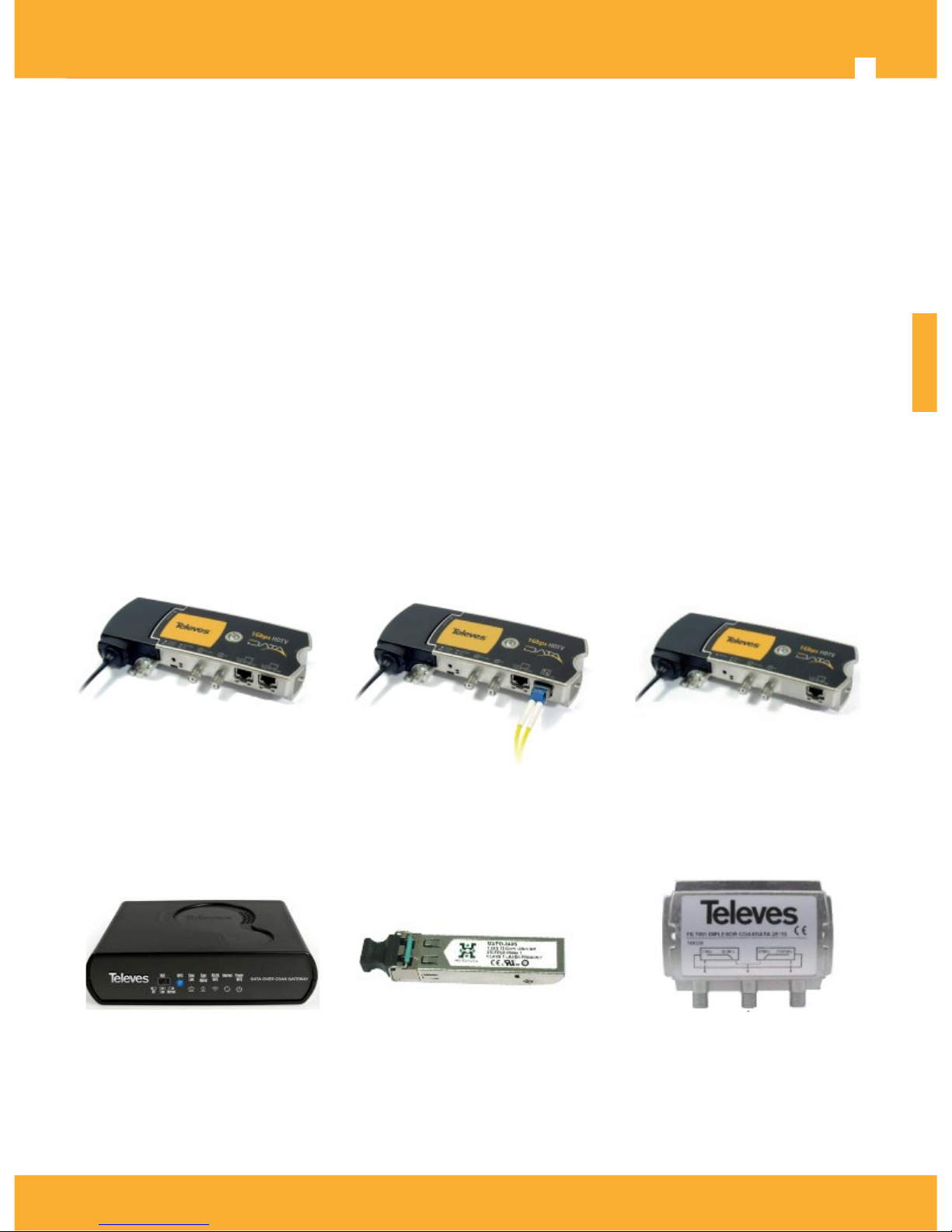
Ref.769330 complements CoaxData 1Gbps products family:
• Ref.769201 CoaxData ™ 1Gbps-HDTV
• Ref.769202 CoaxData ™ 1Gbps SFP-HDTV With
• Ref.769203 CoaxData ™ 1Gbps-HDTV 1XEth
• Ref.769301 CoaxData ™ 1Gbps-HDTV Coax + Wifi
• Ref.769220 CoaxData ™ TV-Data Filter diplexer 2-68 MHz / 87-2150 MHz
• Ref.769210 CoaxData ™ SFP optical adapter 1000 Base-X 2 FO
Ref.769201 CoaxData ™
1Gbps HDTV
Ref.769202 CoaxData ™
1Gbps HDTV con SFP
Ref.769203 CoaxData ™
1Gbps HDTV 1xEth
Ref.769301 CoaxData ™
1Gbps-HDTV Coax + Wifi
Ref.769210 CoaxData ™
SFP Module 1000 Base-X
Ref.769220 CoaxData ™ 1Gbps
diplexer filter TV-Data 2-68 MHz /
87-2150 MHz
ENGLISH
2017 © Copyright, Televés S.A. www.televes.es
Page 6
Televes
6
CoaxBox Package content
1
CoaxData CoaxBox
2
12VDC power supply with RJ9 connector
Knowing CoaxBox
Device Connections
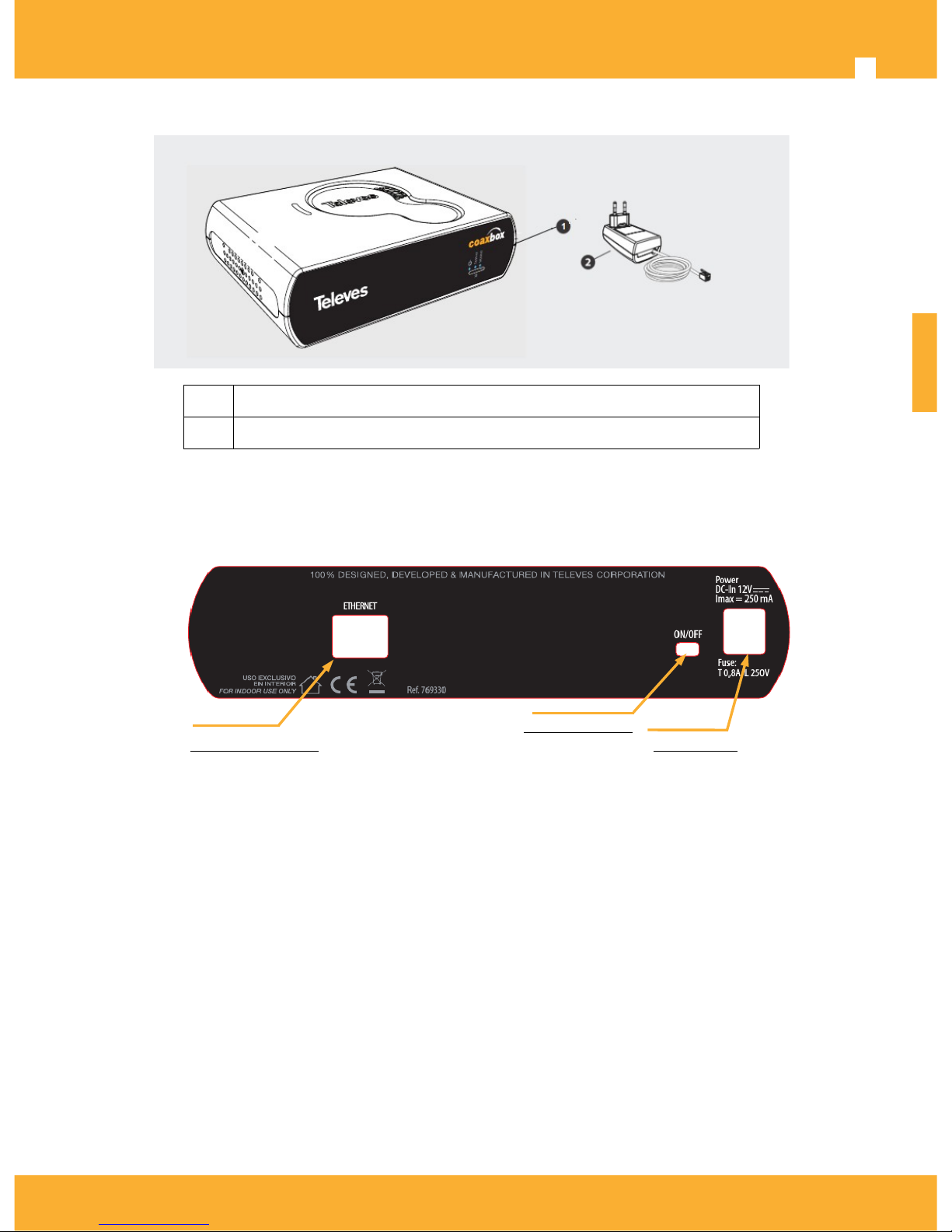
1xEthernet RJ-45
Ethernet connector 1000BASE-T for Connect CoaxBox to a PC or laptop. It allows autonegotiation with the host for
maximum link speed and Auto-MDIX which avoids using Ethernet crossover cables.
RJ9 Power connector
12Vdc connector powers the device for operation. RJ9 connector is equipped with a flange which prevents power
being accidentally disconnected.
Power Switch Off
Use power switch to turn on/off device. LED on the front that indicates when device is on and working.
SDCard Expansion Slot
Allows to increase storage capacity of the CoaxBox. By default, storage capacity is 4GB corresponding to internal
eMMC. Use this slot to increase capacity.
ENGLISH
2017 © Copyright, Televés S.A. www.televes.es
1xEthernet Port
1000Base-TX
Power Switch
On/Off
Power RJ9
12Vdc, 250 mA
Page 7
CoaxBox - User Guide Ref.769330
7
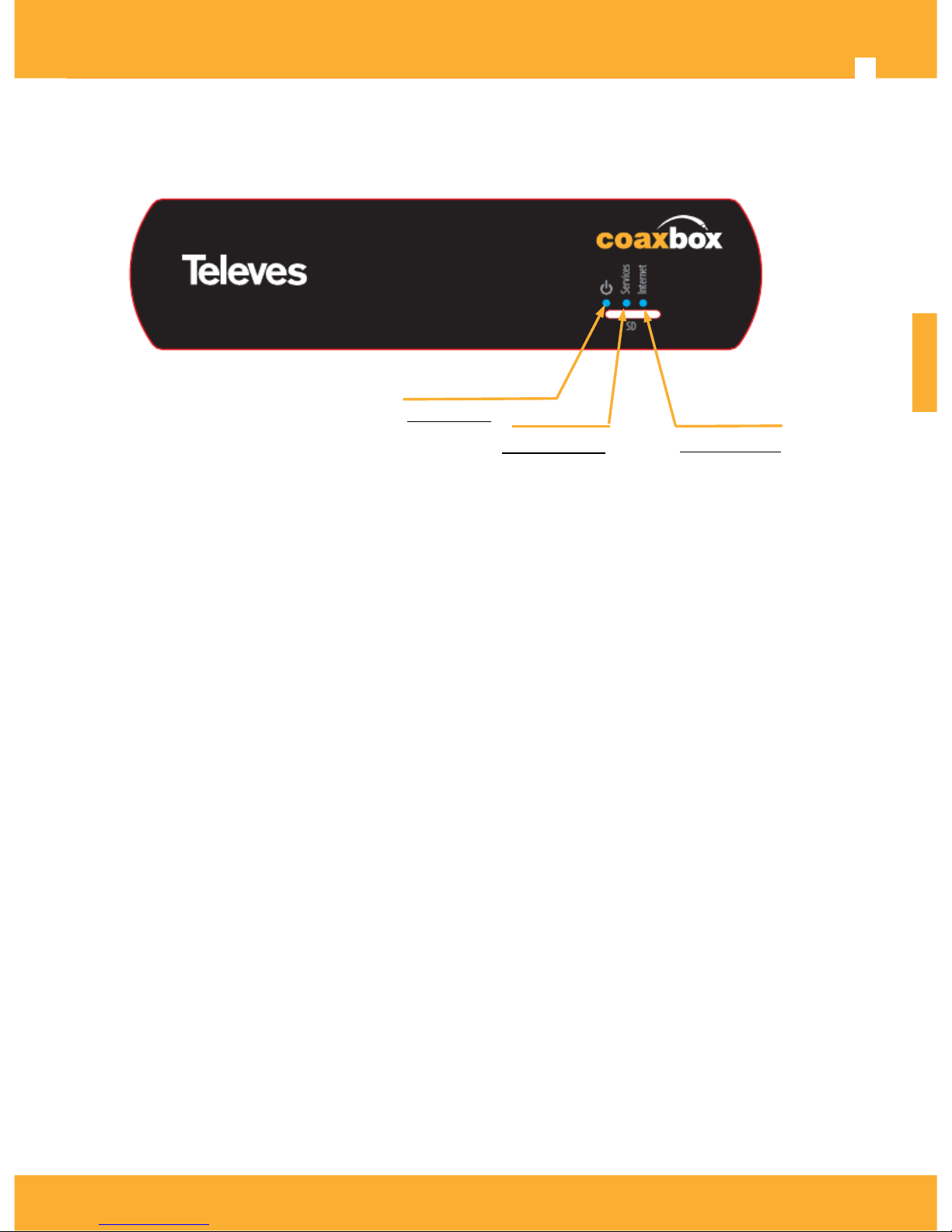
LED device
Power Led
It indicates that device is correctly power:
• Green: The device is on and working.
• Off: The device is not on. Check switch position and device is powered via RJ9 connector supply.
Led Services
This LED indicates that CoaxBox services are running correctly:
• Green:Host Services are running OK.
• Red: Management Services are failing or are not running properly.
Led Internet
This LED indicates status of internet connection:
• Green: Indicates that device has Internet access.
• Off: Indicates that the device does not have Internet access. Check device connections, if LED still keep
off check Internet access provided by your ISP.
ENGLISH
2017 © Copyright, Televés S.A. www.televes.es
Power Led
On/Off
Services Led
Verde: Services OK
Rojo: Services Fail
Internet Led
On: Internet OK
Off: Internet Fail
Page 8
Televes
8
Installing CoaxBox
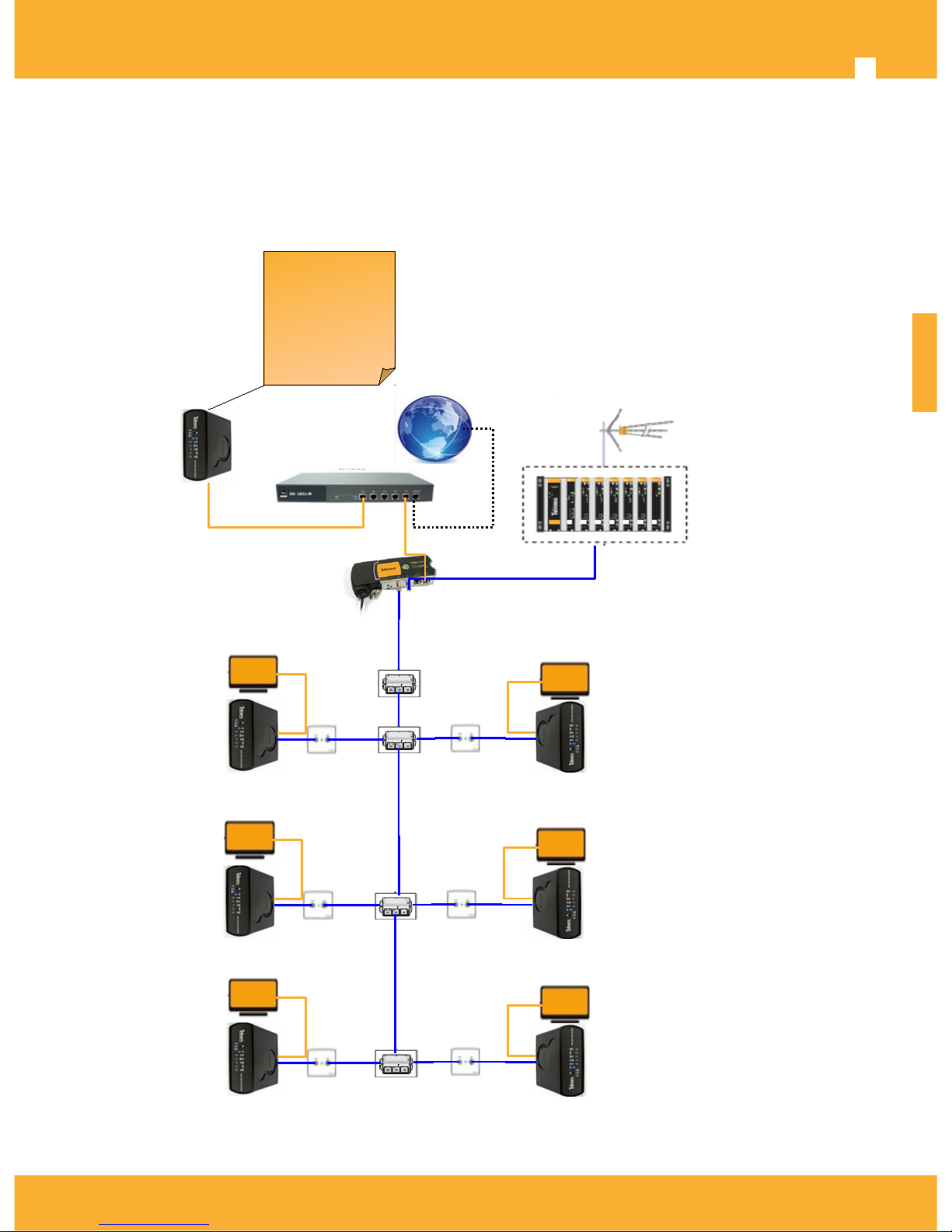
The figure shows an installation example of CoaxBox in a managed CoaxData network
• CoaxBox is installed at the coaxial headend and connected directly to the CoaxData master or via an Ethernet switch.
CoaxBox will search for devices and process the received reports to send alarms to installer via email or SNMP.
• ref.769301 Slave devices has an active SNMP Agent. It should be configured to send reports to the CoaxBox.
ENGLISH
2017 © Copyright, Televés S.A. www.televes.es
Internet
Router
Snmp
Agent
Snmp
Agent
TV
Headend
769201
Master
TV
TV
Snmp
Agent
Snmp
Agent
Snmp
Agent
Snmp
Agent
data
TV
TV+ data
ref.769330
CoaxBox
CoaxData
Management
Page 9

CoaxBox - User Guide Ref.769330
9
Configure CoaxBox
Device has an Ethernet interface with two IP addresses:
• eth0: Interface is pre-configure as active DHCP client.
• eth0:1 : Alias Interface with fixed 169.254.1.254 IP Address.
CoaxBox Web
Device has a Web Service running on port 80, all services running inside CoaxBox are available on this web and
redirect to proper service when click on button.
Following services are avallabe:
• Administration Web: Redirects browser to CoaxBox Web Administration(port 15712)
• CoaxProv: 769301 Device Management (port 15710)
• AccessControl: Coaxdata Device Management (port 15708)
ENGLISH
2017 © Copyright, Televés S.A. www.televes.es
Page 10
Televes
10
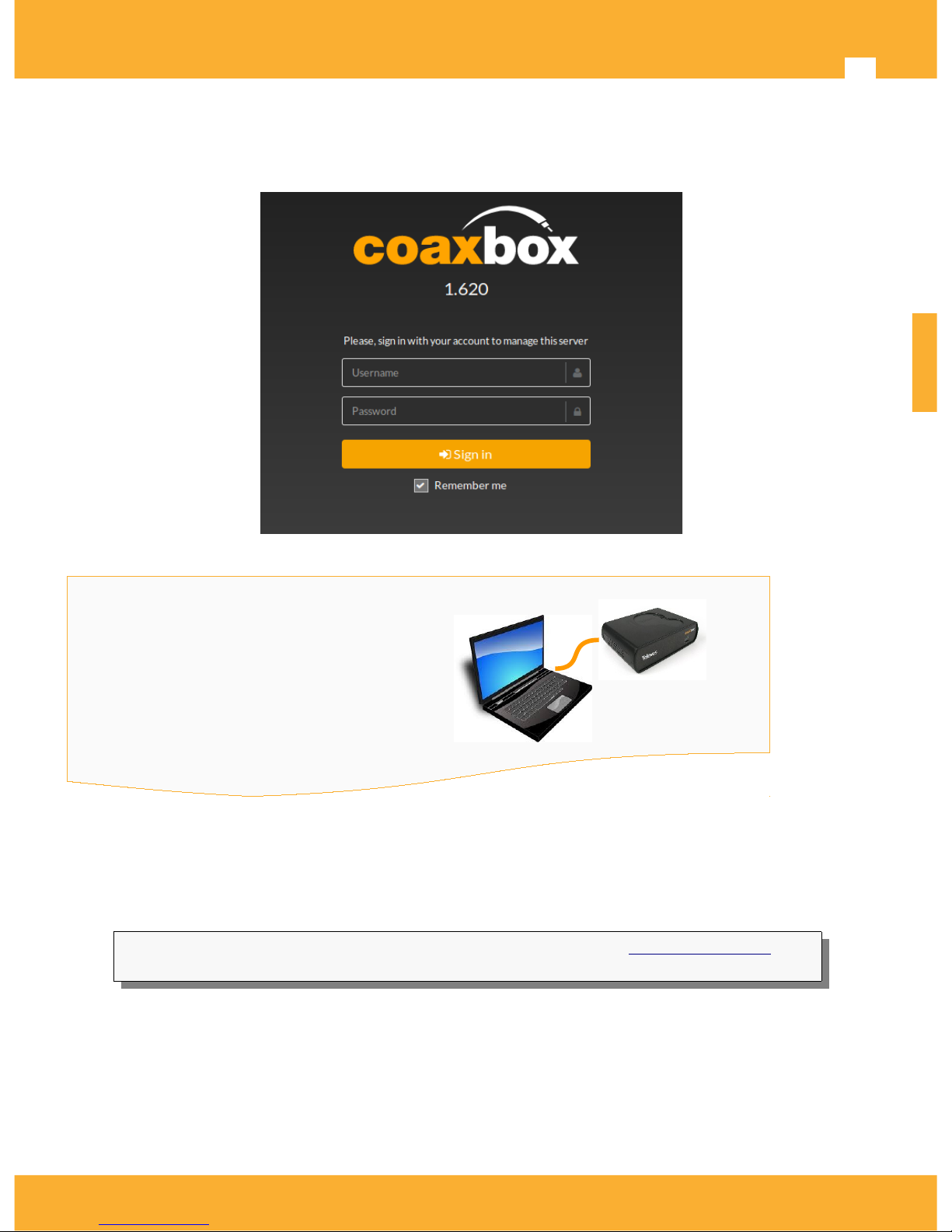
CoaxBox Administration Web.
For device network configuration and another administration tasks, a Web service running on 15712 port is
available.
Use the following account to access to CoaxBox web service
Device access via ssh
The most immediate way to access to device is via ssh. To do this configure the host IP 169.254.1.253/24 and
perform the following ssh command to access.
$ sshpass -p 76Coax93Box30 ssh -o StrictHostKeyChecking = no [email protected]4
coaxdataservices root @: ~ #
SSH Terminal can execute any command on the CoaxBox such as install new packages, remove/add services or
restart device.
ENGLISH
2017 © Copyright, Televés S.A. www.televes.es
CoaxBox Management Web
Web: http://169.254.1.254:15712
Usuario/User: Admin
Password: Televes1
Page 11
CoaxBox - User Guide Ref.769330
11
Configure network interfaces
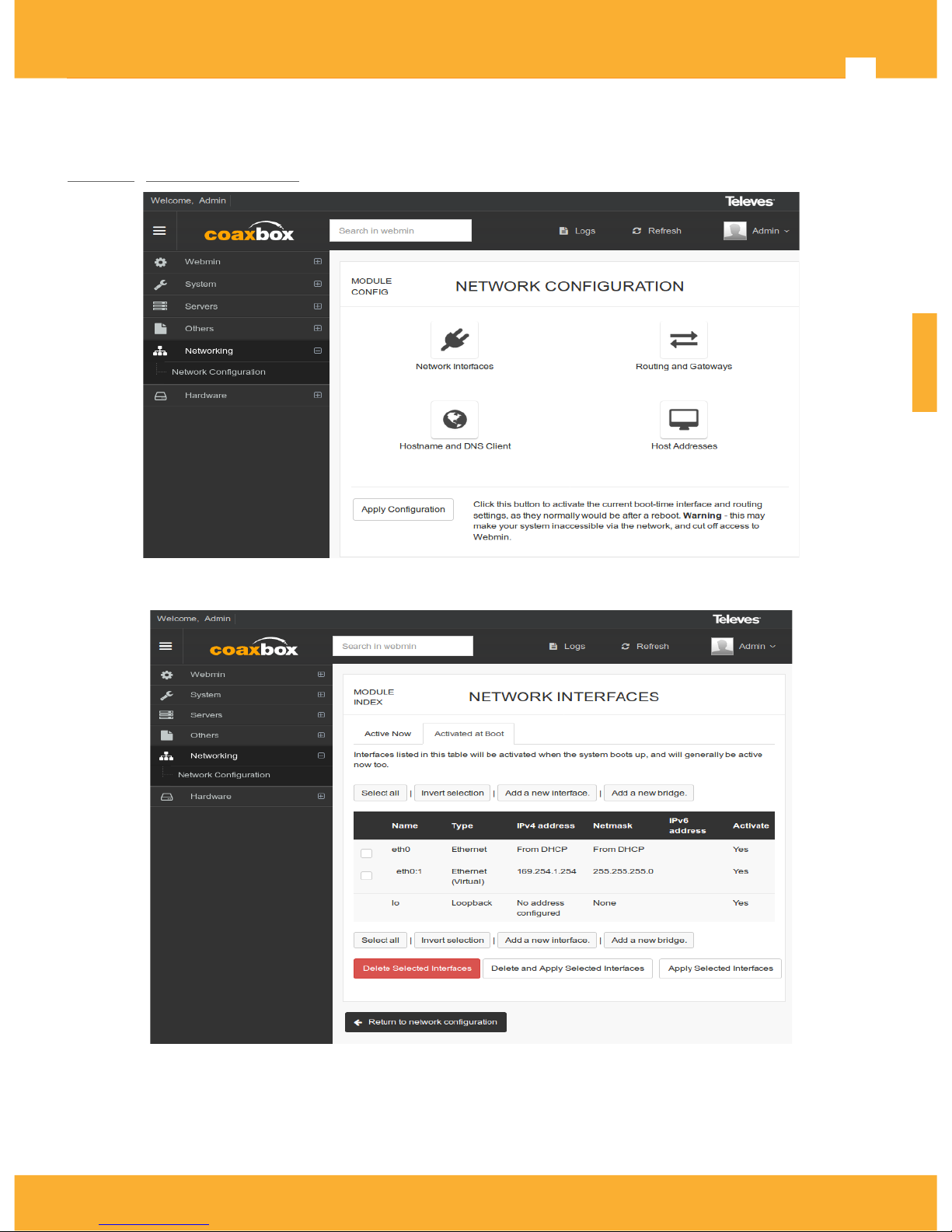
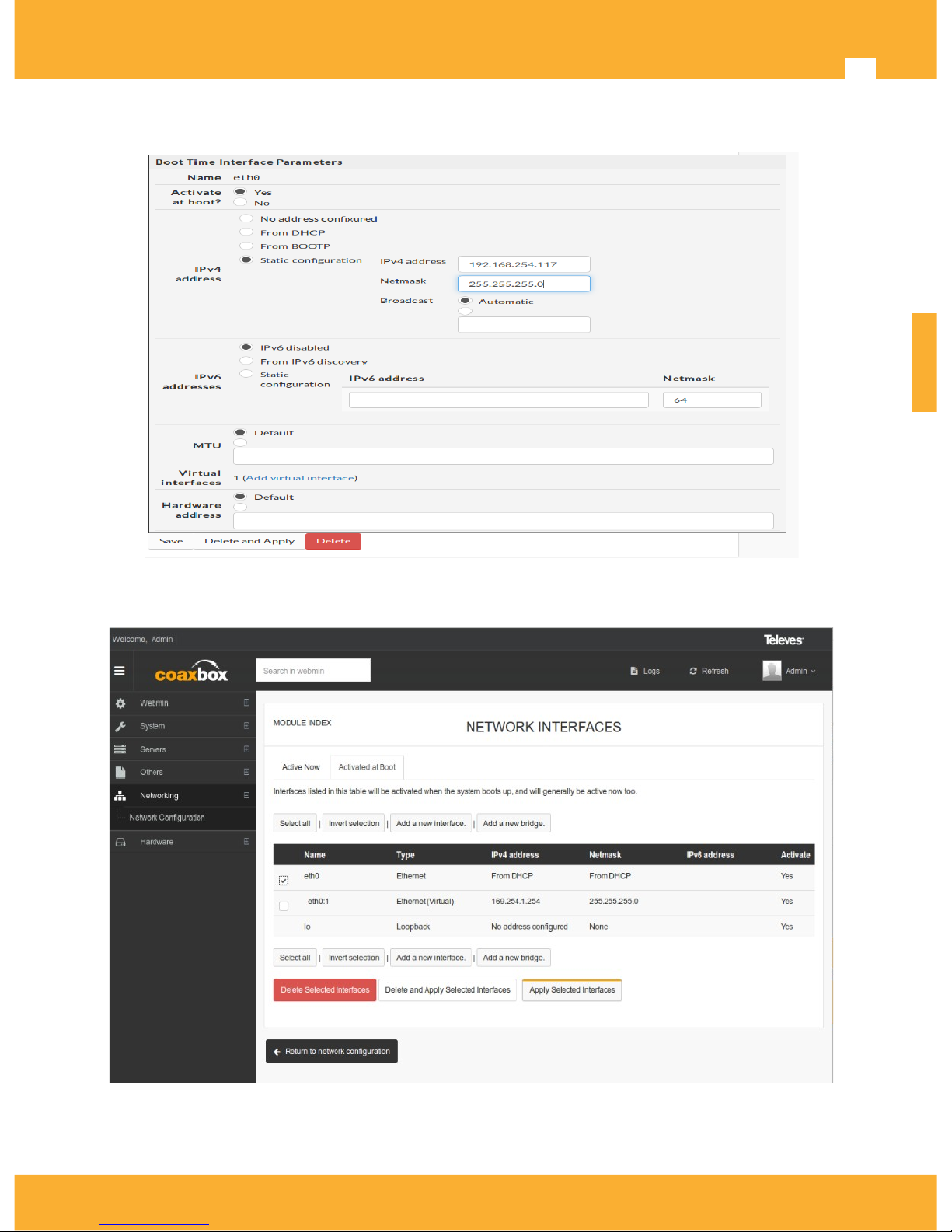
To change the configuration of the eth0 interface to assign an static IP instead of DHCP interface; Go to
Network>Network Interfaces on Web interface
This shows device interface's list
ENGLISH
2017 © Copyright, Televés S.A. www.televes.es
Page 12
Televes
12
Click on eth0, select the static settings and press Save to save interface configuration
On the menu Network Interfaces, select eth0 and click Apply Selected Interfaces, to apply previously saved
configuration.
ENGLISH
2017 © Copyright, Televés S.A. www.televes.es
Page 13
CoaxBox - User Guide Ref.769330
13
Security Considerations
Please note that access to the CoaxBox should be restricted.
• The firewall has not been enabled.
• Admin access account root/76Coax93Box30 is public, as this manual. Changing this password should be
done prior to any further configuration.
• User Access Account Admin/Televes1 is public, as this manual. Changing this password should be done
prior to any further configuration.
Operating Considerations
Consider the following notes about CoaxBox services:
• Maximum number of reports that CoaxBox can process is 600 reports/minute. Please check number of
CoaxData devices and report interval to avoid exceeding this value.
• If you install multiple CoaxBox in your CoaxData network, only one CoaxData AccessControl can be
running on each broadcast domain. Enable Access Control only on one CoaxBox.
User Account Management
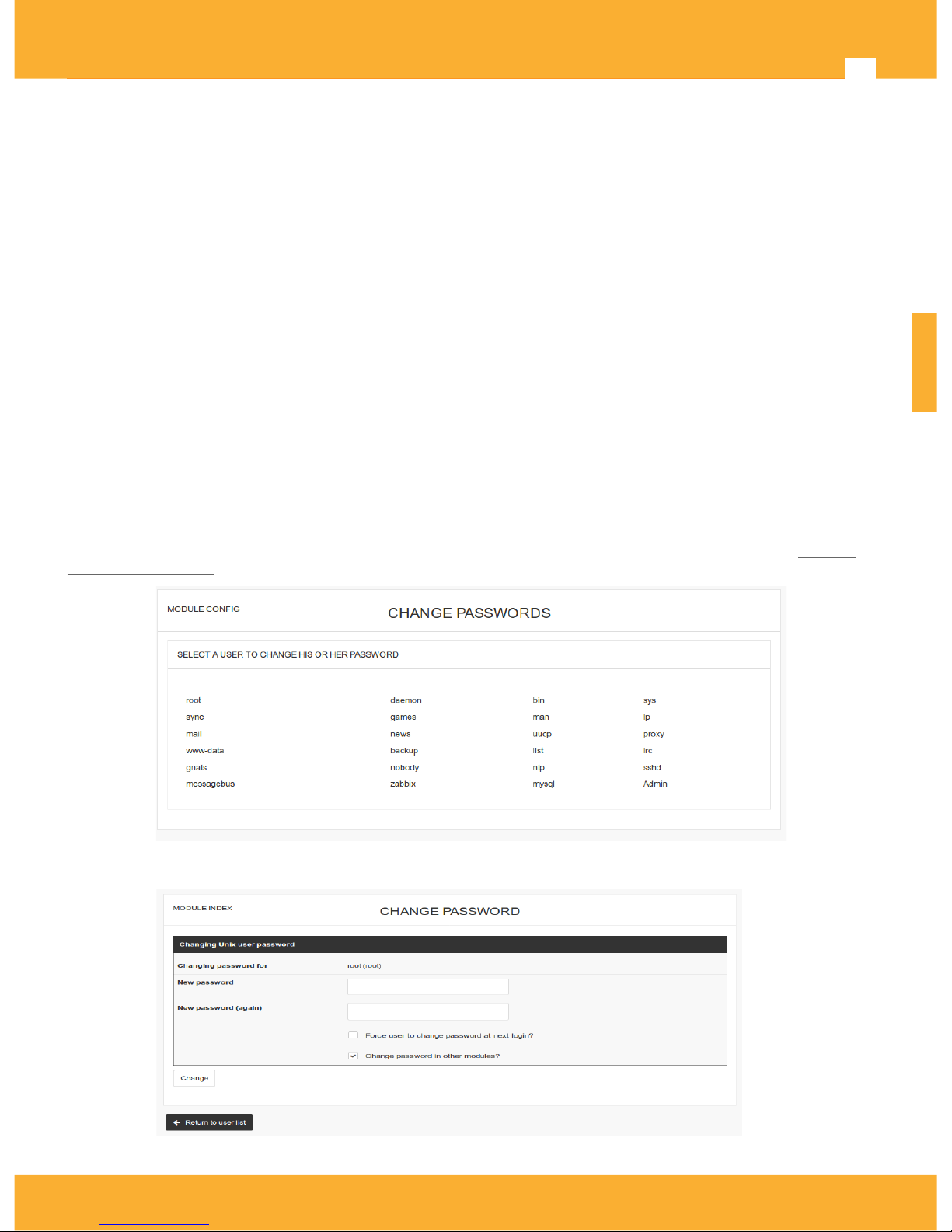
For security reasons use could consider to change user/system account's password. Please, go to System >
Change Passwords on Web management.
Select account, and change the password
ENGLISH
2017 © Copyright, Televés S.A. www.televes.es
Page 14
Televes
14
CoaxBox services
CoaxBox comes with severeal preinstalled services:
• CoaxProv: Application for ref.769301 management.
• CoaxData AccessControl: Application for CoaxData management .
CoaxProv
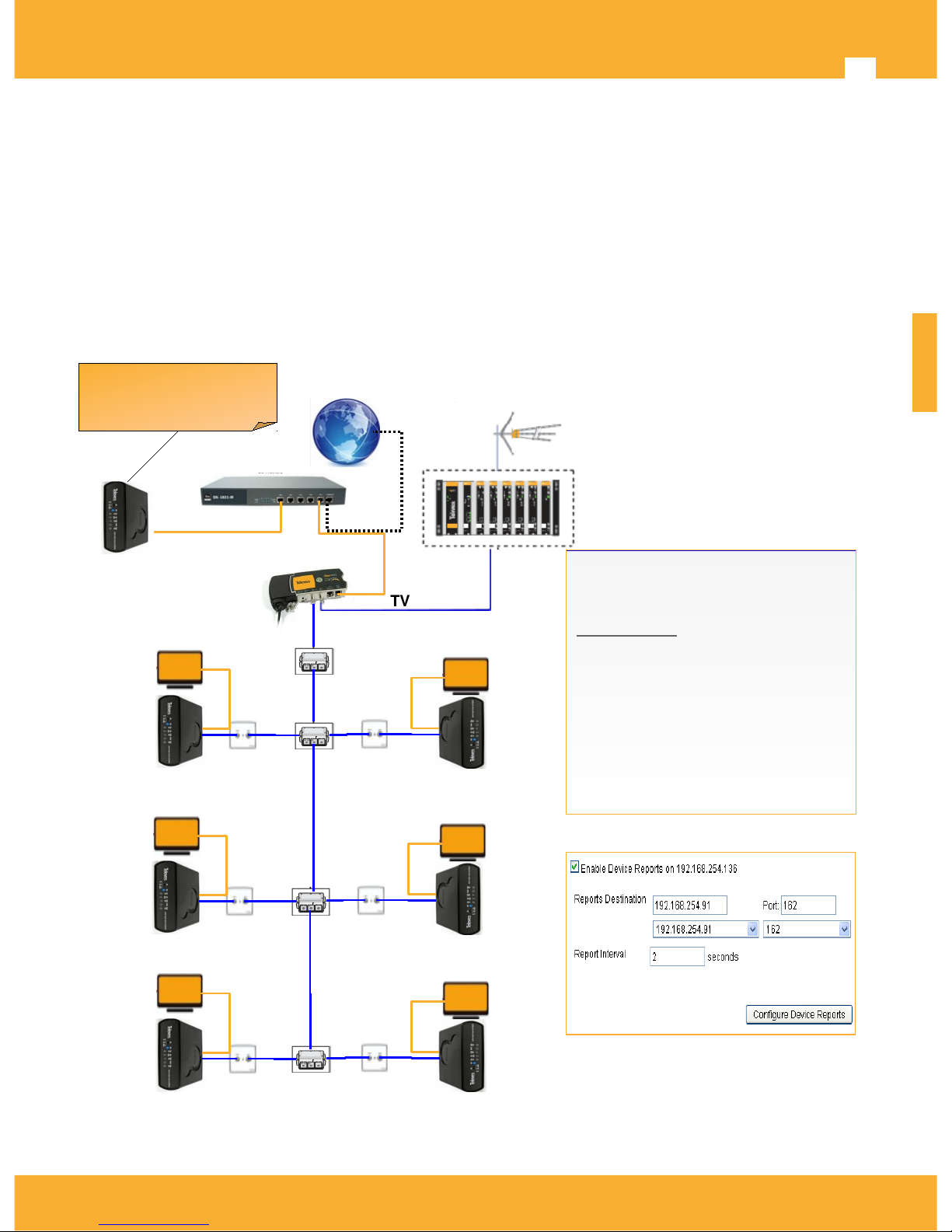
CoaxProv™ is a tool to manage ref.769301 devices. With CoaxProv™ provision and monitor 769301 devices is
easy. You can also check status of coaxial and wireless networks as well and generate alarms when a malfunction
is detected.
This application is developed specifically for OEMs and network operators who need to remotely manage CoaxData
devices and check the status of the network in real time.Installation diagram
ENGLISH
2017 © Copyright, Televés S.A. www.televes.es
Internet Router
769301
Snmp
Agent
769301
Snmp
Agent
TV
Headend
769201
Master
TV
TV
769301
Snmp
Agent
769301
Snmp
Agent
769301
Snmp
Agent
769301
Snmp
Agent
769330 CoaxBox
with CoaxProv
Enable Snmp agent on 769301.
Configure Trap Destination and
Port to report to CoaxProv.
Send reports every Snmp Report
Interval on seconds.
data
TV
Ref.769330 CoaxBox
with CoaxProv
Page 15

CoaxBox - User Guide Ref.769330
15
Main features CoaxProv™
• Upgrade 769301 firmware and configuration.
• Support for massive operations to upgrade firmware or configuration of multiple devices.
• Embedded TFTP server to Provision device with DHCP protocol options 66 and 67.
• Discovery of local 769301 devices with LLDP layer-2 protocol.
• Discovery of remote devices with IP scanning.
• Configure devices to send reports to CoaxProv and record reports on an internal database.
• Monitor device wifi links and provide info of device VAPs and Wifi stations connected.
• Monitor device resources like interfaces, CPU. memory and disk.
• Monitor Coaxial links and provide info of Coaxial Rate, Signal to noise and Attenuation.
• Monitor Wifi links and provide info of stations connected to VAPs and VAP state.
• Monitor device status and provide list with CPU, memory and disk usage.
• Create Graphics with all device info collected.
• Generate device alarms when device stop to send reports to CoaxProv or cannot load device configuration.
Track device activity with device events.
• Automatic generation of e-mails or snmp traps that enable propagate alerts to operator monitoring
system for major incidents. To avoid alarm flooding, email or trap alarm must match rule on alarm filters,
so only specific alarms are propagated to external monitor system.
• Device Groups. Grouping devices help to track and avoids long lists with a lot of devices, also help to
locate device when grouping by building block or hotel floors.
Number of device reports cannot exceed 600 reports/minute!
In your monitoring needs exceed that amount, It is recommended the installation of multiple
CoaxBox devices on your network and segment network management.
Calculate storage needs for application or use an external SD!
Ref.769330 box has an internal 4GB eMMC. Depending on the number of reports/minute and
time to keep reports in database, device storage capacity can be exceeded. If storage needs
exceed capacity, CoaxProv detects it and sends an alarm, eliminating the oldest reports.Use an
external microSD to avoid this. Simply insert the microSD card into expansion slot and restart
your system. On boot, internal DB is copied automatically to external microSD card and new
reports are stored on it.
microSD Card must have only one partition with Ext4 filesystem.
Web interface
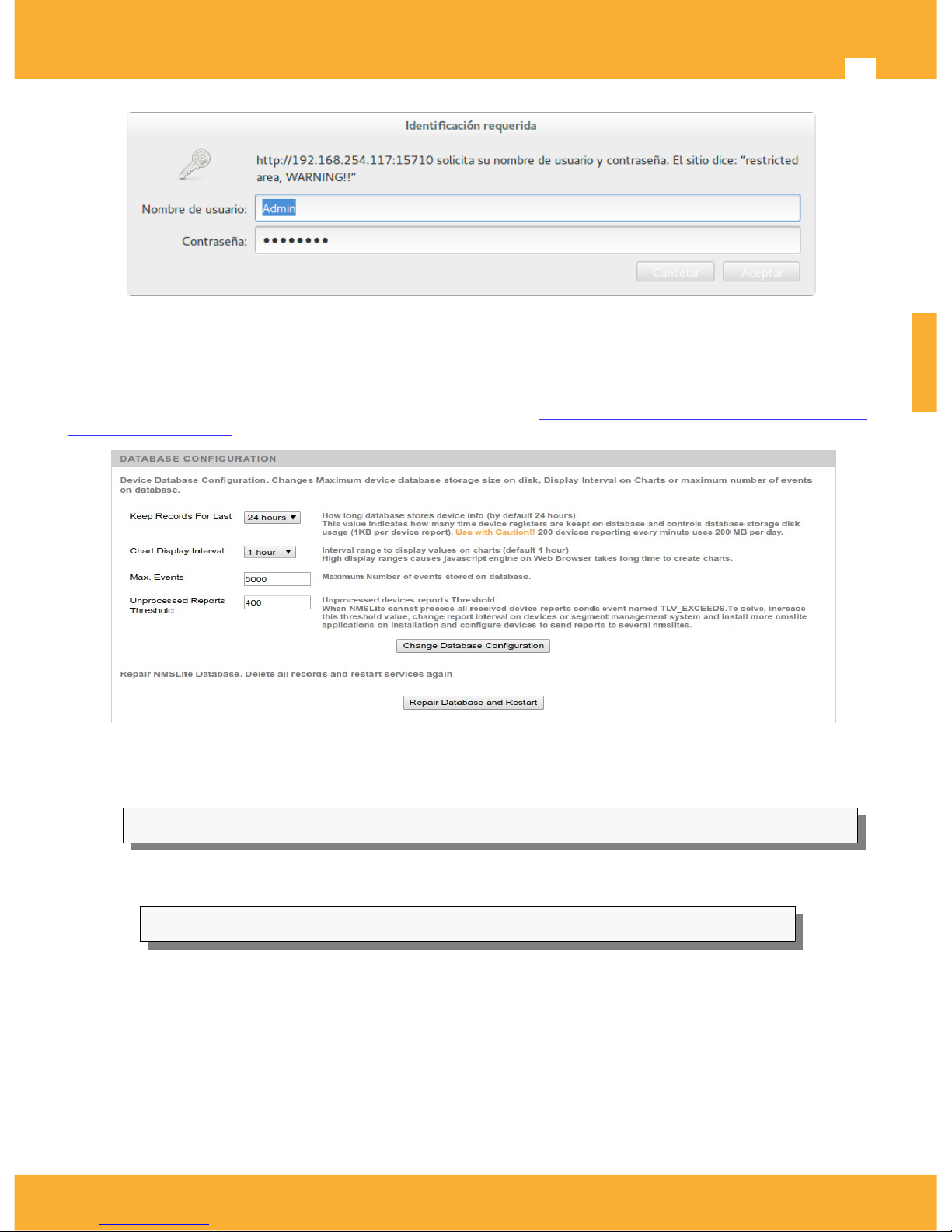
The first step you must take the installer is set CoaxProv. This step is performed via Web port 15710.
• Opening a browser and indicate the address: http: // <CoaxBox_IP> : 15710
• Use the following account
user: Admin
password: Televes1
ENGLISH
2017 © Copyright, Televés S.A. www.televes.es
Page 16
Televes
16
Calculation of storage capacity
An important parameter of CoaxProv is the calculation of storage needs. Ref.769330 has a 4GB on internal eMMC,
but in the case that available space is exhausted the CoaxProv emits an alarm and deletes the oldest records.
This capability is controlled by the configuration parameters of the Provision Database> Provision Configuration>
Database Configuration
As seen in the image, device reports are stored for 24 hours. The consumption of each report in the database is
1KByte/report. So if we have a system with 600 devices, sending a report every minute, the storage capacity per
day will be:
1KB/report x 600 reports/minute x 60 min/hour x 24 hhour = 864000 KB = 864MB/day
Changing the time that reports are stored on system (Keep Records For Last) from 24h to 1 week, the need for
storage will be:
864MB/day x 7days =6,04GB
The value required for storage is 6GB, exceeding the internal capacity of 4GB.
To increase the storage capacity insert an external microSD into the expansion slot of the device. microSD Card
must have only one partition with Ext4 filesystem. Reboot the system using the Administration Web on port
15712: System>Boot And Shutdown>Reboot System.
On boot system will detect that there is an microSD and will install internal database on EMMC on SD, without risk
of information will be lost.
ENGLISH
2017 © Copyright, Televés S.A. www.televes.es
Page 17
CoaxBox - User Guide Ref.769330
17
Install/Uninstall CoaxProv service
By default the CoaxProv starts when the unit does. Service configuration can be performed via Web Administration
interface on port 15712.
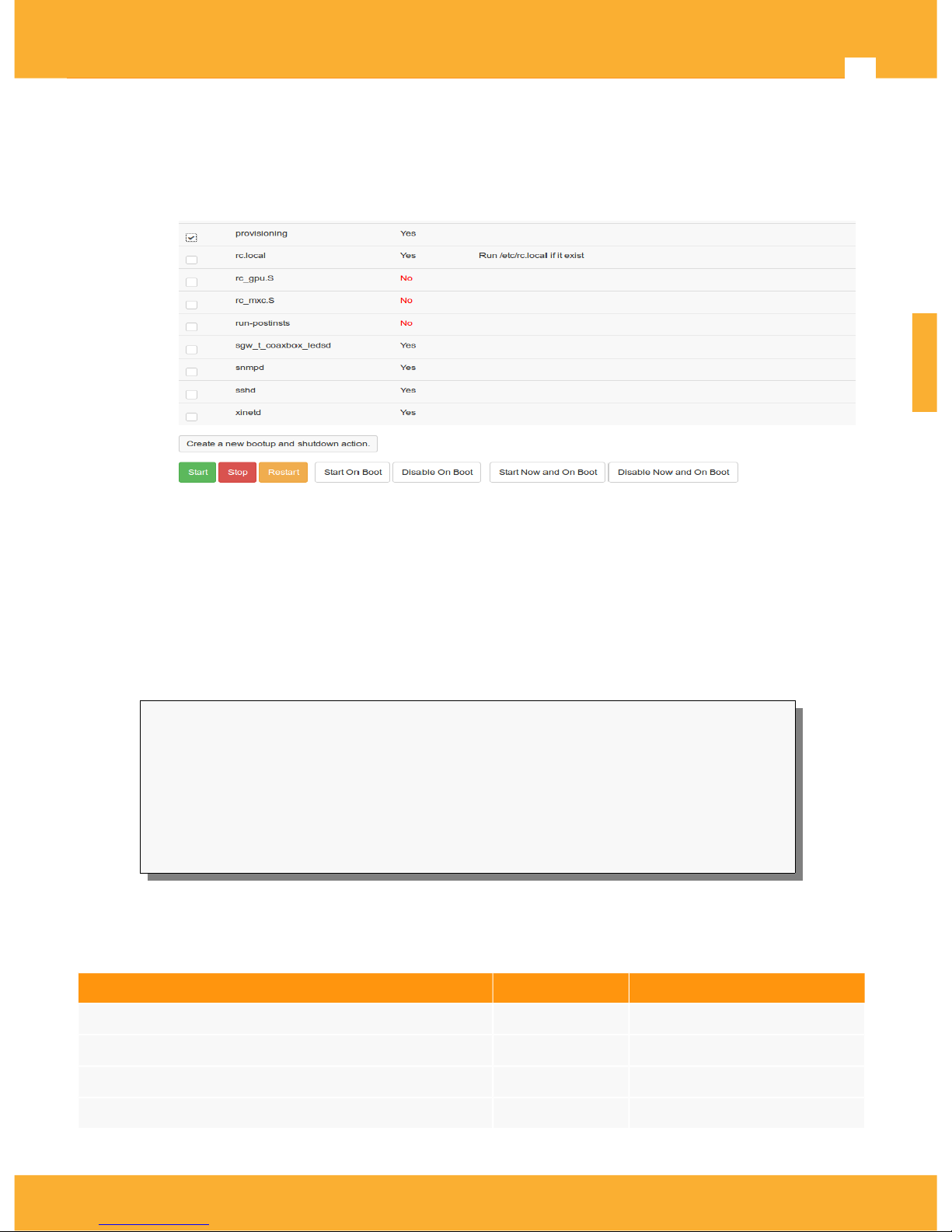
Go to System > Bootup and Shutdown, select service called provisioning
• Start/Stop/Restart to start / stop the service.
• Start on Boot: Starts the service at boot
• Disable On Boot: Disables the service at boot
• Start Now and On Boot: Starts the service at startup and now.
• Stop Now and On Boot: Starts the service at startup and now.
The same task can be performed through an SSH connection. Commands below shows how to configure this
service through a terminal.
# To start the service
coaxdataservices root @: ~ # /etc/init.d/provisioning start
# To stop the service
coaxdataservices root @: ~ # /etc/init.d/provisioning stop
# To install the service (it will start when CoaxBox is started)
coaxdataservices root @: ~ # update-rc.d provisioning 50 defaults 20
# To remove the service (serice will not start when you start CoaxBox)
coaxdataservices root @: ~ # update-rc.d -f provisioning remove
Documentation
Next table shows CoaxProv documentation for Web interface and 769301 SNMP agent. Check your CoaxData
documentation or contact with your Televes support.
Document Language Description
CoaxProv_User_Guide_003_ES SPANISH Manual CoaxProv
CoaxProv_User_Guide_003_EN ENGLISH Manual CoaxProv (EN)
DoC-AN_CoaxData_ref769301_Snmp_Support_002_ES SPANISH Ref.769301 SNMP Agent
DoC-AN_CoaxData_ref769301_Snmp_Support_002_EN ENGLISH Ref.769301 SNMP Agent (EN)
ENGLISH
2017 © Copyright, Televés S.A. www.televes.es
Page 18
Televes
18
CoaxData AccessControl
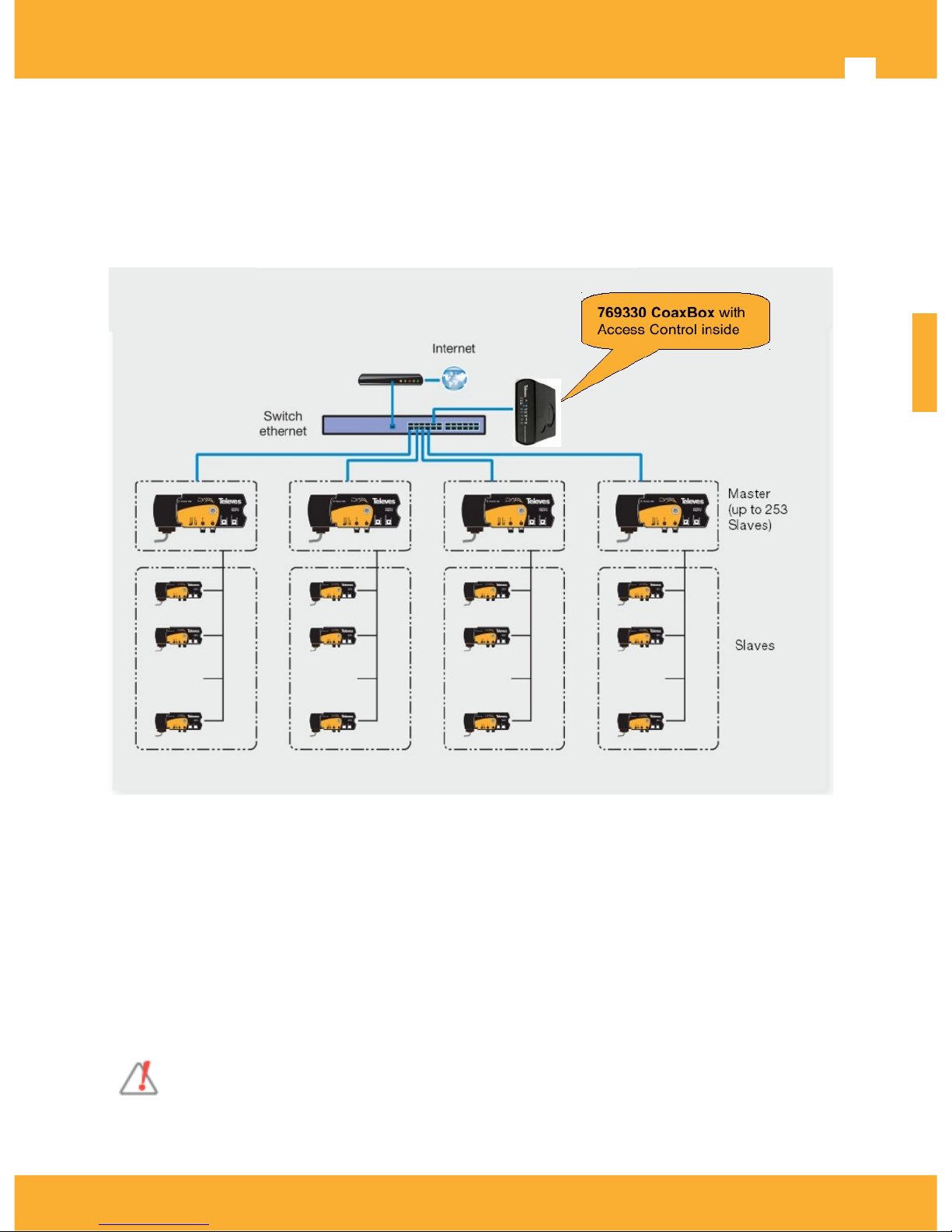
The application CoaxAccessControl™ allows setting CoaxData™ devices in a simple and intuitive way to
establish different parameters of access to coax medium, check installation status and link quality between
devices.
Installation diagram
Main Features
Configure the access mode of the coaxial modems CoaxData1Gbps the medium such that can enable /
disable a device and set parameters such as access bandwidth and user limit modem.
check installation status determining the rate links between different devices.
Alarm generation to notify the user of any impact on the system as a link loss of a device or poor
quality, and access to the current network situation by implementing an SNMP agent.
The system configuration can be done by SNMP protocol or through a simple Web interface for users
without technical knowledge of this protocol. For this it provides a complete specification MIB defines all
SNMP objects implemented by SNMP agent.
Automatic generation of e-mails that enable ongoing monitoring and warning for major incidents in
both the management system itself as devices to manage.
Multiple CoaxData AccessControl on the same network segment are not allowed!
Depending on the characteristics of your network, you may need to segment the monitoring
and install several CoaxBox in your installation. Only one AccessControl can be enabled.
See bellow instruction to enable/disable AccessControl con CoaxBox.
ENGLISH
2017 © Copyright, Televés S.A. www.televes.es
Page 19
CoaxBox - User Guide Ref.769330
19
AccessControl Web interface
The first step required of the installer is to configure the access control system indicating operating parameters.
This step is performed via un port Web.
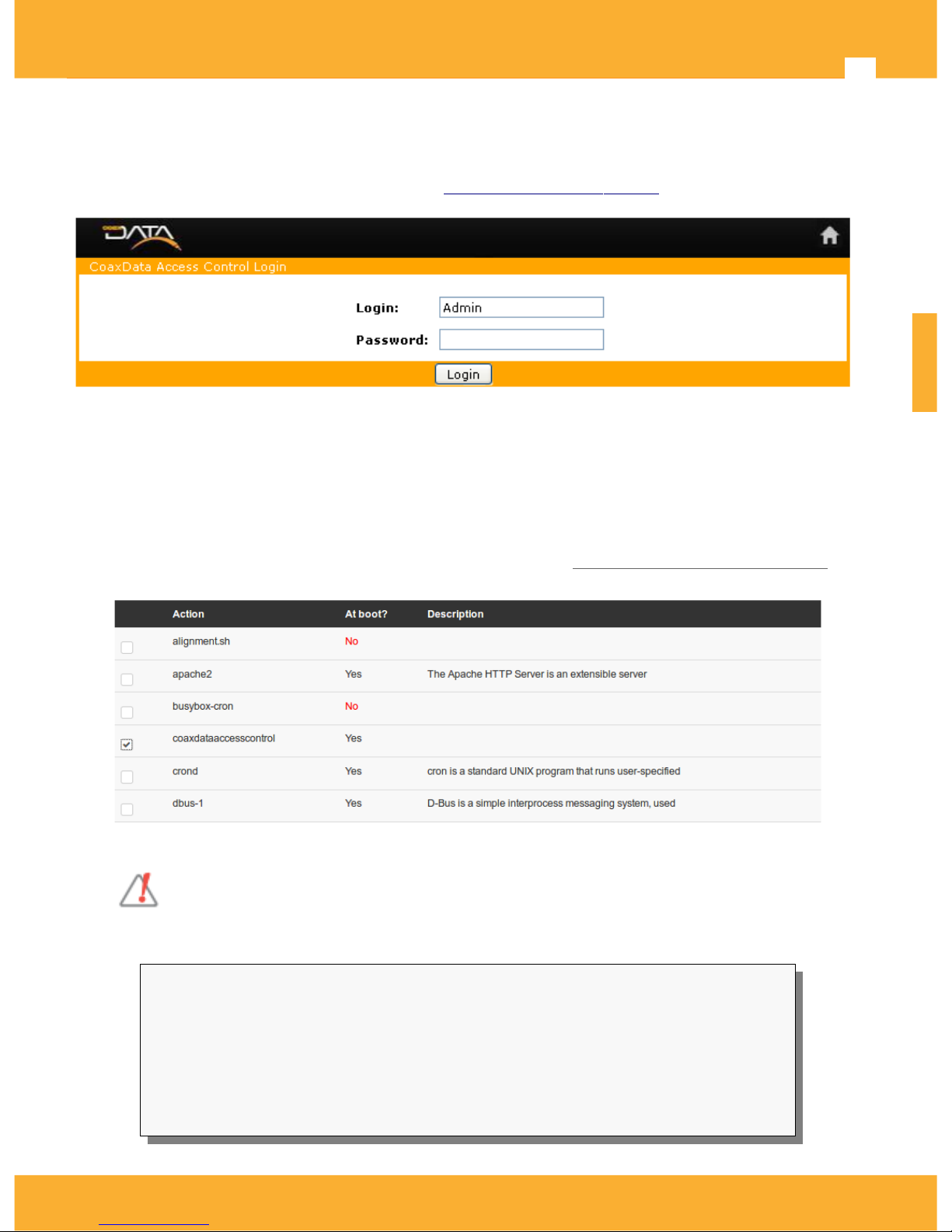
• Opening a browser and indicate the address: http: // <CoaxBox_IP> : 15708
• Use the following account to access.
user:Admin
password: Televes1.
Enable/Disable AccessControl Service
By default CoaxBox start AccessControl service at startup.
Use the Web management to configure this CoaxBox service. Go to System> Bootup and Shutdown select
service called coaxdataaccesscontrol and click on start/stop/install/uninstall button.
Multiple CoaxData AccessControl on the same network segment are not allowed!
In case there are several AccessControl applications running on the same network segment,
use service options to disable service on all CoaxBox except one.
Service can also be configured through ssh terminal.
# To start the service
coaxdataservices root @: ~ # /etc/init.d/coaxdataaccesscontrol start
# To stop the service
coaxdataservices root @: ~ # /etc/init.d/coaxdataaccesscontrol stop
# To install the service (it will start on CoaxBox bootup)
coaxdataservices root @: ~ # update-rc.d coaxdataaccesscontrol 50 defaults 20
# To remove the service (it will not start on CoaxBox bootup)
coaxdataservices root @: ~ # update-rc.d -f coaxdataaccesscontrol remove
ENGLISH
2017 © Copyright, Televés S.A. www.televes.es
Page 20
Televes
20
Documentation
AccessControl has documentation for Web interface and SNMP agent. Consult your CoaxData documentation or
contact with Televes Support to get following docs:
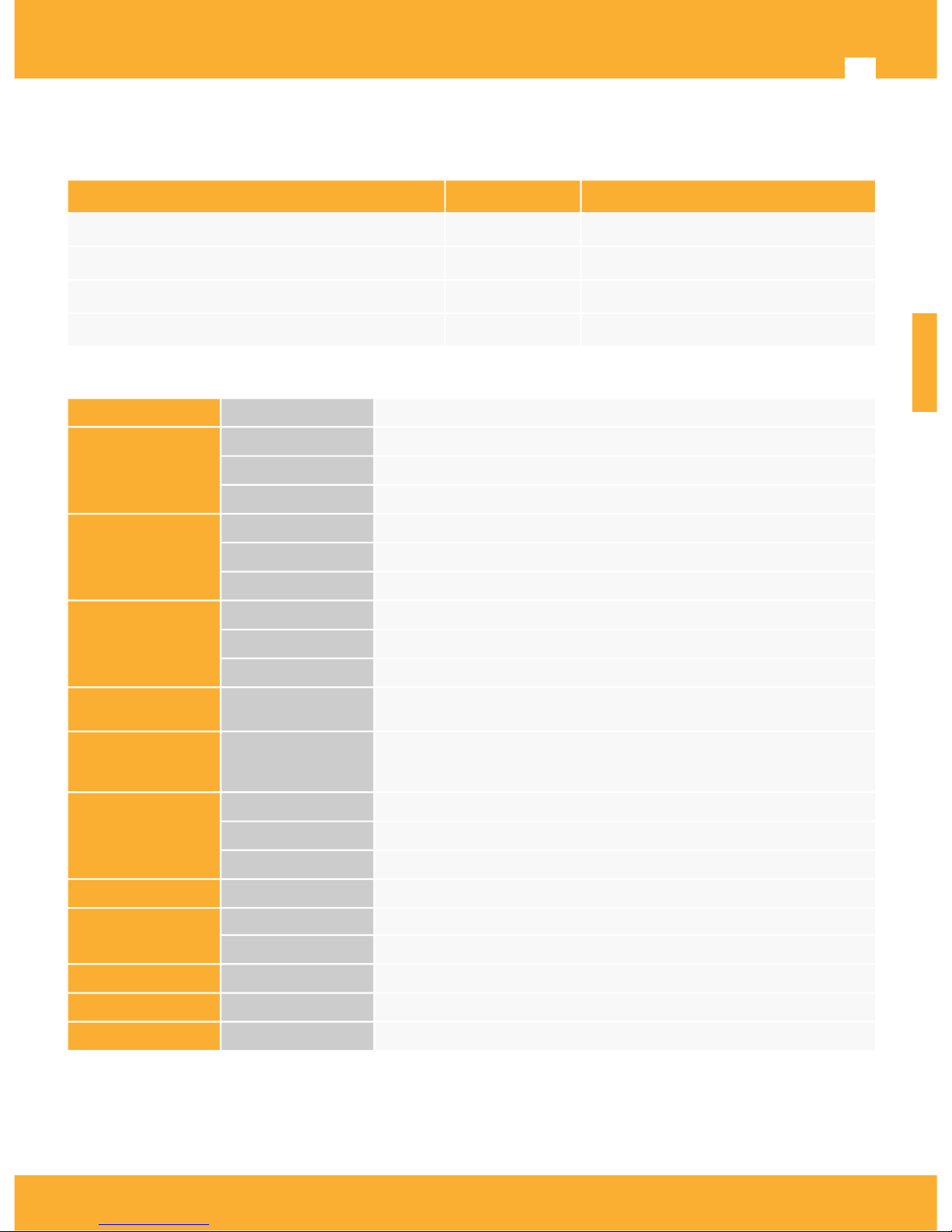
Document Language Description
AccessControl-Manual_Web_001-ES SPANISH Web Access Control Manual
AccessControl-Manual_Web_001-EN ENGLISH Web Access Control Manual (EN)
AccessControl-Manual_Snmp_Agent_001-ES SPANISH Access Control Snmp Manual
AccessControl-Manual_Snmp_Agent_001-EN ENGLISH Access Control Snmp Manual (EN)
CoaxBox Characteristics
CPU Processor
Cortex A9 Dual Core (i.MX6 DualLite)
Storage DDR
1 GByte DDR3
eMMC
4GBytes eMMC (solid-state drive)
Flash
16MBytes NOR SPI (Boot)
Interfaces Feeding
RJ9 12V DC
Ethernet
RJ45 10/100/1000 Base-T Ethernet. Autocrossover.
Micro SD Slot
Micro SD connector
Leds
Led
Led Power
Led
Led Internet
Led
Led Service
Services CoaxProv™
CoaxData AccessControl™
Directives
CE
UNE-EN 60950-1: 2007 / AC: 2012: product safety
UNE-EN 55022: 2008 radio interference
UNE-EN 55024: 2011 immunity requirements
account access
Default IP address
169.254.1.254
root account
user:root Password:76Coax93Box30
Admin account
User: Admin Password: Televes1
OS
Linux
Linux kernel 3.10.53 or higher
Power Power Adapter 108 - 254V ~ 50 / 60Hz /// 12V - 0.7A
Consumption
12V - 250mA, 4W
Temp range. -5 ... +45 ° C
Dimensions 165 x 120 x 48 mm
Weight 475 g
ENGLISH
2017 © Copyright, Televés S.A. www.televes.es
Page 21

 Loading...