

Page 1
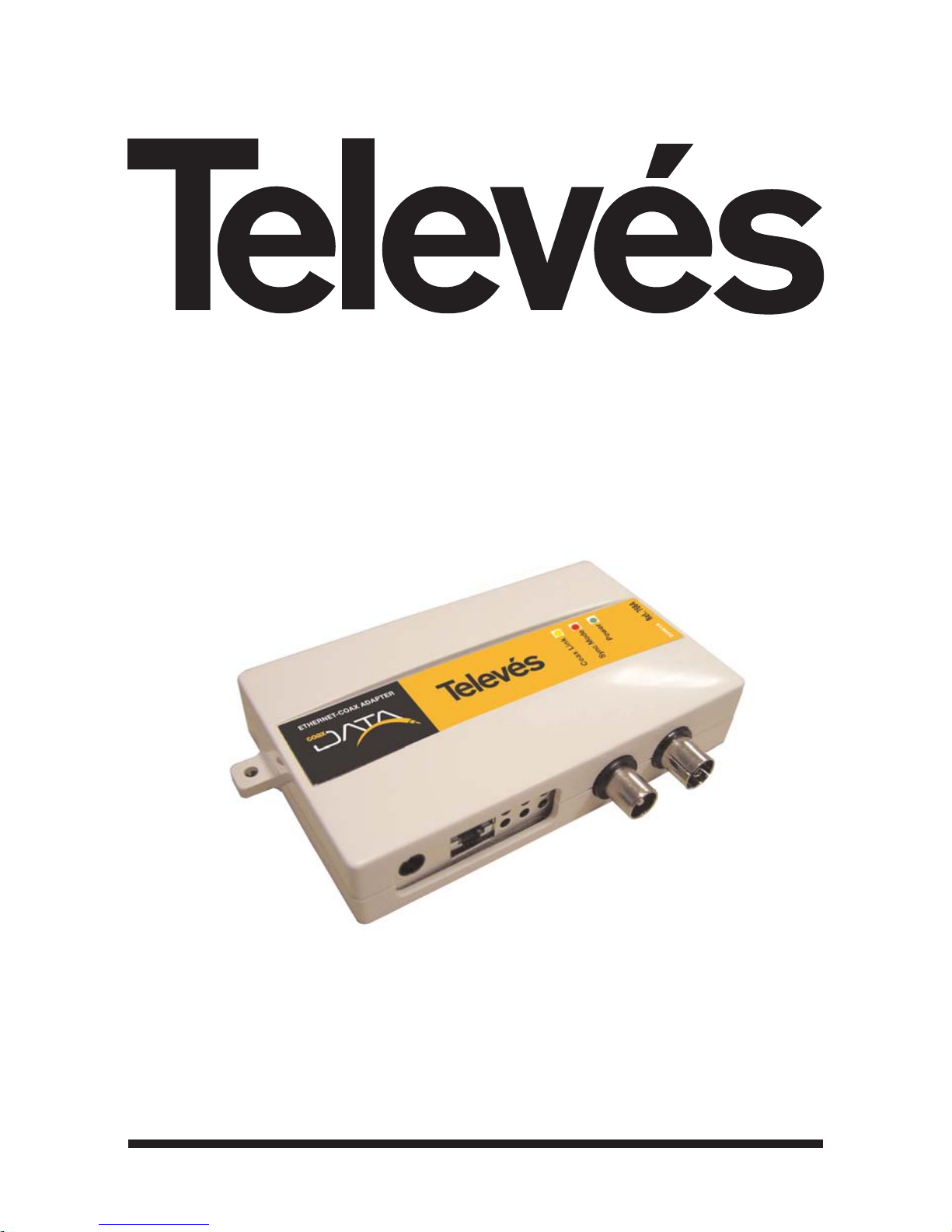
User Manual
Manuel d´utilisation
© Copyright Televés S.A.
ETHERNET-COAXIAL ADAPTOR
ADAPTATEUR ETHERNET-COAXIAL
128 Mbps
Ref. 7664
Page 2

Page 3

3
ETHERNET-COAXIAL ADAPTOR 128 Mbps
Ref. 7664
ENGLISH
Important safety instructions
- The plugs should be near the equipment and should be easily accessible.
- Do not connect to the power supply until the installation is complete.
- To disconnect the equipment from the mains, unplug the adaptor.
- Do not use oils, solvents, petroleum, paint thinner or insecticides on this product.
- No part of this product can be repaired by the user. Do not open the product as you run the
risk of electric shock.
- Do not use this product near water, for example; bathrooms, sinks, damp areas, pools, etc.
- Power the product using the supply indicated on the label.
- Unplug the adapter from the mains in the following cases:
a) When the plug has been damaged.
b) When the product has been in contact with water.
c) If the product does not function normally.
d) If the product is broken.
This symbol indicates total compliance with the CE mark.
This symbol indicates that the equipment is for indoor use.
This symbol indicates that the equipment complies with the safety requirements for
class II equipment.
Page 4

Page 5

5
Ref. 7664
ENGLISH
INDEX . . . . . . . . . . . . . . . . . . . . . . . . . . . . . . . . . . . . . . . . . . . . . . . . . .
. . . . . . . . . . . . . . . . . . . . . . . . . . . . . . . . . . . . . . . . . . . . . . . . . . Pg.
1- INTRODUCTION . . . . . . . . . . . . . . . . . . . . . . . . . . . . . . . . . . . . . . . . . . . . . . . . . . . . . . . 6
1.1- TELEVÉS ETHERNET-COAXIAL ADAPTOR 128Mbps . . . . . . . . . . . . . . . . . . . . . 6
1.2- SPECIFICATIONS . . . . . . . . . . . . . . . . . . . . . . . . . . . . . . . . . . . . . . . . . . . . . . . . . . 6
1.3- SYSTEM REQUIREMENTS . . . . . . . . . . . . . . . . . . . . . . . . . . . . . . . . . . . . . . . . . . . 6
1.4- PACKET CONTENTS . . . . . . . . . . . . . . . . . . . . . . . . . . . . . . . . . . . . . . . . . . . . . . . . 7
2- GETTING TO KNOW THE ETHERNET-COAXIAL ADAPTOR 128Mbps . . . . . . . . . . . . . 8
2.1- THE ADAPTOR LEDS . . . . . . . . . . . . . . . . . . . . . . . . . . . . . . . . . . . . . . . . . . . . . . 9
3- INSTALLING THE COAXIAL-ETHERNET ADAPTOR 128Mbps . . . . . . . . . . . . . . . . . . . 10
3.1- Step 1: SETTING THE MASTER/SLAVE OPERATION MODE . . . . . . . . . . . . . . . . 10
3.2- Step 2: GETTING CONNECTED . . . . . . . . . . . . . . . . . . . . . . . . . . . . . . . . . . . . . . 11
3.3- Step 3: CONNECTING THE ADAPTOR TO THE TV SOCKET . . . . . . . . . . . . . . . 11
3.4- Step 4: POWERING THE MODEM . . . . . . . . . . . . . . . . . . . . . . . . . . . . . . . . . . . . 12
4- INSTALLATION EXAMPLES . . . . . . . . . . . . . . . . . . . . . . . . . . . . . . . . . . . . . . . . . . . . . . . 13
Annex A- TECHNICAL SPECIFICATIONS . . . . . . . . . . . . . . . . . . . . . . . . . . . . . . . . . . . . . . 16
Annex B- TROUBLESHOOTING . . . . . . . . . . . . . . . . . . . . . . . . . . . . . . . . . . . . . . . . . . . . . 17
ETHERNET-COAXIAL ADAPTOR 128 Mbps
Page 6
6
Ref. 7664
ETHERNET-COAXIAL ADAPTOR 128 Mbps
1- Introduction
1.1- Ethernet-Coaxial Adaptor 128Mbps
Thank you for purchasing the network adaptor, the Ethernet-Coaxial Adaptor 128Mbps. Now
you will be able to connect multiple PCs to the coaxial network in your home, easily and
simply. You don’t need any extra cables or Hubs, or switches. The data will use the coaxial
cable installation of the TV distribution system in your home.
The Ethernet-Coaxial Adaptor 128Mbps lets you transmit network data at the same time as
transmitting the existing TV channels or services and it can transmit up to 128Mbps (physical)
and 85Mbps Throughput.
1.2- Specifications
You can connect the computer to a network, using the existing coaxial cable, and prepare your coaxial network for the exchange of data, VoIP, online/network games, IPTV, etc.
Easy installation, without the need to start your PC or install a driver.
Data transfer rate of up to 128Mbps (physical) and 85Mbps Throughput.
3 LEDs that are easy to read and indicate the adaptor status.
Possibility of connecting up to 16 PCs to your coaxial distribution network.
Neither Hubs nor Switches are required, the coaxial acts as a shared medium.
High speed shared Internet access. Share files and printers. Distribute video or VoIP
services using the coaxial network.
IEEE 802.1p service quality.
Up to 50 dB attenuation between two sockets in the return channel.
1.3- System requirements
To use this device, you need a PC with an ethernet 802.3 network interface (card).
The system is completely Plug&Play and it is not necessary to install any additional soft-
ware or driver.
Page 7
7
Ref. 7664
ENGLISH
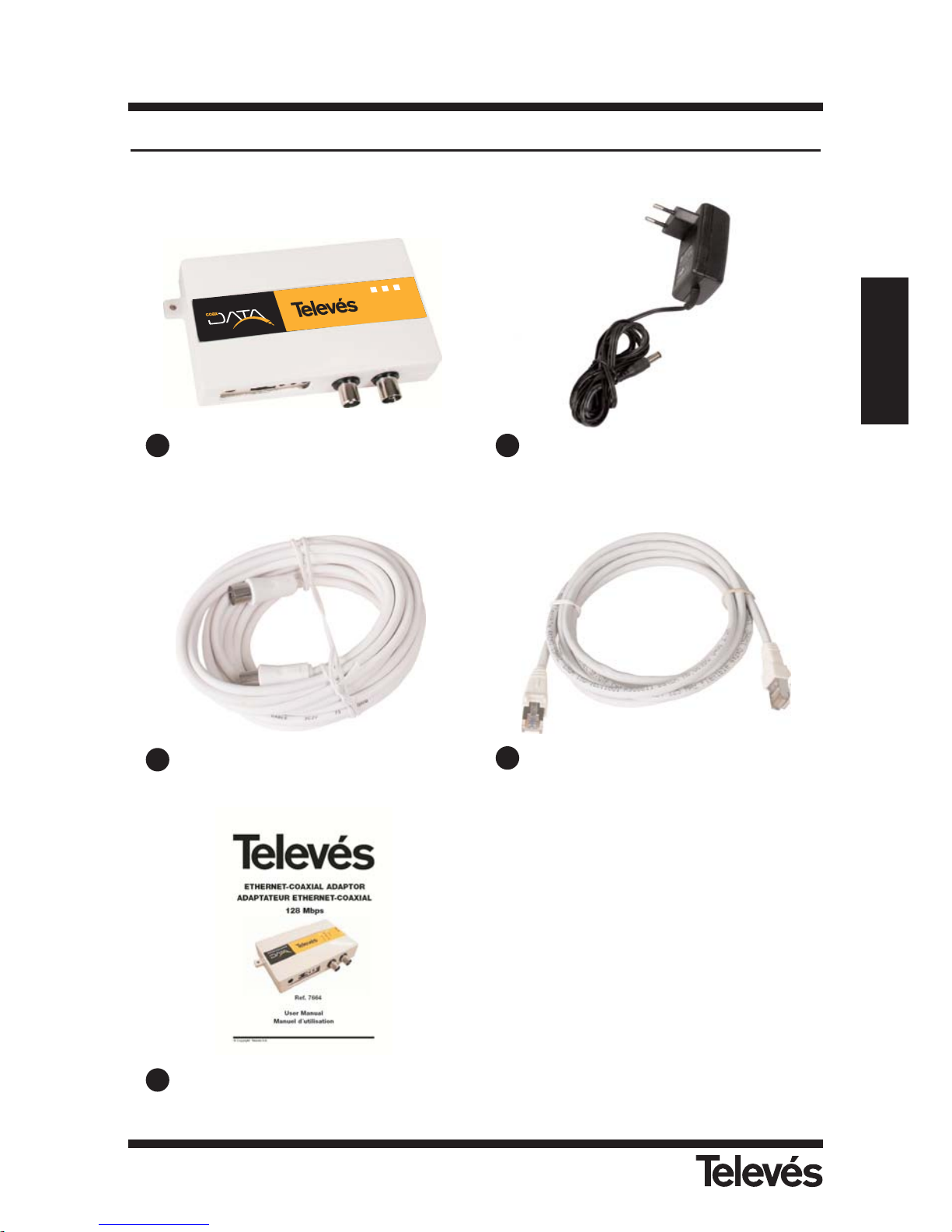
1.4- Packet contents
ETHERNET-COAXIAL ADAPTOR 128 Mbps
Coax Link
Sync Mode
Power
2
3
4
6
1
4
E
T
H
E
R
N
E
T
-C
O
A
X
A
D
A
P
T
E
R
Ref. 7664
1
2
3
4
5
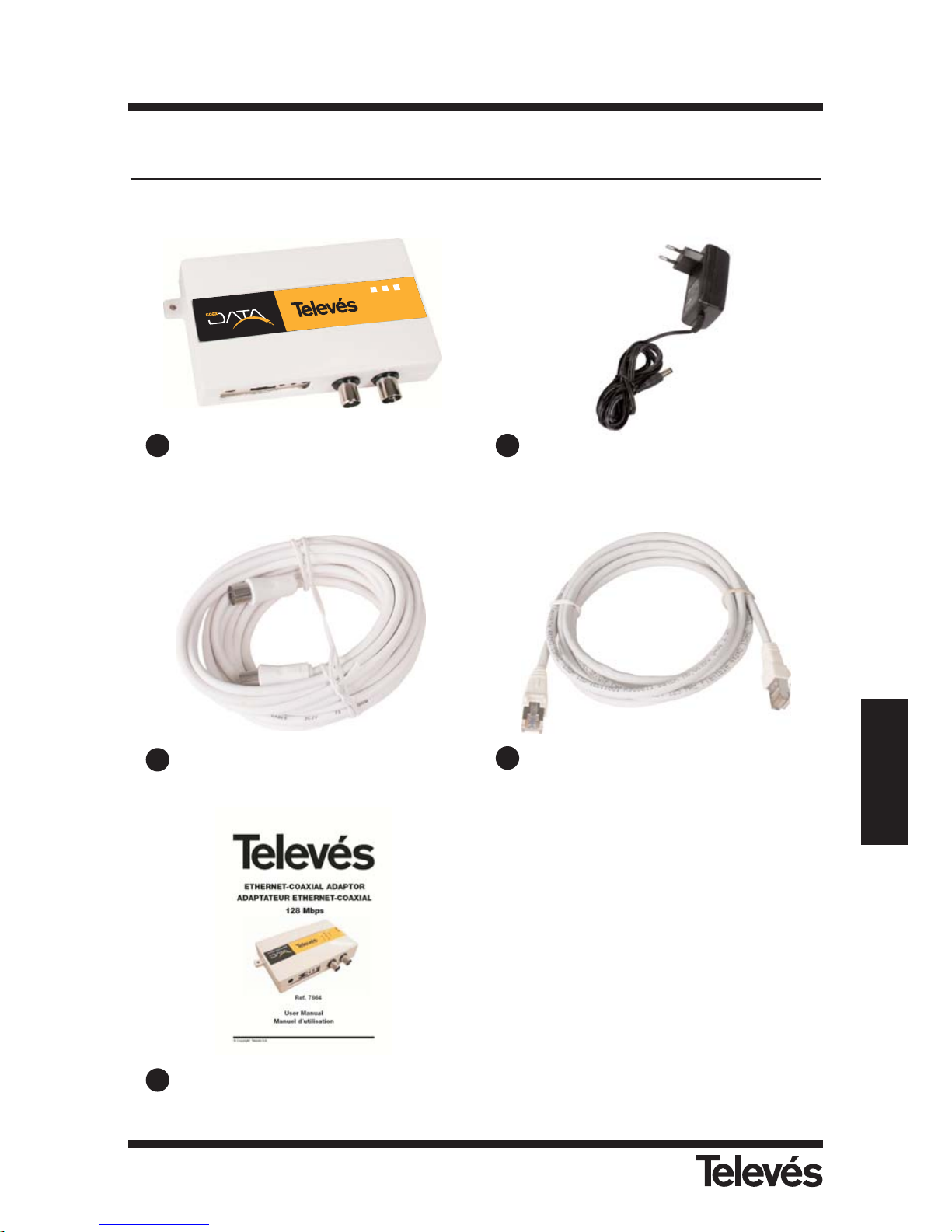
Ethernet-Coaxial Adaptor 128Mbps
White coaxial cable wire 2.5m
User Manual
Ethernet CAT-5 cable
(Uncrossed cable)
External power supply 15V/800mA
Page 8
8
Ref. 7664
ETHERNET-COAXIAL ADAPTOR 128 Mbps
C
oa
x Lin
k
S
yn
c M
o
d
e
P
o
w
er
2
3
4
6
1
4
E
T
H
E
R
N
E
T
-
C
O
A
X
A
D
A
P
T
E
R
Ref. 7664
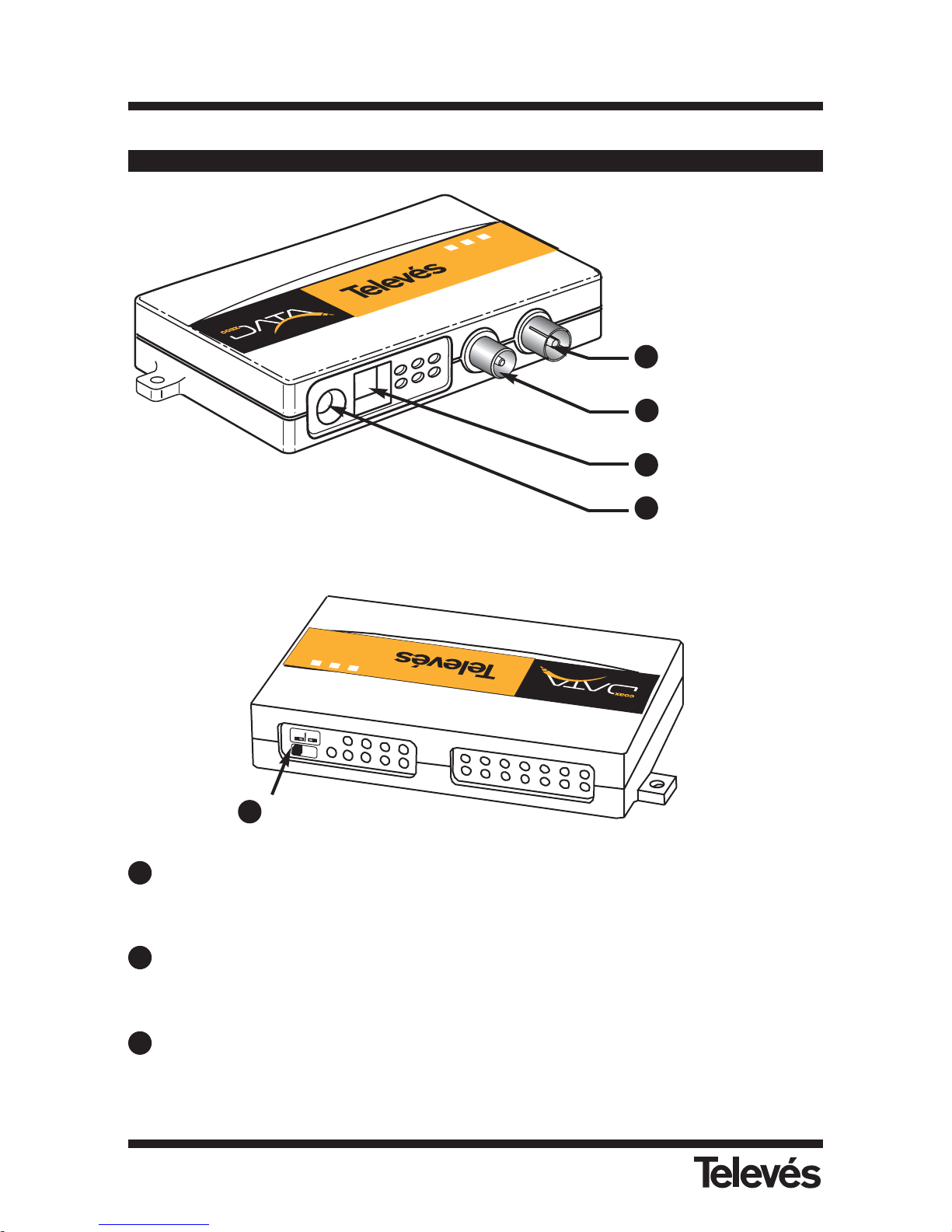
2- Getting to know the Ethernet-Coaxial Adaptor 128Mbps
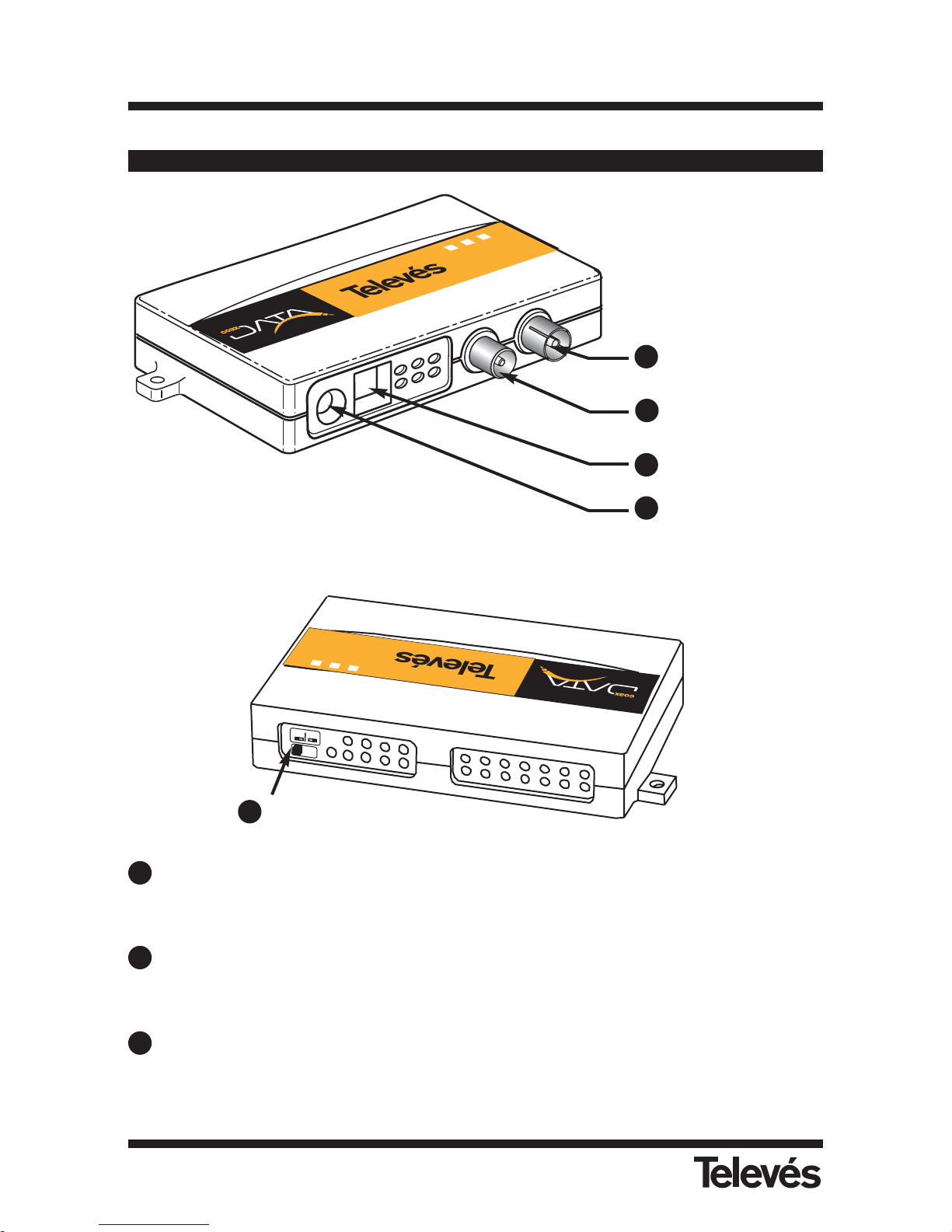
TV / data connector
IEC female connector for the TV and data network.
TV connector
IEC make connector to connect the TV.
Ethernet port
RJ-45 connector to connect the ethernet-coaxial adaptor 128Mbps, using the ethernet
cable included in the packet, to the PC.
M
a
s
t
e
r
S
l
a
v
e
E
T
H
E
R
N
E
T
-C
O
A
X
A
D
A
P
T
E
R
Coax Link
S
yn
c M
o
d
e
Power
Ref. 7664
2
3
4
6
1
4
Master-slave
switch
TV / data
connector
TV connector
Ethernet
Powering
1
2
3
4
5
1
2
3
Page 9
9
Ref. 7664
ENGLISH
Powering connector
To connect the external power supply of 15V/800mA that comes with the product.
Master / Slave switch
At the back of the ethernet-coaxial adaptor 128Mbps, you will find this switch that lets you
select the operating mode (master or slave mode).
Remember to take into account that one of the adaptors must be set to master mode and
the rest to slave mode.
2.1.- The LEDs
Power
LED (green) will light up when the adaptor is connected to the power supply.
Sync Mode
If the adaptor is in master mode, this LED (red) will be switch on permanently, whether
there are adaptors in slave mode or not.
If the adaptor is in slave mode, this LED will only light up when connected to the master
adaptor. Because of this, it is necessary to make sure that this LED is switch on.
Coax Link
LED (yellow) that will only flash on and off when data is being transmitted or received.
Coax Link
Sync Mode
Power
234614
ETHERNET-COAX ADAPTER
Ref. 7664
Coax Link
Sync Mode
Power
234614
ETHERNET-COAX ADAPTER
Ref. 7664
ETHERNET-COAXIAL ADAPTOR 128 Mbps
4
5
1
2
3
Page 10
10
Ref. 7664
ETHERNET-COAXIAL ADAPTOR 128 Mbps
3- Installing the Ethernet-Coaxial Adaptor 128Mbps
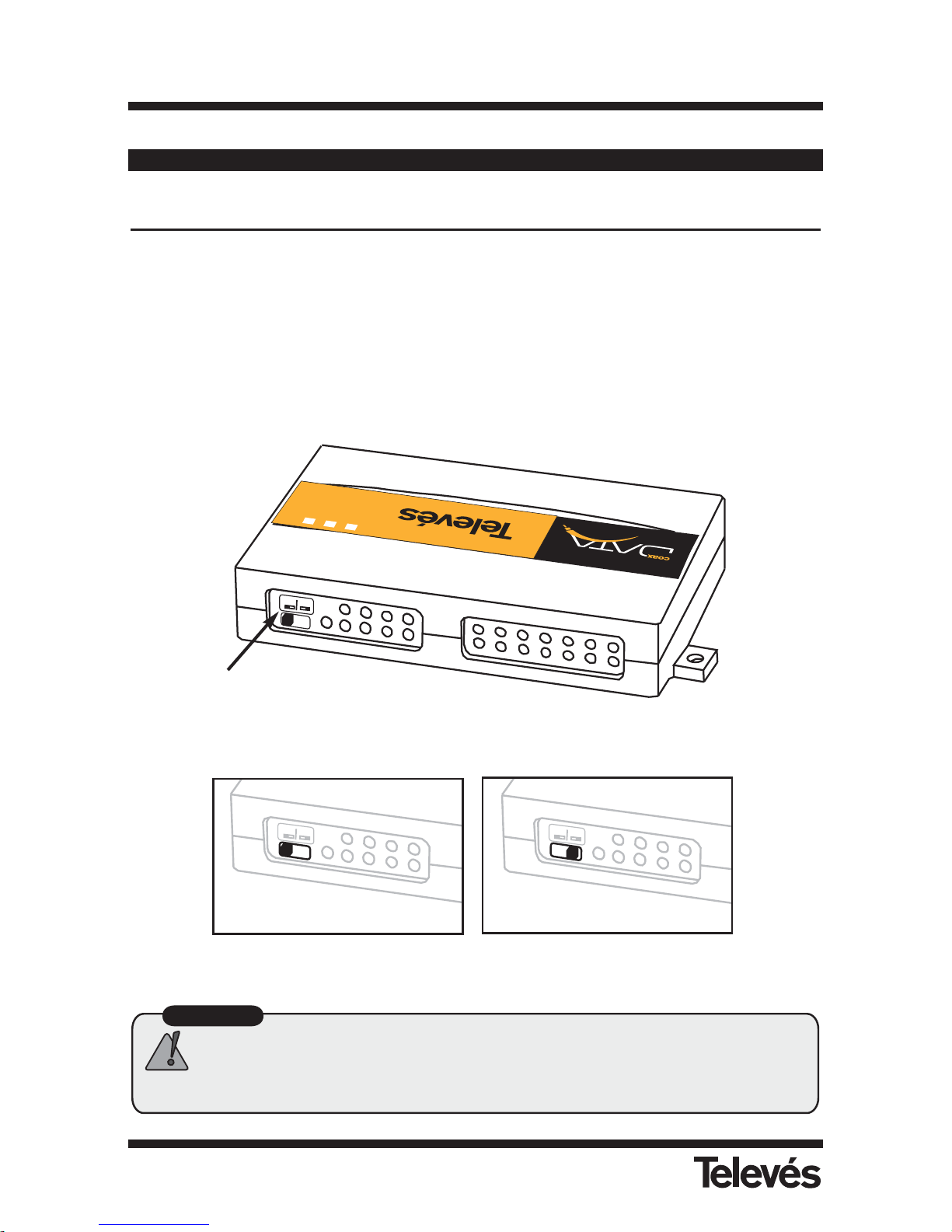
Step 1- Setting the Master/Slave operating mode
To set the data network it is necessary for one of the adaptors to be in master mode; the rest
of the adaptors must be in slave mode.
There is a switch at the back of the adaptor to configure these operating modes.
Master
Slave
E
T
H
E
R
N
E
T
-C
O
A
X
A
D
A
P
T
E
R
Coax Link
S
yn
c
M
o
d
e
Pow
er
Ref. 7664
2
3
4
6
1
4
Master/Slave
switch
Important
Only one adapter from the installation can be configured in master mode,
so make sure that there is only one master connected to the coaxial
network.
M
a
s
t
e
r
S
la
v
e
M
a
s
t
e
r
S
l
a
v
e
Master setting
Mode setting
Page 11
11
Ref. 7664
ENGLISH
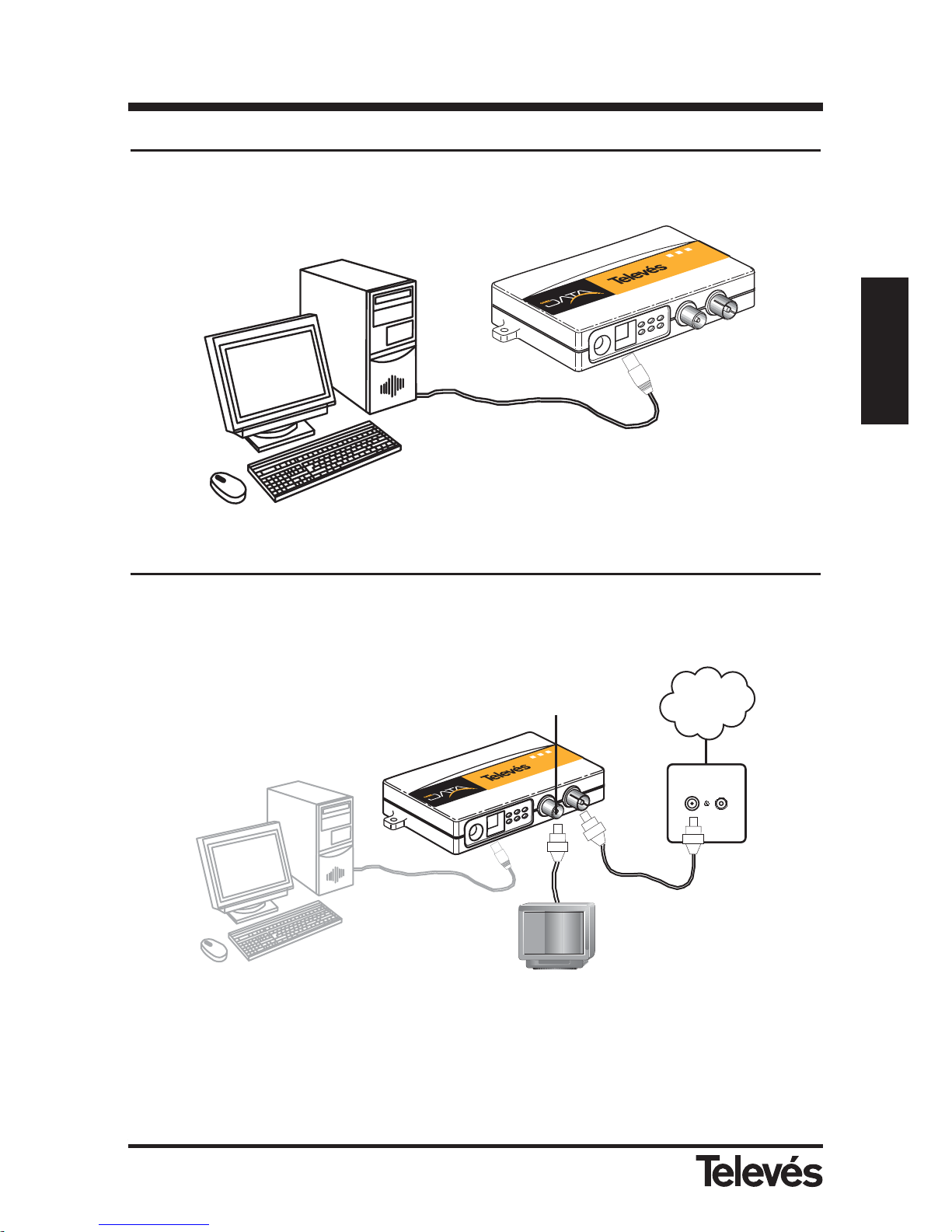
Step 2- Getting connected
Connect one end of the ethernet cable (that comes with the adaptor) to the ethernet port of the
PC and the other end to the ethernet connector of the adaptor.
Step 3- Connecting the adaptor the the TV socket
Connect one end of the coaxial cable (that comes with the adaptor) to the TV/data connector
(IEC female connector) of the adaptor and the other end to the home TV socket.
Note: You can connect a TV to the adaptor by connecting the TV coaxial cable to the TV con-
nector (IEC male connector) of the adaptor.
ETHERNET-COAXIAL ADAPTOR 128 Mbps
Red
Coaxial
C
o
a
x
L
in
k
S
y
n
c
M
o
d
e
P
o
w
e
r
2
3
4
6
1
4
E
T
H
E
R
N
E
T
-
C
O
A
X
A
D
A
P
T
E
R
R
e
f
.
7
6
6
4
Coaxial
cable
TV
socket
Coax Link
S
ync
Mod
e
P
ow
er
2
3
4
6
1
4
E
T
H
E
R
N
E
T
-
C
O
A
X
A
D
A
P
T
E
R
Ref. 7664
Ethernet
cable
Ethernet
cable
TV/data connector
Page 12
12
Ref. 7664
ETHERNET-COAXIAL ADAPTOR 128 Mbps
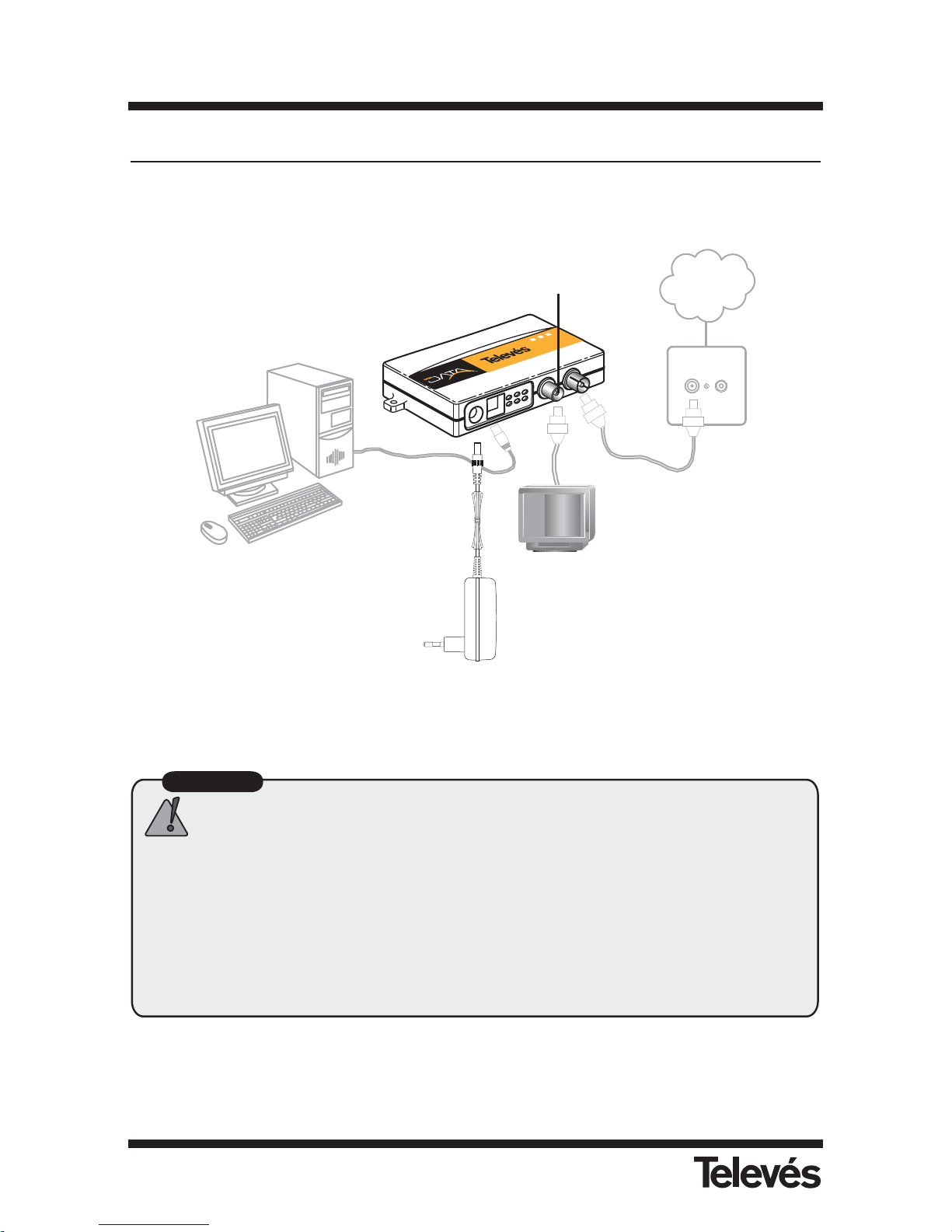
Step 4- Powering the modem
Power the modem using the power supply 15V/800mA
Your PC is now connected to the coaxial distribution network of the TV!
Important
It is recommended that a diplexer filter is used at the headend output to
avoid signals that interfere with the data: see the Generic installation
examples section.
If your home has any Televés Integra device installed (video monitor, video
entry system, services terminal, etc.), before carrying out the installation
we recommend that you check the example shown in Appendix A of this
manual, or consult the application notes in the Support section of our
website, www.televesintegra.com
Red
Coaxial
C
o
a
x
L
in
k
S
y
n
c
M
o
d
e
P
o
w
e
r
2
3
4
6
1
4
E
T
H
E
R
N
E
T
-
C
O
A
X
A
D
A
P
T
E
R
R
e
f
.
7
6
6
4
Coaxial
cable
TV
socket
Ethernet
cable
TV/data connector
Powering
Page 13
13
Ref. 7664
ENGLISH
ETHERNET-COAXIAL ADAPTOR 128 Mbps
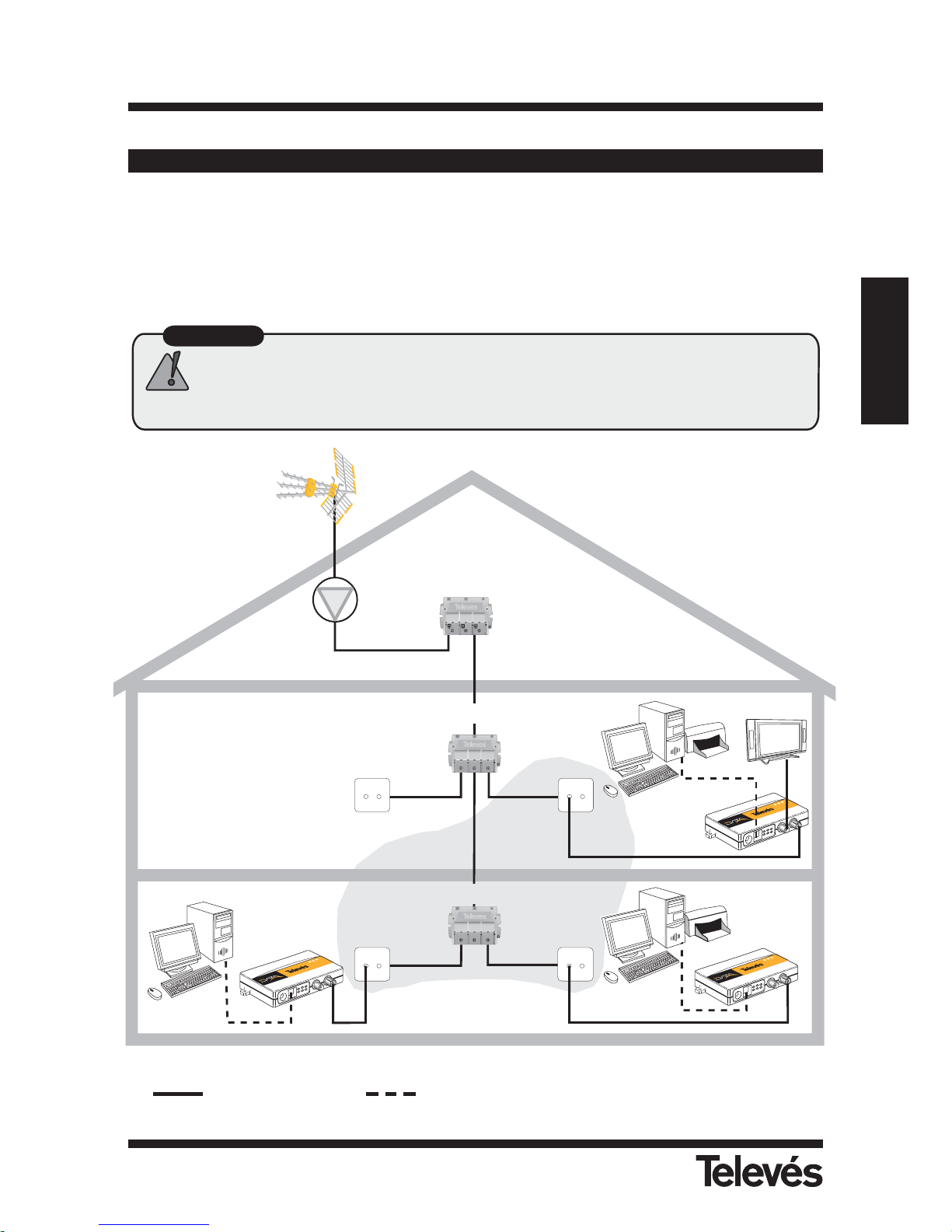
(1) Filters are recommended (refs. 7653, 7654 ó 7668) after the headend
Ref 7654
FPB FPA
Slave
adapter
Master
adapter
TV
socket
TV
socket
TV
socket
Slave
adapter
Diplexer filter
1
TV
socket
C
o
a
x
L
i
n
k
S
y
n
c
M
o
d
e
P
o
w
e
r
2
3
4
6
1
4
E
T
H
E
R
N
E
T
-
C
O
A
X
A
D
A
P
T
E
R
R
e
f
.
7
6
6
4
C
o
a
x
L
i
n
k
S
y
n
c
M
o
d
e
P
o
w
e
r
2
3
4
6
1
4
E
T
H
E
R
N
E
T
-
C
O
A
X
A
D
A
P
T
E
R
R
e
f
.
7
6
6
4
C
o
a
x
L
i
n
k
S
y
n
c
M
o
d
e
P
o
w
e
r
2
3
4
6
1
4
E
T
H
E
R
N
E
T
-
C
O
A
X
A
D
A
P
T
E
R
R
e
f
.
7
6
6
4
Distributor
Distributor
4- Generic installation examples
Example 1: Creating a data network in the home
With this configuration, all the points on your coaxial network will be connected.
Important
The attenuation between all of the points on which a 129 Mbps EthernetCoaxial Adapter is situated must not exceed 50 dB in the return channel
(4-21 MHz).
Attenuation <50 dB
Coaxial cable Ethernet cable
Page 14
14
Ref. 7664
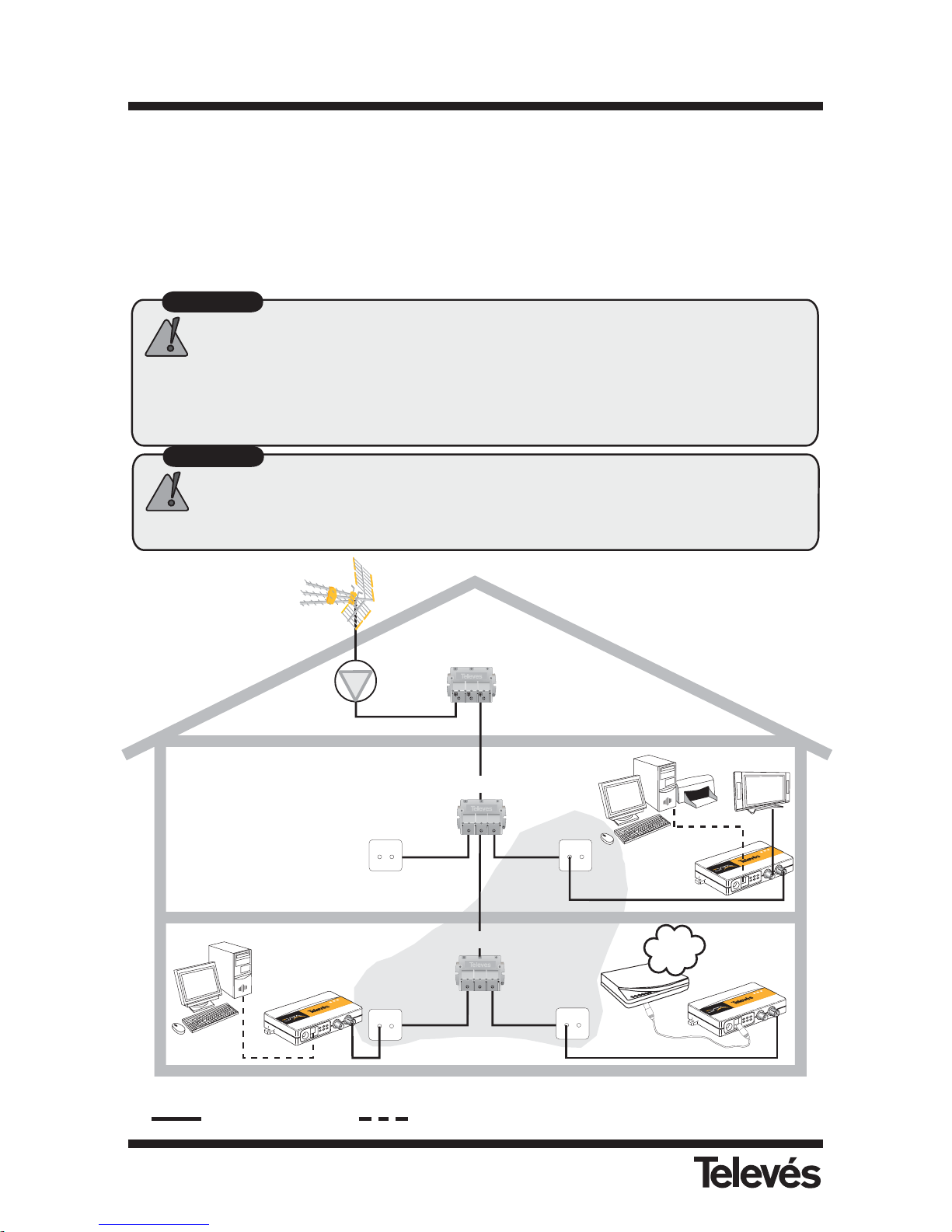
ETHERNET-COAXIAL ADAPTOR 128 Mbps
Important
The adapter is connected to the PC using the Ethernet cable supplied
with the adapter.
The adapter is connected to the ADSL router using a crossed cable (not
supplied with the adapter)
(1) Filters are recommended (refs: 7653, 7654 ó 7668) after the headend
Ref 7654
FPB FPA
Slave
adapter
Master
adapter
TV
socket
Distributor
Distributor
Slave
adapter
Crossed
cable
Internet
Router
ADSL
Diplexer filter
1
C
o
a
x
L
i
n
k
S
y
n
c
M
o
d
e
P
o
w
e
r
2
3
4
6
1
4
E
T
H
E
R
N
E
T
-
C
O
A
X
A
D
A
P
T
E
R
R
e
f
.
7
6
6
4
C
o
a
x
L
i
n
k
S
y
n
c
M
o
d
e
P
o
w
e
r
2
3
4
6
1
4
E
T
H
E
R
N
E
T
-
C
O
A
X
A
D
A
P
T
E
R
R
e
f
.
7
6
6
4
C
o
a
x
L
i
n
k
S
y
n
c
M
o
d
e
P
o
w
e
r
2
3
4
6
1
4
E
T
H
E
R
N
E
T
-
C
O
A
X
A
D
A
P
T
E
R
R
e
f
.
7
6
6
4
TV
socket
TV
socket
TV
socket
Important
The attenuation between all of the points on which a 129 Mbps EthernetCoaxial Adapter is situated must not exceed 50 dB in the return channel
(4-21 MHz).
Example 2: Shared internet access
To have shared internet access, connect one of the adaptors to a broadband router.
The internet router must provide all the services that the users that are connected to the adaptors (DNS, DHCP, NAT, etc) need. To carry out a correct installation, consult the router manual
supplied by your Internet provider.
To connect the adaptor with the broadband router use the ethernet crossed cable.
Attenuation <50 dB
Coaxial cable Ethernet cable
Page 15
15
Ref. 7664
ENGLISH
ETHERNET-COAXIAL ADAPTOR 128 Mbps
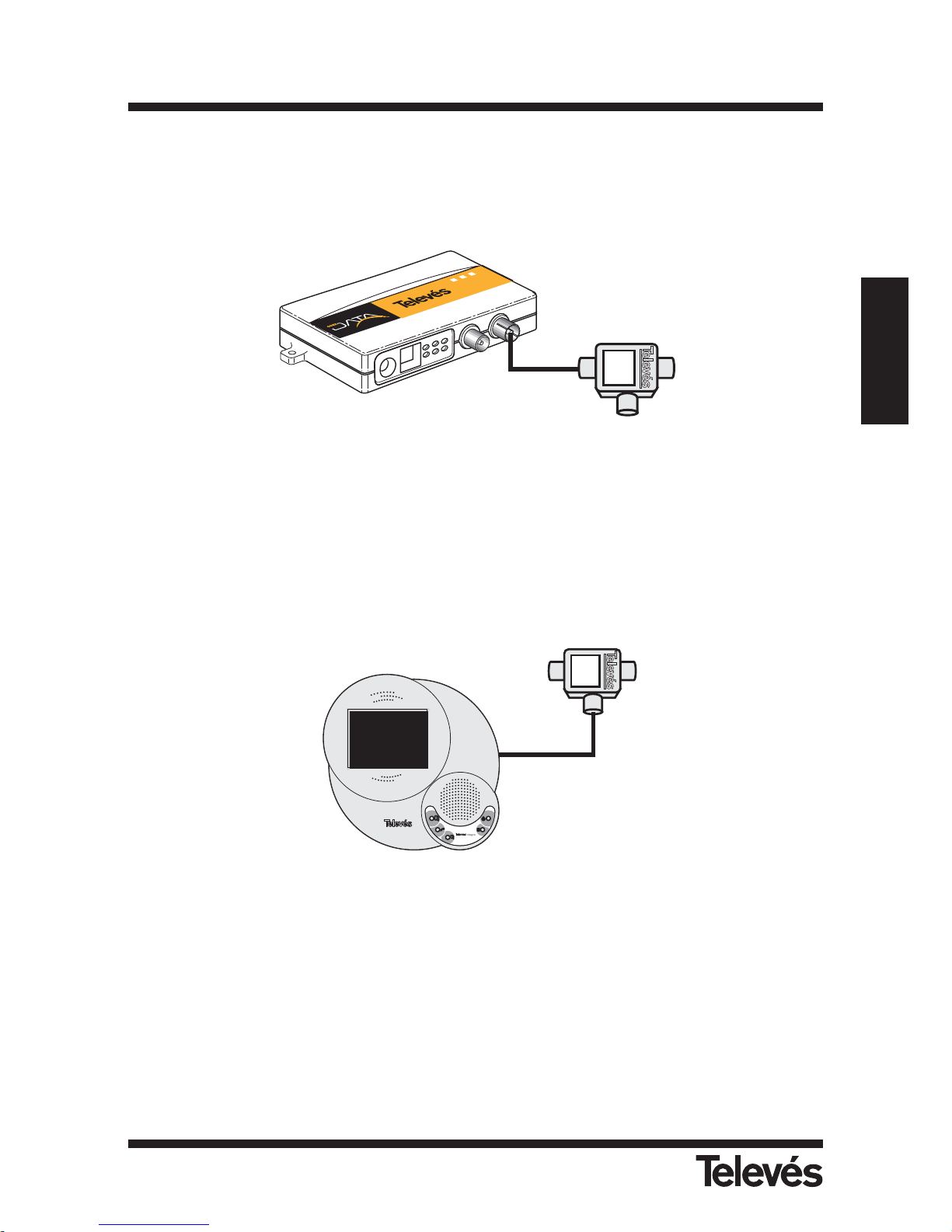
If your home has a TelevésIntegra device installed (video entryphone, video monitor, service terminal...), in order to install the adaptor, some diplexor filters must be installed (ref. 7669) as can
be seen below:
The diplexor filter isolates the operating bands of both systems thereby guaranteeing their
correct operation. In this case, there is a transfer rate of up to 64Mbps (physical) and 40Mbps
Throughput.
It is necessary to take two aspects into account:
1- All the adaptors must be connected to the FPB connector of the diplexor filter (ref. 7669).
2- The TelevésIntegra devices (video entryphone, video monitor, service terminal...) must be
connected to the FPA connector of the diplexor filter (ref. 7669).
IN
FPA
FPB
C
o
a
x
L
in
k
S
y
n
c
M
o
d
e
P
o
w
e
r
23461
4
E
T
H
E
R
N
E
T
-
C
O
A
X
A
D
A
P
T
E
R
R
e
f
.
7
6
6
4
IN
FPA
FPB
D
O
W
N
OK
UP
MENU
O
N
2
1
Diplexor filter
(ref. 7669)
Diplexor filter
(ref. 7669)
Page 16
16
Ref. 7664
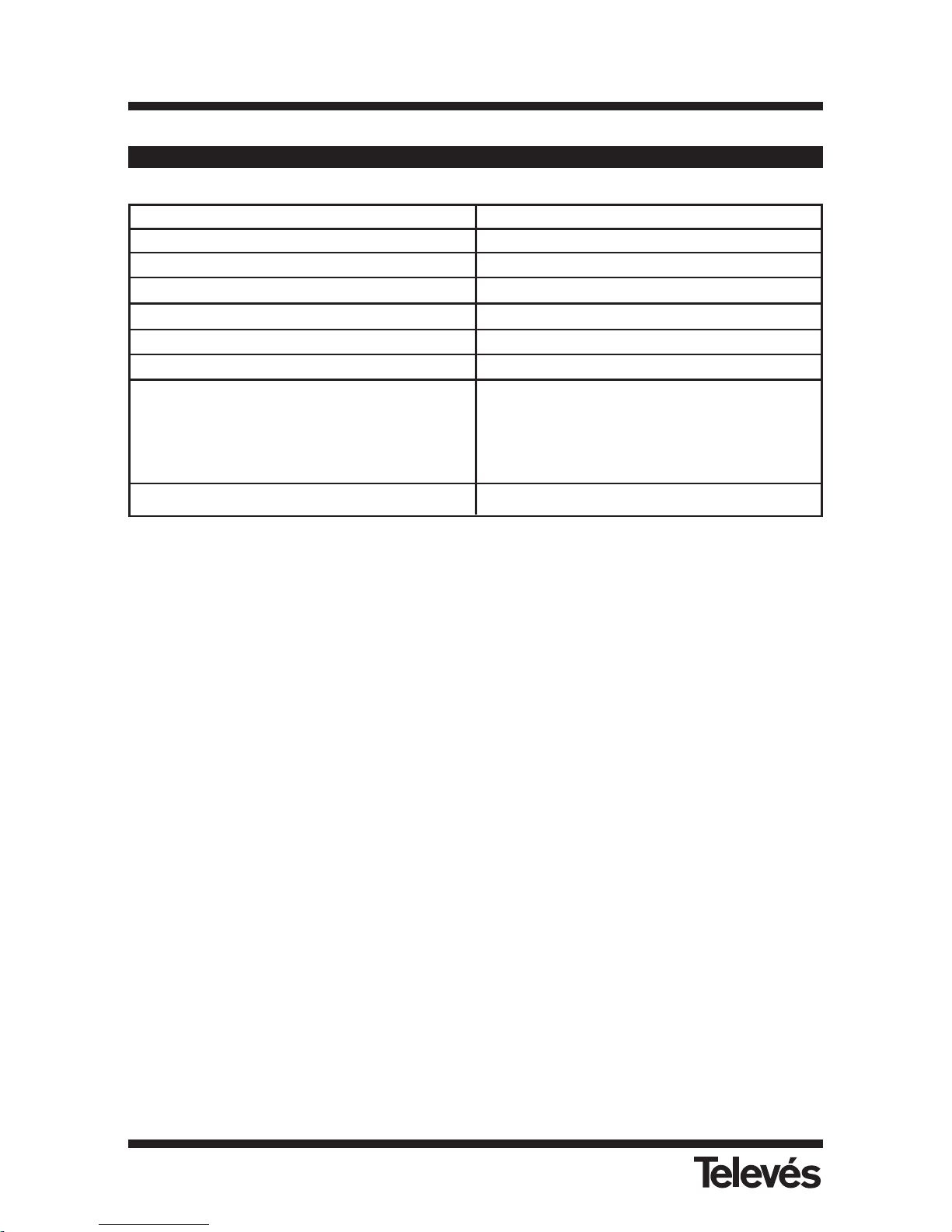
Note: The technical specifications here described are defined at a maximum room temperatu-
re of 40ºC.
ETHERNET-COAXIAL ADAPTOR 128 Mbps
Annex A - Technical specifications
Operating frequency 4 - 21 MHz
Output signal level 112 dBµV
Maximum attenuation 50 dB
Transmission rate 128 Mbps
Quality of Service VLAN 802.1p Priority Support
Maximum distance 1.1 Km
Maximum number of PCs 16
Connectors Ethernet RJ-45 port
Input IEC port (Data+TV)
Output IEC port (Tv/Radio)
Jack connector for powering
Maximum consumption at 12 - 15 V
DC
3.6 W
Page 17

Ref. 7664
ENGLISH
ETHERNET-COAXIAL ADAPTOR 128 Mbps
17
If there are problems in the connections of the data network, please check the following points:
1. Check that there is only one master in the network.
2. Check that the slave adaptors have the Sync Mode led on permanently.
3. Chack that the return channel is available in your coaxial network.
The return channel in the frequencies 4-21MHz must be able to operate in your coaxial
network in a downwards direction (headend-socket) and in an upwards direction (socketheadend).
4. Check that the attenuation between adaptors does not surpass 50 dB in the operating channel: 4-21 MHz.
5. Check the TV signal filtering in the headend
To avoid interference from the TV headend in the data signal it is advisable to use diplexor filters. The diplexor filter (ref. 7653, 7654 or 7668) is recommended to mix the data
signal with the TV and to stop the headend from interfering in the data signal.
Annex B - Troubleshooting
Page 18

Page 19
19
FRANÇAIS
ADAPTATEUR ETHERNET-COAXIAL 128 Mb
Ref. 7664
Conseils de sécurité
- Les prises de courant doivent se trouver à proximité du produit et être facilement accessibles.
- Attendre la fin de l’installation pour raccorder l’alimentation.
- Pour disconnecter le produit du réseau d’alimentation, drébrancher le connecteur.
- Ne jamais mettre d’huiles, de dissolvants, d’alcools, de diluants ou de produits insecticides
sur ce produit.
- Ce produit ne possède aucun élément réparable par l’utilisateur. Ne pas l’ouvrir, risque de
décharge électrique.
- Ne pas utiliser ce produit en milieu humide: proche d’un évier, d’une piscine, etc.
- Alimenter le produit en respectant les paramètres électriques de l’etiquette.
- Débrancher l’adaptateur du réseau électrique:
a) Quand la prise est endommagée.
b) Quand le produit est au contact de l’eau.
c) Si le produit ne fonctionne pas correctement.
d) Si le produit est cassé.
Ce symbole indique la compatibilité CE.
Ce symbole indique une utilisation en intérieur.
Ce symbole indique que le produit possède les paramètres de sécurité requis pour
un classement en classe II.
Page 20

Page 21

21
FRANÇAIS
ADAPTATEUR ETHERNET-COAXIAL 128 Mb
Ref. 7664
INDEX . . . . . . . . . . . . . . . . . . . . . . . . . . . . . . . . . . . . . . . . . . . . . . . . . . Pag.
1- INTRODUCTION . . . . . . . . . . . . . . . . . . . . . . . . . . . . . . . . . . . . . . . . . . . . . . . . . . . . . . . 22
1.1- ADAPTATEUR ETHERNET COAXIAL 128Mbps TELEVÉS . . . . . . . . . . . . . . . . . . . 22
1.2- CARACTERISTIQUES . . . . . . . . . . . . . . . . . . . . . . . . . . . . . . . . . . . . . . . . . . . . . . . 22
1.3- EQUIPEMENT REQUIS . . . . . . . . . . . . . . . . . . . . . . . . . . . . . . . . . . . . . . . . . . . . . . 22
1.4- CONTENU DU BOITIER . . . . . . . . . . . . . . . . . . . . . . . . . . . . . . . . . . . . . . . . . . . . . 23
2- RACCORDEMENT DE L’ ADAPTATEUR ETHERNET COAXIAL 128Mbps . . . . . . . . . . . 24
2.1- LES INDICATEURS LUMINEUX DE L’ADAPTATEUR . . . . . . . . . . . . . . . . . . . . . . . 25
3- INSTALLATION DE L’ADAPTATEUR ETHERNET COAXIAL 128Mbps . . . . . . . . . . . . . 26
3.1- Pas 1: MODE DE FONCTIONNEMENT MAITRE/ESCLAVE . . . . . . . . . . . . . . . . 26
3.2- Pas 2: ETABLIR LA LIAISON PC/ADAPTATEUR . . . . . . . . . . . . . . . . . . . . . . . . . 27
3.3- Pas 3: RACCORDEMENT A LA PRISE TV . . . . . . . . . . . . . . . . . . . . . . . . . . . . . 27
3.4- Pas 4: ALIMENTATION DU MODEM . . . . . . . . . . . . . . . . . . . . . . . . . . . . . . . . . . 28
4- EXEMPLES D’ INSTALLATION . . . . . . . . . . . . . . . . . . . . . . . . . . . . . . . . . . . . . . . . . . . . 29
Annexe A- CARACTERISTIQUES TECHNIQUES . . . . . . . . . . . . . . . . . . . . . . . . . . . . . . . . 32
Annexe B- SOLUTIONS AUX PRINCIPAUX PROBLEMES . . . . . . . . . . . . . . . . . . . . . . . . 33
Page 22
22
ADAPTATEUR ETHERNET-COAXIAL 128 Mb
Ref. 7664
1- Introduction
1.1- Adaptateur Ethernet-Coaxial 128Mbps
Merci d’avoir choisi l’adaptateur de réseau "Adaptateur Ethernet-Coaxial 128Mbps".
Maintenant vous pouvez raccorder immédiatement plusieurs PCs sur le réseau coaxial de
votre habitation. Pas besoin de cables supplémentaires, ni Hubs, ni Switch. Les données passent par l’intermédiaire du câble coaxial de la distribution TV de votre installation.
L’adaptateur Ethernet-Coaxial 128Mbps permet de transmettre le réseau de données en
même temps que les services ou/et les canaux TV existants. Il est peut transmettre jusqu’à
128Mbps (limite physique) et 85Mbps de Throughput.
1.2- Caractéristiques
Raccordement en réseau, utilisant le câble coaxial de votre installation pour tout type d’échanges de données, VoIP, jeux en réseau, IPTV, etc.
Installation simple, sans nécéssité d’un PC ou d’installer un quelconque driver.
Taux de transfert de données jusqu’à 128Mbps (limite physique) et 85Mbps de
Throughput.
3 LED d’information, faciles à lire, pour idiquer l’état de l’adaptateur.
Jusqu’à 16 PCs sur un réseau de distribution coaxial.
Ni Hubs ni Switches. Les données sont transférées par le câble coaxial.
Partage d’acces Internet haut débit. Partage de fichiers et d’imprimantes. Partage de
fichiers et d’imprimantes. Distribution de services video ou services VoIP sur le câblel
coaxial.
Permet une qualité de service IEEE 802.1p
Atténuation maximale entre deux prises: 50 dB en voie retour.
1.3- Equipement requis
Pour utiliser ce produit, les PC doivent posséder une interface réseau Ethernet 802.3.
Le système est complètement Plug&Play; aucune installation, aucun logiciel ni driver.
Page 23
23
FRANÇAIS
ADAPTATEUR ETHERNET-COAXIAL 128 Mb
Ref. 7664
1.4- Contenu du boitier
Coax Link
Sync Mode
Power
2
3
4
6
1
4
E
T
H
E
R
N
E
T
-C
O
A
X
A
D
A
P
T
E
R
Ref. 7664
1
2
3
4
5
Adaptateur Ethernet-Coaxial 128Mbps
Raccord cable coaxial 2.5 m blanc
Manuel d’utilisation
Raccord Ethernet CAT-5
(non croisé)
Alimentation externe 15V/800mA
Page 24
24
ADAPTATEUR ETHERNET-COAXIAL 128 Mb
Ref. 7664
C
oa
x Lin
k
S
yn
c M
o
d
e
P
o
w
er
2
3
4
6
1
4
E
T
H
E
R
N
E
T
-
C
O
A
X
A
D
A
P
T
E
R
Ref. 7664
2- Présentation de l’ Adaptateur Ethernet-Coaxial 128Mbps
Connecteur Data/TV
Connecteur CEI femelle pour le réseau datas et TV.
Connecteur TV
Connecteur CEI mal disponible pour le raccordement TV.
Port Ethernet
Connecteur RJ-45 qui permet de raccorder l’ adaptateur ethernet-coaxial 128Mbps au PC
à l’aide d’un cable Ethernet.
M
a
s
t
e
r
S
l
a
v
e
E
T
H
E
R
N
E
T
-
C
O
A
X
A
D
A
P
T
E
R
Coax Link
S
yn
c M
o
d
e
Power
Ref. 7664
2
3
4
6
1
4
Commutateur
maître-esclave
Connecteur
Datas/TV
Connecteur TV
Ethernet
Alimentation
1
2
3
4
5
1
2
3
Page 25
25
FRANÇAIS
ADAPTATEUR ETHERNET-COAXIAL 128 Mb
Ref. 7664
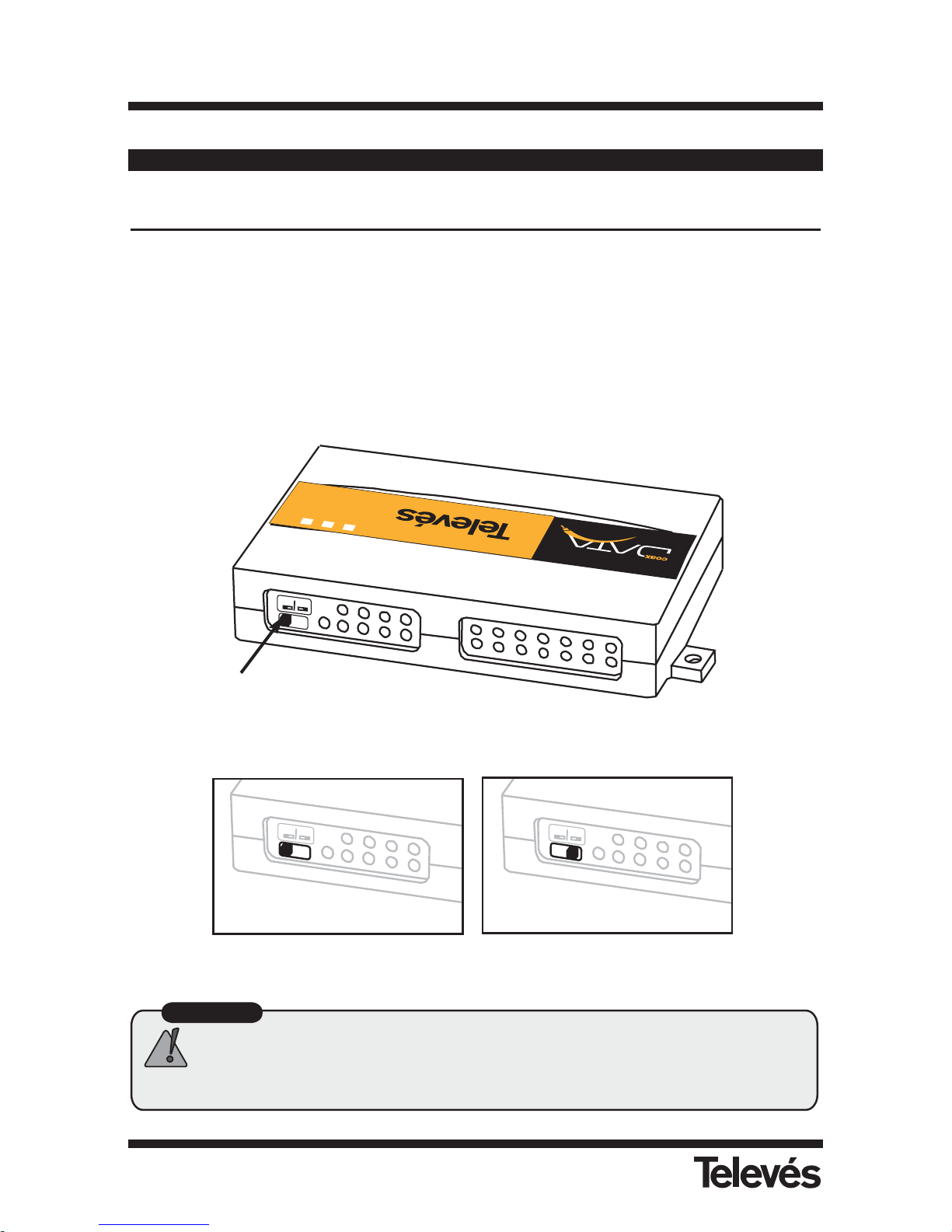
Connecteur d’ alimentation
Raccorder ici l’alimentation externe 15V/800mA fournie.
Commutateur Maitre/Esclave
En face arrière de l’adaptateur ethernet-coaxial 128Mbps on trouve un commutateur qui
permet de sélectionner le mode de fonctionnement de l’adaptateur maître ou esclave.
Dans toute installation, il est impératif d’avoir un adaptateur en configuration maître.
2.1.- Les indicateurs lumineux de l’ Adaptateur
Power
LED d’alimentation (verte) s’allume au raccordement de l’alimentation.
Sync Mode
En cas de fonctionnement en mode maître, cette LED (rouge) est allumée en permanen-
ce.
En mode esclave, elle est témoin des liaisons établies avec l’adaptateur maître. Elle doit
être allumée lors de toutes les opérations de transmission/reception de données.
Coax Link
LED (Jaune) de liaison entre deux adaptateurs sur le réseau. Elle s’allume à chaque activité de transmission ou de réception de donnée, de façon intermittente.
Coax Link
Sync Mode
Power
234614
ETHERNET-COAX ADAPTER
Ref. 7664
Coax Link
Sync Mode
Power
234614
ETHERNET-COAX ADAPTER
Ref. 7664
4
5
1
2
3
Page 26
26
ADAPTATEUR ETHERNET-COAXIAL 128 Mb
Ref. 7664
3- Installation de l’adaptateur Ethernet-Coaxial 128Mbps
Pas 1- Mode de fonctionnement Maître/Esclave
Pour réaliser un réseau de données, il est indispensable qu’un des adaptateurs fonctionne en
mode maître; les autres doivent être configurés en mode esclave.
Pour la configuration des modes de fonctionnement, utiliser le commutateur situé en face arrière de l’adaptateur.
Master
Slave
E
T
H
E
R
N
E
T
-C
O
A
X
A
D
A
P
T
E
R
Coax Link
S
yn
c
M
o
d
e
P
ow
er
Ref. 7664
2
3
4
6
1
4
Commutateur
Maître/Esclave
Attention
Il ne peut y avoir quun seul adaptateur configuré en mode maître dans
linstallation. Vérifier quil ny a quun seul maître raccordé au réseau
coaxial.
M
a
s
t
e
r
S
la
v
e
M
a
s
t
e
r
S
l
a
v
e
Configuration
Maître
Configuration
Esclave
Page 27
27
FRANÇAIS
ADAPTATEUR ETHERNET-COAXIAL 128 Mb
Ref. 7664
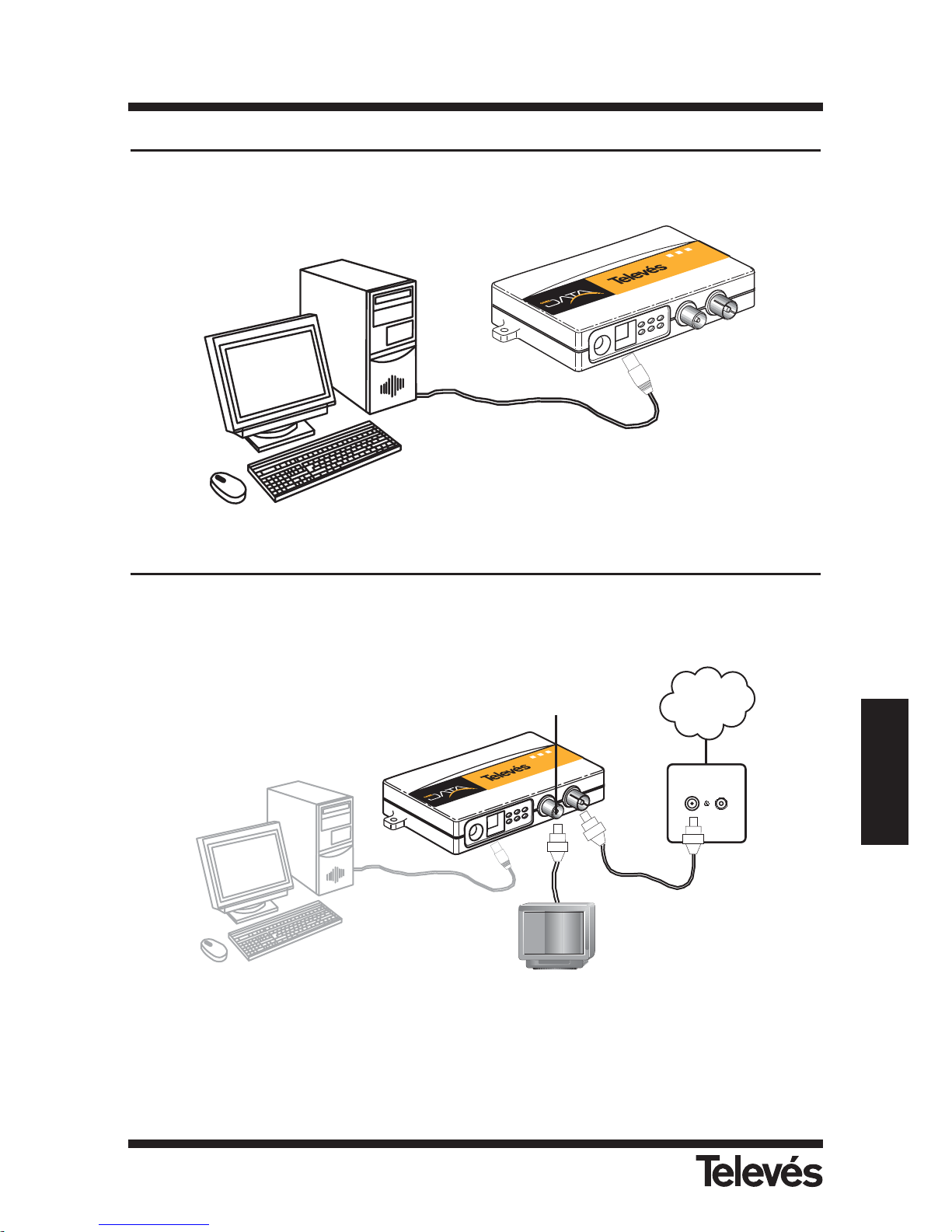
Pas 2- Etablir la liaison PC/Adaptateur
Raccorder une des extremités du câble ethernet (fourni) à l’interface réseau du PC et l’autre
extrémité au connecteur RJ-45 de l’adaptateur.
Pas 3- Raccordement à la prise TV
Raccorder une des extremités du câble coaxial (fourni) au connecteur datas/TV (connecteur CEI
femelle) de l’adaptateur et l’autre extremité à la prise TV.
Note: On peut raccorder une TV à l’adaptateur en utilisant le connecteur prévu à cet effet (con-
necteur CEI mâle).
Red
Coaxial
C
o
a
x
L
in
k
S
y
n
c
M
o
d
e
P
o
w
e
r
2
3
4
6
1
4
E
T
H
E
R
N
E
T
-
C
O
A
X
A
D
A
P
T
E
R
R
e
f
.
7
6
6
4
Cable
Coaxial
Prise
TV
Coax Link
S
ync
Mod
e
P
ow
er
2
3
4
6
1
4
E
T
H
E
R
N
E
T
-
C
O
A
X
A
D
A
P
T
E
R
Ref. 7664
Cable
Ethernet
Cable
Ethernet
Connecteur
Datas/TV
Page 28
28
ADAPTATEUR ETHERNET-COAXIAL 128 Mb
Ref. 7664
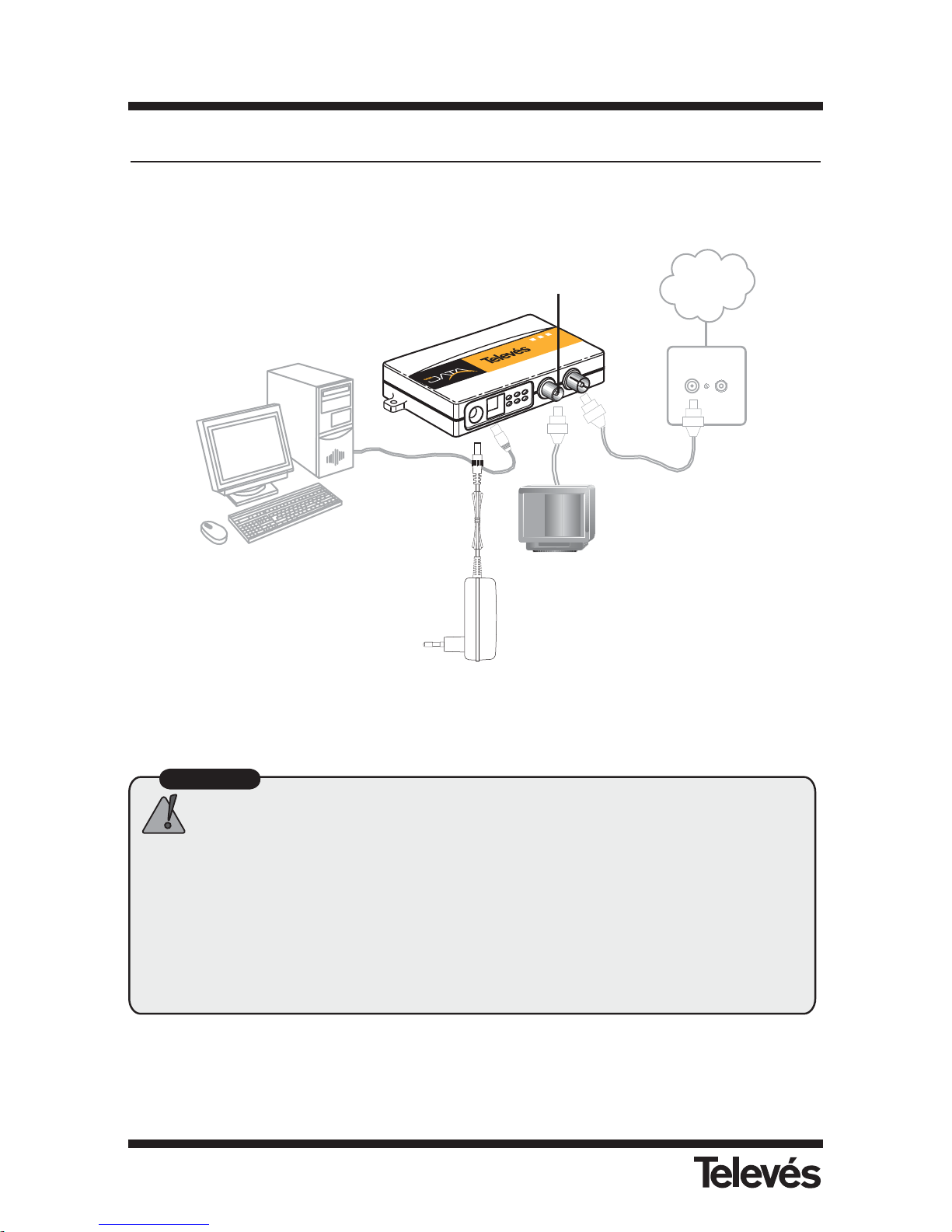
Pas 4- Alimentation du modem
Alimenter le modem à l’aide de l’alimentation 15V/800mA
¡ Maintenant votre PC est raccordé au réseau de distribution coaxial TV !
Attention
Il est recommandé dutiliser un filtre diplexeur à la sortie de la station pour
éviter toutes interférences avec les datas, voir le chapitre Exemples
dinstallation.
Dans le cas dun réseau de type Televés Intégra (moniteur vidéo, videoportier,
terminal de service), il est recommandé, avant toute installation, de se
reporter aux exemples situés en annexe A de ce manuel ou de consulter
les « notes dapplication » qui apparaissent dans « support » sur le site
www.televesintegra.com
Red
Coaxial
C
o
a
x
L
in
k
S
y
n
c
M
o
d
e
P
o
w
e
r
2
3
4
6
1
4
E
T
H
E
R
N
E
T
-
C
O
A
X
A
D
A
P
T
E
R
R
e
f
.
7
6
6
4
Cable
Coaxial
Prise
TV
Cable
Ethernet
Connecteur
Datas/TV
Alimentation
Page 29
29
FRANÇAIS
ADAPTATEUR ETHERNET-COAXIAL 128 Mb
Ref. 7664
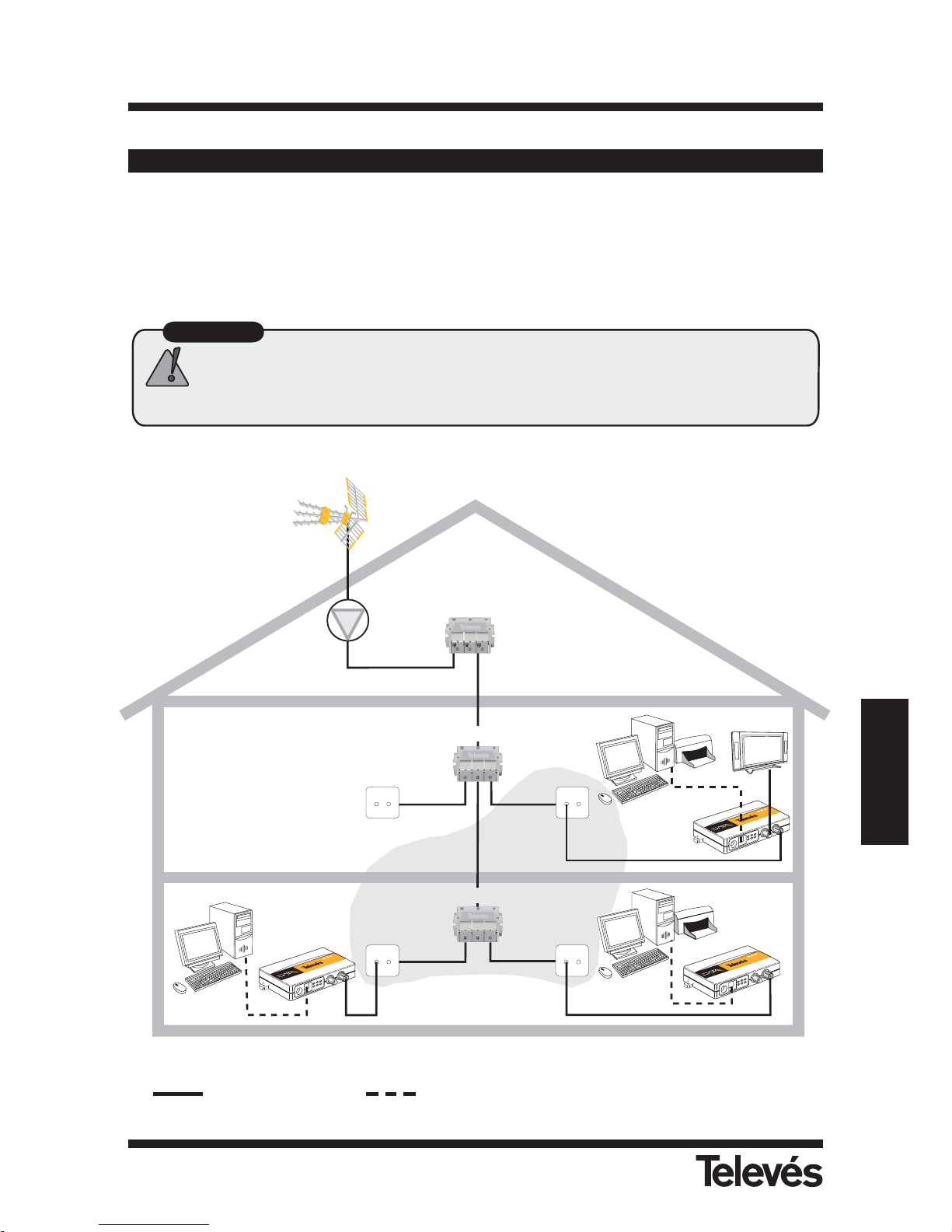
(1) Il est recommandé de poser des filtres (refs. 7653, 7654 ó 7668) après la station
Ref 7654
FPB FPA
Adaptateur
esclave
Adaptateur
maître
Prise
TV
Prise
TV
Prise
TV
Répartiteur
Adaptateur
esclave
Filtre
diplexeur
1
Prise
TV
Répartiteur
C
o
a
x
L
in
k
S
y
n
c
M
o
d
e
P
o
w
e
r
2
3
4
6
1
4
E
T
H
E
R
N
E
T
-
C
O
A
X
A
D
A
P
T
E
R
R
e
f
.
7
6
6
4
C
o
a
x
L
in
k
S
y
n
c
M
o
d
e
P
o
w
e
r
2
3
4
6
1
4
E
T
H
E
R
N
E
T
-
C
O
A
X
A
D
A
P
T
E
R
R
e
f
. 7
6
6
4
C
o
a
x
L
in
k
S
y
n
c
M
o
d
e
P
o
w
e
r
2
3
4
6
1
4
E
T
H
E
R
N
E
T
-
C
O
A
X
A
D
A
P
T
E
R
R
e
f.
7
6
6
4
4- Exemples d’ installation
Exemple 1: Creation d’un réseau de données dans le foyer
Cette configuration permet de relier tous les points de votre réseau coaxial.
Attention
Latténuation maximum entre Adaptateur Ethernet-Coaxial 128 Mbps ne
doit pas dépasser les 50 dB en voie retour (4-21 MHz).
Atténuation <50 dB
Cable Coaxial Cable Ethernet
Page 30
30
ADAPTATEUR ETHERNET-COAXIAL 128 Mb
Ref. 7664
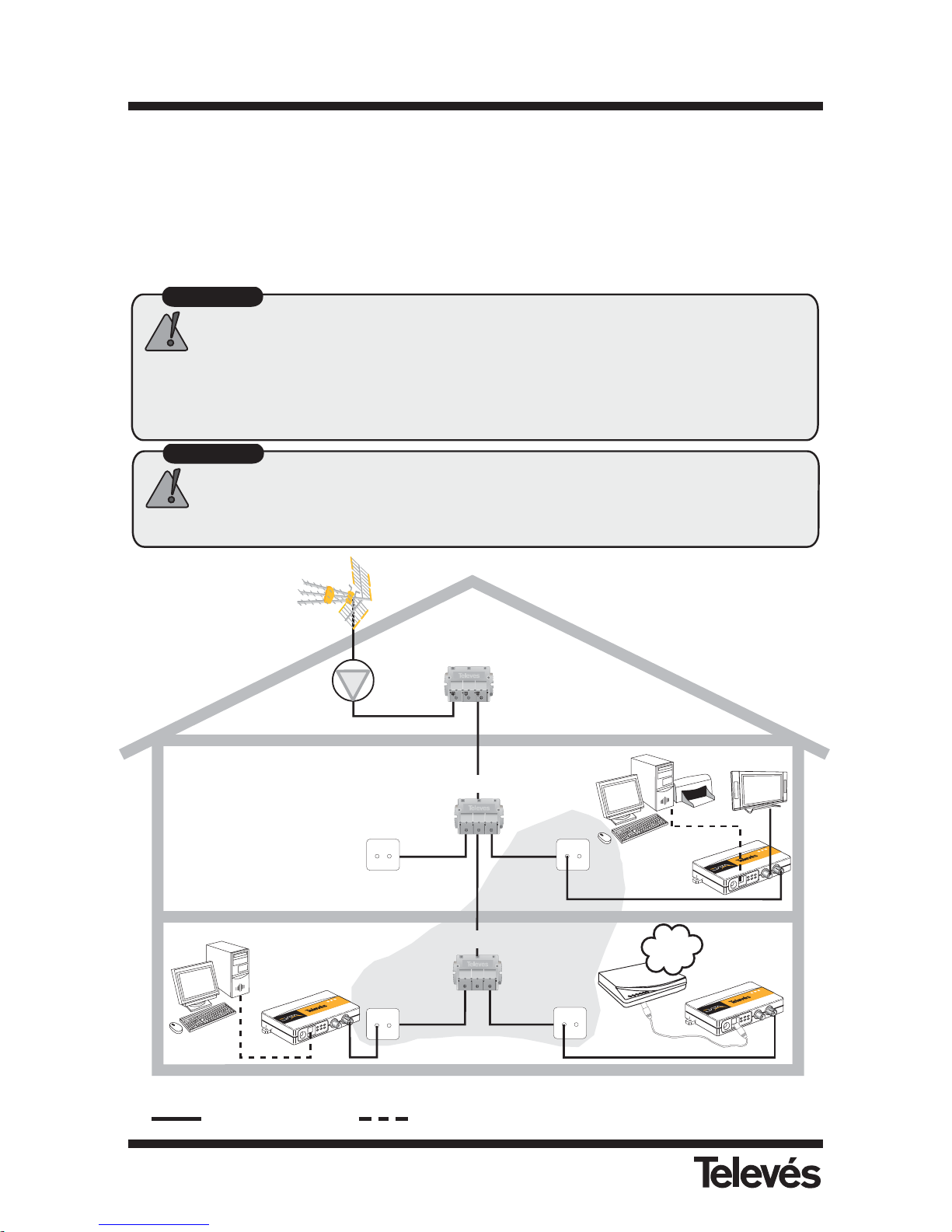
Attention
La liaison entre ladaptateur et le PC se fait par lintermédiaire du câble
Ethernet fourni avec ladaptateur
La liaison entre ladaptateur et le routeur ADSL se fait par lintermédiaire
dun câble croisé (non fourni avec ladaptateur).
(1) Il est recommandé de poser des filtres (refs: 7653, 7654 ó 7668) après la station
Ref 7654
FPB FPA
Adaptateur
esclave
Adaptateur
maître
Prise
TV
Prise
TV
Prise
TV
Répartiteur
Répartiteur
Adaptateur
esclave
Cable
croisé
Internet
Router
ADSL
Prise
TV
Filtre
diplexeur
1
C
o
a
x
L
i
n
k
S
y
n
c
M
o
d
e
P
o
w
e
r
2
3
4
6
1
4
E
T
H
E
R
N
E
T
-
C
O
A
X
A
D
A
P
T
E
R
R
e
f
.
7
6
6
4
C
o
a
x
L
i
n
k
S
y
n
c
M
o
d
e
P
o
w
e
r
2
3
4
6
1
4
E
T
H
E
R
N
E
T
-
C
O
A
X
A
D
A
P
T
E
R
R
e
f
.
7
6
6
4
C
o
a
x
L
i
n
k
S
y
n
c
M
o
d
e
P
o
w
e
r
2
3
4
6
1
4
E
T
H
E
R
N
E
T
-
C
O
A
X
A
D
A
P
T
E
R
R
e
f
.
7
6
6
4
Attention
Latténuation maximum entre Adaptateur Ethernet-Coaxial 128 Mbps ne
doit pas dépasser les 50 dB en voie retour (4-21 MHz).
Exemple 2: Acces partagé à internet
Pour partager l’acces à Internet raccorder un des adaptateurs à un router ADSL.
Il est indispensable que le router Internet fournisse tous les services souhaités par les usagers raccordés aux adaptateurs (DNS, DHCP, NAT, etc.) Pour réaliser une installation
correcte, consulter le manuel du router donné par le fournisseur d’Internet.
Pour raccorderl’adaptateur à un router ADSL utiliser un cable ethernet croisé.
Atténuation <50 dB
Cable Coaxial Cable Ethernet
Page 31
31
FRANÇAIS
ADAPTATEUR ETHERNET-COAXIAL 128 Mb
Ref. 7664
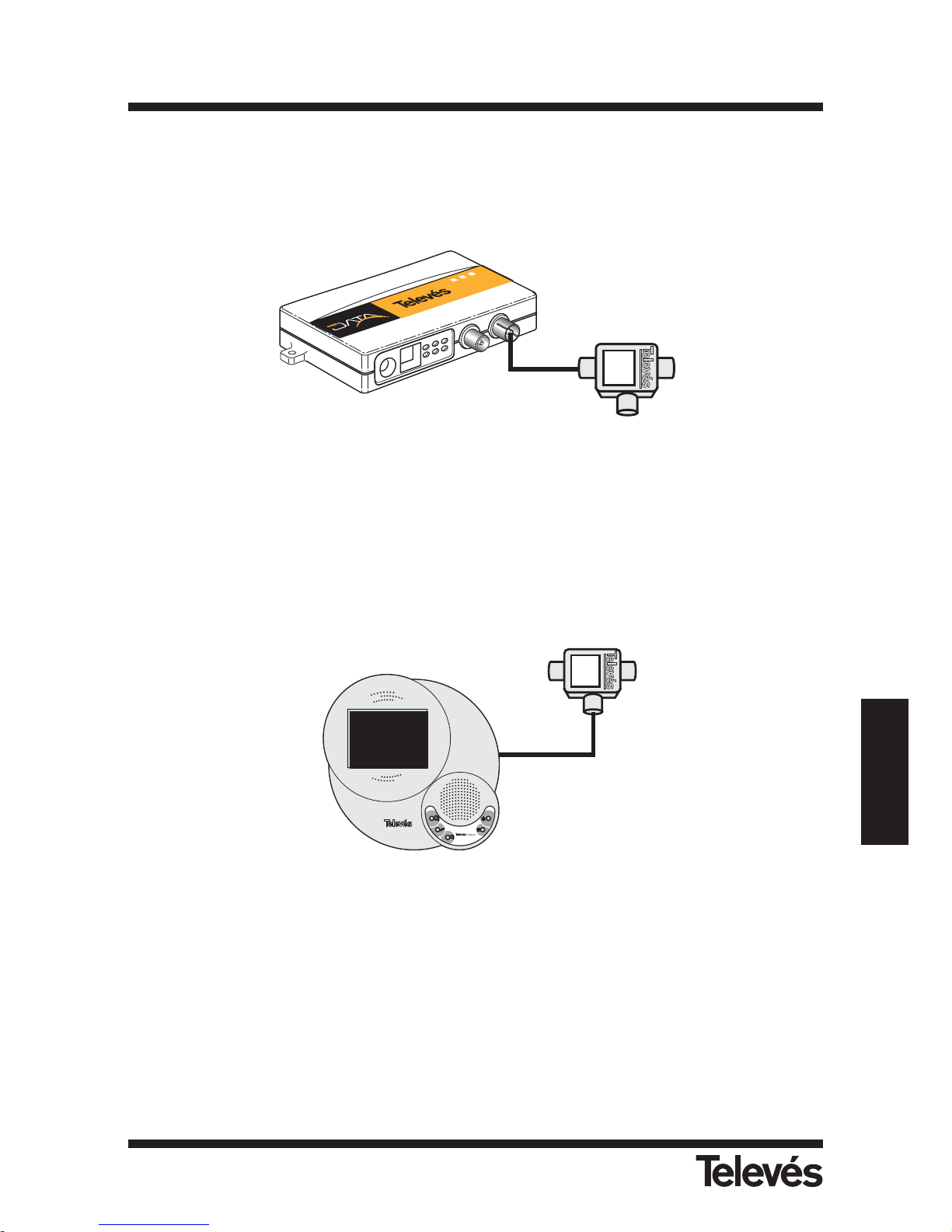
Dans le cas d’une installation de type TelevésIntegra (videoportier, moniteur vídeo, terminal de
services...), la pose d’un adaptateur nécessite l’adjonction de filtres diplexeurs (ref. 7669)
comme montré dans les shémas suivants:
Le filtre diplexeur permet d’isoler les différentes bandes passantes des deux systèmes garantissant ainsi son bon fonctionnement. Dans ce cas on a un taux de transfert de 64Mbps (limite
physique) et 40Mbps de Throughput.
Deux points à prendre en compte:
1- Tous les adaptateurs doivent être raccordés au connecteur FPB du filtre diplexeur (ref.
7669).
2- Les éléments TelevésIntegra (videoportier, moniteur video, terminal de services...) doivent
être raccordés au connecteur FPA du filtre diplexeur (ref. 7669).
IN
FPA
FPB
C
o
a
x
L
in
k
S
y
n
c
M
o
d
e
P
o
w
e
r
23461
4
E
T
H
E
R
N
E
T
-
C
O
A
X
A
D
A
P
T
E
R
R
e
f
.
7
6
6
4
IN
FPA
FPB
D
O
W
N
OK
UP
MENU
O
N
2
1
Filtre diplexeur
(ref. 7669)
Filtre diplexeur
(ref. 7669)
Page 32
32
ADAPTATEUR ETHERNET-COAXIAL 128 Mb
Ref. 7664
Note: Les carateristiques techniques décrites sont définies pour une temperature ambiante
maximum de 40ºC.
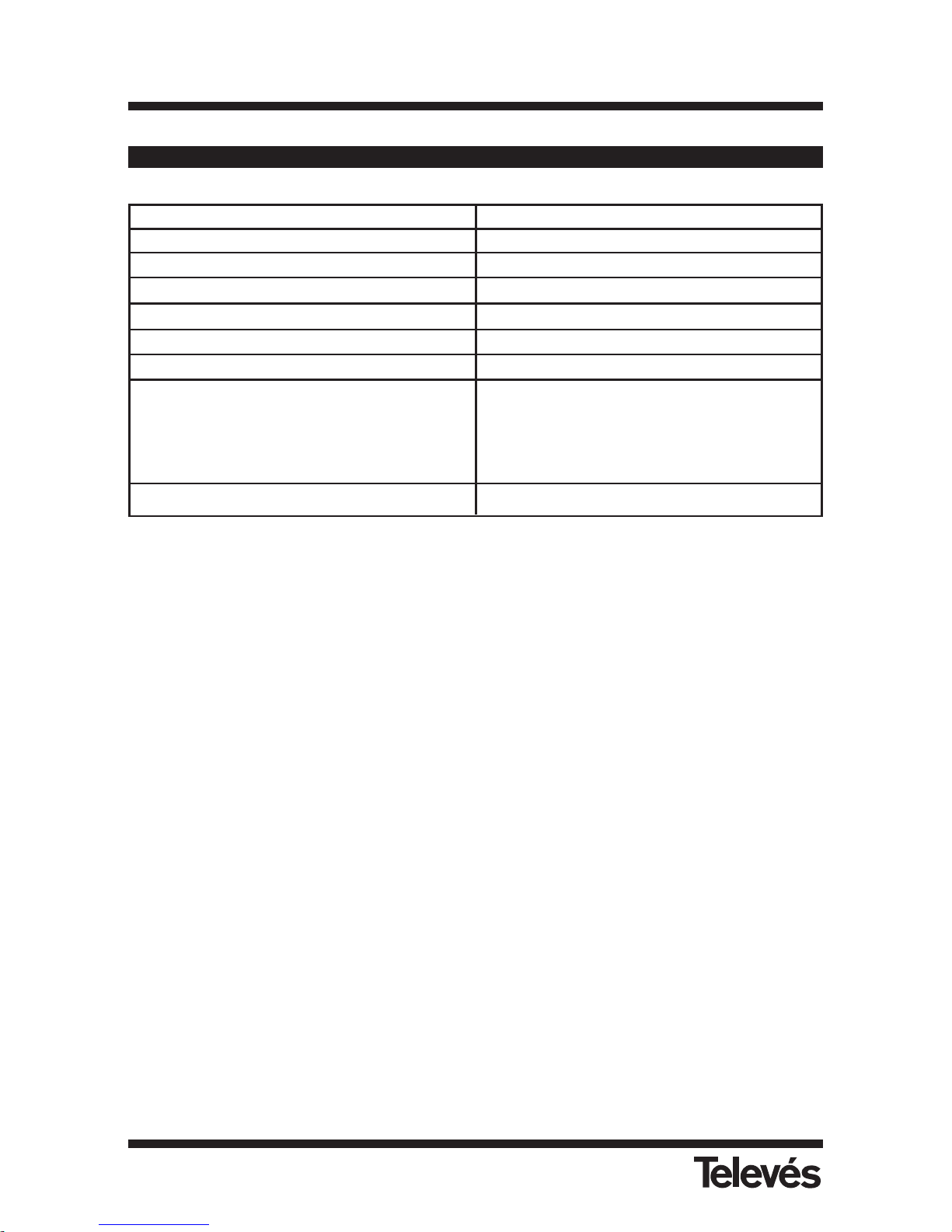
Anexo A - Caractéristiques techniques
Fréquence de travail 4 - 21 MHz
Niveau de sortie
112 dBµV
Atténuation max. 50 dB
Vitesse de transmission 128 Mbps
Qualité de Service VLAN 802.1p Priority Support
Distance max 1.1 Km
Nombre d’utilisateurs 16
Connecteurs Ethernet RJ-45
CEI Entrée (Datas+TV)
CEI Sortie (Tv/Radio)
Jack pour alimentation.
Consommation max. á 12 - 15 V
DC
3,6 W
Page 33

FRANÇAIS
ADAPTATEUR ETHERNET-COAXIAL 128 Mb
Ref. 7664
33
Si vous renconter des problèmes sur le réseau de données vérifier les points suivants:
1. Verifier qu’il n’y a qu’un seul maître sur le réseau.
2. Verifier que la led Sync Mode des adaptateurs esclaves est allumé en permanence.
3. Verifier que la voie retour de l’installation est fonctionnelle.
Le canal utilisé entre 4-21Mhz doit être opérationnel aussi bien en voie montante (prisestation de tête) qu’en voie descendante (station de tête-prise).
4. Verifier que l’atténuation entre les différents adaptateurs n’est pas supérieure à 50
dB dans la bande: 4-21 Mhz.
5. Filtrer les signaux TV à la station de tête.
Pour éviter toutes interférences des signaux de station de tête TV et le réseau de données, il recommandé d’utiliser des filtres diplexeurs et tout particulièrement les filtres diplexeur (ref.: 7653, 7654 ou 7668) pour éviter toutes interférences entre le réseau de données et le réseau TV.
Annexe B - Solutions aux principaux problèmes
Page 34

Page 35
35
Page 36
VIGO
VALENCIA
OPORTO
LISBOA
MADRID
ZARAGOZA
MURCIA
MÁLAGA
SEVILLA
GIJÓN
LUGO
OURENSE
CANTABRIA
GUIPÚZCOA
LEÓN
BURGOS
ÁLAVA
NAVARRA
LA RIOJA
HUESCA
TARRAGONA
SEGOVIA
GUADALAJARA
ÁVILA
CUENCA
TOLEDO
CIUDAD REAL
TERUEL
CASTELLÓN
BADAJOZ
CÓRDOBA
HUELVA
CÁDIZ
JAÉN
GRANADA
ALMERÍA
ALBACETE
ALICANTE
SALAMANCA
PALENCIA
ZAMORA
GIRONA
PALMA DE
MALLORCA
BALEARES
CANARIAS
TENERIFE
LAS PALMAS
SUCURSALES
DELEGACIONES
FÁBRICAS
SORIA
CÁCERES
CEUTA
MELILLA
BILBAO
A CORUÑA
SANTIAGO
BARCELONA
ASTURIAS
LLEIDA
LOGROÑO
PAMPLONA
Rúa B. de Conxo, 17
15706 SANTIAGO DE COMPOSTELA
Tel. 981 52 22 00 Fax 981 52 22 62
[email protected] www.televes.com
A CORUÑA C.P. 15011
Gregorio Hernández 8.
Tfnos.: 981 27 47 31 /981 27 22 10
Fax: 981 27 16 11
[email protected]
ALMERÍA C.P. 04008
Campogrís 9.
Tfno.: 950 23 14 43
Fax: 950 23 14 43
[email protected]
BADAJOZ C.P. 06010
C/Jacobo Rodríguez,
Pereira, nº11-Oficina
Tfno.: 924 20 74 83
Móvil: 670 70 21 93
Fax: 924 20 01 15
[email protected]
BARCELONA C.P. 08940
C/ Sant Ferrán, 27
Cornellá - Barcelona
Tfnos.: 93 377 08 62 /93 474 29 50
Fax: 93 474 50 06
[email protected]
BILBAO C.P. 48150
Iberre kalea, módulo 16, pabellón 15-B
Sangroniz-Sondika
Tfnos.: 94 471 12 02 /94 471 24 78
Fax: 94 471 14 93
[email protected]
RReedd CCoommeerrcciiaall NNaacciioonnaall
RReedd CCoommeerrcciiaall IInntteerrnnaacciioonnaall
TELEVES ELECTRONICA PORTUGUESA
MAIA - OPORTO
Via . Dr Francisco Sa Carneiro. Lote 17.
ZONA Ind. MAIA 1. Sector-X MAIA. C.P. 4470 BARCA
Tel/Fax.: 00 351 22 9478900
GSM: 00 351 968581614
[email protected]
LISBOA
C.P. 1000 Rua Augusto Gil 21-A.
Tel.: 351 21 7932537 Fax: 351 21 7932418
[email protected]
TELEVES FRANCE S.A.R.L.
1 Rue Louis de Broglie
Parc d'Activités de l'Esplanade
77400 St Thibault des Vignes FRANCE
Tél.: +33 (0)1 60 35 92 10
Fax: +33 (0)1 60 35 90 40
[email protected]
TELEVES ITALIA S.r.l.
S.op.Viale Liguria 24
20068 Peschiera Borromeo (MI) Italia
Tel.: (+39)-0251650604 (RA)
Fax: (+39)-0255307363
[email protected]
TELEVES MIDDLE EAST FZE
P.O. Box 17199
JEBEL ALI FREE ZONE DUBAI,
UNITED ARAB EMIRATES
Tel.: 9714 88 343 44 Fax: 9714 88 346 44
[email protected]
TELEVES UNITED KINGDOM LTD
Unit 11 Hill Street, Industrial State
CWMBRAN, GWENT NP44 7PG.
(United Kingdom)
Tel.: 44 01 633 87 58 21
Fax: 44 01 633 86 63 11
[email protected]
BURGOS C.P. 09188
C/Campanero 3, San Adrián de Juarros
Tfno.: 947 56 04 58
Móvil: 670 73 75 86
[email protected]
GIJÓN C.P. 33210
C/Japón, 14
Tfnos.: 985 15 25 50 /985 15 29 67
Fax : 985 14 63 89
[email protected]
JAÉN C.P. 23007
Hermanos Pinzón, 8-bajo
Tfnos.: 953 29 50 40 /953 29 52 11
Móvil: 636 984489
Fax: 953 29 52 10
[email protected]
LAS PALMAS C.P. 35006
Gral. Mas de Gaminde 26
Tfnos.: 928 23 11 22 /928 23 12 42
Fax: 928 23 13 66
[email protected]
LOGROÑO C.P. 26004
San Prudencio 19. bajo
Tfno.: 941 23 35 24
Fax: 941 25 50 78
[email protected]
Miembro de número del
ER 224/1/94
Empresa
Registrada
MADRID C.P. 28005
Paseo de los Pontones 11
Tfnos.: 91 474 52 21 /91 474 52 22
Fax: 91 474 54 21
[email protected]
MÁLAGA C.P. 29006
C/ La Boheme 55
Pol. Ind. Alameda 2
[email protected]
MURCIA C.P. 30010
Polígono Conver - C/ Rio Pliego 22
Tfnos.: 968 26 31 44 /968 26 31 77
Fax: 968 25 25 76
[email protected]
PALMA DE MALLORCA C.P.
07007
Ferrer de Pallares 45. bajo D.
Tfno.: 971 24 70 02
Fax: 971 24 53 42
[email protected]
PAMPLONA C.P. 31007
Avda. Sancho el Fuerte 5
Tfno.: 948 27 35 10
Fax: 948 17 41 49
[email protected]
SEVILLA C.P. 41008
Pol. Ind. Store - C/ A-6. Nave 5
Tfnos.: 95 443 64 50 /95 443 58 00
Fax: 95 443 96 93
[email protected]
TENERIFE C.P. 38108
Avda. El Paso, 25 Los Majuelos- La Laguna
Tfnos.: 922 31 13 14 /922 31 13 16
Fax: 922 31 13 33
[email protected]
VALENCIA C.P. 46022
Plaza Jordi San Jordi s/n
Tfnos.: 96 337 12 01 /96 337 12 72
Fax: 96 337 06 98
[email protected]
VIGO C.P. 36204
Escultor Gregorio Fernández, 5
Tfnos.: 986 42 33 87 /986 42 40 44
Fax: 986 42 37 94
[email protected]
ZARAGOZA C.P. 50002
C/ Monasterio de Alahón 1-3
Tfno.: 976 41 12 73
Fax: 976 59 86 86
[email protected]
 Loading...