

Page 1

PROTOCOL SOLUTIONS GROUP
3385 SCOTT BLVD
SANTA CLARA, CA 95054
LeCroy Protocol Analyzers
File-Based Decoding
User Manual
August 2011
Page 2

Document Disclaimer File-based Decoding User Manual
Document Disclaimer
The information in this document has been carefully checked and is believed to be
reliable. However, no responsibility can be assumed for inaccuracies that may not have
been detected.
LeCroy reserves the right to revise the information in this document without notice or
penalty.
Trademarks and Servicemarks
CATC Trace, FCTracer, SATracer, SASTracer, PETracer, PETracer ML, PETracer EML,
UWBTracer, UWBTracer MPI, BTTracer, Merlin, Merlin II, USBTracer, USB
USB
Mobile HS, Voyager, Advisor T3, UPAS, and BusEngine are trademarks of LeCroy.
Microsoft and Windows are registered trademarks of Microsoft Inc.
All other trademarks are property of their respective companies.
Mobile,
Copyright
Copyright © 2011, LeCroy Corporation. All Rights Reserved.
This document may be printed and reproduced without additional permission, but all
copies should contain this copyright notice.
LeCroy Corporation
Page 3

File-based Decoding User Manual Table of Contents
TABLE OF CONTENTS
Chapter 1 Introduction 1
1.1 Features of CATC Scripting Language. . . . . . . . . . . . . . . . . . . . . . . . . 1
Chapter 2 Values 3
2.1 Literals . . . . . . . . . . . . . . . . . . . . . . . . . . . . . . . . . . . . . . . . . . . . . . . . . 3
2.2 Variables. . . . . . . . . . . . . . . . . . . . . . . . . . . . . . . . . . . . . . . . . . . . . . . . 5
2.3 Constants . . . . . . . . . . . . . . . . . . . . . . . . . . . . . . . . . . . . . . . . . . . . . . . 6
Chapter 3 Expressions 7
3.1 select expression . . . . . . . . . . . . . . . . . . . . . . . . . . . . . . . . . . . . . . . 8
Chapter 4 Operators 9
4.1 Operations . . . . . . . . . . . . . . . . . . . . . . . . . . . . . . . . . . . . . . . . . . . . . . 9
4.2 Operator Precedence and Associativity . . . . . . . . . . . . . . . . . . . . . . . . 9
Chapter 5 Comments 17
Chapter 6 Keywords 19
Chapter 7 Statements 21
7.1 Expression Statements. . . . . . . . . . . . . . . . . . . . . . . . . . . . . . . . . . . . 21
7.2 if Statements. . . . . . . . . . . . . . . . . . . . . . . . . . . . . . . . . . . . . . . . . . . . 21
7.3 if-else Statements. . . . . . . . . . . . . . . . . . . . . . . . . . . . . . . . . . . . . . . . 22
7.4 while Statements . . . . . . . . . . . . . . . . . . . . . . . . . . . . . . . . . . . . . . . . 22
7.5 for Statements . . . . . . . . . . . . . . . . . . . . . . . . . . . . . . . . . . . . . . . . . . 23
7.6 return Statements. . . . . . . . . . . . . . . . . . . . . . . . . . . . . . . . . . . . . . . . 24
7.7 Compound Statements. . . . . . . . . . . . . . . . . . . . . . . . . . . . . . . . . . . . 26
Chapter 8 Preprocessing 27
Chapter 9 Context 29
Chapter 10 Functions 31
Chapter 11 Primitives 33
11.1 General Primitives . . . . . . . . . . . . . . . . . . . . . . . . . . . . . . . . . . . . . . 33
11.2 Data Manipulation Primitives . . . . . . . . . . . . . . . . . . . . . . . . . . . . . . 39
11.3 List Manipulation Primitives . . . . . . . . . . . . . . . . . . . . . . . . . . . . . . . 43
11.4 Transaction Decoder Primitives . . . . . . . . . . . . . . . . . . . . . . . . . . . . 45
11.5 Display Primitives . . . . . . . . . . . . . . . . . . . . . . . . . . . . . . . . . . . . . . . 50
Appendix A:PCI Express . . . . . . . . . . . . . . . . . . . . . . . . . 59
A.1 Modules . . . . . . . . . . . . . . . . . . . . . . . . . . . . . . . . . . . . . . . . . . . . . . . 59
Module Function . . . . . . . . . . . . . . . . . . . . . . . . . . . . . . . . . . . . . . . . . 59
A.2 Decoder Script Files. . . . . . . . . . . . . . . . . . . . . . . . . . . . . . . . . . . . . . 59
cfg.dec . . . . . . . . . . . . . . . . . . . . . . . . . . . . . . . . . . . . . . . . . . . . . . . . 60
io.dec . . . . . . . . . . . . . . . . . . . . . . . . . . . . . . . . . . . . . . . . . . . . . . . . . 61
mem.dec. . . . . . . . . . . . . . . . . . . . . . . . . . . . . . . . . . . . . . . . . . . . . . . 62
LeCroy Corporation iii
Page 4

Table of Contents File-based Decoding User Manual
Appendix B:Bluetooth . . . . . . . . . . . . . . . . . . . . . . . . . . . 67
B.1 Modules . . . . . . . . . . . . . . . . . . . . . . . . . . . . . . . . . . . . . . . . . . . . . . . 67
Module Functions . . . . . . . . . . . . . . . . . . . . . . . . . . . . . . . . . . . . . . . . 67
Module Data . . . . . . . . . . . . . . . . . . . . . . . . . . . . . . . . . . . . . . . . . . . . 68
B.2 Input Context Data . . . . . . . . . . . . . . . . . . . . . . . . . . . . . . . . . . . . . . . 70
How to Contact LeCroy . . . . . . . . . . . . . . . . . . . . . . . . . . 71
Index 73
iv LeCroy Corporation
Page 5

File-based Decoding User Manual List of Figures
LIST OF FIGURES
Figure 7.1 Execution of a for Statement . . . . . . . . . . . . . . . . . . . . . . . . . . . . . . . . . . . . 23
Figure 11.1 Example: Output for AddCell . . . . . . . . . . . . . . . . . . . . . . . . . . . . . . . . . . . . 51
Figure 11.2 Example: Output for AddDataCell . . . . . . . . . . . . . . . . . . . . . . . . . . . . . . . . 53
Figure 11.3 Example: Separator Cell . . . . . . . . . . . . . . . . . . . . . . . . . . . . . . . . . . . . . . . 54
Figure 11.4 Example: Output for BeginCellBlock with Red Group Collapsed . . . . . . . . 57
Figure 11.5 Example: Output for BeginCellBlock with Red Group Expanded and Blue
Group Collapsed . . . . . . . . . . . . . . . . . . . . . . . . . . . . . . . . . . . . . . . . . . . . . 57
Figure 11.6 Example: Output for BeginCellBlock with Red Group Expanded and Blue
Group Expanded . . . . . . . . . . . . . . . . . . . . . . . . . . . . . . . . . . . . . . . . . . . . . 57
LeCroy Corporation v
Page 6

List of Tables File-based Decoding User Manual
LIST OF TABLES
Table 2.1 Examples of String Literals . . . . . . . . . . . . . . . . . . . . . . . . . . . . . . . . . . . . . . . . 3
Table 2.2 Escape Sequences. . . . . . . . . . . . . . . . . . . . . . . . . . . . . . . . . . . . . . . . . . . . . . 4
Table 4.1 Operator Precedence and Associativity . . . . . . . . . . . . . . . . . . . . . . . . . . . . . 10
Table 4.2 Operators . . . . . . . . . . . . . . . . . . . . . . . . . . . . . . . . . . . . . . . . . . . . . . . . . . . . 11
Table 6.1 Keywords . . . . . . . . . . . . . . . . . . . . . . . . . . . . . . . . . . . . . . . . . . . . . . . . . . . . 19
vi LeCroy Corporation
Page 7

File-based Decoding User Manual Chapter 1: Introduction
Chapter 1: Introduction
CATC Scripting Language (CSL) was developed to create scripts that would allow users
to perform file-based decoding with all LeCroy analyzers. CSL is used to edit
CATC
Decode Scripting (CDS) files, which are pre-written decoder scripts supplied by
LeCroy. These script-based decoders can be modified by users or used as-is.
Additionally, users can create brand new CDS files.
This document includes the following analyzer-specific contents:
• Appendix A: PETracer™ Decoder Script Files (for the PETracer product)
• Appendix B: Bluetooth
Decoding scripts for analyzers are located in the /Scripts sub-directory below the
application directory. These scripts are tools to decode and display transactions. Users
can also add entirely new, customized decoders to fit their own specific development
needs. The analyzer application looks in the
sub-directories and automatically loads all of the .dec files that it finds. To prevent a
particular decoder from being loaded, change its extension to something other than .dec
or move it out of the
CSL is based on C language syntax, so anyone with a C programming background
should have no trouble learning CSL. The simple, yet powerful, structure of CSL also
enables less experienced users to easily acquire the basic knowledge needed to start
writing custom scripts.
/Scripts directory.
/Scripts directory and all its
1.1 Features of CATC Scripting Language
• Powerful: Provides a high-level API while simultaneously allowing implementation
of complex algorithms.
• Easy to learn and use: Has a simple but effective syntax.
• Self-contained: Needs no external tools to run scripts.
• Wide range of value types: Provides efficient and easy processing of data.
• Script-based decoding: Used to create built-in script-based decoders for analyz-
ers.
• Custom decoding: May be used to write custom decoders.
• General purpose: Is integrated in a number of LeCroy products.
LeCroy Corporation 1
Page 8

Chapter 1: Introduction File-based Decoding User Manual
2 LeCroy Corporation
Page 9

File-based Decoding User Manual Chapter 2: Values
Chapter 2: Values
There are five value types that may be manipulated by a script: integers, strings, lists,
raw bytes, and null. CSL is not a strongly typed language. Value types need not be
re-declared. Literals, variables and constants can take on any of the five value types,
p
and the types can be reassigned dynamically.
2.1 Literals
Literals are data that remain unchanged when the program is compiled. Literals are a way
of expressing hard-coded data in a script.
Integers
Integer literals represent numeric values with no fractions or decimal points.
Hexadecimal, octal, decimal, and binary notation are supported:
Hexadecimal numbers must be preceded by 0x: 0x2A, 0x54, 0xFFFFFF01
Octal numbers must begin with 0: 0775, 017, 0400
Decimal numbers are written as usual: 24, 1256, 2
Binary numbers are denoted with 0b: 0b01101100, 0b01, 0b100000
Strings
String literals are used to represent text. A string consists of zero or more characters and
can include numbers, letters, spaces, and punctuation. An empty string ("") contains
o characters and evaluates to false in an expression, whereas a non-empty string
n
evaluates to true. Double quotes surround a string, and some standard backslash (
escape sequences are supported.
String Represented Text
"Quote: \"This is a string
literal.\""
"256"
"abcd!$%&*"
"June 26, 2001"
"[ 1, 2, 3 ]"
Table 2.1 Examples of String Literals
Quote: "This is a string literal."
256
**Note that this does not represent the
integer 256, but only the characters that
make up the number.
abcd!$%&*
June 26, 2001
[ 1, 2, 3 ]
\)
LeCroy Corporation 3
Page 10

Chapter 2: Values File-based Decoding User Manual
Escape Sequences
These are the available escape sequences in CSL:
Escape
Character
backslash This is a backslash: \
le
doub
quote
horizon
tab
ine This is how
newl
single quote 'Single quote'
Sequence Example Output
\\ "This is a backslash: \\"
\" "\"Quotes!\""
tal
\t "Before tab\tAfter tab"
\n "This is how\nto get a newline."
\' "\'Single quote\'"
"Quotes!"
Before tab After tab
et a newline.
to g
Table 2.2 Escape Sequences
Lists
A list can hold zero or more pieces of data. A list that contains zero pieces of data is called
an empty list. An empty list evaluates to false when used in an expression, whereas a
non-empty list evaluates to true. List literals are expressed using the square bracket (
delimiters. List elements can be of any type, including lists.
[1, 2, 3, 4]
[]
["one", 2, "three", [4, [5, [6]]]]
[])
Raw Bytes
Raw binary values are used primarily for efficient access to packet payloads. A literal
notation is supported using single quotes:
'00112233445566778899AABBCCDDEEFF'
This represents an array of 16 bytes with values starting at 00 and ranging up to 0xFF.
e values can only be hexadecimal digits. Each digit represents a nybble (four bits), and
Th
if there are not an even number of nybbles specified, an implicit zero is added to the first
byte. For example:
'FFF'
is interpreted as
'0FFF'
null
null indicates an absence of valid data. The keyword null represents a literal null value
and evaluates to false when used in expressions.
result = null;
4 LeCroy Corporation
Page 11

File-based Decoding User Manual Chapter 2: Values
2.2 Variables
Variables are used to store information, or data, that can be modified. A variable can be
thought of as a container that holds a value.
All variables have names. Variable names must contain only alphanumeric characters
and the underscore (
variable names are
x
_NewValue
name_2
A variable is created when it is assigned a value. Variables can be of any value type, and
can change type with re-assignment. Values are assigned using the assignment operator
(
= ). The name of the variable goes on the left side of the operator, and the value goes
on the right:
x = [ 1, 2, 3 ]
New_value = x
name2 = "Smith"
If a variable is referenced before it is assigned a value, it evaluates to null.
There are two types of variables: global and local.
_ ) character, and they cannot begin with a number. Some possible
Global Variables
Global variables are defined outside of the scope of functions. Defining global variables
requires the use of the keyword
all files that it includes).
set Global = 10;
If an assignment in a function has a global as a left-hand value, a variable is not created,
but the global variable is changed. For example:
set Global = 10;
Function()
{
Global = "cat";
Local = 20;
}
creates a local variable called Local, which is only visible within the function Function.
Additionally, it changes the value of
This also changes its value type from an integer to a string.
set. Global variables are visible throughout a file (and
Global to "cat", which is visible to all functions.
LeCroy Corporation 5
Page 12

Chapter 2: Values File-based Decoding User Manual
Local Variables
Local variables are not declared. Instead, they are created as needed. Local variables
are created either by being in a function's parameter list, or simply by being assigned a
value in a function body.
Function(Parameter)
{
Local = 20;
}
This function creates a local variable Parameter and a local variable Local, which has
an assigned value of 20.
2.3 Constants
A constant is similar to a variable, except that its value cannot be changed. Like variables,
constant names must contain only alphanumeric characters and the underscore (
character, and they cannot begin with a number.
Constants are declared similarly to global variables using the keyword const:
const CONSTANT = 20;
_ )
They can be assigned to any value type, but generates an error if used in the left-hand
side of an assignment statement later on. For example:
const constant_2 = 3;
Function()
{
constant_2 = 5;
}
generates an error.
Declaring a constant with the same name as a global, or a global with the same name as
a constant, also generates an error. Like globals, constants can only be declared in the
file scope.
6 LeCroy Corporation
Page 13

File-based Decoding User Manual Chapter 3: Expressions
Chapter 3: Expressions
An expression is a statement that calculates a value. The simplest type of expression is
assignment:
x = 2
The expression x = 2 calculates 2 as the value of x.
All expressions contain operators, which are described in
Chapter 4, Operators, on page 9. The operators indicate how an expression should be
evaluated in order to arrive at its value. For example
x + 2
says to add 2 to x to find the value of the expression. Another example is
x > 2
which indicates that x is greater than 2. This is a Boolean expression, so it evaluates to
either true or false. Therefore, if
false.
True is denoted by a non-zero integer (any integer except 0), and false is a zero integer
(0). True and false are also supported for lists (an empty list is false, while all others are
true), and strings (an empty string is false, while all others are true), and
considered false. However, all Boolean operators result in integer values.
x = 3, then x > 2 evaluates to true; if x = 1, it returns
null is
LeCroy Corporation 7
Page 14

Chapter 3: Expressions File-based Decoding User Manual
3.1 select expression
The select expression selects the value to which it evaluates based on Boolean
expressions. This is the format for a
select {
<expression1> : <statement1>
<expression2> : <statement2>
...
};
The expressions are evaluated in order, and the statement that is associated with the first
true expression is executed. That value is what the entire expression evaluates to.
x = 10
Value_of_x = select {
x < 5 : "Less than 5";
x >= 5 : "Greater than or equal to 5";
};
The above expression evaluates to “Greater than or equal to 5” because the first true
expression is
expression because it is not a compound statement and can be used in an expression
context.
x >= 5. Note that a semicolon is required at the end of a select
select expression:
There is also a keyword default, which in effect always evaluates to true. An example
of its use is
Astring = select {
A == 1 : "one";
A == 2 : "two";
A == 3: "three";
A > 3 : "overflow";
default : null;
};
If none of the first four expressions evaluates to true, then default is evaluated,
returning a value of
select expressions can also be used to conditionally execute statements, similar to C
switch statements:
select {
A == 1 : DoSomething();
A == 2 : DoSomethingElse();
default: DoNothing();
};
In this case the appropriate function is called depending on the value of A, but the
evaluated result of the
null for the entire expression.
select expression is ignored.
8 LeCroy Corporation
Page 15

File-based Decoding User Manual Chapter 4: Operators
Chapter 4: Operators
An operator is a symbol that represents an action, such as addition or subtraction, that
can be performed on data. Operators are used to manipulate data. The data being
manipulated are called operands. Literals, function calls, constants, and variables can
all serve as operands. For example, in the operation
x + 2
the variable x and the integer 2 are both operands, and + is the operator.
4.1 Operations
Operations can be performed on any combination of value types, but results in a null
value if the operation is not defined. Defined operations are listed in the Operand Types
column of
results in the non-null value. For example, if
then
Tab le 4.2 on page 11. Any binary operation on a null and a non-null value
x = null
3 * x
returns a value of 3.
A binary operation is an operation that contains an operand on each side of the operator,
as in the preceding examples. An operation with only one operand is called a unary
operation, and requires the use of a unary operator. An example of a unary operation is
!1
which uses the logical negation operator. It returns a value of 0.
4.2 Operator Precedence and Associativity
Operator rules of precedence and associativity determine in what order operands are
evaluated in expressions. Expressions with operators of higher precedence are
evaluated first. In the expression
4 + 9 * 5
the * operator has the highest precedence, so the multiplication is performed before the
addition. Therefore, the expression evaluates to 49.
The associative operator () is used to group parts of the expression, forcing those parts
to be evaluated first. In this way, the rules of precedence can be overridden.
For example,
( 4 + 9 ) * 5
causes the addition to be performed before the multiplication, resulting in a value of 65.
LeCroy Corporation 9
Page 16

Chapter 4: Operators File-based Decoding User Manual
When operators of equal precedence occur in an expression, the operands are evaluated
according to the associativity of the operators. This means that if an operator's
associativity is left to right, then the operations is done starting from the left side of the
expression. So, the expression
4 + 9 - 6 + 5
would evaluate to 12. However, if the associative
operator is used to group a part or parts
of the expression, those parts are evaluated first. Therefore,
( 4 + 9 ) - ( 6 + 5 )
has a value of 2.
In Table 4.1, Operator Precedence and Associativity, the operators are listed in order of
precedence, from highest to lowest. Operators on
the same line have equal precedence,
and their associativity is shown in the second column.
Operator Symbol Associativity
++ --
[] ()
~ ! sizeof head tail first next more
Right to left
Left to right
Right to left
last prev
* / %
+ -
<< >>
< > <= >=
== !=
&
Left to right
Left to right
Left to right
Left to right
Left to right
Left to right
^
|
&&
||
= += -= *= /= %= >>= <<= &= ^= |=
Left to right
Left to right
Left to right
Left to right
Right to left
Table 4.1 Operator Precedence and Associativity
10 LeCroy Corporation
Page 17

File-based Decoding User Manual Chapter 4: Operators
Operator
Symbol Description Operand Types
Result
Types Examples
Index Operator
[ ] Index or subscript Raw Bytes Integer Raw = '001122'
Raw[1] = 0x11
List Any List = [0, 1, 2, 3, [4, 5]]
List[2] = 2
List[4] = [4, 5]
List[4][1] = 5
*Note: if an indexed Raw value is assigned to any
value that is not a byte (
variable is promoted to a list before the assignment
is performed.
Associative Operator
( ) Associative Any Any ( 2 + 4 ) * 3 = 18
2 + ( 4 * 3 ) = 14
Arithmetic Operators
* Multiplication Integer-integer Integer 3 * 1 = 3
/ Division Integer-integer Integer 3 / 1 = 3
% Modulus Integer-integer Integer 3 % 1 = 0
+ Addition Integer-integer Integer 2 + 2 = 4
String-str ing Strin g "one " + "two" = "one two"
Raw byte-raw byte Raw '001122' + '334455' = '001122334455'
List-list List [1, 2] + [3, 4] = [1, 2, 3, 4]
Integer-list List 1 + [2, 3] = [1, 2, 3]
Integer-string Strin g "number = " + 2 = "number = 2"
*Note: integer-string concatenation uses decimal
conversion.
String-lis t List "one" + ["two"] = ["one", "two"]
- Subtraction Integer-integer Integer 3 – 1 = 2
> 255 or not an integer), the
Increment and Decrement Operators
++ Increment Integer Integer a = 1
-- Decrement Integer Integer a = 2
++a = 2
b = 1
b++ = 1
*Note that the value of b after execution is 2.
--a = 1
b = 2
b-- = 2
*Note that the value of b after execution is 1.
Table 4.2 Operators
LeCroy Corporation 11
Page 18

Chapter 4: Operators File-based Decoding User Manual
Operator
Symbol Description Operand Types
Result
Types Examples
Equality Operators
== Equal Integer-integer Integer 2 == 2
String-str ing Integer "three" == "three"
Raw byte-raw byte Integer '001122' == '001122'
List-list Integer [1, [2, 3]] == [1, [2, 3]]
!= Not equal Integer-integer Integer 2 != 3
String-str ing Integer "three" != "four"
Raw byte-raw byte Integer '001122' != '334455'
List-list Integer [1, [2, 3]] != [1, [2, 4]]
Relational Operators
< Less than Integer-integer Integer 1 < 2
String-str ing Integer "abc" < "def"
> Greater than Integer-integer Integer 2 > 1
String-str ing Integer "xyz" > "abc"
<= Less than or equal Integer-integer Integer 23 <= 27
String-str ing Integer "cat" <= "dog"
>= Greater than or
equal
Integer-integer Integer 2 >= 1
String-str ing Integer "sun" >= "moon"
*Note: equality operations on values of different
types evaluates to false.
*Note: equality operations on values of different
types evaluates to false.
*Note: relational operations on string values are
evaluated according to character order in the ASCII
table.
Table 4.2 Operators (Continued)
12 LeCroy Corporation
Page 19

File-based Decoding User Manual Chapter 4: Operators
Operator
Symbol Description Operand Types
Result
Types Examples
Logical Operators
! Negation All combinations of types Integer !0 = 1 !"cat" = 0
!9 = 0 !"" = 1
&& Logical AND All combinations of types Integer 1 && 1 = 1 1 && !"" = 1
1 && 0 = 0 1 && "cat" = 1
|| Logical OR All combinations of types Integer 1 || 1 = 1 0 || 0 = 0
1 || 0 = 1 "" || !"cat" = 0
Bitwise Logical Operators
~ Bitwise
complement
& Bitwise AND Integer-integer Integer 0b11111110 & 0b01010101 = 0b01010100
^ Bitwise exclusive ORInteger-integer Integer 0b11111110 ^ 0b01010101 = 0b10101011
| Bitwise inclusive ORInteger-integer Integer 0b11111110 | 0b01010101 = 0b11111111
Integer-integer Integer ~0b11111110 = 0b00000001
Shift Operators
<< Left shift Integer-integer Integer 0b11111110 << 3 = 0b11110000
>> Right shift Integer-integer Integer 0b11111110 >> 1 = 0b01111111
Table 4.2 Operators (Continued)
LeCroy Corporation 13
Page 20

Chapter 4: Operators File-based Decoding User Manual
Operator
Symbol Description Operand Types
Result
Types Examples
Assignment Operators
= Assignment Any Any A = 1
+= Addition
assignment
-= Subtraction
assignment
*= Multiplication
assignment
/= Division
assignment
%= Modulus
assignment
>>= Right shift
assignment
<<= Left shift
assignment
&= Bitwise AND
assignment
^= Bitwise exclusive
OR assignment
|= Bitwise inclusive
OR assignment
Integer-integer Integer x = 1
String-str ing Strin g a = "one "
Raw byte-raw byte Raw z = '001122'
List-list List x = [1, 2]
Integer-list List y = 1
Integer-string Strin g a = "number = "
String-lis t List s = "one"
Integer-integer Integer y = 3
Integer-integer Integer x = 3
Integer-integer Integer s = 3
Integer-integer Integer y = 3
Integer-integer Integer b = 0b11111110
Integer-integer Integer a = 0b11111110
Integer-integer Integer a = 0b11111110
Integer-integer Integer e = 0b11111110
Integer-integer Integer i = 0b11111110
B = C = A
x += 1 = 2
a += "two" = "one two"
z += '334455' = '001122334455'
x += [3, 4] = [1, 2, 3, 4]
y += [2, 3] = [1, 2, 3]
a += 2 = "number = 2"
*Note: integer-string concatenation uses decimal
conversion.
s + ["two"] = ["one", "two"]
y –= 1 = 2
x *= 1 = 3
s /= 1 = 3
y %= 1 = 0
b >>= 1 = 0b01111111
a <<= 3 = 0b11111110000
a &= 0b01010101 = 0b01010100
e ^= 0b01010101 = 0b10101011
i |= 0b01010101 = 0b11111111
Table 4.2 Operators (Continued)
14 LeCroy Corporation
Page 21

File-based Decoding User Manual Chapter 4: Operators
Operator
Symbol Description Operand Types
Result
Types Examples
List Operators
sizeof() Number of
elements
head() Head List Any head([1, 2, 3]) = 1
tail() Ta i l List List tail([1, 2, 3]) = [2, 3]
first() Returns the first
element of the list
and resets the list
iterator to the
beginning of the list
next() Returns the next
element of the list
relative to the
previous position of
the list iterator
more() Returns a non-zero
value if the list
iterator did not
reach the bounds
of the list
last() Returns the last
element of the list
and resets the
position of the list
iterator to the end
of the list
prev() Returns the
previous element in
the list relative to
the previous
position of the list
iterator
Any Integer sizeof([1, 2, 3]) = 3
sizeof('0011223344') = 5
sizeof("string") = 6
sizeof(12) = 1
sizeof([1, [2, 3]]) = 2
*Note: the last example demonstrates that the
sizeof() operator returns the shallow count of a
complex list.
*Note: the Head of a list is the first item in the list.
*Note: the Tail of a list includes everything except
the Head.
List Any list = [1, 2, 3];
for( item = first(list);
more(list); item = next(list) )
{
ProcessItem( item );
}
List Any list = [1, 2, 3];
for( item = first(list);
more(list); item = next(list) )
{
ProcessItem( item );
}
List Integer list = [1, 2, 3];
for( item = first(list);
more(list); item = next(list) )
{
ProcessItem( item );
}
List Any list = [1, 2, 3];
for( item = last(list);
more(list); item = prev(list) )
{
ProcessItem( item );
}
List Any list = [1, 2, 3];
for( item = last(list);
more(list); item = prev(list) )
{
ProcessItem( item );
}
Table 4.2 Operators (Continued)
LeCroy Corporation 15
Page 22

Chapter 4: Operators File-based Decoding User Manual
16 LeCroy Corporation
Page 23

File-based Decoding User Manual Chapter 5: Comments
Chapter 5: Comments
Comments may be inserted into scripts as a way of documenting what the script does
and how it does it. Comments are useful as a way to help others understand how a
particular script works. Additionally, comments can be used as an aid in structuring the
program.
Most comments in CSL begin with a hash mark (#) and finish at the end of the line. The
end of the line is indicated by pressing the Return or Enter key. Anything contained inside
the comment delimiters is ignored by the compiler. Thus,
# x = 2;
is not considered part of the program. CSL supports only end-of-line comments of this
type (comments that can be used only at the end of a line or on their own line). It's not
possible to place a comment in the middle of a line using the hash mark.
Writing a multi-line comment requires either beginning each line with the hash mark (and
ending that line with a Return or Enter) or using a comment block.
A comment block begins with "/*" and end with "*/". Everything inside of the comment
block is ignored.
Example of a multi-line comment with comment delimiters on each line:
# otherwise the compiler would try to interpret
# anything outside of the delimiters
# as part of the code.
Example of a multi-line comment block:
/*
The compiler ignores all contents
of the block comment.
*/
The most common use of comments is to explain the purpose of the code immediately
following the comment. For example:
# Add a profile if we got a server channel
if(rfChannel != "Failure")
{
result = SDPAddProfileServiceRecord(rfChannel,
"ObjectPush");
}
LeCroy Corporation 17
Page 24

Chapter 5: Comments File-based Decoding User Manual
18 LeCroy Corporation
Page 25

File-based Decoding User Manual Chapter 6: Keywords
Chapter 6: Keywords
Keywords are reserved words that have special meanings within the language. They
cannot be used as names for variables, constants or functions.
In addition to the operators, the followin
Keyword Usage
select select expression
set Define a global variable
const Define a constant
return return statement
while while statement
for for statement
if if statement
else if-else statement
default select expression
null Null value
in Input context
out Output context
g are keywords in CSL:
Table 6.1 Keywords
LeCroy Corporation 19
Page 26

Chapter 6: Keywords File-based Decoding User Manual
20 LeCroy Corporation
Page 27

File-based Decoding User Manual Chapter 7: Statements
Chapter 7: Statements
Statements are the building blocks of a program. A program is made up of list of
statements.
Seven kinds of statements are used in CSL: expression statements, if statements, if-else
statements, while statements, for statements, return statements, and compound
statements.
7.1 Expression Statements
An expression statement describes a value, variable, or function.
<expression>
Here are some examples of the different kinds of expression statements:
Value: x + 3;
Variable: x = 3;
Function: FormatEx ("%s", x);
The variable expression statement is also called an assignment statement, because it
assigns a value to a variable.
7.2 if Statements
An if statement follows the form
if <expression> <statement>
For example,
str = "";
if (3 && 3) str = FormatEx ( "%s", "True!" );
causes the program to evaluate whether the expression 3 && 3 is nonzero, or True. It
is, so the expression evaluates to True and the
other hand, the expression
statement would not be executed.
FormatEx statement is executed. On the
3 && 0 is not nonzero, so it would evaluate to False, and the
LeCroy Corporation 21
Page 28

Chapter 7: Statements File-based Decoding User Manual
7.3 if-else Statements
The form for an if-else statement is
if <expression> <statement1>
else <statement2>
The following code
str = "";
if ( 3 - 3 || 2 - 2 ) str = FormatEx ( "%s", "Yes" );
else str = FormatEx ( "%s", "No" );
causes “No” to be printed, because 3 - 3 || 2 - 2 evaluates to False (neither
3 - 3 nor 2 - 2 is nonzero).
7.4 while Statements
A while statement is written as
while <expression> <statement>
An example of this is
str = "";
x = 2;
while ( x < 5 )
{
str += FormatEx ( "%d", x );
x = x + 1;
}
The result of this would be
str == "234"
22 LeCroy Corporation
Page 29
File-based Decoding User Manual Chapter 7: Statements
7.5 for Statements
A for statement takes the form:
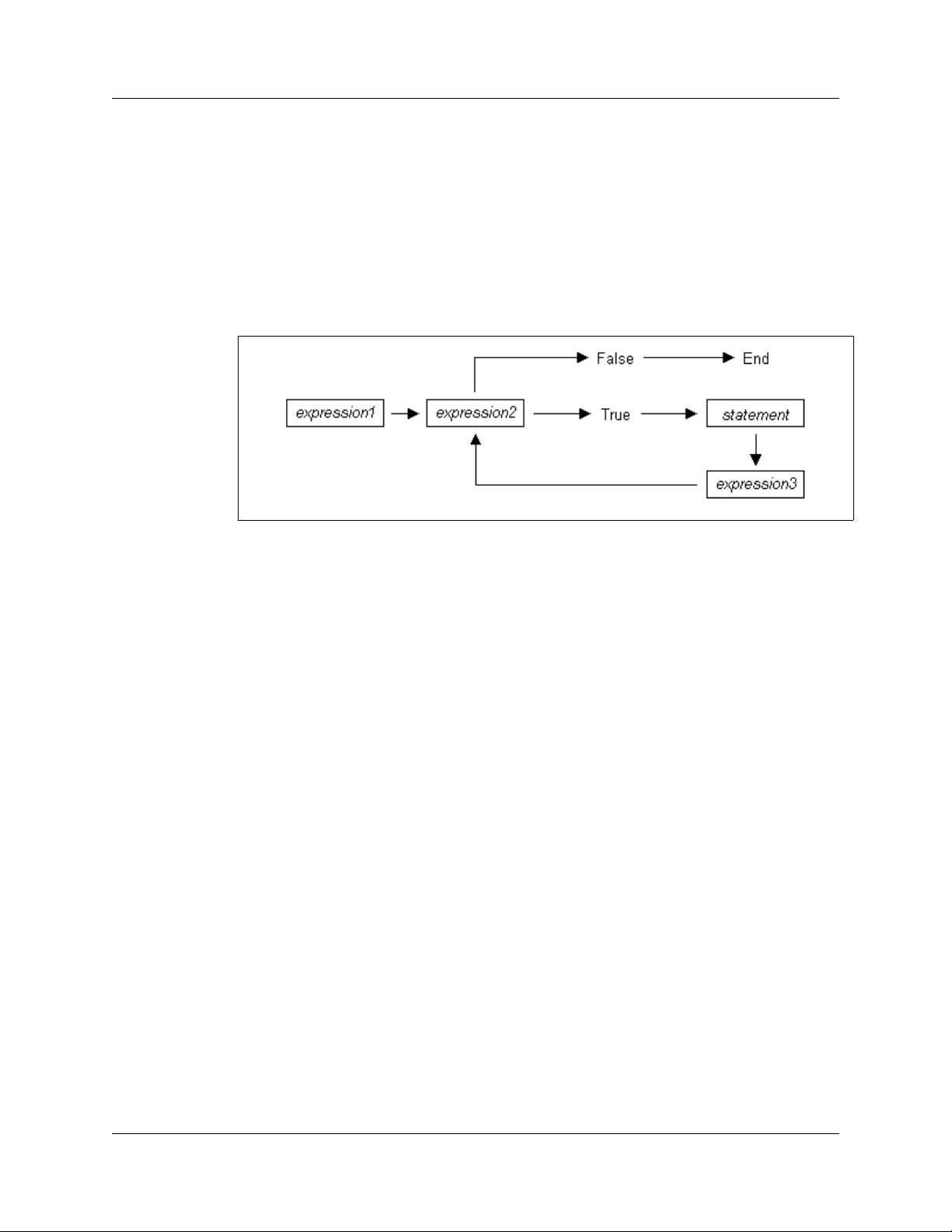
for (<ex
pression1>; <expression2>; <expression3>) <statement>
The first expression initializes, or sets, the starting value for x.
before the loop begins. The second expression is a conditional expression. It determines
whether the loop continues. If it evaluates true, the function keeps executing and
proceeds to the statement. If it evaluates false, the loop ends. The third expression is
executed after every iteration of the statement.
Figure 7.1 Execution of a for S
The example
str = "";
for ( x = 2; x < 5; x = x + 1 ) str += FormatEx ( "%d", x );
would output
str == "234"
The example above works out like this: the expression x = 2 is executed. The value of
is passed to x < 5
x
FormatEx ( "%x", 1 ) is performed, causing "2" to be
third expression is executed, and the value of x is increased to 3. Now, x < 5 is
xecuted again, and is again true, so the FormatEx statement is executed, causing "3"
e
concatenated to str. The third expression increases the value of x to 4; 4 < 5 is
to be
ue, so "4" is concatenated to str. Next, the value of x increases to 5. 5 < 5 is no
tr
so the loop ends.
, resulting in 2 < 5. This evaluates to true, so the statement
tatement
It is executed one time,
concatenated to str. Next, the
t true,
LeCroy Corporation 23
Page 30

Chapter 7: Statements File-based Decoding User Manual
7.6 return Statements
Every function returns a value, which is usually designated in a return statement. A
return statement returns the value of an expression to the calling environment. It uses
the following form:
return <expression>;
An example of a return statement and its calling environment is
str = FormatEx ( "%s", HiThere() );
...
HiThere()
{
return "Hi there";
}
The call to the function FormatEx causes the function HiThere() to be executed.
HiThere() returns the string “Hi there” as its value. This value is passed to the calling
environment (
A return statement also causes a function to stop executing. Any statements that come
after the
program back to the calling environment. As a result,
str = FormatEx ( "%s", HiThere() );
...
HiThere()
{
}
FormatEx), causing “Hi there” to be assigned to str.
return statement are ignored, because return transfers control of the
a = "Hi there";
return a;
b = "Goodbye";
return b;
results in only “Hi there” getting assigned to str. Because when return a; is
encountered, execution of the function terminates, and the second return statement
(
return b;) is never processed.
24 LeCroy Corporation
Page 31

File-based Decoding User Manual Chapter 7: Statements
However,
str = FormatEx ( "%s", HiThere() );
...
HiThere()
{
a = "Hi there";
b = "Goodbye";
if ( 3 != 3 ) return a;
else return b;
}
results in "Goodbye" getting assigned to str, because the if statement evaluates to
false. This causes the first
executing with the
argument to
else statement, thereby returning the value of b to be used as an
FormatEx.
return statement to be skipped. The function continues
LeCroy Corporation 25
Page 32

Chapter 7: Statements File-based Decoding User Manual
7.7 Compound Statements
A compound statement, or statement block, is a group of one or more statements that
is treated as a single statement. A compound statement is always enclosed in
curly
braces ( {} ). Each statement within the curly braces is followed by a semicolon;
however, a semicolon is not used following the closing curly brace.
The syntax for a compound statement is
{
<first_statement>;
<second_statement>;
...
<last_statement>;
}
An example of a compound statement is
{
x = 2;
x + 3;
}
It's also possible to nest compound statements, like so:
{
x = 2;
{
y = 3;
}
x + 3;
}
Compound statements can be used anywhere that any other kind of statement can be
used.
str = "";
if (3 && 3)
{
result = "True!";
str = FormatEx ( "%s", result );
}
Compound statements are required for function declarations and are commonly used in
if, if-else, while, and for statements.
26 LeCroy Corporation
Page 33

File-based Decoding User Manual Chapter 8: Preprocessing
Chapter 8: Preprocessing
The preprocessing command %include can be used to insert the contents of a file into
a script. It has the effect of copying and pasting the file into the code. Using
allows the user to create modular script files that can then be incorporated into a script.
This way, commands can easily be located and reused.
The syntax for %include is this:
%include “includefile.inc”
The quotation marks around the filename are required, and by convention, the included
file has a
The filenames given in the include directive are always treated as being relative to the
current file being parsed. So, if a file is referenced via the preprocessing command in a
.dec file, and no path information is provided (
application tries to load the file from the current directory. If there is no such file in the
current directory, the application tries to load the file from the \Scripts\Shared
directory.
Files that are in a directory one level up from the current file can be referenced using
.inc extension.
%include “file.inc”), the
“..\file.inc”, and likewise, files one level down can be referenced using the relative
pathname (
using a full pathname, such as
“directory\file.inc”). Last but not least, files can also be referred to
“C:\global_scripts\include\file.inc”.
%include
LeCroy Corporation 27
Page 34

Chapter 8: Preprocessing File-based Decoding User Manual
28 LeCroy Corporation
Page 35

File-based Decoding User Manual Chapter 9: Context
Chapter 9: Context
The context is the mechanism by which transaction data is passed in and out of the
scripts. There is an output context that is modified by the script, and there are possibly
multiple input contexts that the script is invoked on separately.
A context serves two roles: It functions as a symbol table whose values are local to a
particular transaction, and it functions as an interface to the application.
Two keywords are used to reference symbols in the context: in and out. Dot notation is
used to specify a symbol within a context:
out.symbol = "abcd";
out.type = in.type;
The output context can be read and written to, but the input context can only be read.
Context symbols follow the same rules as local variables: they are created on demand,
and uninitialized symbols always evaluate to null.
LeCroy Corporation 29
Page 36

Chapter 9: Context File-based Decoding User Manual
30 LeCroy Corporation
Page 37

File-based Decoding User Manual Chapter 10: Functions
Chapter 10: Functions
A function is a named statement or a group of statements that are executed as one unit.
All functions have names. Function names must contain only alphanumeric characters
and the underscore (
A function can have zero or more parameters, which are values that are passed to the
function statement(s). Parameters are also known as arguments. Value types are not
specified for the arguments or return values. Named arguments are local to the function
body, and functions can be called recursively.
The syntax for a function declaration is
name(<parameter1>, <parameter2>, ...)
{
<statements>
}
The syntax to call a function is
name(<parameter1>, <parameter2>, ...)
So, for example, a function named add can be declared like this:
add(x, y)
{
return x + y;
}
_ ) character, and they cannot begin with a number.
and called this way:
add(5, 6);
This would result in a return value of 11.
Every function returns a value. The return value is usually specified using a return
statement, but if no
last statement executed.
Arguments are not checked for appropriate value types or number of arguments when a
function is called. If a function is called with fewer arguments than were defined, the
specified arguments are assigned, and the remaining arguments are assigned to null. If
a function is called with more arguments than were defined, the extra arguments are
ignored. For example, if the function
add(1);
the parameter x is assigned to 1, and the parameter y is assigned to null, resulting in a
return value of 1. But if
add(1, 2, 3);
x is assigned to 1, y to 2, and 3 is ignored, resulting in a return value of 3.
return statement is specified, the return value is the value of the
add is called with just one argument
add is called with more than two arguments
LeCroy Corporation 31
Page 38

Chapter 10: Functions File-based Decoding User Manual
All parameters are passed by value, not by reference, and can be changed in the function
body without affecting the values that were passed in. For instance, the function
add_1(x, y)
{
x = 2;
y = 3;
return x + y;
}
reassigns parameter values within the statements. So,
a = 10;
b = 20;
add_1(a, b);
has a return value of 5, but the values of a and b is not changed.
The scope of a function is the file in which it is defined (as well as included files), with the
exception of primitive functions, whose scopes are global.
Calls to undefined functions are legal, but always evaluate to null and result in a compiler
warning.
32 LeCroy Corporation
Page 39

File-based Decoding User Manual Chapter 11: Primitives
Chapter 11: Primitives
Primitive functions are called similarly to regular functions, but they are implemented
outside of the language. Some primitives support multiple types for certain arguments,
but in general, if an argument of the wrong type is supplied, the function returns null.
11.1 General Primitives
Call()
Call( <function_name string>, <arg_list list> )
Default
Parameter Meaning
Value Comments
function_name str
arg_list li
Support
Supported by all LeCroy analyzers.
Return value
Same as that of the func
Comments
Calls a function whose name matches the function_name parameter. All scope rules
pply normally. Spaces in the function_name parameter are interp
a
(underscore) character since function names cannot contain spaces.
Example
is equivalent to:
st Used as the list of parameters in the function
Call("Format", ["the number is %d", 10]);
Format("the number is %d", 10);
ing
call.
tion that is called.
reted as the ‘_’
LeCroy Corporation 33
Page 40

Chapter 11: Primitives File-based Decoding User Manual
Format()
Format (<format string>, <value string or integer>)
Default
Parameter Meaning
Value Comments
format str
value string or int
ing
eger
Support
Supported by all LeCroy analyzers.
Return value
None.
Comments
Format is used to control the way that arguments pr
int out. The format string may contain
conversion specifications that affect the way in which the arguments in the value string
are returned. Format conversion characters, flag characters, and field width modifiers are
used to define the conversion specifications.
Example
Format("0x%02X", 20);
would yield the string 0
x14.
Format can only handle one value at a time, so
Format("%d %d", 20, 30);
would not work properly. Furthermore, types that
do not match what is specified in the
format string yields unpredictable results.
34 LeCroy Corporation
Page 41

File-based Decoding User Manual Chapter 11: Primitives
Format Conversion Characters
These are the format conversion characters used in CSL:
Code Type Output
c
d
i
o
u
x
X
s
Integer Character
Integer Signed decimal integer.
Integer Signed decimal integer
Integer Unsigned octal integer
Integer Unsigned decimal integer
Integer Unsigned hexadecimal integer, using "abcdef."
Integer Unsigned hexadecimal integer, using "ABCDEF."
String String
A conversion specification begins with a percent sign (%) and ends with a conversion
character. The following optional items can be included, in order, between the % and the
conversion character to further control argument formatting:
• Flag characters are used to further specify the formatting. There are five flag
aracters:
ch
• A minus sign (-) causes an argument to be left-aligned in its field. Without the
minus sign, the default position of the argument is right-aligned.
• A plus sign (+) inserts a plus sign (+) before a positive signed integer. This
only works with the conversion characters d and i.
• A space inserts a space before a positive signed integer. This only works with
the conversion characters d and i. If both a space and a plus sign are used,
the space flag is ignored.
• A hash mark (#) prepends a 0 to an octal number when used with the
conversion character o. If # is used with x or X, it prepends 0x or 0X to a
hexadecimal number.
•A zero (0) pads the field with zeros instead of with spaces.
• Field width specification is a positive integer that defines the field width, in spaces,
of the converted argument. If the number of characters in the argument is smaller
than the field width, then the field is padded with spaces. If the argument has more
characters than the field width has spaces, then the field expands to accommodate
the argument.
LeCroy Corporation 35
Page 42

Chapter 11: Primitives File-based Decoding User Manual
FormatEx()
FormatEx (<format_string string>, <arg_list list>)
Default
Parameter Meaning
format_string string
arg_list list Used as the list of parameters in the
Support
Supported by all LeCroy analyzers.
Return value
Formatted string.
Comments
FormatEx
writes data to a string.
Example
str = "String";
i = 12;
hex_i = 0xAABBCCDD;
...
formatted_str = FormatEx( "%s, %d, 0x%08X", str, i, hex_i );
# formatted_str = "String, 12, 0xAABBCCDD"
Value Comments
function
call.
36 LeCroy Corporation
Page 43

File-based Decoding User Manual Chapter 11: Primitives
Format Conversion Characters
These are the format conversion characters used in CSL:
Code Ty pe Output
c
d
i
o
u
x
X
s
Integer Character
Integer Signed decimal integer.
Integer Signed decimal integer
Integer Unsigned octal integer
Integer Unsigned decimal integer
Integer Unsigned hexadecimal integer, using "abcdef."
Integer Unsigned hexadecimal integer, using "ABCDEF."
String String
A conversion specification begins with a percent sign (%) and ends with a conversion
character. The following optional items can be included, in order, between the % and the
conversion character to further control argument formatting:
• Flag characters are used to further specify the formatting. There are five flag
aracters:
ch
• A minus sign (-) causes an argument to be left-aligned in its field. Without the
minus sign, the default position of the argument is right-aligned.
• A plus sign (+) inserts a plus sign (+) before a positive signed integer. This
only works with the conversion characters d and i.
• A space inserts a space before a positive signed integer. This only works with
the conversion characters d and i. If both a space and a plus sign are used,
the space flag is ignored.
• A hash mark (#) prepends a 0 to an octal number when used with the
conversion character o. If # is used with x or X, it prepends 0x or 0X to a
hexadecimal number.
•A zero (0) pads the field with zeros instead of with spaces.
• Field width specification is a positive integer that defines the field width, in spaces,
of the converted argument. If the number of characters in the argument is smaller
than the field width, then the field is padded with spaces. If the argument has more
characters than the field width has spaces, then the field expands to accommodate
the argument.
LeCroy Corporation 37
Page 44

Chapter 11: Primitives File-based Decoding User Manual
Resolve()
Resolve( <symbol_name string> )
Default
Parameter Meaning
Value Comments
symbol_name str
Support
Supported by all LeCroy analyzers.
Return value
The value of the symbol. Returns null if
Comments
Attempts to resolve the value of a symbol. Ca
symbols. Spaces in the symbol_name parameter are interpreted as the ‘_’ (underscore)
aracter since symbol names cannot contain spaces.
ch
Example
a = Resolve( "symbol" );
is equivalent to:
a = symbol;
ing
the symbol is not found.
n resolve global, constant and local
38 LeCroy Corporation
Page 45

File-based Decoding User Manual Chapter 11: Primitives
11.2 Data Manipulation Primitives
GetBitOffset()
GetBitOffset()
Default
Parameter Meaning
N/A
Support
Supported by all LeCroy analyzers.
Return value
None.
Comments
Returns the current bit offset that is used in NextNBits or PeekNBits.
Va
lue Comments
Example
raw = 'F0F0';# 1111000011110000 binary
result1 = GetNBits ( raw, 2, 4 );
result2 = PeekNBits(5);
result3 = NextNBits(2);
offset = GetBitOffset();
The example results in:
offset == 8
LeCroy Corporation 39
Page 46

Chapter 11: Primitives File-based Decoding User Manual
GetNBits()
GetNBits (<bit_source list or raw>,
<bit_offset integer>, <bit_count integer>)
Default
Parameter Meaning
Value Comments
bit_source li
or integer
bit_offset in
bit_count integer Number of bits to
st, raw,
teger Index of bit to start
reading from
read
Can be an integer value (4 bytes) or a list of
integers that are interpreted as bytes.
Support
Supported by all LeCroy analyzers.
Return value
None.
Comments
Reads bit_count bits from bit_source starting at bit_offset. Returns null if
bit_offset + bit_count exceeds the number of bits in bit_source. If bit_count
is 32 or
less, the result is returned as an integer. Otherwise, the result is returned in a list
format that is the same as the input format. GetNBits also sets up the bit data source
d global bit offset used by NextNBits and PeekNBits.
an
Note that bits are indexed
starting at bit 0.
Example
raw = 'F0F0'; # 1111000011110000 binary
result = GetNBits ( raw, 2, 4 );
The return value is given in hexadecimal, so in binary it is 1100.The function returns:
C
A call to GetNBits, starting at bit 2, reads 4 bits (1100), and returns the value 0xC.
40 LeCroy Corporation
Page 47

File-based Decoding User Manual Chapter 11: Primitives
NextNBits()
NextNBits (<bit_count integer>)
Default
Parameter Meaning
Value Comments
bit_count in
teger
Support
Supported by all LeCroy analyzers.
Return value
None.
Comments
Reads bit_count bits from the data source specified in the last call to GetNBits,
arting after the last bit that the previous call to GetNBits or NextNBits returned. If
st
d without a previous call to GetNBits, the result is undefined.
calle
Note that bits are
indexed starting at bit 0.
Example
raw = 'F0F0';# 1111000011110000 binary
result1 = GetNBits ( raw, 2, 4 );
result2 = NextNBits(5);
result3 = NextNBits(2);
This results in:
result1 == C
result2 == 7
result3 == 2
A call to GetNBits, starting at bit 2, reads 4 bits (1100), and returns the value 0xC.
A first call to NextNBits, starting at bit 6, reads 5 bits (00111), and returns the value 0x7.
A second call to NextNBits, starting at bit 11 (= 6 + 5), reads 2 bits (10), and returns the
value 0x2.
LeCroy Corporation 41
Page 48

Chapter 11: Primitives File-based Decoding User Manual
PeekNBits()
PeekNBits(<bit_count integer>)
Default
Parameter Meaning
Value Comments
bit_count in
Support
Supported by all LeCroy analyzers.
Return value
None.
Comments
Reads bit_count bits from the data source. The difference between PeekNBits and
NextNBits is that PeekNBits does not advance the global bit offset. PeekNBits can
e used to make decisions about how to parse the next fields without affecting
b
subsequent calls to NextNBits. If PeekNBits is called without a prior call to
GetNBits, the result is undefined. No
Example
raw = 'F0F0';# 1111000011110000 binary
result1 = GetNBits ( raw, 2, 4 );
result2 = PeekNBits(5);
result3 = NextNBits(2);
This results in:
result1 == C
result2 == 7
result3 == 0
teger
te that bits are indexed starting at bit 0.
A call to GetNBits, starting at bit 2, reads 4 bits (1100), and returns the value 0xC.
A call to PeekNBits, starting at bit 6, reads 5 bits (00111), and returns the value 0x7.
A call to NextNBits, starting at bit 6, reads 2 bits (00), and returns the value 0x0.
42 LeCroy Corporation
Page 49

File-based Decoding User Manual Chapter 11: Primitives
11.3 List Manipulation Primitives
RemoveAt()
RemoveAt( <list_object list, index integer> )
Default
Parameter Meaning
Va
lue Comments
list_object li
index in
Support
Supported by all LeCroy analyzers.
Return value
Removed element if the specified index is less th
otherwise null value is returned.
Comments
This function removes an element in a list at a given index.
Example
list = [0, 1, 2, 3];
list += 4;
list += 5;
SetAt( list, 8, 15, 0xAA ); # now list = [ 0, 1, 2, 3, 4, 5,
0xAA, 0x
removed_Item = RemoveAt( list, 6 );
removed_Item = RemoveAt( list, 6 ); # now list = [ 0, 1, 2, 3,
4, 5, 15
# removed_Item = 0xAA
st
teger
an or equal to the list upper bound,
AA, 15];
];
LeCroy Corporation 43
Page 50

Chapter 11: Primitives File-based Decoding User Manual
SetAt()
RemoveAt( <list_object list, index integer> )
Default
Parameter Meaning
Value Comments
list_object li
index in
st
teger
Support
Supported by all LeCroy analyzers.
Return value
None.
Comments
This function sets up an element in a list at a giv
en index and fills up the list with new
elements.
Example
list = [0, 1, 2, 3];
list += 4;
list += 5;
SetAt( list, 8, 15, 0xAA ); # now list = [ 0, 1, 2, 3, 4, 5,
0xAA, 0x
AA, 15];
...
list = [ 0,1, 2, 3 ];
SetAt( list, 6, 15 ); # now list = [ 0,1, 2, 3, null, null, 15 ];
44 LeCroy Corporation
Page 51

File-based Decoding User Manual Chapter 11: Primitives
11.4 Transaction Decoder Primitives
Abort()
Abort()
Default
Parameter Meaning
N/A
Support
Supported by Bluetooth and Firewire analyzers only.
Return value
An integer that should be passed back to the application unchanged.
Comments
Called when an input context renders the currently pending transaction done, but is not
self a member of that transaction. An example would be an input transaction that
it
represents some sort of reset condition that renders all pending transactions invalid. The
input transaction is not consumed by this action and goes on to be considered for other
pending transactions.
Va
lue Comments
Example
if ( IsReset )
return Abort();
LeCroy Corporation 45
Page 52

Chapter 11: Primitives File-based Decoding User Manual
AddEvent()
AddEvent(<Group string>, <Value string> )
Default
Parameter Meaning
Value Comments
Group str
Value string Value associated
ing Name of the group Corresponds to the name of a field that
might be encountered while decoding.
Corresponds to a field value that might be
wi
th the group
encountered while parsing.
Support
Supported by Bluetooth and Firewire analyzers only.
Return value
None.
Comments
Events are used for transaction searching and fo
r transaction summary. This function is
only effective when called during the ProcessData() phase of decoding. Event groups
d values are stored globally for transaction levels and new ones are created as they
an
are encountered. Each transaction contains information as to which events were
associated with it.
Example
AddEvent( "DataLength", Format( "%d",
out.DataLength ));
46 LeCroy Corporation
Page 53

File-based Decoding User Manual Chapter 11: Primitives
Complete()
Complete()
Default
Parameter Meaning
Support
Supported by Bluetooth and Firewire analyzers only.
Return value
An integer that should be passed back to the application unchanged.
Comments
This should be called when it has been decided that an input context has been accepted
to a transaction, and that the transaction is complete. The return value of this function
in
should be passed back to the application from the ProcessData function. This function
uld be used to associate the input context with the output context.
co
Example
if ( done )
return Complete();
Value Comments
LeCroy Corporation 47
Page 54

Chapter 11: Primitives File-based Decoding User Manual
Pending()
Pending()
Default
Parameter Meaning
Support
Supported by Bluetooth and Firewire analyzers only.
Return value
An integer that should be passed back to the application unchanged.
Comments
This should be called when it has been decided that an input context has been accepted
into a transac
function could be used to associate input contexts with the output context. The return
value of this function should be returned to the application in the ProcessData function.
Example
if ( done )
return Complete();
else return Pending();
tion, but that the transaction still requires further input to be complete. This
Value Comments
48 LeCroy Corporation
Page 55

File-based Decoding User Manual Chapter 11: Primitives
Reject()
Reject()
Default
Parameter Meaning
Support
Supported by Bluetooth and Firewire analyzers only.
Return value
An integer that should be passed back to the application unchanged.
Comments
Called when it is decided that the input context do
of the current transaction. The output context should not be modified before this decision
is made. The return value of this function should be returned by the ProcessData
tion.
func
Example
if ( UnknownValue )
return Reject();
Value Comments
es not meet the criteria for being a part
LeCroy Corporation 49
Page 56

Chapter 11: Primitives File-based Decoding User Manual
11.5 Display Primitives
AddCell()
AddCell(<name string>, <value string>, <description
string or null>, <color integer or list>,
<additional_info any>)
Parameter Meaning Default Value Comments
name str
value string Displays in the value field of the cell.
description str
null
color int
additional_info an
ing Displays in the name field of the cell.
ing or
eger or list If not specified,
a default color
is used
y Used to create special cells or to modify cell
Displays in tool tip.
Color can be specified as either a packed
color value in an integer or as an array of
RGB values ranging from 0-255.
Displays in the name field of the cell.
attributes.
The values are predefined constants, and
ze
ro or more of them may be used at one
time.
Possible values are:
_COLLAPSED
_ERROR
_EXPANDED
[_FIXEDWIDTH, w]
_HIDDEN
_MONOCOLOR
_MONOFIELD
_SHOWN (default)
_WARNING
Support
Supported by all LeCroy analyzers.
Return value
None.
Comments
Adds a display cell to the current output context. Cells are displayed in the order that they
re added. The name and value strings are displayed directly in the cell.
a
50 LeCroy Corporation
Page 57
File-based Decoding User Manual Chapter 11: Primitives
Example
# Create a regular cell named Normal with a value "Cell" and
tool tip "Normal cell":
AddCell( "Normal", "Value1", "Normal cell" );
# Use the _MONOCOLOR value in the additional_info parameter to
create a cell with
a color value of 0x881122 in both the name
and value fields:
AddCell( "MonoColor", "Value2", "MonoColor cell", 0x881122,
_MONOCOL
OR );
# Use the _MONOFIELD value to create a cell with only a name
field:
AddCell( "MonoField", "Value3", "MonoField cell", [255, 200,
200], _M
ONOFIELD );
# Use the _ERROR value to create a cell with a red value field:
AddCell( "Error", "Value4", "Error cell", 0xcc1155, _ERROR );
# Use the _WARNING value to create a cell with a yellow value
field:
AddCell( "Warning", "Value5", "Warning cell", 0x00BB22,
_WARNING
);
# Use the [_FIXEDWIDTH, w] value to create a cell with a fixed
width of 20 in
conjuction with the error value to create a fixed
width cell with a red value field:
AddCell( "Fixed Width 20", "Value6", "Fixed Width and Error
cell", 0
x001122, [_FIXEDWIDTH, 20], _ERROR );
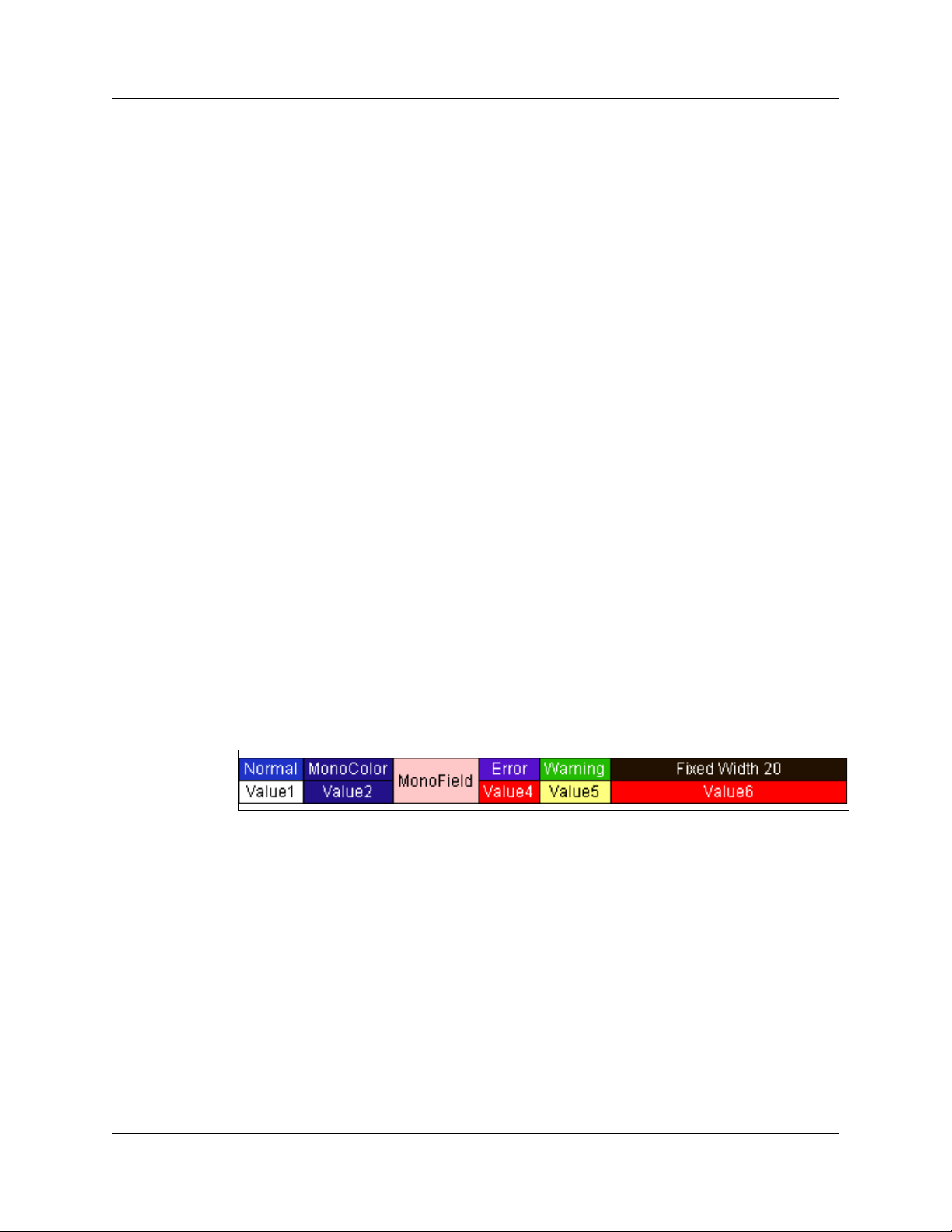
The output of the example is:
Figure 11.1 Example: Output for AddCell
LeCroy Corporation 51
Page 58

Chapter 11: Primitives File-based Decoding User Manual
AddDataCell()
AddDataCell(<data_value raw, list or integer>,
<additional_info any>, ...)
Default
Parameter Meaning
Value Comments
data_value raw
integer
additional_info an
, list, or
y Used to create special cells or to modify cell
Interpreted the same way as GetNBits
interprets data_source
attributes.
Possible values are:
_BYTES
_COLLAPSED
_DWORDS
_EXPANDED
_HIDDEN
_SHOWN (default)
Support
Supported by all LeCroy analyzers.
Return value
None.
Comments
Creates an expandable/collapsible cell for viewing raw dat
a such as data payloads. Data
can be raw bytes, an integer, or a list. If an integer is used, it is interpreted as 4 bytes of
data. Specifying _BYTES or _DWORDS in an additional_info field forces data to be
terpreted as bytes or quadlets. _COLLAPSED, _EXPANDED, _HIDDEN and _SHOWN are
in
ll interpreted the same is in a regular AddCell call.
a
52 LeCroy Corporation
Page 59
File-based Decoding User Manual Chapter 11: Primitives
Example
# Creates a data cell with 2 dwords (32-bit integers) of data.
AddDataCell( '0123456789ABCDEF', _DWORDS );
# Creates a data cell with 4 bytes. Integer data values are
always i
nterpreted as 32 bits of data.
AddDataCell( 0x11223344, _BYTES );
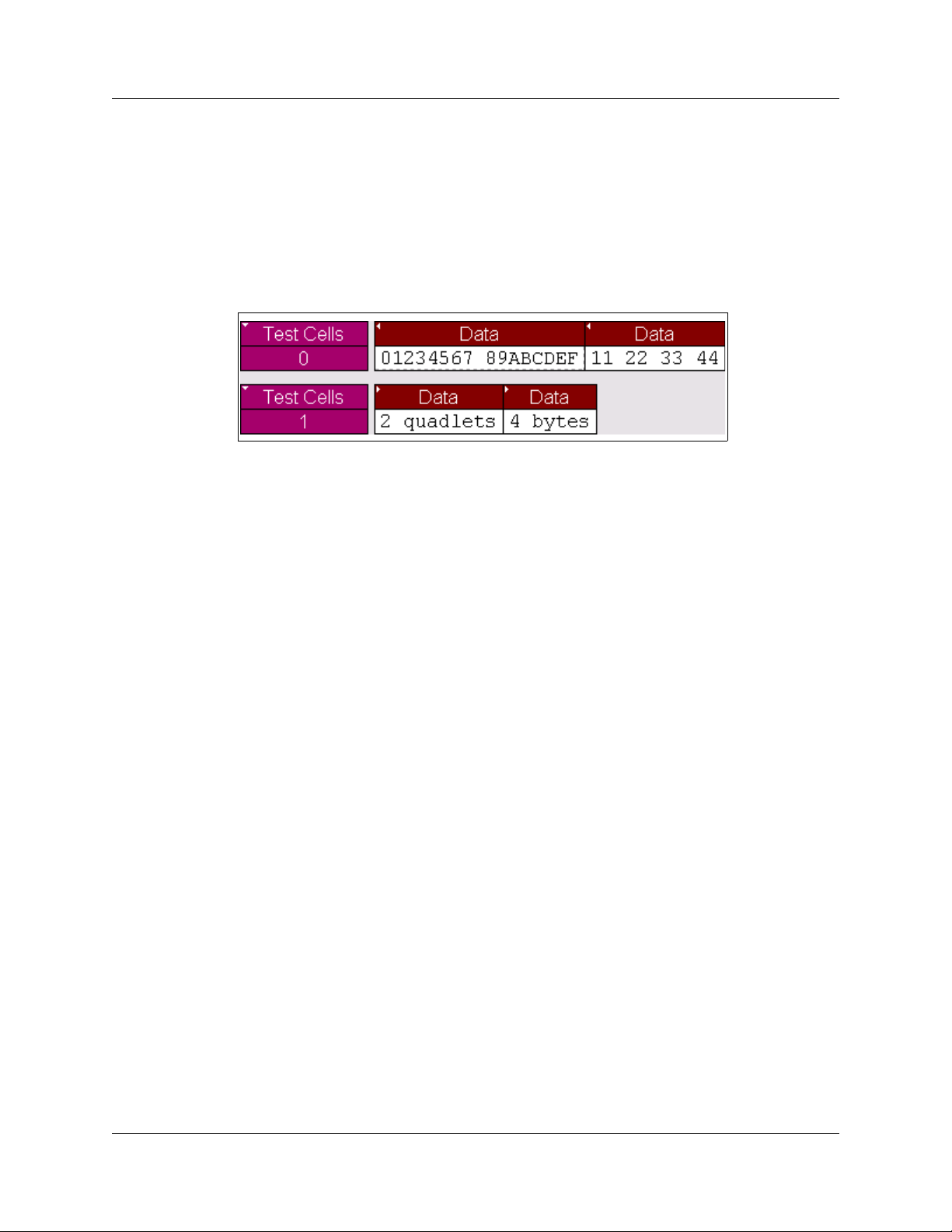
The output of the example is:
Figure 11.2 Example: Output for AddDataCell
LeCroy Corporation 53
Page 60

Chapter 11: Primitives File-based Decoding User Manual
AddSeparator()
AddSeparator(<additional_info any>, ...)
Default
Parameter Meaning
Value Comments
additional_info an
y Used to create special cells or to modify cell
attributes.
The values are predefined constants.
Possible values are:
_COLLAPSED
_EXPANDED
_HIDDEN
_SHOWN (default)
Support
Supported by all LeCroy analyzers.
Return value
None.
Comments
Creates a separator cell. _COLLAPSED, _EXPANDED, _HIDDEN, and _SHOWN are all
terpreted the same is in a regular AddCell call.
in
Example
AddCell( "Stuff", "Things" );
# AddSeparator adds a space between the previous and subsequent
cells.
AddSeparator();
AddCell( "More stuff", "More things" );
The output of the example is:
Figure 11.3 Example: Separator Cell
54 LeCroy Corporation
Page 61

File-based Decoding User Manual Chapter 11: Primitives
BeginCellBlock()
BeginCellBlock(<name string>, <value string>,
<description string or null>, <color integer or list>,
<additional_info any>)
Parameter Meaning Default Value Comments
name str
value string Displays in the value field of the cell.
description str
null
color int
additional_info an
ing Displays in the name field of the cell.
ing or
eger or list If not specified,
a default color
is used
y Used to create special cells or to modify cell
Displays in tool tip.
Color can be specified as either a packed
color value in an integer or as an array of
RGB values ranging from 0-255.
Displays in the name field of the cell.
attributes.
The values are predefined constants, and
ze
ro or more of them may be used at one
time.
Possible values are:
[_BLOCKNAME, x]
_COLLAPSED
_ERROR
_EXPANDED
[_FIXEDWIDTH, w]
_HIDDEN
_MONOCOLOR
_MONOFIELD
_SHOWN (default)
_WARNING
Support
Supported by all LeCroy analyzers.
Return value
None.
Comments
Begins a cell block and adds a block header cell.
This is a special cell that can be
collapsed and expanded. The collapsed/expanded state of this cell affects cells in the
group according to their _COLLAPSED, _EXPANDED attributes. All calls to AddCell after
to BeginCellBlock() put the new cells into this group until a call to
a call
EndCell
Block is made.
Cell blocks can be nested.
LeCroy Corporation 55
Page 62

Chapter 11: Primitives File-based Decoding User Manual
Example
# Begin the 'red' group. For clarity these cells are red:
BeginCellBlock( "Red Group", null, null, 0x0000ff, _MONOFIELD
);
# This cell is displayed when the red group is in the expanded
state:
AddCell( "Red is", "Expanded", null, 0x0000ff, _EXPANDED );
# This cell is displayed when the red group is collapsed:
AddCell( "Red is", "Collapsed", null, 0x0000ff, _COLLAPSED );
# This begins the nested blue group. Nothing in the blue group
is displayed unless the red group is expanded:
BeginCellBlock( "Blue Group", null, null, 0xff0000, _MONOFIELD,
_EXPANDED, [_BLOCKNAME, "BlockName"] );
# This cell is only displayed when the blue group is visible
and expanded:
AddCell( "Blue is", "Expanded", null, 0xff0000, _EXPANDED );
# This cell is also only displayed when the blue group is
visible and expanded:
AddCell( "Blue", "Too", null, 0xff0000, _EXPANDED );
# This cell is only displayed when the blue group is visible
and collapsed:
AddCell( "Blue is", "Collapsed", null, 0xff0000, _COLLAPSED );
# This ends the blue group.
EndCellBlock();
# Cells with the _SHOWN attribute are always displayed. This is
the default:
AddCell( "Always", "Shown", null, 0x0000ff, _SHOWN );
# This cell is never displayed. In a real script this would be
driven by a variable:
AddCell( "Never", "Shown", null, 0x0000ff, _HIDDEN );
# This ends the red group.
EndCellBlock();
56 LeCroy Corporation
Page 63
File-based Decoding User Manual Chapter 11: Primitives
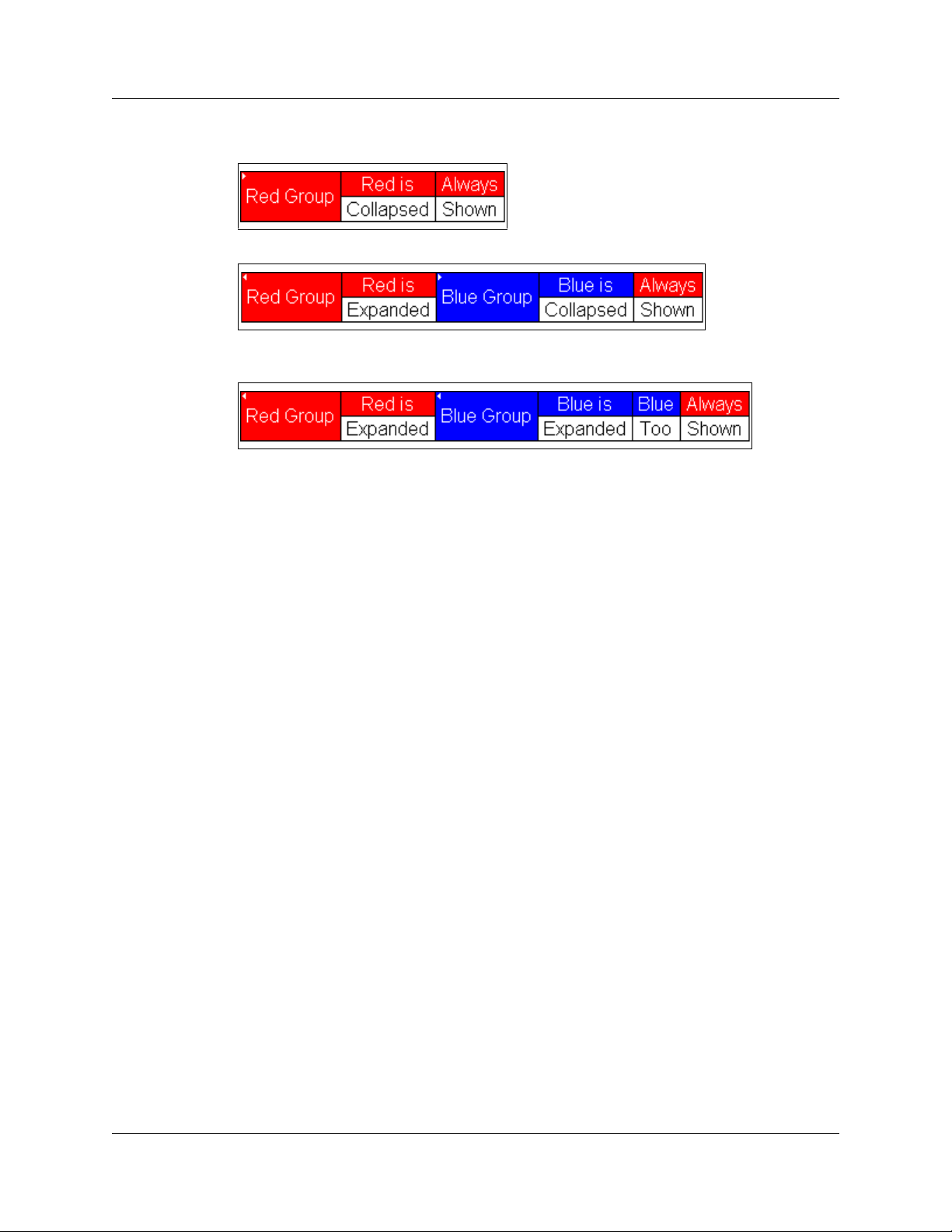
The output of the example is:
Figure 11.4 Example: Output for BeginCellBlock with Red Group Collapsed
Figure 11.5 Example: Output for BeginCellBlo
Blue Group Collapsed
Figure 11.6 Example: Output for BeginCellBlo
Blue Group Expanded
ck with Red Group Expanded and
ck with Red Group Expanded and
LeCroy Corporation 57
Page 64

Chapter 11: Primitives File-based Decoding User Manual
EndCellBlock()
EndCellBlock()
Default
Parameter Meaning
Support
Supported by all LeCroy analyzers.
Return value
None.
Comments
Ends a cell block that was started with Be
Example
See BeginCellBlock()
See BeginCellBlock().
.
Value Comments
ginCellBlock().
58 LeCroy Corporation
Page 65

File-based Decoding User Manual
Appendix A: PCI Express
The information in this appendix is specific to the PETracer™ analyzer.
It is divided into two parts:
• Modules
•
Decoder Script Files
A.1 Modules
Modules are a collection of functions and data dedicated to decoding a certain type of
transaction. Each module consists of one primary file (.dec), and possibly several
included files (.inc)
Module Function
A module function is used as an entry-point into a decoding module. It is called by the
application and used each time a transaction needs to be displayed.
ProcessData()
PETracer supports only the ProcessData() function. It is called with each packet of the
appropriate type with input context filled with data from that packet. It reports the amount
of processed data through the out.Decoded variable.
A.2 Decoder Script Files
PETracer includes the four script files in the \Scripts directory. You can use these files
as is or modify them.
To activate a script file, go to the las
reads: “set OutputType =”__IO”) and remove the underscore. For example:
set OutputType =”__IO”
Change to:
set OutputType =”IO”
Following is a list and brief summary of the decoder script files. The following sections
describe each file in greater detail.
Decoder Script File Function
cfg.dec Configuration data script decoder
io.dec IO data script decoder
mem.dec Memory data script decoder
msg.dec Message data script decoder
t line in the file (for example, in io.dec, the line
atomop.dec Atomic Operation data script decoder
LeCroy Corporation 59
Page 66

File-based Decoding User Manual
cfg.dec
Description: cfg.dec is a configuration data script decoder.
Input Data Fields
in.Channel: Direction of the traffic: 0 = Upstream, 1 = Downstream. The following
constants are defined for the possible values:
• _CHANNEL_UPSTREAM
• _CHANNEL_DOWNSTREAM
in.Speed: Speed of the traffic: 0 = 2.5 GT/s, 1 = 5.0 GT/s, 2 = 8.0 GT/s. The following
constants are defined for the possible values:
• _SPEED_GEN1
• _SPEED_GEN2
• _SPEED_GEN3
in.LinkWidth: LinkWidth of the traffic: 1, 2, 4, 8, 16. Represents the number of lanes on
the link.
in.Data: Data block to decode
in.DataLength: Length of data block in bytes
in.PrepareFldsForDlg: If not 0, means that script should prepare decoded fields for
presenting them in a special dialog.
in.Type: Request type:
• _TLP_TYPE_ID_CFGRD_0
• _TLP_TYPE_ID_CFGRD_1
• _TLP_TYPE_ID_CFGWR_0
• _TLP_TYPE_ID_CFGWR_1
in.FirstByteEnabled: Index of first enabled byte in data block
in.EnabledByteCount: Number of enabled bytes in data block
in.DeviceID: Device ID
in.Register: Configuration space address
in.TC: TC (Traffic Class) field of TLP header
in.Tag: Tag field of TLP header
in.RequesterID: RequesterID field of TLP header
in.Attr: Attr field of TLP header
in.Length: Length field of TLP header
in.TD: TD (Transport Digest) field of TLP header
in.EP: EP (End-to-end Poisoning) field of TLP header
in.CompleterID: ID of the completer that completed the transaction
in.HeaderData: Packet header data bytes, without any formatting or transformation.
This field is available on all levels: Packet, Link, Split, and NVM.
in.HeaderDataLength: Length of packet header data in bytes. This field is available on
all levels: Packet, Link, Split, and NVM.
Output Data Fields
out.Decoded: Amount of data (in bytes) that has been decoded
60 LeCroy Corporation
Page 67

File-based Decoding User Manual
io.dec
Description: io.dec is an IO data script decoder.
Input Data Fields
in.Channel: Direction of the traffic: 0 = Upstream, 1 = Downstream. The following
constants are defined for the possible values:
• _CHANNEL_UPSTREAM
• _CHANNEL_DOWNSTREAM
in.Speed: Speed of the traffic: 0 = 2.5 GT/s, 1 = 5.0 GT/s, 2 = 8.0 GT/s. The following
constants are defined for the possible values:
• _SPEED_GEN1
• _SPEED_GEN2
• _SPEED_GEN3
in.LinkWidth: LinkWidth of the traffic: 1, 2, 4, 8, 16. Represents the number of lanes on
the link.
in.Data: Data block to decode
in.DataLength: Length of data block in bytes
in.PrepareFldsForDlg: If not 0, means that script should prepare decoded fields for
presenting them in a special dialog.
in.Type: Request type:
• _TLP_TYPE_ID_IORD
• _TLP_TYPE_ID_IOWR
in.FirstByteEnabled: Index of first enabled byte in data block
in.EnabledByteCount: Number of enabled bytes in data block
in.Address: Address
in.TC: TC (Traffic class) field of TLP header
in.Tag: Tag field of TLP header
in.RequesterID: RequesterID field of TLP header
in.Attr: Attr field of TLP header
in.Length: Length field of TLP header
in.TD: TD (Transport Digest) field of TLP header
in.EP: EP (End-to-end Poisoning) field of TLP header
in.CompleterID: ID of the completer that completed the transaction
in.HeaderData: Packet header data bytes, without any formatting or transformation.
This field is available on all levels: Packet, Link, Split, and NVM.
in.HeaderDataLength: Length of packet header data in bytes. This field is available on
all levels: Packet, Link, Split, and NVM.
Output Data Fields
out.Decoded: Amount of data (in bytes) that has been decoded
set OutputType = "__IO"; # remove __ to use the script
LeCroy Corporation 61
Page 68

File-based Decoding User Manual
mem.dec
Description: mem.dec is a memory data script decoder.
Input Data Fields
in.Channel: Direction of the traffic: 0 = Upstream, 1 = Downstream. The following
constants are defined for the possible values:
• _CHANNEL_UPSTREAM
• _CHANNEL_DOWNSTREAM
in.Speed: Speed of the traffic: 0 = 2.5 GT/s, 1 = 5.0 GT/s, 2 = 8.0 GT/s. The following
constants are defined for the possible values:
• _SPEED_GEN1
• _SPEED_GEN2
• _SPEED_GEN3
in.LinkWidth: LinkWidth of the traffic: 1, 2, 4, 8, 16. Represents the number of lanes on
the link.
in.Data: Data block to decode
in.DataLength: Length of data block in bytes
in.PrepareFldsForDlg: If not 0, means that script should prepare decoded fields for
presenting them in a special dialog.
in.Type: Request type:
• _TLP_TYPE_ID_MRD32
• _TLP_TYPE_ID_MRDLK32
• _TLP_TYPE_ID_MWR32
• _TLP_TYPE_ID_MRD64
• _TLP_TYPE_ID_MRDLK64
• _TLP_TYPE_ID_MWR64
in.FirstByteEnabled: Index of first enabled byte in data block
in.EnabledByteCount: Number of enabled bytes in data block
in.AddressLo: Address[31:0]
in.AddressHi: Address[63:32]; only for:
• _TLP_TYPE_ID_MRD64
• _TLP_TYPE_ID_MRDLK64
• _TLP_TYPE_ID_MWR64
in.TC: TC (Traffic Class) field of TLP header
in.Tag: Tag field of TLP header
in.RequesterID: RequesterID field of TLP header
in.Attr: Attr field of TLP header
in.Length: Length field of TLP header
in.TD: TD (Transport Digest) field of TLP header
in.EP: EP (End-to-end Poisoning) field of TLP header
in.CompleterID: ID of the completer that completed the transaction
in.HeaderData: Packet header data bytes, without any formatting or transformation.
This field is available on all levels: Packet, Link, Split, and NVM.
in.HeaderDataLength: Length of packet header data in bytes. This field is available on
all levels: Packet, Link, Split, and NVM.
Output Data Fields
out.Decoded: Amount of data (in bytes) that has been decoded
62 LeCroy Corporation
Page 69

File-based Decoding User Manual
msg.dec
Description: msg.dec is a message data script decoder.
Input Data Fields
in.Channel: Direction of the traffic: 0 = Upstream, 1 = Downstream. The following
constants are defined for the possible values:
• _CHANNEL_UPSTREAM
• _CHANNEL_DOWNSTREAM
in.Speed: Speed of the traffic: 0 = 2.5 GT/s, 1 = 5.0 GT/s, 2 = 8.0 GT/s. The following
constants are defined for the possible values:
• _SPEED_GEN1
• _SPEED_GEN2
• _SPEED_GEN3
in.LinkWidth: LinkWidth of the traffic: 1, 2, 4, 8, 16. Represents the number of lanes on
the link.
in.Data: Data block to decode
in.DataLength: Length of data block in bytes
in.PrepareFldsForDlg: If not 0, means that script should prepare decoded fields for
presenting them in a special dialog.
in.Type: Request type:
• _TLP_TYPE_ID_IORD
• _TLP_TYPE_ID_IOWR
in.FirstByteEnabled: Index of first enabled byte in data block
in.EnabledByteCount: Number of enabled bytes in data block
in.MessageCode: Message code:
• _TLP_MSGCODE_ASSERT_INTA
• _TLP_MSGCODE_ASSERT_INTB
• _TLP_MSGCODE_ASSERT_INTC
• _TLP_MSGCODE_ASSERT_INTD
• _TLP_MSGCODE_DEASSERT_INTA
• _TLP_MSGCODE_DEASSERT_INTB
• _TLP_MSGCODE_DEASSERT_INTC
• _TLP_MSGCODE_DEASSERT_INTD
• _TLP_MSGCODE_PM_ACTIVESTATENAK
• _TLP_MSGCODE_PM_PME
•_TLP_MSGCODE_PM_TURNOFF
• _TLP_MSGCODE_PM_TOACK
• _TLP_MSGCODE_ERR_COR
• _TLP_MSGCODE_ERR_NONFATAL
• _TLP_MSGCODE_ERR_FATAL
LeCroy Corporation 63
Page 70

File-based Decoding User Manual
• _TLP_MSGCODE_UNLOCK
• _TLP_MSGCODE_SLOTPOWERLIMIT
• _TLP_MSGCODE_VENDOR0
• _TLP_MSGCODE_VENDOR1
• _TLP_MSGCODE_HP_ATTN_IND_ON
• _TLP_MSGCODE_HP_ATTN_IND_BLINK
• _TLP_MSGCODE_HP_ATTN_IND_OFF
• _TLP_MSGCODE_HP_POWER_IND_ON
• _TLP_MSGCODE_HP_POWER_IND_BLINK
• _TLP_MSGCODE_HP_POWER_IND_OFF
• _TLP_MSGCODE_HP_ATTN_BTN_PRESSED)
in.MessageRouting: Message routing:
• _TLP_MSGROUTE_TOROOTCOMPLEX
• _TLP_MSGROUTE_BYADDRESS
• _TLP_MSGROUTE_BYID
• _TLP_MSGROUTE_FROMROOTCOMPLEX
• _TLP_MSGROUTE_LOCALTERMRECEIVER
• _TLP_MSGROUTE_GATHERTOROOTCOMPLEX
• _TLP_MSGROUTE_RESERVED1TERMRECEIVER
• _TLP_MSGROUTE_RESERVED2TERMRECEIVER
in.AddressLo: Address [31:00] (if MessageRouting is
_TLP_MSGROUTE_BYADDRESS)
in.AddressHi: Address [63:32] (if MessageRouting is
_TLP_MSGROUTE_BYADDRESS)
in.DeviceID: Device ID (if MessageRouting is _TLP_MSGROUTE_BYID)
in.TC: TC (Traffic Class) field of TLP header
in.Tag: Tag field of TLP header
in.RequesterID: RequesterID field of TLP header
in.Attr: Attr field of TLP header
in.Length: Length field of TLP header
in.TD: TD (Transport Digest) field of TLP header
in.EP: EP (End-to-end Poisoning) field of TLP header
in.HeaderData: Packet header data bytes, without any formatting or transformation.
This field is available on all levels: Packet, Link, Split, and NVM.
in.HeaderDataLength: Length of packet header data in bytes. This field is available on
all levels: Packet, Link, Split, and NVM.
Output Data Fields
out.Decoded: Amount of data (in bytes) that has been decoded
64 LeCroy Corporation
Page 71

File-based Decoding User Manual
atomop.dec
Description: atomop.dec is an atomic operation data script decoder.
Input Data Fields
in.Channel: Direction of the traffic: 0 = Upstream, 1 = Downstream. The following
constants are defined for the possible values:
• _CHANNEL_UPSTREAM
• _CHANNEL_DOWNSTREAM
in.Speed: Speed of the traffic: 0 = 2.5 GT/s, 1 = 5.0 GT/s, 2 = 8.0 GT/s. The following
constants are defined for the possible values:
• _SPEED_GEN1
• _SPEED_GEN2
• _SPEED_GEN3
in.LinkWidth: LinkWidth of the traffic: 1, 2, 4, 8, 16. Represents the number of lanes on
the link.
in.Data: Data block to decode
in.DataLength: Length of data block in bytes
in.PrepareFldsForDlg: If not 0 (zero), means that script should prepare decoded fields
for presenting them in a special dialog.
in.Type: Request type:
• _TLP_TYPE_ID_FETCHADD32
• _TLP_TYPE_ID_FETCHADD64
• _TLP_TYPE_ID_SWAP32
• _TLP_TYPE_ID_SWAP64
• _TLP_TYPE_ID_CAS32
• _TLP_TYPE_ID_CAS64
in.FirstByteEnabled: Index of first enabled byte in data block
in.EnabledByteCount: Number of enabled bytes in data block
in.AddressLo: Address[31:0]
in.AddressHi: Address[63:32]; only for:
• _TLP_TYPE_ID_FETCHADD64
• _TLP_TYPE_ID_SWAP64
• _TLP_TYPE_ID_CAS64
in.TC: TC (Traffic Class) field of TLP header
in.Tag: Tag field of TLP header
in.RequesterID: RequesterID field of TLP header
in.Attr: Attr field of TLP header
in.Length: Length field of TLP header
in.TD: TD (Transport Digest) field of TLP header
in.EP: EP (End-to-end Poisoning) field of TLP header
LeCroy Corporation 65
Page 72

File-based Decoding User Manual
in.CompleterID: ID of the completer that completed the transaction
in.HeaderData: Packet header data bytes, without any formatting or transformation.
This field is available on all levels: Packet, Link, Split, and NVM.
in.HeaderDataLength: Length of packet header data in bytes. This field is available on
all levels: Packet, Link, Split, and NVM.
Output Data Fields
out.Decoded: Amount of data (in bytes) that has been decoded
66 LeCroy Corporation
Page 73

File-based Decoding User Manual
Appendix B: Bluetooth
The information in this appendix is specific to the Bluetooth analyzer.
B.1 Modules
Modules are collections of functions and global data dedicated to decoding a certain type
of transaction. Each module consists of one primary file (.dec), and possibly several
included files (.inc).
Module Functions
Three functions are used as entry-points into a decoding module. They are called by the
application and are used both in the initial transaction decoding phase and each time that
a transaction needs to be displayed.
ProcessData()
Called repeatedly with input contexts representing transactions of the specified input
types. Decides if input transaction is a member of this transaction or if it begins a new
transaction. This function is called first using incomplete output transactions. If the input
transaction is not accepted into any of the pending transactions, it is called with an empty
output transaction to see if it starts a new transaction.
CollectData()
Called with each input transaction that was previously accepted by the function
ProcessData. Generates all output context data that would be required for input into a
higher level transaction.
BuildCellList()
Called with the output context generated by the call to CollectData, and no input
context. This function is responsible for adding display cells based on the data collected
by
CollectData.
Note that there is some flexibility in the use of these functions. For example, if it is easier
for a particular protocol to build cells in
and
BuildCellList could be left empty. Another approach would be to have
ProcessData do everything (generate output data, and build cell lists) and then
implement
decoding phase but may reduce some repetition of code. These decisions are dependent
on the protocol to be decoded.
CollectData as a pass-thru to ProcessData. This is less efficient in the
CollectData, cells could be generated there,
LeCroy Corporation 67
Page 74

File-based Decoding User Manual
Module Data
There are several standard global variables that should be defined in a module which are
queried by the application to figure out what the module is supposed to do.
ModuleType
Required. A string describing the role of the script. Currently, only
Transaction Decoder is valid.
EXAMPLE
set ModuleType = "Transaction Decoder";
Note: The following applies to transaction decoding:
When a script is first invoked, it is given an input context that corresponds to a packet or
transaction that is a candidate for being a part of a larger transaction. The output context
is initially empty. It is the script's job to examine the input context and decide if it qualifies
for membership in the type of transaction that the script was designed to decode. If it
qualifies, the appropriate values are decoded and put in the output context symbol table,
and if the transaction is complete, it is done. If the transaction is not complete, the script
indicates this to the application based on its return value, and is invoked again with the
same output context, but a new input context. The script then must decide if this new
input context is a member of the transaction, and keep doing this until the transaction is
complete.
In order to accomplish all this, state information should be placed in the output context. It
should be possible to use the output context of one transaction as an input context to
another transaction.
OutputType
Required. A string label describing the output of the script. Example: AVC Transaction
EXAMPLE
set OutputType = "BNEP";
InputType
Required. A string label describing the input to the script. Input and output types should
be matched by the application in order to decide which modules to invoke on which
contexts.
EXAMPLE
set InputType = "L2CAP";
LevelName
Optional. A string that names this decoder.
EXAMPLE
set LevelName = "BNEP Transactions";
68 LeCroy Corporation
Page 75

File-based Decoding User Manual
DecoderDesc
Optional. A string that describes this decoder. Displays as a toolbar icon tool tip.
EXAMPLE
set DecoderDesc = "View Bluetooth Encapsulation Protocol
Layer";
Icon
Optional. File name of an icon to display on the toolbar. Must be a 19x19 pixel bitmap file.
EXAMPLE
set Icon = "bitmap.bmp";
LeCroy Corporation 69
Page 76

File-based Decoding User Manual
B.2 Input Context Data
The Merlin application decodes several layers of Bluetooth protocol and provides input
context as follows:
Packet Level
in.Data: Data block (packet payload) [null if no data in packet]
in.DataLength: Length of packet payload [null if no data in packet]
in.ScoData: SCO data block (voice) [null if no SCO data in packet]
in.ScoDataLength: Length of SCO data [null if no SCO data in packet]
in.Slave: 1 = Slave; 0 = Master
in.AmAddr: Am address
in.Type: Type of packet
in.Flow: Packet flow bit
in.Seqn: Packet seqn bit
in.L_CH: Packet L_CH value
L2CAP
in.Data: L2CAP data block
in.DataLength: Length of data block
in.Slave: 1 = Slave; 0 = Master
in.AmAddr: Am address
in.Cid: L2CAP CID value
RFCOMM
in.Data: RFCOMM data block
in.DataLength: Length of data block
in.Slave: 1 = Slave; 0 = Master
in.AmAddr: Am address
in.Dlci: RFCOMM dlci value
HDLC and PPP
in.Data: HDLC data block
in.DataLength: Length of data block
in.Protocol: PPP protocol value
in.Slave: 1 = Slave; 0 = Master
in.AmAddr: Am address
70 LeCroy Corporation
Page 77

File-based Decoding User Manual How to Contact LeCroy
How to Contact LeCroy
Type of Service
Call for technical
support…
Fax your questions… Worldwide: 1 (408) 727-6622
Write a letter… LeCroy
Send e-mail… [email protected]
Visit LeCroy’s web site… http://www.lecroy.com/
Contact
US and Canada: 1 (800) 909-2282
Worldwide: 1 (408) 727-6600
Protocol Solutions Group
Customer Support
3385 Scott Blvd.
Santa Clara, CA 95054
USA
LeCroy Corporation 71
Page 78

How to Contact LeCroy File-based Decoding User Manual
72 LeCroy Corporation
Page 79

File-based Decoding User Manual Index
Index
Symbols
# symbol 17
% symbol 35
%include statement 27
*/ symbol 17
.dec files 1, 59
.inc extension 27
.inc files 59, 67
/* symbol 17
_BYTES 52
_COLLAPSE 52
_DWORDS 52
_EXPANDED 52
_HIDDEN 52
_SHOWN 52
{} symbol 26
A
Abort function 45
AddCell function 50
AddDataCell function 52
AddEvent function 46
additional_info field 52
AddSeparator function 54
API 1
application interface 29
arguments 31
arithmetic operators 11
assign 6
assignment operators 14
assignment statements 21
assignments 7
associative operator 9, 11
associativity 10
atomop.dec 59, 65
B
backslash 3, 4
BeginCellBlock function 55
binary numbers 3
binary operation 9
bit_count 41
bit_count bits 40, 42
bit_offset 40
bit_source 40
bitmap file 69
bitwise logical operators 13
Bluetooth analyzer 67
Bluetooth protocol 70
Boolean expression 7
BuildCellList function 67
C
C language 1
call a function 31
Call function 33
calling environment 24
CATC Decode Scripting files 1
CATC Scripting Language 1
CATC Technical Support 71
CDS files 1
cfg.dec 59
cfg.dec file 59, 60
collapsible cell 52
CollectData function 67
comment block 17
comments 17
Complete function 47
compound statements 26
const keyword 6, 19
constants 3, 6
contact 71
context 29
conversion character 35
conversion specification 35
CSL 1
curly braces 26
D
data fields 60
LeCroy Corporation 73
Page 80

Index File-based Decoding User Manual
Data Manipulation Primitives 39
decimal numbers 3
declare a function 31
Decode Scripting files 1
decoder scripts 1
DecoderDesc variable 69
decrement operator 11
default keyword 8, 19
display cell 50
Display Primitives 50
dot notation 29
double quote 4
double quotes 3
E
else keyword 19
e-mail 71
Email CATC Support 71
empty list 4
empty string 3
EndCellBlock function 58
end-of-line comments 17
environment 24
equality operators 12
escape sequences 4
event groups 46
events 46
expandable/collapsible cell 52
expression statements 21
expression value 24
expressions 7
F
False 7
fax 71
Fax number 71
field width modifiers 34
field width specification 35, 37
Firewire analyzer 48, 49
Firewire analyzers 45, 47
flag characters 34, 35, 37
for keyword 19
for statements 23
format conversion 34
format conversion characters 34, 35, 37
Format function 34
format string 34
FormatEx function 36
full pathname 27
function call 31
function declaration 31
function names 31
function scope 32
function_name parameter 33
functions 31
functions, primitive 33
G
General Primitives 33
GetBitOffset function 39
GetNBits function 40
global variables 5
H
hash mark 17, 35, 37
HDLC 70
hexadecimal numbers 3
horizontal tab 4
I
Icon variable 69
if keyword 19
if statements 21
if-else statements 22
in keyword 19, 29
in.Address 61
in.AddressHi 62, 64, 65
in.AddressLo 62, 64, 65
in.AmAddr 70
in.Attr 60, 61, 62, 64, 65
in.Channel 60, 61, 62, 63, 65
in.Cid 70
in.CompleterID 60, 61, 62, 65
in.Data 60, 61, 62, 63, 65
in.DataLength 60, 61, 62, 63, 65, 70
in.DeviceID 60, 64
in.Dlci 70
in.EnabledByteCount 60, 61, 62, 63, 65
in.EP 60, 61,
in.FirstByteEnabled 60, 61, 62, 63, 65
in.Flow 70
in.HeaderData 60, 61, 62, 64, 66
in.HeaderDataLength 60, 61, 62, 64, 66
in.L_CH 70
in.Length 60, 61, 62, 64, 65
in.LinkWidth 60, 61, 62, 63, 65
in.MessageCode 63
in.MessageRouting 64
62, 64, 65
74 LeCroy Corporation
Page 81

File-based Decoding User Manual Index
in.PrepareFldsForDlg 60, 61, 62, 63, 65
in.Protocol 70
in.Register 60
in.RequesterID 60, 61, 62, 64, 65
in.ScoData 70
in.ScoDataLength 70
in.Seqn 70
in.Slave 70
in.Speed 60, 61, 62, 63, 65
in.Tag 60, 61, 62, 64, 65
in.TC 60, 61, 62, 64, 65
in.TD 60, 61, 62, 64, 65
in.Type 60, 61, 62, 63, 65, 70
include command 27
included files 59, 67
increment operator 11
index operator 11
input context 29
input data fields 60, 61,
InputType variable 68
insert the contents of a file 27
integer literals 3
interface to the application 29
io.dec 59
io.dec file 59, 61
62, 63
K
keywords 19
L
LevelName variable 68
list literals 4
List Manipulation Primitives 43
list operators 15
lists 4
literal null value 4
literals 3
local variables 6
logical operators 13
loops 23
M
mem.dec 59
mem.dec file 59, 62
minus sign 35, 37
module data 68
module function 59
modules 59
ModuleType variable 68
msg.dec 59
msg.dec file 59, 63
multi-line comment 17
multiplicative operator 9
N
named statement 31
nested cell block 55
newline 4
NextNBits 39
NextNBits function 41
null keyword 4, 19
nybble 4
O
octal numbers 3
operands 9
operations 9
operators 7, 9
out keyword 19, 29
out.Decoded 60, 61, 62, 64
out.Decoded variable 59
output context 29
output data fields 60, 61, 62, 64
OutputType variable 68
P
Packet Level 70
parameter list 6
parameters 31
passed by value, not by reference 32
pathname 27
PeekNBits 39
PeekNBits function 42
Pending function 48
percent sign 35
plus sign 35, 37
PPP 70
precedence rules 9
preprocessing 27
primitive functions 32, 33
ProcessData function 59, 67
program 21
R
raw binary value 4
raw bytes 4
recursion 31
LeCroy Corporation 75
Page 82

Index File-based Decoding User Manual
regular functions 33
Reject function 49
relational operators 12
relative pathname 27
RemoveAt function 43, 44
reserved words 19
Resolve function 38
return keyword 19
return statement 31
return statements 24
RFCOMM 70
rules of precedence 9
S
scope of a function 32
script files 27
Scripts directory 1, 59
ScriptsShared directory 27
select expression 8
select keyword 19
semicolon 26
Servicemarks ii
set keyword 5, 19
shift operators 13
single quote 4
space 35, 37
square bracket delimiters 4
statement block 26
statements 21
string literals 3
Support CATC 71
switch statements 8
symbol table 29
symbol_name parameter 38
underscore 5, 6, 31, 38
V
value of an expression 24
value types 3
variable names 5
variables 3, 5
W
web site 71
Website, CATC 71
while keyword 19
while statements 22
Z
zero 35, 37
T
Technical Support 71
tool tip 69
Trademarks ii
transaction 47, 48, 49
transaction data 29
Transaction Decoder module type 68
Transaction Decoder Primitives 45
transaction decoding 68
True 7
U
unary operation 9
undefined functions 32
76 LeCroy Corporation
 Loading...