

Page 1
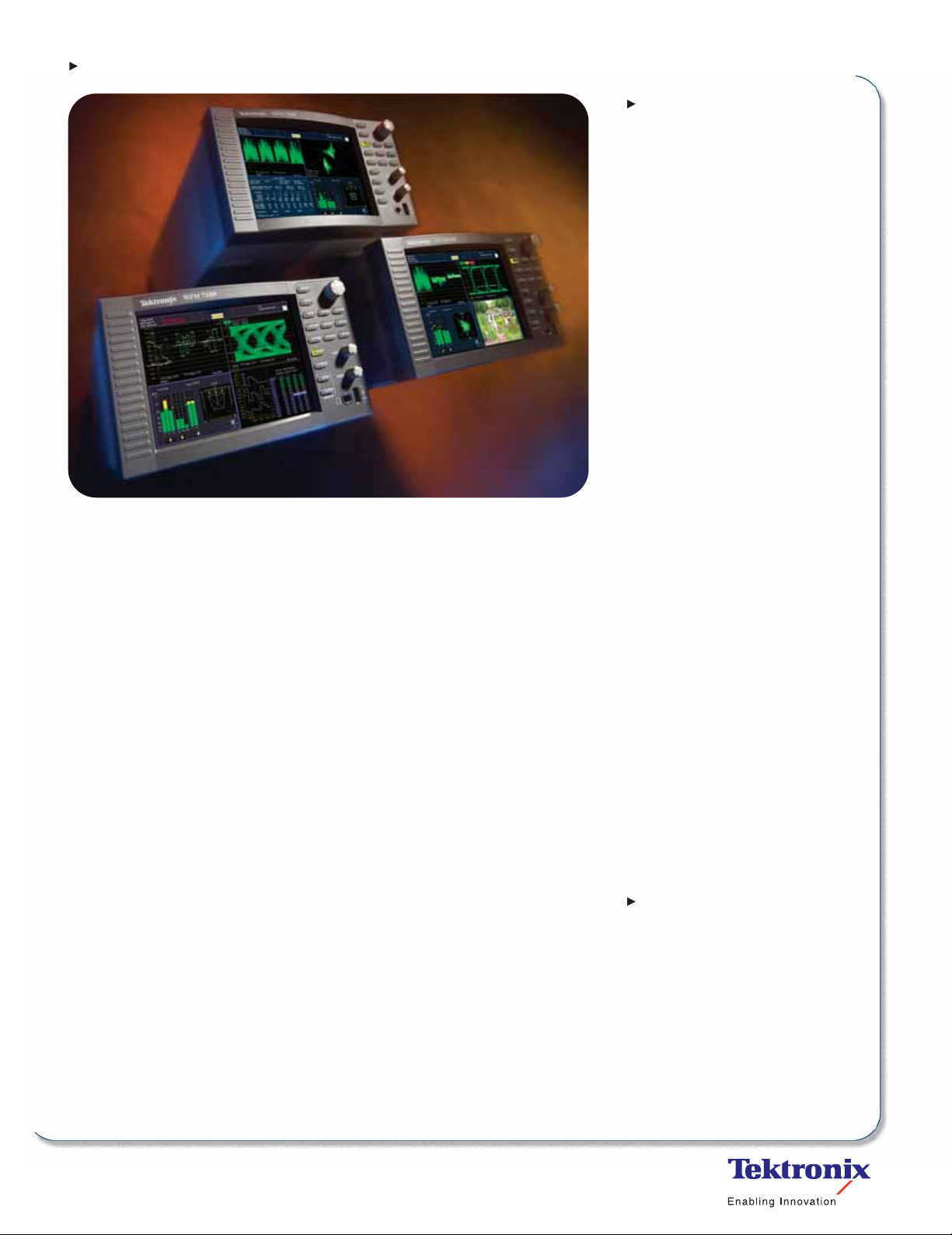
Multi-standard, Multi-format Waveform Monitors
WFM6100 • WFM7000 • WFM7100
Features & Benefits
The WFM7000 and WFM7100
Support HD, SD and Composite
Video Formats
The WFM6100 Supports SD and
Composite Video Formats
FlexVu™XGA Display Increases
Productivity with the Ability to
Create Hundreds of Custom
Multiple-view Displays Tailored
to Specific Work Practices
CaptureVu Video Frame Capture
Improves Efficiency in Troubleshooting and Equipment Setup
MyMenu User-defined Menu
Saves Time by Placing Frequently
Used Controls On a Single, Easilyaccessed Touch-screen Menu
Exclusive Tektronix Gamut Displays
Help Ensure Compliant Content
Patented Tektronix Timing and
Lightning Displays Help Rapidly
and Accurately Adjusts Critical
Plant Timing
Extensive Fault Monitoring, Status
WFM6100
The SD-capable WFM6100 offers highperformance monitoring and measurement
capabilities. It can be configured to monitor
either NTSC/PAL analog video (Opt. CPS),
SD digital video (Opt. SD), or both video
formats. Available audio options offer support for monitoring digital audio (embedded
and AES/EBU inputs), analog audio and
Dolby audio formats. Available measurement options offer in-depth digital data
analysis and SDI signal measurements,
such as Eye diagrams and jitter.
WFM7000
The HD-capable WFM7000 offers basic
monitoring capabilities for applications
involving HD digital video. It can be configured to monitor NTSC/PAL analog
video (Option CPS), SD digital video
(Option SD), HD digital video (Option HD)
or any combination of these video
formats. Available audio options offer
support for monitoring digital audio
(embedded or AES/EBU inputs) and
analog audio.
WFM7100
The HD-capable WFM7100 offers highperformance monitoring and measurement
for applications involving HD digital video.
It combines the video and audio monitoring
capabilities available on the WFM7000
with available support for Dolby audio,
in-depth data analysis and SDI signal
measurement.
Ideal for multi-format environments, the
WFM6100 and the WFM7000 Series
Waveform Monitors offer the performance
and flexibility needed for demanding
video applications.
Reporting and Error Logging
Simplify Content Quality Control
Available High-performance SDI
Signal Measurement and In-depth
Digital Data Analysis Help Quickly
Resolve Difficult Quality and
Reliability Problems
Exceptional Audio Monitoring
Available, Including Support for
Dolby Audio Formats and a Frontpanel Headphone Connector,
Reduce Time and Effort in Verifying
Multi-channel Audio Content
Standard and User-definable
Safe Area Graticules Help Avoid
Errors and Rework in Editing and
Format Conversion
Front-panel USB Port For Easy
Storage and Transfer of Instrument
Settings and Video Data
Network Access and Control
Supports Remote-site Monitoring
Fully Digital Processing for
Accurate, Repeatable, Driftfree Operation
Applications
Monitoring and Compliance
Checking in Video Distribution
and Broadcasting
Quality Control in Video
Production and Post-production
Equipment Qualification and
Troubleshooting in the Installation
and Maintenance of Video
Facilities and Systems
Page 2
Multi-standard, Multi-format Waveform Monitors
WFM6100 • WFM7000 • WFM7100
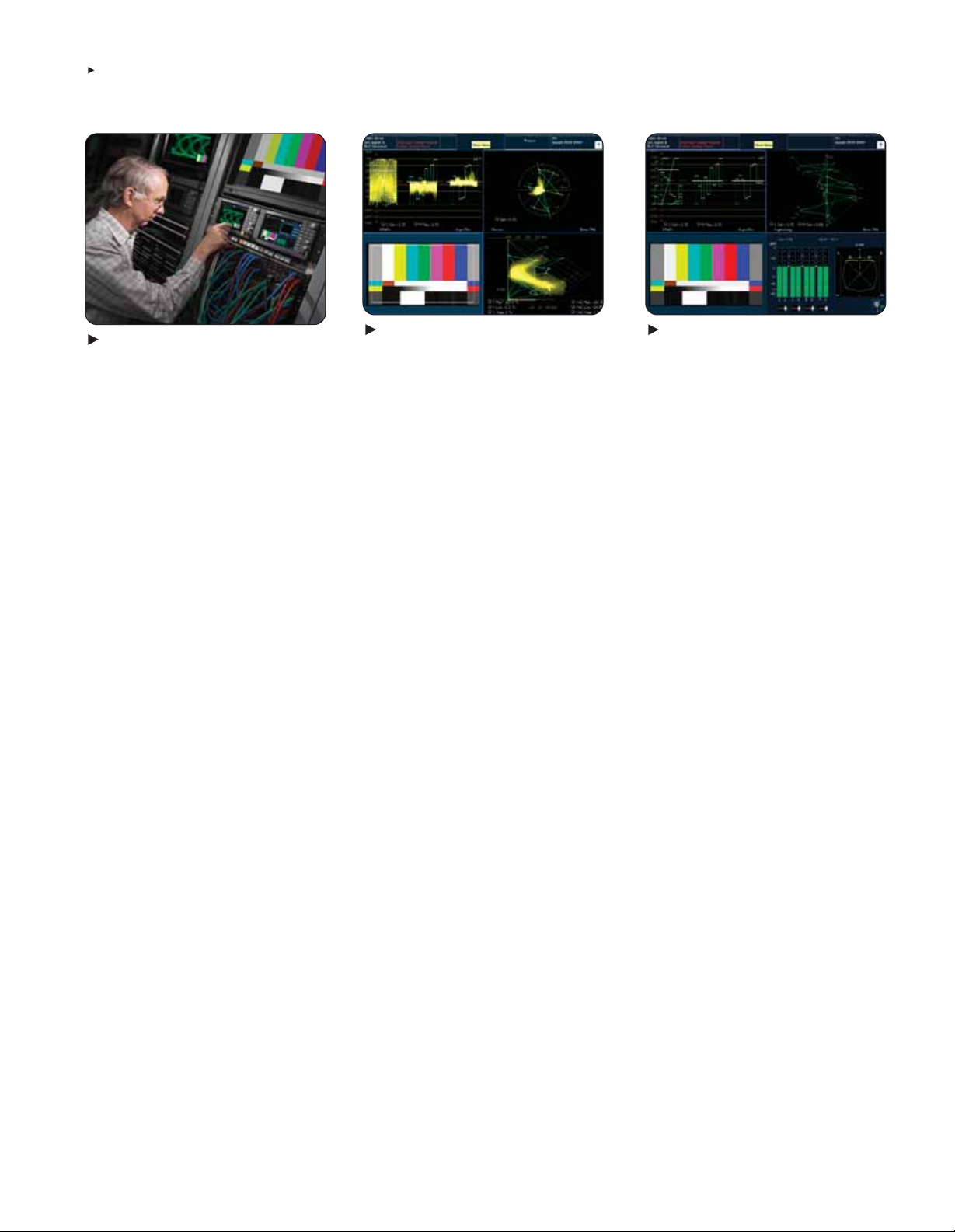
Figure 1.Flexible configurations
and upgrades.
Flexible Configurations and
Upgrades – Helping You Manage
the Digital Transition
To help address the challenges of maintaining both legacy analog and emerging
digital video technology during the digital
transition, the WFM6100 and the
WFM7000 Series offer an exceptionally
broad range of options and upgrades.
Video monitoring, audio monitoring and
measurement options can be added to
a previously purchased instrument with a
field-installable upgrade. For example, you
can purchase a WFM6100 configuration
that only monitors composite analog and
then add support for SD digital video when
your facilities make the transition. If you
anticipate a future transition to HD digital
technology, you can purchase WFM7000
or WFM7100 configurations without HD
support, and then add this capability
when your needs change.
Figure 2.CaptureVu can compare captured
data and live signal on multiple displays.
CaptureVu – Much More
Than “Freezing” a Display
The CaptureVu capability on the WFM6100
and WFM7100 can capture and store the
video data from an entire video frame and
display this data on waveform, vector,
gamut and picture displays. Unlike “freeze”
captures, you can compare the live signal
to capture data in one kind of display (for
example, a waveform display), and then
make the same live-to-capture comparison
in a different display (such as a vector or
picture display).
In addition to user-initiated captures, the
instrument can do a triggered capture
that automatically acquires data on the
occurrence of specific faults. Triggered
captures are particularly useful for finding
intermittent errors and for capturing data
about fault conditions at remote sites.
With CaptureVu, you can store a video
frame generated by one piece of equipment (for example, a camera), and use
this as a reference to configure other
equipment to have matching video characteristics. The data can also be stored
on a USB memory device and transferred
to another instrument.
Figure 3.Use FlexVu™to create the multiview display that best fits your needs.
™
FlexVu
Display Interface –
Four Instruments in One
The WFM6000 and the WFM7000 Series
models have an integrated, XGA-resolution
™
display with the Tektronix FlexVu
user
interface. With FlexVu, you can combine
separate monitoring and measurement
displays four at a time, in almost any
combination. Unlike instruments with
pre-determined view combinations or
more restricted choices, FlexVu lets you
create a multi-view display best suited to
your specific needs and work practices.
Multi-standard, Multi-format Waveform Monitors • www.tektronix.com/video
2
Page 3

Multi-standard, Multi-format Waveform Monitors
WFM6100 • WFM7000 • WFM7100
Figure 4.Personalize the menu interface
with MyMenu.
MyMenu and Presets – Frequent
tasks at your fingertips
All models offer the MyMenu capability
that lets you create a special menu tailored
to your particular needs. MyMenu helps
streamline instrument operation by letting
you place up to seven of your most
frequently used functions in one handy
on-screen menu.
Using presets, you can quickly configure
the instrument for specific tasks or personal
preferences. These instruments can store
up to 20 presets organized into four
groups. You can label the presets and
preset groups for easy identification. Each
preset can store a different MyMenu.
The presets and MyMenu data can be
downloaded to a USB memory device
and transferred to another instrument.
Figure 5.Waveform and Vector displays.
Waveform Displays – Quickly
Verify and Adjust Critical
Signal Parameters
Familiar video waveform displays can
show digital video signals in RGB, YPbPr,
YRGB or composite formats with flat or
low-pass filtering. Waveform displays of
composite analog video signals can show
NTSC and PAL signals with luma, chroma
and luma+chroma filtering. Signal components can be displayed in either parade
or overlay mode, and in composite format
displays with setup selection. The waveform display has several sweep rates and
easy, touch-screen control of vertical gain
and horizontal magnification to help you
efficiently monitor and measure video
waveform parameters. With FlexVu you
can see four differently configured waveform displays of the same signal.
Figure 6.Quickly detect Gamut errors using
specialized displays.
Tektronix-exclusive Gamut
Displays – Efficiently Detect
and Correct Gamut Problems
The patented Tektronix Split Diamond and
Arrowhead gamut displays simplify the
process of verifying gamut compliance.
The Split Diamond display helps easily
identify and correct RGB gamut errors
in digital video signals. The Arrowhead
display saves time in verifying the gamut
compliance of the composite analog video
signal generated from a digital video signal.
™
With FlexVu,
you can simultaneously
monitor both gamut displays to quickly
gain complete confidence in content
compliance throughout the delivery chain.
Also, user-selectable gamut thresholds
let you tailor these displays, and the
associated gamut alarms, to your
particular compliance standards.
Vector, Lightning and SCH Phase
Displays – Accurately Control
Color Parameters
The vector display offers user-selectable
graticules, color targets (75% and 100%)
and color axis. The patented Tektronix
Lightning display shows luma and chroma
amplitudes and lets you verify component
timing using a color bar signal. The SCH
Phase display helps quickly verify this
critical timing parameter of composite
analog video signals.
Multi-standard, Multi-format Waveform Monitors • www.tektronix.com/video
3
Page 4
Multi-standard, Multi-format Waveform Monitors
WFM6100 • WFM7000 • WFM7100
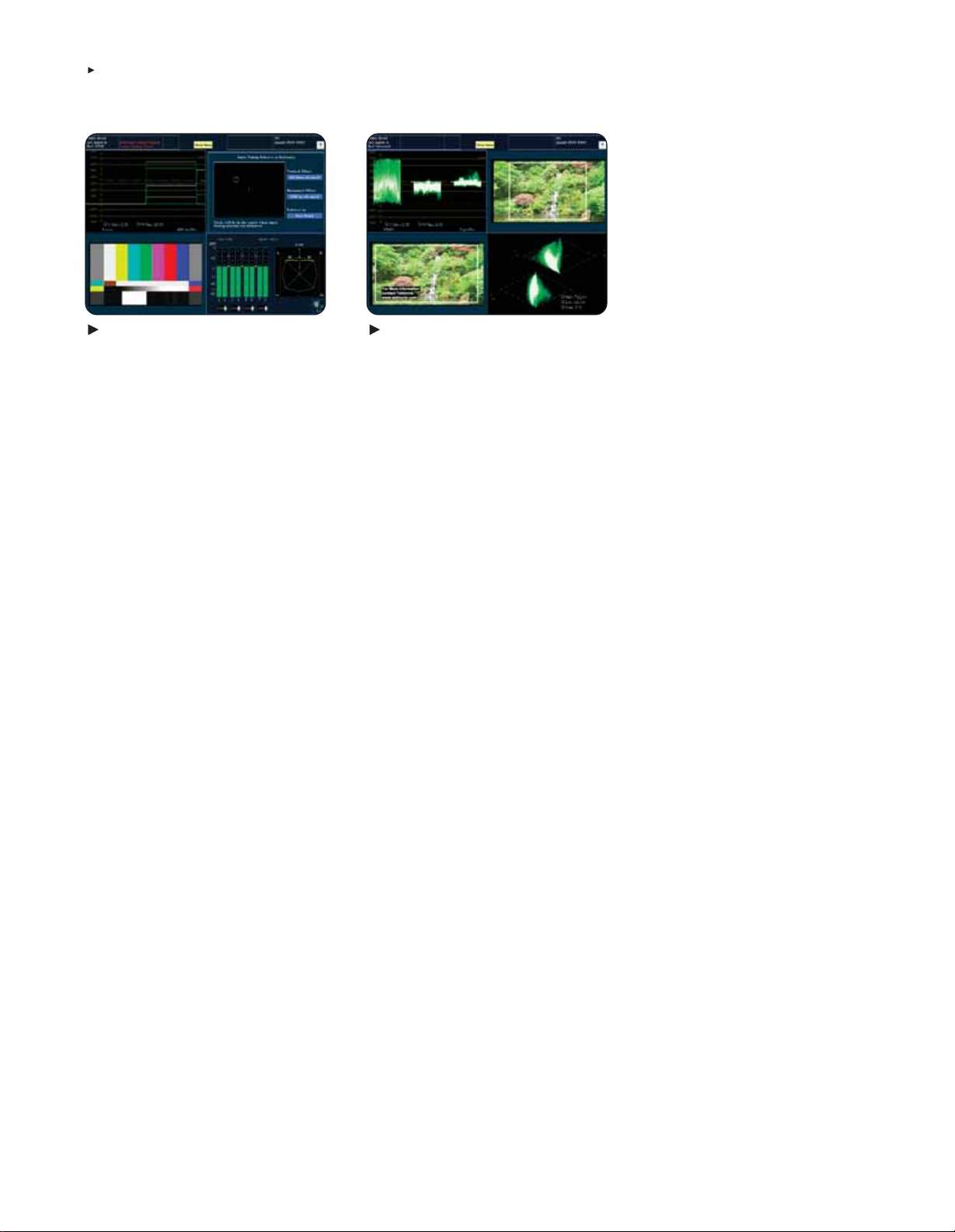
Figure 7. Patented Tektronix Timing display . Figure 8.Picture display with Closed Caption,
Timing Display – Simplify
Plant Timing
The patented Tektronix Timing display
makes facility timing easy through a
simple graphical representation which
shows the relative timing of the input
signal (the circle) versus the reference
signal (the crosshair).
For proper timing, the circle is centered
on the crosshair and changes color from
red to green. The display also has numeric
readouts of the timing difference relative
to the reference signal, showing vertical
timing as number of lines and horizontal
time difference in µsec.
Safe area graticules and gamut brightups.
Picture Displays – Quick Visual
Conformation and Precision
Content Adjustment
A full-color picture display shows the
video content of the monitored input. The
instrument can display the picture on the
full-screen, or on up to four views in a
multiple-view display. For different input
formats, the picture display automatically
adjusts to show the full image content.
The picture display can also show content
advisory codes and decoded closed
caption data (EIA608 formats) for easy
verification of this critical ancillary data.
Editors can choose from several Safe
Area graticules on the picture display to
quickly verify correct placement of graphics,
titles or logos. Graticule choices include
the Safe Action and Safe Title graticules
defined in the SMPTE, ITU and ARIB
standards, plus custom, user-definable
graticules. Using FlexVu, editors can see
two or more pictures with different graticules to verify correct placement for different
formats and standards.
You can also select “brightup” conditions
that show the location of RGB or composite gamut errors on the picture display.
Line and sample brightups show the
location of the currently selected line
or video data sample.
4
Multi-standard, Multi-format Waveform Monitors • www.tektronix.com/video
Page 5
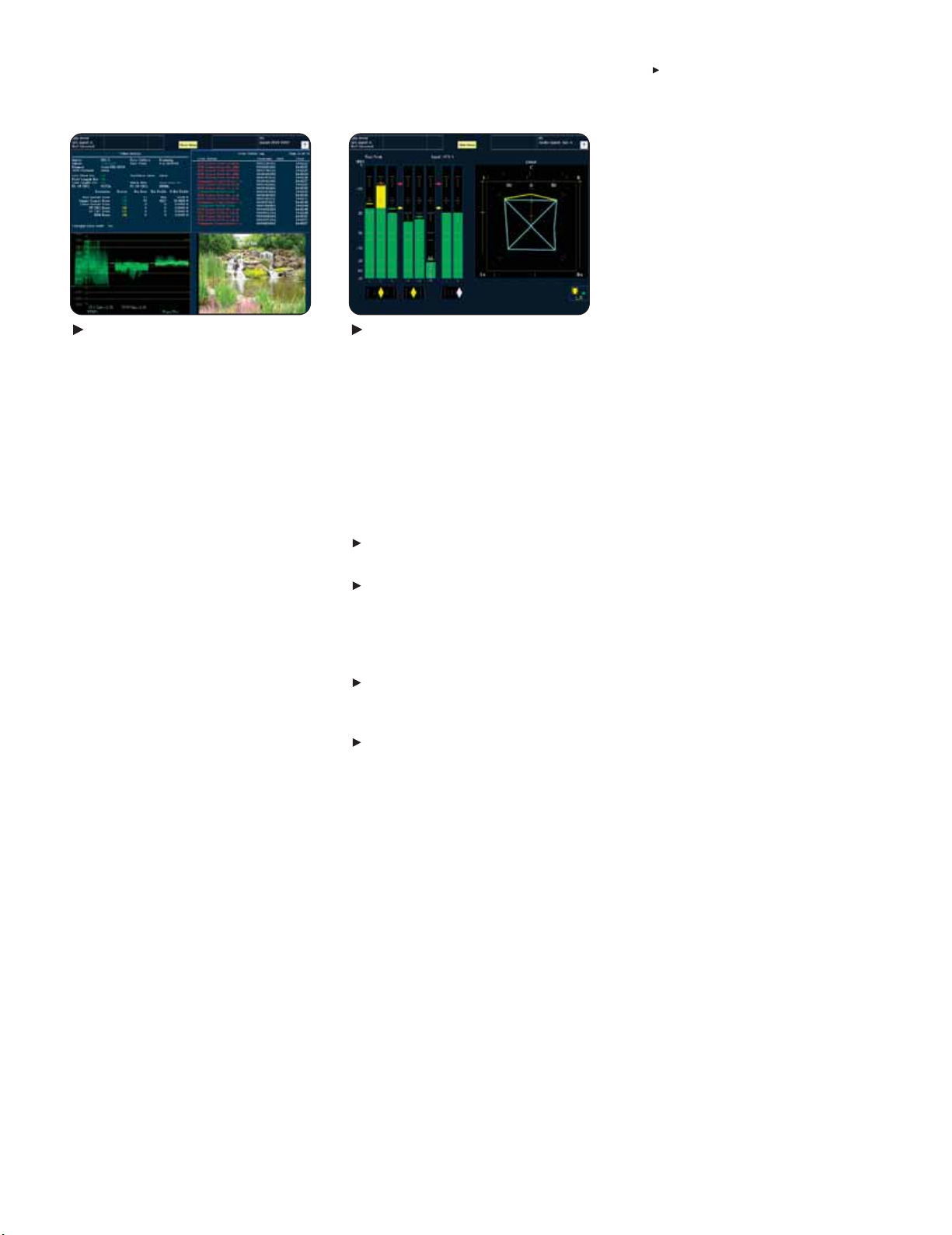
Figure 9.Alarms,status, quality logistics
and logging.
Alarms, Quality Statistics and
Logging – Thorough and Fast
Content Verification
All models offer a variety of displays for
“status at a glance” signal monitoring
and quick, thorough content verification.
Using the alarm status display, operators
and technicians can quickly detect video
faults including gamut, EDH and CRC
errors, SDI format problems and many
more. The instrument offers several alarm
notification methods, including on-screen
error icons, audible beep, ground-closure
output and SNMP traps.
For verifying and documenting content
compliance, the Video Session display
shows key status information on the signal
plus quality statistics like errored seconds
and percentage content with errors.
To support unattended monitoring, and
to supply documentation for maintenance
records or service level agreements, the
instrument logs alarms and other key
events (such as format changes). Log
entries can be time-stamped with date,
time-of-day and time code reference
(VITC, ATC or LTC).
All models also offer extensive ancillary
data monitoring. This includes monitoring
the presence of closed caption content
formats defined by EIA608, EIA708 and
ARIB standards.
Multi-standard, Multi-format Waveform Monitors
Figure 10.Audio bars and Surround
Sound displays.
Audio Monitoring - Versatile Tools
Help Confirm and Adjust Sound
Quality
The WFM6100 and the WFM7000 Series
offer several options for monitoring both
analog and digital audio.
Available on all models:
Option DS monitors digital audio, both
embedded and AES/EBU inputs
Option AD monitors analog audio formats
and all the digital audio formats included
in Option DS
Available on the WFM6100 and WFM7100:
Option DD monitors and decodes Dolby
Digital audio (AC-3) plus the analog and
digital audio formats included in Option AD
Option DDE monitors and decodes Dolby E
plus all the audio formats included in
Option DD
Options DD and DDE automatically sense
Dolby audio formats and place a status
message in the appropriate audio bar,
eliminating confusion about audio input
formats. Dolby status displays offer indepth review of decoded Dolby metadata.
All audio options have an audio bar display
that can display up to six audio bars for
analog inputs, up to eight audio bars on
AES/EBU inputs and embedded audio
sources and up to ten audio bars when
decoding Dolby Digital and Dolby E formats.
WFM6100 • WFM7000 • WFM7100
The audio options provide user-selectable
scales, meter ballistics and audio level
indicators. “In-bar” messages show status
and fault conditions for each monitored
audio channel, reducing the likelihood
of an undetected audio problem.
Audio phase displays include phase
correlation meters, a flexible Lissajous
display (for any pair of channels) and a
multiple-channel “Surround Sound” display
that shows audio levels (A-weighted or
linear), total sound volume, phantom source
locations and the dominant sound position.
The Audio Session display shows audio
error conditions (such as parity errors),
highest true peak and the number of
detected, clips, mutes, over-levels and
silences. User-specified threshold values
determine over-level and silence conditions
and the duration a potential audio problem
must persist before the instrument generates an alarm.
In addition to monitoring audio inputs,
these options can generate analog or
digital audio outputs from the analog
or AES/EBU audio inputs. They can also
generate audio outputs from embedded
audio in the video input, or by decoding
Dolby audio inputs, including stereo
down-mixes. A convenient front-panel
headphone connector lets you listen to
any stereo audio output.
Multi-standard, Multi-format Waveform Monitors • www.tektronix.com/video
5
Page 6
Multi-standard, Multi-format Waveform Monitors
WFM6100 • WFM7000 • WFM7100
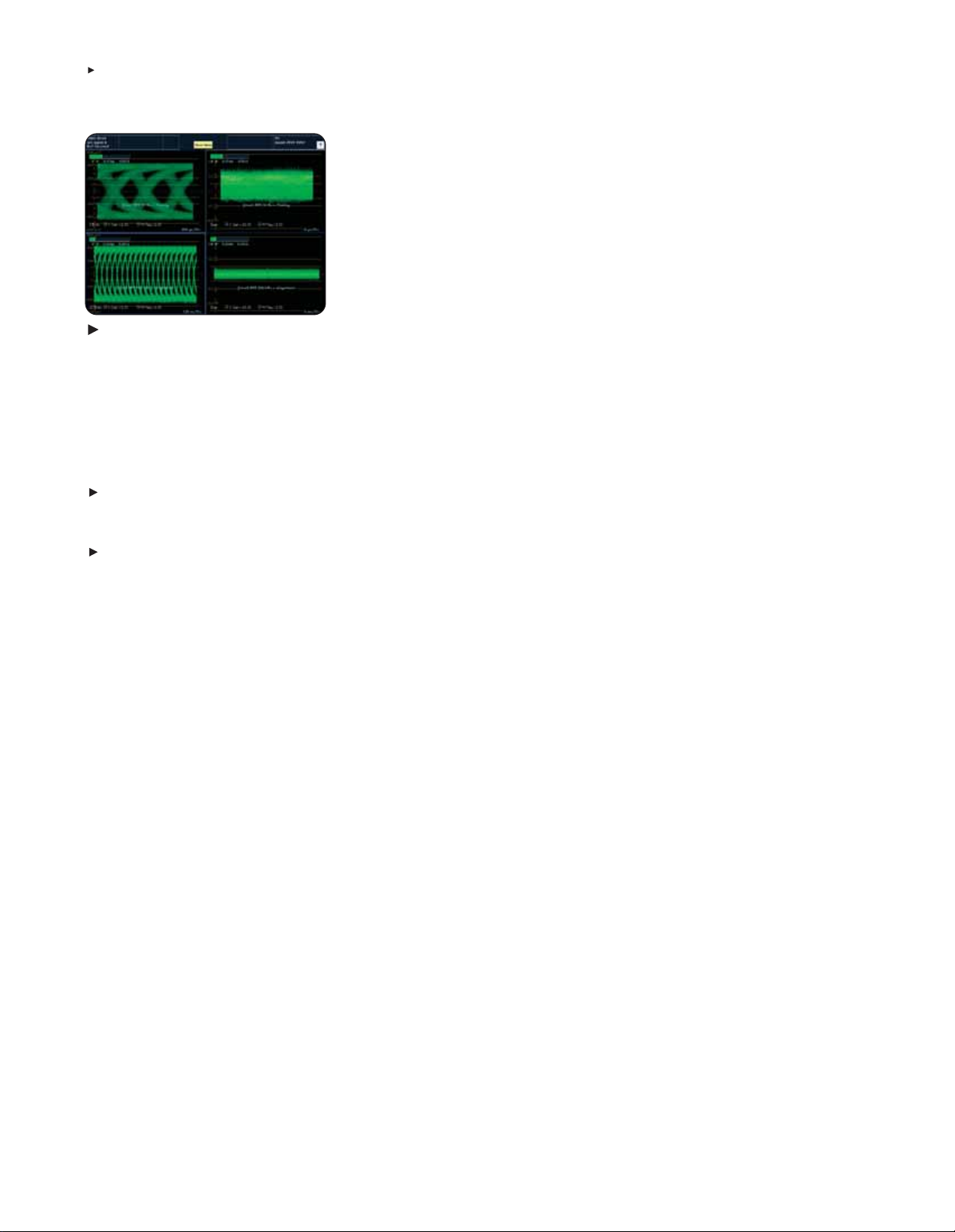
Figure 11.3-Eye, 20-Eye and jitter
waveform.
SDI Signal Measurement and Data
Analysis - Resolve the Most
Challenging Problems
The WFM6100 and WFM7100 offer
options for monitoring and measuring
SDI signal parameters:
For basic SDI signal monitoring, Option EYE
has Eye pattern displays, plus readouts of
jitter and key cable parameters
For more complete SDI signal measurement,
Option PHY has all the capabilities of the EYE
option plus a jitter waveform display and
automated Eye parameter measurements
On the WFM6100, Options EYE and PHY
measure SD-SDI signal parameters. On
the WFM7100, these options measure both
SD-SDI and HD-SDI signal parameters.
Both the EYE and PHY options can
display Eye Patterns in 3-Eye, 10-Eye
(SD-SDI) or 20-Eye (HD-SDI) mode.
These displays include cursors to manually measure Eye parameters and userselectable clock bandwidths to help
isolate jitter components. Option PHY
automatically measures Eye amplitude,
rise-time and fall-time.
Both options use a phase demodulation
technique with selectable filters to continuously monitor and measure the peakto-peak amplitudes of timing and
alignment jitter.
The phase demodulation approach
helps better characterize the random
and deterministic jitter in the input signal.
An easy-to-interpret jitter gauge augments
the numeric jitter readouts. The jitter
waveform display available with Option
PHY lets engineers examine signal jitter
in greater detail.
An SDI signal status display summarizes
key signal parameters. This includes signal
strength, cable loss and estimated cable
length based on the user-selected cable
™
type. With FlexVu,
you can simultaneously
display timing and alignment jitter values,
cable parameter measurements and
different Eye Patterns to help quickly
diagnose and resolve problems related
to SDI jitter or cable attenuation.
To help efficiently detect and diagnose
errors in digital video data, the WFM6100
and WFM7100 offer Option DAT, containing
a color-coded data word display, logic
waveforms of the video data and a display
of data words in user-specified ancillary
data packets.
6
Multi-standard, Multi-format Waveform Monitors • www.tektronix.com/video
Page 7
Multi-standard, Multi-format Waveform Monitors
WFM6100 • WFM7000 • WFM7100
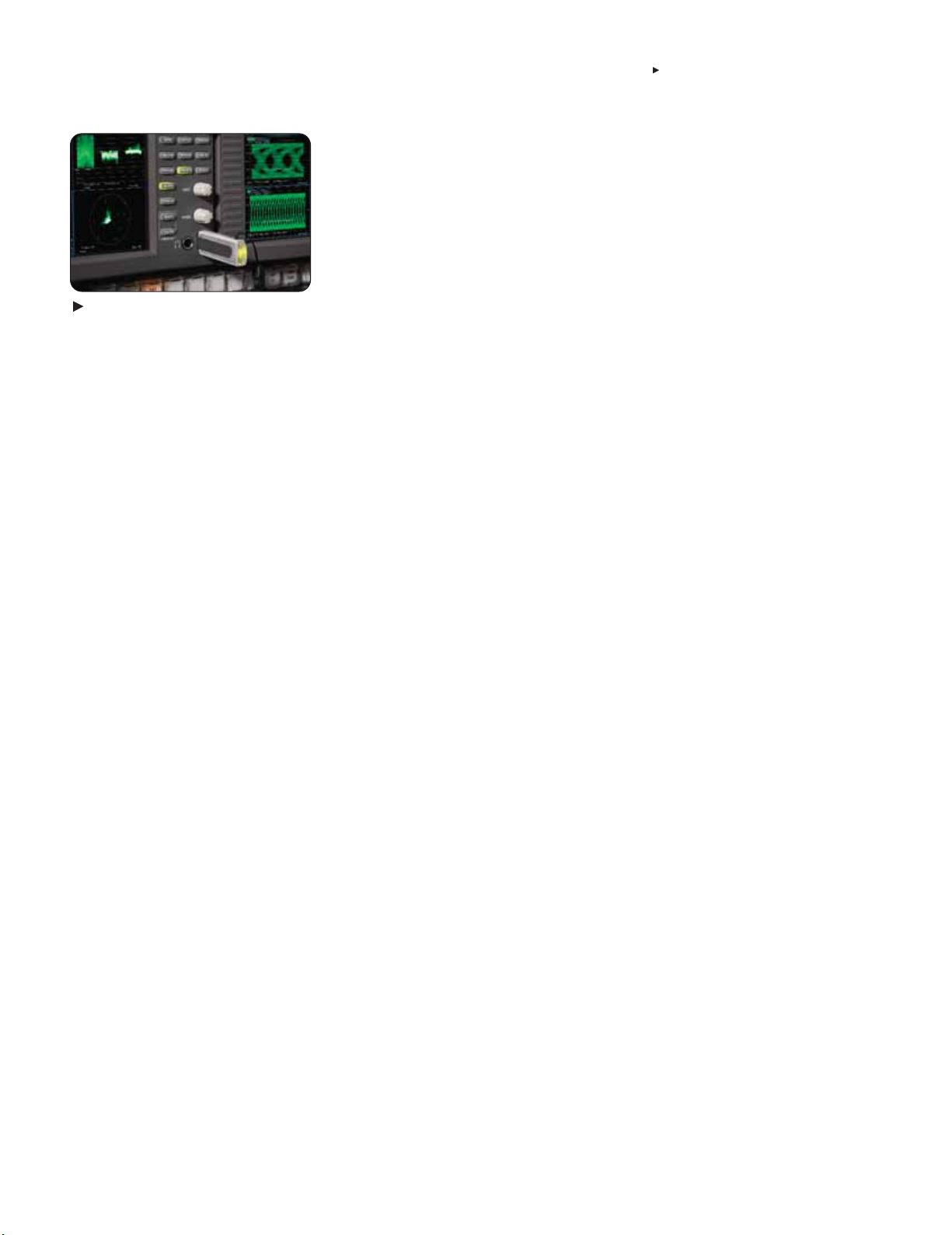
Figure 12. USB ports and Headphone
connector.
Signal Inputs and Outputs,
Peripherals, Communication –
Convenient Interfaces for
Video Systems
The digital video options (Options SD and
HD) have two SDI inputs and a switched
output of the selected input signal. The
analog video option (Option CPS) has two
composite analog video inputs with passive
loop-though outputs.
The instrument senses the input format
and automatically configures the required
settings. It will signal a format mismatch
if the applied external reference format is
not compatible with the input signal.
The audio options (Options DS, AD, DD
and DDE) have up to 16 AES/EBU input
channels and up to 8 AES/EBU output
channels. Those with support for analog
audio have up to 12 analog audio inputs
and up to 8 analog audio outputs. All audio
options can output to the front-panel
headphone port.
The front-panel USB port makes it easy
to store captured data or instrument settings on a USB memory stick and transfer
this information to another instrument.
All models have a 10/100Base-T Ethernet
connection and offer remote access and
control with a standard Web-browser.
You can use this interface to download
presets and error logs or print the screen
contents for easy record keeping.
For simple remote control, a ground-closure
type remote interface can indicate alarm
condition or execute instrument presets.
An SNMP interface allows easy integration with network management software.
Multi-standard, Multi-format Waveform Monitors • www.tektronix.com/video
7
Page 8
Multi-standard, Multi-format Waveform Monitors
WFM6100 • WFM7000 • WFM7100
Characteristics
Video Input and External
Reference Formats
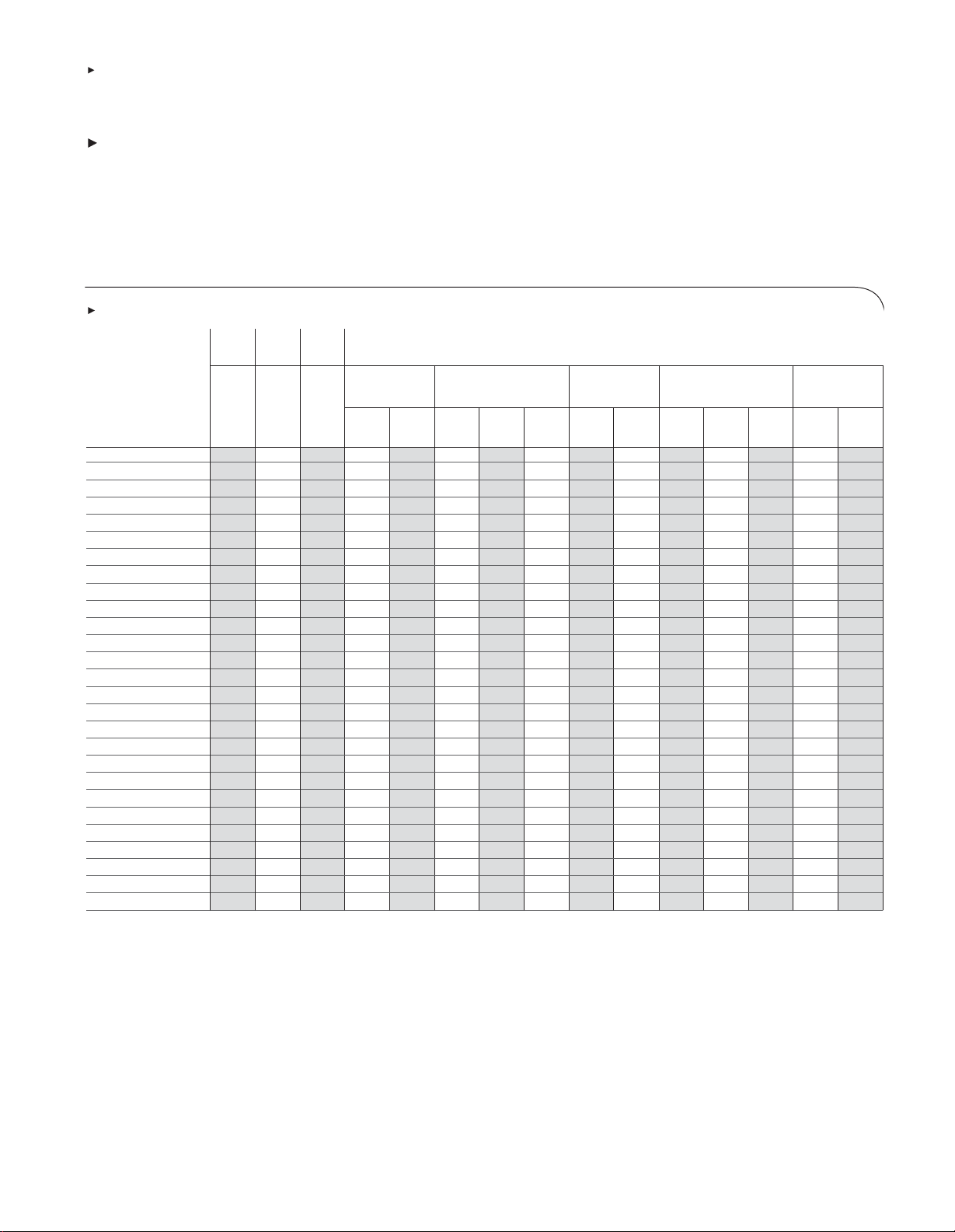
WFM6000/7000 Waveform Monitors accept a
diverse range of signal formats and external references.The following chart shows all accepted video
formats and their compatible external references.
Supported Input Formats
Opt. Opt. Opt.
CPS SD HD External Reference Inputs
NTSC 59.94 Hz x x
PAL 50 Hz x x
BT601 483i, 59.94 Hz (525) x x x x
BT601 576i, 50 Hz (625) x x x x
296M 720p, 23.98 Hz x x(/5) x(/5) x x(/5) x
296M 720p, 24 Hz x x x x(/5) x
296M 720p, 25 Hz x x x x
296M 720p, 29.97 Hz x x x x
296M 720p, 30 Hz x x x
296M 720p, 50.00 Hz x x x x
296M 720p, 59.94 Hz x x x x x
296M 720p, 60.00 Hz x x x x x
240M 1035i, 59.94 Hz x x x x
240M 1035i, 60 Hz x x x(/5) x x
274M, 1080i,50 Hz x x x x
274M, 1080i,59.94 Hz x x x x
274M, 1080i,60 Hz x x x(/5) x x
274M, 1080p,23.98 Hz x x(/5) x(/5) x x(/5) x
274M, 1080p,24 Hz x x x x(/5) x
274M, 1080p,25 Hz x x x x
274M, 1080p,29.97 Hz x x x x
274M, 1080p,30 Hz x x x
274M, 1080sf,23.98 Hz x x(/5) x(/5) x(/2) x(/5) x
274M, 1080sf,24 Hz x x x(/2) x(/5) x
274M, 1080sf,25 Hz x x x x
274M, 1080sf,29.97 Hz x x x x
274M, 1080sf,30 Hz x x x
The monitor will automatically detect the signal
format and establish the appropriate settings for
the various displays.
You can select an expected signal format from the
list of supported formats. If the expected format and
detected format differ,the instrument will report a
format mismatch.
Bi-Level Sync Tri-Level Tri-Level Tri-Level 1080
720p 1080p 1080i SF
NTSC PAL 50 59.94 60 23.98 24 50 59.94 60 23.98 24
Hz Hz Hz Hz Hz Hz Hz Hz Hz Hz
8
Multi-standard, Multi-format Waveform Monitors • www.tektronix.com/video
Page 9

Multi-standard, Multi-format Waveform Monitors
WFM6100 • WFM7000 • WFM7100
Serial Digital Video Interface
Inputs –
2, only one active at a time.The inputs autodetect
between HD and SD signals.
Input Type– 75 Ω BNC, internally terminated.
Input Level – 800 mV
Pk-Pk
, ±10%.
Return Loss – >15 dB from 1 MHz to 1.5 GHz.
Receiver Equalization Range – Typical.
SD: to 250 m of type 8281 cable.
HD: to 100 m of type 8281 cable.
Composite Video Interface
(Option CPS)
Inputs –
Two,only one active at a time. Input Type – Passive
loopthrough BNC, 75 Ω compensated.
Input Dynamic Range – ±6 dB.
Maximum Operating Amplitude–
–1.8 V to +2.2 V, DC + peak AC.
Absolute Maximum Input Voltage–
–6.0 V to +6.0 V, DC + peak AC.
DC Input Impedance – 20 kΩ,nominal.
Return Loss –
>40 dB to 6 MHz, power on.
>40 dB to 10 MHz (typical).
>46 dB to 6 MHz (typical).
35 dB, power off (standard amplitude video).
Crosstalk Between Channels – >60 dB to 6 MHz.
Loopthrough Isolation – >70 dB to 6 MHz.
DC Offset with Restore Off – <7 mV. DC Restore
50 Hz and 60 Hz Attenuation – Fast Mode >95%
attenuation, Slow Mode <10% attenuation, <10%
peaking. Slow mode Typ peaking 8% at 50 Hz and
60 Hz. Lock Range – ±50 ppm remains locked.
External Reference
Input Type–
Passive loopthrough BNC, 75 Ω compensated.
DC Input Impedance – 20 kΩ,nominal.
Return Loss –
>40 dB to 6 MHz,>35 dB to 30 MHz.
User Interface
1024 (H) x 768 (V) pixels LCD.
With FlexVu,
Serial Digital Waveform
Vertical Characteristics
™
Touchscreen and backlit buttons.
Vertical Measurement Accuracy –
At 1X, ±0.5%; at 5X, ±0.2% of 700mV
full-scale mode.
Gain – X1, X2, X5 and X10.
Frequency Response –
HD:
Luminance Channel (Y): 50 kHz to 30 MHz
±0.5%.
Chrominance Channels (Pb,Pr): 50 kHz to 15 MHz
±0.5%.
SD:
Luminance Channel (Y): 50 KHz to 5.75 MHz
±0.5%.
Chrominance Channels: 50 KHz to 2.75 MHz
±0.5%.
Analog Composite Waveform
Vertical Characteristics
(Option CPS)
Vertical Measurement Accuracy –
±1% all gain settings.
Gain – X1, X2, X5 and X10.
Frequency Response – Flat to 5.75 MHz, ±1%.
Waveform Horizontal
Sweep Characteristics
Sweep Timing Accuracy–
±0.5%, all rates, fully digital system.
Sweep Linearity –
0.2% of time displayed on screen, fully digital system.
Audio Characteristics
(Optional Capability)
Level Meter Resolution –
0.056 dB steps at 30 dB scale,from full scale
to –20 dB FS.
User-selectable Scales–
Analog: dBu,Din,Nordic,VU, IEEE, PPM and
user-definable.
Digital: dBFS and user-definable.
Meter Ballistics –
Selectable from true peak, PPM type 1, PPM Type 2
and Extended VU.
Defined/Programmable Level Detection –
Mute, clip user-programmable silence,over.
Level Meter Accuracy Over Frequency –
+0.1dB from 20 Hz to 20 kHz 0 to –40 dBFS sine
wave, Peak Ballistic mode (except for within 5 Hz
of some submultiples of the sampling frequency).
Digital Audio (Options
DDE, DD, AD and DS)
AES Inputs –
Two sets with 8 Channels each,32 to 192 kHz,
24-Bit, meets requirements of AES 3-ID and
SMPTE 276M-1995.
AES Input Characteristics –
BNC,75 Ω terminated, unbalanced, 0.2 V to 2 V
Pk-Pk
AES Input Return Loss –
25 dB Relative to 75 Ω from 0.1 to 6 MHz Typ
better than 30 dB to 24 MHz.
AES Outputs –
Up to 8 channels,AES3-ID Output,48 kHz, 20-Bit
for embedded, 48 kHz, 24-Bit for analog to AES, for
AES to AES loopthrough,output format equals input
format. Meets requirements of SMPTE 276M-1995
(AES 3-ID). For decoded Dolby Digital, output is
24-Bits at a rate of 32, 44.1 or 48 kHz for any one
decoded pair.For decoded Dolby E, the output is
24-Bits at 48 KHz, or 47.952 kHz for up to 4 pairs.
AES Output Characteristics –
BNC, 75 Ω terminated, unbalanced, 0.9 V to
into 75 Ω.
1.1 V
Pk-Pk
AES Output Return Loss –
>25 dB relative to 75 Ω from 0.1 to 6 MHz.
AES Output Jitter –
3.5 ns, peak, typical, with 700 Hz high-pass filter
per AES specification.
Analog Audio (Options
DDE, DD and AD)
Analog Inputs – Two sets of 6 channels each.
Analog Input Characteristics –
Balanced, unterminated via rear panel connector.
Cross Talk– <90 dB.
Input Impedance – 24 kΩ,typical.
Analog Outputs – 8 channels.
Analog Output Characteristics –
Balanced, un-terminated via rear panel connector.
Maximum Output Level –
Balanced: +24 dBu ±0.5 dB.
Digital Input to Analog Output Gain Accuracy
Over Frequency –
±0.5 dB, 20 Hz to 20 kHz, 0 to –40 dBFS,20or 24-Bit inputs.
Analog Input to Analog Output Gain Accuracy
Over Frequency –
+0.8 dB, 20 Hz to 20 kHz, 24 dBu to –16 dBu.
Output Impedance – 50 Ω,nominal.
Power
100 to 240 VAC ±10%,50/60 Hz.
Physical Characteristics
Dimensions mm in.
Height 133.4 5.25
Width 215.9 8.5
Depth (front to back 460.4 18.125
including handles
and BNCs)
Weight kg lbs.
Net 5.5 12
.
Multi-standard, Multi-format Waveform Monitors • www.tektronix.com/video
9
Page 10

Multi-standard, Multi-format Waveform Monitors
WFM6100 • WFM7000 • WFM7100
Ordering Information
WFM Models and Options
Must select one and then desired options.
WFM7100
HD-capable performance monitor.
WFM7000
HD-capable basic monitor.
WFM6100
SD-capable performance monitor.
Video Options
Must choose at least one when ordering any model.
CPS – (Available for all models).
Adds support for Composite Analog Monitoring;
2 Composite Analog Inputs.
SD – (available for all models).
Adds support for Standard Definition Monitoring;
2 SD SDI Inputs.
HD – (available for WFM7000 and WFM7100).
Adds support for High Definition inputs.
Audio Options
If audio test is required, select only one option
(the advanced options include the features of
the basic ones).
DS – (Available for all models).
Adds support for Digital Audio Monitoring
in embedded and AES/EBU formats.
AD – (Available for all models).
Adds support for Digital Audio monitoring
(embedded and AES/EBU inputs) and for Analog
Audio Monitoring.
DD – (Available for WFM6100 and WFM7100).
Adds support for Dolby Digital (AC-3) decode,
Digital Audio (embedded and AES/EBU inputs)
and for Analog Audio Monitoring.
DDE – (Available for WFM6100 and WFM7100).
Adds support for Dolby E decode, Dolby Digital (AC-3)
decode, Digital Audio (embedded and AES/EBU
inputs) and for Analog Audio Monitoring.Supports
digital audio formats with up to eight channels.
Eye/Jitter and Data
Analysis Options
SD or HD option required for these options.
EYE – (Available for WFM6100 and WFM7100).
Adds eye pattern and basic jitter measurement.
The EYE option enables the display of Eye Patterns
in 3-Eye, 10-Eye (SD) or 20-Eye (HD) modes and
cable length measurements (including source
signal level and cable loss).
PHY – (Available for WFM6100 and WFM7100).
Includes the capabilities of EYE option plus
advanced physical layer measurements; jitter
waveform and automated eye measurements.
DAT –(Available for WFM6100 and WFM7100).
Adds data analysis capabilities.Allows for logiclevel view of video and audio digital data stream
and ANC data extraction.
WFM7100
Base unit can be equipped with options for
SD, HD and composite analog video advanced
monitoring and measurement.
Video Options
Must choose at least one when ordering.
CPS – Composite Analog Monitoring.
SD – Standard Definition Monitoring.
HD – High Definition Monitoring.
Audio Options
DS – Audio Monitoring for AES/EBU formats.
AD – DS capabilities plus Analog Audio Monitoring.
DD – AD capabilities plus Monitoring for Dolby
Digital (AC-3) decode.
DDE – DD capabilities plus Dolby E decode
monitoring.
Eye/Jitter and Data
Analysis Options
EYE – Eye pattern and basic jitter measurement.
PHY – EYE capabilities plus advanced physical
layer measurements.
DAT –Data analysis capabilities.
WFM7000
Base unit can be equipped with options for SD,
HD and composite analog video monitoring.
Video Options
Must choose at least one when ordering.
CPS – Composite Analog Monitoring.
SD – Standard Definition Monitoring.
HD – High-definition Monitoring.
Audio Options
DS – Audio Monitoring for AES/EBU formats.
AD – DS capabilities plus Analog Audio Monitoring.
WFM6100
Base unit can be equipped with options for SD and
composite analog video advanced monitoring and
measurement.
Video Options
Must choose at least one when ordering.
CPS – Composite Analog Monitoring.
SD – Standard Definition Monitoring.
Audio Options
DS – Audio Monitoring for AES/EBU formats.
AD – DS capabilities plus Analog Audio Monitoring.
DD – AD capabilities plus Monitoring for Dolby
Digital (AC-3) decode.
DDE – DD capabilities plus Dolby E decode
monitoring.
Eye/Jitter and Data
Analysis Options
EYE – Eye pattern and basic jitter measurement.
PHY – EYE capabilities plus advanced physical
layer measurements.
DAT –Data analysis capabilities.
Power Options
Opt. A0 – North America power.
Opt. A1 – Universal Euro power.
Opt. A2 – United Kingdom power.
Opt. A3 – Australia power.
Opt. A4 – 240 V ,North America power.
Opt. A5 – Switzerland power.
Opt. A6 – Japan power.
Opt. A10 – China power.
Opt. A99 – No power cord or AC adapter.
10
Multi-standard, Multi-format Waveform Monitors • www.tektronix.com/video
Page 11
Language Options
L0 – English manual.
L5 – Japanese manual.
L7 – Simplified Chinese manual.
Service Options
Opt. CA1 – Single Calibration.
Opt. C3 – Calibration Service 3 Years.
Opt. C5 – Calibration Service 5 Years.
Opt. D1 – Calibration Data Report.
Opt. D3 – Calibration Data Report 3 years
(with Option C3).
Opt. D5 – Calibration Data Report 5 years
(with Option C5).
Opt. R3 – Repair Service 3 years
(including warranty).
Opt. R5 – Repair Service 5 years
(including warranty).
Other Options
Opt. NRC – No portable or rack cabinet.
Opt. 01 – Portable cabinet.
Opt. 02 – Dual rack cabinet (same as WFM7F05
option NN).
Opt. 05 – Dual rack cabinet (same as WFM7F05
option ON).
Opt. 06 – Filler panel for dual rack cabinet.
Opt. 07 – Drawer for dual rack cabinet.
Opt. 62 – Analog audio breakout cable.
Optional Accessories
WFM7F02 – Portable cabinet with handle, feet,
tilt bail and front panel cover.
WFM7F05 – Dual rackmount for WFM6100,
WFM7000,WFM7100,1700 Series,WFM601
Series,WFM700 Series,760A and 764.
071-0915-xx – Service Manual for the WFM6100
and the WFM7000 Series products.
Post-sale Upgrades
WFM61UP – Upgrade kit for WFM6100. Upgrade
by ordering WFM61UP with appropriate options:
CPS, SD, DS,AD, DD, DDE, EYE, PHY,DAT.
WFM70UP – Upgrade kit for WFM7000. Upgrade
by ordering WFM70UP with appropriate options:
CPS, SD, HD, DS, AD.
WFM71UP – Upgrade kit for WFM7100. Upgrade
by ordering WFM71UP with appropriate options:
CPS, HD, SD, DS, AD, DD, DDE, EYE, PHY,DAT.
Extended Service Offerings
See next page.
Multi-standard, Multi-format Waveform Monitors
WFM6100 • WFM7000 • WFM7100
Multi-standard, Multi-format Waveform Monitors • www.tektronix.com/video
11
Page 12
Multi-standard, Multi-format Waveform Monitors
WFM6100 • WFM7000 • WFM7100
Extended Service Offerings
WFM6100
WFM6100-CA1 – Single Calibration.
WFM6100-R1PW – Repair Service 1 year
(post warranty).
WFM6100-R2PW – Repair Service 2 years
(post warranty).
WFM6100-R3DW – Repair Service 3 years
(includes warranty).
WFM6100-R5DW – Repair Service 5 years
(includes warranty).
WFM7000
WFM7000-CA1 – Single Calibration
WFM7000-R1PW – Repair Service 1 year
(post warranty).
WFM7000-R2PW – Repair Service 2 years
(post warranty).
WFM7000-R3DW – Repair Service 3 years
(includes warranty).
WFM7000-R5DW – Repair Service 5 years
(includes warranty).
WFM7100
WFM7100-CA1 – Single Calibration.
WFM7100-R1PW – Repair Service 1 year
(post warranty).
WFM7100-R2PW – Repair Service 2
years
(post warranty).
WFM7100-R3DW – Repair Service
3 years (includes warranty).
WFM7100-R5DW – Repair Service
5 years (includes warranty).
Contact Tektronix:
ASEAN / Australasia (65) 6356 3900
Austria +41 52 675 3777
Balkan, Israel, South Africa and other ISE Countries +41 52 675 3777
Belgium 07 81 60166
Brazil & South America 55 (11) 3741-8360
Canada 1 (800) 661-5625
Central East Europe, Ukraine and the Baltics +41 52 675 3777
Central Europe & Greece +41 52 675 3777
Denmark +45 80 88 1401
Finland +41 52 675 3777
France & North Africa +33 (0) 1 69 86 81 81
Germany +49 (221) 94 77 400
Hong Kong (852) 2585-6688
India (91) 80-22275577
Italy +39 (02) 25086 1
Japan 81 (3) 6714-3010
Luxembourg +44 (0) 1344 392400
Mexico, Central America & Caribbean 52 (55) 56666-333
Middle East, Asia and North Africa +41 52 675 3777
The Netherlands 090 02 021797
Norway 800 16098
People’s Republic of China 86 (10) 6235 1230
Poland +41 52 675 3777
Portugal 80 08 12370
Republic of Korea 82 (2) 528-5299
Russia & CIS +7 (495) 7484900
South Africa +27 11 254 8360
Spain (+34) 901 988 054
Sweden 020 08 80371
Switzerland +41 52 675 3777
T aiwan 886 (2) 2722-9622
United Kingdom & Eire +44 (0) 1344 392400
USA 1 (800) 426-2200
For other areas contact Tektronix, Inc. at: 1 (503) 627-7111
Updated 28 February 2006
Our most up-to-date product information is available at:
www.tektronix.com
Product(s) are manufactured in ISO registered facilities.
Product(s) complies with IEEE Standard 488.1-1987, RS-232-C, and with
Tektronix Standard Codes and Formats.
Copyright © 2006,Tektronix.All rights reserved. Tektronix products are covered
by U.S. and foreign patents, issued and pending. Information in this publication
supersedes that in all previously published material. Specification and price
change privileges reserved. TEKTRONIX and TEK are registered trademarks
of Tektronix, Inc. All other trade names referenced are the service marks,
trademarks or registered trademarks of their respective companies.
5/06 HB/WOW 25W-19435-1
 Loading...