

Page 1
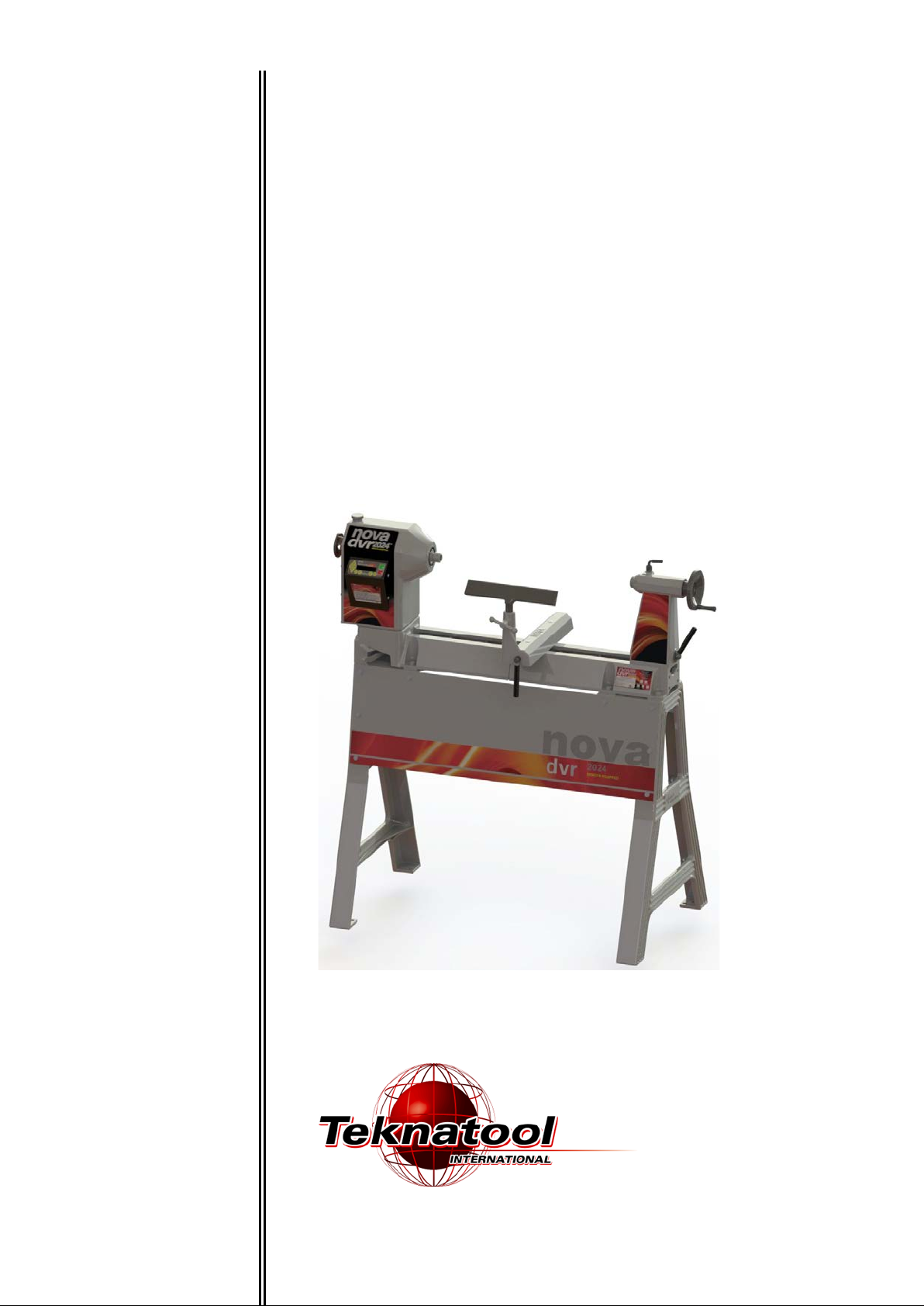
I
M
NSTRUCTION
NOVA
TM
DVR 2024
WOOD LATHE
ANUAL
-1-
116-0712-006
Page 2

Models
1) 57080 spindle thre a d 1 1/ 4" x 8 TPI 220v (USA)
2) 57081 spindle threa d 1 1/4" x 8 TPI 220v (Aus/NZ)
3) 57082 spindle thread 1 1/4" x 8 TPI 220v (UK)
4) 57083 spindle thread M33x3.5 220v (Europe)
NOVA DVR 2024 Lathe Features at a glance
DVR Electronic drive
The Nova DVR lathes are unique. The DVR incorporates the motor built as part of the headstock, the
spindle and motor are one unit. The motor is almost maintenance free and designed with high
reliability. The Digital Variable Reluctance motor uses smart motor technology to provide an
incredibly smooth and powerful drive. This drive takes turning to a new level. The controller monitors
the spindle position constantly and maintains spindle speed very closely. Additional power is added
as it senses extra load from the tool.
Add on Bed System
A lathe that meets your woodturning needs your workshop space, and your pocket! Each segment is 20" or 510mm in length. This
feature appeals for many different reasons:
As a compact lathe (standard configuration) it is great for small turning workshop spaces.
• As an extended lathe for those wanting to do extra long spindles (beyond the traditional between center of most lathes) the Nova DVR
2024 delivers big turning capacity.
• As a bowl lathe for those just wanting to turn bowls.
Sophisticated Swivel Head
Swivel head lathes have many advantages:
• Space saving
• Allows the turner (not the machine!) to decide the most comfortable position for your turning (saving you from backstrain)
• Elimination of left-hand ‘outboard’ turning techniques and no extra outboard chucks and faceplates are necessary.
There are a number of swivel head lathes available, but Nova DVR have by far the most sophisticated, accurate and easy to use swivel
head on the market.
The Nova DVR lathes can be easily and quickly swiveled to any position (360 degrees). It can be solidly locked in any position plus it has
the added security of a detent pin lock at 0,22.5,45,90 degrees plus 315 (for left-hand use).
The swivel head turns, locks easily and has a very accurate detent position, to lock the spindle in line with the tailstock. The combination of
rigid Tailstock construction and detent pin delivers superb accuracy and is unique to the Nova DVR .
116-0712-006
-2-
Page 3

Solid Construction
Well proven design, the Nova DVR 2024 is made from Cast Iron components for strength and rigidity. Added features like special webbed
bed design makes the lathe well equipped to take heavy turning stresses. The bed has been designed with vibration dampening qualities a solid 1/2" cross rib is positioned along the bed unit, quickly dissipating any vibration as it travels down the bed. The new powerful
trapezoidal bed design delivers even more vibration damping properties. All this combined with cosmeticall y appeali ng, smoot h fl owing
lines.
Cast iron has always been the material of choice for Woodlathe
construction for its inherent mass and an excellent modulus of
vibration.
Bed Extension Segment Main Bed Segment
New 10 Favourite Speeds Function
Pre-program your most favourite speeds for easy retrieval.
Trapezoidal Bed Design
Powerful with smooth flowing lines, Nova bed design delivers even more vibration dampening propert i es.
New Headstock Design
One piece design increases strength and vibration dampening properties. Micro analysed for optimum design. Same popular swivel
headstock as used in the older DVR and 3000 Lathe models, saves strain on your back.
Adaptive Control Software
Smart adaptive computer technology actually measures the weight of the work piece and adjusts its performance accordingly.
Safety Sensing Feature
Intelligent DVR computer controller senses abnormal turning conditions e.g. a chisel dig in or index left engaged – and instantaneously
shuts down power to the spindle. Normal safety precautions would still apply – see pages 7-8.
Energy Efficient
Unlike other ‘dumb’ electric motors, the Smart DVR Motor only inputs enough power to maintain the set speed – giving you potential for
power savings over conventional motors.
Wide Speed Range
100-5000 rpm, easy push button speed change.
DVR Direct Drive Motor
Driven by unique Direct Drive Variable Reluctance Motor Technology, with superior performance over AC or DC motors. Proven
technology, many thousands of users. No power loss through belts or transmission. Provides digital electronic push button variabl e speed
with no belt changes.
Ultra Smooth Cutting Power
Selected RPM is closely maintained and the DVR has no belt stretch or motor bounce which affects smooth cutting. The DVR motor runs
smooth with almost no vibration.
5 Year Warranty (limited)
On all castings, mechanical parts and components. 2 Year Warranty on all electronics and electrical components.
Plug and Play
Just bolt to stand or bench, plug it in and you are turning! No complex motor set ups or adjustments.
Low Mantainence
The motor is simple, brushless with no rotor windings (rotor is solid steel). The indust rial grade elect roni cs are bui lt to last. There are no
drive pulleys or belts to set up or come loose.
116-0712-006
-3-
Page 4

Welcome
Thank you for choosing our NOVA DVR 2024 Wood Lathe and welcome to the Teknatool product family. Your
choice shows you want the best for your woodturning and you recognize the superb DVR drive technology and
the host of other unique features the Nova DVR offers.
We strive to achieve the best value for your money – providing quality, innovative features, a wide range of
accessories – plus comprehensive, ongoing support (latest manuals downloadable from our website,
newsletters, projects etc). We are only a phone call or email away with technical advice or assistance on the
operation of your lathe or your woodturnin g queries .
Please feel free to contact us about any aspect of our products or service – we regard our customers as our
best development and improvement team – we would love to hear from you!
Once again, welcome to the “Teknatool NOVA Family”. We trust that you enjoy our products and hope they
enhance the pleasure you experience from the wonderful craft of wood turning!
Best Regards
Brian Latimer
Marketing Director
Teknatool International Ltd
116-0712-006
-4-
Page 5

Contact Teknatool
Website: http://www.baptist.nl
Email: [email protected]
New Zealand
Teknatool International Ltd
Phone: (+64) 9 477 5600
Fax: (+64) 9 477 5601
Email: [email protected]
Website: www.teknatool.com
Carba-Tec NZ Ltd
Free Phone: 0800-444-329
Phone: 274-9454
Website: www.carbatec.co.nz
United States
Teknatool Service Center
Phone: 727-954-3433
Fax: 727-623-0902
Email: [email protected]
Website: www.teknatool.com
Woodcraft Supply Corp
Technical Service: 1-800-535-4486
Orders: 1-800-225-1153
Website: www.woodcraft.com
Australia
Carbatec Australia
Phone: +61 7 3397 2577
Free Fax: +61 7 3390 5280
Email: [email protected]
Website: www.carbatec.com.au
Canada
KMS Tools and Equipment Ltd
Phone: (+1) 604-522-5599
Free Phone: 1-800-567-8979
Fax: (+1) 604-522-0638
Email: [email protected]
Website: www.kmstools.com
Netherlands
United Kingdom
Record Power
Phone: (+44) 0870 770 1777
Fax: (+44) 0870 770 1888
Website: www.recordpower.co.uk
Austria
Neureiter
Phone:+43 6244 202 99
Fax: +43 6244 202 9910
Email: [email protected]
France
OTELO
Phone: 0.800 33 11 11
Fax: 01 39 72 16 60
Website: www.otelo.fr
MAISON DU TOURNAGE
Phone: +33-467-232-852
Fax +33-467-230-038
Email: [email protected]
Norway
WWW VERKTOY AS
Phone: 0047-51-88-68-00
Fax: 0047-51-88-68-10
Email: [email protected]
Website: www.verktoyas.no
Belgium
Willy Vanhoutte BVBA
Phone +32 (50) 78 17 94
Fax + 32 (50) 78 19 64
Email: [email protected]
Website: http://www.willyvanhoutte.beSouth Africa
The Hardware Centre
Phone: (27) 011 791 0844
Baptist voor Houtbewerkers
Tel: 026 445 16 44
-5-
Fax: (27) 011 791 0850
Website: www.hardwarecentre.co.za
116-0712-006
Page 6

Table of Contents
GENERAL SAFETY RULES ..................................................................................................................... 7
ADDITIONAL SAFETY RULES FOR WOOD LATHES ............................................................................ 8
DVR 2024 Wood Lathe Specifications ................................................................................................... 9
Workshop Requirements ...................................................................................................................... 10
Assembling the Nova DVR 2024 ........................................................................................................... 11
Nova DVR Components After Unpacking ........................................................................................... 11
Adding an Extension Bed ..................................................................................................................... 12
Mounting the lathe to the Cast Iron Stand ............................................................................................ 13
Mounting the Skirt to the Stand ............................................................................................................ 16
Connecting to Power ............................................................................................................................ 17
Using the NOVA DVR 2024 .................................................................................................................... 18
DVR Drive Functions ............................................................................................................................ 19
Turning Tips .......................................................................................................................................... 21
Swiveling the Headstock ...................................................................................................................... 22
Spindle Index ........................................................................................................................................ 23
Headstock ............................................................................................................................................. 23
Spindle Thread Size ............................................................................................................................... 23
Toolrest ................................................................................................................................................. 25
Tailstock ............................................................................................................................................... 26
Learning Turning .................................................................................................................................. 27
CONTROLLER USER’S GUIDE ................................................................................................................... 28
Programming the Favorite Speeds ....................................................................................................... 33
Maintaining the NOVA DVR 2024 .......................................................................................................... 36
General Maintenance ........................................................................................................................... 36
Cleaning the Toolslide .......................................................................................................................... 37
Cleaning the Tailstock .......................................................................................................................... 37
Aligning the Tailstock ............................................................................................................................ 38
Troubleshooting Guide.......................................................................................................................... 39
Troubleshooting Guide continued ....................................................................................................... 41
NOVA DVR 2024 Wood Lathe Parts List .............................................................................................. 42
Accessories ............................................................................................................................................ 45
Accessories ............................................................................................................................................ 46
Index ........................................................................................................................................................ 48
Teknatool Warranty ................................................................................................................................ 49
© Copyright 2001-2012 by Teknatool International; All Rights Reserved.
Nova DVR is a trademark of Teknatool International Ltd.
The information and specifications contained herein are subject to change. Teknatool is not responsible for errors or
omissions herein or for incidental damages in connection with the furnishing or use of this information.
116-0712-006
-6-
Page 7

GENERAL SAFETY RULES
Warning! Failure to follow these rules may result in serious personal injury.
1. FOR YOUR OWN SAFETY, READ THE
MANUAL BEFORE OPERATING THE TOOL.
Learn the machine’s application and limitations
plus the specific hazards particular to it.
2. ALWAYS USE A FULL FACE SHIELDStrongly recommended (mus t comply with
ANSI STANDARD Z87.1 -USA) Everyday eyeglasses usually are only impact res istant and
safety glasses only protect eyes. A full face
shield will protect the eyes and face. A lso use
face or dust mask if cutting operation i s dusty.
3. WEAR PROPER APPAREL. Do not wear loose
clothing, gloves , neckties, rings, bracelets or
other jewelry which may get caught in moving
parts. Non slip f ootwear is recommended. Wear
protective hair covering to contai n long hair.
4. USE EAR PROTECTORS. Use ear m uffs for
extended period of operation. Use muffs rated to
103 DBA LEQ (8 hour).
5. DON’T USE IN DANGEROUS ENVIRONMENT.
Don’t use power tools in damp or wet locations,
or expose them to rain. Keep work ar ea well
lighted. The DVR Lat he is intended for indoor
use only. Failure t o do so may void the warr anty.
6. KEEP WORK AREA CLEAN. Cluttered ar eas
and benches invite accidents. Build up of
sawdust is a fire hazard.
7. KEEP CHILDREN AND VISITORS AWAY. The
Nova DVR is not recommended for children
and infirm. Such personnel and onlookers should
be kept a safe distance from work ar ea.
8. MAKE WORKSHOP CHILDPROOF with locks,
master switc hes, or by removing starter keys.
9. GROUND ALL TOOLS. If the t ool is equipped
with a three prong plug, it should be plugged into
a three hole electrical receptacle. If an adapter is
used to accommodate a two prong receptacle,
the adapter plug must be attached to a known
ground. Never remove the third prong.
10. MAKE SURE TOOL IS DISCONNECTED
FROM POWER SUPPLY while the mot or is
being mounted, c onnected, or reconnected.
11. DISCONNECT TOOLS from wall socket before
servicing and when changing acces sories such
as blades, bits, cutters and fuses etc.
12. AVOID ACCIDENTAL STARTING. Make sure
switch is in the Off position before pl ugging in
power cord.
13. NEVER LEAVE MACHINE RUNNING
UNATTENDED. Do not leave machine unless it
is turned off and has come to a complete stop.
14. KEEP GUARDS IN PLACE and in working
order.
15. USE CORRECT TOOLS. Do not use a tool or
attachment to do a job for which it was not
designed.
16. USE RECOMMENDED ACCESSORIES. The
use of improper accessories may cause
hazards.
17. DON’T FORCE THE TOOL. It will do t he job
better and be safer at the rate for which it was
designed.
18. MAINTAIN TOOLS IN TOP CONDITION. Keep
tools sharp and clean for best and safes t
performance. Follow instructi ons for lubricating
and changing acces sories.
19. NEVER STAND ON TOOL. Serious injury could
occur if the tool is tipped or if the cutting tool is
accidentally contacted.
20. REMOVE ADJUSTING KEYS AND
WRENCHES. Form a habit of checking to see
that keys and adjusting wrenches are removed
from tool before turning it on.
21. DON’T OVERREACH. Keep proper footing and
balance at all tim es.
22. DIRECTION OF FEED. Feed wor k into a blade
or cutter against the direction of rotation of the
blade or cutter onl y.
23. ATTENTION TO WORK. Concentrate on your
work. If you become tired or frustr ated, leave it
for awhile and rest.
24. SECURE WORK. Use clamps or a vice to hold
work when practi cal. It’s safer than using your
hand and frees both hands to operate tool .
25. CHECK DAMAGED PARTS. Before fur ther use
of the tool, any part that is damaged should be
carefully checked to ensure that it will operate
properly and perform its intended function.
Check for ali gnm ent of moving parts, binding of
moving parts, m ounting, and any other
conditions that m ay affect its operation. Any
damaged part shoul d be properly repair ed or
replaced.
26. DRUGS, ALCOHOL, MEDICATION. Do not
operate machine whi le under the influence of
drugs, alcohol, or any medication.
27. DUST WARNING. The dust gen erated by
certain woods and wo od products can be
harmful to your healt h. Always operate
machinery in well-ventilated areas and provide
means for proper dus t removal. Use wood dus t
collection systems whenever possible.
116-0712-006
-7-
Page 8

ADDITIONAL SAFETY RULES FOR WOOD LATHES
important information for you.
Warning! Failure to follow these rules may result in serious personal injury.
Important: ALWAYS BEFORE SWITCHING SPINDLE ON, CHECK SCREEN FOR
CORRECT SETTING
1. DO NOT MODIFY OR USE LATHE FOR USES
OTHER THAN FOR WHICH IT WAS DESIGNED.
2. SEEK INSTRUCTION. If you are not thoroughly
familiar wit h the operation of woodlat hes, obtain
advice from your supervisor, instructor, or other
qualified person. Instruction from a qualified person
is strongly recommended.
3. DO NOT OPERATE LATHE until it is completely
assembled and installed. Follow instructions and
recommendations.
4. FOLLOW ELECTRICAL CODES. M ake sure
wiring codes and recommended electrical
connections are followed and that the machine is
properly grounded.
5. WHEN REPLACING THE FUSE (on relevant
models), completely isolate power when removing
the fuse. It is im perative the plug is removed from
the mains supply before the fuse is r em oved.
Replace fuse cap before reconnecting to mains.
6. DVR ; Do not open the switch and rear covers.
Components can carry dangerous volt ages even
when isolated from m ains power.
7. DVR ; Always ensure spindle fixtures (e.g.
faceplates etc) are locked to spindl e in case
spindle reverse is en gaged. Otherwi se they will
unwind from spindle. See "Mounting a Faceplate to
a chuck" section.
8. WHEN SPINDLE REVERSE IS ENGAGED DO
NOT USE CHISELS OR CUTTING TOOLS - USE
FOR SANDING ONLY
9. KEEP WORK AREA CLEAN. Do not turn the
lathe on before clearing the lathe of all objects
(tools, scraps of wood, etc.). Keep the nearby area
and floor clear of debris.
10. CHECK SET-UP with spindle O ff. Examine the
set-up carefully and rotate the work piece by hand
to check clearance and check speed is correctly
selected before turning on spindle.
11. DO NOT MAKE ADJUSTMENTS when the lat he
or work piece is turning. Make all adjustments with
power Off.
12. TIGHTEN ALL CLAMP HANDLES on the
headstock, tailstock, and toolrest before operating
lathe.
13. EXAMINE WORK PIECE and glue joints before
turning to make sure it has no defects that would
cause it to break when turning.
14. DVR ; ALWAYS CHECK CORRECT SPEED IS
SELECTED BEFORE SWITCHING ON SPINDLE
15. USE LOWEST SPEED when tur ning a new or
unbalanced work piece.
16. TURN AT RECOMMENDED SPEED. Always
operate the lathe at the recommended speeds.
Consult this manual for suggested speeds.
17. ADJUST TOOLREST close to the work piece.
Before turning, r evolve the stock by hand to make
sure it clears t he rest. At intervals, stop the lathe
and readjust the toolrest.
18. KEEP TOOL ON TOOLREST. The lathe t ool or
chisel should be on the toolrest before the lathe is
turned On. Tools should remain on the toolrest
whenever the tool is engaged in contact with the work
piece REMOVE TOOLREST when sanding or
polishing so fi ngers do not get pinched.
19. USE CORRECT LATHE TOOLS. Do not use spindle
turning chisel s for faceplate mou nted work, and vice
versa. Spindle turning tools used f or faceplate
mounted work may grab the work piece and pull the
chisel from your control.
20. WHEN ROUGHING STOCK do not jam the lathe tool
or chisel into wor k piece or take too big a c ut.
21. DO NOT POUND WORK PIECE into headstock drive
(spur) center w hen turning between centers. Pound
the drive center i nto the work piece with a soft mallet
before installing it between center s in the lathe.
22. DO NOT USE TAILSTOCK to drive wor k piece into the
drive (spur) center when turning betw een centers.
Secure work between centers with light pressure fr om
the tailstock quill action.
23. FASTEN STOCK SECURELY BETWEEN CENTERS.
Make sure the tailstock is locked bef ore turning on the
power.
24. NEVER LOOSEN TAILSTOCK SPINDLE or tailstock
while work piece is turning.
25. CORRECT USE OF FACEPLATE. When faceplate
turning, make sure work piece is s ecurely fastened to
the faceplate and t hat appropriate size faceplate is
used to support the work piece. Any screw fasteners
must not interfere with the turning tool at the finished
dimension of the work piece. Rough-cut the work piece
as close as possible to finished shape before installing
on faceplate.
26. DO NOT OPERATE LATHE IF DAMAGED OR
FAULTY. If any part of your lathe is missing, damaged
or broken, in any way, or any electrical component fails,
shut off the lat he and disconnect the l athe from the
power supply. Replace missing, dama ged, or failed
parts before resuming operation.
27. ADDITIONAL SAFETY INFORMATION regar ding the
safe and proper operation of this product is available
from the National Safety Council, 444 N. Michigan
Avenue, Chicago, IL 60611 in the Acc ident Prevention
Manual of Industrial Operations and also in the Safety
Data Sheets provided by the NSC. Also refer to the
American National S tandards Institute ANSI 01.1
Safety Requirement s for Woodworking Machines and
the U.S Department of Labor OSHA 1910.213
Regulation.
Guidelines to symbols used in this manual:
Warning Symbol. Pay close attention!
Note/Information Symbol. Please read -
-8-
116-0712-006
Page 9
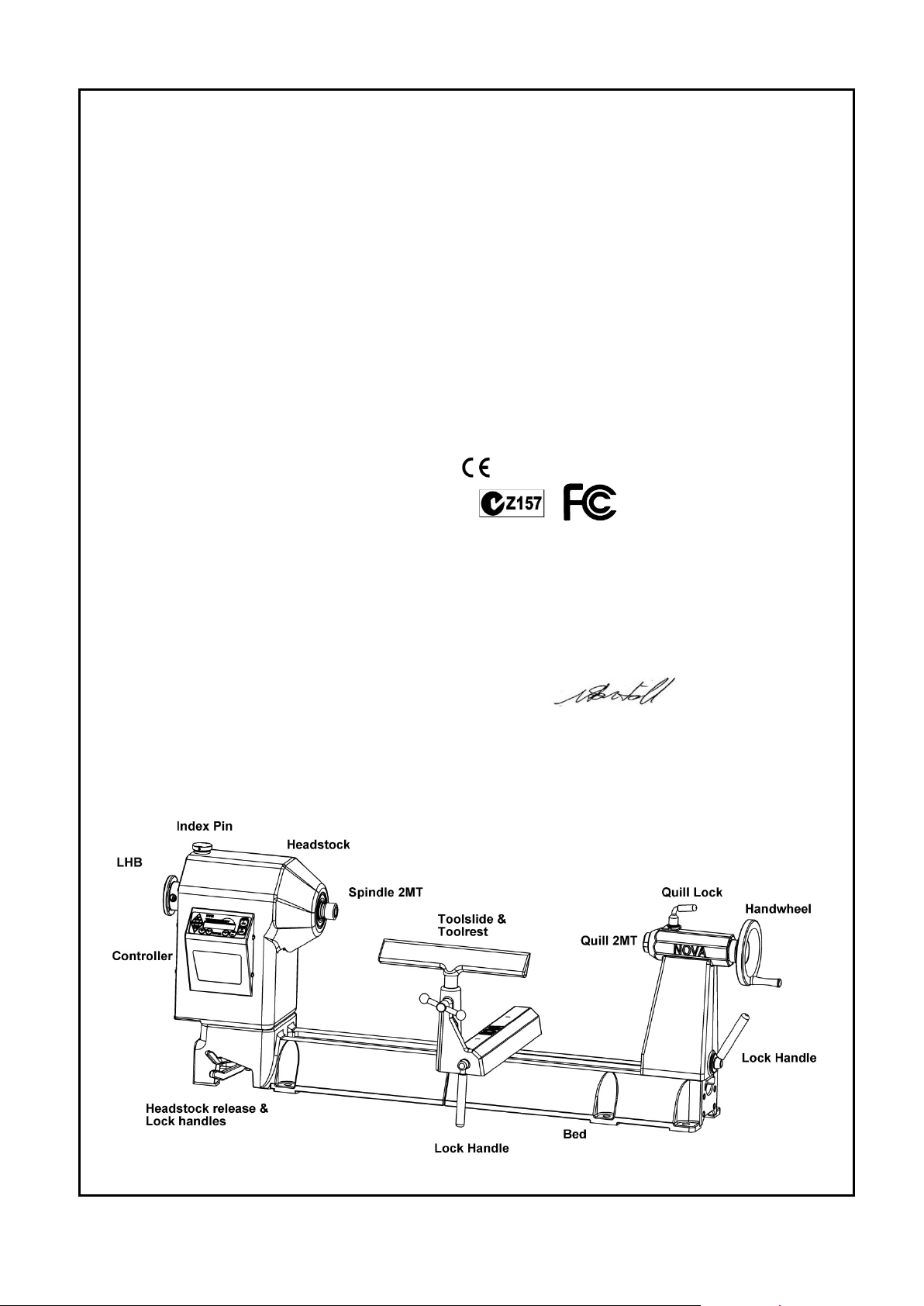
DVR 2024 Wood Lathe Specifications
Size: 1100mm(L) x 240mm (W) x 412mm(H)
43 1/3"(L) x 9 1/2" (W) x 16 1/4"(H)
Weight: 88kg (194 LB) + Legs
Swing Over Bed: 508mm (20in.)
Distance Between Centers: 600mm (24in.);
extendable in 510mm (20in.) units with
add-on Bed sections.
Swing Outboard: 798mm (31in.) with headstock
at 90° using outrigger toolrest.
Headstock:
Spindle Thread: M33 x 3.5 RH
1-1/4 x 8 TPI RH
(2)
(1)
or
Headstock Bore: No. 2 Morse Taper (#2 MT)
Headstock Swivel: 0 to 360 degrees, with
detents at 0, 22.5, 45, and 90 degrees.
Outboard End Internal Thread: M20 x 1.5 LH
Spindle Index: 24 divisions (every 15 degrees)
15mm through-hole through Headstock
Tailstock:
Tailstock Bore: No. 2 Morse Taper (#2 MT)
Quill Travel: 85mm (3-1/4in.)
Hole Through Tailstock: 12mm (7/16in.)
Toolrest:
Length: 300mm (12in.)
Shaft Diameter: 25.4mm (1in.)
Speeds (rpm):
100 – 5000 (in 5rpm increments)
Favourite Speeds:
10 presets
Standard Equipment:
300mm (12in.) Toolrest, 150mm (6in.) Faceplate, Spur
Center, and Live Center. Outboard Handwheel, Cast
Iron Stand, NOVA DVR Wireless Remote.
Optional Accessories:
Precision Midi Chuck
G3 Chuck
SuperNova 2 Chuck
II
Chuck
Titan
80mm (3in.) Faceplate
100mm (4in.) Toolrest
Bowl Toolrest
Outrigger Toolrest Unit
Revolving Center System
Faceplate rings
Swing Away Bed Unit
Notes:
(1) Applicable to Europe (excluding the UK)
(2) Applicable to United States, Canada, United Kingdom,
Australia, New Zealand & South Africa.
For Europe, Australasia, UK and South Africa
Directives this equipment complies with:
Low voltage directive (LVD) 73/23/EEC + 93/68/EEC+2006/95/EC
Machinery directive (MD) 89/392/EEC + 91/368 EEC + 93/68/EEC+2006/42/EC
Electromagnetic compatibility directive (EMCD) 89/336/EEC + 92/31/EEC +
93/68/EEC+2004/108/EC
Harmonized Standards applied in order to verify compliance with Directives:
EN 61029-1:2009 Low Voltage Directive and Machinery Directive
EN 55014-1:2007
EN 55014-2:2009
EN 61000-3-2:Ed3 2006
EN 61000-3-3:1995 A1 + A2
Signed………………………………………..Dated 10/10/11
Nathan Stantiall
Development Manager
116-0712-006
-9-
Page 10

Setting Up Your Workshop
Workshop Requirements
Consideration Recommendation
Lathe location Locate the Nova DVR 2024 close to a power source in an area with
good lighting. Leave enough clearance on all sides of the lathe;
allow for clearance when the headstock is swiveled. Other
machines in your shop should not interfere with the operation of the
lathe.
Lighting Your shop should have adequate lighting. The work area of the
lathe should be well lit; there should not be shadows cast on your
work. If possible, locate near a window. A portable spotlight may
be helpful.
Electrical The Nova DVR 2024 requires the appropriate power outlet nearby
to power the motor. Wiring and outlets should adhere to local
electrical codes. If in doubt, seek advice from an electrician.
Minimize use of extension cords. See "Connecting to power" section
for Surge Protector requirements.
Ventilation Your shop should be adequately ventilated. The degree of
ventilation will vary based on the size of the shop and the amount of
work done. The use of dust collectors and filters will minimize risks
to your health.
116-0712-006
-10-
Page 11
Assembling the Nova DVR 2024
handle firmly in thread.
1. Unpack the lathe and components from the shipping container. This is best done by cutting down the
sides of the box to expose the lathe
Warning!
Have other people help when moving or lifting the Nova DVR 2024 Woodlathe; it
weighs 146.2kg (322.3 LB) including stand.
2. Clean any parts coated with rust preventative with a cloth moistened with a petroleum-based solvent or
cleanser, such as paint thinner. Coat the lathe bed with paste wax.
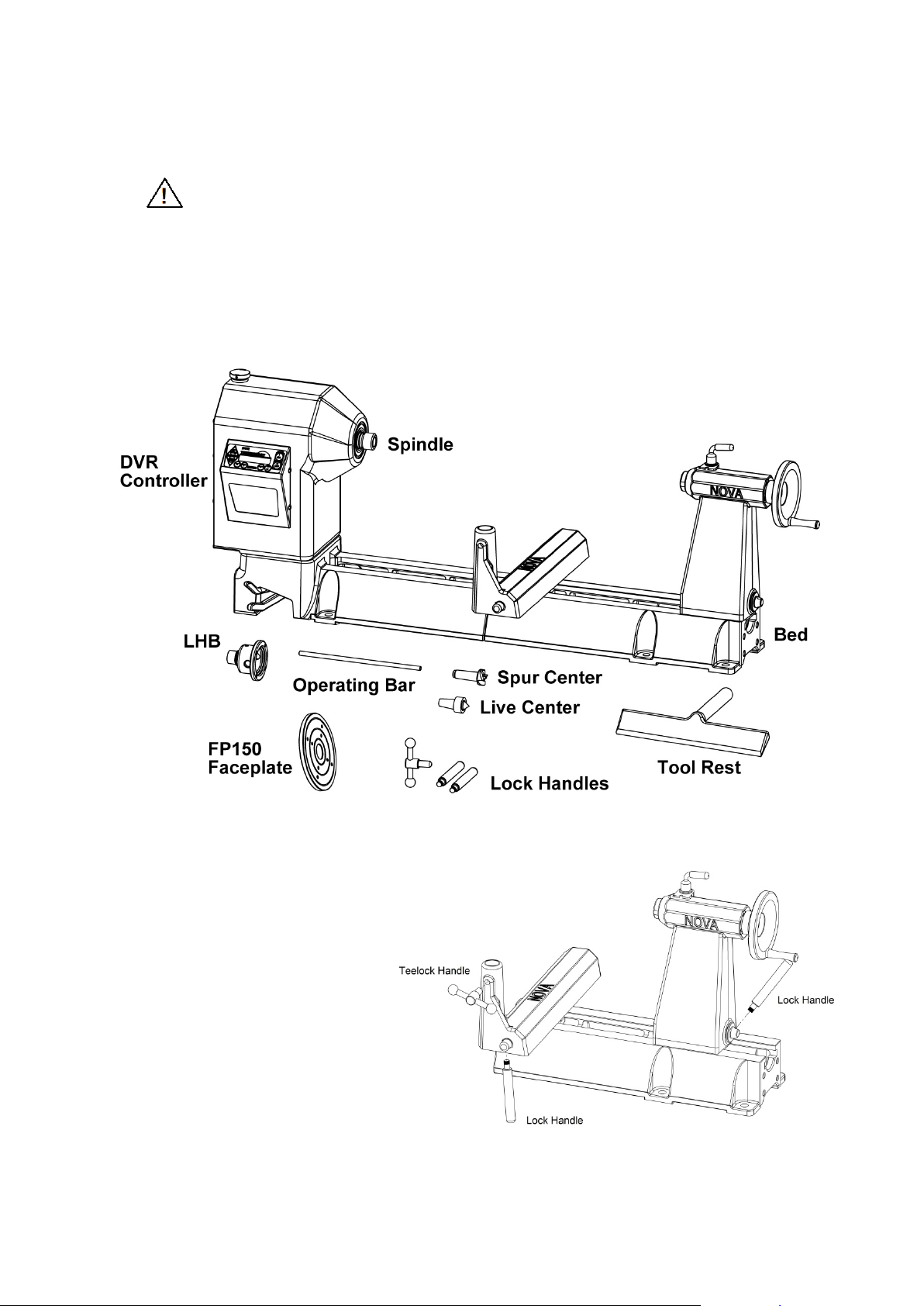
Nova DVR Components After Unpacking
5. Assemble the handles:
Note: Some handles may come pre-
assembled.
Toolrest Clamp Handle -
insert the rod through the handle
and screw the ball knobs onto each
end of the rod.
Toolslide Clamp Handle - screw the
rod lock handle into the Toolslide.
use a hex spanner to lock handle
firmly in thread.
Tailstock Clamp Handle -
screw the lock handle into the
tailstock. Use a hex spanner to lock
-11-
116-0712-006
Page 12
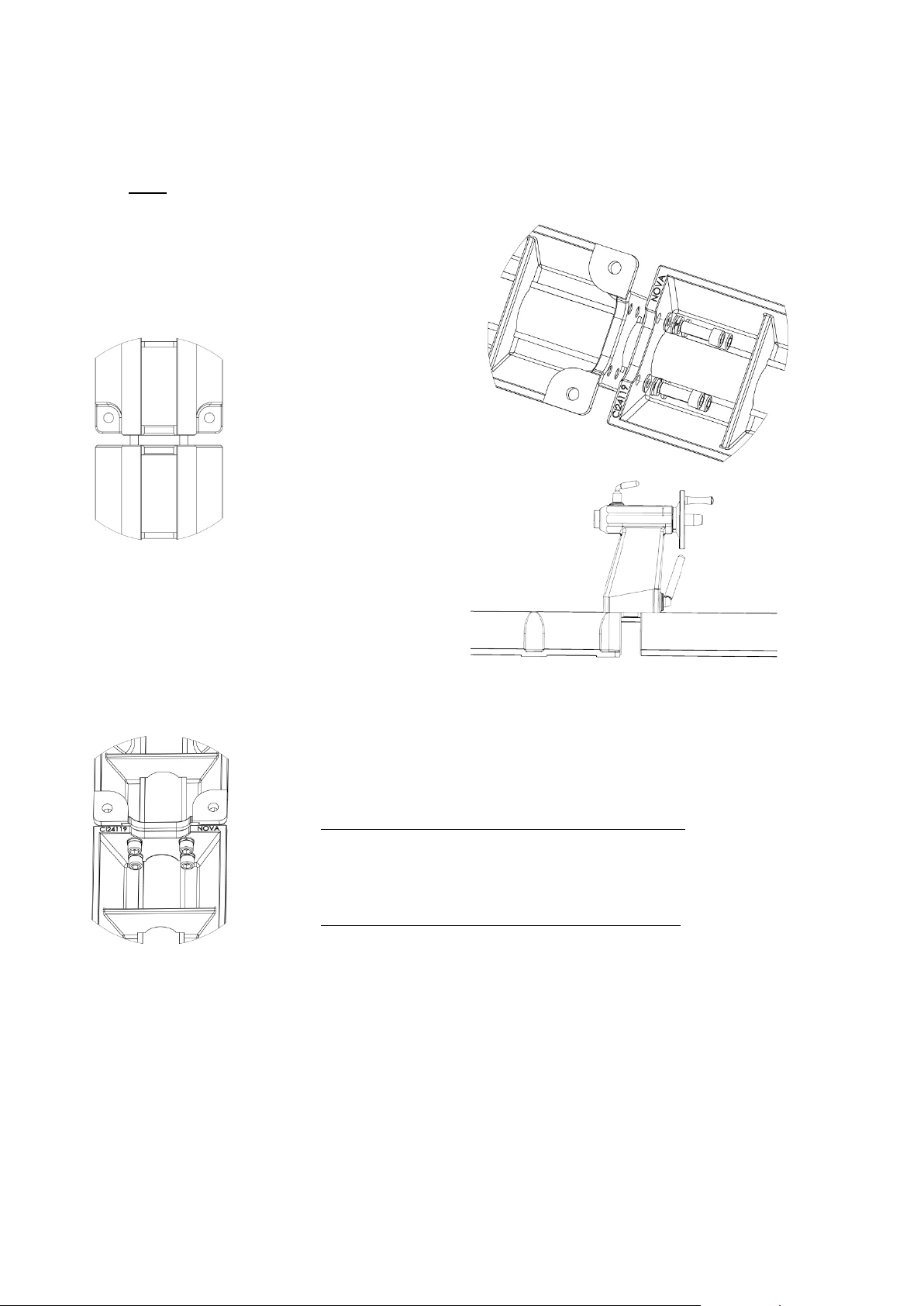
Adding an Extension Bed
Also, wipe off any yellow rust protective, dirt etc (if applicable).
Allen key provided.
30 N-m (22 lb-ft).
and run over the join until the 'railroad clacking' sound disappears.
Each cast iron extension bed adds 510mm (20in.) to the lathe's capacity to turn between centers.
1. Ensure that the bed pieces are flat and the two faces of the bed (which are to be mated) are
clean, free of any burrs and dents.
Note: The end of the extension bed with no feet should be mated to the lathes end face.
2. Place the add on bed extension close to the
lathes end face, align the holes and screw
on the four M12 cap screws (with one spring
washer and flat washer on each)
four tapped holes with the help of the 10mm
Do NOT fully tighten the
cap screws at this stage,
but tighten enough so that
the add on bed extension
is secured
into the
3. Move the tailstock over the two joining extension
beds (tailstock approximately covering equal
length on either extension). Lock the tailstock
firmly over the joining faces
4. Now, use the 10mm Allen key to fully tighten all four cap screws. The torque required is approximately
5. Check that the tailstock runs smoothly over the mating joint, and also over the
full length of the extension. Although all components manufactured by
Teknatool International are made to closest possible tolerances, it is possible
for a difference of approximately 0.1mm to put the bed 'out of true'. The
tailstock can bind in any given area in two possible ways:
A) Jamming between slides (inside the wall of the bed)
Using a smooth flat file, run over the area a few times until the
tailstock frees itself. To maintain central running of the tailstock,
both sides must be filed evenly.
B) The Tailstock clips or appears to jump over the join
The machined flat surfaces may not be quite flush. Use a flat file
-12-
116-0712-006
Page 13
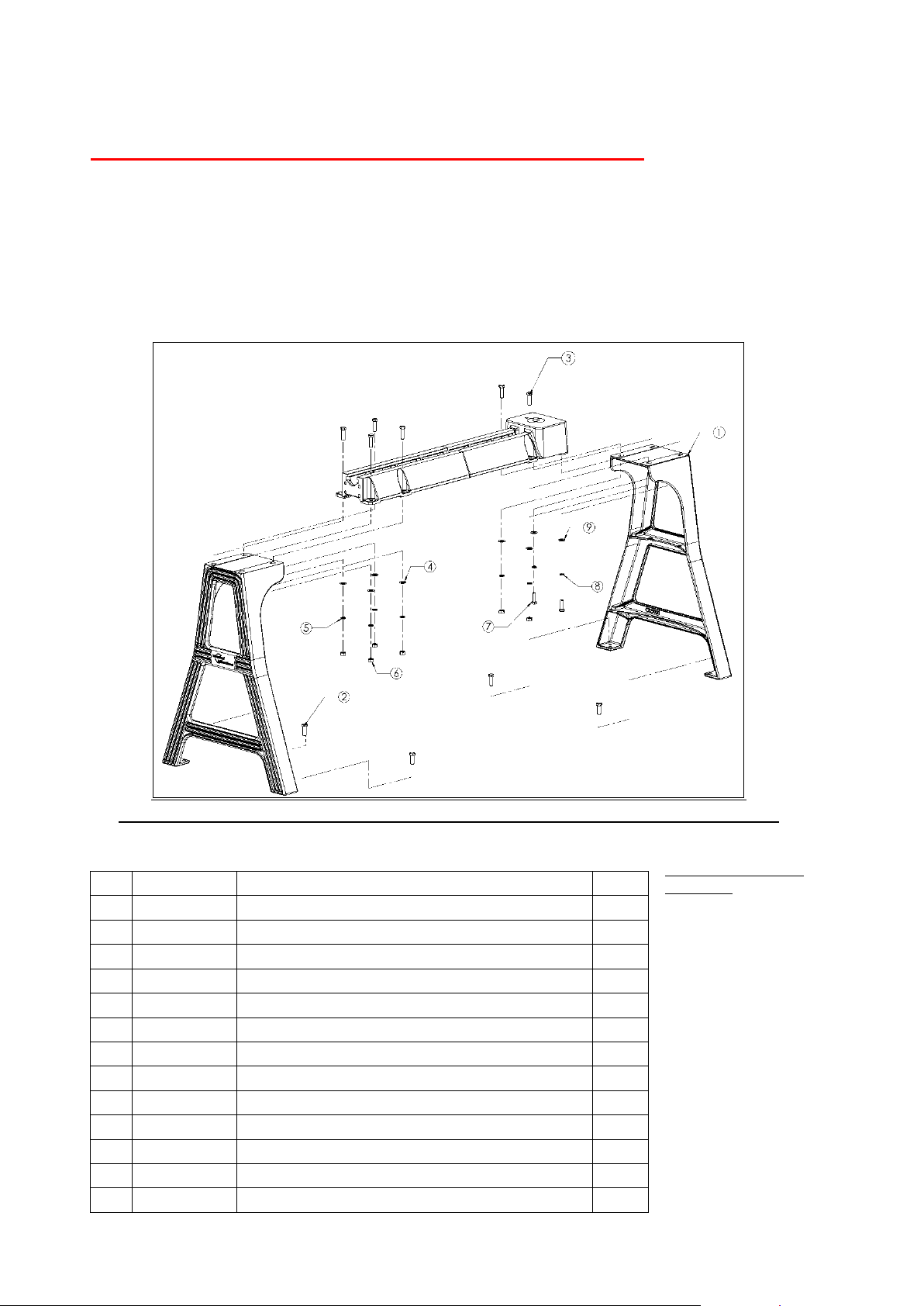
Mounting the lathe to the Cast Iron Stand
NB: Front Face (user side) of casting legs must have skirt fastening holes facing out. See page 16 for skirt fastening instruction.
Parts List
No.
Code
Description
Qty 1 57034
STAND MACHINED CAST IRON NOVA
2
2
BNMZ12030
BOLT ENG M12X30
4 3 BNMZ12050
BOLT ENG M12X50
6 4 FW12
WASHER FLAT M12
6 5 SW12
WASHER SPRING M12
6
6
NHZ12
NUT HEX M12
6
7
BNMZ10035
BOLT ENG M10X35
2 8 SW10
WASHER SPRING M10
2 9 FFW10
WASHER FLAT FENDER M10X32X1.6
2 57058
SKIRT (NOT SHOWN IN PICTURE)
1
NFW06
Nylon Shim (NOT SHOWN IN PICTURE)
8 FFW06
6 Washer C Degree (NOT SHOWN IN PICTURE)
8
MP30608
Screw (NOT SHOWN IN PICTURE)
8
For safety reasons please carefully read and understand these instructions.
The Nova Cast Iron Stand was designed to fit and be used only for Nova Lathes. Use of the stand on
other lathes could void the warranty, and risk personal injury.
The Nova Cast Iron Stand set comprises of two cast iron legs, one on either side, with skirt fastening
holes facing the user. The Stand pieces are cast from a high grade of cast iron with extremely good
section thickness and CAD generated internal gussets at all critical points to withstand extremely high
stresses with practically no distortion. Cast iron has always been the material of choice for wood lathe
construction because of its inherent mass and excellent modulus of vibration dampening.
Suggested Tools for
Assembly
• Ratchet and M10 socket
• At least one other
Person
• Saw benches or
workshop bench both
need to be greater than
860mm
(33 7/8”).
• 5/8” or 16mm Ring/
Open End Spanner
• 3/4” or 19mm
Ring/Open End Spanner
• 8” Adjustable Spanner
116-0712-006
-13-
Page 14
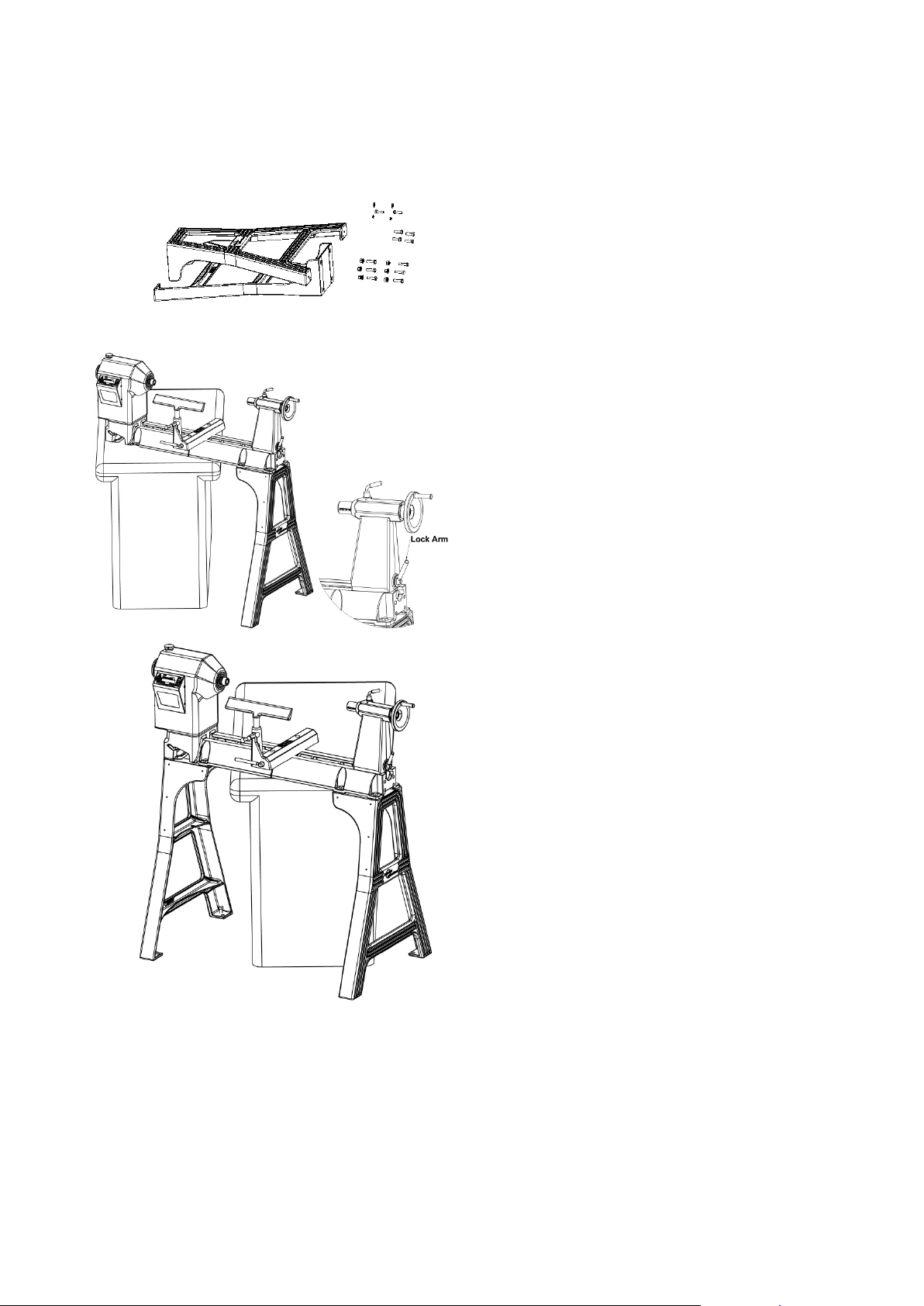
Set up your workshop area before beginning assembly of the lathe stand.
assembly.
the lifting of the lathe.
ASSEMBLY INSTRUCTIONS
SAFETY: The stand and lathe elements are heavy, please ensure correct lifting techniques and equipment are
used and have someone to assist. Use correct tools and observe recommended practices.
1. Open the cardboard box and identify the parts
against the parts lists provided (above)
2. Stand the two legs uprig ht fac ing each other at
approximately the same distance apart as the
length of the lathe. The Stand legs will stand
upright on their two feet, although not very
stable, but this is enough to carry out the
3. For this step you will need a second person
and a table, saw horses or workshop bench of
suitable height. (If the table is not high enough
then you may need to put blocks underneath).
With the help of a second person, move the
lathe from the box and up to the bench or onto
the saw horses. It may be easier to cut the
box away in order to prevent any dangerous
loading on your back.
Notes:
• Check the tailstock is securely fastened by
tightening the lock arm.
Once the following checks have been made the
headstock and the tailstock can be used to assist in
4. Move the lathe on the bench so that the
tailstock end is overhanging and accessible.
Attach the legs sloping to the right on this
end. Drop the M12 x 50 hex bolts through the
holes and then fasten underneath with the
washer and nut.
5. Next do the headstock end. Note that the left
most fastenings are inserted upward into two
blind holes into the lathe bed.
116-0712-006
-14-
Page 15
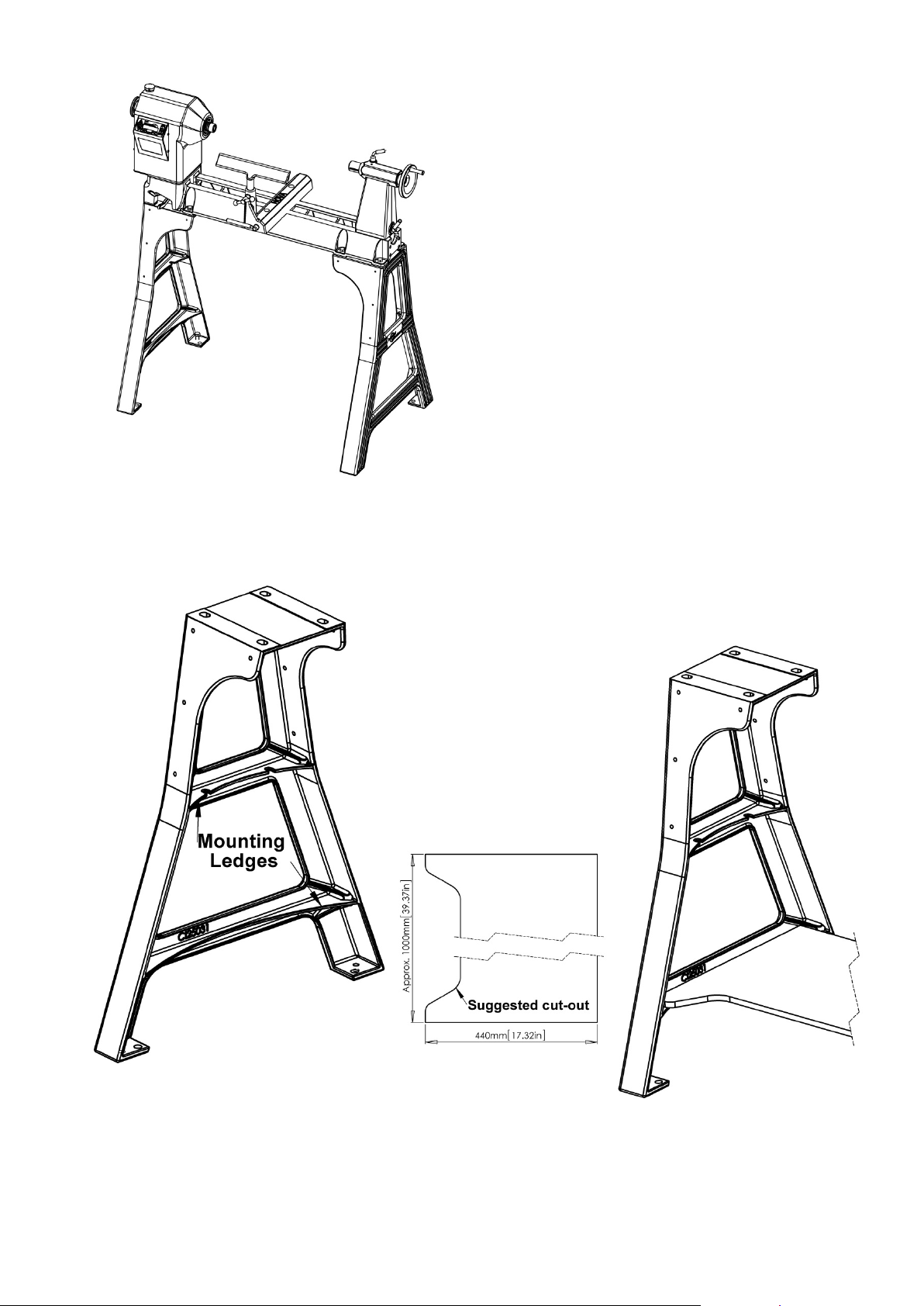
everywhere.
Stand Shelf
6. Now, with the help of a marker, mark the position for
drilling holes into concrete floor for securing the
construction bolts. On the feet of the Stand legs,
there are two holes , one is an M12 tap ped hole for
the jacking bolts, the other is a pla in 14mm hole f or
the construction bolts. T he position for construction
bolts has not been shown in the exploded view.
7. Once the hole posit ions ha ve be en marked, shift the
lathe aside and ins tall the construction bolts. Ref er
to your supplier on the size of drill recom m ended f or
the construction bolts you bu y.
8. Lift and position the complete unit over these
construction bolts. Tighten all nuts firmly.
9. Install all M12x30mm bolts (part 2) for jacking as
shown in the exploded view in the M12 tapped holes
on each of the feet of the Stand legs.
10. Level the lathe bed with the help of the above
jacking bolts with the help of a spirit level.
11. Once the lathe has been le veled tig hte n all
construction bolts firmly.
Re-inspect to ensure all fasteners are firmly secured
The Cast Iron stand has provision for customer shelving between the legs under the lathe. The exac t len gth of
the shelf will depend on how the legs have been setu p and adjusted .
If thicker wood is used, the edges of the shelf ends m ay need to
be relieved to allow the shelf to fit into the leg castings.
For the bottom shelf there
are example dimensions
below.
It is recommended that the
shelf has a cutout along the
front edge to enable free foot
movement around the lathe.
-15-
116-0712-006
Page 16
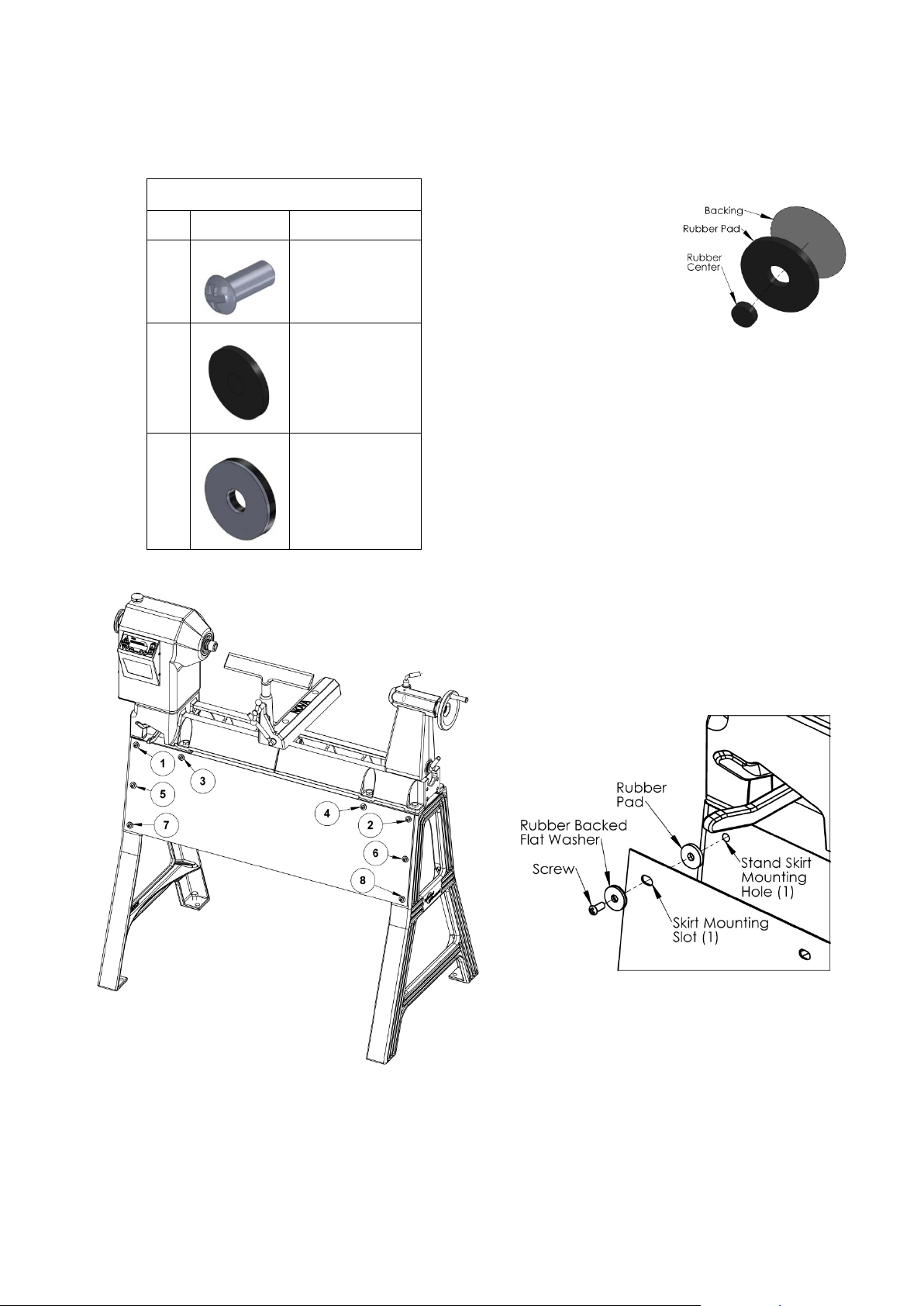
Mounting the Skirt to the Stand
cast iron stand.
Fastener parts list
Qty.
Image
Description
To mount the skirt to the cast iron stand, the lathe must first be completely and securely assembled onto the
1. Clean the area around each of the eight skirt
mounting holes on the stand legs.
2. Remove the center
and backing on the
rubber pads and
place one around
8
Screw M6x1 2
each of the eight
skirt mounting holes
in the stand leg.
3. Hold the skirt up b y its top edge. From the front
side of the skirt, insert a screw and rubber
8
Rubber Pad
backed washer through the first mounting hole
in the skirt as in Figure 1 (Fastening sequence).
Make sure the Rubber on the washer is against
the skirt.
4. Screw it into its corresponding top hole in the
8
Rubber Backed
flat washer
stand. Make sure a rubber pad is on both sides
of the skirt as in Figure 2 (Fastener layup).
Tighten finger tight to allow adjustment when
installing the remaining fasteners.
5. Repeat procedures 3 and 4 for the remaining 7
fasting points following the fastening sequence
detailed in Figure 1.
6. Once all eight mounting holes have fasteners,
tighten each screw snug.
7. Re-inspect to ensure all fasteners are firmly
secured.
Figure 2 (Fastener layup)
-16-
Figure 1 (Fastening sequence)
116-0712-006
Page 17

Connecting to Power
The power cord should be 3-wire, having a groundi ng c onduc tor and a gro unding plug. The plug must be
plugged into a matching outlet that is properly installed and grounded in accordance with local electrical codes.
Warning!
Improper connection of the motor can result in a risk of electrical shock.
If it is necessary to use an extension cord, the cord should be grounded. Use the correct wire size for the
extension cord, for a given cord length, to avoid power loss and over-heating.
IMPORTANT: A Surge Protection Device rated to at least 15 amps - for USA and Canada, other
countries 10 or 15 amps - must be used to protect the DVR electronics from electrical spikes or
surges, similar to those used on most Home PC's.
Note: Ground Fault Interrupters (GFI's) are generally not compatible with Variable speed motors. If you
wish to use a GFI or RCD select a unit that is confirmed for use with a Variable speed motor using
capacitor charge. The Machine must be connected to a suitable ground outlet.
116-0712-006
-17-
Page 18
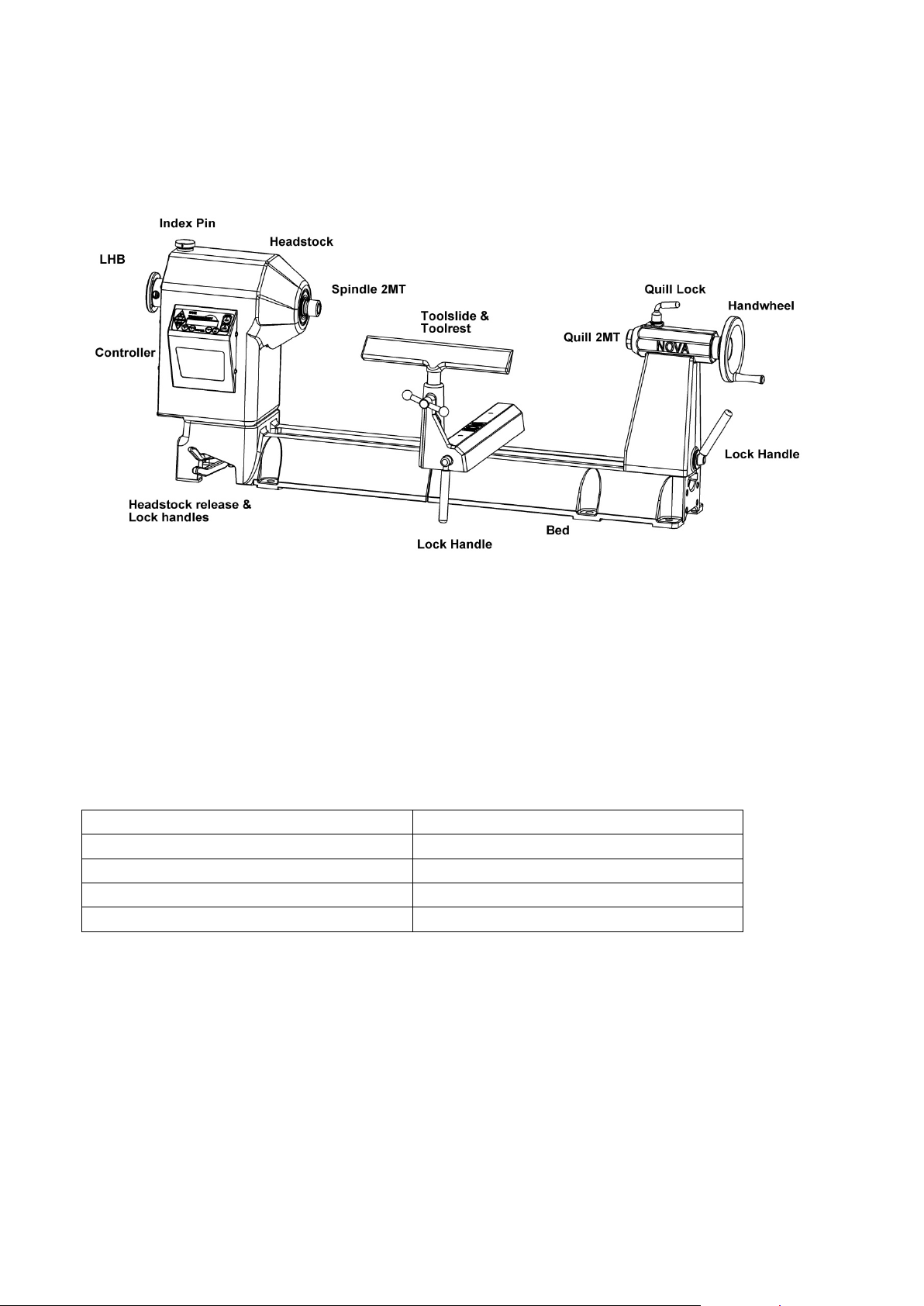
Using the NOVA DVR 2024
Motor Type: Digital Variable Reluctance
Accuracy of Speed Stabilization: <2.5%
Motor Power: 2.3 Hp (230v only)
Regulator Type: PID
Efficiency: > 0.80
Speed Stabilization: Current level, pulse width
Motor Speed Range: 100-5000rpm
Reverse: Yes
Default speed (when powering up) : 500 RPM
Speed Control: Button (5rpm increment)
Parts of the NOVA DVR 2024 Wood Lathe Assembled
DVR Variable Speed Controller
The Nova DVR drive is a unique type of motor and controller where the motor and controller interact. The
motor provides data to the controller on its position and load conditions.
The motor provides high torque even at low rpm and inherits extremely close speed control.
With the toggle switch in the "OFF" position, plug lead into wall socket and switch on.
An electronic tune will be heard as the controller computer "boots up" and the LCD display will show a two-line
display.
DVR Drive Parameters
-18-
116-0712-006
Page 19
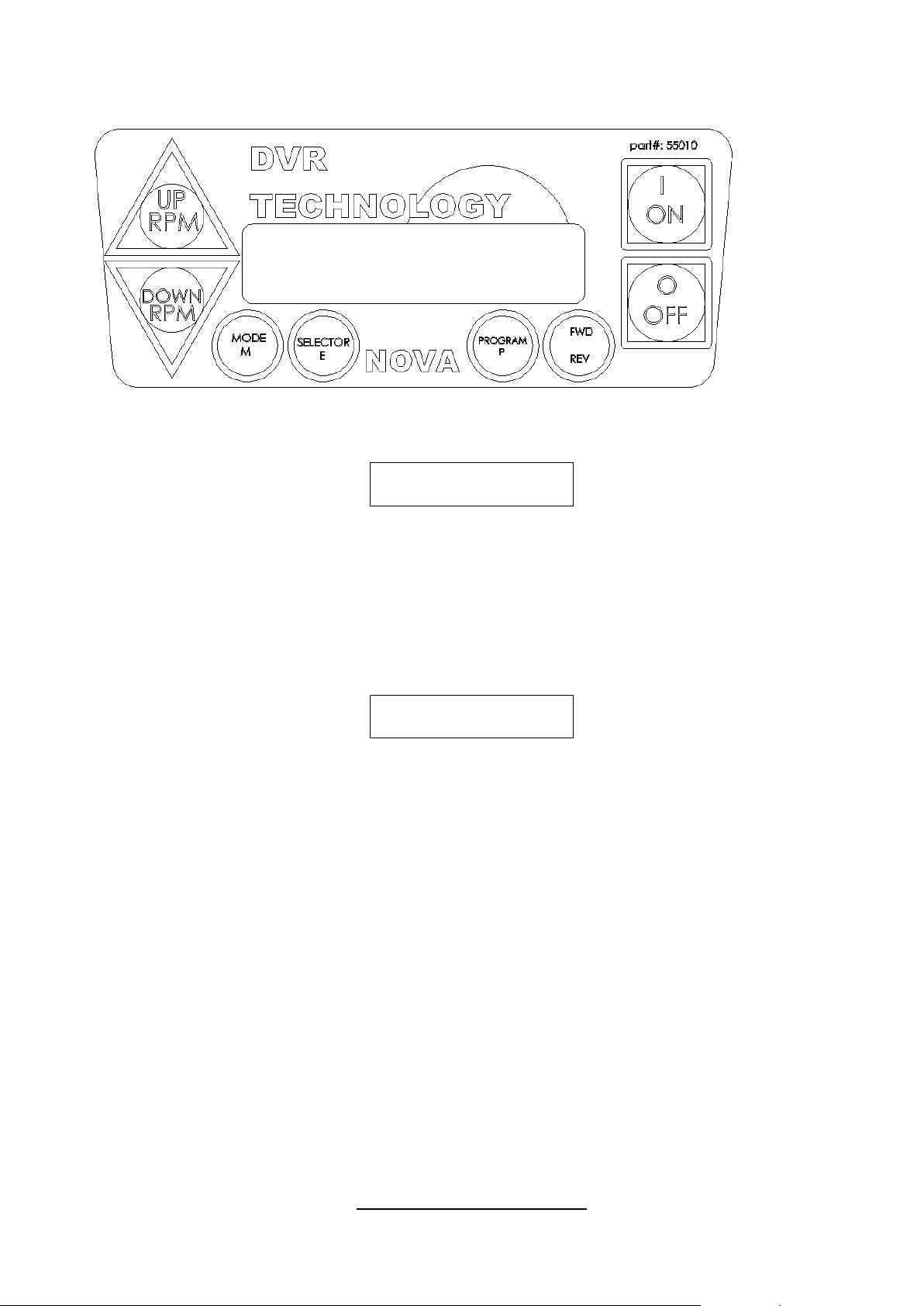
DVR Drive Functions
Ready to run
at XXXXrpm >>
Speed = CCCC rpm
Ref -> RRRR rpm
3
4
6 1 5
2
A two-string li qui d-crystal display panel (LCD) displays the current information.
“XXXX” is the reference motor speed.
“>>” Indicates forward direction of rotation.
1. Green ON -- Press to start machine at the commanded speed -- always check that the speed has been
selected correctly. When the computer is first switched on it is set at a default speed of 500 rpm.
Remember that whenever the computer is switched off at the wall or at the incoming power supply
switch the computer will restart at the default setting. The spindle cannot restart until 1 “ON” is
depressed.
As with any Woodlathe ensure that the index is off and the work piece is free to turn without hitting the Toolrest
etc. Ensure that the work piece is secure and the appropriate speed is selected.
"CCCC” = current value of the motor speed
“RRRR” = reference value. (Value selected)
When the On button is first pushed the screen will display "Go Low!! RPM" and then
"4 retries left". These messages are normal; the computer first does a self-check
2. Red OFF key. Pressing this key will stop spindle rotation.
The ON / OFF keys in the above panel only switch the motor on and off. The selected speed will
remain until adjusted or computer switched off.
3. UP RPM. To raise speed, one press of the key will increase speed by 5 rpm. Continuing to hold key
pressed will continue to raise speed. The speed can be adjusted with the spindle running or off. To make a
large adjustment in speed it is quicker when the spindle is OFF.
4. Down RPM. Press to lower speed this key operates the same as up key.
.
The UP and Down keys can also be used in program mode to change the parameters.
5. FWD / REV Key. Pressing this key will change the motor rotation from forward to reverse. Pressing again
will select forward. You can verify the direction by the two arrows at the bottom left or right of the screen.
Important: always verify the forward or reverse is selected correctly before switching spindle on.
The Direction of rotation setting is only available in the ready to start mode. Press stop if necessary, and press
FWD/REV to toggle direction of rotation. The two arrows on the right side indicate reverse.
Whenever reverse is selected a “ Warning Reverse Selected “ will flash on screen for about 1-2 seconds
before spindle starts.
-19-
Special and Parameter sett ing s
116-0712-006
Page 20

You may wish to change the stabilization setting from time to time depending on the type of work piece
you are working on. You have 3 options preset for you:
1. SOFT: For light work at speeds lower than 500 rpm
2. NORMAL: Suitable for most work and is the default setting
3. HARD: For heavy and/or ‘out-of-balance’ work at speeds lower than 500 rpm
a) Press <OFF> if necessary.
b) Press <PROGRAM> (ke y #6 on diagram). The stabilization setting will be displayed. The default setting is
NORMAL.
c) Press <SELECTOR> ( key # 7 on diagram) to toggle between the 3 options as mentioned above.
NOTE: Pressing <MODE> (key #8 on diagram) allows the user to change the parameter settings in
more detail. This breaks it down into Proportional (Kprop) and Integration (Kint) settings which make up
the PID control of the DVR. The 3 options of SOFT, NORMAL and HARD have been preprogrammed
for your convenience and are balanced for optimum output. To clear special settings and return to
default --- switch off computer at the master switch.
d) Press <OFF> button to return to ready state. (Ready to start mode).
While the machine is running if you push Program (6) the screen will display various diagnostics. Operation of
the machine is not effected. Each time mode is pressed a different screen will show. This area is only used for
advanced programming functions. Press OFF to return to ready state.
Auto safety -- If the power is lost to the machine, when power is restored the computer wil l reboot but the
machine will not start until the ‘ON’ switch is pressed. Remember to correctly select speed if different from
Default speed.
Warning: Do not push several keys together as special coded combinations of keys open
diagnostic and service functions . Some of these disable control and protection func tions. If an
unfamiliar screen is displayed, switch off the computer and leave for one minute before rebooting.
If the DVR hasn’t been used for some period (over one month) it is helpful to switch the unit on 30 – 60 minutes
before use
116-0712-006
-20-
Page 21

Turning Tips
The Nova DVR Drive technology is not just a variable speed motor - its smart motor technology takes turning to
a new level. The speed, vibration and load sensing, work with the conditions and turning. The machine will
reward skilled turning with exceptional finish conditions. There is often no need for sanding. As you apply load
(chisel pressure or depth of cut) the control will sense the change in spindle conditions and compensate
accordingly. Get a feel of the communication between yourself and the motor turning by applying increasing
force. The motor will respond by applying increased power to exactly maintain speed.
LOW SPEEDS 100-350: Select Hard Mode (see Special and Parameter settings)
Note – at low speeds 100- 350 rpm control of the chisel is important. At 250 rpm the motor still has good torque
(in fact the torque is more or less the same as at 400 or 1000 – but at low speeds there is a difference , the
DVR is a unique type of motor in that the control only supplies enough power to maintain the spindle at the
commanded speed. It needs to sense the load from the chisel and then it will apply power as needed. At very
low speeds the chisel can move fast compared with the rotation of the wood. The important thing is to have
good control of the chisel and maintain steady cuts (using the same woodturning practices that produce quality
cuts and finishes). In this way surprisingly heavy cuts can be achieved. However, rapid or incautious use of the
chisel will be immediately sensed by machine and spindle will shut down and then automatically try a restart.
“Will The Machine Shut Down on Interrupted Cuts?”
No, as long as the cut is within the normal range of Woodturning cuts. An interrupted cut at slow rpm may
cause a loss of control of the chisel and a dig in may occur.
A way to understand chisel feed rates is to consider that at 100 rpm, the work piece has only rotated about 1
and a half turns in one second and at 250 rpm, 4 turns. Considering that chisel feed or movement under
normal turning can be anything between say 5 and 100mm per second at normal Woodturning turning speeds.
At very low rpms it is easy to move the chisel too fast for good cutting conditions. In general, low rpm is only
used for special processes or conditions. Speeds below 350 are generally not Woodturning speeds. The
machine will operate down to 100 rpm but this is generally for applying finishes and other applications.
116-0712-006
-21-
Page 22
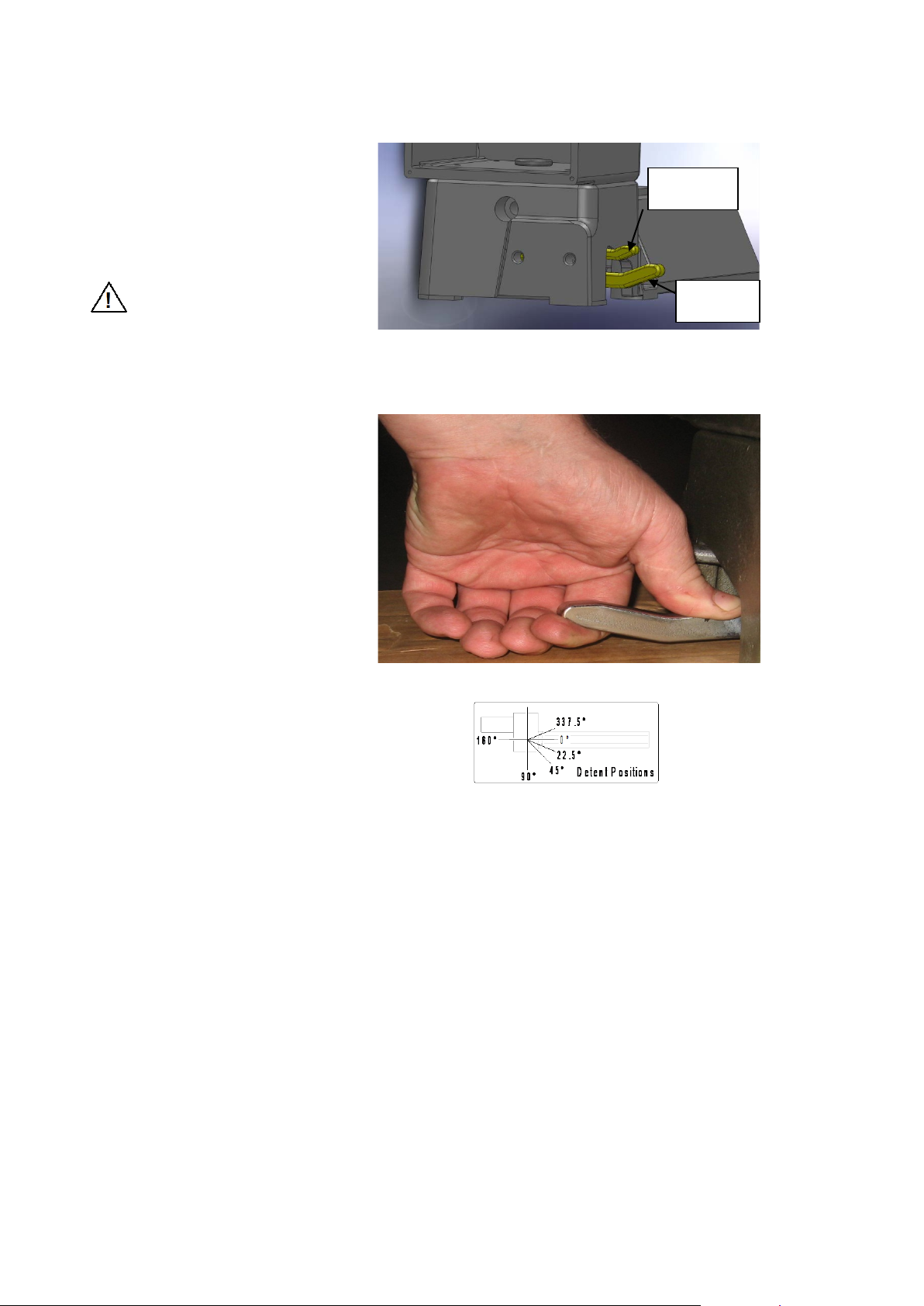
Swiveling the Headstock
Detent Positions 0, 22.5, 45, 90 degrees 180, 337.5 degrees
Lever 1
1. Stop the lathe. Loos en hea dst ock
by moving lever 2 to the left most
position
2. Slide the Headstock Release lever
1 Handle towards tailstock end of
lathe, and rotate the headstock to
a detent position. Do not push
down on the handle.
Warning!
Use the detent latch positions
to prevent headstock
movement during turning.
3. Firmly tighten the Headstock by
moving lever 2 back toward the
tailstock end of lathe until you feel
it firmly tight, in some cases you
may need the release the handle
by applying downward pressure
with thumb and 1 finger as shown
in Fig: 1
but do not use excessive force if
finger are place correctly as shown
lever will slide down easily and
disengage from locking nut.
Then move lever to the left until it
pops back up into the next
available index position and repeat
tighten as described earlier.
Note: Levers may differ from
depicted; some models hav e red
plasticized handles. The same
operation to swivel and lock
applies.
Lever 2
Fig 1
Right-hand Turners Left-hand Turners
-22-
116-0712-006
Page 23
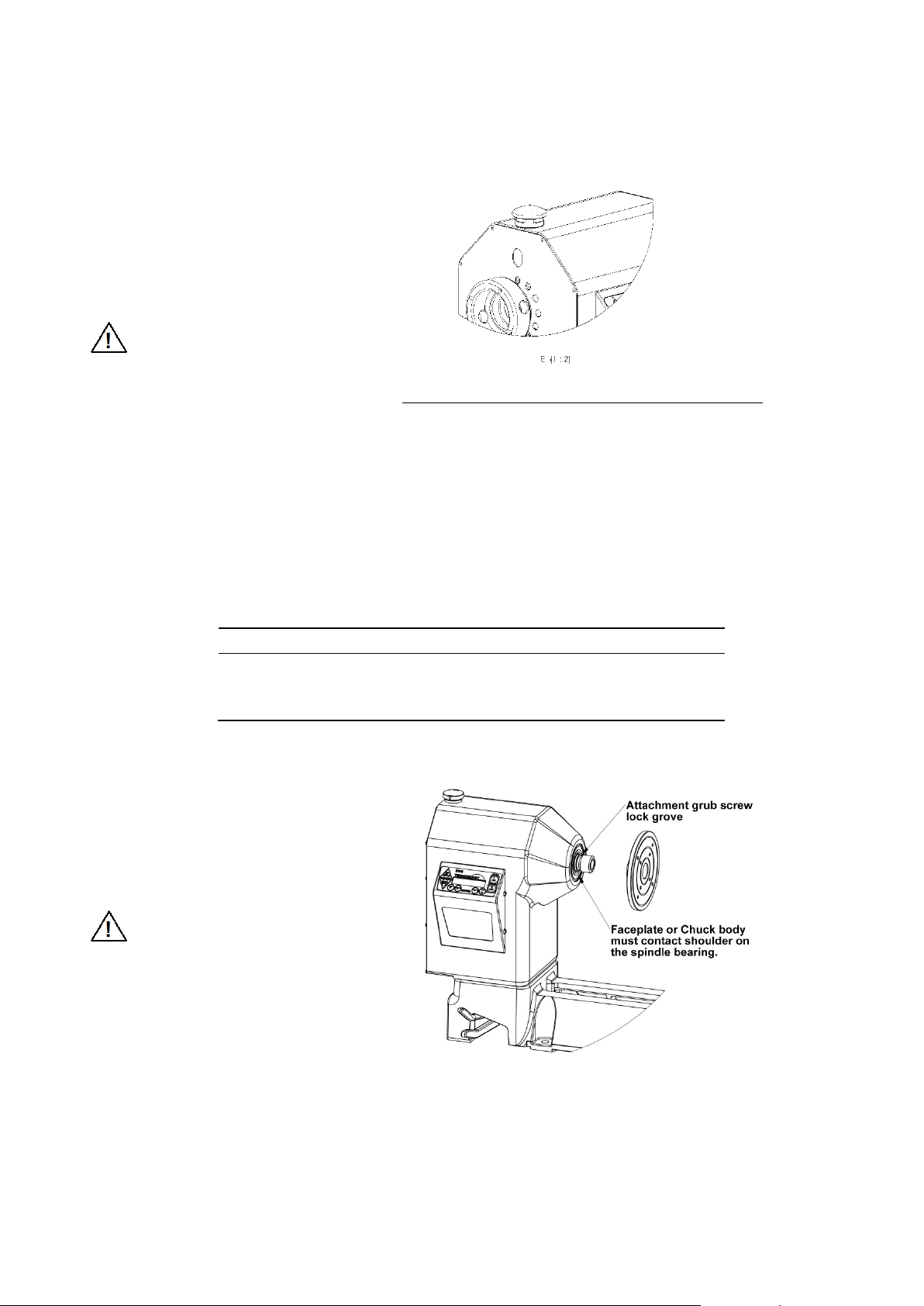
Spindle Index
24 every hole 15
The spindle index pin locks the
headstock spindle. It is selectable in
15 degree increments (24 divisions).
There is sight hole to read index
numbers (0 through 23).
1. Stop the lathe.
2. Pull the index knob and turn it left
until the pin drops into the hole. To
lock the spindle it must engage into
a hole in the headstock pulley.
Warning!
Make sure the index pin is
out before operating the lathe.
The pin should drop into the
indentation in the headstock to
prevent it from engaging while
the spindle is turning.
Divisions Index Number Degrees
2 0,12 180
3 0,8,16 (every 8
4 0,6,12,18 (every 6
6 0,4,8,12,16,20 (every 4
8 0,3,6,9,12,15,18,21 (every 3rd) 45
12 0,2,4,6,8…22 (every 2
th
) 120
th
) 90
th
) 60
nd
) 30
Headstock
The headstock houses the Rotor, Stator, Electronics, bearings, and the Spindle. The headstock spindle
accepts centers and accessories with no. 2 Morse taper (#2 MT), plus threaded faceplates and chucks.
Spindle Thread Size
Country Threads
United States, Canada, Australia, New Zealand,
South Africa, United Kingdom.
Europe (excluding the UK)
Mounting a faceplate or chuck
1. Use the Spindle Index Pin to lock the
headstock spindle.
2. Remove the side-locking screw, then
wind the faceplate or chuck onto the
spindle threads. A spindle washer in
between may be used to make
removal easier.
Warning!
The faceplate or chuck body must
contact the shoulder on
the spindle bearing.
1-1/4 x 8 TPI RH
M33 x 3.5 RH
4. Pull and turn the Index Pin and place it
in the "safe" indentation in the
headstock.
5. A vee groove is provided in the spindle
for a special locking grub screw that is
used in conjunction with Nova chucks
and accessories to prevent unwinding
during reverse operations. Wind in the
side-locking grub screw and lock firmly
in place, without over tightening.
-23-
116-0712-006
Page 24
Warning!
It is important that all Chucks and
Faceplates that are used on the DVR
spindles have a side-locking function.
Warning!
When installing or removing the Faceplate or
Chuck from the spindle, the side-locking grub screw
MUST be completely removed.
Some older Teknatool products may not
have a side-locking function. If any of these
products are intended to be used on the
DVR spindle they will need to undergo a
modification to include the side-locking
function or new products purchas ed with a
side-locking function. All spindle mounted
products produced by Teknatool
International for the DVR Lathe have sidelocking functions*.
The side-locking function should be used
at all times while running the chuck on the
spindle during operation. Without this
function engaged the Chuck or Faceplate
may unwind from the spindle during
operation.
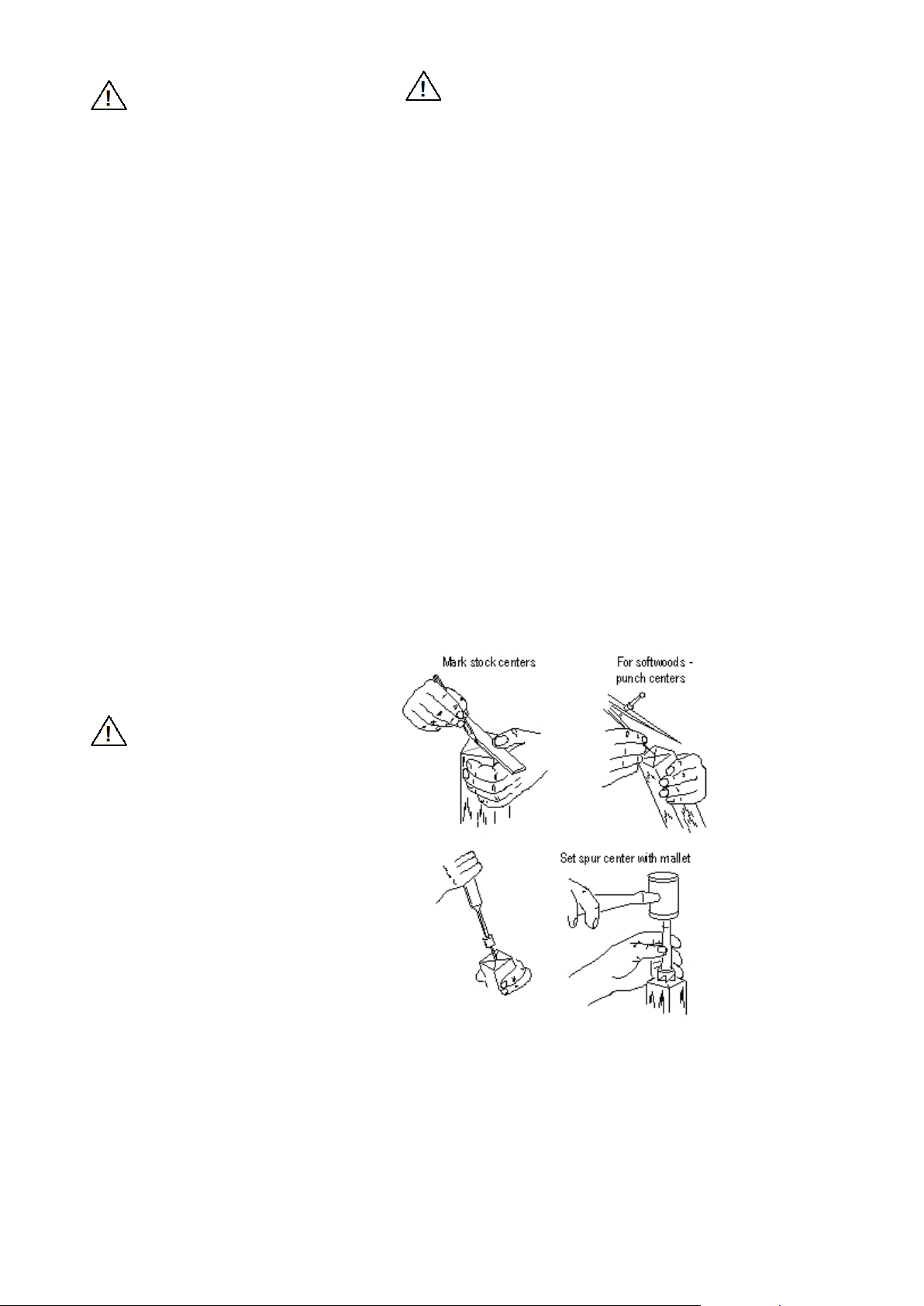
Using a spur center
This avoids any potential damage to the spindle
that the grub screw may cause if it were not
completely removed, when winding the Faceplate
or Chuck on or off the spindle.
*Exception 1. When an ILNS insert is used with a
FP150Z faceplate on the DVR 2024 or a Spindle
adaptor, the insert or adaptor must be locked onto
the faceplate to avoid it unwinding when the spindle
is run in reverse. Loctite 272 Thread locker is
recommended.
*Exception 2. Customers with dedicated threaded
Teknatool chucks who intend using the chuck on
the DVR 2020 Spindle must have a side-locking
function adapted to the chuck before running it.
Chucks with M33 threads may apply for Europe.
IMPORTANT NOTE
The Index Pin is designed for indexing and not for
leveraging against, when removing faceplates,
inserts and chucks. For this we recommend holding
the spindle using the operating bar through the 2
LHB holes (Left Hand Brake).
Mount the spur center to the work
piece as shown and then insert the
spur center and work piece into the
headstock spindle.
Warning!
Do not pound work piece into
headstock drive center when
turning between centers or you
may damage the headstock.
To remove the center, insert a 10mm
(3/8-inch) diameter wooden dowel or
steel rod through the headstock spindle
hole. While holding the center so it
doesn’t fall, tap it out.
For Hardwoods - drill
centers and saw diagonals
for spur drive centre
116-0712-006
-24-
Page 25
Toolrest
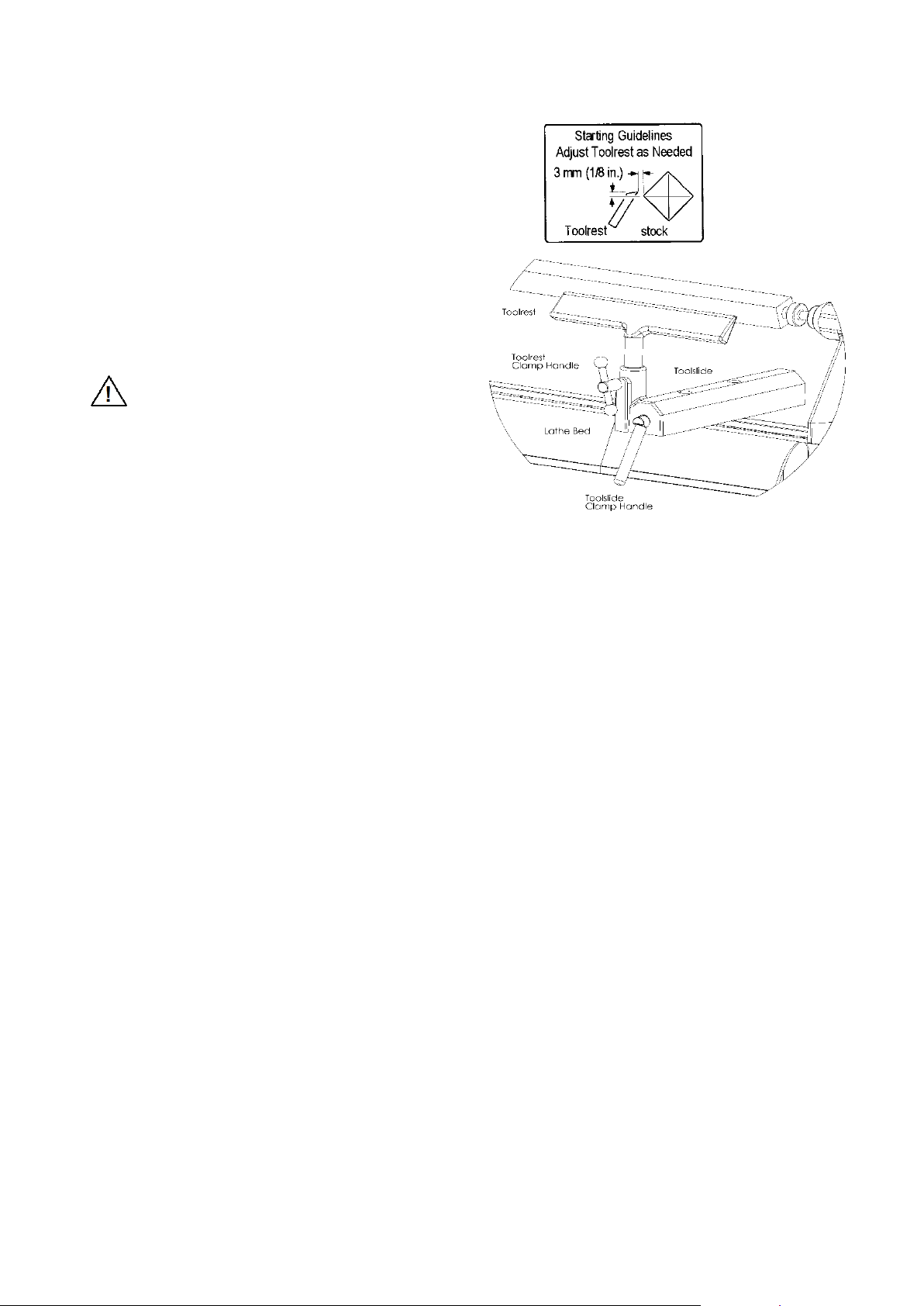
To move the Toolslide along the bed,
loosen the Toolslide Clamp Handle,
move the slide to the desired position,
and tighten the clamp handle.
To adjust the Toolrest, loosen the
Toolrest Clamp Handle, position the
Toolrest, and tighten the clamp handle.
Adjust the Toolrest close to the work
piece. Exact positioning may be varied
to suit the turner. Before turning,
revolve the stock by hand to make sure
it clears the rest. At intervals, stop the
lathe and readjust the Toolrest.
Warning!
Lathe tools and chisels should
remain on the Toolrest
whenever the tool is in contact
with the work piece.
Remove the Toolrest wh en
sanding or polishing so fingers
do not get pinched.
116-0712-006
-25-
Page 26
Lathe Turning speeds
center is used.
250 - 100
5000 - 3000
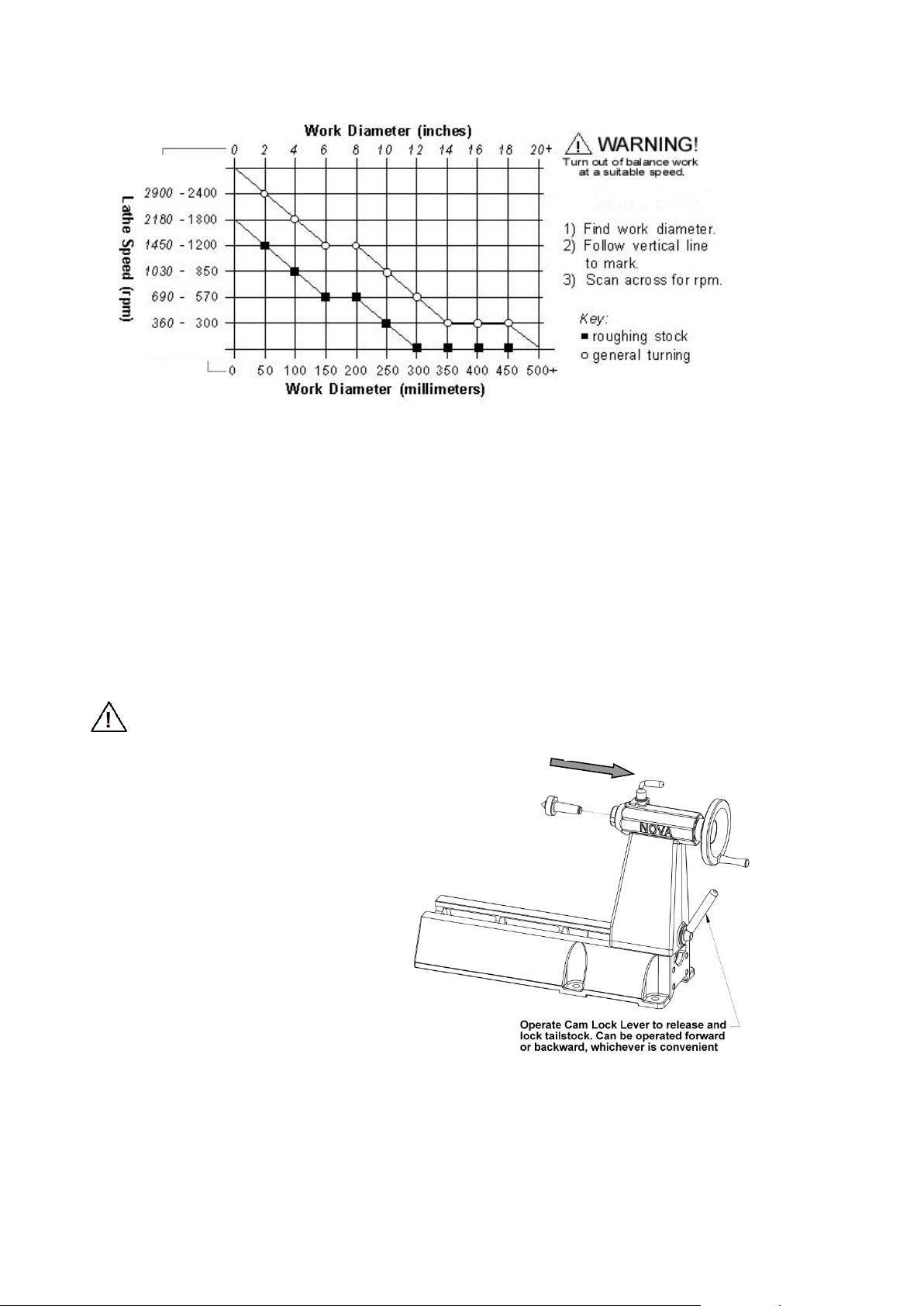
Correct selection of turning speeds is important for safety and finish cut quality
It is important to take into account the fixing of the work piece; it should be made as secure as possible.
Various techniques are available for this consult books on the subject and seek training opportunities.
There are safety and out of balance considerations. Aim for a good balance in turning speed, ensure good
fixing and try to balance timber as much as possible before installing on lathe.
In general wood likes being sliced and if too low a speed is used the timber can "hammer" against the cutting
tool, tearing fibers and imposing large forces on the tool and work piece. This can often be dangerous, it is best
to select a higher speed, the cut will be smoother and less force is imposed on the work piece. It can be
likened to a wood plane, if it is pushed very slowly much force is needed to break the fibers, if the plane is
pushed at a higher speed less forces are involved and a better cut results. Use 250 rpm when needed, but it is
better turning at 400-600 rpm.
Tailstock
Warning!
Never loosen the Tailstock Quill or
Tailstock while the work piece is
turning.
To move the Tailstock along the bed,
loosen the Tailstock Clamp Handle, slide
the tailstock to the desired position, and
tighten the clamp handle.
To move the Tailstock quill in or out, loosen
the Quill Lock and turn the Handwheel.
Lock the quill in place with the Quill Lock.
The Tailstock Quill accepts centers and
accessories with no. 2 Morse taper (#2
MT). To install a taper use a quick, firm
action by hand. Do not pound the taper in.
Quill Eject Direction
To remove a taper, either wind the quill into
the tailstock until the taper is ejected or
insert the operating bar through the
Tailstock Quill hole. While holding the taper
so it doesn’t fall, tap it out.
The Tailstock Quill is hollow, allowing you
to bore holes through turnings if a hollow
116-0712-006
-26-
Page 27

by Keith Rowley
Learning Turning
The art and technique of turning is a subject beyond the scope of this instruction manual. It is recommended
that you receive hands-on instruction on lathe turning and/or refer to books and videos on the subject. For
reference, some woodturning books are:
The Lathe Book
By Ernie Conover
Woodturning A Foundation Course
Creative Woodturning
by Dale Nish
Turning Wood With Richard Raffan
by Richard Raffan
The Fundamentals of Woodturning
by Mike Darlow
-27-
116-0712-006
Page 28

CONTROLLER USER’S GUIDE
NOVA DVR (SWITCHED RELUCTANCE) DRIVE
Teknatool International
1.0 INTRODUCTION
1.1 General
This guide contains the basic information on use of the Digital Variable Re luctance (DVR) electrical dr ive for
DVR Drive products.
1.2 Overview
The DVR integrated electri cal drive s ystem contains the DVR motor with the Rotor P osition S ensor (R PS), t he
drive control board and the hum an-machine interface (HMI). The c ontrol board, RPS and HMI represent the
control system of the drive. The DVR is connected with the control board by six power wires and RPS cable.
The control board c onta ins power input devic es – input rectif ier, po w er f ac tor cor rec tor with the DC link reactor,
three-phase inverter and the control circuit based on the 16-bit Infineon microcontroller.
The HMI contains th e int erf ace boar d, the LCD and k eyboar d. The inter face boar d is based on th e 805 1 f amil y
Atmel microcontroller and connected with the control board through the insulated serial RS232 interface.
Both microcontrollers have flash program memory. The interface board microcontroller also contains the
EEPROM memor y in or d er to change and store the dr i ve par ameters. The control system has been spec if ical l y
designed for control flexibility and to provide optimal drive performance.
2.0 MAIN PARAMETERS AND FEATURES
• The motor type – Switched Reluct ance Mot or (D VR)
• Nominal operating output power – 2.3 HP
• Power supply range: 220V 50Hz or 60Hz
• Power factor correction: PF ≥ 0.95
• Speed range: 100 – 5000 rpm
• 5 preset (favorite) speeds with save function.
• PI speed controller with adaptive coefficients
• 3 preloaded coefficient curves: SOFT, NORMAL and HARD
• Load inertia measurement for improving the PI speed controller coefficients (adoptive control)
• Reverse function
• Torque and speed ramp functions
• Overload protection
• Under-voltage / PFC fault protection
3.0 HUMAN MACHINE INTERFACE DESCRIPTION
The Human Machine I nterf ace (HMI) pr ovides a flexi ble c hoice of the dr ive par am eters: r un/sto p, m otor spee d,
direction of rotation, PI speed controller coefficients. HMI contains 2-lines, 16-position LCD display and
keyboard. The drive par ameters can be set by decreasin g/increasing values incrementall y. Some parameter
values can be stored in the EEPROM of HMI.
116-0712-006
-28-
Page 29
UP
RPM
DOWN
RPM
I
ON
0
OFF
PROGRAM
P
MODE
M
SELECTOR
E
FWD
REV
DVR
DRIVE
NOVA
FUTURE TECH
FWD
REV
PROGRAM
P
SELECTOR
E
MODE
M
UP
RPM
DOWN
RPM
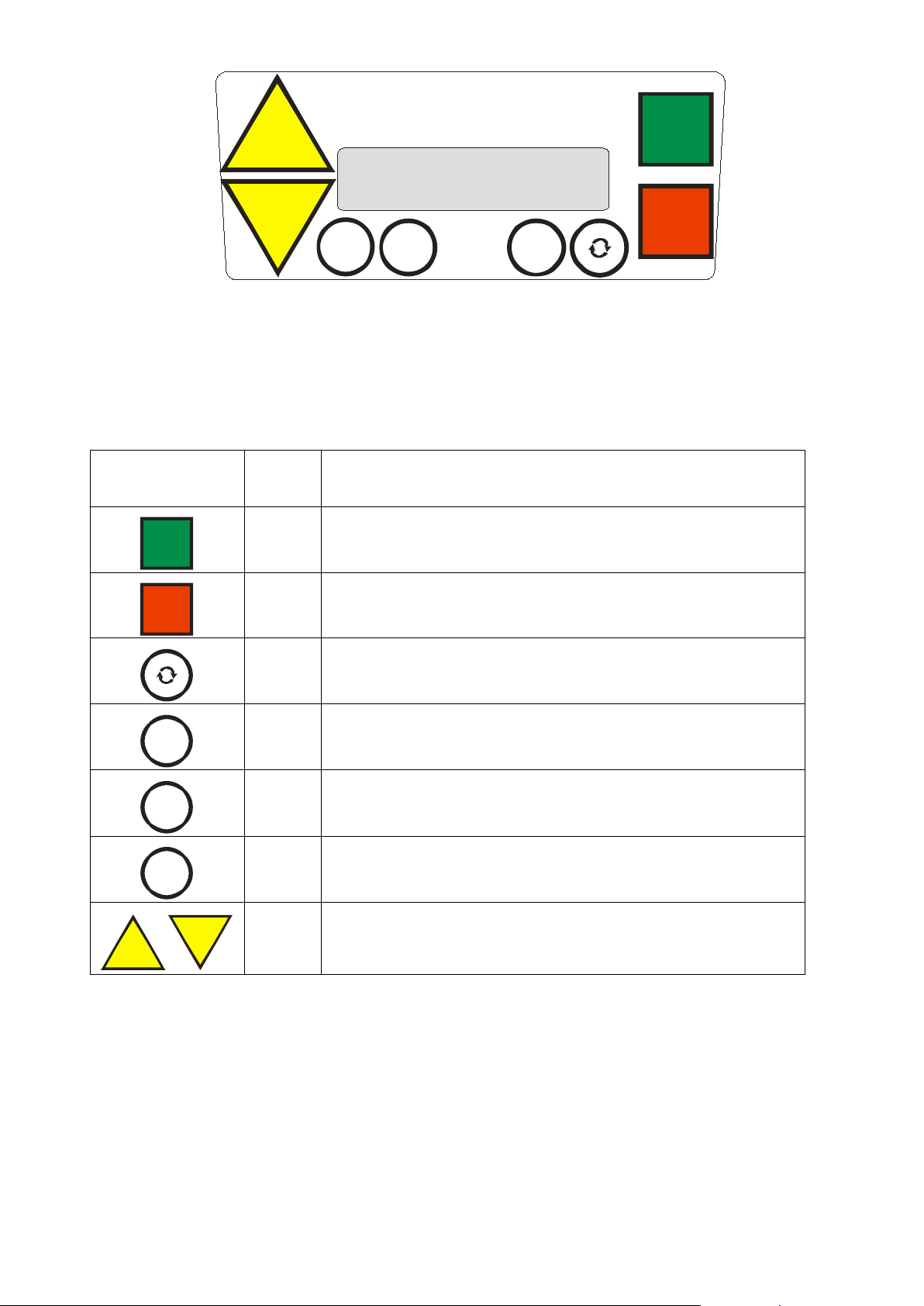
Figure 1: Keyboard view
3.1 Keyboard Description
The keys description:
Key view Legend Short Description
I
ON
0
OFF
I
O
R
P
E
M
S
- START KEY -
- run the motor -
- STOP KEY -
- stop the motor and reset system -
- REVERSE KEY -
- change the direction of motor rotation -
- PROGRAM KEY -
- SELECTOR KEY -
- MODE KEY -
- UP KEY and DOWN KEY-
- Increase/Decrease and set the parameter incrementally -
-29-
116-0712-006
Page 30

4.0 CONTROL FUNCTIONS
UP
RPM
DOWN
RPM
DOWN
RPM
Drive Parameter Settings (Set Function)
HMI display lines contain the para mete rs , which can be edited.
Press key
to incrementally increase the parameter or
to decrease it.
Hard Reset Function
0
Press key
way is to switch off the power, wait 10 seconds and switch it on again. Use this function if you want to return
the factory-preloaded values of the drive parameters. Also, try to use this function if you have a problem with
the drive, for example, if the system is not responding to the keys.
OFF
, hold it and then press key
in order to provide the Hard Reset of the drive. Another
116-0712-006
-30-
Page 31

5.0 CONTROL OPERATIONS AT STOP MODE
TEKNATOOL
SAFETY FIRST
ALWAYS WEAR
FACE SHIELD
ENSURE CORRECT
SPEED SELECTED
v4.54xs03 2006
v4.54
- control software version
x
- XC164CS Infineon microcontroller with flash m emory
s
- Serial interface
03
- Interface software version
LCD View
Comments
Set 500rpm=#2D
S
Reference speed and number (D = default speed number)
Ready to run >>
R
<</>> - reference direction (forward/reverse)
5.1 Starting operation
Insert the drive power plug into the 220-230, 50/60 Hz socket. There must be the sound signal and dis p lay
messages step-by-step will be: (shown on the next page)
TEKNATOOL Int. v4.54xs03 2006
PROMOTES
0
OFF
Beeper will sound twice. Wait for message to end or press key
will be:
to cancel. After that the display message
TEKNATOOL Int.
The version number means:
Note: This guide is up dated for the v4.54x control softw are v ers ions a nd s03 interf ace software versi on, whic h
are compatible with each other. The control software versions v4.41x and higher will also work but
without some functions.
The drive will make the pr eparation procedure, chec k the fault conditions a nd after that the LCD will sho w the
Main display page (for Stop operation):
Note: S = parameter can be modified using Set Function.
R, P, E, M = parameter(s) can be modified by one of keys in accordance with the keyboard
description legend (see above page 28)
The drive is in Stop mode and ready to run the motor forward with the speed of 500 rpm.
-31-
116-0712-006
Page 32
Number
#0
#1D
#2
#3
#4
Speed (rpm)
250
500
750
1020
1250
Number
#5
#6
#7
#8
#9
Speed (rpm)
1500
1750
2000
2250
2500
MODE
M
UP
RPM
DOWN
RPM
LCD View
Comments
Go to 500rpm
S
Preset speed
P-confirm, E-Esc
PROGRAM
P
SELECTOR
E
DOWN
RPM
LCD View
Comments
Set 450rpm #2D
S
Reference speed is now not equal to preset speed #2
Ready to run >>
R
>> - forward direction
UP
RPM
5.2 Reference speed setting. Preset (favorite) speed selection and set function
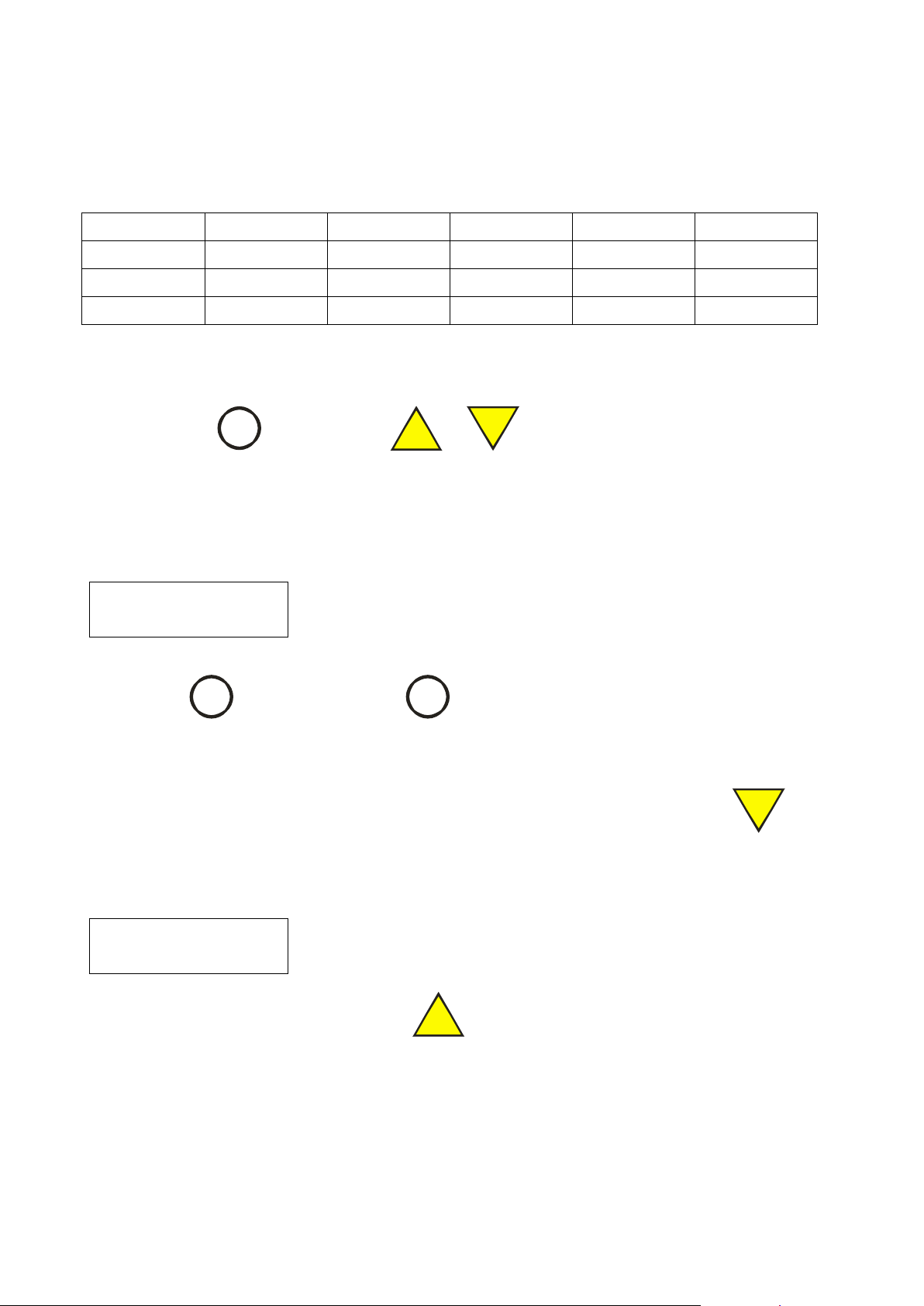
There are 10 preset speeds available in the drive.
The factory-preloaded reference speeds are:
Note: The speed #1 is default sp eed number.
The letter D after the number #1 indicates it is default.
• Press the key
, hold it and press
or
in order to go from one preset speed number to
the next one.
If the next preset speed is higher than 500 rpm, you will see warning:
Press the key
to confirm the choice or
(“Escape”) to return to previous speed.
• Use the Set Function (see 4.0) in order to increase/decrease the reference speed. In this case, if the
reference speed is not equal to the preset speed of the current speed number, the symbol ‘=’ will be
removed from the LC D. For exam ple, if you will dec rea se the ref erence s peed using k e y
, the LCD
will be:
If you go back to the speed 500 rpm using key
-32-
then the symbol ‘=’ will show on LCD.
116-0712-006
Page 33

Programming the Favorite Speeds
SELECTOR
E
PROGRAM
P
FWD
REV
LCD View
Comments
Set 500rpm=#2D
S
Reference speed and number
Ready to run <<
R
<< - reverse direction
• Pick a preset number you would like to change. IMPORT ANT Note: The default speed (#2D) cannot be set
at more than 500 rpm and the saved preset speed values will work also after Hard Reset Function.
• Press the key
in order to make the r equest for saving the new value of pre-selected spee d in the
EEPROM (memory). It will display the symbol ‘?’ at the end of LCD line. Change the speed you require.
• Press key
to store the new value. There will be the symbol ‘*’ instead the symbol ‘?’.
• Your new setting is now stored.
5.3 Set the direction of rotation (Forward/Reverse function)
• Press
direction. In reverse mode the LCD will be:
to set the direction of rotation (Forward/Reverse). Each key pressing will toggle the
-33-
116-0712-006
Page 34
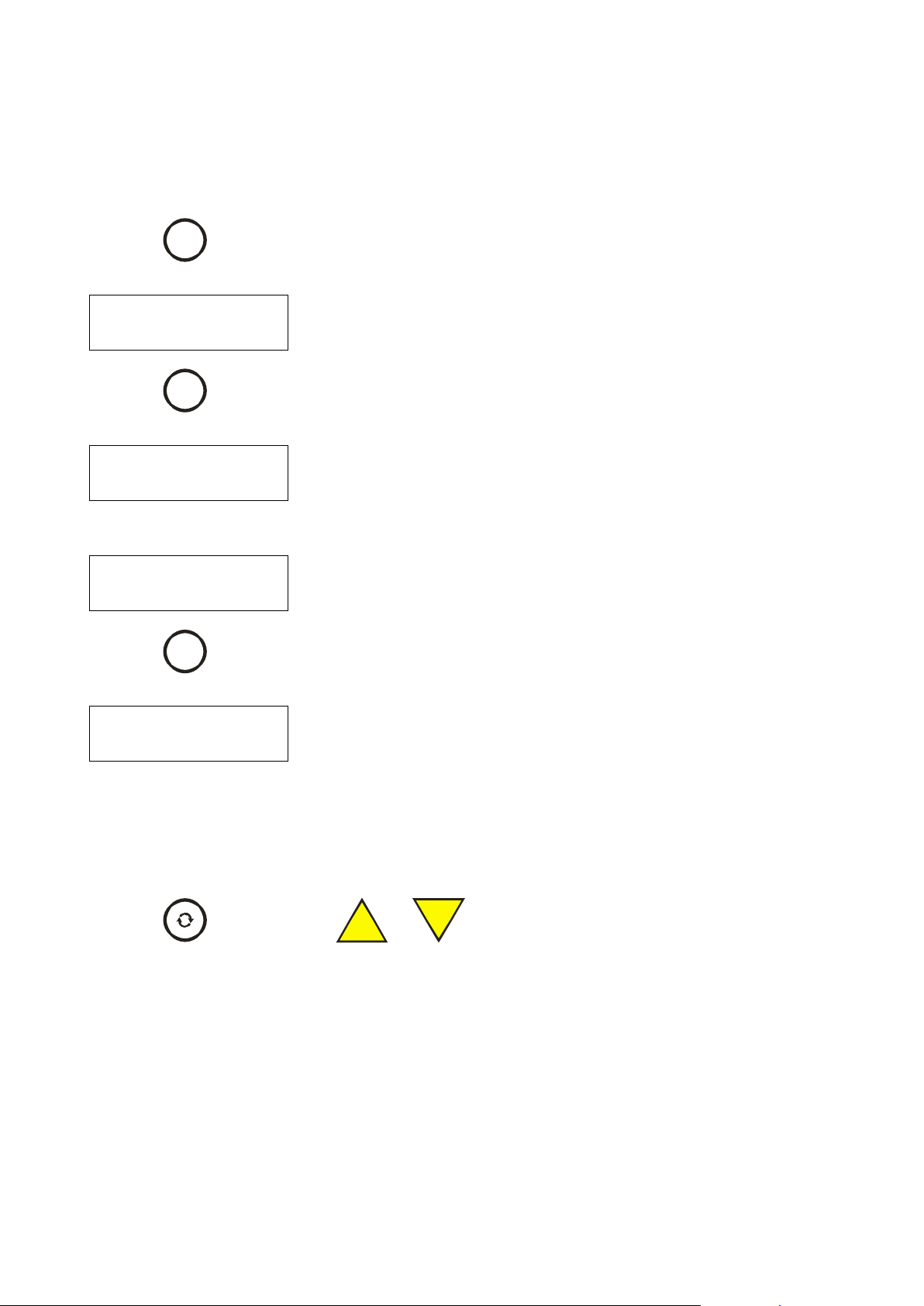
5.4 The Speed Control Loop. The PI Speed Control coefficients setting
PROGRAM
P
LCD View
Comments
SPEED CONTROL
<E> NORMAL
E
Normal coefficient curves selected
SELECTOR
E
LCD View
Comments
SPEED CONTROL
<E> SOFT
E
Soft coefficient curves selected
LCD View
Comments
SPEED CONTROL
<E> HARD
E
Hard coefficient curves selected
PROGRAM
P
LCD View
Comments
Kprop = 250 % *
S
Proportional coefficient value (in percent) for selected speed
Kint = 2000 %/s
S
Integral coefficient value (in percent/sec) for selected speed
FWD
REV
UP
RPM
DOWN
RPM
The control system of the DVR Drive has a Speed Control Loop which provides the PI speed controller
function. The KPror and KI nt are the values of the Propor tional and Integral coe fficient of speed control loo p.
They are functions of m otor speed. See App endix A for the bas ic c urves of the PI s peed contr oller c oeff icient s.
There are three possible c hoices – Normal (def ault), Soft and Hard coefficient curves. The va lues Kprop &
Kint are multiplied by 100 (given as a percentage).
• Press
• Press
• Press
(“Page”) to go to next display page in order to select the coefficient curves:
to toggle changing the other coefficient curves:
(“Page”) again to see the PI coefficients:
Note: The LCD shows the values of the Proportional and Integral coefficient of speed control loop for
selected speed. The parameters Kprop & Kint get their values from the curves and calculations.
• Use the Set Function (see 4.1) in order to increase/decrease the coefficient values to adjust the
coefficients for your type of load.
• Press
,hold it and press
or
in order to move the symbol “*” at th e display line end
up and down in order to select the display line which is ready to edit.
Note: If you will c hange one of th ese v alues, it w ill be fix ed and will no t automatically chang e as the s peed is
adjusted. It will also over-ride load inertia until software hard reset.
• Use the Hard Reset Function in order to return the factory curves of these parameters.
-34-
116-0712-006
Page 35

5.5 Serial Number view.
PROGRAM
P
LCD View
Comments
SERIAL NUMBER
04067648
The Control Board Serial Number
MODE
M
• Press
Press
(“Page”) again to see Board Serial Number:
(“Main”) to go to Main display page from any other display pages.
-35-
116-0712-006
Page 36
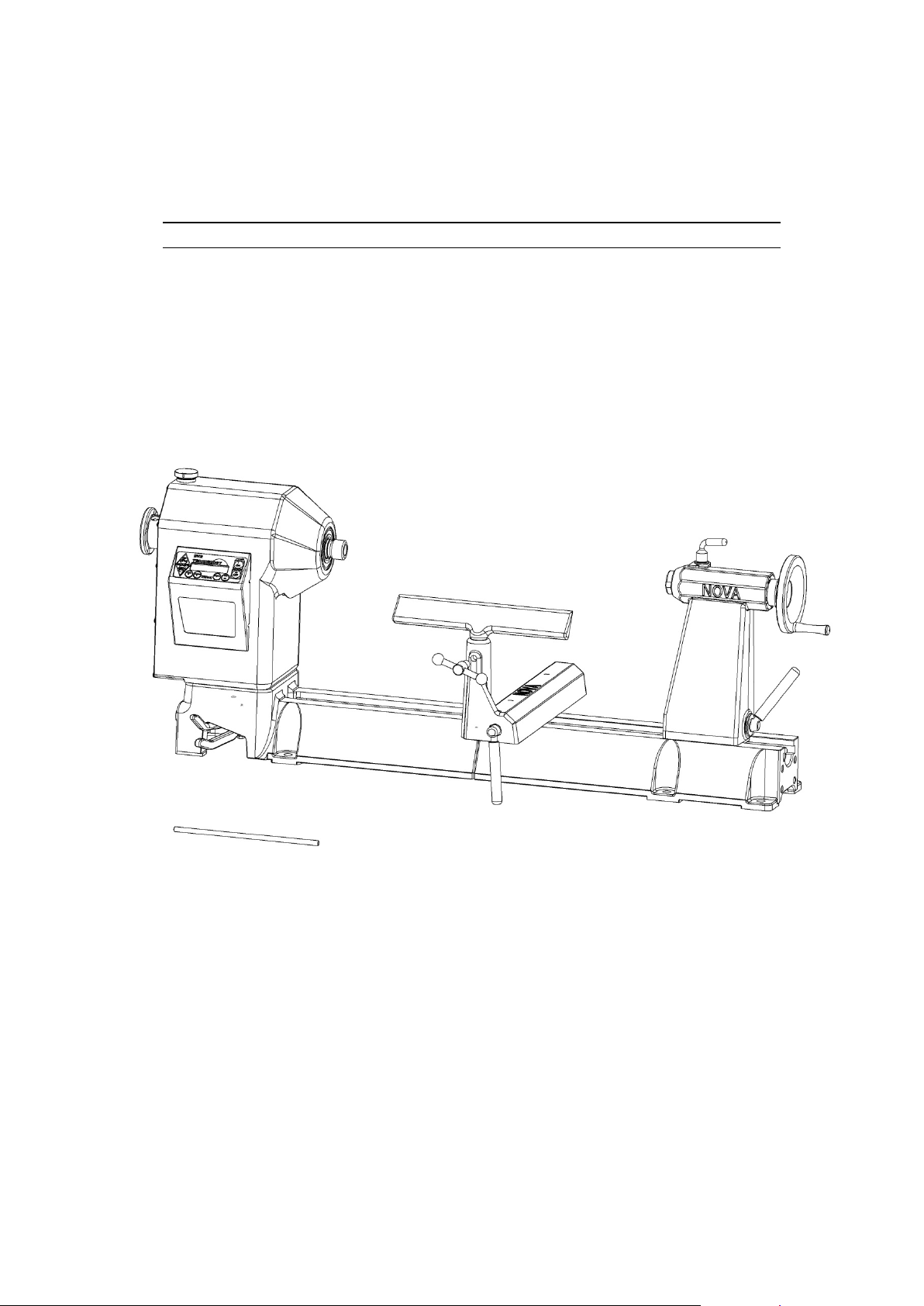
Maintaining the NOVA DVR 2024
General Maintenance
Always isolate from power supply (unplug) before carrying out any maintenance
Interval Maintenance
After each use Clean the work area and Lathe. Vacuum shavings and dust from the
Headstock, Tailstock, under the Toolslide and in between the bed.
Monthly Wax exposed cast iron parts with a good quality paste wax,
especially the bed rails. Buff out the wax thoroughly.
Check tightness of nuts and bolts.
Lubricate, with one or two drops of light-weight oil, the tailstock quill
threads, index pin shaft, and the Toolslide camshaft (remove plastic
plugs) and Toolslide front camshaft bore.
6 Months Lubricate the tailstock slot with one or two drops of light-weight oil.
116-0712-006
-36-
Page 37
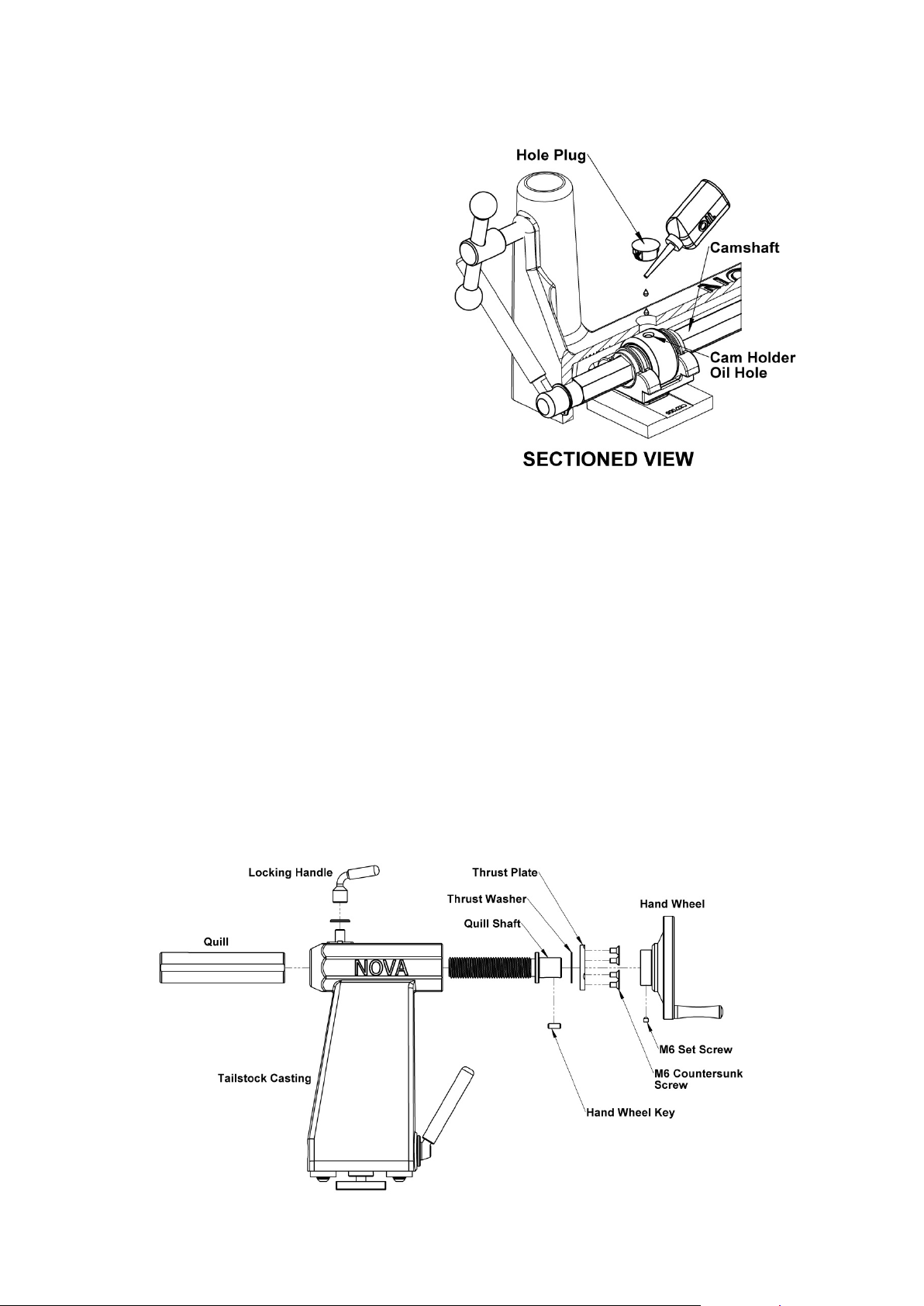
Cleaning the Toolslide
If the Toolslide becomes hard to move and
adjust, cleaning and lubricating are required.
1. To make the Toolslide slide more freely
along the bed, make sure the bed rails are
clean. Apply some paste wax to the rails.
2. If the Toolslide is hard to move towards or
away from you, remove the Toolslide from
the lathe bed. Clean the Toolslide
Camshaft (hexagonal rod) with a
petroleum-based solvent. Lubricate the rod
with high quality grease.
3. Remove one of the plastic Hole Plugs on
the top of the Toolslide casting and align
the Cam Holder so its Oil Hole can be
accessed. Apply oil through the Toolslide
Casting into the Cam Holder Oil Hole.
4. Reassemble and slide the Toolslide back
onto the lathe bed.
Cleaning the Tailstock
If the Tailstock Quill becomes hard to use or the Hand whee l is hard to turn, cleaning and lubricating are
required.
1. Wind the Hand wheel until quill is free of the thread and can be removed from Tailstock.
2. Remove the M6 set screw from the Tailstock Hand Wheel. If necessary, turn the Hand wheel to
expose the set screw hole.
3. Using light force slide the Hand wheel from the Quill shaft. N ote light blo ws wit h a sof t mallet m a y
assist..
4. Remove the 4 M6 countersink screw retaining the thrust plate. Note! There is a special fiber thrust
washer on either side of the thrust plate.
3. Remove the quill from the Tailstock Body Casting.
4. Wipe cleans all parts including the inside of the tailstock .
5. Lubricate the Quill and tailstock slot with lightweight oil and apply a small amount of grease to the
threads inside the Quill and on the Quill Shaft.
6. Reassemble.
116-0712-006
-37-
Page 38
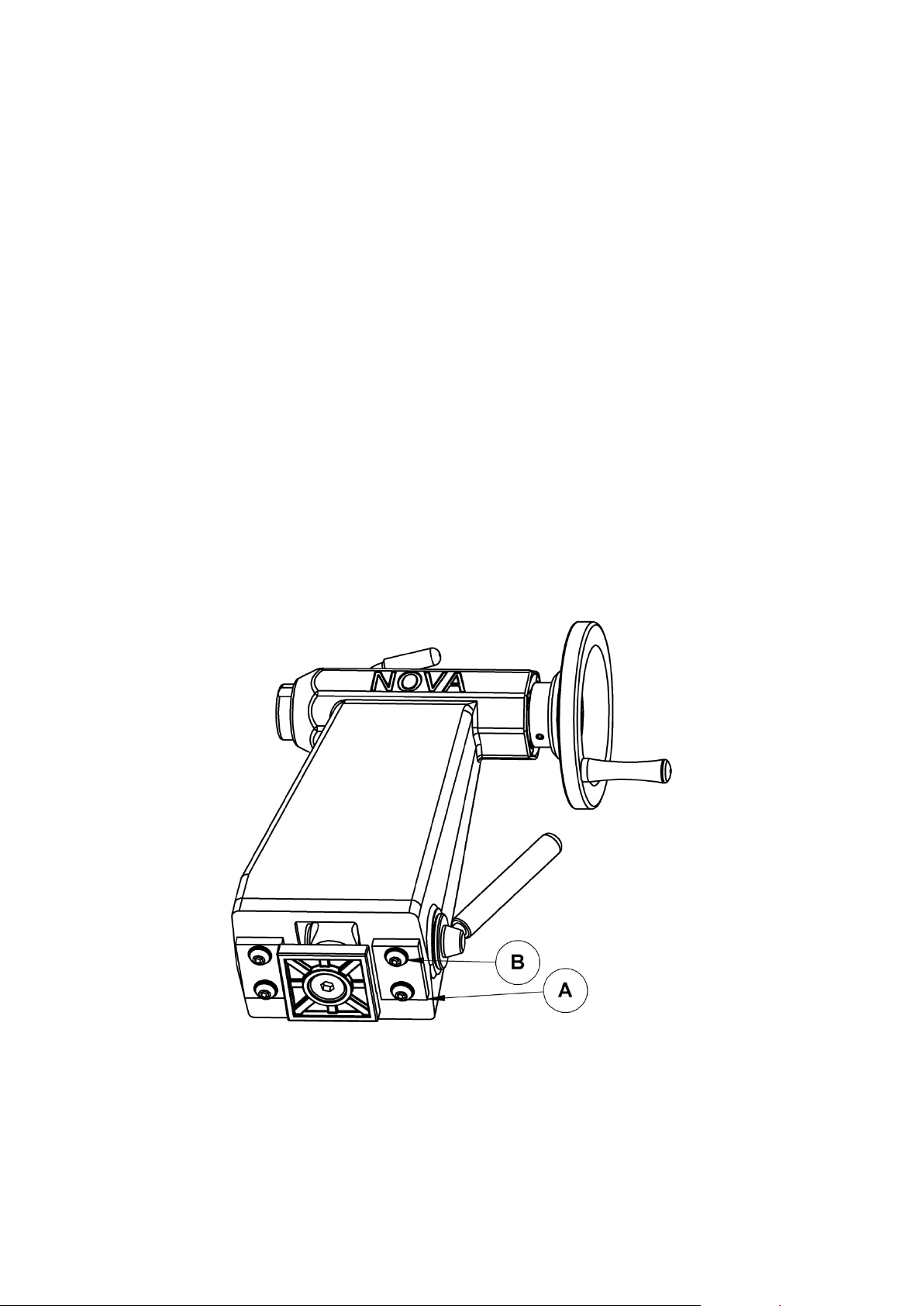
Aligning the Tailstock
width of each other
1. Crank the Hand wheel back so the quill is all the way in.
2. Place any #2 MT accessories you have that have a sharp point like a spur center, or live center in
the tailstock quill and another center in the headstock spindle.
Note: Tailstock alignment can be made easier by using the double ended NOVA Acurline Accessory
Center (SKU: 2MTNA) in place of the centers.
3. Move the Tailstock close to the Headstock so the two centers nearly touch; check the alignment of
the center points. Move the Tailstock away from the Headstock and extend and lock the Quill. The
points of the centers should align when the Quill is halfway extended, fully extended, and fully retracted.
If the centers are aligned at all three locations no adjustment is necessary.
4. If the Tailstock does not meet the conditions in step 3, follow the steps below. This indicates that the
Tailstock is not parallel to the lathe bed and you will need to realign the Tailstock.
5. First make sure the Tailstock alignment plate (A) is not binding inside the bed. If the Tailstock
doesn't move freely, then remove the Tailstock and look for burrs or high spots on the bed rails or the
alignment plate (A). Using a smooth file remove any burrs or high spots. When done replace the
tailstock on the bed.
6. Slightly loosen the four cap screws (B) securing the tailstock ailment plates (A) with a 5mm Allen
wrench. Tap the Tailstock with a wooden mallet in the appropriate direction to align the centers. Check
and adjust the positioning of the Tailstock. The centers should align when the quill is halfway extended,
fully extended, and fully retracted, as previously described in step 3.
7. Lock the tailstock in place with the Tailstock Clamp Handle and fully tighten the four cap screws (B).
The cap screws (B) must be fully tightened in order to avoid slippage during work.
8. Check the alignment of the Tailstock by bringing it together with the Headstock, with the Live center
and Spur center in each spindle. The Points on the centers should be within 0.50mm (0.020") height and
-38-
116-0712-006
Page 39

Troubleshooting Guide
Problem Possible Cause and Solution
Excessive vibration.
Faceplate or chuck
running out of true.
Out of balance, or large work piece. Reduce lathe speed to the
lowest speed possible and turn the work piece to a true circle.
Adjusting the speed using the up / down keys will change the speed
in 10 rpm increments. If you try adjusting the speed up or down you
will find that it is easy to find speed points that will minimize vibration
and is one of the biggest advantages of DVR technology.
Work piece is not held in the center. Check work piece mounting and
correct.
Work piece is not secure or held tight enough. Check work piece
mounting.
Lathe incorrectly bolted to stand or bench. Refer to this manual for
lathe stand recommendations.
Stand or bench not well constructed, too light, or not level on the
floor. Make sure the stand is solidly constructed. Use sandbags to
weigh down the stand.
The metal floor stand should be Rawl bolted to the concrete floor, at
the 4 mounting hole points.
Dirt build-up on the rear of the faceplates or chuck. Clean off all
build-up and dirt. Faceplates and chucks must mount securely
against the inner bearing ring surface of the spindle.
Turning tools not sliding
smoothly across Toolrest.
Spur drive center or live
center not holding into the
spindle taper or quill taper
when turning.
Display screen not on
Damaged surface on Toolrest face caused by sharp edged tools.
File the Toolrest using a fine smooth file and polish with extra fine
sandpaper. Also remove the sharp edges from the corners of turning
tools.
Small end of Morse taper is damaged due to dropping or hitting. File
or polish away any damage. Check that inside of tapers have not
been scored.
Grease or oil inside of Morse tapers. Wipe clean the inside of the
tapers.
Insufficient pressure when installing the center. Use a quick, firm
action by hand to install a taper. Do not knock in using any solid
object.
Is master switch on? Toggle master switch to "ON" position.
Check machine is plugged into wall socket and switched on.
Check that the wall switch plug is live by plugging in another power
tool if the other power tool doesn't go check your board fuse.
Check the master fuse on the lower rear guard. Ensure machine
unplugged (see Additional safety rules at the front of this manual). If
blown, replace with the spare fuse that comes with the lathe. Do not
replace with a higher amp fuse.
116-0712-006
-39-
Page 40

Display screen shows
Rotor Fault
<Flashing>
PFC Corrector
<Flashing>
RP State Error
<Flashing>
Press off button; switch off computer by master switch wait one
minute and switch on again. Check that the spindle index is not
engaged or that something is preventing the spindle from turning.
Note leaving the spindle index unit in will not harm the motor;
however it will put some strain on the index unit. It is likely that the
spindle index will be left in from time to time and the motor is
designed for this.
LCD screen shows
The optical sensors that give the spindle position feedback (‘Rotor
Position’ State) are obscured, damaged or have been disconnected.
Dust over a long period of time may have settled on the sensors.
Firstly spin the spindle by hand to create a draught through the
sensors. Re-try the motor. If the error remains, with the power
switched off and disconnected, remove the upper-rear guard and
remove any wood dust with a vacuum cleaner. Avoid getting the
nozzle too close to the electronics. After this step dust may fall into
the Headstock so suck the dust out through the vent at the front of
the Headstock under the spindle. Do this sequence a few times. Try
blowing if available with Vacuum or Air gun. Replace guard.
The computer has built in voltage condition and temperature
sensors, if this message appears, check the temperature of the lower
section of the headstock. If it is very hot, switch off the master switch
and leave the machine to cool down for a period. If the headstock is
relatively cool the computer may have detected an under and over
voltage from the mains power. Switch off and try rebooting. The DVR
has a high level of protection and is intelligently checking conditions
all the time.
Note: Can't find the answer in this Trouble Shooting guide?
Visit the Lathe Support Section on our website - this is packed with Frequently Asked Questions.
Or
Contact us (details are at the front of this manual)
-40-
116-0712-006
Page 41

Troubleshooting Guide continued
Problem Possible Cause and Solution
Tailstock and
Headstock center not
lining up correctly.
Tailstock Handwheel
hard to turn or will not
turn.
Tailstock quill
hard to move.
Bed incorrectly bolted to stand causing twist. Ensure stand and lathe
are correctly installed.
Headstock not returned to detent position after it has been rotated.
Ensure that the headstock is locked into a detent position.
Quill lock is locked; unlock the quill lock. If necessary, lightly tap a
block of wood against the Handwheel h an dle ; tap the hand le in a
clockwise direction as viewed from the tailstock end.
Build up of dust and wood resin on the quill or inside of the Handwheel
thread. Remove, clean, and lubricate the quill and tailstock as described
under "Cleaning the Tailstock".
The Quill has been extended too far and is locked against the
Handwheel. Push the quill back into the tailstock when turning the
Handwheel.
Quill lock is locked; unlock the quill lock.
The quill is damaged; turn the handle to expose the quill and check for
marks along the quill, especially on the edges of the slotted keyway.
Remove the high spots with a smooth file and test the quill travel.
Replace the quill if necessary.
Tailstock not locking
correctly onto bed, or
tailstock not sliding
smoothly on bed ways.
Tailstock binds.
Tailstock jumps where
bed sections join.
Tailstock adjustment plate not adjusted correctly; adjust as described
under "Aligning the Tailstock".
Dirty bed ways and underside of tailstock body. Clean bed ways and
underside of tailstock body with a petroleum-based solvent.
The inside of the bed has a high spot. File the area with a smooth flat
file until the tailstock moves freely.
The tailstock adjustment plate has a rough spot or a burr. Remove the
tailstock and file the plate with a smooth flat file.
The machined flat surfaces are not flush. File the area with a smooth
flat file until the tailstock moves freely.
116-0712-006
-41-
Page 42
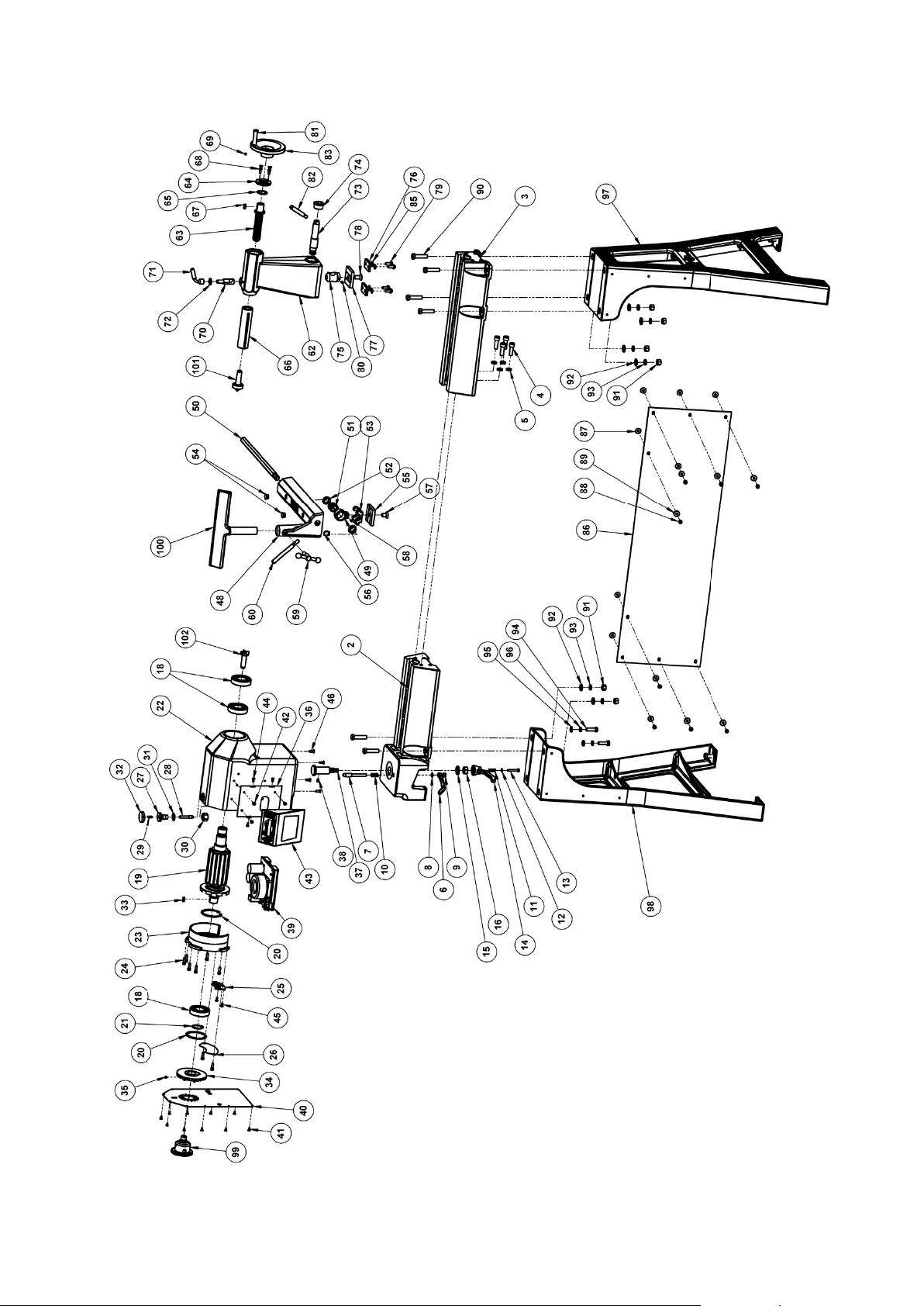
NOVA DVR 2024 Wood Lathe Parts List
116-0712-006
-42-
Page 43

-43-
ITEM NO.
PART NUMBER
DESCRIPTION
QTY.
1
Headstock Assembly
1
2
57118
Main Bed
1
3
24119
Extension Bed
1 4 C06020
Hex Socket Cap Screw M6x20
4
5
SW12
Spring Washer M12
4
6
57176
Headstock Detent Lever
1 7 57023
Headstock Detent Pin
1
8
FW08
Flat Washer M8
1
9
NHZ8
Hex Nut M8
1
10
24060-1
Headstock Detent Spring
1
11
55056
Spring 25mm
1
12
FW06
Flat Washer M6
1
13
BNMZ06040
Hex Head Bolt M6x40
1
14
57209
Headstock Lock Lever
1
15
FWH16
Flat Washer M16
1
16
57208
Nut M16
1
18
6207VV
Headstock Spindle Bear i ng
3
19
57008
Motor Rotor Assembly
1
20
IC72
Internal Circlip 72mm
2
21
EC35
External Circlip 35mm
1
22
57000
DVR 2024 Headstock
1
23
57146
Headstock Bearing Carrier
1
24
C06020
Hex Socket Cap Screw M6x20
8
25
55020
Position Sensor
1
26
55174
Sensor Guard
1
27
55035
Index Pin Bush Guide
1
28
55033
Index Pin
1
29
TP131658
Spring Pin
1
30
NHH16
Hex Nut M12
1
31
55137
Lock Washer External Lock 16mm
1
32
55036
Index Pin Rotating Handle
1
33
55051-20
Key 6x6x20mm
1
34
55011
Index Fan
1
35
G0606
Hex Socket Set Screw M6x6
1
36
55040
Backing Plate
1
37
57207
Swivel Pin
1
38
G0610
Hex Socket Set Screw M6x10
1
39
57300
Control Board Assembly
1
40
57171
Headstock End Cover
1
41
MPB0408
Button Head Screw M 5x8
10
42
MPB0508
Button Head Screw M 5x8
4
43
Control Panel Assembl y
1
44
STPB5
Button Head Screw
4
45
MPB0412
Button Head Screw M 4x12
2
46
K0616
Countersunk Hex Socket Screw M6x16
4
47
Toolslide Assembly
1
48
57009
Toolslide Casting
1
49
57014
Toolslide Cam Holder
1
50
57010
Toolslide Camshaft
1
51
CS57013
Toolslide Lock Cam
1
52
CS57012
Toolslide Lock Camshaft Bearing
2
116-0712-006
Page 44

53
CS57011
Toolslide Lock Cradle
1
54
HP-16
Plastic Hole Plug
2
55
27006
Lock plate Tailstock & Toolslide
1
56
EC35
External Circlip 35mm
1
57
K1225
Countersunk Hex Socket Screw M12x25
1
58
G0610
Hex Socket Set Screw
1
59
24057
Tee-Lock
1
60
57253
Lock Arm
1
61
Tailstock Assembly
1
62
57017
Tailstock Casting
1
63
57042
Tailstock Quill Shaft
1
64
57019
Tailstock Thrust Plate
1
65
57039
Tailstock Thrust Washer
1
66
57020
Tailstock Quill
1
67
55051-20
Key 6x6x20mm
1
68
K0616
Countersunk Hex Socket Screw M6x16
4
69
G0606
Hex Socket Set Screw M6x6
1
70
55026
Quill Lock
1
71
55029
Tailstock Quill Lock Lever
1
72
FW12
Flat Washer M12
1
73
57025
Tailstock Lock Camshaft
1
74
55027
Tailstock Camshaft Sleeve
1
75
24048
Tailstock Cam
1
76
25029
Tailstock Alignment Plate
2
77
27006
Lock plate Tailstock & Toolslide
1
78
K1225
Countersunk Hex Socket Screw M12x25
1
79 BHC0816
Hex Socket Button Head Screw
M8x16
80
G0610
Hex Socket Set Screw
1
81
57065
Tailstock Handwheel Handle
1
82
57253
Lock Arm
1
83
57043
Tailstock Handwheel
1
84
CM0815
Countersunk Hex Socket Screw M8x15
1
85
FW08
Flat Washer M8
4
86
57058
Skirt
1
87
55030
Adhesive backed Rubber pad M6
8
88
MPB0612
Cross Button Head Screw M6x12
8
89
FFW06 + 55030
Flat Washer 6x20 + Rubber pad
8
90
BNMZ12050
Hex Head Bolt M12x50
6
91
NHZ12
Hex Nut M12
6
92
FW12
Flat Washer M12
6
93
SW12
Spring Washer M12
6
94
BNMZ12035
Hex Head Bolt M6x40
2
95
FW12
Flat Washer M12
2
96
SW12
Spring Washer M12
2
97
57035
Rear Cast Iron Stand Legs
1
98
57034
Front Cast Iron Stand Legs
1
99
LHB
LHB
1
100
24120
Tool Rest
1
101
2MTLC
Live Center
1
102
2MTSPUR
2MT Spur Center
1
4
-44-
116-0712-006
Page 45
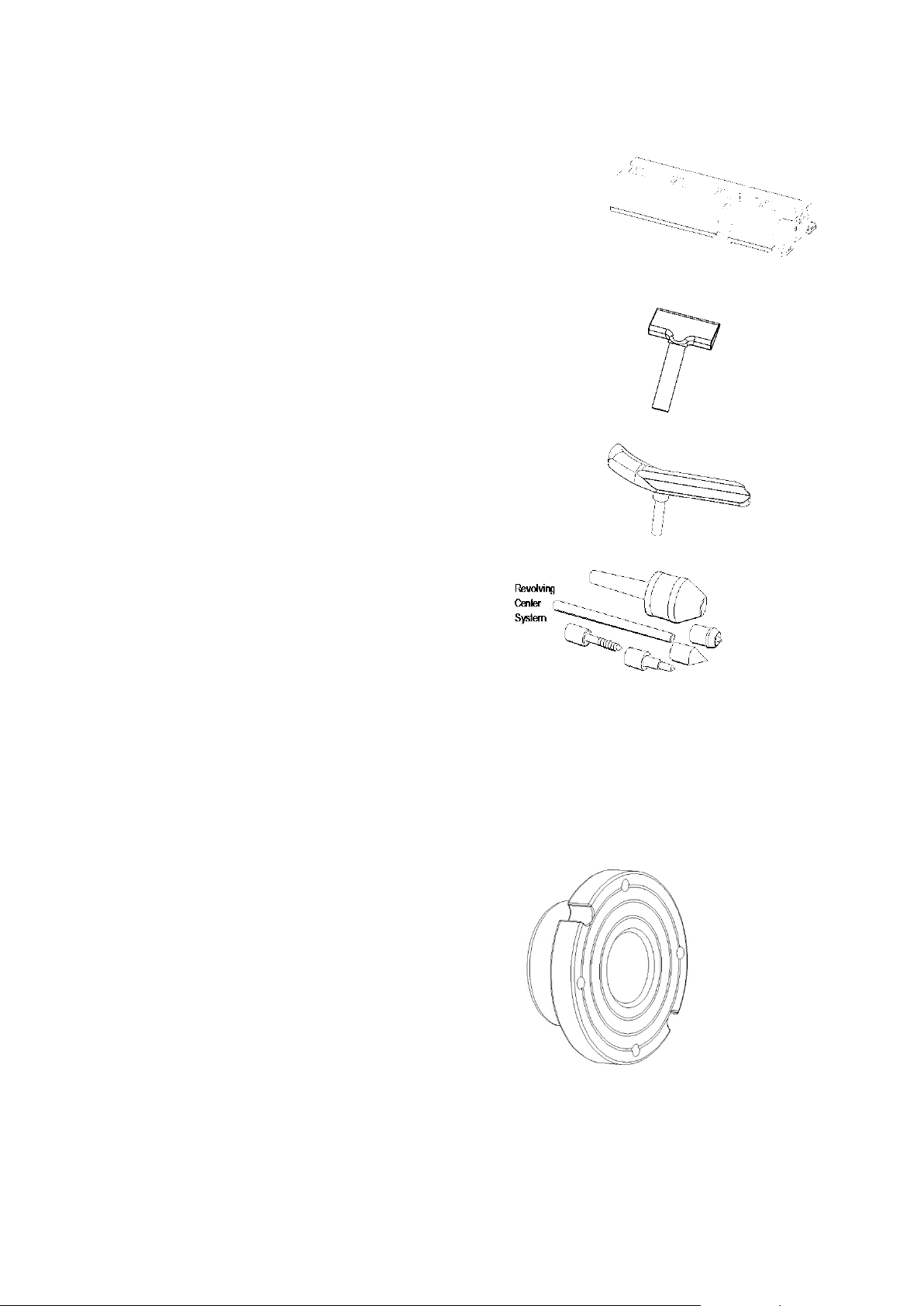
Accessories
Add On Bed Extension: 55195
Extend the bed of your Nova DVR 2024 Woodlathe for
greater capacity for turning between centers. Each bed
unit adds 510mm (20in.)
Small Toolrest: TR100/1
A small 100mm (4in.) Toolrest for turning small work
pieces or reaching into recessed areas.
Bowl Toolrest: TRB/1
A curved Toolrest, which gives you better chisel support on
both the outside and inside of a bowl. Because of the
curve you are able to position your chisel support closer to
the bowl.
Revolving Center System: NLCS or NLCS1
A multi-function live center system to expand your options
when turning between centers. It includes quick change
tapers: a hollow cup center point, threaded center, cone
center, and an extension center. Made with three bearings
and precision machined for a high quality finish.
Faceplates:
FP150L
Faceplates are used to mount the work piece when
faceplate turning bowls or platters. The 150mm (6")
faceplate is made of solid steel. Comes standard with the
2024 Lathe.
SFP80L (with side-locking function).
Faceplates are used to mount the work piece when
faceplate turning bowls or platters. Faceplates are
available in 80mm (3") diameter. A vacuum faceplate is
also available. The 80mm (3") faceplate is made of solid
steel. This faceplate has a small contact area to allow
maximum freedom while shaping. It comes with 2 notches
on the outside diameter for removing the faceplate from the
spindle. This can be done with a light drift and mallet.
116-0712-006
-45-
Page 46
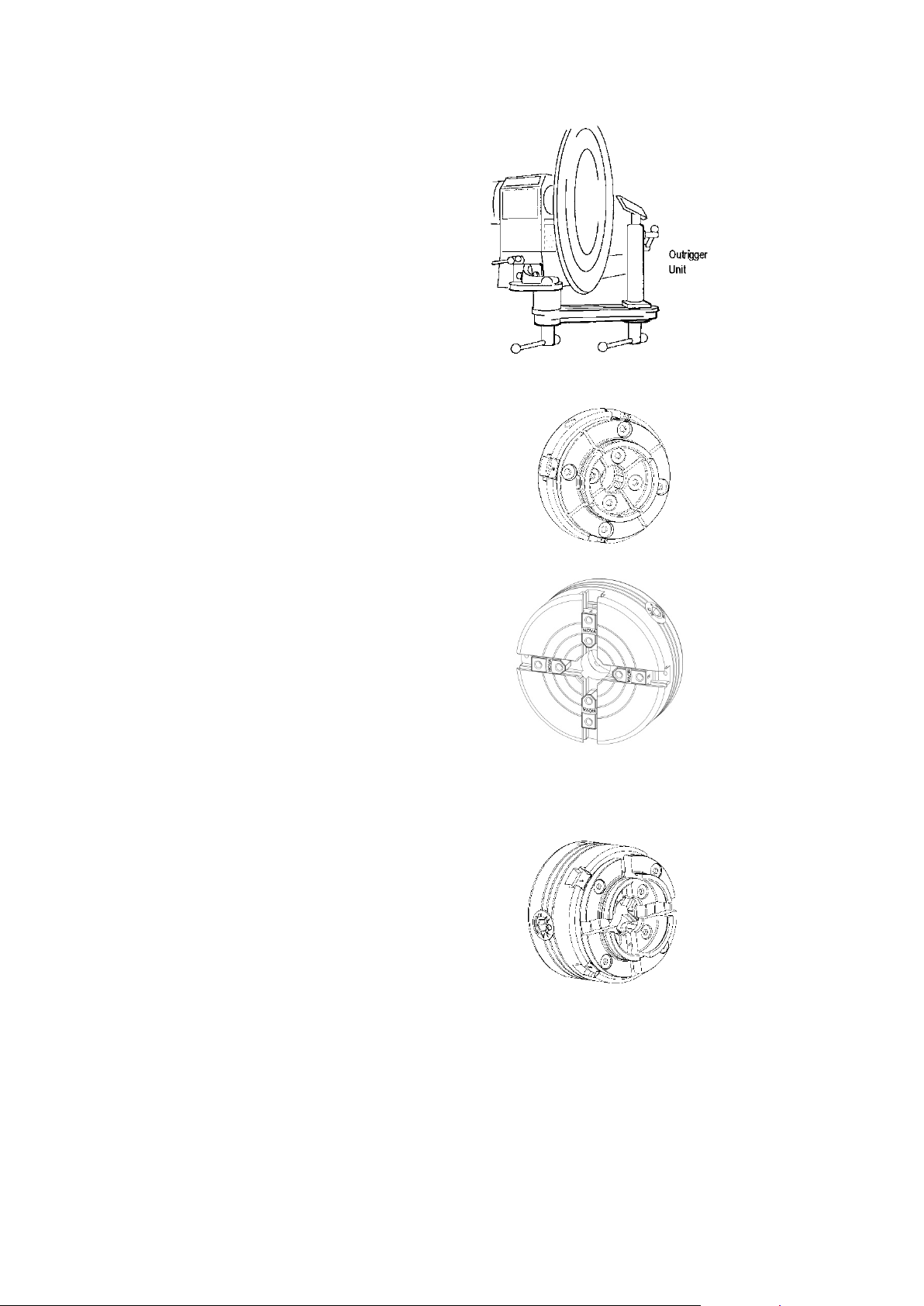
Accessories
Outrigger Unit: 57073
Extend the bowl turning capacity of the Nova
DVR 2024 Wood lathe to up to 798mm (31in.)
in diameter. This unit is made from cast iron,
is easy to position and control, and mounts to
the headstock end of the lathe.
Precision Midi Chuck
Ideal for mini, midi and all lathes up to 6”
center height (12” diameter over bed) Can
also be used for small work on large lathes.
NOVA Titan2 Chuck
The Nova Titan2 Chuck is a large solid chuck
designed for use on large lathes and for larger
projects.
This solid 5” diameter chuck with it’s larger
jaw capacity, and unique 3 hole jaw slide, is
capable of handling much larger projects than
the SuperNova2Chuck.
SuperNova2 Chuck
Designed for the tough demands of modern
woodturning. Body is precision machined from
high quality K1045 machine steel. Gearing is
heavy section, hardened steel to provide a
powerful action. The greater holding strength,
stability, and precision decreases vibration
from small delicate turnings right up to large
bowls and platters work (up to 29”/740mm)
116-0712-006
-46-
Page 47

NOVA Sharpening Centre The
Nova Sharpening Centre attachment will
transform your standard bench grinder into a
precision grinding machine. The NOVA
Sharpening Centre combines the sli de way
grinding jig and the powerful finger grind jig
into one versatile sharpening tool.
For further details about the NOVA range of’ lathe acces s ories , please contact your local retailer for more
information, or contact us for a free product catalogue. This catalogue can also be downloaded from our
website - at www.teknatool.com
116-0712-006
-47-
Page 48

Index
Accessories 45, 46, 47
Assembling 11
Bed - Lathe 2, 3, 9, 13, 14, 21, 22, 23, 33,
35,37,42,43
Camshaft 36, 37
Center less Turning 8, 23
Centers 8, 9, 23
Changing Speeds 28, 29, 30, 32, 33
Cleaning 36, 37
Components, 3, 8, 11
Connecting to Power, 17
Contents, 6
Distance between Centers, 9
Electrical 3, 7, 8, 9, 10, 17
Extension Bed, 12
Extension Cords, 10, 17
Faceplate, 2, 8, 9, 23, 24, 39, 45
Function, 3, 7, 18, 19, 20
Handles, 8, 11, 12
Handwheel, 9, 26, 41
Headstock, 2, 3, 8, 9, 10, 22, 23, 24, 36, 38
Lathe Stand Requirements, 10, 13
Live Center, 9, 38, 39, 45
Maintenance, 3, 36, 37
Mounting Faceplate or Chuck, 8, 23, 39
Mounting, Lathe, 2, 13, 14, 15, 39
Nova DVR 2024 Specifications, 9
Oil, 36, 37
Operating, 7, 8, 18
Operating Bar, 11, 24, 25
Outrigger Unit 9, 46
Parts List 43, 44
Power, 2, 3, 7, 8, 17, 18, 19, 20, 28, 29, 30,
31, 32, 33, 34, 35
Problems 39, 40, 41
Quill 8, 9, 26, 36, 37, 38, 39
Removing Centers and Tapers, 26
Revolving Center System, 45
Rpm, 3, 9, 19, 20, 21, 26, 28, 31, 32, 33, 39
Safety, 7, 8
Sanding, 8, 25
Shop Requirements, 10
Speed, 2, 3, 8, 9, 17, 18, 19, 20, 21, 26, 28,
31, 32, 33, 34, 39
Spindle Index, 2, 9, 19, 22, 23, 24, 30, 40
Spindle Threads,2, 9, 23
Spur Center, 8, 9, 24, 38, 39
Stand, 2, 9, 10, 11, 13, 14, 15, 16, 39, 41
Standard Equipment, 9
Swing, 9
Swiveling the Headstock, 22
Tailstock parts list, 42, 43, 44
Tailstock, 2, 8, 9, 11, 12, 14, 22, 26, 36, 37,
38, 41
Teknatool, 4, 5, 6, 24, 28, 31, 47, 49, 50
Toolrest, 9, 8, 11, 19, 25, 39, 45
Toolslide Parts List, 42, 43, 44
Troubleshooting, 39, 40, 41
Turning between Centers, 24
Turning Speeds, 26
Turning, 2, 3, 4, 7, 8, 21, 22, 23, 24, 25, 26,
27, 39, 40, 42, 43, 45, 46
Unpacking, 11
Vibration, 3, 13, 21, 39
Warranty, 49
Website, 5
116-0712-006
-48-
Page 49

Teknatool Warranty
Teknatool Five Year Limited Warranty ( 2 year on electrical parts)
This Teknatool product is backed by a warranty from the date of purchase. Teknatool International Ltd will repair or replace, at its
expense and option, this Teknatool product which in normal use has proven to be defective in workmanship or material, provided that
the customer returns the product prepaid to an authorized Teknatool service center with proof of purchase of the product within TWO
YEARS and provides Teknatool with reasonable opportunity to verify the alleged defect by inspection. Teknatool will pay retur n
product by most cost effective surface transport to customer. Any special freight services above this will be at customer cost.
Furthermore, Teknatool International Ltd. extends this two-year period for three additional years, excluding labor c osts and electrical
parts, provided the aforementioned conditions are met. All electrical parts and electronics are covered by a TWO YEAR warranty
from the date of purchase.
Teknatool will not be responsible for any asserted defect, which has resulted from normal wear, misuse, abuse, Power surges or
excess voltage fluctuation, repair or alteration made by anyone other than an authorized service facility or representative. Under no
circumstances will Teknatool International Ltd. be liable for incidental, special, indirect, and c onsequential dam ages or expenses,
including loss of profits or loss of operations. This warranty is Teknatool International Ltd sole warranty. There are no other
warranties, whether written or verbal, whether expressed or implied by law, trade, custom, or otherwise, whether of merchantability,
fitness for purpose, or otherwise, except for remedies available to customers under the Consumer Guarantees Act or other
legislation.
OVERSEAS CUSTOMERS: Our Teknatool Distributors and agents will issue their own warranty to cover this product. Terms may vary
from those stated above; please check with your dealer. In North America warranty covers Continental USA only. For Alaska,Hawaii and
other areas, warranty covers replacement of parts only and excludes transport costs.
Register your warranty faster with Teknatool online.
Visit our website on www.teknatool.com
to register your warranty today!
116-0712-006
-49-
Page 50

Nova DVR 2024 Woodlathe Manual
116-0712-006
© Teknatool® International 2012
®
All rights reserved. Teknatool
USA Inc
116-0712-006
-50-
 Loading...