

Page 1
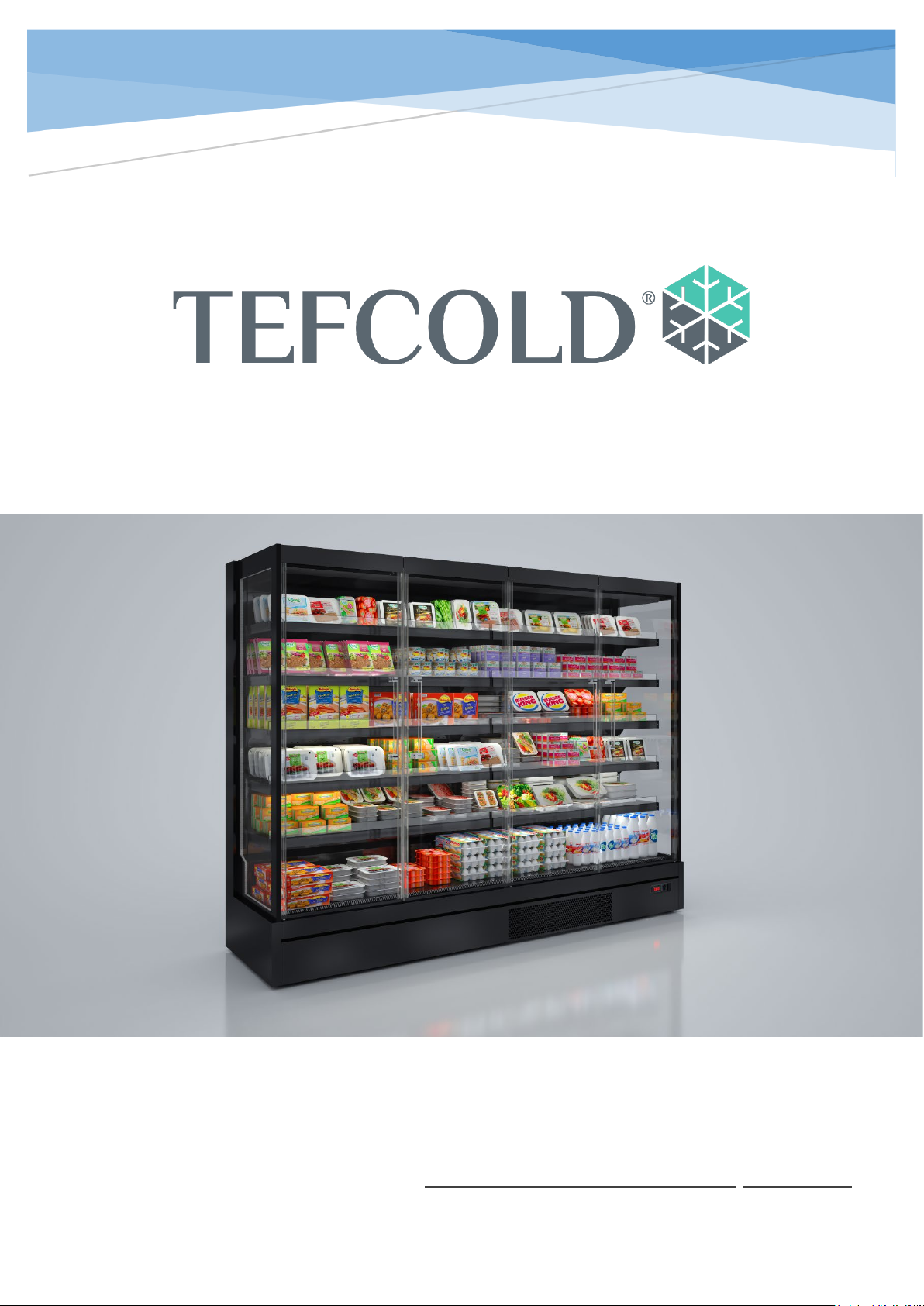
GALAXY+3
Installation and User Manual
Page 2
GALAXY+
1
INTRODUCTION
Please kindly read this first
Dear Customer,
We would like to offer you the best quality products which have been produced in our
modern facilities with the utmost care and passed through rigorous quality control
processes. Please kindly read this manual first, before using the product, and keep it for
reference.
This guide;
• This user guide will help you use your product quickly and safely,
• Please carefully follow the instructions for your safety,
• Keep it in an easily accessible place as you may need it later,
• Please also read the additional documentation provided with your product.
Intended Purpose;
• This product is a refrigerated display cabinet and is designed for commercial
purposes; to be used in the display of foodstuffs within the cooling conditions
specified below.
• The product should not be used outdoors,
• For the cooling class information of your product, please see the label with serial
number.
Page 3
GALAXY+
2
CONTENT
1. IMAGES .................................................................................................................................................... 4
INSTALLATİON TECHNİCAL DRAWİNG .............................................................................................................. 4
TRANSPORTATİON ....................................................................................................................................... 5
PRODUCT SERİAL ID PLATE ........................................................................................................................... 5
INSTALLATİON AND ENVİRONMENTAL FACTOR .................................................................................................. 5
2. IMAGES .................................................................................................................................................... 6
MULTIPLEXING ....................................................................................................................................... 6
3. IMAGE...................................................................................................................................................... 7
4. INSTALLATION ....................................................................................................................................... 11
ASSEMBLY ............................................................................................................................................ 11
POWER ................................................................................................................................................. 11
5. OPERATION ............................................................................................................................................ 12
SWITCHING ON .................................................................................................................................... 12
CASE INSPECTION ................................................................................................................................ 12
MERCHANDISING ................................................................................................................................. 12
6. CLEANING AND GENERAL MAINTENANCE .............................................................................................. 13
GENERAL .............................................................................................................................................. 13
EXTERIOR / INTERNAL SURFACES, SHELVES AND AIR GRILLES.............................................................. 13
GLASS AND MIRROR ............................................................................................................................. 13
CASE WELL ........................................................................................................................................... 13
7. CLEANING .............................................................................................................................................. 14
FAN DECK ............................................................................................................................................. 14
AIR COOLED CONDENSER AND COOLING FINS ..................................................................................... 14
CONDENSATE TRAY .............................................................................................................................. 14
WATER OUTLETS .................................................................................................................................. 14
LIGHTING ............................................................................................................................................. 14
8. NON-WORKING HOURS ......................................................................................................................... 15
9. DEFROST ................................................................................................................................................ 15
10. SERVICE REQUEST AND SAFETY ......................................................................................................... 15
SERVICE SAFETY CHECKS ...................................................................................................................... 15
DİSPOSAL OF APPLİANCES CONTAİNİNG FLAMMABLE REFRİGERANTS .................................................................. 16
ADDITIONAL WARNINGS...................................................................................................................... 16
11. REFRİGERATİON DİAGRAM ................................................................................................................ 17
12. ELECTRİCAL WİRİNG DİAGRAM .......................................................................................................... 19
Page 4

GALAXY+
3
Page 5
GALAXY+
4
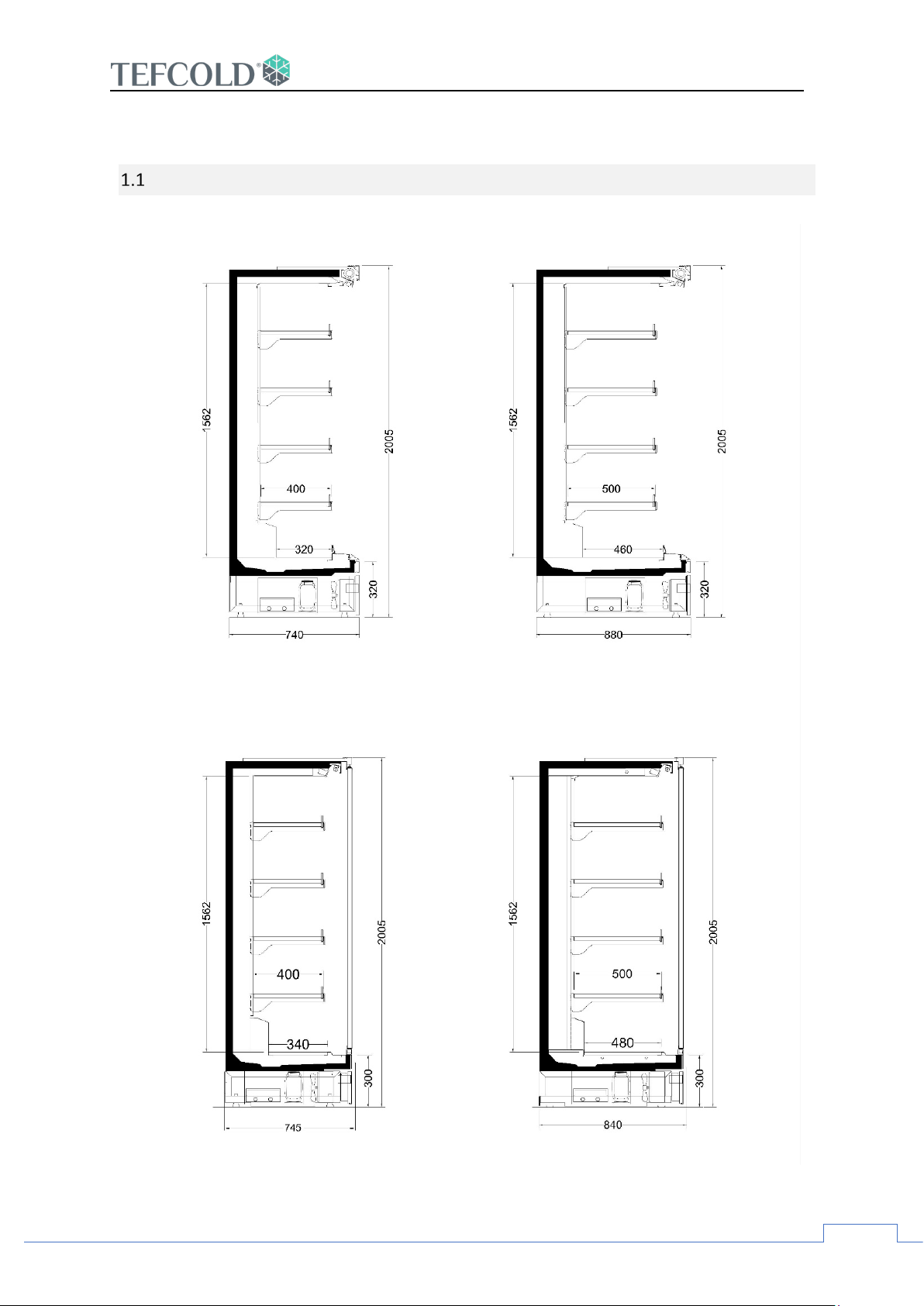
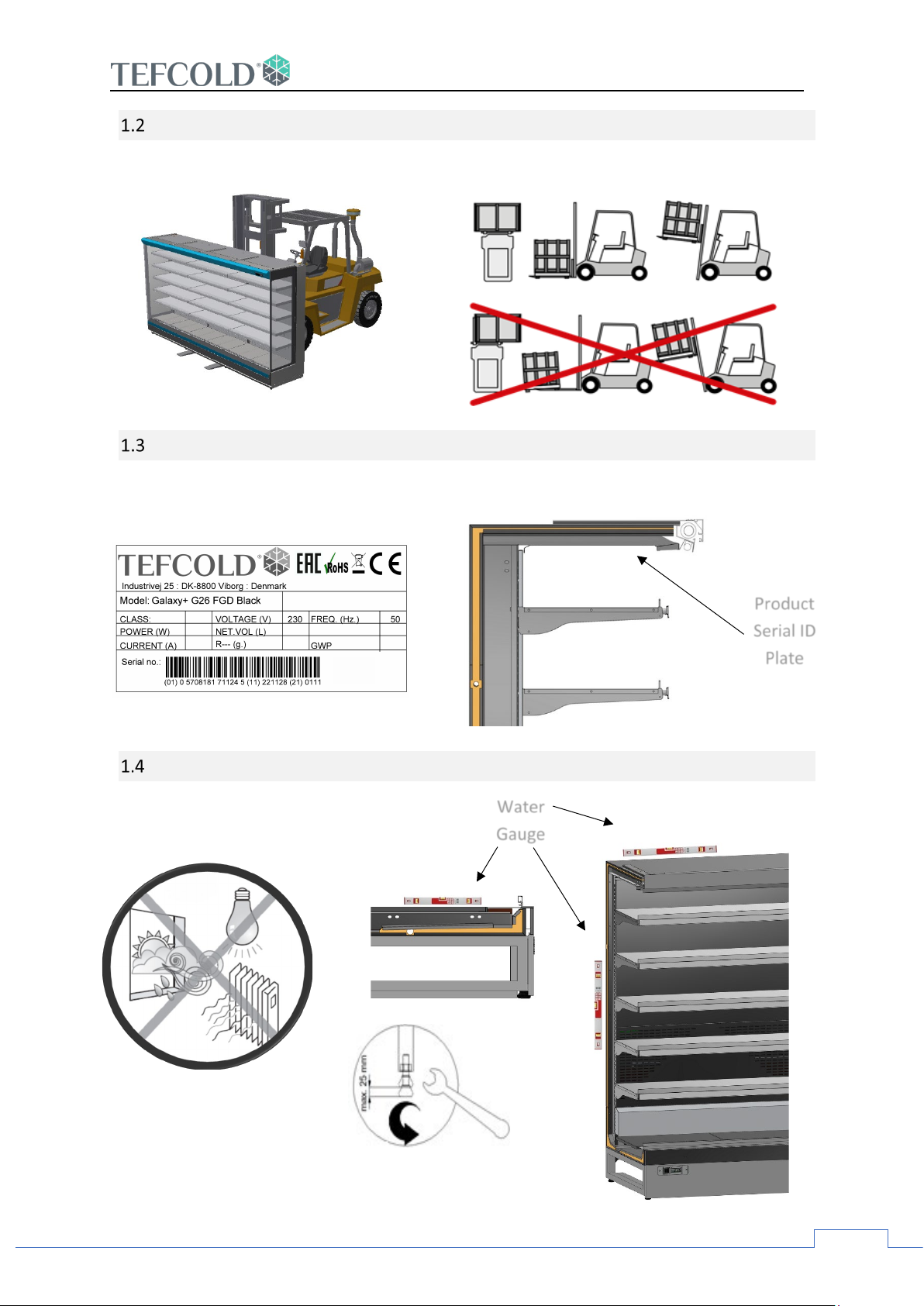
1. Images
Installation Technical Drawing
Page 6
5
Transportation
Product
Water
Gauge
Product Serial ID Plate
GALAXY+
Installation and Environmental Factor
Serial ID
Plate
Page 7
GALAXY+
6
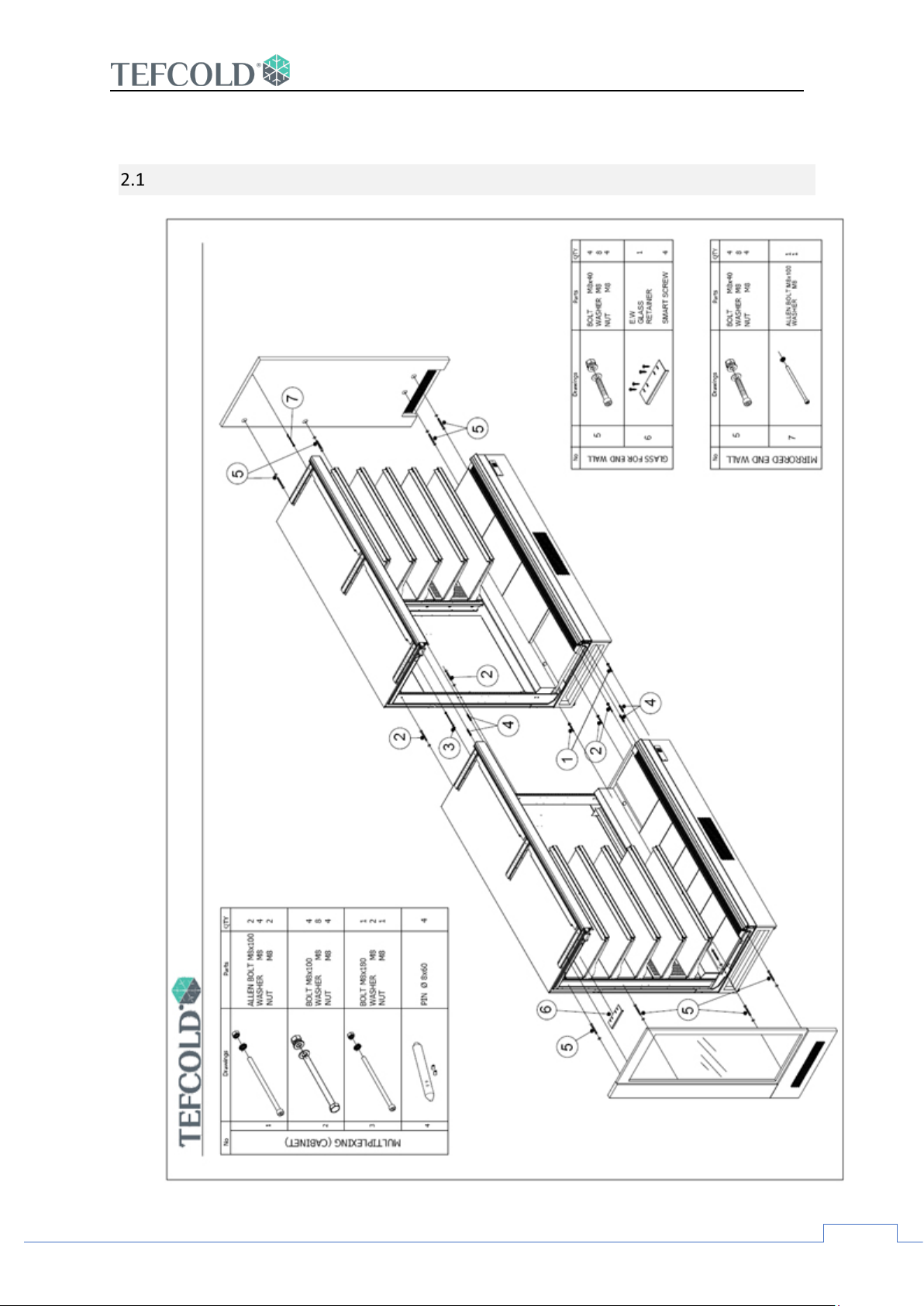
2. Images
MULTIPLEXING
Page 8
7
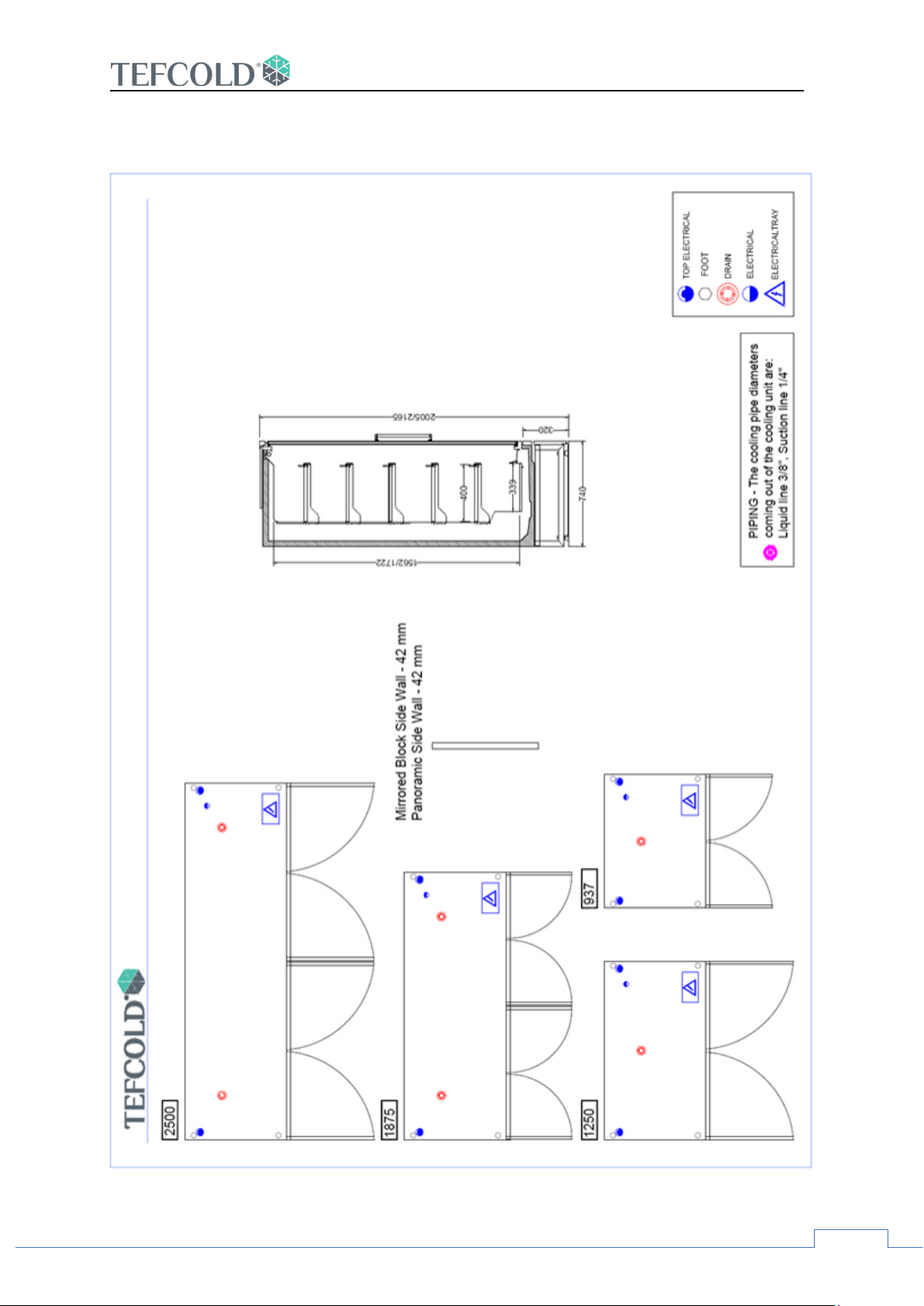
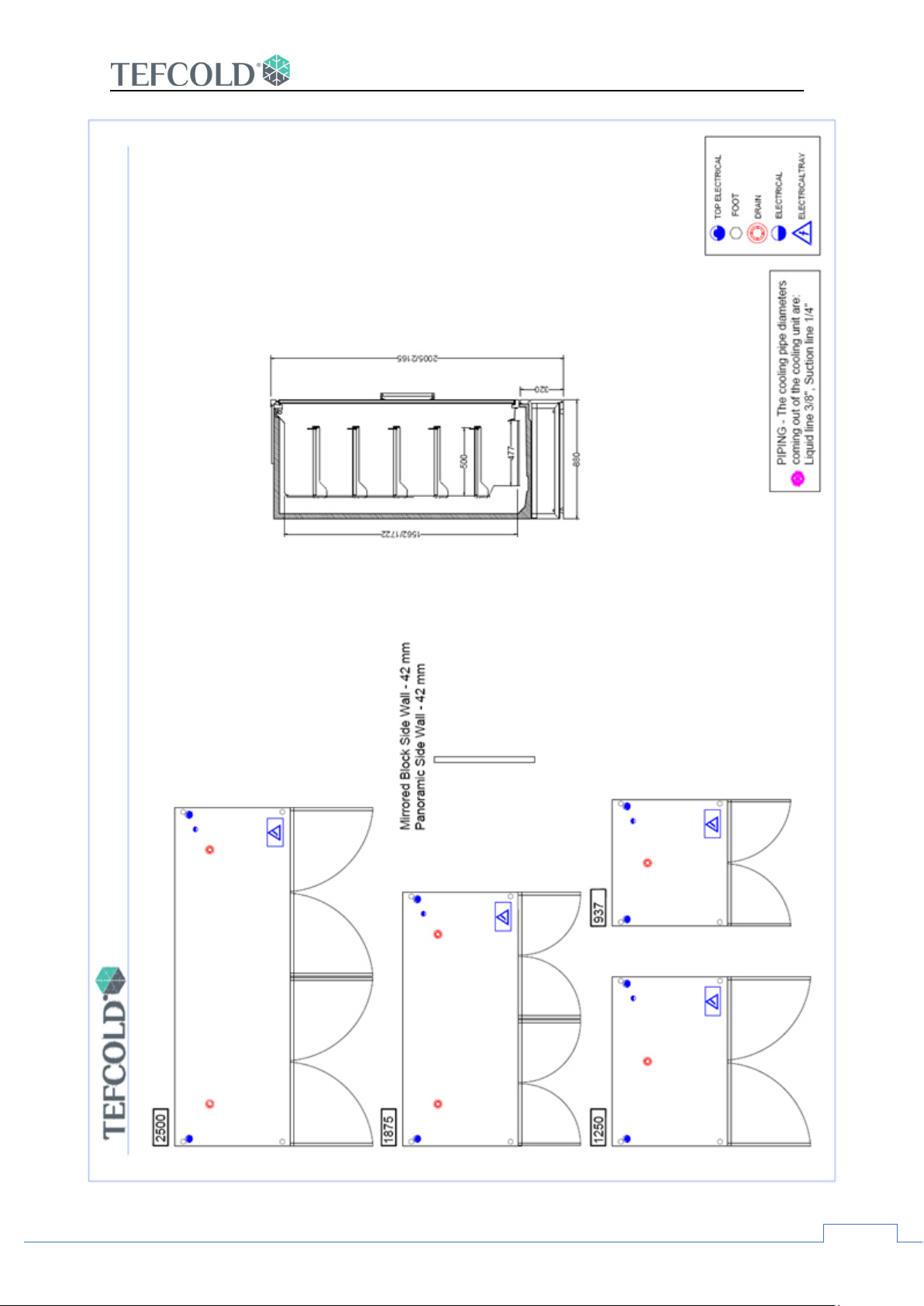
3. Image
GALAXY+
Page 9
GALAXY+
8
Page 10
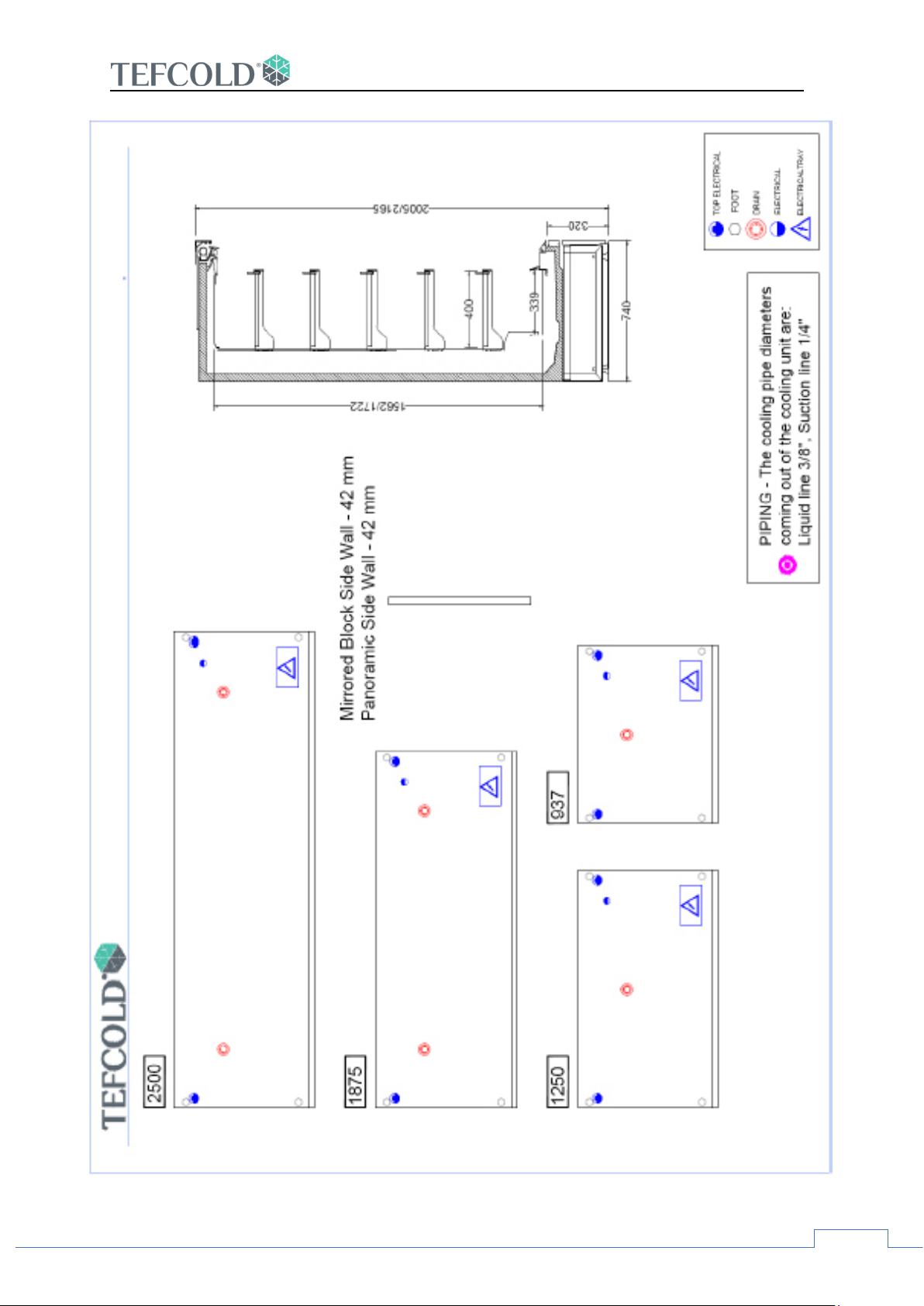
GALAXY+
9
Page 11
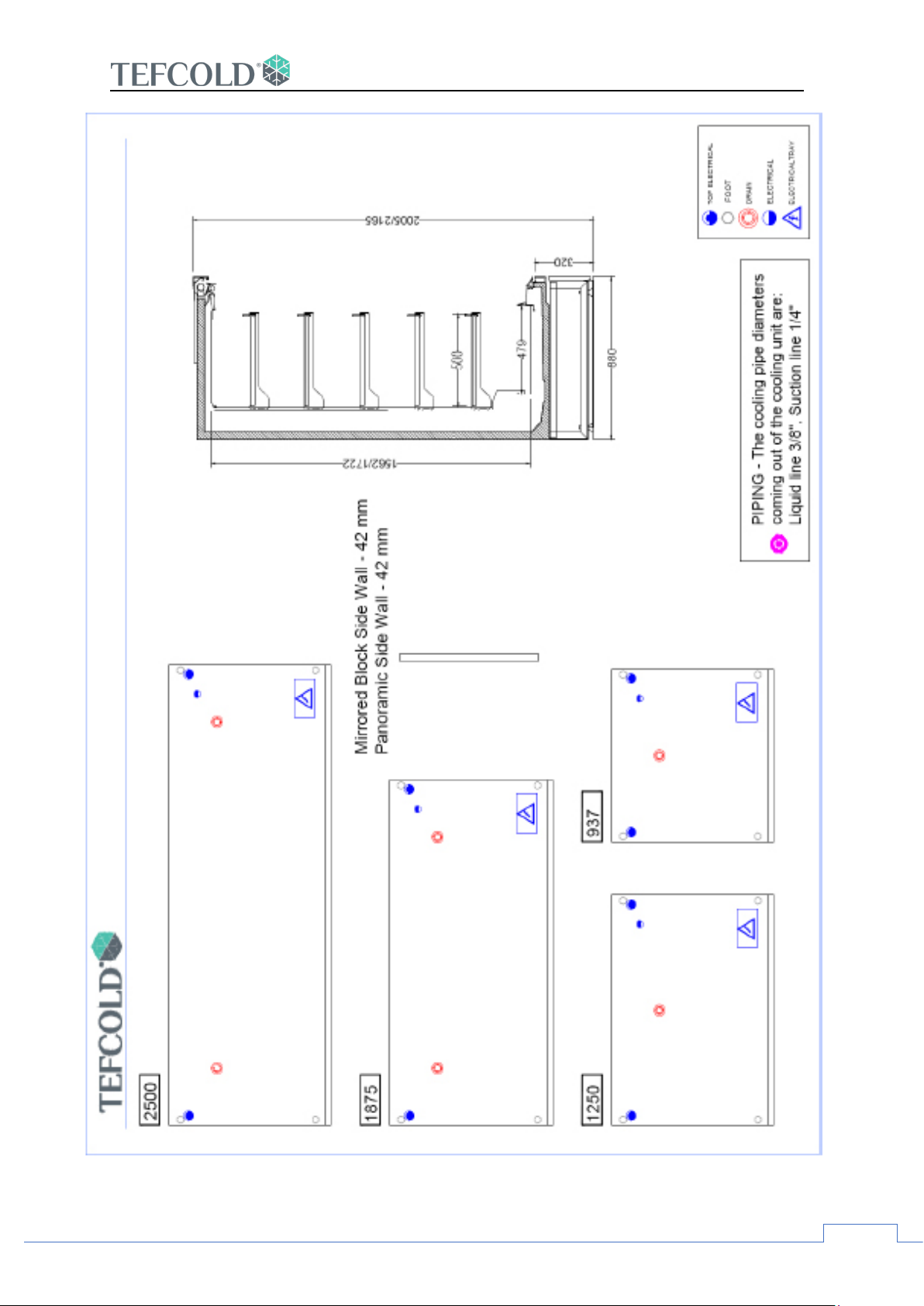
GALAXY+
10
Page 12
11
4. INSTALLATION
ASSEMBLY
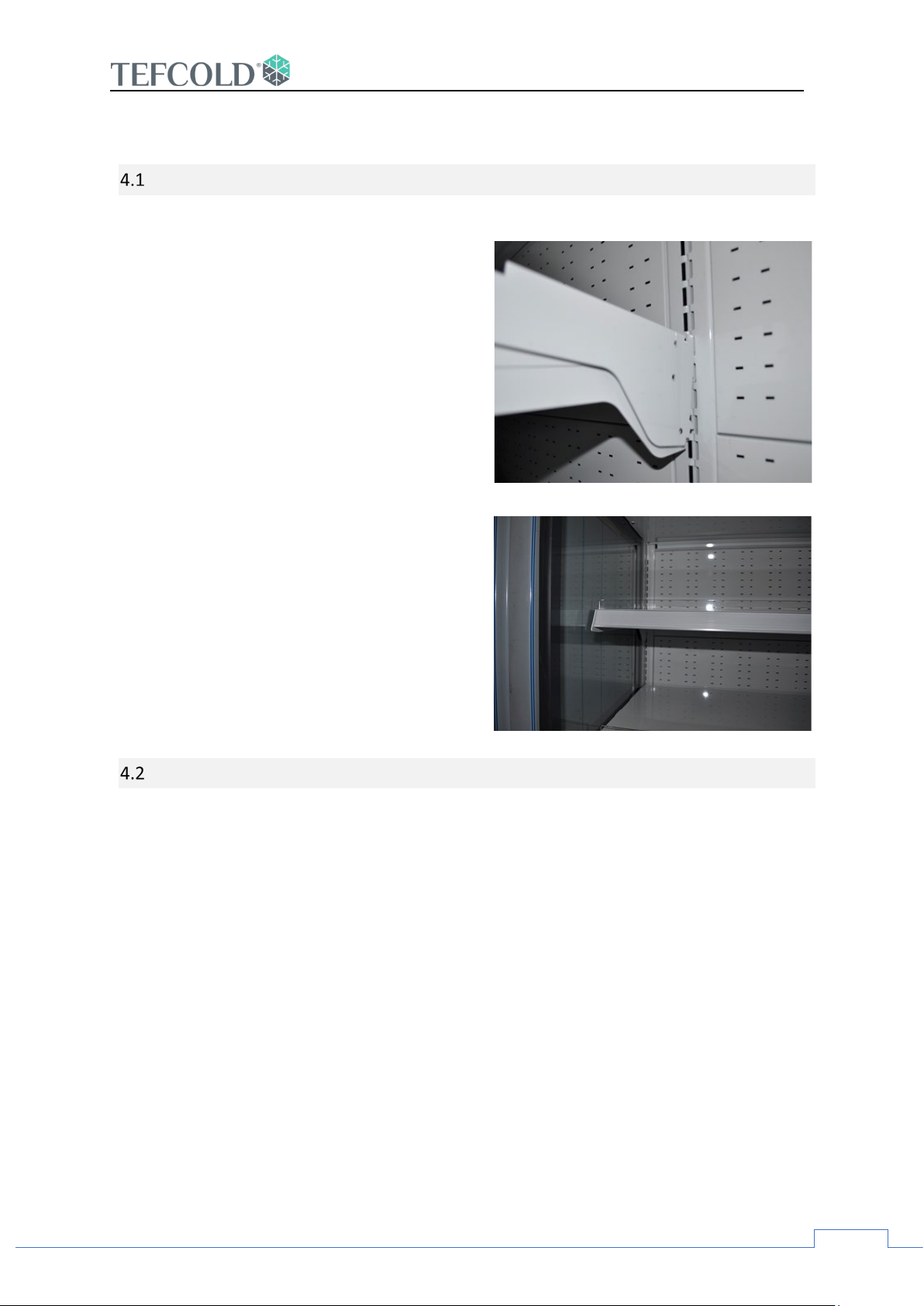
• All assembly work must be done by
qualified personnel.
• Adjustable shelves should be placed in
the appropriate holes on the back panel.
• It is recommended that placement of
shelves is carried out by two personnel.
First, remove the shelf to place it in the
desired location. Then, after removing
the shelf brackets and placing them in
the desired position, place the shelf back
• Tags are placed at the front of the
shelves
• Plexi holders are optional.
GALAXY+
POWER
• As a standard, the case is supplied at 230V-50 Hz.
• Please ensure that the local power supply is proper.
• Check the rating for your case model by consulting the table on page 7 of this manual
and ensure that the plug is correctly fused.
• If the case is hardwired to the mains supply, a means of isolation must be provided.
• If a plug and socket supply is used, the plug should be accessible after the case is
positioned.
• The case should be earthed.
Page 13
12
5. OPERATION
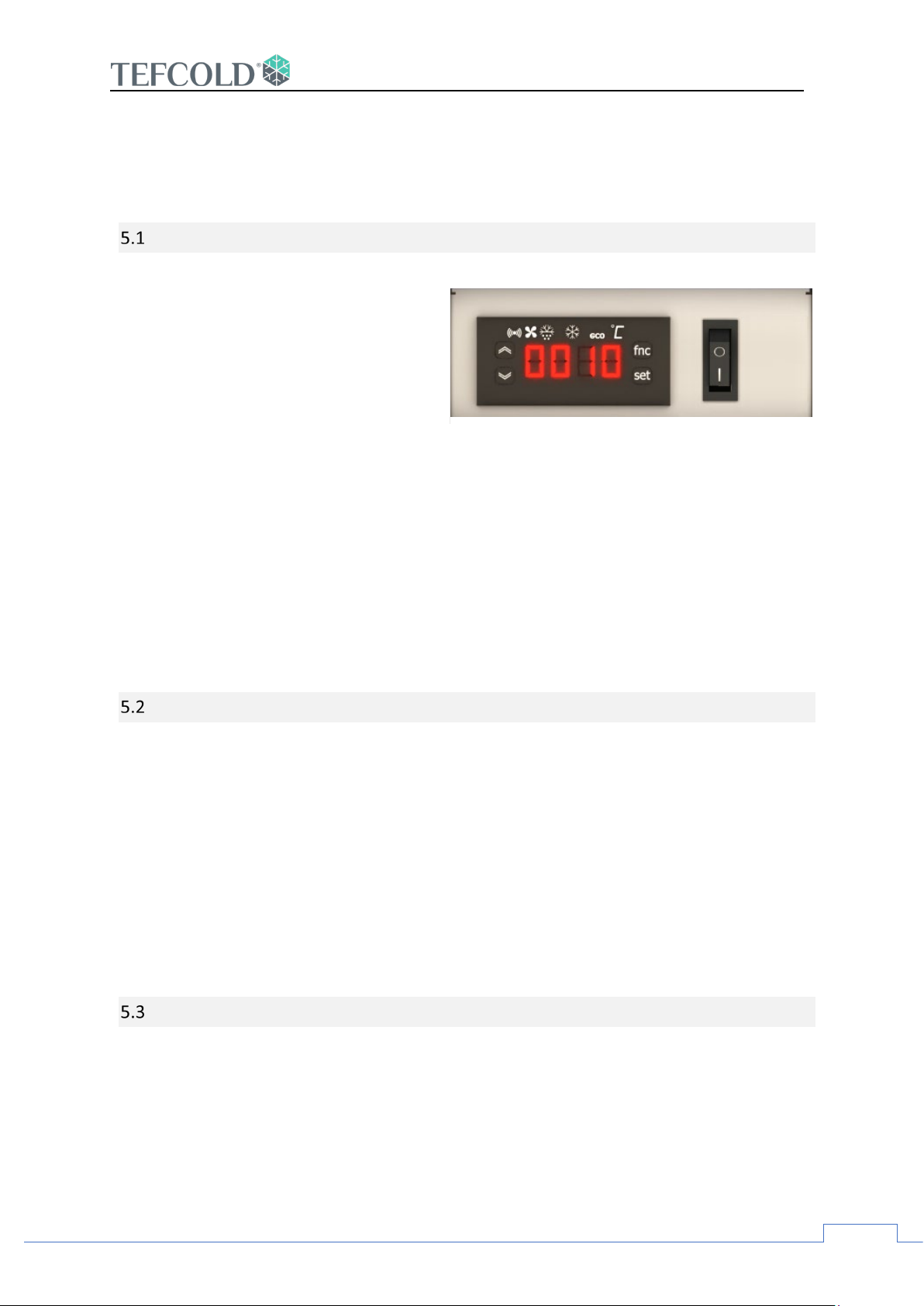
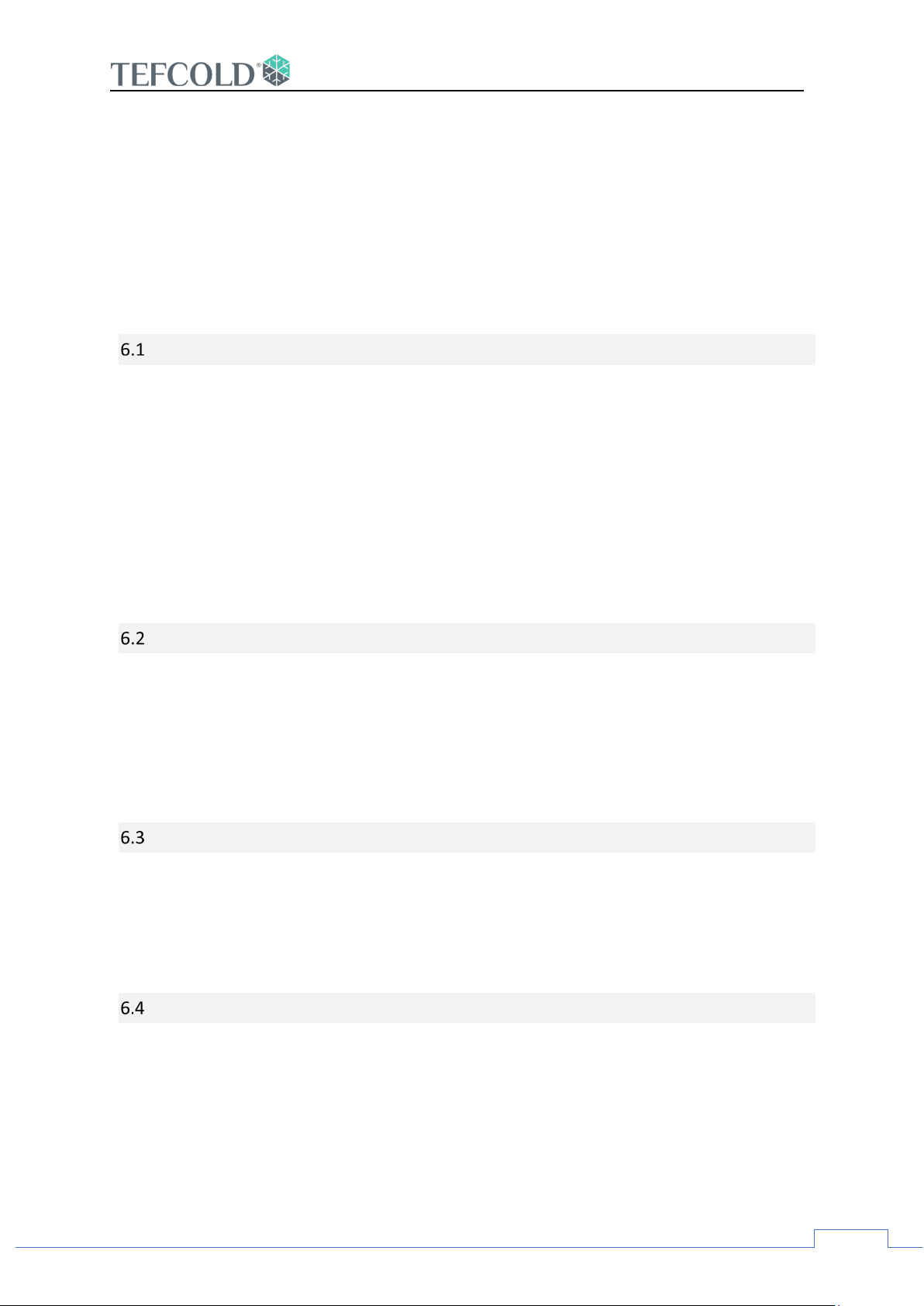
The main power switch is located next to the digital control
screen
Your cabinet is set to automatic defrost values. The
temperature of the cabinet will be reflected on the control
panel.
SWITCHING ON
• Make sure the main power supply
is connected.
• Press the ON/OFF switch on the
control panel to turn on your
cabinet.
• All the fans in the cabinet will start
running.
• The temperature of the fridge
starts to decrease in line with the
predetermined value. You can find
the value determined for the
model you use on page 3.
• Press on the switch to turn on the
lights.
GALAXY+
CASE INSPECTION
• Operating temperature, as indicated on the controller mounted on the front of the
case, should be checked on a daily basis.
• Cases should be monitored on a daily basis for any undue noise, smell or
malfunction. In such cases, immediate action must be taken.
• Regularly inspect the case for milk spillage or debris in the air grilles, case well and
condensate tray. Remove and clean spillages and debris. The water tank should be
checked regularly and care should be taken to keep it clean at all times.
MERCHANDISING
• Allow the case to operate at least for two hours before loading merchandise.
• When loading cases, do not exceed loading limits or allow product to overhang the
shelf front edges or obstruct air return grilles.
• A tidy, well merchandised case will function more efficiently than a badly loaded one.
Page 14
GALAXY+
13
• Ensure free air flow around the merchandise and between the air discharge and
return ducts.
• Always load chilled product. Your display case is designed to maintain the
temperature not to reduce it. If warm product is loaded into the case, there may pass
some time before the case reaches its desired operating temperature.
6. CLEANING AND GENERAL MAINTENANCE
GENERAL
• A regular and thorough cleaning regime is essential for the efficient and hygienic
operation of your display case.
• Before undertaking any cleaning operation, ALWAYS turn the case off and if possible,
disconnect it from the mains power supply.
• Avoid water splashing onto the case’s electrical elements. If water splashing occurs,
make sure that all electrical components are thoroughly dry before reconnecting to
the power supply.
EXTERIOR / INTERNAL SURFACES, SHELVES AND AIR GRILLS
• Painted or metal surfaces should be cleaned with a cloth soaked in warm soapy
water. Surfaces should be dried with soft cloth.
• Shelves should be removed for cleaning as above.
GLASS AND MIRROR
• Glass and mirrored end-walls should be cleaned with a suitable glass cleaner. Glass
and mirrored surfaces may be wiped with a soft dry cloth.
CASE WELL
• Lift out deck trays and sweep or vacuum any debris from the case well.
Page 15
14
7. CLEANING
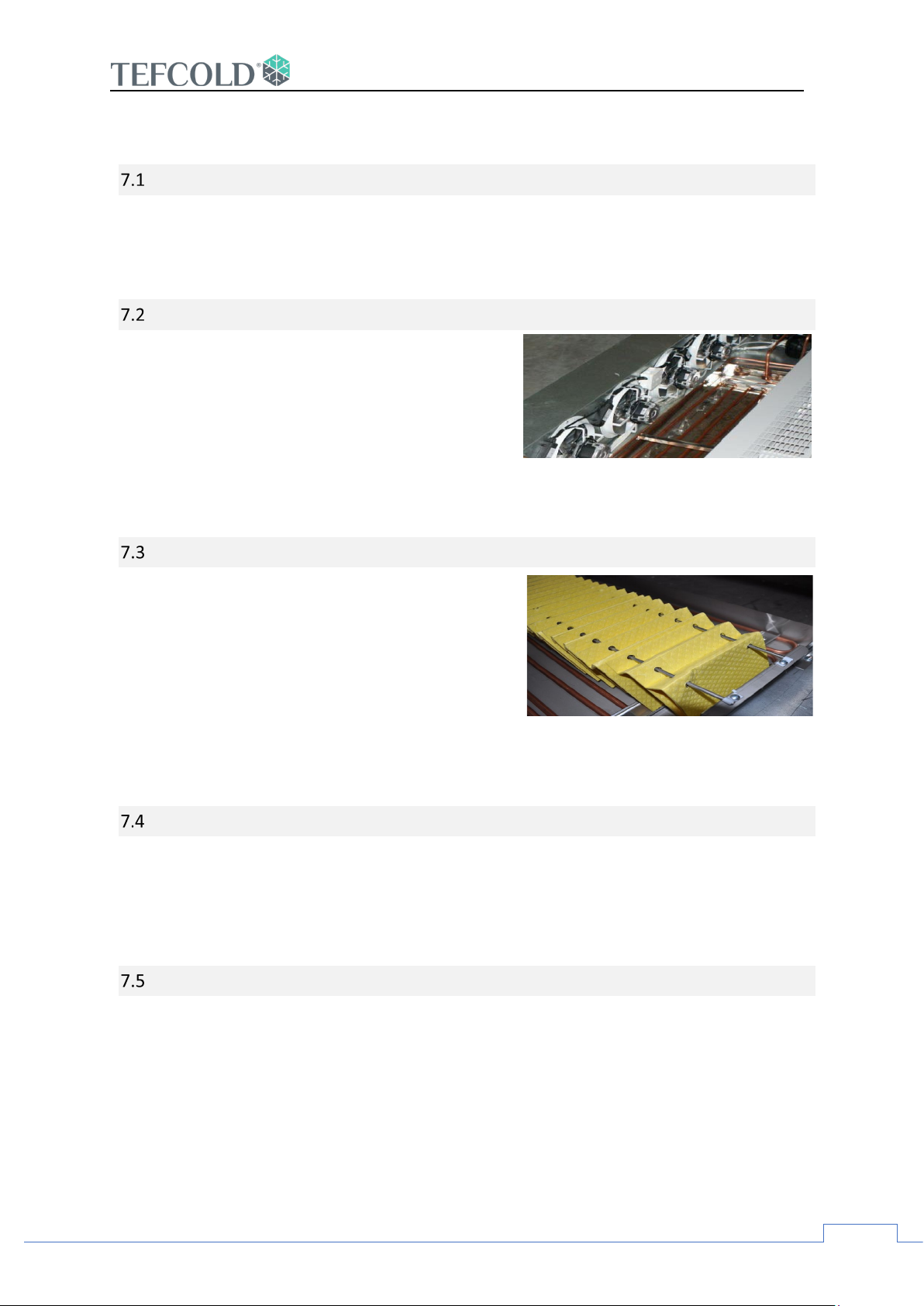
Vacuum dust and debris from the
condenser unit and cooling fins
Condensate tray should be cleaned
regularly
FAN DECK
• Lift the fan plate in order to allow cleaning around the fans.
• ALWAYS make sure that fans are not running by switching the case off!
AIR COOLED CONDENSER AND COOLING FINS
• Carefully vacuum dust and airborne debris
from the condenser unit and cooling fins.
• Exercise care not to damage fins.
• Beware of the sharp fins and take care when
cleaning this area.
GALAXY+
CONDENSATE TRAY
• The self-evaporating water tray which collects
defrost water should be cleaned regularly.
• Spilled milk and other dairy products collecting
in the condensate tray may lead to odor and
should be cleaned immediately.
WATER OUTLETS
utlets for waste water should be cleaned regularly to ensure a continuous flow of wast
• O
ater.
w
LIGHTING
e
• Lights can be wiped with a soft cloth after making sure they have been turned off
beforehand.
Page 16
15
8. NON-WORKING HOURS
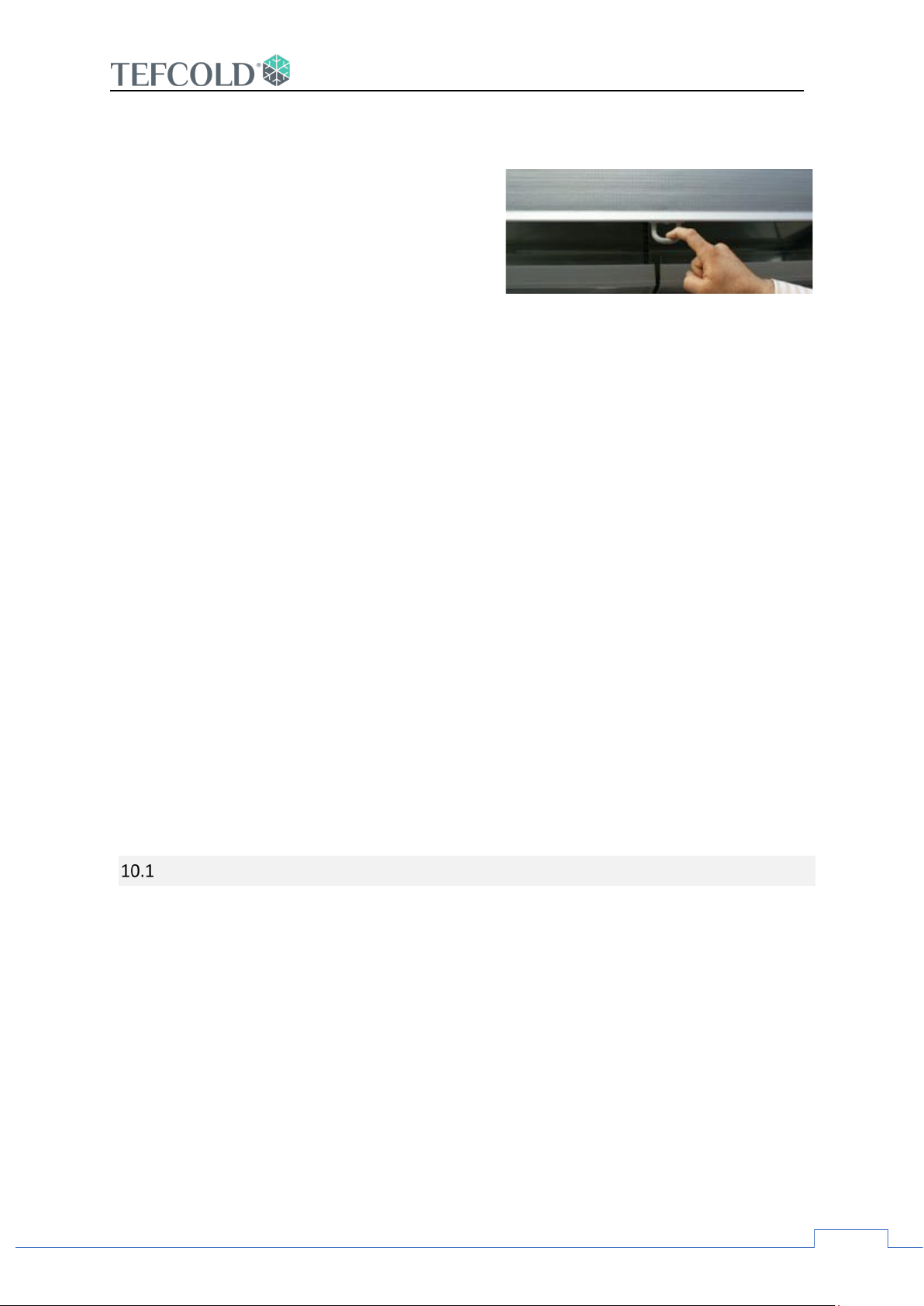
Using night curtains outside of working hours provides
significant energy saving
• The cabinets should NEVER BE TURNT OFF,
including non-working hours.
• Up to 30% energy savings can be achieved by
using night curtains outside working hours
on open cabinets.
s
9. DEFROST
• Your cabinet automatically defrosts for 16 minutes, every 3 hours.
• The first defrost period is activated at least 3 hours after the cabinet starts to
operate.
GALAXY+
10. SERVICE REQUEST AND SAFETY
• The operating temperature on the control panel must be checked daily. In the event
of malfunction or failure, you should request a service engineer visit as soon as
possible. If in doubt, turn off the case and disconnect it from the mains supply.
• In the event of case failure, remove perishables from the display case and store in an
alternative, suitably chilled location to avoid deterioration of merchandise.
• Servicing of your case should only be undertaken by an approved Service Engineer.
Failure to comply may invalidate your warranty.
SERVICE SAFETY CHECKS
se a leak detector for a background check on the appliance. The detector must be certified
1. U
for use with the specific refrigerant class. In case of flammable refrigeration detection,
ventilate and evacuate the room immediately and notify the customer.
2. Make sure that an appropriate fire extinguisher is on site. Technicians must be trained to us
these extinguishers.
3. Make sure that the area is well ventilated and free from flame or burning materials such as
cigarettes, candles etc.
4. Check the appliance and its surroundings for any irregular signs of ignition. Do not operate in
case of such signs and contact the manufacturer.
5. If the appliance is being transported, take extra care not to damage the appliances, especially
the refrigerant carrying pipes and components.
WARNING: Check and follow the compressor manufacturer’s instructions for the specific refrigerant
for removal and recharging of the refrigerant.
e
Page 17
GALAXY+
16
Disposal of Appliances Containing Flammable Refrigerants
• A written plan for the disposal of scrap appliances carrying flammable refrigerants
should be developed and followed by the service team.
• Prior to disposal of the device, the gas must be recovered or evacuated.
• The service technician shall comply with relative domestic laws and regulations while
performing disposal.
• In case of recovery, follow the manufacturer's instructions for recovering the
refrigerant in a suitable container and transporting it to a licensed refrigerant
reclamation or destruction facility.
• Flammable hydrocarbon refrigerants that can be released to outside, such as R-600a
or R-290 should be safely retrieved from the appliance and evacuated to the outside
environment, away from ignition sources or air intakes. Ensure effective grounding
and bonding of the appliance while removing the refrigerant.
ADDITIONAL WARNINGS
• The instructions concerning persons (including children) with reduced physical,
sensory or mental capabilities, or lack of experience and knowledge and children
playing with the appliance are not required. (EN 60335-2-89)
• The cabinets’ load bearing capacity is 160 kg/m2, load the cabinet accordingly.
• Do not store explosive substances such as aerosol cans with a flammable propellant
in this appliance.
• WARNING: Do not use electrical appliances inside the food storage compartments of
the appliance, unless they are of the type recommended by the manufacturer. (EN
60335-2-89)
Page 18
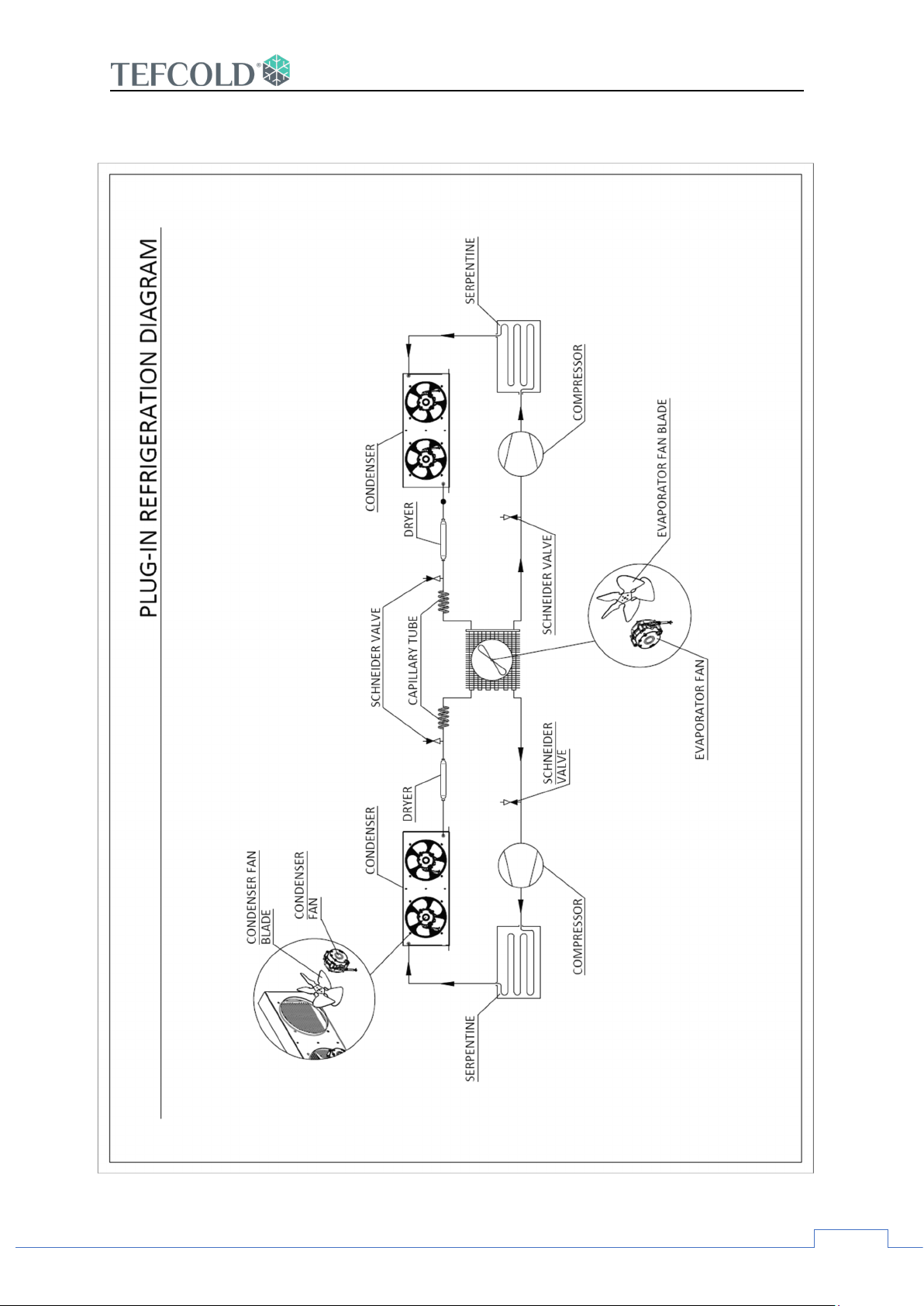
17
11. Refrigeration Diagram
GALAXY+
Page 19
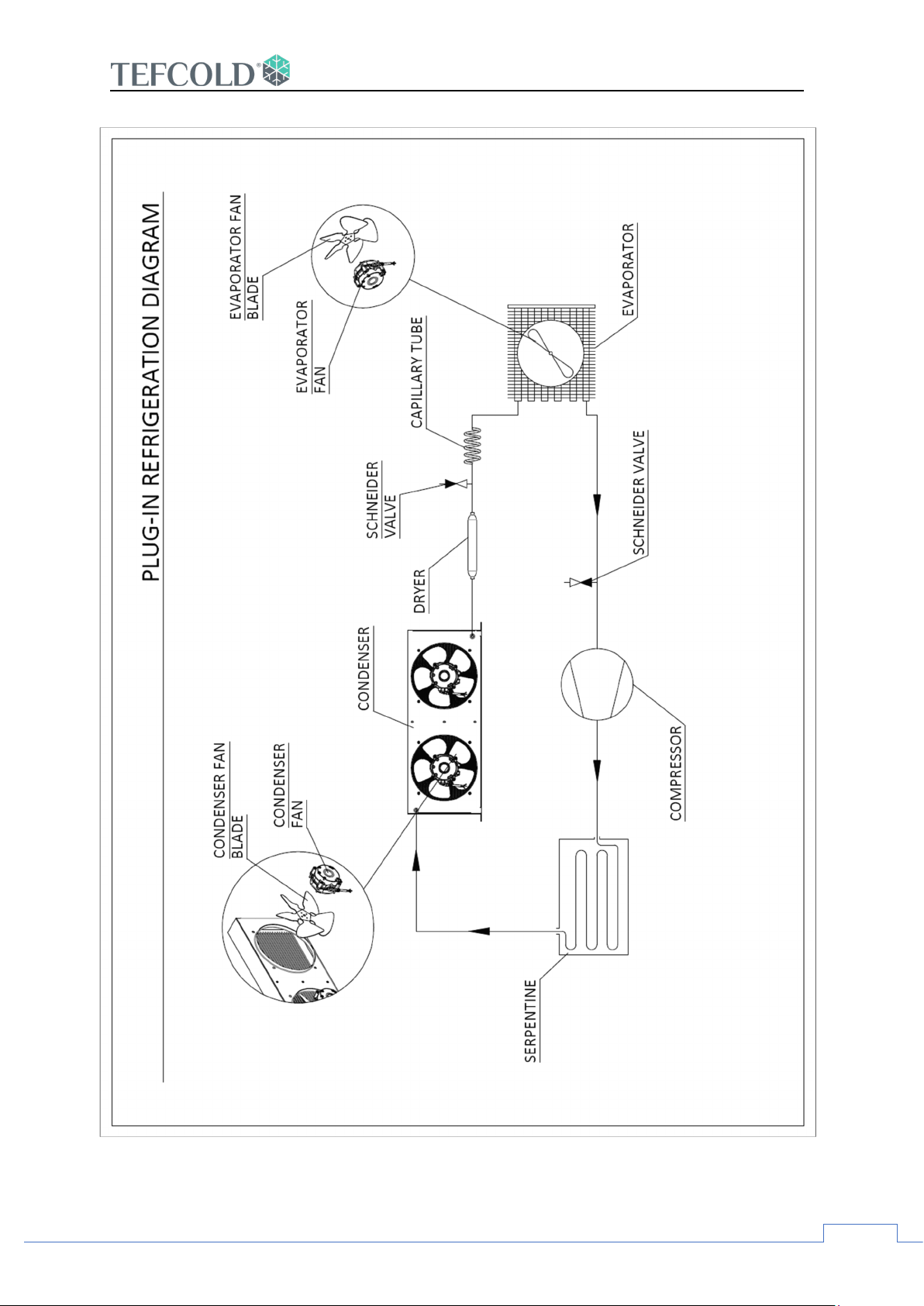
GALAXY+
18
Page 20
19
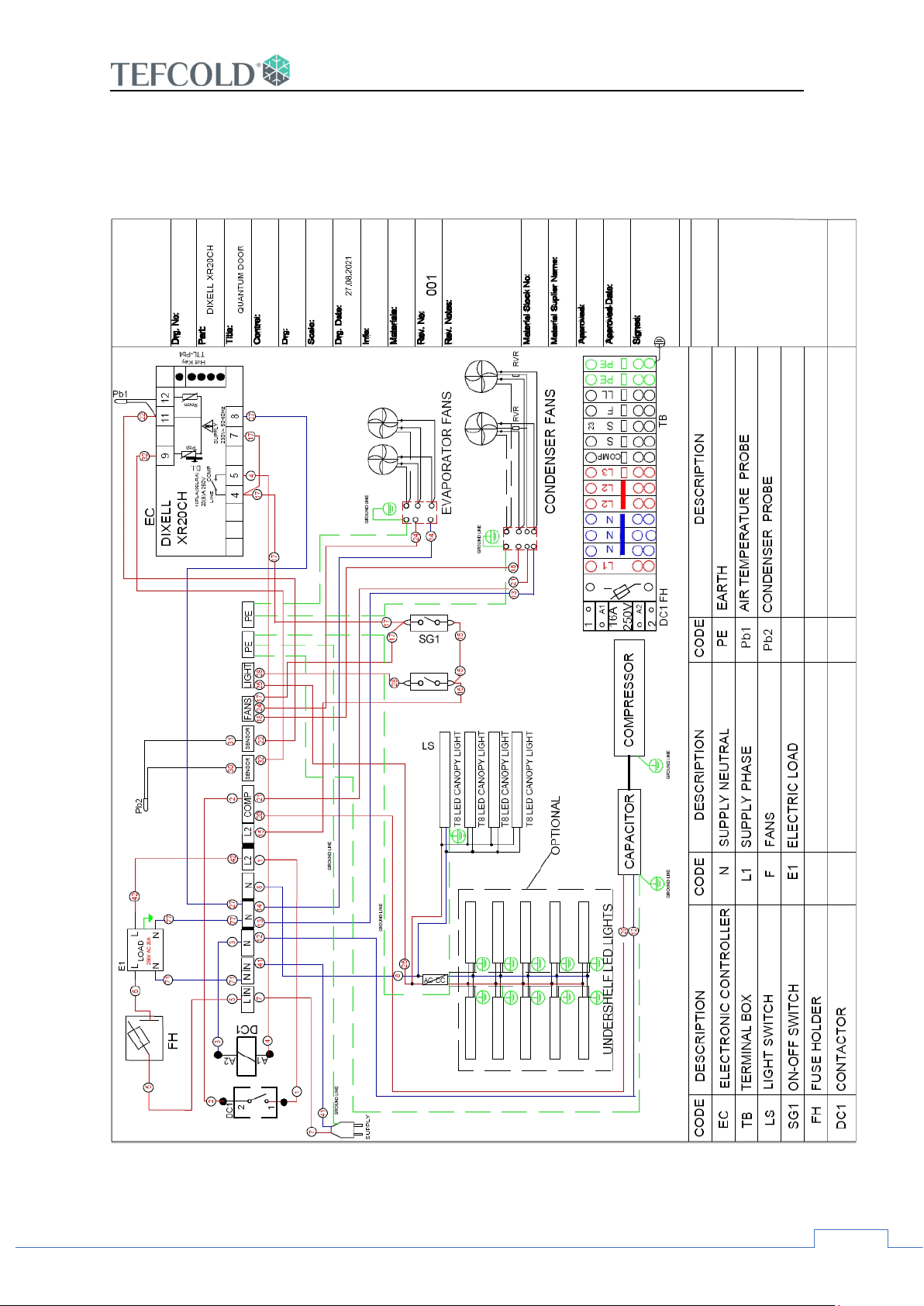
12. Electrical Wiring Diagram
G
ALAXY+ WITH DOOR WIRING DIAGRAM
GALAXY+
Page 21
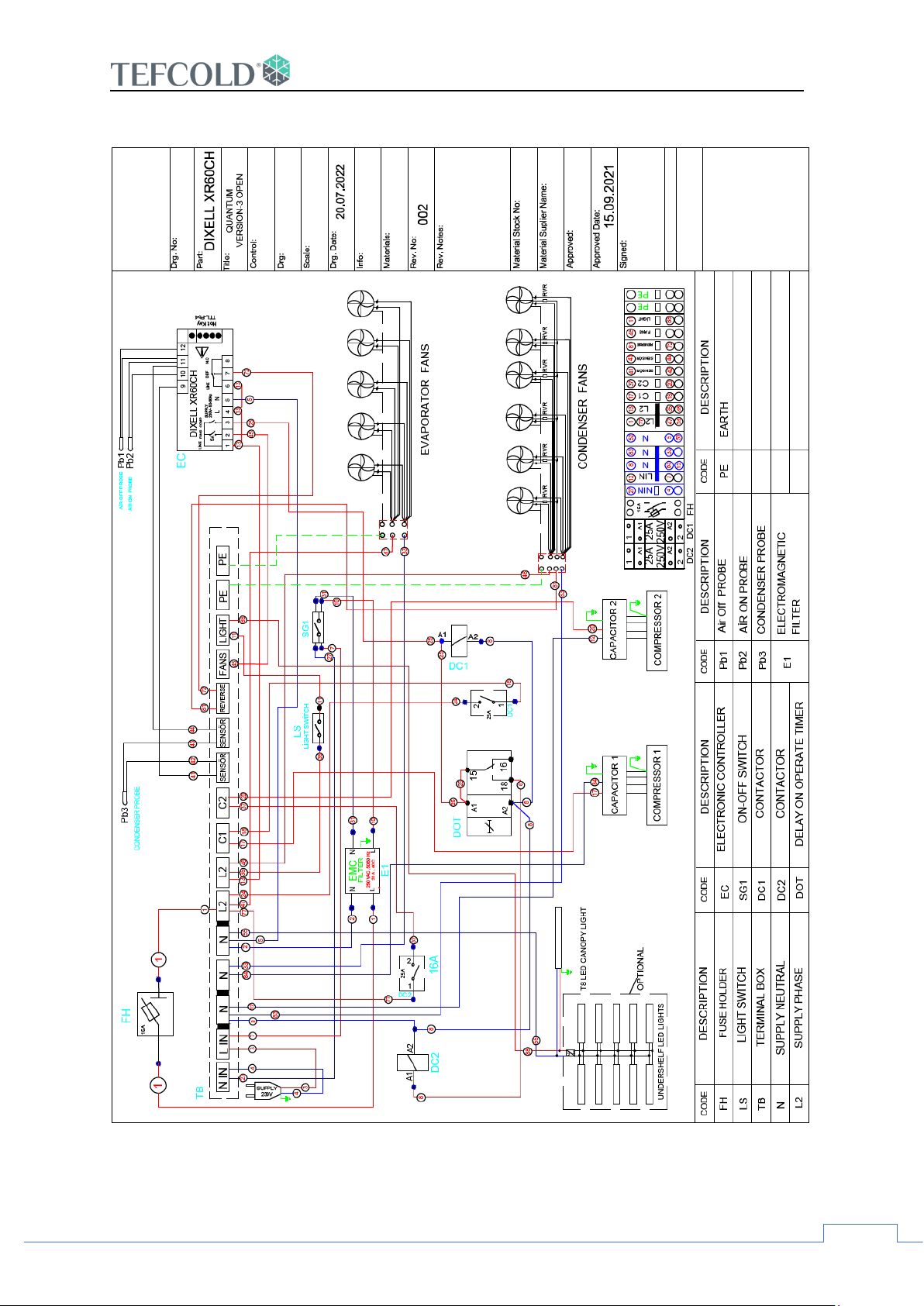
20
GALAXY+ OPEN FRONT WIRING DIAGRAM XR60
GALAXY+
 Loading...