

Page 1
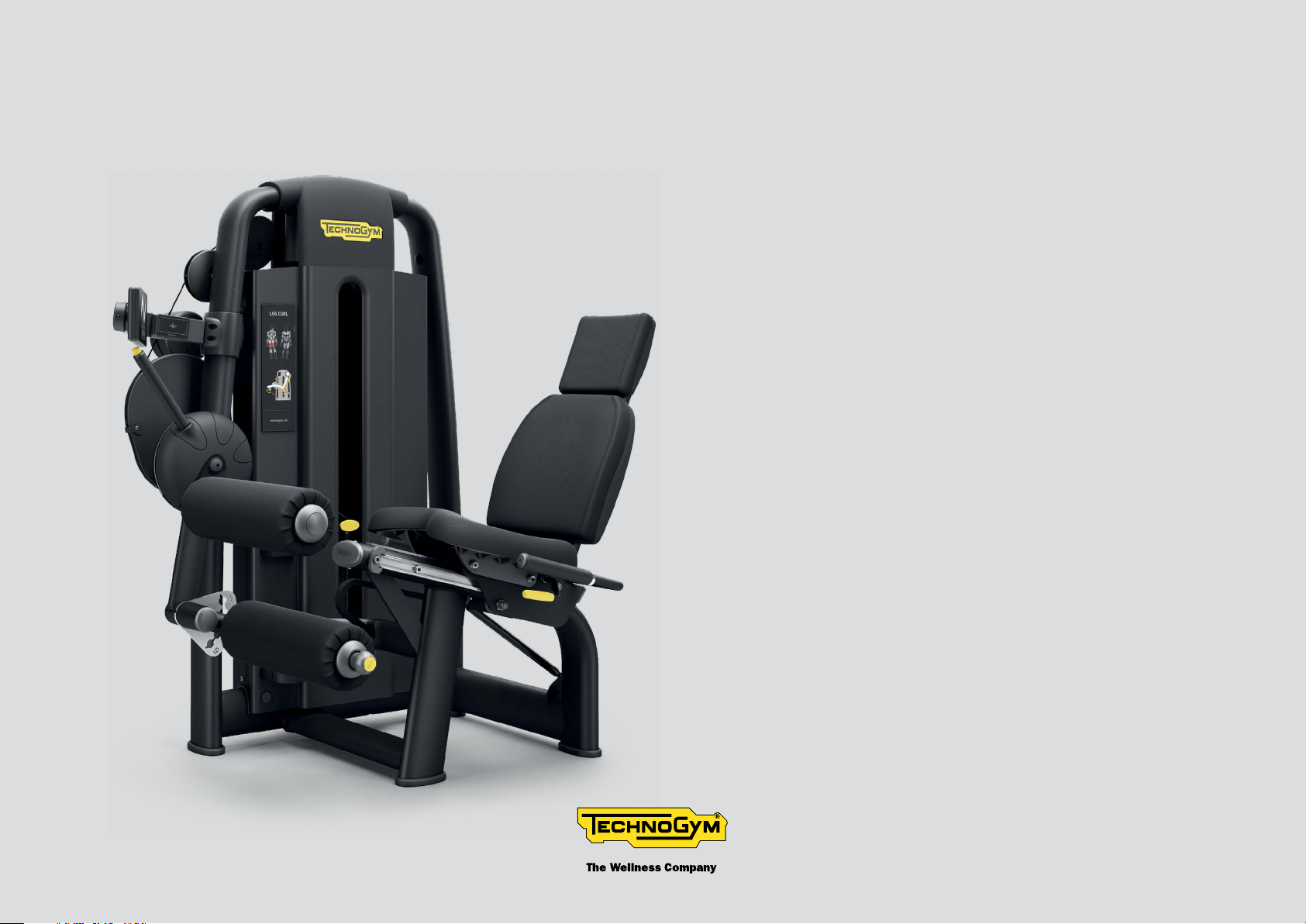
SELECTION PRO
CONNECTED STRENGTH
LEG CURL
User manual
Page 2
Contents
Important safety instructions ........................................................................................... 3
Personal safety ................................................................................................................... 5
Identication of the manufacturer and equipment ........................................................ 8
Description of the equipment ............................................................................................ 9
Technical data .................................................................................................................... 10
Place of installation ..........................................................................................................11
Fitting the number holder ............................................................................................... 12
Lifting and moving the equipment ................................................................................. 13
Adjusting the equipment ..................................................................................................15
Routine maintenance ....................................................................................................... 16
Replacing the padded parts ............................................................................................. 17
Replacing the cable ........................................................................................................... 18
Adjusting the cable tension .............................................................................................20
Removing the rear protective weight stack panel ........................................................ 21
Technical Service ..............................................................................................................23
Storage ............................................................................................................................... 24
Disposal .............................................................................................................................25
Using the equipment ........................................................................................................26
Leg Curl 2
Page 3
Important safety instructions
You should always consult with a qualied and licensed medical professional or healthcare practitioner before starting any nutritional, diet,
stretching or exercise program. You are advised to investigate and inform yourself about any health related actions and choices you make.
Read all instructions before using the equipment. These instructions were written to ensure your safety and to protect the equipment.
Equipment is intended for commercial use.
WARNING
To reduce the risk of injury, take the following precautions.
The products in the Selection range are units of xed weight training equipment units that can be used for body-building or sculpting, physical
activity aimed at keeping in shape, physical education and training for specic competitions and sports.
The equipment must be used by only one user at a time.
Use any equipment only for its intended use as described in the user manual. Only perform the exercises for which the equipment has been
designed, following the instructions given in the manual. Any other use is to be considered improper and therefore dangerous.
Do not use attachments not recommended by the manufacturer.
The equipment must be installed and used in a place in which access and supervision are specically controlled by the owner.
Do not allow unsupervised children close to the equipment.
Close supervision is necessary when any equipment is used by, on or near children or disabled persons.
Never operate any equipment if it has damaged power supply cord, if it is not working properly or if it has been dropped or damaged. In these
circumstances, contact the Technogym Technical Support service.
Leg Curl 3
Page 4
Important safety instructions
Keep hands away from moving parts.
Never drop or insert any object into any opening.
Do not use outdoors. Do not leave the equipment outdoors, exposed to the elements. Do not expose the equipment to water jets.
The maximum user weight is 397 lb (180 kg).
Leg Curl 4
Page 5
Personal safety
Completely assemble the equipment before using it.
Maintain the equipment in good working condition.
Before each use check the equipment, check that the cable is correctly routed inside the races of all the pulleys and the state of wear of the
cable. If there are signs of wear, contact the Technogym Technical Support service.
Do not continue to operate the equipment when it is not working properly.
Do not attempt to service the equipment yourself other than the maintenance instructions found in the user manual.
Assemble and operate the equipment on a solid, level surface.
Do not put anything on the frame.
Use of the equipment is subject to a medical examination in relation to the intended type of exercise, and compliance with the conditions of
use indicated by the manufacturer.
Persons suering from certain physical conditions may only use the equipment under the strict supervision of a specialist doctor.
Before starting an exercise, make sure your position on the equipment is correct, and be careful with any components that might constitute
an obstruction.
Wear proper exercise clothing and shoes during a workout: no garments that impede perspiration and no loose clothing. Tie long hair back. Keep
garments or towels away from moving parts.
Choose suitable exercises for your physical characteristics and state of health, starting with light loads.
Do not overexert yourself or work to exhaustion. If you feel any pain or abnormal symptoms, stop your workout immediately and consult your
physician.
Make sure that the load selection pin is fully inserted. Use only the pin provided by the manufacturer. Contact the sta for any questions.
Only remove the pin when the weight stack is in the rest position. The weight stack is in the rest position when both the weights and the
crosspiece are not in the air. If the weight stack is not in the rest position, contact oor sta and do NOT use the equipment.
Leg Curl 5
Page 6
Personal safety
The weight stack is covered externally with protective panels. Do NOT use the equipment is even only one of them is missing.
The instruction label must be applied on each piece of equipment. Technogym declines all responsibility in the event of the equipment being
used before the instruction label has been axed.
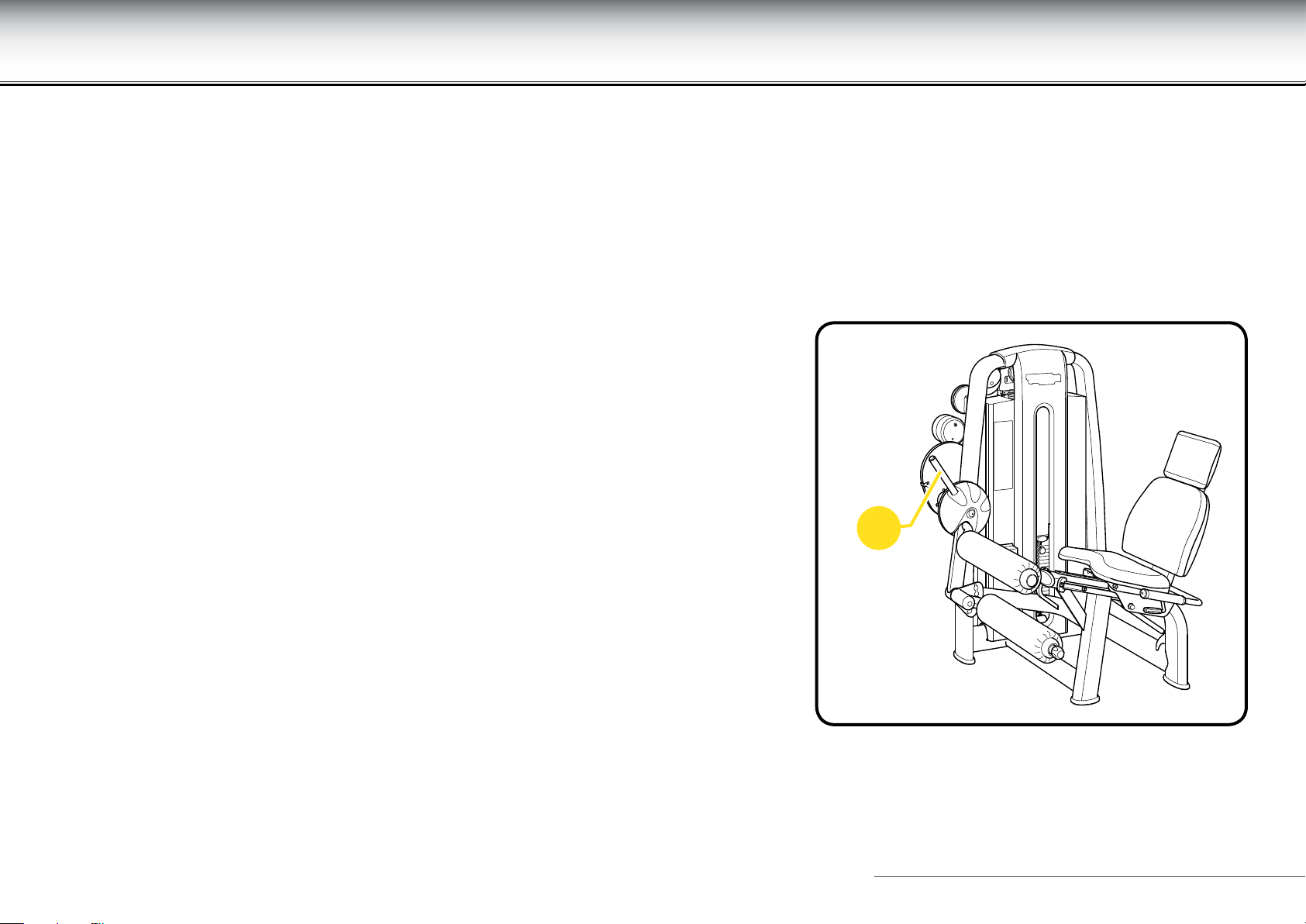
When the equipment is being used, DO NOT use the adjustment lever (A), DO NOT make
the adjustment.
A
Leg Curl 6
Page 7
Personal safety
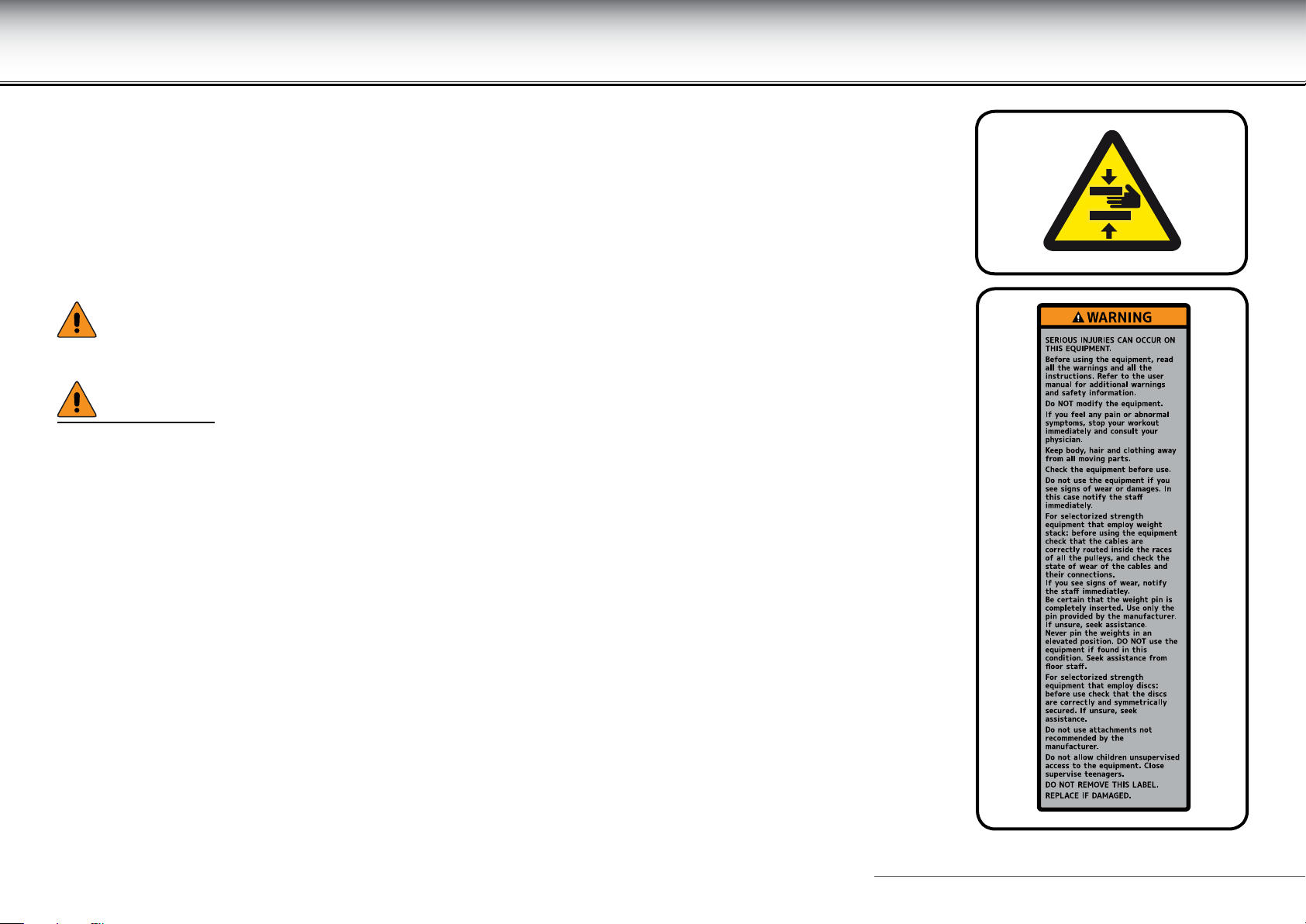
Pay particular attention to the parts of the equipment with labels indicating “BEWARE OF CRUSHING”.
This symbol accompanies safety warnings. It is used to draw attention to potential risks of personal
injury. Pay attention to all safety warnings accompanied by this symbol to avoid possible injury.
WARNINGS
During all operations involving transport, maintenance and cleaning, pay attention to any part of
the equipment where body parts may become trapped.
Attention must be paid to the labels attached to the equipment, as they provide information about
possible risks and hazards.
We recommend immediately replacing the labels when they become damaged or dicult to read.
Technogym is not responsible for any damage due to any failures or damage caused by unauthorized
service, misuse, accident, negligence, improper assembly or installation, debris resulting from
construction activities in the product’s environment, rust or corrosion as a result of the product’s
location, alterations or modications without Technogym’s written authorisation or for failure on your
part to use, operate and maintain the products as set out in this User Manual.
Leg Curl 7
Page 8
Identication of the manufacturer and equipment
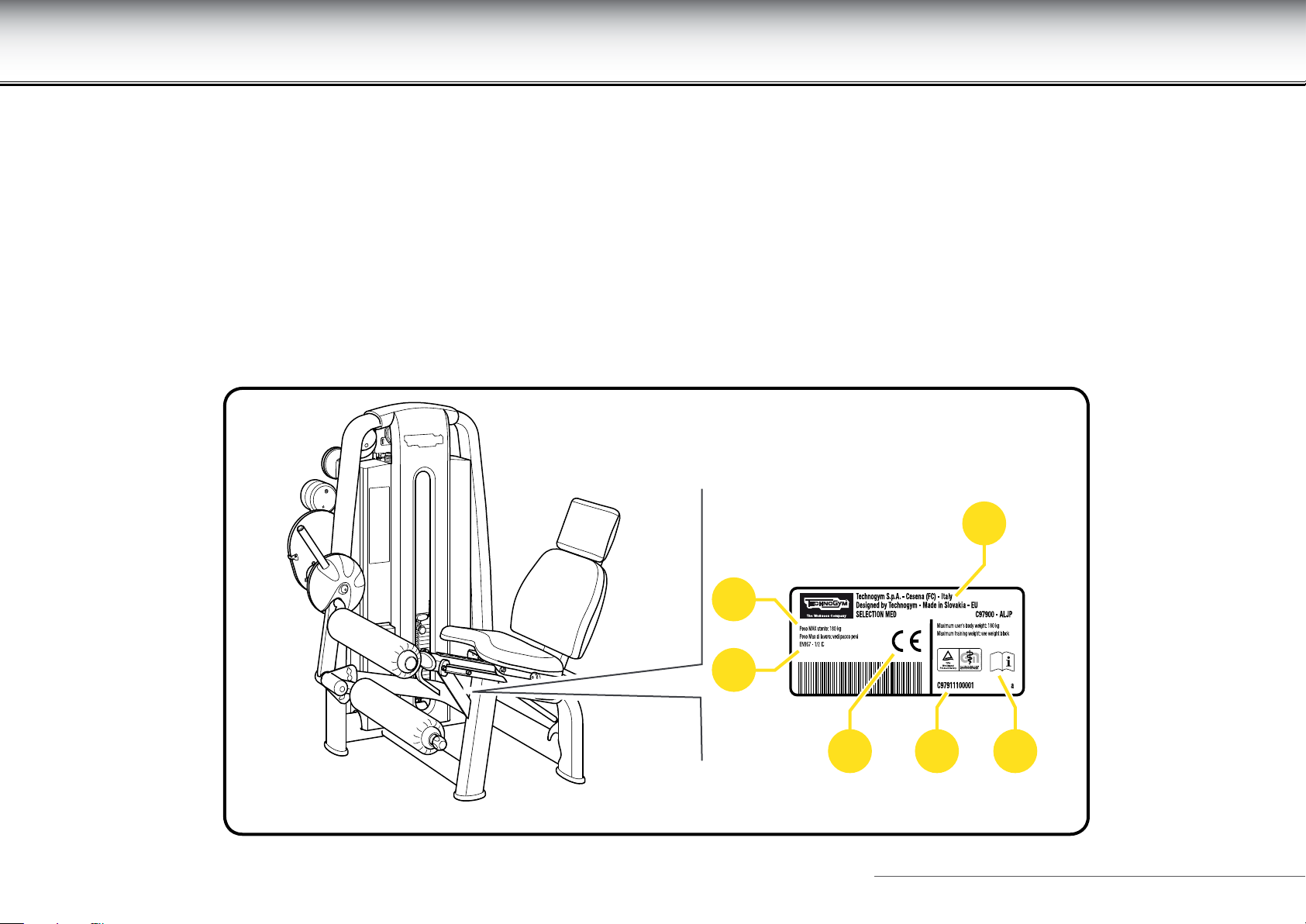
The equipment and manufacturer identication plate, axed on the right side of the seat, gives the following details:
A Manufacturer's name and address
B CE Mark
C Serial number
D Maximum user weight
E Equipment classication
F Consultation of user manual required
D
E
A
B C F
Leg Curl 8
Page 9
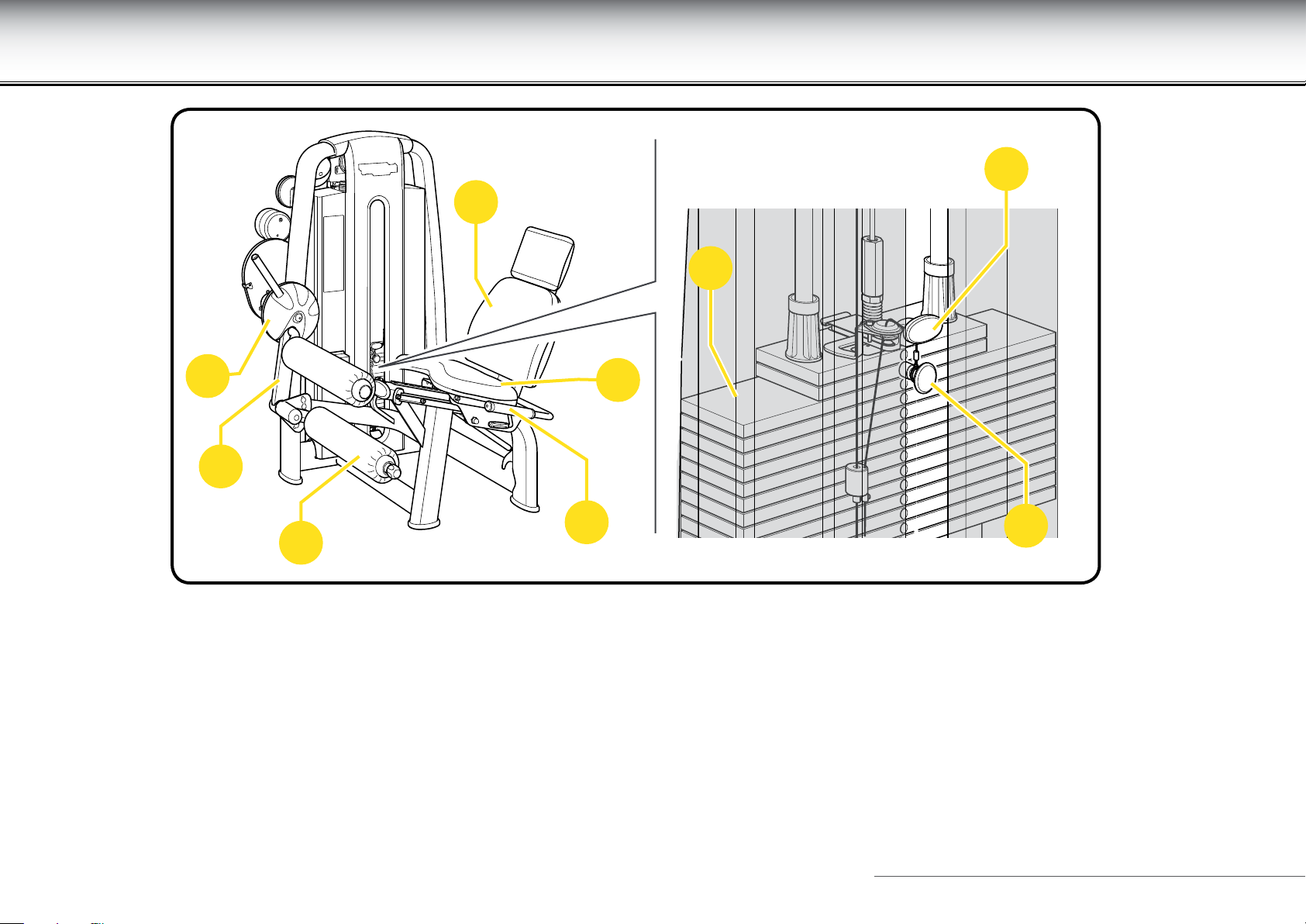
Description of the equipment
L
G
E
C
A
B
F
I
D
A Seat: where the user sits to perform the exercise. It has a backrest (G).
B Exercise lever: operated by the user by means of the roller (D).
C ROM device: allows the starting position to be adjusted, therefore the Range of Motion.
E Weight stack: lever (B), operated by the user, moves the weights along two guide rails by means of a cable. A pin (I) is used to select the
workload, to adjust the exercise eort level. The cursor (L) is used to vary the selected workload by 2.5 kg.
F Side handgrips: the user can enhance the comfort by holding them during the exercise.
Leg Curl 9
Page 10
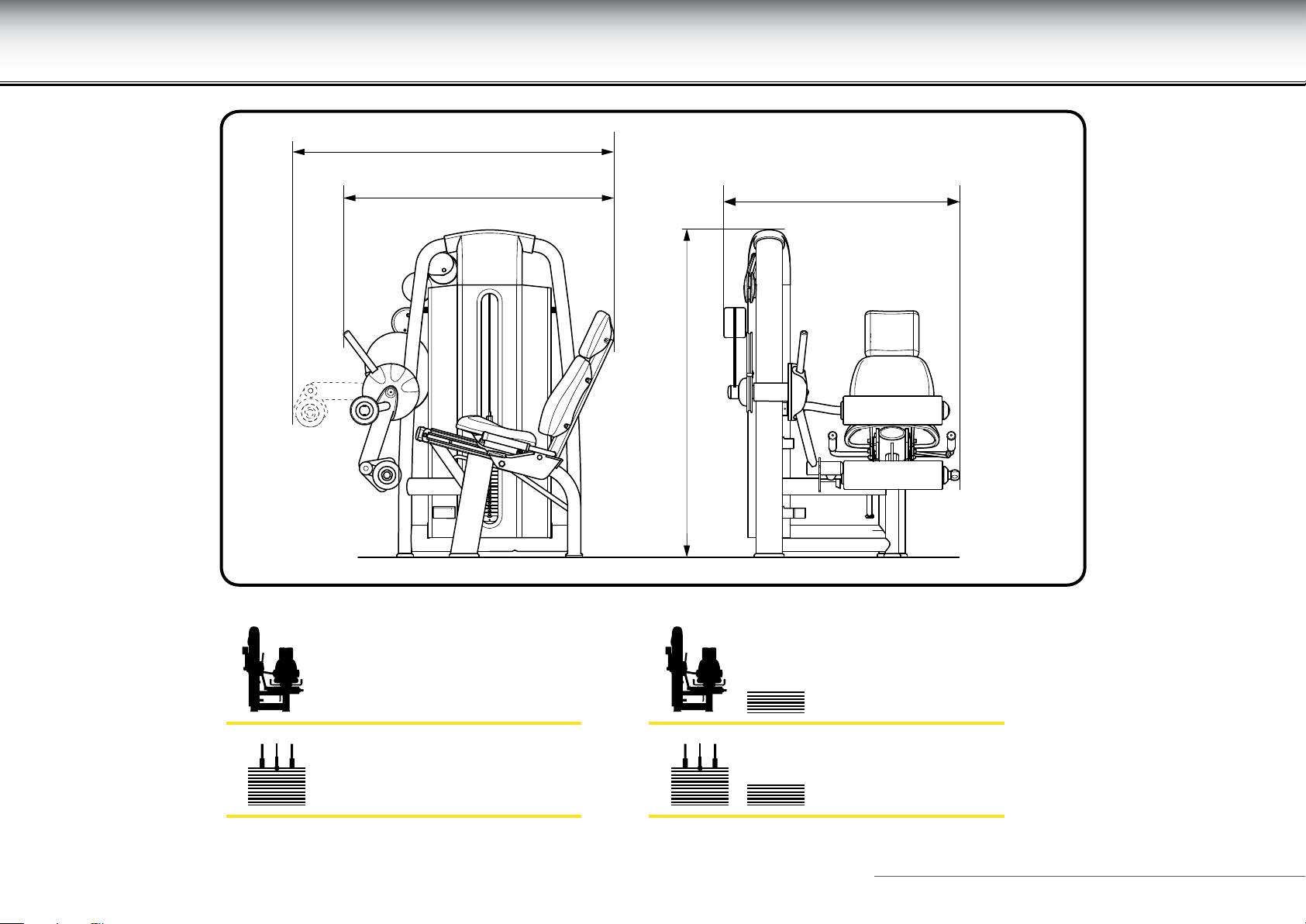
Technical data
1410 mm (56")
1130 mm (45")
1070 mm (42")
1485 mm (59")
260 kg (573 lb) + 290 kg (639 lb)
95 kg (190 lb) + 125 kg (250 lb)
Leg Curl 10
Page 11
Place of installation
To ensure safe, comfortable and eective use of the equipment, the place of installation must comply with certain specic requirements; in
particular, before choosing where to install the equipment we recommended that you check that the following conditions are available:
- a temperature between +10°C and +25°C;
- sucient ventilation to maintain a humidity level between 20% and 90%, when the equipment is in use;
- sucient lighting to make the area a safe and relaxing place to exercise;
- sucient clearance on all sides of the equipment, taking into account its maximum dimensions when in use, to ensure safety;
- a at, stable and vibration-free oor surface, with sucient load bearing capacity for the equipment’s weight.
If the equipment is to be installed in a public recreation area, the place of installation must comply with all the requirements of the regulations
currently in force.
WARNINGS
The equipment must be installed and used in a place where access and supervision are specically controlled by the owner.
When installing the equipment, use suitable personal protective equipment.
Leg Curl 11
Page 12
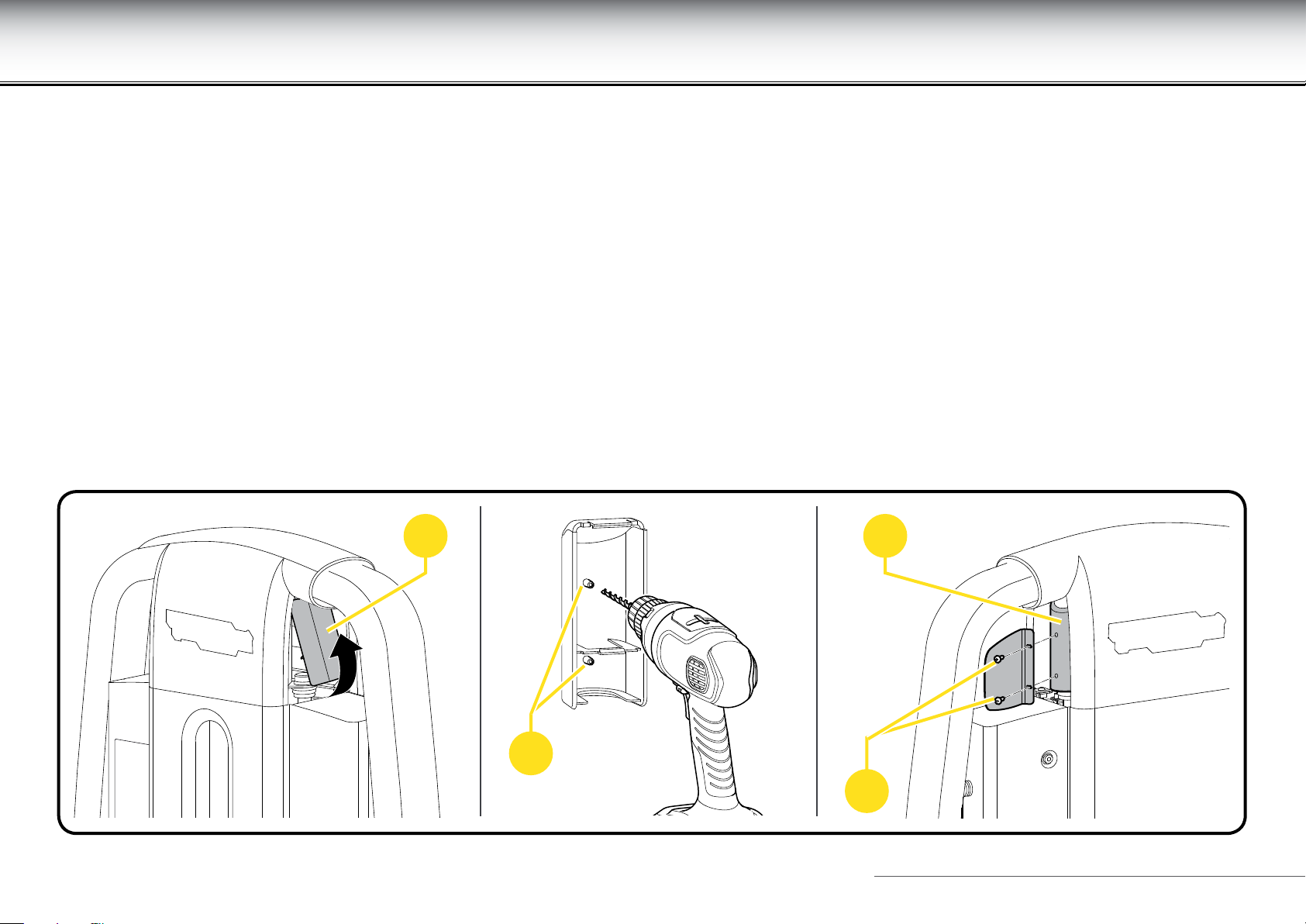
Fitting the number holder
Standing facing the equipment, attach the number holder on the left, on the cover of
the weight pack guide rail.
Proceed as follows to apply the number holder:
- Remove the cover (A).
- Find the place (B) where the two screws are to be inserted.
- Use a drill to complete the holes.
- Ret the cover (A).
- Attach the number holder using the two screws (C).
The number holder is optional.
A A
B
C
Leg Curl 12
Page 13
Lifting and moving the equipment
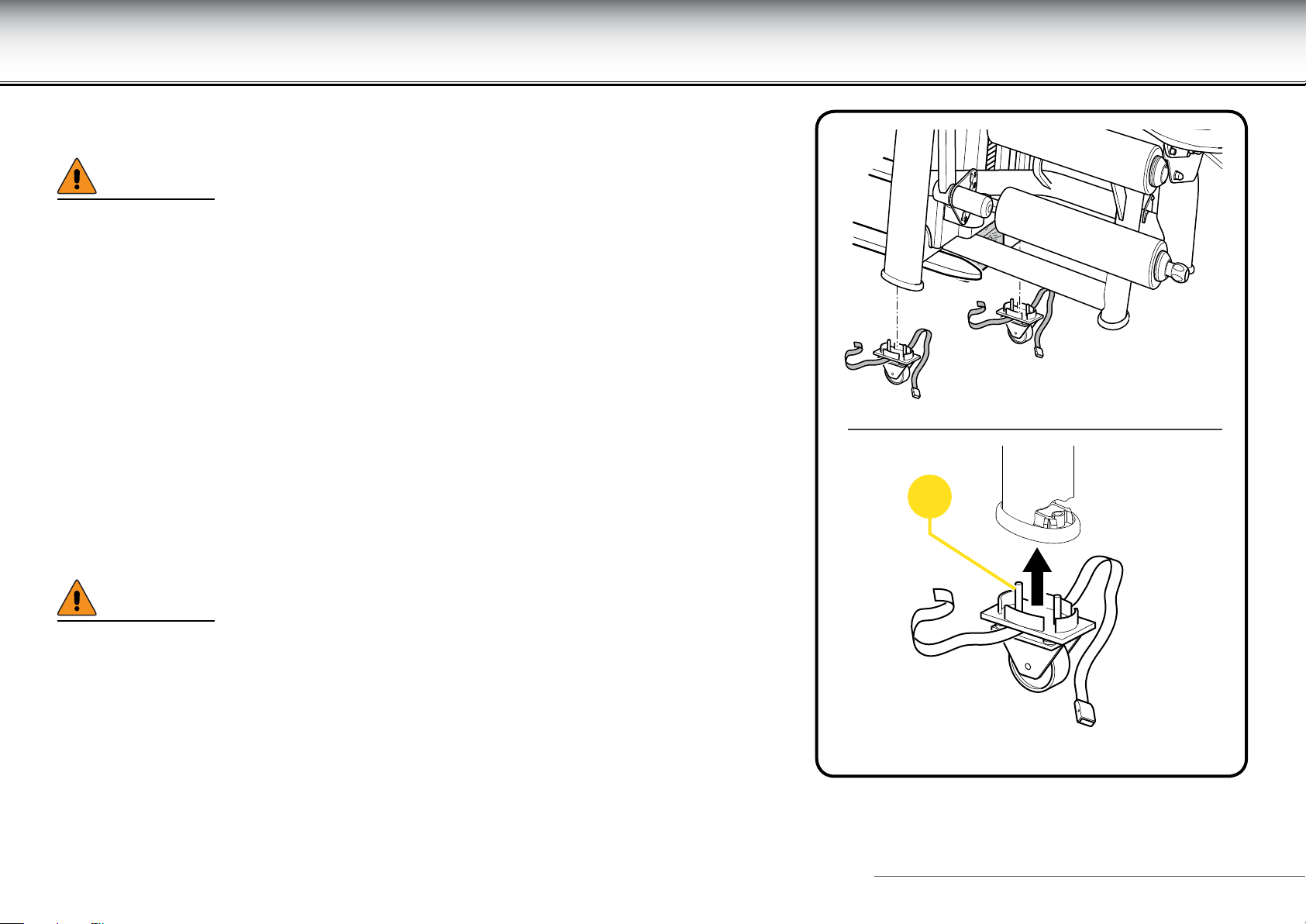
Snap-on castors (optional) must be used to move the equipment.
WARNINGS
Move the equipment very carefully, because it may become unstable and tip over.
Do not use the equipment with the castors tted. The castors are to be used only for
moving the equipment and must be removed before exercising on it.
The castors for moving the equipment snap on under the feet of the equipment, after
it has been raised, and are held in place by the special straps.
Raise the equipment on the weight stack side, using a pallet truck or fork-lift truck;
and for greater safety place a wedge under the frame to keep the equipment raised.
Insert the two xed castors rst on one side and then on the other side of the weight
stack: t castor stems (A) into the holes provided under the equipment feet, then push
hard until they snap in.
WARNINGS
We recommend placing padded material between the frame and the wedge and
between the frame and the machinery used to lift it.
The xed castors must always be placed underneath the weight stack.
A
Leg Curl 13
Page 14
Lifting and moving the equipment
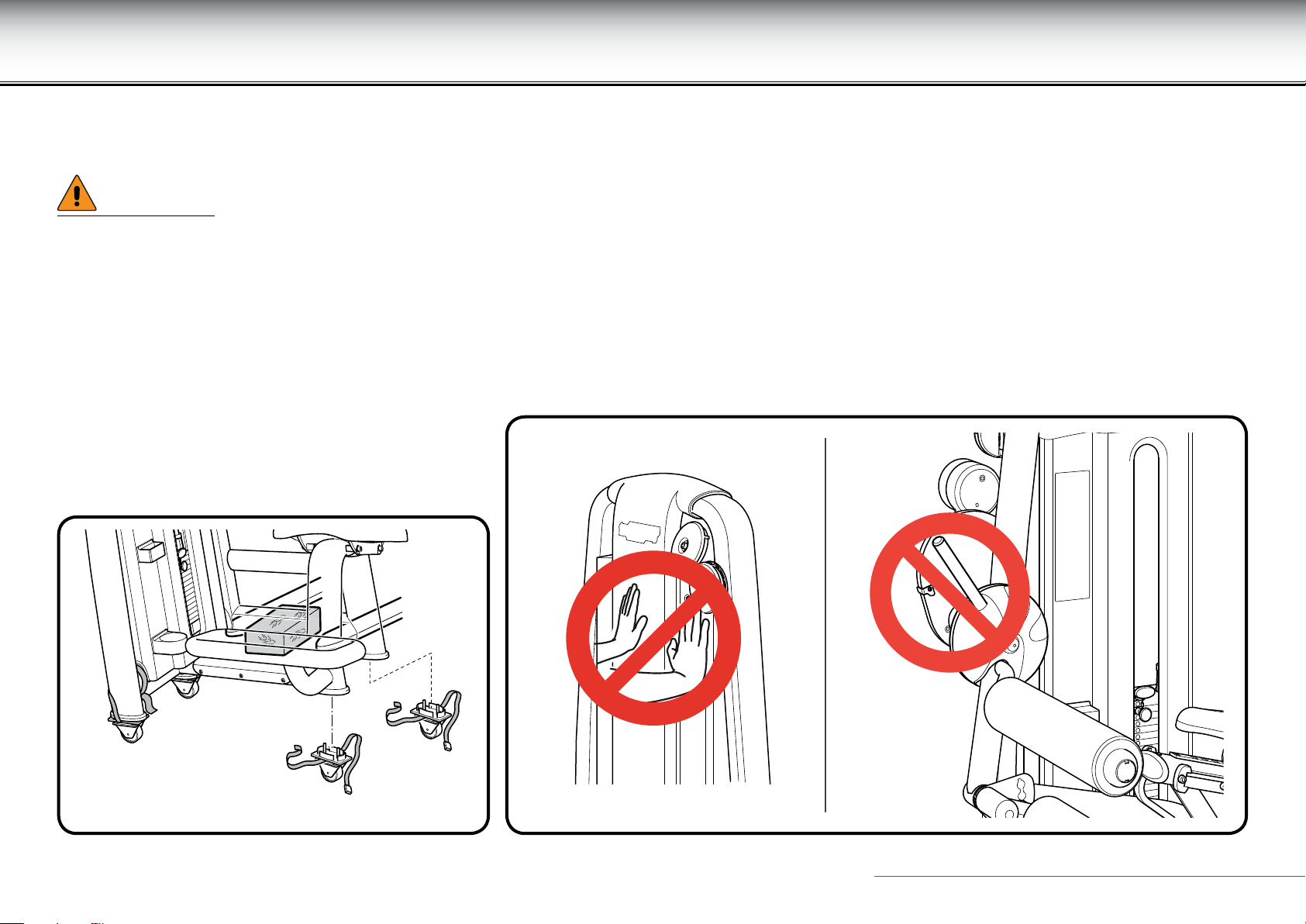
Proceeding in the same way, lift the equipment on seat side and insert the swivel castors.
Lastly, lift the equipment again, remove the safety wedges and place the wheels on the oor.
WARNINGS
When moving the equipment, we recommend pushing it only from the weight stack side, and not from any other side.
When lifting the equipment, do not press against the weight stack guard.
Do not use the adjustment lever to try to move the equipment: because it may cause DAMAGE and become unstable.
Leg Curl 14
Page 15
Adjusting the equipment
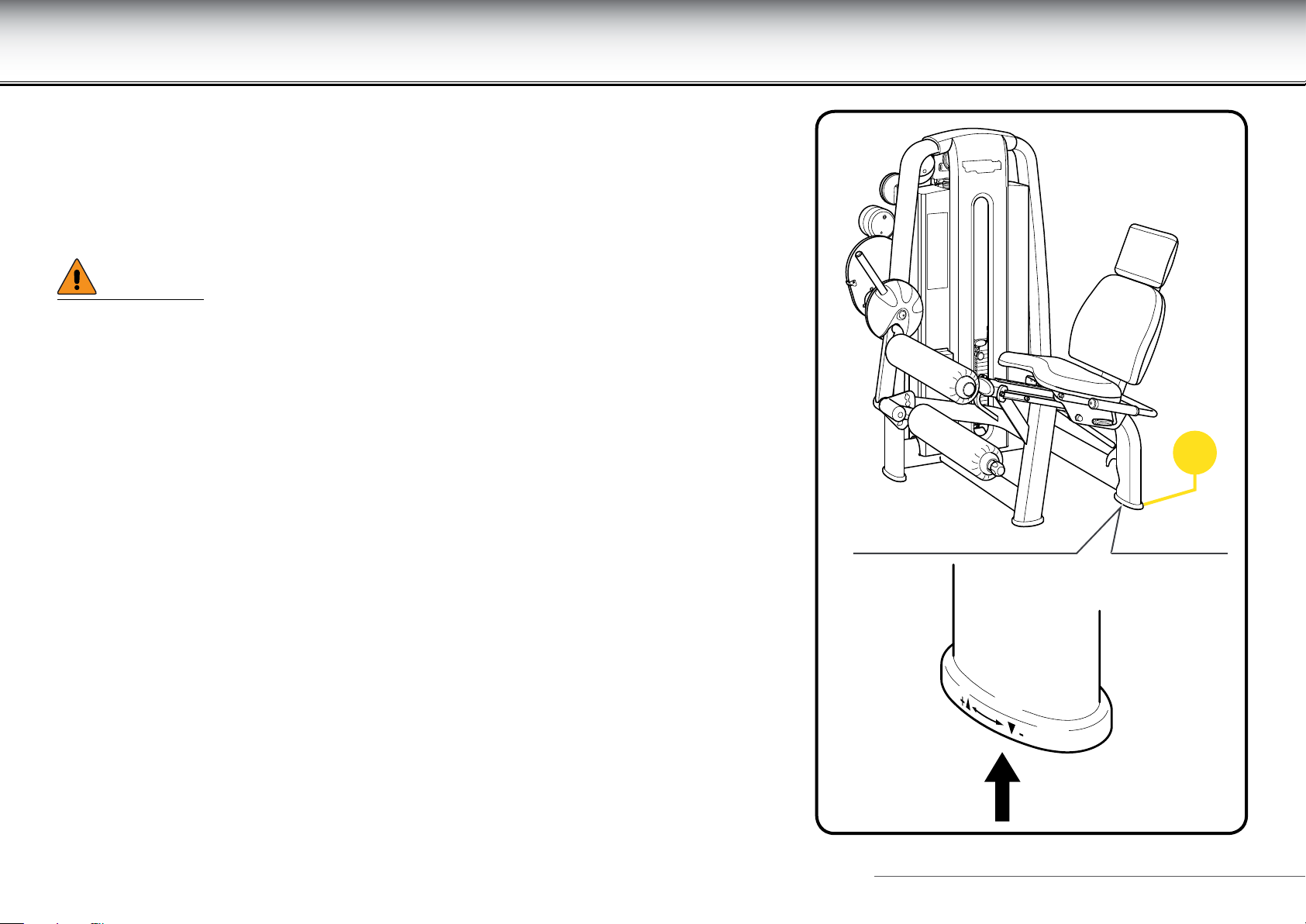
The equipment must be level for proper operation.
If necessary, use the adjuster screw located under foot (A), clearly indicated by two
raised arrows.
Raise the equipment and adjust the screw until the equipment is level.
WARNING
Given the weight of the equipment, we recommend that it should always be lifted
by more than one person.
A
Leg Curl 15
Page 16
Routine maintenance
WARNINGS
The safety of the equipment is assured only on the condition that it is carefully inspected every two weeks for any signs of damage and/or wear.
Replace defective and worn components immediately, or alternatively remove the equipment from service.
The equipment should always be kept clean and free of dust, in compliance with good hygiene practice, especially if it is used in a gym or by
more than one person.
Use a moist cloth or a sponge and mild soap to clean the padded parts.
Wipe the outside of the equipment every week using a damp sponge.
Do not use chemicals or solvents.
WARNING
Be careful not to rub too hard on the drawings and instructions shown on the labels.
Call in the Technogym Technical Support Service for instructions on any maintenance operations not described in this manual.
Leg Curl 16
Page 17
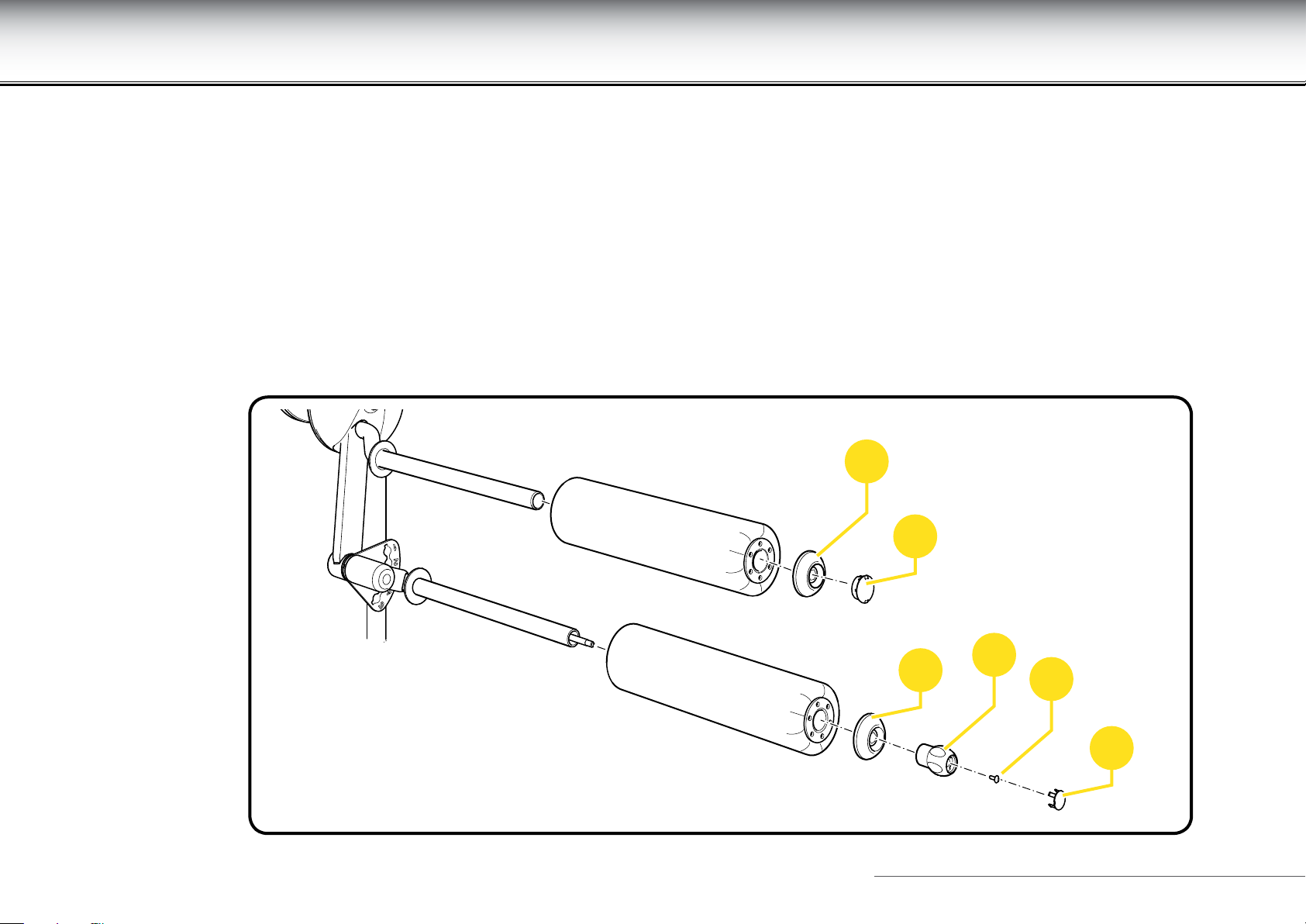
Replacing the padded parts
If any of the padding shows signs of wear, especially in the interests of hygiene, we recommend replacing them completely.
To replace the seat padding, unscrew the screws located on the opposite side of the padding..
Proceed as follows to replace the rollers:
- remove the cap (A);
- unscrew the screw (B), inside the knob (C), in the lower roller;
- unscrew the caps (D);
- remove the rollers.
D
A
D
C
B
A
Leg Curl 17
Page 18
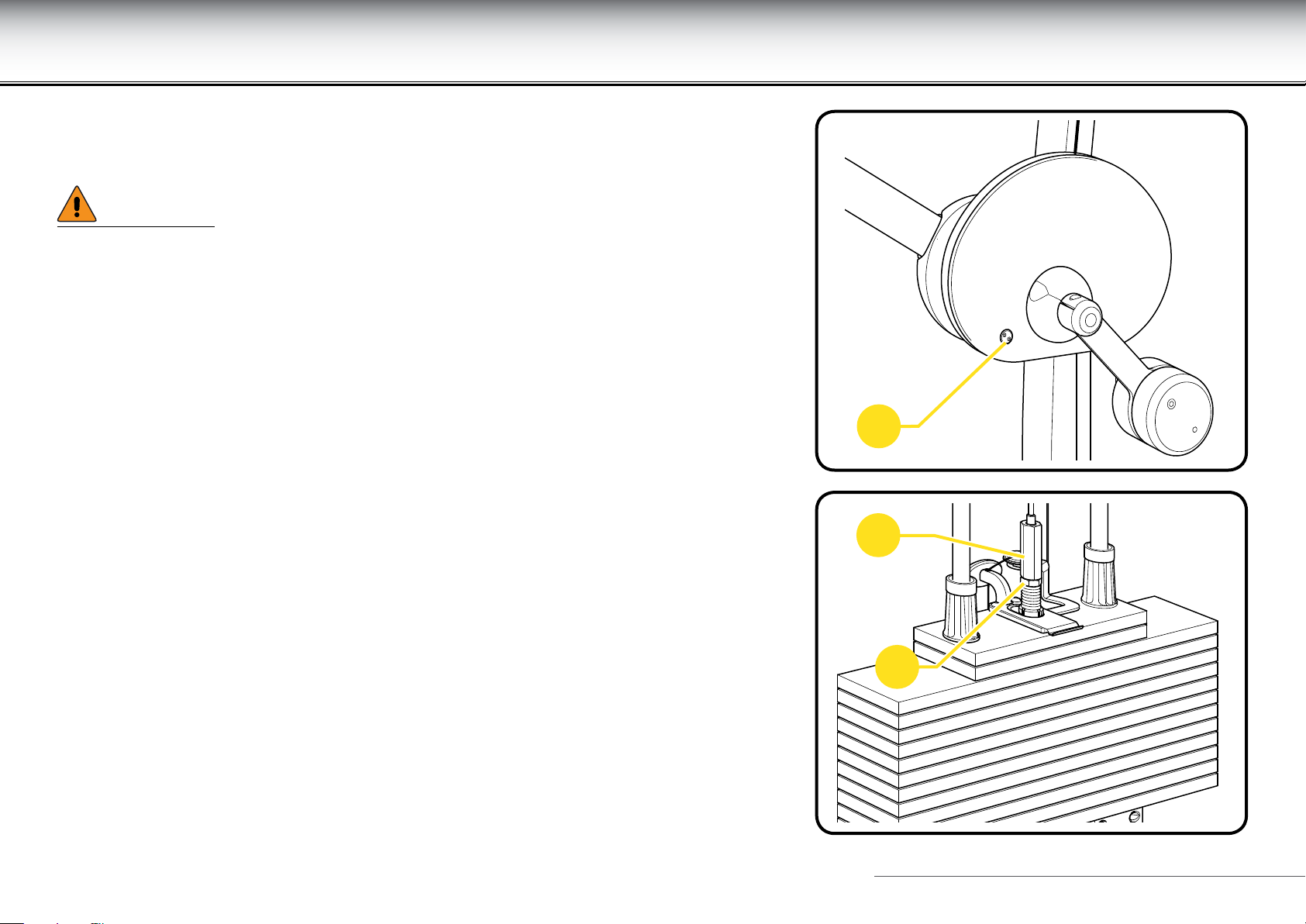
Replacing the cable
Cables must always be replaced at the rst sign of wear, even if only the outer rubber
protection is worn.
WARNINGS
Carefully check the state of the cables once a month.
ALWAYS use cables supplied directly by Technogym.
To replace the cable, you must:
- remove the rear protective weight stack panel;
- unscrew screws (A);
- loosen lock nut (B) and loosen adjuster (C);
- remove the weight stack cable from adjuster side;
A
C
B
Leg Curl 18
Page 19
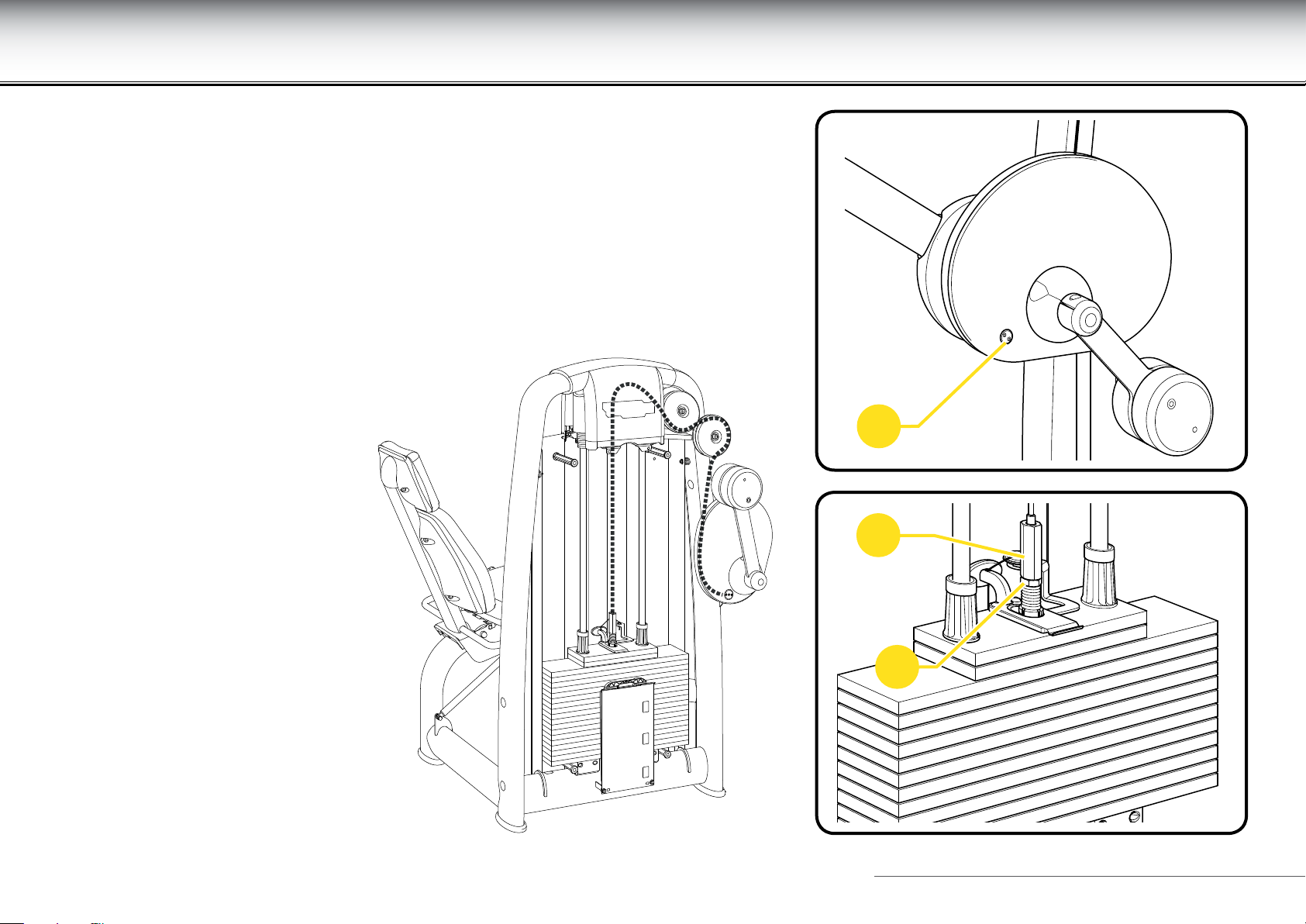
Replacing the cable
- insert the new cable from the adjuster side (ensuring that it follows the same route
as the original cable, as shown in the illustration);
- tighten screws (A);
- screw in adjuster (C) and screw on lock nut (B);
- ret the protective panel on the weight stack.
A
C
B
Leg Curl 19
Page 20
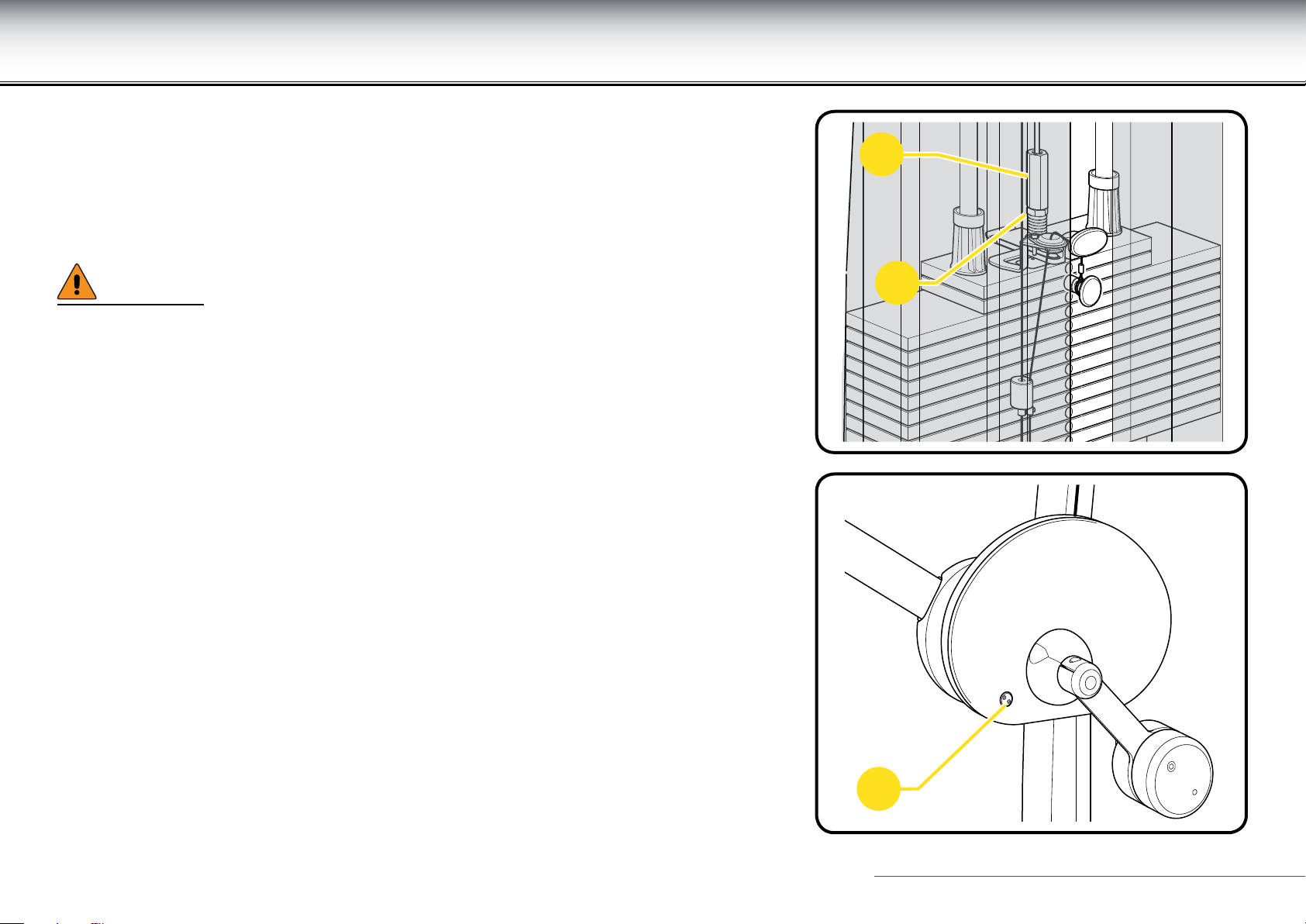
Adjusting the cable tension
Use the adjuster (C) to adjust the tension of the weight stack cable:
- loosen the locknut (B);
- tighten or loosen the adjuster (C) to correctly adjust the cable tension;
- tighten the locknut (B).
WARNING
To pull the cable taut after replacement, it may be helpful, when tightening the
screws (A), to insert a thickness of approx. 10 mm (1/2”) under the rst weight in
the weight stack.
C
B
A
Leg Curl 20
Page 21
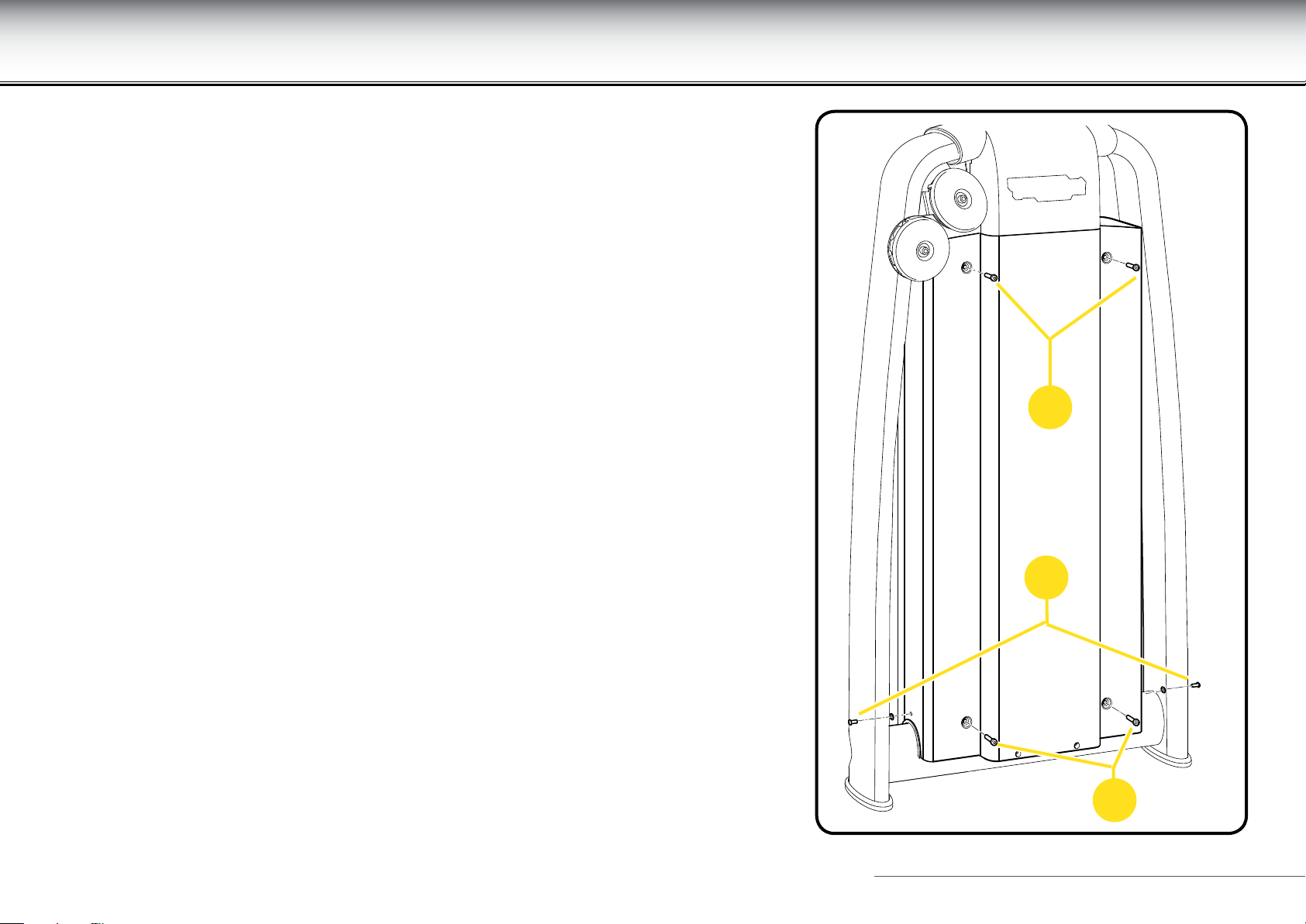
Removing the rear protective weight stack panel
Remove the rear protective weight stack panel to access the cable.
Do not use the product even if only one of the protective weight pack panels is missing.
Proceed as follows to remove the panel:
- unscrew the four screws (C);
- unscrew the two screws (D);
C
D
C
Leg Curl 21
Page 22
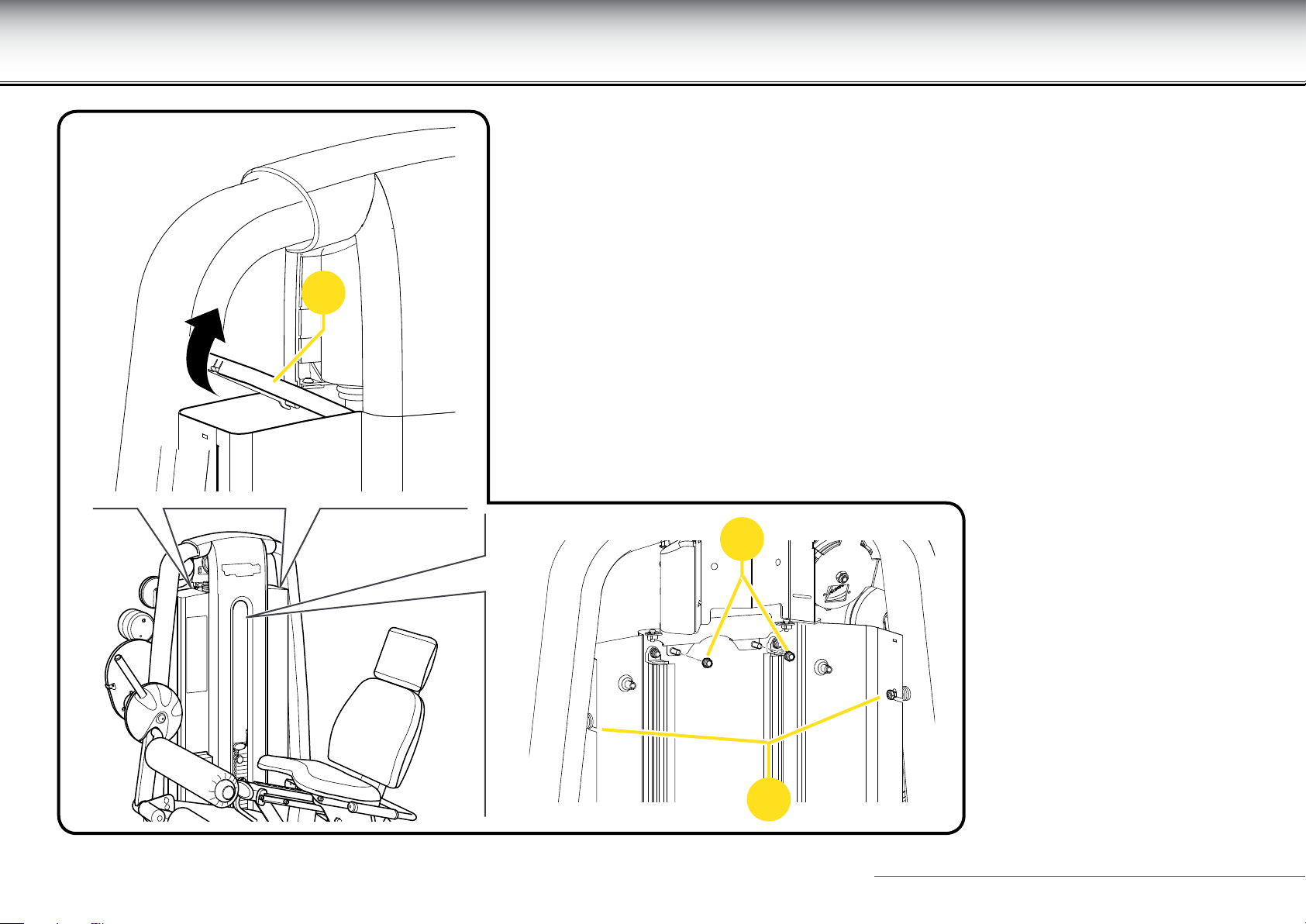
Removing the rear protective weight stack panel
E
- remove the two covers (E);
- loosen the two nuts (F);
- unscrew the two nuts (G);
- remove the panel.
To reassemble the panel, carry out the above steps in reverse order.
G
F
Leg Curl 22
Page 23
Technical Service
The Technogym Technical Support Service provides:
- telephone assistance;
- information on which service calls are covered and not covered by warranty;
- on-site assistance;
- sending of original spare parts.
When contacting the Technogym Technical Support Service, please specify the following details:
- equipment model,
- date of purchase,
- serial number,
- precise description of the problem.
Technical Support Service
Technogym s.p.a.
Via Calcinaro 2861, 47521 Cesena Italy
tel: +39 0547 56047
http://www.technogym.com/Support
WARNING
Any operations carried out by persons not authorized by Technogym on the equipment will invalidate the warranty.
Leg Curl 23
Page 24
Storage
If the equipment will not be used for a prolonged period, we recommend storing it:
- in a clean and dry place, covered with a cloth to protect it from dust;
- in an environment with a temperature between +10°C and +25°C and a humidity between 20% and 90%.
Use the original packing materials, to better preserve the equipment.
Leg Curl 24
Page 25
Disposal
It is always good practise to ensure that the equipment can never constitute a hazard; therefore do not leave the equipment where children
may play with it.
Do not dump the equipment in the environment, or in public areas or private areas accessible to the public.
The equipment is made from recyclable materials such as steel, aluminium and plastic, which must be disposed of in the manner prescribed
by the urban refuse collection regulations in force, by rms specialised in urban and environmental hygiene.
Leg Curl 25
Page 26
Using the equipment
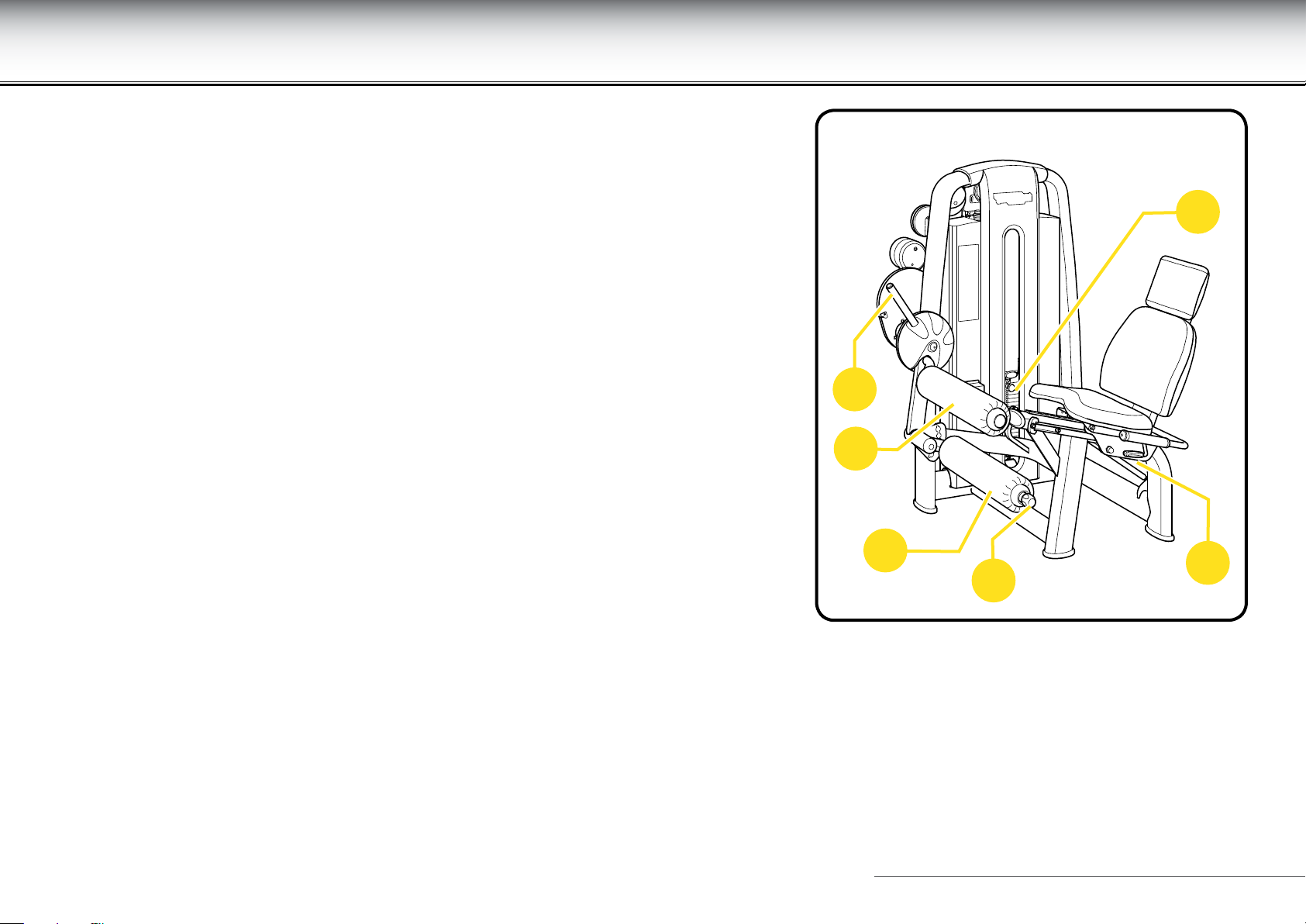
Select the workload with the pin (F).
To access the seat comfortably push the button on the lever (A), and move the
lever forward to lower the roller pads.
Lift the lever (B) under the handgrip on your left to adjust the seat. Your knees rest
against the upper roller (C) while the lower roller (D) is behind your legs.
Adjust the lower roller (D) behind your ankles by pulling the end knob (E).
To adjust the starting position release the lever (A) with the button located on its end, lift
legs, then release the button to lock it into position.
F
A
C
D
B
E
Leg Curl 26
Page 27
Using the equipment
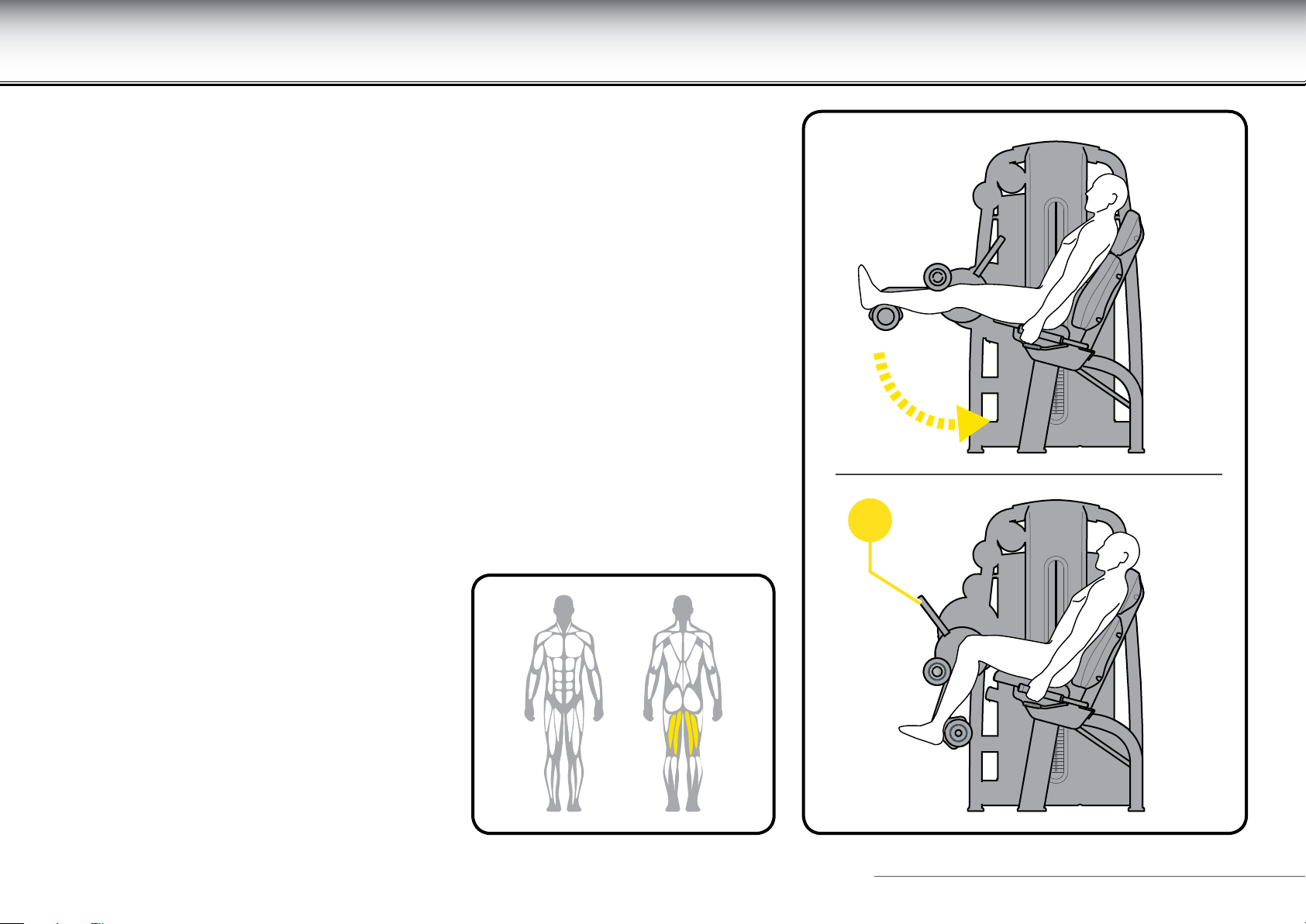
Flex and extend the legs at the same time with a slow and controlled motion.
For greater stability during the exercise, grasp the side handgrips.
Maintain control of the workload during the movement; during the return phase the
weight stack must not return completely to the rest position.
Constantly control the speed of the movement; we recommend a slower speed during
the return phase than during the approach phase.
At the end of the exercise, to get up more easily release and lower the lever (A).
When the equipment is in use, DO NOT use the adjustment lever (A), DO NOT make the
adjustment.
A
Leg Curl 27
Page 28
Using the equipment
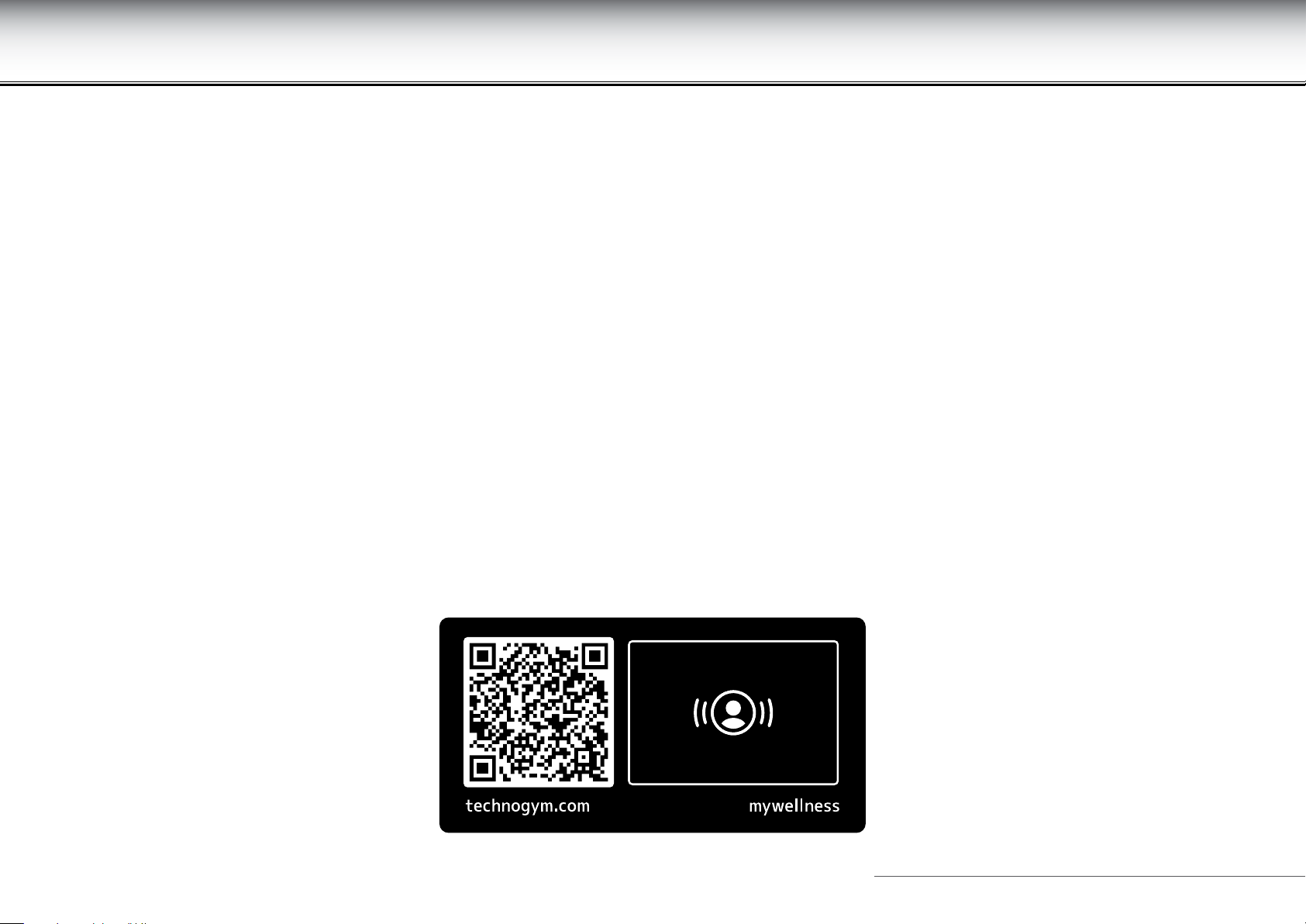
For further information on use of the product, connect to the Technogym cloud.
Use the QR code or the NFC sensor to connect to the cloud.
NFC sensor
Activate the Internet connection on your device (for example, on your smartphone).
Identify the position of the NFC sensor on your device.
Place your personal device on the equipment, with its sensor over the NFC logo. In this way, the personal device will connect to the Technogym
cloud.
To connect using NFC you must have installed the Technogym application on your personal device.
QR code
Activate the Internet connection on your device (for example, on your smartphone).
Open the QR code reader on your device and point the camera of the device at the code on the product.
In this way, the personal device will connect to the Technogym cloud.
To connect using the QR code, you must have installed the Technogym application on your personal device.
Leg Curl 28
Page 29
Leg Curl_en_AA
0SM00964
 Loading...